
MF-CN65E2 - Deep fryer MIDEA - Free user manual and instructions
Find the device manual for free MF-CN65E2 MIDEA in PDF.


| Product Type | Deep Fryer |
| Brand | Midea |
| Model | MF-CN65E2 |
| Dimensions (W x D x H) | Approx. 25 x 20 x 30 cm |
| Weight | Approx. 2.5 kg |
| Power | 1500 W |
| Voltage | 220-240 V |
| Frequency | 50/60 Hz |
| Oil Capacity | 2.5 L |
| Temperature Range | 150°C - 190°C |
| Timer | 0 - 60 minutes with auto shut-off |
| Basket Capacity | 1 kg (frozen fries) |
| Material | Stainless steel body, plastic handles |
| Filter Type | Permanent mesh filter |
| Overheat Protection | Yes, with automatic shutdown |
| Cool Touch Handles | Yes |
| Dishwasher Safe Parts | Basket and lid (check manual) |
| Cord Storage | Yes, under unit |
| Non-Slip Feet | Yes |
| Power Indicator Light | Yes |
| Safety Switch | Yes, prevents operation if handle is not locked |
Frequently Asked Questions - MF-CN65E2 MIDEA
User questions about MF-CN65E2 MIDEA
0 question about this device. Answer the ones you know or ask your own.
Ask a new question about this device
Download the instructions for your Deep fryer in PDF format for free! Find your manual MF-CN65E2 - MIDEA and take your electronic device back in hand. On this page are published all the documents necessary for the use of your device. MF-CN65E2 by MIDEA.
USER MANUAL MF-CN65E2 MIDEA
natural_image
Line drawing of a rectangular air fryer with a vertical slot on the side panel (no text or symbols)HEISSLUFTFRITTEUSE
BEDIENUNGSANLEITUNG
MF-CN65E2
natural_image
Technical line drawing of a mechanical component with multiple oval slots and mounting holes (no text or symbols)PRODUKTÜBERSICHT
Teile und Zubehör
natural_image
Line drawing of a simple air fryer on a wooden table (no text or symbols)Abb. 1
natural_image
Line drawing of a square frying pan with a handle and side compartments (no text or symbols)Abb. 2
natural_image
Line drawings of two household appliances, one open and one closed, with no text or symbols present.Abb. 3
natural_image
Line drawing of a refrigerator with an arrow indicating the change from front to side (no text or symbols present)
natural_image
Line drawing of a smart air purifier with a bell icon above it (no text or symbols)natural_image
Symbol of a trash bin crossed with no visible text or labelsnatural_image
Recycling symbol with three chasing arrows forming a triangle (no text or labels)DATENSCHUTZHINWEISE
Homepage: www.midea.com/de
Im Servicefall:
Tel.: 06196-90 20 - 0
Fax: 06196-90 20 -120
E-Mail: kundenservice@midea.com
natural_image
Line drawing of a rectangular electronic device with a central vertical slot and two side supports (no text or symbols)AIR FRYER
USER MANUAL
MF-CN65E2
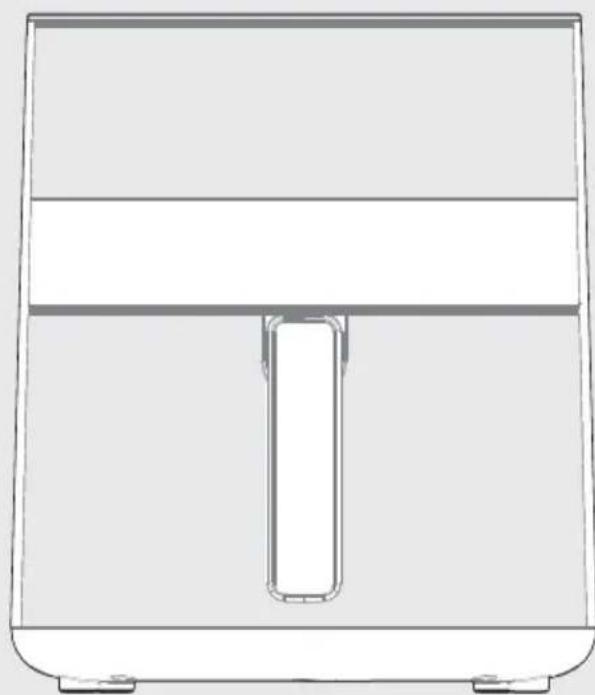
Warning notices: Before using this product, please read this manual carefully and keep it for future reference. The design and specifications are subject to change without prior notice for product improvement. Consult with your dealer or manufacturer for details. The diagram above is just for reference. Please take the appearance of the actual product as the standard.
THANK YOU LETTER
Thank you for choosing Midea! Before using your new Midea product, please read this manual thoroughly to ensure that you know how to operate the features and functions that your new appliance offers in a safe way.
EN
CONTENTS
THANK YOU LETTER 01
SAFETY INSTRUCTIONS 02
SPECIFICATIONS 08
PRODUCT OVERVIEW 09
OPERATING INSTRUCTIONS 10
CLEANING AND MAINTENANCE 16
TROUBLESHOOTING 17
TRADEMARKS, COPYRIGHTS AND LEGAL STATEMENT 18
DISPOSAL AND RECYCLING 19
DATA PROTECTION NOTICE 20
IMPORTANT SAFEGUARDS
Intended Use
The following safety guidelines are intended to prevent unforeseen risks or damage from unsafe or incorrect operation of the appliance. Please check the packaging and appliance on arrival to make sure everything is intact to ensure safe operation. If you find a damage, please contact the retailer or dealer. Please note that for alterations to the appliance are not allowed for your safety concern. Unintended use may cause hazards and loss of warranty claims.
EN
Explanation of Symbols

Danger
This symbol indicates that there are dangers to the life and health of persons due to extremely flammable gas.

Warning of electrical voltage
This symbol indicates that there is a danger to life and health of persons due to voltage.

Warning
The signal word indicates a hazard with a medium level of risk which, if not avoided, may result in death or serious injury.

Caution
The signal word indicates a hazard with a low degree of risk which, if not avoided, may result in minor or moderate injury.

Attention
The signal word indicates important information (e.g. damage to property), but not danger.

Observe instructions
This symbol indicates that a service technician should only operate and maintain this appliance in accordance with the operating instructions.
Read these operating instructions carefully and attentively before using/commissioning the unit and keep them in the immediate vicinity of the installation site or unit for later use!
CAUTION
- To protect against the risk of electric shock, DO NOT immerse power cord, plug, or the appliance in water or other liquid.
- DO NOT rinse the appliance under a faucet or other water source.
- Turn off and unplug when not in use and before cleaning. Allow to cool before putting on or taking off parts or accessories. To turn off, press Cancel. To unplug, grasp the plug and pull from the outlet. Never pull from the power cord.
- Avoid making contact with moving parts.
- Inspect the appliance and power cord regularly. DO NOT operate any appliance with a damaged cord or plug. DO NOT operate after the appliance malfunctions, or is dropped or damaged in any manner.
- DO NOT use any accessories or attachments not authorized by MIDEA. The use of attachments not recommended by the manufacturer may cause injury, fire or electric shock.
- For household countertop use only. DO NOT use outdoors. Not for commercial use.
- DO NOT place the appliance or any of its parts on any kind of stovetop, near gas or electric burners, or in a heated oven; heat from an external source will damage the appliance.
- DO NOT use appliance for anything other than intended use.
- DO NOT attempt to repair, replace, alter, or modify components of the appliance. This may cause electric shock, fire and/or injury, and will void the warranty.
- DO NOT tamper with any of the safety mechanisms.
- DO NOT leave the appliance unattended while in use.
- DO NOT store any materials, other than the included accessories, in the cooking cavity when not in use.
- DO NOT place any combustible materials in the cooking cavity; such as paper, cardboard, plastic, styrofoam or wood.
- Use extreme caution when moving an appliance containing hot oil or other hot liquids.
- Keep your air fryer away from flammable materials (curtains, tablecloths, etc). Use on a stable and heat-resistant surface away from heat sources or liquids.
• To avoid the risk of fire, property damage and personal injury, DO NOT spray cooking oil into the cooking cavity.
- Do not place any objects on top of air fryer at any time.
- The air fryer's cooking cavity contains electrical components. To avoid electric shock, DO NOT put liquid of any kind into the cooking cavity.
- Proper maintenance is recommended after each use. Refer to CLEANING AND MAINTENANCE.
- Let the appliance cool to room temperature before cleaning or storage.
- Do not clean with metal scouring pads. Pieces can break off the pad and touch electrical parts, creating a risk of electric shock.
- The appliance is not to be used by persons (including children) with reduced physical, sensory or mental capabilities, or lack of experience and knowledge, unless they have been given supervision or instruction, children being supervised not to play with the appliance.
- The appliances are not intended to be operated by means of an external timer or separate remote-control system.
- If the power cord is damages, it must be replaced by the manufacturer, its service agent or similarly qualified persons in order to avoid a hazard.
WARNING
- The appliance's outer surfaces may become hot during use. DO NOT touch hot surfaces. Only use the air fryer basket handle to lift and carry the air fryer basket. Wear proper hand protection when handling hot components. Extreme caution must be used when moving the appliance.
- Let the appliance cool to room temperature before handling or moving.
- WARNING: Spilled food can cause serious burns. Keep appliance and cord away from children.
- NEVER drape cord over edge of table or counter or touch hot surfaces, NEVER use power outlet below counter.
- DO NOT overfill the appliance or accessories. Overfilling may cause food to contact the heating element, which may result in fire and/or personal injury.
- DO NOT cover the air inlet, air outlet (upper) or air outlet (lower) while the appliance is in operation. Doing so will prevent even cooking and may cause damage to the appliance.
- An air fryer works with hot air only. NEVER pour or spray oil into the cooking cavity. This could result in fire and/or personal injury.
- While cooking, the internal temperature of the appliance reaches several hundred degrees. To avoid personal injury, NEVER place unprotected hands inside the appliance until it has cooled to room temperature.
-
When cooking, DO NOT place the appliance against a wall or against other appliances. Leave at least 5in (13cm) of free space on the back, front, sides, and above the appliance. DO NOT operate the appliance on or near combustible materials such as tablecloths and curtains. DO NOT place anything on top of the appliance.
-
Do not put food in the Drip tray.
- The food height of Lower oven cavity is 1 inch from the upper electric heat tube.
• DO NOT dish wash the drip tray. - Wire rack is only used for toast.
- When in operation, hot air is released through the air outlets. Keep your hands and face at a safe distance from the vents and take extreme caution when removing the accessories from the appliance.
- Should the unit emit black smoke, press Cancel and unplug the appliance immediately. Wait for smoking to stop before removing the basket and then clean the appliance thoroughly. If the cause was not burnt food, contact our Customer Service Center at 1-866-646-4332.
- NEVER connect this appliance to an external timer switch or separate remote-control system.
- Use extreme caution when removing hot baskets from the appliance, or disposing of hot grease.
- Without proper cleaning, food and grease splatter may build up around the heating element.
This can cause smoke, fire, and/or personal injury.
- Oversized foods and/or metal foil packages, or utensils must not be inserted into the cooking cavity as they may cause risk of fire and/or personal injury.
- DO NOT use appliance accessories in any other appliance including microwave ovens, toaster ovens, convection or conventional ovens, ceramic, electric, induction or gas cooktops, or outdoor grills.
- Do not place paper, cardboard, non-heat-resistant plastic, or similar materials, into your air fryer.
You may use parchment paper or foil.
- Never put baking or parchment paper into the air fryer without food on top. Air circulation can cause paper to lift and touch heating coils.
- Always use heat-safe containers. Be extremely cautious if using containers that aren't metal or glass.
- Do not cover crumb tray or any part of the oven with metal foil. This will cause overheating of the oven.
IMPORTANT SAFEGUARDS
EN
PLUG & CORD
- A short power-supply cord is provided to reduce the risk resulting from becoming entangled in or tripping over a longer cord.
- Extension cords are available and may be used if care is exercised in their use.
If an extension cord is used:
- The marked electrical rating of the extension cord should be at least as great as the electrical rating of the appliance (see page 9).
- The cord should be arranged so that it will not drape over the countertop or tabletop where it can be pulled on by children or tripped over unintentionally.
- Do not share the extension cord with other appliances.
- DO NOT let the power cord contact hot surfaces or open flames, including stovetop.
- Read this manual carefully and completely and retain for future reference. Failure to adhere to safety instructions may result in serious injury or damage.
• To avoid injury, read and understand the instructions in this user manual before attempting to use this appliance.
- The failure to follow any of the important safeguards and/or the instructions for safe use is a misuse of your appliance that can void your warranty and create the risk of serious injury.
SAVE THESE INSTRUCTIONS
SPECIFICATIONS
| Product Model | MF-CN65E2 |
| Voltage | 220-240V~ |
| Frequency | 50-60Hz |
| Rated Power | 1500-1700W |
| Capacity 6L |
EN
How To Find The Model Name And Serial Number
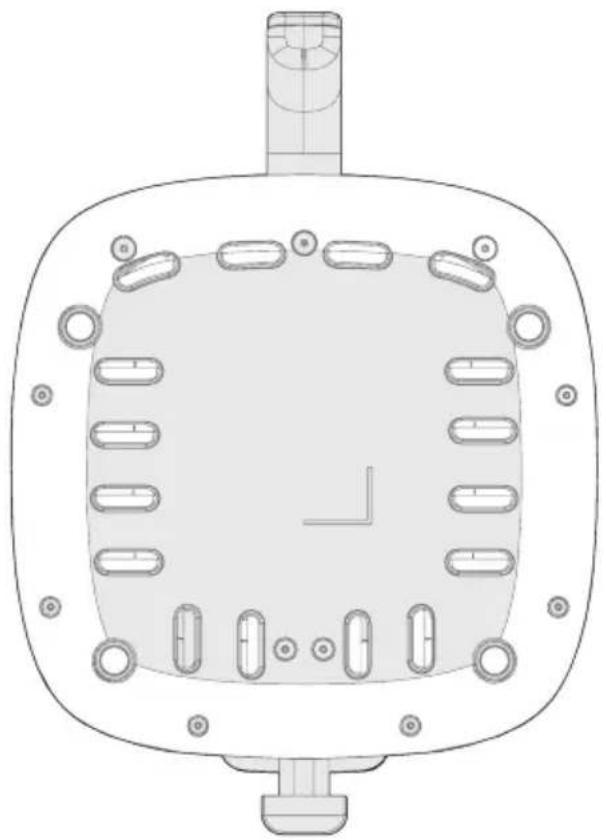
Both the model name and serial number can be found on the rating label that is located on the bottom of the air fryer.
natural_image
Technical line drawing of a mechanical component with multiple oval features and a central square base (no text or symbols)PRODUCT OVERVIEW
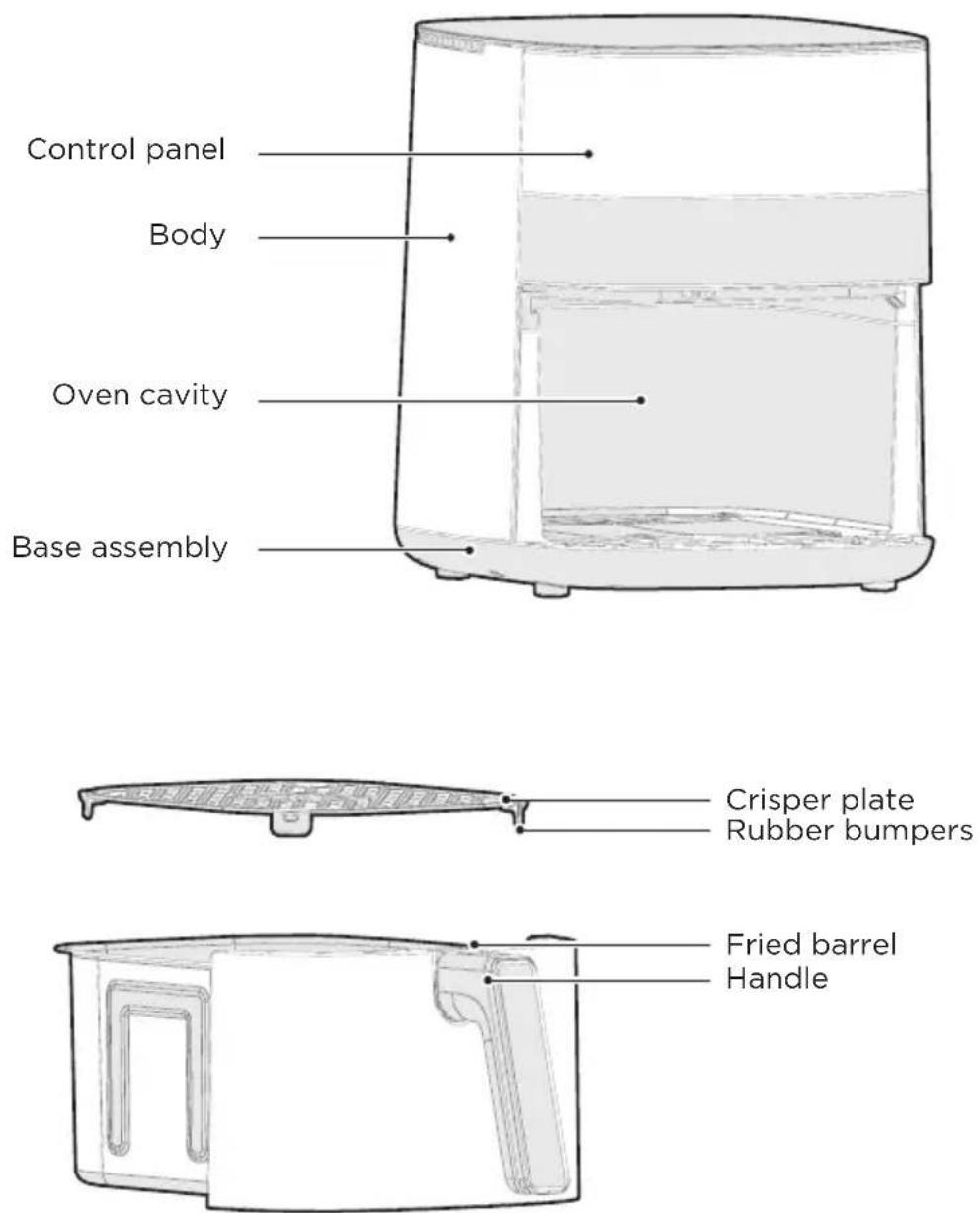
Parts and Accessories
Before using your new air fryer, make sure that all parts and accessories are included.
EN

NOTE
All the pictures in this manual are for explanatory purposes only. Any discrepancy between the real object and the illustration in the drawing shall be subject to the real subject.
OPERATING INSTRUCTIONS
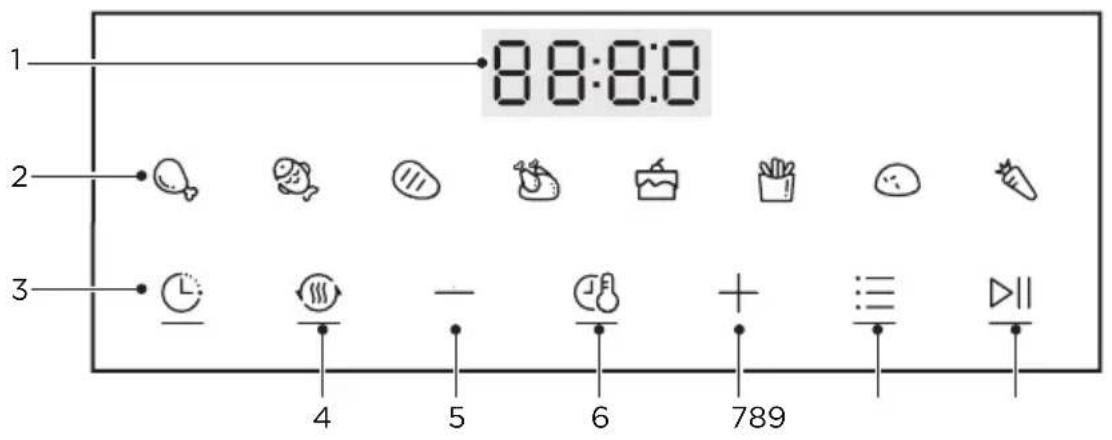
Control Panel
EN
| DescriptionName | ||
| 1 Display | • The cook time, set temperature, reminder messages, and error messages are shown here. | |
| 2 | Functions | • There are eight functional menus in total, the temperature and time can be adjusted for each function. |
| 3 | Appointed time | • Select the menu to select the reservation function |
| 4 | Reheating | • Heat food for a short time |
| 5 Reduce | • Reduce time and temperature. | |
| 6 TIME/TEMP | • After selecting a function, touch TIME/TEMP to adjust the set cook time and temperature. | |
| 7 Increase | • Increase the time and temperature | |
| 8 MENU | • Function selector | |
| 9 Start/Pause | • Touch ▷□ to start cooking. While cooking, touch ▷□ to pause cooking and touch again to resume cooking. |
Display Messages
| DescriptionMessage | |
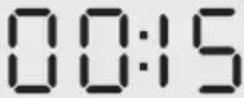 | ·While programming, the display will show the set cook time. While cooking, the display will show the remaining cook time. |
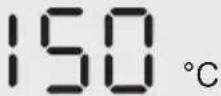 | ·The display shows the set temperature. |
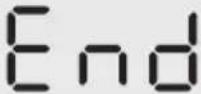 | ·Cooking is complete and the upper basket or lower tray can be removed. |
When the appliance is halfway through the set time, the appliance buzzer beeps 5 times, while the display interface shows “Turn Food” to indicate the flip-over, then pull out the frying bucket, hold the bucket handle, gently shake the bucket to turn the ingredients, and then use chopsticks to pull it apart and continue baking evenly until the cooking is ended.

Instructions For Use
(the machine enters the state of function selection mode)
Operation process of the panel: power on the machine (the machine enters the state of function selection mode), than choose a function (bake, roast, dehydrate, air fry, reheat) by touch the icon, touch start keey, the AIR FRY, GRILL, DEHYDRATE, BAKE, ROAST, BROIL, REHEAT, KEEP WARM stop working while the time counts down.
you can DIY the operation time and temperture after choosing the function by touch teh icon, using "+" to increase or "-" to decrease time or temperture. While touch "cancel", the appliance stop working and return to the function selection mode.

Note:

Function selection Status: function indicator light and key indicator light are on, only the selected function light blinking, and the digital tube displays the default temperature. If there is no operation for 2 minutes in the off state, it will return to the energy saving state.
Setting status: The selected function indicator start blinking, while other function lights will be on. The setting parameters displayed in the digital tube will be blinking, if doesn't operate within 5s, the machine will go into new set status and continue working.
The default menu pre-sets the heating temperature and time:
| Menu function | Temperature (°C) | Time (Min) | ||
| Pre-setting | Pre-settingAdjustment range | Adjustment range | ||
 | 180 | 40-200 | 22 | 1-120 |
 | 180 | 40-200 | 12 | 1-120 |
 | 200 | 40-200 | 12 | 1-120 |
 | 170 | 40-200 | 30 | 1-120 |
 | 170 | 40-200 | 10 | 1-120 |
 | 180 | 40-200 | 20 | 1-120 |
 | 180 | 40-200 | 24 | 1-120 |
 | 180 | 40-200 | 14 | 1-120 |
 | 20 | 40-200 6 | 1-120 | |
Preparation
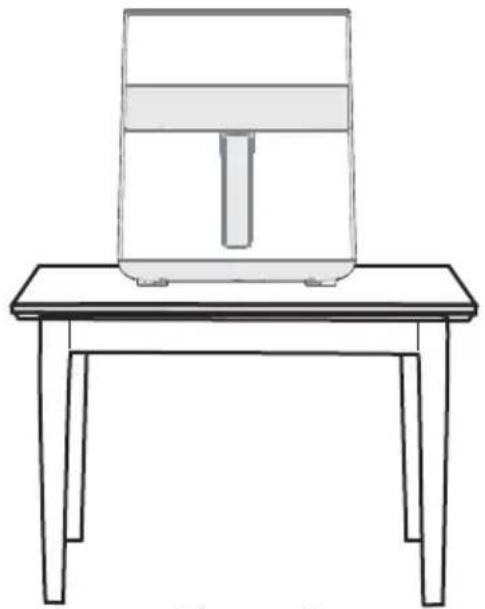
- The product should be stably placed on a flat table (Figure 1), so that the power cord has a sufficient length to be plugged into the socket, and the air around the product should be kept in circulation, and should not be close to flammable items.
natural_image
Line drawing of a simple air fryer on a wooden table (no text or symbols)Figure 1
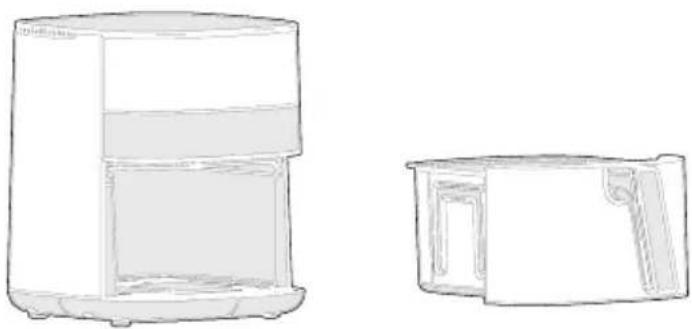
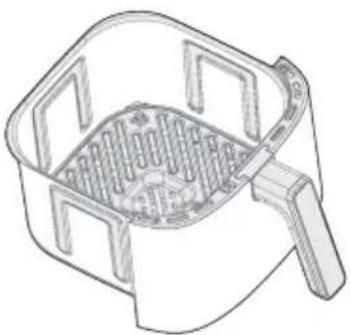
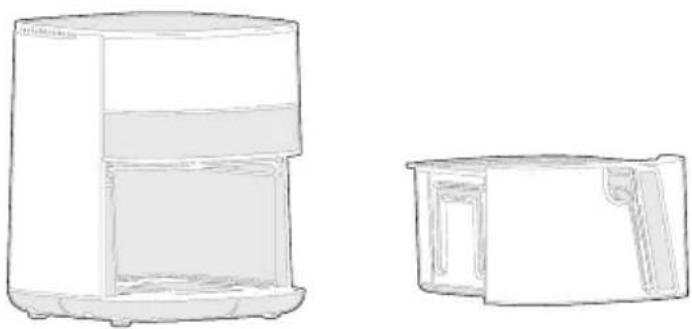
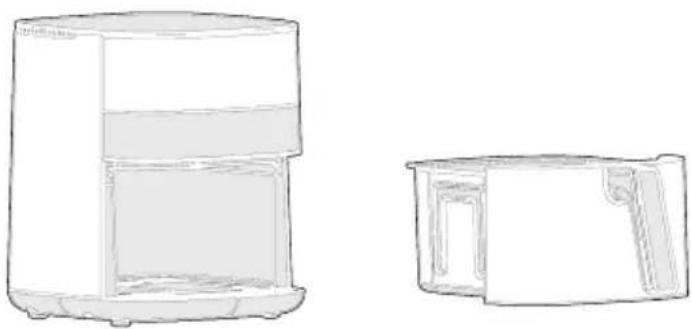
- According to different configurations install the barrel assembly (Figure 2), then push it into the Main unit (Figure 3).
natural_image
Line drawing of a rectangular kitchen grater with a handle and side compartments (no text or symbols)Figure 2
natural_image
Line drawings of two household appliances, one open and one closed, both without any text or symbols.Figure 3
- Before placing ingredients, preheat the machine for 3-5 minutes, the cooking effect will be better.
Instructions
-
Turn on the power, hold the top of the machine with one hand, and pull the barrel out by holding the handle of the barrel with the other hand. The barrel must be placed on a stable table.
-
Put the ingredients on basket in the fried barrel.
natural_image
Line drawing of a refrigerator with an open lid and side panel, showing front and back views (no text or symbols)EN
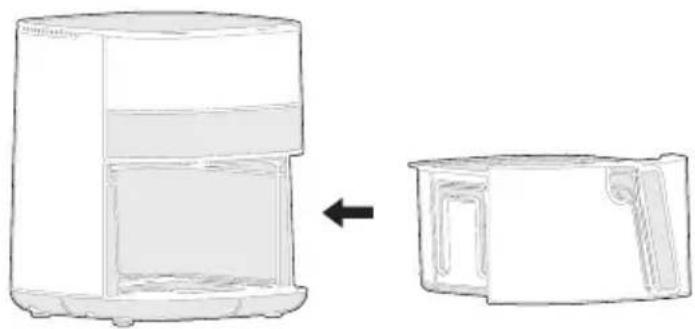
- Push the frying barrel into the machine, after the machine is powered on, it will continue to work and the interface shows the set time or DIY through the control panel to set the certain temperature and time, then touch "Start" button to start. Then the machine enters the heating work state, cooks and heats the food material.
Note:
When the frying barrel is not thoroughly pushed in the micro switch is not triggered; the machine is at the power-off state of getting the barrel and it won't work. At that time, you only need to totally push the frying barrel into the machine. The machine has the fuction of 10 minutes power off memory. After taking out of the frying barrel and stirring the food in the process of food cooking, fully push the frying barrel into the machine and the machine restores the working state when the frying barrel is not taken out, and continues to cook and heat the food materials.
natural_image
Line drawing of a smart air purifier with a bell icon above it (no text or symbols)-
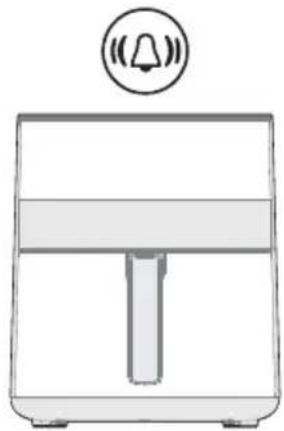
After reaching half of the set heating, the machine beeps 5 times and shows "Turn Food", you can put out the barrel, flip sides of the food.
-
The machine beeps after cooked, unplug the power plug. Unplug the socket put it on the desk flatwise and take out the cooked food with the auxiliary tool (such as chopsticks and clamp).

Please carefully take it out. Do put it on the desk flatwise so as to avoid being scalded by steam or topping over the frying barrel which may lead to scalding by oil or high temperature food. In addition, the auxiliary tools (such as chopsticks) are suggested to be used in the process of taking out food.
Warm Reminder
- The first use requires 10 minutes of dry burning. A small amount of white smoke or odor may appear during the dry burning process, which is normal. Do not panic.
- Before the product works, please check whether the bakeware or fried blue is in place to avoid malfunction.
- If you find that the product is malfunctioning, please stop using it and contact our service department immediately.
- Please use the bakeware or fried blue and fried barrel together in the whole machine, and avoid using them separately.
• After using, unplug the power plug and allow the air fryer to cool completely before moving.
CLEANING AND MAINTENANCE
- Please clean the air fryer to prevent it from being burned.
- After using, please clean the bakeware or fried blue and fried barrel in time to avoid the damage of the coating due to the erosion of food residue oil.
- Do not use strong abrasive cleaners to prevent damage to the machine and your health.
- Use a soft, clean cloth to wipe the air fryer. Please do not use an over-wet cloth to clean the air fryer, to prevent water from entering the air fryer, which may cause short circuit and fire.
- Please do not use other cleaning equipment such as a dishwasher to clean the air fryer, otherwise it may cause damage and affect the use.
- Use neutral detergent or clean water to clean the frying pans and drums.
- Please do not use hard and sharp items (such as wire balls, blades, etc.) to clean the bakeware or fried blue and fried barrel to prevent scratching.
- Any other servicing should be performed by an authorized service representative.
TROUBLESHOOTING
| Possible Reasons SolutionsProblem | ||
| No power | Improper power cord and outlet connection | Check that the power cord is firmly plugged into outlet. If this cannot solve the problem, please contact the Customer Service Center at +1-866-646-4332. |
| Display shows E1 or E2 | The unit is not operating properly | Contact the Customer Service Center at +1-866-646-4332. |
| Food undercooked | Food not placed in an even layer | For best cooking performance, place food in an even layer with no overlapping. See COOKING. |
| Food not crispy | Crisper plate not used in upper basket | For the best air frying performance, always use the crisper plate in the upper basket. The crisper plate allows air to flow underneath food and produces the best cooking results. |
| Food improperly prepped | For optimal crispiness, spray or brush small amounts of oil onto food before air frying. See COOKING. | |
| Difficult to remove or insert upper barrel | Too much food within basket | Do not pile food too high or the food will contact the top of the upper cavity. This can result in difficulty inserting and removing the upper basket and may cause food to burn. |
| Debris on basket exterior or within upper cavity | Remove all debris from the basket exterior and within the upper cavity. See CLEANING AND MAINTENANCE. | |
TRADEMARKS, COPYRIGHTS AND LEGAL STATEMENT
Midea logo, word marks, trade name, trade dress and all versions there of are valuable assets of Midea Group and/or its affiliates (“Midea”), to which Midea owns trademarks, copyrights and other intellectual property rights, and all goodwill derived from using any part of an Midea trademark. Use of Midea trademark for commercial purposes without the prior written consent of Midea may constitute trademark infringement or unfair competition in violation of relevant laws.
This manual is created by Midea and Midea reserves all copyrights thereof. No entity or individual may use, duplicate, modify, distribute in whole or in part this manual, or bundle or sell with other products without the prior written consent of Midea.
All the described functions and instructions were up to date at the time of printing this manual. However, the actual product may vary due to improved functions and designs.
DISPOSAL AND RECYCLING
Important Instructions for Environment
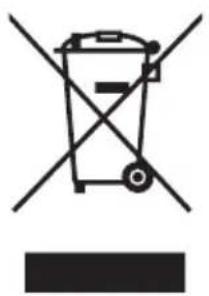
Compliance with the WEEE Directive and Disposing of the Waster Product: This product complies with EU WEEE Directive (2012/19/EU). This product bears a classification symbol for waster electrical and electronic equipment (WEEE).
EN
This symbol indicates that this product shall not be disposed with other household wastes at the end of its service life. Used device must be returned to official collection point for recycling of electrical electronic devices. To find these collection systems please contact to your local authorities or retailer where the product was purchased. Each household performs important role in recovering and recycling of old appliance. Appropriate disposal of used appliance helps prevent potential negative consequences for the environment and human health.
natural_image
Symbol of a trash bin crossed with a diagonal line, no text or numbers presentCompliance with RoHS Directive
The product you have purchased complies with EU RoHS Directive (2011/65/EU). It does not contain harmful and prohibited materials specified in the Directive.
Package Information
Packaging materials of the product are manufactured from recyclable materials in accordance with our National Environment Regulations. Do not dispose of the packaging materials together with the domestic or other wastes. Take them to the packaging material collection points designated by the local authorities.

natural_image
Recycling symbol with four arrows forming a triangle (no text or labels)DATA PROTECTION NOTICE
For the provision of the services agreed with the customer,
we agree to comply without restriction with all stipulations of applicable data protection law, in line with agreed countries within which services to the customer will be delivered, as well as, where applicable, the EU General Data Protection Regulation (GDPR).
Generally, our data processing is to fulfil our obligation under contract with you and for product safety reasons, to safeguard your rights in connection with warranty and product registration questions. In some cases, but only if appropriate data protection is ensured, personal data might be transferred to recipients located outside of the European Economic Area.
Further information are provided on request. You can contact our Data Protection Officer via MideaDPO@midea.com. To exercise your rights such as right to object your personal date being processed for direct marketing purposes, please contact us via MideaDPO@midea.com. To find further information, please follow the QR Code.
WARRANTY / SERVICE
Congratulations to your new product. We hope that you will enjoy it.
If you should have any reason for complaint, please contact our customer service at:
Midea Europe GmbH
Homepage: www.midea.com/de
Im Servicefall:
Tel.: 06196-90 20 - 0
Fax: 06196-90 20 -120
E-Mail: kundenservice@midea.com
EN
In case of malfunction, please provide your correct address, phone number, number of purchase agreement, type of device, serial no. (on the rating plate of your product), and a short description of the fault.
This device has been manufactured and tested according to the latest methods. Regardless of any statutory warranty obligations of the seller/retailer, the manufacturer offers a warranty on material and workmanship for a period of 36 months (or 12 months for commercial use) starting from the day of purchase.
A warranty claim will be void in case of any intervention by the seller or third party. The warranty does not cover damage caused by improper handling or use, incorrect assembly or storage, improper installation or connection, force majeure, or any other external factors.
In case of warranty claims, we reserve the right to repair or replace any defect part or to replace the whole product. Parts or devices replaced will become our property.
If the use intended by the manufacturer cannot be achieved by repair/s or replacement of a device, only then and within 6 months starting from the day of purchase may the purchaser under warranty request a reduction of the purchase price or cancellation of the purchase agreement.
Any claims for damages, including consequential damages, are excluded, provided they are not the result of intent or gross negligence.
The purchaser must proof a warranty claim by presenting the purchase receipt. This warranty is applicable within the Federal Republic of Germany.
natural_image
Line drawing of a rectangular air fryer with a vertical handle and base (no text or symbols)Friggitrice ad aria
MANUALE UTENTE
MF-CN65E2
natural_image
Technical line drawing of a mechanical component with multiple oval slots and a central hub (no text or symbols)PANORAMICA DEL PRODOTTO
Parti e accessori
natural_image
Line drawing of a simple air fryer on a wooden table (no text or symbols)Figura 1
natural_image
Line drawing of a rectangular kitchen grater with handle and side compartments (no text or symbols)Figura 2
natural_image
Line drawings of two household appliances, one open and one closed, with no text or symbols present.Figura 3
natural_image
Line drawing of a portable refrigerator with an arrow indicating the change from front to side (no text or symbols present)natural_image
Line drawing of a smart air purifier with a bell icon above it (no text or symbols)natural_image
Symbol of a trash bin crossed out by two diagonal lines (no text or numbers present)
IT
natural_image
Recycling symbol with three chasing arrows forming a triangle (no text or labels)Sito web: www.midea.com/de
make yourself at home
- BEDIENUNGSANLEITUNG
- PRODUKTÜBERSICHT
- Teile und Zubehör
- DATENSCHUTZHINWEISE
- USER MANUAL
- THANK YOU LETTER
- CONTENTS
- IMPORTANT SAFEGUARDS
- Intended Use
- Explanation of Symbols
- Danger
- Warning of electrical voltage
- Warning
- Caution
- Attention
- Observe instructions
- EN
- PLUG & CORD
- SAVE THESE INSTRUCTIONS
- SPECIFICATIONS
- How To Find The Model Name And Serial Number
- PRODUCT OVERVIEW
- Parts and Accessories
- NOTE
- OPERATING INSTRUCTIONS
- Control Panel
- Display Messages
- Instructions For Use
- Note:
- Preparation
- Instructions
- Warm Reminder
- CLEANING AND MAINTENANCE
- TROUBLESHOOTING
- TRADEMARKS, COPYRIGHTS AND LEGAL STATEMENT
- DISPOSAL AND RECYCLING
- Important Instructions for Environment
- Compliance with RoHS Directive
- Package Information
- DATA PROTECTION NOTICE
- WARRANTY / SERVICE
- MANUALE UTENTE
- PANORAMICA DEL PRODOTTO
- Parti e accessori
Brand : MIDEA
Model : MF-CN65E2
Category : Deep fryer