
S-4000-SP - Professional audio equipment ROLAND - Free user manual and instructions
Find the device manual for free S-4000-SP ROLAND in PDF.


| Product Type | REAC Splitter for RSS S-4000 Digital Snake System |
| Dimensions | 482.0 (W) x 224.8 (D) x 43.8 (H) mm / 19 x 8-7/8 x 1-3/4 inches |
| Weight | 2.8 kg / 6 lbs 3 oz |
| Power Supply | AC 115 V, 117 V, 220 V, 230 V, 240 V (50/60 Hz) |
| Power Consumption | 13 W |
| Number of Ports | Two independent 5-port splitters (MAIN and BACKUP) |
| Connectors | MAIN REAC (RJ-45 EtherCon) x 5, BACKUP REAC (RJ-45 EtherCon) x 5 |
| Indicators | MAIN LNK/ACT (Green/Orange) x 5, BACKUP LNK/ACT x 5, POWER A, POWER B |
| Redundant Power | Two independent internal power supplies for uninterrupted operation |
| Max REAC Cable Length | 100 meters per segment |
| Split Function | Splits master REAC device input audio to a split REAC device |
| Mounting Options | Rack-mountable (brackets included) or desktop use with rubber feet |
| Operating Temperature | 0 to +40°C / +32 to +104°F |
| Accessories | Power Cord x 2, REAC Connector Cover x 10, Rubber Foot x 4, Owner's Manual |
| Maintenance | Clean with soft dry cloth; avoid solvents |
| Safety Compliance | FCC Part 15 Class A, EN55022 Class A |
| Reparability | Refer to Roland service centers; no user-serviceable parts inside |
| Power On/Off | No power switch; plug/unplug power cord |
Frequently Asked Questions - S-4000-SP ROLAND
User questions about S-4000-SP ROLAND
0 question about this device. Answer the ones you know or ask your own.
Ask a new question about this device
Download the instructions for your Professional audio equipment in PDF format for free! Find your manual S-4000-SP - ROLAND and take your electronic device back in hand. On this page are published all the documents necessary for the use of your device. S-4000-SP by ROLAND.
USER MANUAL S-4000-SP ROLAND
The S-4000-SP is a REAC splitter for use with the RSS S-4000 Digital Snake System. Use of this REAC splitter enables you to do the following:
- It permits you to extend REAC cables in lengths of 100 meters.
- It allows you to split the master REAC device's input audio to a split REAC device.
In addition, the S-4000-SP also has the following features: - The S-4000-SP is made up of two independent 5 port splitters with independent power supplies. These two splitters can be used independently as dedicated splitters for the REAC device's MAIN port and BACKUP port. This provides a fully redundant REAC connection system.
- Two independent internal power supplies furnish power to each of the two internal splitters, enabling uninterrupted use in the event the power happens to cut out in one of the power supplies or if there is some other sort of power interruption.

Before using this unit, carefully read the sections entitled: "IMPORTANT SAFETY INSTRUCTIONS" (p. 2), "USING THE UNIT SAFELY" (p. 3–4), and "IMPORTANT NOTES" (p. 5). These sections provide important information concerning the proper operation of the unit. Additionally, in order to ensure that you have gained a good grasp of every feature provided by your new unit, the Owner's manual should be read in its entirety. The manual should be saved and kept on hand as a convenient reference.

ATTENTION
CAUTION
RISK OF ELECTRIC SHOCK DO NOT OPEN

RISQUE DE CHOC ELECTRIQUE NE PAS OUVRIR
CAUTION: TO REDUCE THE RISK OF ELECTRIC SHOCK, DO NOT REMOVE COVER (OR BACK).
NO USER-SERVICEABLE PARTS INSIDE.
REFER SERVICING TO QUALIFIED SERVICE PERSONNEL.

The lightning flash with arrowhead symbol, within an equilateral triangle, is intended to alert the user to the presence of uninsulated “dangerous voltage” within the product’s enclosure that may be of sufficient magnitude to constitute a risk of electric shock to persons.

The exclamation point within an equilateral triangle is intended to alert the user to the presence of important operating and maintenance (servicing) instructions in the literature accompanying the product.
INSTRUCTIONS PERTAINING TO A RISK OF FIRE, ELECTRIC SHOCK, OR INJURY TO PERSONS.
IMPORTANT SAFETY INSTRUCTIONS SAVE THESE INSTRUCTIONS
WARNING - When using electric products, basic precautions should always be followed, including the following:
- Read these instructions.
- Keep these instructions.
- Heed all warnings.
- Follow all instructions.
- Do not use this apparatus near water.
- Clean only with a dry cloth.
- Do not block any of the ventilation openings. Install in accordance with the manufacturers instructions.
- Do not install near any heat sources such as radiators, heat registers, stoves, or other apparatus (including amplifiers) that produce heat.
-
Do not defeat the safety purpose of the polarized or grounding-type plug. A polarized plug has two blades with one wider than the other. A grounding type plug has two blades and a third grounding prong. The wide blade or the third prong are provided for your safety. If the provided plug does not fit into your outlet, consult an electrician for replacement of the obsolete outlet.
-
Protect the power cord from being walked on or pinched particularly at plugs, convenience receptacles, and the point where they exit from the apparatus.
- Only use attachments/accessories specified by the manufacturer.
- Use only with the cart, stand, tripod, bracket, or table specified by the manufacturer, or sold with the apparatus. When a cart is used, use caution when moving the cart/apparatus combination to avoid injury from tip-over.
- Unplug this apparatus during lightning storms or when unused for long periods of time.
- Refer all servicing to qualified service personnel. Servicing is required when the apparatus has been damaged in any way, such as power-supply cord or plug is damaged, liquid has been spilled or objects have fallen into the apparatus, the apparatus has been exposed to rain or moisture, does not operate normally, or has been dropped.

For the U.K.
WARNING: THIS APPARATUS MUST BE EARTHED
IMPORTANT: THE WIRES IN THIS MAINS LEAD ARE COLOURED IN ACCORDANCE WITH THE FOLLOWING CODE. GREEN-AND-YELLOW: EARTH, BLUE: NEUTRAL, BROWN: LIVE
As the colours of the wires in the mains lead of this apparatus may not correspond with the coloured markings identifying the terminals in your plug, proceed as follows:
The wire which is coloured GREEN-AND-YELLOW must be connected to the terminal in the plug which is marked by the letter E or by the safety earth symbol ⊕ or coloured GREEN or GREEN-AND-YELLOW.
The wire which is coloured BLUE must be connected to the terminal which is marked with the letter N or coloured BLACK.
The wire which is coloured BROWN must be connected to the terminal which is marked with the letter L or coloured RED.
USING THE UNIT SAFELY
INSTRUCTIONS FOR THE PREVENTION OF FIRE, ELECTRIC SHOCK, OR INJURY TO PERSONS
About ⚠️ WARNING and ⚠️ CAUTION Notices
| ⚠ WARNING | Used for instructions intended to alert the user to the risk of death or severe injury should the unit be used improperly. |
| ⚠ CAUTION | Used for instructions intended to alert the user to the risk of injury or material damage should the unit be used improperly.* Material damage refers to damage or other adverse effects caused with respect to the home and all its furnishings, as well to domestic animals or pets. |
About the Symbols
| The △ symbol alerts the user to important instructions or warnings. The specific meaning of the symbol is determined by the design contained within the triangle. In the case of the symbol at left, it is used for general cautions, warnings, or alerts to danger. | |
| The ⊗ symbol alerts the user to items that must never be carried out (are forbidden). The specific thing that must not be done is indicated by the design contained within the circle. In the case of the symbol at left, it means that the unit must never be disassembled. | |
| The ● symbol alerts the user to things that must be carried out. The specific thing that must be done is indicated by the design contained within the circle. In the case of the symbol at left, it means that the power-cord plug must be unplugged from the outlet. |
ALWAYS OBSERVE THE FOLLOWING
WARNING
- Before using this unit, make sure to read the instructions below, and the Owner's Manual.

- Connect mains plug of this model to a mains socket outlet with a protective earthing connection.

- Do not open or perform any internal modifications on the unit.

- Do not attempt to repair the unit, or replace parts within it (except when this manual provides specific instructions directing you to do so). Refer all servicing to your dealer, the nearest Roland Service Center, or an authorized Roland distributor, as listed on the "Information" page.

- Never use or store the unit in places that are:
- Subject to temperature extremes (e.g., direct sunlight in an enclosed vehicle, near a heating duct, on top of heat-generating equipment); or are

- Damp (e.g., baths, washrooms, on wet floors); or are

- Humid; or are
- Exposed to rain; or are
- Dusty; or are
- Subject to high levels of vibration.
- Make sure you always have the unit placed so it is level and sure to remain stable. Never place it on stands that could wobble, or on inclined surfaces.

- The unit should be connected to a power supply only of the type described in the operating instructions, or as marked on the rear side of unit.

WARNING
- Use only the attached power-supply cord. Also, the supplied power cord must not be used with any other device.

- Do not excessively twist or bend the power cord, nor place heavy objects on it. Doing so can damage the cord, producing severed elements and short circuits. Damaged cords are fire and shock hazards!

- Do not allow any objects (e.g., flammable material, coins, pins); or liquids of any kind (water, soft drinks, etc.) to penetrate the unit.

- Immediately turn the power off, remove the power cord from the outlet, and request servicing by your dealer, the nearest Roland Service Center, or an authorized Roland distributor, as listed on the "Information" page when:

- The power-supply cord, or the plug has been damaged; or
• If smoke or unusual odor occurs
- Objects have fallen into, or liquid has been spilled onto the unit; or
- The unit has been exposed to rain (or otherwise has become wet); or
- The unit does not appear to operate normally or exhibits a marked change in performance.
- In households with small children, an adult should provide supervision until the child is capable of following all the rules essential for the safe operation of the unit.

- Protect the unit from strong impact. (Do not drop it!)


WARNING
- Do not force the unit's power-supply cord to share an outlet with an unreasonable number of other devices. Be especially careful when using extension cords—the total power used by all devices you have connected to the extension cord's outlet must never exceed the power rating (watts/amperes) for the extension cord. Excessive loads can cause the insulation on the cord to heat up and eventually melt through.

- Before using the unit in a foreign country, consult with your dealer, the nearest Roland Service Center, or an authorized Roland distributor, as listed on the "Information" page.

- Do not put anything that contains water (e.g., flower vases) on this unit. Also, avoid the use of insecticides, perfumes, alcohol, nail polish, spray cans, etc., near the unit. Swiftly wipe away any liquid that spills on the unit using a dry, soft cloth.
- The unit should be located so that its location or position does not interfere with its proper ventilation.

• Always grasp only the plug on the power-supply cord when plugging into, or unplugging from, an outlet or this unit.

- At regular intervals, you should unplug the power plug and clean it by using a dry cloth to wipe all dust and other accumulations away from its prongs. Also, disconnect the power plug from the power outlet whenever the unit is to remain unused for an extended period of time. Any accumulation of dust between the power plug and the power outlet can result in poor insulation and lead to fire.

- Try to prevent cords and cables from becoming entangled. Also, all cords and cables should be placed so they are out of the reach of children.

- Never climb on top of, nor place heavy objects on the unit.

- Never handle the power cord or its plugs with wet hands when plugging into, or unplugging from, an outlet or this unit.

- Before moving the unit, disconnect the power plug from the outlet, and pull out all cords from external devices.

- Before cleaning the unit, turn off the power and unplug the power cord from the outlet (p. 8).

- Whenever you suspect the possibility of lightning in your area, pull the plug on the power cord out of the outlet.

- Store the removed rack-mount bracket attachment screws, supplied REAC cover, and rubber feet out of the reach of small children to prevent these parts from being swallowed accidentally.

In addition to the items listed under “IMPORTANT SAFETY INSTRUCTIONS” and “USING THE UNIT SAFELY” on pages 2 and 3–4, please read and observe the following:
Power Supply
- Do not connect this unit to the same electrical outlet that is being used by an electrical appliance that is controlled by an inverter (such as a refrigerator, washing machine, microwave oven, or air conditioner), or that contains a motor. Depending on the way in which the electrical appliance is used, power supply noise may cause this unit to malfunction or may produce audible noise. If it is not practical to use a separate electrical outlet, connect a power supply noise filter between this unit and the electrical outlet.
- Before connecting this unit to other devices, turn off the power to all units. This will help prevent malfunctions and/or damage to speakers or other devices.
- This devices has no power switch. Disconnect the plug from the power outlet whenever shutdown of power is required. The power cord's plug should be connected to the closest available power outlet to the device; this should be within immediate reach during use.
Placement
- This device may interfere with radio and television reception. Do not use this device in the vicinity of such receivers.
- Noise may be produced if wireless communications devices, such as cell phones, are operated in the vicinity of this unit. Such noise could occur when receiving or initiating a call, or while conversing. Should you experience such problems, you should relocate such wireless devices so they are at a greater distance from this unit, or switch them off.
- When moved from one location to another where the temperature and/or humidity is very different, water droplets (condensation) may form inside the unit. Damage or malfunction may result if you attempt to use the unit in this condition. Therefore, before using the unit, you must allow it to stand for several hours, until the condensation has completely evaporated.
- Depending on the material and temperature of the surface on which you place the unit, its rubber feet may discolor or mar the surface. You can place a piece of felt or cloth under the rubber feet to prevent this from happening. If you do so, please make sure that the unit will not slip or move accidentally.
Maintenance
- For everyday cleaning wipe the unit with a soft, dry cloth or one that has been slightly dampened with water. To remove stubborn dirt, use a cloth impregnated with a mild, non-abrasive detergent. Afterwards, be sure to wipe the unit thoroughly with a soft, dry cloth.
- Never use benzine, thinners, alcohol or solvents of any kind, to avoid the possibility of discoloration and/or deformation.
Additional Precautions
- Use a reasonable amount of care when using the unit's buttons, sliders, or other controls; and when using its jacks and connectors. Rough handling can lead to malfunctions.
- When connecting / disconnecting all cables, grasp the connector itself—never pull on the cable. This way you will avoid causing shorts, or damage to the cable's internal elements.
- A small amount of heat will radiate from the unit during normal operation.
- To avoid disturbing your neighbors, try to keep the unit's volume at reasonable levels (especially when it is late at night).
- When you need to transport the unit, package it in the box (including padding) that it came in, if possible. Otherwise, you will need to use equivalent packaging materials.
- This product is a Class A digital device for use in other than residential environment. Use of this equipment in a residential environment may cause radio interference requiring the user to take appropriate preventative measures. In such instances, take steps such as using cables with ferrite core connectors. For information on specific preventive methods, contact your dealer, the nearest Roland Service Center, or an authorized Roland distributor, as listed on the "Information" page.
- This product is a Class A digital device designed to be used in a non-residential environment. When this device is connected to a digital snake or other such Class B equipment, the system as a whole is then classified as a Class A device. Use of this equipment in a residential environment may cause radio interference requiring the user to take appropriate preventive measures. In such instances, take steps such as using cables with ferrite cores near their connectors. For information on specific preventive methods, contact your dealer, the nearest Roland Service Center, or an authorized Roland distributor, as listed on the "Information" page.
Panel Descriptions....7
Front Panel....7
Rear Panel....7
Turning the Power On and Off....8
Instructions for Connecting the Power Cords....9
How to Use the Power Cord Clamps 9
About Placement....10
Removing the Rack-Mount Brackets....10
Using the REAC Connector Covers....11
Attaching the Rubber Feet....11
Notes to Observe in Using the S-4000 System ....12
Use and Handling of REAC Systems 12
About REAC Cables....12
Notes to Observe When Producing REAC Cables 12
Advantages and Precautions to Note When Connecting the Split Device with MAIN and BACKUP.... 13
System Connection Example....14
Specifications....15
Front Panel

1 MAIN REAC Ports 1–5
These are used as the main lines for the REAC connection interface.
The indicators function as follows.
| Indicator | ||
| Green Orange | ||
| With nothing connected | Off | Off |
| When enabled for transmission | Lit | Lit |
| When transmitting with another REAC device | Flashing | Lit |
2 BACKUP REAC Ports 1–5
These function as backups to the MAIN REAC ports.
REAC transmissions automatically switch to the BACKUP REAC ports if a problem with the MAIN REAC connection occurs.
The indicators function the same way as those for the MAIN REAC ports 1–5.
3 POWER Indicators A, B
These indicate the status of the power supply.
The corresponding indicator lights blue when power is supplied from AC INPUT A or B on the rear panel.
Rear Panel

4 AC INPUT A, B
Connect the supplied power cords here.
Secure the power cords with the cord clamps (p. 9) to prevent accidental disconnection of the cords.
Turning the Power On and Off
This device has no power switch.
Power is switched on by plugging the power cord into a power outlet; remove the plug from the outlet to switch power off. When powering up, first connect any peripheral devices, then plug in the power to the S-4000-SP before turning on the power to the connected devices.
The S-4000-SP features two systems for inputting power to the unit, "AC INPUT A" and "AC INPUT B," and these are connected separately to two power units, as shown below.
The output of each power unit is connected to "REAC MAIN" and "REAC BACKUP," enabling continuous use even when circumstances result in an interruption of power in one of the systems.
![graph LR A["AC INPUT A"] --> B["POWER SUPPLY UNIT A"] C["AC INPUT B"] --> D["POWER SUPPLY UNIT B"] B --> E["REAC MAIN UNIT"] D --> F["REAC BACKUP UNIT"]](/content/2026/05/915450/images/ae2c52906f11010faab41b956803a9c6093f20dd6257996c77aa151d44995da1.jpg)

To prevent malfunction and/or damage to speakers or other devices, always turn down the volume, and turn off the power on all devices before making any connections.

Once the connections have been completed, turn on power to your various devices in the order specified. By turning on devices in the wrong order, you risk causing malfunction and/or damage to speakers and other devices.

To completely shut off the power to the unit, disconnect the power cords from both the "AC INPUT A" and "AC INPUT B" sockets.
Instructions for Connecting the Power Cords
If there is no UPS or other external backup power system
Connect "AC INPUT A" and "AC INPUT B" to ordinary power outlets. (Although you can connect just "AC INPUT A" or "AC INPUT B," connecting both is recommended for improved reliability of the S-4000-SP).
If a UPS or other external backup power system separate from the ordinary power supply is available
Connect "AC INPUT A" to an ordinary power outlet. Connect "AC INPUT B" to the external backup power supply.

Be sure to use only the power cords supplied with the S-4000-SP to connect the power supply.
MEMO
UPS
Uninterruptible Power Supply (System)
How to Use the Power Cord Clamps
Use the following procedure to secure the power plugs.

Insert the power cord into the AC INPUT on the rear panel.


Lower the power cord clamp to secure the power cord plug.

Removing the Rack-Mount Brackets
The S-4000-SP can be used as a desktop unit or it can be rack mounted.
In addition, the rack-mount brackets can be attached at different points, allowing the unit to be recessed toward the rear of the rack.
* You can slide the S-4000-UP's rack-mount brackets forward and attach them at the front of the rack, allowing you to shift the unit back, with the front panel recessed.
Installing the unit in this manner allows you to prevent plugs from protruding from the front of the rack when you have plugs connected.
Use the following procedure to remove and reinstall the S-4000-UP's rack-mount brackets for recessed rack-mounting.
1
Turn off the power on all equipment and disconnect all cables from the S-4000-SP unit.
2
Remove only the screws shown in the following diagram (6 screws on each side, 12 screws total), and detach the rack-mount brackets from the sides of the unit as shown.

3
Using the screws you removed in Step 2, reinstall the rack-mount brackets as shown.

NOTE
Do not attach the rack-mount brackets further forward than the attachment holes shown in the figure. This will make the installation unstable.
Using the REAC Connector Covers
If using commercially available Cat5e Ethernet cables, attach the supplied REAC connector covers to the connectors.
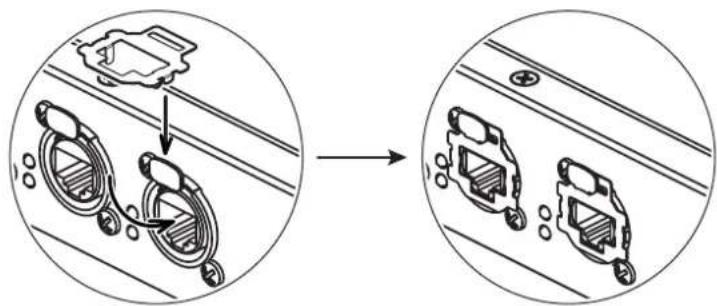
MEMO
Remove the REAC connector covers if you are using REAC cables with EtherCon type connectors (SC-W100X or SC-W100S).
Take care not to lose the REAC connector covers removed at this time.
Attaching the Rubber Feet
Attach the rubber feet when not rack mounting the unit.
Peel off the backing from the double-sided adhesive tape on the rubber feet and attach the feet at the points indicated in the figure below.
* When turning the unit upside-down, get a bunch of newspapers or magazines, and place them under the four corners or at both ends to prevent damage to the buttons and controls. Also, you should try to orient the unit so no buttons or controls get damaged.
* When turning the unit upside-down, handle with care to avoid dropping it, or allowing it to fall or tip over.
bottom of the unit
![graph TD A[" "] --> B[" "] C[" "] --> D[" "] E[" "] --> F[" "] G[" "] --> H[" "] I[" "] --> J[" "] K[" "] --> L[" "] M[" "] --> N[" "] O[" "] --> P[" "] Q[" "] --> R[" "] S[" "] --> T[" "] U[" "] --> V[" "] W[" "] --> X[" "] Y[" "] --> Z[" "]](/content/2026/05/915450/images/53429acf6f345e1e53541f59ea4ae99de70ba31e1db1ae58ed847ccd1e792d5a.jpg)
Use and Handling of REAC Systems
The REAC cables used in digital snake systems employ computer network technology to enable transmission of multichannel audio signals.
In very rare cases, however, noise may be generated when these systems are used in certain environments. If noise is present, check the following points.
About REAC Cables
As REAC cables use computer network technology, you should pay attention to the following points regarding wiring with network cables.
- Ensure that cables used for REAC connections conform to the Cat5e (Ethernet Category 5) standard.
- No single cable should be longer than 100 meters.
- Do not use cables with cut or torn coverings.
- Do not subject cables to undue stress.
- Do not wind or bend cables such that the radius of the turn is 25 mm or less, and do not double cables over.
- Do not bind cables tightly into bundles.
Notes to Observe When Producing REAC Cables
If you are making your own REAC cables, note the following precautions in addition to those above.
- Use plugs (RJ-45) conforming to high reliability standards.
- Do not separate the wires (twisted pairs) within the cables.
Advantages and Precautions to Note When Connecting the Split Device with MAIN and BACKUP
As shown in the figure below, using the S-4000-SP for REAC connections with MAIN and BACKUP allows one splitter to ensure continued REAC transmissions even if the other splitter fails.
However, REAC transmissions will not be switched if there is a failure in the MAIN REAC cable connected to the split device. Accordingly, no audio will be output from the split device under such circumstances.
This is due to the fact that REAC split devices are designed exclusively for the reception of signals only, so even if a split unit should detect an error, it cannot communicate this back to the Master Device.
![graph TD A["Master Device"] --> B["1 MAIN"] A --> C["2 MAIN"] A --> D["3 MAIN"] A --> E["4 BACKUP"] A --> F["5 BACKUP"] A --> G["6 BACKUP"] H["Slave Device"] --> I["3 MAIN"] H --> J["4 BACKUP"] H --> K["5 BACKUP"] L["Split Device"] --> M["6 MAIN"] L --> N["7 BACKUP"] L --> O["8 MAIN"] P["S-4000-SP"]…](/content/2026/05/915450/images/d11868ba36e9e78bf6f87dceba7956387b30ba2c0cd2bcffc3def1800d0ae7ed.jpg)
■ Example of Malfunction
If cable or is interrupted, the system will automatically switch to the BACKUP REAC system.
However, if there is a failure of the MAIN REAC cable going to a Split Device, cable 3 then the system will not automatically switch to the BACKUP REAC system, cables 4 a 5 . 6
■ Reestablishing Transmission
Carry out the following steps in the event a transmission failure to the split device prevents the transmission of audio to the Split device.
- Disconnect the active REAC cable from the REAC connector in either the MASTER or SLAVE device. The active REAC connector will have a blinking indicator light.

To activate REAC transmission using the BACKUP cable system, you can disconnect the MAIN cable from either the MAIN device, cable 1 the MAIN connector on the S-4000-SP, cables or 2 the MAIN connector on the SLAVE device, cable 2. Once you do this, the system will automatically switch to the BACKUP REAC system and use cables 4 a 5 . Audio will be restored to all SPLIT devices.
- Check the REAC cable in which the failure occurred.
System Connection Example
![graph TD A["S-4000-SP"] --> B["Cat5e cables"] B --> C["S-4000S 32x8 (Master REAC device)"] C --> D["Digital Snake"] D --> E["8 outputs from console"] F["S-4000H 8x32 (Split REAC device)"] --> G["Monitor Console"] G --> H["32 mic/line sources from the stage"] I["S-4000H 8x32 (Slave REAC device)"] -->…](/content/2026/05/915450/images/903cbbfacae01eae0cc05af0f9bab1d949234753d977613428c7246259906a18.jpg)
S-4000-SP: REAC SPLITTER
Connectors
MAIN REAC (RJ-45 EtherCon type) x 5
BACKUP REAC (RJ-45 EtherCon type) x 5
■ Indicators:
MAIN LNK/ACT Indicator: Green x 5, Orange x 5
BACKUP LNK/ACT Indicator: Green x 5, Orange x 5
POWER A Indicator x 1
POWER B Indicator x 1
■ Power Supply:
AC 115 V, AC 117 V, AC 220 V, AC 230 V, AC 240 V (50/60 Hz)
■ Power Consumption:
13 W
■ Dimensions:
482.0 (W) x 224.8 (D) x 43.8 (H) mm
19 (W) x 8-7/8 (D) x 1-3/4 (H) inches
■ Weight:
2.8 kg
6 lbs 3 oz
■ Operation Temperature:
0 to +40 degrees centigrade
+32 to +104 degrees Fahrenheit
■ Accessories:
Power Cord x 2
REAC Connector Cover x 10
Rubber Foot x 4
Owner's Manual
EMI:
FCC Part 15 Class A
EN55022 Class A
* In the interest of product improvement, the specifications and/or appearance of this unit are subject to change without prior notice.
Information
When you need repair service, call your nearest Roland Service Center or authorized Roland distributor in your country as shown below.
ASIA
TAIWAN
ROLAND TAIWAN
ENTERPRISE CO., LTD.
Room 5, 9fl. No. 112 Chung Shan N.Road Sec.2, Taipei, TAIWAN, R.O.C.
TEL: (02) 2561 3339
SINGAPORE/MALAYSIA
Roland Asia Pacific Sdn. Bhd. 45-1, Block C2, Jalan PJU 1/39, Dataran Prima, 47301 Petaling Jaya, Selangor, MALAYSIA TEL.: 3-7805-3263
CENTRAL/LATIN AMERICA
Roland Systems Group U.S. 425 Sequoia Drive Suite 114, Bellingham, Washington, 98226 USA TEL: 360-594-4282
EUROPE
EAST EUROPE
Roland East Europe Ltd.
Warehouse Area 'DEPO' Pf.83 H-2046 Torokbalint, HUNGARY TEL: (23) 511011
AUSTRIA/BELGIUM/ FRANCE/GERMANY/ HOLLAND/
LUXEMBOURG/ PORTUGAL/SPAIN/
SWITZERLAND
Roland Iberia, S.L. Paseo García Faria, 33-35 08005 Barcelona SPAIN TEL: 93 493 91 00
DENMARK
Roland Scandinavia A/S Nordhavnsvej 7, Postbox 880, DK-2100 Copenhagen DENMARK TEL: 3916 6200
FINLAND
Roland Scandinavia As,
Filial Finland
Elannontie 5
FIN-01510 Vantaa, FINLAND
TEL: (0)9 68 24 020
NORWAY
Roland Scandinavia Avd.
Kontor Norge
Danvik Center 28, 2 tr.
S-131 30 Nacka SWEDEN
TEL: (0)8 702 00 20
UNITED KINGDOM/IRELAND
Roland (U.K.) Ltd.
Atlantic Close, Swansea
Enterprise Park, Swansea
SA7 9FJ,
UNITED KINGDOM
TEL: (01792) 70270
OCEANIA
Roland Corporation
Australia Pty., Ltd.
38 Campbell Avenue
Dec Why West, NSW 2099
AUSTRALIA
For Australia
TEL: (02) 9982 8266
For New Zealand
TEL: (09) 3098 715
NORTH AMERICA
CANADA
Roland Canada Ltd.
(Head Office)
5480 Parkwood Way, Richmond
B. C., V6V 2M4 CANADA
TEL: (604) 270 6626
Roland Canada Ltd.
(Toronto Office)
170 Admiral Boulevard
Mississauga ON L5T 2N6
CANADA
TEL: (905) 362 9707
U. S. A.
Roland Systems Group U.S.
425 Sequoia Drive Suite 114.
Bellingham, Washington,
98226 USA
TEL: 360-594-4282

For EU Countries
This product complies with the requirements of European Directives EMC 89/336/EEC and LVD 73/23/EEC.
For the USA
FEDERAL COMMUNICATIONS COMMISSION RADIO FREQUENCY INTERFERENCE STATEMENT
This equipment has been tested and found to comply with the limits for a Class A digital device, pursuant to Part 15 of the FCC Rules. These limits are designed to provide reasonable protection against harmful interference when the equipment is operated in a commercial environment. This equipment generates, uses, and can radiate radio frequency energy and, if not installed and used in accordance with the instruction manual, may cause harmful interference to radio communications. Operations of this equipment in a residential area is likely to cause harmful interference in which case the user will be required to correct the interference at his own expense.
This device complies with Part 15 of the FCC Rules. Operation is subject to the following two conditions:
(1) This device may not cause harmful interference, and
(2) This device must accept any interference received, including interference that may cause undesired operation.
Unauthorized changes or modification to this system can void the users authority to operate this equipment.
This equipment requires shielded interface cables in order to meet FCC class A Limit.
For Canada
NOTICE
This Class A digital apparatus meets all requirements of the Canadian Interference-Causing Equipment Regulations.
AVIS
DECLARATION OF CONFORMITY Compliance Information Statement
Model Name : S-4000-SP
Type of Equipment : REAC SPLITTER
Responsible Party : Roland Systems Group U.S.
Address: 425 Sequoia Drive, Suite 114, Bellingham, WA 98226
Telephone : (360) 594-4282
- CAUTION
- IMPORTANT SAFETY INSTRUCTIONS SAVE THESE INSTRUCTIONS
- USING THE UNIT SAFELY
- INSTRUCTIONS FOR THE PREVENTION OF FIRE, ELECTRIC SHOCK, OR INJURY TO PERSONS
- ALWAYS OBSERVE THE FOLLOWING
- WARNING
- POWER SUPPLY
- PLACEMENT
- MAINTENANCE
- ADDITIONAL PRECAUTIONS
- PANEL DESCRIPTIONS....7
- TURNING THE POWER ON AND OFF....8
- ABOUT PLACEMENT....10
- NOTES TO OBSERVE IN USING THE S-4000 SYSTEM ....12
- SYSTEM CONNECTION EXAMPLE....14
- SPECIFICATIONS....15
- FRONT PANEL
- 1 MAIN REAC PORTS 1–5
- 2 BACKUP REAC PORTS 1–5
- 3 POWER INDICATORS A, B
- REAR PANEL
- 4 AC INPUT A, B
- TURNING THE POWER ON AND OFF
- INSTRUCTIONS FOR CONNECTING THE POWER CORDS
- IF THERE IS NO UPS OR OTHER EXTERNAL BACKUP POWER SYSTEM
- IF A UPS OR OTHER EXTERNAL BACKUP POWER SYSTEM SEPARATE FROM THE ORDINARY POWER SUPPLY IS AVAILABLE
- MEMO
- UPS
- HOW TO USE THE POWER CORD CLAMPS
- REMOVING THE RACK-MOUNT BRACKETS
- 1
- 2
- 3
- NOTE
- USING THE REAC CONNECTOR COVERS
- ATTACHING THE RUBBER FEET
- USE AND HANDLING OF REAC SYSTEMS
- ABOUT REAC CABLES
- NOTES TO OBSERVE WHEN PRODUCING REAC CABLES
- ADVANTAGES AND PRECAUTIONS TO NOTE WHEN CONNECTING THE SPLIT DEVICE WITH MAIN AND BACKUP
- EXAMPLE OF MALFUNCTION
- REESTABLISHING TRANSMISSION
- SYSTEM CONNECTION EXAMPLE
- S-4000-SP: REAC SPLITTER
- CONNECTORS
- INDICATORS
- POWER CONSUMPTION
- DIMENSIONS
- WEIGHT
- OPERATION TEMPERATURE
- ACCESSORIES
- EMI
- INFORMATION
- ASIA
- TAIWAN
- SINGAPORE/MALAYSIA
- CENTRAL/LATIN AMERICA
- EUROPE
- EAST EUROPE
- AUSTRIA/BELGIUM/ FRANCE/GERMANY/ HOLLAND
- LUXEMBOURG/ PORTUGAL/SPAIN
- SWITZERLAND
- DENMARK
- FINLAND
- NORWAY
- UNITED KINGDOM/IRELAND
- OCEANIA
- NORTH AMERICA
- CANADA
- A
- FEDERAL COMMUNICATIONS COMMISSION RADIO FREQUENCY INTERFERENCE STATEMENT
- NOTICE
- AVIS
- DECLARATION OF CONFORMITY COMPLIANCE INFORMATION STATEMENT
Brand : ROLAND
Model : S-4000-SP
Category : Professional audio equipment