
AmpliTube X-DRIVE - Uncategorized IK Multimedia - Free user manual and instructions
Find the device manual for free AmpliTube X-DRIVE IK Multimedia in PDF.


| Product Type | Distortion / Overdrive / Fuzz Stompbox Pedal |
| Brand | IK Multimedia |
| Model | AmpliTube X-DRIVE |
| Dimensions | 17.5 cm x 14.5 cm x 5.8 cm (6.88 in x 5.7 in x 2.28 in) |
| Weight | 906 g (31.96 oz) |
| Power Supply | 9V DC center negative, 260 mA minimum |
| Power Consumption | 260 mA |
| Audio Converters | 24-bit / 192 kHz |
| Frequency Response | 5 Hz – 24 kHz |
| Dynamic Range | 123 dB |
| Built-in Distortion Models | 16 (including MODERN, METAL, MONARCH, CAT, ORANGE, YELLOW, GREEN, DIODE, BLUE, BOOSTER, H-BOOST, CRUSH, OCTOFUZZ, PURPLE, FUZZACE, BIG-FUZZ) |
| Presets | 300 storable (50 factory) |
| Cabinet Simulator | 5 options (CAB 1-4, BASS) plus OFF |
| Bypass Modes | True bypass or buffered bypass (selectable) |
| Input / Outputs | 1/4" INPUT, 1/4" OUTPUT, CAB SIM OUT (1/4"), HEADPHONES (1/4"), MIDI IN/OUT (5-pin DIN), EXT. CONTROL (1/4"), USB Type-B, Power (9V DC) |
| USB | USB Type-B for preset management and audio interface |
| MIDI | Full MIDI implementation (CC, PC, Bank Select) |
| External Control | Supports expression pedal, single switch, or double switch |
| Construction | Anodized aluminum chassis |
| Display | High-contrast LED display |
| Included Software | X-GEAR Librarian, AmpliTube 5 SE |
| Supported Operating Systems (AmpliTube 5) | macOS 10.10 or later, Windows 7 or later (64-bit) |
| Cleaning and Maintenance | Use a dry, soft cloth to clean the exterior. Do not use solvents or abrasive cleaners. |
| Safety Precautions | Use only the supplied power supply. Do not expose to rain or moisture. |
| Spare Parts and Repairability | Contact IK Multimedia support for service. No user-serviceable parts inside. |
| Country of Origin | Designed and made in Italy |
Frequently Asked Questions - AmpliTube X-DRIVE IK Multimedia
User questions about AmpliTube X-DRIVE IK Multimedia
0 question about this device. Answer the ones you know or ask your own.
Ask a new question about this device
Download the instructions for your Uncategorized in PDF format for free! Find your manual AmpliTube X-DRIVE - IK Multimedia and take your electronic device back in hand. On this page are published all the documents necessary for the use of your device. AmpliTube X-DRIVE by IK Multimedia.
USER MANUAL AmpliTube X-DRIVE IK Multimedia
Front Panel Overview 3
Rear Panel Overview 5
Firmware update 7
Saving presets 8
External Control Setup 9
Expression pedal & single switch (creating macros) 9
Double switch 10
Expression pedal calibration 11
Distortion Models 12
MODERN 12
METAL 14
MONARCH 16
CAT 18
ORANGE 20
YELLOW 22
GREEN 24
DIODE 26
BLUE 28
BOOSTER 30
H-BOOST 32
CRUSH 34
OCTOFUZZ 36
PURPLE 38
FUZZACE 40
BIG-FUZZ 42
Global Setup 44
Preset Setup 47
Safe Mode 48
Temporary Mode 49
CAB SIM OUT & HEADPHONES out 50
Interface Mode 51
Included applications 52
MIDI Specifications 53
Features 54
System Requirements 55
AmpliTube X-GEAR series 56
Front Panel Overview
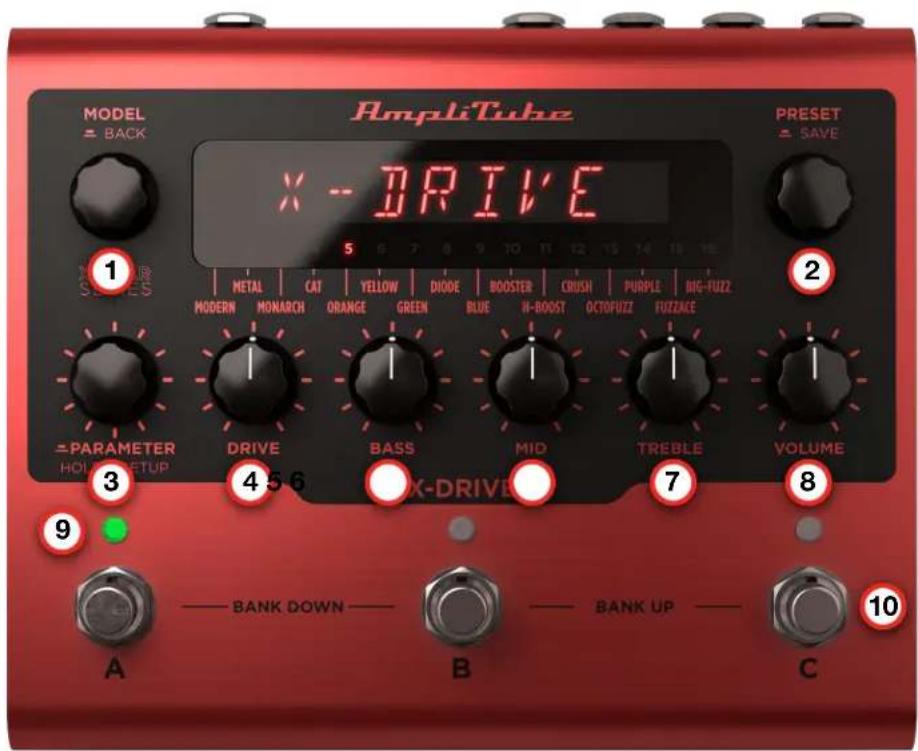
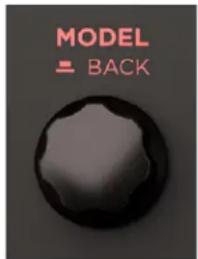
1. MODEL encoder
Turn the MODEL encoder to select the preferred X-DRIVE model among the 16 advanced algorithms available.
Push to go back when browsing menus.
2. PRESET encoder
Turn the PRESET encoder to browse among the 300 preset slots available in the machine.
Push to save a preset and choose its name and bank position.
3. PARAMETER encoder
Each model inside X-DRIVE has its own parameter set.
Push the PARAMETER encoder to access the additional parameters of the selected model. The last edited parameter is always available by pressing or rotating the parameter encoder.
Hold the PARAMETER encoder to access the global and preset setups.
4. DRIVE knob
The DRIVE knob increases the amount of clipping in the distortion circuit.
5. BASS knob
The BASS knob boosts and cuts the low frequencies.
6. MID knob
The MID knob boosts and cuts the mid frequencies.
7. TREBLE knob
The TREBLE knob boosts and cuts the high frequencies.
8. VOLUME knob
The VOLUME knob sets the output level.
9. A, B & C LEDs
Green if preset is active.
Amber if preset has been edited.
Blinking amber when browsing among banks.
Off if bypassed.
10. A, B & C footswitches
Press to engage or bypass preset of the current bank.
Hold while preset is ON to access the X-MODE for selected model.
Hold while preset is OFF to activate that preset temporary while the footswitch is held down.
Press A+B to select a lower bank.
Press B+C to select a higher bank.
Rear Panel Overview
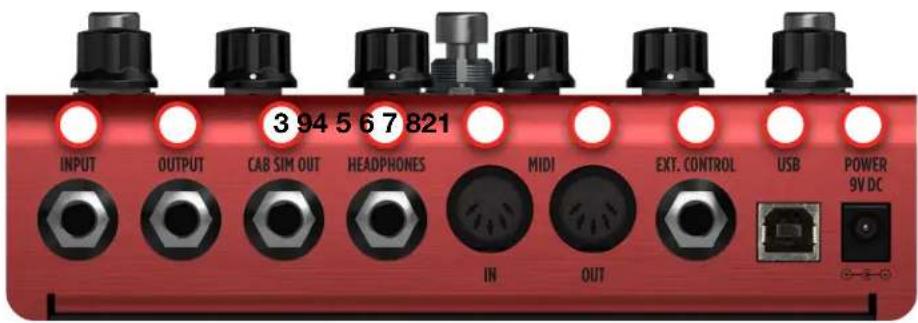
1. INPUT
Plug your instrument in here.
2. OUTPUT
Connect to an amplifier or stomp box.
3. CAB SIM OUT
This is the cabinet simulator output that can be connected directly to a full range speaker, PA system or other devices.
4. HEADPHONES
Connect a pair of headphones to monitor your sound quietly.
5. MIDI IN
Connect to external MIDI controllers to automatically browse presets and modulate parameters via control changes.
6. MIDI OUT
Connect to external MIDI devices. Through this port X-DRIVE can send out MIDI messages anytime a switch is pressed or a knob is turned.
7. EXT. CONTROL
Hook up an external expression or single switch pedal to control any combinations of parameters with a single action.
Hook up a double switch pedal to easily move among banks or presets.
8. USB
Use this port to connect X-DRIVE to your Mac/PC as an audio interface and for using the Librarian app to organize and load presets. It can also be used to send or receive MIDI signals.
9. POWER 9V DC
Power the pedal via a 9V DC center negative power supply. At least 260mA.
Firmware update
Before doing anything with your X-GEAR pedal it's highly recommended to hook it up to the X-GEAR Librarian and check if any firmware update is available to make sure you are running the most updated and stable firmware available.
To do so:
- Install the X-GEAR librarian on your computer following the instructions found in the box.
- Connect your pedal to your computer using the provided USB cable.
- Launch the X-GEAR librarian and select the connected pedal.
- Click the top right gear icon and click "Check for updates."
- If the librarian or the X-GEAR need to be updated, you'll be asked to do so and by clicking "Update" you'll start the updating process.
After updating you can start using your X-GEAR pedal.
Saving presets
To quickly save a preset, hold down the PRESET encoder until the display shows SAVED. The preset will be saved with the same name in the same location.
To change name or location when saving a preset:
- Press the PRESET encoder to enter the saving process.
- The first letter of the preset's name starts blinking indicating the cursor's position.
- Rename the preset:
a. Turn the PRESET encoder to select a character.
b. Turn the MODEL encoder to change the cursor's position.
-
Push the PRESET encoder to confirm the name.
-
The display shows a location (bank-number and slot).
-
Rotate the PRESET encoder to select the desired location.
-
Push the PRESET encoder to select the location an save the preset with the chosen name in the chosen location.
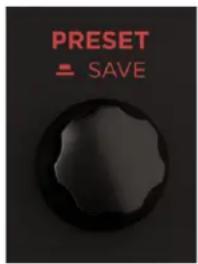
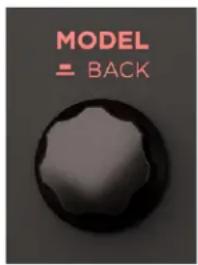
N.B. When choosing a different location saving a preset will overwrite the preset that was previously stored in that location and the new one gets copied over it.
External Control Setup
The EXT. CONTROL jack can be connected to various types of external pedals:
- Expression pedal
- Single switch
- Double switch
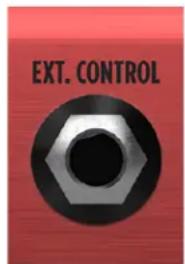
Expression pedal & single switch (creating macros)
An expression pedal and a single switch pedal can be assigned to a parameter or to various parameters to create macros. A macro is an ensemble of parameters, which can be modulated simultaneously via the external control.
To setup a macro on the selected preset using an expression pedal or a single switch pedal, do as follows:
- Hook it up to the EXT. CONTROL.
- Hold the PARAMETER encoder and choose GLOBAL SETUP.
- Select EXT. CTRL and choose one of the following:
a. TRS EXP PEDAL: if you are using a TRS type expression pedal.
b. RTS EXP PEDAL: if you are using a RTS type expression pedal.
c. N.O. SWITCH: if you are using a normally open single switch pedal.
d. N.C. SWITCH: if you are using a normally close single switch pedal.
-
Press the MODEL knob to go back and choose PRESET SETUP.
-
In the PRESET SETUP menu, select ON from the EXT. CTRL option.
-
Come back to the PRESET SETUP menu, select EXT. LEARN and choose LEARN.
-
While LEARN A is being displayed, position the parameters of the preset as you wish they would be when the external control is in position A, then press the PRESET encoder when the A setup is done.
-
While LEARN B is being displayed, position the parameters of the preset as you wish they would be when the external control is in position B, then press the PRESET encoder when the B setup is done.
-
Once the SAVE button (PRESET encoder) is pressed, the pedal returns to its default behavior and the macro is assigned to the external control.
N.B.
In a single switch pedal position A refers to the off status. In an expression pedal position A refers to the heel status.
In a single switch pedal position B refers to the on status. In an expression pedal position B refers to the tip status.
The only difference between a single switch or an expression pedal is that with the first one changing from position A to position B is an instant transition (pressing the footswitch), while the second one is a smooth transition (moving the expression pedal).
Double switch
Connect a double switch pedal to browse among presets or banks more easily.
To setup a double switch pedal do as follows:
- Hook it up to the EXT. CONTROL.
- Hold the PARAMETER encoder and choose GLOBAL SETUP.
- Select EXT. CTRL and choose N.O. DUAL SWITCH, if your double switch pedal is normally open or N.C. DUAL SWITCH, if your double switch pedal is normally closed.
- In the GLOBAL SETUP browse to DUAL SWITCH MODE and choose BANK, if you want to use your double switch pedal to move among banks or PRESET, if you want it to move among presets.
Expression pedal calibration
If you feel that your expression pedal doesn't work as expected, you may need to calibrate it to get its full functionality.
To calibrate an expression pedal do as follows:
- Hook it up to the EXT. CONTROL in the rear panel.
- Hold the PARAMETER encoder and choose GLOBAL SETUP.
- In the GLOBAL SETUP select EXP. CALIBRATION.
- While HEEL is being displayed move your expression pedal to its heel position then press the PARAMETER encoder to confirm.
- While TIP is being displayed move your expression pedal to its tip position then press the PARAMETER encoder to confirm.
- When the display shows DONE, the calibration is set.
Distortion Models
MODERN
This overdrive adds pleasing harmonics for a tube-like sound. It recreates creamy saturation with a solid warm low end.
Parameters
- DRIVE: increases the amount of clipping in the distortion circuit. From 0 to 10.
- BASS: boosts and cuts the low frequencies. From -6 dB to +6 dB.
- MID: boosts and cuts the mid frequencies. From -6 dB to +6 dB.
- TREBLE: boosts and cuts the high frequencies. From -6 dB to +6 dB.
• VOLUME: sets the output level. From 0 to 10.
• COLOR: controls the tone of the distortion. From 0 to 10. - MID Q: sets the bandwidth of the mid parameter EQ from narrow to wide. From 0.2 to 3.
- MID FREQ: changes the center frequency of the mid parametric EQ. From 80 Hz to 5000 Hz.
- EQ POSITION: sets the tone EQ pre or post clipping. PRE or POST.
- NOISE GATE: turns the noise gate ON or OFF. ON or OFF.
- NG THRESHOLD: adjusts the sensitivity of the gate's threshold. From -100 dB to 0 dB.
- NG RELEASE: adjusts the time of the gate's release. From 20 ms to 1500 ms.
- NG DEPTH: adjusts the gate's deepness. From -20 dB to -100 dB.
- COMPRESSOR: turns the compressor ON or OFF. ON or OFF.
- COMP SENSITIVITY: sets the sensitivity of the compressor. From 0 to 10.
- COMP OUT: sets the output level of the compressor. From 0 to 10.
-
CAB SIM: selects the cabinet simulator. CAB 1, CAB 2, CAB 3, CAB 4, BASS, OFF.
-
MIX: regulates the amount of the dry and wet distorted signal. By default, the mix is set to 100% WET. From 0% to 100%.
- X-MODE: the X-MODE boosts the output signal to achieve more volume in certain parts during the performance.
ON or OFF.
N.B. If you also want the Cab Sim when the pedal is bypassed, the BUFFER BYPASS MODE is required.
MODERN Control Changes
| Parameter Control Change # Values | ||
| DRIVE 21 0 - 127 | ||
| BASS 22 0 - 127 | ||
| MID 23 0 - 127 | ||
| TREBLE 24 0 - 127 | ||
| VOLUME 25 0 - 127 | ||
| COLOR 46 0 - 127 | ||
| MID Q 47 0 - 127 | ||
| MID FREQ 48 0 - 127 | ||
| EQ POSITION | 49 0 - 127 | |
| NOISE GATE | 50 0 - 127 | |
| NG THRESHOLD | 51 0 - 127 | |
| NG RELEASE | 52 0 - 127 | |
| NG DEPTH | 53 0 - 127 | |
| COMPRESSOR | 54 0 - 127 | |
| COMP SENSITIVITY | 55 0 - 127 | |
| COMP OUT | 56 0 - 127 | |
| CAB SIM 57 0 - 127 | ||
| MIX | 58 0 - 127 | |
| X-MODE | 13 0 - 127 |
When a parameter range is not linear its values are equally divided among the 128 steps of a Control Change value.
METAL
Based on BOSS® MT-2
Inspired by one of the most favorite metal pedals of all time, perfect for extreme gain and sustain. Nothing compares to this pedal for pure distortion mayhem. It features punch, color and presence to sculpt the perfect high gain tone under your feet.
Parameters
- DRIVE: increases the amount of clipping in the distortion circuit. From 0 to 10.
- BASS: boosts and cuts the low frequencies. From -6 dB to +6 dB.
- MID: boosts and cuts the mid frequencies. From -6 dB to +6 dB.
- TREBLE: boosts and cuts the high frequencies. From -6 dB to +6 dB.
• VOLUME: sets the output level. From 0 to 10.
- PUNCH: boosts the low frequencies. From -15 dB to 15 dB.
- COLOR: enhance the mid-frequency response. From -15 dB to +15 dB.
- COLOR FREQ: selects the mid-frequency for the COLOR parameter. From 300 Hz to 6000 Hz.
- PRESENCE: boosts the high frequencies. From -15 dB to +15 dB.
- MID Q: sets the bandwidth of the mid parameter EQ from narrow to wide. From 0.2 to 3.
- MID FREQ: changes the center frequency of the mid parametric EQ. From 80 Hz to 5000 Hz.
- EQ POSITION: sets the tone EQ pre or post clipping. PRE or POST.
- NOISE GATE: turns the noise gate ON or OFF. ON or OFF.
- NG THRESHOLD: adjusts the sensitivity of the gate's threshold. From -100 dB to 0 dB.
- NG RELEASE: adjusts the time of the gate's release. From 20 ms to 1500 ms.
- NG DEPTH: adjusts the gate's deepness. From -20 dB to -100 dB.
- COMPRESSOR: turns the compressor ON or OFF. ON or OFF.
- COMP SENSITIVITY: sets the sensitivity of the compressor. From 0 to 10.
- COMP OUT: sets the output level of the compressor. From 0 to 10.
- CAB SIM: selects the cabinet simulator. CAB 1, CAB 2, CAB 3, CAB 4, BASS, OFF.
- MIX: regulates the amount of the dry and wet distorted signal. By default, the mix is set to 100% WET. From 0% to 100%.
- X-MODE: the X-MODE boosts the output signal to achieve more volume in certain parts during the performance. ON or OFF.
N.B. If you also want the Cab Sim when the pedal is bypassed, the BUFFER BYPASS MODE is required.
METAL Control Changes
| Parameter Control Change # Values | ||
| DRIVE 21 0 - 127 | ||
| BASS 22 0 - 127 | ||
| MID 23 0 - 127 | ||
| TREBLE 24 0 - 127 | ||
| VOLUME 25 0 - 127 | ||
| PUNCH 46 0 - 127 | ||
| COLOR 47 0 - 127 | ||
| COLOR FREQ | 48 0 - 127 | |
| PRESENCE | 49 0 - 127 | |
| MID Q | 50 0 - 127 | |
| MID FREQ | 51 0 - 127 | |
| EQ POSITION | 52 0 - 127 | |
| NOISE GATE | 53 0 - 127 | |
| NG THRESHOLD | 54 0 - 127 | |
| NG RELEASE | 55 0 - 127 | |
| NG DEPTH | 56 0 - 127 | |
| COMPRESSOR | 57 0 - 127 | |
| COMP SENSITIVITY | 58 0 - 127 | |
| COMP OUT | 59 0 - 127 | |
| CAB SIM 60 0 - 127 | ||
| MIX | 61 0 - 127 | |
| X-MODE | 13 0 - 127 |
When a parameter range is not linear its values are equally divided among the 128 steps of a Control Change value.
MONARCH
Based on Marshall® Guv'Nor.
This pedal is a model of a beloved ‘80s-era distortion pedal by a company known for making amps with amazing distortion.
Parameters
- DRIVE: increases the amount of clipping in the distortion circuit. From 0 to 10.
- BASS: boosts and cuts the low frequencies. From -6 dB to +6 dB.
- MID: boosts and cuts the mid frequencies. From -6 dB to +6 dB.
- TREBLE: boosts and cuts the high frequencies. From -6 dB to +6 dB.
• VOLUME: sets the output level. From 0 to 10.
- COLOR: controls the tone of the distortion pedal. From 0 to 10.
- MID Q: sets the bandwidth of the mid parameter EQ from narrow to wide. From 0.2 to 3.
- MID FREQ: changes the center frequency of the mid parametric EQ. From 80 Hz to 5000 Hz.
- EQ POSITION: sets the tone EQ pre or post clipping. PRE or POST.
- NOISE GATE: turns the noise gate ON or OFF. ON or OFF.
- NG THRESHOLD: adjusts the sensitivity of the gate's threshold. From -100 dB to 0 dB.
- NG RELEASE: adjusts the time of the gate's release. From 20 ms to 1500 ms.
- NG DEPTH: adjusts the gate's deepness. From -20 dB to -100 dB.
- COMPRESSOR: turns the compressor ON or OFF. ON or OFF.
- COMP SENSITIVITY: sets the sensitivity of the compressor. From 0 to 10.
- COMP OUT: sets the output level of the compressor. From 0 to 10.
- CAB SIM: selects the cabinet simulator. CAB 1, CAB 2, CAB 3, CAB 4, BASS, OFF.
- MIX: regulates the amount of the dry and wet distorted signal. By default, the mix is set to 100% WET. From 0% to 100%.
- X-MODE: the X-MODE boosts the output signal to achieve more volume in certain parts during the performance. ON or OFF.
N.B. If you also want the Cab Sim when the pedal is bypassed, the BUFFER BYPASS MODE is required.
MONARCH Control Changes
| Parameter Control Change # Values | ||
| DRIVE 21 0 - 127 | ||
| BASS 22 0 - 127 | ||
| MID 23 0 - 127 | ||
| TREBLE 24 0 - 127 | ||
| VOLUME 25 0 - 127 | ||
| COLOR 46 0 - 127 | ||
| MID Q 47 0 - 127 | ||
| MID FREQ 48 0 - 127 | ||
| EQ POSITION | 49 0 - 127 | |
| NOISE GATE | 50 0 - 127 | |
| NG THRESHOLD | 51 0 - 127 | |
| NG RELEASE | 52 0 - 127 | |
| NG DEPTH | 53 0 - 127 | |
| COMPRESSOR | 54 0 - 127 | |
| COMP SENSITIVITY | 55 0 - 127 | |
| COMP OUT | 56 0 - 127 | |
| CAB SIM 57 0 - 127 | ||
| MIX | 58 0 - 127 | |
| X-MODE | 13 0 - 127 |
When a parameter range is not linear its values are equally divided among the 128 steps of a Control Change value.
CAT
Based on ProCo® Rat™
One of the most beloved distortion boxes ever. From smooth, light crunch, to extreme shred sustain offering a fuzz-like flavor. This pedal has been a classic ever since its release in the early '80s.
Parameters
- DRIVE: increases the amount of clipping in the distortion circuit. From 0 to 10.
- BASS: boosts and cuts the low frequencies. From -6 dB to +6 dB.
- MID: boosts and cuts the mid frequencies. From -6 dB to +6 dB.
- TREBLE: boosts and cuts the high frequencies. From -6 dB to +6 dB.
• VOLUME: sets the output level. From 0 to 10.
- COLOR: controls the tone of the distortion. From 0 to 10.
- MID Q: sets the bandwidth of the mid parameter EQ from narrow to wide. From 0.2 to 3.
- MID FREQ: changes the center frequency of the mid parametric EQ. From 80 Hz to 5000 Hz.
- EQ POSITION: sets the tone EQ pre or post clipping. PRE or POST.
- NOISE GATE: turns the noise gate ON or OFF. ON or OFF.
- NG THRESHOLD: adjusts the sensitivity of the gate's threshold. From -100 dB to 0 dB.
- NG RELEASE: adjusts the time of the gate's release. From 20 ms to 1500 ms.
- NG DEPTH: adjusts the gate's deepness. From -20 dB to -100 dB.
- COMPRESSOR: turns the compressor ON or OFF. ON or OFF.
- COMP SENSITIVITY: sets the sensitivity of the compressor. From 0 to 10.
- COMP OUT: sets the output level of the compressor. From 0 to 10.
- CAB SIM: selects the cabinet simulator. CAB 1, CAB 2, CAB 3, CAB 4, BASS, OFF.
- MIX: regulates the amount of the dry and wet distorted signal. By default, the mix is set to 100% WET. From 0% to 100%.
- X-MODE: the X-MODE boosts the output signal to achieve more volume in certain parts during the performance. ON or OFF.
N.B. If you also want the Cab Sim when the pedal is bypassed, the BUFFER BYPASS MODE is required.
CAT Control Changes
| Parameter Control Change # Values | ||
| DRIVE 21 0 - 127 | ||
| BASS 22 0 - 127 | ||
| MID 23 0 - 127 | ||
| TREBLE 24 0 - 127 | ||
| VOLUME 25 0 - 127 | ||
| COLOR 46 0 - 127 | ||
| MID Q 47 0 - 127 | ||
| MID FREQ 48 0 - 127 | ||
| EQ POSITION | 49 0 - 127 | |
| NOISE GATE | 50 0 - 127 | |
| NG THRESHOLD | 51 0 - 127 | |
| NG RELEASE | 52 0 - 127 | |
| NG DEPTH | 53 0 - 127 | |
| COMPRESSOR | 54 0 - 127 | |
| COMP SENSITIVITY | 55 0 - 127 | |
| COMP OUT | 56 0 - 127 | |
| CAB SIM 57 0 - 127 | ||
| MIX | 58 0 - 127 | |
| X-MODE | 13 0 - 127 |
When a parameter range is not linear its values are equally divided among the 128 steps of a Control Change value.
ORANGE
Based on BOSS® DS-1
This is one of the most versatile distortion boxes ever made. From subtle crunch to complete craziness, this pedal has been used by countless guitarists of all styles from classic rock to grunge.
Parameters
- DRIVE: increases the amount of clipping in the distortion circuit. From 0 to 10.
- BASS: boosts and cuts the low frequencies. From -6 dB to +6 dB.
- MID: boosts and cuts the mid frequencies. From -6 dB to +6 dB.
- TREBLE: boosts and cuts the high frequencies. From -6 dB to +6 dB.
• VOLUME: sets the output level. From 0 to 10.
- COLOR: controls the tone of the distortion. From 0 to 10.
- MID Q: sets the bandwidth of the mid parameter EQ from narrow to wide. From 0.2 to 3.
- MID FREQ: changes the center frequency of the mid parametric EQ. From 80 Hz to 5000 Hz.
- EQ POSITION: sets the tone EQ pre or post clipping. PRE or POST.
- NOISE GATE: turns the noise gate ON or OFF. ON or OFF.
- NG THRESHOLD: adjusts the sensitivity of the gate's threshold. From -100 dB to 0 dB.
- NG RELEASE: adjusts the time of the gate's release. From 20 ms to 1500 ms.
- NG DEPTH: adjusts the gate's deepness. From -20 dB to -100 dB.
- COMPRESSOR: turns the compressor ON or OFF. ON or OFF.
- COMP SENSITIVITY: sets the sensitivity of the compressor. From 0 to 10.
- COMP OUT: sets the output level of the compressor. From 0 to 10.
- CAB SIM: selects the cabinet simulator. CAB 1, CAB 2, CAB 3, CAB 4, BASS, OFF.
- MIX: regulates the amount of the dry and wet distorted signal. By default the mix is set to 100% WET. From 0% to 100%.
- X-MODE: the X-MODE boosts the output signal to achieve more volume in certain parts during the performance. ON or OFF.
N.B. If you also want the Cab Sim when the pedal is bypassed, the BUFFER BYPASS MODE is required.
ORANGE Control Changes
| Parameter Control Change # Values | ||
| DRIVE 21 0 - 127 | ||
| BASS 22 0 - 127 | ||
| MID 23 0 - 127 | ||
| TREBLE 24 0 - 127 | ||
| VOLUME 25 0 - 127 | ||
| COLOR 46 0 - 127 | ||
| MID Q 47 0 - 127 | ||
| MID FREQ 48 0 - 127 | ||
| EQ POSITION | 49 0 - 127 | |
| NOISE GATE | 50 0 - 127 | |
| NG THRESHOLD | 51 0 - 127 | |
| NG RELEASE | 52 0 - 127 | |
| NG DEPTH | 53 0 - 127 | |
| COMPRESSOR | 54 0 - 127 | |
| COMP SENSITIVITY | 55 0 - 127 | |
| COMP OUT | 56 0 - 127 | |
| CAB SIM 57 0 - 127 | ||
| MIX | 58 0 - 127 | |
| X-MODE | 13 0 - 127 |
When a parameter range is not linear its values are equally divided among the 128 steps of a Control Change value.
YELLOW
Based on BOSS® SD-1
One of the earliest and most collectible Japanese pedals, it's one of the most iconic overdrive pedals ever made. From subtle to over-the-top, it pushes amps harder without sacrificing attack clarity.
Parameters
- DRIVE: increases the amount of clipping in the distortion circuit. From 0 to 10.
- BASS: boosts and cuts the low frequencies. From -6 dB to +6 dB.
- MID: boosts and cuts the mid frequencies. From -6 dB to +6 dB.
- TREBLE: boosts and cuts the high frequencies. From -6 dB to +6 dB.
• VOLUME: sets the output level. From 0 to 10.
- COLOR: controls the tone of the distortion. From 0 to 10.
- MID Q: sets the bandwidth of the mid parameter EQ from narrow to wide. From 0.2 to 3.
- MID FREQ: changes the center frequency of the mid parametric EQ. From 80 Hz to 5000 Hz.
- EQ POSITION: sets the tone EQ pre or post clipping. PRE or POST.
- NOISE GATE: turns the noise gate ON or OFF. ON or OFF.
- NG THRESHOLD: adjusts the sensitivity of the gate's threshold. From -100 dB to 0 dB.
- NG RELEASE: adjusts the time of the gate's release. From 20 ms to 1500 ms.
- NG DEPTH: adjusts the gate's deepness. From -20 dB to -100 dB.
- COMPRESSOR: turns the compressor ON or OFF. ON or OFF.
- COMP SENSITIVITY: sets the sensitivity of the compressor. From 0 to 10.
- COMP OUT: sets the output level of the compressor. From 0 to 10.
- CAB SIM: selects the cabinet simulator. CAB 1, CAB 2, CAB 3, CAB 4, BASS, OFF.
- MIX: regulates the amount of the dry and wet distorted signal. By default the mix is set to 100% WET. From 0% to 100%.
- X-MODE: the X-MODE boosts the output signal to achieve more volume in certain parts during the performance. ON or OFF.
N.B. If you also want the Cab Sim when the pedal is bypassed, the BUFFER BYPASS MODE is required.
YELLOW Control Changes
| Parameter Control Change # Values | ||
| DRIVE 21 0 - 127 | ||
| BASS 22 0 - 127 | ||
| MID 23 0 - 127 | ||
| TREBLE 24 0 - 127 | ||
| VOLUME 25 0 - 127 | ||
| COLOR 46 0 - 127 | ||
| MID Q 47 0 - 127 | ||
| MID FREQ 48 0 - 127 | ||
| EQ POSITION | 49 0 - 127 | |
| NOISE GATE | 50 0 - 127 | |
| NG THRESHOLD | 51 0 - 127 | |
| NG RELEASE | 52 0 - 127 | |
| NG DEPTH | 53 0 - 127 | |
| COMPRESSOR | 54 0 - 127 | |
| COMP SENSITIVITY | 55 0 - 127 | |
| COMP OUT | 56 0 - 127 | |
| CAB SIM 57 0 - 127 | ||
| MIX | 58 0 - 127 | |
| X-MODE | 13 0 - 127 |
When a parameter range is not linear its values are equally divided among the 128 steps of a Control Change value.
GREEN
Based on Ibanez® Tube Screamer
This is a model of the classic overdrive/distortion pedal, which has become the go-to overdrive pedal for some of the most influential guitar players of all time. It helps to boost the mid frequencies keeping great transient response.
Parameters
- DRIVE: increases the amount of clipping in the distortion circuit. From 0 to 10.
- BASS: boosts and cuts the low frequencies. From -6 dB to +6 dB.
- MID: boosts and cuts the mid frequencies. From -6 dB to +6 dB.
- TREBLE: boosts and cuts the high frequencies. From -6 dB to +6 dB.
• VOLUME: sets the output level. From 0 to 10.
- COLOR: controls the tone of the distortion. From 0 to 10.
- MID Q: sets the bandwidth of the mid parameter EQ from narrow to wide. From 0.2 to 3.
- MID FREQ: changes the center frequency of the mid parametric EQ. From 80 Hz to 5000 Hz.
- EQ POSITION: sets the tone EQ pre or post clipping. PRE or POST.
- NOISE GATE: turns the noise gate ON or OFF. ON or OFF.
- NG THRESHOLD: adjusts the sensitivity of the gate's threshold. From -100 dB to 0 dB.
- NG RELEASE: adjusts the time of the gate's release. From 20 ms to 1500 ms.
- NG DEPTH: adjusts the gate's deepness. From -20 dB to -100 dB.
- COMPRESSOR: turns the compressor ON or OFF. ON or OFF.
- COMP SENSITIVITY: sets the sensitivity of the compressor. From 0 to 10.
- COMP OUT: sets the output level of the compressor. From 0 to 10.
- CAB SIM: selects the cabinet simulator. CAB 1, CAB 2, CAB 3, CAB 4, BASS, OFF.
- MIX: regulates the amount of the dry and wet distorted signal. By default the mix is set to 100% WET. From 0% to 100%.
- X-MODE: the X-MODE boosts the output signal to achieve more volume in certain parts during the performance.
ON or OFF.
N.B. If you also want the Cab Sim when the pedal is bypassed, the BUFFER BYPASS MODE is required.
GREEN Control Changes
| Parameter Control Change # Values | ||
| DRIVE 21 0 - 127 | ||
| BASS 22 0 - 127 | ||
| MID 23 0 - 127 | ||
| TREBLE 24 0 - 127 | ||
| VOLUME 25 0 - 127 | ||
| COLOR 46 0 - 127 | ||
| MID Q 47 0 - 127 | ||
| MID FREQ 48 0 - 127 | ||
| EQ POSITION | 49 0 - 127 | |
| NOISE GATE | 50 0 - 127 | |
| NG THRESHOLD | 51 0 - 127 | |
| NG RELEASE | 52 0 - 127 | |
| NG DEPTH | 53 0 - 127 | |
| COMPRESSOR | 54 0 - 127 | |
| COMP SENSITIVITY | 55 0 - 127 | |
| COMP OUT | 56 0 - 127 | |
| CAB SIM 57 0 - 127 | ||
| MIX | 58 0 - 127 | |
| X-MODE | 13 0 - 127 |
When a parameter range is not linear its values are equally divided among the 128 steps of a Control Change value.
DIODE
Based on MXR® Distortion+
This model is perfect to pump up your amplifier from light overdrives to dense distortions.
Parameters
- DRIVE: increases the amount of clipping in the distortion circuit. From 0 to 10.
- BASS: boosts and cuts the low frequencies. From -6 dB to +6 dB.
- MID: boosts and cuts the mid frequencies. From -6 dB to +6 dB.
- TREBLE: boosts and cuts the high frequencies. From -6 dB to +6 dB.
• VOLUME: sets the output level. From 0 to 10.
- MID Q: sets the bandwidth of the mid parameter EQ from narrow to wide. From 0.2 to 3.
- MID FREQ: changes the center frequency of the mid parametric EQ. From 80 Hz to 5000 Hz.
- EQ POSITION: sets the tone EQ pre or post clipping. PRE or POST.
- NOISE GATE: turns the noise gate ON or OFF. ON or OFF.
- NG THRESHOLD: adjusts the sensitivity of the gate's threshold. From -100 dB to 0 dB.
- NG RELEASE: adjusts the time of the gate's release. From 20 ms to 1500 ms.
- NG DEPTH: adjusts the gate's deepness. From -20 dB to -100 dB.
- COMPRESSOR: turns the compressor ON or OFF. ON or OFF.
- COMP SENSITIVITY: sets the sensitivity of the compressor. From 0 to 10.
- COMP OUT: sets the output level of the compressor. From 0 to 10.
- CAB SIM: selects the cabinet simulator. CAB 1, CAB 2, CAB 3, CAB 4, BASS, OFF.
- MIX: regulates the amount of the dry and wet distorted signal. By default the mix is set to 100% WET. From 0% to 100%.
- X-MODE: the X-MODE boosts the output signal to achieve more volume in certain parts during the performance. ON or OFF.
N.B. If you also want the Cab Sim when the pedal is bypassed, the BUFFER BYPASS MODE is required.
DIODE Control Changes
| Parameter Control Change # Values | ||
| DRIVE 21 0 - 127 | ||
| BASS 22 0 - 127 | ||
| MID 23 0 - 127 | ||
| TREBLE 24 0 - 127 | ||
| VOLUME 25 0 - 127 | ||
| MID Q 46 0 - 127 | ||
| MID FREQ 47 0 - 127 | ||
| EQ POSITION 48 0 - 127 | ||
| NOISE GATE 49 0 - 127 | ||
| NG THRESHOLD 50 0 - 127 | ||
| NG RELEASE | 51 0 - 127 | |
| NG DEPTH | 52 0 - 127 | |
| COMPRESSOR | 53 0 - 127 | |
| COMP SENSITIVITY | 54 0 - 127 | |
| COMP OUT | 55 0 - 127 | |
| CAB SIM 56 0 - 127 | ||
| MIX | 57 0 - 127 | |
| X-MODE | 13 0 - 127 |
When a parameter range is not linear its values are equally divided among the 128 steps of a Control Change value.
BLUE
A very versatile model, which is the best fit for creamy jazz tones and crunchy blues lines.
Parameters
- DRIVE: increases the amount of clipping in the distortion circuit. From 0 to 10.
- BASS: boosts and cuts the low frequencies. From -6 dB to +6 dB.
- MID: boosts and cuts the mid frequencies. From -6 dB to +6 dB.
- TREBLE: boosts and cuts the high frequencies. From -6 dB to +6 dB.
• VOLUME: sets the output level. From 0 to 10.
- COLOR: controls the tone of the distortion. From 0 to 10.
- MID Q: sets the bandwidth of the mid parameter EQ from narrow to wide. From 0.2 to 3.
- MID FREQ: changes the center frequency of the mid parametric EQ. From 80 Hz to 5000 Hz.
- EQ POSITION: sets the tone EQ pre or post clipping. PRE or POST.
- NOISE GATE: turns the noise gate ON or OFF. ON or OFF.
- NG THRESHOLD: adjusts the sensitivity of the gate's threshold. From -100 dB to 0 dB.
- NG RELEASE: adjusts the time of the gate's release. From 20 ms to 1500 ms.
- NG DEPTH: adjusts the gate's deepness. From -20 dB to -100 dB.
- COMPRESSOR: turns the compressor ON or OFF. ON or OFF.
- COMP SENSITIVITY: sets the sensitivity of the compressor. From 0 to 10.
- COMP OUT: sets the output level of the compressor. From 0 to 10.
- CAB SIM: selects the cabinet simulator. CAB 1, CAB 2, CAB 3, CAB 4, BASS, OFF.
- MIX: regulates the amount of the dry and wet distorted signal. By default the mix is set to 100% WET. From 0% to 100%.
- X-MODE: the X-MODE boosts the output signal to achieve more volume in certain parts during the performance. ON or OFF.
N.B. If you also want the Cab Sim when the pedal is bypassed, the BUFFER BYPASS MODE is required.
BLUE Control Changes
| Parameter Control Change # Values | ||
| DRIVE 21 0 - 127 | ||
| BASS 22 0 - 127 | ||
| MID 23 0 - 127 | ||
| TREBLE 24 0 - 127 | ||
| VOLUME 25 0 - 127 | ||
| COLOR 46 0 - 127 | ||
| MID Q 47 0 - 127 | ||
| MID FREQ 48 0 - 127 | ||
| EQ POSITION 49 0 - 127 | ||
| NOISE GATE 50 0 - 127 | ||
| NG THRESHOLD | 51 0 - 127 | |
| NG RELEASE | 52 0 - 127 | |
| NG DEPTH | 53 0 - 127 | |
| COMPRESSOR | 54 0 - 127 | |
| COMP SENSITIVITY | 55 0 - 127 | |
| COMP OUT | 56 0 - 127 | |
| CAB SIM 57 0 - 127 | ||
| MIX | 58 0 - 127 | |
| X-MODE | 13 0 - 127 |
When a parameter range is not linear its values are equally divided among the 128 steps of a Control Change value.
BOOSTER
A booster to increase the level of the instrument going into the amplifier in order to add harmonics and increase the overall saturation for solo parts and whenever your instrument needs to come up over the others.
Parameters
- DRIVE: not available.
- BASS: boosts and cuts the low frequencies. From -6 dB to +6 dB.
- MID: boosts and cuts the mid frequencies. From -6 dB to +6 dB.
- TREBLE: boosts and cuts the high frequencies. From -6 dB to +6 dB.
• VOLUME: boosts the overall output level. From 0 to 10.
- MID Q: sets the bandwidth of the mid parameter EQ from narrow to wide. From 0.2 to 3.
- MID FREQ: changes the center frequency of the mid parametric EQ. From 80 Hz to 5000 Hz.
- EQ POSITION: sets the tone EQ pre or post clipping. PRE or POST.
- NOISE GATE: turns the noise gate ON or OFF. ON or OFF.
- NG THRESHOLD: adjusts the sensitivity of the gate's threshold. From -100 dB to 0 dB.
- NG RELEASE: adjusts the time of the gate's release. From 20 ms to 1500 ms.
- NG DEPTH: adjusts the gate's deepness. From -20 dB to -100 dB.
- COMPRESSOR: turns the compressor ON or OFF. ON or OFF.
- COMP SENSITIVITY: sets the sensitivity of the compressor. From 0 to 10.
- COMP OUT: sets the output level of the compressor. From 0 to 10.
- CAB SIM: selects the cabinet simulator. CAB 1, CAB 2, CAB 3, CAB 4, BASS, OFF.
- MIX: regulates the amount of the dry and wet distorted signal. By default the mix is set to 100% WET. From 0% to 100%.
- X-MODE: the X-MODE boosts the output signal to achieve more volume in certain parts during the performance. ON or OFF.
N.B. If you also want the Cab Sim when the pedal is bypassed, the BUFFER BYPASS MODE is required.
BOOSTER Control Changes
| Parameter Control Change # Values | ||
| BASS 22 0 - 127 | ||
| MID 23 0 - 127 | ||
| TREBLE 24 0 - 127 | ||
| VOLUME 25 0 - 127 | ||
| MID Q 46 0 - 127 | ||
| MID FREQ 47 0 - 127 | ||
| EQ POSITION 48 0 - 127 | ||
| NOISE GATE 49 0 - 127 | ||
| NG THRESHOLD 50 0 - 127 | ||
| NG RELEASE 51 0 - 127 | ||
| NG DEPTH | 52 0 - 127 | |
| COMPRESSOR | 53 0 - 127 | |
| COMP SENSITIVITY | 54 0 - 127 | |
| COMP OUT | 55 0 - 127 | |
| CAB SIM 56 0 - 127 | ||
| MIX | 57 0 - 127 | |
| X-MODE | 13 0 - 127 |
When a parameter range is not linear its values are equally divided among the 128 steps of a Control Change value.
H-BOOST
A treble booster to increase the presence of the instrument in order to pump up the overall saturation and add some sparkling highs for solo parts and whenever your instrument needs to come up over the others.
Parameters
- DRIVE: not available.
- BASS: boosts and cuts the low frequencies. From -6 dB to +6 dB.
- MID: boosts and cuts the mid frequencies. From -6 dB to +6 dB.
- TREBLE: boosts and cuts the high frequencies. From -6 dB to +6 dB.
• VOLUME: boosts the overall output level. From 0 to 10.
- MID Q: sets the bandwidth of the mid parameter EQ from narrow to wide. From 0.2 to 3.
- MID FREQ: changes the center frequency of the mid parametric EQ. From 80 Hz to 5000 Hz.
- EQ POSITION: sets the tone EQ pre or post clipping. PRE or POST.
- NOISE GATE: turns the noise gate ON or OFF. ON or OFF.
- NG THRESHOLD: adjusts the sensitivity of the gate's threshold. From -100 dB to 0 dB.
- NG RELEASE: adjusts the time of the gate's release. From 20 ms to 1500 ms.
- NG DEPTH: adjusts the gate's deepness. From -20 dB to -100 dB.
- COMPRESSOR: turns the compressor ON or OFF. ON or OFF.
- COMP SENSITIVITY: sets the sensitivity of the compressor. From 0 to 10.
- COMP OUT: sets the output level of the compressor. From 0 to 10.
- CAB SIM: selects the cabinet simulator. CAB 1, CAB 2, CAB 3, CAB 4, BASS, OFF.
- MIX: regulates the amount of the dry and wet distorted signal. By default the mix is set to 100% WET. From 0% to 100%.
- X-MODE: the X-MODE boosts the output signal to achieve more volume in certain parts during the performance. ON or OFF.
N.B. If you also want the Cab Sim when the pedal is bypassed, the BUFFER BYPASS MODE is required.
H-BOOST Control Changes
| Parameter Control Change # Values | ||
| BASS 22 0 - 127 | ||
| MID 23 0 - 127 | ||
| TREBLE 24 0 - 127 | ||
| VOLUME 25 0 - 127 | ||
| MID Q 46 0 - 127 | ||
| MID FREQ 47 0 - 127 | ||
| EQ POSITION 48 0 - 127 | ||
| NOISE GATE 49 0 - 127 | ||
| NG THRESHOLD 50 0 - 127 | ||
| NG RELEASE 51 0 - 127 | ||
| NG DEPTH | 52 0 - 127 | |
| COMPRESSOR | 53 0 - 127 | |
| COMP SENSITIVITY | 54 0 - 127 | |
| COMP OUT | 55 0 - 127 | |
| CAB SIM 56 0 - 127 | ||
| MIX | 57 0 - 127 | |
| X-MODE | 13 0 - 127 |
When a parameter range is not linear its values are equally divided among the 128 steps of a Control Change value.
CRUSH
This model alters the sound of the input signal by changing the sample-rate, cutoff frequency and by distorting it. This effect can produce very aggressive distorted sounds, more pronounced than overdrive stomp boxes. The low-pass filter is very creative when combined with high distortion levels.
Parameters
- DRIVE: increases the amount of clipping in the distortion circuit. From 0 to 10.
- BASS: boosts and cuts the low frequencies. From -6 dB to +6 dB.
- MID: boosts and cuts the mid frequencies. From -6 dB to +6 dB.
- TREBLE: boosts and cuts the high frequencies. From -6 dB to +6 dB.
• VOLUME: sets the output level. From 0 to 10.
- CUTOFF: controls the cut-off frequency for the low-pass filter. From 20 Hz to 20000.
- DECIM: selects the sample rate ratio of the processed sound. From 1 to 15.
- MID Q: sets the bandwidth of the mid parameter EQ from narrow to wide. From 0.2 to 3.
- MID FREQ: changes the center frequency of the mid parametric EQ. From 80 Hz to 5000 Hz.
- EQ POSITION: sets the tone EQ pre or post clipping. PRE or POST.
- NOISE GATE: turns the noise gate ON or OFF. ON or OFF.
- NG THRESHOLD: adjusts the sensitivity of the gate's threshold. From -100 dB to 0 dB.
- NG RELEASE: adjusts the time of the gate's release. From 20 ms to 1500 ms.
- NG DEPTH: adjusts the gate's deepness. From -20 dB to -100 dB.
- COMPRESSOR: turns the compressor ON or OFF. ON or OFF.
- COMP SENSITIVITY: sets the sensitivity of the compressor. From 0 to 10.
- COMP OUT: sets the output level of the compressor. From 0 to 10.
- CAB SIM: selects the cabinet simulator. CAB 1, CAB 2, CAB 3, CAB 4, BASS, OFF.
- MIX: regulates the amount of the dry and wet distorted signal. By default the mix is set to 100% WET. From 0% to 100%.
- X-MODE: the X-MODE boosts the output signal to achieve more volume in certain parts during the performance.
ON or OFF.
N.B. If you also want the Cab Sim when the pedal is bypassed, the BUFFER BYPASS MODE is required.
CRUSH Control Changes
| Parameter Control Change # Values | ||
| DRIVE 21 0 - 127 | ||
| BASS 22 0 - 127 | ||
| MID 23 0 - 127 | ||
| TREBLE 24 0 - 127 | ||
| VOLUME 25 0 - 127 | ||
| CUTOFF 46 0 - 127 | ||
| DECIM 47 0 - 127 | ||
| MID Q 48 0 - 127 | ||
| MID FREQ | 49 0 - 127 | |
| EQ POSITION | 50 0 - 127 | |
| NOISE GATE | 51 0 - 127 | |
| NG THRESHOLD | 52 0 - 127 | |
| NG RELEASE | 53 0 - 127 | |
| NG DEPTH | 54 0 - 127 | |
| COMPRESSOR | 55 0 - 127 | |
| COMP SENSITIVITY | 56 0 - 127 | |
| COMP OUT | 57 0 - 127 | |
| CAB SIM 58 0 - 127 | ||
| MIX | 59 0 - 127 | |
| X-MODE 13 0 - 127 |
When a parameter range is not linear its values are equally divided among the 128 steps of a Control Change value.
OCTOFUZZ
Based on MXR® Blue Box™ Octave Fuzz
This Fuzz/Octave stomp box adds a crazy fuzz to your signal and then duplicates it two octaves down. This is one of the most wicked and overpowering models.
Parameters
- DRIVE: adjusts the ratio of fuzzed signal with octaved signal. From 0 to 10.
- BASS: boosts and cuts the low frequencies. From -6 dB to +6 dB.
- MID: boosts and cuts the mid frequencies. From -6 dB to +6 dB.
- TREBLE: boosts and cuts the high frequencies. From -6 dB to +6 dB.
• VOLUME: sets the output level. From 0 to 10. - MID Q: sets the bandwidth of the mid parameter EQ from narrow to wide. From 0.2 to 3.
- MID FREQ: changes the center frequency of the mid parametric EQ. From 80 Hz to 5000 Hz.
- EQ POSITION: sets the tone EQ pre or post clipping. PRE or POST.
- NOISE GATE: turns the noise gate ON or OFF. ON or OFF.
- NG THRESHOLD: adjusts the sensitivity of the gate's threshold. From -100 dB to 0 dB.
- NG RELEASE: adjusts the time of the gate's release. From 20 ms to 1500 ms.
- NG DEPTH: adjusts the gate's deepness. From -20 dB to -100 dB.
- COMPRESSOR: turns the compressor ON or OFF. ON or OFF.
- COMP SENSITIVITY: sets the sensitivity of the compressor. From 0 to 10.
- COMP OUT: sets the output level of the compressor. From 0 to 10.
- CAB SIM: selects the cabinet simulator. CAB 1, CAB 2, CAB 3, CAB 4, BASS, OFF.
- MIX: regulates the amount of the dry and wet distorted signal. By default the mix is set to 100% WET. From 0% to 100%.
- X-MODE: the X-MODE boosts the output signal to achieve more volume in certain parts during the performance. ON or OFF.
N.B. If you also want the Cab Sim when the pedal is bypassed, the BUFFER BYPASS MODE is required.
OCTOFUZZ Control Changes
| Parameter Control Change # Values | ||
| DRIVE 21 0 - 127 | ||
| BASS 22 0 - 127 | ||
| MID 23 0 - 127 | ||
| TREBLE 24 0 - 127 | ||
| VOLUME 25 0 - 127 | ||
| MID Q 46 0 - 127 | ||
| MID FREQ 47 0 - 127 | ||
| EQ POSITION 48 0 - 127 | ||
| NOISE GATE | 49 0 - 127 | |
| NG THRESHOLD | 50 0 - 127 | |
| NG RELEASE | 51 0 - 127 | |
| NG DEPTH | 52 0 - 127 | |
| COMPRESSOR | 53 0 - 127 | |
| COMP SENSITIVITY | 54 0 - 127 | |
| COMP OUT | 55 0 - 127 | |
| CAB SIM 56 0 - 127 | ||
| MIX | 57 0 - 127 | |
| X-MODE | 13 0 - 127 |
When a parameter range is not linear its values are equally divided among the 128 steps of a Control Change value.
PURPLE
Based on Roger Mayer™ Octavia
This effect was first used on the early Jimi Hendrix songs. It is a fuzz box with frequency-doubling circuitry that produces a second note an octave above the fundamental note. This was first used on “Purple Haze” and “Fire”.
Parameters
- DRIVE: adjusts the ratio of fuzzed signal with octaved signal. From 0 to 10.
- BASS: boosts and cuts the low frequencies. From -6 dB to +6 dB.
- MID: boosts and cuts the mid frequencies. From -6 dB to +6 dB.
- TREBLE: boosts and cuts the high frequencies. From -6 dB to +6 dB.
• VOLUME: sets the output level. From 0 to 10. - MID Q: sets the bandwidth of the mid parameter EQ from narrow to wide. From 0.2 to 3.
- MID FREQ: changes the center frequency of the mid parametric EQ. From 80 Hz to 5000 Hz.
- EQ POSITION: sets the tone EQ pre or post clipping. PRE or POST.
- NOISE GATE: turns the noise gate ON or OFF. ON or OFF.
- NG THRESHOLD: adjusts the sensitivity of the gate's threshold. From -100 dB to 0 dB.
- NG RELEASE: adjusts the time of the gate's release. From 20 ms to 1500 ms.
- NG DEPTH: adjusts the gate's deepness. From -20 dB to -100 dB.
- COMPRESSOR: turns the compressor ON or OFF. ON or OFF.
- COMP SENSITIVITY: sets the sensitivity of the compressor. From 0 to 10.
- COMP OUT: sets the output level of the compressor. From 0 to 10.
- CAB SIM: selects the cabinet simulator. CAB 1, CAB 2, CAB 3, CAB 4, BASS, OFF.
- MIX: regulates the amount of the dry and wet distorted signal. By default the mix is set to 100% WET. From 0% to 100%.
- X-MODE: the X-MODE boosts the output signal to achieve more volume in certain parts during the performance. ON or OFF.
N.B. If you also want the Cab Sim when the pedal is bypassed, the BUFFER BYPASS MODE is required.
PURPLE Control Changes
| Parameter Control Change # Values | ||
| DRIVE 21 0 - 127 | ||
| BASS 22 0 - 127 | ||
| MID 23 0 - 127 | ||
| TREBLE 24 0 - 127 | ||
| VOLUME 25 0 - 127 | ||
| MID Q 46 0 - 127 | ||
| MID FREQ 47 0 - 127 | ||
| EQ POSITION 48 0 - 127 | ||
| NOISE GATE | 49 0 - 127 | |
| NG THRESHOLD | 50 0 - 127 | |
| NG RELEASE | 51 0 - 127 | |
| NG DEPTH | 52 0 - 127 | |
| COMPRESSOR | 53 0 - 127 | |
| COMP SENSITIVITY | 54 0 - 127 | |
| COMP OUT | 55 0 - 127 | |
| CAB SIM 56 0 - 127 | ||
| MIX | 57 0 - 127 | |
| X-MODE | 13 0 - 127 |
When a parameter range is not linear its values are equally divided among the 128 steps of a Control Change value.
FUZZACE
Based on Arbiter® Fuzz Face®
This effect is modeled after a classic germanium transistor fuzz vintage effect. Typically used on lead guitar, this effect has remained a popular distortion effect throughout the years.
Parameters
- DRIVE: increases the amount of clipping in the distortion circuit. From 0 to 10.
- BASS: boosts and cuts the low frequencies. From -6 dB to +6 dB.
- MID: boosts and cuts the mid frequencies. From -6 dB to +6 dB.
- TREBLE: boosts and cuts the high frequencies. From -6 dB to +6 dB.
• VOLUME: sets the output level. From 0 to 10.
• BIAS: regulates the fuzz BIAS. From 0 to 10.
- MID Q: sets the bandwidth of the mid parameter EQ from narrow to wide. From 0.2 to 3.
- MID FREQ: changes the center frequency of the mid parametric EQ. From 80 Hz to 5000 Hz.
- EQ POSITION: sets the tone EQ pre or post clipping. PRE or POST.
- NOISE GATE: turns the noise gate ON or OFF. ON or OFF.
- NG THRESHOLD: adjusts the sensitivity of the gate's threshold. From -100 dB to 0 dB.
- NG RELEASE: adjusts the time of the gate's release. From 20 ms to 1500 ms.
- NG DEPTH: adjusts the gate's deepness. From -20 dB to -100 dB.
- COMPRESSOR: turns the compressor ON or OFF. ON or OFF.
- COMP SENSITIVITY: sets the sensitivity of the compressor. From 0 to 10.
- COMP OUT: sets the output level of the compressor. From 0 to 10.
- CAB SIM: selects the cabinet simulator. CAB 1, CAB 2, CAB 3, CAB 4, BASS, OFF.
- MIX: regulates the amount of the dry and wet distorted signal. By default the mix is set to 100% WET. From 0% to 100%.
- X-MODE: the X-MODE boosts the output signal to achieve more volume in certain parts during the performance. ON or OFF.
N.B. If you also want the Cab Sim when the pedal is bypassed, the BUFFER BYPASS MODE is required.
FUZZACE Control Changes
| Parameter Control Change # Values | ||
| DRIVE 21 0 - 127 | ||
| BASS 22 0 - 127 | ||
| MID 23 0 - 127 | ||
| TREBLE 24 0 - 127 | ||
| VOLUME 25 0 - 127 | ||
| BIAS 46 0 - 127 | ||
| MID Q 47 0 - 127 | ||
| MID FREQ 48 0 - 127 | ||
| EQ POSITION | 49 0 - 127 | |
| NOISE GATE | 50 0 - 127 | |
| NG THRESHOLD | 51 0 - 127 | |
| NG RELEASE | 52 0 - 127 | |
| NG DEPTH | 53 0 - 127 | |
| COMPRESSOR | 54 0 - 127 | |
| COMP SENSITIVITY | 55 0 - 127 | |
| COMP OUT | 56 0 - 127 | |
| CAB SIM 57 0 - 127 | ||
| MIX | 58 0 - 127 | |
| X-MODE | 13 0 - 127 |
When a parameter range is not linear its values are equally divided among the 128 steps of a Control Change value.
BIG-FUZZ
Based on Electro-Harmonix® Big Muff Pi
An iconic distortion pedal that has stood the test of time. Capable of tones from smooth sustain & compression to heavy buzz-saw distortion, this pedal is perfect for indie and alternative rock.
Parameters
- DRIVE: increases the amount of clipping in the distortion circuit. From 0 to 10.
- BASS: boosts and cuts the low frequencies. From -6 dB to +6 dB.
- MID: boosts and cuts the mid frequencies. From -6 dB to +6 dB.
- TREBLE: boosts and cuts the high frequencies. From -6 dB to +6 dB.
• VOLUME: sets the output level. From 0 to 10.
- COLOR: controls the tone of the distortion. From 0 to 10.
- MID Q: sets the bandwidth of the mid parameter EQ from narrow to wide. From 0.2 to 3.
- MID FREQ: changes the center frequency of the mid parametric EQ. From 80 Hz to 5000 Hz.
- EQ POSITION: sets the tone EQ pre or post clipping. PRE or POST.
- NOISE GATE: turns the noise gate ON or OFF. ON or OFF.
- NG THRESHOLD: adjusts the sensitivity of the gate's threshold. From -100 dB to 0 dB.
- NG RELEASE: adjusts the time of the gate's release. From 20 ms to 1500 ms.
- NG DEPTH: adjusts the gate's deepness. From -20 dB to -100 dB.
- COMPRESSOR: turns the compressor ON or OFF. ON or OFF.
- COMP SENSITIVITY: sets the sensitivity of the compressor. From 0 to 10.
- COMP OUT: sets the output level of the compressor. From 0 to 10.
- CAB SIM: selects the cabinet simulator. CAB 1, CAB 2, CAB 3, CAB 4, BASS, OFF.
- MIX: regulates the amount of the dry and wet distorted signal. By default the mix is set to 100% WET. From 0% to 100%.
- X-MODE: the X-MODE boosts the output signal to achieve more volume in certain parts during the performance. ON or OFF.
N.B. If you also want the Cab Sim when the pedal is bypassed, the BUFFER BYPASS MODE is required.
BIG-FUZZ Control Changes
| Parameter Control Change # Values | ||
| DRIVE 21 0 - 127 | ||
| BASS 22 0 - 127 | ||
| MID 23 0 - 127 | ||
| TREBLE 24 0 - 127 | ||
| VOLUME 25 0 - 127 | ||
| COLOR 46 0 - 127 | ||
| MID Q 47 0 - 127 | ||
| MID FREQ 48 0 - 127 | ||
| EQ POSITION | 49 0 - 127 | |
| NOISE GATE | 50 0 - 127 | |
| NG THRESHOLD | 51 0 - 127 | |
| NG RELEASE | 52 0 - 127 | |
| NG DEPTH | 53 0 - 127 | |
| COMPRESSOR | 54 0 - 127 | |
| COMP SENSITIVITY | 55 0 - 127 | |
| COMP OUT | 56 0 - 127 | |
| CAB SIM 57 0 - 127 | ||
| MIX | 58 0 - 127 | |
| X-MODE | 13 0 - 127 |
When a parameter range is not linear its values are equally divided among the 128 steps of a Control Change value.
Global Setup
The global setup menu features different settings to manage the global behavior of the pedal independent of which preset is active.
To access the Global Setup menu, hold down the PARAMETER encoder and select GLOBAL SETUP.
NAME MODE
Changes the way preset names are displayed:
• NAME: the display shows only the preset's name.
- PC+NAME: the display shows the program change number followed by its name.
- BNK+NAME: the display shows the currently selected preset bank followed by its name.
EXT. CTRL
Selects which type of external controller pedal is attached to the EXT. CONTROL jack.
- TRS EXP PEDAL: select this if the pedal connected to the EXT. CONTROL jack is a TRS type expression pedal.
- RTS EXP PEDAL: select this if the pedal connected to the EXT. CONTROL jack is a RTS type expression pedal.
- N.O. SWITCH: select this if the pedal connected to the EXT. CONTROL jack is a normally open single footswitch pedal.
- N.C. SWITCH: select this if the pedal connected to the EXT. CONTROL jack is a normally close single footswitch pedal.
- N.O. DUAL SWITCH: select this if the pedal connected to the EXT. CONTROL jack is a normally open double footswitch pedal.
- N.C. DUAL SWITCH: select this if the pedal connected to the EXT. CONTROL jack is a normally close double footswitch pedal.
DUAL SWITCH MODE
Selects the operative mode for the double switch pedal connected to the EXT. CONTROL jack.
- BANK: select this if you want to use the connected double switch pedal to browse among banks.
- PRESET: select this if you want to use the connected double switch pedal to browse among presets.
EXP. CALIBRATION
Starts the calibration process for the connected expression pedal.
Refer to the expression pedal calibration paragraph to learn more about calibrating an expression pedal with X-GEAR.
MIDI CHANNEL
Selects on which MIDI channel the X-GEAR pedal operates, from 1 to 16. By default, X-GEAR pedals operate to channel 1.
MIDI THRU
Selects which MIDI signals are sent to the MIDI outputs (MIDI and USB ports).
• OFF: no MIDI signals are sent to the MIDI outputs.
- THRU: the MIDI signals arriving to the X-GEAR MIDI input are sent to the X-GEAR MIDI outputs.
- MERGE: the MIDI signals arriving to the X-GEAR MIDI input and the MIDI signals generated by the pedal are merged and sent to the X-GEAR MIDI outputs.
MAIN VOL
Controls the master volume of the pedal from -40 dB to +3 dB.
AUX VOL
Controls the volume for the auxiliary outputs (CAB SIM OUT and HEADPHONE OUT) from -40 dB to +3 dB.
INTERFACE VOL
Controls the master volume when the pedal is set in interface mode from -40 dB to +3 dB.
By default, the volume is set to -20 dB.
MIDI CLOCK
Sets the MIDI CLOCK function.
• OFF: no MIDI CLOCK function is active.
- DIN: the MIDI CLOCK is set by the incoming MIDI clock from the MIDI input.
- USB: the MIDI CLOCK is set by the incoming MIDI clock from the USB input.
USB OUT
Sets what signals are sent to the USB OUT.
- CAB OFF: on USB OUT 1 is sent a copy of the MAIN OUT (without the CAB SIM), on USB OUT 2 is sent a copy of the dry DI signal.
- CAB ON: on USB OUT 1 is sent a copy of the CAB SIM OUT (with the CAB SIM), on USB OUT 2 is sent a copy of the dry DI signal.
GRND LIFT
Activates or deactivates the ground lift to remove buzzes.
BYPASS MODE
Sets the bypass technology for the pedal.
• TRUE: selects the true bypass technology.
- BUFFER: selects the buffered bypass technology.
OPERATION MODE
Sets the operative mode of the pedal to be used for live gigs or as an audio interface.
- LIVE: in live mode, the audio signal is taken from the analog jack inputs, processed by the DSP and sent to all outputs.
- INTERFACE: in interface mode, the signal is taken from the analog jack inputs, processed, and then sent to the USB outputs to a computer.
Then the signal coming out from the computer goes back into the pedal in its USB inputs and sent to the OUTPUT (left) & CAB SIM OUT (right) outputs, which can be connected to a monitoring system.
See the Interface Mode paragraph to learn more.
FACTORY RESET
After a confirmation this option resets the pedal to its factory status.
FW VERSION
Displays the currently installed firmware version.
Preset Setup
The preset setup menu features different settings to manage the selected preset.
To access the Preset Setup menu, hold down the PARAMETER encoder and select PRESET SETUP.
EXT. CTRL
Sets if the preset is using the External Control or not.
- ON: enables the external control connected (single switch or expression pedal) for the selected preset.
- OFF: disables the external control connected (single switch or expression pedal) for the selected preset. This is to avoid that a connected external control could potentially modify the preset.
EXT. LEARN
Starts the process of assigning the external control pedal and creating macros. See the External Control Setup paragraph for more information.
Safe Mode
SAFE MODE is very useful for playing live since it locks all the knobs to be sure that your sound does not change, if you accidentally move a knob or hit your pedal.
To activate and deactivate the SAFE MODE, press simultaneously the MODEL and PRESET encoders. A display confirmation (LOCKED and UNLOCKED) will confirm you that the mode has been activated/deactivated.
Temporary Mode
By holding down a preset's footswitch while it's off, the preset gets activated temporarily and is deactivated when the footswitch is released.
You can do this operation both when the pedal is bypassed to engage a certain effect only for a little time or while another preset is on.
If you do it while another preset is on, this mode will allow you to quickly change to the other preset by holding down its footswitch and coming back to the previous one once you release the footswitch.
CAB SIM OUT & HEADPHONES out
The CAB SIM OUT and the HEADPHONES out are both available in the rear panel.
The CAB SIM OUT is an auxiliary output that gets filtered by the Cabinet Simulator when choosing one of the 5 cabinet options inside the model parameters. The Cabinet Simulator can also be set to OFF to get a copy of the main OUTPUT if needed.
The HEADPHONES output is linked to the CAB SIM OUT therefore any decision made on the Cabinet Simulator is copied over this output too. It is used to monitor the pedal output using headphones.
Both the CAB SIM OUT and the HEADPHONES out are controlled by the AUX VOL in the GLOBAL SETUP.
If you want the Cabinet Simulator to be active even when the preset is bypassed be sure to set the BYPASS MODE to BUFFER in the GLOBAL SETUP.
Interface Mode
Using the interface mode of the pedal you can hook it up to your computer and a monitoring system to jam and playback music directly from X-GEAR.
You can activate the INTERFACE MODE from the GLOBAL SETUP.
Connect X-GEAR to your computer using the provided USB cable and use the OUTPUT (left channel) and CAB SIM OUT (right channel) to connect the pedal to a monitoring system such as a power amplifier, active monitors, or a headphone preamplifier.
AmpliTube (or your DAW) sees the X-GEAR as a regular interface, and you can playback songs from the computer and jam along using AmpliTube (or the DAW) to monitor your session.
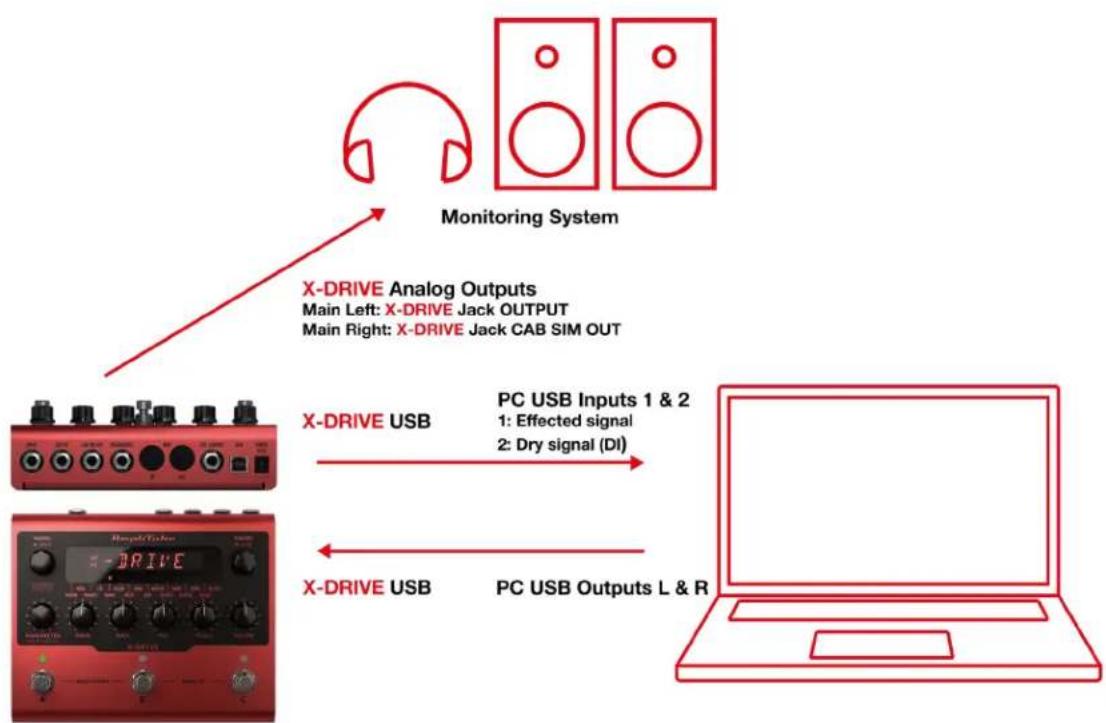
flowchart
graph TD
    A["Monitoring System"] --> B["X-DRIVE Analog Outputs\nMain Left: X-DRIVE Jack OUTPUT\nMain Right: X-DRIVE Jack CAB SIM OUT"]
    B --> C["X-DRIVE USB"]
    C --> D["PC USB Inputs 1 & 2\n1: Effected signal\n2: Dry signal (DI)"]
    C --> E["X-DRIVE USB"]
    E --> F["PC USB Outputs L & R"]
To tweak the volume of the X-GEAR when used as audio interface browse to the GLOBAL SETUP and edit the INTERFACE VOL parameter. After tweaking the volume for the first time the INTERFACE VOL parameter will be quickly accessible using the PARAMETER encoder until you select another parameter.
N.B. The headphone output is not really meant to be used in audio interface mode since it's directly connected to the CAB SIM OUT therefore it is a mono output, and you would only hear the right channel of your computer. Use a dedicated monitoring system to monitor while the pedal is in audio interface mode.
Included applications
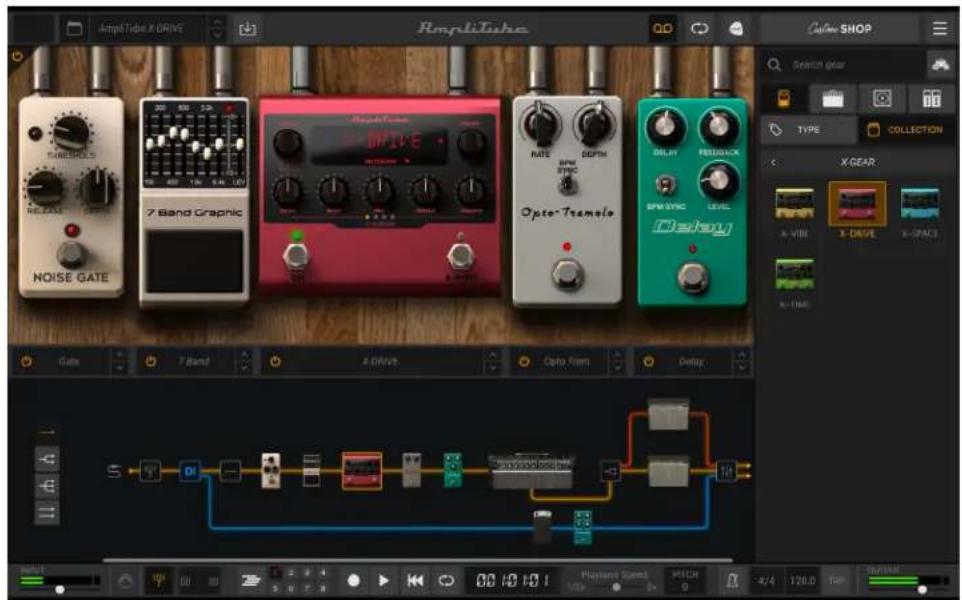
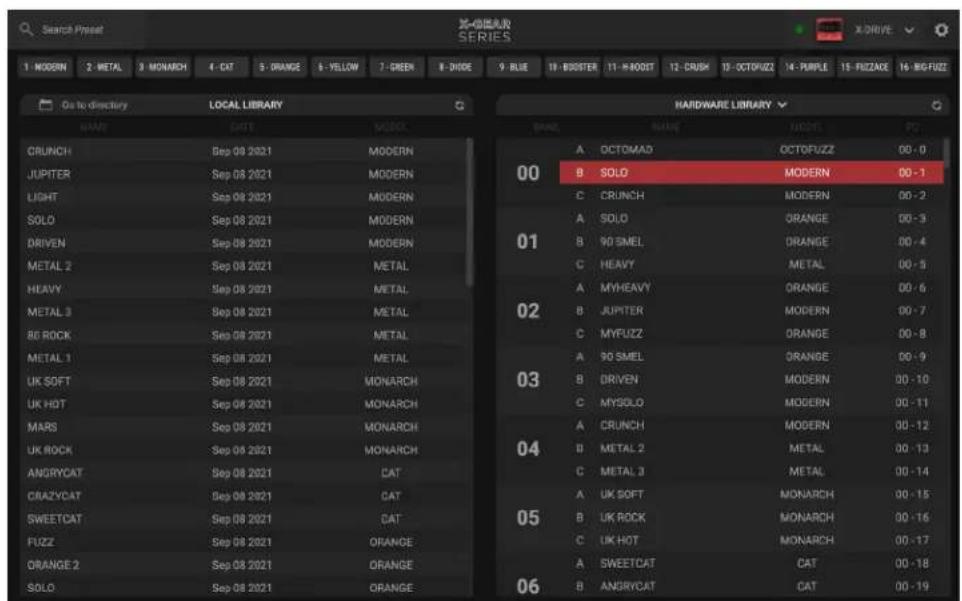
Along with your X-GEAR you get a Librarian App to manage your presets and AmpliTube 5 SE to edit your presets from your computer and use them inside AmpliTube.
Follow the instructions found in the box to get the X-GEAR Librarian and AmpliTube 5 SE.
MIDI Specifications
X-DRIVE presents 100 numbered banks with 3 presets each for a total of 300 presets.
Since MIDI program changes can only go up to 127 the presets are split into 3 MIDI Patch Banks:
MIDI BANK 0 (CC#0 Value=0) = PRESETS 00A-63B
MIDI BANK 1 (CC#0 Value=1) = PRESETS 64A-127B
MIDI BANK 2 (CC#0 Value=2) = PRESETS 128A-149B
In each MIDI PATCH BANK, the presets are numbered sequentially:
PRESET 00A = MIDI Program #0
PRESET 00B = MIDI Program #1
PRESET 01A = MIDI Program #2
PRESET 01B = MIDI Program #3
... up to MIDI Program #127
X-DRIVE always powers up in MIDI Patch Bank 0, therefore if you stay within the first 127 presets (00A-63B), simply send a standard MIDI Program Change message to load a preset.
If you plan to use presets above the 127th you should send a standard MIDI Bank Change message (MIDI CC#0) with a value equal to the MIDI Bank you'd like to use before each MIDI Program Change.
MIDI Control Change Table
| Parameter Control Change # Values | ||
| Expression 11 0 – 127 | ||
| Preset ON/OFF 12 ON = 127, OFF = 0 | ||
| X-MODE for the current preset 13 Bypass=0 | Engaged=12 | |
| Model selector 14 1 – 16 | ||
| MIDI Patch Bank 0 0 – 2 |
For individual parameter control changes, see each distortion model in the Distortion Models paragraph.
When a parameter range is not linear its values are equally divided among the 128 steps of a Control Change value.
Features
AmpliTube X-DRIVE
• Breakthrough software and hardware integration for guitarists
• State-of-the-art DSP in a road-worthy anodized aluminum chassis
• 16 different algorithms, 50 factory presets (300 storable presets)
• Distortion, overdrive, fuzz, compressor and more + cab emulation
- Includes exclusive virtual X-DRIVE version for use in AmpliTube 5
• USB port for preset management and use as a recording interface
- Designed and made in Italy for a lifetime of playing and gigging
• Ultra-low noise, 24-bit/192kHz converters for class-leading sound quality
- 5 Hz–24 kHz frequency response to capture the full scope of your guitar's sound
• 123 dB dynamic range provides whisper-quiet operation at any gain setting
- Selectable true or soft bypass for maximum control
• 5Hz to 24kHz frequency response to record the full range of your guitar or bass
- Versatile routing options let you send the wet and/or dry signals to your DAW
- Stereo out for monitoring sound between the X-DRIVE pedal and your computer
• Full MIDI implementation to map control of AmpliTube and/or any compatible DAW
- Fast, intuitive interface and control knobs to tweak your sound on the fly
• High-contrast LED display keeps you informed on everything, indoors and out
• Expression pedal input adds additional control over any parameter you choose
• Full MIDI implementation is built-in for even the most complex setups
• 5 cabinet impulse responses and a CAB SIM out to connect directly to the PA
Package includes
• X-DRIVE pedal
• USB A-Type to USB B-Type connection cable (1.5m/4.32ft)
• Power Supply Unit
• Plug-in and Preset Librarian serial number
Dimensions
• Size: 17.5cm/6.88" x 14.5cm/5.7" x 5.8cm/2.28"
• Weight: 906g/31.96oz
System Requirements
AmpliTube 5
AmpliTube is a 64-bit application and requires a 64-bit CPU and Operating System.
Mac® (64-bits)
- Minimal: Intel® Core™ 2 Duo (Intel Core i5 suggested), 4 GB of RAM (8 GB suggested), macOS 10.10 or later. 3 GB of hard drive space.
- Requires an OpenGL 2 compatible graphics adapter.
• Supported Plug-in formats (64-bit): Audio Units, VST 2, VST 3, AAX.
Windows® (64-bits)
- Minimal: Intel® Core™ 2 Duo or AMD Athlon™ 64 X2 (Intel Core i5 suggested), 4 GB of RAM (8 GB suggested). Windows® 7 or later. 3 GB of hard drive space.
- Requires an ASIO compatible sound card.
- Requires an OpenGL 2 compatible graphics adapter.
• Supported Plug-in formats (64-bit): VST 2, VST 3, AAX.
To use X-GEAR as audio interface on Windows devices, Windows® 10 or later is required.
AmpliTube X-GEAR series
Discover the full AmpliTube X-GEAR series:
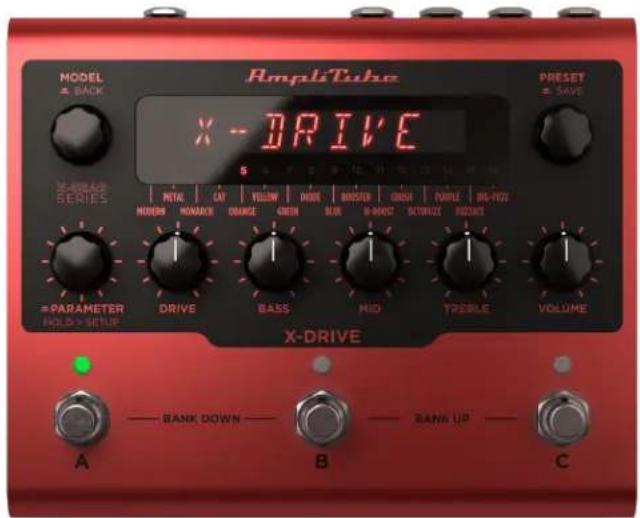
X-DRIVE
Distortion
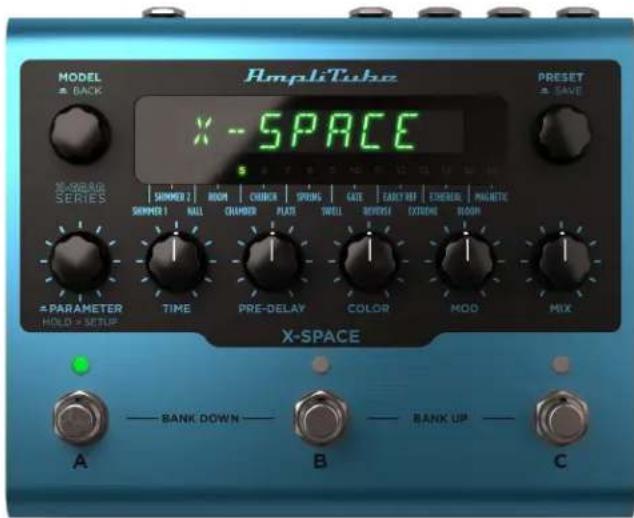
X-SPACE
Reverb
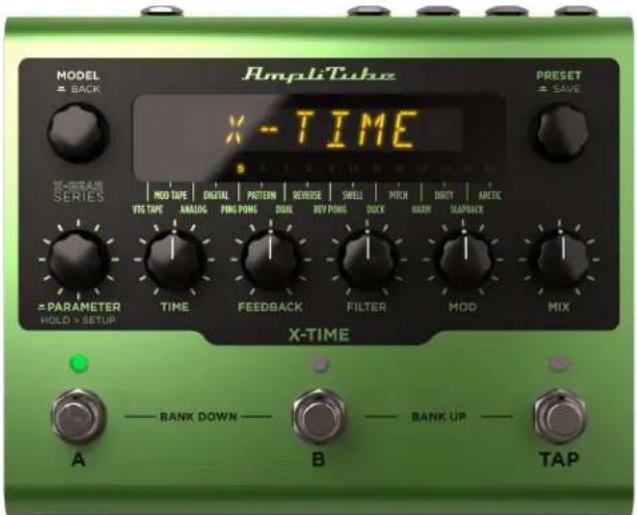
X-TIME
Delay
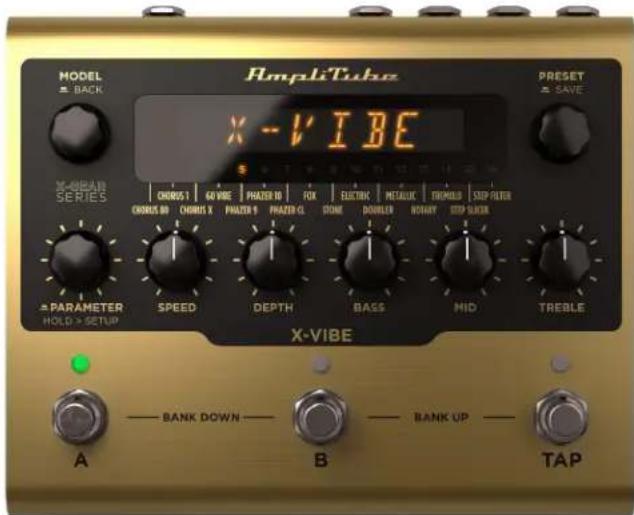
X-VIBE
Modulation
Learn more at www.ikmultimedia.com/xgear
IK Multimedia Production Srl
IK Multimedia US, LLC
590 Sawgrass Corporate Pkwy.
Sunrise, FL 33325
USA
IK Multimedia Asia
TB Tamachi Bldg. 1F, MBE #709
4-11-1 Shiba
Minato-ku, Tokyo 108-0014
Japan
www.ikmultimedia.com
AmpliTube®, X-GEAR, X-DRIVE, X-SPACE, X-TIME and X-VIBE are trademarks or registered trademarks property of IK Multimedia Production Srl. All other product names and images, trademarks and artists names are the property of their respective owners, which are in no way associated or affiliated with IK Multimedia. Product names are used solely for the purpose of identifying the specific products that were studied during IK Multimedia's sound model development and for describing certain types of tones produced with IK Multimedia's digital modeling technology. Use of these names does not imply any cooperation or endorsement.
All specifications are subject to change without further notice.
Document Version: 1.0
Latest Update: 2021/09/21
© 2021 IK Multimedia. All rights reserved.
AmpliTube
X-DRIVE
用户手册
目录内容
内容 2
前面板概览 3
后面板概览 5
固件升级 7
保存预设 8
外部控制设置 9
表情踏板和单开关(创建宏) 9
双开关 10
表情踏板校准 11
失真模型 12
MODERN 12
METAL 14
MONARCH 16
CAT 18
ORANGE 20
YELLOW 22
GREEN 24
DIODE 26
BLUE 28
BOOSTER 30
H-BOOST 32
CRUSH 34
OCTOFUZZ 36
PURPLE 38
FUZZACE 40
BIG-FUZZ 42
全局设置 44
预设设置 47
安全模式 48
临时模式 49
- DRIVE: adjusts the ratio of fuzzed signal with octaved signal. From 0 to 10.
- BASS: boosts and cuts the low frequencies. From -6 dB to +6 dB.
- MID: boosts and cuts the mid frequencies. From -6 dB to +6 dB.
- TREBLE: boosts and cuts the high frequencies. From -6 dB to +6 dB.
• VOLUME: sets the output level. From 0 to 10. - MID Q: sets the bandwidth of the mid 参数 EQ from narrow to wide. From 0.2 to 3.
- MID FREQ: changes the center frequency of the mid parametric EQ. From 80 Hz to 5000 Hz.
- EQ POSITION: sets the tone EQ pre or post clipping. PRE or POST.
- NOISE GATE: turns the noise gate ON or OFF. ON or OFF.
- NG THRESHOLD: adjusts the sensitivity of the gate's threshold. From -100 dB to 0 dB.
- NG RELEASE: adjusts the time of the gate's release. From 20 ms to 1500 ms.
- NG DEPTH: adjusts the gate’s deepness. From -20 dB to -100 dB.
- COMPRESSOR: turns the compressor ON or OFF. ON or OFF.
- COMP SENSITIVITY: sets the sensitivity of the compressor. From 0 to 10.
- COMP OUT: sets the output level of the compressor. From 0 to 10.
- CAB SIM: selects the cabinet simulator. CAB 1, CAB 2, CAB 3, CAB 4, BASS, OFF.
- MIX: regulates the amount of the dry and wet distorted signal. By default the mix is set to 100% WET. From 0% to 100%.
- X-MODE: the X-MODE boosts the output signal to achieve more volume in certain parts during the performance. ON or OFF.
Mac ^® (64-bits)
Windows ^® (64-bits)
4-11-1 Shiba Minato-ku, Tokyo 108-0014 Japan
IK Multimedia Asia
IK Multimedia US, LLC
TB Tamachi Bldg. 1F, MBE #709
www.ikmultimedia.com
AmpliTube®, X-GEAR, X-DRIVE, X-SPACE, X-TIME and X-VIBE are trademarks or registered trademarks property of IK Multimedia Production Srl. All other product names and images, trademarks and artists names are the property of their respective owners, which are in no way associated or affiliated with IK Multimedia. Product names are used solely for the purpose of identifying the specific products that were studied during IK Multimedia’s sound model development and for describing certain types of tones produced with IK Multimedia’s digital modeling technology. Use of these names does not imply any cooperation or endorsement.
All specifications are subject to change without further notice.
Document Version: 1.0
Latest Update: 2021/09/27
© 2021-2022 IK Multimedia. All rights reserved.
- Front Panel Overview
- MODEL encoder
- PRESET encoder
- PARAMETER encoder
- DRIVE knob
- BASS knob
- MID knob
- TREBLE knob
- VOLUME knob
- A, B & C LEDs
- A, B & C footswitches
- Rear Panel Overview
- INPUT
- OUTPUT
- CAB SIM OUT
- HEADPHONES
- MIDI IN
- MIDI OUT
- EXT. CONTROL
- USB
- POWER 9V DC
- Firmware update
- To do so:
- Saving presets
- External Control Setup
- Expression pedal & single switch (creating macros)
- N.B.
- Double switch
- Expression pedal calibration
- Distortion Models
- MODERN
- Parameters
- METAL
- MONARCH
- CAT
- ORANGE
- YELLOW
- GREEN
- DIODE
- BLUE
- BOOSTER
- H-BOOST
- CRUSH
- OCTOFUZZ
- PURPLE
- FUZZACE
- BIG-FUZZ
- Global Setup
- NAME MODE
- CTRL
- DUAL SWITCH MODE
- CALIBRATION
- MIDI CHANNEL
- MIDI THRU
- MAIN VOL
- AUX VOL
- INTERFACE VOL
- MIDI CLOCK
- USB OUT
- GRND LIFT
- BYPASS MODE
- OPERATION MODE
- FACTORY RESET
- FW VERSION
- Preset Setup
- LEARN
- Safe Mode
- Temporary Mode
- CAB SIM OUT & HEADPHONES out
- Interface Mode
- Included applications
- MIDI Specifications
- Features
- AmpliTube X-DRIVE
- Package includes
- Dimensions
- System Requirements
- AmpliTube 5
- Mac® (64-bits)
- Windows® (64-bits)
- AmpliTube X-GEAR series
- IK Multimedia Production Srl
- IK Multimedia US, LLC
- IK Multimedia Asia
- www.ikmultimedia.com
- AmpliTube
- X-DRIVE
- 目录内容
- Mac ® (64-bits)
- Windows ® (64-bits)
Brand : IK Multimedia
Model : AmpliTube X-DRIVE
Category : Uncategorized