
WA616M - Uncategorized SHURE - Free user manual and instructions
Find the device manual for free WA616M SHURE in PDF.


| Product Type | Microphone Color ID Rings |
| Brand | Shure |
| Model | WA616M |
| Purpose | Identify microphones with color-coded rings |
| Compatibility | Shure microphones with threaded handle (e.g., SM58, Beta 58A) |
| Color Options | Multi-color (various rings included) |
| Material | Plastic |
| Installation | Place ring at base of microphone grille |
| Removal Method | Unscrew handle ~3 turns, then push ring down to remove |
| Package Contents | Set of identification rings (quantity not specified) |
| Power Requirement | None (passive accessory) |
| Care Instructions | Wipe with dry cloth; avoid liquids |
| Spare Parts Availability | Contact Shure or authorized dealers |
| Repairability | Replaceable rings; no user-serviceable parts |
Frequently Asked Questions - WA616M SHURE
User questions about WA616M SHURE
0 question about this device. Answer the ones you know or ask your own.
Ask a new question about this device
Download the instructions for your Uncategorized in PDF format for free! Find your manual WA616M - SHURE and take your electronic device back in hand. On this page are published all the documents necessary for the use of your device. WA616M by SHURE.
USER MANUAL WA616M SHURE
Online user guide for WA616M identification rings.
Version: 2.0 (2020-H)
Table of Contents
WA616M Color ID Rings
3
Identification Rings 3
Removing the Contact Cover 3
WA616M
Color ID Rings
Identification Rings
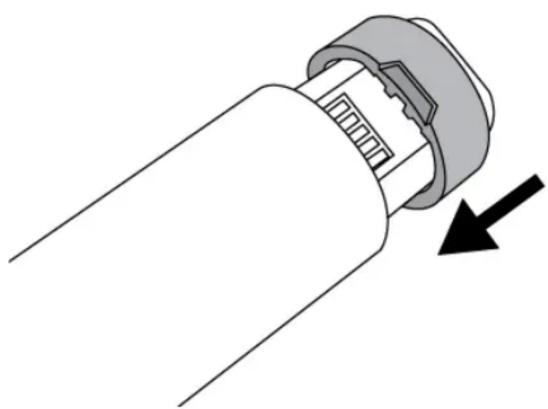
These multi-color rings help to identify microphones. Place the ID rings at the base of each microphone as shown.
natural_image
Diagram of a mechanical component with a black arrow indicating direction (no text or symbols present)Removing the Contact Cover
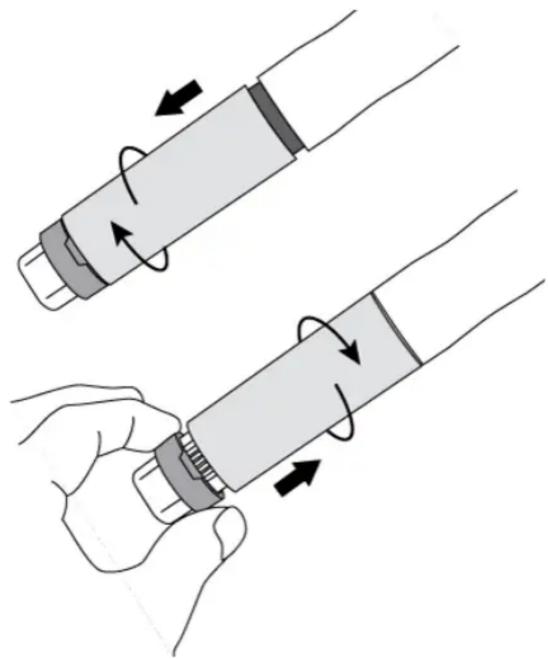
To remove the battery contact cover, partially unscrew the handle, about three turns, and then screw it back on. This pushes the ring down enough so it may be removed with the fingers.
natural_image
Illustration of two hands holding a cylindrical object with internal components, showing motion arrows (no text or symbols)Brand : SHURE
Model : WA616M
Category : Uncategorized