
PS120A - Installation solaire DOMETIC - Free user manual and instructions
Find the device manual for free PS120A DOMETIC in PDF.


| Product Type | Portable Solar Kit |
| Model | PS120A |
| Peak Power | 120 W ±3% |
| Panel Type | Monocrystalline |
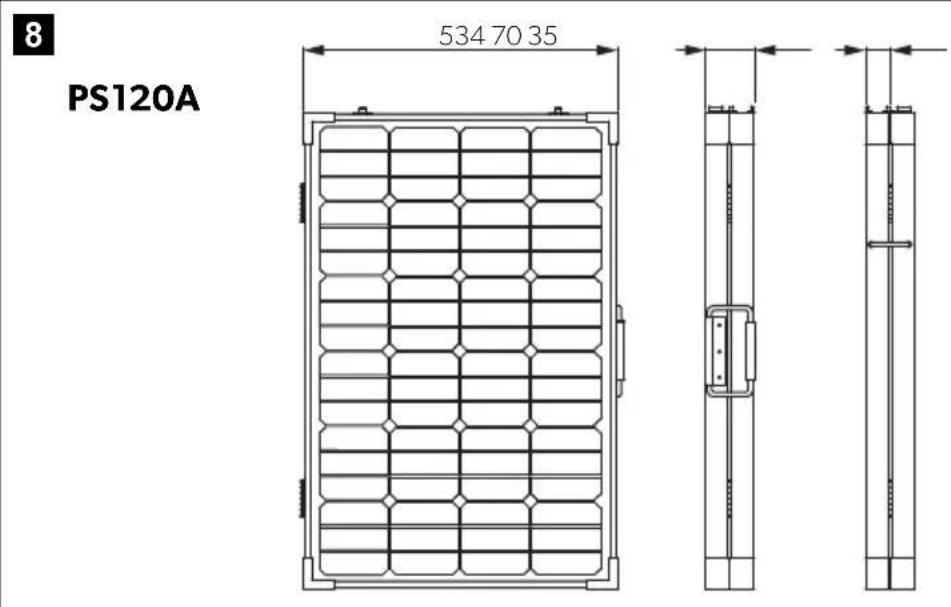
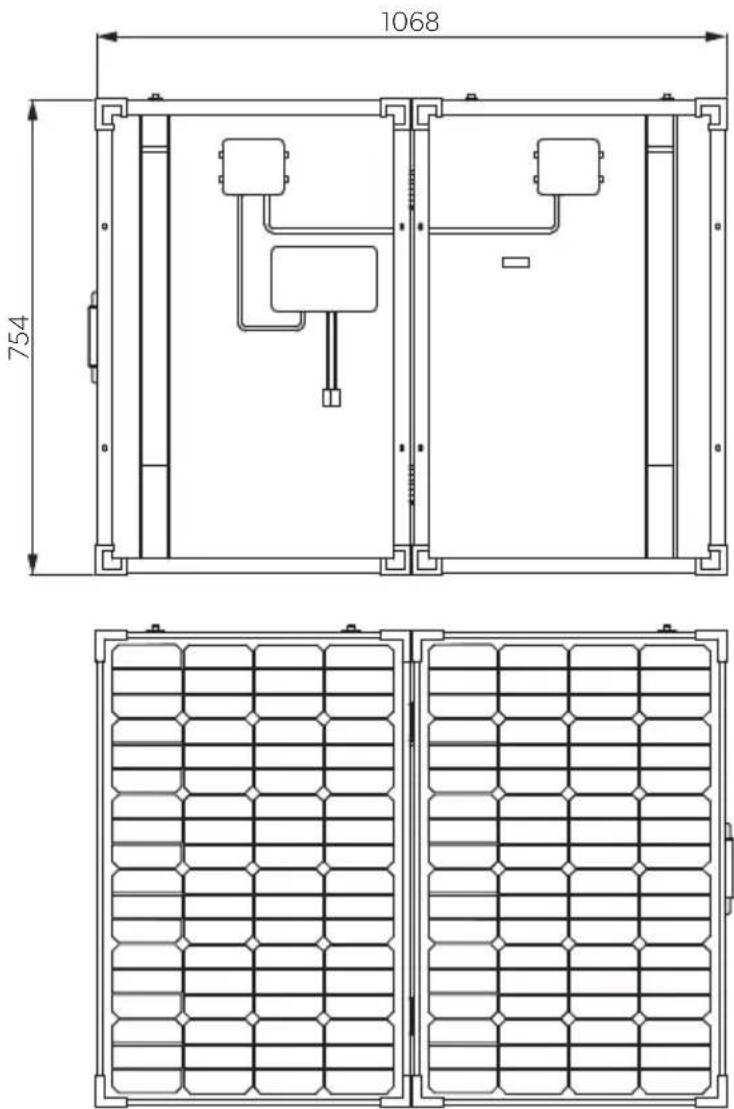
| Dimensions (Unfolded) | 1068 x 754 mm |
| Net Weight | 12.25 kg |
| Rated Voltage | 12 V --- |
| Voltage at Max Power (Vmp) | 18.1 V |
| Current at Max Power (Imp) | 6.63 A |
| Open Circuit Voltage | 22.44 V |
| Short Circuit Current | 7.09 A |
| Controller Rated Current | 10 A |
| Controller Protections | Reverse polarity, overvoltage, undervoltage, overcharge, overdischarge, overcurrent, short circuit, temperature compensation |
| Cable Length | 2.5 m with Anderson plugs |
| Included Accessories | Alligator clips adapter, carry bag, temperature sensor, manual |
| Intended Use | Charging 12 V batteries and powering 12 V devices simultaneously |
| Operating Temperature Range | -40 °C to +85 °C (panel), -10 °C to +55 °C (controller) |
| Fuse Rating (Cable) | 15 A, automotive, fast acting |
| Fuse Rating (Controller) | 15 A, automotive, fast acting |
| Maintenance | Clean with damp cloth; no sharp objects or solvents |
| Safety Notes | Disconnect before servicing; avoid windy/gusty conditions; do not use with non-rechargeable batteries |
| Warranty | Statutory warranty period; contact retailer or Dometic branch |
Frequently Asked Questions - PS120A DOMETIC
User questions about PS120A DOMETIC
0 question about this device. Answer the ones you know or ask your own.
Ask a new question about this device
Download the instructions for your Installation solaire in PDF format for free! Find your manual PS120A - DOMETIC and take your electronic device back in hand. On this page are published all the documents necessary for the use of your device. PS120A by DOMETIC.
USER MANUAL PS120A DOMETIC
natural_image
Two solar panels with metallic frame and metal supports, displayed side by side (no text or symbols visible)PS120A, PS180A

Portable Solar Kit
Installation and Operating Manual
Please read this instruction manual carefully before installation and first use, and store it in a safe place. If you pass on the product to another person, hand over this instruction manual along with it.
Table of contents
1 Explanation of symbols....3
2 General safety instructions ....4
3 Scope of delivery 6
4 Intended use ....7
5 Technical description ....7
6 Using the appliance 9
7 Troubleshooting....14
8 Maintaining and cleaning the product....14
9 Warranty ....14
10 Disposal....15
11 Technical data....16
1 Explanation of symbols

WARNING!
Safety instruction: Failure to observe this instruction can cause fatal or serious injury.

CAUTION!
Safety instruction: Failure to observe this instruction can lead to injury.

NOTICE!
Failure to observe this instruction can cause material damage and impair the function of the product.

NOTE
Supplementary information for operating the product.
2 General safety instructions
The manufacturer accepts no liability for damage in the following cases:
- Damage to the product resulting from mechanical influences and excess voltage
• Alterations to the product without express permission from the manufacturer - Use for purposes other than those described in the operating manual
The declaration of conformity can be requested from the manufacturer (contact information on the back).
Note the following basic safety information when using electrical devices to protect against:
- Electric shock
- Fire hazards
- Injury
2.1 General safety

WARNING!
- Only use the device as intended. Any alternation to the product without express permission from Dometic Australia head office avoids warranty.
- Disconnect the device
- Before cleaning and maintenance
- After use
- Before changing a fuse
- The device may not be used if the device itself or connection cables are visibly damaged.
- This appliance may only be repaired by qualified personnel. Inadequate repairs may cause serious hazards.
- This appliance can not be used by children as well as by persons with diminished physical, sensory or mental capacities or a lack of experience and knowledge.
• Electrical devices are not toys.
Always keep and use the device out of the reach of children.
- Children must be supervised to ensure that they do not play with the appliance.

NOTICE!
- Check the manufacturer's data for your battery and ensure that the maximum voltage of the solar charge controller does not exceed the manufacturer's recommended charging voltage.
- Do not use the solar panel to charge non-rechargeable batteries.
- Be sure to connect the battery before exposing the solar panel to the sun.
- Before using the device for the first time, check that the voltage specification on the rating plate matches that of the power supply.
- Store the device in a dry and cool place.
2.2 Operating the device safely

CAUTION!
- Do not use the solar panel in windy or gusty conditions.
- Do not use high pressure to clean the solar panel.
- Do not operate the device
- In salty, wet or damp environments
- In the vicinity of corrosive fumes
- In the vicinity of combustible materials
- In areas where there is a danger of explosions

NOTICE!
- Do not disconnect any cables when the device is still in use.
3 S c o p e o f d
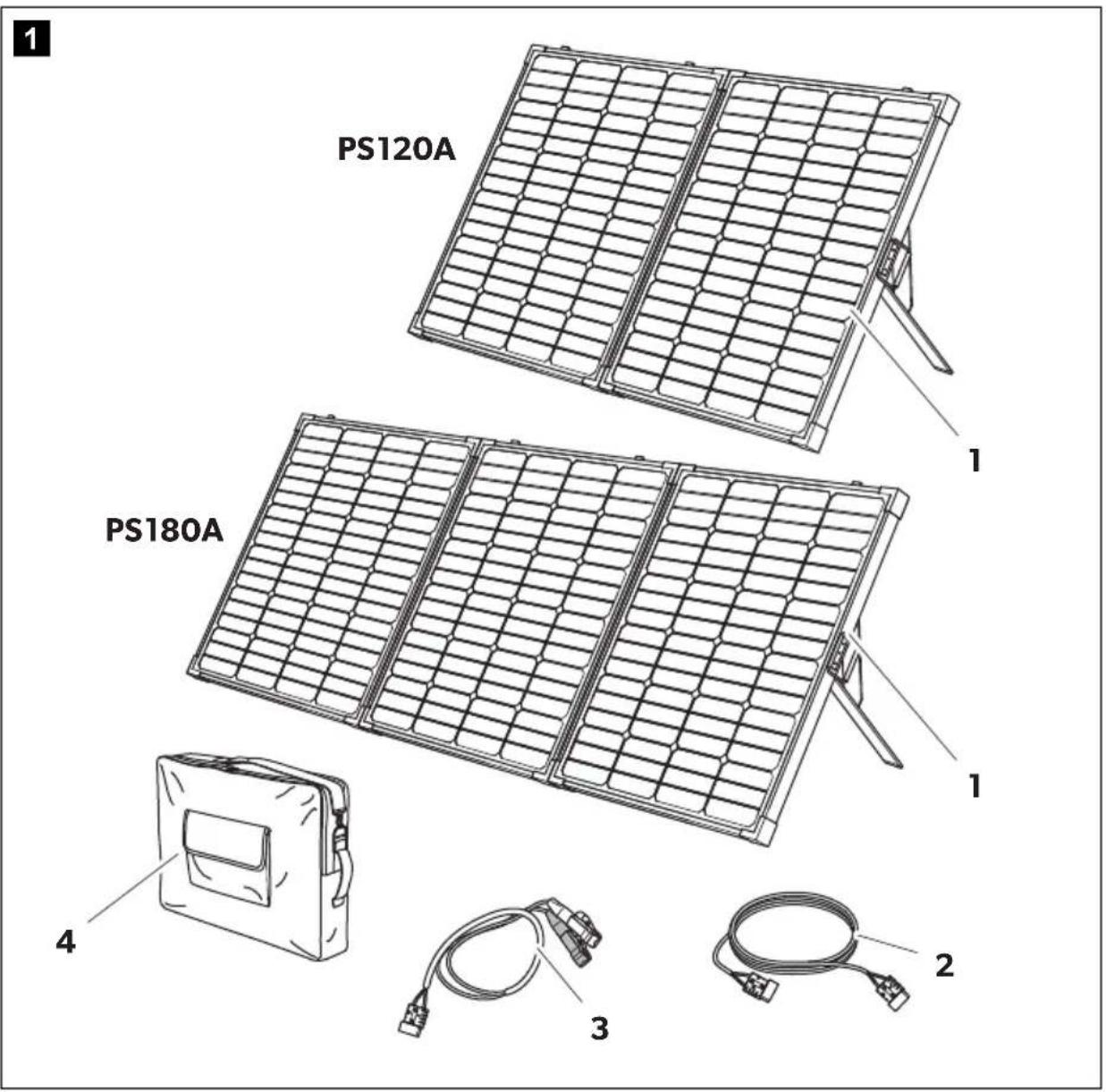
No. in
fig. 1
Description
1 Portable solar panel with solar controller
2.5 m cable with Anderson plugs
3 Alligator clips adapter
4 Carry bag
- Temperature sensor
- Installation and operating manual
4 Intended use
The portable solar panel is a mobile power supply with a solar controller attached to the back for charging a 12 V--- battery and connecting a 12 V--- device.
5 Technical description
The portable solar panel is designed as monocrystalline construction with tempered glass coating. The integrated solar controller attached to the back enables a DC consumer unit (e.g. a cooler) or inverter to be simultaneously supplied with power while the 12 V--- battery is being charged.
The solar controller has the following protective functions:
- Incorrect polarity protection
- Battery overvoltage protection
- Battery undervoltage protection
- Battery open circuit protection
- Battery over-charge and over-discharge protection
• Output overcurrent protection - Short circuit protections for output and solar panel
• Temperature compensation function
5.1 Connecting and display elements
2
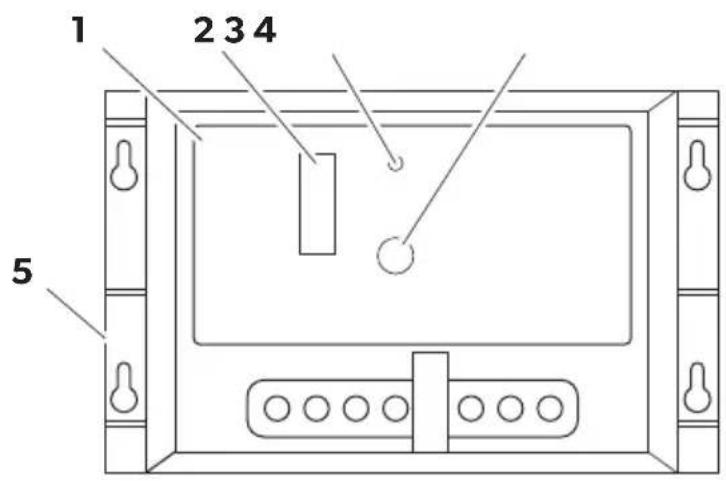
No. in
fig. 2
Description
1 Solar controller
2 Status LEDs Battery is being charged according to the number of LEDs shining in cycle:
LED 1 = 25%
LED 2 = 50%
LED 4 = 75%
LED 8 = 100%
LEDs light on when the battery is fully charged.
3 Load LED The output indicator lights on when an output is present.
4 Error LED The error LED lights on when the following faults occur: - Over discharge status - Batteries reverse polarity - Solar module reserve polarity - Load over-current - Short current - Batteries open circuit working
5 Temperature sensor port
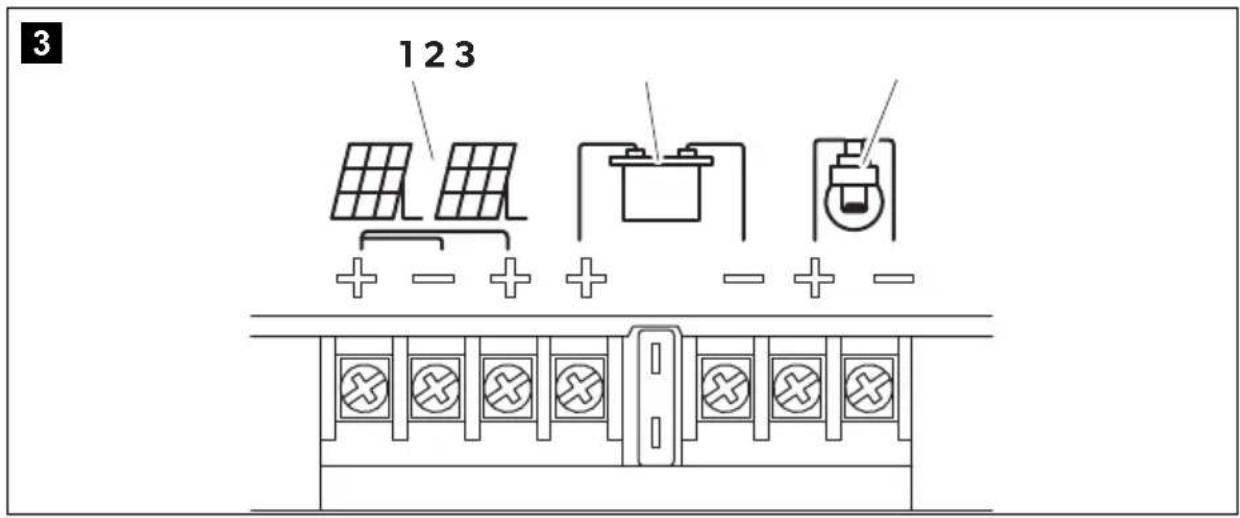
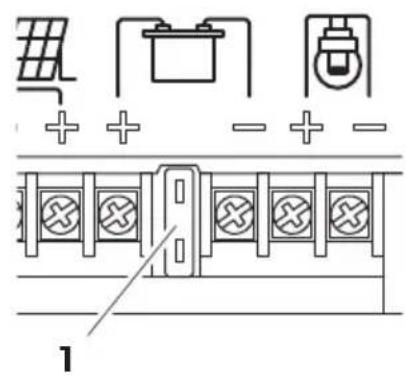
| No. in fig. 3 | Description |
| 1 Solar panel terminals | |
| 2 Battery terminals | |
| 3 Load terminals | |
6 Using the appliance
6.1 Positioning the solar panel

NOTE
To obtain maximum output, regularly move the solar panel to track movement of the sun throughout the day.
▶ Locate a clear area free from over hanging branches or obstructions.
▶Remove the solar panel from the carry bag.
▶ Unclip the latches on the side of the unit and unfold the panel.
4
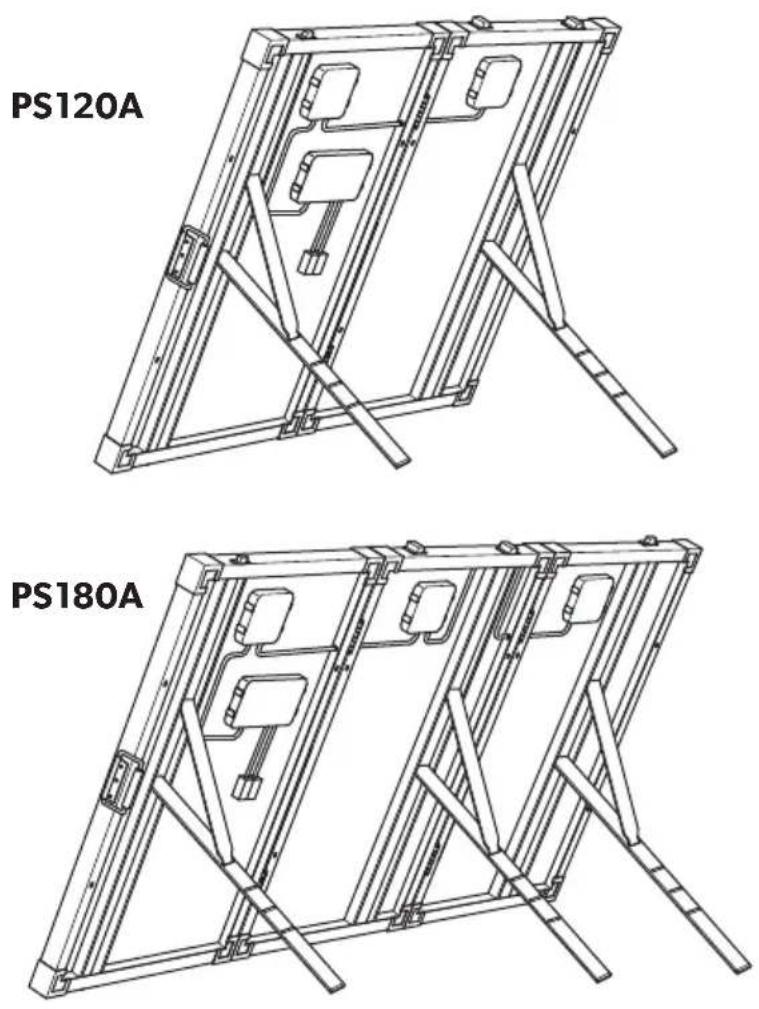
▶ Extend the stands to the required length and lock them in position.
6.2 Connecting the solar panel

NOTICE!
• Always observe the following connection sequence.
Overvoltage can damage the electronics of the device.
- Connecting the solar panel: Connect the Alligator clips to the battery, then connect the Anderson plug to the solar panel, finally connect the load.
- Disconnecting the solar panel: Disconnect the load first, then disconnect the Anderson plug from the solar panel, finally disconnect the Alligator clips from the battery.
- Ensure that the battery clamps do not get in contact with each other.
- Only use the cable with Anderson plug and alligator clips supplied.
• Make sure that the polarity is correct.
• Make sure that the connection is tight and secure.
Connecting diagram
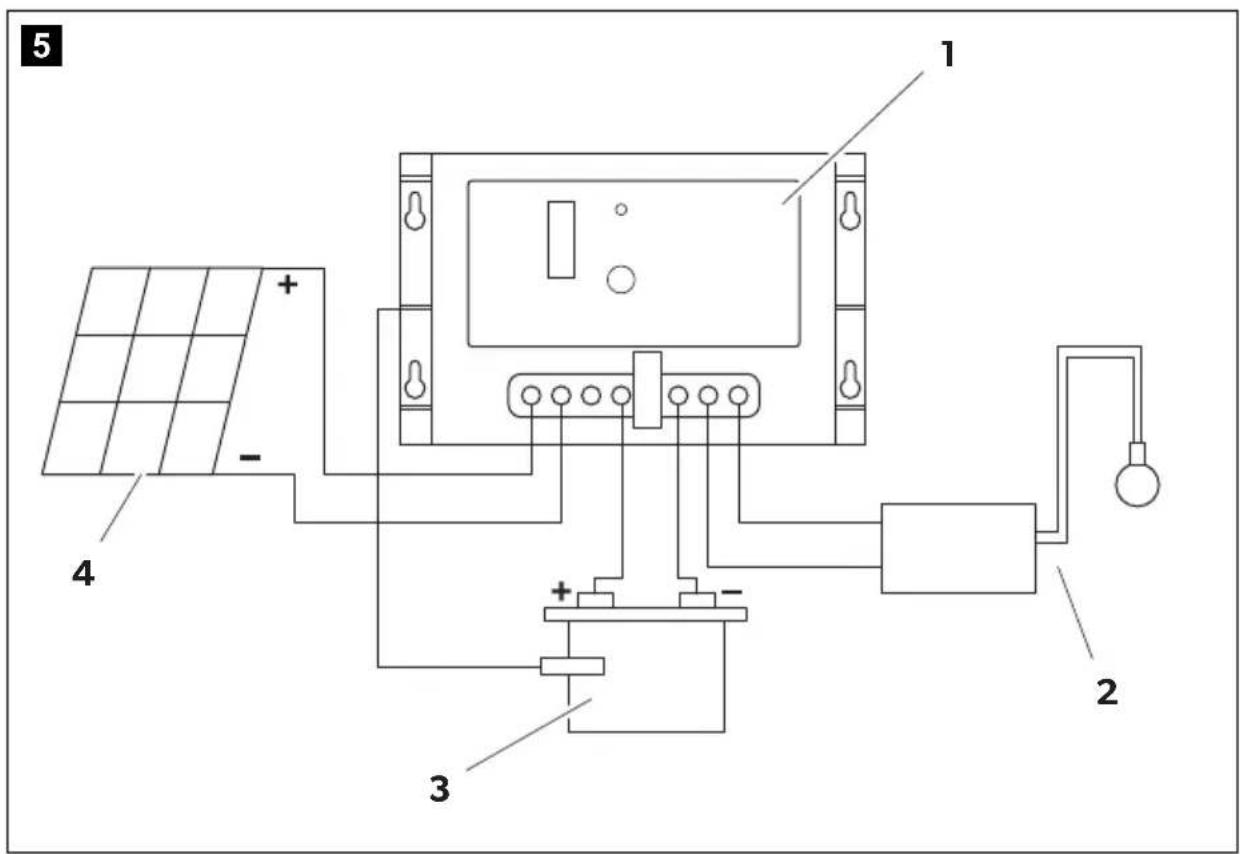
Key to connecting diagram
| No. in fig. 5 | Description | |||
| 1 Solar controller | ||||
| 2 | L | o | a | d |
| 3 | 1 | 2 | V | === battery |
| 4 Solar panel | ||||
Connecting to a battery
▶Connect the Alligator clips to the battery terminals. Connect the red lead with red clamp to the positive (+) battery terminal. Connect the black lead with black clamp to the negative (−) battery terminal. Ensure that the connection is secure and tight.
▶Connect the Anderson plug to the Anderson socket.
√The battery is loading.
√The green LEDs on the solar controller light up.
The number of green LEDs show the battery capacity. The LEDs light in cycle during charging status. The LEDs stop shining and light on when the battery is fully charged. In over-discharge status, LED 1 (25%) flashes quickly to warn the user to charge the battery immediately.
For safety reasons the solar controller will start buzzing if the battery connection is in reverse polarity to protect against reversing the polarity and short circuits when connecting to a battery.
To protect the battery, the solar controller switches off automatically if the voltage is insufficient (see table below).
| 12 V | |
| Switch-off voltage | 11 ± 0.3 V--- |
| Switch-on voltage | 12 ± 0.3 V--- |
Connecting a 12 V--- device or inverter
▶ Connect the lead to the positive (+) and negative (−) terminal. Ensure that the connection is secure and tight.
Connecting the temperature sensor
The battery temperature sensor allows the charge controller to continuously adjust charge voltage based on measured battery temperature.
▶Attach temperature sensor to the battery with tape, ensuring good contact.
Disconnecting the solar panel
▶ Disconnect the load first, then disconnect the Anderson plug from the solar panel, finally disconnect the Alligator clips from the battery.
Replacing the fuse

NOTICE!
Disconnect the solar panel before you replace the device fuse.
6
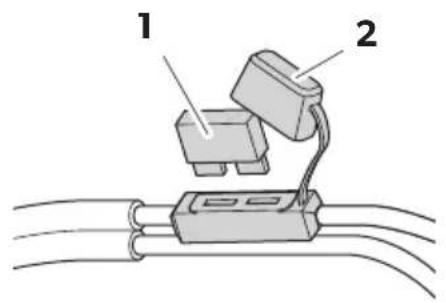
▶Disconnect the solar panel.
▶Remove the protective cover (2)
▶ Replace the defective fuse (1) with a new fuse of the same type and rating:
- Cable: 15 A, automotive, fast acting
- Controller: 15 A for PS120A, 20 A for PS180A, automotive, fast acting
▶Refit the protective cover.
▶Reconnect the power supply to the cooler.
7 Troubleshooting
If you are unable to rectify the fault, get in touch with a specialist workshop.
| Fault Possible cause Suggested remedy | ||
| Device does not function, LED does not glow. | The device fuse is defective | Replace the device fuse, see chapter “Replacing the fuse” on page 13. |
| The charging LED flashes. The device is in over discharge status. | Remove the load. Otherwise the device switches of to protect the battery. | |
| The fault LED flashes. The controller buzzes. | Battery is connected with wrong polarity. | Connect the battery with correct polarity. |
| The fault LED flashes. | Load over-current and short current protection are activated.Solar module is connected with reserve polarity.Batteries circuit open. | Connect the device correctly. |
8 Maintaining and cleaning the product

NOTICE!
Do not use sharp or hard objects or cleaning agents for cleaning as these may damage the product.
▶ Occasionally clean the surface of the solar panel with a damp cloth.
9 W a r r a n t y
The statutory warranty period applies. If the product is defective, please contact your retailer or the manufacturer's branch in your country (see the back of the instruction manual for the addresses).
For repair and guarantee processing, please include the following documents when you send in the device:
• A copy of the receipt with purchasing date
- A reason for the claim or description of the fault
10 Disposal
▶ Place the packaging material in the appropriate recycling waste bins wherever possible.
If you wish to finally dispose of the product, ask your local recycling centre or specialist dealer for details about how to do this in accordance with the applicable disposal regulations.
11 Technical data
| PS120A PS180A | ||
| Ref. no.: 9108400883 9108400917 | ||
| Panel type: Monocrystalline | ||
| Peak power: 120 W ±3% 180 W ±3% | ||
| Voltage at max. power (Vmp): 18.1 V | ||
| Current at max. power (Imp): 6.63 A 9.95 A | ||
| Open circuit voltage: 22.44 V | ||
| Short circuit current: | 7.09 A | 10.5 A |
| Operating temperature: | -40 °C to +85 °C | |
| Max. system voltage: | 700 V | |
| In-line fuse: | 15 A, automotive, fast acting | |
| Net weight | 12.25 kg | 17 kg |
| Test condition: | Irradiance 1000 W/m2, AM = 1.5Module temperature 25 °C | |
Controller:
| Rated current: | 10 A | 20 A |
| Rated voltage: | 12 V--- | |
| Over-charge protection: 14.4 ± 0.3 V--- | ||
| Over-discharge: | ||
| Cut-off: | 11 ± 0.3 V--- | |
| Resume: | 12 ± 0.3 V--- | |
| Over-voltage: | ||
| Cut-off: | 16.5 V--- | |
| Resume: | 15.0 V--- | |
| Voltage drop: | ||
| Between input and batteries: | 0.5 V--- | |
| Between batteries and load: | 0.2 V--- | |
| No load current draw: | <5 mA | |
| Ambient temperature: | -10 °C to +55 °C | |
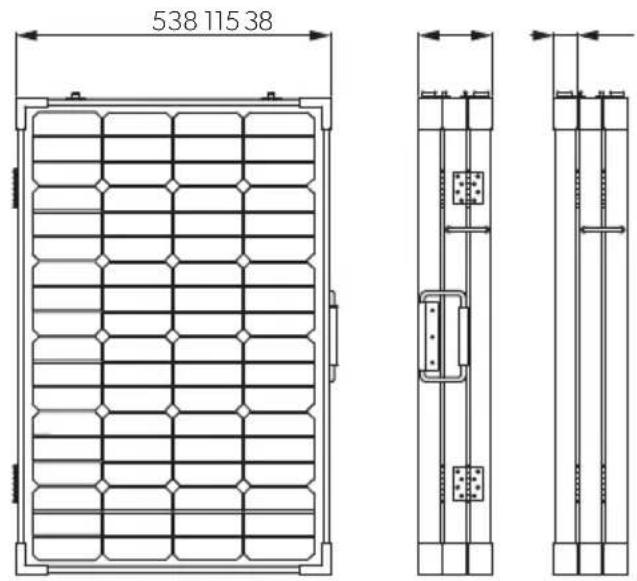
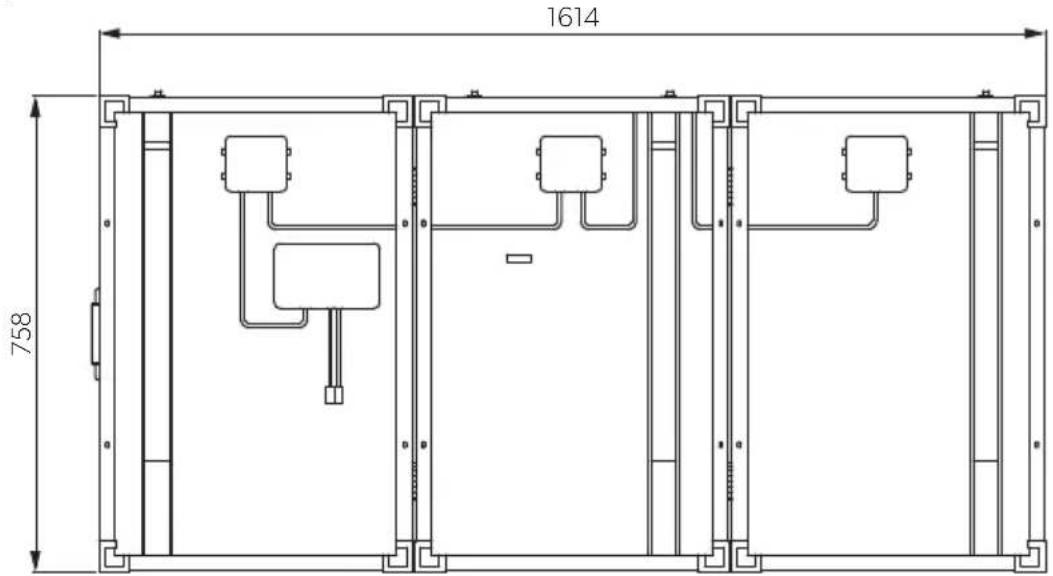
Measurements
9
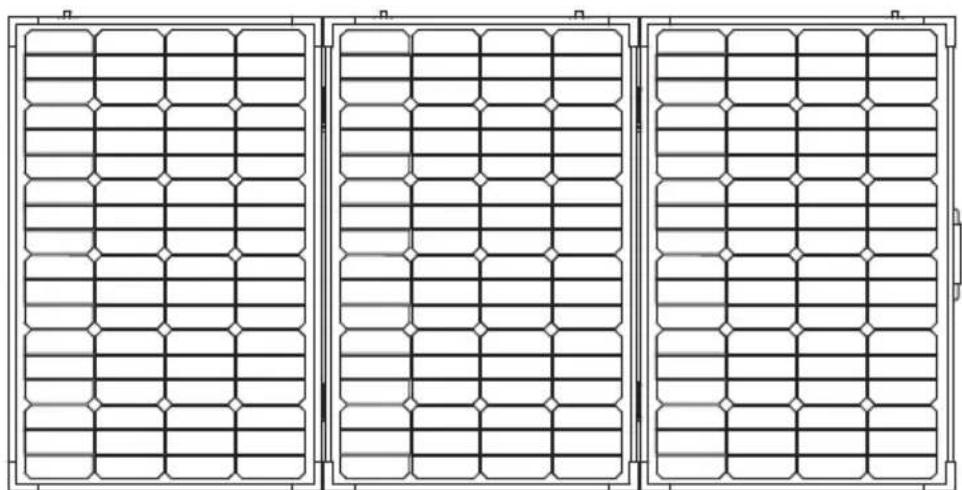
PS120A
10
PS180A
11
PS180A
natural_image
Three identical rectangular panels with grid patterns, no text or symbols visibleAUSTRIA
Dometic Austria GmbH
Neudorferstraße 108
A-2353 Guntramsdorf
+43 2236 908070
+43 2236 90807060
Mail: info@dometic.at
BENELUX
Dometic Branch Office Belgium
Zincstraat 3
B-1500 Halle
+32 2 3598040
+32 2 3598050
Mail: info@dometic.be
BRAZIL
Dometic DO Brasil LTDA
Avenida Paulista 1754, conj. 111
SP 01310-920 Sao Paulo
+551132513352
+551132513362
Dometic Group Asia Pacific
Suites 2207-11 · 22/F · Tower 1
The Gateway · 25 Canton Road,
Tsim Sha Tsui · Kowloon
+852 2 4611386
+85224665553
Mail: info@waeco.com.hk
HUNGARY
Dometic Zrt. Sales Office
Kerékgyártó u. 5.
H-1147 Budapest
+3614684400
+3614684401
Domettic Italy S.r.l.
Via Virgilio, 3
I-47122 Forlì (FC)
+39 0543 754901
+39 0543 754983
Mail: vendite@dometic.it
JAPAN
Dometic KK
Maekawa-Shibaura, Bldg. 2
2-13-9 Shibaura Minato-ku
Tokyo 108-0023
+81 3 5445 3333
+81 3 5445 3339
Mail: info@dometic.jp
MEXICO
Circuito Médicos No. 6 Local 1
Colonia Ciudad Satélite
CP 53100 Naucalpan de Juárez
Estado de México
+52 55 5374 4108
+52 55 5393 4683
Mail: info@dometic.com.mx
NETHERLANDS
Dometic Benelux B.V.
Ecustraat 3
NL-4879 NP Etten-Leur
+31 76 5029000
+31765029019
Mail: info@dometic.nl
NEW ZEALAND
Dometic New Zealand Ltd.
PO Box 12011
Penrose
Auckland 1642
+6496221490
+6496221573
Mail: customerservices@dometic.co.nz
NORWAY
Dometic Norway AS
∅sterøyveien 46
N-3232 Sandefjord
+47 33428450
+47 33428459
Mail: firmapost@dometic.no
POLAND
Dometic Poland Sp. z o.o.
Ul. Puławska 435A
PL-02-801 Warszawa
+48 22 414 3200
+48 22 414 3201
Mail: info@dometic.pl
PORTUGAL
Dometic Spain, S.L.
Komsomolskaya square 6-1
RU-107140 Moscow
+7 495 780 79 39
+7 495 916 56 53
Mail: info@dometic.ru
SINGAPORE
Dometic Pte Ltd
18 Boon Lay Way 06-140 Trade Hub 21
Singapore 609966
+65 6795 3177
+65 6862 6620
Mail: dometic@dometic.com.sg
SLOVAKIA
Dometic Slovakia s.r.o. Sales Office Bratislava
Nádražná 34/A
900 28 Ivanka pri Dunaji
+421 2 45 529 680
Mail: bratislava@dometic.com
SOUTH AFRICA
Dometic (Pty) Ltd.
Regional Office
South Africa & Sub-Saharan Africa
Unit 6-7 on Mastiff Linbro Park
2008 Johannesburg
+27114504978
+27114504976
Mail: info@dometic.co.za
SPAIN
Dometic Spain S.L.
Avda. Sierra del Guadarrama, 16
E-28691 Villanueva de la Cañada
Madrid
+34 902 111 042
+34 900 100 245
Mail: info@dometic.es
SWEDEN
Dometic Scandinavia AB
Gustaf Melins gata 7
Dometic Switzerland AG
Riedackerstrasse 7a
CH-8153 Rümlang
+41 44 8187171
+41 44 8187191
Mail: info@dometic.ch
UNITED ARAB EMIRATES
Dometic Middle East FZCO
P. O. Box 17860
S-D 6, Jebel Ali Freezone
Dubai
+97148833858
+97148833868
Mail: info@dometic.ae
UNITED KINGDOM
Dometic UK Ltd.
Dometic House, The Brewery
Blandford St. Mary
Dorset DT119LS
+44 344 626 0133
+44 344 626 0143
Mail: customerservices@dometic.co.uk
USA
Dometic RV Division
1120 North Main Street
Elkhart, IN 46515
+1574-264-2131