
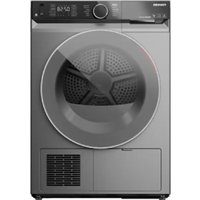
TD-BK110GHMSK - Tumble dryer TOSHIBA - Free user manual and instructions
Find the device manual for free TD-BK110GHMSK TOSHIBA in PDF.


| Product Type | Tumble Drier |
| Brand | Toshiba |
| Model | TD-BK110GHMSK |
| Drying Capacity | 8 kg |
| Dimensions (W x D x H) | 60 cm x 60 cm x 85 cm |
| Weight | 40 kg |
| Power Supply | 220-240 V, 50 Hz |
| Energy Rating | A++ |
| Drying System | Condenser |
| Noise Level | 65 dB |
| Programs | Cotton, Synthetics, Delicates, Quick, Anti-Allergy |
| Key Features | Sensor Drying, Reverse Tumbling, Anti-Crease, Delayed Start |
| Safety | Child Lock, Overheat Protection |
| Maintenance | Lint Filter Cleaning, Condenser Cleaning |
| Spare Parts | Drum, Heating Element, Belt, Motor, Door Seal |
| Repairability Index | 8.0 / 10 |
Frequently Asked Questions - TD-BK110GHMSK TOSHIBA
User questions about TD-BK110GHMSK TOSHIBA
0 question about this device. Answer the ones you know or ask your own.
Ask a new question about this device
Download the instructions for your Tumble dryer in PDF format for free! Find your manual TD-BK110GHMSK - TOSHIBA and take your electronic device back in hand. On this page are published all the documents necessary for the use of your device. TD-BK110GHMSK by TOSHIBA.
USER MANUAL TD-BK110GHMSK TOSHIBA
Read and follow the instructions carefully.
Keep the operation instructions handy for future use.
Please contact the customer service if you are in need of a new user manual.
SAFETY INSTRUCTIONS
■ Safety Instructions 2
INSTALLATION
■ Product Description 8
■ Installation 8
OPERATION
■ Quick Start 11
■ Before Each Drying 12
■ Control Panel 13
■ Option.... 15
■ Display.... 18
■ Programmes.... 19
■ Instructions to Connection with the TSmartLife App.... 20
■ Drying Programmes Table 23
MAINTENANCE
■ Cleaning and Care 24
■ Trouble Shooting 27
■ Technical Specifications 29
■ Safety Instructions
For your safety, the information in this manual must be followed to minimize the risk of fire or explosion, electric shock, or to prevent property damage, personal injury or loss of life.
Explanation of the symbols:

Warning!
This combination of symbol and signal word indicates a potentially dangerous situation which may result in death or serious injuries unless it's avoided.

Caution!
This combination of symbol and signal word indicates a potentially dangerous situation which may result in slight or minor injuries or damage to property and the environment.

Note!
This combination of symbol and signal word indicates a potentially dangerous situation which may result in slight or minor injuries.
Intended use
- This dryer is inteded for household use only. It is not for commercial use or shared use (i.e. by use in an apartment.)
• This dryer is for inndor use only.
Safety Instructions
- This appliance must be grounded. In the event of malfunction or breakdown, grounding will reduce the risk of electric shock by providing a path of least resistance for electric current.
- This appliance is equipped with a cord having an equipment-grounding conductor and grounding plug. The plug must be plugged into an appropriate outlet that is properly installed and grounded in accordance with all local codes and ordinances.
- Improper connection for the appliance when using not grounded outlet or when GND terminal of outlet is not suitable with GND terminal of power plug, can result in risk of electric shock. Check with a qualified electrician or service person if you are in doubt as to whether the appliance is properly grounded.

Warning!
Risk of Electric Shock
- Do not use any outlet with rated current less than that of appliance.
- Do not pull the power cord forcefully. Hold power plug instead.
- Do not touch the plug with wet hands.
- Do not bend, clamp or damage the power cord and the power plug.
-
If the power cable is damaged, it must be replaced by the manufacturer, its service agent or similarly qualified persons in order to avoid a hazard.
-
The appliance must not be supplied through an external switching device, such as a timer, or connected to a circuit that is regularly switched on and off by a utility.
- Do not use multiple outlet sockets, an extension power cable or double adapter with this appliance.
- Plug must be accessible after installation.
Risk of Injury
- Do not attempt to repair, disassemble, or modify the appliance yourself.
- Do not lean on the opened door of the dryer.
- Do not drink condensed water.
Risk of Prouduct Damage
- Do not put more load than rated in this user manual. See the related chapter in the user manual.
- Do not operate the dryer without Doorfilter and Base filter.
- Do not dry the clothes without spin-dry.
- Do not expose the dryer directly under the sun.
- Do not install the dryer in humid and wet environment.
- Before maintenance, unplug the appliance.
- Do not spray water on the appliance.
- Do not overturn the appliance.

Warning!
Risk of Explosion & Fire
- Please do not dry the clothes with any flammable substances such as kerosene or alcohol.
- The tumble dryer is not to be used if industrial chemicals have been used for cleaning.
- Do not dry unwashed items in the tumble dryer.
- Items that have been soiled with substances such as cooking oil, acetone, alcohol, petrol, kerosene, spot removers, turpentine, waxes and wax removers should be washed in hot water with an extra amount of detergent before being dried in the tumble dryer.
- Items such as foam rubber (latex foam), shower caps, waterproof textiles, rubber backed articles and clothes or pillows fitted with foam rubber pads should not be dried in the tumble dryer.
- Fabric softeners, or similar products, should be used as specified by the fabric softener instructions.
- Oil-affected items can ignite spontaneously, especially when exposed to heat sources such as in a tumble dryer. The items become warm, causing an oxidation reaction in the oil. Oxidation creates heat. If the heat cannot escape, the items can become hot enough to catch fire. Piling, stacking or storing oil-affected items can prevent heat from escaping and so create a fire hazard.
-
Remove all objects from pockets such as lighters and matches.
-
If it is unavoidable that fabrics that contain vegetable or cooking oil or have been contaminated by hair care products are placed in a tumble dryer they should first be washed in hot water with extra detergent. This will reduce, but not eliminate, the hazard.
- Never stop a tumble dryer before the end of the drying cycle unless all items are quickly removed and spread out so that the heat is dissipated.
- Openings must not be obstructed.
- Door filter and Base filter should be cleaned frequently.
- Lint must not be allowed to accumulate around the tumble dryer(heat exchanger, inside drum,around door etc.)
Safety with children
- This appliance is not intended for use by persons (including children) with reduced physical, sensory or mental capabilities or lack of experience and knowledge unless they have been given supervision or instruction concerning use of the appliance by a person responsible for their safety.
- Children should be supervised to ensure that they do not play with the appliance.
- Cleaning and user maintenance shall not be made by children without supervision.
• Animals and children may climb into the machine. Check the machine before every operation. - Glass door may be very hot during the operation. Keep children and pets far away from the machine during the operation.
For use in EU contries :
- The appliance can be used by children aged from 8 years and above and persons with reduced physical, sensory or mental capabilities or lack of experience and knowledge if they have been given supervision or instruction concerning use of the appliance in a safe way and understand the hazards involved.
• Children of less than 3 years should be kept away unless continuously supervised.
ENVIRONMENT
Disposal of old appliances
For use in EU contries
This appliance is labelled in accordance with the European Directive 2012/19/EU on waste electrical and electronic equipment (WEEE). The directive provides the framework for the EU-wide take-back and recycling of waste equipment.


The devices marked with this symbol must not be disposed of in household waste!
For use in other contries
This appliance doesn't have symbol above. If you want to dispose your appliance, please contact your local authority or retailer for further information on collection and disposal.
| Model | Rated capacity |
| TD-BK100GH Series | 9.0kg |
| TD-BK110GH Series | 10.0kg |
■ Product Description

Note: The actual model you purchased might differ. Please see the product you purchased in kind prevail.
Accessories
The following parts are optional for specific models.
If your dryer has following parts, please wear gloves to their install as per the instruction below.

natural_image
Simple line drawing of a U-shaped mechanical component (no text or symbols)Hose holder
Condensing drain hose
Connector
■ Installation

Remove the drain hose from the housing drawer.
Insert the drain hose and the external drainage hose into the connector.
Put the hose holder in the washing basin or any other sink.
If you want to install the drying support, first clamp the support on the door filter, then hook it in the front support slot (as shown below).


Note!
Drying support is mainly used for items that is not suitable for tumble dry, like hats, shoes, plush toys etc. Warm program is recommended for this function and if items are not completely dried once, you can restart the program to complete dryness. All items dried with support must meet the warning requirement of Page 5. Leather products also cannot be dried.
Transport
Move cautiously. Do not grasp any salient parts of machine. The machine door cannot be used as the handle for transport. If the dryer can't be transported erectly, the dryer can be tilted to right less than 30^ .
Risk of injury and damage!
Improper handling of the appliance may result in injury.
- This appliance should only be transported by two or more people holding the appliance aecurely.
- Remove all obstacles on the transport route and from the installation location, e.g. open doors and clear away objects lying on the floor.
- Do not use the open door as a handhold.
- Remove all package material before using the appliance.
- Before setting up the tumble dryer, check it for any externally visible damage. Do not install or use a damaged tumble dryer.
- Do not install the tumble dryer in a room where there is a risk of frost occurring. At temperatures around freezing point the tumble dryer may not be able to operate properly. There is a risk of damage if the condensed water is allowed to freeze in the pump and hoses.
Installation Place

Warning!
- Do not allow children to play with pacckaging materials.
- The appliance must not be installed behind a lockable door, a sliding door or a door with a hinge on the opposite side to that of the tumble dryer, in such a way that a full opening of the tumble dryer door is restricted.
-
Do not restrict the floor clearance through deep pile carpets, strips of wood or similar. This might cause heat built-up which would interfere with the operation of the appliance.
-
It is recommended that, for your convenience, the machine is positioned close to your washing machine.
-
The tumble dryer must be installed in a clean place, where dirt does not accumulate. Air must be able to circulate freely around the appliance. Do not obstruct the front air inlet or the air intake grilles at the back of the machine.
-
To keep vibration and noise within minimum level when the dryer is in use, it must be placed on a firm and level surface.
-
The feet must never be removed.

natural_image
Three diagrams showing a container with liquid and a cross mark, each resting on a surface (no text or symbols)Level Adjusting
Once in its permanent operating position, check that the dryer is absolutely level with the aid of a spirit level. If it is not, adjust the feet by hand or using a tool.

Power Supply Connection
- Make sure that the voltage of the power supply is more than the electric specification.
- Do not connect the dryer with the power connection board, a universal plug or socket, do not use multi-plug adapters and extension cables.
Quick Start

Note!
Before using, make sure the tumble dryer is installed correctly.
Before Drying
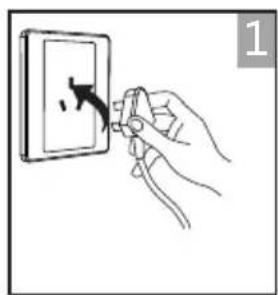
natural_image
Hand holding a switch to open a wall socket, with a hand pointing at the socket (no text or symbols visible)plug in

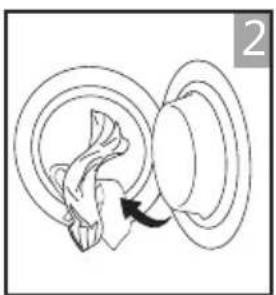
natural_image
Diagram of a mechanical or electrical component with a rotating arrow indicating rotation (no text or symbols)load


natural_image
Hand holding a coiled rope with a curved arrow indicating rotation (no text or symbols)close the door
Drying

on


select program


select function or default


start
After Drying
Buzzer beep and "End" on display.

natural_image
Hand holding a circular object with an arrow indicating rotation (no text or symbols)open the door and take out laundry

natural_image
Pure mechanical assembly diagram showing a lever and bracket without any text or symbolspull out the container

natural_image
Technical line drawing of a mechanical component or bracket (no text or symbols)natural_image
Diagram of curved road or pipeline sections with an upward arrow indicating direction (no text or symbols)clean the filter power off
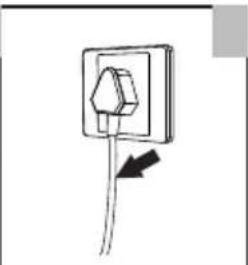
natural_image
Simple line drawing of a wall socket with a cable and arrow indicating direction (no text or symbols)
Note!
- If the socket with a switch is used, please press the switch to turn off the power directly.
■ Before Each Drying

Note!
- Leave it to stand for 2 hours after transporting. Before first use, please use the soft fabric to clean the inside drum.
- Put some clean rags into the drum.
-
Select the 【Refresh】Programme, press 【▶II】 button
-
After finishing this programme, please follow the "cleaning and care" to clean the filter door.
- During drying, the compressor and the water will generate some noise which is entirely normal.
- Before drying, thoroughly spin the laundry in washing machine. High spin speed shortens the drying time and saves energy.
- For even drying result, sort the laundry according to fabric type and select the appropriate drying programme.
- Before drying, please close zips, hooks and eyelets, button, tie fabric belts, etc.
- Remove all objects from pockets such as lighters and matches.
- Remove underwiring from bras.
- Close duvet covers and pillow cases to prevent small items from being rolled up inside them.
7.Leave jackets open and undo any long zips so that textiles dry evenly.
8.Do not over dry the clothes, because over dried clothes can easily get creases. - Do not dry the articles containing rubber or similar elastic materials.
- Keep the area around the tumble dryer clean. Coal dust or flour may cause an explosion.
- The door can be opened only after the programme of the tumble dryer is finished to avoid being scalded by hot steam or hot drum.
- Clean the and refitely and base of container after each use to avoid extension of drying time and increase of energy consumption.
- Do not dry clothes after dry-clean process.
Control Panel

1 On/Off
Product is switched on or off.
2 Start/Pause
Press the button to start or pause the drying cycle.
3 Option
These buttons are used for setting additional functions.
4 Display
The display shows the setting, estimated program time remaining and status messages of your dryer.
5 Programmes
Different drying cycles can be selected according to the users need and the type of laundry to be dried.
The reference weight of dry clothes (weight per item)
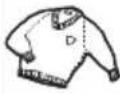 | Sweater(mixed 800g) |  | Jacket(800g)cotton |  | Jeans(800g) |  | Bath Towel(900g)cotton |
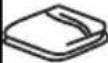 | Single bedsheet(600g)cotton | 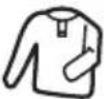 | Work clothes(1120g) |  | Pyjamas(200g) |  | Shirt(300g)cotton |
 | T-Shirt(180g)cotton |  | Underwear(70g)cotton |  | Socks(50g)mixed-weave |

Note!
- Do not put more load than rated.
- Do not dry dripping wet laundry. The dryer might get damaged
Only dry laundry suitable for tumble drying. Regard the laundry care labels:

Suitable for tumble drying

Normal drying process : Dry under medium temperature.

Mild drying process: Dry under lower temperture.

Do not tumble dry: Articles unsuitable for drying in the tumbler.
Option
Delay
Delay
This function is used for delaying the start of the drying programme up to 24 hours. When the delayed programme starts, the time starts to countdown on the display and the delay icon blinks.
- Load your laundry and make sure the machine door is closed.
- Press the 【💡】button, then use the programme selector knob to select the desired programme.
-
You can additionally select the 【Anti-Crease】or 【Signal】functions according to your need.
-
Press the【Delay】button.
-
Repeatedly to press the 【Delay】button to select the desired delay time.
-
After the 【▶II】 button is pressed, the Dryer is at the running condition. The drying procedure will be automatically performed when the delay time is over.
-
If you press the 【▶II】 button again, the delay function will be paused.
-
If you want to cancel the "Delay" function, please press the 【 ⏻ 】 button.
Time
Time+ / Time-
When the 【Warm】 or 【Cool】 or 【Refresh】 programme is selected, the 【Time】 button can be used to adjust the drying time in 10 min. steps.
Intensity
Intensity
You can adjust the dryness level of the laundry by pressing the 【Intensity】 button. There are four grades.
- The intensity function can be activated only before the programme starts.
- Press the【Intensity】button repeatedly to increase the drying grade.
- Except the 【Wool】, 【Warm】, 【Cool】, 【Refresh】 programme, all the other programmes can be adjusted with the 【Intensity】 function.
Hygiene
Hygiene
After selecting the program, you can choose the "Hygiene" function according to your needs. Press 【Hygiene】 to select this function. Press it again to cancel. After selecting the "Hygiene" function, the clothes are sterilized during the drying process, making the clothes cleaner and safer. Use this function with caution for light, thin or delicate laundry.
Lamp
Lamp
The drum light will be on for 1 minute when the button is pressed or 1 minute when the door is open.
Signal
Signal
Set the buzzer on or off. In default condition, the buzzer is on. When the buzzer is on:
- The dryer will affirm pressed function button by a sound.
- If the programme knob is rotated during the dryer is running, the buzzer will remind the user that this is an invalid operation.
- When the drying programme is done, the buzzer will beep.
Anti-Crease
Anti-Crease
At the end of the drying cycle, the anti-crease time is 30 minutes (default) or 120 minutes (selected). This function prevents the laundry from creases. The laundry can be removed during the anti-crease phase. Except
【Warm】, 【Cool】, 【Wool】 and 【Refresh】, all the other programmes have this function.
Memory
MEMORY
Used to define and save your favourite programme, which is used frequently.
- Select the desired programme and other drying functions.
- Press 【Time +】 and 【Time -】 for 3 seconds until the beep sounds and the desired programme has been saved.
- Turn the programme selector to the 【MEMORY】 position, then you can start your favourite programme. If you want to change the 【MEMORY】 settings, repeat the steps (1) and (2).
Child Lock
Child Lock
- This machine incorporates a special child safety lock, which can prevent children from carelessly pressing buttons or making the faulty operation.
- When the drying cycle is running, press the【LAMP】and【HYGIENE】buttons at the same time for 3 seconds to start child lock function.
- When child lock function is set, the display will show Child lock icon and all button are deactivated, except 【💡】 button.
- To deactivate the child lock function, the【LAMP】and【HYGIENE】buttons shall be pressed at the same time for3 seconds.

WiFi
Press [INTENSITY] for 3 seconds to configure the network or reset the network.

Remote Control
This is the switch of remote control, if you want to use your smartphone to control the machine remotely, you need to hold [ANTI CREASE] for 3 seconds.
Considering the safe operation of the machine, the smartphone remote control should meet the following conditions:
- The appliance should connect to the internet;
- The door of drum should be closed.
Remark:
-. If the door is open in anytime, the remote control function will be failure.
-. The remote control function is turned off at the end of each cycle automatically, if you want to use remote control function again, you need turn on it again.
■ Display
| Delay | |
| Child lock | |
| 88:88 | Remaining Time indicator/Error message |
| Anti crease | |
| Clean filters (warning) | |
| Empty water container (warning) | |
| *** | Dryness level |
| Lamp | |
| Signal | |
| Hygiene | |
| Memory | |
| Wi-Fi | |
| Remote control |

WOOL CARE
The wool drying cycle of this machine has been approved by The Woolmark Company for the drying of machine dryable wool products provided that the products are dried according to the instructions on the garment label and those issued by the manufacturer of this tumble dryer. M1716
Programmes
Programme selector
- When the LED display screen brightens up, rotate the programme knob to select the desired programme.
- Select the 【Delay】, 【Time】, 【Intensity】, 【Anti-Crease】 or 【Signal】 functions for additional options.
- Press the 【▶II】 button.
- Press the 【 ⏻】 button after the programme has comlpeted.
Programme start
The drum will rotate after the programme starts. and the remaining programme time will be displayed.
Programme end
- The drum will stop rotating after the programme ends. The display will show "End", The dryer will start 【Anti-Crease】 function if user doesn't take out the load. Please press 【💡】 button after unloading the tumble dryer to cut off power and pull out the plug.
■ Instructions to Connection with the TSmartLife App
Before you start, make sure that:
- Your smartphone is connected to home WiFi network, and you know the network password.
- Make sure you are near the home appliance.
- The 2.4GHz band wireless signal is enabled on your wireless router.
Follow the below steps to enter the remote control state
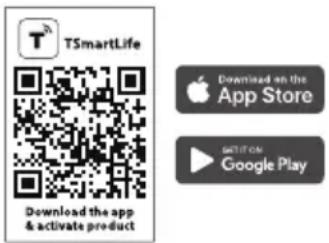
Download the TSmartLife App
On an app market (Google Play Store, Apple App Store), search for "TSmartLife" and find the TSmartLife app. Download and install it on your phone. You can also download the app by scanning the QR code below.
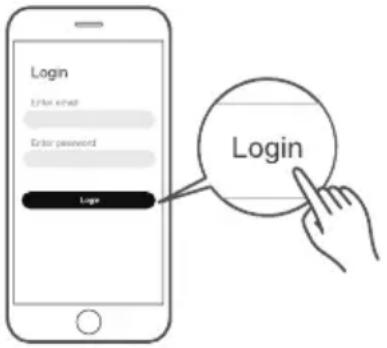
Register and log in
Open the TSmartLife app, and create a new account to start (you can also register through a third-party account). If you already had an existing account, use the account to log in.
Connect your devices to TSmartLife
1: Please make sure your mobile phone is connected to WiFi. If not, go to Settings and turn on the wireless connection, select and connect to a WiFi. Also please turn on the Bluetooth on your phone. If not, go to Settings and turn it on.
2: Please power on your devices.
3: Open TSmartLife app on your phone.
4: If a message of "Smart devices discovered nearby" appears, click to add.

natural_image
Illustration of a hand interacting with a washing machine on a smartphone screen (no text or symbols visible)5: If no message appears, select " + " on the page and select your device in the list of nearby devices available. If your device is not listed, please add your device manually by the device category and device model.

natural_image
Illustration of a hand interacting with a smartphone displaying a mobile app interface (no text or symbols visible)6: Connect your device to WiFi according to the instructions on app. If the connection fails, please follow the instructions provided by the app to continue with the operation.

WiFi Status Light
| Slowly flashing | Waiting for connection | |
| Quickly flashing | Connecting | |
| Quickly flashing solid | Connected to your wireless router |

Notes
• Make sure your devices are powered on.
- Keep your mobile phone close enough to your device when you are connecting network to your device.
- Connect your mobile phone to the wireless network at home, and make sure you know the password of the WiFi.
- Check if your router supports 2.4 GHz WiFi band and turn it on. If you are not sure whether the router supports 2.4 GHz band, please contact the router manufacturer.
- The device cannot connect to the WiFi that requires authentication, and it usually appears in public area such as hotels, restaurants, etc. Please connect to a WiFi that does not require authentication.
- It is recommended to use a WiFi name that only contains letters and numbers. If your WiFi name contains special characters, please modify it in the router.
- Turn off the WLAN+ (Android) or WLAN Assistant (iOS) function of your mobile phone when connecting network to your devices.
- In the case that your device connected to WiFi before but it needs to reconnect, please click "+" on app Home page, and add your device again by the device category and model according to the instructions on app.
Wi-Fi INFORMATION
| Working Frequency | 2.4G |
| Extreme Temperature Range | -20°C~85°C |
| Max RF Power Output | WiFi: E.I.R.P 18dBm BT: 8dBm |
■ Drying Programmes Table
| Programme | Max Load | Max Load | Application/Properties |
| Cotton | 9.0kg | 10.0kg | For single or multi-layer cotton laundry . |
| Synthetics | 3.5kg | 3.5kg | To dry thin synthetic textiles, which are not ironed, such as easy care shirts, baby cloths or socks. |
| Mix | 3.5kg | 3.5kg | For mixed fabrics from cotton and synthetics. |
| Wool | 1.0kg | 1.0kg | For machine washable wool items . |
| J eans | 4.0kg | 4.0kg | To dry jeans or leisure clothes . |
| Bed Linen | 4.0kg | 4.0kg | To dry bed linen, bed sheets or other large items. |
| Sports | 3.0kg | 3.0kg | To dry sportswear and thin fabrics from polyester,which are not ironed. |
| Shirts | 1.0kg | 1.0kg | Foreasy care laundry, such as shirts and blouses equipped with anti-crease function to minimize the ironing effort .Place clothes loosely in the dryer. Once dried, remove quickly and hang it on a clothes hanger. |
| Memory | — | — | Define and save your favourite programme. |
| Warm | — | — | For completing dryness of clothes when you feel uneven dry and partially humid in the clothes. |
| Cool | — | — | For cooling down hot clothes which have been just dried. |
| Refresh | 1.0kg | 1.0kg | To refresh clothes kept at closet for a long time or to remove odors. Min. 20 min to max. 150 min. (in 10 min. steps) |
| Programme | Lamp | Hygiene | Siganl | Anti Crease | Intensity | Delay | Time |
| Cotton | Y | Y | Y | Y | Y | Y | N |
| Synthetics | Y | N | Y | Y | Y | Y | N |
| Mix | Y | Y | Y | Y | Y | Y | N |
| Wool | Y | N | Y | N | N | Y | N |
| J eans | Y | Y | Y | Y | Y | Y | N |
| Bed Linen | Y | Y | Y | Y | Y | Y | N |
| Sports | Y | Y | Y | Y | Y | Y | N |
| Shirts | Y | Y | Y | Y | Y | Y | N |
| Memory | Y | — | Y | — | — | Y | — |
| Warm | Y | N | Y | N | N | Y | Y |
| Cool | Y | N | Y | N | N | Y | Y |
| Refresh | Y | N | Y | N | N | Y | Y |
■ Cleaning and Care
Empty the water container
- Pull out and hold the water container with two hands.
- Tilt the water container, pour out the condensate water into the basin.
- Install the water container.

natural_image
Line drawing of hands operating a mechanical bracket or frame (no text or symbols)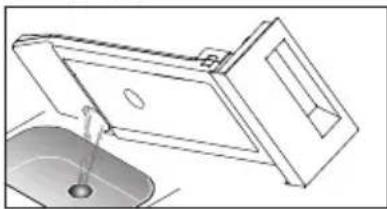
natural_image
Technical line drawing of a mechanical assembly with a sink and housing (no text or symbols)
Warning!
- Empty the water container after each use. Once the water container is filled completely, the programme will be paused and the "icon will light. After the container is emptied, the dryer can be restarted by pressing
【Start/Pause】button.
- Do not drink the condensate water.
- Do not use the dryer without the water container.
Clean the filters
This dryer has a primary door lint filter and a base filter in front of the heat exchanger for additional protection. Make sure you clean the door filter after each cycle.
The base filter need to be cleaned every 5 operations.
Clean the filter door
- Open the door.
- Take out the fiber.
- Open the filter and remove the lint on the filter, You can clean it in watering
- Dry the ditter thoroughly before installing it back.

Note!
• Take notice of the correct orientation before to insert the door filter.

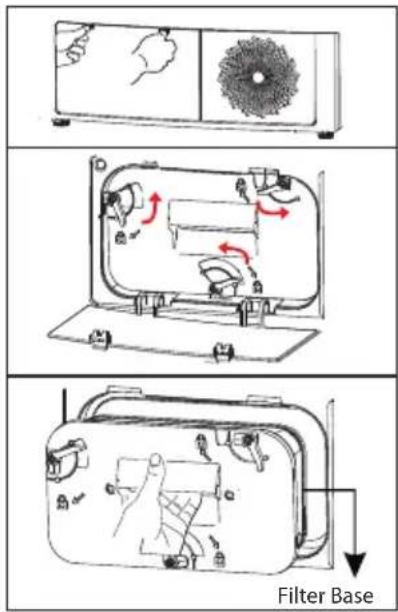
Clean the base filter
- Open the cover.
- Unlock three locking levers and grasp the filter handle.
- Remove the base filter and clean it.
If there is too much lint on the filter, clean it in water. Dry the filter thoroughly before installing it back.
- Clean the rubber sealing, both at the filter and handle.
- Re-insert the filter.
- Lock three locking levers and make sure that the levers are in correct lock position.
- Close the cover until there is a click sound.

Note!
- The lint accumulated on the filter will block the air circulation. Not cleaning the filter regularly will increase drying time and energy consumption.
- Disconnect the power cord before cleaning!
- Do not operate the dryer without the filter!
- Clean the base filter every 5 evaporations accumulation inside the dryer.
Clean the heat exchanger

Warning!
- Do not touch the heat exchanger with your hand, which may cause an injury.
- As necessary, approx. once every 6 months, remove the lint from the heat exchanger using a vacuum cleaner with a dusting brush attached.
- Clean the heat exchanger without applying any pressure. Otherwise the heat
exchanger could be damaged. The dryer will not dry if the cooling fins are damaged or bent.

natural_image
Diagram of a device with a USB cable inserted into a grid, showing an upward arrow and dashed lines (no text or symbols)Clean Tumble dryer

Warning!
- Disconnect the power cord before cleaning!
- Clean the dryer with a wet cloth which is only damped by clean water.
- Do not use solvents, abrasive cleaners, glass cleaners or all-purpose cleaners.
These could damage plastic surfaces and other parts.
natural_image
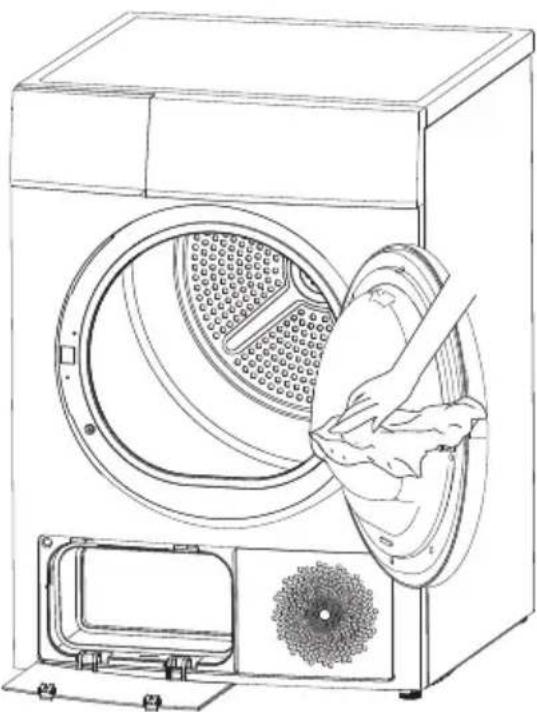
Line drawing of a washing machine with a hand inserting a cloth into the air gap (no text or symbols)• Prepare a wet cloth damped by clean water.
- Clean the door, especially the inside window.
- Clean the sealing around the door opening.
- Clean the humidity sensor inside the drum.
• Take out all the filters, clean the sealing and air flow openings.
• Before starting the dryer, dry all parts with a soft cloth.
■ Trouble Shooting
If you encounter an issue with the dryer, first check the table below and try to solve the issue before calling the service.
| Problem | Solution |
| • Display is not on | • Check if the power supply works.• Check if power plug is inserted in wall socket correctly.• Check if dryer is turned on. |
| • “☐”is lighting | • Check Water Container. If it is full of water, empty it. |
| • “☐”is inglight | • Clean the .Door filter and Base fileter |
| • Dryer does not start | • Check if the power supply works.• Check if power plug is inserted in wall socket correctly.• Check if dryer is turned on.• Check if door is closed correctly.• Check if [Start/Pause] is pressed. |
| • Cloths are not dried or drying time is too long | • Clean Door filter and Base filter.• Clean heat excanger.• Empty Water container.• Clean air inlet.• Check if installation place is proper |
| • There are humming noises | • The compressor is operating. These noises are quite normal and do not indicate a fault. |
| • The dryer switches off at the end of the programme | • The dryer switches off automatically after the end of operation. This is not an error but a normal function. |

Warning!
If the issue continues after trying the solutions, turn off dryer and disconnect power plug, then call the service.
| Display | Reason | Solutions |
| “”E32 | Humidity sensor error | Please contact your local service center if the problem occurs. |
| “”E33 | Temperature sensor error | |
| “”E64 | BLDC motor communication error | |
| “”E82 | PCB communication error |

Warning!
- Only authorised technicians can carry out repairs.
■ Technical Specifications
| ModelParameter | TD-BK100GH Series | TD-BK110GH Series |
| Dimension(W*D*H) | 595*640*845(mm) | 595*640*845(mm) |
| Ambient temperature | + 5°C ~ +35°C | + 5°C ~ +35°C |
| Rated input power | 1050W | 1050W |
| Rated voltage | 220-240V~ | 220-240V~ |
| Rated frequency | 50Hz | 50Hz |
| Refrigerant | R134a | R134a |
| Weight of product | 54kg | 54kg |
| Rated capacity | 9.0kg | 10.0kg |
| GWP | 1430 | 1430 |
| Tonne(s) of CO _2 Equivalent | 0.5t | 0.5t |
| Quantity of refrigerant | 350g | 350g |
Contains fluorinated greenhouse gases covered by the Kyoto Protocol. Hermetically sealed.

Note!
- The rated capacity is the maximum capacity to be dried at one time. Make sure that the dry clothes which are loaded into the appliance do not exceed the rated capacity.
- Do not install the tumble dryer in a room when there is a risk of frost occurring. At temperatures around freezing point the tumble dryer may not be able to operate properly.
- There is a risk of damage if the allowed water is the pump, hoses and / or water container.



- SAFETY INSTRUCTIONS
- INSTALLATION
- OPERATION
- MAINTENANCE
- ■ Safety Instructions
- Warning!
- Caution!
- Note!
- Intended use
- Risk of Electric Shock
- Risk of Injury
- Risk of Prouduct Damage
- Risk of Explosion & Fire
- Safety with children
- ENVIRONMENT
- Disposal of old appliances
- The devices marked with this symbol must not be disposed of in household waste!
- ■ Product Description
- Accessories
- ■ Installation
- Transport
- Installation Place
- Level Adjusting
- Power Supply Connection
- Quick Start
- Before Drying
- Drying
- After Drying
- ■ Before Each Drying
- Control Panel
- On/Off
- Start/Pause
- Option
- Display
- Programmes
- Option
- Delay
- Time
- Time+ / Time-
- Intensity
- Hygiene
- Lamp
- Signal
- Anti-Crease
- Memory
- Child Lock
- WiFi
- Remote Control
- Programmes
- Programme selector
- Programme start
- Programme end
- ■ Instructions to Connection with the TSmartLife App
- Follow the below steps to enter the remote control state
- Download the TSmartLife App
- Register and log in
- Connect your devices to TSmartLife
- Notes
- ■ Drying Programmes Table
- ■ Cleaning and Care
- Empty the water container
- Clean the filters
- Clean the filter door
- Clean the base filter
- Clean the heat exchanger
- Clean Tumble dryer
- ■ Trouble Shooting
- ■ Technical Specifications
Brand : TOSHIBA
Model : TD-BK110GHMSK
Category : Tumble dryer