Match UP 6DSP - Receiver Audiotec Fischer - Free user manual and instructions
Find the device manual for free Match UP 6DSP Audiotec Fischer in PDF.


| Type | Car Audio DSP Receiver |
| Brand | Audiotec Fischer |
| Model | Match UP 6DSP |
| Channels | 6 |
| Power Output (RMS) | 6 x 65W @ 4 Ohms |
| Digital Signal Processor | 56-bit, 96 kHz sampling rate |
| Inputs | 4 high-level (speaker) and 2 low-level (RCA) |
| Outputs | 6 RCA preouts |
| Bluetooth Audio Streaming | Yes |
| Remote Control | Wired remote included |
| Dimensions (W x H x D) | 178 x 52 x 130 mm |
| Weight | 1.2 kg |
| Power Supply | 12V DC (9-16V) |
| Frequency Response | 10 Hz - 20 kHz |
| Total Harmonic Distortion | <0.01% |
| Signal-to-Noise Ratio | >105 dB |
| Speaker Impedance | 4-8 Ohms |
| Protection Circuits | Short-circuit, thermal, overvoltage |
| Installation | Professional recommended; disconnect battery first |
| Cleaning | Use a dry, soft cloth |
| Safety | Disconnect power before installation; avoid moisture |
| Spare Parts & Repairability | Not user-serviceable; contact authorized dealer |
Frequently Asked Questions - Match UP 6DSP Audiotec Fischer
User questions about Match UP 6DSP Audiotec Fischer
0 question about this device. Answer the ones you know or ask your own.
Ask a new question about this device
Download the instructions for your Receiver in PDF format for free! Find your manual Match UP 6DSP - Audiotec Fischer and take your electronic device back in hand. On this page are published all the documents necessary for the use of your device. Match UP 6DSP by Audiotec Fischer.
USER MANUAL Match UP 6DSP Audiotec Fischer
UP 6DSP
UPGRADE
6-channel upgrade amplifier with integrated 7-channel 64 Bit DSP for universal applications
Speaker Output E - H
natural_image
Coiled electrical connectors with various colors and terminal blocks, no visible text or symbolsnatural_image
Abstract red geometric shape on black background, no text or symbols presentnatural_image
Simple curved line drawing on dark background with a red rectangular border (no text or symbols)natural_image
Diagram of a SCP-to-Control Input Adapter connector with two terminal blocks (no text or symbols on the diagram itself)![Center Full IF [SubR... woofer 1 IG [SubR... woofer 2 DRAG & DR Subwoofer 1 100.0 % Subwoofer 1 100.0 % Subwoofer 1 AMP Out E [SubRC] Subwoofer 1 AMP Out E [SubRC]](/content/2026/05/913366/images/d7b07b0fa52af5b306626532b86b0b52ecb5788e751da2007506e5b75b7cfef8.jpg)
Turn On & Off Delay
Remote Output Configuration
ADEP.3 Configuration
natural_image
Close-up of a printed circuit board with electronic components and a highlighted orange section (no readable text or symbols)natural_image
Close-up of electronic circuit board with multiple LED connectors and a green checkmark overlay (no readable text or symbols)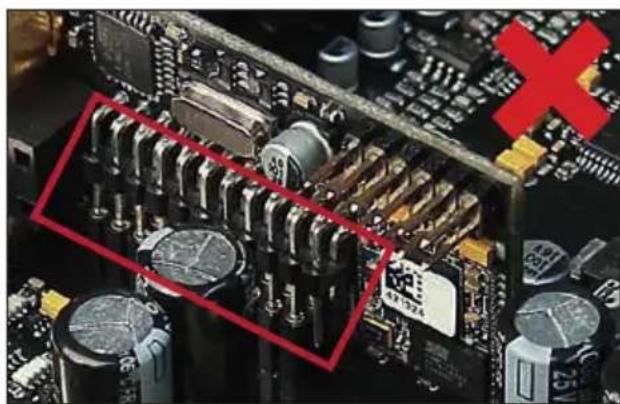
natural_image
Close-up of a computer motherboard with visible electronic components and a red X symbol (no readable text or symbols)Abtastrate ....48 kHz
Congratulations on your purchase of this innovative and high-qual ity MATCH product.
Thanks to more than 30 years of experience in research and development of audio products this amplifier sets new standards in the range of digital amplifiers.
We wish you many hours of enjoyment with your new MATCH UP 6DSP.
Yours, AUDIOTEC FISCHER
General instructions
General installation instructions for MATCH components
To prevent damage to the unit and possible injury, read this manual carefully and follow all installation instructions. This product has been checked for proper function prior to shipping and is guaranteed against manufacturing defects.
Before starting your installation, disconnect the battery's negative terminal to prevent damage to the unit, fire and / or risk of injury. For a proper performance and to ensure full warranty coverage, we strongly recommend to get this product installed by an authorized MATCH dealer.
Install your UP 6DSP in a dry location with sufficient air circulation for proper cooling of the equipment.
For safety reasons, the UP 6DSP must be professionally installed. Therefore, use the two mounting plates which are included in delivery. These are attached to the bottom of the amplifier with two short screws which are included in delivery, too.
When screwing the amplifier to the vehicle chassis, carefully examine the area around and behind the proposed installation location to ensure that there are no electrical cables or components, hydraulic brake lines or any part of the fuel tank located behind the mounting surface. Failure to do so may result in unpredictable damage to these components and possible costly repairs to the vehicle.
General instruction for connecting the UP 6DSP amplifier
The UP 6DSP amplifier may only be installed in motor vehicles which have a 12 Volts negative terminal connected to the chassis ground. Any other system could cause damage to the amplifier and the electrical system of the vehicle.
The positive cable from the battery for the entire sound system should be provided with a main fuse at a distance of max. 30 cm from the battery. The value of the fuse is calculated from the maximum total current draw of the car audio system.
Use only the included MATCH cable or an optionally available MATCH cable harness for connection of the UP 6DSP. The use of other cables can result in damage of the amplifier, the head unit / car radio or the connected loudspeakers! The fuses of the amplifier may only be replaced by identically rated fuses (1 x 30 A) to avoid damage of the amplifier.
Prior to installation, plan the wire routing to avoid any possible damage to the wire harness. All cabling should be protected against possible crushing or pinching hazards. Also avoid routing cables close to potential noise sources such as electric motors, high power accessories and other vehicle harnesses.
Connectors and control units
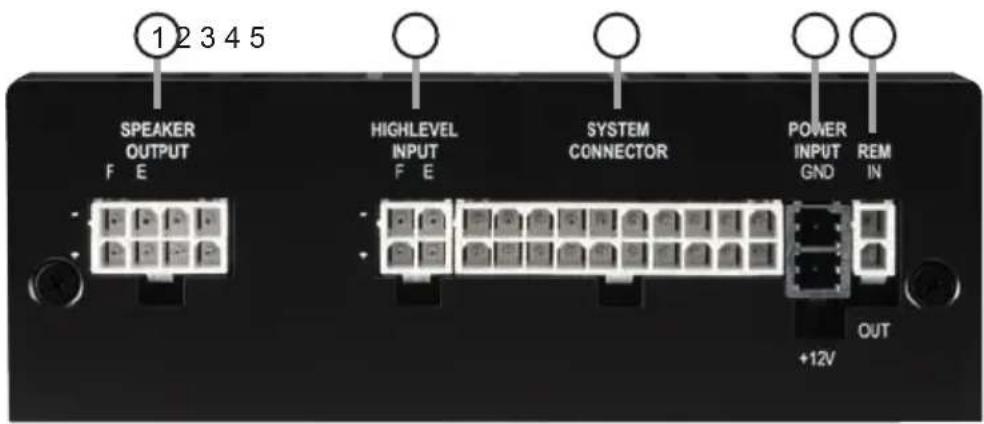
① Speaker Output E & F
Page 23, point 3
② Highlevel Input E & F
Page 23, point 2
③ System Connector input
Page 23, point 1
④ Power connector
Page 24, point 7
⑤ Remote connectors
Page 24, point 6
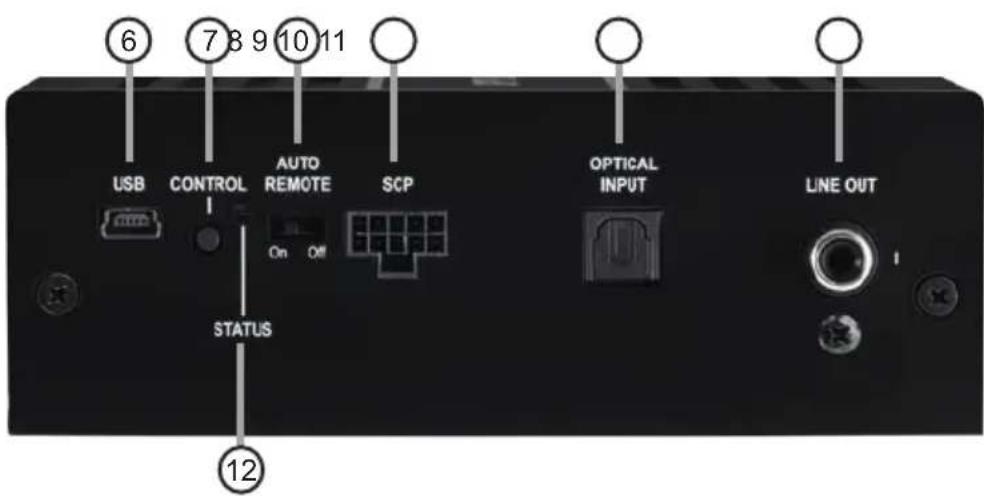
⑥ USB input
Page 25, point 8
⑦ Control pushbutton
Page 27, point 2
⑧ Auto Remote switch
Page 24, point 5
⑨ SCP (Smart Control Port)
Page 27, point 3
10 Optical Input Page 23, point 4
11 Line Output Page 26, point 12
12 Status LED Page 27, point 1
Fig. 1: Pin configuration UP 6DSP
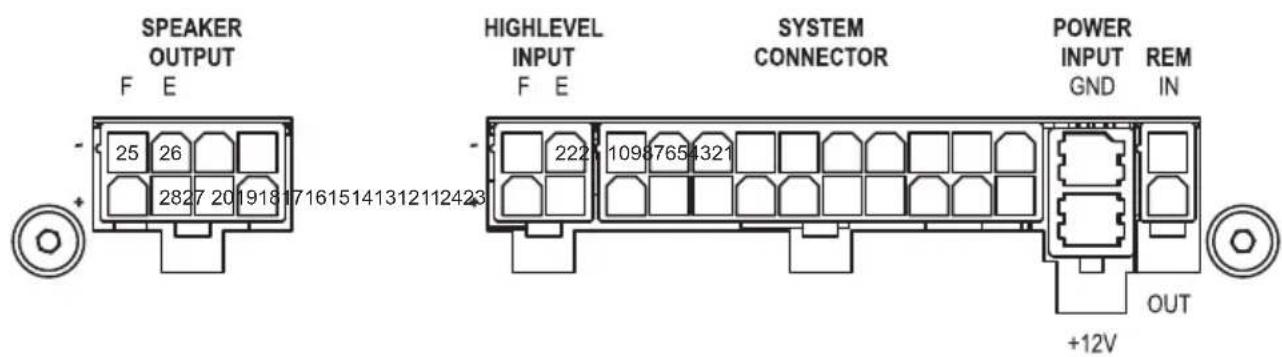
System Connector
- Highlevel loudspeaker input rear left (-) / C
- Highlevel loudspeaker input front left (-) / A
- Highlevel loudspeaker input front right (-) / B
- Highlevel loudspeaker input rear right (-) / D
- Loudspeaker output rear right (-) / D
- Loudspeaker output rear left (-) / C
- Loudspeaker output front right (-) / B
- Loudspeaker output front left (-) / A
- Ground* / Warning: Do not use this pin!
-
Ground* / Warning: Do not use this pin!
-
Highlevel loudspeaker input rear left (+) / C
- Highlevel loudspeaker input front left (+) / A
- Highlevel loudspeaker input front right (+) / B
- Highlevel loudspeaker input rear right (+) / D
- Loudspeaker output rear right (+) / D
- Loudspeaker output rear left (+) / C
- Loudspeaker output front right (+) / B
- Loudspeaker output front left (+) / A
- +12 Volts* / Warning: Do not use this pin!
- +12 Volts* / Warning: Do not use this pin!
Highlevel Input E - F
- Highlevel loudspeaker input channel F (-)
-
Highlevel loudspeaker input channel E (-)
-
Highlevel loudspeaker input channel F (+)
- Highlevel loudspeaker input channel E (+)
Speaker Output E - H
- Subwoofer output 2 (-) / F
-
Subwoofer output 1 (-) / E
-
Subwoofer output 2 (+) / F
- Subwoofer output 1 (+) / E)
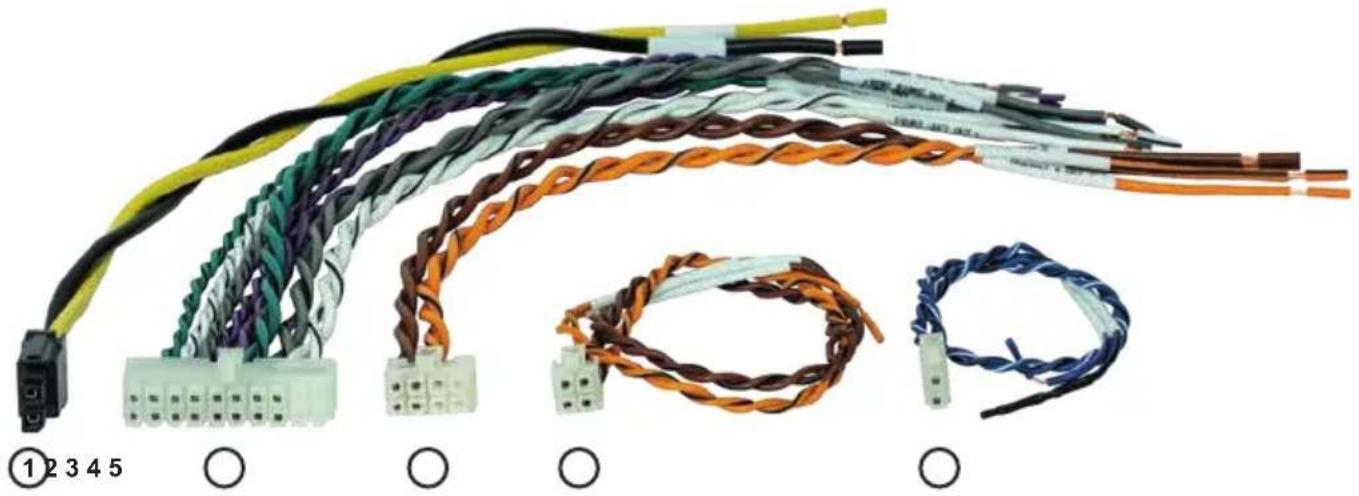
Fig. 2: Overview connection cables
natural_image
Coiled electrical connectors with various colors and wire types, no visible text or symbolsPower Input connection cable (+12V / GND)
② System Connector connection cable
③ Speaker Output E - F connection cable
④ Highlevel Input E - F connection cable
⑤ Remote (REM IN / OUT) connection cable
Configure the MATCH UP 6DSP as follows
Caution: Carrying out the following steps will require special tools and technical knowledge. In order to avoid connection mistakes and / or damage, ask your dealer for assistance if you have any questions and follow all instructions in this manual (see page 19). It is recommended that this unit will be installed by an authorized MATCH dealer.
1. Connecting the System Connector
-
Connecting the highlevel speaker inputs A - D: The highlevel loudspeaker inputs (see page 21, fig. 1, no. 1 - 4 and 11 - 14) can be connected directly to the loudspeaker outputs of an OEM radio or aftermarket radio by using the enclosed MATCH connection cable. It is not mandatory to use all highlevel speaker inputs. It is sufficient if two of four highlevel loudspeaker inputs are connected. With the DSP PC-Tool software it is possible to route the input signals to the 9 output channels individually. Make sure that the polarity is correct. If one or more connections have reversed polarity it may affect the performance of the amplifier. If this input is used the remote input (REM IN) does not need to be connected as the amplifier will automatically turn on once a loudspeaker signal is received.
-
Connecting the loudspeaker outputs A - D: The loudspeaker outputs (see page 21, fig. 1, no. 5 - 8 and 15 - 18) can be connected directly to the wires of the loudspeakers by using the enclosed MATCH connection cable.
Never connect any of the loudspeaker cables to the chassis ground as this will damage your amplifier and your speakers. Ensure that the loudspeakers are correctly connected (phase), i.e. plus to plus and minus to minus. Exchanging plus and minus causes a total loss of bass reproduction. The plus pole is indicated on most speakers. The impedance per channel must not be lower than 4 Ohms, otherwise the amplifier protection will be activated.
Attention: Solely use the System Connector connection cable which is included in deliv-
ery or an appropriate cable harness from the MATCH accessories program for connection!
2. Connecting the highlevel speaker inputs E & F (optionally)
The highlevel loudspeaker inputs E & F can be connected directly to the loudspeaker outputs of an OEM radio or aftermarket radio using the enclosed MATCH connection cable (see page 21, fig. 1, no. 21 - 24). Make sure that the polarity is correct. If one or more connections have reversed polarity it may affect the performance of the amplifier. If this input is used the remote input (REM IN / page 20, point 5) does not need to be connected as the amplifier will automatically turn on once a loudspeaker signal is received.
Attention: Solely use the connection cable with the 4-pole connector and flying leads which is included in delivery or an appropriate cable harness from the MATCH accessories program!
3. Optional: Connecting the speaker outputs E & F
The two power loudspeaker outputs E & F allow to connect subwoofers using the included connection cable (see page 21, fig. 1, no. 25 - 28). Never connect any of the loudspeaker cables with the chassis ground as this will damage your amplifier and your speakers. Ensure that the loudspeakers are correctly connected (in phase), i.e. plus to plus and minus to minus. Exchanging plus and minus causes a total loss of bass reproduction. The plus pole is indicated on most speakers. The impedance of the speakers must not be lower than 2 Ohms, otherwise the amplifier protection will be activated.
Attention: Solely use the connection cable with the 8-pole connector and flying leads (page 22, fig. 2) which is included in delivery for connecting further loudspeakers or an appropriate cable harness from the MATCH accessories program!
4. Connecting a digital signal source
If you have a signal source with an optical digital output you can connect it to the amplifier using the appropriate input. The sampling rate must be between 12 and 96 kHz. The input signal is automatically adapted to the internal
sample rate.
In standard configuration the manual activation via an optional remote control is configured.
Alternatively you can activate the automatic turn-on feature in the DCM menu of the DSP PC-Tool software.
The automatic turn-on circuit does not work when the digital input is used. Therefore it is mandatory to connect the remote input (REM IN / page 20, point 5).
Important: The signal of a digital audio source normally does not contain any information about the volume level. Keep in mind that this will lead to full level on the outputs of the UP 6DSP and your connected amplifiers.
This may cause severe damage to your speakers. We strongly recommend to use an optional remote control for adjusting the volume level of the digital signal inputs!
Note: The MATCH UP 6DSP can only handle uncompressed digital stereo signals in PCM format with a sample rate between 12 kHz and 96 kHz and no MP3- or Dolby-coded digital audio stream!
5. Configuration of the remote input
The UP 6DSP will be turned on automatically if the highlevel inputs of the System Connector and / or the Highlevel Inputs E & F are used or if a signal is applied to the remote input terminal. The Auto Remote switch (page 20, point 8) allows to deactivate the automatic turn-on feature of the highlevel inputs. The feature should be deactivated if there are e.g. noises while switching on / off the amplifier.
On: Activation via highlevel speaker input is enabled (by default).
Off: Activation via highlevel speaker input is disabled.
Note: If the automatic turn-on function is deactivated it is mandatory to use the remote input terminal to power up the amplifier!
6. Connecting the remote connectors
Only connect the remote wires using the 2-pole connection cable with the flying leads which is included in delivery (page 22, fig. 2) or an appropriate cable harness from the MATCH accessories program.
REM IN: The remote input has to be used to turn on / off the amplifier if the signal source which is connected to the System Connector or Highlevel Input E & F is not activating the “automatic turn-on” function (Auto Remote) or if the amplifier shall only be activated / deactivated by a remote signal applied to the remote input.
The remote wire should be connected to the remote output / automatic antenna (aerial positive) output of the head unit / car radio. This is only activated if the head unit is switched on. Thus the amplifier is switched on and off together with the head unit.
We do not recommend controlling the remote input via the ignition switch to avoid pop noise during turn on / off.
Note: This input does not need to be assigned if one of the highlevel inputs A - F is used. To deactivate the “automatic turn-on” function read the description in point 5 “Configuration of the remote input”.
REM OUT: The remote output is used for turning on / off an amplifier that is connected to the pre-amplifier output (Line Out) of the MATCH UP 6DSP. Therefore connect the remote output of the UP 6DSP to the remote input of your amplifier to switch it on and off via the internal DSP without interfering signals. The remote output is activated automatically as soon as the booting process of the DSP is completed. Additionally this output will be turned off during the "Power Save Mode" or a software update process.
Important: Never use a different signal than the remote output of the UP 6DSP to activate a connected amplifier!
7. Connection to power supply
Make sure to disconnect the battery before installing the MATCH UP 6DSP!
Solely use the Power Input connection cable which is included in delivery for connection (page 22, fig. 2). Make sure of correct polarity. +12 V (black cable): Connect the +12 V power cable to the positive terminal of the battery. The wire needs to have an inline fuse (30 A) at a distance of less than 12 inches (30 cm) from the battery. If your power wires are short (less than 1 m / 40") then a wire gauge of 6 mm² / AWG 10 will be sufficient. In all other cases we
strongly recommend gauges of 10 - 16 mm ^2 / AWG 8 – 6!
GND (yellow cable): Connector for the ground cable. The ground wire must be connected to the vehicle chassis at a non-insulated point. The cable should have the same gauge as the +12 V wire. Inadequate grounding causes audible interference and malfunctions.
8. Connecting the PC & first start-up
The USB input enables the connection of the UP 6DSP to a personal computer and its free configuration with our DSP PC-Tool software using the provided USB cable.
Please note: It is not possible to connect any USB storage devices.
Prior to connecting the amplifier to your PC visit our website and download the latest version of the DSP PC-Tool software.
We strongly recommend to carefully read the DSP PC-Tool knowledge base before using the software for the first time in order to avoid any complications and failures.
Important: Make sure that the amplifier is not connected to your computer before the software and USB driver are installed!
In the following the most important steps how to connect and the first start-up are described:
- Download the latest version of the DSP PC-Tool software (available on our website www.audiotec-fischer.com) and install it on your computer.
- Connect the amplifier to your computer using the USB cable that is included in delivery. If you have to bridge longer distances please use an active USB extension cable with integrated repeater.
- First turn on the amplifier and then start the software. The operating software will be updated automatically to the latest version if it is not up-to-date.
9. Adjustment of the input sensitivity of the analog inputs
ATTENTION: It is mandatory to properly adapt the input sensitivity of the UP 6DSP to the signal source in order to avoid damage to the amplifier.
The input sensitivity can be optimally adapted to the signal source using the DSP PC-Tool software. Input sensitivity is factory set to 11 Volts. This is definitely the best setting in most applications. Only if the head unit / car radio doesn't deliver enough output level, the input sensitivity should be increased.
Note: Mute all signal outputs of the UP 6DSP during this setup.
For adjustment of the input sensitivity please proceed as follows:
- Turn on the amplifier.
- Start the DSP PC-Tool software.
- The adjustment of the input sensitivity can be found in the "Signal Management" tab of the DCM menu under the item "Main Input → Input Gain".
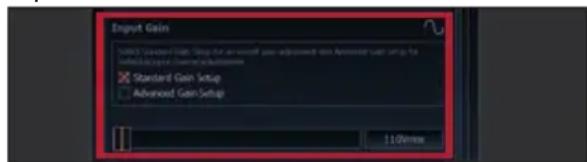
- Select the setup method to adjust the input sensitivity.
Standard Gain Setup: This method allows to globally set the input sensitivity for all input channels.
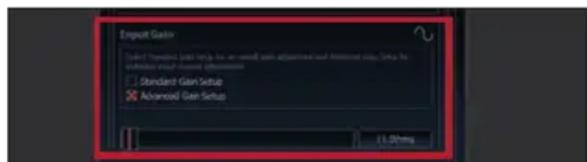
Advanced Gain Setup: This method allows an individual setting for each channel pair.
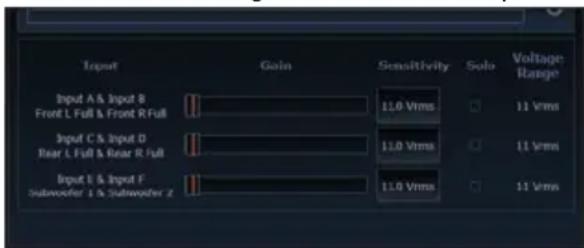
- Adjust the volume of your radio to approx. 90 % of the max. volume and playback an appropriate test tone, e.g. the special and unique "Input Gain Setup" signal from the test tones folder of the DSP PC-Tool (0 dB).
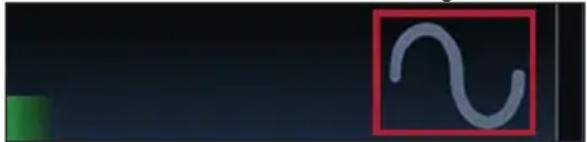
- If the clipping indicator in the DSP PC-Tool already lights up (see picture below), you have to reduce the input sensitivity using the scroll bar until the indicator turns off.

natural_image
Abstract red geometric shape on black background, no text or symbols present- Increase the input sensitivity until the clipping indicator lights up. Now turn the control back until the indicator turns off again.
natural_image
Simple curved line drawing inside a red square frame on dark background (no text or symbols)10. Configuration of the internal DSP
The general amplifier settings should be conducted with the DSP PC-Tool software before using the amplifier for the first time.
Now you are able to configure your UP 6DSP with our intuitive DSP PC-Tool software. Useful hints for the correct setting can be found in our knowledge base at www.audiotec-fischer.com.
Caution: We highly recommended to set the volume of your car radio to minimum position and to mute all signal outputs. Especially if the UP 6DSP will be used in fully active applications, a wrong setup can destroy your speakers right away.
11. Analyzing the input signal
Check the input signal for factory-set equalizing and all-pass filters using the Input Signal Analyzer (ISA) of the DSP PC-Tool software. Information about the ISA can be found in the extensive Knowledge Base on our website www.audiotec-fischer.com.
Caution: We highly recommend to set the volume of your car radio to minimum position during first start-up. Additionally no device should be connected to the amplifier until general settings in the DSP PC-Tool software have been made. Especially if the UP 6DSP will be used in fully active applications, a wrong setup can destroy your speakers right away.
12. Optional: Connecting the pre-amplifier output
The Line Out is a mono floating-ground low level output for connecting an additional power amplifier. This output can now be connected to the pre-amplifier / lowlevel / RCA input of the external amplifier using an appropriate cable (RCA / Cinch cables).
The output provides a maximum output voltage of 3 Volts RMS.
Please make sure that you always turn on / off the external amplifier using the remote output (REM OUT) of the UP 6DSP in order to avoid interfering noises.
13. Sound tuning
Now you can create your sound setup. Information about sound tuning can be found in our extensive knowledge base at audiotec-fischer.com or contact your local MATCH dealer.
1. Status LED
The Status LED indicates the operating mode of the amplifier and its DSP memory.
Green: Amplifier is ready for operation.
Orange: Power Save Mode is activated.
Red: Protection Mode is active. This may have different root causes. The amplifier is equipped with protection circuits against over- and under-voltage as well as overheating. Please check for connecting failures such as short-circuits or other wrong connections.
If the amplifier is overheated the internal temperature protection switches off the remote and signal output until it reaches a safe temperature level again.
Red / green slow flashing: No operating software installed. Connect the amplifier to the DSP PC-Tool software and confirm the automatic update of the operating system. You will find the latest version of the DSP PC-Tool software at www.audiotec-fischer.com.
Red / green fast flashing: The currently selected sound setup memory is empty. A new setup has to be loaded via the DSP PC-Tool software or switch to a memory position with existing sound setup.
2. Control pushbutton
The UP 6DSP provides 10 internal memory locations for sound setups. The Control push-button allows the user to switch between two memory positions. These can be defined in the DSP PC-Tool. In addition a device reset can be made by pressing the button for a longer period.
-
Setup switch: Press Control pushbutton for 1 second. The memory locations one and two are defined by default. Switching is indicated by a single red flash of the Status LED. Alternatively, the optional URC.3 remote control can be used for switching. To switch between all internal memory locations, optional accessories like the DIRECTOR display remote control or CONDUCTOR are required.
-
Device reset: Press pushbutton for five seconds. This completely erases the internal memory and is indicated by a continuous red glowing and constant green flashing of the Status LED.
Attention: After erasing the setups from memory the UP 6DSP will not reproduce any audio output until the device is updated via the DSP PC-Tool software.
3. SCP (Smart Control Port)
This multi-functional input is designed for MATCH UP 6DSP accessory products like a remote control which allows to adjust several features of the amplifier. Depending on the type of remote control, at first its functionality has to be defined in the “Device Configuration Menu” of the DSP PC-Tool software.
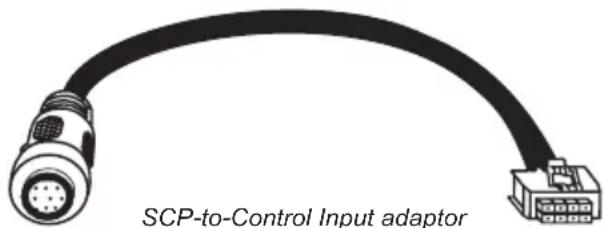
Attention: If the accessory product does not have a NanoFit connector, a SCP-to-Control Input adaptor (Art-Nr. M141313) is optionally available from your specialist dealer.
Configuration examples
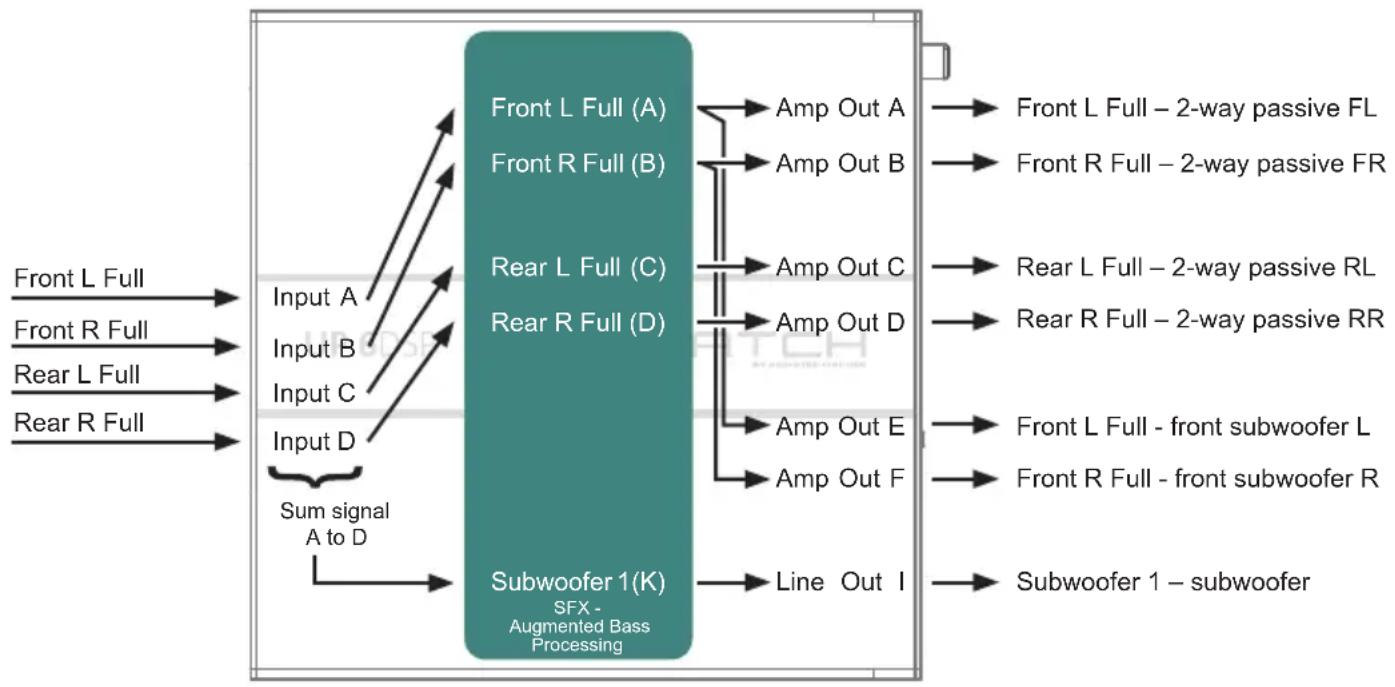
Example 1: Channel routing with Virtual Channel Processing
4-channel head unit > Front: 2-way passive; Rear: 2-way passive + two front subwoofer + Line Out for external subwoofer
From car radio Inputs Outputs To speakersVirtual channels
flowchart
graph LR
    A["Input A"] --> B["Sum signal A to D"]
    C["Input B"] --> B
    D["Input C"] --> B
    E["Input D"] --> B
    B --> F["Subwoofer 1(K) SFX - Augmented Bass Processing"]
    G["Front L Full (A)"] --> H["Amp Out A"]
    I["Front R Full (B)"] --> J["Amp Out B"]
    K["Rear L Full (C)"] --> L["Amp Out C"]
    M["Rear R Full (D)"] --> N["Amp Out D"]
    O["Amp Out E"] --> P["Amp Out F"]
    Q["Line Out I"] --> R["Subwoofer 1 - subwoofer"]
    S["Front L Full - 2-way passive FL"] --> T
    U["Front R Full - 2-way passive FR"] --> V
    W["Rear L Full - 2-way passive RL"] --> X
    Y["Rear R Full - 2-way passive RR"] --> Z
    AA["Front L Full - front subwoofer L"] --> AB
    AC["Front R Full - front subwoofer R"] --> AD
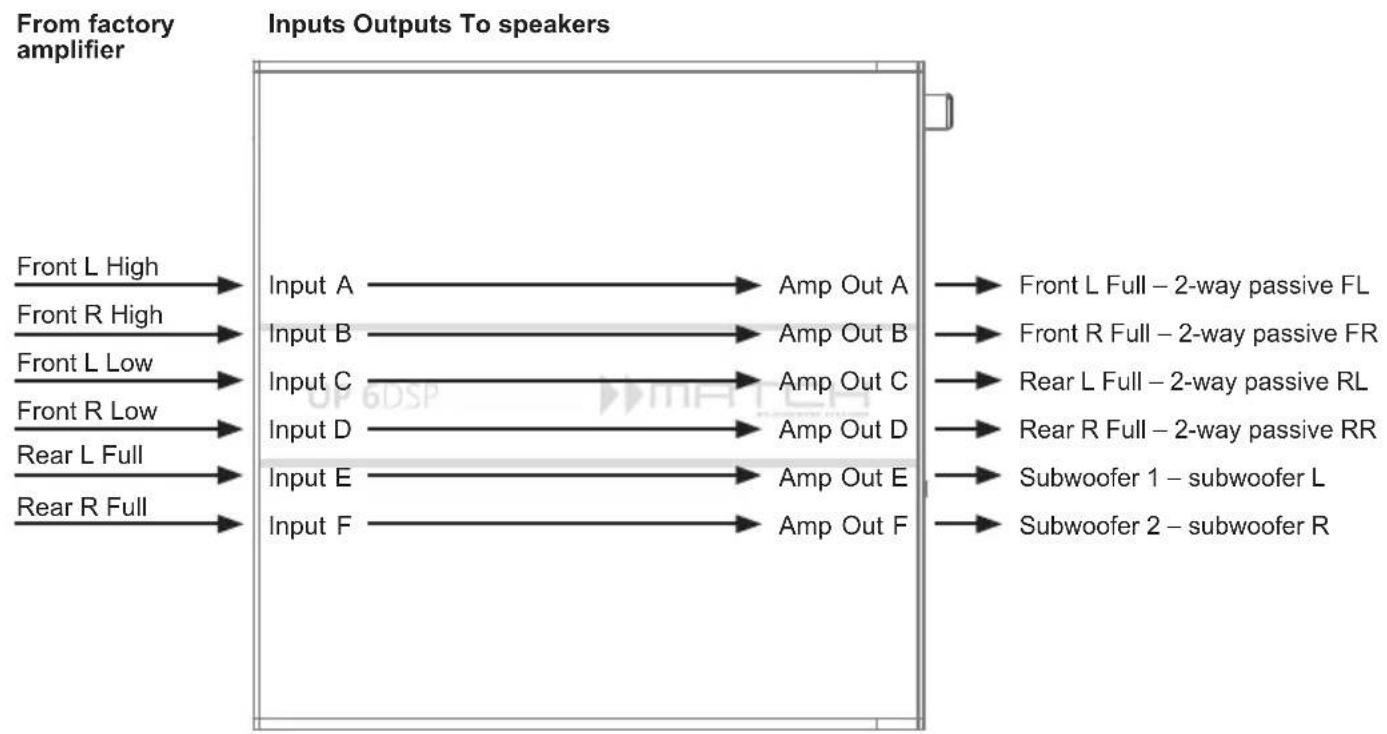
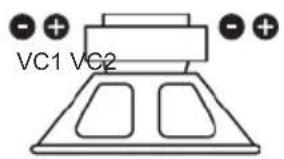
Example 2: 6-channel 1 to 1 channel routing (IOR) e.g.: Front 2-way passive / Rear 2-way passive / two subwoofers with single voice coil (1 x 2 Ohms)
flowchart
graph LR
    A["From factory amplifier"] --> B["Input A"]
    B --> C["Amp Out A"]
    C --> D["Front L Full – 2-way passive FL"]
    A --> E["Input B"]
    E --> F["Amp Out B"]
    F --> G["Front R Full – 2-way passive FR"]
    A --> H["Input C"]
    H --> I["Amp Out C"]
    I --> J["Rear L Full – 2-way passive RL"]
    A --> K["Input D"]
    K --> L["Amp Out D"]
    L --> M["Rear R Full – 2-way passive RR"]
    A --> N["Input E"]
    N --> O["Amp Out E"]
    O --> P["Subwoofer 1 – subwoofer L"]
    A --> Q["Input F"]
    Q --> R["Amp Out F"]
    R --> S["Subwoofer 2 – subwoofer R"]
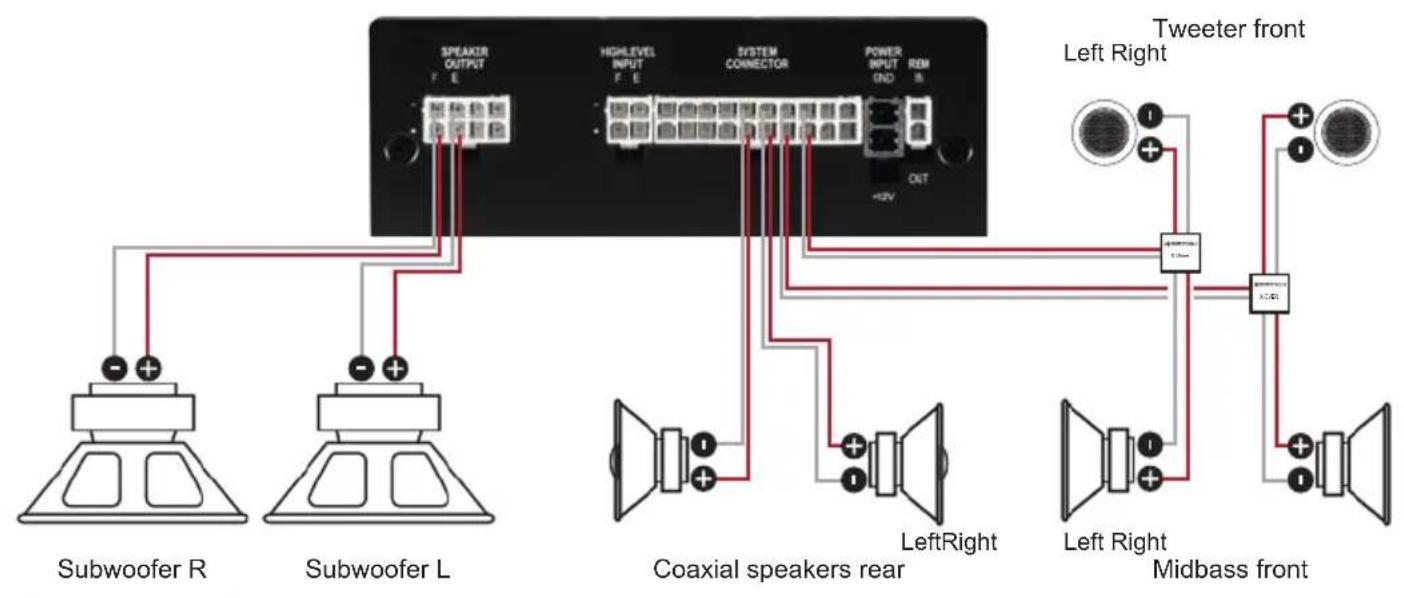
Alternative: One subwoofer with 2 x 2 Ohms dual voice coil
A basic DSP setup can be found at www.audiotec-fischer.de under Tools → Sound Setups.
For further applications please contact your MATCH specialist dealer.
Virtual Channel Processing (VCP)
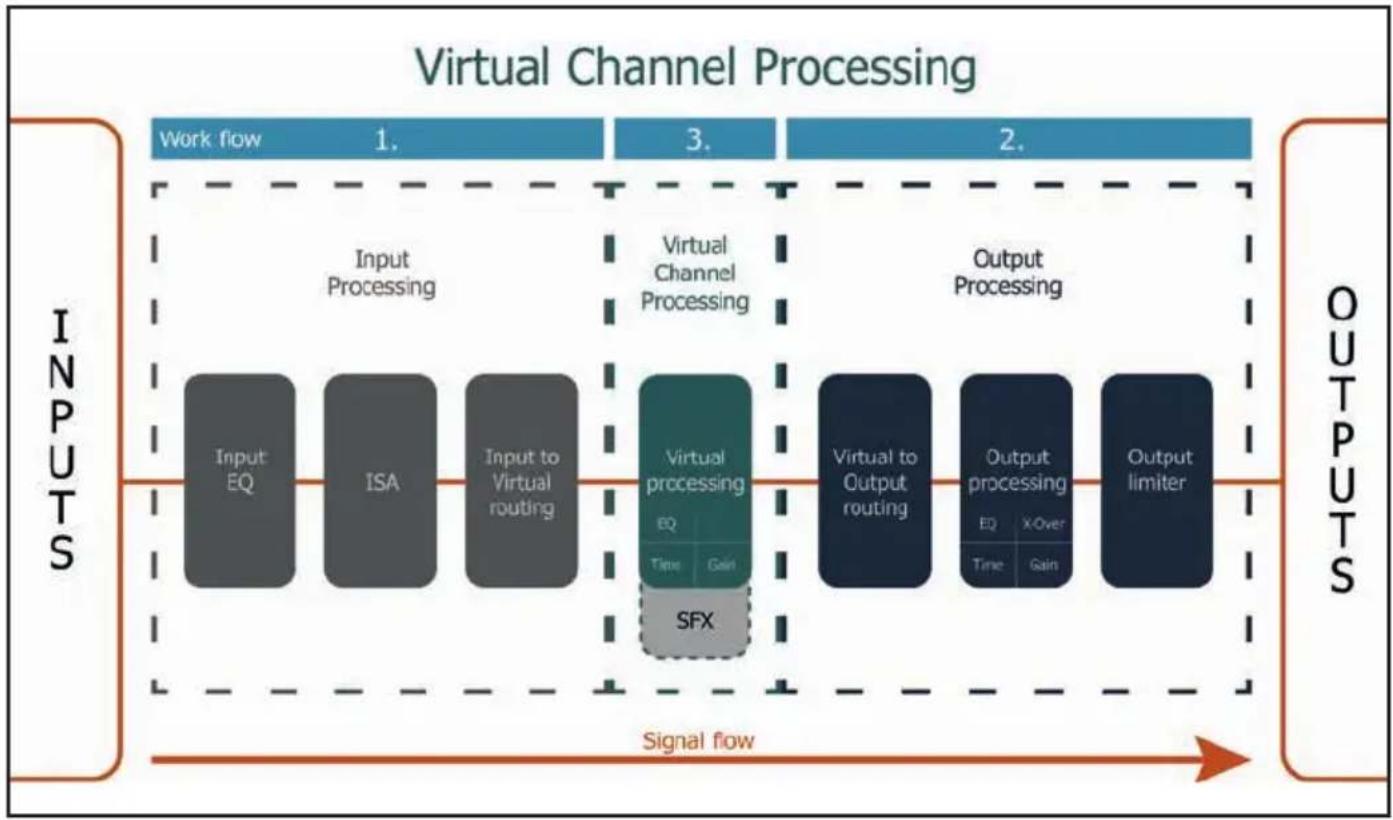
In addition to standard routing, the MATCH UP 6DSP offers Virtual Channel Processing (VCP), a multi-stage signal processing concept that enables the perfect configuration of complex sound systems, opening up completely new possibilities for sound tuning.
flowchart
graph LR
    subgraph Inputs
        A["Input EQ"] --> B["Input Processing"]
        C["ISA"] --> D["Input to Virtual routing"]
    end

    subgraph Virtual Processing
        E["Virtual processing EQ Time Gain SFX"] --> F["Virtual Channel Processing"]
        G["Virtual to Output routing"] --> H["Output Processing"]
        I["Output processing EQ Time Gain"] --> J["Output Limiter"]
    end

    subgraph Outputs
        K["OUTPUT Processing"] --> L["Output Processing"]
        M["OUTPUT Processing"] --> N["Output Limiter"]
    end

    style Inputs fill:#f9f,stroke:#333
    style Outputs fill:#bbf,stroke:#333
The VCP extends the previous scope of the device by an additional layer of processed channels, which is located between the inputs and outputs. A total of seven additional processed virtual channels and seven processed output channels are available.
This virtual channel layer offers several advantages, especially in complex system configurations.
The main advantages of this concept are:
- Cross-channel group equalizers that affect several output channels simultaneously
- Multi-way speaker configuration of DSP sound effects (SFX)
- Additional features such as Rear Attenuation
For further information about the VCP and its configuration, please refer to our Knowledge Base at www.audiotec-fischer.com.
In order to configure a subwoofer remote control, specific settings have to be made in the DSP PC-Tool. First, the appropriate remote control must be activated in the "Extended Features" tab in the DCM menu of the DSP PC-Tool software and configured, depending on the model.

If the VCP is not activated, the subwoofer remote control of the UP 6DSP is permanently assigned to the output channels E and F. In this case it does not matter which output is named "Subwoofer" in the IO routing matrix.
In the "Outputs" menu you can also see to which outputs the SubRC (subwoofer remote control) is tied:
![TCH Outputs Virtual DCM FX IO Time AMP Out E [SubRC] AMP Out F [SubRC] Line Out I](/content/2026/05/913366/images/0a6e8b274383f395a013fa43140becf517cf38afeab13a84c587b6073011467f.jpg)
When VCP is activated, the subwoofer remote control is tied to the output channels that are supplied with one of the two virtual subwoofer signals ("Subwoofer 1" or "Subwoofer 2") in the "Virtual to Output Routing" matrix. This can be any combination of output channels.
In the following example these are the amplifier outputs E and F:
![Main to Virtual Routing HEC/AUX to Virtual Routing Digital to Virtual Routing Virtual to Output Routing Center Full Subwoofer 1 100.0 % Subwoofer 1 100.0 % DRAG & DR Subwoofer 1 100.0 % Subwoofer 1 AMP Out E [SubRC] Subwoofer 1 AMP Out F [SubRC]](/content/2026/05/913366/images/8b6bd9b9e3ac27f439eab5d7094c10799e7d686d3bfa252e3a2985895244623e.jpg)
Note: Please note that an input signal must be assigned to the two virtual subwoofer signals "Subwoofer 1" and / or "Subwoofer 2" in the other routing matrices.
Afterwards, the subwoofer control is also displayed in the "Outputs" menu next to the name of the channel [SubRC]:
![TCH Outputs Virtual DCM FX IO Time AMP Out E [SubRC] AMP Out F [SubRC] Line Out I](/content/2026/05/913366/images/06daba5f404e07f812f45347b9486c364da3cd439e773a8867703baaca08a5ce.jpg)
Beside the unique DSP sound effects the UP 6DSP provides a bunch of new system features.
In the DCM menu of the DSP PC-Tool software individual settings can be made for several of these system features.
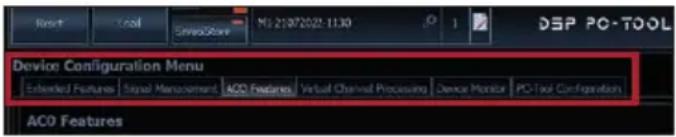
Turn On & Off Delay
This function allows to determine the delay time with which the integrated DSP is switched on and off. The factory setting is 0.2 seconds. The delay time should only be modified if there are e.g. noises while switching on / off the amplifier.
URC Setup Switch Configuration
The ACO provides ten internal memory locations for sound setups instead of the common two.
By using an optional URC remote control or the Control pushbutton (see page 20) it is possible to toggle between two of the ten memory locations. These two memory locations can be determined in the "URC Setup Switch Configuration". The memory locations one and two are preassigned by default. To switch between all internal memory locations, the optionally available remote controls DIRECTOR and CONDUCTORarerecommended.
Remote Output Configuration
This function controls if the remote output (which switches on and off the connected amplifiers) will be temporarily deactivated during a sound setup switch. This function is activated (ON) by default.
ADEP.3 Configuration
If the UP 6DSP is connected to an OEM radio via the highlevel inputs it may happen that the ADEP.3 circuit has to be adapted to the diagnostic mode of the radio if the latter is equipped with a so-called "class SB" output stage.
In the “ADEP.3 SB compatibility mode & Advanced Noise Suppression” section, an adjustment should be made if there are e.g. distortions occur in the upper volume range.
The compatibility mode is enabled by default.
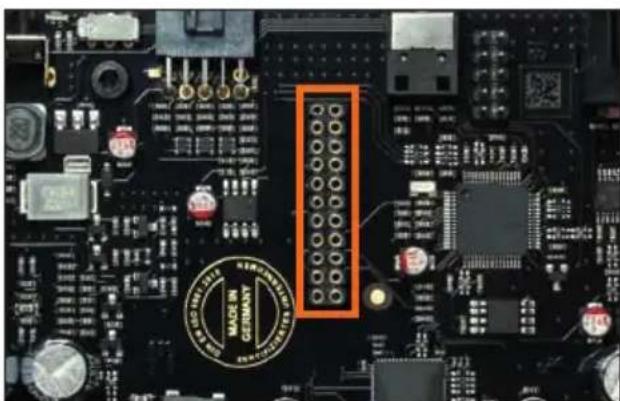
It is possible to extend the functionality of the MATCH UP 6DSP by inserting an optional MATCH Extension Card (MEC) – for example a High Definition Bluetooth Audio Streaming module, a High Resolution Audio USB soundcard etc.
To install a MATCH Extension Card it is necessary to remove the side panel of the UP 6DSP and replace it by the new side panel that comes with the MEC module.
Attention: Install the MEC module only in the designated device and its specific slot. Using the MEC module in other devices or slots can result in damage of the MEC module, the amplifier, the head unit / car radio or other connected devices!
Read in the following the steps how to install a MEC module:
- First disconnect all cables from the device.
- Dismantle the side panel where the USB input is located by removing the Phillips screws.
- Pull out the bottom plate.
- Prepare the module for installing it into the device. Any further mounting information will be found in the instruction manual of the respective MEC module.
- Insert the MEC module into the specific slot of the device which is marked in the following picture.
natural_image
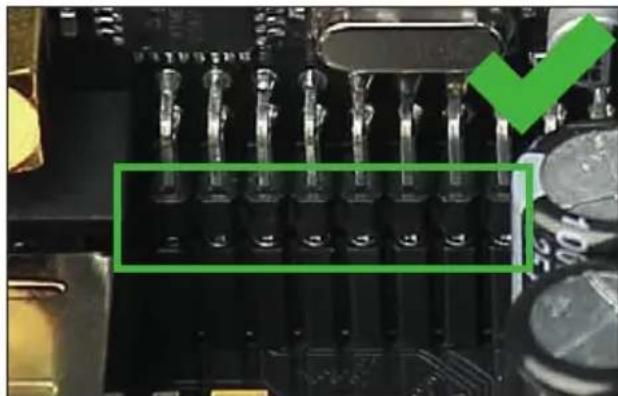
Close-up of a computer motherboard with electronic components and a highlighted orange section (no readable text or symbols)- Make sure that the MEC module is installed properly and all pins are fully inserted into the socket.
natural_image
Close-up of a circuit board with multiple LED connectors and a green checkmark overlay (no readable text or symbols)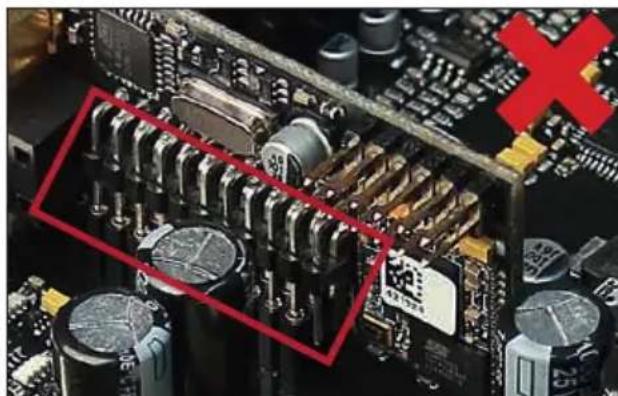
natural_image
Close-up of a computer motherboard with visible circuitry and capacitors, no readable text or symbols present.- Reinsert the bottom plate and fix the new side panel which is delivered with the MEC module with the Phillips screws.
- Bolt the MEC module to the side panel. Precise mounting information will be found in the instruction manual of the respective MEC module.
- Reconnect all cables to the device.
- Turn on the amplifier. The MEC module is automatically detected by the device and the Status LED of the MEC module lights up green.
- Now you are able to configure the MEC module in the DSP PC-Tool software.
Technical data
Output power RMS
- Channel A - D 4 x 65 Watts @ 4 Ohms
- Sub Out E - F 2 x 90 Watts @ 4 Ohms
2 x 160 Watts @ 2 Ohms
Amplifier technology .... Class GD
Inputs....6 x Highlevel speaker input
1 x Optical SPDIF (12 - 96 kHz)
1 x Remote In
Input sensitivity 2.8 - 11 Volts
Input impedance 9 - 33 Ohms with ADEP.3
Outputs....6 x Speaker output
1 x RCA / Cinch
1 x Remote Out
Output voltage RCA / Cinch.... 3 Volts RMS
Frequency response.... 10 Hz - 22,000 Hz
DSP resolution....64 Bit
DSP power 295 MHz (1.2 billion MAC operations/sec.)
Sampling rate 48 kHz
DSP type ...... Audio signal processor
Signal converters....A/D: BurrBrown
D/A: BurrBrown
Signal-to-noise ratio (A-weighted)......Digital input: 106 dB
Analog input: 104 dB
Distortion (THD).... < 0.03 %
Damping factor ....> 100
Operating voltage 10.5 - 18 Volts (max. 5 sec. down to 6 Volts)
Power rating ...... DC 12 V=35 A max.
Current draw....360 mA
Max. remote output current 500 mA
Operating temperature range ....-40°C to +70°C
Fuse.... 1 x 30 A LP-Mini-fuse (APS)
Additional features....Class GD technology with dynamically controlled power supply, 32 Bit CoProcessor, ADEP.3 circuit, Start-Stop capability, Smart Control Port, USB, MEC slot, Auto Remote switch, galvanically isolated Line Out
Dimensions (H x W x D) 46 x 130 x 130 mm / 1.81 x 5.12 x 5.12"
The warranty service is based on the statutory regulations. Defects and damage caused by overload or improper handling are excluded from the warranty service. Any return can only take place following prior consultation, in the original packaging together with a detailed description of the error and a valid proof of purchase.
Technical modifications, misprints and errors excepted! For damages on the vehicle and the device, caused by handling errors of the device, we can't assume liability.
Trademarks

Bluetooth®
The Bluetooth® word mark and logos are registered trademarks owned by Bluetooth SIG, Inc. and any use of such marks by Audiotec Fischer GmbH is under license. Other trademarks and trade names are those of their respective owners.
Correct disposal of this product

This symbol means the product must not be discarded as household waste, and should be delivered to an appropriate collection facility for recycling. Follow local rules and never dispose of the product with normal household waste. Correct disposal of old products helps prevent negative consequences for the environment and human health.
Regular notes
CE
This product has been issued a CE marking. This means that the device is certified for use in vehicles within the European Union (EU).
UK CA
This product has been issued an UKCA marking. This means that the device is certified for use in vehicles within the United Kingdom.
EAC
This product has been issued an EAC marking. This means that the device is certified for use in vehicles within the Eurasian Customs Union.
AUDIOTEC
FISCHER
- UP 6DSP
- UPGRADE
- Speaker Output E - H
- Turn On & Off Delay
- Remote Output Configuration
- ADEP.3 Configuration
- General instructions
- General installation instructions for MATCH components
- General instruction for connecting the UP 6DSP amplifier
- Connectors and control units
- System Connector
- Highlevel Input E - F
- Configure the MATCH UP 6DSP as follows
- Connecting the System Connector
- Connecting the highlevel speaker inputs E & F (optionally)
- Optional: Connecting the speaker outputs E & F
- Connecting a digital signal source
- Configuration of the remote input
- Connecting the remote connectors
- Connection to power supply
- Make sure to disconnect the battery before installing the MATCH UP 6DSP!
- Connecting the PC & first start-up
- Adjustment of the input sensitivity of the analog inputs
- Configuration of the internal DSP
- Analyzing the input signal
- Optional: Connecting the pre-amplifier output
- Sound tuning
- Status LED
- Control pushbutton
- SCP (Smart Control Port)
- Configuration examples
- Example 1: Channel routing with Virtual Channel Processing
- Virtual Channel Processing (VCP)
- URC Setup Switch Configuration
- Technical data
- Output power RMS
- Trademarks
- Bluetooth®
- Correct disposal of this product
- Regular notes
Brand : Audiotec Fischer
Model : Match UP 6DSP
Category : Receiver