Zeo - Receiver Antelope - Free user manual and instructions
Find the device manual for free Zeo Antelope in PDF.


| Product Type | Portable Hi-Fi DAC & Headphone Amplifier |
| Dimensions | 128 x 27 x 89 mm |
| Weight | 60 g (approx.) |
| Power Supply | Bus-powered through USB-C |
| DAC Chip | Dual CS43198 |
| Dynamic Range | 130 dB (A-weighted) |
| THD+N | -115 dB |
| Frequency Response | 20-20 kHz ±0.5 dB |
| Headphone Amplifier | Dual RiCORE RT6863 |
| Headphone Output Impedance | <1 Ohm |
| Power Output | 310 mW @ 32 Ohm |
| Connectivity | 1 x USB-C (USB 2.0 class compliant) |
| Supported Sample Rates | 44.1, 48, 88.2, 96, 176.4, 192, 352, 384 kHz; DoP 64-128 |
| Clocking Technology | 4th Generation Acoustically Focused Clocking (AFC™), 64-bit DDS |
| LED Indicators | Green (powered on, no audio), Blue (playing audio), Cyan (playing DSD DoP) |
| Included Accessories | USB-C to USB-C cable, USB-C to Lightning cable, USB-C to USB-A adapter, Getting Started leaflet |
| Operating Temperature | 0°C to 50°C (32°F to 122°F) |
| System Requirements (Mac) | Apple Mac 2013 or newer, macOS 10.14 or later, 4 GB RAM |
| System Requirements (Windows) | PC with USB 2.0/3.0, Windows 10 64-bit, 4 GB RAM, Intel Core i3 or AMD FX |
| System Requirements (Android) | USB-C host compliant phones/tablets with 5V/500mA |
| System Requirements (iOS) | iPhone 8 or newer, iOS 16 recommended |
| Warranty | 1 year limited warranty (6 months for B-stock/refurbished) |
Frequently Asked Questions - Zeo Antelope
User questions about Zeo Antelope
0 question about this device. Answer the ones you know or ask your own.
Ask a new question about this device
Download the instructions for your Receiver in PDF format for free! Find your manual Zeo - Antelope and take your electronic device back in hand. On this page are published all the documents necessary for the use of your device. Zeo by Antelope.
USER MANUAL Zeo Antelope
natural_image
Black rectangular device labeled 'zeo' with a blue indicator light and a small emblem on the base (no readable text or symbols beyond branding)ZEO
Portable Hi-Fi DAC & Headphone amp
CONTENTS
BEFORE YOU BEGIN 2
PRODUCT ACTIVATION 3
SYSTEM REQUIREMENTS....6
CONNECTIVITY AND LED LIGHTS EXPLAINED....7
USING ZEO ON DIFFERENT SYSTEMS....8
Windows PC....8
macOS....9
WHAT'S IN THE BOX....10
CUSTOMER SUPPORT INFORMATION.... 11
MY ANTELOPE AUDIO PRODUCT ISN'T WORKING....12
LIMITED WARRANTY POLICY....14
SAFETY NOTES 20
TECHNICAL SPECIFICATIONS....21
BEFORE YOU BEGIN
Congratulations on your purchase! We would like to turn your attention to the following:
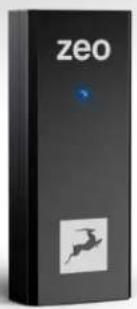
ZEO is a portable bus-powered DAC and headphone amplifier with pristine sound quality achieved thanks to Antelope Audio's proprietary technologies developed within the last 15 years.
ZEO is a Plug & Play device, it does not require any mandatory software installation, although there is an available Antelope Launcher application which allows Firmware updates.
No drivers are required for playing audio on macOS or Windows operating systems. ZEO can be used on mobile devices such as Android phones and tables as well as iOS products like iPhone and iPad.
Should you ever find yourself struggling, do not hesitate to contact our Customer Support team over phone, live chat and our ticket system.
We hope you will enjoy sound like never before with ZEO.
Best wishes,
Team Antelope
PRODUCT ACTIVATION
Please note that the device activation procedure is not mandatory, but it is recommended. It requires an active Internet connection on your computer.
This chapter contains the necessary instructions:
- Open your internet browser and navigate to https://en.antelopeaudio.com/login/
- Login to the Antelope Audio user area with your e-mail and password.
If you don't have an account, visit https://en.antelopeaudio.com/sign-up/ to create one.
- Click on the 'Activate New Device' button.
Activation
Step by step activation of your new device.
ACTIVATE NEW DEVICE
- Click on "ZEO" from the device list.
| AUDIO INTERFACE | MASTERING CONVERTERS | LEGACY DEVICES |
| Discrete 4 Pro Synergy Core | Amar1 | Discrete 4 |
| Discrete 4 Synergy Core | Pure2 | Discrete 8 |
| Discrete B Pro Synergy Core | Eclipse 3B4 | |
| Discrete B Synergy Core | MASTER CLOCKS | Edge Mic |
| Galaxy 32 Synergy Core | 10M-X | Galuth |
| Galaxy 54 Synergy Core | OCX HD | Galuth HD |
| Goliath HD | Gen 3 | Isochrone 10M | |
| Orion 32+ | Gen 3 | ANALOG PROCESSORS | Isochrone OCX |
| Orion 32HD | Gen 3 | MF32 | Isochrone OCX-V |
| Orion Studio Synergy Core | R45 | Isochrone Trinity |
| Zen Go Synergy Core | Satori | Live Clock |
| Zen Go Synergy Core T83 | MP8d | |
| Zen D Synergy Core | HI-FI | Orion 32 |
| Zen D Synergy Core USB | Zea | Orion 32+ |
| Zen Tour Synergy Core | Orion 32HD | |
| Orion Studio | ||
| Orion Studio HO | ||
| Orion Studio Rev 2017 | ||
| Zen Studio | ||
| MODELING MICS | ||
| Axino Synergy Core | ||
| Discrete MP |
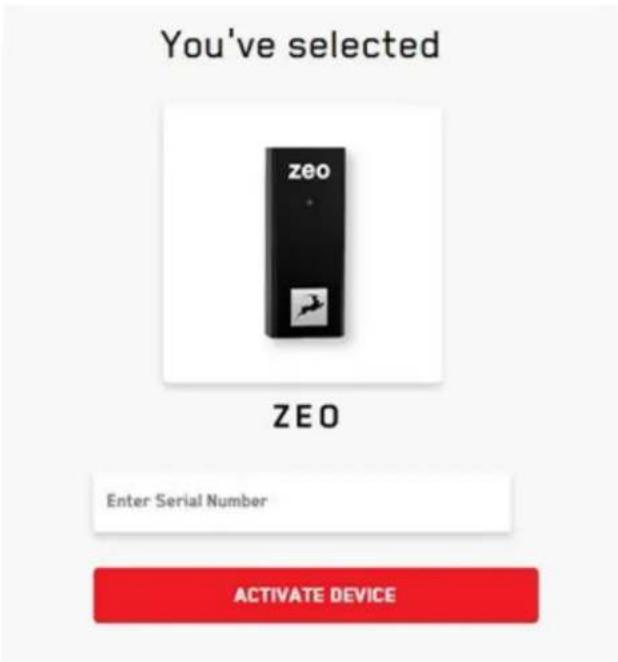
After selecting your device, enter the 13-digit serial number which you can find on a small sticker in the base of your device or on the side of the box:
- Download and install the Antelope Launcher application for Windows or macOS.
You will only need it in case a Firmware update is required.
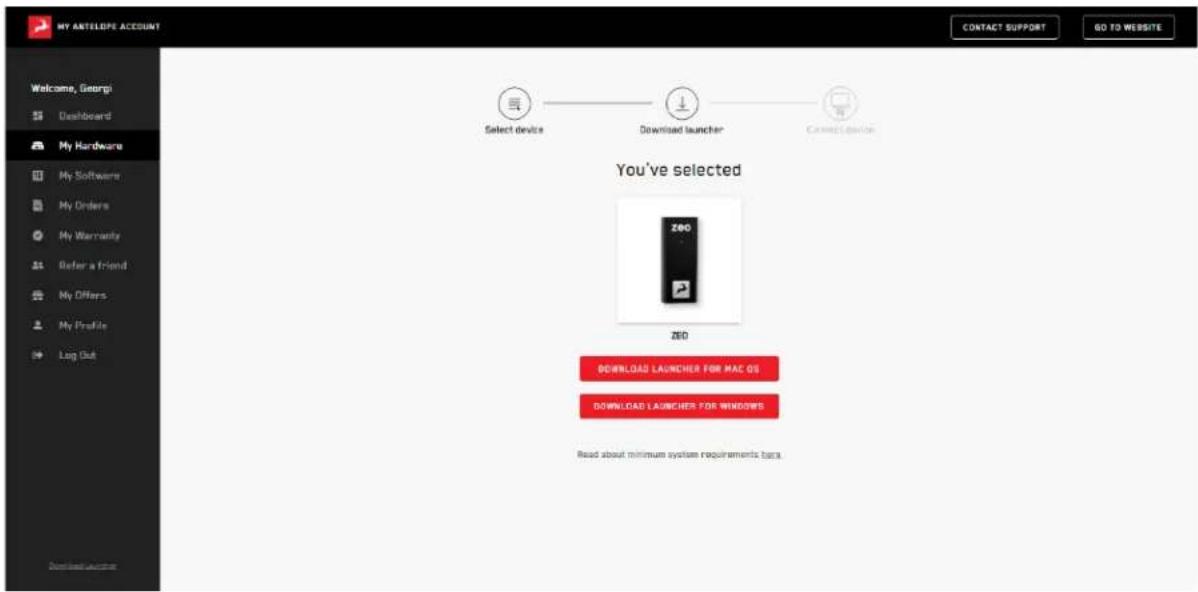
Further instructions on the use of the Antelope Launcher can be found here.
SYSTEM REQUIREMENTS
Mac:
• Apple Mac 2013 or newer with USB 2.0/3.0/3.1 port or Thunderbolt 3
• Minimum: Mac OS X 10.14 Mojave. Recommended: Mac OS X 11.02 Big Sur
• Available storage space (Minimum 4 GB)
- Memory (RAM): 4 GB minimum (8 GB or more recommended)
Windows:
• PC computer with USB 2.0/3.0/3.1 port
• Windows 10 (64-bit) with latest Microsoft Updates
• Available storage space (Minimum 4 GB)
• Memory (RAM): 4 GB minimum (8 GB or more recommended)
• CPU: Intel Core i3™ or AMD FX (recommended)
Android:
- Android phones and tables with USB-C ports that are Host compliant (providing 5V/ 500mA) and support Audio Device Class
iOS:
- iPhone 8 or newer
- Recommended iOS 16
Additional Information:
- Stable Internet connection is required to download the Antelope Launcher and update the firmware of the device.
CONNECTIVITY AND LED LIGHTS EXPLAINED
ZEO has the following hardware components:
- 1 x 3.5mm Headphone output


Headphones
3.5mm
The output can send signal to different headphones and aux cables.
• 1 x USB-C port for playback and power supply

The port can be connected to a USB-C port of a smartphone, tablet or computer with the provided USB-C to USB-C cable or together with the USB-C to USB-A adapter into a USB-A port.
• 1 x LED light with 3 colors, showing the state of the device
Green: the device is powered on, but no audio is playing
Blue: the device is connected and playing Audio
Cyan: the device is connected and playing DSD DoP format
USING ZEO ON DIFFERENT SYSTEMS
NOTE: To avoid hearing damage, turn down the volume of your system to its minimum level before you put the headphones on!
Windows PC
ZEO is natively compatible with Windows, and it does not require additional drivers to be installed. Once the device is plugged, the computer will recognize it and it will show up in "Sounds" tab:
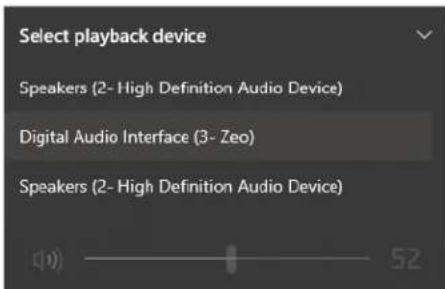
Volume can be adjusted from the Windows volume slider.
In order to change the Sample Rate Enter the 'Sounds' options window from the Control Panel or right-click the speaker icon in the system tray and choose 'Open Sound settings' and navigate to "Advanced":
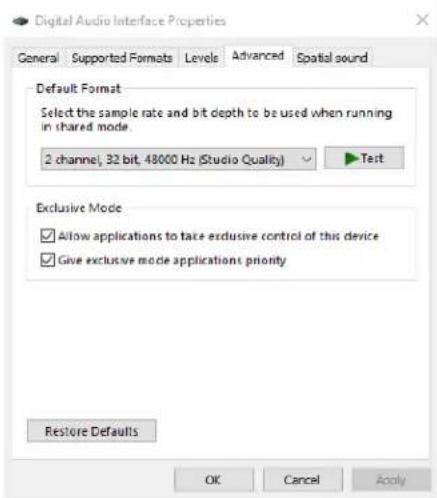
If you are using ZEO with a DAW, it will automatically follow the Sample rate of the DAW without the need to change it from "Windows Sound Settings". The device will appear as MME/DirectX driver in your DAW.
macOS
ZEO is natively compatible with macOS systems, and it does not require additional drivers to be installed. Once the device is plugged, the computer will recognize it and it will show up in "Audio MIDI Settings" and "Sounds" tab:
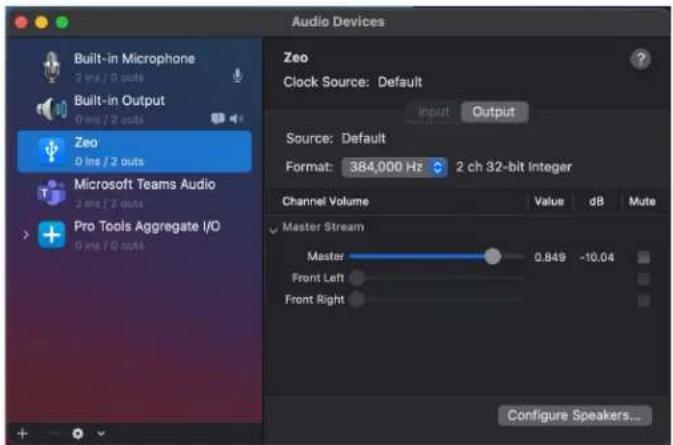
• Volume can be adjusted from the Volume Slider.
- Sample rate can be changed from the drop-down menu "Format".
If you are using ZEO with a DAW, it will automatically follow the Sample rate of the DAW without the need to change it from "Audio MIDI Settings". The device will appear as Core Audio driver in your DAW.
WHAT'S IN THE BOX
- ZEO DAC
• USB-C to USB-C cable
• USB-C to Lightning cable
USB-C to USB-A adapter - Getting Started leaflet

CUSTOMER SUPPORT INFORMATION
Antelope Audio Customer Support can be reached by the following means:
Online
Visit support.antelopeaudio.com
Phone
We are there for you around the clock, 21 hours/day, Monday to Friday.
North America +1-916-238-1643 01:00 a.m. - 10:00 p.m. (EST)
International +44 19 2593 3423 06:00 a.m. - 03:00 a.m. (GMT)
Live Chat
Live Chat is available during the following hours Monday to Friday International 06:00 a.m. – 06:00 p.m. (GMT)
Note: If you're trying to reach us outside working hours, we advise you to file a ticket in our customer support system or leave a voice message.
Additional Resources
- The Antelope Audio Users Facebook group lets you interact with fellow users and some of our employees. Note, however, that it is not meant to be a support group. Please contact our customer support team for such inquiries.
- The Knowledge Base in our Customer Support section is an often-overlooked source of troubleshooting information, answers to commonly asked questions and Antelope know-how.
MY ANTELOPE AUDIO PRODUCT ISN'T WORKING.
WHAT SHOULD I DO?
If you can't find a solution on your own, please get in touch with us so we check if you are having a hardware-related issue. If this is the case, we'll guide you through the repair process. If the product should be returned, a RMA number will be issued so we can begin the procedure.
What's an RMA number?
Issuing a RMA (Return Merchandise Authorization) number is required for any factory service or repair procedure. Please, don't attempt to send us your device without receiving a RMA number first, as the device will be returned and not serviced.
How do I get an RMA number?
The Antelope Audio Customer Support team is in charge of issuing RMA numbers. Visit support.antelopeaudio.com and get in touch.
After your RMA has been issued, you will receive an email with instructions on how to proceed.
RMA shipping information
Alongside the product you are returning please, include a letter containing your full name, shipping address, RMA number issued by our technical support team and a note with a short information about the technical issue.
Please use the original box if possible, because a worn out one will surely not protect your product sufficiently on its way to the Antelope Audio HQ. Additional cushioning materials in multiple layers between the unit and the box walls to prevent from shock, vibration and various tears and scratches.
Please remove any labels or old shipment markings it may have and ensure you add your shipping address inside the box in case the original shipment label becomes illegible during transportation.
The shipping costs are covered by the owner of the product. Antelope Audio will not cover any local customs charges.
We recommend using a courier service of your choice (e.g. DHL, UPS, FedEx). The package should be insured for its real value, marked as fragile and a tracking number should be provided. We do not recommend using standard mail delivery services.
Please, don't forget to add the RMA number, issued by the Antelope Audio technical support, on all shipping paperwork.
Antelope Audio cannot be held responsible for undelivered packages – lost or damaged on the way to the Antelope Audio HQ. For damage claims, please contact your shipping service provider of choice.
Antelope Audio cannot cover any repair costs for product damages due to poor packaging.
LIMITED WARRANTY POLICY
This is a non-transferable voluntary Limited Product Warranty provided to end-customers who have purchased Antelope Audio-branded hardware product (hereinafter referred to as "Product") from an authorized Antelope Audio re-seller.
For customers covered by consumer protection laws or regulations in their country of purchase or, if different, their country of residence, the benefits conferred by Antelope Audio's Limited Warranty are in addition to, and not instead of, rights and remedies convened by such consumer protection laws and regulations and it does not exclude, limit or suspend buyer's rights arising from consumer law. Consumers have
the right to choose whether to claim service under the Antelope Audio Limited Warranty or under their consumer law rights.
All claims made under the Antelope Audio Limited Warranty will be governed by the terms set out in this warranty document.
Warranty Coverage
Antelope Audio warrants that the Product will be free from defects in material and workmanship for the period of 1 (one) year commencing on the date of purchase of Product by end-customer from authorized Antelope Audio's re-seller.
Except where explicitly prohibited by applicable local law, this warranty is limited to the original purchaser and is non-transferable. This warranty provides you with specific legal rights, and you may have additional rights that vary under local laws.
In general, this warranty means your Antelope Audio hardware product will operate in accordance with published technical specifications, as specified by its data-sheet, and in the operating environment for which it was intended for the length of the warranty period.
This version of the warranty applies to products purchased on or after January 1, 2018. For prior versions of the Antelope Audio limited warranty, please contact customer service.
Limited Factory Refurbished (B-stock) Warranty
Antelope Audio warrants products sold as "B-stock, Factory Refurbished or Open Box" to be free from defects in materials (unless otherwise stated in product description) and workmanship. Only products purchased from an authorized dealer or directly from Antelope Audio are covered by this Warranty.
The Limited Factory Refurbished (B-stock) Warranty is valid for the period of 6 (six) months, commencing on the date of purchase of Product, if local regulations do not require otherwise.
All warranty terms contained hereunder apply also to the B-stock Warranty, unless otherwise specified.
Remedies
Antelope Audio's entire liability and your exclusive remedy for any Antelope Audio Product that is not operating in accordance with its published technical specifications is at Antelope Audio's discretion:
1) to repair the Product at Antelope Audio's expense using new or equivalent-to new refurbished parts in good working condition; or
2) to replace the Product at Antelope Audio's expense with a product with equivalent functionality formed from new and/or equivalent-to new refurbished parts in good working condition, or
3) to refund the price paid. Should Antelope Audio decide to refund the price paid, it may deduct from the paid Product's price any damages caused to the Product; where, within
fourteen (14) days of the expiration of the warranty period,(i) Antelope Audio has received written notice of any nonconformity;(ii) after Antelope Audio's written authorization, customer has returned the nonconforming product to the designated place; and (iii)Antelope Audio has determined that the Product is nonconforming and that such non conformity is not the result of any of the exclusions designated below.
These warranty obligations are conditioned upon the hardware being returned to the original place of purchase, or another place as directed by Antelope Audio, with the original sales receipt attached. You will be required to pay shipping and handling charges for returning the product. You may be required to pay any other applicable tariffs, duties, taxes, or other fees with regard to returning the products.
Any repaired or replacement Product will be warranted for the remainder of the original warranty period.
Obsolete or Discontinued Products
An obsolete or discontinued product will be repaired or replaced with the same product if available. If Antelope Audio is unable to replace your obsolete or discontinued product with the same product, Antelope Audio will replace the obsolete or discontinued product, in its sole discretion, with a product having similar function and capacity.
Exclusions
This warranty does not cover problems or damage resulting from, but not limited to, any of the following: (i)Wear and tear associated with normal use; (ii)Any modification, abuse, accident, disassembly, misapplication, misuse, negligence, acts of God, accident; (iii)Unauthorized repair or attempted repair by anyone other than Antelope Audio or someone authorized by Antelope Audio to do warranty work; any unauthorized repairs will void this warranty(iv)Any improper operation, maintenance or installation, including any use not in accordance with any supplied product instructions; (v)Connection to any improper voltage supply; (vi)Use of consumables or spare parts not supplied by Antelope Audio, except where
such restriction is prohibited by applicable local law; (vii) Any other cause which does not relate to a Product defect in materials or workmanship.
The warranty does not apply to any Products which have been subject to misuse, neglect, accident or modification or which have been soldered or altered such that they are not capable of being tested under normal test conditions.
This warranty does not cover (i) any counterfeit products, i.e. Products that Antelope Audio, at its sole discretion, determines were not manufactured by Antelope Audio or any of its authorized manufacturing partners; (ii) Products purchased from a person or entity which is not an authorized dealer or re-seller of Antelope Audio; (iii) Product sold “as is” or “with all faults”, to the extend permitted by local law.
This warranty is not valid in case any manufacturer label(s), serial numbers, date stamp(s) or warranty sticker(s) has been altered or removed from the Product.
Limitation of Liability
ANTELOPE AUDIO SHALL NOT BE LIABLE FOR ANY SPECIAL, INCIDENTAL, INDIRECT, OR CONSEQUENTIAL DAMAGES WHATSOEVER, INCLUDING BUT NOT LIMITED TO LOSS OF PROFITS, REVENUE, OR DATA (WHETHER DIRECT OR INDIRECT) OR COMMERCIAL LOSS FOR BREACH OF ANY EXPRESS OR IMPLIED WARRANTY ON YOUR PRODUCT EVEN IF Antelope Audio HAS BEEN ADVISED PREVIOUSLY OF THE POSSIBILITY OF SUCH DAMAGES. Some local laws do not allow the exclusion or limitation of special, indirect, incidental or consequential damages, so this limitation or exclusion may not apply in your jurisdiction.
ANTELOPE AUDIO WILL NOT ASSUME OR AUTHORIZE ANY OTHER PERSON TO ASSUME FOR IT ANY OTHER LIABILITY IN CONNECTION WITH ITS PRODUCTS.
Data Recovery
In the event of data loss using Antelope Audio storage devices, Antelope Audio is not responsible for backing up or recovering any data that you may have lost.
No Other Warranties
No Antelope Audio employee, dealer, re-seller, or other agent is authorized to make any modification, extension, or addition to this warranty.
How to Make a Warranty Claim
Valid warranty claims should be processed through your point of purchase. Please also verify the return policy directly with the retailer where you purchased your product. Any warranty claims that cannot reprocessed through your original point of purchase should be addressed directly to Antelope Audio. Our customer service contact information can be found on the web or in the documentation included with your Product.
Returning Your Product
If you need to return your Antelope Audio products for repair or replacement, Antelope Audio will provide you with a Return Merchandise Authorization Number (RMA#) as well as return instructions. Do not return your product without prior approval from Antelope Audio. Any product returned without a valid unique RMA# will be refused and returned to the sender at the sender's expense. To avoid problems at the time of receipt, clearly write your RMA# on the outside of the package and include a copy of your RMA confirmation-mail within the package.
In certain situations, for in-warranty units, we may (entirely at our opinion) offer you a temporary replacement unit, provided that we have such on stock in your state. To request a temporary replacement unit, a valid credit card must be provided to secure the new replacement unit for shipping prior to Antelope Audio receiving the defective one.
Request a Return Material Authorization Number (RMA#)
Please follow these steps to obtain an RMA number:
(I) For end user customers, submit a claim online at: support.antelopeaudio.com. For business to business (B2B) / Direct customers of Antelope Audio please email us at
techsupport@antelopeaudio.com
(ii) A valid proof of purchase is required for RMA processing (i.e. receipt, invoice, etc). Antelope Audio will provide you with the RMA number within 2 working days as of the claim submission date.
RMA Return Addresses
We have multiple RMA receiving locations worldwide. Your RMA confirmation will specify the specific return address you must use when sending your RMA package. Any packages received at an unauthorized location may be refused and returned to the sender at the sender's expense.
Products Lost or Damaged During Transit
The original packaging material should be used to pack the product for return; if the original packaging is not available, you should use such materials that provide the same or greater protection to the product. All packages that arrive with any external damage or appear inadequately packed will be refused and returned to the sender at the sender's expense. We are not responsible for damage incurred during shipping to our RMA receiving locations or for lost or stolen products.
Company information
Antelope Audio is the trade name, under which the company Elektrosfera ltd., registered under the legislation of the Republic of Bulgaria with UIN: 131052590, is doing business and is worldwide known. Elsewhere in this document where the trade name Antelope Audio is used shall refer to Elektrosfera ltd., with address of management: Tsarigradsko Shose Blvd., 7th km, Building of BIC IZOT, floor 6, Mladost region, Sofia, Bulgaria.
If any term hereunder is held to be illegal or unenforceable, it shall be severed from this warranty and the legality or enforce ability of the remaining terms shall not be affected.
SAFETY NOTES
To reduce the risk of electrical shocks, fire, and related hazards:
- Do not remove screws, cover, or cabinet. There are no user serviceable parts inside. Refer servicing to qualified service personnel.
- Do not expose this device to rain, moisture, or spillover of liquid of any kind.
- Should any form of liquid or a foreign object enter the device, do not use it. Switch off the device and then unplug it from the power source. Do not operate the device again until the foreign object is removed, or the liquid has completely dried, and its residues fully cleaned up. If in doubt, please consult the manufacturer.
- Do not handle the power cables with wet hands!
- Do not place near any heat sources such as radiators, stoves, or other apparatus (including amplifiers) that produce heat.
- Do not use harsh chemicals to clean your unit. Clean only with specialized cleaners for electronics equipment.
- Both occasional and continued exposure to high sound pressure levels can cause permanent ear damage via headphones and monitors.
- The device is designed to operate in a temperate environment, with a correct Operating Temperature of 0–50° C, 32–122° F.
TECHNICAL SPECIFICATIONS
Analog Output
Dual CS43198 DAC chip with up to 130dB Dynamic range (A-weighed)
THD + N:-115 dB
Frequency response: 20-20kHz +/- 0.5dB
Dual RiCORE RT6863 amp
Headphone output impedance <1 Ohms
Power Output: 310mW @ 32ohm headphones
Device connection
1 × USB-C - USB 2.0 class compliant
Power
Bus-powered through USB-C
Clocking System
4th Generation Acoustically Focused Clocking (AFC™), 64-bit DDS
Sample Rates (kHz)
44.1, 48, 88.2, 96, 176.4, 192, 352, 384
DoP: 64-128
Physical Dimensions:
128 x 27 x 89 mm
Weight: 60g (approx.)
- ZEO
- Portable Hi-Fi DAC & Headphone amp
- CONTENTS
- BEFORE YOU BEGIN
- PRODUCT ACTIVATION
- Activation
- SYSTEM REQUIREMENTS
- Mac:
- Windows:
- Android:
- iOS:
- Additional Information:
- CONNECTIVITY AND LED LIGHTS EXPLAINED
- 3.5mm
- USING ZEO ON DIFFERENT SYSTEMS
- Windows PC
- macOS
- WHAT'S IN THE BOX
- CUSTOMER SUPPORT INFORMATION
- Online
- Phone
- Live Chat
- Additional Resources
- MY ANTELOPE AUDIO PRODUCT ISN'T WORKING.
- WHAT SHOULD I DO?
- What's an RMA number?
- How do I get an RMA number?
- RMA shipping information
- LIMITED WARRANTY POLICY
- Warranty Coverage
- Limited Factory Refurbished (B-stock) Warranty
- Remedies
- Obsolete or Discontinued Products
- Exclusions
- Limitation of Liability
- Data Recovery
- No Other Warranties
- How to Make a Warranty Claim
- Returning Your Product
- Request a Return Material Authorization Number (RMA#)
- RMA Return Addresses
- Products Lost or Damaged During Transit
- Company information
- SAFETY NOTES
- TECHNICAL SPECIFICATIONS
Brand : Antelope
Model : Zeo
Category : Receiver