
TPMC-8X-BTP - Rechargeable Battery Crestron - Free user manual and instructions
Find the device manual for free TPMC-8X-BTP Crestron in PDF.


| Product Type | Internal Battery Pack |
| Battery Type | Lithium Ion (Li-Ion) |
| Output Voltage | 7.2 – 7.4 VDC |
| Capacity | 2000 – 2200 mAh |
| Weight | 3.1 oz (87.9 g) |
| Charging Time | Approximately 2 hours (2.5 – 3 hours when touchpanel is in use) |
| Compatible with | Crestron TPMC-8X Touchpanel |
| Charging Method | Via TPMC-8X-DS Docking Station/Charger (sold separately) or AC adapter |
| Storage Temperature | 32°F – 104°F (0°C – 40°C) |
| Cycle Life | 300 – 500 charge/discharge cycles |
| Self-Discharge | Low; best when stored at optimal temperature |
| Connector | Multi-pin connector |
| Safety Features | Protection against short circuit, overheating; do not puncture or disassemble |
| Compliance | CE marking, EMC standards |
| Warranty | Batteries are not covered under standard Crestron limited warranty |
| Included Accessories | None (battery only; installation screws are part of touchpanel) |
Frequently Asked Questions - TPMC-8X-BTP Crestron
User questions about TPMC-8X-BTP Crestron
0 question about this device. Answer the ones you know or ask your own.
Ask a new question about this device
Download the instructions for your Rechargeable Battery in PDF format for free! Find your manual TPMC-8X-BTP - Crestron and take your electronic device back in hand. On this page are published all the documents necessary for the use of your device. TPMC-8X-BTP by Crestron.
USER MANUAL TPMC-8X-BTP Crestron
Internal Battery Pack for TPMC-8X
Operations & Installation Guide
This document was prepared and written by the Technical Documentation department at:

CRESTRON®
Crestron Electronics, Inc.
15 Volvo Drive
Rockleigh, NJ 07647
1-888-CRESTRON
Contents
Internal Battery Pack for TPMC-8X: TPMC-8X-BTP 1
Introduction ....1
Features and Functions....1
Specifications 2
Physical Description....2
Industry Compliance 3
Handling....3
Storage....3
Setup 4
Charging....4
Installation....4
Removal 6
More Information....7
Reference Documents....7
Further Inquiries....7
Future Updates ....7
Return and Warranty Policies....8
Merchandise Returns / Repair Service 8
CRESTRON Limited Warranty....8
Internal Battery Pack for TPMC-8X: TPMC-8X-BTP
Introduction
Features and Functions
- Lithium Ion rechargeable battery pack for the TPMC-8X WiFi Touchpanel
- Can be charged when TPMC-8X is mounted in the TPMC-8X-DS Docking Station/Charger (sold separately)
NOTE: For more information on the TPMC-8X touchpanel, refer to the latest version of the TPMC-8X Isys i/O™ Touchpanel Operations Guide (Doc. 6539), which is available from the Crestron website (http://www.crestron.com/manuals).
NOTE: For more information on the TPMC-8X-DS, refer to the latest version of the TPMC-8X-DS Desktop Docking Station/Charger guide (Doc. 6541).
Specifications
Specifications for the TPMC-8X-BTP are listed in the following table.
TPMC-8X-BTP Specifications
| SPECIFICATION | DETAILS |
| Battery (6502269)Output Voltage 7.4 Volts DCCapacity 2200 mAh | |
| Battery (6501482)Output Voltage 7.2 Volts DCCapacity 2000 mAh | |
| Composition Lithium Ion (Li-Ion)Charging time ~2 hrs. (~2.5 – 3 hrs. when in use)Weight 3.1 oz (87.9 g) |
Physical Description
The TPMC-8X-BTP has a multi-pin connector for attachment inside the battery compartment of the TPMC-8X.
TPMC-8X-BTP Physical View

Industry Compliance
As of the date of manufacture the TPMC-8X-BTP has been tested and found to comply with specifications for CE marking and standards per EMC and Radiocommunications Compliance Labelling.

Handling
NOTE: The TPMC-8X-BTP contains a Lithium Ion (Li-Ion) battery. When the unit can no longer retain a charge, it must be recycled or disposed of properly. Follow local ordinances and/or regulations for disposal.
To prevent damage to multi-pin connector and wiring, use care when handling the TPMC-8X-BTP.
Storage
The TPMC-8X-BTP can be stored in a temperate, dry place (removed from the touchpanel and docking station) indefinitely without significant irreversible degradation of its performance. The self-discharge rate is a function of temperature and internal resistance. High temperature storage reduces charge retention. Best results occur if the TPMC-8X-BTP is stored at an optimal temperature of 32^ to 104^ F ( 0^ to 40^ C). After an extended period of storage, initiate a few charge/discharge cycles to restore full capacity.
Setup
Charging
NOTE: A Lithium Ion (Li-Ion) battery typically provides 300-500 charge/discharge cycles.
There are two ways to charge the TPMC-8X-BTP:
- Install the TPMC-8X-BTP in a TPMC-8X touchpanel and connect the touchpanel to an AC source using its AC adapter or
- Install the TPMC-8X-BTP in a TPMC-8X touchpanel and mount the touchpanel on an AC powered TPMC-8X-DS Docking Station/Charger (sold separately).
NOTE: The battery pack may take up to three hours to charge in a powered touchpanel if the panel is in use during charging.
NOTE: When the external battery pack (TPMC-8X-BTPE, sold separately) is attached, both the internal and external battery packs charge simultaneously.
Installation
Use the following procedure to install the TPMC-8X-BTP in a TPMC-8X touchpanel:
- Place the touchpanel screen-side down on a clean, soft surface.
- Remove the two Phillips head screws that hold the internal battery compartment cover on the rear of the touchpanel.
- Place the TPMC-8X-BTP in the battery compartment oriented so the multi-pin connector is in the upper left corner.
- Carefully connect the multi-pin connector of the TPMC-8X-BTP with the corresponding connector inside the battery compartment (refer to illustration on the following page).
TPMC-8X-BTP in Battery Compartment of TPMC-8X
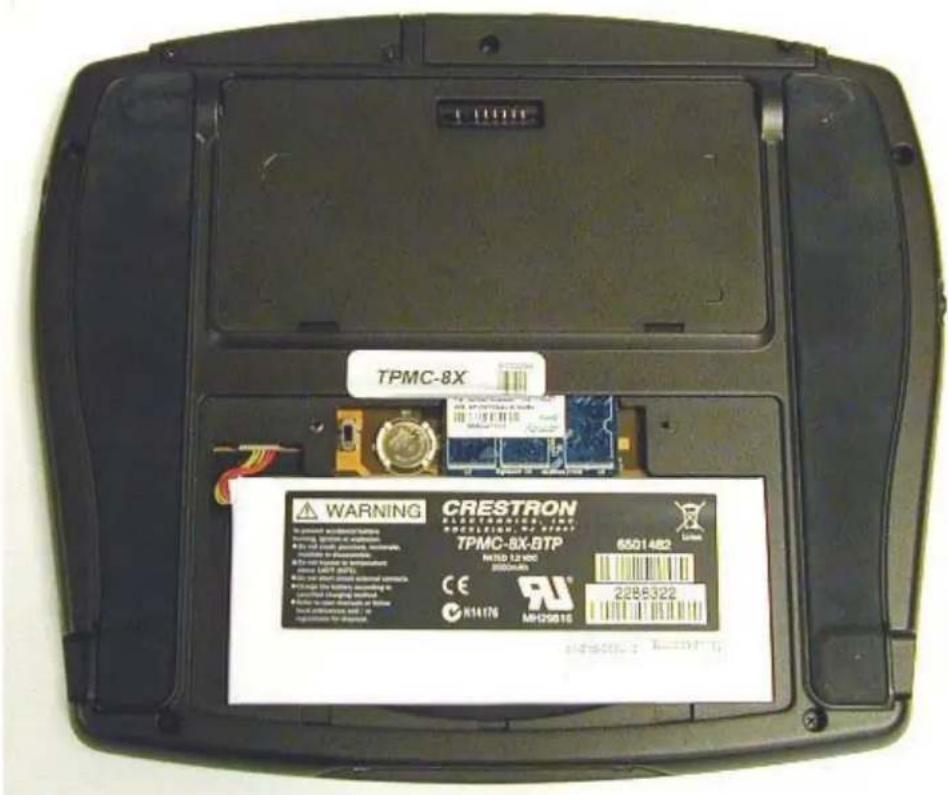
NOTE: To prevent battery drain during shipment or for long-term storage, the TPMC-8X has a battery switch inside the battery compartment. To use the internal battery, move the switch to the up (on) position. To conserve battery power when the unit will not be used for extended periods, move the switch to the down (off) position. (Refer to illustration on the following page.)
TPMC-8X Internal Battery Switch

- Re-attach the battery compartment cover using the two supplied Phillips head screws.
Removal
Use the following procedure to remove the TPMC-8X-BTP from a TPMC-8X touchpanel:
- Place the touchpanel screen-side down on a clean, soft surface.
- Remove the two Phillips head screws that hold the internal battery compartment cover on the rear of the touchpanel.
- Using the flat end of a small slot head screwdriver, gently pry the multi-pin connector off the corresponding connector in the battery compartment of the TPMC-8X.
- With the multi-pin connector detached from the TPMC-8X, lift the TPMC-8X-BTP out of the battery compartment.
More Information
Reference Documents
The latest version of all documents mentioned within the guide can be obtained from the Crestron website (http://www.crestron.com/manuals). This link will provide a list of product manuals arranged in alphabetical order by model number.
List of Related Reference Documents
| DOCUMENT TITLE |
| TPMC-8X Isys i/O ^TM WiFi Touchpanel |
| TPMC-8X-DS Desktop Docking Station/Charger |
Further Inquiries
If you cannot locate specific information or have questions after reviewing this guide, please take advantage of Crestron's award winning customer service team by calling Crestron at 1-888-CRESTRON [1-888-273-7876].
You can also log onto the online help section of the Crestron website to ask questions about Crestron products. First-time users will need to establish a user account to fully benefit from all available features.
Future Updates
As Crestron improves functions, adds new features and extends the capabilities of the TPMC-8X-BTP, additional information may be made available as manual updates. These updates are solely electronic and serve as intermediary supplements prior to the release of a complete technical documentation revision.
Check the Crestron website periodically for manual update availability and its relevance. Updates are identified as an “Addendum” in the Download column.
Return and Warranty Policies
Merchandise Returns / Repair Service
- No merchandise may be returned for credit, exchange or service without prior authorization from CRESTRON. To obtain warranty service for CRESTRON products, contact an authorized CRESTRON dealer. Only authorized CRESTRON dealers may contact the factory and request an RMA (Return Merchandise Authorization) number. Enclose a note specifying the nature of the problem, name and phone number of contact person, RMA number and return address.
- Products may be returned for credit, exchange or service with a CRESTRON Return Merchandise Authorization (RMA) number. Authorized returns must be shipped freight prepaid to CRESTRON, 6 Volvo Drive, Rockleigh, N.J. or its authorized subsidiaries, with RMA number clearly marked on the outside of all cartons. Shipments arriving freight collect or without an RMA number shall be subject to refusal. CRESTRON reserves the right in its sole and absolute discretion to charge a 15% restocking fee plus shipping costs on any products returned with an RMA.
- Return freight charges following repair of items under warranty shall be paid by CRESTRON, shipping by standard ground carrier. In the event repairs are found to be non-warranty, return freight costs shall be paid by the purchaser.
CRESTRON Limited Warranty
CRESTRON ELECTRONICS, Inc. warrants its products to be free from manufacturing defects in materials and workmanship under normal use for a period of three (3) years from the date of purchase from CRESTRON, with the following exceptions: disk drives and any other moving or rotating mechanical parts, pan/tilt heads and power supplies are covered for a period of one (1) year; touchscreen display and overlay components are covered for 90 days; batteries and incandescent lamps are not covered.
This warranty extends to products purchased directly from CRESTRON or an authorized CRESTRON dealer. Purchasers should inquire of the dealer regarding the nature and extent of the dealer's warranty, if any.
CRESTRON shall not be liable to honor the terms of this warranty if the product has been used in any application other than that for which it was intended or if it has been subjected to misuse, accidental damage, modification or improper installation procedures. Furthermore, this warranty does not cover any product that has had the serial number altered, defaced or removed.
This warranty shall be the sole and exclusive remedy to the original purchaser. In no event shall CRESTRON be liable for incidental or consequential damages of any kind (property or economic damages inclusive) arising from the sale or use of this equipment. CRESTRON is not liable for any claim made by a third party or made by the purchaser for a third party.
CRESTRON shall, at its option, repair or replace any product found defective, without charge for parts or labor. Repaired or replaced equipment and parts supplied under this warranty shall be covered only by the unexpired portion of the warranty.
Except as expressly set forth in this warranty, CRESTRON makes no other warranties, expressed or implied, nor authorizes any other party to offer any warranty, including any implied warranties of merchantability or fitness for a particular purpose. Any implied warranties that may be imposed by law are limited to the terms of this limited warranty. This warranty statement supersedes all previous warranties.
Trademark Information
All brand names, product names and trademarks are the sole property of their respective owners. Windows is a registered trademark of Microsoft Corporation. Windows95/98/Me/XP/Vista and WindowsNT/2000 are trademarks of Microsoft Corporation.
This page is intentionally left blank.
This page is intentionally left blank.
This page is intentionally left blank.

CRESTRON®
Crestron Electronics, Inc. Operations & Installation Guide - DOC. 6556A
15 Volvo Drive Rockleigh, NJ 07647
Tel: 888.CRESTRON
Fax: 201.767.7576 Specifications subject to
www.crestron.com change without notice.
(2016937)
05.08
- Internal Battery Pack for TPMC-8X
- Operations & Installation Guide
- CRESTRON®
- Contents
- Internal Battery Pack for TPMC-8X: TPMC-8X-BTP 1
- Internal Battery Pack for TPMC-8X: TPMC-8X-BTP
- Introduction
- Features and Functions
- Specifications
- Physical Description
- Industry Compliance
- Handling
- Storage
- Setup
- Charging
- Installation
- Removal
- More Information
- Reference Documents
- Further Inquiries
- Future Updates
- Return and Warranty Policies
- Merchandise Returns / Repair Service
- CRESTRON Limited Warranty
- Trademark Information
Brand : Crestron
Model : TPMC-8X-BTP
Category : Rechargeable Battery