
Eko - Guitar effects pedal Hotone - Free user manual and instructions
Find the device manual for free Eko Hotone in PDF.


| Product Type | Guitar Multi-Effects Pedal / Modeling Preamp |
| Brand | Hotone |
| Model | Eko |
| Power Supply | 9V DC (center negative, 2.1mm barrel) |
| Current Consumption | 250 mA |
| Dimensions (W x D x H) | 100 x 60 x 50 mm (3.9 x 2.4 x 2.0 in) |
| Weight | 200 g (7.1 oz) |
| Input Impedance | 1 MΩ |
| Output Impedance | 100 Ω |
| Controls | Footswitch, rotary knobs (volume, tone, effects selection, parameter adjust) |
| Display | LED indicators for effect on/off and power |
| Connectivity | 1/4" instrument input, 1/4" output, USB (for firmware updates/editing) |
| Construction Material | Aluminum alloy chassis |
| Operating Temperature | 0°C to 40°C (32°F to 104°F) |
| Storage Temperature | -20°C to 60°C (-4°F to 140°F) |
| Warranty | 2 years (limited) |
| Accessories Included | Quick start guide, warranty card, sticker |
| Cleaning Instructions | Wipe with a dry, soft cloth. Do not use solvents or abrasive cleaners. |
| Safety Warnings | Use only the specified power adapter. Do not expose to rain or moisture. Avoid extreme temperatures. |
| Repairability | No user-serviceable parts inside. Contact qualified service for repairs. |
| Manual Availability | Free PDF download in multiple languages at notice-facile.com |
Frequently Asked Questions - Eko Hotone
User questions about Eko Hotone
0 question about this device. Answer the ones you know or ask your own.
Ask a new question about this device
Download the instructions for your Guitar effects pedal in PDF format for free! Find your manual Eko - Hotone and take your electronic device back in hand. On this page are published all the documents necessary for the use of your device. Eko by Hotone.
USER MANUAL Eko Hotone
Binary Eko Owner's Manual
HOTONE DESIGN INSPIRATION
Welcome
Congratulations on your new Hotone Binary pedal! You have just added some serious power to your pedalboard.
The Binary series lets loose versatile pro effects in compact cases. A dual-DSP powered platform and CDCM modeling system ensure a realistic playing experience, dual-footswitch design and variable I/Os make it easy to use, and an OLED screen offers clear, detailed display.
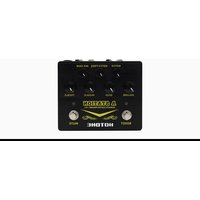
Binary Eko is a CDCM-based multi modulation effects pedal with stereo I/O and expression pedal support, delivering precise classic delay pedal sounds along with new and inspiring Hotone original delay effects.
Features
Grown out of next-gen XTOMP technology
★ Compact, easy-to-use dual footswitch delay pedal with tap tempo
Advanced CDCM modeling system ensures realistic playing experience
Dual DSP-powered platform ensures high sound quality
24-bit A/D/A conversion, up to 110dB S/N ratio
17 high quality delay effects including CDCM-based classics and Hotone originals
Variable maximum delay time ranging from 1000ms to 4000ms
Tap Tempo function with Tap Divide
Stereo I/Os
EXP jack for expression pedal control
USB jack for firmware upgrading, loading/managing effects with free PC/Mac software
10 Presets (2 banks x 5 patches)
Built-in OLED screen with clear display
5 transparent knobs with LEDs
9V DC power supply
Panel Introduction
- ON/OFF: For switching this unit on/off. The LEDs under the upper 5 knobs indicate effect on/off status.
- PATCH/TAP: Tap for selecting forward patches in current bank, hold for engaging/disengaging tap tempo mode.
- +/- buttons: For selecting effects and adjusting parameters.
- GLOBAL: For setting expression pedal, input mode, and other parameters.
- SAVE/EXIT button: For saving or canceling parameter changes.
- OLED screen: Shows bank/patch numbers, setting values and other operation info.
- MIX: Controls effect wet/dry signal ratio (varies with effects).
8-9. A/B: Control detailed effect character (varies with effects). - F.BACK: Controls the delay feedback amount (varies with effects).
- TIME: Controls the delay time. In Tap Tempo mode, use TIME knob to set a Tap Tempo subdivision*, and the TIME LED will keep flashing.
- INPUT: 1/4" (6.35mm) stereo jack, for plugging in instruments or other effects. A Y cable is needed when connecting to stereo pedal outputs.
- EXP: 1/4" (6.35mm) TRS jack, for connecting expression pedals. The expression pedal should have a TRS cable attached to it. We recommend using a Hotone Soul Press (switched to EXP mode) for expression control.
14-15. OUTPUT (L & R): 1/4" (6.35mm) mono jacks, for connecting to amps or other effects. - USB jack: Mini USB jack, for effects editing, firmware updates, and factory reset.
- DC 9V: Plug in your power supply here (DC 9V, center negative).

*Requires firmware v1.1.1 or later
Connections

Note: TURN ON FIRST, TURN OFF LAST. Always mute the mixer/audio interface before plugging or unplugging power jacks, cables, etc. When you're using a mixer or an audio interface, please adjust the onboard knobs carefully to avoid signal clipping.
Display
Plugging in your power supply will turn on the device. The main display will come up as shown below:

1 - Current bank/patch number
2 - Shows the expression pedal controlled parameter
3 - Indicates the effect you're using in current patch
Select a Patch/Bank
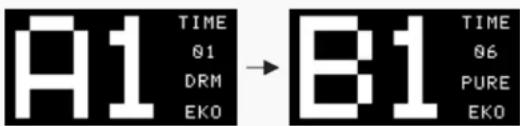
Tap the PATCH footswitch once to switch to the next patch. Tap it repeatedly to cycle through patches of the current bank in the order 1, 2, 3, 4, 5, then 1.

Tap the two footswitches at the same time to switch to the next bank. Tap them repeatedly to cycle through banks in the order A, B, then A.
Tap Tempo and Tap Tempo Subdivision
Hold the PATCH/TAP footswitch to engage Tap Tempo mode when the effect is on. Then tap the PATCH/TAP footswitch to set a tempo speed. In this mode, the LED under the TIME knob will pulse to indicate the effect time you set. Hold the PATCH/TAP footswitch again to disengage. In Tap Tempo mode, turn the TIME knob (or B knob when using DUAL EKO) to set a proper tap tempo subdivision shown as below:
| SUBDIVISION | DIVIDE RATIO | DISPLAY |
| Whole Note | 4 | 1 |
| Half Note | 2 | 1/2 |
| Dotted Half Note | 3 | 1/2D |
| Half Note Triplet | 4/3 | 1/2T |
| Quarter Note (no division) | 1/1 | 1/4 |
| Dotted Quarter Note | 3/2 | 1/4D |
| Quarter Note Triplet | 2/3 | 1/4T |
| 8th Note | 1/2 | 1/8 |
| Dotted 8th Note | 3/4 | 1/8D |
| 8th Note Triplet | 1/3 | 1/8T |
| 16th Note | 1/4 | 1/16 |
Note: 1. The default division is Quarter Note (1/4, no division). Disengaging Tap Tempo function will reset the subdivision to default.
2. Tap Tempo subdivision function requires firmware v1.1.1 or later.
Global
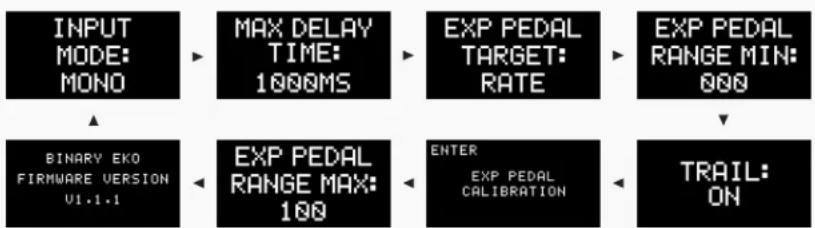
Press the GLOBAL button repeatedly to cycle through input mode, max delay time, expression pedal, trail settings and firmware version info:
flowchart
graph TD
    A["INPUT MODE: MONO"] --> B["MAX DELAY TIME: 1000MS"]
    B --> C["EXP PEDAL TARGET: RATE"]
    C --> D["EXP PEDAL RANGE MIN: 000"]
    E["BINARY EKO FIRMWARE VERSION U1.1.1"] --> F["EXP PEDAL RANGE MAX: 100"]
    F --> G["ENTER EXP PEDAL CALIBRATION"]
    G --> H["TRAIL ON"]
Use the +/- buttons to set the parameters, press the SAVE/EXIT button (or wait for 5 seconds without any operation) to confirm settings and exit to the main display.
Note: 1. There is no parameter in firmware info display.
2. To check firmware version on your Binary Eko, you need to update to firmware v1.1.1 or later.
Edit
1. Adjust the parameters
Use the onboard knobs to adjust the effect parameters. The screen display will be shown as below when adjusting:

1 - Current parameter value you're adjusting (shown: feedback)
2 - Saved parameter value in the current patch (PREV. = Previous value)
Note: In this status, you can use the +/- buttons to fine tune the delay time.
Edit
2. Select a different effect
Use the +/- button to change to another effect:

The inverted bank/patch number indicates that the current patch has been edited.
Edit
3. Set the expression pedal
If you have an expression pedal, you can control an effect parameter in real time. In main display, press the GLOBAL button three times to edit control target:

Use the +/- buttons to select a target among OFF, MIX, A, B, F.BACK, TIME.
Note: If you change to another patch before saving your edits, all your changes will be lost. Save the patches to keep your changes.
Save
Hold the SAVE/EXIT button to activate save function. The screen will be shown as below:

Use the +/- buttons to choose a location. Tap the SAVE/EXIT button to confirm saving. Tap PATCH/TAP footswitch to cancel saving and go back to edit status.
Input Mode, Max Delay Time and Trail
1. Input mode
In main display, press the GLOBAL button once to select an input mode:

Use the +/- buttons to choose from MONO and STEREO. If you choose to use STEREO mode while using mono (L) input, the right output will be MUTED.
Input Mode, Max Delay Time and Trail
2. Max delay time
In main display, press the GLOBAL button twice to set a max delay time:
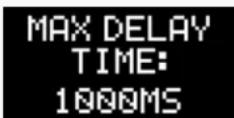
Use the +/- buttons to choose from 1000ms/2000ms/3000ms/4000ms. The default setting is 1000ms.
Input Mode, Max Delay Time and Trail
3. Trail
A trail will affect the effect "tail" when you turn off the pedal. When trail is on, the delay repeats will continue after you bypass the effect; when trail is off, the effect will disappear immediately. The default trail setting is OFF.
In main display, press the GLOBAL button seven times until the message below is shown:

Use the +/- buttons to select trail on/off.
Input mode, max delay time and trail settings are all global settings (it won't change your patches) and changes will be automatically saved.
Expression Pedal Range and Calibration
In main display, press the GLOBAL button four times/five times to set the minimum/maximum value ranging from 000 to 100:

4 times (min value)

5 times (max value)
Parameter value

Note: 1. The minimum value cannot be set higher than the maximum value.
2. This is a global setting (it won't change your patches) and changes will be automatically saved.
Expression Pedal Range and Calibration
The expression pedal can be calibrated if necessary. If there does not seem to be much effect even when you press the pedal, or effects change greatly when the pedal only moves slightly, use the following procedure to readjust it. In the main display, press the GLOBAL button six times:

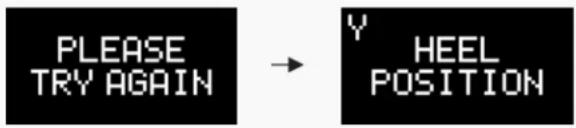
Press + button to activate calibration and then screen displays "HEEL POSITION":

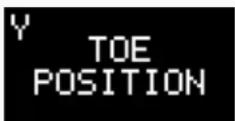
Press the pedal all the way back towards the heel and press + button, and then it displays "TOE POSITION":
Expression Pedal Range and Calibration
Press the pedal all the way forward towards the toe and press + button.
After finishing the adjustment, "CALIBRATION COMPLETE" will appear and it will go back to the main display.
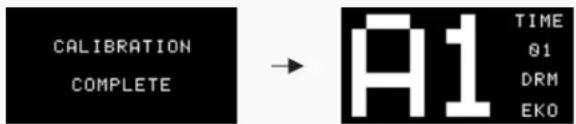
If "PLEASE TRY AGAIN" appears, do the calibration from "HEEL POSITION" again:
Effect Models List\*
| No. | Name Description MIX A B F.BACK TIME Tap Target | |||||||
| 01 | Dream Eko (DRM EKO) | Based on legendary BBD analog delay with repeat rate control | E.LEVEL | Mod depth(M. DEPTH) | Mod rate(M. RATE) | F.BACK | 20ms-1000ms/2000ms/3000ms/4000ms | TIME |
| 02 | 80 EKO | Based on MaxonAD80 | MIX | Mod depth(M. DEPTH) | Mod rate(M. RATE) | F.BACK | 20ms-1000ms/2000ms/3000ms/4000ms | TIME |
| 03 | MEMO EKO | Based on Electro-Harmonix Stereo Memory Man | E.LEVEL | Mod depth(M. DEPTH) | Mod rate(M. RATE) | F.BACK | 20ms-1000ms/2000ms/3000ms/4000ms | TIME |
| 04 | 900 EKO | Basedon Maxon AD900 | E.LEVEL | Mod depth(M. DEPTH) | Mod rate(M. RATE) | F.BACK | 20ms-1000ms/2000ms/3000ms/4000ms | TIME |
| 05 | 999 EKO | Based on Maxon AD999 | E.LEVEL | Mod depth(M. DEPTH) | Mod rate(M. RATE) | F.BACK | 20ms-1000ms/2000ms/3000ms/4000ms | TIME |
| 06 | PURE EKO | Producing pure delay effect | MIX | Mod depth(M. DEPTH) | Mod rate(M. RATE) | F.BACK | 20ms-1000ms/2000ms/3000ms/4000ms | TIME |
| 07 | WARM EKO | Producing delay with warm, analog-feel feedback | MIX | Mod depth(M. DEPTH) | Mod rate(M. RATE) | F.BACK | 20ms-1000ms/2000ms/3000ms/4000ms | TIME |
| 08 | TAPE EKO | Simulates vintage tape echo machine | MIX | Low cut(LO CUT) | High cut(HI CUT) | F.BACK | 20ms-1000ms/2000ms/3000ms/4000ms | TIME |
| 09 | TUBE EKO | Simulates tube driven echo machine | MIX | Low cut(LO CUT) | High cut(HI CUT) | F.BACK | 20ms-1000ms/2000ms/3000ms/4000ms | TIME |
| 10 | Vintage Rack (VINT RACK) | Simulates 1980's rack digital delay sound with slightly downsampled feedback | MIX | MOD | TONE | F.BACK | 20ms-1000ms/2000ms/3000ms/4000ms | TIME |
| 11 | DUAL EKO | Producing dual delay effect with pure feedback | MIX | Feedback A(FB A) | Time A: 20ms-1000ms/2000ms/3000ms/4000ms | Feedback B(FB B) | Time B : 20ms-1000ms/2000ms/3000ms/4000ms | Time B |
| 12 | PING PONG | Producing delay effect that bounces back and forth between left and right channels | MIX | Mod depth(M. DEPTH) | Mod rate(M. RATE) | F.BACK | 20ms-1000ms/2000ms/3000ms/4000ms | TIME |
| 13 | Sweep Eko (SWP EKO) | Producing delay effect with sweeping filter | MIX | Sweep filter Q(Q) | Sweep rate(S. RATE) | F.BACK | 20ms-1000ms/2000ms/3000ms/4000ms | TIME |
| 14 | Tremolo Eko (TRM EKO) | Producing delay effect with tremolo modulation | MIX | Tremolo depth(T. DEPTH) | Tremolo rate(T. RATE) | F.BACK | 20ms-1000ms/2000ms/3000ms/4000ms | TIME |
| 15 | LOFI EKO | Producing delay effect with sample reduced feedback | MIX | Low cut(LO CUT) | High cut(HI CUT) | F.BACK | 20ms-1000ms/2000ms/3000ms/4000ms | TIME |
| 16 | RING EKO | Producing delay effect with ring modulated feedback | MIX | Ring mod frequency(FREQ) | Ring mod tone(TONE) | F.BACK | 20ms-1000ms/2000ms/3000ms/4000ms | TIME |
| 17 | SLAP BACK | Simulates vintage slap back echo sound | MIX | Mod depth(M. DEPTH) | Mod rate(M. RATE) | F.BACK | 10ms-200ms fixed | TIME |
*The Manufacturers and product names mentioned above are trademarks or registered trademarks of their respective owners. The trademarks were used merely to identify the sound character of the products
Specifications
Numbers of Effects: 17
Numbers of Patches: 10 (2 banks x 5 patches)
Max. Delay Time: 4000ms
Digital Processing: 24-bit A/D/A conversion, 44.1 kHz sample rate
Frequency Response: 20 Hz-20 kHz
S/N Ratio: Up to 110dB
Input Impedance: 1M Ohms
Output Impedance: 100 Ohms
Power Requirement: DC 9V, center negative
Current Consumption: 200mA minimum
Dimensions: 121mm (D) x 72mm (W) x 47mm (H)
Weight: 340g
The contents of this manual are subject to change without notice.

- Binary Eko Owner's Manual
- Welcome
- Features
- Panel Introduction
- Connections
- Display
- Select a Patch/Bank
- Tap Tempo and Tap Tempo Subdivision
- Global
- Edit
- Adjust the parameters
- Select a different effect
- Set the expression pedal
- Save
- Input Mode, Max Delay Time and Trail
- Input mode
- Max delay time
- Trail
- Expression Pedal Range and Calibration
- Effect Models List\*
- Specifications
Brand : Hotone
Model : Eko
Category : Guitar effects pedal