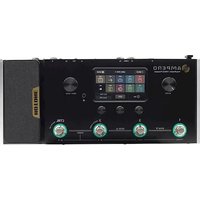
Ampero Amp Modeler - Guitar effects pedal Hotone - Free user manual and instructions
Find the device manual for free Ampero Amp Modeler Hotone in PDF.


Pick your language and provide your email: we'll send you a specifically translated version.
| Product Type | Guitar Amp Modeler & Multi-Effects Processor |
| Dimensions | Approx. 250 x 150 x 50 mm |
| Weight | Approx. 1.2 kg |
| Power Supply | 9V DC center negative adapter (not included) |
| Current Consumption | ~500 mA |
| Processing | High-performance DSP |
| Amp Models | Over 100 models of classic and modern amps |
| Effects | Built-in effects (compression, OD, delay, reverb, modulation, etc.) |
| IR Loading | Supports third-party cabinet IRs via USB |
| USB Audio Interface | USB-C for recording and reamping |
| Connectivity | 1/4" instrument input, stereo 1/4" outputs, headphones out, MIDI I/O, expression pedal jack |
| Display | Color LCD screen |
| Presets | 200+ factory presets, unlimited user presets via software |
| Software Editor | Compatible with Windows/Mac (free download) |
| Firmware Updates | Via USB connection |
| Construction | Aluminum chassis, durable footswitches |
| Maintenance | Clean with a soft, dry cloth. Avoid liquids. |
| Safety | Operate only with specified power supply. Keep away from moisture and heat. |
| Spare Parts & Repairability | Contact Hotone support for service. Not user-serviceable. |
| Included Accessories | USB cable, quick start guide |
Frequently Asked Questions - Ampero Amp Modeler Hotone
How do I connect the Ampero to my computer?
Use the USB-C port on the back and connect to your computer. Download the Ampero Editor software from the Hotone website. The device will appear as an audio interface.
Can I use the Ampero as an audio interface for recording?
Yes, the Ampero functions as a USB audio interface with up to 24-bit/48kHz quality. You can record dry or processed signals directly into your DAW.
How do I load custom IRs?
Connect the Ampero via USB and use the Ampero Editor software. In the cab block, you can import third-party IRs (WAV format, 44.1kHz or 48kHz).
What power supply does the Ampero need?
It requires a standard 9V DC adapter with center negative polarity and at least 500mA current. Use only the recommended adapter to avoid damage.
How do I update the firmware?
Download the latest firmware from the Hotone website. Connect the Ampero to your computer via USB and run the firmware updater tool while the device is in update mode (hold preset button while powering on).
Can I connect an expression pedal?
Yes, connect a standard expression pedal (TRS cable) to the EXP jack on the back. You can assign its function (volume, wah, parameter control) in the system settings.
How many presets can I store?
The Ampero has 200+ factory presets and unlimited user presets can be stored via the software editor. The onboard memory holds up to 500 user presets.
Can I use the Ampero with a bass guitar?
Yes, the input is designed for both guitar and bass. Use a bass-appropriate amp model and effects. The IR loader can accommodate bass cabinet IRs.
How do I reset the device to factory settings?
Press and hold the Bank and Exit buttons while powering on. This will erase all user presets and restore factory defaults. Backup your data first via the editor.
Does the Ampero support MIDI control?
Yes, it has MIDI In/Out via 5-pin DIN connectors. You can send program changes, CC messages, and sync tempo with external devices.
User questions about Ampero Amp Modeler Hotone
0 question about this device. Answer the ones you know or ask your own.
Ask a new question about this device
No questions yet. Be the first to ask one.
Download the instructions for your Guitar effects pedal in PDF format for free! Find your manual Ampero Amp Modeler - Hotone and take your electronic device back in hand. On this page are published all the documents necessary for the use of your device. Ampero Amp Modeler by Hotone.
USER MANUAL Ampero Amp Modeler Hotone


Manual assistant
Powered by Anthropic
Waiting for your message
Product information
Brand : Hotone
Model : Ampero Amp Modeler
Category : Guitar effects pedal