WV-S1536LTN - Security Camera i-PRO - Free user manual and instructions
Find the device manual for free WV-S1536LTN i-PRO in PDF.


| Product Type | Indoor/Outdoor Network Security Camera |
| Model | WV-S1536LTN |
| Brand | i-PRO (Panasonic) |
| Image Sensor | 1/3-inch Progressive Scan CMOS |
| Resolution | 5 Megapixels (up to 2592 x 1944) |
| Frame Rate | Up to 30 fps at 5MP |
| Lens | Varifocal, 2.8–10mm, F1.3 |
| Angle of View | Horizontal: 105° (wide) to 28° (tele) |
| Night Vision | IR LEDs, up to 30m range |
| Compression | H.265 / H.264 / JPEG |
| Network Interface | 10/100/1000 Base-T Ethernet (RJ-45) |
| Power Supply | PoE (IEEE 802.3af) or DC 12V |
| Power Consumption | 15.2 W max (IR on) |
| Dimensions (W x H x D) | 160 x 130 x 120 mm (6.3 x 5.1 x 4.7 in) |
| Weight | 1.5 kg (3.3 lb) |
| Ingress Protection | IP66, IK10 |
| Operating Temperature | -40°C to +60°C (-40°F to +140°F) |
| Main Features | Smart analytics, motion detection, tamper alarm, edge recording |
| Audio | 2-way audio (mic input, line output) |
| Storage | MicroSD slot (up to 256 GB), NAS, NVR |
| Repairability / Spare Parts | Replaceable unit design, lens and IR board available |
| Maintenance | Clean lens with dry soft cloth; check cable seals |
| Security | Encryption (HTTPS, 802.1x), password protection, firmware updates |
Frequently Asked Questions - WV-S1536LTN i-PRO
User questions about WV-S1536LTN i-PRO
0 question about this device. Answer the ones you know or ask your own.
Ask a new question about this device
Download the instructions for your Security Camera in PDF format for free! Find your manual WV-S1536LTN - i-PRO and take your electronic device back in hand. On this page are published all the documents necessary for the use of your device. WV-S1536LTN by i-PRO.
USER MANUAL WV-S1536LTN i-PRO
Operating Instructions
Network Camera
Model No.
WV-S2500 Series
WV-S2200 Series
WV-S2100 Series
WV-S1500 Series
WV-S1100 Series
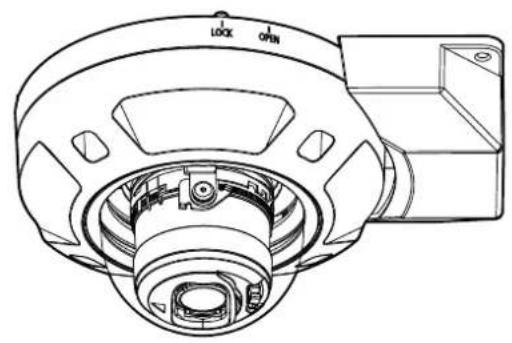
natural_image
Technical line drawing of a mechanical component with no visible text or symbols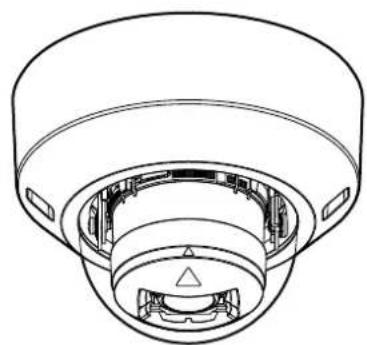
natural_image
Technical line drawing of a mechanical component with internal cavities and mounting holes (no text or symbols)WV-S2136LWV-S2536LN
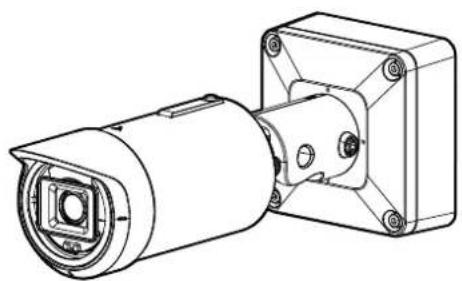
natural_image
Technical line drawing of a mechanical component with mounting flanges and central housing (no text or symbols)WV-S1536LN
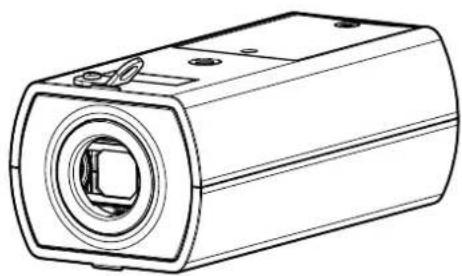
natural_image
Technical line drawing of a cylindrical mechanical component with a central hole and mounting holes (no text or symbols)WV-S1136
- This manual covers the models: WV-S2500 Series (WV-S2536LTN, WV-S2536LN, WV-S2536L), WV-S2200 Series (WV-S2236L), WV-S2100 Series (WV-S2136L, WV-S2136), WV-S1500 Series (WV-S1536LTN, WV-S1536LN, WV-S1536L, WV-S1536LNS), and WV-S1100 Series (WV-S1136).
- The model number is abbreviated in some descriptions in this manual.

Preface
About the user manuals
There are 3 sets of operating instructions as follows.
- Operating Instructions (this document): Explains how to perform the settings and how to operate this camera.
- Basic Information: Provides information about “Precautions for use”, “Parts and functions” and “Detail specifications”.
- Installation Guide: Provides information about "Precautions", "Precautions for installation" and the installation method.
The screens used in these operating instructions show the case of WV-S2136L. Depending on the model used, the screens shown in the explanations may differ to the actual camera screens.
This document provides how to operate and configure the camera using a web browser but it is recommended to use the i-PRO Configuration Tool to configure the camera. The i-PRO Configuration Tool can configure up to 1024 cameras at the same time so that the cameras can be configured efficiently.
For information about the i-PRO configuration tool (iCT), refer to our technical information website
Note
- "
" used in this document should be used to search for information on our technical information website (https://i-pro.com/global/en/surveillance/training_support/support/technical_information) and will guide you to the right information. - The captured screens are used based on the guideline by Microsoft Corporation.
- Operations using Google Chrome is described in this document. For information on the operation verification of the supported web browsers, refer to our technical information website
- Covered by one or more claims of the HEVC patents listed at patentlist.accessadvance.com.
- The default settings of some of the stream-related settings vary as follows depending on the language setting of the browser selected at the time of administrator registration.
| Setting items | Language of the browser | |
| Languages other than Japanese | Japanese | |
| Transmission priority VBR Frame rate | ||
| Image quality 3 Normal | ||
| Stream(1)-Max bit rate (per client) | 6144kbps * 3072kbps * | |
| Stream(1)-Smart VIQS | On(Low) Off | |
| Stream(2)-Max bit rate (per client) | 4096kbps * 2048kbps* | |
| Stream(3)-Max bit rate (per client) | 1536kbps * 768kbps * | |
| Stream(4)-Max bit rate (per client) | 1536kbps * 768kbps * | |
| Stream(1) - Stream(4)-Refresh interval | 2s 1s | |
About notations
The following notations are used when describing the functions limited for specified models. The functions without the notations are supported by all models.
| Notation | Model |
| S1136 | WV-S1136 |
| S2536L | WV-S2136/ WV-S2136L/WV-S2236L/ WV-S2536L/WV-S2536LN/ WV-S2536LTN/WV-S1536L/ WV-S1536LN/WV-S1536LTN/ WV-S1536LNS |
Abbreviations
The following abbreviations are used in these operating instructions.
Microsoft Windows 10 is described as Windows 10.
Microsoft Windows 8.1 is described as Windows 8.1.
microSDXC/microSDHC/microSD memory card is described as SD card or SD memory card.
Universal Plug and Play is described as UPnP ^TM or UPnP.
For administrator registration
At the time of first access to the camera (or at the time of initialization), the registration screen will be displayed.
Define the user name and the password for the administrator, and enter them correctly. Hereafter, they can be used for login.
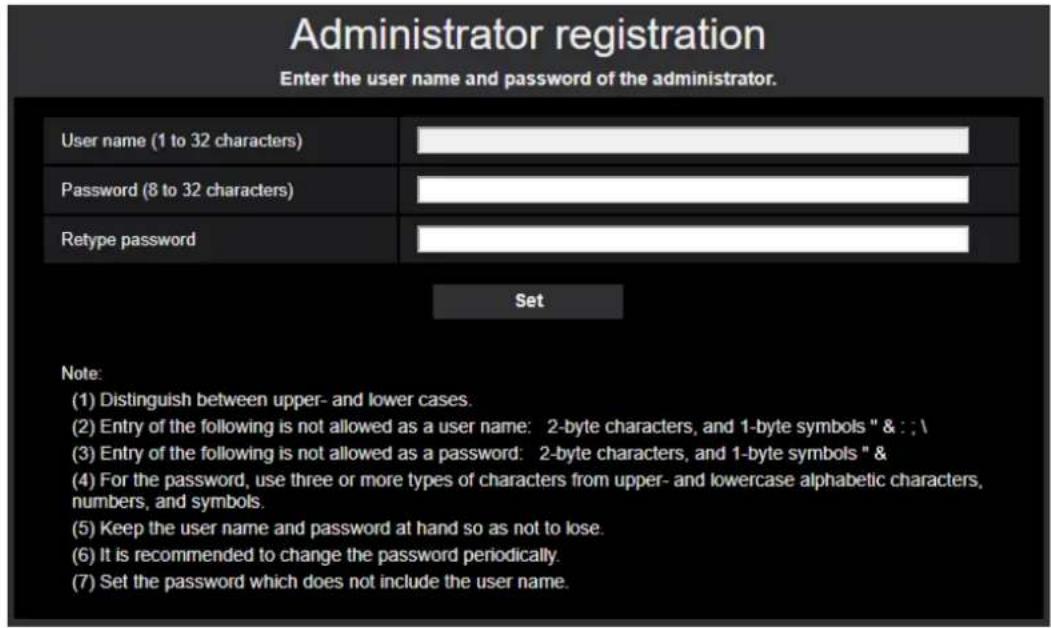
[User name (1 to 32 characters)]
Enter the user name of the administrator.
Available number of characters: 1 - 32 characters
Unavailable characters: 2-byte characters, and 1-byte symbols " & : ; \
[Password (8 to 32 characters)]/[Retype password]
Enter the administrator password.
Available number of characters: 8 - 32 characters
Unavailable characters: 2-byte characters, and 1-byte symbols " &
Note
- Distinguish between upper- and lower cases.
- For the password, use three or more types of characters from upper- and lowercase alphabetic characters, numeric characters, and symbols.
- Set the password which does not include the user name.
IMPORTANT
- If you forgot or do not know the password or user name, the camera must be initialized. Because all settings other than preset position settings are deleted when the camera is initialized, make sure to keep the information secure from third parties. Refer to "Parts and functions" section in the Basic Information for more information about initializing the camera.
- It is recommended to change the password periodically.
- Do not use the password already used for other camera or device.
The registration completion screen will be displayed after registering a user name and password of the administrator. After 10 seconds, the camera will be reconnected automatically. Please click "here" if it is not displayed automatically.
When the camera is reconnected to, an authentication window is displayed. Enter the registered user name and password to start operation.
Registration of administrator is completed.
After 10 seconds, the camera will be reconnected automatically.
Please click here if it is not displayed automatically.
Table of Contents
1 Operations ......9
1.1 Monitor images on a PC 9
1.1.1 Monitor images from a single camera 9
1.1.2 About the "Live" page 12
1.1.3 Monitor images from multiple cameras 16
1.2 Monitor images on a mobile terminal or tablet device ....18
1.2.1 Monitor images on a mobile terminal (smartphone, etc.) 18
1.2.2 Monitor images on a tablet device 21
1.3 Record images on the SD memory card manually ....26
1.4 Action at an alarm occurrence 27
1.4.1 Alarm type 27
1.4.2 Action at an alarm occurrence 27
1.5 Display the log list 29
1.6 Playback of images on the SD memory card 32
1.6.1 Playback "JPEG(1)"/ "JPEG(2)" images saved to the SD memory card ....32
1.6.2 Playback "Stream(1)"/ "Stream(2)"/ "Stream(3)"/ "Stream(4)" images saved to the SD memory card .... 34
2 Settings ....37
2.1 About the network security ....37
2.1.1 Equipped security functions 37
2.2 Display the setup menu from a PC 38
2.2.1 How to display the setup menu 38
2.2.2 How to operate the setup menu ....38
2.2.3 About the setup menu window 40
2.3 Perform management of the extension software and the schedule setting [Ext. software] 42
2.3.1 Perform the installation, uninstallation and version upgrade of the extension software [Software mng.] 42
2.3.2 Set a schedule of the extension software [Operation sched.] 45
2.3.3 Check the control log of extension software [Control log] 46
2.4 Use Easy Setup [Easy Setup] 47
2.4.1 Configure the Internet settings [Internet] 47
2.4.2 Configure an event action [Event action] 49
2.4.2.1 Configure the schedule/alarm (event function type setup menu) 50
2.4.2.2 Alarm: Configure the terminal and VMD (alarm setup menu) 51
2.4.2.3 Alarm: Configure the alarm function type (Alarm function type setup menu) .....53
2.4.2.4 Alarm: Configure the details for recording conditions ....54
2.4.2.5 Alarm: Configure the output terminal 56
2.4.2.6 Alarm: configure the mail notifications and mail server ....56
2.4.2.7 Schedule: Configure SD recording (schedule function type setup menu) .....58
2.4.2.8 Schedule: Set SD memory recording (video recording setup menu) 58
2.5 Configure the basic settings of the camera [Basic] 61
2.5.1 Configure the basic settings [Basic] 61
2.5.2 Configure the settings relating to the SD memory card [SD memory card] ....65
2.5.3 Configure the settings relating to alteration detection [Alteration detection] ....73
2.5.4 How to configure alteration detection settings 76
2.5.4.1 Generation of the CRT key (encryption key) 76
2.5.4.2 Generation of CSR (Certificate Signing Request) 77
2.5.4.3 Installation of the certificate issued by CA 78
2.5.4.4 Configuration of alteration detection 79
2.5.5 Configure the overlay image function [Overlay image] 80
2.6 Configure the settings relating to images and audio [Image/Audio] 83
2.6.1 Configure the settings relating to the image capture mode [Image] 83
2.6.2 Configure the settings relating to JPEG images [Image] 83
2.6.3 Configure the settings relating to Stream [Image] 85
2.6.4 Configure the settings relating to image adjust, zoom/focus, privacy zone, VIQS, and lens distortion compensation [Image quality] 91
2.6.4.1 Configure the settings relating to image quality ("Image adjust" setup menu) .....92
2.6.4.2 Set mask areas 101
2.6.4.3 Adjust the zoom and focus 104
2.6.4.4 Adjust the back focus \$1136 107
2.6.4.5 Adjust the angular field of view using the Extra optical zoom function S1136 ......109
2.6.4.6 Configure the settings relating to the privacy zone (“Privacy zone” setup menu)....110
2.6.4.7 Configure the VIQS setting 111
2.6.4.8 Configure the VIQS area 113
2.6.4.9 Configure the settings relating to lens distortion compensation 114
2.6.5 Configure the settings relating to audio [Audio] 115
2.7 Configure the multi-screen settings [Multi-screen] ....118
2.8 Configure the alarm settings [Alarm] 120
2.8.1 Configure the settings relating to the alarm action [Alarm] 120
2.8.2 Configure the settings relating to the output terminal [Alarm] 122
2.8.3 Change the AUX name [Alarm] 124
2.8.4 Configure the settings relating to the camera action on alarm occurrence [Alarm] 124
2.8.4.1 Configure settings relating to alarm E-mail notifications 125
2.8.4.2 Configure settings relating to recording to an SD memory card when an alarm occurs 125
2.8.4.3 Configure settings relating to TCP alarm notification when an alarm occurs .....125
2.8.4.4 Configure settings relating to HTTP alarm notification when an alarm occurs .....125
2.8.4.5 Configure settings relating to SNMP transmissions of alarm images 125
2.8.5 Configure the VMD settings [VMD area] 126
2.8.6 Set the VMD areas [VMD area] 129
2.8.7 Configure the SCD settings [SCD area] 130
2.8.8 Set the SCD areas [SCD area] 132
2.8.9 Configure the settings relating to the audio detection [Audio detection] 133
2.8.10 Configuration of the settings relating to alarm notification [Notification] 134
2.8.10.1 Configure the settings relating to TCP alarm notification 134
2.8.10.2 Configure the settings relating to HTTP alarm notification 136
2.9 Configure the settings relating to the authentication [User mng.] ....138
2.9.1 Configure the settings relating to the user authentication [User auth.] 138
2.9.2 Configure the settings relating to the host authentication [Host auth.] 140
2.9.3 Configure IEEE 802.1X [IEEE 802.1X]....141
2.9.4 Configure the data encryption settings [Data encryption] 144
2.10 Configuring the network settings [Network] 147
2.10.1 Configure the network settings [Network] 147
2.10.2 Configure advanced network settings [Advanced] 151
2.10.2.1 Configure the settings related to sending E-mails 151
2.10.2.2 Configure the settings relating to the NTP server 154
2.10.2.3 Configure the UPnP settings 155
2.10.2.4 Configure the HTTPS settings 156
2.10.2.5 Configure the settings relating to DDNS 158
2.10.2.6 Configure the settings relating to SNMP 158
2.10.2.7 Configure the QoS settings 162
2.10.2.8 Configure the SRTP settings 163
2.10.3 How to configure HTTPS settings 164
2.10.3.1 Select the certificate to use when accessing with HTTPS 165
2.10.3.2 Obtaining the root certificate 166
2.10.3.3 Configuration of HTTPS connections 172
2.10.3.4 Generation of the CRT key (SSL encryption key) 173
2.10.3.5 Generation of CSR (Certificate Signing Request) 174
2.10.3.6 Installation of the CA certificate 175
2.10.4 Access the camera using the HTTPS protocol (for pre-installed certificate) .....176
2.10.4.1 Configuration of the host file 176
2.10.5 Access the camera using the HTTPS protocol (for CA Certification) 181
2.10.6 How to configure the settings relating to DDNS 182
2.10.6.1 Configuration of the DDNS service (Example of the "Viewnetcam.com" service) 183
2.10.6.2 When using "Dynamic DNS Update" 186
2.10.6.3 When using "Dynamic DNS Update(DHCP)" 186
2.11 Configure the settings relating to the schedules [Schedule]....187
2.11.1 How to delete the set schedule 190
2.12 Maintenance of the camera [Maintenance] 191
2.12.1 Check the system log [System log] 191
2.12.2 Upgrade the firmware [Upgrade] 191
2.12.3 Check the status [Status] 192
2.12.4 Reset the settings/Reboot the camera [Default reset] 195
2.12.5 Settings data/backing up or restoring logs [Data] 195
2.13 Display our support website [Support] 197
3 Others 198
3.1 About the displayed system log ....198
3.2 Troubleshooting 203
3.3 Directory structure of SD memory card 210
1 Operations
1.1 Monitor images on a PC
The following are descriptions of how to monitor images from the camera on a PC.
1.1.1 Monitor images from a single camera
-
Start up the web browser.
-
Enter the IP address designated using the "IP Setting Software" in the address box of the browser.
• Example when entering an IPv4 address: http://URL registered using IPv4 address http://192.168.0.10/
• Example when entering an IPv6 address: http://[URL registered using IPv6 address] http://[2001:db8::10]/

IMPORTANT
- When the HTTP port number is changed from "80", enter "http://IP address of the camera + : (colon) + port number" in the address box of the browser. (Example: http://192.168.0.11:8080)
- When this camera is in a local network, configure the proxy server setting ([Settings] → [Network and Internet] → [Proxy]) not to use the proxy server for the local address.
Note
- Refer to "2.10.4 Access the camera using the HTTPS protocol (for pre-installed certificate)" and "2.10.5 Access the camera using the HTTPS protocol (for CA Certification)" for further information about the case in which "HTTPS" is selected for "HTTPS" - "Connection" on the [Advanced] tab of the "Network" page (→"2.10.1 Configure the network settings [Network]).
- Press the [Enter] key on the keyboard.
→ The window with the user name and password entry fields will be displayed.
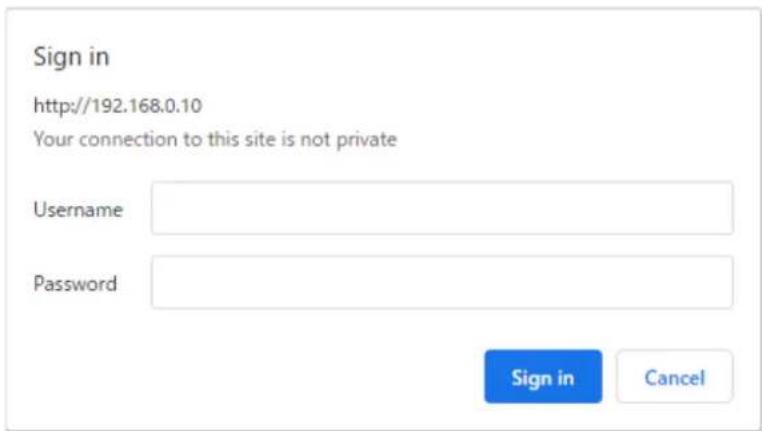
Note
- When "Off" is selected for "User auth.", the authentication window will not be displayed before displaying live images for the user name and password entries.
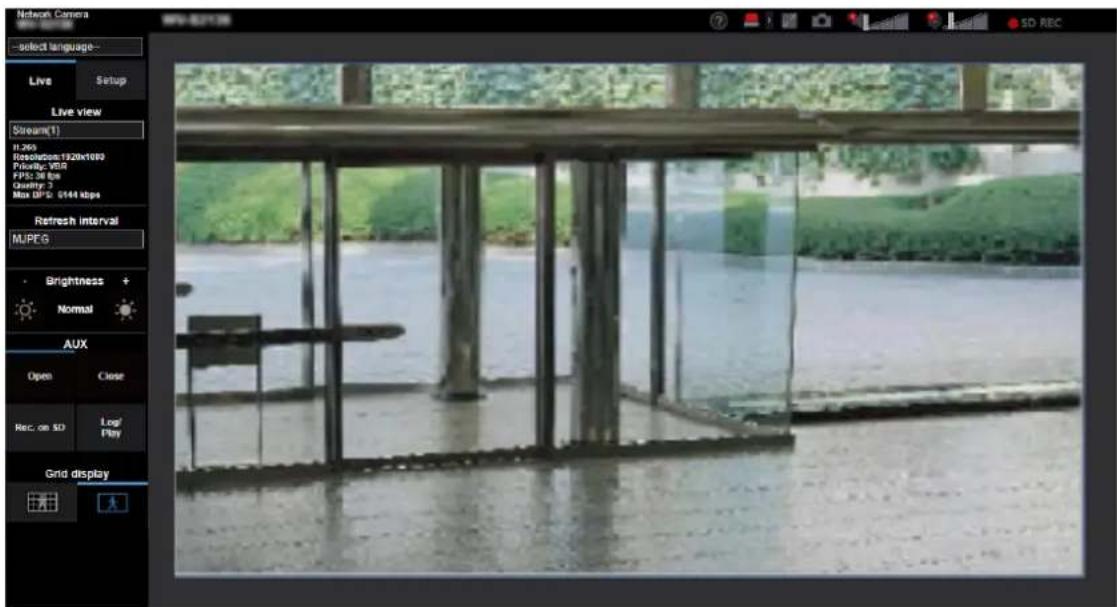
- Click the [OK] button after entering the user name and the password.
→ The "Live" page will be displayed. Refer to "1.1.2 About the "Live" page" for further information about the "Live" page.
IMPORTANT
- It is recommended to change the password periodically.
- When displaying multiple H.265 (or H.264) images on a PC, images may not be displayed depending on the performance of the PC.
Note
- The maximum number of concurrent access user is 14 including users who is receiving H.265 (or H.264) images and users who are receiving JPEG images. Depending on the set values for "Bandwidth control(bit rate)" and "Max bit rate (per client)*", the maximum concurrent access number may be 14 or less users. When 14 users are concurrently accessing, the access limit message will be displayed for users who subsequently attempt to access.
- If you set the "Stream transmission" (→"Stream(1)/ Stream(2)/ Stream(3)/ Stream(4)") to "On", an H. 265 (or H.264) image will be displayed based on the settings of the "Stream encoding format". If you set the "Stream transmission" (→"Stream(1)/ Stream(2)/ Stream(3)/ Stream(4)") to "Off", a JPEG image will be displayed. A JPEG image can be displayed even if the "Stream transmission" is set to "On", but in that case, the transmission interval of the JPEG image will be restricted as follows.
| Image capture mode | Stream transmission | |
| On Off | ||
| 4:3 mode(30fps mode) max. 5 fps max. 30 fps | ||
| 16:9 mode(30fps mode) | ||
| 16:9 mode(60fps mode) | ||
| 4:3 mode(25fps mode) max. 4 | 2 fps max. 25 fps | |
| 16:9 mode(25fps mode) | ||
| 16:9 mode(50fps mode) | ||
| 4:3 mode(15fps mode) max. 5 | fps max. 15fps | |
| 4:3 mode(12.5fps mode) max. | 4.2fps max. 12.5fps | |
- The refresh interval may become longer depending on a network environment, PC performance, photographic subject, access traffic, etc.
1.1.2 About the "Live" page
Note
- The buttons and setting items displayed on the "Live" page can be changed depending on the user rights of the accessing user. You can set the user right settings from "User auth." under "User mng.". (→"2.9.1 Configure the settings relating to the user authentication [User auth.]")
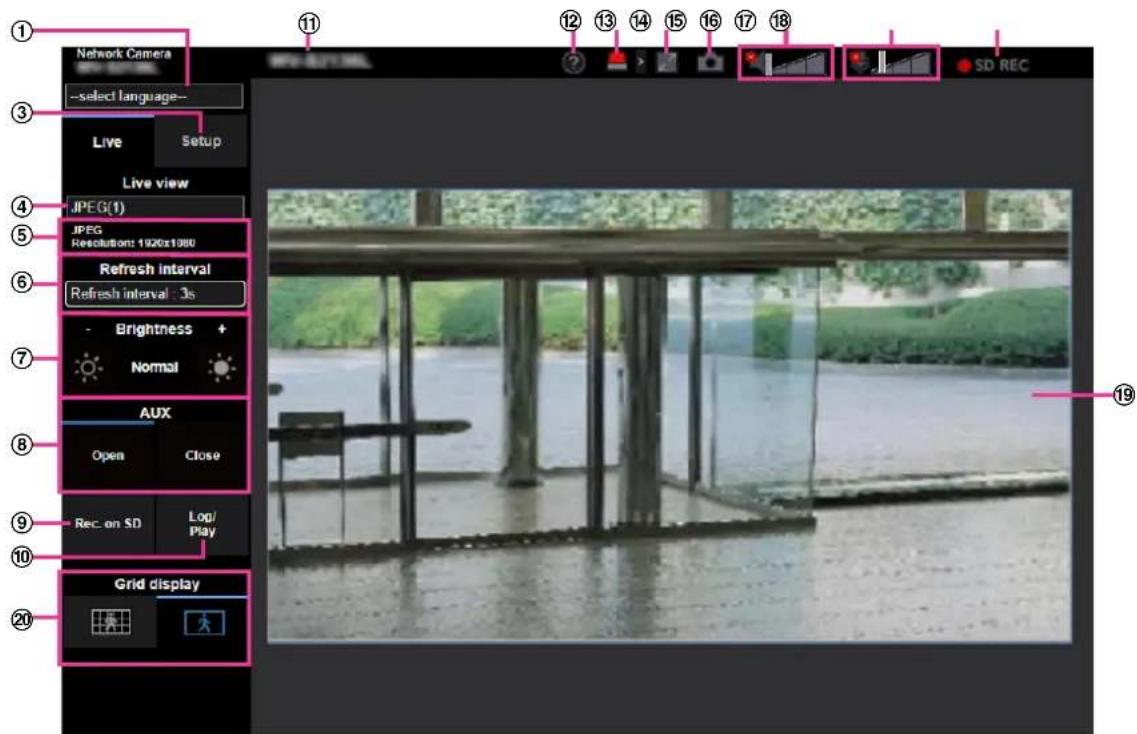
① [select language] pull-down-menu
The camera's display language can be selected. The default language can be set in the [Menu language] in the [Basic] settings. (→“2.5.1 Configure the basic settings [Basic]”)
② [Login] button
This button is displayed when "User auth." is "On" and a person other than the administrator logs in, or when "User auth." is "Off" and "Guest User" is set to "Use". (→"2.9.1 Configure the settings relating to the user authentication [User auth].")
Even in the above case, the [Login] button will not be displayed if "Host auth." is set to "On", and the camera browser is opened from a host with administrator rights.
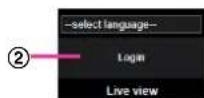
If login fails, close all the browsers, open the "Live" page and login once again.
③ [Setup] button ^1
Displays the setup menu.
④ [Live view] pull-down menu
You can select and switch to the image to be displayed in the main area from the following:
Stream(1)/Stream(2)/Stream(3)/Stream(4)/JPEG(1)/JPEG(2)/Multi-screen
The image in the main area is displayed based on the contents set in Stream(1) - (4) ( "Stream(1)/Stream(2)/Stream(3)/Stream(4)"), JPEG(1) - (2) ( "JPEG"), or Multi-screen ( "2.7 Configure the multi-screen settings [Multi-screen]).
Also the first stream displayed when you accessed the camera can be set from “Initial display stream” of the [Image] tab. For “Multi-screen”, you can set the “Initial display” in the [Multi-screen] tab.
Note
- When the image capture size is larger than “1280×720”, the image may become smaller than the actual size depending on the window size of the web browser.
⑤ Stream information display
Displays the setup for stream encoding format, image capture size, bit rate, and frame rate for the live view of a stream.
Note
- Displays the values set in the stream. The actual bit rate and frame rate vary depending on the network environment and the used PC.
⑥ [Refresh interval] pull-down menu
This pull-down menu will be displayed only when a JPEG image is displayed. Use it to select the display method of the JPEG image.
- MJPEG: Displays JPEG images successively as MJPEG (Motion JPEG).
- Refresh interval : 1s/Refresh interval : 3s/Refresh interval : 5s/Refresh interval : 10s/Refresh interval : 30s/Refresh interval : 60s: Refreshes JPEG format (still images) images at the specified interval.
Note
- Depending on the network environment or the PC used, JPEG format (still images) images may not be refreshed at the specified interval. Depending on the browser and PC environment, a previous still image may be seen like an afterimage.
- The [Refresh interval] pull-down on the "Live" page is not displayed for JPEG images with data encryption set to "On".
⑦ [Brightness] buttons ^2
The brightness is adjustable from 0 to 255. Click the button to make the image brighter, or click the button to make the image darker. If you click the [Normal] button, the display will be reset to default.
⑧ [AUX] button
These buttons will be displayed only when "Terminal 3" of "Alarm" is set to "AUX output" on the setup menu. (→“2.4.2.2 Alarm: Configure the terminal and VMD (alarm setup menu)”)
- [Open] button: The status of the AUX connector will be open.
- [Close] button: The status of the AUX connector will be closed.
Note
- The names of “AUX”, “Open” and “Close” can be changed. (→“2.8.3 Change the AUX name [Alarm]”)
⑨ [Rec. on SD] button ^2
The [Rec. on SD] button will be displayed only when "Manual" is selected for "Save trigger" on the [SD memory card] tab. (→"[Save trigger]")
Click this button to manually record images on the SD memory card. Refer to 1.3 Record images on the SD memory card manually for descriptions of how to manually record images on the SD memory card.
⑩ [Log/Play] button
When the [Log/Play] button is clicked, the log list will be displayed and images saved on the SD memory card can be played.
Refer to “1.5 Display the log list” for further information about the log list and for how to play images on the SD memory card.
⑪ Camera title
The camera title entered for "Camera title" on the [Basic] tab will be displayed. (→"[Camera title]")
⑫ Support button
When this button is clicked, our support site will be displayed in a newly opened window. This website contains technical information, FAQ, and other information. https://i-pro.com/global/en/surveillance/training_support/support
⑬ Alarm occurrence indication button ^2
When an alarm occurs, the display flashes. When this button is clicked, the output terminal will be reset and this button will disappear. ( “1.4 Action at an alarm occurrence”)
Note
- Since the blinking of the alarm occurrence indication button is not coupled to recording images to the SD memory card, forwarding E-mails, or other operations, check the settings of each operation separately.
⑭ Full screen button
A new window will open and images will be displayed on a full screen.
⑮ Snap shot button
Click this button to take a picture (a still picture). The picture will be displayed on a newly opened window. When right-clicking on the displayed image, the image can be saved using a function of the web browser.
Note
- When it takes longer than the specified period to obtain the snap shot picture due to the network environment, the snap shot picture may not be displayed.
- If the image capture size specified for JPEG cannot be obtained, JPEG images are displayed with the image capture size that could be obtained.
Therefore, when JPEG images obtained with snap shot are displayed on a PC, the displayed image size may differ from the captured sized. - If the encryption setting for JPEG(1) or JPEG(2) is "On", the Snap shot button is not displayed.
⑯ Mic input button
Turns on/off the audio reception (hear audio from the camera on a PC). This button will be displayed when the settings are as follows. (→“2.6.5 Configure the settings relating to audio [Audio]”)
- When "Mic input", "Interactive(Full-duplex)" or "Interactive(Half-duplex)" is selected for "Audio transmission mode"
- When "AAC-LC" is selected for "Audio input encoding format"
When the audio reception is turned off, the button will turn into the button and audio from the camera will not be heard.
Audio volume can be adjusted (Low/ Middle/ High) by moving the volume cursor

Note
- When “Audio volume control mode” is set to “Adjust Mic input” in the setup menu, the volume cursor is not displayed when using “Audio recording” or “Audio detection”.
- When the camera is restarted, the adjusted volume level (for the reception) will return to the level that had been set on the [Audio] tab on the setup menu. (→“2.6.5 Configure the settings relating to audio [Audio]”)
- Actual volume level will change in three steps even though the volume cursor can be adjusted minutely.
- If multiple camera browsers are open at the same time on the same computer, audio cannot be heard from the camera browsers that were opened later. Please only access 1 camera at a time.
- If the network communication is unstable, audio input may stop. In this case, resume the audio input by turning the Mic input button off and on.
⑰ Audio output button
Turns on/off the audio transmission (play audio from the PC on the unit speaker). This button will be displayed only when "Audio output", "Interactive(Full-duplex)" or "Interactive(Half-duplex)" is selected for
"Audio transmission mode" on the setup menu. (→“2.6.5 Configure the settings relating to audio [Audio]”)
The button will blink during the audio transmission. When the audio transmission is turned off, the button display will switch to the 📄, and audio from the PC will not be heard.
Audio output volume can be adjusted (Low/Middle/High) by moving the volume cursor

Note
- Audio output is available only when connected with HTTPS.
- When a user is using the audio transmission function with "Interactive(Half-duplex)" selected, the receiver button and the transmission button will be inoperable for the other users. When "Interactive(Full-duplex)" is selected, the transmission button is inoperable for other users.
- The maximum duration of a single audio output is the audio output duration set in the [Audio] tab on the "Image/Audio" page. Audio output stops when the specified audio output duration has passed. To turn the audio transmission function on, click the [Audio output] button again.
- When the camera is restarted, the adjusted volume level (for both the audio transmission and reception) will return to the level that had been set on the [Audio] tab on the "Image/Audio" page. ( "2.6.5 Configure the settings relating to audio [Audio}")
- Actual volume level will change in three steps even though the volume cursor can be adjusted minutely.
⑱ SD recording status indicator
The status of the SD recording can be checked with this indicator.
When the SD recording starts, the SD recording status indicator will light red. It will go off when the SD recording stops.
This indicator will be displayed when "Manual" or "Schedule" is selected for "Save trigger" on the setup menu. (→“2.5.2 Configure the settings relating to the SD memory card [SD memory card]”)
⑲ Main area
Images from the camera will be displayed in this area.
The current time and date will be displayed according to the settings configured for “Time display format” and “Date/time display format”. (→“2.5.1 Configure the basic settings [Basic]”)
In addition, when being adjusted, the status of brightness ( “[Brightness status display]”) will be displayed as well as the characters configured for “Camera title on screen” ( “[Camera title on screen]”). The number of lines for the display is 2.
When displaying H.265 with a high bit rate, the stream may display only i-frames.
Note
- When the camera is operated by a user with a low access level, images displayed on the screen may be changed temporarily. This does not affect operation of the camera.
- Depending on the PC in use, screen tearing* may occur when the shooting scene drastically changes due to the GDI restrictions of the OS.
*A phenomenon in which portions of the screen are displayed out of alignment.
- When the data encryption function is enabled, images cannot be monitored on the "Live" page. Please use our supported devices.
⑳ [Grid display] buttons
Select On/Off to determine whether or not to use the grid display for position adjustment of this product when using the extension software.
For further information about the grid adjustment, refer to our technical information website below.
https://i-pro.com/global/en/surveillance/training_support/support/technical_information
1.1.3 Monitor images from multiple cameras
Images from multiple cameras can be displayed on a multi-screen. Images from 4, 9, and up to 16 cameras can be displayed simultaneously. To display images on a multi-screen, it is necessary to register cameras in advance. 4 cameras can be registered as a group and up to 4 groups (16 cameras) can be registered. (→“2.7 Configure the multi-screen settings [Multi-screen]”)
IMPORTANT
- When 16 screens are used for the display, only still images (JPEG) can be refreshed.
Note
- For further information about "Network Camera Recorder with Viewer Software Lite", which is suited to viewing images from several cameras, refer to our technical information website
. -
When you have registered a camera with the authentication function enabled, it is necessary to access the camera and register the user name of "Administrator" and password in the web browser in advance. Refer to our technical information website
for information about the terms and conditions for use of multi-screen. -
From the "Live view" pull-down menu in the "Live" page, select "Multi-screen".
→ Images from the registered cameras will be displayed on a selected multi-screen (screen can be split up to 16 areas). The following are instructions when displaying on a 4-split screen.
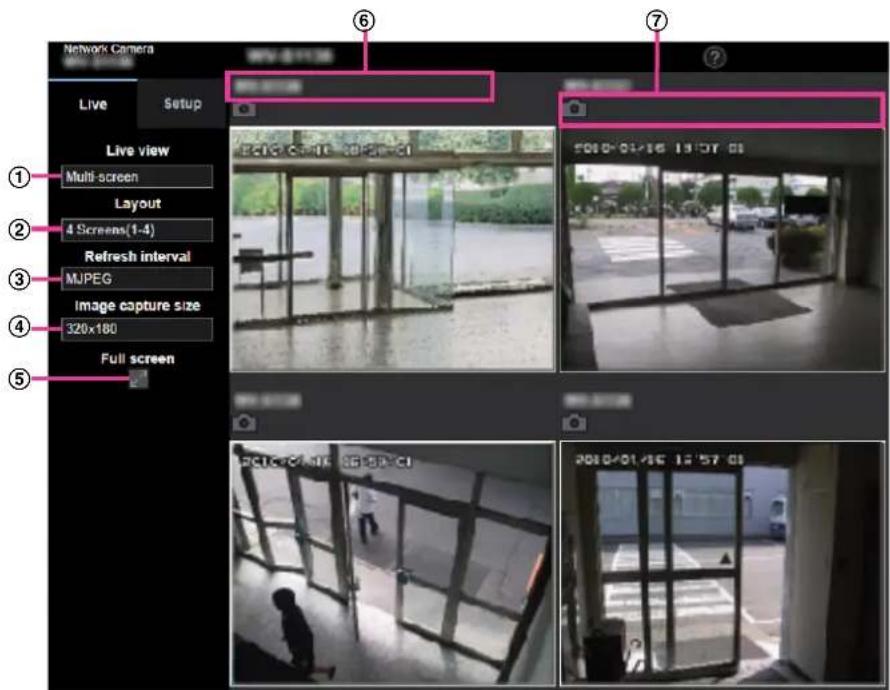
① "Live view" pull-down menu
Select the image displayed in the main area.
② [Layout] pull-down menu
Select from the pull-down menu to display images from cameras in multi-screens of 4 to 9 or even 16 screens.
③ [Refresh interval] pull-down menu
Select from the pull-down menu and switch between video (MJPEG) and still images (JPEG). For still images (JPEG), select the refresh interval (Refresh interval : 1s/Refresh interval : 3s/Refresh interval : 5s/Refresh interval : 10s/Refresh interval : 30s/Refresh interval : 60s) for camera images. When the 16 screen layout is used, Refresh interval : 1s cannot be selected.
④ Image capture size pull-down menu
Select the image capture size from the pull-down menu to change it.
When you select "4 Screens" in the [Layout] pull-down menu, the image capture size of the camera changes.
- Switching between 320x180 (default) and 640x360
⑤ Full screen display
If you press the full screen button, the display of the camera image will be maximized. If you click the
(reset) button in the full screen display, the display size will be reset to original size.
⑥ Camera title
If you click the camera title, live images from the corresponding camera will be displayed on the
"Live" page of the newly opened window.
⑦ Camera control bar
Can be used to get snap shot of JPEG images.
Note
- The frame rate may drop depending on the network environment and number of accessing users.
- If the image capture size specified for JPEG cannot be obtained, a JPEG image with an image capture size that could be obtained is displayed. Therefore, when JPEG images obtained with snap shot are displayed on a PC, the displayed image size may differ from the captured sized.
- When in full screen display, click¢ering and zoom are not available.
1.2 Monitor images on a mobile terminal or tablet device
1.2.1 Monitor images on a mobile terminal (smartphone, etc.)
It is possible to connect to the camera using a mobile terminal via the Internet and monitor images (MJPEG or JPEG) from the camera on the screen of the mobile terminal. It is also possible to refresh images to display the latest image.
The compatible mobile terminals are shown as follows. (As of April, 2020)
- iPad, iPhone (iOS 8 or later)
- Android™ mobile terminals
When an Android terminal is used, an MJPEG format image is displayed by the Firefox browser, and a JPEG format image is displayed by the standard browser.
IMPORTANT
- When the authentication window is displayed, enter the user name and password.
To enhance the security, it is recommended to change the password periodically. (→“2.9.1 Configure the settings relating to the user authentication [User auth.]”)
Note
- It is necessary to configure the network settings of the mobile terminal in advance to connect to the Internet and monitor images from the camera. (→“2.10 Configuring the network settings [Network]”)
- Access to "http://IP address/cam" or "http://Host name registered in the DDNS server/cam" ^2 using a mobile terminal.
→ Images from the camera will be displayed.
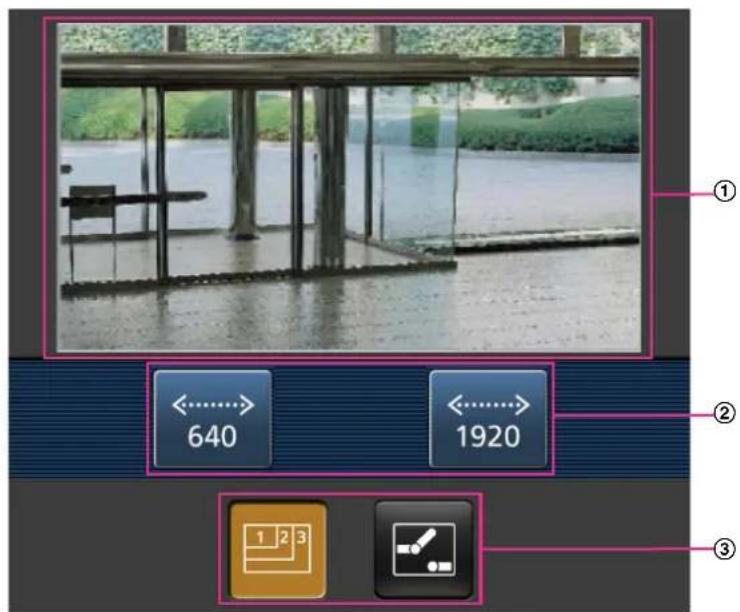
① Live images area
Displays images from the camera.
② Operation buttons area
When functions are selected in the function selection area ③, buttons to operate those functions are displayed.
③ Function selection area
When functions that can be operated are selected, operation buttons are displayed in the operation buttons area ②.
Note
- The operations button displayed on the mobile terminal screen may not be available depending on the user rights and access level of the accessing user. To display the operations button, it is necessary to set the user rights and access level ("User auth." in "User mng."). (→"2.9.1 Configure the settings relating to the user authentication [User auth.]")
- Click the button of the function that you want to operate.
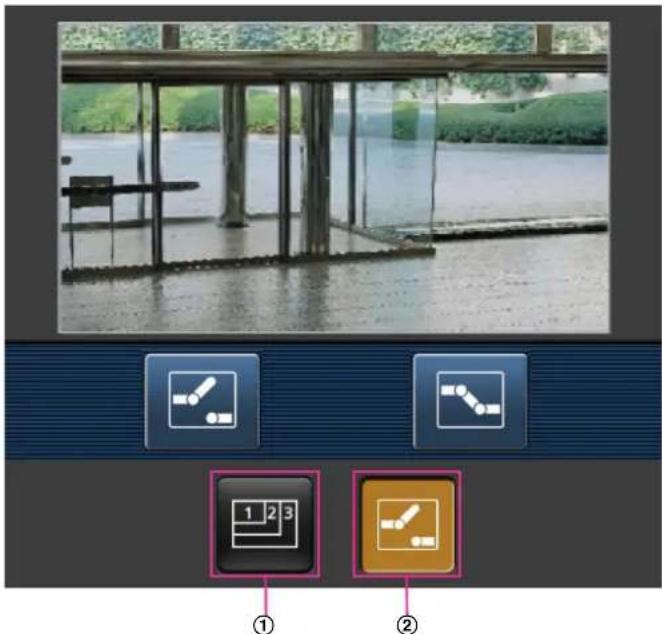
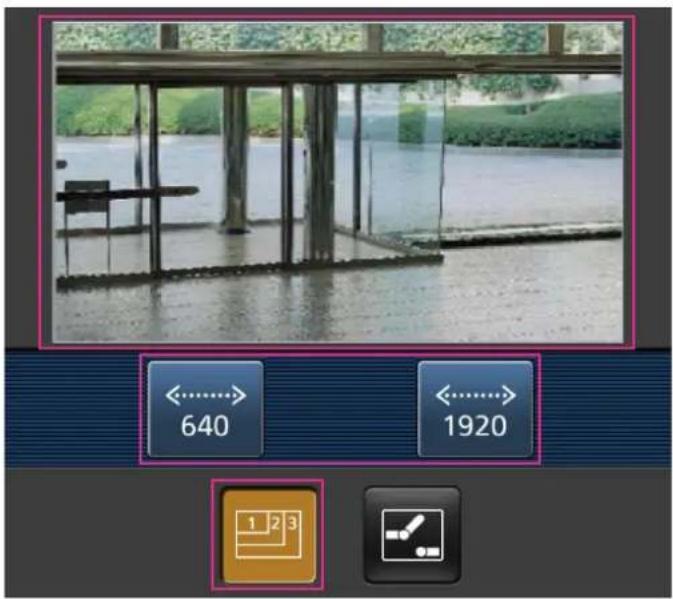
① Resolution control
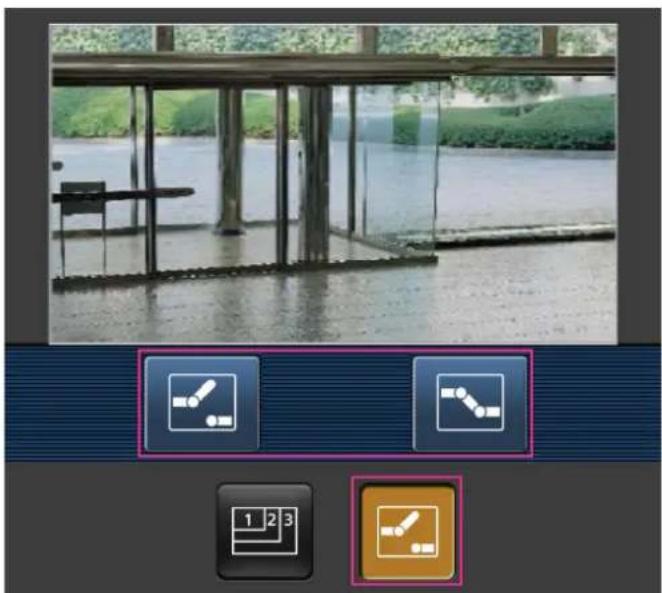
② AUX control
Each function is explained below.
① Resolution control
Press the button to display the buttons used to select the resolution on the screen.
The resolution can be changed by selecting a resolution setting from the buttons.
Images are displayed in the image capture size selected in "JPEG(1)" or "JPEG(2)" of [JPEG] on the [Image] tab.
② AUX control
Press the button to display the buttons used to operate the AUX output on the screen. The AUX output terminals can be controlled with the and buttons.
This function is only displayed when [Terminal 3] is set to [AUX output] on the settings menu. (→“2.8.1 Configure the settings relating to the alarm action [Alarm]”)
natural_image
Exterior view of a modern building with water spray and glass facade, showing three blue-labeled accessibility symbols (no readable text or numbers)Note
• You can change the image size displayed on the mobile terminal by accessing the following addresses.
– Large display: http://IP address/cam/dl
– Medium display: http://IP address/cam/dm
– Small display: http://IP address/cam/ds
- When the resolution is changed by the resolution control, the displayed resolution changes but the image size remains the same.
- When the HTTP port number is changed from "80", enter "http://IP address: (colon) + port number/cam" ^1 in the address box of the browser. When using the DDNS function, access to "http://Host name registered in the DDNS server: (colon) + port number/cam" ^2 .
- When "HTTPS" is selected for "HTTPS" - "Connection" on the [Advanced] tab of the "Network" page, enter as follows.
"https://IP address: (colon) + port number/cam" or "https://Host name registered in the DDNS server: (colon) + port number/cam" - When the authentication window is displayed, enter the user name of an administrator or user and password. Depending on the mobile terminal in use, password entry may be required each time the screen is switched.
- It is impossible to send and receive audio using a mobile terminal.
- Depending on the mobile terminal in use, larger size images may not be displayed. In this case, selecting a setting close to the lowest quality setting for "Image quality setting" of "JPEG" (→“2.6.2 Configure the settings relating to JPEG images [Image]”) may sometimes solve this problem.
- Depending on the mobile terminal in use or its contract plan, it may be impossible to access.
1.2.2 Monitor images on a tablet device
It is possible to connect to the camera using a tablet device via the Internet and monitor images (MJPEG or JPEG) from the camera on the screen of the tablet device. It is also possible to refresh images to display the latest image.
The compatible mobile terminals are shown as follows. (As of April, 2020)
- iPad, iPhone (iOS 8 or later)
- Android™ mobile terminals
When an Android terminal is used, an MJPEG format image is displayed by the Firefox browser, and a JPEG format image is displayed by the standard browser.
IMPORTANT
- When the authentication window is displayed, enter the user name and password.
To enhance the security, it is recommended to change the password periodically. (→“2.8.1 Configure the settings relating to the alarm action [Alarm]”)
Note
- It is necessary to configure the network settings of the tablet device in advance to connect to the Internet and monitor images from the camera. (→“2.9.1 Configure the settings relating to the user authentication [User auth.]”)
-
Depending on the device model, the same screen as the PC may be displayed. In that case, access to "http://IP address/live/tab.html" or "http://Host name registered in the DDNS server/live/tab.html".
-
Access to "http://IP address/" or "http://Host name registered in the DDNS server/" using a tablet device. → Images from the camera will be displayed.
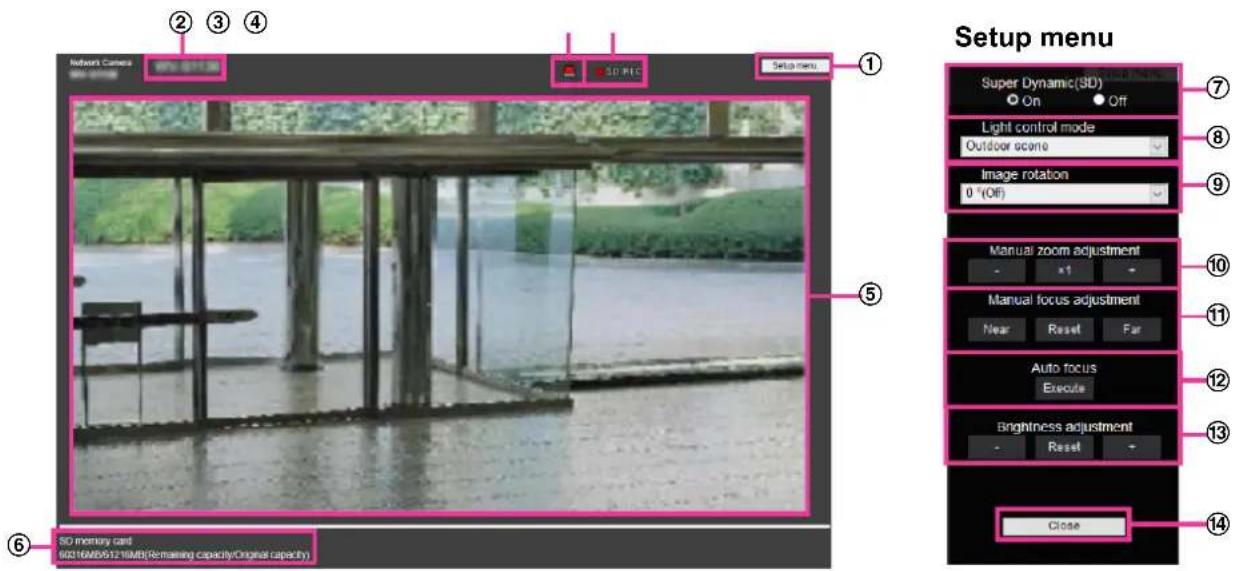
① [Setup menu] button ^1
Displays the setup menu.
② Camera title
The camera title entered for "Camera title" on the [Basic] tab will be displayed. (→“2.5.1 Configure the basic settings [Basic]”)
③ Alarm occurrence indication button ^2
When an alarm occurs, the display flashes. When this button is clicked, this button will disappear. (→“1.4 Action at an alarm occurrence”)
Note
- Since the blinking of the alarm occurrence indication button is not coupled to recording images to the SD memory card, forwarding E-mails, or other operations, check the settings of each operation separately.
④ SD recording status indicator
The status of the SD recording can be checked with this indicator. When the SD recording starts, the SD recording status indicator will light red. It will go off when the SD recording stops.
This indicator will be displayed when "Manual" or "Schedule" is selected for "Save trigger" on the setup menu. (→“2.5.2 Configure the settings relating to the SD memory card [SD memory card]”)
⑤ Main area
The live images from the camera will be displayed in this area.
⑥ Remaining capacity
Displays the remaining capacity and total capacity of the SD memory card.
⑦ Super Dynamic setting
Select "On" or "Off" to determine whether or not to activate the super dynamic function. Refer to the description "Super Dynamic function" (→"Basic adjustment") about the super dynamic function.
On: The super dynamic function will work.
Off: The super dynamic function will not work.
Default: On
Note
- When the following are observed depending on the light condition, select "Off" for "Super Dynamic(SD)".
— When flickering appears or the color changes on the screen
- When noise appears in the brighter area on the screen
⑧ [Light control mode] pull-down menu
Select the light control mode from the following.
Outdoor scene: Depending on the brightness level (illuminance), the iris will automatically be controlled together with the shutter speed adjustment to control light. When shooting a bright subject such as outdoor, etc., select this parameter. Be aware that flicker may occur when a subject is under fluorescent lighting.
Indoor scene (50 Hz) / Indoor scene (60 Hz): The shutter speed will automatically be adjusted to prevent flicker caused by fluorescent light. Select 50 Hz or 60 Hz corresponding to the location where the camera is in use.
Fix shutter:
- When 30fps mode or 15fps mode is selected for [Image capture mode]:
1/30 Fix, 3/120 Fix, 2/100 Fix, 2/120 Fix, 1/100 Fix, 1/120 Fix, 1/250 Fix, 1/500 Fix, 1/1000 Fix, 1/2000 Fix, 1/4000 Fix, 1/10000 Fix - When 25fps mode or 12.5fps mode is selected for [Image capture mode]:
1/25 Fix, 3/100 Fix, 2/100 Fix, 1/100 Fix, 1/250 Fix, 1/500 Fix, 1/1000 Fix, 1/2000 Fix, 1/4000 Fix, 1/10000 Fix - When 60fps mode is selected for [Image capture mode]:
1/60 Fix, 1/100 Fix, 1/120 Fix, 1/250 Fix, 1/500 Fix, 1/1000 Fix, 1/2000 Fix, 1/4000 Fix, 1/10000 Fix - When 50fps mode is selected for [Image capture mode]:
1/50 Fix, 1/100 Fix, 1/250 Fix, 1/500 Fix, 1/1000 Fix, 1/2000 Fix, 1/4000 Fix, 1/10000 Fix
ELC: S1136
Uses shutter speed adjustment to control light.
Default: Outdoor scene
Note
- When a faster shutter speed is selected (up to 1/10000), it is possible to capture a fast moving object with less blur.
- When a faster shutter speed is selected, the sensitivity will become lower.
- When “On” is selected for “Super Dynamic(SD)”, “Fix shutter” is not available. To configure “Fix shutter”, set “Super Dynamic(SD)” to “Off”.
- When 25fps, 50fps, or 12.5fps mode is selected for "Image capture mode", "Indoor scene (60 Hz)" is not available.
⑨ Image rotation
Set whether or not to rotate the image (JPEG, H.265, or H.264).
0 °(Off): Does not rotate the image.
90°: Rotates the image by 90 degrees.
180 °(Upside-down): Turns the image upside down.
270°: Rotates the image by 270 degrees.
Default: 0 °(Off)
IMPORTANT
- The position shifts if the image rotation setting is changed when the following area settings are configured. Therefore, configure the settings for each area after configuring the image rotation.
- Privacy zone (→"2.6.4.6 Configure the settings relating to the privacy zone ("Privacy zone" setup menu)")
- VMD area (→"2.8.5 Configure the VMD settings [VMD area]")
- SCD area (→“2.8.7 Configure the SCD settings [SCD area]”)
- VIQS area (→“2.6.4.7 Configure the VIQS setting”)
- Mask area (→“2.6.4.2 Set mask areas”)
- Overlay image (→"2.5.5 Configure the overlay image function [Overlay image]")
- If “90 °” or “270 °” is selected for “Image rotation”, depending on the “Character size” setting and the number of characters used, characters displayed on the screen may be cut off.
- When “90 °” or “270 °” is selected for “Image rotation”, the position selectable with “OSD” - “Position” is limited to “Upper left” or “Lower left”.
Note
- When "320x180" is selected for "Image capture size", the "90 °" or "270 °" cannot be set for [Image rotation].
- The analog output from the MONITOR OUT terminal rotates along with the set angle for “Image rotation”.
⑩ Manual zoom adjustment
Adjust the zoom manually.
[-]: Adjust the zoom (magnification) up to 1.0 time in the "Wide" side.
[×1]: Make the zoom (magnification) 1.0 times.
[+]: Adjust the zoom (magnification) to the "Tele" side.
Note
- The camera switches between optical zoom and extra optical zoom depending on the zoom ratio. S2536L
IMPORTANT
- If extra optical zoom is configured after configuring settings for the mask area ( "2.6.4.2 Set mask areas"), privacy zone ( "2.6.4.6 Configure the settings relating to the privacy zone ("Privacy zone" setup menu)), VMD area ( "2.8.5 Configure the VMD settings [VMD area]), SCD area ( "2.8.7 Configure the SCD settings [SCD area]) and VIQS area ( "2.6.4.8 Configure the VIQS area"), the configured areas for those settings may move out of alignment. Therefore, perform the setting for extra optical zoom function before other settings.
⑪ Manual focus adjustment
Adjust the focus manually.
[Near]: Adjust the focus in the "near" direction.
[Reset]: Return focus to initial setting.
[Far]: Adjust the focus in the "far" direction.
Note
- One-click of the [Near] or [Far] button is a fine adjustment, and it can look like there is no change in the focus. To shift the focus point largely, keep the button pressed.
⑫ Auto focus
[Excute]: When you press the button, the auto focus function works and automatically adjusts the focus to the subject in the center area of the screen.
IMPORTANT
- When a value with an interval longer than “Max.1/30s” (Max.2/30s/ Max.4/30s/ Max.6/30s/ Max.10/30s/ Max.16/30s) is selected for “Maximum shutter” (→[Maximum shutter]), if “Auto focus” is executed during slow shutter operations at night, it may take a long time to complete “Auto focus”.
-
In the following locations or with the following subjects, the focus may not be able to be automatically adjusted. In this case, manually adjust the focus.
-
when the subject moves a lot
- when there are large changes to the lighting intensity
- when the light level is low
- when the subject or location is extremely bright or reflective
- when viewing through windows
- when the dome cover is in a location where it can easily become dirty
- locations where there is not much contrast such as a white wall
- when there is harsh flickering
- When images in the near-infrared light area change from color to black & white, images may be out of focus due to the nature of optical properties. In this case, the focus can automatically be corrected by selecting "Auto" or "Preset" for "Adjusting method" (the focus will not automatically be adjusted according to the illumination level change once the focus is corrected).
⑬ [Brightness adjustment] button
Adjust the brightness.
Click the [+] button to make the image brighter.
Click the [-] button to make the image darker.
Click the [Reset] button to reset to the default brightness setting.
⑭ [Close] button
Close the setup menu.
Note
- When the HTTP port number is changed from "80", enter "http://IP address: (colon) + port number" ^3 in the address box of the browser. When using the DDNS function, access to "http://Host name registered in the DDNS server: (colon) + port number" ^3 .
- When "HTTPS" is selected for "HTTPS" - "Connection" on the [Advanced] tab of the "Network" page, enter as follows.
“https://IP address: (colon) + port number” or “https://Host name registered in the DDNS server: (colon) + port number” ^3
- When the authentication window is displayed, enter the user name of an administrator or user and password. Depending on the mobile terminal in use, password entry may be required each time the screen is switched.
- Depending on the tablet device in use, larger size images may not be displayed. In this case, selecting a setting close to the lowest quality setting for "Image quality setting" of "JPEG" (→“2.6.2 Configure the settings relating to JPEG images [Image]”) may sometimes solve this problem.
- Depending on the tablet device in use or its contract plan, it may be impossible to access.
1.3 Record images on the SD memory card manually
Images displayed on the "Live" page can be recorded on the SD memory card manually. This button is operable only when "Manual" is selected for "Save trigger" on the [SD memory card] tab on the "Basic" page of the setup menu. (→[Save trigger])
It is possible to select “JPEG(1)”, “JPEG(2)”, “Stream(1)”, “Stream(2)”, “Stream(3)”, or “Stream(4)” on “Recording format” of the setup menu. (→“Recording stream”) When “JPEG(1)” or “JPEG(2)” is selected for “Recording format”, still image data are recorded. When “Stream(1)”, “Stream(2)”, “Stream(3)”, or “Stream(4)” is selected, video data are recorded.
- Display the "Live" page. (→"1.1.1 Monitor images from a single camera")
- Click the [Rec. on SD] button.
→ The SD recording window will open.
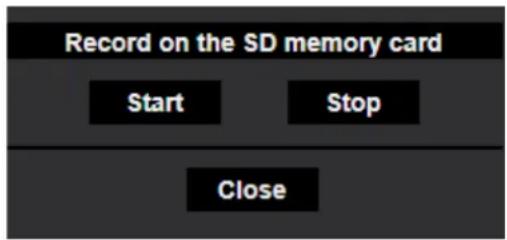
- Click the [Start] button to start recording images on the SD memory card. The SD recording status indicator will light red ( "1.1.2 About the "Live" page") while images are being recorded on the SD memory card. The image saving interval can be configured on the [SD memory card] tab of the "Basic" page. ( "2.5.2 Configure the settings relating to the SD memory card [SD memory card])
- Click the [Stop] button to stop saving images on the SD memory card.
→ The SD recording status indicator will turn off.
- Click the [Close] button to close the window.
Note
- You can click the [Log/Play] button of the "Live" page to download data from the log list display page to the PC. (→“1.5 Display the log list”)
With the download feature on "1.6 Playback of images on the SD memory card", data can be saved to a PC.
The destination to save image data is a fixed directory on the SD memory card. ( “3.3 Directory structure of SD memory card”) - When the [Start] button is clicked immediately after the [Stop] button is clicked, saving of images may not start. In this case, click the [Start] button again.
1.4 Action at an alarm occurrence
The alarm action (camera action at an alarm occurrence) will be performed when the following alarms occur.
1.4.1 Alarm type
- Terminal alarm: When connecting an alarm device such as a sensor to the alarm input terminal of the camera, the alarm action will be performed when the connected alarm device is activated.
- VMD alarm: When motion is detected in the set VMD area, the alarm action will be performed. *VMD stands for "Video Motion Detection".
- SCD alarm: This function triggers an alarm action when observed a change in the state of a subject such as by covering the camera with a cloth, a cap or others, or by changing the camera direction largely.
- Command alarm: When a TCP alarm notification is received from the connected device via a network, the alarm action will be performed.
- Audio detection alarm: When the configured audio detection level is exceeded, the alarm action will be performed.
- Alarm notification from the extension software: In case that the extension software having an alarm function is installed, an alarm action will be taken when an alarm is issued by the alarm function of the extension software.
For further information about the extension software, refer to our technical information website
1.4.2 Action at an alarm occurrence
Display the alarm occurrence indication button on the "Live" page
The alarm occurrence indication button will be displayed on the "Live" page at an alarm occurrence. ( "1.1.2 About the "Live" page")
Notify of alarm occurrences to the device connected to the output terminal
It is possible to output signals from the output terminal of the camera and sound the buzzer when an alarm occurs. The settings for the alarm output can be configured in the [Alarm] tab of the "Alarm" page. (→“2.8.2 Configure the settings relating to the output terminal [Alarm]”)
Save images on the SD memory card
When an alarm occurs, images (JPEG/H.265/H.264) will be saved on the SD memory card. The settings to save images on the SD memory card can be configured on the [SD memory card] tab ( "2.5.2 Configure the settings relating to the SD memory card [SD memory card]) of the "Basic" page and the [Alarm] tab of the "Alarm" page. ( "2.8.4 Configure the settings relating to the camera action on alarm occurrence [Alarm])
Notify of alarm occurrences by E-mail
Alarm E-mail (alarm occurrence notification) can be sent at an alarm occurrence to the E-mail addresses registered in advance. Up to 4 addresses can be registered as recipients of the alarm E-mail. An alarm image (still picture) can be sent with the alarm E-mail as an attached file. The settings for alarm E-mail can be configured in the "Alarm E-mail notification" section on the [Alarm] tab of the "Alarm" page ( "2.8.4 Configure the settings relating to the camera action on alarm occurrence [Alarm]) and the [Advanced] tab of the "Network" page ( "2.10.2.1 Configure the settings related to sending E-mails").
Notify of alarm occurrences to the designated addresses (TCP alarm notification)
This function is available only when our device, such as the network disk recorder, is connected to the system. When “On” is selected for “TCP alarm notification”, the connected our device will be notified that the camera is in the alarm state. The settings for TCP alarm notification can be configured in the “TCP alarm notification” section of the [Notification] tab of the “Alarm” page. ( 2.8.10.1 Configure the settings relating to TCP alarm notification)
Notify of alarm occurrences to the designated HTTP server (HTTP alarm notification)
Alarm occurrence notifications can be sent at an alarm occurrence to the HTTP servers registered in advance. Up to 5 HTTP servers can be registered as recipients of alarm notifications. The URL sent to HTTP servers with alarm notifications can be specified. The settings for HTTP alarm notification can be configured on the [Notification] tab of the "Alarm" page. (→“2.8.10.2 Configure the settings relating to HTTP alarm notification”)
1.5 Display the log list
The history of various logs will be displayed in list form.
- Alarm log: Logs of the alarm occurrences such as time and date of the alarm occurrences, the image recording period and the alarm type will be displayed.
-
Manual/Schedule log: Logs filed when images have been recorded manually or during the period of the schedule, and the image recording period will be displayed.
-
Display the "Live" page. (→"1.1.1 Monitor images from a single camera")
-
Click the [Log/Play] button.
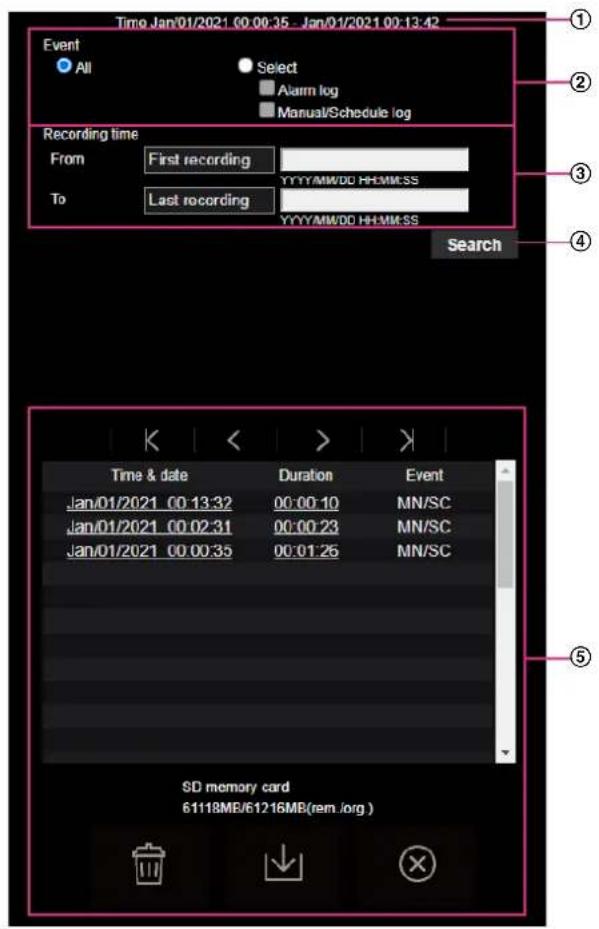
→ The log list will be displayed in a newly opened window (log list window).
IMPORTANT
• Only a single user can operate the log list window. Other users cannot access the log list window.
① Time
Displays the time period of the data recorded on the SD memory card.
② Event
Select a log type to display on the log list.
• All: All logs will be displayed.
- Select: Only the logs of the selected log type will be displayed.
- Alarm log: The log when an alarm is detected will be displayed.
- Manual/Schedule log: Manual and Schedule logs will be displayed.
- Default: All
③ Recording time
Configure the time period of logs displayed on the log list.
• From: Configure the starting period of logs displayed on the log list.
- First recording: Displays from the first log recorded on the SD memory card.
— Today: Displays the logs recorded today.
— Yesterday: Displays the logs recorded from yesterday to the present day.
— Last 7 days: Displays the logs recorded from 6 days ago to the present day.
– Last 30 days: Displays the logs recorded from 29 days ago to the present day. - Date/time: Displays the logs recorded from the entered date and time on "Date/time" box.
- To: Configure the ending period of logs displayed on the log list when "First recording" or "Date/time" is selected for "From".
– Last recording: Displays until the last log recorded on the SD memory card.
- Date/time: Displays the logs recorded until the entered date and time on "Date/time" box.
④ [Search] button
Searches for logs according to the conditions specified in "Event" and "Recording time".
The search result will be displayed on the log list.
⑤ Log list
Displays the log search results.
You can play back recorded data by clicking on the time or duration of the recorded data displayed under [Time & date] and [Duration].
(Top) button: Click this button to display the log listed at the top.
(Prev. page) button: Click this button to display the previous page of the log list.
(Next page) button: Click this button to display the next page of the log list.
(Last) button: Click this button to display the log listed at the bottom.
• [Time & date]: Time and date when each log has been recorded will be displayed.
Note
- When “24h” is selected for “Time display format”, the alarm occurrence times are displayed in 24 hour time format.
- The recording timing of logs is as follows.
– Alarm log: Alarm occurrence time and date will be filed as a log.
- Manual/Schedule log: Time and date when recording of images onto the SD memory card started manually or during the period of the schedule will be filed as a log. When images are recorded sequentially, if "JPEG" is selected for "Recording format", logs will be filed on the hour every hour (12:00, 1:00, 2:00, etc.). If "Stream" is selected for "Recording format", logs will be filed every hour from the time when recording starts.
• [Duration]: Displays the period of time that the data has been recorded on the SD memory card.
Note
- The difference between the recording end time and recording start time of the image is calculated by rounding off to the nearest tenth of a second. For this reason, when only 1 JPEG image is saved, 00:00:00 is displayed for the duration.
• [Event]: The event type will be displayed.
- MN/SC: Log by "Manual/Schedule"
- TRM1: Alarm by alarm input to Terminal 1
- TRM2: Alarm by alarm input to Terminal 2
-
TRM3: Alarm by alarm input to Terminal 3
-
VMD: Alarm by VMD alarm
- SCD: Alarm by SCD alarm
- COM: Alarm by command alarm
- INT: Intruder Alarm by AI-VMD
- LOI: Loitering Alarm by AI-VMD
– DIR: Direction Alarm by AI-VMD - CLD: Cross Line Alarm by AI-VMD
Note
- INT/LOI/DIR/CLD will be displayed at a AI-VMD alarm occurrence. Depending on the detected object type, either of [Human]/[Vehicle]/[Bicycle] will be displayed after INT/LOI/DIR/CLD.
- [SD memory card]: Available capacity and the original capacity of the SD memory card will be displayed.
- (Delete) button: Deletes log lists from all pages. When logs are searched for, only the searched logs are deleted. Images associated with deleted logs will also be deleted.
IMPORTANT
- If there are many recorded data files on the SD memory card, it may take time to delete all of them. In this case, format the SD memory card. However, please note that formatting will delete all of the files on the SD memory card.
- In the process of the deletion, "Alarm" and "Manual/Schedule" cannot be operated.
- Do not turn off the power of the camera until the deletion is complete. When the power of the camera is turned off in the process of the deletion, some images may remain on the SD memory
card. In this case, click the

button on the same log list window used to delete the logs.
- (Download) button: Click this button to download all logs of the selected log list onto the PC.
Note
- Up to 50,000 logs will be downloaded to the SD memory card. When more than 50,000 logs are filed, the older logs will be overwritten by the newer logs. In this case, the oldest log is the first to be overwritten. If there are many logs, it may take time to download the logs.
- (Close) button: Click this button to close the log list window.
1.6 Playback of images on the SD memory card
When clicking a time and date listed on the log list window, the "Live" page will turn to the "Playback" page. The display format varies depending on the "Recording format" of the SD memory card.
IMPORTANT
- Refresh interval of images may become slow during playback or download.
- When many images are saved on the SD memory card, it may take time to display images on the "Playback" page.
- When the aspect ratio is "4:3", images will be displayed in VGA size on the "Playback" page regardless of the image capture size of the images saved on the SD memory card. When the aspect ratio is "16:9", images will be displayed in "640×360" on the "Playback" page regardless of the image capture size of the images saved on the SD memory card. Therefore, images may look coarse on the "Playback" page.
- The playback refresh interval may become slower when recording data to the SD memory card.
- When playing H.265 images recorded at a high recording bit rate, only the I-frames may be displayed.
1.6.1 Playback “JPEG(1)”/“JPEG(2)” images saved to the SD memory card
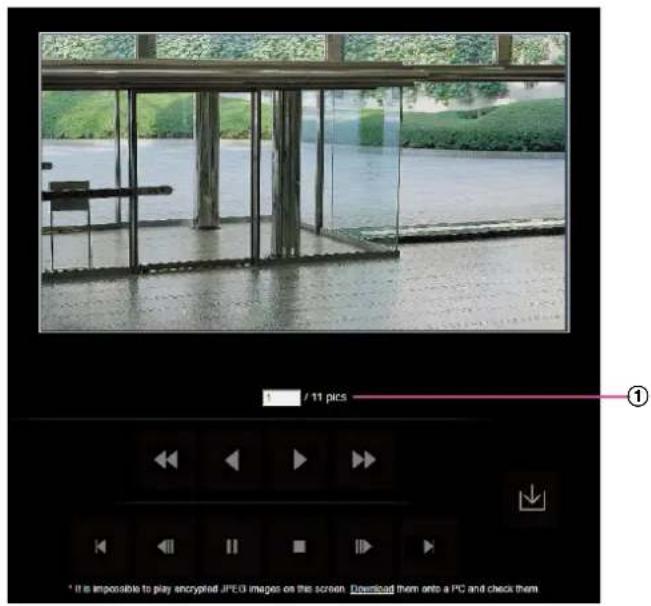
When images associated with the clicked time and date are on the SD memory card, the first image of them will be displayed.
① Number of images
When clicking a time and date listed on the log list window, total number of images associated with the clicked time and date, and the number of the currently displayed image will be displayed.
Note
- Enter the desired number of image and press the [Enter] key on the keyboard. The image of the designated number will be displayed.

(REW) button
Each time the button is clicked, the playback speed will change.
When the button or the button is clicked during fast reverse playback, playback speed will return to the normal playback speed.

(REV PLAY) button
Images will be played in reverse sequential order.

(PLAY) button
When this button is clicked, images will be played in sequential order.

(FF) button
Each time the button is clicked, the playback speed will change.
When the ▶ button or the ◀ button is clicked during fast playback, playback speed will return to the normal playback speed.

(TOP) button
The first image will be displayed.

(PREV. IMAGE) button
The previous frame will be displayed and paused when this button is clicked during playback.
Each time this button is clicked during pausing, the frame previous to the currently displayed frame will be displayed.
Note
- When the mouse button is held down while the mouse pointer is on this button, the image number will be decreased. When the mouse button is released, the decreasing of the image number will stop and the image corresponding to the currently displayed number will be displayed.

(PAUSE) button
Playback will be paused when this button is clicked during playback.
Playback will resume when this button is clicked during pausing.

(STOP) button
Playback will stop and the "Playback" window will turn to the "Live" page.

(NEXT IMAGE) button
The next frame will be displayed and paused when this button is clicked during playback.
Each time this button is clicked during pausing, the frame next to the currently displayed frame will be displayed.
Note
- When the mouse button is held down while the mouse pointer is on this button, the image number will be increased. When the mouse button is released, the increment of the image number will stop and the image number displayed at the moment when the mouse button is released will be displayed.

(LAST) button
The last image will be displayed.

(Download) button
The selected image will be downloaded onto the PC.
1.6.2 Playback “Stream(1)”/“Stream(2)”/“Stream(3)”/“Stream(4)” images saved to the SD memory card
IMPORTANT
- Depending on the network environment, download of video data may fail. If downloading failed while playing images, you may be able to download images after stopping the currently played images and starting the download again.
- Depending on the network environment and status of the camera, you may not be able to operate each operation on this screen consecutively.
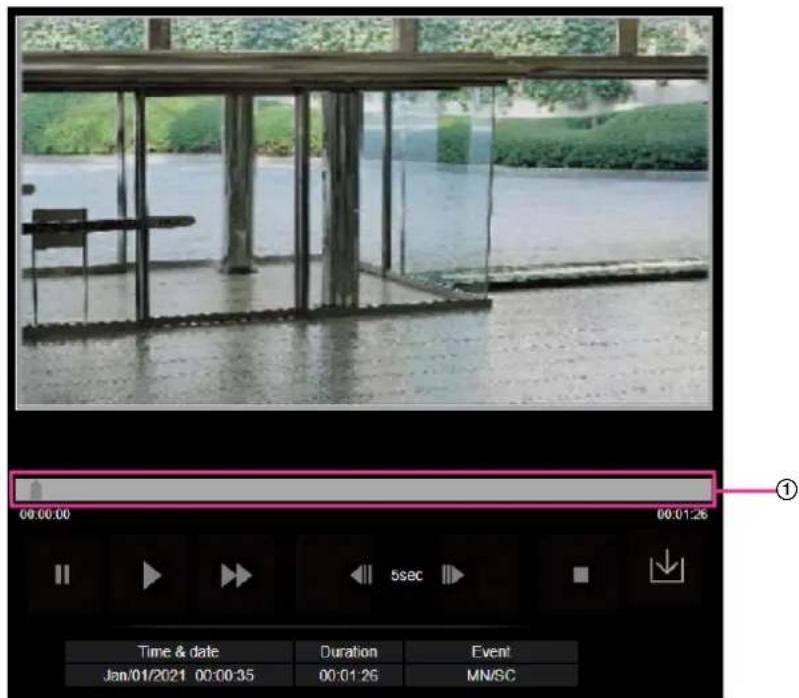
Images can be played by pressing the PLAY button after the image playing screen is displayed.
① Slider bar
By operating the slider bar, you can select where to start playing images from. The slider bar can only be used before playing images, or when playing is paused or stopped.
Note
- When the slide bar is moved to a certain point, the i-frame corresponding to this point will be designated. Therefore, when a stream is being recorded in a state where “Advanced(Fixed GOP 60s w/1s key-frame)” is selected for “GOP control”, positions where the slide bar can be moved to will be in steps of 60 seconds.

(PAUSE) button
Playback will be paused when this button is clicked during playback.

(PLAY) button
When this button is clicked, recorded data will be played.
Note
- If audio is recorded, it can be played back, but the image and audio will not be synchronized. Therefore, images and audio may not always match. When data is being recorded to the SD memory card, audio may sound as if it is cutting out and the audio quality may be reduced.
- When recorded audio is played back, the refresh interval of live images and playback may become slow.
- Recorded audio is not played back when "Off" or "Interactive(Half-duplex)" is selected for "Audio transmission mode" on the [Audio] tab of the "Image/Audio" page.

(FF) button
Each time this button is clicked, the playback speed will change. When the button is clicked during fast playback, playback speed will return to the normal playback speed.
Note
- The maximum speed of the fast playback varies depending on the setting of "Bit rate" - "Stream recording" of the SD memory card.
- Recorded audio will not be played back during fast playback.
- Displaying of images may become slower or the playback time may skip during the fast playback depending on the setting of "Bit rate" - "Stream recording".

(5s backward) button
Each time this button is clicked, the recorded data goes back by 5 seconds and starts playing.
Note
- When a stream is being recorded in a state where “Advanced(Fixed GOP 60s w/1s key-frame)” is selected for “GOP control”, clicking this button may skip back more than 5 seconds depending on the time when the corresponding i-frame is recorded.

(5s forward) button
Each time this button is clicked, the recorded data goes forward by 5 seconds and starts playing.
Note
- When a stream is being recorded in a state where “Advanced(Fixed GOP 60s w/1s key-frame)” is selected for “GOP control”, clicking this button may skip back instead of forward depending on the time when the corresponding i-frame is recorded.

(STOP) button
Playback will stop and the "Playback" window will turn to the "Live" page.
[Time & date]
Time and date when each log has been recorded will be displayed.
[Duration]
Displays the period of time that the data has been recorded on the SD memory card.
[Event]
The event type will be displayed.
- MN/SC: Log by "Manual/Schedule"
- TRM1: Alarm by alarm input to Terminal 1
• TRM2: Alarm by alarm input to Terminal 2
• TRM3: Alarm by alarm input to Terminal 3
• VMD: Alarm by VMD alarm
• SCD: Alarm by SCD alarm
• COM: Alarm by command alarm
• INT: Intruder Alarm by AI-VMD
• LOI: Loitering Alarm by AI-VMD
• DIR: Direction Alarm by AI-VMD
- CLD: Cross Line Alarm by AI-VMD
Note
- INT/LOI/DIR/CLD will be displayed at a AI-VMD alarm occurrence.

(Download) button
The selected image will be downloaded onto the PC.
Before downloading images, designate the destination directory in advance.
The message window will be displayed to ask if it is OK to start download when the button is clicked. Click the [OK] button.
Note
- The image playing screen cannot be operated while downloading. Perform operations after the downloading is completed.
- When the [Cancel] button is clicked in the process of the download, the download will be canceled. In this case, video data already downloaded before clicking the [Cancel] button will be saved on the PC.
- Video data are saved in the files of approx. 60 MB. When the file size of video data is more than 60 MB, two or more files will be downloaded.
- It is possible to play back H.264 video data saved on the PC using such applications as Windows Media® Player. However, we are not liable for performance relating to these applications.
- Depending on the status of the SD memory card or Windows Media Player, H.264 video data cannot be played back.
- For information on playing back H.265 video data, refer to our technical information website
.
2 Settings
2.1 About the network security
2.1.1 Equipped security functions
The following security functions are featured in this camera.
① Access restrictions by the host authentication and the user authentication
It is possible to restrict users from accessing the camera by setting the host authentication and/or the user authentication to "On". (→"2.9.1 Configure the settings relating to the user authentication [User auth].", "2.9.2 Configure the settings relating to the host authentication [Host auth.]")
② Access restrictions by changing the HTTP port
It is possible to prevent illegal access such as port scanning, etc. by changing the HTTP port number.
(→“Common”)
③ Access encryption by the HTTPS function
It is possible to enhance the network security by encrypting the access to cameras using the HTTPS function. (→“2.10.3 How to configure HTTPS settings”)
IMPORTANT
- Design and enhance security countermeasures to prevent leakage of information such as image data, authentication information (user name and password), alarm E-mail information, DDNS server information, etc. Perform the countermeasure such as access restriction (using the user authentication) or access encryption (using the HTTPS function).
• After the camera is accessed by the administrator, make sure to close the browser for added security. - Change the administrator password periodically for added security.
- When using the SNMP function with SNMPv1/v2, do not set a community name that can easily be guessed. (Example: public)
Use of an easily guessable community name may result in leakage of status information of this product on the network or being used as a stepping stone for illegal access to other devices.
Note
- When user authentication (authentication error) has failed to pass 8 times within 30 seconds using the same IP address (PC), access to the camera will be denied for a while.
2.2 Display the setup menu from a PC
The settings of the camera can be configured on the setup menu.
IMPORTANT
- The setup menu is only operable by users whose access level is "1. Administrator". Refer to "2.9.1 Configure the settings relating to the user authentication [User auth.]" for how to configure the access level.
2.2.1 How to display the setup menu
- Display the "Live" page. (→"1.1.1 Monitor images from a single camera")
- Click the [Setup] button on the "Live" page.
→ The setup menu will be displayed. Refer to "2.2.3 About the setup menu window" for further information about this menu.
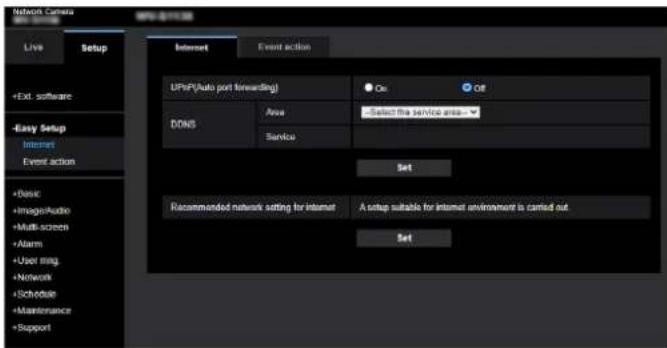
2.2.2 How to operate the setup menu
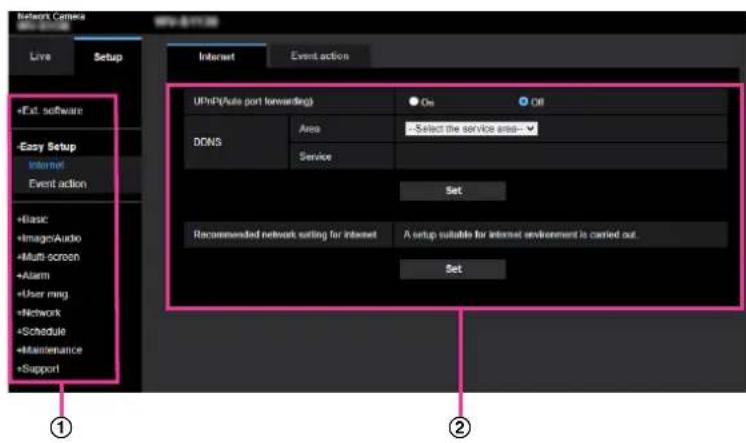
① Menu buttons
② Setup page
- Click the desired button in the frame on the left of the window to display the respective setup menu. When there are tabs at the top of the "Setup" page displayed in the frame on the right of the window, click the desired tab to display and configure the setting items relating to the name of the tab.
- Complete each setting item displayed in the frame on the right of the window.
- After completing each setting item, click the [Set] button to apply them.
IMPORTANT
- When there are two or more [Set], [Register], and [Execute] buttons on the page, click the respective button to the edited setting item.
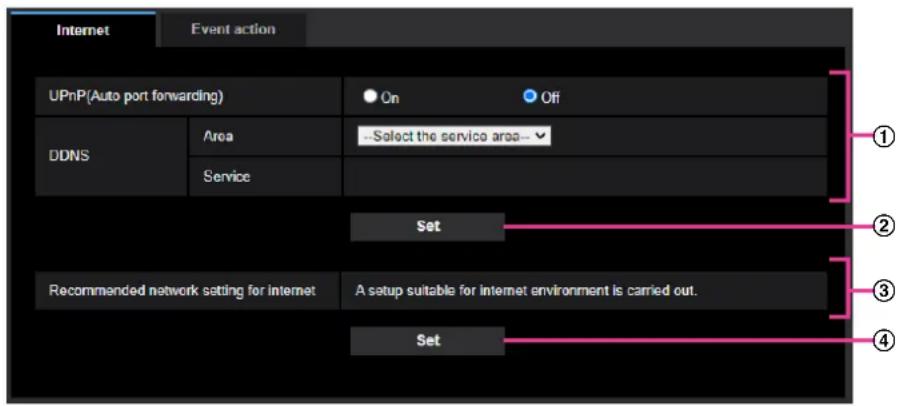
When completing the setting items in field ①, click the [Set] button (②) below field (①).
The edited settings in field ① will not be applied unless the [Set] button (②) below field (①) is clicked. In the same manner as above, click the [Set] button (④) below field ③ when completing the setting items in field ③.
2.2.3 About the setup menu window
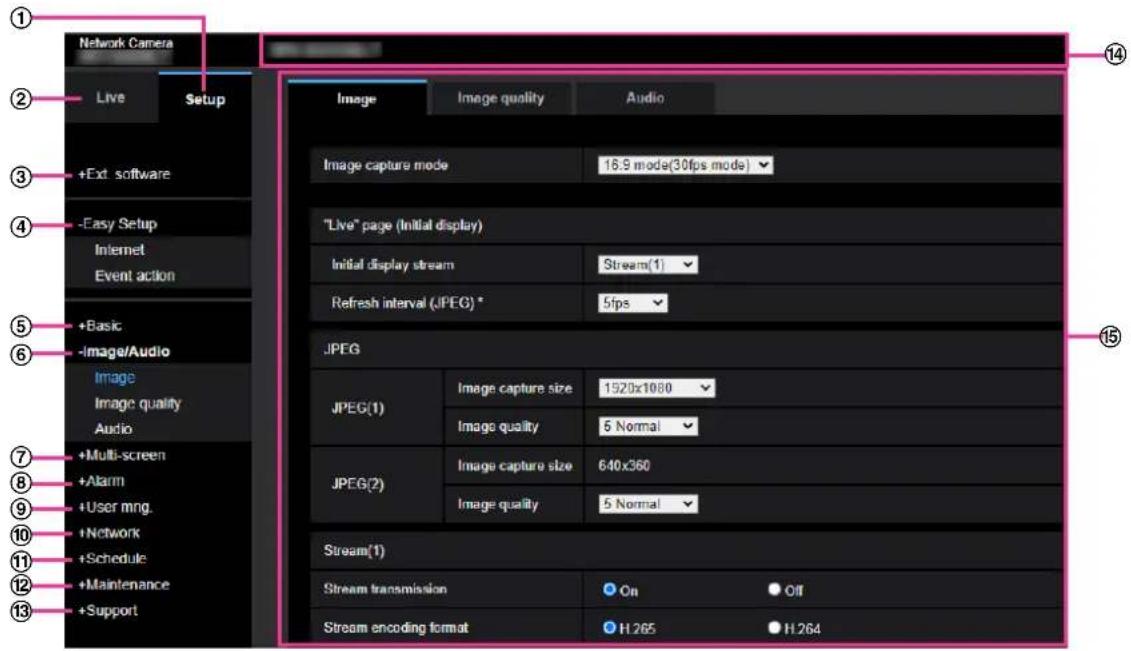
① [Setup] button
Display the "Setup" page.
② [Live] button
Display the "Live" page.
③ [Ext. software] button
Management of the extension software and the schedule setting are available. When the extension software is installed, a link for the screen of the extension software will displayed. (→“2.3 Perform management of the extension software and the schedule setting [Ext. software]”)
④ [Easy Setup] button
Displays the "Easy Setup" page. The "Easy Setup" page is used to set the connectivity to the Internet, as well as to set event actions such as alarm settings and camera action on alarm. (→“2.4 Use Easy Setup [Easy Setup]”)
⑤ [Basic] button
Displays the "Basic" page. The basic settings such as time and date and camera title, and the settings relating to the SD memory card can be configured on the "Basic" page. (→“2.5 Configure the basic settings of the camera [Basic]”)
⑥ [Image/Audio] button
Displays the "Image/Audio" page. The settings relating to image quality, image capture size, etc. of JPEG/H.265/H.264 camera images can be configured on the "Image/Audio" page. (→“2.6 Configure the settings relating to images and audio [Image/Audio]”)
⑦ [Multi-screen] button
Displays the "Multi-screen" page. The cameras from which images are to be displayed on a multi-screen can be registered on the "Multi-screen" page. (→“2.7 Configure the multi-screen settings [Multi-screen]”)
⑧ [Alarm] button
Displays the "Alarm" page. The settings relating to alarm occurrences such as settings for the alarm action at an alarm occurrence, the VMD area settings, the SCD area settings and the alarm occurrence notification can be configured on the on the "Alarm" page. (→“2.8 Configure the alarm settings [Alarm]”)
⑨ [User mng.] button
Displays the "User mng." page. The settings relating to the authentication such as users and PC restrictions for accessing the camera and the data encryption can be configured on the "User mng." page. (→"2.9 Configure the settings relating to the authentication [User mng].")
⑩ [Network] button
Displays the "Network" page. The network settings and the settings relating to DDNS (Dynamic DNS), SNMP (Simple Network Management Protocol), the NTP server, QoS, and SRTP can be configured on the "Network" page. (→“2.10 Configuring the network settings [Network]”)
⑪ [Schedule] button
Displays the "Schedule" page. On the "Schedule" page, it is possible to designate time zones to allow to activate the VMD function, the SCD function, and the Audio detection function. (→“2.11 Configure the settings relating to the schedules [Schedule]”)
⑫ [Maintenance] button
Displays the “Maintenance” page. System log check, firmware upgrade, status check and initialization of the setup menu can be carried out on the “Maintenance” page. (→“2.12 Maintenance of the camera [Maintenance]”)
⑬ [Support] button
Displays the “Support” page. The “Support” page contains methods to display our support website. ( “2.13 Display our support website [Support]”)
⑭ Camera title
The title of the camera whose settings are currently being configured will be displayed.
⑮ Setup page
Pages of each setup menu will be displayed. There are tabs for some setup menus. The bottom of the settings page has been omitted.
2.3 Perform management of the extension software and the schedule setting [Ext. software]
Management of the extension software and the schedule setting can be performed on the "Ext. software" page. The "Ext. software" page has the [Software mng.] tab and the [Operation sched.] tab.
Note
- When "16:9 mode(60fps mode)", "16:9 mode(50fps mode)", "4:3 mode(15fps mode)" or "4:3 mode(12.5fps mode)" is selected for "Image capture mode", the extension software will become unusable. The operation schedule of the installed extension software will also be deleted.
- Some AI applications are already installed at the time of purchase. For further information, refer to the respective operating instructions.
2.3.1 Perform the installation, uninstallation and version upgrade of the extension software [Software mng.]
Click the "Software mng." tab of the "Ext. software" page. (→For menu display and how to operate, refer to "2.2.1 How to display the setup menu" and "2.2.2 How to operate the setup menu".)
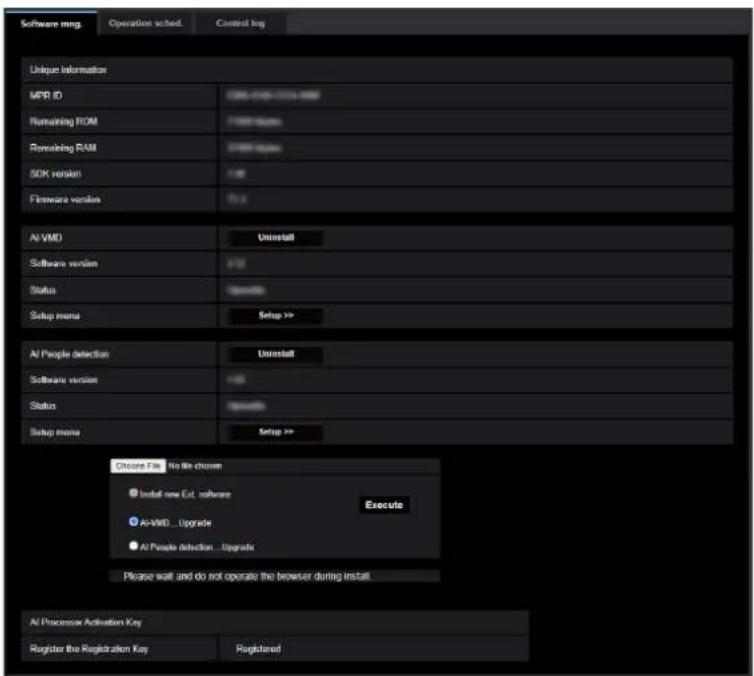
Installing the extension software
- Save the extension software to be installed in the PC.
Note
- For how to obtain the extension software, refer to our technical information website
IMPORTANT
- Check [Remaining ROM] and [Remaining RAM] of the camera. If the Remaining ROM or RAM is not enough to install the extension software, it is necessary to uninstall the other extension software that is already installed. Refer to "[Uninstall] button" for how to uninstall the software.
-
Click the [Choose File] button and designate "Ext. software".
-
Confirm that "Install new Ext. software" is selected and then click the [Execute] button. Installation of the extension software will start. When the installation is completed, the name of the installed extension software will be added to the "Software mng." screen.
IMPORTANT
- A space cannot be used in the name of the saving directory.
- Be sure to use the designated file (extension: ext).
- Do not turn off the power of the camera during the installation process.
- Do not perform any operation during the installation process and wait until it completes.
"Software mng." screen
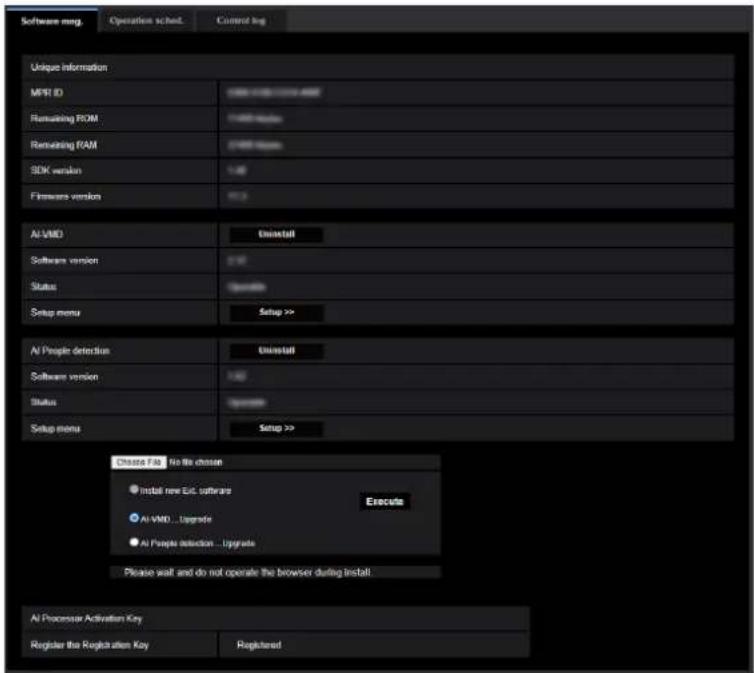
When the extension software is installed, unique information of the camera and the registration status of the extension software will be displayed. On this screen, the following operations are available.
- Uninstallation of the extension software
- Display of the registration status detail screen
• Display of the extension software setting screen - Update of the extension software
Note
- Up to two extension software can be installed.
- For further information about the supported extension software, refer to our technical information website
.
Unique information
[MPR ID]
This ID is required to install the extension software. This also has a device ID unique to each camera.
[Remaining ROM]
The remaining ROM capacity in the camera for the extension software will be displayed. If an extension software to be installed requires more capacity than the ROM capacity displayed here, installation of the extension software is unavailable.
[Remaining RAM]
The remaining RAM capacity in the camera for the extension software will be displayed. If an extension software to be installed requires more capacity than the RAM capacity displayed here, installation of the extension software is unavailable.
[SDK version]
Display the version information of the SDK installed in the camera. If the ext. software you install requires a version number higher than the one shown here, the ext. software may not work properly.
[Software version]
The version information of the installed camera software will be displayed.
Ext. software
[Uninstall] button
The installed extension software can be uninstalled.
[Software version]
If you have installed ext. software, the version information of the installed ext. software is displayed along with the version information of the SDK installed in the ext. software.
If the version information of the SDK embedded in the camera is less than the version number required by the ext. software, the ext. software may not operate properly.
Note
- For ext. software that does not have SDK version information installed, the SDK version information will not be displayed.
[Status]
The installation status of the extension software will be displayed. When “Operable” is displayed, it is in a state that operation of the installed extension software is available.
[Setup>>] button
In case that the extension software has a unique screen such as a setting screen, it is possible to display the screen.
Install new Ext. software
When installing a new extension software is installed, select this and then select an extension software to be installed.
Upgrade
The version of the installed extension software can be upgraded by selecting the installed extension software and then clicking the [Execute] button.
[Al Processor Activation Key] - [Register the Registration Key]
It is possible to install and use other manufacturers' application software that uses the AI processor of this camera.
2.3.2 Set a schedule of the extension software [Operation sched.]
Click the "Operation sched." tab of the "Ext. software" page. (→For menu display and how to operate, refer to "2.2.1 How to display the setup menu" and "2.2.2 How to operate the setup menu".)
![Operating day of week Day Mon Tue Wed Thu Fri Sat Sun Time table 1 0 0 0 0 0 0 0 0 Time table 2 0 0 0 0 0 0 0 Off 0 0 0 0 0 0 0 [Time table 1] 6:00 6:00 12:00 18:00 24:00 Operation content On Off Off Off Off Off Off Off Off Off Off Off [Time table 2] 6:00 6:00 12:00 18:00 24:00 Operation content Off Off Off Off Off Off Off Off Set](/content/2026/05/911312/images/1186701c84c2523d943d9c0cc40165d34d0b7f03a4d16d201f7debfa1960d9cb.jpg)
Select an extension software for which an operation schedule is set.
[Operating day of week]
Select "Time table 1", "Time table 2" or "Off" for each day of the week.
[Time table 1] [Time table 2]
From the pull-down menu, select the start time and the end time of the schedule.
To set 24 hours per day, set [00:00] - [00:00].
On/Off option can be set at [Operation content].
How to set the schedules
- Select software for which an operation schedule is set from the extension software list.
- At [Operating day of week], select a day of week and a time table where the operation schedule is to be set.
- Specify a period of time on "Time table 1" and "Time table 2" where the schedule is to be executed. To execute for 24 hours, specify the period of time as [00:00] - [00:00].
- Click the [Set] button after completing the settings.
Note
- “AI-VMD” is set as the default on the schedule setup screen of the extension software. For [Operation content] of “AI-VMD”, Off/Detection program1/Detection program2 are available. For further information, refer to the operating instructions of the AI-VMD.
2.3.3 Check the control log of extension software [Control log]
The control log about the extension software will be displayed.
Up to 200 control logs can be saved on the built-in memory of the camera.
When the saved control logs have reached the maximum number, the newer logs will overwrite the older control logs. In this case, the oldest log is the first to be overwritten.
The control logs will be displayed in group of 100 logs each, and the logs will be saved even when the power of the camera is turned off.

[Next 100 >>]
When clicking "Next 100 >>", the next 100 control logs will be displayed.
[Number of pages display]
The currently opened page will be displayed in the "page/total page" format.
[<< Previous 100]
When clicking “<< Previous 100”, the previous 100 control logs will be displayed.
[No.]
The serial number of the control log will be displayed.
[Time & date]
Time and date at the error occurrence will be displayed.
[Description]
The descriptions about the control log will be displayed. For further information about the control logs, refer to our technical information website
2.4 Use Easy Setup [Easy Setup]
The "Easy Setup" page uses simple operations to set the following:
- Make the camera image available on the Internet
- Set event actions such as recording of a schedule/alarm to the SD memory card
The "Easy Setup" page consists of the [Internet] tab and [Event action] tab.
2.4.1 Configure the Internet settings [Internet]
Click the [Internet] tab of the "Basic" page. (→“2.2.1 How to display the setup menu”, “2.2.2 How to operate the setup menu”)
The settings relating to UPnP (Auto port forwarding), DDNS (Viewnetcam.com), and network settings for the Internet can be configured on this page.
[UPnP (Auto port forwarding)]
Select "On" or "Off" to determine whether or not to use the port forwarding function of the router.
To use the auto port forwarding function, the router in use must support UPnP and the UPnP must be enabled.
- Default: Off
Note
- Due to auto port forwarding, the port number may sometimes be changed. When the number is changed, it is necessary to change the port numbers registered in the PC and recorders, etc.
- The UPnP function is available when the camera is connected to the IPv4 network. IPv6 is not supported.
- To check if auto port forwarding is properly configured, click the [Status] tab on the "Maintenance" page, and check that the "Enable" is displayed for "Status" of "UPnP". (→“2.12.3 Check the status [Status]”)
When “Enable” is not displayed, refer to “Cannot access the camera via the Internet.” in “3.2 Troubleshooting”.
- When the "UPnP (Auto port forwarding)" setting is changed, the "Auto port forwarding" setting under "UPnP" on the [Advanced] tab of the "Network" page also changes to the same setting.
- When the live page or the setting page is not correctly displayed such as when replacing the router in use, set "UPnP (Auto port forwarding)" to "Off" once and then set it to "On" again.
[Area]
Select the region where the camera is installed.
Global/Japan
Note
- If the camera is used in Japan, select "Japan". If the camera is used outside of Japan, select "Global". The "Viewnetcam.com" service that is displayed when "Global" is selected cannot be used in Japan.
[Service]
Select "Viewnetcam.com" or "Off" to determine whether or not to use "Viewnetcam.com".
By selecting "Viewnetcam.com" and clicking the [Set] button, the registration window for "Viewnetcam.com" will be displayed in a newly opened window.
Follow the on-screen instructions to register with "Viewnetcam.com".
Refer to "When using the "Viewnetcam.com" service" or the "Viewnetcam.com" website
(http://www.viewnetcam.com/) for further information.
- Default: Off
Note
- When the "DDNS" setting is changed, the "DDNS" setting on the [Advanced] tab of the "Network" page also changes to the same setting.
[Recommended network setting for internet]
The recommended settings for connecting to the Internet are performed here.
By clicking the [Set] button, a dialog displaying how the following settings will change is displayed.
Click the [OK] button after checking the settings to change the settings to the displayed values.
– [Image] tab on the "Image/Audio" page
[JPEG(1)]
[Stream(1)]/[Stream(2)]/[Stream(3)]/[Stream(4)]
[Transmission priority]: Best effort
[Max bit rate (per client)*]: 1024 kbps
[Stream(1)]
[Stream(2)]
[Stream(3)]
[Stream(4)]
– [Network] tab on the "Network" page
[Common]
Note
- In the [Basic] tab of the "Basic" page, if "90°" or "270°" is selected for "Image rotation", "640x360" will be selected for the "Image capture size" of "JPEG(1)" and "Stream(4)".
2.4.2 Configure an event action [Event action]
Click the [Event action] tab in the "Easy Setup" page. (→“2.2.1 How to display the setup menu”, “2.2.2 How to operate the setup menu”)
The current settings are displayed here.
![[Current settings] Alarm Alarm condition Off Alarm Off Output terminal Off E-mail notification Off Schedule Schedule Off [Notes] • When the operating condition is changed, some settings will be cancelled. Confirm the settings after completing the setup. Next](/content/2026/05/911312/images/111086a34aa1ea522423d91efaacf1762d7dd6eda15eda1879817ffab4de3bc8.jpg)
You can set event actions for SD schedule recording/alarm detection. Once the settings are completed in each setup menu, click the [Next] button to proceed.
The setup flow is as follows.
Note
- If you click the [Next] button, the settings in the screen will be saved.
Flow of event action setup
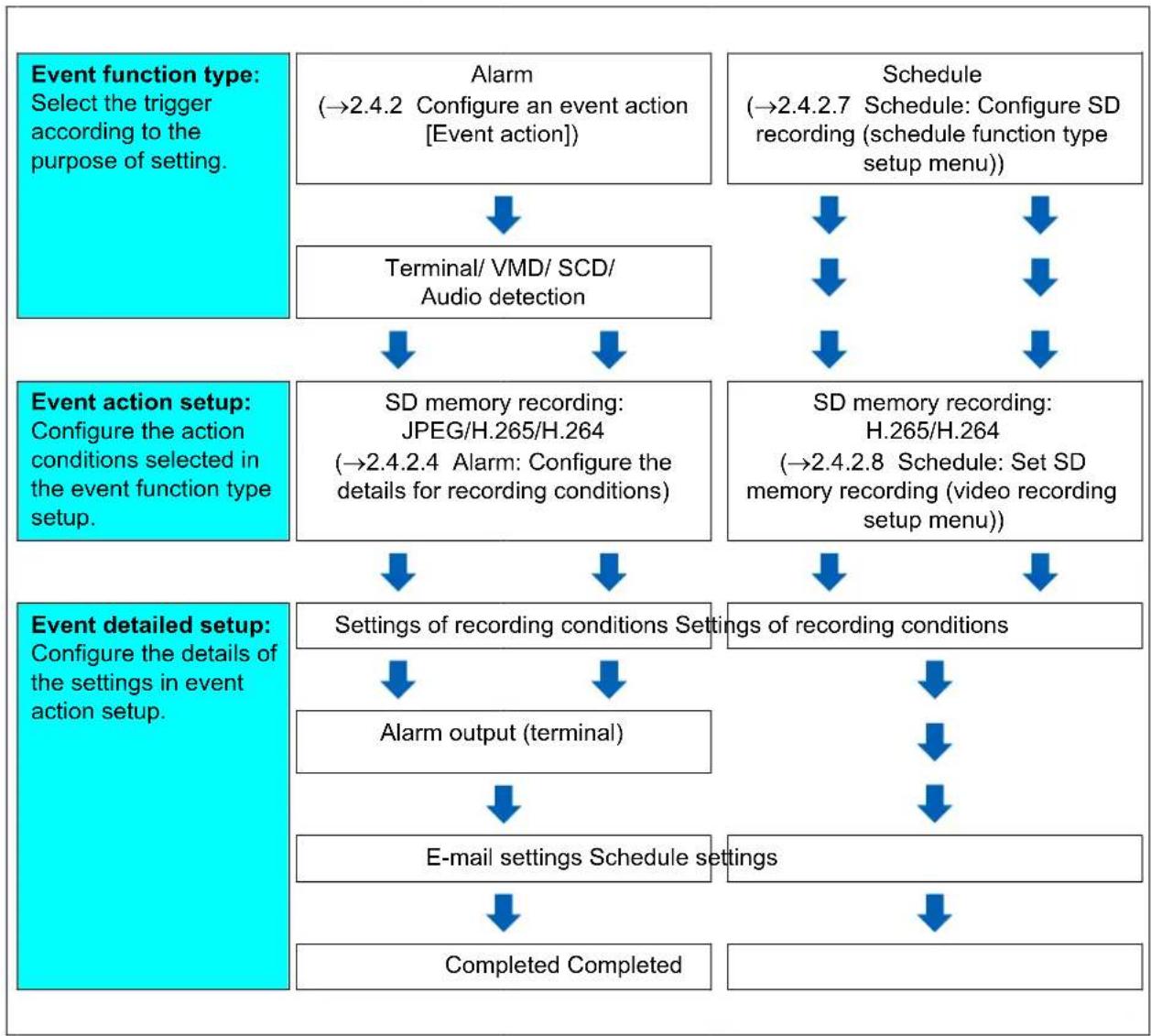
flowchart
graph TD
    A["Event function type: Select the trigger according to the purpose of setting."] --> B["Alarm (→2.4.2 Configure an event action [Event action"])]
    B --> C["Terminal/ VMD/ SCD/ Audio detection"]
    C --> D["SD memory recording: JPEG/H.265/H.264 (→2.4.2.4 Alarm: Configure the details for recording conditions)"]
    D --> E["Settings of recording conditions"]
    E --> F["Alarm output (terminal)"]
    F --> G["E-mail settings Schedule settings"]
    G --> H["Completed Completed"]
    I["Schedule (→2.4.2.7 Schedule: Configure SD recording (schedule function type setup menu))"] --> J["SD memory recording: H.265/H.264 (→2.4.2.8 Schedule: Set SD memory recording (video recording setup menu))"]
    J --> K["Settings of recording conditions"]
    K --> L["Alarm output (terminal)"]
    L --> M["E-mail settings Schedule settings"]
    M --> N["Completed Completed"]
2.4.2.1 Configure the schedule/alarm (event function type setup menu)
Here, select the function type of the event.
![Internet Event action Select an event that triggers the event action. When it is needed to format the SD memory card, click the [Execute] button. Trigger Alarm SD memory card format Execute Next](/content/2026/05/911312/images/1eefc74d29ba5d357d992b7a5127395491b699828246001cc7e85c1c084018b9.jpg)
[Trigger]
- Alarm: Select when setting the alarm detection settings.
- Schedule: Select during "SD memory recording".
- Default: Alarm
[SD memory card format]
To format the SD memory card, click the [Execute] button.
Once you click the [Execute] button, the "Format" confirmation screen will be displayed.
If you click the [OK] button, the formatting will start.
Once the "Format" completion screen is displayed, press the ✗ button.
IMPORTANT
- All data saved on the SD memory card will be deleted when the SD memory card is formatted.
- Do not turn off the power of the camera during formatting.
[Next] button
If you select "Alarm", and click the [Next] button, the alarm setup menu will be displayed. (→"2.4.2.2 Alarm: Configure the terminal and VMD (alarm setup menu)")
If you select "Schedule", and click the [Next] button, the schedule function type setup menu will be displayed. (→"2.4.2.7 Schedule: Configure SD recording (schedule function type setup menu)")
2.4.2.2 Alarm: Configure the terminal and VMD (alarm setup menu)
The settings relating to actions when an alarm is detected can be configured in this section.
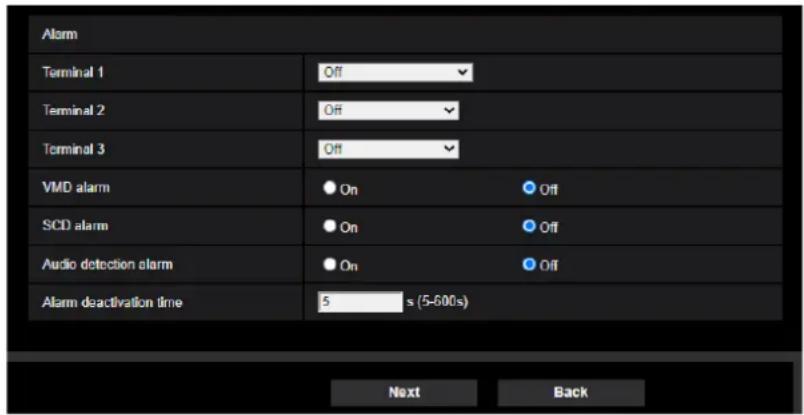
Alarm
[Terminal 1]
Determine how to use terminal 1.
- Off: Not used.
- Alarm input(TRM1): Receives terminal alarm input.
- Close: An alarm is detected when the terminal status is changed to "On".
- Open: An alarm is detected when the terminal status is changed to "Off".
- Close(Continue): An alarm is detected when the terminal status is changed to "On". When "On" is selected for the terminal status, alarm detection will be performed regularly at a fixed interval set by "Alarm deactivation time".
- Open(Continue): An alarm is detected when the terminal status is changed to "Off". When "Off" is selected for the terminal status, alarm detection will be performed regularly with the interval set by "Alarm deactivation time".
- Black & white input: Receives the black & white input. (When the input is set to "On", the black & white mode is activated)
- Auto time adjustment: Receives time setting through terminal input. When the signal is entered, if the time difference from the hour (every hour) is less than 29 minutes, the time is adjusted to 00 minutes 00 seconds. During SD memory card recording, the time is not changed in operations which reset the time under 5 seconds. If you select auto time adjustment, the pull-down menu to select close or open is displayed.
- Close: Performs auto time adjustment when the terminal status is changed to "Close".
- Open: Performs auto time adjustment when the terminal status is changed to "Open".
- Default: Off
[Terminal 2]
Determine how to use terminal 2.
- Off: Not used.
- Alarm input(TRM2): Receives terminal alarm input.
- Close: An alarm is detected when the terminal status is changed to "On".
- Open: An alarm is detected when the terminal status is changed to "Off".
- Close(Continue): An alarm is detected when the terminal status is changed to "On". When "On" is selected for the terminal status, alarm detection will be performed regularly at a fixed interval set by "Alarm deactivation time".
- Open(Continue): An alarm is detected when the terminal status is changed to "Off". When "Off" is selected for the terminal status, alarm detection will be performed regularly with the interval set by "Alarm deactivation time".
- Alarm output: Alarm output will be carried out according to the settings for "Output terminal" (→“2.8.2 Configure the settings relating to the output terminal [Alarm]”).
- Default: Off
[Terminal 3]
Determine how to use terminal 3.
- Off: Not used.
- Alarm input(TRM3): Receives terminal alarm input.
- Close: An alarm is detected when the terminal status is changed to "On".
- Open: An alarm is detected when the terminal status is changed to "Off".
- Close(Continue): An alarm is detected when the terminal status is changed to "On". When "On" is selected for the terminal status, alarm detection will be performed regularly at a fixed interval set by "Alarm deactivation time".
- Open(Continue): An alarm is detected when the terminal status is changed to "Off". When "Off" is selected for the terminal status, alarm detection will be performed regularly with the interval set by "Alarm deactivation time".
- AUX output: AUX output is carried out. The [AUX] button will be displayed on the "Live" page.
- Default: Off
[VMD alarm]
- On: If the VMD area is not configured, the entire region is configured. To configure the VMD area, use the [VMD area] tab on the "Alarm" page. (→“2.8.6 Set the VMD areas [VMD area]”)
- Off: Disables all VMD states.
- Default: Off
[SCD alarm]
- On: If the SCD area is not configured, the entire region is configured. To configure the SCD area, use the [SCD area] tab on the "Alarm" page. (→“2.8.7 Configure the SCD settings [SCD area]”)
- Off: Disables all SCD states.
- Default: Off
[Audio detection alarm]
- On: Uses audio detection alarms. All of the detection targets for AI sound classification will be selected.
- Off: Does not use audio detection alarms.
- Default: Off
[Alarm deactivation time]
Set the duration for which detection is not to be performed after an alarm has been detected. For example, by using this function you can prevent mail from being sent too often when the E-mail notifications are configured to be sent to a mobile terminal or tablet device when an alarm is detected.
5 - 600 seconds
- Default: 5s
Note
- The duration of the alarm deactivation time can be specified for each type of alarm. For example, during the time when detections for "Terminal alarm 1" are not made, detections for "VMD alarm" can be made.
[Next] button
If you click the [Next] button, the alarm function type setup menu will be displayed. (→“2.4.2.3 Alarm: Configure the alarm function type (Alarm function type setup menu)”)
Note
- If you click the [Next] button, the setting items in the screen are saved.
[Back] button
If you click the [Back] button, the event function type setup menu will be displayed. (→“2.4.2.1 Configure the schedule/alarm (event function type setup menu)”)
2.4.2.3 Alarm: Configure the alarm function type (Alarm function type setup menu)
Configure "Recording format" of SD memory recording triggered by an alarm occurrence.
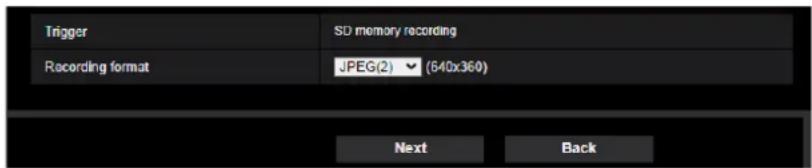
[Trigger]
• SD memory recording: When an alarm occurs, records the image to the SD memory card.
[Recording format]
Select the recording format by selecting from "JPEG(1)", "JPEG(2)", "Stream(1)", "Stream(2)", "Stream(3)" and "Stream(4)".
[Next] button
If you select "SD memory recording" for "Trigger", select "JPEG(1)" or "JPEG(2)" for "Recording format", and then click the [Next] button, the JPEG recording setup menu will be displayed. (→① Configure SD memory recording (JPEG) (JPEG recording setup menu)")
If you select "SD memory recording" for "Trigger", select "Stream(1)", "Stream(2)", "Stream(3)", or "Stream(4)" for "Recording format", and then click the [Next] button, the video recording setup menu will be displayed. (→② Configure SD memory recording (H.265 or H.264) (video recording setup menu)")
Note
- If you click the [Next] button, the setting items in the screen are saved.
- Even when the audio detection alarm is set, alarm recording onto the SD memory card will not be performed.
[Back] button
If you click the [Back] button the alarm setup menu will be displayed. (→“2.4.2.2 Alarm: Configure the terminal and VMD (alarm setup menu)”)
2.4.2.4 Alarm: Configure the details for recording conditions
① Configure SD memory recording (JPEG) (JPEG recording setup menu)
The SD memory recording (JPEG) when an alarm is detected is configured in this section.
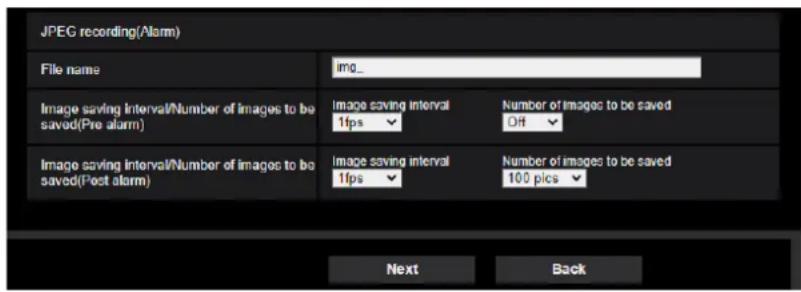
Refer to "JPEG recording(Alarm)" of 2.5.2 Configure the settings relating to the SD memory card [SD memory card] for information about how to set the above screen.
[Next] button
If you select "Alarm output" in the alarm setup menu and click the [Next] button, the alarm output setup menu will be displayed. (→“2.4.2.5 Alarm: Configure the output terminal”)
If you click the [Next] button in the alarm setup menu without selecting "Alarm output", the mail setup menu will be displayed. (→"2.4.2.6 Alarm: configure the mail notifications and mail server")
[Back] button
If you click the [Back] button, the alarm function type setup menu will be displayed. (→“2.4.2.3 Alarm: Configure the alarm function type (Alarm function type setup menu)”)
② Configure SD memory recording (H.265 or H.264) (video recording setup menu)
The SD memory recording (H.265 or H.264) when an alarm is detected is configured in this section.
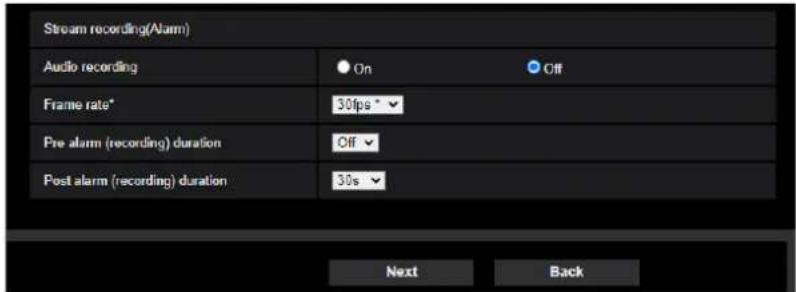
[Audio recording]
Select On/Off to determine whether or not to record audio data.
- On: Saves audio data to videos (MP4 format).
- Off: Does not save audio data to videos (MP4 format).
Note
- This setting is not available when "Interactive(Half-duplex)" is selected for "Audio transmission mode".
[Frame rate]
Select a frame rate for the H.265 (or H.264) to be recorded.
Note
- Refer to "[Frame rate*]" in "2.4.2.8 Schedule: Set SD memory recording (video recording setup menu)" for information about available frame rates and the bit rates that are set according to the frame rate.
[Pre alarm (recording) duration]
Determine whether or not to perform the pre alarm recording. Set the duration to save image data on the SD memory card.
Off/ 1s/ 2s/ 3s/ 4s/ 5s/ 8s/ 10s/ 15s/ 20s/ 25s/ 30s/ 40s/ 50s/ 60s/ 90s/ 120s
- Default: Off
Note
- The values change depending on the bit rate and the image capture size of the recorded stream. As the selected bit rate increases, the available maximum value for the pre alarm duration decreases.
[Post alarm (recording) duration]
Set the duration to save image data on the SD memory card after an alarm occurrence.
10s/ 20s/ 30s/ 40s/ 50s/ 60s/ 120s/ 180s/ 240s/ 300s
- Default: 30s
* The actual recording time may sometimes be longer than the duration selected for this setting.
[Next] button
If you select "Alarm output" in the alarm setup menu and click the [Next] button, the alarm output setup menu will be displayed. (→“2.4.2.5 Alarm: Configure the output terminal”)
If you click the [Next] button in the alarm setup menu without selecting "Alarm output", the mail setup menu will be displayed. (→"2.4.2.6 Alarm: configure the mail notifications and mail server")
Note
- If you click the [Next] button, the setting items in the screen are saved.
[Back] button
If you click the [Back] button, the alarm function type setup menu will be displayed. (→“2.4.2.3 Alarm: Configure the alarm function type (Alarm function type setup menu)”)
2.4.2.5 Alarm: Configure the output terminal
Alarm output is configured in this section. This screen will be displayed when "Alarm output" is selected in the alarm setup menu.
- To configure settings relating to the output terminal:
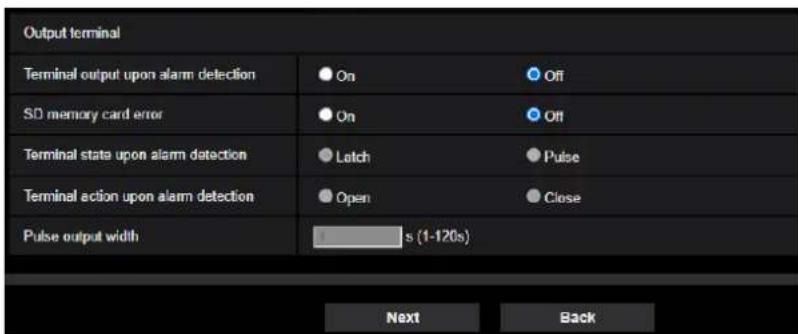
Refer to "2.8.2 Configure the settings relating to the output terminal [Alarm]" for information about how to configure the above screen.
[Next] button
If you click the [Next] button, the mail setup menu will be displayed. (→“2.4.2.6 Alarm: configure the mail notifications and mail server”)
Note
- If you click the [Next] button, the setting items in the screen are saved.
[Back] button
If you click the [Back] button, either the JPEG recording setup menu (→“① Configure SD memory recording (JPEG) (JPEG recording setup menu)”), or the video recording setup menu (→“② Configure SD memory recording (H.265 or H.264) (video recording setup menu)”) will be displayed.
2.4.2.6 Alarm: configure the mail notifications and mail server
The settings relating to e-mail can be configured in this section.
• To configure e-mail related settings:
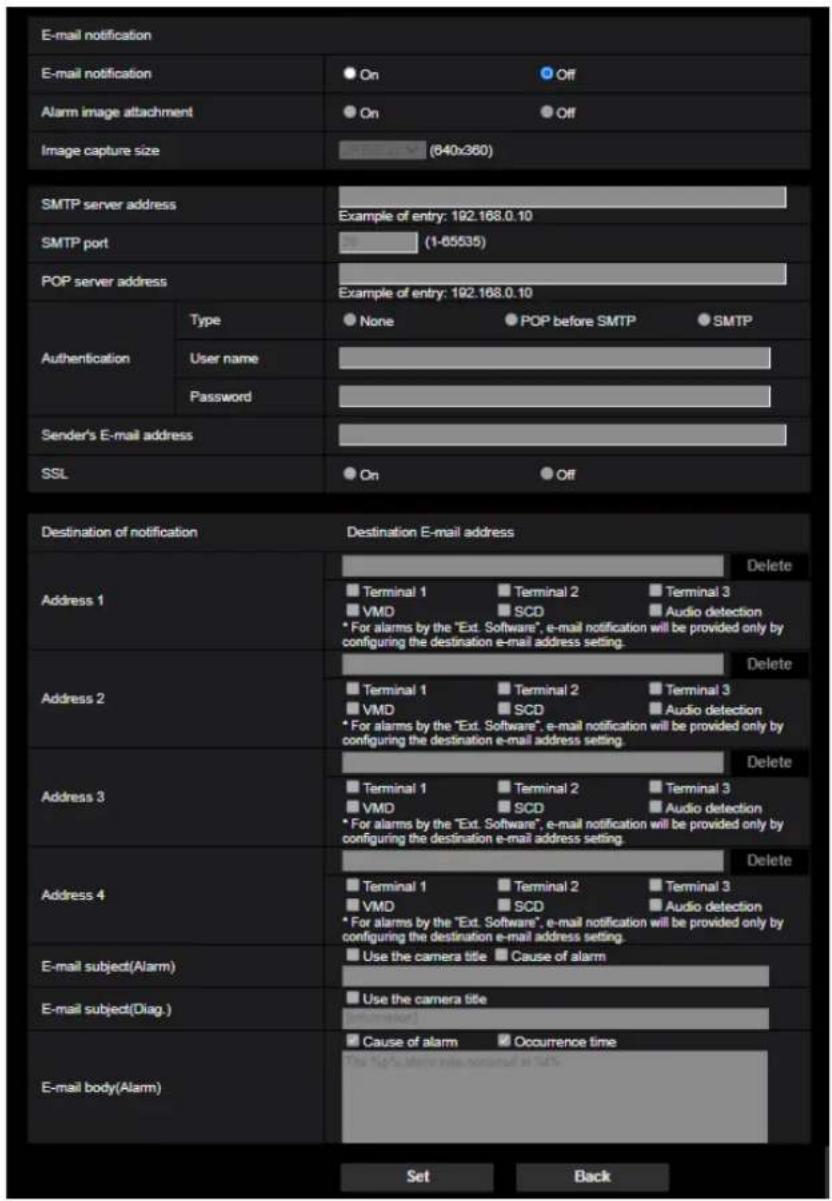
Refer to "2.10.2.1 Configure the settings related to sending E-mails" for information about how to configure the above screen.
[Set] button
If you click the [Set] button, setup will be completed.
[Back] button
If you click the [Back] button, either the JPEG recording setup menu (→“① Configure SD memory recording (JPEG) (JPEG recording setup menu)”), the video recording setup menu (→“② Configure SD memory recording (H.265 or H.264) (video recording setup menu)”), or the alarm output setup menu (→“2.4.2.5 Alarm: Configure the output terminal”) will be displayed.
2.4.2.7 Schedule: Configure SD recording (schedule function type setup menu)
Here, the schedule type is selected as "SD memory recording".
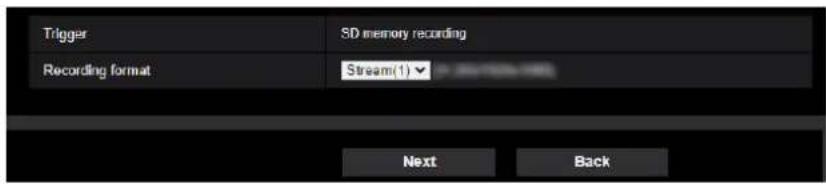
[Trigger]
- SD memory recording: Records the H.265 (or H.264) image in the SD memory card at the scheduled time.
[Recording format]
When "SD memory recording" is selected for "Trigger", "Stream(1)", "Stream(2)", "Stream(3)", or "Stream(4)" can be selected for the recorded image.
[Next] button
If you select "SD memory recording" and click the [Next] button, the video recording setup menu will be displayed. (→"2.4.2.8 Schedule: Set SD memory recording (video recording setup menu)")
Note
- If you click the [Next] button, the setting items in the screen are saved.
[Back] button
If you click the [Back] button, the event function type setup menu will be displayed. (→“2.4.2.1 Configure the schedule/alarm (event function type setup menu)”)
2.4.2.8 Schedule: Set SD memory recording (video recording setup menu)
Here, SD memory recording (H.265 or H.264) is configured according to the schedule.
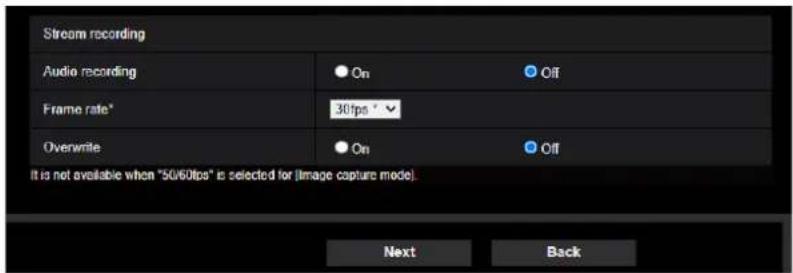
[Audio recording]
Determine whether or not to perform audio recording.
- On: Saves audio data to videos (MP4 format).
- Off: Does not save audio data to videos (MP4 format).
- Default: Off
Note
- This setting is not available when "Interactive(Half-duplex)" is selected for "Audio transmission mode".
IMPORTANT
- When the [Overwrite] setting is changed from "Off" to "On", if the remaining capacity of the SD memory card is low, old images may be deleted in order to prepare to save new images.
[Frame rate ^* ]
Select a frame rate for the H.265 or H.264 to be recorded from the following.
- When 30fps mode is selected for [Image capture mode]: 1fps/ 3fps/ 5fps*/ 7.5fps*/ 10fps*/ 12fps*/ 15fps*/ 20fps*/ 30fps*
- When 25fps mode is selected for [Image capture mode]: 1fps/3.1fps/4.2fps*/6.25fps*/8.3fps*/12.5fps*/20fps*/25fps*
- When 15fps mode is selected for [Image capture mod 1fps/3fps/5fps*/7.5fps*/10fps*/12fps*/15fps*
- When 12.5fps mode is selected for [Image capture mode]: 1fps/3.1fps/4.2fps*/6.25fps*/8.3fps*/12.5fps*
- Default: 30fps*
Note
- If you click the [Next] button, the “Transmission priority” will be set to “Frame rate”. (→[Transmission priority])
The bit rate will automatically be set according to the selected image capture size and frame rate.
Check the set bit rate at "Max bit rate (per client)*" of each stream.
[Overwrite]
Determine whether or not to overwrite images when the remaining capacity of the SD memory card becomes insufficient.
- On: Overwrites when the remaining capacity of the SD memory card becomes insufficient. (The oldest image is the first to be overwritten.)
- Off: Stops saving images on the SD memory card when the SD memory card becomes full.
- Default: Off
IMPORTANT
- When the [Overwrite] setting is changed from "Off" to "On", if the remaining capacity of the SD memory card is low, old images may be deleted in order to prepare to save new images.
[Next] button
If you click the [Next] button, the setup menu to set the schedule for recording into the SD memory card will be displayed. (→“To configure the schedule settings:”)
[Back] button
If you click the [Back] button, the schedule function type setup menu will be displayed. (→“2.4.2.8 Schedule: Set SD memory recording (video recording setup menu)”)
• To configure the schedule settings:
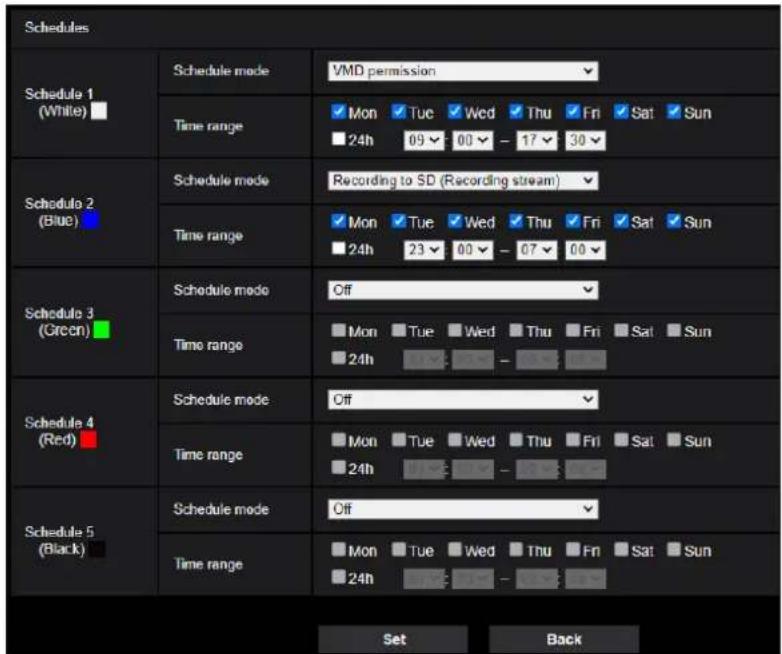
Refer to "2.11 Configure the settings relating to the schedules [Schedule]" for information about how to set the above screen.
[Set] button
If you click the [Set] button, setup will be completed.
[Back] button
If you click the [Back] button, the (video recording setup menu will be displayed. (→“2.4.2.8 Schedule: Set SD memory recording (video recording setup menu)”)
Note
- Video recording is not performed if "SD memory recording" is not selected in the "Schedule mode".
2.5 Configure the basic settings of the camera [Basic]
The basic settings such as camera title, time and date, SD memory card and the logs can be configured on the "Basic" page. The "Basic" page has the [Basic] tab, the [SD memory card] tab, and the [Overlay image] tab.
2.5.1 Configure the basic settings [Basic]
Click the [Basic] tab on the "Basic" page. (→“2.2.1 How to display the setup menu”, “2.2.2 How to operate the setup menu”)
The settings such as the camera title, time and date, etc. can be configured on this page.
[Menu language]
Select the language to initially display when the camera is accessed from the following.
Auto/English/Japanese/Italian/French/German/Spanish/Chinese/Russian/Portuguese
- Auto: The language used by the browser is automatically selected. If the language used by the browser is not supported by the camera, English is selected.
- Default: Auto
The language displayed on the "Live" page can also be changed. (→"1.1.2 About the "Live" page")
[Camera title]
Enter the title of the camera. Click the [Set] button after entering the title of the camera. The entered title will be displayed in the "Camera title" field.
• Available number of characters: 0 - 20 characters
- Unavailable characters: " &
- Default: The model No. is displayed.
[Date/time]
Enter the current time and date. When “12h” is selected for “Time display format”, “AM” or “PM” can be selected. The date and time of the PC will be obtained and set it to the camera by checking the “Set PC time to the camera” checkbox and then clicking the [Set] button.
• Available range: Jan/01/2013 00:00:00 - Dec/31/2035 23:59:59
IMPORTANT
- Use an NTP server when the more accurate time & date setting is required for the system operation. (→“2.10.2.2 Configure the settings relating to the NTP server”)
[Date/time display]
Select On/Off to determine whether or not to display the date and time on an image. To hide the date and time, select "Off".
- Default: On
[Time display format]
Select the time display format from "24h" and "12h". Enter the current hour reflecting this setting when entering the current time and date for "Date/time".
- Default: 24h
[Date/time display format]
Select a date/time display format. When “2020/04/01 13:10:00” is set for “Date/time” after selecting “24h” for “Time display format”, time & date will be respectively displayed as follows.
• DD/MM/YYYY: 01/04/2020 13:10:00
• MM/DD/YYYY: 04/01/2020 13:10:00
• DD/Mmm/YYYY: 01/Apr/2020 13:10:00
• YYYY/MM/DD: 2020/04/01 13:10:00
• Mmm/DD/YYYY: Apr/01/2020 13:10:00
- Default: Mmm/DD/YYYY
[Date/time position]
Select the position to display the time and date in an image.
• Upper left: The information will be displayed at the upper left corner of the screen.
• Lower left: The information will be displayed at the lower left corner of the screen.
• Upper center: The information will be displayed at the upper center of the screen.
• Lower center: The information will be displayed at the lower center of the screen.
• Upper right: The information will be displayed at the upper right corner of the screen.
• Lower right: The information will be displayed at the lower right corner of the screen.
- Default: Upper left
Note
- When [Image rotation] is set to "90 °" or "270 °", only "Upper left" or "Lower left" can be selected for [Date/time position].
[NTP]
When “NTP >>” is clicked, the [Advanced] tab of the “Network” page will be displayed. ( “2.10.2.2 Configure the settings relating to the NTP server”)
[Time zone]
Select a time zone corresponding to the location where the camera is in use.
- Default: (GMT +09:00) Osaka, Sapporo, Tokyo
[Summer time (daylight saving)]
Select "In", "Out" or "Auto" to determine whether or not to apply daylight saving time. Configure this setting if the summer time (daylight saving time) is applied in the location where the camera is in use.
• In: Applies summer time. An asterisk (*) will be displayed on the left side of the displayed time and date.
- Out: Does not apply summer time.
- Auto: Applies summer time in accordance with the settings for “Start time & date” and “End time & date” (month, week, day of the week, time).
- Default: Out
[Start time & date] [End time & date]
When “Auto” is selected for “Summer time (daylight saving)”, select the time & date for the start time and the end time (month, week, day of the week, time).
[Camera title on screen display]
Select "On" or "Off" to determine whether or not to display the camera title on the screen. When "On" is selected, the character string entered for "Camera title on screen" will be displayed at the position selected for "Camera title position".
- Default: Off
[Camera title on screen]
Enter a character string to be displayed on the image.
• Available number of characters: 0 - 40 characters
• Available characters: 0-9, A-Z, a-z and the following marks.
$$ !" # \% \& ^ {\prime} () ^ {*} +, -. /:; = ? $$
- Default: None (blank)
Note
- "Camera title on screen" can be set with up to 2 lines.
[Camera title position]
Select the position where the character string will be displayed on the image.
• Upper left: The information will be displayed at the upper left corner of the screen.
• Lower left: The information will be displayed at the lower left corner of the screen.
• Upper center: The information will be displayed at the upper center of the screen.
• Lower center: The information will be displayed at the lower center of the screen.
• Upper right: The information will be displayed at the upper right corner of the screen.
• Lower right: The information will be displayed at the lower right corner of the screen.
- Default: Upper left
Note
- When [Image rotation] is set to "90 °" or "270 °", only "Upper left" or "Lower left" can be selected for [Camera title position].
[OSD] - [Display style]
Select "Transparent" or "Opaque" for "Display style".
• Transparent: Date/time and camera title on screen will be displayed with transparent letters.
- Opaque: Date/time and camera title on screen will be displayed with opaque letters (white letters on black background).
- Default: Transparent
Note
- When "Opaque" is selected, the opaque black part may be set wider than the section where date/time and camera title on screen are displayed depending on the character size and number of characters.
[OSD] - [Character size]
Select the character size of the date and time as well as text displayed in the image.
- 50% : Displays in 50% of the standard size.
- 75% : Displays in 75% of the standard size.
• 100%: Displays in the standard size.
• 150%: Displays in 150% of the standard size.
• 200%: Displays in 200% of the standard size. - Default: 100%
IMPORTANT
- If the settings for [Date/time position] and [Camera title position] are different, the frame rate may be lower than the specified value.
- If the settings for [Date/time position] and [Camera title position] are different, characters may be displayed incorrectly or overlapped depending on the [Character size] setting and the number of characters used. After completing the settings, confirm the result on the "Live" page.
- If “150%” or “200%” is selected for [Character size], the frame rate may be lower than the specified value.
- Depending on the setting and the numbers of characters used for [Character size], and the setting and image capture size of images, characters may be cut off or hard to read. After completing the settings, confirm the result on the "Live" page.
Note
- Even when “50%” or “75%” is set, OSD will be displayed in the standard size (100%) when displaying 640x360, VGA, 320x180 or QVGA images.
[Brightness status display]
Select "On" or "Off" to determine whether or not to display the status of brightness on images displayed on the "Live" page when adjusting brightness.
- Default: On
[Image rotation]
Set whether or not to rotate the image (JPEG, H.265, or H.264).
- 0 °(Off): Does not rotate the image.
- 90°: Rotates the image by 90 degrees.
- 180 °(Upside-down): Turns the image upside down.
- 270°: Rotates the image by 270 degrees.
- Default: 0^ (Off)
IMPORTANT
- The position shifts if the image rotation setting is changed when the following area settings are configured. Therefore, configure the settings for each area after configuring the image rotation.
- Privacy zone ( “2.6.4.6 Configure the settings relating to the privacy zone (“Privacy zone” setup menu)”)
- VMD area (→"2.8.5 Configure the VMD settings [VMD area]")
- SCD area (→“2.8.7 Configure the SCD settings [SCD area]”)
- VIQS area ( "2.6.4.7 Configure the VIQS setting")
- Mask area (→“2.6.4.2 Set mask areas”)
- Overlay image (→“2.5.5 Configure the overlay image function [Overlay image]”)
- If "90 °" or "270 °" is selected for "Image rotation", depending on the "Character size" setting and the number of characters used, characters displayed on the screen may be cut off.
- When “90 °” or “270 °” is selected for “Image rotation”, the position selectable with “OSD” - “Position” is limited to “Upper left” or “Lower left”.
- When “16:9 mode(30fps mode)” or “16:9 mode(25fps mode)” is selected for “Image capture mode”, “90 °” and “270 °” will become available to select.
Note
- When “320x180” is selected for “Image capture size”, the “90 °” or “270 °” cannot be set for [Image rotation].
- The analog output from the MONITOR OUT terminal will not rotate even when "90 °" or "270 °" is selected for [Image rotation].
[Indicator]
Determine whether or not to use the following indicators. Select "On" to use the following indicators to check the operational status by lighting them.
- Link indicator (LINK)
- Access indicator (ACT)
- SD memory card error indicator/ABF indicator (SD ERROR ABF)
S1136
- SD MOUNT indicator
- Default: On
Note
- Link indicator (LINK) (orange): This indicator will light when communication with the connected device is available.
- Access indicator (ACT) (green): This indicator will blink when accessing a network.
- SD memory card error indicator/ABF indicator (SD ERROR/ABF) (red): Lights when data cannot be saved to the SD memory card. Also, when the auto focus function is used, the indicator flashes during focus adjustment and turns off when the adjustment is completed.
-
SD MOUNT indicator (SD MOUNT) (green): Lights when data can be saved to the SD memory card. It blinks or is off when data cannot be saved to the SD memory card.
-
Indicator is off: Indicates "Not use" is selected for SD memory card, or an error occurred for the SD memory card.
- Indicator blinks: Indicates the SD memory card is being recognized or is performing the necessary processing for the SD memory card to be removed.
– Indicator lights: Indicates data can be saved to the SD memory card.
[Audio out] S2536L
Determine whether to use the audio output terminal as output for adjustment monitor.
Audio/Monitor
- Default: Audio
Note
- When "Audio out" is set to "Audio", "Monitor out" cannot be selected.
- When “Audio transmission mode” is set to anything other than “Off” or “Mic input”, “Audio out” cannot be set to “Monitor”.
- When "Audio out" is set to "Monitor", "Audio transmission mode" can only be set to "Off" or "Mic input".
[Monitor out]
Set the image format for images output from the image output terminal (MONITOR OUT terminal). NTSC/PAL
- Default: NTSC
Note
- The setting of [Monitor out] can be edited only when 30fps mode/60fps mode/15fps mode is selected for "Image capture mode".
2.5.2 Configure the settings relating to the SD memory card [SD memory card]
Click the [SD memory card] tab on the "Basic" page. (→“2.2.1 How to display the setup menu”, “2.2.2 How to operate the setup menu”)
The settings relating to the SD memory card can be configured on this page.
Operating mode
[SD memory card]
Select "Use" or "Not use" to determine whether or not to use the SD memory card.
- Default: Use
Note
- When "16:9 mode(60fps mode)" or "16:9 mode(50fps mode)" is selected for "Image capture mode", functions related to SD memory cards are not available. "Not use" will be selected for "SD memory card".
[Ext. software mode]
Set this setting to "On" when the installed extension software uses the SD memory card in this product.
- On: The extension software can use the SD memory card in this product. In this case, recording on the SD memory card using the functions of this product will be come unavailable.
- Off: The extension software cannot use the SD memory card in this product.
- Default: Off
Note
- For further information about the extension software, refer to our technical information website
[Audio recording]
Select whether or not to save audio data when saving video data in MP4 format.
- Off: Does not save audio data to videos (MP4 format).
- On: Saves audio data to videos (MP4 format).
- Default: Off
Note
- When "Audio recording" is used, it is necessary to set either of "Stream(1)", "Stream(2)", "Stream(3)" or "Stream(4)" for "Recording format".
[Remaining capacity notification]
When the E-mail notification function or the TCP alarm notification function is used to provide notification of the remaining capacity of the SD memory card, select a level to be notified at from the following. 50%/ 20%/ 10%/ 5%/ 2%
- Default: 50%
Note
- Notification will be provided each time the remaining capacity goes below each of the specified values. For example, notification will be provided each time the remaining capacity reaches 50%, 20%, 10%, 5% and 2% when “50%” is selected. Notification may not always be made at the very moment when the remaining capacity of the SD memory card has reached each value.
[Overwrite]
Determine whether or not to overwrite when the remaining capacity of the SD memory card becomes insufficient.
- On: Overwrites when the remaining capacity of the SD memory card becomes insufficient. (The oldest image is the first to be overwritten.)
- Off: Stops saving images on the SD memory card when the SD memory card becomes full.
- Default: Off
IMPORTANT
- Select "Not use" when operating without an SD memory card.
- Before removing the SD memory card from the camera, it is necessary to select "Not use" first. The recorded data may be corrupted if the SD memory card is removed when "Use" is selected.
- When an SD memory card is inserted when "Use" is selected, data will be saved in accordance with the setting of "Save trigger".
• After inserting the SD memory card, it is necessary to select "Use" to use the SD memory card. - When the image refresh interval is short, notification/recording timing or interval may become incorrect. Notification/recording may also not be performed correctly as configured when multiple users are receiving images. In this case, set the refresh interval longer.
-
There are limited times to overwrite on an SD memory card. When having a high frequency of overwriting, the lifetime of the SD memory card may become shorter.
-
A lifetime of an SD memory card should be influenced by the number of the image files stored and log savings on the SD memory card. Selecting "Stream(1)", "Stream(2)", "Stream(3)", or "Stream(4)" for "Recording format" can reduce the number of files that can be stored on the SD memory card.
- If the data writing speed goes down after data is repeatedly written on an SD memory card, we recommend replacing the SD memory card.
- When the setting is changed from "Off" to "On", if the remaining capacity of the SD memory card is low, old images may be deleted in order to prepare to save new images.
SD memory card security
[Additional info for detecting alteration]
Select whether or not to add information to enable detection when the data in the SD memory card is altered. Alteration detection supports video data (MP4 format) only and can be checked using exclusive software. For further information about exclusive software for alteration detection and how to use it, refer to our technical information website
Click the [Setup>>] button to display the setup menu that can configure the settings relating to additional info for detecting alteration. The setup menu will be displayed in a newly opened window. (→“2.5.3 Configure the settings relating to alteration detection [Alteration detection]”)
[SD memory card password lock]
Configure a password for the SD memory card. When configuring a password, devices other than the camera will be unable to write to or read the SD memory card. If the SD memory card is stolen or lost, the risk of recorded data being leaked can be reduced.
[Set]
When an SD memory card with no configured password is inserted, a password can be configured using the [Set] button.
[Password]/[Retype password]
Enter the password.
Available number of characters: 4 - 16 characters
Unavailable characters: " &
Default: None (blank)
[Remove]
When an SD memory card with a configured password is inserted, the password can be removed using the [Remove] button.
[Password]
Enter the password.
Available number of characters: 4 - 16 characters
Unavailable characters: " &
[Change]
When an SD memory card with a configured password is inserted, the password can be changed using the [Change] button.
[Old password]/[New password]/[Retype new password]
Enter the password.
Available number of characters: 4 - 16 characters
Unavailable characters: " &
[Status]
Display the configuration status of the password lock.
- Lock: A password is configured on the SD memory card, and the lock function is enabled.
- Unlock: The lock function is disabled.
Also display the password configuration status of SD memory card respectively.
- Password is set.: The password is configured correctly.
- Error(Unsupported SD memory card): A card that does not support password lock is inserted. Check that an SDHC memory card or SDXC memory card is inserted.
- Error (Password mismatch): The SD memory card cannot be used because the password configured for the SD memory card and the password configured for the camera do not match. Check that the passwords are correct.
- Error(Undefined error): Displayed when an error occurs in the SD memory card. Check the SD memory card.
Note
- The password lock function supports only SDHC memory cards and SDXC memory cards.
- If you will use the SD memory card on a device other than the camera with password lock configured, remove the password using the password lock remove button before removing the SD memory card. The password cannot be removed on devices (such as PCs) other than the camera.
- When the "Status" of "SD memory card password lock" is "Lock", if an SD memory card with noconfigured password is inserted, the password is automatically configured to the SD memory card.
IMPORTANT
- If you forget the configured password, the password cannot be removed. The SD memory card with the configured password will become unusable, so manage passwords with great care.
- If you forget the configured password and you want to replace the SD memory card with a new one, perform one of the following step to set the "Status" of "SD memory card password lock" to "Unlock" before replacing the SD memory card.
- Use the password lock remove button to enter a password and then press the [Set] button.
- Initialize settings from the "Maintenance" page.
Recording stream
[Recording format]
Select the type of image data to be recorded on the SD memory card.
- Off: Does not record the image data.
- JPEG(1): Records still image data (JPEG(1)). The data is recorded in accordance with the settings of "JPEG(1)" on the [Image] tab of the "Image/Audio" page.
- JPEG(2): Records still image data (JPEG(2)). The data is recorded in accordance with the settings of "JPEG(2)" on the [Image] tab of the "Image/Audio" page.
- Stream(1): Records video data (Stream(1)) in the MP4 video encoding format. The data is recorded in accordance with the settings of "Stream(1)" on the [Image] tab of the "Image/Audio" page.
- Stream(2): Records video data (Stream(2)) in the MP4 video encoding format. The data is recorded in accordance with the settings of “Stream(2)” on the [Image] tab of the “Image/Audio” page.
- Stream(3): Records video data (Stream(3)) in the MP4 video encoding format. The data is recorded in accordance with the settings of "Stream(3)" on the [Image] tab of the "Image/Audio" page.
- Stream(4): Records video data (Stream(4)) in the MP4 video encoding format. The data is recorded in accordance with the settings of "Stream(4)" on the [Image] tab of the "Image/Audio" page.
- Default: JPEG(2)
IMPORTANT
- If an SD memory card with an SD Speed Class other than 10 is used, set the bit rate of a stream selected in "Recording format" to 6 Mbps.
- If an SD memory card with an SD Speed Class 10 is used, set the bit rate of a stream selected in "Recording format" to 12 Mbps.
- For SD memory cards with an SD Speed Class 10, use a card that supports UHS-I. (Ultra High Speed-I)
- Use a microSD memory card dedicated to i-PRO cameras.
Note
- When "Stream(1)" is selected, the settings for "Stream(1)" on the [Image] tab of the "Image/Audio" page will be changed to the settings for "Stream(1) & recording".
When “Stream(2)” is selected, the settings for “Stream(2)” on the [Image] tab of the “Image/Audio” page will be changed to the settings for “Stream(2) & recording”.
When “Stream(3)” is selected, the settings for “Stream(3)” on the [Image] tab of the “Image/Audio” page will be changed to the settings for “Stream(3) & recording”.
When “Stream(4)” is selected, the settings for “Stream(4)” on the [Image] tab of the “Image/Audio” page will be changed to the settings for “Stream(4) & recording”.
- When "Stream(1)", "Stream(2)", "Stream(3)", or "Stream(4)" is selected for "Recording format", the settings of the following functions may be corrected.
- When "Best effort" is selected for "Transmission priority", "Frame rate" is set.
- When "2s", "3s", "4s" or "5s" is selected for "Refresh interval", "1s" is set.
- When “On” is selected for “Additional info for detecting alteration”, “Recording format” cannot be changed to “JPEG(1)” or “JPEG(2)”.
- When "Stream(1)", "Stream(2)", "Stream(3)", or "Stream(4)" is selected for "Recording format", the name of the saved file will be given automatically.
- When "Stream(1)", "Stream(2)", "Stream(3)", or "Stream(4)" is selected for "Recording format", the number of users that can access the camera may be reduced.
- When "On" is selected for "Audio recording", the maximum value of the available bit rate for "Stream" will be limited.
- When "On" is selected for "Additional info for detecting alteration", the maximum value of the available bit rate for "Stream" will be limited.
[Save trigger]
Select a trigger to save images on the SD memory card from the following.
- Alarm input: Saves images at an alarm occurrence.
- Manual: Saves images manually.
- Schedule: Saves images in accordance with the settings for "Schedule" (→“2.11 Configure the settings relating to the schedules [Schedule]”). Available only for the "Stream(1)", "Stream(2)", "Stream(3)", or "Stream(4)" images.
- Default: Manual
If you have selected "Alarm input" in the [Save trigger], you can select the alarm type from the following:
- Terminal 1: Save the image when an alarm occurs in Terminal 1.
• Terminal 2: Save the image when an alarm occurs in Terminal 2.
- Terminal 3: Save the image when an alarm occurs in Terminal 3.
• VMD: Save the image when motion detection occurs.
• SCD: Save the image when SCD occurs.
- Command alarm: Save the image when a command alarm is entered.
Note
- To enable alarms to occur, alarm settings must be configured in advance on the [Alarm] tab.
-
When "JPEG(1)" or "JPEG(2)" is selected for "Recording format", "Schedule" is unavailable.
-
When connected with our network disk recorder, "Save trigger" may be displayed in a gray-out state as "Network failure". To change the setting of "Save trigger" after disconnecting the recorder, set "Not use" for "SD memory card" once and then set "Use" again.
- Alarm recording is not available for streams that are being distributed in a state where "Advanced(Fixed GOP 60s w/1s key-frame)" is selected for "GOP control".
- No image will be recorded at the time of an audio detection alarm occurrence.
JPEG recording(Manual)

This setting is only available when "JPEG(1)" or "JPEG(2)" is selected for "Recording format", and "Manual" is selected for "Save trigger".
[File name]
Enter the file name used for the image to be saved on the SD memory card. The file name will be as follows.
• Available number of characters: 1 - 8 characters
- Unavailable characters: " & */ : ; < > ? \ |
- File name: ["Entered file name" + "Time and date (year/ month/ day/ hour/ minute/ second)"] + "Serial number"
[Image saving interval]
When "Manual" is selected for "Save trigger", select an interval (frame rate) of saving images on the SD memory card from the following.
- When 30fps mode or 15fps mode is selected for [Image capture mode]:
0.1fps/ 0.2fps/ 0.33fps/ 0.5fps/ 1fps - When 25fps mode or 12.5fps mode is selected for [Image capture mode]:
0.08fps/ 0.17fps/ 0.28fps/ 0.42fps/ 1fps
- Default: 1fps
JPEG recording(Alarm)
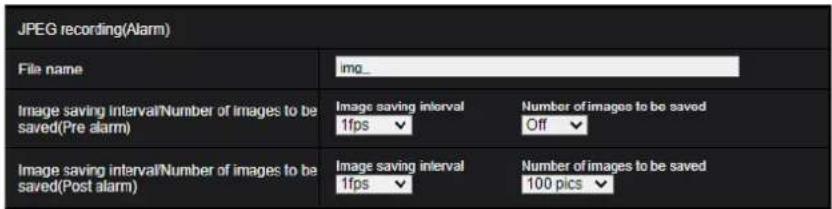
This setting is only available when "JPEG(1)" or "JPEG(2)" is selected for "Recording format", and "Alarm input" is selected for "Save trigger".
[File name]
Enter the file name used for the image to be saved on the SD memory card. The file name will be as follows.
- File name: ["Entered file name" + "Time and date (year/ month/ day/ hour/ minute/ second)"] + "Serial number"
• Available number of characters: 1 - 8 characters
- Unavailable characters: " & */ : ; < > ? \ |
[Image saving interval/Number of images to be saved(Pre alarm)] - [Image saving interval]
When “Alarm input” is selected for “Save trigger”, select a pre alarm interval (frame rate) of saving images on the SD memory card from the following.
- When 30fps mode or 15fps mode is selected for [Image capture mode]: 0.1fps/ 0.2fps/ 0.33fps/ 0.5fps/ 1fps
- When 25fps mode or 12.5fps mode is selected for [Image capture mode]: 0.08fps/ 0.17fps/ 0.28fps/ 0.42fps/ 1fps
- Default: 1fps
[Image saving interval/Number of images to be saved(Pre alarm)] - [Number of images to be saved]
Select a number of pre alarm images to be saved on the SD memory card from the following. Off/ 1pic/ 2pics/ 3pics/ 4pics/ 5pics
- Default: Off
[Image saving interval/Number of images to be saved(Post alarm)] - [Image saving interval]
When “Alarm input” or “Manual” is selected for “Save trigger”, select an interval (frame rate) of saving images on the SD memory card from the following.
- When 30fps mode or 15fps mode is selected for [Image capture mode]: 0.1fps/ 0.2fps/ 0.33fps/ 0.5fps/ 1fps
- When 25fps mode or 12.5fps mode is selected for [Image capture mode]: 0.08fps/ 0.17fps/ 0.28fps/ 0.42fps/ 1fps
- Default: 1fps
[Image saving interval/Number of images to be saved(Post alarm)] - [Number of images to be saved]
Select a number of alarm images to be saved on the SD memory card from the following.
10pics/ 20pics/ 30pics/ 50pics/ 100pics/ 200pics/ 300pics/ 500pics/ 1000pics/ 2000pics/ 3000pics
- Default: 100pics
Stream recording(Alarm)

This setting is only available when "Stream(1)", "Stream(2)", "Stream(3)", or "Stream(4)" is selected for "Recording format" of the SD memory card, and "Alarm input" is selected for "Save trigger".
[Pre alarm (recording) duration]
Determine whether or not to perform the pre alarm recording. Set the duration to save image data on the SD memory card.
Off/ 1s/ 2s/ 3s/ 4s/ 5s/ 8s/ 10s/ 15s/ 20s/ 25s/ 30s/ 40s/ 50s/ 60s/ 90s/ 120s
- Default: Off
Note
- The available values change depending on the bit rate and image capture size for "Stream" selected for recording. As the selected bit rate increases, the available maximum value for the pre alarm duration decreases.
[Post alarm (recording) duration]
Set the duration to save image data on the SD memory card after an alarm occurrence. 10s/20s/30s/40s/50s/60s/120s/180s/240s/300s
- Default: 30s
* The actual recording time may sometimes be longer than the duration selected for this setting.
SD memory card warning/error LED
[SD memory card warning/error LED]
Select On/Off to determine whether or not to activate the SD memory card warning/error LED when an SD memory card warning or error is detected.
SD memory card warning detection conditions: After the total use time has exceeded 6 years and the number of overwrite times has exceeded 2000
SD memory card error detection conditions: Write error, read error, etc.
- On: When a warning status is detected, the SD memory card error/error LED turns on. When an error status is detected, the SD memory card error/error LED starts flashing.
- Off: Stops detection of warning or error status.
- Default: Off
SD memory card information
[Remaining capacity]
Total capacity and remaining capacity of the SD memory card will be displayed.
Depending on the status of the SD memory card, the size indications will differ as follows.
| Indication | Description |
| ----MB/----MB No SD memory | card is inserted. Failed to obtain available capacity due to error, etc. |
| **********MB/**********MB The SD memory card is unformatted. | |
| #########MB/#########MB The SD memory card password lock cannot be unlocked. | |
Note
- When "Off" is selected for "Overwrite" and the available size of the SD memory card is "0 MB", images will not be saved on the SD memory card. When the notification function is on, a notification will be sent to the registered addresses and destinations of the TCP alarm notification when the SD memory card becomes full. (→"2.8.4.1 Configure settings relating to alarm E-mail notifications", "2.8.10 Configuration of the settings relating to alarm notification [Notification]")
[Format]
To format the SD memory card, click the [Execute] button.
IMPORTANT
- Before formatting the SD memory card, it is necessary to select "Use" for "SD memory card" on the [SD memory card] tab of the "Basic" page (→“2.5.2 Configure the settings relating to the SD memory card [SD memory card]).
- Use the SD memory card after formatting it using the [SD memory card] tab. If using the SD memory card that has not been formatted on the [SD memory card] tab, the following functions may not work correctly.
- Save/obtain alarm images
-
Save/obtain images saved manually
-
Save/obtain images in accordance with the schedule settings
— Save/obtain images recorded using the SD memory recording function of our network disk recorder
– Play/download images on the SD memory card
- When an SD memory card is formatted while another user is in operation, the operation will be canceled.
- It is impossible to access the SD memory card during the process of formatting.
- All data saved on the SD memory card will be deleted when the SD memory card is formatted.
- Do not turn off the power of the camera during the process of formatting.
- After formatting the SD memory card, available size may be smaller than the total size since the default directory is automatically created in the SD memory card.
- Use a microSD memory card dedicated to i-PRO cameras.
- When repeatedly recording images on an SD memory card using the auto overwrite function, make sure to use an SD memory card with high reliability and durability.
- Use the SD memory card that complies with UHS-1(Ultra High Speed-1) in the case of SD Speed Class10.
2.5.3 Configure the settings relating to alteration detection [Alteration detection]
Selecting "Alteration detection" enables detection using exclusive software when the data on the SD memory card is altered.
Alteration detection supports video files (MP4 format) only.
Refer to “2.5.4 How to configure alteration detection settings” for information on how to configure “Alteration detection”.
For further information about exclusive software for alteration detection and how to use it, refer to our technical information website
Note
- When “Alteration detection” is used, it is necessary to set either of “Stream(1)”, “Stream(2)”, “Stream(3)” or “Stream(4)” for “Recording format”.
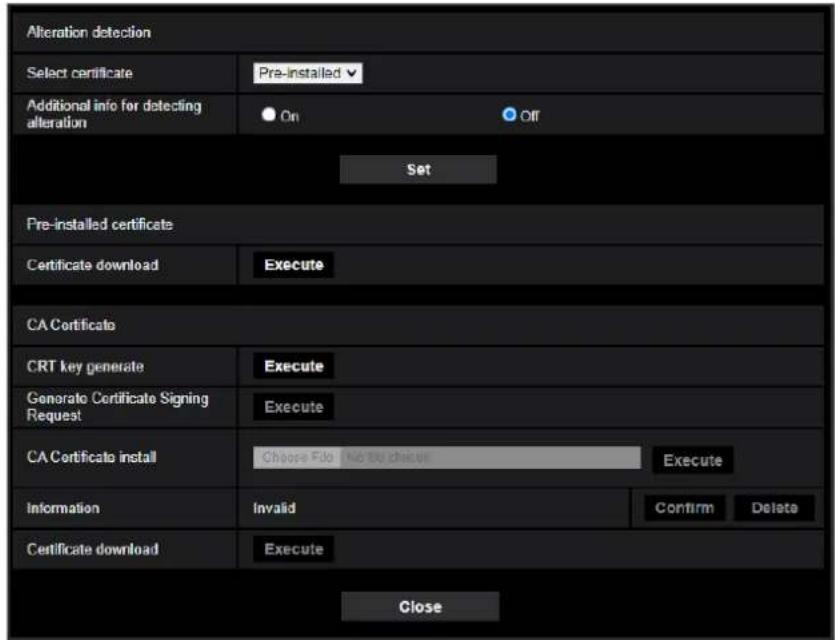
[Select certificate]
Select the certificate to be used with alteration detection.
Pre-installed: Selects a pre-installed certificate.
CA: Selects a "CA Certificate". Only displayed when the "CA Certificate" is installed.
Default: Pre-installed
[Additional info for detecting alteration]
Select whether or not to give information for alteration detection to video files (MP4 format) to be saved on the SD memory card.
Note
- When "JPEG(1)" or "JPEG(2)" is selected for "Recording format" of "Recording stream", "On" cannot be selected.
[Pre-installed certificate - Certificate download]
Click the [Execute] button and download the root certificate for the pre-installed certificate. When implementing alteration detection of video data (MP4 files) on the SD memory card using exclusive software, the downloaded certificate is used.
[CA Certificate - CRT key generate]
CRT key (encryption key) used for alteration detection is generated. To generate the CRT key, click the [Execute] button to display "CRT key generate" dialog box.
[CA Certificate - Generate Certificate Signing Request]
When using the CA certificate issued by CA as the CA certificate used for alteration detection, the CSR (Certificate Signing Request) will be generated.
To generate the CSR, click the [Execute] button to display the "CA Certificate - Generate Certificate Signing Request" dialog window.
[CA Certificate - Certificate install]
Installs the certificate (CA certificate) issued by CA and displays the information of the installed certificate (CA certificate).
To install the certificate (CA certificate), click the [Choose File] button to display the [Open] dialog box, and select the file of the certificate (CA certificate) issued by CA, and click the [Execute] button.
If the certificate (CA certificate) is already installed, the file name of the installed certificate will be displayed.
[CA Certificate - Information]
Displays the information of the certificate (CA certificate) issued by CA.
When the [Confirm] button is clicked, the registered information of the installed certificate (CA certificate) will be displayed in the "CA Certificate - Confirm" dialog box.
When the [Delete] button is clicked, the installed certificate (CA certificate) will be deleted.
[CA Certificate - Certificate download]
Downloads the certificate (CA certificate) issued by CA from the camera.
When implementing alteration detection of video data (MP4 files) on the SD memory card using exclusive software, the downloaded certificate is used.
IMPORTANT
- Before deleting the valid certificate (CA certificate), confirm that there is a backup file of the certificate (CA certificate) on the PC or another media. The backup file will be required when installing the certificate (CA certificate) again.
2.5.4 How to configure alteration detection settings
The settings relating to alteration detection that detects when data in the SD memory card is altered or edited can be configured on this page.
The alteration detection settings will be configured in the following procedure.
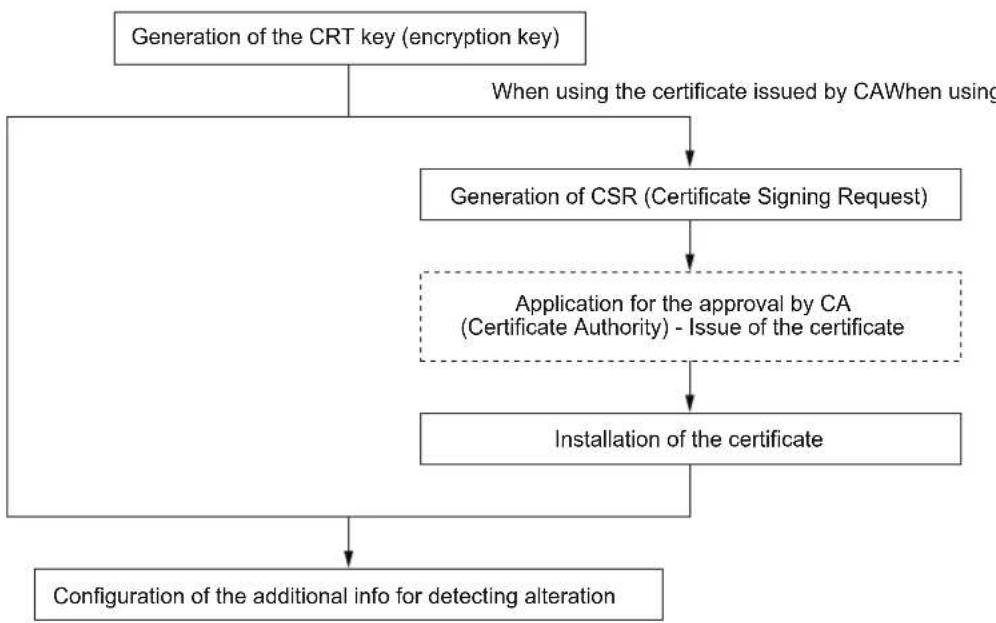
flowchart
graph TD
    A["Generation of the CRT key (encryption key)"] --> B["When using the certificate issued by CAWhen using"]
    B --> C["Generation of CSR (Certificate Signing Request)"]
    C --> D["Application for the approval by CA (Certificate Authority) - Issue of the certificate"]
    D --> E["Installation of the certificate"]
    E --> F["Configuration of the additional info for detecting alteration"]
2.5.4.1 Generation of the CRT key (encryption key)
IMPORTANT
- When the certificate (CA certificate) issued by CA is valid, it is impossible to generate the CRT key.
- When the certificate (CA certificate) issued by CA is used, the available key size varies depending on the CA. Check the available key size in advance.
-
To generate the CRT key, it may take about 2 minutes. Do not operate the web browser until the generation of CRT key is complete. While the CRT key is being generated, the refresh interval and line speed may be lower.
-
Click the [Execute] button of "CRT key generate".
→ The "CRT key generate" dialog box will be displayed.
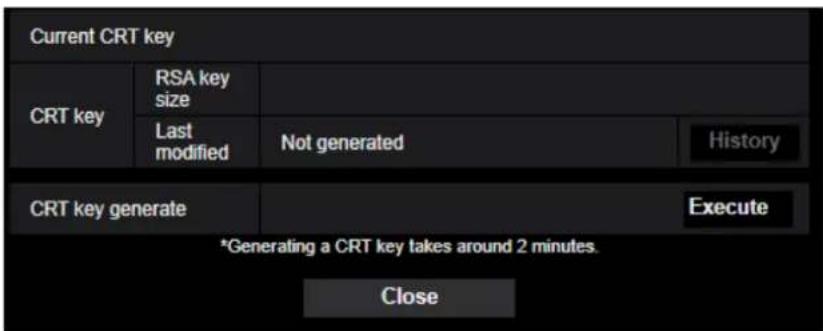
2. Click the [Execute] button.
→ The generation of CRT key will be started. When the generation is finished, the key size and generation time & date of the generated key will be displayed on "Current CRT key".
Note
- To change (or update) the generated CRT key, perform step 1 to 2. The CRT key and certificate issued by CA are valid in a set. When the CRT key is changed, it is necessary to re-apply for the certificate issued by CA.
- When the CRT key is updated, the log of the previous CRT key is saved. When the [History] button of "Current CRT key" on the "CRT key generate" dialog box is clicked, the "Previous CRT key" dialog box will be displayed, and it is possible to check the key size and generation time & date of the previous key. When the [Apply] button is clicked on the "Previous CRT key" dialog box, it is possible to replace the current CRT key with the previous one.
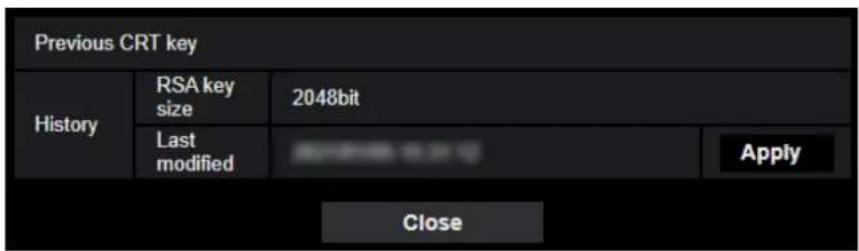
2.5.4.2 Generation of CSR (Certificate Signing Request)
IMPORTANT
- If the CRT key is not generated, it is impossible to generate the CSR.
- Click the [Execute] button of "CA Certificate - Generate Certificate Signing Request".
→ The "CA Certificate - Generate Certificate Signing Request" dialog box will be displayed.
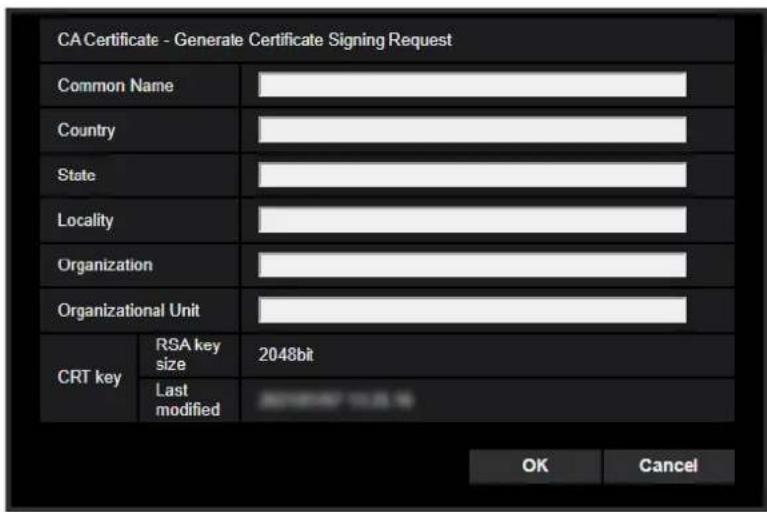
- Enter the information of the certificate to be generated.
| Item Description | Available number of characters | |
| [Common Name] Enter the camera address or host name. 64 characters | ||
| [Country] Enter the country name. 2 characters (Country code) | ||
| [State] Enter the state name. 128 characters | ||
| [Locality] Enter the locality name. 128 characters | ||
| [Organization] Enter the organization name. 64 characters | ||
| [Organizational Unit] | Enter the unit name of the organization. 64 characters | |
| [CRT key] Displays the key size and generation time & date of the current key. | — | |
- Click the [OK] button after entering the items.
→ The [Save As] dialog box will be displayed.
- Enter a file name for the CSR in the [Save As] dialog box to save on the PC.
→ The saved CSR file will be applied to the CA.
IMPORTANT
- The certificate will be issued for the set of the generated CSR and CRT key. If the CRT key is re-generated or updated after applying to the CA, the issued certificate will be invalidated.
Note
• This camera generates the CSR file in the PEM format.
2.5.4.3 Installation of the certificate issued by CA
IMPORTANT
• If the CSR file is not generated, it is impossible to install the certificate (CA certificate) issued by CA.
• For the installation of the certificate issued by CA, the CA certificate issued by CA is required.
-
Click the [Choose File] button of "CA Certificate - Certificate install".
-
Select the certification file and click the [Open] button. Then, click the [Execute] button.
→ The [Open] dialog box will be displayed.
→ The certification will be installed.
Note
- The host name registered in the installed certificate will be displayed on "CA Certificate - Information". Depending on the status of the certificate, the following are displayed.
| Indication | Description |
| Invalid | The CA certificate is not installed. |
| [Host name of the certificate] | The certificate has already been installed and validated. |
| Expired | The certification has already expired. |
- When the [Confirm] button is clicked, the registered information of the installed certificate (CA certificate) will be displayed in the "CA Certificate - Confirm" dialog box. (Only "Organizational Unit" will be displayed with an asterisk (*).)
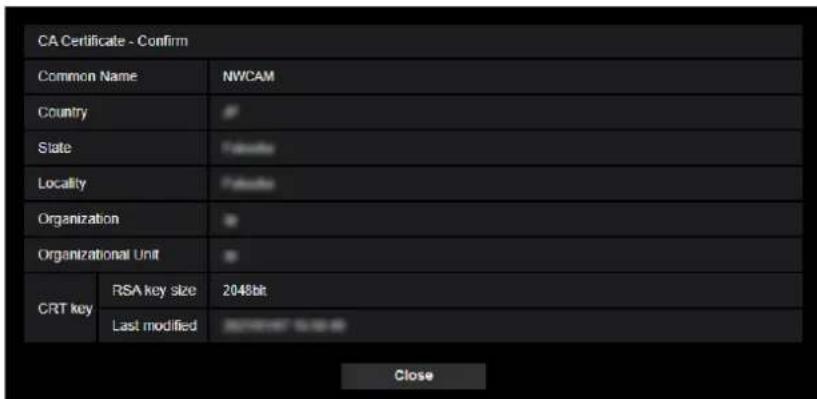
- When the [Delete] button is clicked, the installed certificate (CA certificate) will be deleted.
- When "On" is selected for "Additional info for detecting alteration", it is impossible to delete the certificate (CA certificate) issued by CA.
• To change (or update) the certificate issued by CA, perform step 1 and 2.
IMPORTANT
- Before deleting the valid certificate (CA certificate), confirm that there is a backup file of the certificate (CA certificate) on the PC or another media. The backup file will be required when installing the certificate (CA certificate) again.
- The expiration date of the certificate issued by CA can be checked by double-clicking the server certification file issued by CA.
2.5.4.4 Configuration of alteration detection
- Select "On" for "Additional info for detecting alteration", and click the [Set] button.
- Extensive information for alteration detection will be added to video files (MP4 format) recorded after changing the setting.
IMPORTANT
- When the "Additional info for detecting alteration" setting is changed, manual recording on the SD memory card will stop. Start manual saving again as necessary.
Note
- Alteration detection can be performed on video files (MP4 format) recorded when "On" is selected for "Additional info for detecting alteration" using exclusive software.
For further information about exclusive software and how to use it, refer to our technical information website
2.5.5 Configure the overlay image function [Overlay image]
The overlay image function is a function that superimposes an image uploaded to the camera onto a live image and display it as an overlaid image.
Click the [Overlay image] tab on the "Basic" page. (→For menu display and how to operate, refer to "2.2.1 How to display the setup menu", "2.2.2 How to operate the setup menu")
The settings relating to the overlay image function can be configured on this page.
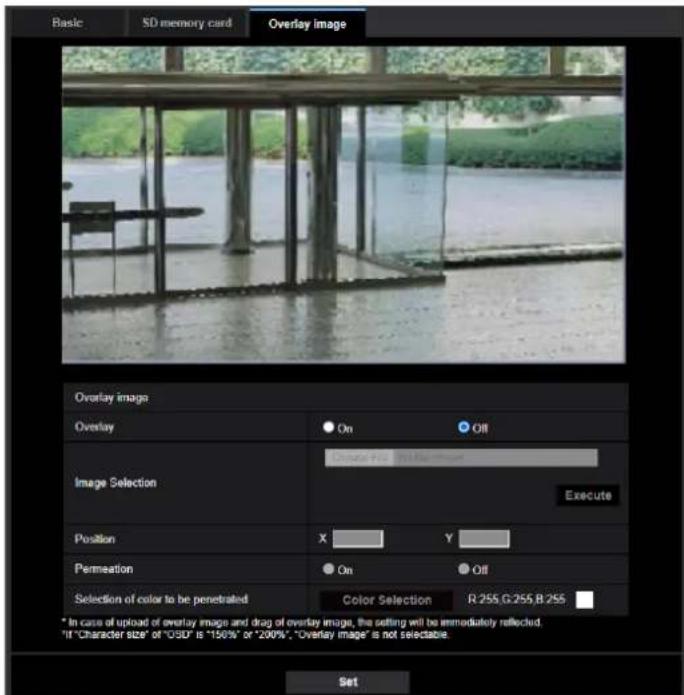
[Overlay]
Select "On" or "Off" to determine whether to display an uploaded image overlaid.
On: Displays uploaded an image overlaid.
Off: Does not display uploaded an image overlaid.
Default: Off
IMPORTANT
- When "On" is set for [Overlay], an overlaid image will be recorded during the SD memory card recording.
Note
- If "Character size" of "OSD" is "150%" or "200%", "Overlay image" is not selectable.
• Overlaid images will not be output to the MONITOR OUT terminal.
[Image Selection]
Upload an image file to be overlaid to the camera in the following procedure.
1) Click the [Choose File] button and select an image file saved on the PC.
2) Click the [Execute] button to upload the selected image to the camera.
When the image is uploaded, the uploaded image will be displayed overlaid on the display. Image files with the following specification are available for the overlay display.
• Image format: 8-bit bitmap (BMP: Windows format)
• Image size: 24 pixels×24 pixels - 512 pixels×512 pixels
- File size: 257 KB or less
Note
- Save image files in a folder whose name does not contain a space or two-bytes code. An image saved in a folder whose name contains a space or two-bytes code may not be uploaded.
IMPORTANT
- Do not turn off the power of the camera or operate the camera during uploading of an image file.
- The uploaded image to be displayed will be reduced in size depending on the resolution of live image. Since the uploaded image could sometimes be displayed with low image quality, check the live image page if images are displayed overlaid.
- The images to be uploaded will be saved when they are uploaded.
[Position]
The display position of the uploaded image (upper left corner of the image) will be displayed with [X] and [Y] coordinates.
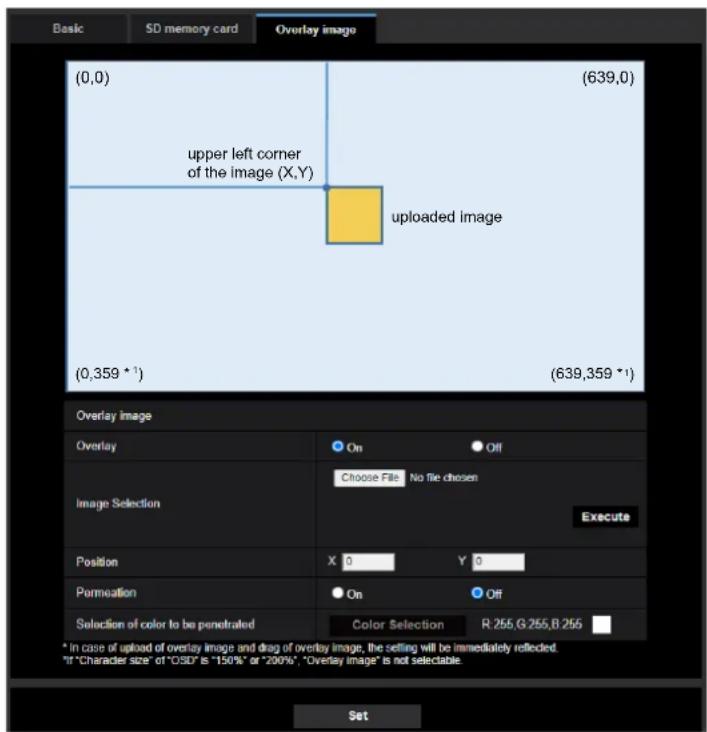
*1 In case that [16:9] is set for [Image capture mode] When [4:3] is set for [Image capture mode], [Y] will be "479"
There are following two methods to change the display position of the uploaded image.
- Drag and drop the currently displayed uploaded image using the mouse.
- Enter coordinates to [X] and [Y] and then click the [Set] button.
Available numbers:
- When "16:9 mode" is selected for "Image capture mode"
X: 0 – (639 minus the horizontal length of the uploaded image)
Y: 0 – (359 minus the vertical length of the uploaded image)
- When "4:3 mode" is selected for "Image capture mode"
X: 0 – (639 minus the horizontal length of the uploaded image)
Y: 0 – (479 minus the vertical length of the uploaded image)
Default: Center of live image
Note
• A red frame indicating the display position will be displayed during dragging of the uploaded image.
- Coordinates that make the uploaded image out of the setting screen are unavailable to set.
- When an uploaded image is moved by mouse operation, the display position will be saved even if the [Set] button is not clicked.
- If an uploaded image is moved to the edge of the screen, there may be a gap between the image and the screen edge.
IMPORTANT
- After changing the settings of [Image capture mode] or [Image rotation], check the display position of the uploaded image. When the display position is deviated, configure the display position setting again. If the uploaded image is to be displayed out of the setup screen, the initial display position (center of the live image) will be restored.
[Permeation]
Select "On" or "Off" to determine whether the color selected at [Selection of color to be penetrated] is to be transparent.
On: Gives transparency to the color selected at [Selection of color to be penetrated].
Off: Does not give transparency to the color.
Default: Off
[Selection of color to be penetrated]
Select a color to be penetrated in the following procedure.
1) Click the [Color Selection] button. A sub window displaying the uploaded image will be displayed.
2) Click a color to be penetrated in the displayed image. The selected color and RGB values will be displayed.
3) Click the [Close] button to close the sub window.
4) Click the [Set] button lastly. The selected color will be penetrated.
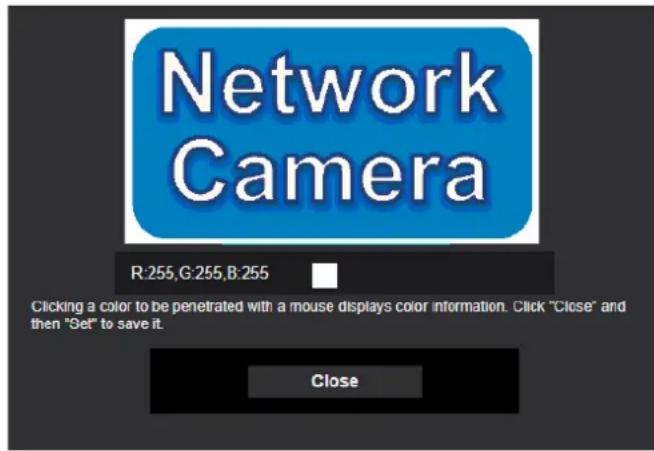
2.6 Configure the settings relating to images and audio [Image/Audio]
The settings relating to JPEG, H.265, and H.264 images such as the settings of image quality, audio, etc. can be configured on this page.
The "Image/Audio" page has the [Image] tab, the [Image quality] tab, and the [Audio] tab.
2.6.1 Configure the settings relating to the image capture mode [Image]
Click the [Image] tab on the "Image/Audio" page. (→“2.2.1 How to display the setup menu”, “2.2.2 How to operate the setup menu”)
[Image capture mode]
16:9 mode(30fps mode)/ 16:9 mode(25fps mode)/ 16:9 mode(60fps mode)/ 16:9 mode(50fps mode)/ 4:3 mode(30fps mode)/ 4:3 mode(25fps mode)/ 4:3 mode(15fps mode)/ 4:3 mode(12.5fps mode)
Default:
16:9 mode(30fps mode)
2.6.2 Configure the settings relating to JPEG images [Image]
Click the [Image] tab on the "Image/Audio" page. (→“2.2.1 How to display the setup menu”, “2.2.2 How to operate the setup menu”)
"Live" page (Initial display)
Configure the settings relating to the initial images displayed on the "Live" page.
[Initial display stream]
Select the image to display on the "Live" page from the following.
JPEG(1)/JPEG(2)/Stream(1)/Stream(2)/Stream(3)/Stream(4)/Multi-screen
- Default: Stream(1)
Note
- When "JPEG(1)" or "JPEG(2)" is selected, the refresh interval can be selected.
MJPEG/Refresh interval: 1s/Refresh interval: 3s/Refresh interval: 5s/Refresh interval: 10s/Refresh interval: 30s/Refresh interval: 60s - "Stream(1)", "Stream(2)", "Stream(3)" or "Stream(4)" is available, when "On" is selected for [Stream transmission].
[Refresh interval (JPEG)\*]
Select an interval to refresh the displayed JPEG image from the following.
- When "16:9 mode(30fps mode)", "16:9 mode(60fps mode)" or "4:3 mode(30fps mode)" is selected for "Image capture mode":
0.1fps/ 0.2fps/ 0.33fps/ 0.5fps/ 1fps/ 2fps/ 3fps/ 5fps/ 6fps*/ 10fps*/ 12fps*/ 15fps*/ 30fps*
- When "16:9 mode(25fps mode)", "16:9 mode(50fps mode)" or "4:3 mode(25fps mode)" is selected for "Image capture mode":
0.08fps/ 0.17fps/ 0.28fps/ 0.42fps/ 1fps/ 2.1fps/ 3.1fps/ 4.2fps/ 5fps*/ 8.3fps*/ 12.5fps*/ 25fps*
- When "4:3 mode(15fps mode)" is selected for "Image capture mode":
0.1fps/ 0.2fps/ 0.33fps/ 0.5fps/ 1fps/ 2fps/ 3fps/ 5fps/ 6fps*/ 10fps*/ 12fps*/ 15fps*
- When "4:3 mode(12.5fps mode)" is selected for "Image capture mode":
0.08fps/ 0.17fps/ 0.28fps/ 0.42fps/ 1fps/ 2.1fps/ 3.1fps/ 4.2fps/ 5fps*/ 8.3fps*/ 12.5fps*
- Default: 5fps
Note
- When “On” is selected for “Stream transmission”, the refresh interval may be longer than the set value when any value with an asterisk (*) on the right is selected.
- Depending on factors such as the network environment, the resolution, the image quality, or the number of computers concurrently accessing the camera, the transmission interval may be longer than the set value.
- If images are not delivered in the specified transmission interval, you can make the images be delivered closer to the specified time by lowering the resolution or image quality.
JPEG
Configure the settings such as "Image capture size", "Image quality" of "JPEG(1)" and "JPEG(2)" on this section. Refer to 2.6.3 Configure the settings relating to Stream [Image] for further information about the settings relating to H.265 (or H.264) images.
[Image capture size]
Select the image capture size to display the JPEG image.
- When "16:9 mode(30fps mode)", "16:9 mode(60fps mode)", "16:9 mode(25fps mode)", or "16:9 mode(50fps mode)" is selected for "Image capture mode": JPEG(1): 1920x1080, 1280x720, 640x360, 320x180 JPEG(2): 640x360 fixed
- Default: 1920x1080
- When "4:3 mode(30fps mode)" or "4:3 mode(25fps mode)" is selected for "Image capture mode": JPEG(1): 1280x960, VGA, QVGA JPEG(2): VGA fixed
- Default: 1280x960
- When "4:3 mode(15fps mode)" or "4:3 mode(12.5fps mode)" is selected for "Image capture mode": JPEG(1): 2048x1536, 1280x960, VGA, QVGA JPEG(2): VGA fixed
- Default: 2048x1536
[Image quality]
Select the image quality of JPEG images for each image capture size.
0 Super fine/ 1 Fine/ 2/ 3/ 4/ 5 Normal/ 6/ 7/ 8/ 9 Low
- Default: 5 Normal
2.6.3 Configure the settings relating to Stream [Image]
Click the [Image] tab on the "Image/Audio" page. (→“2.2.1 How to display the setup menu”, “2.2.2 How to operate the setup menu”)
Configure the settings relating to H.265 (or H.264) image such as "Max bit rate (per client)", "Image capture size", "Image quality", etc. in this section. Refer to "2.6.2 Configure the settings relating to JPEG images [Image]" for the settings relating to JPEG images.
Stream(1)/ Stream(2)/ Stream(3)/ Stream(4)
[Stream transmission]
Select "On" or "Off" to determine whether or not to transmit H.265 (or H.264) images.
- On: Transmits H.265 (or H.264) images.
- Off: Does not transmit H.265 (or H.264) images.
- Default: On
Note
- When “On” is selected for “Stream transmission” in “Stream(1)”, “Stream(2)”, “Stream(3)”, or “Stream(4)” displaying of H.265 (or H.264) images or JPEG images on the “Live” page will become available.
- When “On” is selected for “Stream transmission” for “Stream(1)”, “Stream(2)”, “Stream(3)”, or “Stream(4)”, the refresh interval of JPEG images is limited to a maximum of 5 fps (30fps mode/ 60fps mode/ 15fps mode) or 4.2 fps (25fps mode/ 50fps mode/ 12.5fps mode).
[Stream encoding format]
Select the stream encoding format for transmission.
• H.265: Transmits H.265 images.
• H.264: Transmits H.264 images.
- Default: H.265
[Image capture size]
Select the image capture size from the following. What can be selected may be limited depending on the image capture size already selected.
When "16:9 mode(30fps mode)", "16:9 mode(60fps mode)", "16:9 mode(25fps mode)", or "16:9 mode(50fps mode)" is selected for "Image capture mode":
| Stream(1) | Stream(2) Stream(3) Stream(4) | ||
| 1920x1080 | 1920x1080 | 1280x720 | 640x360 |
| 1280x720 | 1280x720 | 640x360 | 320x180 |
| 640x360 | 640x360 | 320x180 | |
| 320x180 | 320x180 | ||
When "4:3 mode(30fps mode)" or "4:3 mode(25fps mode)" is selected for "Image capture mode":
| Stream(1) | Stream(2) Stream(3) Stream(4) | ||
| 1280x960VGAQVGA | 1280x960VGAQVGA | VGAQVGA | VGAQVGA |
When "4:3 mode(15fps mode)" or "4:3 mode(12.5fps mode)" is selected for "Image capture mode":
| Stream(1) Stream(2) Stream(3) Stream(4) | |||
| 2048x1536(Fixed) | 1280x960VGAQVGA | VGAQVGA | VGAQVGA |
Note
- When “90 °” or “270 °” is selected for “Image rotation” on the [Basic] tab of the “Basic” page (→[Image rotation]), the image capture size “320×180” is not available.
- When "4:3 mode(30fps mode)", "4:3 mode(25fps mode)", "4:3 mode(15fps mode)", or "4:3 mode(12.5fps mode)" is selected for "Image capture mode", "90 °" and "270 °" will become unavailable to select.
[Transmission priority]
Select a transmission priority for "Stream" from the following.
- Constant bit rate: H.265 (or H.264) images will be transmitted with the bit rate selected for "Max bit rate (per client)*".
- VBR: H.265 (or H.264) images will be transmitted with the frame rate selected for "Frame rate*" while maintaining the image quality level selected in "Image quality". In this case, images will be transmitted with the bit rate kept within the maximum bit rate that is set for "Max bit rate (per client)*". The recording capacity changes according to the "Image quality" setting and conditions of the subject.
- Frame rate: H.265 (or H.264) images will be transmitted with the frame rate selected for "Frame rate*".
- Best effort: In accordance with the network bandwidth, H.265 (or H.264) images will be transmitted with the maximum bit rates that are set for "Max bit rate (per client)*".
- Default: VBR
Note
- When “Frame rate” is set for “Transmission priority”, number of users who can access the camera may be limited.
[Frame rate ^* ]
Select a frame rate from the following.
- When "16:9 mode(30fps mode)", "16:9 mode(60fps mode)", "4:3 mode(30fps mode)" or "4:3 mode(15fps mode)" is selected for "Image capture mode":
1fps/ 3fps/ 5fps*/ 7.5fps*/ 10fps*/ 12fps*/ 15fps*/ 20fps*/ 30fps*/ 60fps*
- When "16:9 mode(25fps mode)", "16:9 mode(50fps mode)", "4:3 mode(25fps mode)" or "4:3 mode(12.5fps mode)" is selected for "Image capture mode":
1fps/ 3.1fps/ 4.2fps*/ 6.25fps*/ 8.3fps*/ 12.5fps*/ 20fps*/ 25fps*/ 50fps*
- Default:
30fps
Note
- “Frame rate*” is restricted by “Max bit rate (per client)*”. For this reason, the frame rate may be lower than the specified value when any value marked with an asterisk (*) is selected. When “VBR” is selected for “Transmission priority”, depending on the settings of “Max bit rate (per client)*” and “Image quality”, transmission of images may periodically be paused. Check the transmission of images after changing settings.
- Depending on the number users connecting at the same time or the combination of features used, the frame rate may be lower than the configured value. Check the transmission of images after changing settings.
- When the "Image capture mode" is set as "16:9 mode(60fps mode)", Stream(1) is fixed to 60fps. Also, Stream(2) to Stream(4) can select up to a maximum of 10fps.
- When the "Image capture mode" is set as "16:9 mode(50fps mode)", Stream(1) is fixed to 50fps. Also, Stream(2) to Stream(4) can select up to a maximum of 8.3fps.
- When the frame rate is lowered, images may not be displayed normally depending on the web browser in use.
[Max bit rate (per client)\*]
Select an H.265 (or H.264) bit rate per a client from the following.
64kbps/ 128kbps*/ 256kbps*/ 384kbps*/ 512kbps*/ 768kbps*/ 1024kbps*/ 1536kbps*/ 2048kbps*/ 3072kbps*/ 4096kbps*/ 6144kbps*/ 8192kbps*/ 10240kbps*/ 12288kbps*/ 14336kbps*/ 16384kbps*/ 20480kbps*/ 24576kbps*/ — FREE ENTRY—
When “— FREE ENTRY—” is selected, the bit rate can be freely entered in the available range.
- Default:
- Stream(1): 6144kbps*
- Stream(2): 4096kbps*
- Stream(3): 1536kbps*
- Stream(4): 1536kbps*
* The range of bit rates that can be configured for H.265 (or H.264) bit rates differs depending on the “Transmission priority” and “Image capture size”.
When "Constant bit rate", "Frame rate", or "Best effort" is selected for "Transmission priority"
- 320×180, 640×360, QVGA and VGA: 64kbps - 4096kbps*
- 1280x720 ^*1 and 1280x960: 128kbps* - 8192kbps*
• 1920x1080 ^1 : 256kbps* - 12288kbps*
• 2048x1536: 512kbps* - 16384kbps*
When "VBR" is selected for "Transmission priority"
- 320×180, 640×360, QVGA, and VGA: 64kbps - 12288kbps*
- 1280x720 ^*1 and 1280x960: 128kbps* - 12288kbps*
• 1920x1080 ^1: 256kbps* - 24576kbps*
• 2048x1536: 512kbps* - 24576kbps*
Note
- The bit rate for "Stream" is restricted by "Bandwidth control(bit rate)" on the [Network] tab on the "Network" page (→"2.10.1 Configure the network settings [Network]). When a value with "*" attached is set, images may not be streamed.
- It is recommend that the bit rate setting of the stream to be 8192 kbps or lower. Setting a value higher than 8192 kbps may cause abnormalities in the continuity of the recorded video.
- When the refresh interval is too short, the actual bit rate may exceed the set bit rate depending on the subject.
- Depending on the number users connecting at the same time or the combination of features used, the bit rate may be lower than the configured value. Check the transmission of images after changing settings.
[Image quality]
Select the image quality of H.265 images from the following.
- For “Constant bit rate”, “Frame rate”, and “Best effort”: Low(Motion priority)/ Normal/ Fine(Image quality priority)
- "VBR": 0 Super fine/ 1 Fine/ 2/ 3/ 4/ 5 Normal/ 6/ 7/ 8/ 9 Low
- Default: 3
[Smart Coding] - [Smart VIQS]
Maintains high image quality in the areas containing heads, people, cars, and motorcycles and low or medium image quality in other areas while reducing the transmission data volume.
- Off: Does not use "Smart VIQS".
- On(High): Maintains high image quality in the areas containing heads, people, cars, and motorcycles and low image quality in other areas while reducing the transmission data volume.
- On(Low): Maintains high image quality in the areas containing heads, people, cars, and motorcycles and medium image quality in other areas while reducing the transmission data volume.
- Default: On(Low)
Note
- This feature can only be used for "Stream(1)". If "On(High)" or "On(Low)" is selected, the VIQS setting from the [Image quality] tab is disabled.
[Smart Coding] - [Smart P-picture control]
Controls the area other than the areas containing heads, people, cars, and motorcycles to be reduced the transmission data volume of P-picture.
- Off: Does not use "Smart P-picture control"
- On: Controls the area other than the areas containing heads, people, cars, and motorcycles to be reduced the transmission data volume of P-picture.
- Default: Off
Note
- This feature can only be used for "Stream(1)". If "On" is selected, the VIQS setting from the [Image quality] tab is disabled.
- When "On" is selected, on non-detected area, movement may not be smooth or noise appears.
[Smart Coding] - [GOP control]
By using "GOP control", the transmission data volume can be reduced.
- When “H.265” is selected as the “Stream encoding format”: Off/ Low(Variable GOP 1s-8s)/ Mid(Variable GOP 4s-16s)/ Advanced(Fixed GOP 60s w/1s key-frame)/ Frame rate control(Variable GOP 4s-16s w/frame rate control)
- When "H.264" is selected as the "Stream encoding format": Off/ Low(Variable GOP 1s-8s)/Mid(Variable GOP 4s-16s)
- Default: Off
IMPORTANT
- When "Low(Variable GOP 1s-8s)", "Mid(Variable GOP 4s-16s)", or "Frame rate control(Variable GOP 4s-16s w/frame rate control)" is selected, recording to an SD memory card cannot be performed.
Note
- When using "GOP control", the refresh interval is increased when streaming H.265 (or H.264) images. For this reason, do not use it when the network environment has frequent errors.
- "Low(Variable GOP 1s-8s)"/"Mid(Variable GOP 4s-16s)"/"Frame rate control(Variable GOP 4s-16s w/frame rate control)" can be selected only when "VBR" is selected for "Transmission priority". "Advanced(Fixed GOP 60s w/1s key-frame)" can be selected regardless of the "Transmission priority" setting.
- By using "Low(Variable GOP 1s-8s)"/Mid(Variable GOP 4s-16s)"Frame rate control(Variable GOP 4s-16s w/frame rate control)", the transmission data volume can be reduced when there is no target to be detected (people's face, body, vehicle and two-wheel vehicle) in the image. By using "Advanced(Fixed GOP 60s w/1s key-frame)", the transmission data volume can be reduced regardless of presence/absence of target to be detected in the image.
- When "Frame rate control(Variable GOP 4s-16s w/frame rate control)" is selected, the frame rate will change within the range between 1fps and a value set in [Frame rate*] according to presence/absence of target to be detected.
- When "Frame rate control(Variable GOP 4s-16s w/frame rate control)" is selected, the display may temporarily become slower or faster when changing frame rates.
[Refresh interval]
Select an interval (I-frame interval; 0.2 - 5 seconds) to refresh the displayed H.265 (or H.264) images from the following.
If using under a network environment with frequent error occurrences, shorten the refresh interval for H.265 (or H.264) to diminish image distortions. However, the refresh interval may become longer than the set value or the actual bit rate may exceed the set bit rate.
0.2s/ 0.25s/ 0.33s/ 0.5s/ 1s/ 2s/ 3s/ 4s/ 5s
- Default: 2s
Note
- When "Low(Variable GOP 1s-8s)" is selected for "GOP control", the refresh interval is set to Max. 8s.
- When "Mid(Variable GOP 4s-16s)" is selected for "GOP control", the refresh interval is set to Max. 16s.
- When “Advanced(Fixed GOP 60s w/1s key-frame)” is selected for “GOP control”, the refresh interval is set to 60s.
- If “GOP control” is set to “Frame rate control(Variable GOP 4s-16s w/frame rate control)”, the frame rate ranges from 1fps to the value set in [Frame rate*] depending on the size of image changes. The smaller the frame rate value, the longer the refresh interval. When the frame rate is the value set in [Frame rate*], the refresh interval is at Max. 16s.
[Transmission type]
Select the transmission type of H.265 (or H.264) images from the following.
- Unicast port (AUTO): Up to 14 users can access a single camera concurrently. "Unicast port1(Image)" and "Unicast port2(Audio)" will automatically be selected when transmitting images and audio from the camera. When it is unnecessary to fix the port number for stream transmission such as when using in a particular LAN environment, it is recommended to select "Unicast port (AUTO)".
- Unicast port (MANUAL): Up to 14 users can access a single camera concurrently. It is necessary to select "Unicast port1(Image)" and "Unicast port2(Audio)" manually to transmit images and audio from the camera. When "Unicast port (MANUAL)" is selected, the port number will automatically be assigned at the time of accessing the camera using a web browser. However, it is possible to fix the port number of the router used for stream transmission via the Internet by setting "Unicast port (MANUAL)" ( 2.10.1 Configure the network settings [Network]). Refer to the operating instructions of the router in use.
- Multicast: Unlimited number of users can access a single camera concurrently. Complete the entry field of “Multicast address”, “Multicast port” and “Multicast TTL/HOPLimit” when transmitting stream with multicast. Refer to “1.1.1 Monitor images from a single camera” for further information about the maximum concurrent access number.
- Default: Unicast port (AUTO)
Note
- When multicast is set, H.265 (or H.264) images cannot be monitored using a browser.
[Unicast port1(Image)] ^2
Enter the unicast port number (used to transmit images from the camera).
• Available port number: 1024 - 50000 (Only even numbers are available.)
- Default:
- Stream(1): 32004
- Stream(2): 32014
- Stream(3): 32024
- Stream(4): 32034
[Unicast port2(Audio)] ^2
Enter the unicast port number (used to transmit audio from the camera).
• Available port number: 1024 - 50000 (Only even numbers are available.)
- Default:
- Stream(1): 33004
- Stream(2): 33014
- Stream(3): 33024
- Stream(4): 33034
[Multicast address] ^3
Enter the multicast IP address. Images and audio will be transmitted to the designated IP address.
• Available IPv4 address: 224.0.0.0 - 239.255.255.255
• Available IPv6 address: Multicast address starting with "FF"
- Default:
- Stream(1): 239.192.0.20
- Stream(2): 239.192.0.21
- Stream(3): 239.192.0.22
- Stream(4): 239.192.0.23
Note
- Enter a multicast IP address after checking available multicast address.
[Multicast port] ^3
Enter the multicast port number (used to transmit images from the camera).
• Available port number: 1024 - 50000 (Only even numbers are available.)
- Default: 37004
Note
- When audio is transmitted from the unit, the port number to be used will be the multicast port number plus "1000".
[Multicast TTL/HOPLimit] ^3
Enter a value for "Multicast TTL/HOPLimit".
• Available value: 1-254
- Default: 16
IMPORTANT
- When transmitting stream images via the internet, the transmitted image sometimes may not be displayed depending on the settings of a proxy server or a firewall. In this case, refer to the network administrator.
- When two or more network interface cards are installed on the PC in use, the network interface card(s) not used for receiving images should be invalidated when displaying images using the multicast port.
2.6.4 Configure the settings relating to image adjust, zoom/focus, privacy zone, VIQS, and lens distortion compensation [Image quality]
Click the [Image quality] tab on the "Image/Audio" page. (→“2.2.1 How to display the setup menu”, “2.2.2 How to operate the setup menu”)
When the [Setup>>] button of each setting item is clicked, the detailed settings menu will be displayed in a newly opened window. The detailed settings can be configured while monitoring images displayed on the [Image quality] tab.
The settings relating to the image adjust, zoom/focus, extra optical zoom, back focus, privacy zone, VIQS, and lens distortion compensation can be configured on this page.
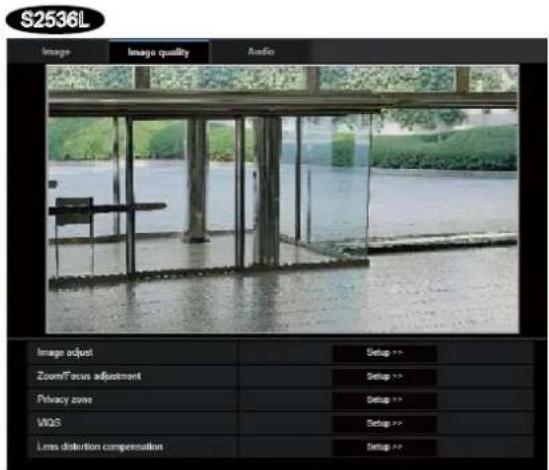
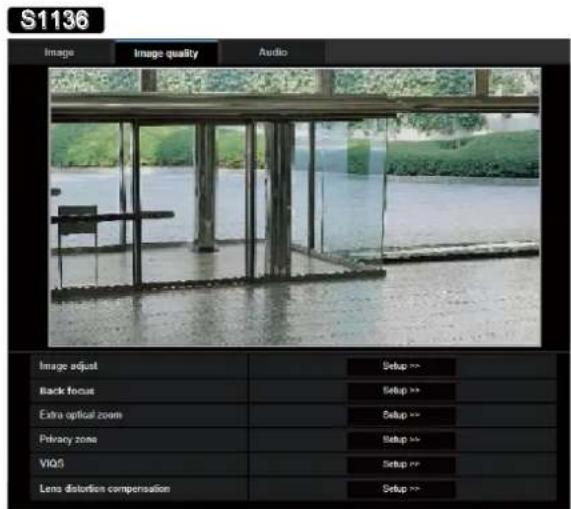
[Image adjust]
Click the [Setup>>] button to display the setup menu that can configure the settings relating to image quality. The setup menu will be displayed in a newly opened window. (→“2.6.4.1 Configure the settings relating to image quality (“Image adjust” setup menu)”)
[Zoom/Focus adjustment] S2536L
Click the [Setup>>] button to display the setup menu that can configure the settings relating to zoom and back focus. (→“2.6.4.3 Adjust the zoom and focus”)
[Back focus] S1136
Click the [Setup>>] button to display the setup menu that can configure the settings relating to back focus. The setup menu will be displayed in a newly opened window. (→“2.6.4.4 Adjust the back focus S1136”)
[Extra optical zoom] S1136
Click the [Setup>>] button to display the setup menu that can configure the settings relating to extra optical zoom. The setup menu will be displayed in a newly opened window. (→“2.6.4.5 Adjust the angular field of view using the Extra optical zoom function S1136”)
[Privacy zone]
Click the [Setup>>] button to display the setup menu that can configure the settings relating to the privacy zone. (→“2.6.4.6 Configure the settings relating to the privacy zone (“Privacy zone” setup menu)”)
[VIQS]
Click the [Setup>>] button to display the setup menu that can configure the settings relating to VIQS. (→“2.6.4.8 Configure the VIQS area”)
[Lens distortion compensation]
Click the [Setup>>] button to display the setup menu that can configure the settings relating to lens distortion compensation. The setup menu will be displayed in a newly opened window. (→“2.6.4.9 Configure the settings relating to lens distortion compensation”)
2.6.4.1 Configure the settings relating to image quality ("Image adjust" setup menu)
Click the [Setup>>] button of "Image adjust" on the [Image quality] tab of the "Image/Audio" page.
(→“2.6.4 Configure the settings relating to image adjust, zoom/focus, privacy zone, VIQS, and lens distortion compensation [Image quality]”)
The settings relating to image quality can be configured with the setup menu displayed in a newly displayed window. When the values are changed, the changed values will be applied to the currently displayed image on the [Image quality] tab.
Click the “+” mark on the left of each item in the setup menu to expand the respective item, and enable detailed settings.
Click the “-” mark on the left of an expanded item to return to the screen displayed before the item was expanded.
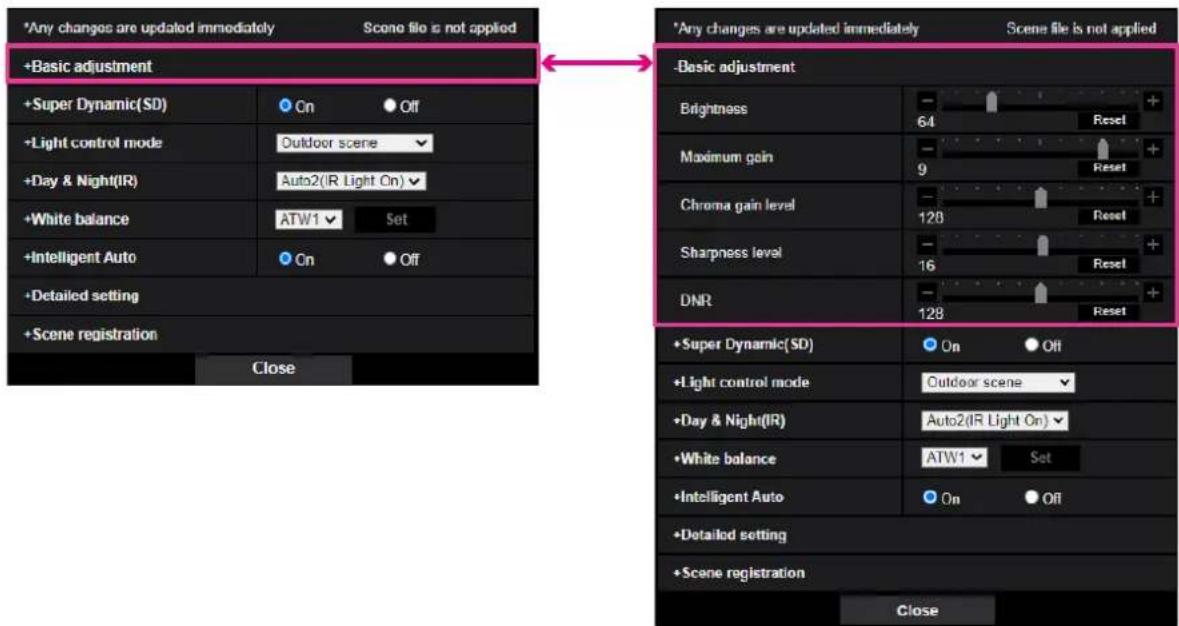
Basic adjustment
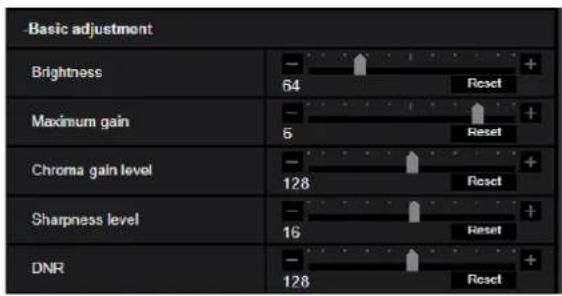
[Brightness]
Adjust the brightness.
If you move the slider in the "+" direction, the image will become brighter.
If you move the slider in the “-” direction, the image will become darker.
Click the [Reset] button to reset to the default brightness setting.
- Default: 64
[Maximum gain]
Adjusts the maximum gain. When the luminance of the subject becomes darker, gain will be automatically increased and screen will become brighter. If you increase the gain, the noise may also increase.
If you move the slider in the "+" direction, the maximum gain will increase.
If you move the slider in the “-” direction, the maximum gain will decrease.
Click the [Reset] button to reset to the default setting.
- Default: 6
[Chroma gain level]
Adjusts the chroma level (color density).
If you move the slider in the "+" direction, the colors will become loud and vivid. If you move the slider in the "-" direction, the colors will become subdued. Click the [Reset] button to reset the color to the default.
- Default: 128
[Sharpness level]
Adjust the sharpness level (outline compensation).
If you move the slider in the “+” direction, the outline of the image will become sharper, and if you move it in the “-” direction, the outline of the image will become softer. Click the [Reset] button to reset the color to the default.
- Default: 16
[DNR]
The digital noise reduction function reduces noise automatically under the condition of low illuminance.
If you move the slider in the “+” direction, the noise reduction effect is strengthened. There may be many afterimages.
If you move the slider in the “-” direction, the noise reduction effect is weakened. There are fewer afterimages.
Click the [Reset] button to reset to the default setting.
- Default: 128
Super Dynamic(SD)
[Super Dynamic(SD)]
Select "On" or "Off" to determine whether or not to activate the super dynamic function.
Refer to the description "Super Dynamic function" about the super dynamic function.
This is not available when "Image capture mode" is set to "16:9 mode(60fps mode)" or "16:9 mode(50fps mode)".
- On: The super dynamic function will work.
- Off: The super dynamic function will not work.
- Default: On
Note
- When the following are observed depending on the light condition, select "Off" for "Super Dynamic(SD)".
- When flickering appears or the color changes on the screen
- When noise appears in the brighter area on the screen
- When [Light control mode] is set to "Fix shutter" or "ELC", [Super Dynamic] cannot be set to "On".
[Level]
Adjust the super dynamic (SD) level.
If you move the slider in the “+” direction, a subject with high contrast can be captured without over exposure or under exposure.
If you move the slider in the “-” direction, the parts with medium brightness can be captured with rich gradation. Click the [Reset] button to reset to the default setting.
- Default: 29
Super Dynamic function
When there is wide variation between the illumination of light and dark areas of the location being monitored, the camera adjusts the lens iris in accordance with the brighter areas. This causes loss of detail in darker areas. Conversely, adjusting the lens brightness for the darker areas causes the brighter areas to become washed out.
Super Dynamic digitally combines an image that is set up for a clear view of the brighter areas with an image that is set up for a clear view of the darker areas, creating a final image that preserves overall detail.
A
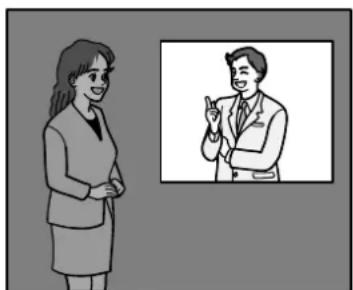
natural_image
Illustration of a woman and a man in business attire, one pointing upward (no text or symbols present)B
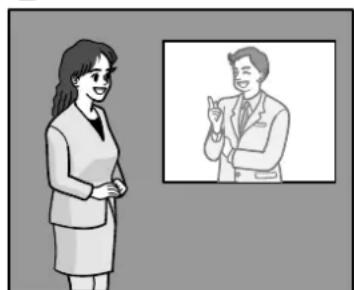
natural_image
Illustration of a woman and a man in business attire, one pointing upward (no text or symbols present)A. Subject in the dark area is hard to notice...
B. Subject in the bright area is washed out...
C. Creates a clearer image by digitally combining images
C
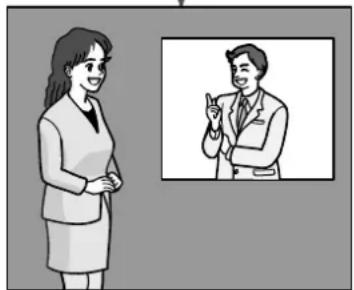
natural_image
Illustration of a woman and a man in business attire, one pointing upward (no text or symbols present)[BLC/ HLC]
Select from the following. When “On” is selected for “Super Dynamic(SD)” or when “On” is selected for “Intelligent auto”, this setting is not available.
- Back light compensation (BLC): Activates the back light compensation (BLC) function.
- High light compensation(HLC): Activates the high light compensation (HLC) function. The high light compensation function limits the over exposure of subjects caused bright light (such as light from headlights of cars) at night.
• Off: Deactivates the back light compensation function and high light compensation function.
- Default: Off
[BLC level]
Adjust the BLC level.
If you move the slider in the “+” direction, the effect of back light compensation will increase.
If you move the slider in the “-” direction, the effect of back light compensation will decrease.
Click the [Reset] button to reset to the default setting.
- Default: 16
[HLC level]
Adjust the high light compensation level.
If you move the slider in the “+” direction, the effect of high light compensation (HLC) will increase. If you move the slider in the “-” direction, the effect of high light compensation (HLC) will decrease.
Click the [Reset] button to reset to the default setting.
- Default: 16
[Mask area]
When mask area is set, the selected area is masked and you can adjust brightness. When “On” is selected for “Super Dynamic(SD)”, this setting is not available.
Refer to "2.6.4.2 Set mask areas" for information on how to set the mask area.
Light control mode
[Light control mode]
Select the light control mode from the following.
- Outdoor scene: Depending on the brightness level (illuminance), the iris will automatically be controlled together with the shutter speed adjustment to control light. When shooting a bright subject such as outdoor, etc., select this parameter. Be aware that flicker may occur when a subject is under fluorescent lighting.
- Indoor scene (50 Hz) / Indoor scene (60 Hz): The shutter speed will automatically be adjusted to prevent flicker caused by fluorescent light. Select 50 Hz or 60 Hz corresponding to the location where the camera is in use.
- ELC S1136 : Uses shutter speed adjustment to control light.
- Fix shutter:
- When 30fps mode or 15fps mode is selected for [Image capture mode]: 1/30 Fix, 3/120 Fix, 2/100 Fix, 2/120 Fix, 1/100 Fix, 1/120 Fix, 1/250 Fix, 1/500 Fix, 1/1000 Fix, 1/2000 Fix, 1/4000 Fix, 1/10000 Fix
- When 25fps mode or 12.5fps mode is selected for [Image capture mode]: 1/25 Fix, 3/100 Fix, 2/100 Fix, 1/100 Fix, 1/250 Fix, 1/500 Fix, 1/1000 Fix, 1/2000 Fix, 1/4000 Fix, 1/10000 Fix
- When 60fps mode is selected for [Image capture mode]: 1/60 Fix, 1/100 Fix, 1/120 Fix, 1/250 Fix, 1/500 Fix, 1/1000 Fix, 1/2000 Fix, 1/4000 Fix, 1/10000 Fix
- When 50fps mode is selected for [Image capture mode]: 1/50 Fix, 1/100 Fix, 1/250 Fix, 1/500 Fix, 1/1000 Fix, 1/2000 Fix, 1/4000 Fix, 1/10000 Fix
- Default: Outdoor scene
Note
- When a faster shutter speed is selected (up to 1/10000), it is possible to capture a fast moving object with less blur.
- When a faster shutter speed is selected, the sensitivity will become lower.
- When “On” is selected for “Super Dynamic(SD)”, “Fix shutter” and “ELC” are not available. To configure “Fix shutter” and “ELC”, set “Super Dynamic(SD)” to “Off”.
- When 25fps mode, 50fps mode, or 12.5fps mode is selected for "Image capture mode", "Indoor scene (60 Hz)" is not available.
[Maximum shutter]
The maximum shutter time adjusts the storage time of the sensor. The following are available for the recording duration.
- When 30fps mode or 15fps mode is selected for [Image capture mode]: Max.1/4000s, Max.1/2000s, Max.1/1000s, Max.1/500s, Max.1/250s, Max.1/120s, Max.1/100s, Max.2/120s, Max.2/100s, Max.3/120s, Max.1/30s, Max.2/30s, Max.4/30s, Max.6/30s, Max.10/30s, Max.16/30s
- When 25fps mode or 12.5fps mode is selected for [Image capture mode]: Max.1/4000s, Max.1/2000s, Max.1/1000s, Max.1/500s, Max.1/250s, Max.1/100s, Max.2/100s, Max.3/100s, Max.1/25s, Max.2/25s, Max.4/25s, Max.6/25s, Max.10/25s, Max.16/25s
- When 60fps mode is selected for [Image capture mode]: Max.1/4000s, Max.1/2000s, Max.1/1000s, Max.1/500s, Max.1/250s, Max.1/120s, Max.1/100s, Max.2/120s, Max.1/30s, Max.2/30s, Max.4/30s, Max.6/30s, Max.10/30s, Max.16/30s
- When 50fps mode is selected for [Image capture mode]: Max.1/4000s, Max.1/2000s, Max.1/1000s, Max.1/500s, Max.1/250s, Max.1/100s, Max.2/100s, Max.1/25s, Max.2/25s, Max.4/25s, Max.6/25s, Max.10/25s, Max.16/25s
- Default: Max.1/30s
Note
- When "On" is selected for "Super Dynamic(SD)", "Max.1/2000s" and "Max.1/4000s" are not available.
- When "0" is selected for "Maximum gain", the setting of "Maximum shutter" will be restricted as follows:
- When 30fps mode, 60fps mode or 15fps mode is selected for [Image capture mode]: "Max.2/30s" or higher is not available.
-
When 25fps mode, 50fps mode or 12.5fps mode is selected for [Image capture mode]: "Max.2/25s" or higher is not available.
-
When “Light control mode” is set to “Indoor scene (60 Hz)”, a shorter time than “Max. 1/120s” cannot be set.
- When “Light control mode” is set to “Indoor scene (50 Hz)”, a shorter time than “Max. 1/100s” cannot be set.
[Light control speed]
Adjust the light control speed.
If you move the slider in the “+” direction, the light control speed will increase.
If you move the slider in the “-” direction, the light control speed will decrease.
Click the [Reset] button to reset to the default setting.
- Default: 31
Day & Night(IR)
[Day & Night(IR)]
type1: Models with LED (L)
Select switching between the color mode and the black & white mode from the following.
- Off: The color mode is selected.
-
On(IR Light Off): Always captured as black & white images.
-
On(IR Light On): Always captured as black & white images. Suitable when using near-infrared lighting at night.
- Auto1(IR Light Off): The camera automatically switches between the color mode and the black & white mode in accordance with the picture brightness (luminance).
- Auto2(IR Light On): The camera automatically switches between the color mode and the black & white mode in accordance with the picture brightness (luminance). Suitable when using near-infrared lighting at night.
- Auto3(SCC): Suitable to keep the color mode even under darker light condition. The Super Chroma Compensation (SCC) function retains the color mode even with dim lighting.
- Default: Auto2(IR Light On)
type2: Other than models with LED
Select switching between the color mode and the black & white mode from the following.
- Off: The color mode is selected.
- On: Always captured as black & white images.
- Auto1(Normal): The camera automatically switches between the color mode and the black & white mode in accordance with the picture brightness (luminance).
- Auto2(IR Light): The camera automatically switches between the color mode and the black & white mode in accordance with the picture brightness (luminance). Suitable when using near-infrared lighting at night.
- Auto3(SCC): Suitable to keep the color mode even under darker light condition. The Super Chroma Compensation (SCC) function retains the color mode even with dim lighting.
- Default: Auto1(Normal)
Super Chrome Compensation (SCC) function
This function achieves faithful color images using the proprietary color compensation technology that reproduce images even under low illumination where it is usually difficult to capture objects faithfully.
IMPORTANT
- If the focus cannot be automatically adjusted, refer to "2.6.4.3 Adjust the zoom and focus - Zoom/ Focus adjustment - [Adjusting method]". S2536L
- If the back focus cannot be automatically adjusted, refer to "2.6.4.4 Adjust the back focus Zoom/Focus adjustment - [Adjusting method]". S1136
Note
- Since the color compensation technology is used for "Auto3(Super Chrome Compensation(SCC))", some colors may look different from the actual objects depending on the light condition (such as when infrared lights are used).
- The operating sound might be heard when changing to black-and-white mode, however it does not indicate any malfunction.
- The color mode and the black & white mode may not be switched automatically depending on the environment. In such a case, use the schedule function to switch the color and the black & white mode. For how to set up, refer to our technical information website
.
[Level]
Select the threshold illuminance level (brightness) to switch between the color mode and the black & white mode. The following threshold illuminance level is given when a clear dome cover is in use and also "Off" is selected for "Super Dynamic(SD)".
- 3: Switches from the color mode to the black & white mode when the ambient brightness (luminance) of the camera reaches approx. 8 lx or less.
- 2: Switches from the color mode to the black & white mode when the ambient brightness (luminance) of the camera reaches approx. 4 lx or less.
-
1: Switches from the color mode to the black & white mode when the ambient brightness (luminance) of the camera reaches approx. 2 lx or less.
-
0: Switches from the color mode to the black & white mode when the ambient brightness (luminance) of the camera reaches approx. 1 lx or less.
- Default: 1
Note
- Switching to the color mode will be made when the ambient brightness of the camera reaches approx. 5 to 8 times of the values above respectively. Depending on the environment, the above operation may vary.
- When a low value is selected for "Maximum gain", it may be difficult to switch modes depending on the environment.
- When a smoke dome cover is in use, the brightness around the camera will switch to twice the brightness of a clear dome cover.
[Dwell time]
Select a wait time for switching between the color mode and the black & white mode from the following.
2s/ 10s/ 30s/ 1min
- Default: 10s
[IR LED light intensity] \*Models with LED (L)
Select the IR LED light intensity from High/Middle/Low/Off.
- Default: High
Note
- "Off" is only available when "Black & white input" is selected for "Terminal 1" on the [Alarm] tab.
[Intensity control] \*Models with LED (L)
Select On/Off to determine whether or not to activate the IR Light over exposure suppression function.
- Default: Off
Note
- When "On" is selected for "Intelligent auto", the IR Light over exposure suppression function will not work.
White balance
[White balance]
Select a method of white balance adjustment from the following.
White color can be adjusted by "Red gain" and "Blue gain".
- ATW1: Selects the automatic tracing white balance mode. The camera will constantly check the color temperature of the light source and adjust the white balance automatically. Operating color temperature range is approx. 2,700 K to 6,000 K.
- ATW2: Selects the automatic tracing white balance mode under a sodium lamp. The camera will adjust the white balance automatically under a sodium lamp. Operating color temperature range is approx. 2,000 K to 6,000 K.
- AWC: Selects the automatic white balance control mode. This adjustment is suitable for a location where a light source is stable. Operating color temperature range is approx. 2,000 K to 10,000 K.
- Default: ATW1
Note
• Under the following conditions, color may not be faithfully processed. In these cases, select "AWC".
- When shooting a subject whose major part is a thick color
- When shooting blue sky or sun at sunset
— When shooting a subject whose luminance is too low
- When "AWC" is selected, click the [Set] button.
[Red gain]
Adjust the red color of images.
When the slider is moved in the “+” direction, the red color will become thicker. When the slider is moved in the “-” direction, the red color will be thinner. Click the [Reset] button to reset the color to the default.
- Default: 128
[Blue gain]
Adjust the blue color of images.
When the slider is moved in the “+” direction, the blue color will become thicker. When the slider is moved in the “-” direction, the blue color will be thinner. Click the [Reset] button to reset the color to the default.
- Default: 128
[Mask area]
If you set the mask area, you can adjust the white balance after masking the set area.
Refer to "2.6.4.2 Set mask areas" for information about how to configure the mask area.
[Adjustment speed]
Adjust the white balance adjustment speed.
If you move the slider in the “+” direction, the white balance adjustment speed will increase. If you move the slider in the “-” direction, the white balance adjustment speed will decrease. If you click the [Reset] button, the slider position and white balance adjustment speed will be reset to default.
- Default: 16
Intelligent auto
[Intelligent auto]
Select On/Off to determine whether or not to activate the "Intelligent auto" function.
“Intelligent auto” can detect conditions (back lighting, outdoor, night time, etc.), people's faces and moving objects and then automatically adjust the camera's aperture, gain, shutter speed, and contrast in order to display people's faces and moving objects more clearly.
- Default: On
[Face priority level(Brightness)]
Adjusts the face priority level when "Intelligent auto" is activated.
If you move the slider in the “+” direction, adjusts to improve the visibility of faces.
If you move the slider in the “-” direction, adjusts the entire image so that is well-balanced.
Click the [Reset] button to reset to the default setting.
- Default: 128
[Motion priority level(Shutter)]
Adjusts the motion priority level when "Intelligent auto" is activated.
If you move the slider in the “+” direction, it becomes difficult for the moving subjects to blur, but the noise of dark subjects increases.
If you move the slider in the “-” direction, it becomes easier for the moving subjects to blur, but the noise of dark subjects decreases.
Click the [Reset] button to reset to the default setting.
- Default: 128
Note
- Be aware that flicker may occur due to fluorescent lighting when activating the Intelligent Auto function. In such a case, set either of the following:
- Move the slider of [Motion priority level(Shutter)] in the “-” direction.
- Change [Light control mode] to "Indoor scene (50 Hz)" or "Indoor scene (60 Hz)".
- Be aware that the brightness of the whole image may change due to changes in a part of the object when activating the “Intelligent auto” function. In this case, move the slider of “Face priority level” in the “-” direction.
Detailed setting
[Auto contrast adjust]
Select On/Off(Manual) to determine whether or not to activate the auto contrast adjust function.
On: Activates the auto contrast adjust function.
Off: Stops the auto contrast adjust function.
- Default: On
Note
- When "On" is selected for "Intelligent auto", this setting is not available.
[Contrast level]
Adjust the contrast level.
If you move the slider in the “+” direction, the contrast of the image will increase.
If you move the slider in the “-” direction, the contrast of the image will decrease.
Click the [Reset] button to reset to the default setting.
- Default: 128
[Adaptive black stretch]
Adjust the brightness of the dark parts of the image.
If you move the slider in the "+" direction, the dark parts of the image will become brighter.
If you move the slider in the “-” direction, the dark parts of the image will become darker.
Click the [Reset] button to reset to the default setting.
- Default: 128
IMPORTANT
- The “adaptive black stretch” settings may cause the noise in the darker parts to increase, and the parts around borders between the darker parts and the brighter parts may become darker/brighter than the other darker/brighter parts.
[Adaptive highlight stretch]
Adjust the brightness of the bright parts of the image.
If you move the slider in the “+” direction, the dark parts of the image will become brighter.
If you move the slider in the “-” direction, the bright parts of the image will become darker.
Click the [Reset] button to reset to the default setting.
- Default: 128
[Fog compensation]
Select “On” or “Off” to determine whether or not to activate the fog compensation function. When “On” is selected for “Auto contrast adjust”, or when “On” is selected for “Intelligent auto”, this setting is not available.
The fog compensation function can make dim images that have been affected by fog or other conditions clearer using digital image processing.
- On: Activates the fog compensation function.
- Off: Stops the fog compensation function.
- Default: Off
[Level]
Adjust the fog compensation level.
The level of fog compensation will increase when the slider is moved in the “+” direction, and decrease when the slider is moved in the “-” direction. Click the [Reset] button to reset to the default setting.
- Default: 4
[Pedestal level]
Adjust the black level of images by moving the slider.
When the slider is moved to the “+” direction, images will become brighter. When the slider is moved to the “-” direction, images will be darker. Click the [Reset] button to reset the color to the default.
- Default: 128
Scene registration
[Scene file]
The combination of settings used to adjust image quality can be saved as a scene file. The scene file can be selected here.
Registered scene files can be configured in the "Schedule" page ( "2.11 Configure the settings relating to the schedules [Schedule]). If the timing of when images are viewed greatly affects the area where images are viewed, registering scene files to the schedule can let you match a combination of settings to different times of day in order to view images in the best conditions.
[Scene file title]
The scene file name (up to 10 characters) displayed in "Scene file" can be changed. Only file names displayed in "1:", "2:", "3:", and "4:" can be changed.
- Unavailable characters: " & \
[Load] button
Loads the setting data selected in "Scene file" and changes the current image accordingly.
[Register] button
The combination of settings used to adjust image quality that are currently displayed can be registered to the scene file displayed in "Scene file".
2.6.4.2 Set mask areas
This explains how to mask an area of the image and adjust brightness. When setting the mask area, set "Super Dynamic(SD)" to "Off".
- Display the "Image adjust" setup menu. (→"2.6.4 Configure the settings relating to image adjust, zoom/focus, privacy zone, VIQS, and lens distortion compensation [Image quality]")
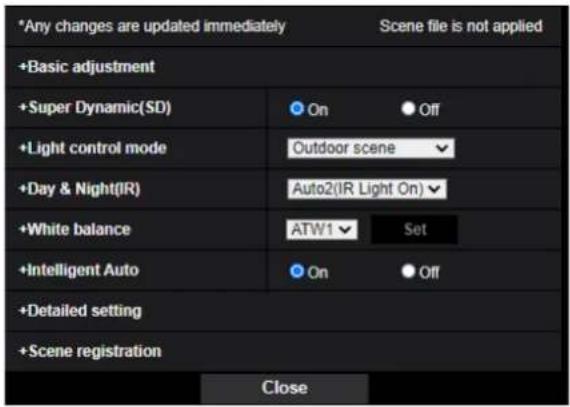
- Click "+" on the left of "Super Dynamic(SD)" to display the detailed SD menu.
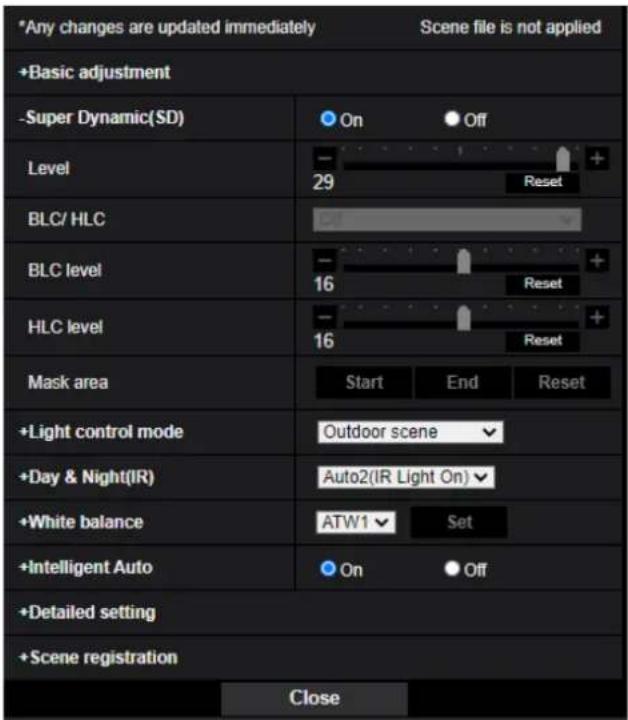
3. Click the [Start] button of "Mask area".
→ Borders will appear and the image displayed on the [Image quality] tab will be divided into 48 (8×6).
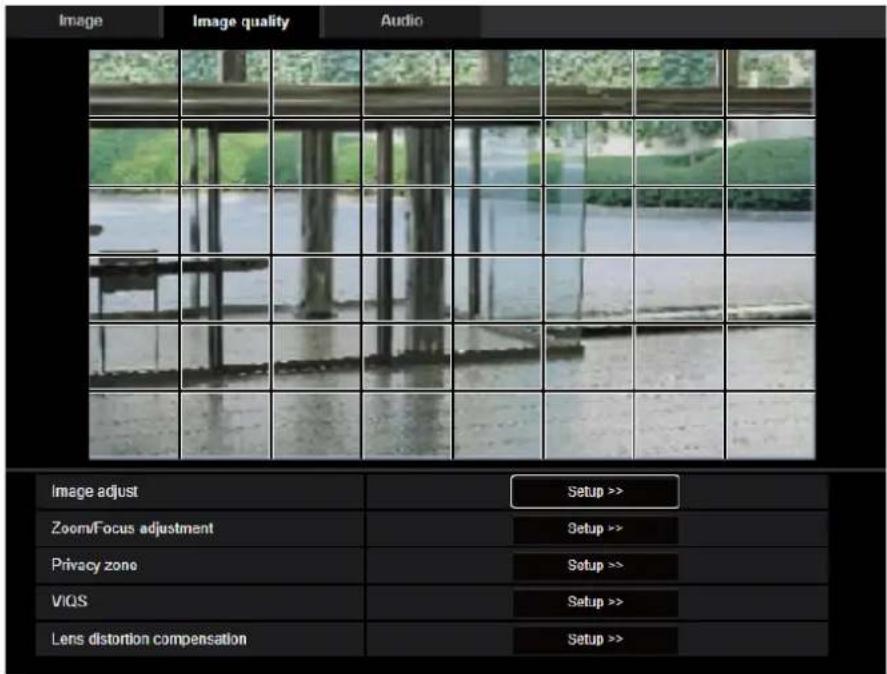
4. Click the divided areas to be masked.
→ The clicked areas will be masked and will become white. To cancel masking, click the area again.
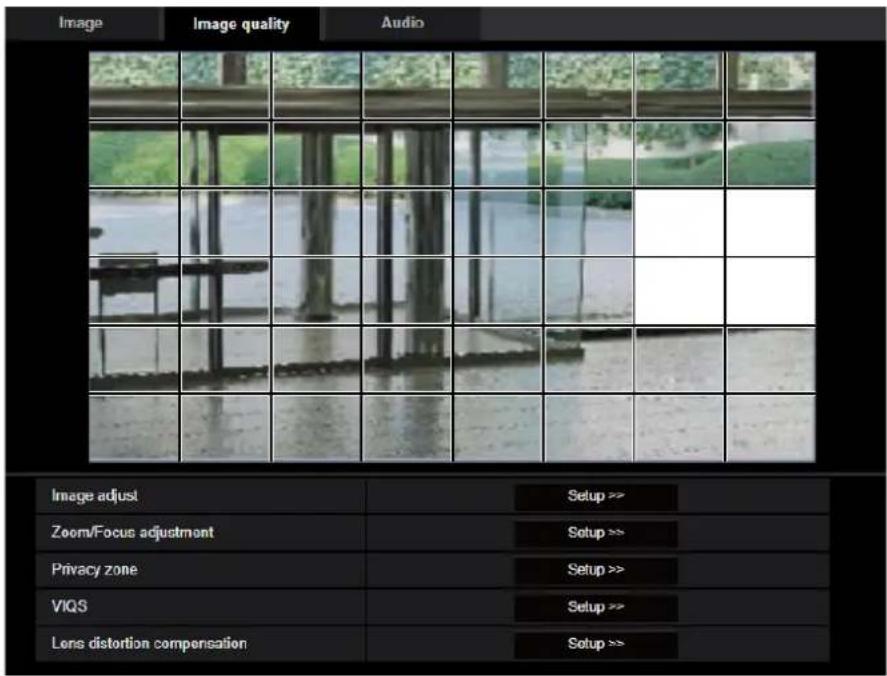
5. Click the [End] button after completing masking areas.
→ The borders on the image displayed on the [Image quality] tab will disappear.
IMPORTANT
- The mask area may move out of alignment if the setting for "Image rotation" of the [Basic] tab is changed after the mask area has been configured.
Make sure to check the mask area after changing the "Image capture mode" setting. - The mask area may move out of alignment when "Extra optical zoom" is configured. Make sure to check the mask area after changing the setting.
Note
- When the [Reset] button is clicked, masking for all the masked areas will be canceled.
2.6.4.3 Adjust the zoom and focus
Click the [Setup>>] button of "Zoom/Focus adjustment" S2536L on the [Image quality] tab of the "Image/Audio" page. (→[Zoom/Focus adjustment] S2536L)
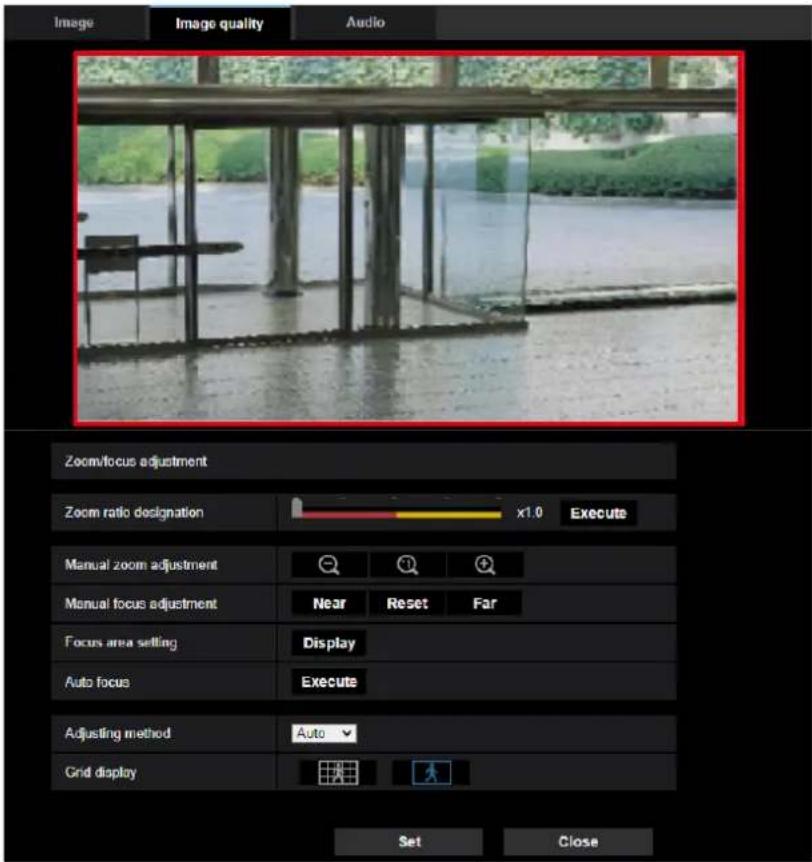
Zoom/Focus adjustment
It is possible to adjust the angular field of view using the zoom and the extra optical zoom.
Adjust the focus setting by moving the lens focus to the appropriate position.
Manual and auto adjustments are available.
[Zoom ratio designation]
The zoom and focus can be adjusted at the same time.
Operate the slider to enlarge/reduce the angular field of view adjustment outline in the image.
When adjusting the zoom ratio to the “Tele” side, only the angular field of view adjustment outline is reduced, and it is possible to determine the zoom ratio while checking the angular field of view after zooming is performed.
When adjusting the zoom ratio to the “Wide” side, the image itself is zoomed out of or the angular field of view adjustment outline is enlarged, and it is possible to determine the zoom ratio while checking the image size after zooming is performed.
After the angular field of view adjustment outline is adjusted, zooming is performed, and the auto focus function starts to automatically adjust focus based on a subject located in the center of the screen by clicking the [Execute] button.
Note
- The red area of the slider and angular field of view adjustment outline represents optical zoom, and the yellow area represents extra optical zoom. The maximum magnification for optical zoom and extra optical zoom varies depending on the model.
- If you click the button of [Room adjustment], [Zoom ratio designation] cannot be operated. To perform [Zoom ratio designation], click the [Load] button, or the button of [Manual zoom adjustment].
- The specified zoom ratio may not be obtained with [Zoom ratio designation]. In that case, specify the zoom ratio and reopen the menu window. Then, make adjustment again with [Zoom ratio designation] or [Manual zoom adjustment] as required.
[Manual zoom adjustment]
The zoom can be adjusted manually.
![i-PRO WV-S1536LTN - [Manual zoom adjustment] - 1](/content/2026/05/911312/images/a76b77f5e837955ded7f5599eb0adc3a13380c8d356f93eb54f36c6085d31256.jpg)
Click this button to adjust the zoom ratio to the "Wide" side until x1.0.
![i-PRO WV-S1536LTN - [Manual zoom adjustment] - 2](/content/2026/05/911312/images/fa0528a279c4c60a4d2d606a52f0c186ea96c946c0b1c3fd2fff374bd9b876a5.jpg)
Click this button to set the zoom ratio to x1.0.
![i-PRO WV-S1536LTN - [Manual zoom adjustment] - 3](/content/2026/05/911312/images/75f278e465b940927373e91bffb028344693aba13e389f73d839a2ce8be117a7.jpg)
Click this button to adjust the zoom ratio to the "Tele" side.
Note
- The camera switches between optical zoom and extra optical zoom depending on the zoom ratio.
- For WV-S1536LTN, WV-S2536LTN
Until 2.3x: Optical zoom
Until 6.9x: Optical zoom + EX optical zoom
- For WV-S2536LN, WV-S2536L, WV-S2236L, WV-S2136L, WV-S2136, WV-S1536LN,
WV-S1536L, WV-S1536LNS
Until 3.1x: optical zoom
Until 9.3x: optical zoom + extra optical zoom
IMPORTANT
- If extra optical zoom is configured after configuring settings for the mask area ( "2.6.4.2 Set mask areas"), privacy zone ( "2.6.4.6 Configure the settings relating to the privacy zone ("Privacy zone" setup menu"), VMD area ( "2.8.5 Configure the VMD settings [VMD area]), SCD area ( "2.8.7 Configure the SCD settings [SCD area]) and VIQS area ( "2.6.4.8 Configure the VIQS area"), the configured areas for those settings may move out of alignment. Therefore, perform the setting for extra optical zoom function before other settings.
[Manual focus adjustment]
The focus can be adjusted manually.
• [Near]: Click this button to adjust the focus to the "Near" side.
- [Reset]: Click this button to reset the focus to the default.
- [Far]: Click this button to adjust the focus to the "Far" side.
Note
- One-click of the [Near] or [Far] button is a fine adjustment, and it can look like there is no change in the focus. To shift the focus point largely, keep the button pressed.
[Auto focus area setting]
When performing auto focus, you can use this frame to specify the subject on the screen for which the focus should be adjusted. Unless specified otherwise, adjusts the focus to the subject in the central area of the screen.
- [Display]: Displays the auto focus frame in the settings screen. In the default settings, the auto focus frame is displayed in the central area of the screen. Drag the mouse on the image, and specify the area where the focus should be adjusted. Once the setting is complete, click the [Register] button.
When the [Display] button is clicked, the [Reset] and [Register] buttons are displayed.
- [Reset]: Resets the frame setting to its default.
• [Register]: Saves the set frame. Click to automatically adjust the focus on the subject in the specified area.
[Auto focus]
The auto focus function starts to automatically adjust focus based on a subject located in the center of the screen by clicking the [Execute] button.
IMPORTANT
- When a value with an interval longer than “Max.1/30s” (Max.2/30s/ Max.4/30s/ Max.6/30s/ Max.10/30s/ Max.16/30s) is selected for “Maximum shutter” (→[Maximum shutter]), if “Auto focus” is executed during slow shutter operations at night, it may take a long time to complete “Auto focus”.
- In the following locations or with the following subjects, the focus may not be able to be automatically adjusted. In this case, manually adjust the focus.
- when the subject moves a lot
- when there are large changes to the lighting intensity
- when the light level is low
- when the subject or location is extremely bright or reflective
- when viewing through windows
- when the dome cover is in a location where it can easily become dirty
- locations where there is not much contrast such as a white wall
- when there is harsh flickering
- When images in the near-infrared light area change from color to black & white, images may be out of focus due to the nature of optical properties. In this case, the focus can automatically be corrected by selecting "Auto" or "Preset" for "Adjusting method" (the focus will not automatically be adjusted according to the illumination level change once the focus is corrected).
[Adjusting method]
Select the focus adjustment method upon switching between the color mode and the black & white mode. For further information, refer to our technical information website
- Auto: When color/BW of an image on which the final focus adjustment is performed is switched, the focus will automatically be adjusted. When switched back to the previous color/BW, the focus position will return to the position determined when the final focus adjustment was performed. If the focus of an image could not be adjusted as a black & white image, the image may be readjusted as a color image and then switched again to a black & white image.
- Preset: Performs the preset movement to each specified focus position when switching between color and black & white images. The preset position is the focus position specified last time, which was automatically memorized for each of color images and black & white images.
• Fix: Fixes the position after adjusting the focus either automatically or manually. - Default: Auto
IMPORTANT
- If the focus cannot be adjusted automatically when switching between the color mode and the black & white mode when "Auto" is selected, select "Preset" or "Fix" and adjust the focus manually.
[Grid display]
Select On/Off to determine whether or not to use the grid display for position adjustment of this product when using the extension software.
For further information about the grid adjustment, refer to our technical information website below.
https://i-pro.com/global/en/surveillance/training_support/support/technical_information
[Close] button
Click this button to close the "Zoom/Focus adjustment" setup menu.
2.6.4.4 Adjust the back focus
S1136
Click the [Setup>>] button of "Back focus" on the [Image quality] tab of the "Image/Audio" page.
(→“2.6.4 Configure the settings relating to image adjust, zoom/focus, privacy zone, VIQS, and lens distortion compensation [Image quality]”)
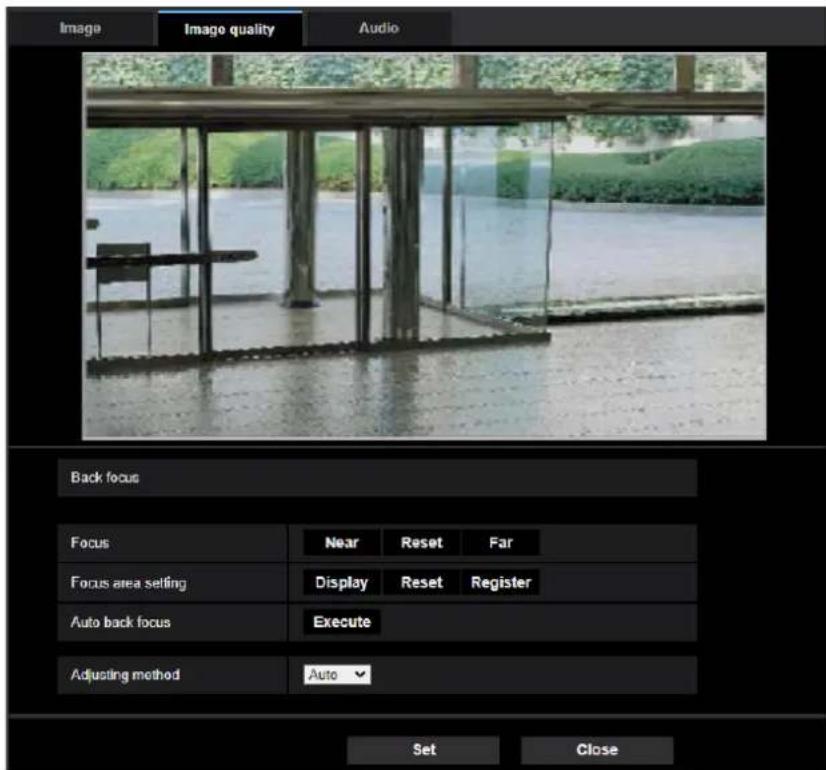
Back focus setting
Adjust the back focus by moving the CMOS image sensor of the camera to the appropriate position.
[Focus]
The back focus can be adjusted manually.
• [Near]: Click this button to adjust the focus to the "Near" side.
- [Reset]: Click this button to reset the focus to the default.
• [Far]: Click this button to adjust the focus to the "Far" side.
[Focus area setting]
When performing back focus, you can use this frame to specify the subject on the screen for which the focus should be adjusted. Unless specified otherwise, adjusts the focus to the subject in the central area of the screen.
- [Display]: Displays the back focus frame in the settings screen. In the default settings, the back focus frame is displayed in the central area of the screen. Drag the mouse on the image, and specify the area where the focus should be adjusted. Once the setting is complete, click the [Register] button. When the [Display] button is clicked, the [Reset] and [Register] buttons are displayed.
- [Reset]: Resets the frame setting to its default. To register, click the [Register] button.
• [Register]: Saves the set frame. Click to automatically adjust the focus on the subject in the specified area.
[Auto back focus]
The auto back focus function starts to automatically adjust back focus based on a subject located in the center of the screen by clicking the [Execute] button.
IMPORTANT
- When a value with an interval longer than “Max. 1/30s” (Max. 2/30s/ Max. 4/30s/ Max. 6/30s/ Max. 10/30s/ Max. 16/30s) is selected for “Maximum shutter” (→“2.6.4 Configure the settings relating to image adjust, zoom/focus, privacy zone, VIQS, and lens distortion compensation [Image quality]”), if “Auto back focus” is executed during slow shutter operations at night, it may take a long time to complete “Auto back focus”.
-
In the following locations or with the following subjects, the auto back focus may not be able to be automatically adjusted. In this case, manually adjust the focus.
-
when the subject moves a lot
- when there are large changes to the lighting intensity
- when the light level is low
- when the subject or location is extremely bright or reflective
- when viewing through windows
- when the lens is in a location where it can easily become dirty
- locations where there is not much contrast such as a white wall
- when there is harsh flickering
- When images in the near-infrared light area change from color to black & white, images may be out of focus due to the nature of optical properties. In this case, the focus can automatically be corrected by selecting "Auto" or "Preset" for "Adjusting method" (the focus will not automatically be adjusted according to the illumination level change once the focus is corrected).
[Adjusting method]
Select the back focus adjustment method upon switching between the color mode and the black & white mode.
- Auto: Adjusts the back focus function automatically and corrects the focus when switching between color and black & white images.
- Preset: Performs the preset movement to each specified back focus position when switching between color and black & white images. The preset position is the back focus position specified last time, which was automatically memorized for each of color images and black & white images.
• Fix: Fixes the position after adjusting the back focus either automatically or manually. - Default: Auto
[Close] button
Click this button to close the "Back focus" setup menu.
2.6.4.5 Adjust the angular field of view using the Extra optical zoom function S1136
Click the [Setup>>] button of "Extra zoom" on the [Image quality] tab of the "Image/Audio" page. (→"2.6.4.1 Configure the settings relating to image quality ("Image adjust" setup menu)") It is possible to adjust the angular field of view using the extra zoom function.
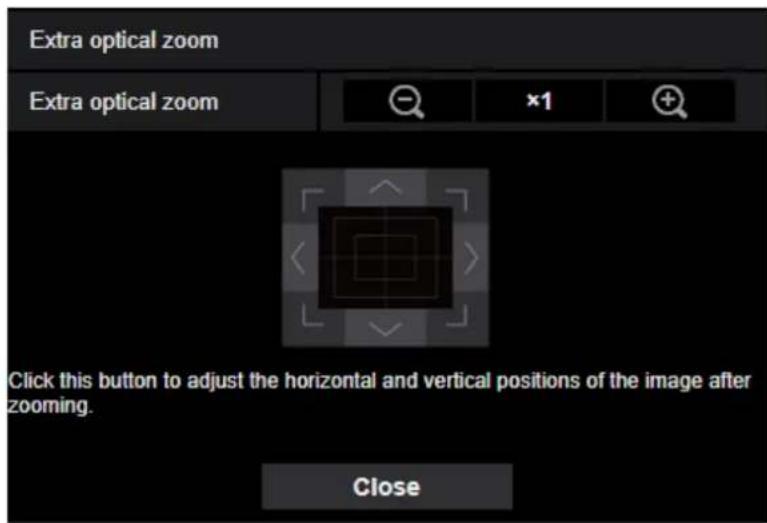
• : C button to adjust the zoom ratio to the "Wide" side.
• x1 : Click this button to set the zoom ratio to x1.0.
• : O button to adjust the zoom ratio to the "Tele" side.
- : Click to buttons to adjust the horizontal/vertical position of the image after zooming.
Note
- For information about the maximum zoom ratio, refer to the Important Information.
IMPORTANT
- The positions will move out of alignment if extra zoom settings are configured when the mask area (→“2.6.4.2 Set mask areas”), privacy zone (→“2.6.4.6 Configure the settings relating to the privacy zone (“Privacy zone” setup menu”), VMD area (→“2.8.5 Configure the VMD settings [VMD area]”), SCD area (→“2.8.7 Configure the SCD settings [SCD area]”), and VIQS area (→“2.6.4.8 Configure the VIQS area”) is configured. To prevent this, perform the setting for the extra zoom function before other settings.
2.6.4.6 Configure the settings relating to the privacy zone (“Privacy zone” setup menu)
Click the [Setup>>] button of "Privacy zone" on the [Image quality] tab of the "Image/Audio" page.
(→“2.6.4 Configure the settings relating to image adjust, zoom/focus, privacy zone, VIQS, and lens distortion compensation [Image quality]”)
When there is a zone that you do not want to display, set the zone as a privacy zone is filled with gray.
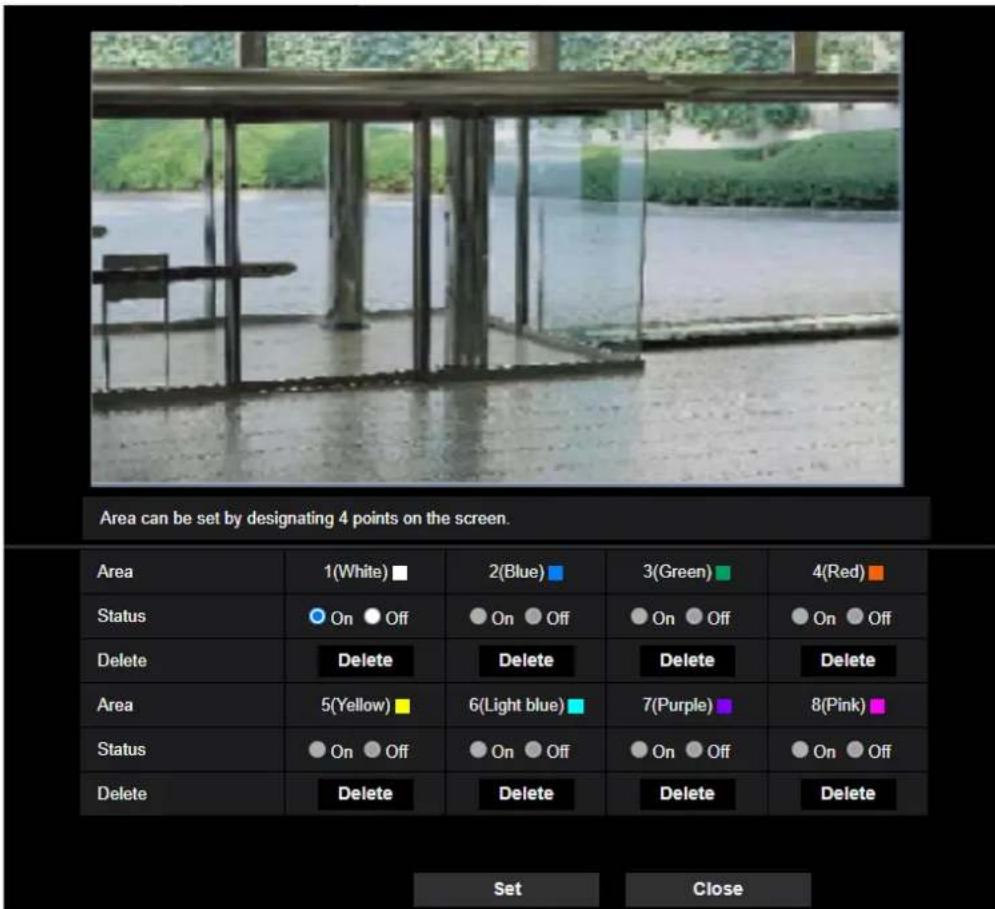
[Area]
The privacy zone will be set by designating four peak points on an image. Each zone can be overlapped. The zones are numbered sequentially from area 1.
Note
- Set the privacy zone larger than the size of an object to be hidden.
[Status]
Select "On" or "Off" to determine whether or not to display the privacy zone.
- On: The privacy zone will be displayed.
- Off: The privacy zone will not be displayed.
- Default: Off
[Delete] button
Click the [Delete] button corresponding to the zone to be deleted.
[Close] button
Click this button to close the "Privacy zone" setup menu.
IMPORTANT
- After configuring the privacy zone, the privacy zone may move out of alignment when “Image rotation” of the [Basic] tab is changed. Make sure to check the privacy zone after changing the setting.
- After configuring the privacy zone, the privacy zone may move out of alignment when the "Extra optical zoom" setting is changed. Make sure to check the privacy zone after changing the setting.
- When the privacy zone is configured while the lens distortion compensation is in active, the privacy zone may move out of alignment.
In this case, firstly reset the lens distortion compensation to "0" once and configure the privacy zone. Then, configure the distortion compensation again.
2.6.4.7 Configure the VIQS setting
Click the [Setup>>] button of "VIQS" on the [Image quality] tab of the "Image/Audio" page. (→“2.6.4 Configure the settings relating to image adjust, zoom/focus, privacy zone, VIQS, and lens distortion compensation [Image quality]”)
VIQS is an abbreviation of Variable Image Quality on Specified area and is a feature that enables you to change the images of a specified area.
It is possible to enhance the image quality of the specified range within a shooting area (image).
It is also possible to moderate the image data size by lowering the image quality of other areas.
The VIQS setting is available only for H.265 (or H.264) images.
Up to 8 VIQS areas can be set.
To check the image after configuring VIQS, when H.265 (or H.264) images are selected under "Stream", you can check the image by pressing the [Confirm] button. You can also check by displaying an H.265 (or H.264) image on the "Live" page.
The VIQS function is not available in the following cases:
- When "On(High)" or "On(Low)" is set for "Smart VIQS" of "Stream(1)"
- When "On" is selected for "Smart P-picture control"
[Area]
When selecting a VIQS area in the screen, it will be numbered as area 1. (Subsequent areas will be numbered in the order of selection.)
[Status]
Select "On" or "Off" to determine whether or not to use the VIQS area.
- On: The VIQS area will be set.
- Off: Does not set the VIQS area.
- Default: Off
[Delete] button
Deletes the VIQS area. Click the button to delete the VIQS area.
[Level]
Configure the difference level in the image quality between specified areas and non-specified areas. The greater the difference level, the more the image quality of the non-specified area is reduced. This makes it possible to moderate the image data size.
Select "On" or "Off" to determine whether or not to activate the VIQS function for the transmitted (Stream(1)) images.
The VIQS (Stream(1)) images can be confirmed with the [Confirm] button.
- Default: Off
[Stream(2)]
Select "On" or "Off" to determine whether or not to activate the VIQS function for the transmitted (Stream(2)) images.
The VIQS (Stream(2)) images can be confirmed with the [Confirm] button.
- Default: Off
[Stream(3)]
Select "On" or "Off" to determine whether or not to activate the VIQS function for the transmitted (Stream(3)) images.
The VIQS (Stream(3)) images can be confirmed with the [Confirm] button.
- Default: Off
[Stream(4)]
Select "On" or "Off" to determine whether or not to activate the VIQS function for the transmitted (Stream(4)) images.
The VIQS (Stream(4)) images can be confirmed with the [Confirm] button.
- Default: Off
IMPORTANT
- When the setting for "Image rotation" on the [Basic] tab is changed after setting "On" for the VIQS setting, the VIQS area may move out of alignment. Make sure to check the VIQS setting after changing the "Image capture mode" setting.
Note
- Refer to "2.6.4.8 Configure the VIQS area" for setting procedure of the VIQS area.
- When "Off" is selected for "Stream transmission" of the applicable stream, the [Confirm] button of the stream selection will become unavailable.
2.6.4.8 Configure the VIQS area
The VIQS area is specified by following the steps below.
- Drag the mouse on the screen to specify the area (up to 8 areas).
→ The specified area is set to area "1(White)", and the outline is displayed.
The areas are set in the area number order from number 1. The color next to the area number show the color of the corresponding outline.
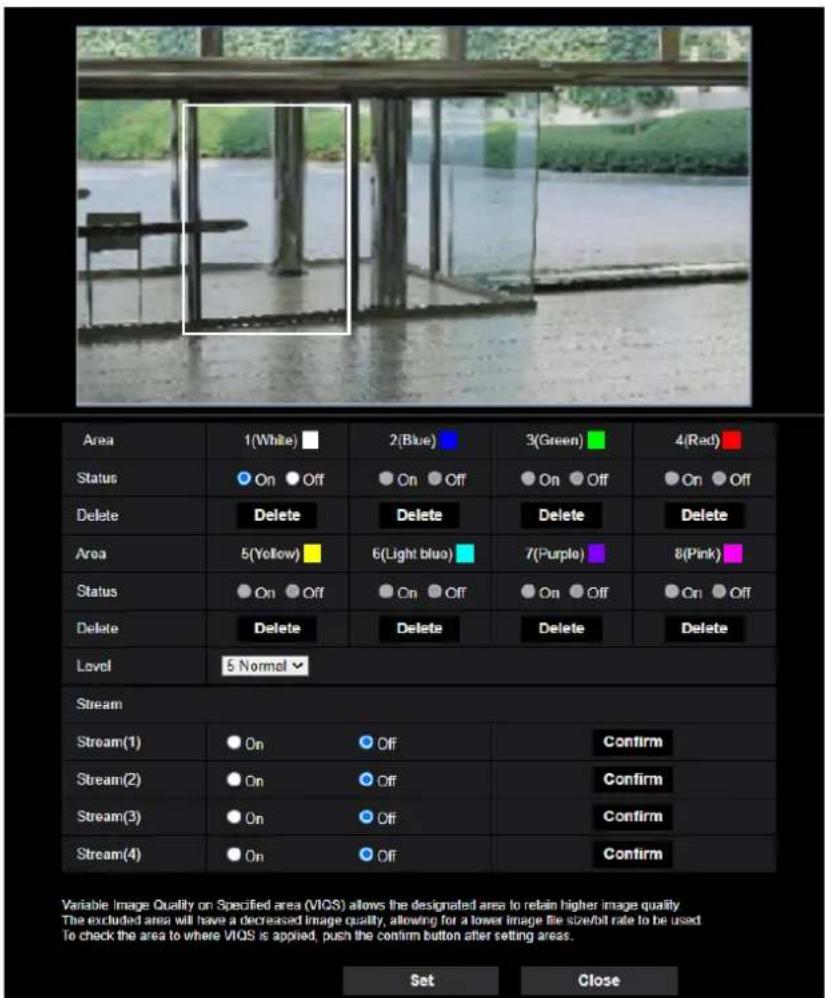
-
Configure the difference level in the image quality between specified areas and non-specified areas. The greater the difference level, the more the image quality of the non-specified area is reduced. This makes it possible to moderate the image data size.
-
Select "On" or "Off" to determine whether or not to activate the VIQS function for the transmitted images of "Stream(1)" - "Stream(4)".
-
Click the [Set] button.
→ This unit is updated with the setting contents. Click the [Delete] button corresponding to the area to be deleted.
- Click the [Confirm] button.
→ The image ("Stream(1)" – "Stream(4)") that the [Confirm] button was pressed for is displayed. When a window is newly opened and about 3 seconds pass, the currently outputted bit rate can be confirmed with the configured VIQS.
IMPORTANT
- No setting contents are determined unless the [Set] button is clicked.
- To check the image after configuring VIQS, display an H.265 (or H.264) image on the "Live" page, or press the [Confirm] button under "Stream".
- The outputted bit rate changes depending on the subject. Confirm the bit rates with actual subjects used when operating the camera.
- If the larger range is specified, the output bit rate increases. Check the current output bit rate to decide the area size.
2.6.4.9 Configure the settings relating to lens distortion compensation
Click the [Setup>>] button of "Lens distortion compensation" on the [Image quality] tab of the "Image/Audio" page. (→[Lens distortion compensation])
Distortion correction can be performed using lens distortion compensation.
The amount of compensation performed can be adjusted.
- The degree of distortion compensation varies depending on the zoom ratio. Adjust the angular field of view with the zoom setting before configuring the lens distortion compensation.
Note
- When the extra optical zoom is in use, the lens distortion compensation will not work.
2.6.5 Configure the settings relating to audio [Audio]
Click the [Audio] tab on the "Image/Audio" page. (→“2.2.1 How to display the setup menu”, “2.2.2 How to operate the setup menu”)
The settings relating to audio can be configured on this page.
Note
- Images and audio will not be synchronized. Therefore, images and audio may not always match.
- Audio may be interrupted depending on the network environment.
Mic input
[Mic input volume]
Set the audio volume for input into the camera. This setting is reflected in the volume when listening to audio on a PC (mic input to PC), and in the volume during "Audio recording".
- Mic High/Mic Middle/Mic Low: Set the volume when audio is input to the camera using a microphone.
• Line High/Line Middle/Line Low: Set the volume when audio is input to the camera using line input. - Default: Mic Middle
[AGC (audio)]
Automatically adjusts the audio reception to a suitable volume. The degree to which the volume is adjusted can be selected from High/Middle/Low.
When "High" is selected, it is easier to hear quiet sounds, but sounds may be heard as noise. If you do not want to hear noise, select "Middle" or "Low". These settings are linked with the volume settings of the "Audio recording".
- Default: High
[Audio bit rate]
Set the audio compression bit rate.
- Default:
- G.726(Live): 32kbps
- AAC-LC(Live/Recording): 128kbps
Audio transmission/reception
[Audio transmission mode]
Select the communication mode used for audio data transmission/reception between the camera and the PC from the following:
• Off: Does not receive/transmit audio between the camera and the PC.
- Mic Input (To PC): PC receives the audio data from the camera. On the PC, the image can be viewed together with the accompanying audio. The image and audio are not synchronized.
- Audio output(From PC): Transmits audio data from the PC to the camera. Audio can be heard from the speaker connected to the camera.
- Interactive(Half-duplex): Both reception and transmission are available. However, audio data cannot simultaneously be transmitted and received.
- Interactive(Full-duplex): Both reception and transmission are simultaneously available.
- Default: Off
Note
- Howling may be generated depending on the usage conditions. Prevent sound generated by the PC from entering the PC microphone.
- “Audio recording” is not available when “Interactive(Half-duplex)” is selected for “Audio transmission mode”.
- When using audio output on the "Live" page, access the "Live" page through HTTPS.
[Mic input interval (Camera to PC)]
Select an interval for audio reception from the following.
20ms/ 40ms/ 80ms/ 160ms
- Default: 40ms
Note
- When a shorter interval is selected, the delay time will be shorter. When a longer interval is selected, audio interruption may be diminished even though the delay time will be longer. Select the interval according to the network environment.
- "Mic input interval (Camera to PC)" is unavailable when "AAC-LC" is selected for "Audio input encoding format".
[Audio output volume (PC to Camera)]
Select a volume level on the camera to hear audio transmitted from the PC.
High/ Middle/ Low
- Default: Middle
[Audio output interval (PC to Camera)]:
Select an interval for audio transmission from the following. 160ms/ 320ms/ 640ms/ 1280ms
- Default: 640ms
Note
- When a shorter interval is selected, the delay time will be shorter. When a longer interval is selected, audio interruption may be diminished even though the delay time will be longer. Edit the settings according to the network environment, performance of the PC in use and the usage of applications other than the web browser.
- Audio may temporarily be interrupted and noise may be heard when multiple users are accessing the camera concurrently. It may be possible to diminish the interruption or noise by setting a longer interval for “Audio output interval (PC to Camera)”.
- Audio may sometimes not be heard depending on the network environment.
[Audio output duration]:
Configure the maximum duration for each time audio is outputted.
- Audio output stops when the specified time has passed. To turn the audio transmission function on, click the Audio output button again.
[Audio output port (PC to Camera)]:
Enter the transmission port number (the port number on the camera used to receive audio data transmitted from the PC).
Available port number: 1024-50000 (Only even numbers are available.)
- Default: 34004
Note
- The transmission port number entered for "Audio output port (PC to Camera)" will be used only when "Unicast port (MANUAL)" is selected for "Transmission type" (→[Transmission type]). When "Off" is selected for "Stream transmission" (→[Stream transmission]) or when "Unicast port (AUTO)" or "Multicast" is selected for "Transmission type", it is not necessary to enter the transmission port number.
Live page
[Audio input encoding format]
Select the audio input encoding format from G.726, G.711, or AAC-LC.
- Default: AAC-LC
Note
- Mic input is available only with AAC-LC when using a web browser.
G.711 is available only when the "Mic Input (To PC)" is selected for "Audio transmission mode".
• G.726 is always applied for the audio transmission encoding format.
[Audio volume control mode]
Select the operation method using the volume cursor of the Mic input button on the "Live" page.
- Adjust PC speaker: Change the volume of the PC in which the "Live" page is opened.
- Adjust Mic input: Change the mic input volume of the camera.
- Default: Adjust Mic input
2.7 Configure the multi-screen settings [Multi-screen]
The cameras from which images are to be displayed on a multi-screen can be registered on the
"Multi-screen" page. (→"2.2.1 How to display the setup menu", "2.2.2 How to operate the setup menu")
[IP address]
Enter the IP address or the host name of the camera to be used for the multi-screen. 4 cameras can be registered as a group and up to 4 groups (16 cameras) can be registered.
When the HTTP port number for the camera of which images are to be displayed had been changed, enter as follows:
Example of entry:
– Example when entering an IPv4 address: http://192.168.0.10:8080
– Example when entering an IPv6 address: http://[2001:db8:0:0:0:0:0:1]:8080
To access the cameras using the HTTPS protocol, enter as follows:
Example of entry: https://192.168.0.10/
• Available number of characters: 1 - 128 characters
- Default: (Cam. 1) selfcamera, (Cam. 2 - 16) not registered
IMPORTANT
- When accessing the camera using the HTTPS protocol, install the pre-installed certificate or the CA certificate of the camera to display images on the monitor. (→“2.10.3.6 Installation of the CA certificate”)
- This camera is specified when "selfcamera" is displayed for the IP address or host name.
Note
- For further information about "Network Camera Recorder with Viewer Software Lite", which is suited to viewing images from several cameras, refer to our technical information website
. - When using the host name, it is necessary to configure the DNS settings of the PC to be used for the multi-screen display. Refer to the network administrator for information on the DNS setting of PCs.
[Camera title]
Enter the title of the camera. The entered camera title will be displayed on a multi-screen.
• Available number of characters: 0 - 20 characters
- Unavailable characters: " &
- Default:
– (Cam. 1) The model No. is displayed.
- (Cam. 2 - 16) None (blank)
Note
- When selecting a 16 split-screen, some characters of the camera title to be displayed may not be displayed.
- Even when "16:9" is selected for the aspect ratio, the multi-screen is displayed in 4:3.
Initial display
[Layout]
Select the layout for the initial display from the following:
4 Screens(1-4)/ 4 Screens(5-8)/ 4 Screens(9-12)/ 4 Screens(13-16)/ 9 Screens(1-9)/ 9 Screens(10-16)/ 16
Screens
- Default: 4 Screens(1-4)
[Refresh interval]
Select the refresh interval during initial display.
- MJPEG: Displays the camera image in the motion JPEG format (video).
- Refresh interval : 1s/ Refresh interval : 3s/ Refresh interval : 5s/ Refresh interval : 10s/ Refresh interval : 30s/ Refresh interval : 60s: Displays the JPEG format (still image) camera image in the selected interval.
- Default: MJPEG
[Image capture size(4 Screens)]
Select the image capture size for 4 screens in initial display.
640x360/320x180
- Default: 320x180
2.8 Configure the alarm settings [Alarm]
The settings relating to alarm actions using the external I/O terminals of the camera, alarm image, the VMD area settings, and the alarm occurrence notification can be configured on the "Alarm" page.
The "Alarm" page has the [Alarm] tab, the [VMD area] tab, the [SCD area] tab, and the [Notification] tab.
2.8.1 Configure the settings relating to the alarm action [Alarm]
Click the [Alarm] tab on the "Alarm" page. (→“2.2.1 How to display the setup menu”, “2.2.2 How to operate the setup menu”)
The settings relating to the alarm can be configured in this section. Refer to "2.8.4 Configure the settings relating to the camera action on alarm occurrence [Alarm]" and "2.8.2 Configure the settings relating to the output terminal [Alarm]" for further information about the settings relating to the alarm images and the alarm output terminal.
Alarm
[Terminal 1]
Determine how to use terminal 1.
- Off: Not used.
- Alarm input(TRM1): Receives alarms. When “Alarm input” is selected, a pull-down menu for “Close”, “Open”, “Close(Continue)”, and “Open(Continue)” is displayed.
- Close: An alarm is detected when the terminal status is changed to "Close".
- Open: An alarm is detected when the terminal status is changed to "Open".
- Close(Continue): An alarm is detected when the terminal status is changed to "Close". When "Close" is selected for the terminal status, alarm detection will be performed regularly at a fixed interval set by "Alarm deactivation time".
- Open(Continue): An alarm is detected when the terminal status is changed to "Open". When "Open" is selected for the terminal status, alarm detection will be performed regularly at a fixed interval set by "Alarm deactivation time".
- Black & white input: Receives the black & white switchover input. (When the input is set to On, the black & white mode is activated.)
- Auto time adjustment: Receives the time adjustment input. When the signal is received and if the clock is within 29 minutes ± the hour, the time will be adjusted to 00 minutes 00 seconds. During SD memory card recording, the time is not changed in operations which reset the time under 5 seconds. When “Auto time adjustment” is selected, a pull-down menu for “Close” and “Open” is displayed.
- Close: The time is adjusted when the terminal status is changed to "Close".
- Open: The time is adjusted when the terminal status is changed to "Open".
- Default: Off
[Terminal 2]
Determine how to use terminal 2.
- Off: Not used.
- Alarm input(TRM2): Receives alarms. When “Alarm input” is selected, a pull-down menu for “Close”, “Open”, “Close(Continue)”, and “Open(Continue)” is displayed.
- Close: An alarm is detected when the terminal status is changed to "Close".
- Open: An alarm is detected when the terminal status is changed to "Open".
- Close(Continue): An alarm is detected when the terminal status is changed to "Close". When "Close" is selected for the terminal status, alarm detection will be performed regularly at a fixed interval set by "Alarm deactivation time".
- Open(Continue): An alarm is detected when the terminal status is changed to "Open". When "Open" is selected for the terminal status, alarm detection will be performed regularly at a fixed interval set by "Alarm deactivation time".
- Alarm output: Alarm output will be carried out according to the settings for "Output terminal" (→“2.8.2 Configure the settings relating to the output terminal [Alarm]”).
- Default: Off
[Terminal 3]
Determine how to use terminal 3.
- Off: Not used.
- Alarm input(TRM3): Receives alarms. When "Alarm input" is selected, a pull-down menu for "Close", "Open", "Close(Continue)", and "Open(Continue)" is displayed.
- Close: An alarm is detected when the terminal status is changed to "Close".
- Open: An alarm is detected when the terminal status is changed to "Open".
- Close(Continue): An alarm is detected when the terminal status is changed to "Close". When "Close" is selected for the terminal status, alarm detection will be performed regularly at a fixed interval set by "Alarm deactivation time".
- Open(Continue): An alarm is detected when the terminal status is changed to "Open". When "Open" is selected for the terminal status, alarm detection will be performed regularly at a fixed interval set by "Alarm deactivation time".
- AUX output: AUX output will be supplied. The [AUX] buttons will be displayed on the "Live" page.
- Default: Off
IMPORTANT
- In order for the EXT I/O terminals to detect alarm inputs when the terminal status is changed from Open to Close (On) or from Close to Open (Off), about 100 ms or more is needed. Because alarms cannot be detected for about 5 seconds after a detection is made, alarm inputs received within about 5 seconds after an alarm is detected are not detected.
Note
- AUX is a camera terminal that allows users to operate (Open/Close) arbitrarily from the "Live" page. For example, an operator can remotely control lights in a place where the camera is installed by connecting the terminal to the light controller.
• Refer to the Installation Guide for further information about input/output rating of each terminal.
[VMD alarm]
When clicking "VMD >>", the [VMD area] tab of the "Alarm" page will be displayed. (→“2.8.6 Set the VMD areas [VMD area]”)
[SCD alarm]
When clicking "SCD", the [SCD area] tab of the "Alarm" page will be displayed. (→"2.8.7 Configure the SCD settings [SCD area]")
[Audio detection alarm]
When clicking "Audio detection", the [Audio detection] tab of the "Alarm" page will be displayed.
[Command alarm]
Select "On" or "Off" to determine whether or not to receive the command alarm.
The command alarm is the function that provides notification of a TCP alarm notification from the other cameras. When “On” is selected, alarm actions will be performed between multiple cameras.
- Default: Off
[Reception port]
Select a port number to be used to receive the command alarm.
• Available range: 1-65535
- Default: 8181
The following port numbers are unavailable since they are already in use.
20, 21, 23, 25, 42, 53, 67, 68, 69, 80, 110, 123, 161, 162, 443, 554, 995, 10669, 10670, 59000-61000
[Alarm deactivation time]
Configure the duration that detections won't be made after an alarm is detected. For example, by using this function you can prevent E-mail from being sent too often when E-mail notifications are configured to be sent to a mobile terminal or tablet device when an alarm is detected.
5-600s
- Default: 5s
Note
- The duration that alarm detections are not made can be managed for each type of alarm. For example, even during the time when alarm detection for command alarm is not being performed, VMD alarms and SCD alarms will be detected.
[Alarm test]
Click the [Execute] button to execute the alarm test function.
Note
- When the test alarm function is executed, the camera will detect a command alarm. This can be used to check the SD recording or notification to external devices triggered by alarm detection. Check the related settings using the system logs of this camera and the external device set as the notification destination.
- The test alarm function cannot be executed multiple times during the alarm deactivation time.
2.8.2 Configure the settings relating to the output terminal [Alarm]
Click the [Alarm] tab on the “Alarm” page. ( “2.2.1 How to display the setup menu”, “2.2.2 How to operate the setup menu”)
The settings relating to the output terminal can be configured in this section.
Output terminal
In order to be able to configure "Output terminal", "Alarm output" must be selected for [Terminal 2] of the [Alarm] setting.
[Terminal output upon alarm detection]
Select "On" or "Off" to determine whether or not to output the alarm signals to the output terminal when an alarm is detected.
- Default: Off
[SD memory card error]
Select "On" or "Off" to determine whether or not to output signals from the output terminal when an error is detected for the SD memory card.
SD memory card error condition: SD memory card error (write error, read error, etc), Total use time over 6 years, and number of overwrites over 2000 times
- On: When an error status is detected, the signals from an output terminal is outputted and the [Alarm occurrence indication] button on the "Live" page blinks.
- Off: Deactivates the warning status detection.
- Default: Off
IMPORTANT
- In order to be able to correctly use this function, format the SD memory card with the camera before using it.
Note
- The total service time of 6 years is the total power-on time from the SD card being inserted. 2000 cycles are the upper limit overwrite counts of the industrial SD memory card (MLC type). These are typical values and not a guarantee of the SD card lifetime.
- The output terminal and the SD memory card errors use the same output terminal.
• A signal is outputted to the output terminal when either an alarm or SD memory card error occurs. - When an SD memory card error is detected, the [Alarm occurrence indication] button on the "Live" page blinks. If you click on the [Alarm occurrence indication] button, the button will be hidden.
- Output signals from the output terminal for [SD memory card error] differ depending on the settings of [Terminal state upon alarm detection].
- When "Latch" is selected: Even after you click the [Alarm occurrence indication] button and it disappears, output signals from the output terminal will continue as long as the cause of the [SD memory card error] is not resolved.
- When "Pulse" is selected: Even after you click the [Alarm occurrence indication] button and it disappears, output signals from the output terminal will continue as long as the cause of the [SD memory card error] is not resolved. However, if the time period specified for [Pulse output width] is exceeded, output signals from the output terminal will be stopped.
[Terminal state upon alarm detection]
Select "Latch" or "Pulse" for the output terminal at an alarm occurrence.
- Latch: When an alarm is detected, the output terminal will be in the state selected for "Terminal action upon alarm detection" until the alarm occurrence indication button is clicked.
- Pulse: When an alarm is detected, the output terminal will be in the state to the "Terminal action upon alarm detection" setting for the period set for "Pulse output width". When the alarm occurrence indication button is clicked, the output terminal will return to the normal state.
- Default: Latch
[Terminal action upon alarm detection]
Select “Open” or “Close” to determine whether to open or close the output terminal when outputting the alarm signals.
- Open: The output terminal will open when outputting the alarm signals. (Normally close)
- Close: The output terminal will close when outputting the alarm signals. (Normally open)
- Default: Close
Note
- When "Open" is selected, the alarm signal will be output for about 20 seconds when the power of the unit is turned on.
[Pulse output width]
When “Pulse” is selected for “Terminal state upon alarm detection”, select an output terminal duration from the following.
• Available range: 1-120s
- Default: 1s
2.8.3 Change the AUX name [Alarm]
Click the [Alarm] tab on the “Alarm” page. ( “2.2.1 How to display the setup menu”, “2.2.2 How to operate the setup menu”)
The names of "AUX", "Open" and "Close" on the "Live" page can be changed.
AUX title
[AUX (Up to 10 characters)]
Enter the name for "AUX" on the "Live" page.
- Unavailable characters: " &
- Default: AUX
[Open (Up to 5 characters)]
Enter the name for "Open" of "AUX" on the "Live" page.
- Unavailable characters: " &
- Default: Open
[Close (Up to 5 characters)]
Enter the name for "Close" of "AUX" on the "Live" page.
- Unavailable characters: " &
- Default: Close
Note
- AUX name can be changed when "AUX output" is selected for "Terminal 3" of "Alarm".
- AUX is a camera terminal that allows users to operate (Open/Close) arbitrarily from the "Live" page. For example, an operator can remotely control lights in a place where the camera is installed by connecting the terminal to the light controller.
2.8.4 Configure the settings relating to the camera action on alarm occurrence [Alarm]
Click the [Alarm] tab on the “Alarm” page. ( “2.2.1 How to display the setup menu”, “2.2.2 How to operate the setup menu”)
The settings related to the camera action on alarm can be configured in this section.
[Alarm E-mail notification]
Click "E-mail server >>" to display the setup menu that can configure the settings relating to E-mail notification when an alarm occurs. The setup menu will be displayed in a newly opened window. (→“2.8.4.1 Configure settings relating to alarm E-mail notifications”)
[Alarm image recording(SD memory card)]
Click "SD memory card setup >>" to display the setup menu that can configure the settings relating to recording images on an SD memory card when an alarm occurs. The setup menu will be displayed in a newly opened window. (→"2.8.4.2 Configure settings relating to recording to an SD memory card when an alarm occurs")
[TCP alarm notification]
Click "TCP alarm notification >>" to display the setup menu that can configure the settings relating to transmitting TCP alarm notifications when an alarm occurs. The setup menu will be displayed in a newly opened window. (→"2.8.4.3 Configure settings relating to TCP alarm notification when an alarm occurs")
[HTTP alarm notification]
Click "HTTP alarm notification setup >>" to display the setup menu that can configure the settings relating to transmitting HTTP alarm notifications when an alarm occurs. The setup menu will be displayed in a newly opened window. (→“2.8.4.4 Configure settings relating to HTTP alarm notification when an alarm occurs”)
[SNMP transmission upon alarm detection]
Click "To SNMP setting" to display the setup menu that can configure the settings relating to SNMP transmission when an alarm occurs. The setup menu will be displayed in a newly opened window.
(→“2.8.4.5 Configure settings relating to SNMP transmissions of alarm images”)
2.8.4.1 Configure settings relating to alarm E-mail notifications
Click "E-mail server >>" of "Camera action on alarm" on the [Alarm] tab of the "Alarm" page. (→“2.8.4 Configure the settings relating to the camera action on alarm occurrence [Alarm])
Refer to “2.10.2.1 Configure the settings related to sending E-mails” for information on configuration for these settings.
2.8.4.2 Configure settings relating to recording to an SD memory card when an alarm occurs
Click "SD memory card setup >>" of "Camera action on alarm" on the [Alarm] tab of the "Alarm" page.
(→“2.8.4 Configure the settings relating to the camera action on alarm occurrence [Alarm]”)
Refer to “2.5.2 Configure the settings relating to the SD memory card [SD memory card]” for information on configuration for these settings.
2.8.4.3 Configure settings relating to TCP alarm notification when an alarm occurs
Click "TCP alarm notification >>" of "Camera action on alarm" on the [Alarm] tab of the "Alarm" page.
(→“2.8.4 Configure the settings relating to the camera action on alarm occurrence [Alarm]”)
Refer to "2.8.10.1 Configure the settings relating to TCP alarm notification" for information on configuration for these settings.
2.8.4.4 Configure settings relating to HTTP alarm notification when an alarm occurs
Click "HTTP alarm notification setup >>" of "Camera action on alarm" on the [Alarm] tab of the "Alarm" page.
(→“2.8.4 Configure the settings relating to the camera action on alarm occurrence [Alarm]”)
Refer to “2.8.10.2 Configure the settings relating to HTTP alarm notification” for information on configuration for these settings.
2.8.4.5 Configure settings relating to SNMP transmissions of alarm images
Click "To SNMP setting" of "Camera action on alarm" on the [Alarm] tab of the "Alarm" page. (→“2.8.4 Configure the settings relating to the camera action on alarm occurrence [Alarm]”)
Refer to "2.10.2.6 Configure the settings relating to SNMP" for information on configuration for these settings.
2.8.5 Configure the VMD settings [VMD area]
Click the [VMD area] tab on the "Alarm" page. (→“2.2.1 How to display the setup menu”, “2.2.2 How to operate the setup menu”)
The video motion detection areas can be set on this page.
Up to 4 areas can be set. When motion is detected in the set area, it will be regarded as an alarm.
IMPORTANT
- The alarm occurrence indication button ( “1.1.2 About the “Live” page”) will be displayed when motion is detected by the VMD function.
- The alarm occurrence indication button will be displayed when receiving an alarm input of a terminal alarm or a command alarm.
- Depending on the network environment, notification may be delayed.
- After configuring the VMD area, the VMD area may move out of alignment when "Image rotation" of the [Basic] tab is changed. Make sure to check the VMD area after changing the "Image capture mode" setting.
- The motion detection function is not the dedicated function to prevent thefts, fires, etc. We are not responsible for any accidents or damages that may occur.
- Be aware that a VMD alarm may occur due to changes in the brightness of the whole image depending on the status of the object when “On” is selected for “Intelligent auto”. In such a case, set either of the following:
- Select "On" for "Light detection control" of VMD.
- Move the slider of "Detection sensitivity" of the VMD area in the "-" direction.
- Move the slider of "Face priority level(Brightness)" of "Intelligent auto" in the "-" direction.
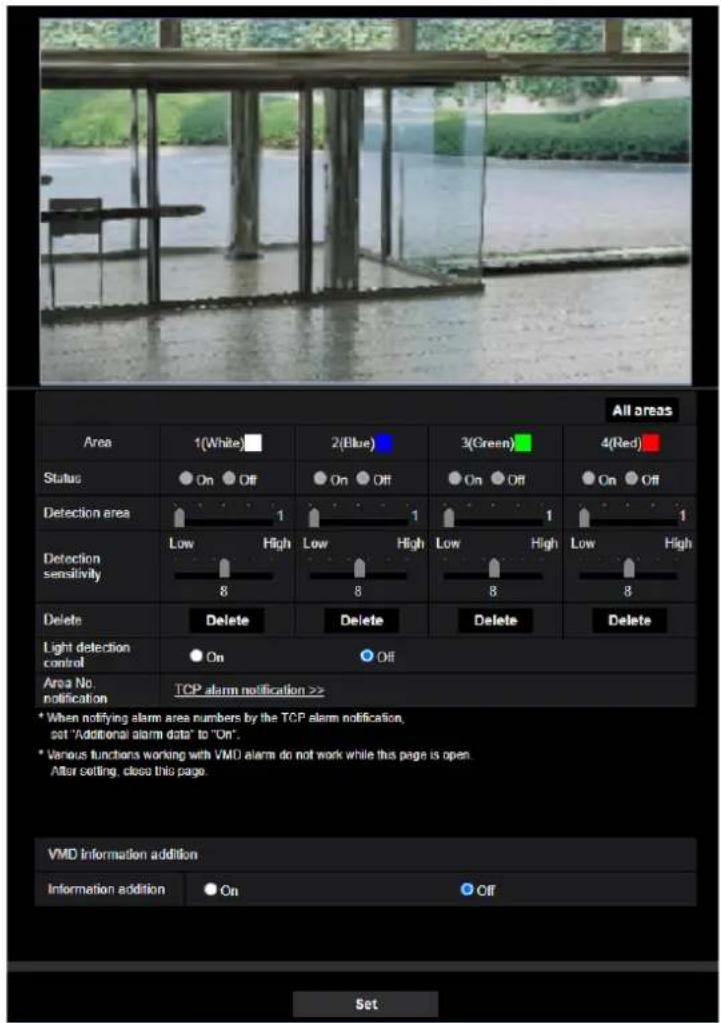
[Area]
When selecting a VMD area in the screen, it will be numbered as area 1. (Subsequent areas will be numbered in the order of selection.)
[All areas] button
When the [All areas] button is clicked, the whole area will become the VMD area, and "1(White)" will be automatically applied to "Area".
[Status]
Select "On" or "Off" to determine whether or not to perform video motion detection.
- On: Performs video motion detection.
- Off: Does not perform video motion detection.
- Default: Off
[Detection area]
Adjust the size of the VMD area using the slider. The smaller the selected value is, the higher the sensitivity of VMD area becomes. The current value (1-10) will be displayed on the right of the slider.
- Default: 1
[Detection sensitivity]
Adjust the sensitivity of motion detection in the VMD area using the slider. The settings can be configured for each area individually. The larger the value is set, the higher the sensitivity level becomes.
The current value (1 (low) - 15 (high)) will be displayed below the slider.
- Default: 8
[Delete] button
Click the [Delete] button corresponding to the area to be deleted. The outline of the selected area will be deleted.
[Light detection control]
Select “On” or “Off” to determine whether or not to suspend video motion detection affected by brightness change such by a dimming level control.
- Default: Off
IMPORTANT
- "Light detection control" may not work when brightness change is too small.
- When “On” is selected for “Light detection control”, the video motion detection may not be performed even when detecting a subject moving over the whole screen.
[Area No. notification]
When "TCP alarm notification >>" is clicked, the [Notification] tab of the "Alarm" page will be displayed.
(→"2.8.10 Configuration of the settings relating to alarm notification [Notification]")
VMD information addition
[Information addition]
Select "On" or "Off" to determine whether or not to add VMD information to superimposed image data. The VMD information can be searched by some of our network disk recorders. Refer to the operating instructions of the connected devices for further information about the functions and settings.
- Default: Off
2.8.6 Set the VMD areas [VMD area]
Set the areas to activate the VMD function.
IMPORTANT
- During change of setting in the setup menu, no alarm will be detected. After setup is complete, close the setup menu.
- Set the video motion detection area by dragging the mouse on the screen.
→ The designated area will become the VMD area "1(White)" and the outline will be displayed. When 2 - 4 VMD areas are set, each area will be numbered in order. The areas will be identified by the respective outline colors. The "Status" of the outline to be set for the area will become "On".
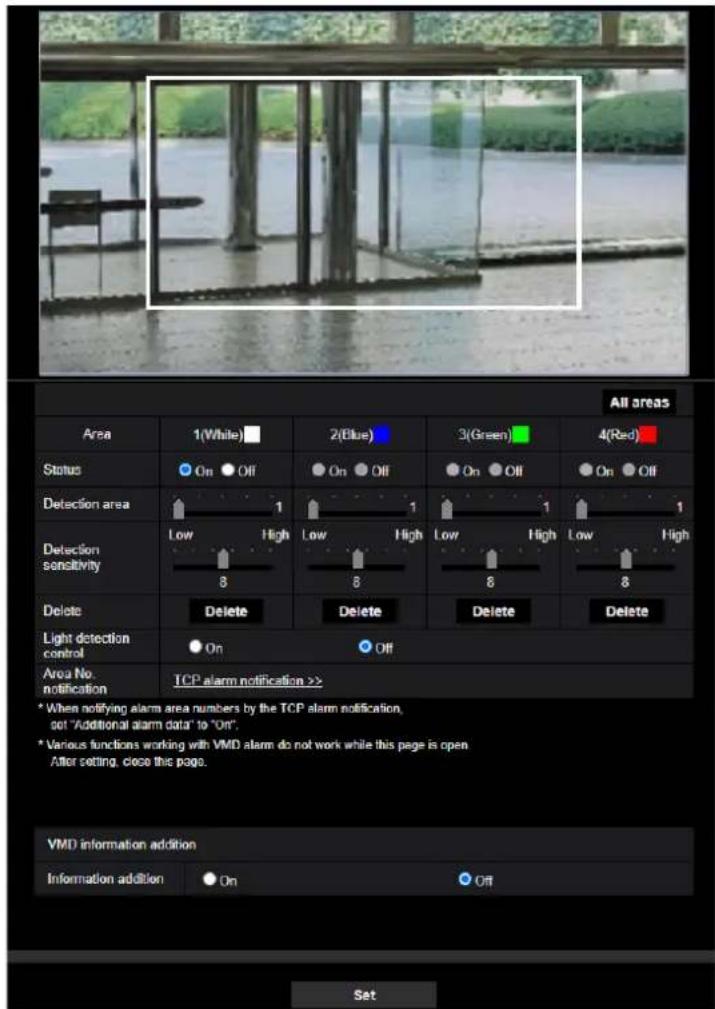
- Adjust "Detection area" and "Detection sensitivity" using the slider.
Refer to "2.8.5 Configure the VMD settings [VMD area]" for further information about the "Detection sensitivity" and "Detection area".
The currently displayed area and its detection sensitivity will be displayed in the "Detection area" section. Change areas and the settings of "Detection area" and "Detection sensitivity" as necessary.
- Click the [Set] button after completing the settings.
IMPORTANT
- The setting will not be applied unless the [Set] button is clicked.
- To invalidate the VMD area, click the [Set] button after selecting "Off" for "Status" of the VMD area to be invalidated.
→ The outline of the invalidated VMD area will turn to a dotted line. When the VMD area is invalidated, no alarm will occur even when a motion can be recognized in the area.
- To delete the VMD area, click the [Delete] button corresponding to the area to be deleted.
→ The outline of the respective VMD area will disappear.
- Click the [Set] button.
→ The edited settings will be applied.
2.8.7 Configure the SCD settings [SCD area]
Click the [SCD area] tab on the "Alarm" page. (→For menu display and how to operate, refer to "2.2.1 How to display the setup menu", "2.2.2 How to operate the setup menu")
By configuring SCD (scene change detection) setting, it is possible to issue an alarm when a camera is covered with something or the camera direction is changed to shoot a different subject.
The detection area using the SCD function can be set on this section. Up to 1 area can be set. When a shooting subject is changed in the set area, it will issue an alarm.
IMPORTANT
- Since it takes time for necessary learning in the following period, the SCD will not function for a while.
- Right after the SCD is set
- After the power of this product is turned on
– After a scene change is detected
- The alarm occurrence indication button ( "1.1.2 About the "Live" page") will be displayed when scene change is detected by the SCD function.
- The alarm occurrence indication button will be displayed at a VMD alarm occurrence or when receiving a command alarm as well.
- After configuring the SCD area, the SCD area may move out of alignment when "Image capture mode" of the [Image] tab is changed. Make sure to check the SCD area after changing the "Image capture mode" setting.
- In the following cases, scene change may not be detected.
- Only a part of the shooting area is covered or the covered object can be seen.
- Subjects look alike each other before and after the camera direction has been changed.
– In the area where the privacy zone is set.
- The SCD function is not the dedicated function to prevent thefts, fires, etc.
We are not responsible for any accidents or damages that may occur.
- When “Detection time” of “SCD area” is shorter than “Dwell time” of “Day & Night(IR)”, a scene change detection (SCD) may be activated at the time when an image is switched to BW. It can be improved by setting “Dwell time” of “Day & Night(IR)” shorter than “Detection time” of “SCD area”.
- When the image color is close to monochrome, detection of SCD alarms may become difficult. When no alarms is detected, increase “Detection sensitivity” or set smaller “Detection area”.
[Area]
Set by selecting an SCD area on the screen.
[All areas]
Set the entire image in the SCD area.
[Status]
Select "On" or "Off" to determine whether or not to perform SCD.
- On: Performs SCD.
- Off: Does not performSCD.
- Default: Off
[Detection area]
Set the detection ratio “Small”, “Middle” or “Large”, which specifies how much of change in the area set in [SCD area] to be detected.
- Default: Middle
[Detection sensitivity]
Adjust the SCD sensitivity in the SCD area and select from "Very Low", "Low", "Middle", or "High".
- Default: Middle
[Detection time]
The SCD function issues an alarm when the scene change continues for a specified time of period. 3s/5s/10s/30s/1min
- Default: 3s
[Delete] button
Click the [Delete] button to be deleted the selected area.
SCD information addition
[Information addition]
Select "On" or "Off" to determine whether or not to add SCD information to superimposed image data.
- Default: Off
Note
• Additional SCD information will not be used on our network disk recorders. (As of June, 2021)
2.8.8 Set the SCD areas [SCD area]
Set the areas to activate the SCD (scene change detection) function.
IMPORTANT
- During change of setting in the setup menu, no alarm will be detected. After setup is complete, close the setup menu.
- Set the SCD area by dragging the mouse on the screen.
→ The designated area will become the SCD area and the outline of white color will be displayed. The "Status" will become "On".
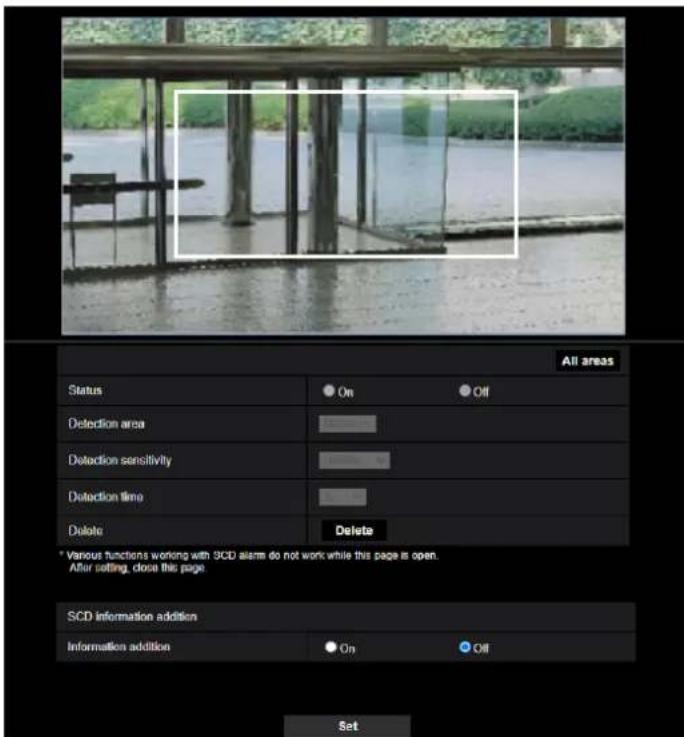
-
Adjust "Detection area" and "Detection sensitivity" selecting the pull-down menu.
Refer to "2.8.7 Configure the SCD settings [SCD area]" for further information about the "Detection sensitivity" and "Detection area".
Change areas and the settings of "Detection area" and "Detection sensitivity" as necessary. -
Click the [Set] button after completing the settings.
IMPORTANT
- The setting will not be applied unless the [Set] button is clicked.
- To invalidate the SCD area, click the [Set] button after selecting "Off" for "Status".
→ The outline of the invalidated SCD area will turn to a dotted line. When the SCD area is invalidated, no alarm will occur even when a motion can be recognized in the area.
- To delete the SCD area, click the [Delete] button.
→ The outline of the SCD area will disappear.
- Click the [Set] button.
→ The edited settings will be applied.
2.8.9 Configure the settings relating to the audio detection [Audio detection]
Click the [Audio detection] tab on the "Alarm" page. The settings relating to audio detection can be configured in this section.
IMPORTANT
- The alarm occurrence indication button will be displayed when sound is detected by the audio detection function.
- The alarm occurrence indication button will also be displayed when receiving an alarm input of a terminal alarm or a command alarm.
- Notification may be delayed in some network environments.
- The audio detection feature is not suitable to be used in situations where high reliability is constantly required (such as a prevention system). We are not responsible for any accidents or damages that may occur.
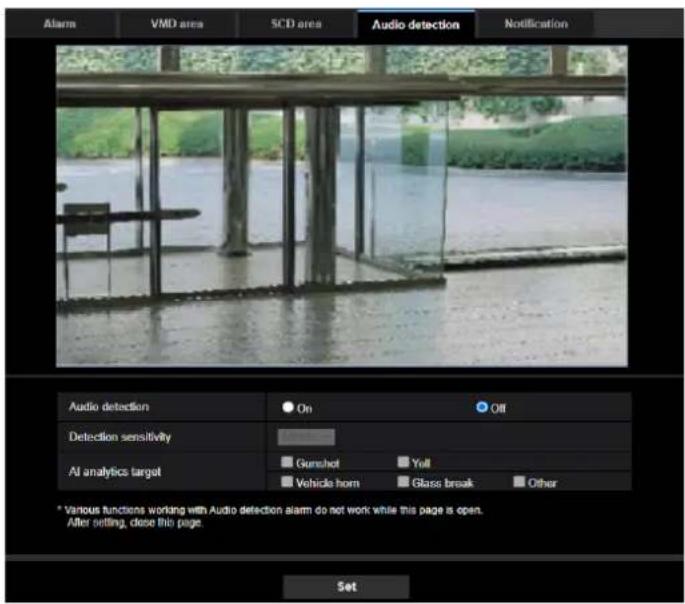
[Audio detection]
Select "On" or Off" to determine whether or not to perform audio detection.
- On: Perform audio detection.
- Off: Does not perform audio detection.
- Default: Off
[Detection sensitivity]
Adjust the sensitivity of Volume from "Low", "Middle", or "High".
- Default: Middle
[AI analytics target]
Select the detection target for AI sound classification.
• Gunshot: Detects sound of gunshots, sound of explosions, impulsive sound and plosive sound.
- Yell: Detects screams and yells.
• Vehicle Horn: Detects car horns.
• Glass Break: Detects sound of glass breaking.
• Other: Detects other sounds than Gunshot, Yell, Vehicle Horn, Glass Break.
Note
- In the following cases, sounds to be detected may not be detected.
- When the duration of Yell, Vehicle Horn or Glass Break is shorter than 1 second
- When the difference between the sound to be detected and noise is less than 6dB
— When raindrops directly hit the camera or microphone
- When multiple sounds of different types occurred at the same time, an alarm notification as triggered by only one type among these types will be provided.
- The message IDs of the TCP alarm notification of the AI sound classification are as follows. Use when registering the sound classification alarm using a recorder or ASM.
- Gunshot: 70
- Glass Break: 71
- Vehicle Horn: 72
- Yell: 73
- Other: 55
- When a recorder or the like received an alarm notification of the AI sound classification, the recorder or the like cannot receive alarms during the alarm mask.
2.8.10 Configuration of the settings relating to alarm notification [Notification]
Click the [Notification] tab on the "Alarm" page. (→“2.2.1 How to display the setup menu”, “2.2.2 How to operate the setup menu”)
The settings relating to TCP alarm notification and HTTP alarm notification can be configured in this section.
2.8.10.1 Configure the settings relating to TCP alarm notification
TCP alarm notification
[TCP alarm notification]
Select "On" or "Off" to determine whether or not to provide notification by TCP alarm notification according to the settings for the "Alarm" and "Diag." checkboxes of "Destination of notification" below.
- When an alarm is detected ("Alarm")
— When a notification of the remaining capacity of the SD memory card has been provided ("Diag.")
- When the SD memory card has become full ("Diag.")
- When the SD memory card cannot be recognized ("Diag.")
- When an SD memory card write error occurred ("Diag.")
- Default: Off
Note
- When "On" is selected, notification of the alarm occurrence will be provided to the registered destination server addresses in order (to IP address 1 first, to IP address 8 last).
[Additional alarm data]
Determine whether or not to send notifications for VMD alarm detection area numbers with the TCP alarm notification by selecting On/Off.
- Default: Off
[Destination port]
Select a destination port for the TCP alarm notification from the following.
• Available range: 1 - 65535
- Default: 1818
The following port numbers are unavailable since they are already in use.
20, 21, 23, 25, 42, 53, 67, 68, 69, 80, 110, 123, 161, 162, 443, 995, 10669, 10670
[Retry times]
Select a retry time for the TCP alarm notification.
• Available range: 0-30
- Default: 2
Destination of notification
[Address 1] - [Address 8]
Enter the destination IP address or host name of the TCP alarm notification from the following. Up to 8 destination server addresses can be registered.
- [Alarm] checkbox: When the checkbox is checked, the TCP alarm notification will be provided upon an alarm occurrence.
- [Diag.] checkbox: When the checkbox is checked, notification using TCP alarm notification will be provided in the following cases.
- When notification of the remaining capacity of the SD memory card has been provided
- When the SD memory card has become full
- When the SD memory card cannot be recognized
- When an SD memory card write error occurred
• [Destination server address]: Enter the destination server address or host name.
- Available characters: Alphanumeric characters, the colon (:), the period (.), the underscore (_), and the hyphen (-).
To delete the registered destination server address, click the [Delete] button respective to the desired destination server address.
[Notification per VMD area]
Select "On" or "Off" to determine whether or not to set "Notification per VMD area".
If “Notification per VMD area” is turned “On”, an alarm is notified only when “Alarm area No.” matches “Alarm area” configured by “VMD alarm”. Alarm notifications other than “VMD alarm” are not implemented. When using “Notification per VMD area”, select “On” for “Status” of the alarm area in VMD.
- Default: Off
[Alarm area No.]
• Available range: 1-4
- Default: 1
IMPORTANT
- When entering the host name of the "Destination server address", the DNS settings on the [Network] tab of the "Network" page must be configured. (→“2.10.1 Configure the network settings [Network]”)
- Confirm that the destination IP addresses are registered correctly. When a registered destination does not exist, notification may be delayed.
2.8.10.2 Configure the settings relating to HTTP alarm notification
HTTP alarm notification
[Address 1] - [Address 5]
Enter the destination IP address or host name of the HTTP alarm notification. Up to 5 destination server addresses can be registered.
• Available characters: Alphanumeric characters, the colon (:), the period (.), the underscore (_), and the hyphen (-).
- Default: http://
Example of entry:
"http://IP address of the HTTP server + : (colon) + port number" or "http://Host name: (colon) + port number" "https://IP address of the HTTP server + : (colon) + port number" or https://Host name: (colon)+ port number
[Alarm] checkbox
When the checkbox is checked, the HTTP alarm notification will be provided upon an alarm occurrence.
[Delete] button
When this button is clicked, all configured information, including the address, user name, password, and notification data, will be deleted.
[User name]
Enter the user name (login name) to access the HTTP server.
• Available number of characters: 0 - 63 characters
- Unavailable characters: " & : ; \
- Default: None (blank)
[Password]
Enter the password to access the HTTP server.
• Available number of characters: 0 - 63 characters
- Unavailable characters: " &
- Default: None (blank)
[Notification data]
Enter the notification data to add after the destination HTTP server addresses set in [Address 1] - [Address 5].
• Available characters: Alphanumeric characters
- Default: /cgi-bin/comalarm.cgi?CMD=01
Note
- Basic authentication or Digest authentication is performed on authentication request of the HTTP server.
- When the HTTP alarm function is enabled, leakage of the HTTP server authentication information (user name and password) may occur in the network at the time of HTTP alarm notification.
- For "Address 1" to "Address 5", a total of 256 characters can be entered for the address (including "http://") and "Notification data".
- Make sure to enter a slash (/) as the first character for "Notification data".
• If the HTTP alarm notification fails, information about the failure will be added to the system log. - Even if the [Set] button is clicked after deleting the contents of "Notification data", "/cgi-bin/comalarm.cgi?CMD=01" will be set.
When http://192.168.0.100 is set for the address and /cgi-bin/comalarm.cgi?CMD=01 is set for "Notification data", an HTTP alarm notification such as http://192.168.0.100/cgi-bin/comalarm.cgi?CMD=01 will be executed.
2.9 Configure the settings relating to the authentication [User mng.]
The settings relating to the authentication such as users and PCs restrictions for accessing the camera with a PC, mobile terminal or tablet device can be configured on the "User mng." page.
The "User mng." page has 4 tabs; the [User auth.] tab, the [Host auth.] tab, [IEEE 802.1X] tab and [Data encryption] tab.
2.9.1 Configure the settings relating to the user authentication [User auth.]
Click the [User auth.] tab on the "User mng." page. (→"2.2.1 How to display the setup menu", "2.2.2 How to operate the setup menu")
The settings relating to the authentication of users who can access this camera from the PC, mobile terminal or tablet device can be configured on this page. Up to 24 users can be registered.
Note
- When user authentication has failed to pass (authentication error) 8 times within 30 seconds using the same IP address (PC), access to the unit will be denied for a while.
[User auth.]
Select "On" or "Off" to determine whether or not to authenticate the users.
- Default: On
[Guest User]
Select whether or not to set Guest User. If you select "Use", you can set which functions are available or unavailable for guest users for whom user authentication has not been performed.
- Default: Use
[Authentication]
Set the user authentication method.
- Digest or Basic: Uses "Digest or Basic" authentication.
- Digest: Uses "Digest" authentication.
- Basic: Uses "Basic" authentication.
- Default: Digest
Note
- To enhance the security, it is recommended to select "Digest" for "Authentication method". If "Digest or Basic" or "Basic" is selected, leakage of the user name and the password may occur.
- When the [Authentication] setting has been changed, close the web browser, and then access the camera again.
- About the system devices (our network disk recorder and others)
For the model No. and the firmware version of applicable products, refer to our technical information website
.
[User name registration]
At the time of new registration, register a new user name in [User name]. Click [▼] in "User name registration" to view registered users. Registered users are displayed as "Registered user name [Access level]". (Example: admin [1])
If you click the [Change] button on the right, the selected user will be displayed in [User name], and you can change the password. By clicking the [Delete] button on the right, you can delete the selected user.
[User name (1 to 32 characters)]
Enter a user name.
• Available number of characters: 1 - 32 characters
- Unavailable characters: " & : ; \
- Default: None (blank)
Note
- When the user name already in use is entered and the [Set] button is clicked, the respective user information will be overwritten.
[Password (8 to 32 characters)] [Retype password]
Enter a password.
• Available number of characters: 8 - 32 characters
- Unavailable characters: " &
- Default: None (blank)
Note
- Distinguish between upper- and lower cases.
- For the password, use three or more types of characters from upper- and lowercase alphabetic characters, numeric characters, and symbols.
- Set the password which does not include the user name.
[Access Level]
Select the access level of the user from the following.
• 1. Administrator: Allowed all available operations of the camera.
• 2. Camera control: Allowed to control the camera. Functions selected for "Access level" can be operated.
• 3. Live only: Allowed to display live view. Functions selected for "Access level" can be operated.
- Default: 3. Live only
[Access level]
Select the available functions based on the user access level (camera control, live view, guest user).
- Default:
– Camera control: All are checked
– Live only: All are not checked
– Guest User: All are not checked
Note
- If you have set "User authentication" to "Off", and "Guest User" to "Not use":
The “Access Level” item cannot be set. And, while all the live operation buttons are displayed, the [Setup] buttons require authentication. - If you have set "User authentication" to "Off", and "Guest User" to "Use":
You can set the items for "Guest User". - If you have set "User authentication" to "On":
You cannot set the items for "Guest User".
You can set the following functions.
| Live view selectable Selecting | an image displayed in the live view setting permissions |
| Listen | Mic Input (To PC) (when listening on a PC) setting permissions ( “Mic input button”) |
| Talk Audio output (From PC) (when talking from a PC) setting permissions(→“Audio output button”) | |
| Refresh Rate | JPEG format image refresh interval setting permissions (→“Stream information display”) |
| Snap shot | Snap shot operation permissions (→“Snap shot button”) |
| Playback of recording (Log disp.) | Log operation permissions (→“[Log/Play] button”) |
| Manual rec./Delete rec. | SD memory card save/delete permissions (→“[Rec. on SD] button”) |
| Brightness | Brightness setting permissions (→“[Brightness] buttons”) |
| AUX | AUX setting permissions (→“[AUX] button”) |
2.9.2 Configure the settings relating to the host authentication [Host auth.]
Click the [Host auth.] tab on the "User mng." page. (→"2.2.1 How to display the setup menu", "2.2.2 How to operate the setup menu")
The restriction settings of PCs (IP address) from accessing the camera can be configured on this page.
[Host auth.]
Select "On" or "Off" to determine whether or not to authenticate the host.
- Default: Off
Note
- Set "Host auth." to "On" after registering the IP address of the PC.
- If "On" is selected for "User auth.", the user authentication is required regardless of the host authentication settings.
[IP address]
Enter the IP address of the PC to be allowed to access the camera. Host name cannot be entered for the IP address.
Note
- When "IP address/subnet mask" is entered, it is possible to restrict PCs in each subnet. For example, when "192.168.0.1/24" is entered and "2. Camera control" is selected for the access level, the PCs whose IP address is between "192.168.0.1" - "192.168.0.254" can access the camera with the access level "2. Camera control".
- When the IP address already in use is entered and the [Set] button is clicked, the respective host information will be overwritten.
- A "Set address" error message is displayed if the IP address of the PC has not been set properly. Check the set IP address of the PC again.
[Access level]
Select the access level of the host from the following.
- Administrator/ 2. Camera control/ 3. Live only
Refer to "2.9.1 Configure the settings relating to the user authentication [User auth.]” for further information about the access level.
- Default: 3. Live only
[Host check]
From the pull-down menu of "Host check", the registered host can be selected and the selected host's IP address can be checked.
The registered IP address will be displayed with the access level.
(Example: 192.168.0.21 [1])
To delete the registered host, click the [Delete] button after selecting the IP address to be deleted.
2.9.3 Configure IEEE 802.1X [IEEE 802.1X]
Click the [IEEE 802.1X] tab on the "User mng." page. (→For menu display and how to operate, refer to "2.2.1 How to display the setup menu", "2.2.2 How to operate the setup menu")
The settings relating to IEEE 802.1X can be configured on this page.
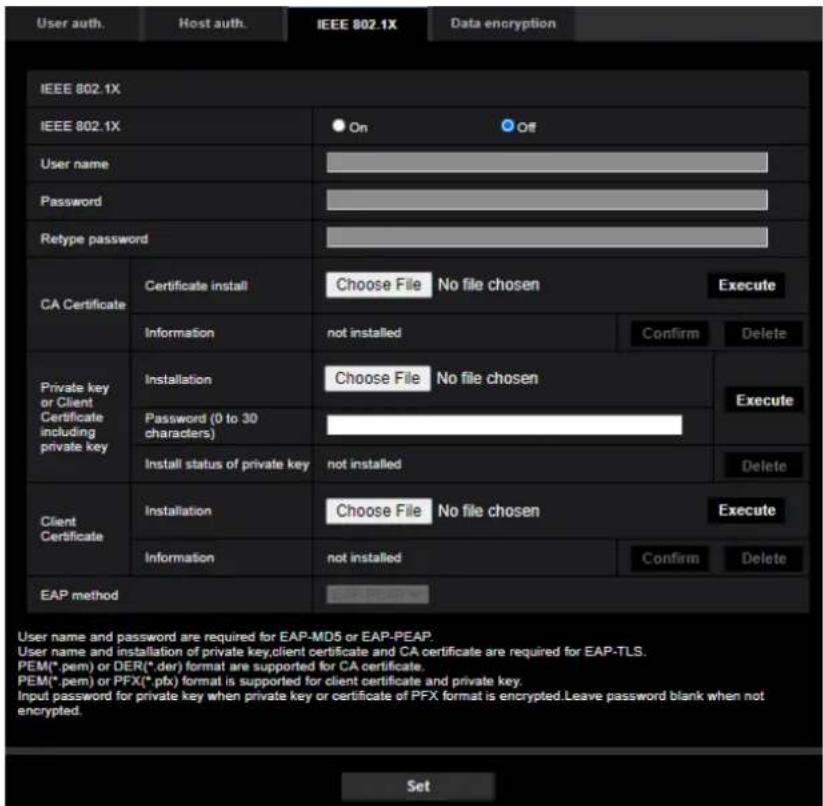
[IEEE 802.1X]
Select "On" or "Off" to determine whether or not to perform port authentication using IEEE 802.1X.
- Default: Off
[User name]
Enter the user name to access the authentication LAN switch.
• Available number of characters: 1 - 32 characters
- Unavailable characters: " & : ; \
[Password]
[Retype password]
Enter the password to access the authentication LAN switch.
• Available number of characters: 4 - 32 characters
- Unavailable characters: " &
[CA Certificate] - [Certificate install]
Install the root CA Certificate. Do not include the intermediate CA Certificate. Installation is possible only when "Off" is selected for "IEEE 802.1X".
■ Specification of CA Certificate
| Item | Specifications Remarks | |
| Data format Format: PEM or DER Extension: pem or der | ||
| Max. number of certificates included in the PEM format | 1 pc. — | |
| Max. size of certificate Approx. 10 kB | — | |
[CA Certificate] - [Information]
not installed: indicates that the certificate is not installed.
CA certificate host name: indicates that the certificate is installed.
Expired: indicates that the certificate is expired.
The details of CA Certificate can be checked with the [Confirm] button.
When the [Delete] button is clicked, the CA certificate will be deleted.
Note
- Check that the CA certificate has not expired. If you use a certificate that have expired, you may not be able to connect to authentication LAN switches.
[Private key or Client Certificate including private key] - [Installation]
Install the private key or Client Certificate that includes private key. Installation is possible only when "Off" is selected for "IEEE 802.1X".
■ Specification of private key and Client Certificate including private key
| Item | Specifications Remarks | |
| Data format Format: PEM or PFX Extension: pem or pfx | ||
| Key size [bit] 1024 /1536 /2048 /3072 | /4096 — | |
| Max. number of certificates included in the PEM format | 6 pc. — | |
| Max. size of certificate (including intermediate CA Certificate) | Approx. 10 kB — | |
[Private key or Client Certificate including private key] - [Password]
Enter the password if the private key is encrypted or the password is set for Client Certificate for the PFX method. Leave password blank when not encrypted.
Available number of characters: 0 - 30 characters
[Private key or Client Certificate including private key] - [Install status of private key]
not installed: Private key is not installed.
installed: Private key is installed.
When the [Delete] button is clicked, the private key will be deleted.
[Client Certificate] - [Installation]
Install the Client Certificate.
If signed by the intermediate CA Certificate, install the Client Certificate including the intermediate CA Certificate.
Installation is possible only when "Off" is selected for "IEEE 802.1X".
■ Specification of Client Certificate
| Item Specifications | Remarks | |
| Data format Format: PEM Extension: | pem | |
| Max. number of certificates included in the PEM format | 6 pc. — | |
| Max. size of certificate (including intermediate CA Certificate) | Approx. 10 kB — |
[Client Certificate] - [Information]
not installed: indicates that the certificate is not installed.
Certificate host name: indicates that the certificate is installed.
Expired: indicates that the certificate is expired.
The details of Client Certificate can be checked with the [Confirm] button.
When the [Delete] button is clicked, the client certificate will be deleted.
Note
- Check that the client certificate has not expired. If you use a certificate that has expired, you may not be able to connect to authentication LAN switches.
[EAP method]
Select the authentication method from EAP-MD5, EAP-PEAP or EAP-TLS.
EAP-MD5/EAP-PEAP
- Select "On" for "IEEE 802.1X".
- Select "EAP-MD5" or "EAP-PEAP" for "EAP method".
- Click the [Set] button after entering the user name, the password, and confirming the password.
EAP-TLS
- Click the [Choose File] button of "CA Certificate" - "Certificate install". Then, select a CA Certificate and click the [Execute] button. The host name (CommonName) designated when created the certificate will be displayed at "Information".
- Click the [Choose File] button of "Private key or Client Certificate including private key", and select a private key or Client Certificate that includes Private key.
- Enter the password if the private key is encrypted or the password is set for Client Certificate for the PFX method. Leave password blank when not encrypted.
- Click the [Execute] button to start installation. "installed" will be displayed for "Install status of private key".
In the case of selecting Client Certificate including the private key, "installed" will be displayed for "Client Certificate" - "Information" as well.
-
When the private key is installed in step 2, select a Client Certificate after clicking the [Choose File] button of "Client Certificate", and then click the [Execute] button. The host name (CommonName) designated when created the certificate will be displayed at "Information".
-
Select "On" for "IEEE 802.1X". Then, select "EAP-TLS" for "EAP method".
-
Enter the user name registered to the server in "User name". Then, click the [Set] button. If no user name is registered to the server, enter an arbitrary user name.
"Password" and "Retype password" can be left blank.
Note
- To delete each certificate, set [IEEE 802.1X] to "Off".
- Check that the CA certificate and client certificate have not expired. If you use certificates that have expired, you may not be able to use the port notification feature.
Example of CA Certificate check screen
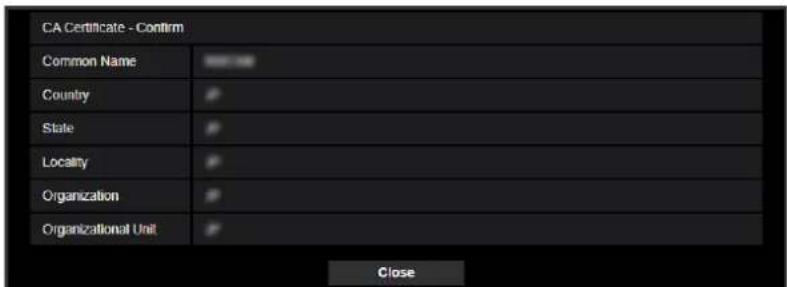
Example of Client Certificate check screen
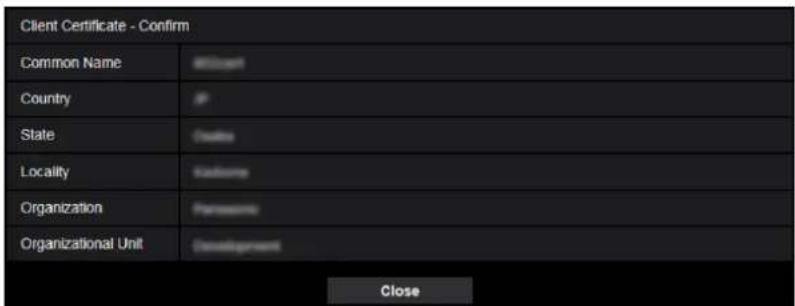
IMPORTANT
- After selecting "On" for "IEEE 802.1X", if access to the camera fails for some reason, connect to a switch or port without authentication. It disables IEEE 802.1X, and enables access to the camera.
- If the Client Certificate includes intermediate CA Certificate, the Client Certificate needs to come first, then the intermediate CA Certificate.
- When a certificate over 10 Kbyte is installed, no error will be displayed during installation. However, an error may occur at the time of connection.
2.9.4 Configure the data encryption settings [Data encryption]
Click [Data encryption] on the "User mng." page. (→For menu display and how to operate, refer to "2.2 Display the setup menu from a PC", "2.2.2 How to operate the setup menu")
The settings relating to the data encryption can be configured in this section.
Click the "+" mark on the left of the setup menu to expand the respective item, and enable detailed settings.
Click the “-” mark on the left of an expanded item to return to the screen displayed before the item was expanded.
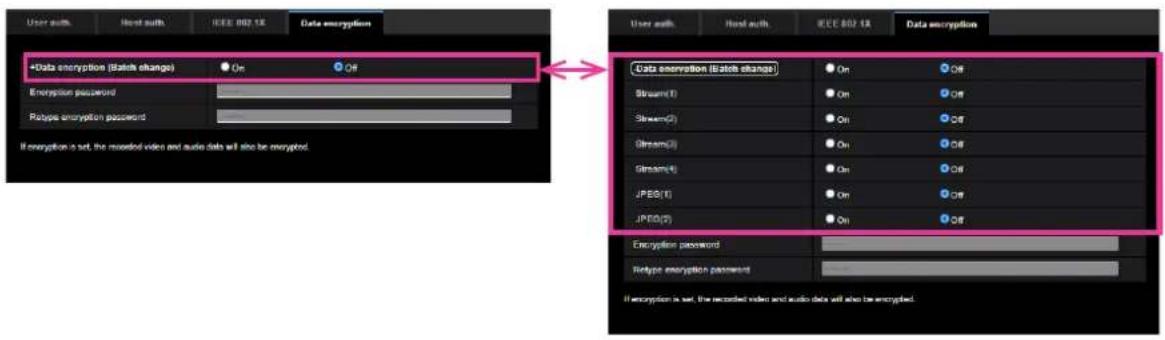
[Data encryption (Batch change)]
Select "On" or "Off" to determine whether or not to activate data encryption.
- On: Activates data encryption. Encrypts Stream(1), Stream(2), Stream(3), Stream(4), JPEG(1), JPEG(2), and "AAC-LC" audio.
- Off: Deactivates data encryption.
- Default: Off
[Stream(1)], [Stream(2)], [Stream(3)], [Stream(4)], [JPEG(1)], [JPEG(2)]
Select "On" or "Off" independently for Stream(1), Stream(2), Stream(3), Stream(4), JPEG(1) and JPEG(2) to determine whether or not to activate data encryption.
- Default: Off
[Encryption password], [Retype encryption password]
Set the password for data encryption.
• Available number of characters: 4 - 16 characters
- Unavailable characters: " &
IMPORTANT
- The initial password is displayed in "MAC address" on the [Upgrade] screen of the [Maintenance] tab. When using data encryption, make sure to change the password.
- When "On" is selected for data encryption, it is recommended to set the total bit rate of the stream becomes 16 Mbps or less.
- When "On" is selected, images cannot be monitored using a browser. Please use our supported devices to monitor encrypted images.
- The encrypted MP4 files and JPEG images cannot be viewed on the image playing screen in the browser. Download it to a PC and use the decryption tool to confirm it.
For information about the decryption tool, refer to our technical information website
- When "On" is selected for data encryption, "16 Screens" in the "Layout" pull-down menu on the multi-screen becomes unselectable.
Note
- Streams that have data encryption enabled for them are wrapped in < > in the [Live view] pull-down menu. Additionally, streams that have data encryption enabled will be displayed with
Example: When Stream 1 and JPEG(2) are data encrypted
• [Live view] pull-down menu on the "Live" page
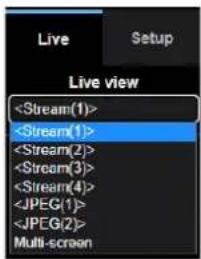
- Pull-down menu in the setup menu
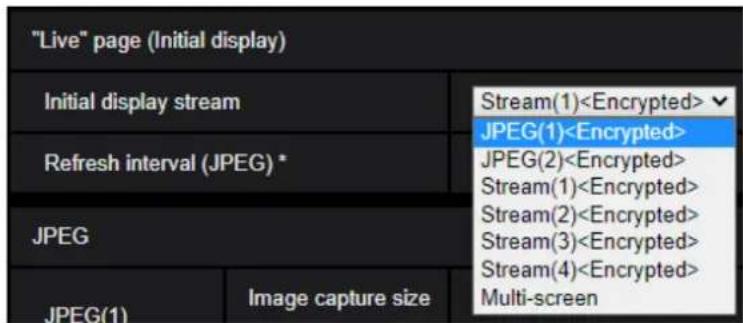
- When [Data encryption (Batch change)] is "On", "AAC-LC" audio is data encrypted ("G.726" and "G.711" are not data encrypted). To encrypt both the image and audio, set [Data encryption (Batch change)] to "On" and set [Audio input encoding format] to "AAC-LC".
- For encrypted MP4 files and JPEG images, you can use the decryption tool to confirm the images.
2.10 Configuring the network settings [Network]
The network settings can be configured on the "Network" page.
The "Network" page has the [Network] tab and the [Advanced] tab.
2.10.1 Configure the network settings [Network]
Click the [Network] tab on the "Network" page. ( "2.2.1 How to display the setup menu", "2.2.2 How to operate the setup menu")
The following information is required to configure the network settings. Contact the network administrator or your Internet service provider.
- IP address
- Subnet mask
- Default gateway (when using the gateway server/router)
- HTTP port
• Primary DNS address, Secondary DNS address (when using DNS)
IPv4 network
[Network Settings]
Select the method of how to configure the IP address from the following.
- Static: The IP address is configured by entering manually on "IP address(IPv4)".
- DHCP: The IP address is configured using the DHCP function. If the camera cannot acquire an IP address from the DHCP server, set the IP address to "192.168.0.10". After that, once an IP address is acquired from the DHCP server, change it to that IP address.
- Auto(AutoIP): The IP address is configured using the DHCP function. When the DHCP server is not found, the IP address is automatically configured.
- Auto(Advanced): Using the DHCP function, network address information is referred to, and an unused IP address is configured to the camera as a static IP address. The configured IP address is automatically determined within the subnet mask range by the camera. When the DHCP server is not found, the IP address is set to 192.168.0.10.
- Default: DHCP
Note
- When "Auto(AutoIP)" is selected and the IP address cannot be obtained from the DHCP server, an IP address not used in the same network will be searched within 169.254.1.0 - 169.254.254.255.
[IP address(IPv4)]
When not using the DHCP function, enter the IP address of the camera. Do not enter an IP address already in use (for the PCs and the other network cameras).
- Default: 192.168.0.10
Note
- Multiple IP addresses are unavailable even when using the DHCP function. Refer to the network administrator for further information about the settings of the DHCP server.
[Subnet mask]
When not using the DHCP function, enter the subnet mask of the camera.
- Default: 255.255.255.0
[Default gateway]
When not using the DHCP function, enter the default gateway of the camera.
- Default: 192.168.0.1
Note
- Multiple IP addresses for the default gateway are unavailable even when using the DHCP function. Refer to the network administrator for further information about the settings of the DHCP server.
[DNS]
Determine how to set the address of the DNS server by selecting "Auto" (obtain the address automatically) or "Manual" (enter the address of the DNS server). When "Manual" is selected, it is necessary to configure the settings for the DNS.
When using the DHCP function, it is possible to obtain the DNS address automatically by selecting "Auto". Refer to the network administrator for further information about the settings.
- Default: Auto
[Primary server address], [Secondary server address]
When "Manual" is selected for "DNS", enter the IP address of the DNS server.
Refer to the network administrator about the IP address of the DNS server.
IPv6 network
[Manual]
Select "On" or "Off" to determine whether or not to manually configure the IP address for IPv6 network (IPv6 address).
- On: Enter an IPv6 address manually.
- Off: Manual entry of an IPv6 address will become unavailable.
- Default: Off
[IP address(IPv6)]
When “On” is selected for “Manual”, manual entry of the IPv6 address is required. Do not enter an address already in use.
Note
- When connecting to the manually configured IPv6 address beyond the router, use an IPv6 compatible router and turn on the automatic IPv6 address assignment function. In this case, it is necessary to configure IPv6 address including prefix information provided from the IPv6 compatible router. Refer to the manuals provided with the router for further information.
[Default gateway]
When "On" is selected for "Manual" of IPv6 network, enter the default gateway of IPv6 network of the camera.
- Default: None (blank)
[DHCPv6]
Select "On" or "Off" to determine whether or not to use the IPv6 DHCP function.
Configure the DHCP server not to assign the same IP addresses used for the other network cameras and PCs whose IP address is unique. Refer to the network administrator for further information about the settings of the server.
- Default: Off
[Primary DNS server address], [Secondary DNS server address]
Enter the IPv6 address of the DNS server. Refer to the network administrator about the IPv6 address of the DNS server.
Common
[HTTP port]
Assign the port numbers independently.
• Available port number: 1 - 65535
- Default: 80
The following port numbers are unavailable since they are already in use.
20, 21, 23, 25, 42, 53, 67, 68, 69, 110, 123, 161, 162, 443, 554, 995, 10669, 10670, 59000 - 61000
Note
- Some ports may not be accessible depending on the browser. If you cannot access to the camera from the browser, please access to the camera via HTTPS or change the HTTP port number of the camera using iCT.
[Line speed]
Select the line speed for data transmission from the following. It is recommended to use with the default "Auto".
• Auto: Line speed will be applied automatically.
• 100M-Full: 100 Mbps full-duplex
• 100M-Half: 100 Mbps half-duplex
• 10M-Full: 10 Mbps full-duplex
• 10M-Half: 10 Mbps half-duplex
- Default: Auto
[Max RTP packet size]
Select "Unlimited(1500byte)" or "Limited(1280byte)" to determine whether or not to restrict the RTP packet size when viewing images from the camera using the RTP protocol. It is recommended to use with the default "Unlimited(1500byte)".
When the RTP packet size is restricted in the network line in use, select "Limited(1280byte)". Refer to the network administrator for further information about the maximum packet size in the network line.
- Default: Unlimited(1500byte)
[HTTP max segment size(MSS)]
Select "Unlimited(1460byte)", "Limited(1280byte)", or "Limited(1024byte)" to determine whether or not to restrict the maximum segment size (MSS) when viewing images from the camera using the HTTP protocol. We recommended that you use this feature with the default setting.
When the MSS is restricted in the network line in use, select "Limited(1024byte)" or "Limited(1280byte)". Refer to the network administrator for further information about the MSS in the network line.
- Default: Unlimited(1460byte)
[Bandwidth control(bit rate)]
Select the total bit rate for data transmission from the following.
Unlimited/ 64kbps/ 128kbps/ 256kbps/ 384kbps/ 512kbps/ 768kbps/ 1024kbps/ 2048kbps/ 4096kbps/ 6144kbps/ 8192kbps/ 10240 kbps/ 15360 kbps/ 20480 kbps/ 25600 kbps/ 30720kbps/ 35840kbps/ 40960 kbps/ 51200kbps
- Default: 51200kbps
Note
- When selecting "64kbps", select "Off" for "Audio transmission mode" on the [Audio] tab. (→“2.6.5 Configure the settings relating to audio [Audio]”)
- When "Bandwidth control(bit rate)" is set low, taking a picture using the snap shot button may not function depending on the usage environment. In this case, select "JPEG" on the "Live" page and take a picture with the snap shot button using the lowest possible image capture size.
[Easy IP Setup accommodate period]
Select "20min" or "Unlimited" to determine how long the network setting operation using the "IP Setting Software" can be allowed.
- 20min: The network setting operation using the "IP Setting Software" are allowed for 20 minutes since the camera starts up.
- Unlimited: The network setting operation using the "IP Setting Software" are allowed without time limitation.
- Default: 20min
Note
- The camera information display using the "IP Setting Software" is allowed without time limitation, and camera images can be opened.
• Refer to the network administrator for the addresses of each server. - To access the camera via the Internet by connecting the camera to a router, it is necessary to assign a respective HTTP port number for each camera and address translation by using the port forwarding function of the router. For further information, refer to the operating instructions of the router in use.
- The port forwarding function changes a global IP address to a private IP address, and "Static IP masquerade" and "Network Address Translation (NAT)" have this function. This function is to be set in a router.
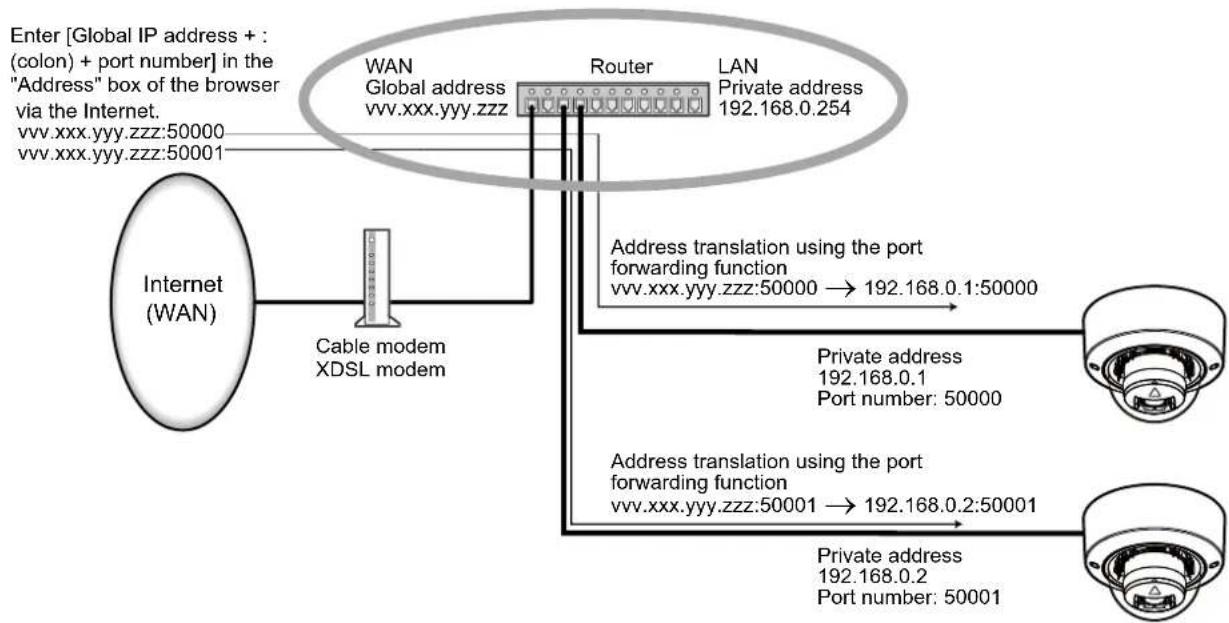
flowchart
graph TD
    A["Internet (WAN)"] --> B["Cable modem XDSL modem"]
    B --> C["Router"]
    C --> D["Global address vvv.xxx.yyy.zzz"]
    C --> E["Private address 192.168.0.254"]
    C --> F["Address translation using the port forwarding function vvv.xxx.yyy.zzz:50000 → 192.168.0.1:50000"]
    C --> G["Address translation using the port forwarding function vvv.xxx.yyy.zzz:50001 → 192.168.0.2:50001"]
    C --> H["Private address 192.168.0.1 Port number: 50000"]
    C --> I["Private address 192.168.0.2 Port number: 50001"]
    J["Enter [Global IP address + : (colon) + port number"] in the "Address" box of the browser via the Internet. vvv.xxx.yyy.zzz:50000 vvv.xxx.yyy.zzz:50001] --> K["WAN"]
[ONVIF®]
Select "On" or "Off" to determine whether to enable the ONVIF function.
- On: The ONVIF function is enabled.
- Off: The ONVIF function is disabled.
- Default: On
Note
• ONVIF is the trademark of ONVIF, Inc.
2.10.2 Configure advanced network settings [Advanced]
Click the [Advanced] tab on the "Network" page. (→“2.2.1 How to display the setup menu”, “2.2.2 How to operate the setup menu”)
The settings related to SMTP (E-mail), NTP, UPnP, HTTPS, DDNS, SNMP, QoS, SRTP can be configured in this section.
You can move to the setting page of a setting item by clicking the corresponding link for that setting item.

2.10.2.1 Configure the settings related to sending E-mails
[E-mail notification]
Select “On” or “Off” to determine whether or not to provide notification by E-mail according to the settings for the “Alarm” and “Diag.” checkboxes of “Destination of notification” below.
- When an alarm is detected ("Alarm")
- When a notification of the remaining capacity of the SD memory card has been provided ("Diag.")
- When the SD memory card has become full ("Diag.")
- When the SD memory card cannot be recognized ("Diag.")
- Default: Off
[Alarm image attachment]
Select "On" or "Off" to determine whether or not to attach an image to the E-mail to be sent when an alarm is detected.
- Default: Off
[Image capture size]
Select the image capture size of images attached to an alarm E-mail from the following. JPEG(1)/JPEG(2)
- Default: JPEG(2)
[SMTP server address]
Enter the IP address or the host name of the SMTP server used to send E-mails.
• Available number of characters: 1 - 128 characters
• Available characters: Alphanumeric characters, the colon (:), the period (.), the underscore (_), and the hyphen (-).
[SMTP port]
Enter the port number to which E-mails are sent.
• Available port number: 1-65535
- Default: 25
The following port numbers are unavailable since they are already in use.
20, 21, 23, 42, 53, 67, 68, 69, 80, 110, 123, 161, 162, 443, 995, 10669, 10670
[POP server address]
When "POP before SMTP" is selected for "Type", enter the IP address or the host name of the POP server.
• Available number of characters: 1 - 128 characters
• Available characters: Alphanumeric characters, the colon (:), the period (.), the underscore (_), and the hyphen (-).
IMPORTANT
- When entering the host name for "SMTP server address" or "POP server address", it is necessary to configure the DNS settings on the [Network] tab of the "Network" page. (→“2.10.1 Configure the network settings [Network]”)
[Authentication]
- Type
Select the authentication method to send E-mails from the following.
— None: It is not necessary to clear any authentication to send E-mails.
- POP before SMTP: It is necessary to first clear the POP server authentication to use the SMTP server to send E-mails.
- SMTP: It is necessary to clear the SMTP server authentication to send E-mails.
- Default: None
Note
- When you don't know the authentication method to send E-mails, refer to the network administrator.
- User name
Enter the user name to access the server.
- Available number of characters: 0 - 32 characters
- Unavailable characters: " & : ; \
- Password
Enter the password to access the server.
- Available number of characters: 0 - 128 characters
- Unavailable characters: " &
[Sender's E-mail address]
Enter the E-mail address of a sender.
The entered E-mail address will be displayed in the "From" (sender) line of the sent E-mails.
• Available number of characters: 3 - 128 characters
• Available characters: Alphanumeric characters, the at sign (@), the period (.), the underscore (_), and the hyphen (-).
[SSL]
Select "On" if you want to use SSL encryption when sending E-mail notifications for alarm occurrences or the "Diag." function. When you select "On", the authentication method will be set to "SMTP". Set the user name and the password used for authentication.
- Default: Off
Note
- Some SMTP servers may not support SSL.
- SSL supports SMTP over SSL, but STARTTLS is not supported.
- When "On" is selected, the SMTP port number may need to be set to 465. Ask your Internet service provider for the appropriate settings.
[Address 1] - [Address 4]
Enter the destination E-mail address. Up to 4 destination E-mail addresses can be registered.
• Available number of characters: 3 - 128 characters
• Available characters: Alphanumeric characters, the at sign (@), the period (.), the underscore (_), and the hyphen (-).
To delete the registered address, click the [Delete] button respective to the desired address.
- Terminal 1: Notify by e-mail when an alarm occurs in Terminal 1.
- Terminal 2: Notify by e-mail when an alarm occurs in Terminal 2.
- Terminal 3: Notify by e-mail when an alarm occurs in Terminal 3.
• VMD: Notify by e-mail when motion is detected.
• SCD: Notify by e-mail when SCD has occurred.
- Command alarm: Notify by e-mail when a command alarm is entered.
• Audio detection: Notify by e-mail when audio detection has occurred.
• Diag.:
- When a notification of the remaining capacity of SD memory card has been provided
- When the SD memory card has become full
- When the SD memory card cannot be recognized
[E-mail subject(Alarm)]
Enter the E-mail subject.
• Available number of characters: 0 - 50 characters
• Use the camera title: The camera title will be displayed in the e-mail subject.
- Cause of alarm: Adds the cause of alarm to the E-mail subject.
[E-mail subject(Diag.)]
Enter the diagnostic e-mail subject.
• Available number of characters: 0 - 50 characters
• Use the camera title: The camera title will be displayed in the e-mail subject.
[E-mail body(Alarm)]
Enter the E-mail body.
• Available number of characters: 0 - 200 characters
- Cause of alarm: The cause of alarm %p% is added in the e-mail body. %p% is replaced by the cause of alarm and sent.
- For VMD alarm: "VMD"
- For SCD alarm: "SCD"
- For terminal alarm: Terminal name set in "Terminal 1", "Terminal 2", and "Terminal 3" of "Terminal name". (Example: If the name of Terminal 1 is "Terminal1", it is "Terminal1")
- For command alarm: "CMD"
- For audio detection alarm (AI sound classification, Gunshot): "Audio detection Gunshot"
- For audio detection alarm (AI sound classification, Yell): "Audio detection Yell"
- For audio detection alarm (AI sound classification, Vehicle Horn): "Audio detection Vehicle Horn"
- For audio detection alarm (AI sound classification, Glass Break): "Audio detection Glass Break"
- For audio detection alarm (AI sound classification, Other): "Audio detection"
- Occurrence time: The time of occurrence %t% will be added to the e-mail body. %t% will be replaced by the time of occurrence of the alarm (HH:MM:SS) and sent.
- Default:
– Cause of alarm: Checked
– Occurrence time: Checked
– E-mail body: The %p% alarm was occurred at %t%.
Note
- Notification E-mail will be sent with the message "The capacity of the SD memory card is full." when the SD memory card has become full, or "The SD memory card cannot be detected." when mounting of the SD memory card failed.
- Entering alternative text into the E-mail body automatically adds the event or time when an alarm occurs.
Alternative text cause of alarm: %p%, occurrence time: %t% (Examples of use)
After setting the following characters in the E-mail body, there is a VMD alarm occurrence at the time 19:13:24.
E-mail body settings: %p% alarm occurred at %t%.
Sent E-mail body: "A "VMD" alarm occurred at 19:13:24."
When the body of the email is empty, the language that the email is sent in is determined by “Menu language” of “Basic”. If “Japanese” is specified, email is sent in Japanese. If another language is specified, email is sent in English.
[Terminal 1 (Up to 10 characters)]
Enter the name of Terminal 1 used in the cause of alarm in the e-mail body.
- Unavailable characters: " &
- Default: Terminal1
[Terminal 2 (Up to 10 characters)]
Enter the name of Terminal 2 used in the cause of alarm in the e-mail body.
- Unavailable characters: " &
- Default: Terminal2
[Terminal 3 (Up to 10 characters)]
Enter the name of Terminal 3 used in the cause of alarm in the e-mail body.
- Unavailable characters: " &
- Default: Terminal3
Example of e-mail notification
An e-mail format in which the camera title check box is specified in the e-mail subject and the cause of alarm/occurrence time are specified in the e-mail body
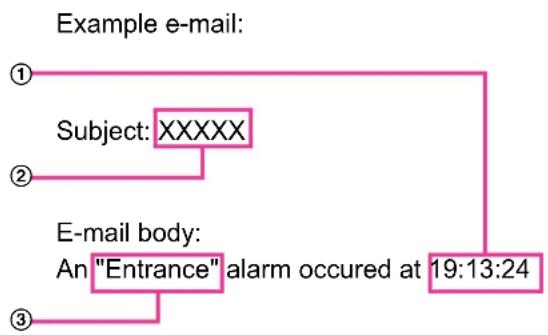
flowchart
graph TD
    A["Example e-mail:"] --> B["①"]
    B --> C["Subject: XXXXX"]
    C --> D["②"]
    D --> E["E-mail body: An "Entrance" alarm occurred at 19:13:24"]
    E --> F["③"]
① The alarm occurrence time is assigned.
② The camera title is used as the e-mail subject.
③ The name set for Terminal names 1 to 3, which is the cause of alarm, is assigned to the name.
2.10.2.2 Configure the settings relating to the NTP server
The settings relating to the NTP server such as the NTP server address, port number, etc. can be configured on this page.
IMPORTANT
- Use an NTP server when the more accurate time & date setting is required for the system operation.
[Time adjustment]
Select the time adjustment method from the following. Time adjusted by the selected method will be used as the standard time of the camera.
- Manual: Time set on the [Basic] tab on the "Basic" page will be used as the standard time of the camera.
- Synchronization with NTP server: Time automatically adjusted by synchronizing with the NTP server will be used as the standard time of the camera.
- Default: Manual
[NTP server address setting]
When “Synchronization with NTP server” is selected for “Time adjustment”, select the method of how to obtain the NTP server address from the following.
- Auto: Obtains the NTP server address from the DHCP server.
- Manual: The NTP server address will be entered manually on "NTP server address".
- Default: Manual
IMPORTANT
- When obtaining the NTP server address from the DHCP server, it is necessary to select "DHCP", "Auto(AutoIP)", or "Auto(Advanced)" for "Network Settings" on the [Network] tab of the "Network" page. (→“2.10.1 Configure the network settings [Network]")
[NTP server address]
When "Manual" is selected for "NTP server address setting", enter the IP address or the host name of the NTP server.
• Available number of characters: 1 - 128 characters
• Available characters: Alphanumeric characters, the colon (:), the period (.), the underscore (_), and the hyphen (-).
- Default: None (blank)
IMPORTANT
- When entering the host name for "NTP server address", it is necessary to configure the DNS settings on the [Network] tab of the "Network" page. (→“2.10.1 Configure the network settings [Network]”)
[NTP port]
Enter a port number of the NTP server.
• Available port number: 1 - 65535
- Default: 123
The following port numbers are unavailable since they are already in use.
20, 21, 23, 25, 42, 53, 67, 68, 69, 80, 110, 161, 162, 443, 995, 10669, 10670
[Time adjustment interval]
Select an interval (1 - 24 hours: in 1 hour intervals) of synchronization with the NTP server.
- Default: 1h
2.10.2.3 Configure the UPnP settings
This camera support UPnP (Universal Plug and Play). By using the UPnP function, it becomes possible to configure the following automatically.
- Configuration of the port forwarding function of the router (However, a router supporting UPnP is required.) This configuration is useful when accessing the camera via the Internet, or from a mobile terminal or tablet device.
- Automatic refreshment of the shortcut to the camera that is created on the [Network] folder of the PC even when the IP address of the camera changes.
[Auto port forwarding]
Select "On" or "Off" to determine whether or not to use the port forwarding function of the router.
To use the port forwarding function, the router in use must support UPnP and the UPnP must be enabled.
- Default: Off
Note
- Due to port forwarding, the port number may sometimes be changed. When the number is changed, it is necessary to change the port numbers registered in the PC and recorders, etc.
- The UPnP function is available when the camera is connected to the IPv4 network. IPv6 is not supported.
- To check if auto port forwarding is properly configured, click the [Status] tab on the "Maintenance" page, and check that the "Enable" is displayed for "Status" of "UPnP". (→"2.12.3 Check the status [Status]")
When “Enable” is not displayed, refer to “Cannot access the camera via the Internet.” in the “3.2 Troubleshooting” section. - When the live page or the setting page is not correctly displayed such as when replacing the router in use, set "UPnP (Auto port forwarding)" to "Off" once and then set it to "On" again.
[Camera short cut]
Select whether or not to create the shortcut to the camera on the [Network] folder of the PC. When creating the shortcut, select "On".
To use the shortcut function to the camera, enable the UPnP function on the PC in advance.
- Default: Off
Note
- To display the shortcut to the camera on the [Network] folder of the PC, it is necessary to add the Windows component. Refer to the following to enable the UPnP function.
For Windows 8.1
Right-click [Start] → select [Control Panel] → [Network and Internet] → [Network and Sharing Center] → select [Turn on network discovery] of [Network discovery] of [Change advanced sharing settings] → click [Save changes] → Complete
For Windows 10
[Start] → [Settings] → [NETWORK & INTERNET] → [Ethernet] → [Network and Sharing Center] → select [Turn on network discovery] of [Network discovery] of [Change advanced sharing settings] → click [Save changes] → Complete
2.10.2.4 Configure the HTTPS settings
It is possible to enhance the network security by encrypting the access to cameras using the HTTPS function. Refer to "2.10.3 How to configure HTTPS settings" for how to configure the HTTPS settings.
[HTTPS - Connection]
Select the protocol used to connect the camera.
- HTTP: HTTP and HTTPS connections are available.
- HTTPS: Only the HTTPS connection is available.
- Default: HTTP
Note
- To change to an HTTPS connection when HTTP is selected, perform HTTPS connection settings first. The HTTPS connection will be available even if the setting is changed to HTTP afterwards.
[HTTPS - Select certificate]
Select the certificate to be used with HTTPS.
- Pre-installed: Select a pre-installed certificate.
• CA: Select a CA certificate. Only displayed when the CA Certificate is installed.
- Default: Pre-installed
[HTTPS - HTTPS port]
Designate the HTTPS port number to be used.
• Available port number: 1 - 65535
- Default: 443
The following port numbers are unavailable since they are already in use.
20, 21, 23, 25, 42, 53, 67, 68, 69, 80, 110, 123, 161, 162, 554, 995, 10669, 10670, 59000-61000
[Pre-installed certificate - Download root certificate]
Click the [Execute] button to download the root certificate for the pre-installed certificate. By installing the root certificate to your PC, you can get signature verification for the pre-installed certificate.
[CA Certificate - CRT key generate]
CRT key (SSL encryption key) used for the HTTPS protocol is generated. To generate the CRT key, click the [Execute] button to display "CRT key generate" dialog box.
[CA Certificate - Generate Certificate Signing Request]
When using the security certificate issued by CA (Certificate Authority) as the security certificate used for the HTTPS protocol, the CSR (Certificate Signing Request) will be generated.
To generate the CSR, click the [Execute] button to display the "CA Certificate - Generate Certificate Signing Request" dialog window.
[CA Certificate - CA Certificate install]
Installs the CA certificate (security certificate) issued by CA (Certificate Authority) and displays the information of the installed CA certificate (security certificate).
To install the CA certificate (security certificate), click the [Choose File] button to display the [Open] dialog box, and select the file of the CA certificate (security certificate) issued by CA, and click the [Execute] button.
If the CA certificate (security certificate) is already installed, the file name of the installed CA certificate (security certificate) will be displayed.
[CA Certificate - Information]
Displays the information of the CA certificate (security certificate).
When the [Confirm] button is clicked, the registered information of the installed CA certificate (security certificate) will be displayed in the "CA Certificate - Confirm" dialog box. If the CA certificate (security certificate) is not installed, the content of the generated CSR file will be displayed.
When the [Delete] button is clicked, the installed CA certificate (security certificate) will be deleted.
IMPORTANT
- Before deleting the valid CA certificate (security certificate), confirm that there is a backup file of the CA certificate (security certificate) on the PC or another media. The backup file of the CA certificate (security certificate) will be required when installing the CA certificate (security certificate) again.
Note
- After changing the connection setting, access the camera again by after waiting a while according to the changed setting ("http://IP address of the camera" or "https://IP address of the camera").
- When the camera is accessed using the HTTPS protocol, the refresh interval and frame rate of images may be lower.
- When the camera is accessed using the HTTPS protocol, it may take time to display images.
- When the camera is accessed using the HTTPS protocol, the images may be distorted or audio may be interrupted.
- The maximum number of concurrent access user varies depending on the maximum image size and transmission format.
2.10.2.5 Configure the settings relating to DDNS
To access this camera via the Internet, it is necessary to configure the settings for the DDNS function. Refer to "2.10.6 How to configure the settings relating to DDNS" for how to configure the settings relating to DDNS.
[Area]
Select the region where the camera is installed.
Japan/Global
Note
- If the camera is used in Japan, select "Japan". If the camera is used outside of Japan, select "Global". The "Viewnetcam.com" service that is displayed when "Global" is selected cannot be used in Japan.
[Service]
Select the DDNS service to determine whether or not to use DDNS.
- Off: Does not use the DDNS function.
- Viewnetcam.com: Uses the "Viewnetcam.com" service.
• Dynamic DNS Update: Uses Dynamic DNS Update (RFC2136 compliant) without the DHCP cooperation. - Dynamic DNS Update(DHCP): Uses Dynamic DNS Update (RFC2136 compliant) with the DHCP cooperation.
- Default: Off
Note
- When using Dynamic DNS Update (RFC2136 compliant), refer to the network administrator for whether or not to cooperate with the DHCP.
2.10.2.6 Configure the settings relating to SNMP
The settings relating to SNMP can be configured on this page. It is possible to check the status of the camera by connecting to the SNMP manager. When using the SNMP function, contact the network administrator.
SNMP agent setting
[SNMP version]
Select the SNMP version to be used.
- SNMPv1/v2: SNMPv1/v2 is activated.
• SNMPv3: SNMPv3 is activated. - SNMPv1/v2/v3: SNMPv1/v2/v3 is activated.
- Default: SNMPv1/v2
[SNMPv1/v2] - [Community]
Enter the community name to be monitored.
• Available number of characters: 0 - 32 characters
- Default: None (blank)
IMPORTANT
- When using the SNMP function with SNMPv1/v2, it is necessary to enter a community name. When no community name is entered, the SNMP function will not work. Do not set a community name that can easily be guessed. (Example: public)
[SNMPv1/v2] - [Manager address]
Enter the IP address of the SNMP manager from which requests are to be permitted when the SNMP version is v1 or v2. When left blank, requests from all IP addresses will be permitted.
• Available number of characters: 1 - 128 characters
• Available characters: Alphanumeric characters, the colon (:), the period (.), the underscore (_), the hyphen (-) and the slash (/).
- Default: None (blank)
Note
- When "IP address/subnet mask" is entered, it is possible to restrict IP address of SNMP manager from which request is permitted by subnet. For example, when "192.168.0.1/24" is entered, all requests from the SMNP managers in the range from "192.168.0.1" to "192.168.0.254" will be permitted.
[SNMPv3] - [User name]
Set the SNMPv3 user name.
• Available number of characters: Empty field or 1 - 32 characters
- Unavailable characters: " & : ; \
[SNMPv3] - [Authentication]
Select the SNMPv3 authentication method from MD5 or SHA1.
- Default: MD5
[SNMPv3] - [Encryption method]
Select the SNMPv3 encryption method from DES or AES.
- Default: DES
[SNMPv3] - [Password]
Set the SNMPv3 password.
• Available number of characters:
- If the authentication method is MD5: Empty field or 8-16 characters
- If the authentication method is SHA1: Empty field or 8-20 characters
- Unavailable characters: " &
SNMPv2-MIB system setting
[System name]
Enter a system name to be used to manage the camera with the SNMP function.
• Available number of characters: 0 - 32 characters
- Default: None (blank)
[Location]
Enter the name of the location where the camera is installed.
• Available number of characters: 0 - 32 characters
- Default: None (blank)
[Contact]
Enter the E-mail address or the phone number of the SNMP manager.
• Available number of characters: 0 - 255 characters
- Default: None (blank)
[SNMP trap setting]
Set On/Off of the SNMP trap.
- Default: Off
[Destination of Trap] - [Address]
Enter the destination address of the SNMP trap.
• Available number of characters: 1 - 128 characters
• Available characters: Alphanumeric characters, the colon (:), the period (.), the underscore (_), and the hyphen (-).
- Default: None (blank)
[Destination of Trap] - [Port number]
Enter the port number of the destination address of the SNMP trap.
• Available port number: 1 - 65535
- Default: 162
The following port numbers are unavailable since they are already in use. 20, 21, 23, 25, 42, 53, 67, 68, 69, 80, 110, 123, 161, 443, 554, 995, 10669, 10670, 59000 - 61000
[SNMPv2c] - [Community]
Enter the community name of the destination address of the SNMP trap.
• Available number of characters: 0 - 32 characters
- Unavailable characters: 2-byte characters
- Default: None (blank)
IMPORTANT
- When using the SNMP trap function, it is necessary to enter the community name. When no community name is entered, the SNMP trap function will not work.
Trap setting
[SNMP Generic trap] - [coldStart] - [On/Off]
When the check box is checked, a trap (SNMPv2-MIB::coldStart) will be sent.
- Default: Not checked (Off)
[SNMP Generic trap] - [coldStart] - [Trap string]
When a camera startup trap is to be extended and sent, set the string of characters of the extended trap.
• Available number of characters: 0 - 20 characters
• Available characters: 0-9, A-Z, a-z and the following marks.
$$ !" # \% \& ^ {\prime} () ^ {*} +, -. /:; = ? $$
- Default: cold start
[SNMP Generic trap] - [linkUP] - [On/Off]
When the check box is checked, a trap (SNMPv2-MIB::linkup) will be sent at the time when the camera is linked up.
- Default: Not checked (Off)
[SNMP Generic trap] - [linkUP] - [Trap string]
When a camera linkup trap is to be extended and sent, set the string of characters of the extended trap.
• Available number of characters: 0 - 20 characters
• Available characters: 0-9, A-Z, a-z and the following marks.
$$ !" # \% \& ^ {\prime} () ^ {*} +, -. /:; = ? $$
- Default: linkup
[SNMP Generic trap] - [authenticationFailure] - [On/Off]
When the check box is checked, a trap (SNMPv2-MIB::coldStart) will be sent at the time when an SNMP authentication error occurs.
- Default: Not checked (Off)
[SNMP Generic trap] - [authenticationFailure] - [Trap string]
When a SNMP authentication error occurrence trap is to be extended and sent, set the string of characters.
• Available number of characters: 0 - 20 characters
• Available characters: 0-9, A-Z, a-z and the following marks.
$$ !" # \% \& ^ {\prime} () ^ {*} +, -. /:; = ? $$
- Default: auth error
[Alarm] - [Terminal 1] - [On/Off]
When the check box is checked, a trap will be sent at the time when an alarm occurs in terminal 1.
- Default: Not checked (Off)
[Alarm] - [Terminal 1] - [Trap string]
Set the string of characters to be used for the trap of [Terminal 1].
• Available number of characters: 0 - 20 characters
• Available characters: 0-9, A-Z, a-z and the following marks.
$$ !" # \% \& ^ {\prime} () ^ {*} +, -. /:; = ? $$
- Default: terminal alarm 1
[Alarm] - [Terminal 2] - [On/Off]
When the check box is checked, a trap will be sent at the time when an alarm occurs in terminal 2.
- Default: Not checked (Off)
[Alarm] - [Terminal 2] - [Trap string]
Set the string of characters to be used for the trap of [Terminal 2].
• Available number of characters: 0 - 20 characters
• Available characters: 0-9, A-Z, a-z and the following marks.
$$ !" # \% \& ^ {\prime} () ^ {*} +, -. /:; = ? $$
- Default: terminal alarm 2
[Alarm] - [Terminal 3] - [On/Off]
When the check box is checked, a trap will be sent at the time when an alarm occurs in terminal 3.
- Default: Not checked (Off)
[Alarm] - [Terminal 3] - [Trap string]
Set the string of characters to be used for the trap of [Terminal 3].
• Available number of characters: 0 - 20 characters
• Available characters: 0-9, A-Z, a-z and the following marks.
$$ !" # \% \& ^ {\prime} () ^ {*} +, -. /:; = ? $$
- Default: terminal alarm 3
[Alarm] - [VMD] - [On/Off]
When the check box is checked, a trap will be sent at the time when a video motion detection is activated.
- Default: Not checked (Off)
[Alarm] - [VMD] - [Trap string]
Set the string of characters to be used for the trap of [VMD].
• Available number of characters: 0 - 20 characters
• Available characters: 0-9, A-Z, a-z and the following marks.
$$ !" # \% \& ^ {\prime} () ^ {*} +, -. /:; = ? $$
- Default: VMD alarm
[Alarm] - [Audio detection] - [On/Off]
When the check box is checked, a trap will be sent at the time when an audio detection alarm occurs.
- Default: Not checked (Off)
[Alarm] - [Audio detection] - [Trap string]
Set the string of characters to be used for the trap of [Audio detection].
• Available number of characters: 0 - 20 characters
• Available characters: 0-9, A-Z, a-z and the following marks.
!" # \$ % & ' () * + , - . / : ; = ?
- Default: audio
[Alarm] - [Command alarm] - [On/Off]
When the check box is checked, a trap will be sent at the time when a command alarm occurs.
- Default: Not checked (Off)
[Alarm] - [Command alarm] - [Trap string]
Set the string of characters to be used for the trap of [Command alarm].
• Available number of characters: 0 - 20 characters
• Available characters: 0-9, A-Z, a-z and the following marks.
!" # \$ % & ' () * + , - . / : ; = ?
- Default: cmd
[SD memory card] - [Diag.] - [On/Off]
When the check box is checked, a trap will be sent in the following cases.
- When a notification of the remaining capacity of SD memory card has been provided
- When the SD memory card has become full
- When the SD memory card cannot be recognized
- Default: Not checked (Off)
[SD memory card] - [Diag.] - [Trap string]
Set the string of characters to be used for the trap of [Diag.].
• Available number of characters: 0 - 20 characters
• Available characters: 0-9, A-Z, a-z and the following marks.
!" # \$ % & ' () * + , - . / : ; = ?
- Default: sd alarm
2.10.2.7 Configure the QoS settings
The settings relating to the Diffserv function and shaping of stream are configured in this section.
Diffserv
The Diffserv function can be used to set the priority of image/audio data sent from routers.
The priority set to this function must match the DSCP value configured to the router.
When using the Diffserv function, contact the network administrator.
[Image DSCP(0-63)]
Enter the packet priority for video data.
• Available values: 0 - 63
- Default: 0
[Audio DSCP(0-63)]
Enter the packet priority for audio transmission/reception.
• Available values: 0 - 63
- Default: 0
[TCP alarm notification DSCP(0-63)]
Enter the packet priority for TCP alarm notification.
• Available values: 0 - 63
- Default: 0
Shaping of stream
[Shaping of stream]
Select On/Off to determine whether or not to control the H.265 (or H.264) image data so that it does not burst. It is effective in situations such as when a network device loses video data from the camera, but the video display may be delayed.
- Off: Disables the shaping of stream function.
- On: Enables the shaping of stream function.
- Default: Off
Note
- If you are concerned about delays of the video display, select Off.
2.10.2.8 Configure the SRTP settings
The settings relating to the SRTP function are configured in this section.
[SRTP]
Select "On" or "Off" to determine whether or not to use the SRTP function.
- On: Use the SRTP function
- Off: Not use the SRTP function
- Default: Off
Note
- RTP distribution is available even when SRTP is set to "On".
• Information on clients that can connect with SRTP is available on our technical information website.
2.10.3 How to configure HTTPS settings
The settings relating to the HTTPS protocol that can enhance the network security by encrypting the access to cameras on this page.
HTTPS settings can be configured by either using the certificate pre-installed to the camera, or using a CA certificate that you obtained by yourself from the CA (CA: Certification Authority). The settings will be configured in the following procedure.
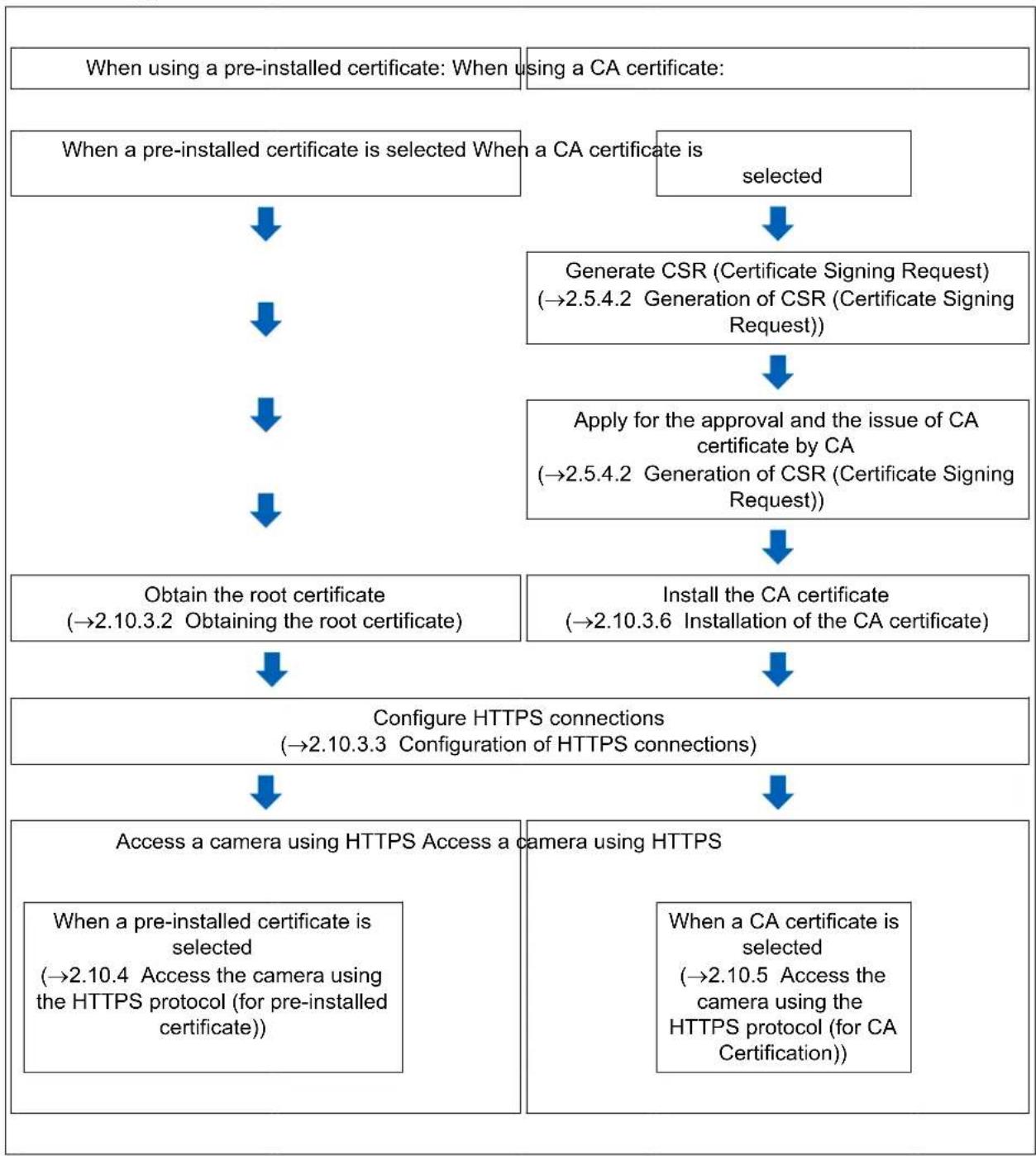
flowchart
graph TD
    A["When using a pre-installed certificate: When using a CA certificate:"] --> B["When a pre-installed certificate is selected: When a CA certificate is selected"]
    B --> C["Generate CSR (Certificate Signing Request) (→2.5.4.2 Generation of CSR (Certificate Signing Request))"]
    C --> D["Apply for the approval and the issue of CA certificate by CA (→2.5.4.2 Generation of CSR (Certificate Signing Request))"]
    D --> E["Install the CA certificate (→2.10.3.6 Installation of the CA certificate)"]
    E --> F["Configure HTTPS connections (→2.10.3.3 Configuration of HTTPS connections)"]
    F --> G["Access a camera using HTTPS Access a camera using HTTPS"]
    G --> H["When a pre-installed certificate is selected (→2.10.4 Access the camera using the HTTPS protocol (for pre-installed certificate))"]
    G --> I["When a CA certificate is selected (→2.10.5 Access the camera using the HTTPS protocol (for CA Certification))"]
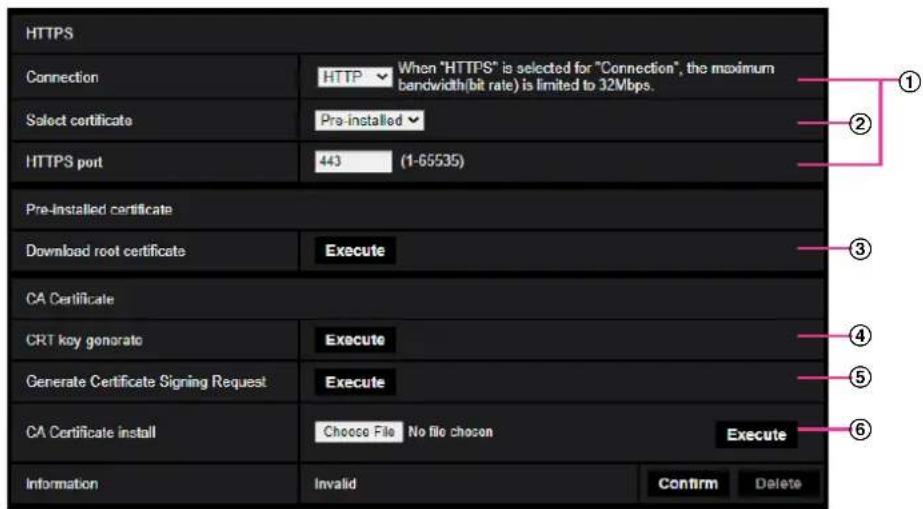
① Configuring the HTTPS connection ( "2.10.3.3 Configuration of HTTPS connections")
② Select the certificate ( "2.10.3.1 Select the certificate to use when accessing with HTTPS")
③ Obtain the root certificate ( "2.10.3.2 Obtaining the root certificate")
④ Generation of the CRT key (SSL encryption key) (→“2.10.3.4 Generation of the CRT key (SSL encryption key)”)
⑤ Generation of CSR (Certificate Signing Request) ( "2.10.3.5 Generation of CSR (Certificate Signing Request)")
⑥ Install the CA certificate ( "2.10.3.6 Installation of the CA certificate")
Note
• To use the CA certificate, you need to apply for the approval and the issue of CA certificate by CA.
2.10.3.1 Select the certificate to use when accessing with HTTPS
Select the certificate to be used with HTTPS with [HTTPS – Select certificate].
- When using a pre-installed certificate: Select "Pre-installed". When "Pre-installed" is selected, a root certificate (→"2.10.3.2 Obtaining the root certificate") must be obtained.
- When using a CA certificate: Select "CA".
Note
- "CA" can only be selected when a CA certificate has been added. Refer to "2.10.3 How to configure HTTPS settings" for information on how to add a CA certificate.
2.10.3.2 Obtaining the root certificate
This procedure only needs to be done once for each PC that accesses the camera.
- Access the camera, and click the [Execute] button for "Pre-installed certificate - Download root certificate" under "HTTPS" in the [Advanced] tab in the settings menu of the "Network" page. Click "***.cer" displayed on the bottom of the browser.
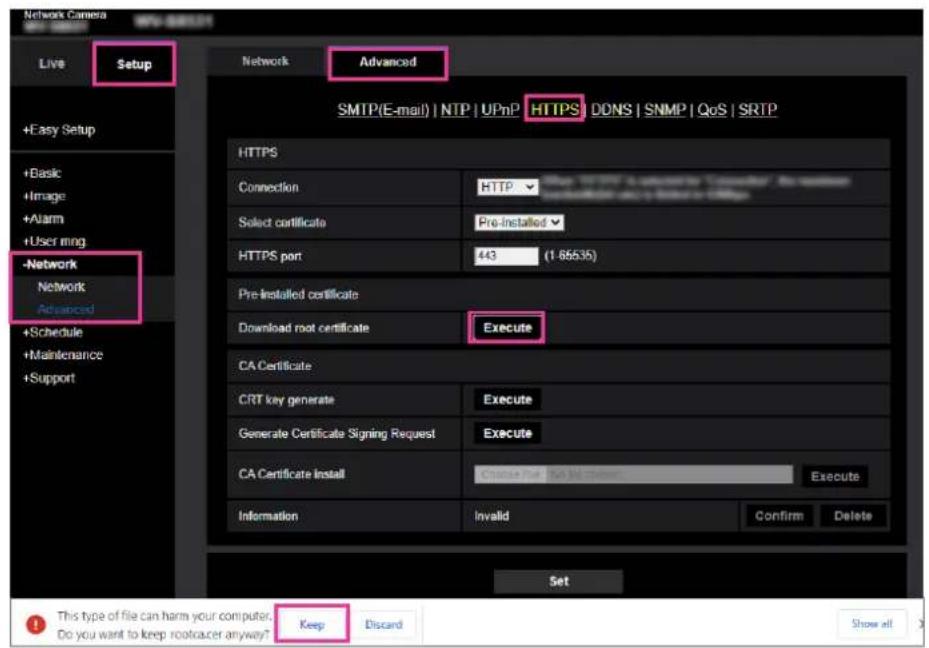
2. Click "Install Certificate...".
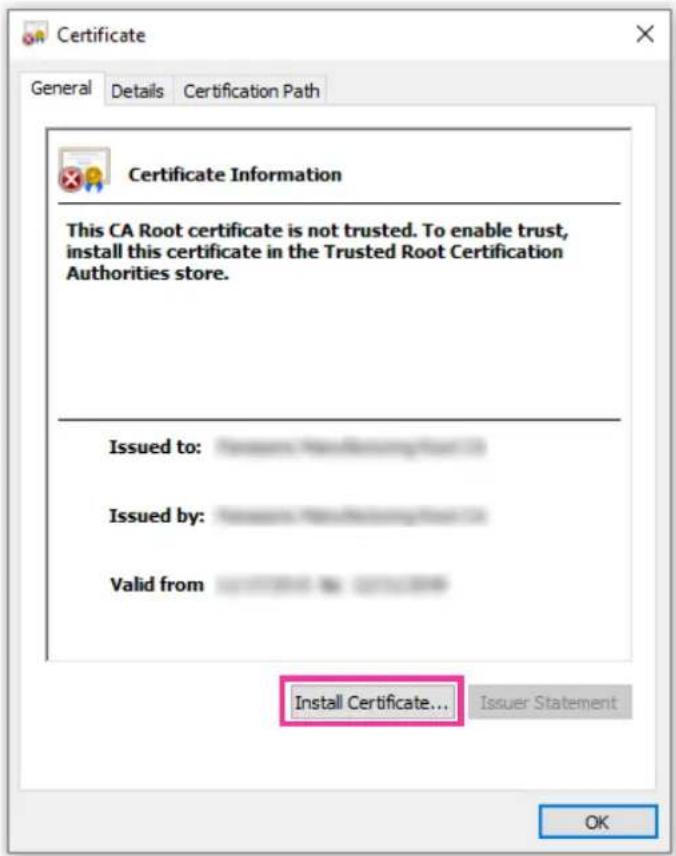
3. Click "Next" displayed in "Certificate Import Wizard".
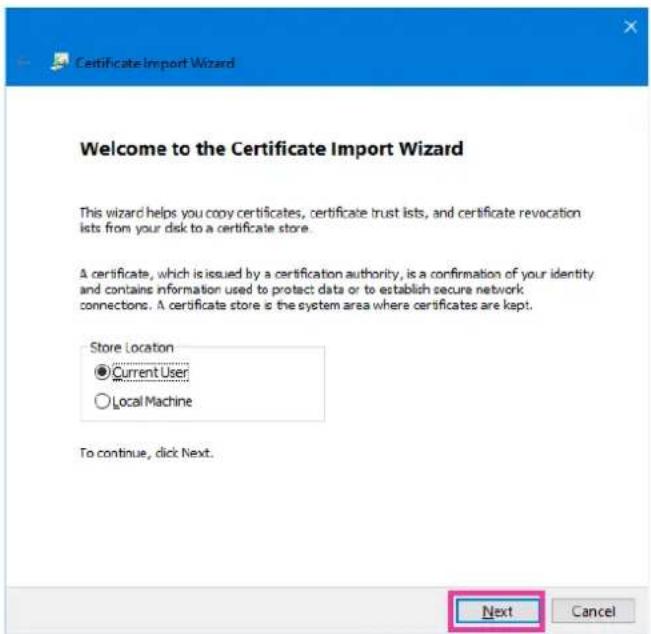
- Select "Place all certificates in the following store", and click "Browse...".
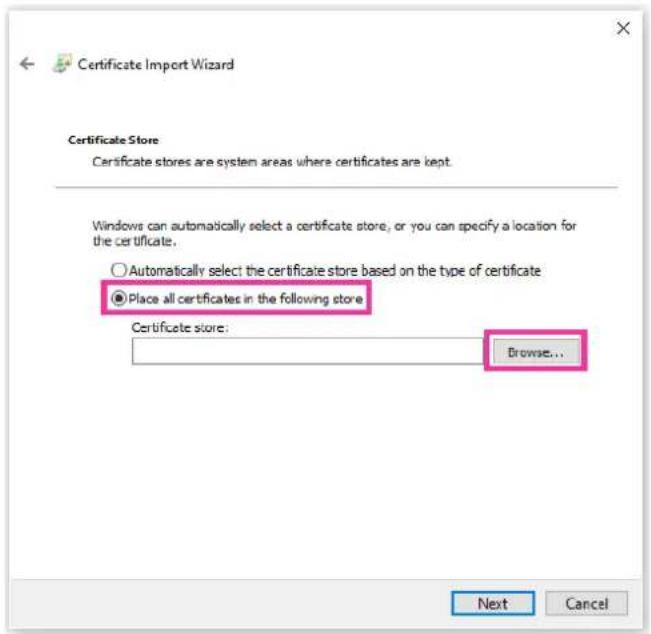
- Select "Trusted Root Certificate Authorities", and click "OK".
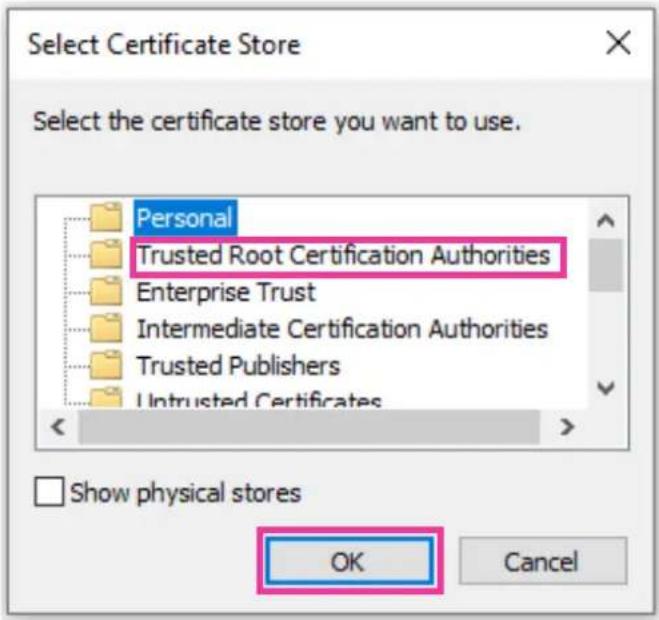
6. Click "Next".
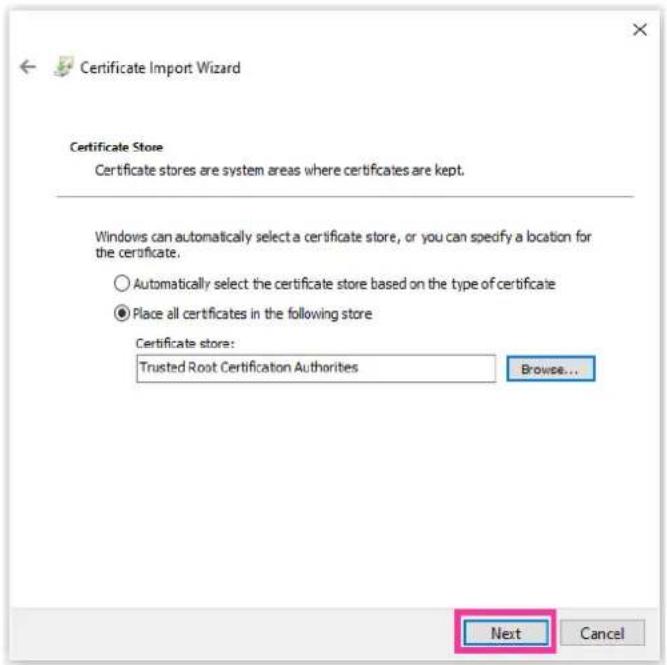
7. Click "Finish".
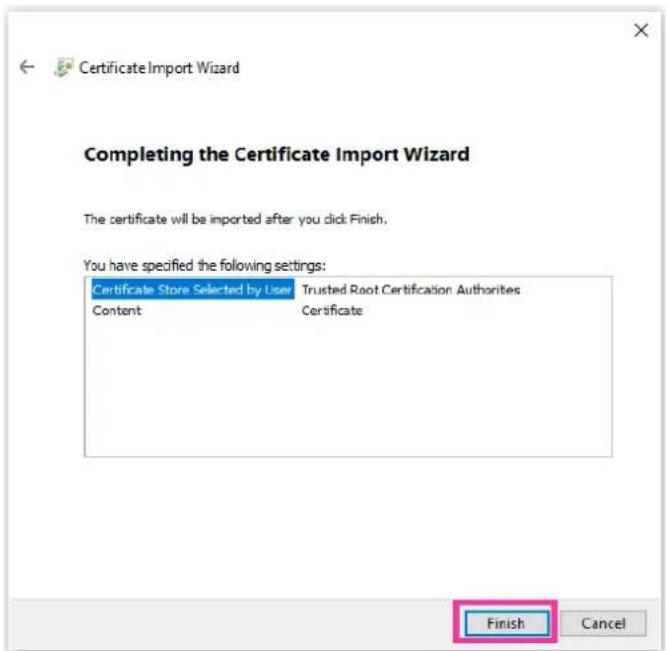
- Confirm that the content shown next to "Thumbprint" in the "Security warning" window is as follows and then click "Yes".
- Thumbprint (sha1): F6ED6BB7 EFB3679E A6E15C40 321186DB 1CE1BBA1
Note
- Other parties cannot create another thumbprint with the same values. You can confirm that you have retrieved the correct root certificate from the specified camera by confirming the values of the thumbprint.
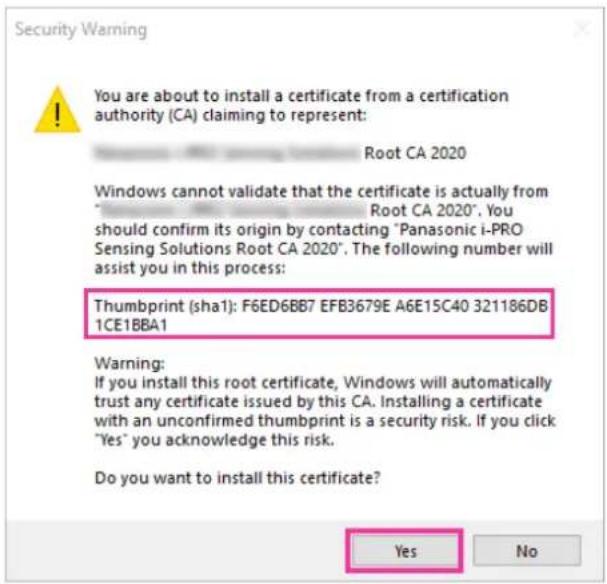
→ When the import is successfully completed, the screen "The import was successful." will be displayed. 9. Click the [OK] button.
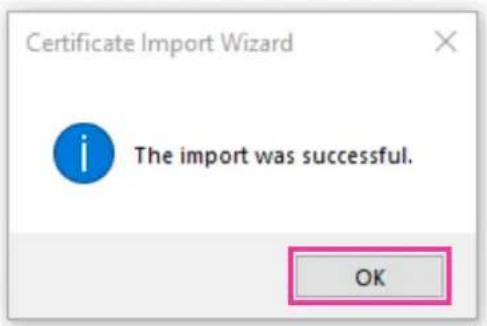
- Click the [OK] button in the "Certificate" window to close the window.
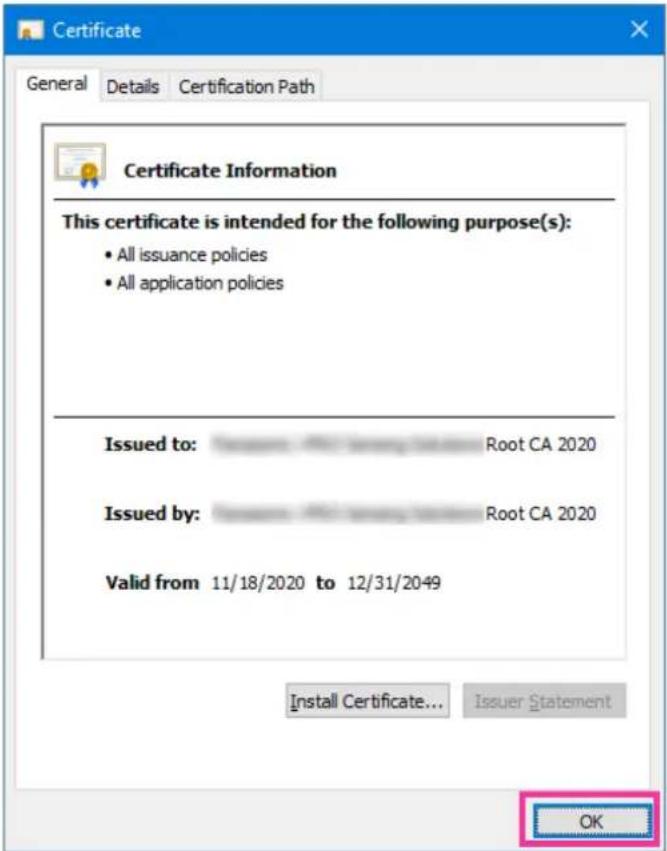
2.10.3.3 Configuration of HTTPS connections
- Select "HTTPS" to access the camera in [HTTPS - Connection].
- Designate the HTTPS port number to be used for [HTTPS – HTTPS port].
• Available port number: 1 - 65535
- Default: 443
The following port numbers are unavailable since they are already in use.
20, 21, 23, 25, 42, 53, 67, 68, 69, 80, 110, 123, 161, 162, 554, 995, 10669, 10670, 59000 - 61000
- Click the [Set] button.
→ It will become possible to access to the cameras using the HTTPS protocol.
Restart the browser and access again.
Refer to the following for information on methods to access cameras using HTTPS.
- Monitor images on a PC: "1.1 Monitor images on a PC"
-
Monitor images on a mobile terminal: "1.2.1 Monitor images on a mobile terminal (smartphone, etc.)"
-
If "Certificate error" is displayed, refer to the following.
-
When using a pre-installed certificate: "2.10.3.2 Obtaining the root certificate"
- When using a CA certificate: "2.10.5 Access the camera using the HTTPS protocol (for CA Certification)"
Note
- When the connection setting is changed, after waiting for a while, access the camera again with either "http://IP address of the camera" or "https://IP address of the camera" depending on the changed setting.
- When using the pre-installed certificate:
In advance, install the root certificate of the Pre-installed certificate on the PC in use. Refer to "2.10.3.2 Obtaining the root certificate" for information on the setting procedure.
- When the camera is accessed using the HTTPS protocol, the refresh interval and frame rate of images may be lower.
- When the camera is accessed using the HTTPS protocol, it may take time to display images.
- When the camera is accessed using the HTTPS protocol, the images may be distorted or audio may be interrupted.
- The maximum number of concurrent access user varies depending on the maximum image size and transmission format.
2.10.3.4 Generation of the CRT key (SSL encryption key)
IMPORTANT
- When the CA certificate is valid, it is impossible to generate the CRT key.
- When the CA certificate is used, the available key size varies depending on the CA. Confirm the available key size in advance.
-
To generate the CRT key, it may take about 2 minutes. Do not operate the web browser until the generation of CRT key is complete. While the CRT key is being generated, the refresh interval and line speed may be lower.
-
Click the [Execute] button of "CRT key generate".
→ The "CRT key generate" dialog box will be displayed.
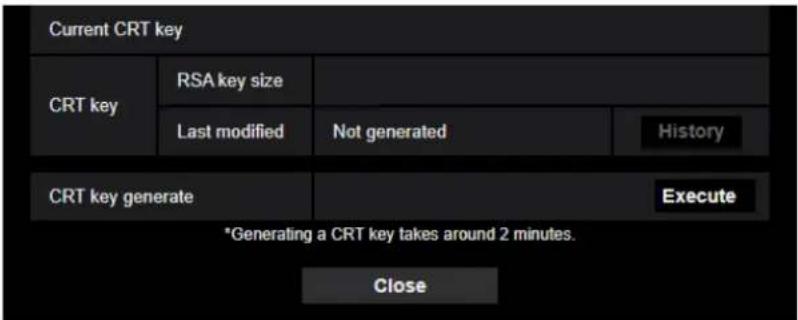
- Click the [Execute] button.
→ The generation of CRT key will be started. When the generation is finished, the key size and generation time & date of the generated key will be displayed on "Current CRT key".
Note
- To change (or update) the generated CRT key, perform step 1 to 2. The CRT key and CA certificate are valid in a set. When the CRT key is changed, it is necessary to re-apply for the CA certificate.
- When the CRT key is updated, the log of the previous CRT key is saved. When the [History] button of "Current CRT key" on the "CRT key generate" dialog box is clicked, the "Previous CRT key" dialog box will be displayed, and it is possible to check the key size and generation time & date of the previous key. When the [Apply] button is clicked on the "Previous CRT key" dialog box, it is possible to replace the current CRT key with the previous one.
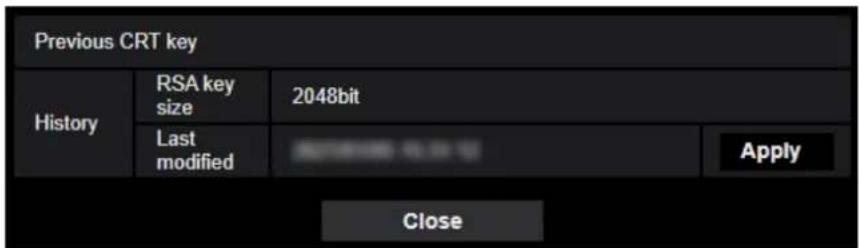
2.10.3.5 Generation of CSR (Certificate Signing Request)
IMPORTANT
- If the CRT key is not generated, it is impossible to generate the CSR.
- Click the [Execute] button of "CA Certificate - Generate Certificate Signing Request". → The "CA Certificate - Generate Certificate Signing Request" dialog box will be displayed.
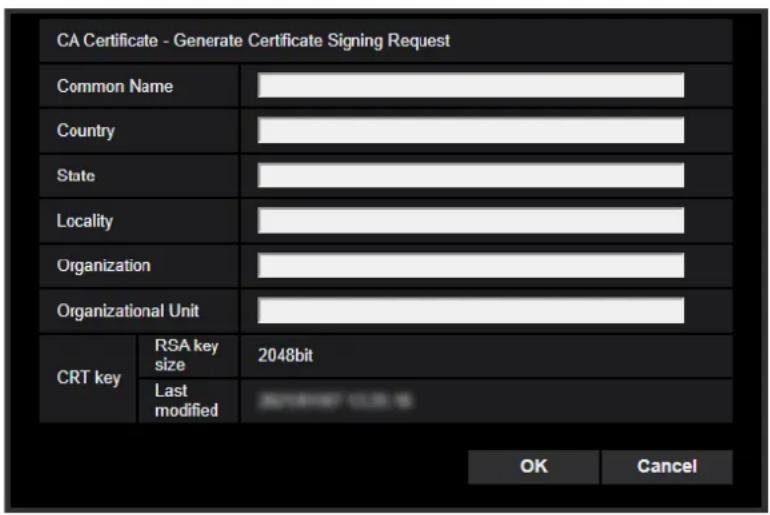
- Enter the information of the certificate to be generated.
| Item | Description Available number of characters |
| [Common Name] Enter the camera address or host name. 64 characters | |
| [Country] Enter the country name. 2 characters (Country code) | |
| [State] Enter the state name. 128 characters | |
| [Locality] Enter the locality name. 128 characters | |
| [Organization] Enter the organization name. 64 characters | |
| [Organizational Unit] | Enter the unit name of the organization. 64 characters |
| [CRT key] | Displays the key size and generation time & date of the current key. — |
Note
- To use the CA certificate, follow the requests from the CA about the information to be entered. - The available characters for [Common Name], [State], [Locality], [Organization], [Organizational Unit] are 0-9, A-Z, a-z and the following marks.
$$ - \cdot _, + / () $$
- Click the [OK] button after entering the items.
→ The [Save As] dialog box will be displayed.
- Enter a file name for the CSR in the [Save As] dialog box to save on the PC.
→ The saved CSR file will be applied to the CA.
IMPORTANT
- The CA certificate will be issued for the set of the generated CSR and CRT key. If the CRT key is re-generated or updated after applying to the CA, the issued CA certificate will be invalidated.
Note
- This camera generates the CSR file in the PEM format.
2.10.3.6 Installation of the CA certificate
IMPORTANT
• If the CSR file is not generated, it is impossible to install the CA certificate (security certificate).
- For the installation of the CA certificate, the CA certificate issued by CA is required.
- Click the [Choose File] button of "CA Certificate - CA Certificate install".
→ The [Open] dialog box will be displayed.
- Select the CA certificate file and click the [Open] button. Then, click the [Execute] button.
→ The CA certificate will be installed.
Note
- The host name registered in the installed CA certificate will be displayed on "CA Certificate - Information". Depending on the status of the CA certificate, the following are displayed.
| Indication | Description |
| Invalid The CA certificate is not installed. | |
| [CA certificate Host name] The CA certificate has already been installed and validated. | |
| Expired The CA certificate has already expired. | |
- When the [Confirm] button is clicked, the registered information of the CA certificate (security certificate) will be displayed in the "CA Certificate - Confirm" dialog box. (Only "Organizational Unit" will be displayed with an asterisk (*).)
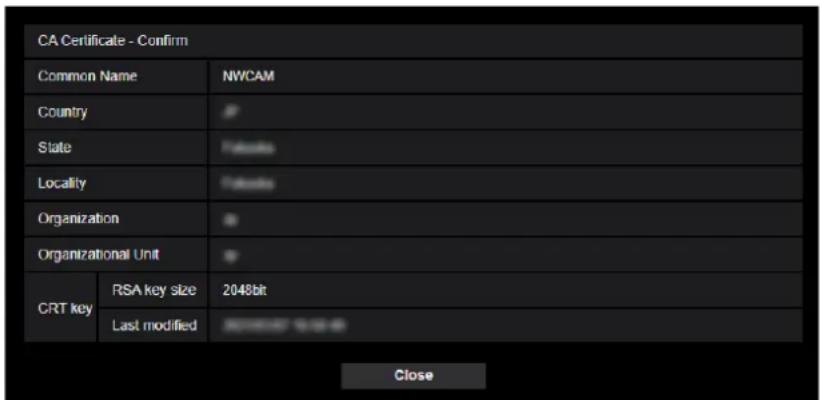
- When the [Delete] button is clicked, the installed CA certificate (security certificate) will be deleted.
- When "HTTPS" is selected for "Connection", it is impossible to delete the CA certificate (security certificate).
- To update the CA certificate, perform step 1 and 2.
IMPORTANT
- Before deleting the valid CA certificate (security certificate), confirm that there is a backup file of the CA certificate (security certificate) on the PC or another media. The backup file of the CA certificate (security certificate) will be required when installing the CA certificate (security certificate) again.
- When the CA certificate has expired, the HTTPS function will become unavailable. When the camera is restarted, the connection protocol will be changed to HTTP. Update the CA certificate before it expires.
- The expiration date of the CA certificate can be checked by double-clicking the CA certificate file issued by CA.
2.10.4 Access the camera using the HTTPS protocol (for pre-installed certificate)
To prevent warning messages of the browser or read errors of the "Live" page/setup menu from displaying at the time of accessing with HTTPS from a browser using the pre-installed certificate, it is necessary to perform the following procedure on each PC in use.
Explanations are based on procedures for Windows 10 using Google Chrome. Procedures for other operating systems or browsers may differ.
2.10.4.1 Configuration of the host file
This procedure must be done on each PC for all the camera that are accessed.
Note
- The following procedure cannot be used if you are using DDNS.
-
Start the browser and then access the camera using the HTTPS protocol.
-
When the security alert window is displayed, Click "Hide advanced" and then click "Proceed to IP address (unsafe)".
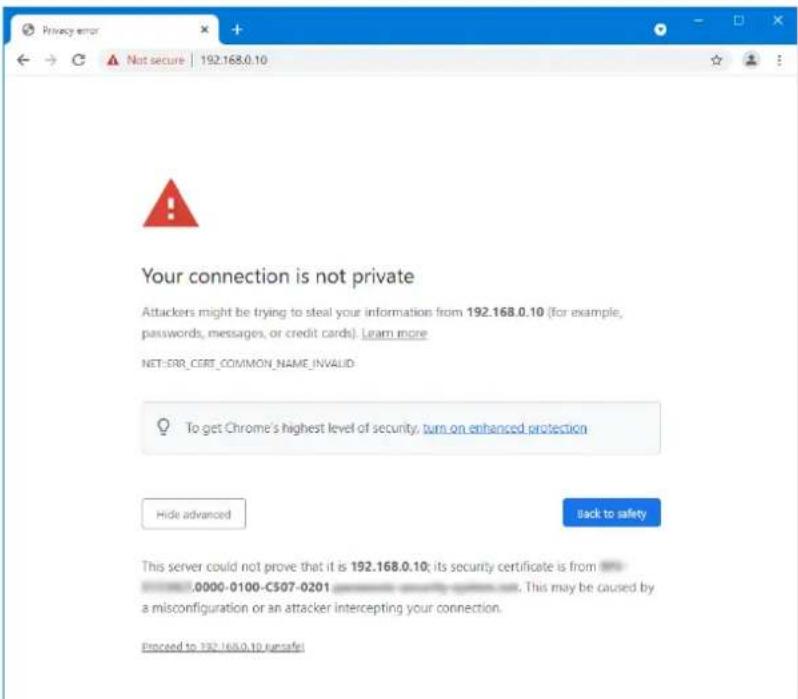
→The "Live" page will be displayed. If an authentication window is displayed, enter the user name and password.
Note
- This warning is displayed because the text entered in the address box does not match the text displayed in the subject of the certificate. This type of warning is displayed because when the certificate for the pre-installed certificate is created, the IP address or domain name assigned to the camera has not been determined yet. However, because the certificate configured in "2.10.3.2 Obtaining the root certificate" is only issued for our products, this is not a problem.
- Click "Not secure" on the address bar and then click "Certificate(Invalid)" on the "Your connection to this site is not secure" window.
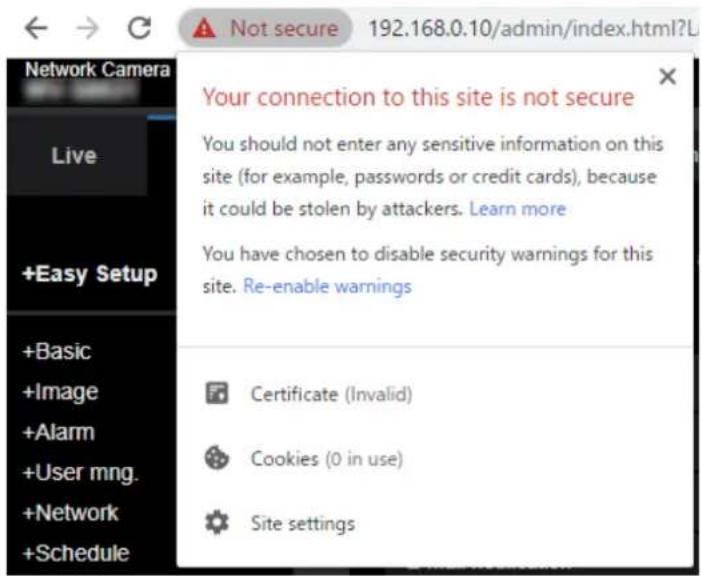
- The "Certificate" window is displayed. Select the "Details" tab.
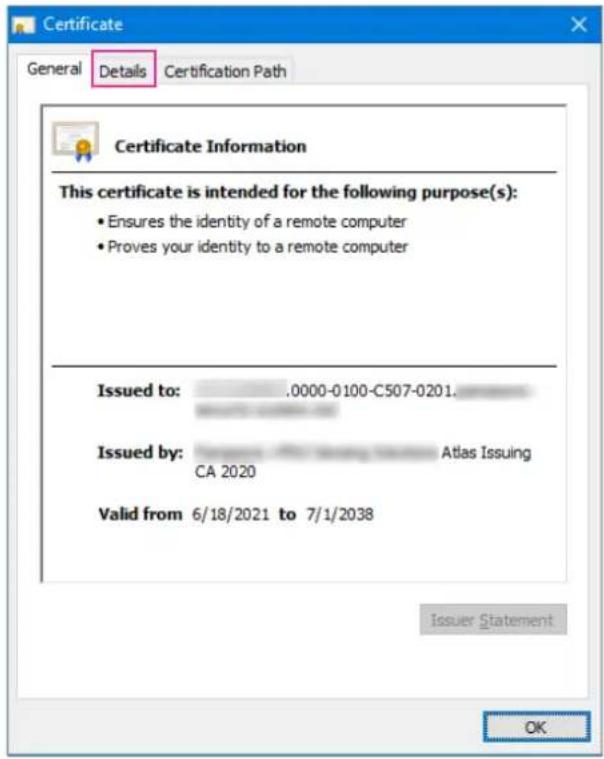
- Confirm
that is displayed for "Show" and then click "Subject" in the field. Copy the text shown after "CN=" in the lower box.
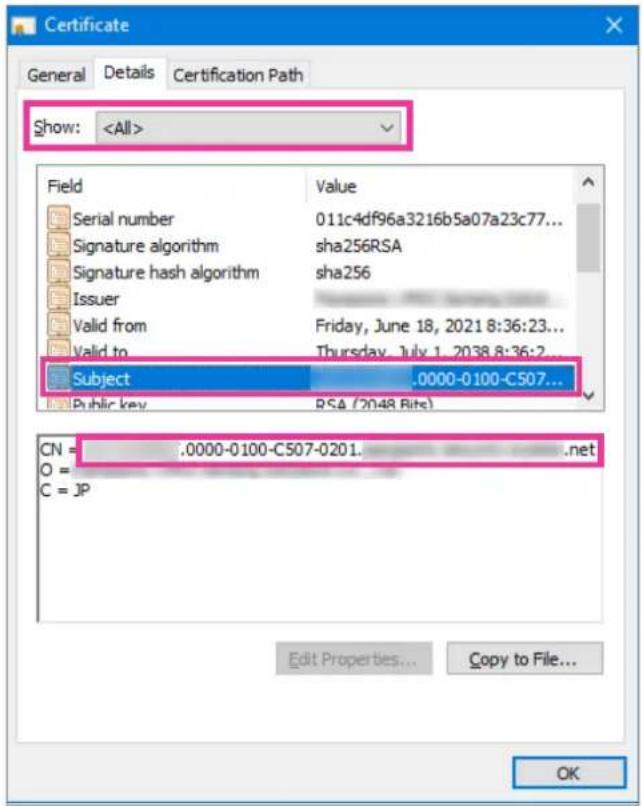
- Click the "Search programs and files" next to the Start menu and enter "notepad". Then, press [Ctrl], [Shift], and [Enter] at the same time.
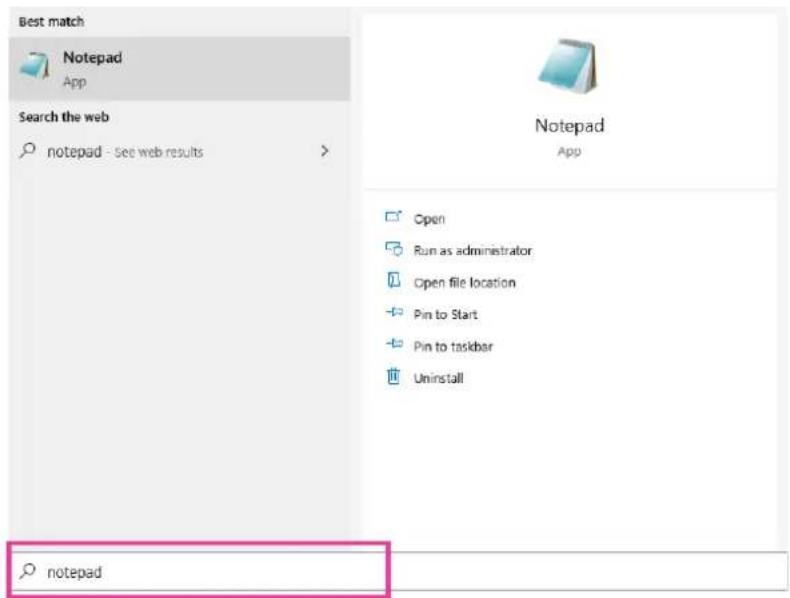
-
If the "User Account Control" window is displayed, select "Yes".
-
Select "Open" under "File" of the menu bar of the notepad. When the "Open" window is displayed, enter the following string in the explorer bar as shown above.
C:\Windows\System32\drivers\etc
Click "Text Documents (*.txt)" and select "All Files (*.*)" and then save the file.
Select and open the saved "hosts" file.
- The "hosts - Notepad" window is opened. Add the following text to the end of the file.
(camera IP address) (copied text from step 5)
The example is when the IP address is "192.168.0.10" and the CN of the camera is "WV-xxxxxx.0000-0100-450D-0022.xxxxxx-security-system.net".
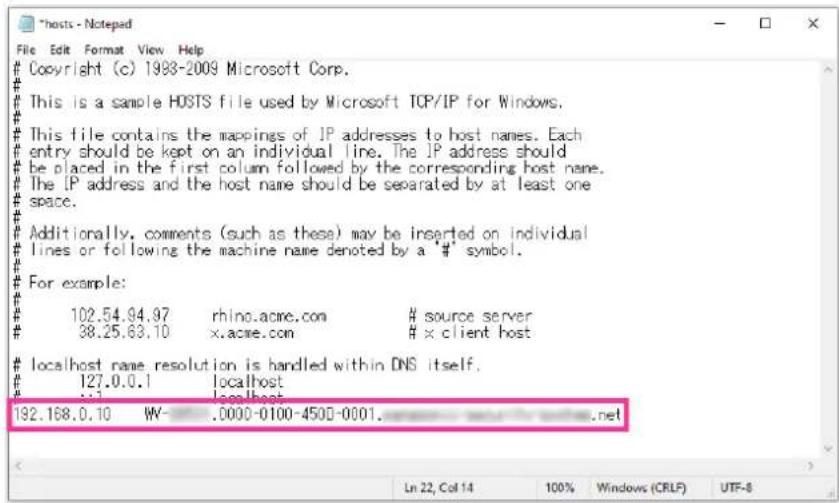
-
Select "File" → "Save" to save the file and then close the file.
-
When accessing with a browser, add the following text for the CN after entering "https://" in the "address" box.

IMPORTANT
- When the HTTPS port number is changed from "443", enter "the following text for CN + : (colon) + port number" in the address box of the browser.
Example of when the port number is "61443":
https://WV-xxxxxx.0000-0100-450D-0022.xxxxxx-security-system.net:61443
- We recommend adding the camera's URL to your browser's bookmark. If you forget the camera's URL, refer to the hosts file.
- When the settings are completed, the key mark will be displayed on the left part of the address bar of the browser. Confirm that "Your connection to this site is not secure" is displayed after clicking the key mark.
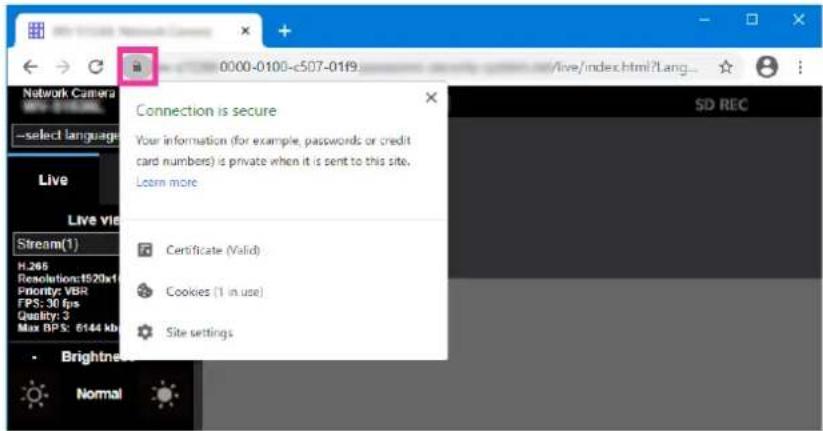
Note
- If you cannot access with this method it may be because of proxy server settings. Ask the network administrator.
IMPORTANT
- When the camera is accessed using the HTTPS protocol, the refresh interval and frame rate of images may be lower.
2.10.5 Access the camera using the HTTPS protocol (for CA Certification)
-
Start up the web browser.
-
Enter the IP address of the camera in the address box of the browser.
• Example of entry: https://192.168.0.10/
IMPORTANT
- When the HTTPS port number is changed from "443", enter "https://IP address of the camera + : (colon) + port number" in the address box of the browser. (Example: https://192.168.0.11:61443)
- When this camera is in a local network, configure the proxy server setting of the PC ([Settings] → [Network and Internet] → [Proxy]) not to use the proxy server for the local address.
- Press the [Enter] key on the keyboard.
→ The "Live" page will be displayed.
IMPORTANT
- When the camera is accessed using the HTTPS protocol, the refresh interval and frame rate of images may be lower.
- HTTPS communication is possible although it appears an error screen such as "Your connection to this site is not secure".
2.10.6 How to configure the settings relating to DDNS
When activating the DDNS function using the camera, either of the following DDNS services is available.
• "Viewnetcam.com" service
• Dynamic DNS Update (RFC2136 compliant)
IMPORTANT
• Before using the DDNS service, it is necessary to perform the port forwarding setting for the router.
- About Dynamic DNS Update (RFC2136 compliant)
Operation using DDNS services other than the “Viewnetcam.com” service is not guaranteed. We are not responsible for any troubles or accidents on the circumstances where the camera is used arising out of such services.
Refer to the DDNS service providers for the selection and configuration of the DDNS services other than the "Viewnetcam.com" service.
Note
- "Viewnetcam.com" is a Dynamic DNS service designed for use with our network cameras. Refer to the "Viewnetcam.com" website for further information about the service.
- HTTPS communication is possible although it appears an error screen such as "Your connection is not private".
- In Google Chrome, there are no effects on the function although the background may be white.
About DDNS services (IPv4/IPv6)
By using a DDNS service, it becomes possible to view camera images via the Internet.
The DDNS service associates dynamic global addresses and domain names.
It is possible to configure the settings for the "Viewnetcam.com" or Dynamic DNS Update (RFC2136 compliant).
In most of the DNS services offered by providers, global addresses are not static but dynamic. Therefore, access to the camera via an old global address may be invalidated after a certain period of time. Either of the following services is required when accessing a camera whose global address is not static via the Internet.
- DDNS service (such as "Viewnetcam.com")
It is possible to access via a registered and static domain name (example: *****.viewnetcam.com) even after the global address is changed. Enrollment in a domain name service is required even when using the IPv6 connection.
Refer to the "Viewnetcam.com" website for further information about the service.
- Static IP address service (such as a service offered by a contracted provider)
In this service, global addresses are static (not changed).
2.10.6.1 Configuration of the DDNS service (Example of the "Viewnetcam.com" service)
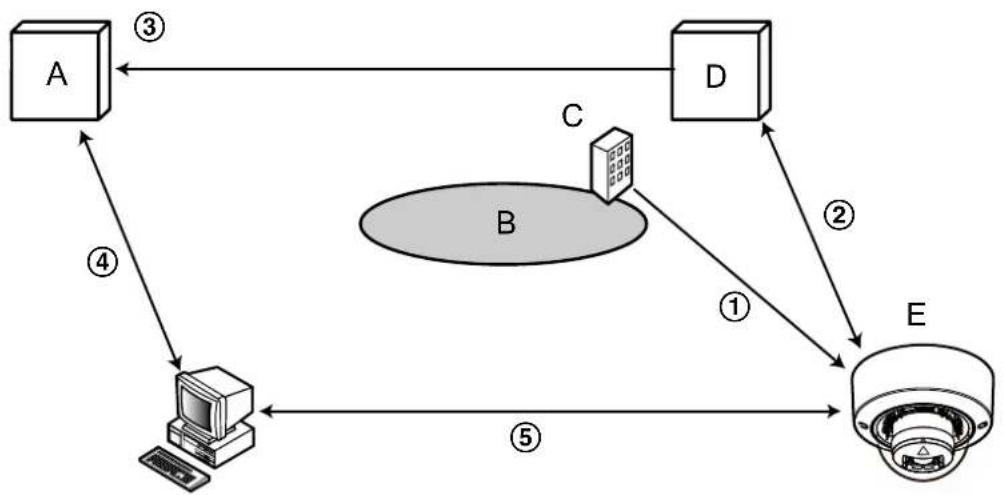
flowchart
graph TD
    A["A"] -->|③| D["D"]
    D -->|②| E["E"]
    E -->|①| B["B"]
    B -->|④| A
    B -->|⑤| E
    B -->|C| C["Server/Device"]
    C --> A
A. DNS server
B. Internet
C. Provider
D. "Viewnetcam.com" service server
E. Remote site
① Global address is changed.
The contracted provider allocates a global address to the router (or the camera). The global address is not static but dynamic.
② “*****.viewnetcam.com” and the current global address is automatically registered.
If you are enrolled in "Viewnetcam.com", the unique "domain name" (example: *****.viewnetcam.com) will be allocated. The "Viewnetcam.com" service server automatically manages the domain name of camera and the global address of router (or camera) when a camera automatically notifies the service server of the global address.
③ Current global address is automatically registered via “*****viewnetcam.com”.
The "Viewnetcam.com" service server registers the global address and the domain name of router (or camera) in the DNS server.
④ Global address is obtained via the URL (domain name).
By entering the URL (including the domain name) on the web browser when accessing the camera via the Internet, the DNS server identifies the registered global address of router (or camera).
⑤ Access using the current global address
The identified global address is used for accessing the router (or camera) to monitor images.
Note
- Refer to the contracted provider whether the current IP address is static or not.
- Depending on the provider, local addresses may be allocated. In this case, the DDNS service is unavailable. Refer to the contract provider for further information.
When using the "Viewnetcam.com" service
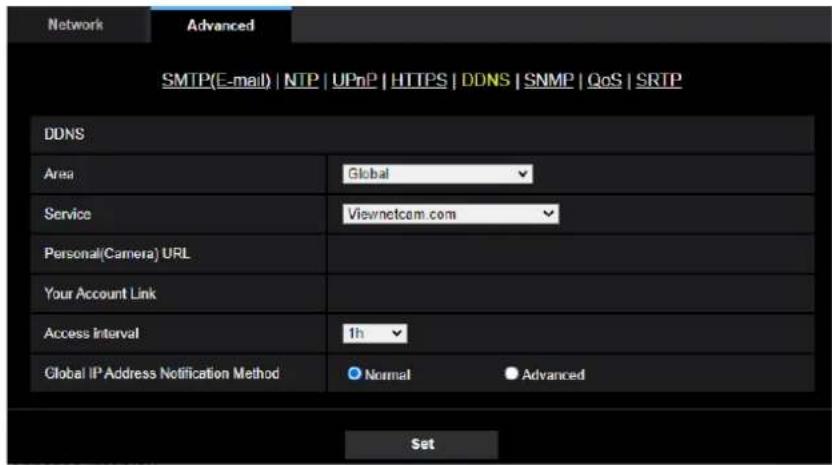
[Personal(Camera) URL]
The URL of the camera registered for "Viewnetcam.com".
[Your Account Link]
When the displayed URL is clicked, the registration window for the "Viewnetcam.com" service will be displayed in a newly opened window.
Register the information in the registration window to enroll in the "Viewnetcam.com" service.
[Access interval]
Select the interval to access the "Viewnetcam.com" service server to check the IP address and the host name from the following.
[Global IP Address Notification Method]
Typically [Global IP Address Notification Method] should be set to "Normal".
If you cannot access the camera using the registered URL 30 minutes after registering with "Viewnetcam.com", select "Advanced".
In this case, UPnP ( "2.10.2.3 Configure the UPnP settings") must be enabled for the camera and for the router.
- Default: Normal
Procedure to register information for the "Viewnetcam.com" service
- Select [Viewnetcam.com] for [Service] and click the [Set] button.
→ A URL is displayed in [Your Account Link]. If a URL is not displayed in [Your Account Link], confirm the camera's network settings and Internet connection, then click [Set] again.
- Register the information for "Viewnetcam.com" by following the instructions of the wizard.
→ The registration window for "Viewnetcam.com" will be displayed in a newly opened window.
When the registration window is not displayed, check that the PC is being connected to the Internet, and click the reload button of the browser.
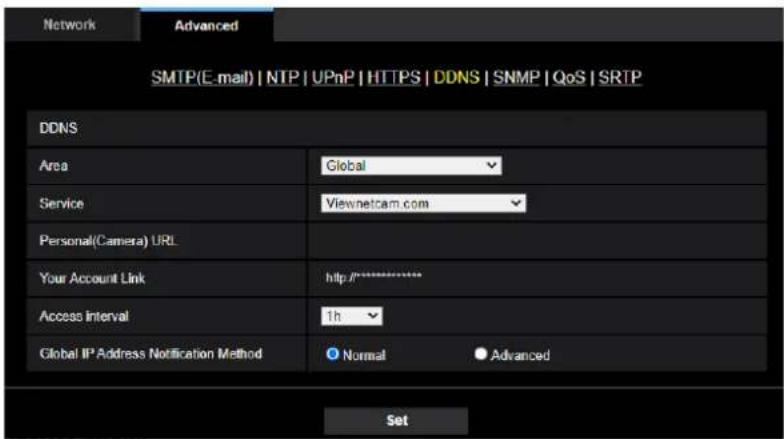
- Register the information for "Viewnetcam.com" by following the instructions of the wizard.
→ When the message “The new camera is successfully registered to Viewnetcam.com” is displayed, close the registration window.
The URL set at the time of registration can be used for camera access. However, this URL is unavailable when accessing the camera from the PC connected to the same network (LAN).
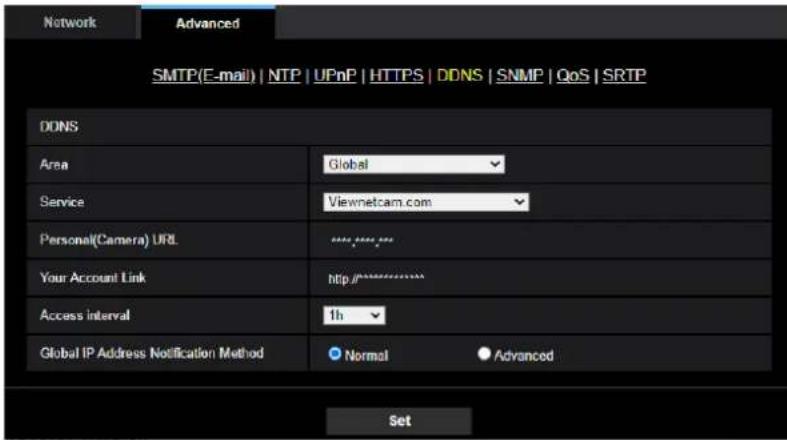
Note
- When the registration for the "Viewnetcam.com" service is completed, the URL registered for "Personal(Camera) URL" is displayed. It may take up to about 30 minutes until the URL of the registered camera is validated.
- To cancel the enrollment in the "Viewnetcam.com" service, access the "Viewnetcam.com" website (http://www.viewnetcam.com/) later.
- When "Expired" is displayed in the URL of "Viewnetcam.com" in the viewnetcam settings page or the status page, restart the camera after registering the "Viewnetcam.com" service. After restarting the camera, check that the registered URL is displayed in the URL of "Viewnetcam.com" of [Status] - [Viewnetcam.com] on the "Maintenance" page.
- It is possible to check the information registered for the "Viewnetcam.com" service by accessing the URL displayed beside "Your Account Link". When the URL is not displayed, check that the PC is being connected to the Internet, and click the [Set] button.
- If access often fails due to the change in the global address of router, set a smaller value for "Access interval".
Checking the information registered for the "Viewnetcam.com" service
It is possible to check if the camera has been registered for the "Viewnetcam.com" service. (→“2.12.3 Check the status [Status]”)
2.10.6.2 When using "Dynamic DNS Update"
[Host name]
Enter the host name to be used for the Dynamic DNS Update service.
• Available number of characters: 3 - 250 characters
Enter in the form of “(host name). (domain name)”.
• Available characters: Alphanumeric characters, the period (.), and the hyphen (-).
- Default: None (blank)
Note
- Refer to the network administrator for further information about the available host names.
[Access interval]
Select the interval to access the Dynamic DNS Update service server to check the IP address and the host name from the following.
Enter the host name to be used for the Dynamic DNS Update service.
• Available number of characters: 3 - 250 characters
Enter in the form of “(host name). (domain name)”.
• Available characters: Alphanumeric characters, the period (.), and the hyphen (-).
- Default: None (blank)
Note
- Refer to the network administrator for further information about the available host names.
2.11 Configure the settings relating to the schedules [Schedule]
On the "Schedule" page, it is possible to configure the settings relating to schedules as follows.
• Alarm permission (Terminal alarm 1, 2, 3)
• Alarm permission(Terminal alarm 1)
• Alarm permission(Terminal alarm 2)
• Alarm permission(Terminal alarm 3)
- VMD permission
- SCD permission
• Audio detection permission
- Access permission
• SD memory recording
- Scene file
- E-mail permission
- Reboot (Schedule 5 only)
The "Schedule" page has only the [Schedule] tab.
Up to 5 schedules can be set.
- Select an action to be assigned to the schedule from "Schedule mode".
"Off" is selected at the default.
- Off: No action will be taken for the respective schedule.
- Alarm permission (Terminal alarm 1, 2, 3): Alarm input (terminal alarm) will be allowed during the period of the schedule.
- Alarm permission(Terminal alarm 1): Terminal 1 alarm input will be allowed during the period of the schedule.
- Alarm permission(Terminal alarm 2): Terminal 2 alarm input will be allowed during the period of the schedule.
- Alarm permission(Terminal alarm 3): Terminal 3 alarm input will be allowed during the period of the schedule.
- VMD permission: The video motion detection (VMD) function will be active during the period of the schedule.
- SCD permission: The scene change detection (SCD) function will be active during the period of the schedule.
- Audio detection permission: The audio detection function will be active during the period of the schedule.
- Access permission: Users whose access level is set to “2. Camera control” and “3. Live only” on the [User auth.] tab (→“2.9.1 Configure the settings relating to the user authentication [User auth.]”) can access the camera only in the period of schedule.
- Recording to SD(Recording stream): The SD recording will be performed at the designated time in the schedule. Further, the “Recording format” is enabled only when there is a stream.
- Image adjust 1: Scene 1: Images are set to the image settings of "Scene file 1" at the designated time in the schedule. When the designated time for the schedule finishes, images are set to the image settings of "Scene file is not applied".
- Image adjust 2: Scene 2: Images are set to the image settings of "Scene file 2" at the designated time in the schedule. When the designated time for the schedule finishes, images are set to the image settings of "Scene file is not applied".
- Image adjust 3: Scene 3: Images are set to the image quality settings of "Scene file 3" at the designated time in the schedule. Once designated time in the schedule is over, the image quality setting is set to "Scene file is not applied".
- Image adjust 4: Scene 4: Images are set to the image quality settings of "Scene file 4" at the designated time in the schedule. Once designated time in the schedule is over, the image quality setting is set to "Scene file is not applied".
• E-mail permission: While the schedule is set, e-mail notification is sent when alarm is input. - Reboot: The camera reboots at the scheduled time. Can only be selected with Schedule 5.
Note
- Select "On" for "User auth." on the [User auth.] tab of "User mng." page (→"2.9.1 Configure the settings relating to the user authentication [User auth.]) and "Off" for "Host auth." on the "Host auth." page (→"2.9.2 Configure the settings relating to the host authentication [Host auth.]) to validate "Access permission".
-
When selecting “Recording to SD(Recording stream)”, select “Stream(1)”, “Stream(2)”, “Stream(3)”, or “Stream(4)” for “Recording format” on the [SD memory card] tab and select “Schedule” for “Save trigger”. (→[Save trigger])
-
Select days of a week by checking the respective checkboxes.
-
From the pull-down menu, select the start time and the end time of the schedule.
When not designating time, check the checkbox of "24h".
- Click the [Set] button after completing the settings.
→ The result will be displayed at the bottom of the window.
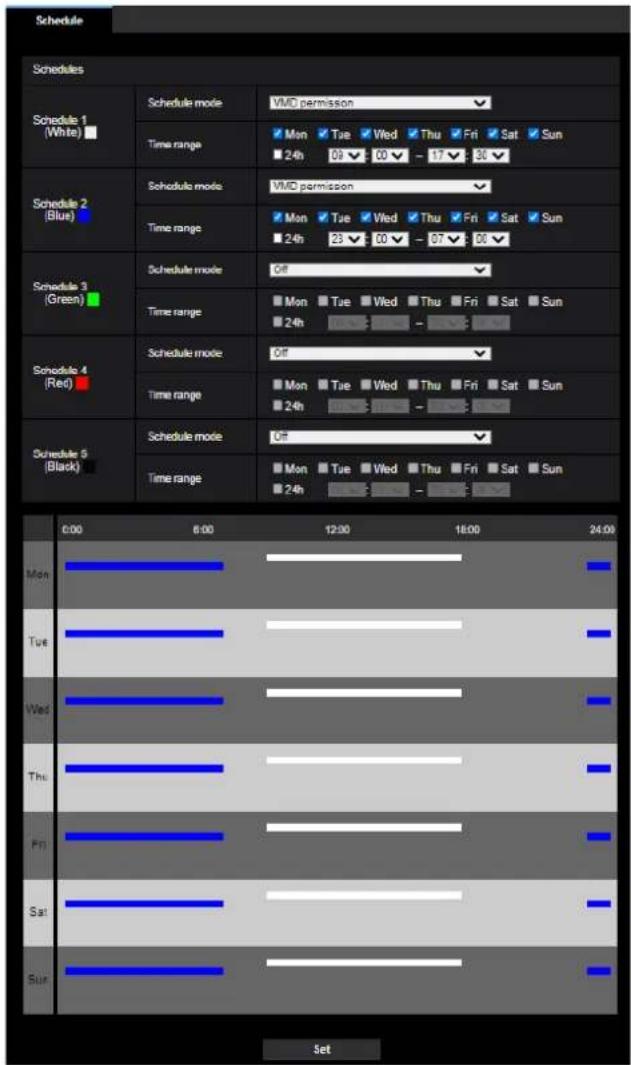
Note
- The schedules displayed at the bottom of the window can be identified by colors assigned to each schedule. - When "Off" is set for the operation mode of schedule 1 through 5, constant operation of the following items will be allowed.
– Alarm permission (Terminal alarm 1, 2, 3)
– Alarm permission(Terminal alarm 1)
– Alarm permission(Terminal alarm 2)
- Alarm permission(Terminal alarm 3)
- VMD permission
- SCD permission
– Audio detection permission
- Access permission
- E-mail permission
2.11.1 How to delete the set schedule
- Uncheck the check box of the set day of the week.
- Click the [Set] button after completing the settings.
→ The schedule of the selected day of the week is deleted.
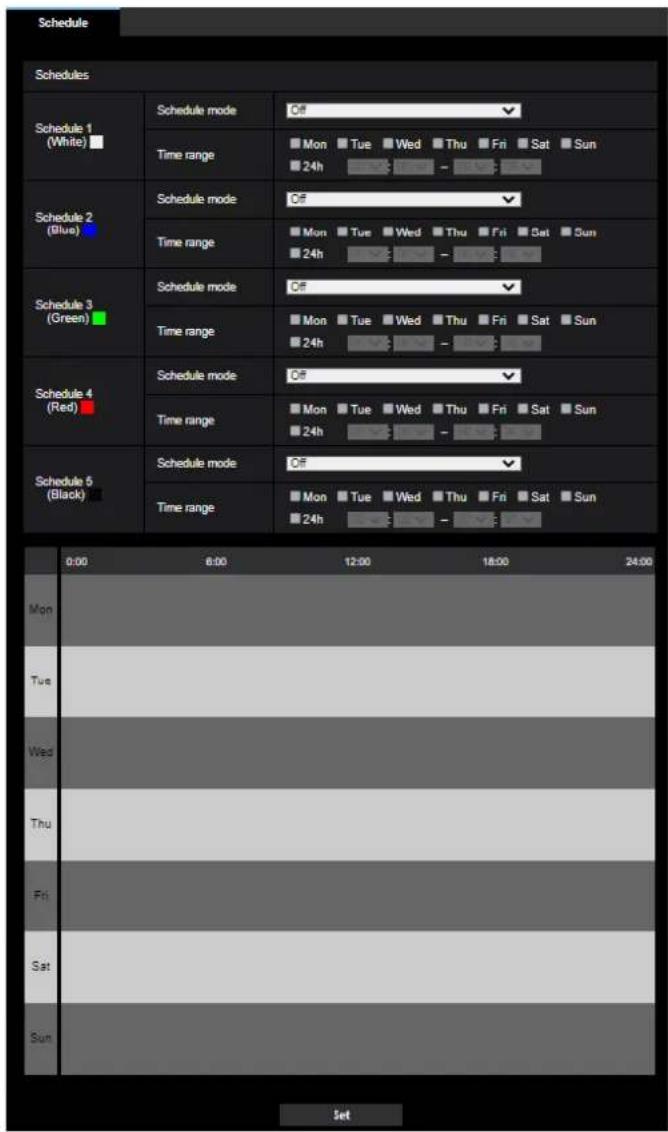
2.12 Maintenance of the camera [Maintenance]
System log check, firmware upgrade, status check and initialization of the setup menu can be performed on this page.
The “Maintenance” page has the [System log] tab, the [Upgrade] tab, [Status] tab, the [Default reset] tab, and the [Data] tab.
2.12.1 Check the system log [System log]
Click the [System log] tab of the "Maintenance" page. (→“2.2.1 How to display the setup menu”, “2.2.2 How to operate the setup menu”)
Up to 4,000 system logs can be saved on the SD memory card when the SD memory card is inserted after selecting "Use" for "SD memory card" on the [SD memory card] tab ( "2.5.2 Configure the settings relating to the SD memory card [SD memory card]).
When “Not use” is selected for “SD memory card”, up to 100 system logs can be saved on the built-in memory of the camera.
When the saved system logs have reached the maximum number, the newer logs will overwrite the older system logs. In this case, the oldest log is the first to be overwritten.
The system logs will be displayed in group of 100 logs each, and the logs will be saved even when the power of the camera is turned off.
[<< Latest 100]
When clicking “<< Latest 100”, the latest 100 system logs will be displayed.
[Next 100 >>]
When clicking "Next 100 >>", the next 100 system logs will be displayed.
[Number of pages display]
The currently opened page will be displayed in the "page/total page" format.
[<< Previous 100]
When clicking “<< Previous 100”, the previous 100 system logs will be displayed.
[No.]
The serial number of the system log will be displayed.
[Time & date]
Time and date at the error occurrence will be displayed.
[Description]
The descriptions about the system log will be displayed. Refer to “3.1 About the displayed system log” for further information about the system logs.
2.12.2 Upgrade the firmware [Upgrade]
Click the [Upgrade] tab of the "Maintenance" page. (→“2.2.1 How to display the setup menu”, “2.2.2 How to operate the setup menu”)
The current firmware can be checked and upgraded to the latest version on this page. Contact the dealer for further information about the firmware upgrade.
[Model no.], [MAC address], [Serial no.], [Firmware version], [IP address(IPv6)], [Time past from the date of manufacture]
Information of each item will be displayed.
- Contact the dealer and download the latest firmware onto a PC.
IMPORTANT
- A blank (space) cannot be used for the name of the directory where the downloaded firmware to be saved.
- Click the [Choose File] button and designate the downloaded firmware.
Note
- The latest firmware upgrade is posted on our website. https://i-pro.com/global/en/surveillance/training_support/support
- Click the radio button respective to the desired option to determine whether or not to initialize the settings after completing the firmware upgrade.
Default: Do not reset the settings to the default after the upgrade.
Note
- Note that the settings cannot be restored after an initialization is operated.
- Click the [Execute] button.
→ The confirmation window will be displayed.
IMPORTANT
• After upgrading, make sure to check the version on this page.
- Upgrade the firmware using a PC in the same subnet as the unit.
- Follow the instructions from the dealer when upgrading the firmware.
- When upgrading the application software, use the designated file (extension: img) for the firmware upgrade.
The name of the firmware to be used for the upgrade should be "model name (Use small letters. "WV-" is not required.)_xxxxx.img".
* ("xxxxx" indicates the version of the firmware.)
- Do not turn off the power of the camera during the upgrade process.
- Do not perform any operation during upgrading and wait until it completes.
- The following network settings will not be reset when upgrading the firmware after selecting “Reset the settings to the default after completing the upgrade. (Except the network settings)”.
Primary server address and secondary server address DNS settings for IPv4, primary DNS server address and secondary DNS server address settings for IPv6, On/Off for DHCP, IP address, subnet mask, default gateway, HTTP port, HTTPS port, connection protocol (HTTP/HTTPS), CRT key, CA certificate, UPnP setting, line speed, bandwidth control (bit rate), time & date, IEEE802.1X setting, Extension software, Extension software setting
2.12.3 Check the status [Status]
Click the [Status] tab of the "Maintenance" page. (→“2.2.1 How to display the setup menu”, “2.2.2 How to operate the setup menu”)
The status of this camera can be checked on this page.
Viewnetcam.com
[Server]
The URL of the "Viewnetcam.com" service server will be displayed.
[Status]
The registration status for the "Viewnetcam.com" will be displayed.
[Personal(Camera) URL]
The URL of the camera registered for "Viewnetcam.com" will be displayed.
UPnP
[Port number(HTTP), Port number(HTTPS)]
The port number that is set for UPnP port forwarding will be displayed.
[Status]
The port forwarding status will be displayed.
[Router global address]
The global address of router will be displayed.
Self check
The self check result of the hardware will be displayed.
Note
- Refer to our technical information website
SD memory card
[Model no.]
Displays the model number of the SD memory card.
If model number information could not be obtained, "Read error" is displayed. If the SD memory card is not used, "Not use" is displayed. In other cases "Unknown" is displayed.
[Serial no.]
Displays the serial number of the SD memory card.
If the serial number information could not be obtained, "Unknown" is displayed.
[Remaining capacity]
Displays the remaining capacity and total capacity of the SD memory card.
This is the same information that is displayed in [Remaining capacity] of the SD memory card information on the [SD memory card] tab of the "Basic" page.
[Total use time]
Displays the length of time that SD memory card has been inserted into and used with the camera.
If the length of time that the SD memory card has been used for cannot be obtained, "Unknown" is displayed.
"Total use time" is updated once per hour.
[Number of overwrite times]
Displays the number of overwrite times as calculated from the total capacity of the SD memory card, the number of times the camera has written files to the SD memory card, and the file sizes.
If the number of overwrite times cannot be calculated, "Unknown" is displayed.
Note
- Because the overwrite time values are just estimates calculated by the camera, they may differ to the actual number of overwrite times.
- The above information will not be displayed if "SD memory card password lock" is set and the password is not matched.
[No.] / [Time & date] / [Description] of the log
Displays the log related to the SD memory card.
| Category | Indication Description | |
| SD memory cardFormat Successfully formatted the SD memory card. | ||
| Format error Error occurred when formatting the SD memory card. | ||
| Detection error The SD memory card could not be correctly recognized. | ||
| Write error An error occurred when writing to the SD memory card. | ||
| Read error An error occurred when reading from the SD memory card. | ||
| Delete error An error occurred when deleting data from the SD memory card. | ||
| File system error An error occurred in File system of the SD memory card. | ||
| Undefined error An error other that the ones above has occurred for the SD memory card. | ||
| An abnormality occurs in continuity of the SD memory recording. Check the recording bit rate setting of the SD memory recording. | An error occurred when writing to the SD memory card. | |
| An error occurs in the SD memory card. Check the status of the SD memory card. | The SD memory card write process still generates data loss. Make sure that the SD memory card is properly recognized. If the card is not recognized, reboot the unit, or remove and reinsert the SD memory card to check. | |
IMPORTANT
- In order to be able to correctly use this function, format the SD memory card with the camera before using it.
- When using SD memory cards that have been used on other devices such as PCs, the correct information may not be able to be displayed.
- Up to 30 SD memory card logs can be saved to the built-in memory of the camera. When the saved system logs have reached the maximum number, the newer logs will overwrite the older system logs.
Note
- Refer to our support website for further information about the contents of the displayed statuses (relating to the "Viewnetcam.com" service, the UPnP function, or the self check).
2.12.4 Reset the settings/Reboot the camera [Default reset]
Click the [Default reset] tab of the "Maintenance" page. (→“2.2.1 How to display the setup menu”, “2.2.2 How to operate the setup menu”)
The setting data of the camera can be initialized and reboot of the camera can be performed on this page.
[Reset to the default (Except the network settings)]
Click the [Execute] button to reset the settings to the default. Note that the network settings will not be reset. It is impossible to operate the camera for about 3 minutes after the initialization.
[Reboot]
Click the [Execute] button to reboot the camera. It is impossible to operate the camera for about 2 minutes after rebooting the camera.
Note
- Refer to the Basic Information in the supplied for more information about initializing the network settings. (→“2.10.1 Configure the network settings [Network]”)
- If "Diag." of the alarm or e-mail notification function is selected, a notification of error will be sent to "Destination E-mail address" or to "Destination of notification" when an error such as no SD memory card insertion after the reboot occurs.
2.12.5 Settings data/backing up or restoring logs [Data]
Click the [Data] tab of the "Maintenance" page. (→“2.2.1 How to display the setup menu”, “2.2.2 How to operate the setup menu”)
The settings related to backing up or restoring settings data, and saving logs can be configured in this section.
Backup
[Setup data]
Click the [Execute] button to backup the setup data of the camera to a PC.
[Scene file]
Click the [Execute] button to backup the scene files of the camera to a PC.
[Logs]
Click the [Execute] button to backup the log data of the camera to a PC.
IMPORTANT
- When backing up settings or logs, creating the backup files takes time.
- When the backup operation takes 10 minutes or more, a communication timeout may occur. In this case all of the backup data may not be obtained. Therefore, we recommend completing backup operations within 10 minutes. It is also possible to check whether or not the correct data was obtained by restoring the obtained data (excluding log data).
Restore
[Setup data]
Press the [Choose File] button and select the setup data files to restore.
Click the radio button respective to the desired option to determine whether or not to also restore network related setting contents.
Click the [Execute] button to start restoring. Do not perform operations until the restoration is complete. (The camera will be rebooted when the restoration is complete.)
Make sure to set the file name of setup data files used when restoring to "model name.dat". (The model name must be written in lower case letters and "WV-" is not needed.)
Default: Restore all settings except the network settings.
IMPORTANT
- When 5 minutes or more is required to restore setup data files, there is a possibility that the restore will fail because or reasons such as transmission disconnections. In this case, restore setup data files again.
Note
- Restore operations for setup data are not applied to HTTPS related settings.
- Restore operations for setup data are not applied to extension software.
[Scene file]
Press the [Choose File] button and select the scene files to restore.
Click the [Execute] button to start restoring. Do not perform operations until the restoration is complete. Make sure to set the file name of scene file data used when restoring to "model name.txt". (The model name must be written in lower case letters and "WV-" is not needed.)
2.13 Display our support website [Support]
Methods for accessing our support website are explained on the "Support" page.
To access our support website from a web browser, click the link for the support page.
When "Click here for OSS information." is clicked, the license of the OSS in use will be displayed.
3 Others
3.1 About the displayed system log
Error indications relating to SMTP
| Category | Indication Description | |
| POP3 server error Authentication error. | Entered user name or password may be incorrect. Check if the E-mail settings are configured correctly. | |
| Failed to find the POP3 server. | ||
| SMTP server error Authentication error. | Entered user name or password may be incorrect. Check if the E-mail settings are configured correctly. | |
| Failed to resolve the E-mail server address from DNS. | ||
| Failed to find the SMTP server. | ||
| Internal error Undefined error. | An error occurred in the E-mail function. Check if the E-mail settings are configured correctly. | |
Error indications relating to "Viewnetcam.com"
| Category | Indication Description | |
| Access test error Access | test failed | • Port forwarding may not be configured for the router. Refer to the manuals provided with the router in use to enable the UPnP setting. |
| Viewnetcam.com server error | Failed to resolve the Viewnetcam.com server address from DNS. | • The designated IP address of the DNS may be incorrect. Check if the DNS settings are configured correctly.• The DNS server may be down. Ask the network administrator. |
| Category Indication Description | ||
| Connection error No response from the Viewnetcam.com server. | • The “Viewnetcam.com” server may be down. Ask the network administrator. | |
| Internal error Undefined error. | • An error relating to the “Viewnetcam.com” function occurred. Check if the “Viewnetcam.com” settings are configured correctly. | |
Error indications relating to Dynamic DNS Update
| Category | Indication Description | |
| DDNS server error Failed | to resolve the DDNS server address from DNS. | The designated IP address of the DNS may be incorrect. Check if the DNS settings are configured correctly.The DNS server may be down. Ask the network administrator. |
| Connection error No response | from the DDNS server. | The DDNS server may be down. Ask the network administrator. |
| Same host name has registered. | The same host name has already been registered in the DDNS server. Check if the DDNS Update settings are configured correctly. | |
| Internal error Undefined | error. | An error occurred in the DDNS function. Check if the DDNS Update settings are configured correctly. |
Error indications relating to NTP
| Category | Indication Description | |
| Connection error No response from the NTP server. | The IP address of the server may be incorrect. Check if the IP address of the server is configured correctly.The NTP server may be down. Ask the network administrator. | |
| Internal error Undefined error. | An error occurred in the NTP function.Check if the NTP settings are configured correctly. | |
| Synchronizing with NTP succeeded. | NTP update succeeded. | Time correction succeeded. |
Log indications relating to HTTPS
| Category Indication Description | ||
| HTTPS Certificate Signing | Request - Generated | • Generation of the CSR (Certificate Signing Request) is complete. |
| CA Certificate - Installed | • Installation of the CA certificate is complete. | |
| CA Certificate - Deleted | • Deletion of the CA certificate is complete. | |
| Previous CRT key - Applied | • Previous CRT key is applied. | |
| CRT key - Generated | • Generation of the CRT key is complete. | |
Log indications relating to login
| Category | Indication Description | |
| Login User name or IP address | The login user name will be displayed when “On” is selected for “User auth.”.The IP address of the PC currently accessing to the camera will be displayed when “On” is selected for “Host auth.”. | |
Error indications relating to login error
| Category | Indication Description | |
| Login failure User name | The user name that has failed in login will be displayed when “On” is selected for “User auth.”.If no user is registered, (Guest User) will be displayed.If “Login failure” log remains in the normal operation, it is not a malfunction of the camera.However, if many logs are output consecutively, there is a possibility of illegal access. Ask the network administrator. |
Error indications relating to TCP alarm notification
| Category Indication Description | ||
| TCP alarm notification error | Failed to find destination of notification. | The IP address of the destination of notification may be incorrect. Check if the IP address of the destination of notification is configured correctly.The destination of notification may be down. Ask the network administrator. |
| Failed to resolve destination addr. from DNS. | The DNS server settings may be incorrect. Check if the DNS settings are configured correctly.The DNS server may be down. Ask the network administrator. | |
Error indications relating to HTTP alarm notification
| Category | Indication Description | |
| HTTP alarm notification error | Failed to find destination of notification. | The IP address of the destination of notification may be incorrect. Check if the IP address of the destination of notification is configured correctly.The destination of notification may be down. Ask the network administrator. |
| Failed to resolve destination addr. from DNS. | The DNS server settings may be incorrect. Check if the DNS settings are configured correctly.The DNS server may be down. Ask the network administrator. | |
| Authentication error. | Entered user name or password may be incorrect. Check if the HTTP alarm settings are configured correctly. |
Error indications relating to SD memory card security settings
| Category | Indication Description | |
| SD memory card Certificate | Signing Request - Generated | • Generation of the CSR (Certificate Signing Request) is complete. |
| CA Certificate - Installed | • Installation of the CA certificate is complete. | |
| CA Certificate - Deleted | • Deletion of the CA certificate is complete. | |
| Previous CRT key - Applied | • Previous CRT key is applied. | |
| CRT key - Generated | • Generation of the CRT key is complete. |
Log indications relating to Firmware Upgrade
| Category Indication Description | |
| Firmware Upgrade Upgraded successfully | • Firmware Upgrade succeeded and the firmware versions(before/after) are logged. |
Error indications relating to Firmware Upgrade
| Category | Indication Description | |
| Firmware Upgrade Upgrade | ade failure (Time out: Shortage of communication bands) | ·Failed to upgrade the firmware due to timeout caused by lack of communication bandwidth.)Check the communication environment and retry. |
| Upgrade failure (File error: Incorrect selection of firmware file) | ·Failed to upgrade the firmware because an incorrect file was uploaded.Select the firmware of the camera and retry. | |
| Upgrade failure (Communication error: File damage) | ·Failed to upgrade the firmware because the file corrupted during the firmware file transfer.Check the communication environment and retry. | |
| Upgrade failure (Other error) | ·Undefined error occurred in the firmware upgrade process.Please wait for a while and retry. |
3.2 Troubleshooting
Before asking for repairs, check the symptoms with the following table.
Contact your dealer if a problem cannot be solved even after checking and trying the solution in the table or a problem is not described below.
| Symptom Cause/solution Reference pages | ||
| Cannot access from the web browser. | • Is the LAN cable (category 5e or better) firmly connected to the network connector of the camera? | Installation Guide |
| • Is the link indicator (LINK) lit?When it is not lit, connection to a LAN may not be established or a network may be not working correctly. Check if the cables have any contact failure or if the wiring is correct or not. | Installation Guide | |
| • Is the power of the camera on?Check if the power of the camera is turned on. | Installation Guide | |
| • Are the set IP addresses valid? | 147 | |
| • Are you accessing the wrong IP address?Check the connection as follows.With the Windows command prompt, > ping “IP address of the camera”.If there is reply from the camera, the connection is normal.If there is no reply, check the connection with the following methods using a computer connected to the same network as the camera. If the firewall settings on the PC are enabled, temporarily disable them before performing settings on the camera.- Start the “IP Setting Software”, confirm the camera’s IP address, and then access that IP address.- If the network settings (IP address, subnet mask, and default gateway) are incorrect, reboot the camera and change the network settings by using the “IP Setting Software” within 20 minutes after the restart.- In networks that do not have a DHCP server, the IP address of the camera will be configured to “192.168.0.10” when the camera is rebooted by holding the INITIAL SET button on the camera. After the camera is initialized, access the camera and set the IP address again. (When the camera is initialized, all the settings of the camera previously configured on the setup menus will be initialized.) | - | |
| Cannot access from the web browser. | • Is “554” selected for the HTTP port number?For the HTTP port number, select a port number other than the following port numbers used by the camera. The number used by the camera: 20, 21, 23, 25, 42, 53, 67, 68, 69, 110, 123, 161, 162, 443, 554, 995, 10669, 10670, 59000 - 61000 | 149 |
| • Is the same IP address provided to other devices?Are there contradictions between the address and the network subnet to be accessed?When the camera and the PC are connected in the same subnet:Are the IP addresses of the camera and the PC set in a common subnet? Or is “Use Proxy Server” for the settings of the PC?When accessing the camera in the same subnet, it is recommended to enter the address of the camera in the “Don’t Use Proxy For These Addresses” box.When the camera and the PC are connected in the different subnet:Is the IP address of the default gateway set for the camera correct? | - | |
| • Is the name currently used to access the camera different from the name registered for the “Viewnetcam.com” service?Access the camera again with the registered name. | 184 | |
| • Did you access “http://” while using the HTTPS function?To use the HTTPS function, access “https://”. It is also necessary to enter the port number. | 176181 | |
| Cannot access the camera via the Internet. | • Are the network settings of the camera correct?Set the default gateway or DNS server address correctly. To use the DDNS service, check that the settings are correct.• Is the setting for “Default gateway” on the “Network” page configured? Or is the setting correct?When communicating using IPv4:Configure the setting for “Default gateway” of “IPv4 network” on the [Network] tab of the setup menu. | 147 |
| Cannot access the camera via the Internet. | • Is the setting of port forwarding configured for the router?To enable the access to the camera via the Internet, it is necessary to perform the port forwarding setting when the router in use does not support the UPnP function. Refer to the manuals provided with the router for further information.• Is UPnP function of the router disabled?Refer to the manuals provided with the router in use to enable the UPnP function.• Is packet filtering set for the router to forbid the access via the Internet?Configure the settings of the router in use to enable the access via the Internet. Refer to the manuals provided with the router for further information about the settings. | 155 |
| • Are you accessing the camera using the local address (the IP address used in a local network)?Check the IPv4 network setting, the IPv6 network and the DDNS setting and then use the global address (or the URL registered in the DDNS service) as the IP address of this camera to be used in the Internet and access using the port number of this camera. | 147148182 | |
| Cannot access the camera via the URL of the “Viewnetcam.com” service. | • Is the global address of camera (or router) notified to the “Viewnetcam.com” service server?Log into the “My Account” page of “Viewnetcam.com” website to check the information of the registered camera. If the global address is not displayed for the IP address, access the camera, and register the user information for the “Viewnetcam.com” service on the [Advanced] tab on the “Network” page of the setup menu. In addition, check the “Status” of “Viewnetcam.com” (on the [Status] tab) and the system log (on the [System log] tab) of the “Maintenance” page of the setup menu. | 184192 |
| Authentication window is displayed repeatedly. | • Is the user name and password changed?While accessing the camera, when changing the user name and password of another user logging into the camera on another web browser, the authentication window will be displayed each time the screen is changed or refreshed. Close the browser and access the camera again.• Have you changed the [Authentication] setting?When the [Authentication] setting has been changed, close the web browser, and then access the camera again. | - |
| It takes time to display the screen. | Are you accessing the camera in the HTTPS mode?In this mode, the refresh interval becomes slower due to decode procession. | - |
| Are you accessing another camera in the same local network via a proxy server?Configure the PC not to use a proxy server. | - | |
| Are two or more users browsing the camera images simultaneously?It may take time to display the screen or refresh interval may become slower when two or more users browse the camera images simultaneously. | - | |
| Cannot access the camera from a mobile terminal or a tablet device. | For mobile terminals:Is the URL correct? Or is "/cam" missing at the end of the URL?Check if the URL is entered correctly. When accessing the camera from a mobile terminal, it is necessary to enter "/cam" at the end of the URL that is used for the camera access from a PC.For tablet devices:Is the URL correct?Check if the URL is entered correctly. | 18 |
| Is the SSL encryption method different from that of the camera?Select "HTTP" (Do not select "HTTPS") for "HTTPS" - "Connection" on the "Network" page - the [Advanced] tab, and access the camera again. | 156 | |
| Did you access "http://" while using the HTTPS function?To use the HTTPS function, access "https://". It is also necessary to enter the port number. | 176 | |
| A cookie error was displayed when performing user registration for "Viewnetcam.com". | Is the web browser configured to allow cookies?Configure the web browser to allow cookies. | - |
| User registration for the "Viewnetcam.com" service fails. | Is the registered E-mail address correct?When an E-mail with the "Viewnetcam.com" website link is not received, the registered E-mail address may be incorrect. Visit the "Viewnetcam.com" website to register the correct E-mail address. | - |
| Symptom Cause/solution Reference pages | ||
| No image is displayed. | • Is the mobile terminal or tablet device in use support the 320×240 or 640×480 resolution? Or is the image data size too big to display images on the mobile terminal or tablet device?Refer to the manuals provided with the mobile terminal or tablet device in use for the restrictions of image data sizes. | - |
| Images are displayed blurry. | • Is the focus adjusted correctly?Check if the focus is adjusted correctly. | Installation Guide |
| Out-of-focus occurred immediately after turning on the power. | • After turning on the camera, temporarily out-of-focus occurred while focusing and zoom adjustment were being performed. | - |
| The image is not being refreshed. | • Depending on the version of your browser, there might be difficulties refreshing the picture, etc. | Basic Information |
| • Depending on the traffic of the network or the concentration of access to the camera, there might be difficulties displaying the camera picture. Request the camera picture using the web browser such as by pressing the [F5] key, etc. | - | |
| No image is displayed (or too dark). | • Is the brightness setting set at an appropriate level?Click the [Normal] button of [Brightness]. | 12 |
| Images are displayed washed out. | • Is the brightness setting set at an appropriate level?Click the [Normal] button of [Brightness].If you move the slider of [Adaptive black stretch] in the “-” direction, the dark parts of the image will become darker. | 12100 |
| Flicker appears on the screen. | • When flicker occurs frequently, select “Indoor scene” for “Light control mode”. | 92 |
| Images cannot be saved on the SD memory card. Failed to write/read data on the SD memory card. | • Is the SD memory card inserted correctly? Check if the SD memory card is inserted correctly. | Basic Information |
| • Is the SD memory card formatted? Format the SD memory card. | 72 | |
| • Is “----MB/----MB” displayed on “Remaining capacity” of the [SD memory card] tab? Format the SD memory card. | 72 | |
| • Is “#######MB/#######MB” displayed on “Remaining capacity” of the [SD memory card] tab? Check the setting of “SD memory card password lock”. | 7267 | |
| • Is any recognition error received when the “Diag.” of “E-mail notification” or “TCP alarm notification” is used? Isn’t “Detection error” displayed in the log of “SD memory card” (under [Status] tab of the “Maintenance” page). Format the SD memory card. | 72151134 | |
| • Isn’t the SD memory card out of order? There are limited times to overwrite on an SD memory card. When frequently overwritten, it may be at the end of product life. It is recommended to replace the SD memory card. | - | |
| Cannot transmit audio to the camera. | • Are the microphone and the speaker connected correctly and firmly? Confirm that they are connected correctly and firmly.• Audio transmission is available only when connected with HTTPS. | Installation Guide14 |
| Audio is not output from other products such as a network disk recorder or PC software package. | • Some of the products such as a network disk recorder or PC software package may not support “G.711”. Set “Audio input encoding format” of the products to “G.726 (32 kbps)” or “AAC-LC”. | 115 |
| No image is displayed on the “Live” page. | • Press the [F5] key on the keyboard of the PC or click the [Live] button. | 9 |
| Shortcut icon of the camera is not displayed on “Network” of the PC. | • Is the Windows component of UPnP added? Add the component to the PC in use. | 155 |
| Symptom Cause/solution Reference pages | ||
| Images are not displayed or not refreshed smoothly. | ·The firewall function of the anti-virus software may be filtering the port of the camera.Exclude the port number of the camera from the list of the port numbers to be filtered by the anti-virus software. | - |
| No indicator lights. | ·Is “Off” selected for “Indicator” on the “Basic” page?Select “On” for “Indicator”. | 61 |
| H.265 (or H.264) images are not smoothly displayed. | ·It can be improved by performing the following.- Check “System requirements for a PC” in the Basic Information. | Basic Information |
| When clicking the back button of the web browser, the screen is not displayed correctly. | ·Press the [F5] key on the keyboard to refresh the display. | - |
| Images are not fit in the frames. | ·When “120 DPI” or higher is selected for “DPI setting”, they may not be displayed correctly.When using Windows 10:Right-click on the desktop, click “Display settings”, and then move the slider of “Change the size of text, apps, and other items” to “100% (Recommended)".Select “Landscape” of “Orientation”.When using Windows 8.1:Right-click on the desktop, click “Screen resolution” → “Make text and other items larger or smaller”, and then move the slider of “Change the size of all items” to “Smaller” so that the screen becomes the recommended size. | - |
| “Reached the concurrent access limit. Please try again later.” is displayed on the “Live” page. | ·Change the value set for “Max bit rate (per client)*” of the stream to a lower value.·Change the setting of “Initial display stream” to a stream that a low value is set for “Max bit rate (per client)*”. | 8783 |
3.3 Directory structure of SD memory card
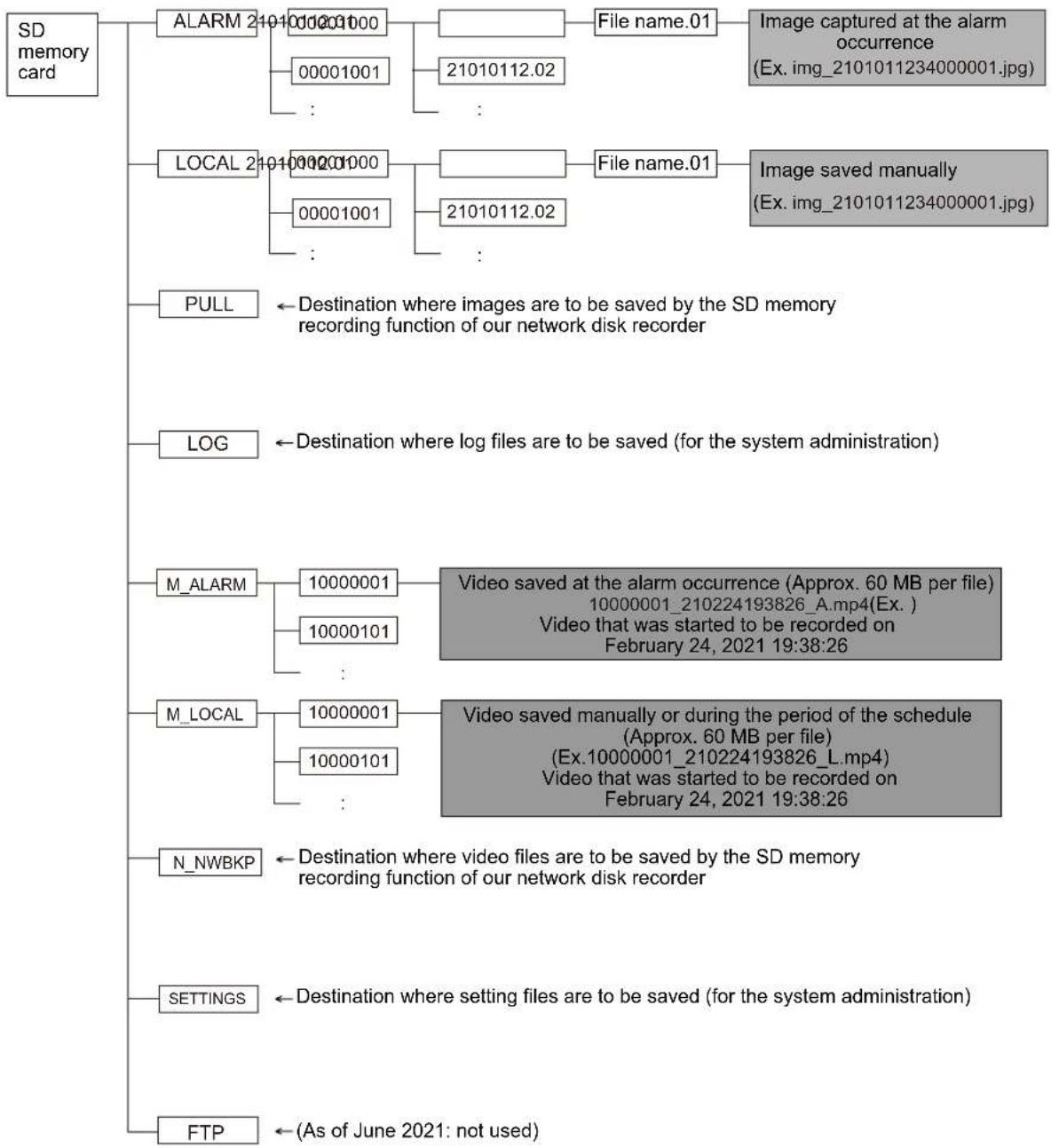
flowchart
graph TD
    A["SD memory card"] --> B["ALARM 2101001000"]
    B --> C["00001001"]
    B --> D["00001001"]
    B --> E["..."]
    B --> F["21010112.02"]
    F --> G["File name.01"]
    G --> H["Image captured at the alarm occurrence (Ex. img_2101011234000001.jpg)"]
    I["LOCAL 2101001000"] --> J["00001001"]
    J --> K["00001001"]
    J --> L["..."]
    L --> M["21010112.02"]
    M --> N["File name.01"]
    N --> O["Image saved manually (Ex. img_2101011234000001.jpg)"]
    P["PULL"] --> Q["Destination where images are to be saved by the SD memory recording function of our network disk recorder"]
    R["LOG"] --> S["Destination where log files are to be saved (for the system administration)"]
    T["M_ALARM"] --> U["10000001"]
    T --> V["10000101"]
    V --> W["Video saved at the alarm occurrence (Approx. 60 MB per file) 10000001_210224193826_A.mp4(Ex.) Video that was started to be recorded on February 24, 2021 19:38:26"]
    X["M_LOCAL"] --> Y["10000001"]
    X --> Z["10000101"]
    Z --> AA["Video saved manually or during the period of the schedule (Approx. 60 MB per file) (Ex.10000001_210224193826_L.mp4) Video that was started to be recorded on February 24, 2021 19:38:26"]
    AB["N_NWBKP"] --> AC["Destination where video files are to be saved by the SD memory recording function of our network disk recorder"]
    AD["SETTINGS"] --> AE["Destination where setting files are to be saved (for the system administration)"]
    AF["FTP"] --> AG["(As of June 2021: not used)"]
https://www.i-pro.com/
- Operating Instructions
- Network Camera
- Preface
- About the user manuals
- Note
- About notations
- Abbreviations
- For administrator registration
- [User name (1 to 32 characters)]
- [Password (8 to 32 characters)]/[Retype password]
- IMPORTANT
- Registration of administrator is completed.
- Table of Contents
- Operations ......9
- Settings ....37
- Configure the settings relating to images and audio [Image/Audio] 83
- Configure the multi-screen settings [Multi-screen] ....118
- Configure the settings relating to the authentication [User mng.] ....138
- Configuring the network settings [Network] 147
- Operations
- Monitor images on a PC
- Monitor images from a single camera
- About the "Live" page
- ⑤ Stream information display
- ⑥ [Refresh interval] pull-down menu
- ⑦ [Brightness] buttons 2
- ⑧ [AUX] button
- ⑨ [Rec. on SD] button 2
- ⑩ [Log/Play] button
- ⑪ Camera title
- ⑫ Support button
- ⑬ Alarm occurrence indication button 2
- ⑭ Full screen button
- ⑮ Snap shot button
- ⑯ Mic input button
- ⑰ Audio output button
- ⑱ SD recording status indicator
- ⑲ Main area
- ⑳ [Grid display] buttons
- Monitor images from multiple cameras
- Monitor images on a mobile terminal or tablet device
- Monitor images on a mobile terminal (smartphone, etc.)
- Monitor images on a tablet device
- ⑧ [Light control mode] pull-down menu
- Fix shutter:
- ELC: S1136
- ⑨ Image rotation
- ⑩ Manual zoom adjustment
- ⑪ Manual focus adjustment
- ⑫ Auto focus
- ⑬ [Brightness adjustment] button
- ⑭ [Close] button
- Record images on the SD memory card manually
- Action at an alarm occurrence
- Alarm type
- Action at an alarm occurrence
- Display the alarm occurrence indication button on the "Live" page
- Notify of alarm occurrences to the device connected to the output terminal
- Save images on the SD memory card
- Notify of alarm occurrences by E-mail
- Notify of alarm occurrences to the designated addresses (TCP alarm notification)
- Notify of alarm occurrences to the designated HTTP server (HTTP alarm notification)
- Display the log list
- ③ Recording time
- ④ [Search] button
- ⑤ Log list
- Playback of images on the SD memory card
- Playback “JPEG(1)”/“JPEG(2)” images saved to the SD memory card
- ① Number of images
- (REW) button
- (REV PLAY) button
- (PLAY) button
- (FF) button
- (TOP) button
- (PREV. IMAGE) button
- (PAUSE) button
- (STOP) button
- (NEXT IMAGE) button
- (LAST) button
- (Download) button
- Playback “Stream(1)”/“Stream(2)”/“Stream(3)”/“Stream(4)” images saved to the SD memory card
- ① Slider bar
- (5s backward) button
- (5s forward) button
- [Time & date]
- [Duration]
- [Event]
- Settings
- About the network security
- Equipped security functions
- Display the setup menu from a PC
- How to display the setup menu
- How to operate the setup menu
- About the setup menu window
- Perform management of the extension software and the schedule setting [Ext. software]
- Perform the installation, uninstallation and version upgrade of the extension software [Software mng.]
- Installing the extension software
- "Software mng." screen
- Unique information
- [MPR ID]
- [Remaining ROM]
- [Remaining RAM]
- [SDK version]
- [Software version]
- Ext. software
- [Uninstall] button
- [Status]
- [Setup>>] button
- Install new Ext. software
- Upgrade
- [Al Processor Activation Key] - [Register the Registration Key]
- Set a schedule of the extension software [Operation sched.]
- [Operating day of week]
- [Time table 1] [Time table 2]
- How to set the schedules
- Check the control log of extension software [Control log]
- [Number of pages display]
- [Description]
- Use Easy Setup [Easy Setup]
- Configure the Internet settings [Internet]
- [UPnP (Auto port forwarding)]
- [Area]
- [Service]
- [Recommended network setting for internet]
- Configure an event action [Event action]
- Flow of event action setup
- Configure the schedule/alarm (event function type setup menu)
- [Trigger]
- [SD memory card format]
- [Next] button
- Alarm: Configure the terminal and VMD (alarm setup menu)
- Alarm
- [Terminal 1]
- [Terminal 2]
- [Terminal 3]
- [VMD alarm]
- [SCD alarm]
- [Audio detection alarm]
- [Alarm deactivation time]
- [Back] button
- Alarm: Configure the alarm function type (Alarm function type setup menu)
- [Recording format]
- Alarm: Configure the details for recording conditions
- ① Configure SD memory recording (JPEG) (JPEG recording setup menu)
- ② Configure SD memory recording (H.265 or H.264) (video recording setup menu)
- [Audio recording]
- [Frame rate]
- [Pre alarm (recording) duration]
- [Post alarm (recording) duration]
- Alarm: Configure the output terminal
- Alarm: configure the mail notifications and mail server
- [Set] button
- Schedule: Configure SD recording (schedule function type setup menu)
- Schedule: Set SD memory recording (video recording setup menu)
- [Frame rate * ]
- [Overwrite]
- Configure the basic settings of the camera [Basic]
- Configure the basic settings [Basic]
- [Menu language]
- [Camera title]
- [Date/time]
- [Date/time display]
- [Time display format]
- [Date/time display format]
- [Date/time position]
- [NTP]
- [Time zone]
- [Summer time (daylight saving)]
- [Start time & date] [End time & date]
- [Camera title on screen display]
- [Camera title on screen]
- [Camera title position]
- [OSD] - [Display style]
- [OSD] - [Character size]
- [Brightness status display]
- [Image rotation]
- [Indicator]
- [Audio out] S2536L
- [Monitor out]
- Configure the settings relating to the SD memory card [SD memory card]
- Operating mode
- [SD memory card]
- [Ext. software mode]
- [Remaining capacity notification]
- SD memory card security
- [Additional info for detecting alteration]
- [SD memory card password lock]
- [Set]
- [Password]/[Retype password]
- [Remove]
- [Password]
- [Change]
- [Old password]/[New password]/[Retype new password]
- Recording stream
- [Save trigger]
- JPEG recording(Manual)
- [File name]
- [Image saving interval]
- JPEG recording(Alarm)
- [Image saving interval/Number of images to be saved(Pre alarm)] - [Image saving interval]
- [Image saving interval/Number of images to be saved(Pre alarm)] - [Number of images to be saved]
- [Image saving interval/Number of images to be saved(Post alarm)] - [Image saving interval]
- [Image saving interval/Number of images to be saved(Post alarm)] - [Number of images to be saved]
- Stream recording(Alarm)
- SD memory card warning/error LED
- [SD memory card warning/error LED]
- SD memory card information
- [Remaining capacity]
- [Format]
- Configure the settings relating to alteration detection [Alteration detection]
- [Select certificate]
- [Pre-installed certificate - Certificate download]
- [CA Certificate - CRT key generate]
- [CA Certificate - Generate Certificate Signing Request]
- [CA Certificate - Certificate install]
- [CA Certificate - Information]
- [CA Certificate - Certificate download]
- How to configure alteration detection settings
- Generation of the CRT key (encryption key)
- Click the [Execute] button.
- Generation of CSR (Certificate Signing Request)
- Installation of the certificate issued by CA
- Configuration of alteration detection
- Configure the overlay image function [Overlay image]
- [Overlay]
- [Image Selection]
- [Position]
- Available numbers:
- [Permeation]
- [Selection of color to be penetrated]
- Configure the settings relating to images and audio [Image/Audio]
- Configure the settings relating to the image capture mode [Image]
- [Image capture mode]
- Default:
- Configure the settings relating to JPEG images [Image]
- "Live" page (Initial display)
- [Initial display stream]
- [Refresh interval (JPEG)\*]
- JPEG
- [Image capture size]
- [Image quality]
- Configure the settings relating to Stream [Image]
- Stream(1)/ Stream(2)/ Stream(3)/ Stream(4)
- [Stream transmission]
- [Stream encoding format]
- [Transmission priority]
- [Max bit rate (per client)\*]
- - Default:
- [Smart Coding] - [Smart VIQS]
- [Smart Coding] - [Smart P-picture control]
- [Smart Coding] - [GOP control]
- [Refresh interval]
- [Transmission type]
- [Unicast port1(Image)] 2
- [Unicast port2(Audio)] 2
- [Multicast address] 3
- [Multicast port] 3
- [Multicast TTL/HOPLimit] 3
- Configure the settings relating to image adjust, zoom/focus, privacy zone, VIQS, and lens distortion compensation [Image quality]
- [Image adjust]
- [Zoom/Focus adjustment] S2536L
- [Back focus] S1136
- [Extra optical zoom] S1136
- [Privacy zone]
- [VIQS]
- [Lens distortion compensation]
- Configure the settings relating to image quality ("Image adjust" setup menu)
- Basic adjustment
- [Brightness]
- [Maximum gain]
- [Chroma gain level]
- [Sharpness level]
- [DNR]
- Super Dynamic(SD)
- [Super Dynamic(SD)]
- [Level]
- Super Dynamic function
- [BLC/ HLC]
- [BLC level]
- [HLC level]
- [Mask area]
- Light control mode
- [Light control mode]
- [Maximum shutter]
- [Light control speed]
- Day & Night(IR)
- [Day & Night(IR)]
- type2: Other than models with LED
- Super Chrome Compensation (SCC) function
- [Dwell time]
- [IR LED light intensity] \*Models with LED (L)
- [Intensity control] \*Models with LED (L)
- White balance
- [White balance]
- [Red gain]
- [Blue gain]
- [Adjustment speed]
- Intelligent auto
- [Intelligent auto]
- [Face priority level(Brightness)]
- [Motion priority level(Shutter)]
- Detailed setting
- [Auto contrast adjust]
- [Contrast level]
- [Adaptive black stretch]
- [Adaptive highlight stretch]
- [Fog compensation]
- [Pedestal level]
- Scene registration
- [Scene file]
- [Scene file title]
- [Load] button
- [Register] button
- Set mask areas
- Click the [Start] button of "Mask area".
- Click the divided areas to be masked.
- Click the [End] button after completing masking areas.
- Adjust the zoom and focus
- Zoom/Focus adjustment
- [Zoom ratio designation]
- [Manual zoom adjustment]
- [Manual focus adjustment]
- [Auto focus area setting]
- [Auto focus]
- [Adjusting method]
- Adjust the back focus
- S1136
- [Focus area setting]
- [Auto back focus]
- [Close] button
- Adjust the angular field of view using the Extra optical zoom function S1136
- Configure the settings relating to the privacy zone (“Privacy zone” setup menu)
- [Delete] button
- Configure the VIQS setting
- [Stream(2)]
- [Stream(3)]
- [Stream(4)]
- Configure the VIQS area
- Configure the settings relating to lens distortion compensation
- Configure the settings relating to audio [Audio]
- Mic input
- [Mic input volume]
- [AGC (audio)]
- [Audio bit rate]
- Audio transmission/reception
- [Audio transmission mode]
- [Mic input interval (Camera to PC)]
- [Audio output volume (PC to Camera)]
- [Audio output interval (PC to Camera)]:
- [Audio output duration]:
- [Audio output port (PC to Camera)]:
- Live page
- [Audio input encoding format]
- [Audio volume control mode]
- Configure the multi-screen settings [Multi-screen]
- [IP address]
- Example of entry:
- Initial display
- [Layout]
- [Image capture size(4 Screens)]
- Configure the alarm settings [Alarm]
- Configure the settings relating to the alarm action [Alarm]
- [Command alarm]
- [Reception port]
- [Alarm test]
- Configure the settings relating to the output terminal [Alarm]
- Output terminal
- [Terminal output upon alarm detection]
- [SD memory card error]
- [Terminal state upon alarm detection]
- [Terminal action upon alarm detection]
- [Pulse output width]
- Change the AUX name [Alarm]
- AUX title
- [AUX (Up to 10 characters)]
- [Open (Up to 5 characters)]
- [Close (Up to 5 characters)]
- Configure the settings relating to the camera action on alarm occurrence [Alarm]
- [Alarm E-mail notification]
- [Alarm image recording(SD memory card)]
- [TCP alarm notification]
- [HTTP alarm notification]
- [SNMP transmission upon alarm detection]
- Configure settings relating to alarm E-mail notifications
- Configure settings relating to recording to an SD memory card when an alarm occurs
- Configure settings relating to TCP alarm notification when an alarm occurs
- Configure settings relating to HTTP alarm notification when an alarm occurs
- Configure settings relating to SNMP transmissions of alarm images
- Configure the VMD settings [VMD area]
- [All areas] button
- [Detection area]
- [Detection sensitivity]
- [Light detection control]
- [Area No. notification]
- VMD information addition
- [Information addition]
- Set the VMD areas [VMD area]
- Configure the SCD settings [SCD area]
- [All areas]
- [Detection time]
- SCD information addition
- Set the SCD areas [SCD area]
- Configure the settings relating to the audio detection [Audio detection]
- [Audio detection]
- [AI analytics target]
- Configuration of the settings relating to alarm notification [Notification]
- Configure the settings relating to TCP alarm notification
- TCP alarm notification
- [Additional alarm data]
- [Destination port]
- [Retry times]
- Destination of notification
- [Address 1] - [Address 8]
- [Notification per VMD area]
- [Alarm area No.]
- Configure the settings relating to HTTP alarm notification
- HTTP alarm notification
- [Address 1] - [Address 5]
- [Alarm] checkbox
- [User name]
- [Notification data]
- Configure the settings relating to the authentication [User mng.]
- Configure the settings relating to the user authentication [User auth.]
- [User auth.]
- [Guest User]
- [Authentication]
- [User name registration]
- [Password (8 to 32 characters)] [Retype password]
- [Access Level]
- Configure the settings relating to the host authentication [Host auth.]
- [Host auth.]
- [Host check]
- Configure IEEE 802.1X [IEEE 802.1X]
- [IEEE 802.1X]
- [Retype password]
- [CA Certificate] - [Certificate install]
- [CA Certificate] - [Information]
- [Private key or Client Certificate including private key] - [Installation]
- [Private key or Client Certificate including private key] - [Password]
- [Private key or Client Certificate including private key] - [Install status of private key]
- [Client Certificate] - [Installation]
- [Client Certificate] - [Information]
- [EAP method]
- EAP-MD5/EAP-PEAP
- EAP-TLS
- Configure the data encryption settings [Data encryption]
- [Data encryption (Batch change)]
- [Encryption password], [Retype encryption password]
- Configuring the network settings [Network]
- Configure the network settings [Network]
- IPv4 network
- [Network Settings]
- [IP address(IPv4)]
- [Subnet mask]
- [Default gateway]
- [DNS]
- [Primary server address], [Secondary server address]
- IPv6 network
- [Manual]
- [IP address(IPv6)]
- [DHCPv6]
- [Primary DNS server address], [Secondary DNS server address]
- Common
- [HTTP port]
- [Line speed]
- [Max RTP packet size]
- [HTTP max segment size(MSS)]
- [Bandwidth control(bit rate)]
- [Easy IP Setup accommodate period]
- [ONVIF®]
- Configure advanced network settings [Advanced]
- Configure the settings related to sending E-mails
- [E-mail notification]
- [Alarm image attachment]
- [SMTP server address]
- [SMTP port]
- [POP server address]
- - Type
- - User name
- - Password
- [Sender's E-mail address]
- [SSL]
- [Address 1] - [Address 4]
- [E-mail subject(Alarm)]
- [E-mail subject(Diag.)]
- [E-mail body(Alarm)]
- [Terminal 1 (Up to 10 characters)]
- [Terminal 2 (Up to 10 characters)]
- [Terminal 3 (Up to 10 characters)]
- Example of e-mail notification
- Configure the settings relating to the NTP server
- [Time adjustment]
- [NTP server address setting]
- [NTP server address]
- [NTP port]
- [Time adjustment interval]
- Configure the UPnP settings
- [Auto port forwarding]
- [Camera short cut]
- For Windows 8.1
- For Windows 10
- Configure the HTTPS settings
- [HTTPS - Connection]
- [HTTPS - Select certificate]
- [HTTPS - HTTPS port]
- [Pre-installed certificate - Download root certificate]
- [CA Certificate - CA Certificate install]
- Configure the settings relating to DDNS
- Configure the settings relating to SNMP
- SNMP agent setting
- [SNMP version]
- [SNMPv1/v2] - [Community]
- [SNMPv1/v2] - [Manager address]
- [SNMPv3] - [User name]
- [SNMPv3] - [Authentication]
- [SNMPv3] - [Encryption method]
- [SNMPv3] - [Password]
- SNMPv2-MIB system setting
- [System name]
- [Location]
- [Contact]
- [SNMP trap setting]
- [Destination of Trap] - [Address]
- [Destination of Trap] - [Port number]
- [SNMPv2c] - [Community]
- Trap setting
- [SNMP Generic trap] - [coldStart] - [Trap string]
- [SNMP Generic trap] - [linkUP] - [On/Off]
- [SNMP Generic trap] - [linkUP] - [Trap string]
- [SNMP Generic trap] - [authenticationFailure] - [On/Off]
- [SNMP Generic trap] - [authenticationFailure] - [Trap string]
- [Alarm] - [Terminal 1] - [On/Off]
- [Alarm] - [Terminal 1] - [Trap string]
- [Alarm] - [Terminal 2] - [On/Off]
- [Alarm] - [Terminal 2] - [Trap string]
- [Alarm] - [Terminal 3] - [On/Off]
- [Alarm] - [Terminal 3] - [Trap string]
- [Alarm] - [VMD] - [On/Off]
- [Alarm] - [VMD] - [Trap string]
- [Alarm] - [Audio detection] - [On/Off]
- [Alarm] - [Audio detection] - [Trap string]
- [Alarm] - [Command alarm] - [On/Off]
- [Alarm] - [Command alarm] - [Trap string]
- [SD memory card] - [Diag.] - [On/Off]
- [SD memory card] - [Diag.] - [Trap string]
- Configure the QoS settings
- Diffserv
- [Image DSCP(0-63)]
- [Audio DSCP(0-63)]
- [TCP alarm notification DSCP(0-63)]
- Shaping of stream
- [Shaping of stream]
- Configure the SRTP settings
- [SRTP]
- How to configure HTTPS settings
- Select the certificate to use when accessing with HTTPS
- Obtaining the root certificate
- Click "Install Certificate...".
- Click "Next" displayed in "Certificate Import Wizard".
- Click "Next".
- Click "Finish".
- Configuration of HTTPS connections
- Generation of the CRT key (SSL encryption key)
- Generation of CSR (Certificate Signing Request)
- Installation of the CA certificate
- Access the camera using the HTTPS protocol (for pre-installed certificate)
- Configuration of the host file
- Copyright (c) 1983-2009 Microsoft Corp.
- This is a sample HOSTS file used by Microsoft TCP/IP for Windows.
- This file contains the mappings of IP addresses to host names. Each
- entry should be kept on an individual line. The IP address should
- be placed in the first column followed by the corresponding host name.
- The IP address and the host name should be separated by at least one
- Additionally, comments (such as these) may be inserted on individual
- lines or following the machine name denoted by a '#' symbol.
- For example:
- localhost name resolution is handled within DNS itself.
- Access the camera using the HTTPS protocol (for CA Certification)
- How to configure the settings relating to DDNS
- About DDNS services (IPv4/IPv6)
- Configuration of the DDNS service (Example of the "Viewnetcam.com" service)
- When using the "Viewnetcam.com" service
- [Personal(Camera) URL]
- [Your Account Link]
- [Access interval]
- [Global IP Address Notification Method]
- Procedure to register information for the "Viewnetcam.com" service
- Checking the information registered for the "Viewnetcam.com" service
- When using "Dynamic DNS Update"
- [Host name]
- Configure the settings relating to the schedules [Schedule]
- How to delete the set schedule
- Maintenance of the camera [Maintenance]
- Check the system log [System log]
- Upgrade the firmware [Upgrade]
- [Model no.], [MAC address], [Serial no.], [Firmware version], [IP address(IPv6)], [Time past from the date of manufacture]
- Check the status [Status]
- Viewnetcam.com
- [Server]
- UPnP
- [Port number(HTTP), Port number(HTTPS)]
- [Router global address]
- Self check
- SD memory card
- [Model no.]
- [Serial no.]
- [Total use time]
- [Number of overwrite times]
- [No.] / [Time & date] / [Description] of the log
- Reset the settings/Reboot the camera [Default reset]
- [Reset to the default (Except the network settings)]
- [Reboot]
- Settings data/backing up or restoring logs [Data]
- Backup
- [Setup data]
- [Logs]
- Restore
- Display our support website [Support]
- Others
- About the displayed system log
- Troubleshooting
- Directory structure of SD memory card
Brand : i-PRO
Model : WV-S1536LTN
Category : Security Camera