
P0056 - Chargeur de téléphone Emos - Free user manual and instructions
Find the device manual for free P0056 Emos in PDF.


| Product Type | Universal Travel Adapter |
| Brand | Emos |
| Model | P0056 |
| Compatible Countries | More than 150 countries (Australia, China, Japan, USA, UK, Switzerland, Italy, Europe) |
| Plug Types Supported | Schuko, 2-pole Euro, UK, USA, Australia, Switzerland, Italy |
| Protection Classes | Class I and II (earthed and unearthed plugs) |
| Voltage Conversion | No (input voltage must match local network) |
| Max Current | Not specified (typical travel adapter: 16A max) |
| Max Power | Not specified (determined by device and local voltage) |
| Slider Mechanism | Yes, with unlocking button |
| Compatible Devices | Dryer, smartphone, shaver, MP3 player, laptop, camera, game console, GPS, camcorder, etc. |
| Cleaning | Dry cloth; disconnect from mains before cleaning |
| Safety Warnings | Do not use if damaged; avoid liquids; keep away from children; disconnect when not in use |
| Combination with Other Adapters | Only with model 1.500304 (type UK, USA, Australia) |
| Disposal | Do not discard as unsorted municipal waste; use collection points |
| Warranty | Improper use voids warranty; manufacturer assumes no liability for damages |
| Manual Languages | CS, DE, EN, HU, LT, LV, PL, RO, SK, UK, etc. |
Frequently Asked Questions - P0056 Emos
User questions about P0056 Emos
0 question about this device. Answer the ones you know or ask your own.
Ask a new question about this device
Download the instructions for your Chargeur de téléphone in PDF format for free! Find your manual P0056 - Emos and take your electronic device back in hand. On this page are published all the documents necessary for the use of your device. P0056 by Emos.
USER MANUAL P0056 Emos
natural_image
Technical line drawing of a mechanical component with no visible text or symbolsGB
WORLD ADAPTER PRO+
CZ
UNIVERZÁLNÍ CESTOVNÍ ADAPTOR WORLD ADAPTER PRO+
SK
UNIVERZÁLNY CESTOVNÝ ADAPTÉR WORLD ADAPTER PRO+
PL
UNIWERSALNY ADAPTER PODRÓŻNY WORLD ADAPTER PRO+
H
WORLD ADAPTER PRO+ UNIVERZÁLIS ÚTI ADAPTER
SI
UNIVERZALNI POTOVALNI ADAPTER WORLD ADAPTER PRO+
RS|HR|BA
UNIVERZALNI PUTNI ADAPTER WORLD ADAPTER PRO+
DE
UNIVERSALREISEADAPTER WORLD ADAPTER PRO+
UA
1) Slider
2) Unlocking button
3) Country-specific plugs
4) For travelers from: Europe (Schuko & 2-pole Euro) to: The whole world (more than 150 countries)
Compatibility (on the socktes side)

Australia
China Japan
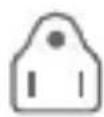
USA
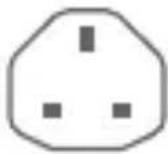
UK
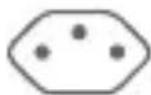
Switzerland
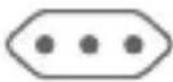
Italy
The World Adapter Pro+ is suitable for most 2-pole, 3-pole and earthed plugs of protection classes I and II; this is the safest way of plugging in your portable devices around the world. It can be used with a range of devices, including: dryer, smart phone, shaver, MP3 player, laptop, camera, game console, GPS, camcorder, etc.

natural_image
Row of grayscale icons representing various devices and media (no text or symbols)Basic Use
Before use, move all sliders on the sides completely back into their starting positions (1).
Press the unklocking button (2) and move the slider you have selected forward until it clicks into place (3). Connect the device plug receptacle of the electrical circuit to the adapter (4). Connect the adapter to the mains.
Setting up the plug for Switzerland/Italy
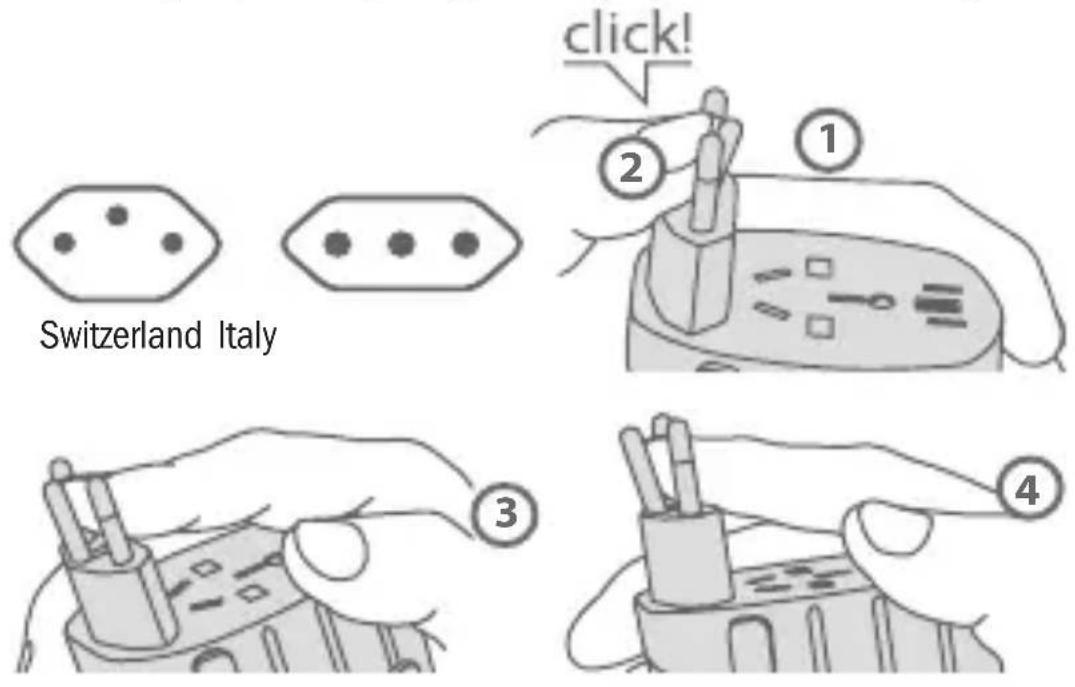
Push out the Switzerland / Italy plug until it locks into place (as described before) (1). Changing from the Italian to the Swiss plug (all three pins must be aligned in a row): Push middle pin to the left with slight force until you hear a distinct „click“ (2). Then push the pin on the top to the right (3). The adapter is not ready for use until all three
pins are in the vertical position. To change to the setting for Italy, simply reverse the procedure (4).

Warning
- Do not use the adapter if the housing is damaged.
- Do not expose the adapter to any kind of liquid or moisture.
- This adapter cannot be combined with any other adapter. The exception is a travel adapter type of 1.500304, which can be used in connection with the World Adaptor Pro+ for connection of foreign plugs (type UK, USA, Australia).
- Do not insert any other objects into the holes of the adapter.
- This adapter is not converting voltage; the input voltage of the device you want to connect must the local power network voltage.
- If dirty, clean with a dry cloth. Make sure the adapter is disconnected from the mains before cleaning.
- Disconnect the adapter from the receptacle of the electrical circuit when you are not using it. Improper use of the adapter automatically voids the manufacturer's warranty. The manufacturer assumes no liability for damages.
- This appliance is not intended for use by persons (including children) whose physical, sensual or mental disability or lack of experience and knowledge prevent them from safely using the appliance, unless they are supervised or instructed regarding its use by a person responsible for their safety.
1910000600_31-P0056 60×60 mm
- Keep the away from children.
- Please keep these instructions for future use.
Do not discard electric appliances as unsorted municipal waste, use sorted waste collection points.
For current information on collection points, contact local authorities. If electric appliances are placed on waste dumps, dangerous substances may seep to groundwater, reach the food chain and
damage your health and comfort.
13.8.2005
natural_image
Row of grayscale icons representing various devices including a handheld device, earphones, audio jack, laptop, camera, game controller, Wi-Fi, and remote control (no text or symbols)natural_image
Row of grayscale icons representing various devices including a handheld device, earphones, audio/video equipment, laptop, camera, game controller, Wi-Fi, and remote control (no text or symbols)natural_image
Row of grayscale icons representing various devices and devices (no text or symbols)natural_image
Symbol of a trash bin with crossed lines indicating no waste or discharge (no text or labels)natural_image
Row of grayscale icons representing various devices including a handheld device, earphones, remote control, laptop, camera, game controller, Wi-Fi, and video camera (no text or symbols)natural_image
Row of grayscale icons representing various devices including a handheld device, earphones, audio/video equipment, laptop, camera, game controller, Wi-Fi, and remote control (no text or symbols)Uporaba potovalnega adapterja
natural_image
Row of grayscale icons representing various devices including a handheld device, earphones, headphones, laptop, camera, game controller, and remote control (no text or symbols)Uporaba putnog adaptera
Prije uporabe, vratite sve klizače na boku adaptera u početni položaj (1). Pritisnite gumb za oslobađanje (2) i premjestite željeni klizač prema naprijed, dok ne sjedne u radni položaj (3). Priključite utikač električnog trošila u utičnicu adaptera (4). Prikopčajte adapter u zidnu utičnicu. Kod iskopčavanja postupajte obrnutim redom.
natural_image
Row of grayscale icons representing various devices and devices (no text or symbols)natural_image
Row of grayscale icons representing various devices including a handheld device, earphones, a laptop, camera, game controller, and remote control (no text or symbols)natural_image
Row of grayscale icons representing various devices including a handheld device, earphones, a laptop, camera, game controller, and remote control (no text or symbols)natural_image
Row of grayscale icons representing various devices including a handheld device, phone, earphone, laptop, camera, game controller, Wi-Fi, and video player (no text or symbols)Naudojimas
natural_image
Row of grayscale icons representing various devices including a handheld device, remote control, and gaming interface (no text or symbols)Pamata lietošana
Brand : Emos
Model : P0056
Category : Chargeur de téléphone