
65P90E3IX - Oven MIDEA - Free user manual and instructions
Find the device manual for free 65P90E3IX MIDEA in PDF.


| Product Type | Built-in Electric Oven |
| Brand | Midea |
| Model | 65P90E3IX |
| Dimensions (HxWxD) | 595 x 595 x 550 mm |
| Weight | 30 kg |
| Power Supply | 220-240 V ~ 50 Hz |
| Total Power Consumption | 3.4 kW |
| Energy Efficiency Class | A |
| Capacity | 71 L |
| Oven Functions | Conventional, Fan Forced, Grill, Defrost, Pizza, Bottom Heat |
| Temperature Range | 50°C - 250°C |
| Control Type | Touch Control + Knobs |
| Display | Digital LED |
| Interior Light | Yes |
| Cleaning Mode | Easy-clean Enamel Surface |
| Child Lock | Yes |
| Automatic Shut-off | Yes |
| Cooling Fan | Yes |
| Door Type | Cool Touch Triple Glazing |
| Number of Shelves | 2 |
| Accessories Included | Baking Tray, Wire Rack, Grill Rack |
| Spare Parts Availability | Available through authorized service centers |
| Repairability Index | 8.2 / 10 |
Frequently Asked Questions - 65P90E3IX MIDEA
User questions about 65P90E3IX MIDEA
0 question about this device. Answer the ones you know or ask your own.
Ask a new question about this device
Download the instructions for your Oven in PDF format for free! Find your manual 65P90E3IX - MIDEA and take your electronic device back in hand. On this page are published all the documents necessary for the use of your device. 65P90E3IX by MIDEA.
USER MANUAL 65P90E3IX MIDEA
natural_image
Blue textured background with white geometric shapes and a horizontal bar pattern (no text or symbols)natural_image
Pure wireframe diagram of a rectangular grid structure with no text, numbers, or symbols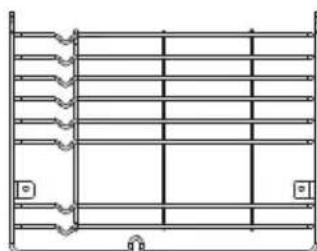
natural_image
Pure technical line drawing of a structural frame with no text, numbers, or symbols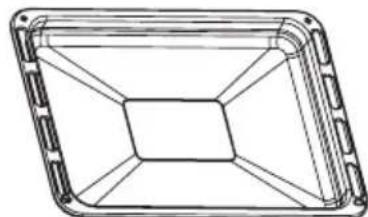
natural_image
Technical line drawing of a rectangular frame with internal grid lines (no text or symbols)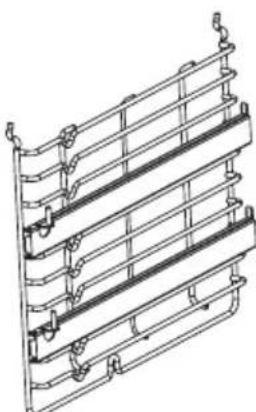
natural_image
Technical line drawing of a multi-tiered metal frame structure (no text or symbols)04
natural_image
Technical line drawing of a mechanical oven or enclosure with internal shelves and a central fan (no text or symbols)ODER
natural_image
Technical line drawing of a multi-tiered storage unit with internal compartments and housing (no text or symbols)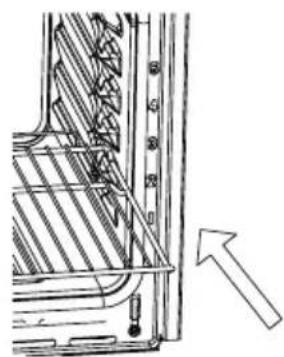
natural_image
Technical line drawing of a mechanical assembly with an arrow indicating direction (no text or symbols present)natural_image
Simple line drawing of a mechanical component with a rotating arrow (no text or symbols)natural_image
Technical diagram showing a square component with arrows indicating rotation and a close-up of a screw (no text or symbols)▲ KÜHLÖFFNUNGEN
INSTALLATION
Anmerkung:
natural_image
Technical diagram showing a mechanical assembly with an inset view of a rotating component (no text or symbols present)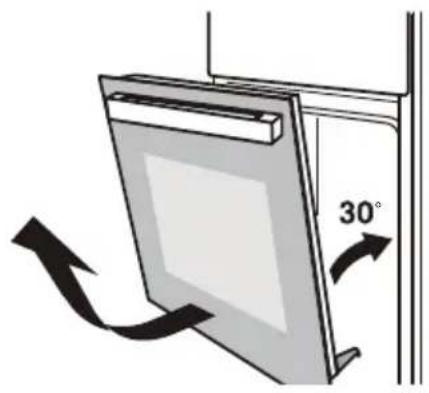
natural_image
Diagram of a wall-mounted device with a 30-degree angle indicator and directional arrows (no text or symbols)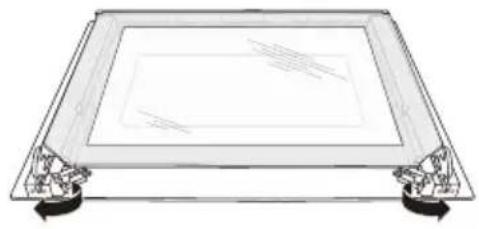
natural_image
Line drawing of a rectangular frame with side supports and a central display (no text or symbols)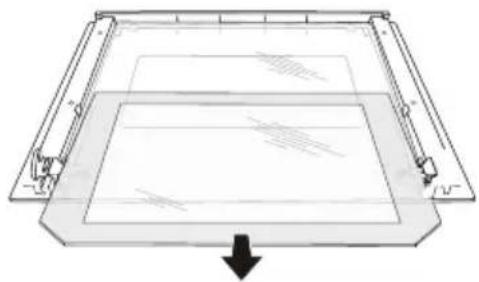
natural_image
Pure technical diagram of a rectangular frame with internal lines and a downward arrow, no text or symbols present.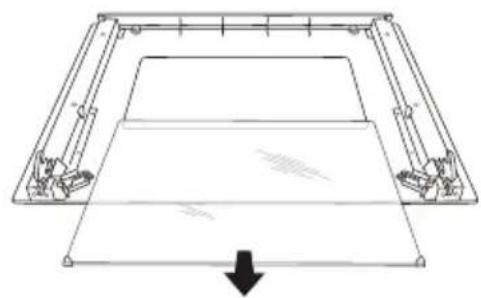
natural_image
Pure technical line drawing of a mechanical component or frame structure without any text, numbers, or symbolsmake yourself at home
Built-in Electric Oven 65P90 E3IX
INSTRUCTION MANUAL
natural_image
Blue textured background with three white circular symbols above and a horizontal striped pattern at the bottom (no text or symbols)Read these instructions carefully before using your oven, and keep it carefully. If you follow the instructions, your oven will provide you with many years of good service.
01 SAFTY HINTS
ACKNOWLEDGMENT
Thank you for purchasing our product. We hope you enjoy using the many features and benefits it provides. Before using this product please study this entire Instruction Manual carefully. Keep this manual in a safe place for future reference. Ensure that other people using the product are familiar with these instructions as well.
▲ WARNING
- When the oven is first switched on, it may give off an unpleasant smell. This is due to the bonding agent used for the insulating panels within the oven. Please run up the new empty product with the conventional cooking function, 250°C90 minutes to clean oil impurities inside the cavity.
- During the first use, it is completely normal that there will be a slight smoke and odors. If it does occur, you merely have wait for the smell to clear before putting food into the oven.
- Please use the product under the open environment.
- The appliance and its accessible parts become hot during use. Care should be taken to avoid touching heating elements. Children less than 8 years of age shall be kept away unless continuously supervised.
- If the surface is cracked, switch off the appliance to avoid the possibility of electric shock.
- This appliance can be used by children aged from 8 years and above and persons with reduced
physical, sensory or mental capabilities or lack of experience and knowledge if they have been given supervision or instruction concerning use of the appliance in a safe way and understand the hazards involved. Children shall not play with the appliance. Cleaning and user maintenance shall not be made by children without supervision.
- During use, the appliance becomes very hot.
Care should be taken to avoid touching heating elements inside the oven.
-
Do not allow children to go near the oven when it is operating, especially when the grill is on.
-
Ensure that the appliance is switched off before replacing the oven lamp to avoid the possibility of electric shock.
-
The means for disconnection must be incorporated in the fixed wiring in accordance with the wiring specifications.
-
Children should be supervised to ensure that they do not play with the appliance.
-
This appliance is not intended for use by persons (including children) with reduced physical, sensory or mental capabilities, or lack of experience and knowledge, unless they have been given supervision or instruction concerning use of the appliance by person responsible for their safety.
-
Accessible parts may become hot during use. Young children should be kept away.
-
An all-pole disconnection means must be incorporated in the fixed wiring in accordance with the wiring rules.
-
If the supply cord is damaged, it must be replaced by the manufacturer, its service agent or similarly qualified persons in order to avoid a hazard.
-
Do not use harsh abrasive cleaners or sharp metal scrapers to clean the oven door glass since they can scratch the surface, which may result in shattering of the glass.
- Only use the temperature probe recommended for this oven.
- Excess spillage must be removed before cleaning.
- During pyrolytic cleaning, accessible parts may become hotter than normal. Young children should be kept away.
- During pyrolytic cleaning, the probe is to be removed. removed.
- A steam cleaner is not to be used.
- The appliances are not intended to be operated by means of an external timer or separate remote-control system.
- The instructions for ovens that have shelves shall include details indicating the correct installations of the shelves.
- Do not use the oven unless you are wearing something on your feet. Do not touch the oven with wet or damp hands or feet.
- For oven: Oven door should not be opened often during the cooking period.
- The appliance must be installed by an authorized technician and put into use. The producer is not responsible for any damage that might be caused by defective placement, and installation by unauthorized personnel.
- When the door or drawer of oven is open do not leave anything on it, you may unbalance your appliance or break the door.
- Some parts of appliance may keep its heat for a long time; it is required to wait for it to cool down
before touching onto the points that are exposed to the heat directly.
- If you will not use the appliance for a long time, it is advised to plug it off.
▲ FITTING THE OVEN INTO THE KITCHEN UNIT
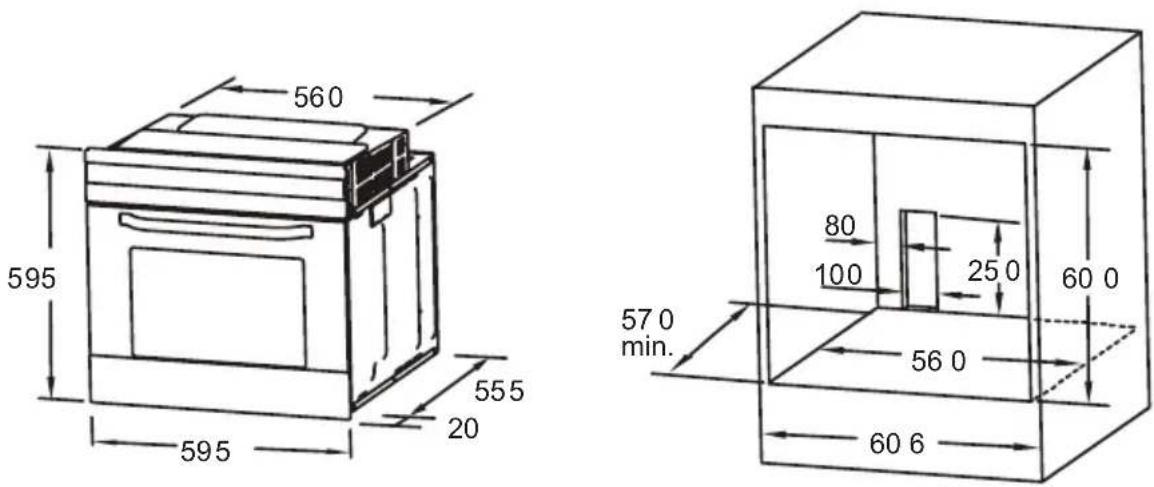
Fit the oven into the space provided in the kitchen unit; it may be fitted underneath a work top or into an upright cupboard. Fix the oven in position by screwing into place, using the two fixing holes in the frame. To locate the fixing holes, open the oven door and look inside. To allow adequate ventilation, the measurements and distances adhered to when fixing the oven.
▲ IMPORTANT
If the oven is to work properly, the kitchen housing must be suitable. The panels of the kitchen unit that are next to the oven must be made of a heat resistant material. Ensure that the glues of units that are made of veneered wood can withstand temperatures of at least 120 °C. Plastics or glues that cannot withstand such temperatures will melt and deform the unit, once the oven has been lodged inside the units, electrical parts must be completely insulated. This is a legal safety requirement. All guards must be firmly fixed into place so that it is impossible to remove them without using special tools. Remove the back of the kitchen unit to ensure an adequate current of air circulates around the oven. The hob must have a rear gap of at least 45 mm.
▲ DECLARATION OF COMPLIANCE
When you have unpacked the oven, make sure that it has not been damaged in any way. If you have any doubts at all, do not use it: contact a professionally qualified person. Keep packing materials such as plastic bags, polystyrene, or nails out of the reach of children because these are dangerous to children.
CE
PRODUCT DESCRIPTION
02
flowchart
graph TD
    A["Start button"] --> B["Stop button"]
    B --> C["Time button"]
    C --> D["Remind button"]
    D --> E["K1"]
    E --> F["F"]
    F --> G["<<"]
    style A fill:#f9f,stroke:#333
    style B fill:#ccf,stroke:#333
    style C fill:#cfc,stroke:#333
    style D fill:#fcc,stroke:#333
    style E fill:#ffc,stroke:#333
Symbol Function description

Oven Lamp: Which enables the user to observe the progress of cooking without opening the door. Oven lamp will light for all cooking functions. (except pyrolytic function and ECO function)

Defrost: The circulation of air at room temperature enables quicker thawing of frozen food, (without the use of any heat). It's a gentle but quick way to speed up the defrosting time and thawing of ready-made dishes and cream filled produce etc.

Bottom heater: A concealed element in the bottom of the oven provides heat. It is mainly used for keeping food warm. The temperature can be set within the range of 60-120°C. The default temperature is 60°C.

Conventional cooking: The top and bottom work together to provide convectional cooking. The temperature can be set within the range of 50-250°C. The default temperature is 220°C.
| Symbol | Function description |
 | Convection with fan: Combination of the fan and both heating element provides more even heat penetration, saving up to 30-40% of energy. Dishes are lightly browned on the outside and still moist on the inside. Note: This function is suitable for grilling or roasting big pieces of meat at a higher temperature. The temperature can be set within the range of 50-250°C. The default temperature is 220°C. |
 | Radiant grilling: The inner grill element switches on and off to maintain temperature. The temperature can be set within the range of 180-240°C. The default temperature is 210°C. |
 | Double grilling: The inside radiant element and top element are working. The temperature can be set within the range of 180-240°C. The default temperature is 210°C. |
 | Double grilling with fan: The inside radiant element and top element are working with fan The temperature can be set within the range of 180-240°C. The default temperature is 210°C. |
 | Convection: An element around the convection fan provides an additional source of heat for convection style cooking. In convection mode the fan automatically comes on to improve air circulation within the oven and creates an even heat for cooking. The temperature can be set within the range of 50-240°C. The default temperature is 180°C. |
 | Pyrolytic function: When the function set to prolytic mode, LED display " PyR ". The default temperature is 450°C . The timer can be set 1:30 or 2:00 hours. |
 | For energy-saved cooking. Cooking the selected ingredients in a gentle manner, and the heat comes from the top and the bottom. |
OPERATION INSTRUCTIONS
03
▲ Clock Setting
After connecting the unit to the power, the symbols "0:00" will be visible on the display.
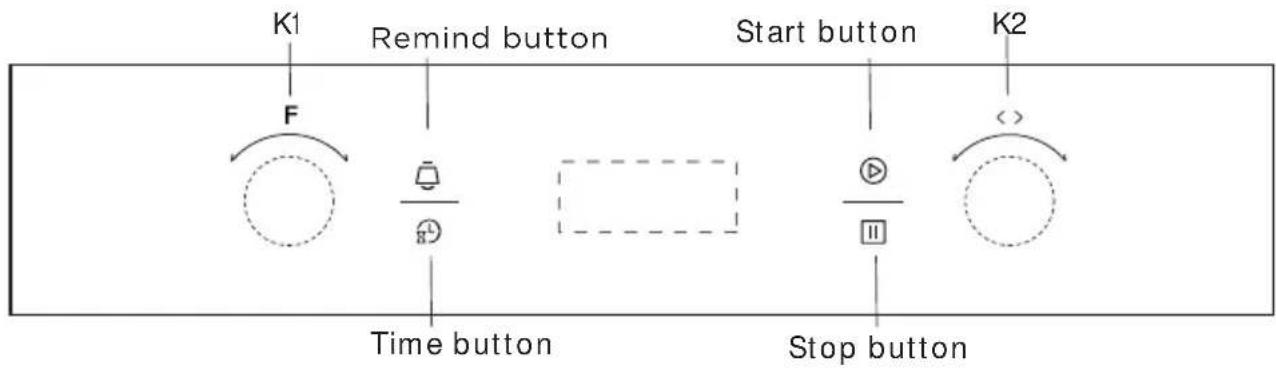
- Press " ☐", the hour figures flashes.
- Rotate "K2" to adjust the hour figures, (time should be within 0--23).
- Press "", the minutes flashes.
- Rotate "K2" to adjust the minutes setting, (time should be within 0--59).
- Press " ☑" to finish the clock settings. " : " will flash, and the time will be illuminated.
Note: The clock is 24 hours. After power on, if not set, the clock will show "0:00".
▲ Function Setting
- Rotate "K1" to choose the cooking function you require. The related symbol will illuminated.
- Rotate "K2" to adjust the temperature.
- Press " TV to confirm the start of cooking.
- If step 2 is ignored, Press " TV" to confirm the start of cooking and the default time is 9 hours, the default temperature will display on the LED.
Note:
- The step quantities for the adjustment time of the knobs are as follow:
0--0:30min : step 1 minute
0:30--9:00hour : step 5 minutes - The step quantities for the adjustment of temperature is 5^ C, and the radiant grilling function is 30^ C.
- Rotate "K1" to adjust the cooking time when cooking begins.
Then press " ☑" to confirm.
If " ☑ not pressed within 3 seconds, the oven will revert back to the previous time to continue cooking. - Rotate" K2 " to adjust the temperature when cooking begins.
The related indicator will be illuminated. Then press " ⬇ to start
cooking. If " ☑ not pressed in 3 seconds, the oven will revert back to the previous temperature to continue cooking.
▲ Lamp Setting
- Rotate" K1 " to select the relevant function, then the corresponding icon will be on.
- Press " button to start," 0:00 " and lamp icon " " will light up, " : " flashes.
▲ Inquiring Function
In the following states, you can use inquiring function, after 3 seconds return to the current state.
- During working state, if the clock was set, press "Button" button to see the current time; if the reminder function was set, press "Button" button to see the time of reminder.
- In reminding state, if the clock was set, press " ☐" button to see the current time.
- In clock display state, if the reservation function was set, press " button to see the time of reservation.
▲ Child lock Function
To Lock: press "▶" and " ∥simultaneously for 3 seconds, there will be a long " beeping " sound and the " 🔊" will be illuminated. Lock quitting: press " ▶" and " ∥simultaneously for 3 seconds, there will be a long " beeping " sound indicating the child-lock is released.
Note: During working mode, if you want to stop cooking, press stop button quickly. Do not need to long pressing on stop button, it is invalid.
▲ Reminder Function
This function will help to remind you to start cooking in a certain time from 0:01 to 9:59. Only when oven in standby mode, the reminder can be set. Follow below to set the reminder:
- Press reminder setting button " ☐";
- Rotate "K2" to set the hour time of reminder. (Time should be within 0--9).
- Press reminder setting button " ☐" again;
- Rotate "K2" to set minute time of reminder. (Time should be within 0--59).
- Press " ☑" to confirm setting. The time will count down.
Note: The oven buzzer will sound for 10 times after the time back to
the zero hour.
You can cancel the reminder during setting by pressing the stop button; After the reminder has been set, you can cancel it by pressing stop button twice.
▲ Start/Pause/Cancel Function
-
If the cooking time has been set, press " ☑ to start cooking. If the cooking is paused, press " ☑ to resume cooking.
-
During cooking process, press "☐" once to pause the cooking. Press "☐" twice to cancel the cooking.
▲ Energy-Saving Function
-
In waiting state and reminding state, press "☒" for three seconds, the LED display will go off and set to energy-saving mode.
-
If no operation in 10 minutes under waiting state, the LED display will go off and go into energy-saving mode.
-
Under the energy-saving mode, press any key or rotate any knob can quit the energy-saving mode.
▲ 9. Pyrolytic Function
This function allows you to clean thoroughly the oven cavity.
-
Rotate "K1" to select the pyrolytic function. LED will display "PyR".
-
Press " ☑" to confirm the cooking. And the default time is 2 hours, " PyR " will display on the LED.
-
Rotate "K1" to change the pyrolytic time. The timer can be set 1:30 or 2:00 hours.
Note:
-
When the oven door was not closed, pressing start button will be invalid. The LED will display "door" and "PyR".
-
When the oven's center temperature is higher than 320°C, pressing start button will be invalid. The LED will display "CooL" and "PyR". When the oven's center temperature is lower than 200°C, press cancel button once, it will pause; press again, it will return to waiting state. If higher than 200°C, press cancel button once, it will return to waiting state directly.
-
Open the door when the oven is working, the LED will display "door" and the buzzer will sound continuously until the door was closed or press cancel button.
-
Before activating the pyrolytic cleaning function, remove any excessive spillage and make sure that oven is empty. Do not leave anything inside it (e.g. pans, baking tray, dripping pan, slider bracket etc.) as this could heavily damage them.
a. When finished pyrolytic cleaning, don't interrupt the power in an hour.
▲ Reservation Function
- To use reservation function, clock must be set in advance. Then, in the way of setting the clock, reserved time that oven starts to cook must be set:
a> Press reservation setting button "
b> Rotate "K2" to set the hour time of reservation. Time should be within 0--23.
c> Press reservation setting button " again;
d> Rotate " K2 " to set minute time of reservation. Time should be within 0--59.),
but don't press clock this time. Next, turn knob "K1" to choose function.
-
Press " ▶" button to set cooking time and temperature. Then turn knob " K1 " to adjust time, and " K2 " to adjust temperature.
-
Press the " ▶" button to finish cooking setting, and the clock will be on the screen with reservation sign " ✉" always lighting. But no other function signals are presented. Reservation time can be checked by pressing "L", 3 seconds later the screen will show clock again.
-
At the time of reservation, cooking will start automatically after a buzzing sound. The reservation symbol "☒" will put out, and other indicating signs will work normally.
Note:
-
Lamp, defrost, probe can't be reserved.
-
During the status of reservation, press cancel button once, time and temperature of reservation menu will be shown with menu icon lighting constantly. Press again, screen returns to clock, or press start button to return to reservation status.
-
Reminder function is invalid during reservation status.
Note
-
The oven lamp will be on for all functions. (except pyrolytic function and ECO function)
-
Once the cooking programme has been set and the " ▶ " button is not pressed within 5 minutes, the current time will be displayed or turn back to waiting state. The setting program will be invalid.
-
The buzzer will sound once when effectively pressed, if not effectively pressed there will be no response.
-
The buzzer will sound five times to remind you when cooking has finished.
▲ Open door detection (Only for some models)
-
When the oven door is opened during cooking, the oven will enter a pause state (except the lamp function).
-
When the oven door is opened, press the " ▶ " key, and the screen displays "door". At this time, the oven cannot be started.
-
During the reservation process, open the oven door, When the reservation time is reached, the oven will enter a pause state (except pyrolytic, lamp and defrost functions).
-
After the booking time of pyrolytic function arrives, if the oven door is in the open state, the oven will return to the standby state.
-
Opening the oven door does not affect the operation of the alarm clock function.
ACCESSORIES
Wire shelf : For grill, dishes, cake pan with items for roasting and grilling.
Slider bracket : For cooking larger size food, these shelf support rails on the right and left sides of the oven can be removed, dishes and tray can be put on the oven floor, using functions as Radiant grilling, Double grilling, Double grill with fan.
NOTE: When placing dishes on the oven floor, please DO NOT use functions with bottom heater to prevent heat gathering at bottom. (only for specific models)
Universal pan: For cooking large quantities of food such as moist cakes, pastries, frozen food etc, or for collecting fat/spillage and meat juices.
Telescopic runner: Some models might with telescopic runners to facilitate the use of oven. These telescopic runners and slider brackets could be disassembled by unscrewing the screws used to fix it. After disassembled, dishes and tray can be put on the oven floor, using functions as Radiant grilling, Double grilling, Double grill with fan.
NOTE: When placing dishes on the oven floor, please DO NOT use functions with bottom heater to prevent heat gathering at bottom. (only for specific models)
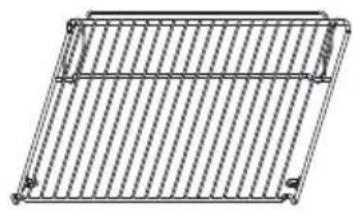
natural_image
Pure wireframe diagram of a rectangular grid structure with no text or symbols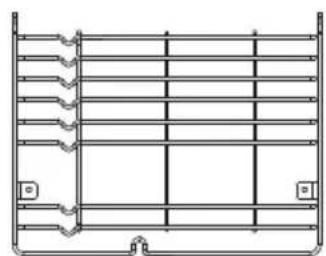
natural_image
Pure technical line drawing of a structural frame with no text, numbers, or symbols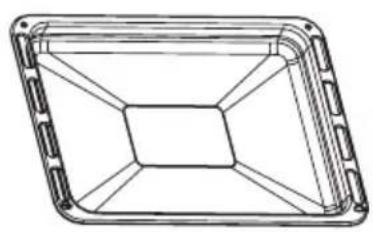
natural_image
Technical line drawing of a rectangular frame with internal hexagonal structure (no text or symbols)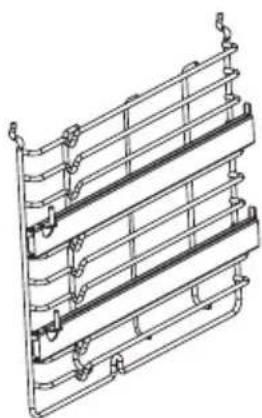
natural_image
Technical line drawing of a multi-tiered metal frame structure (no text or symbols)04
INSTALLATION INSTRUCTIONS
▲ SHELF PLACEMENT WARNING:
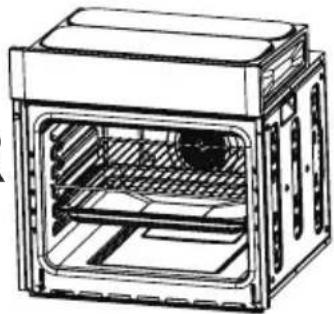
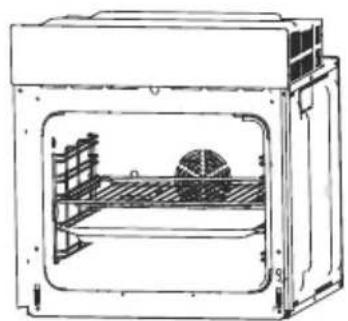
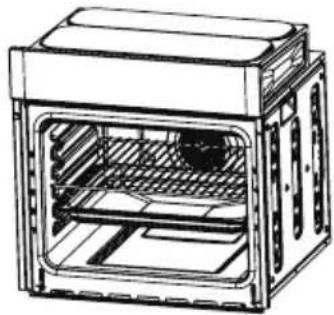
To ensure the oven shelves operate safely, correct placement of the shelves between the side rail is imperative. Shelves and the pan only can be used between the first and fifth layers.
The shelves should be used with the right direction, it will ensure that during careful removal of the shelf or tray, hot food items should not slide out.
natural_image
Technical line drawing of a mechanical oven or enclosure with internal components (no text or symbols)OR
natural_image
Technical line drawing of a multi-tiered oven or storage unit (no text or symbols visible)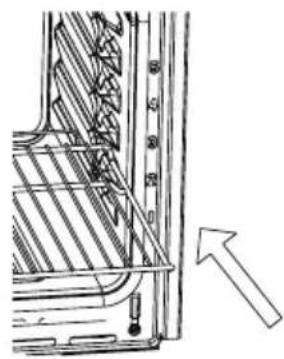
natural_image
Technical line drawing of a mechanical component with an arrow indicating direction (no text or symbols present)▲ BULB REPLACEMENT
For replacement, process as follows:
- Disconnect power from the mains outlet or switch off the circuit breaker of the unit's mains outlet.
- Unscrew the glass lamp cover by turning it counter-clockwise (note, it may be stiff) and replace the bulb with a new one of the same type.
- Screw the glass lamp cover back in place.
NOTE: Only use 25W/230V\~, T300°C halogen lamps.
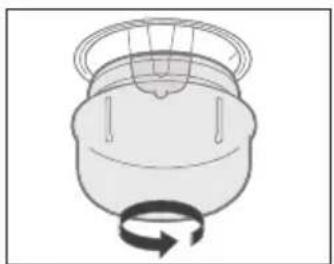
natural_image
Simple line drawing of a mechanical component with a rotating arrow (no text or symbols)▲ SECURING THE OVEN TO THE CABINET
- Fit oven into the cabinet recess.
- Open the oven door and determine the location of the mounting screw holes.
- Fix the oven to the cabinet with two screws.
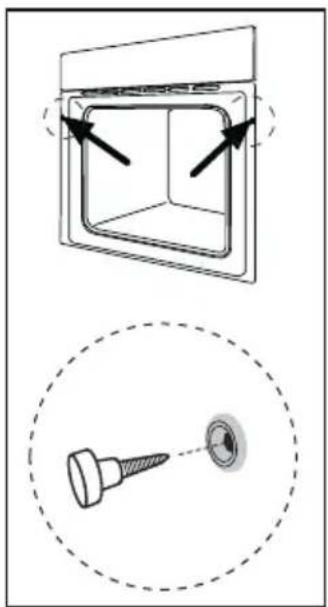
natural_image
Technical diagram showing a square component with arrows indicating rotation and a close-up of a screw (no text or symbols)▲ VENTILATING OPENINGS
When cooking is finished or in pause state or in waiting state, if the oven's center temperature is over 75 degree, the cooling fan will continue working for 15 minutes. Or when the oven's center temperature becomes lower than 75 degree, the cooling fan will stop in advance.
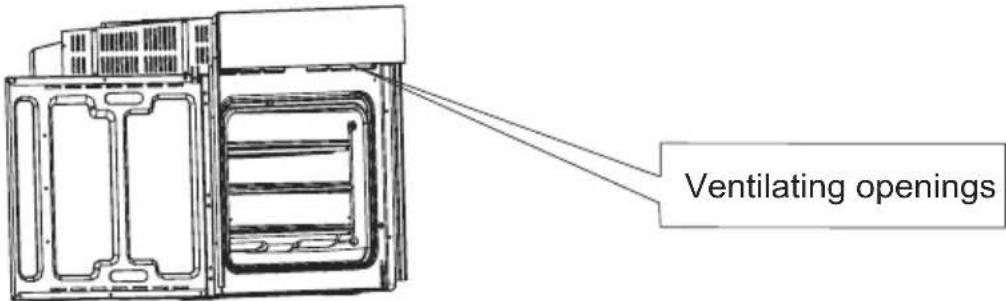
▲ CONNECTION OF THE OVEN
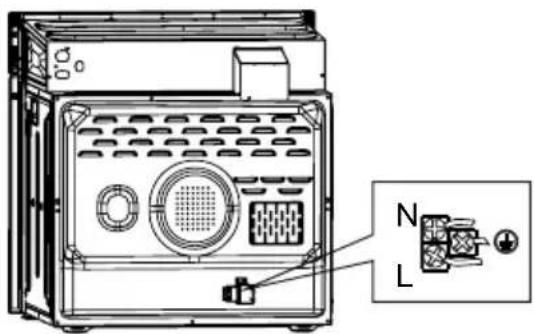
▲ INSTALLATION
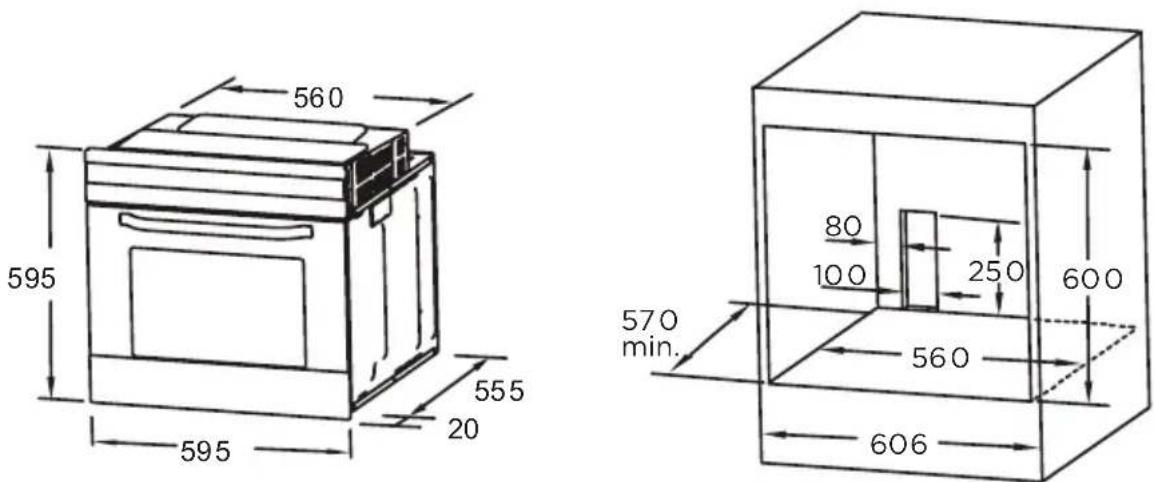
▲ Remark:
- Only plus deviations are admissible for all dimension.
- The cabinet is not include the power switch or socket.
- The dimensions attached are in mm.
NOTE: The number of accessories included depends on the particular appliance purchased.
▲ REMOVING THE DOOR FROM OVEN (OPTIONAL)
Disassembly of oven door components
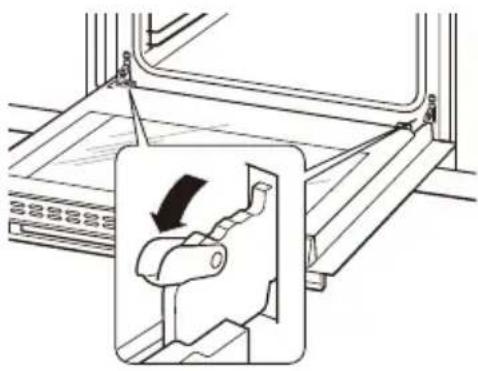
- To remove the door, open the door to the maximum angle. Then pull the buckle at the door hinge backward.
- Close the door to an angle approximately 30^ . Hold the door with one hand on each side. Lift up and slowly pull the door out from the oven.
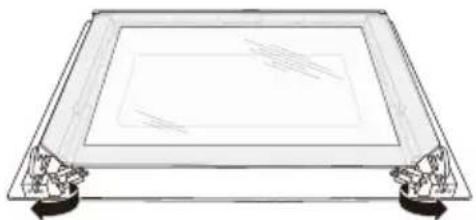
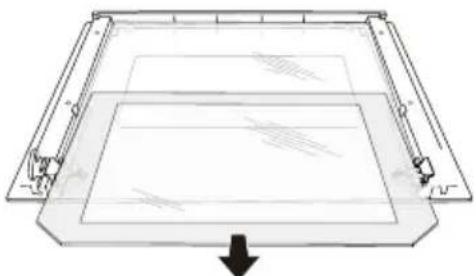
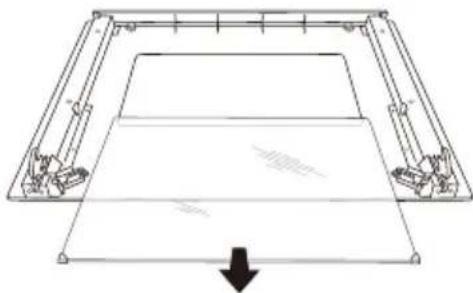
- Open the door rotation bracket assembly, refer the action in the following picture.
- Lift up the door outer glass and pull it out, then take the door middle glass out in the same way.
natural_image
Technical diagram showing a mechanical assembly with a magnified inset of a component (no text or symbols present)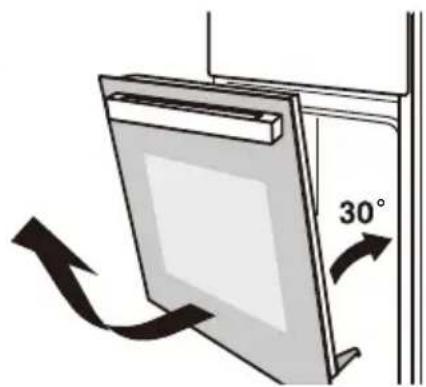
natural_image
Diagram of a door frame with an 30-degree angle indicator and directional arrows (no text or symbols)WARNING:
Don't forcibly pulled out the door and prevent the glass breakage during the dismantling process.
natural_image
Line drawing of a rectangular frame with corner supports and a blank screen (no text or symbols)WARNING:
The hinge springs could loose, causing personal injury.
natural_image
Diagram of a rectangular frame with internal structure and an arrow indicating downward motion (no text or symbols)WARNING:
Do not lift or carry the oven door by the door handle.
natural_image
Pure technical line drawing of a mechanical component or frame structure without any text, numbers, or symbols▲ Recipes for ECO mode
| Recipes Temperature (C°) Level Time (min) Pre-heat | ||||
| Potato | ||||
| Cheese | 180 1 90-100 | No | ||
| Gratin | ||||
| Cheese Cake | 160 1 100-150 | No | ||
| Meatloaf | 190 1 110-130 | No | ||
05
CLEANING AND
MAINTENANCE
For the sake of good appearance and reliability, keep the unit clean. The modern design of the unit facilitates maintenance to a minimum. The parts of the unit which come into contact with food have to be cleaned regularly.
- Before any maintenance and cleaning, disconnect the power.
- Set all controls in the OFF position.
- Wait until the inside of the unit is not hot but only slightly warm-cleaning is easier than when warm.
- Clean the surface of the unit with a damp cloth, soft brush or fine sponge and then wipe dry. In case of heavy soiling, use hot water with non-abrasive cleaning product.
- For cleaning the glass of the oven door, do not use abrasive cleaners or sharp metal scrapers, these can scratch the surface or lead to the glass being damaged.
- Never leave acidic substances (lemon juice, vinegar) on stainless steel parts.
- Do not use a high pressure cleaner for cleaning the unit. The baking pans may be washed in mild detergent.
This appliance is marked according to the European directive 2012/19/EU on Waste Electrical and Electronic Equipment (WEEE).
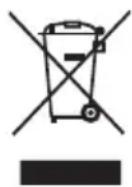
By ensuring this product is disposed correctly, you will help prevent potential negative consequences for the environment and human health, which could otherwise be caused by inappropriate waste handling of this product. The symbol on the product indicates that this product may not be treated as household waste. Instead it shall be handed over to the applicable collection point for the recycling of electrical and electronic equipment. Disposal must be carried out in accordance with local environmental regulations for waste disposal. For more detailed information about treatment, recovery and recycling of this product, please contact your local city office, your household waste disposal service or the shop where you purchased the product.

make yourself at home
- 04
- ▲ KÜHLÖFFNUNGEN
- INSTALLATION
- Anmerkung:
- INSTRUCTION MANUAL
- SAFTY HINTS
- ACKNOWLEDGMENT
- ▲ WARNING
- ▲ FITTING THE OVEN INTO THE KITCHEN UNIT
- ▲ IMPORTANT
- ▲ DECLARATION OF COMPLIANCE
- PRODUCT DESCRIPTION
- 02
- Symbol Function description
- OPERATION INSTRUCTIONS
- 03
- ▲ Clock Setting
- ▲ Function Setting
- Note:
- ▲ Lamp Setting
- ▲ Inquiring Function
- ▲ Child lock Function
- ▲ Reminder Function
- ▲ Reservation Function
- Note
- ACCESSORIES
- INSTALLATION INSTRUCTIONS
- ▲ SHELF PLACEMENT WARNING:
- ▲ BULB REPLACEMENT
- ▲ SECURING THE OVEN TO THE CABINET
- ▲ VENTILATING OPENINGS
- ▲ CONNECTION OF THE OVEN
- ▲ INSTALLATION
- ▲ Remark:
- ▲ REMOVING THE DOOR FROM OVEN (OPTIONAL)
- WARNING:
- 05
- CLEANING AND
- MAINTENANCE
Brand : MIDEA
Model : 65P90E3IX
Category : Oven