
RoboStar SP300 - Vacuum Cleaner TESLA - Free user manual and instructions
Find the device manual for free RoboStar SP300 TESLA in PDF.


| Product Type | Robotic Pool Vacuum Cleaner |
| Brand | TESLA |
| Model | RoboStar SP300 |
| Pool Area Coverage | Up to 100 m² |
| Maximum Pool Depth | 3 meters |
| Water Temperature Range | 10-35°C |
| Filtration | 250 µm fine filter |
| Battery Type | Rechargeable (lithium-ion, typical) |
| Charging Time | Several hours (approx. 4-6 hours) |
| Operating Time | Up to 120 minutes |
| Status Indicator | Solid white (on), solid blue (working), solid red (low battery), flashing white (charging) |
| Auto Shut-off | After 5 minutes out of water |
| Safety Rope | Included, adjustable length |
| Water Drain | Built-in for emptying |
| Wheels | Travel wheels for movement |
| Maintenance | Clean filter and wheels after each use |
| Storage Temperature | 5-40°C |
| Recommended Charging Interval | Every 3 months if not used |
| Consumables | Replacement filters available at official store |
| Salt Water Compatibility | Yes, but minimize time and rinse with clean water after use |
| Package Contents | Robot, power adapter, safety rope, user manual |
Frequently Asked Questions - RoboStar SP300 TESLA
User questions about RoboStar SP300 TESLA
0 question about this device. Answer the ones you know or ask your own.
Ask a new question about this device
Download the instructions for your Vacuum Cleaner in PDF format for free! Find your manual RoboStar SP300 - TESLA and take your electronic device back in hand. On this page are published all the documents necessary for the use of your device. RoboStar SP300 by TESLA.
USER MANUAL RoboStar SP300 TESLA
natural_image
Technical line drawing of a car electrical plug connected to a wire coil (no text or symbols)POPIS
natural_image
Technical line drawing of a robotic car with internal components and a hand inserting a component (no text or symbols)Nabíjecí konektor
natural_image
Technical line drawing of a car electrical plug connected to a wire coil (no text or symbols)OPIS
natural_image
Technical line drawing of a robotic car with internal components and a hand inserting a component (no text or symbols)Nabíjací konektor
natural_image
Technical line drawing of a car electrical plug connected to a wire coil (no text or symbols)BESCHREIBUNG
natural_image
Line drawing of a robotic car with a hand pointing to the side panel (no text or symbols)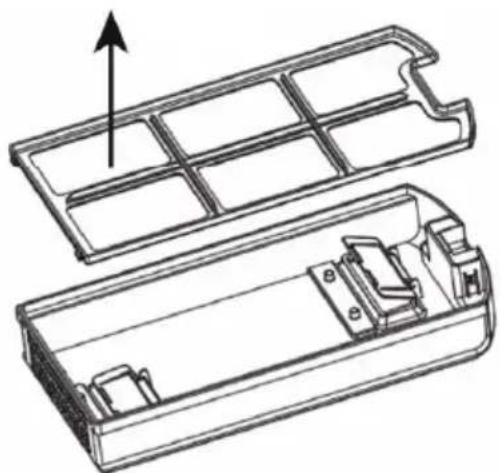
natural_image
Technical line drawing of a mechanical component with internal compartments and housing (no text or symbols)Ladeanschluss
thank you for choosing the TESLA RoboStar SP300.
Before using the robot, please read the rules of safe use thoroughly and follow all common safety rules. Failure to follow the instructions below may result in damage to the robot or its battery. The warnings, cautions, and instructions discussed in this manual cannot cover all possible conditions and situations that may occur.
RULES OF SAFE USE
- The robotic pool vacuum cleaner is intended for pools with a flat floor, an area of up to 100 m2, a maximum depth of 3 meters, with a water temperature in the range of 10 - 35°C.
- Do not use the robot outside the pool.
- Do not use the robot if there are people in the pool.
• We do not recommend that children use the robot alone without adult supervision.
• Always clean the filter after use. - Use only the original power adapter.
- If you do not charge the battery for a long time, the battery voltage may drop below the battery's over-discharge protection voltage due to self-discharge, which may cause irreversible damage to the battery. This is a natural feature of this type of battery.
- Protect the robot from being damaged by impacts or sharp objects.
- Do not touch the parts that are connected to the mains when your hands are wet.
- Do not expose the plastic surface of the robot to radiant heat or direct sunlight.
- Use only original accessories intended for this model.
- Do not open or repair the robot, risking electric shock and voiding the warranty.
- If the robot is damaged, contact an authorized TESLA service center. Never repair the robot yourself, disassembly, including the removal of external screws, may cause loss of water resistance and damage that is not covered by warranty.
- The importer, distributors or sellers are not responsible for damages caused by the operation of the robot, such as injuries, fire, deterioration of other things, etc.
PACKAGE CONTENTS
Check carefully that you have unpacked all supplied accessories, we recommend that you keep the original paper box, user manual and packing material during the warranty period.
FIRST USE
- When charging, place the robot in a cool place and do not cover it to avoid overheating and damage to the electronics.
- Charge the robot's battery. A fast flashing white light indicates that the robot is charging.
- The battery will charge for several hours.
• The ideal temperature for charging is in the range of 5 - 35°C.
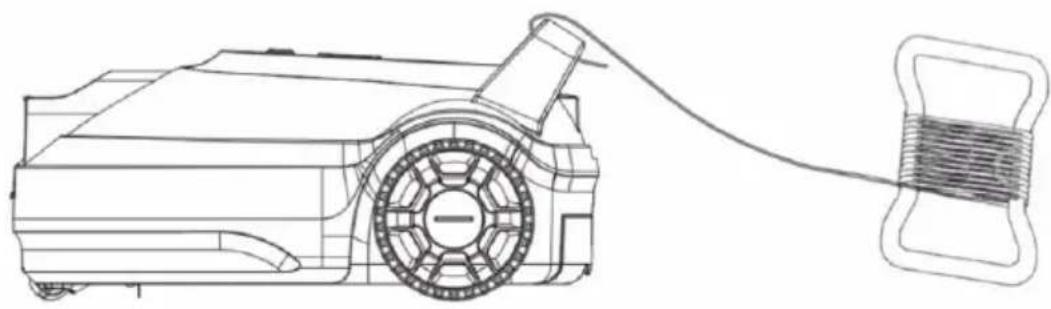
• Install the safety rope and adjust its length according to the depth-swimming pool.
natural_image
Technical line drawing of a car electrical plug connected to a wire coil (no text or symbols)DESCRIPTION
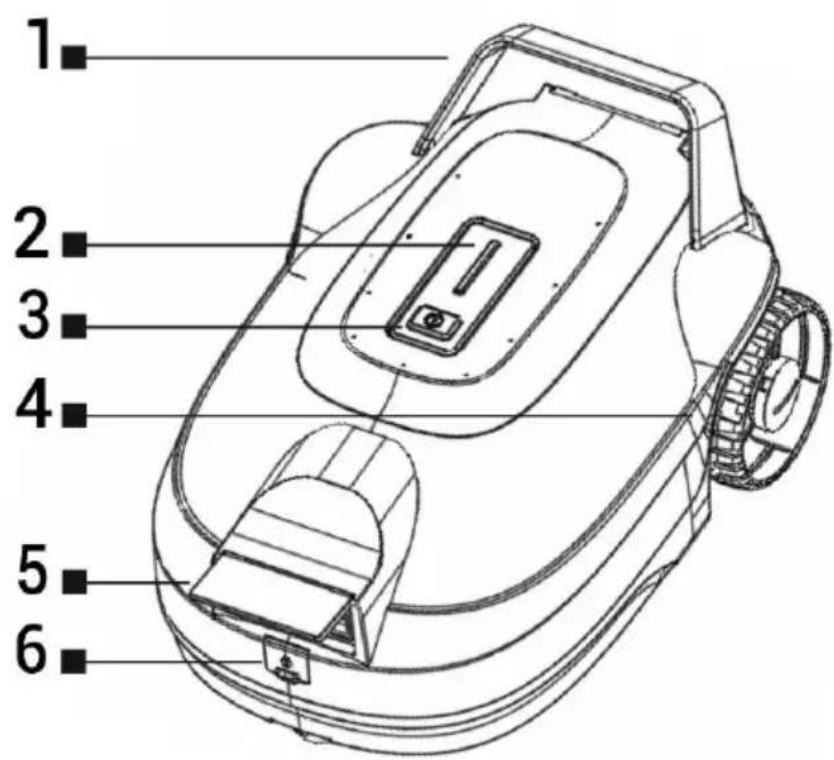
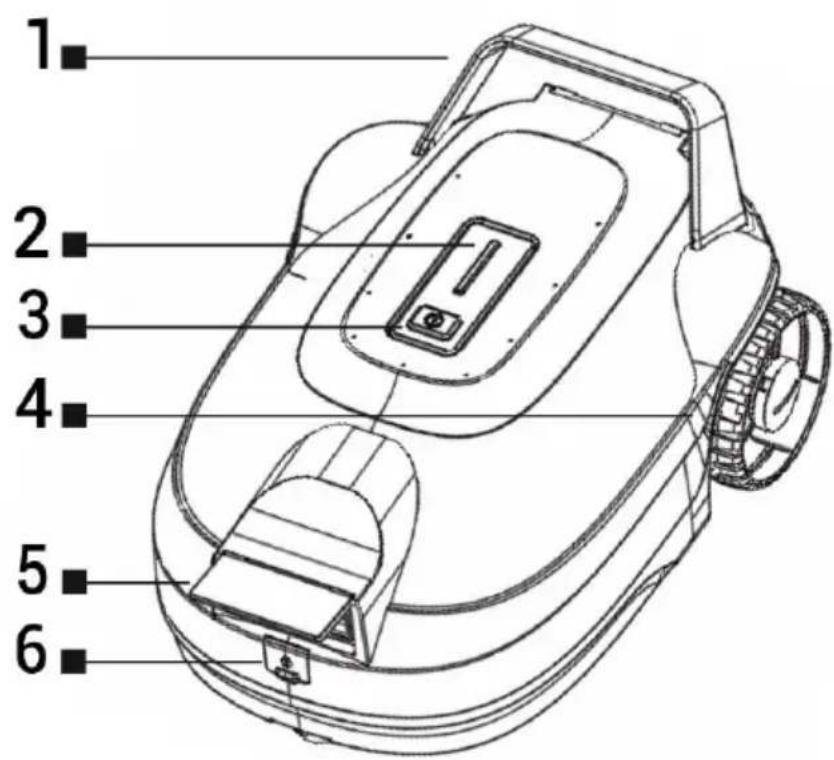
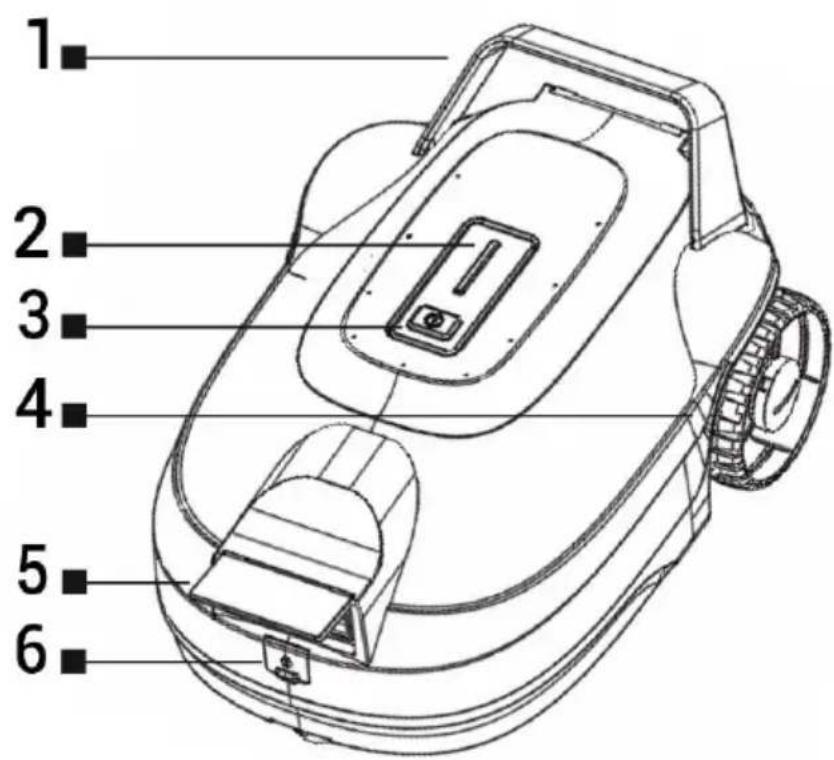
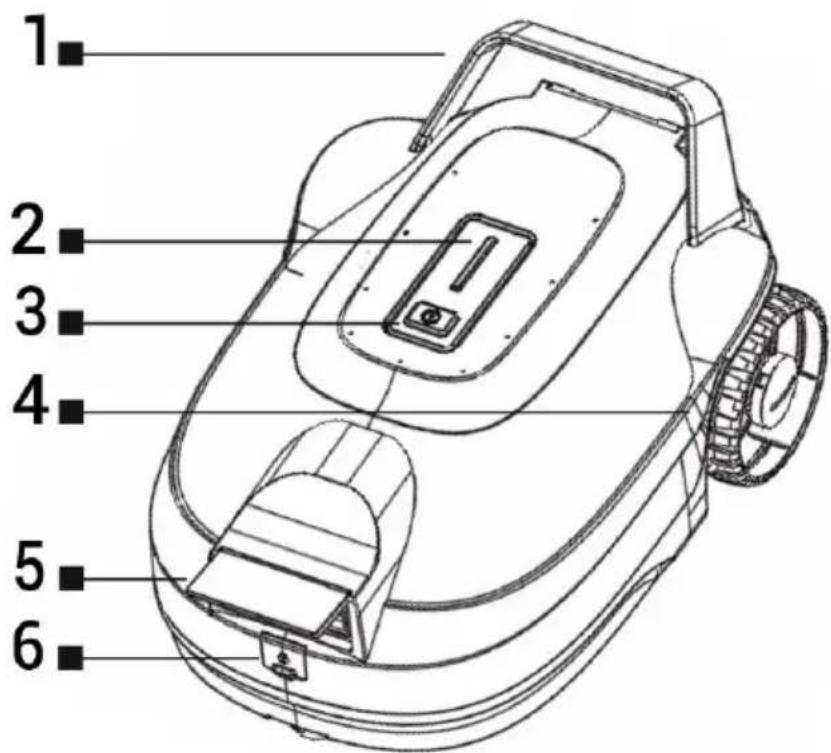
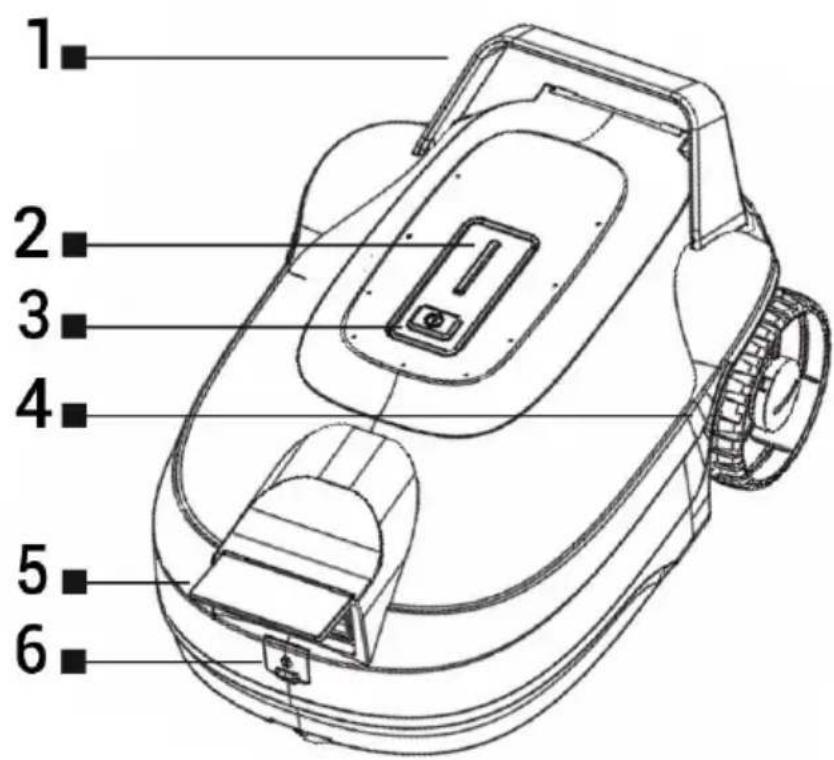
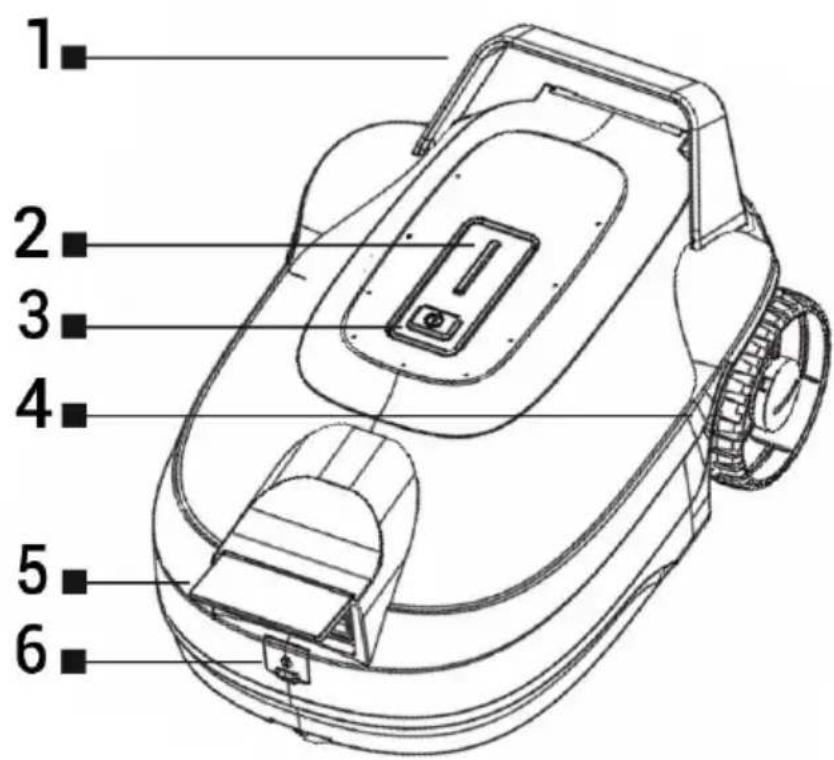
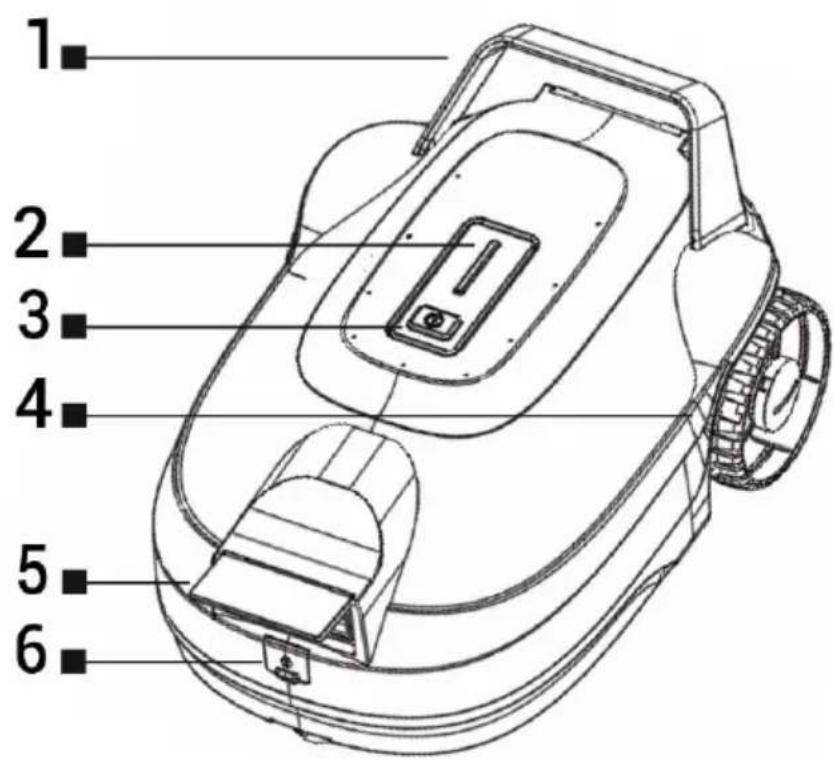
1 Handle
2 Robot status indicator
3 On/Off
4 Travel wheel
5 Water drain
6 Charging connector
| Robot status indicator | Regime |
| It glows permanently white | Emergency status |
| It glows permanently blue | Working |
| It glows permanently red | Low battery capacity |
| Blinks white | Battery charging |
| The LEDs are not lit | The battery is charged |
- Press the On/Off button and the indicator light will be solid white. Now the robot is switched on and ready to be put into the water.
- Grab the handle of the robot and slowly pour water into it. Then let it slowly sink to the bottom of the pool so that it does not tip over. The robot will start cleaning after about 20 seconds and the indicator will be permanently blue.
- If you do not put the robot in the water within 5 minutes after pressing the On/Off button, it will automatically turn off.
ATTENTION!
When the robot is parked at the edge of the pool after cleaning, immediately pull it out of the water. Do not leave the robot in the water longer than is absolutely necessary to clean the pool (maximum 120 minutes).
- Do not charge the robotic pool cleaner outside, especially in summer, too high a temperature can damage the robot.
- Don't forget to charge the robot regularly even when you are not using it.
• A filter with a fineness of 250 µm captures solid impurities.
• Always clean the filter and the wheels after each cleaning of the pool. - Compared to clean water, salt water has a certain degree of corrosiveness. The robot can work in pools with salt water, but we recommend minimizing the time spent in salt water as much as possible and cleaning the robot immediately with clean water after use.
CLEANING AND MAINTENANCE
Turn off the robot by long pressing the On/Off button before starting cleaning. Always clean its filter and travel wheels after each cleaning is completed. The robot must be stored in a dry place at a temperature of 5 - 40°C. Colder or hotter temperatures can affect battery life. Use clean water and a soft cloth for cleaning. Do not use cleaning agents for windows, floors, bathrooms, toilets, dishes, alcohol or abrasive cleaning sponges.
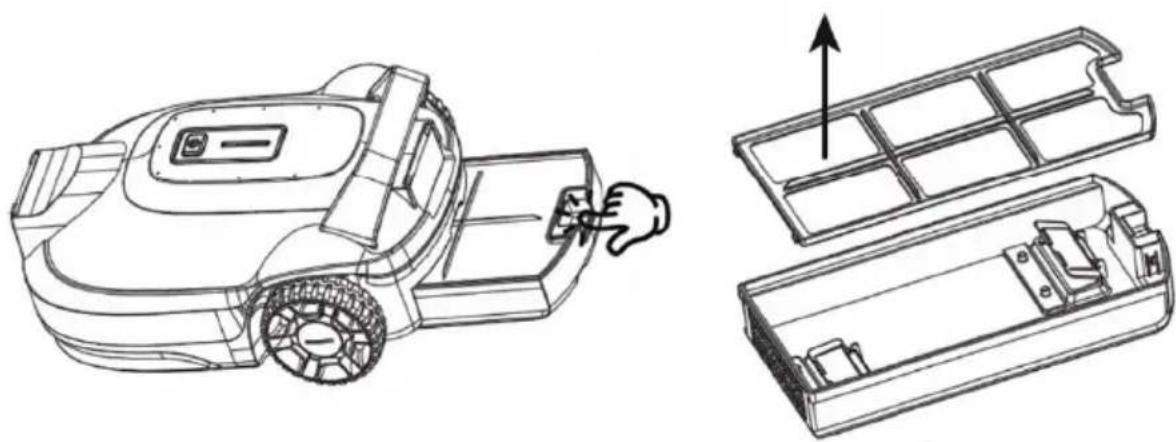
- Push the button to pull the bottom dirt container out of the robot.
- Remove the filter and clean it with clean running water.
- Slide the dirt container back into the robot.
natural_image
Technical line drawing of a robotic car with internal components, showing assembly and mounting (no text or symbols)Charging connector
Before charging the battery, clean the charging connector with a dry cloth or cotton swab.
BATTERY CARE
- If you do not charge the battery for a long time, the battery voltage may be lower than the battery discharge protection voltage due to self-discharge, which may cause irreversible damage to the battery (this is a natural characteristic of this type of battery).
- We recommend charging the battery to full capacity once every three months to prevent it from being completely discharged.
TROUBLESHOOTING
| Question | Answer |
| Why is there no response after turning on the robot? | Check that the battery is fully charged. |
| Why didn’t the robot start cleaning the pool after putting it in the water? | Check that the robot’s wheels are not stuck. |
| Why is the robot moving slowly and not having strong suction? | Check that the water drain is not blocked.Check that the filter is clean.We recommend charging the battery after each use of the robot. |
| Why did the robot stop during cleaning and the battery indicator turned off? | Remove the robot from the pool and clean it thoroughly.Then charge the robot for 10 minutes before putting it back into the pool to continue cleaning. |
| The robot will slow down or go back and forth after cleaning in a dirty pool for a while. | Please clean the filter, this is NOT a bot error or bug. |
TECHNICAL SUPPORT
Do you need advice on setting up and operating the TESLA RoboStar SP300?
Contact us at www.tesla-electronics.eu.
CONSUMABLES
Consumables can be purchased in the official store of the TESLA brand eshop.tesla-electronics.eu.
WARRANTY AND POST-WARRANTY REPAIR
Repairs and service can only be performed at a TESLA authorized service center, otherwise you may damage the robot and lose the warranty. For repair, contact the dealer where you purchased the TESLA product.
WARRANTY EXCLUSIONS
- If the device or part of it has been worn due to normal use. Typical wear and tear of the device or its parts due to normal use includes, for example, the discharge or reduction of the capacity of the battery or accumulator after the usual lifespan of 6 months, wear of the filter, supply cables and others.
- Failure to observe the "Important safety instructions" listed in the user manual.
• Electromechanical or mechanical damage to the device caused by improper use.
• Damage caused by natural elements such as water, fire, static electricity, overvoltage, etc. - Damage caused by unauthorized repair.
- Unreadable device serial number.
DECLARATION OF CONFORMITY
We, TESLA Electronics LTD, declare that this equipment is in compliance with the essential requirements and other relevant provisions of the standards and regulations relevant to the type of equipment.

This product meets the requirements of the European Union.
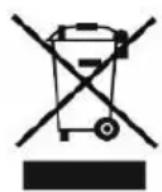
Please inquire about your local separate collection system for electrical and electronic products. Please follow local regulations and do not dispose of old products in normal household waste. Proper disposal of the old product helps prevent potential negative consequences for the environment and human health.
As the product is being developed and improved, we reserve the right to modify the user manual. You can always find the current version of this user manual at www.tesla-electronics.eu.
Design and specifications are subject to change without notice, printing errors reserved.
Kedves Vásárló!
natural_image
Technical line drawing of a car electrical plug connected to a wire coil (no text or symbols)LEÍRÁS
natural_image
Technical line drawing of a robotic car with open door and internal compartments, showing assembly steps (no text or symbols)Töltőcsatlakozó
natural_image
Technical line drawing of a car electrical plug connected to a wire coil (no text or symbols)OPIS
natural_image
Technical line drawing of a robotic arm and its internal components (no text or symbols)Złącze ładowania
NAPRAWY GWARANCYJNE I POGWARANCYJNE
natural_image
Technical line drawing of a car electrical plug connected to a wire coil (no text or symbols)DESCRIERE
natural_image
Technical line drawing of a robotic car with open door and internal compartments, showing assembly steps (no text or symbols)- POPIS
- Nabíjecí konektor
- OPIS
- Nabíjací konektor
- BESCHREIBUNG
- Ladeanschluss
- thank you for choosing the TESLA RoboStar SP300.
- RULES OF SAFE USE
- PACKAGE CONTENTS
- FIRST USE
- DESCRIPTION
- ATTENTION!
- CLEANING AND MAINTENANCE
- Charging connector
- BATTERY CARE
- TROUBLESHOOTING
- TECHNICAL SUPPORT
- CONSUMABLES
- WARRANTY AND POST-WARRANTY REPAIR
- WARRANTY EXCLUSIONS
- DECLARATION OF CONFORMITY
- Kedves Vásárló!
- LEÍRÁS
- Töltőcsatlakozó
- Złącze ładowania
- NAPRAWY GWARANCYJNE I POGWARANCYJNE
- DESCRIERE
Brand : TESLA
Model : RoboStar SP300
Category : Vacuum Cleaner