
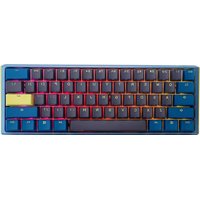
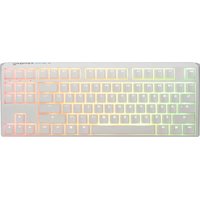
One 3 Pro Mini - Keyboard Ducky - Free user manual and instructions
Find the device manual for free One 3 Pro Mini Ducky in PDF.


| Product Type | Mechanical Keyboard |
| Brand | Ducky |
| Model | One 3 Pro Mini |
| Form Factor | 60% (61 keys) |
| Dimensions (W x D x H) | 295 x 100 x 40 mm |
| Weight | 590 g |
| Connectivity | Wired USB-C |
| Cable Length | 1.5 m detachable USB-C to USB-A |
| Switch Type | Mechanical (Cherry MX or Ducky自家 switch, hot-swappable) |
| Hot-Swappable | Yes (3-pin and 5-pin compatible) |
| Keycap Material | PBT double-shot |
| Backlighting | RGB per-key |
| Onboard Memory | Yes (store profiles and macros) |
| Polling Rate | 1000 Hz |
| Macros/Programmability | Yes (via Ducky Macro 2.0, no software needed) |
| Compatibility | Windows, macOS, Linux |
| Power Source | USB bus power (5V, 500mA) |
| Operating Temperature | 0°C to 40°C |
| Storage Temperature | -20°C to 60°C |
| Included Accessories | USB-C cable, keycap puller, switch puller, extra spacebar |
| Maintenance | Clean with compressed air or damp cloth; avoid liquids |
| Safety | Do not expose to moisture; unplug before cleaning |
| Repairability / Spare Parts | Replacement keycaps, switches, and cable available from Ducky or third parties |
Frequently Asked Questions - One 3 Pro Mini Ducky
User questions about One 3 Pro Mini Ducky
0 question about this device. Answer the ones you know or ask your own.
Ask a new question about this device
Download the instructions for your Keyboard in PDF format for free! Find your manual One 3 Pro Mini - Ducky and take your electronic device back in hand. On this page are published all the documents necessary for the use of your device. One 3 Pro Mini by Ducky.
USER MANUAL One 3 Pro Mini Ducky
目錄
Ducky One 3 Pro Mini 規格與特色 ____ 1
標準層鍵盤配置圖 2
Fn 層鍵盤配置圖 3
Fn+Alt層鍵盤配置圖 4
RGB 燈光操作模式 5
RGB 記憶區域背光 6
多媒體功能 8
設定 Debounce Time 8
店家櫥窗Display模式 9
回復出廠設定 10
Windows Lock功能 10
鍵位切換操作 11
DIP指撥開關功能 12
Ducky One 3 Pro Mini Macro 13
Ducky One 3 Pro Mini Specs & Features 22
Standard Layer Keyboard Configuration Diagram 23
Fn Layer Keyboard Configuration Diagram 24
Fn+Alt Layer Keyboard Configuration Diagram 25
RGB Backlit Modes 27
RGB Zone Customization Modes 27
Multimedia Function 28
Debounce Time Setting 29
Display Mode 29
Reset to Factory Defaults 30
Windows Key Lock Feature 31
Key Switch Functions 32
DIP Switch Functions 33
Ducky One 3 Pro Mini Macro 34
Ducky One 3 Pro Mini Macro Hotkeys Function 35
Ducky One 3 Pro Mini Macro Setting Section 36
Ducky One 3 Pro Mini Macro Multimedia Function Keys 37
Ducky One 3 Pro Mini Macro Keyboard Button Function Keys 38
Ducky One 3 Pro Mini Macro Windows Common Function Keys 39
Ducky One 3 Pro Mini Macro Set-up Example 40
Hot-swap 41
Disclaimers 42

natural_image
Abstract arrangement of gray cubes with no text or symbolsDucky One 3 Pro Mini
RGB LED 燈版本

產品規格:
natural_image
Abstract 3D arrangement of gray cubes with no text or symbolsDucky One 3 Pro Mini
鍵盤配置圖,以美規為範例
標準層
![ESC 1 ! @ 3 #5 6 $ % ^ 7 &2 8 * 9 ( 0 ) - _ =+ ← ≡ T U IYRW EQ O P [ ]∅ ↓ A S D F G H J K L ; : ' " → ↑ Z X C V B N M , < > · / ? ↑ Ctrl CtrlFnAlt Alt](/content/2026/05/909980/images/a9afaff70b97a62eae9121aa3566b52df19231a89de2c45b3ff553611542a235.jpg)

natural_image
Abstract arrangement of gray cubes with no text or symbolsDucky One 3 Pro Mini
鍵盤配置圖,以美規為範例
Fn層


natural_image
Abstract arrangement of gray cubes with no text or symbolsDucky One 3 Pro Mini
鍵盤配置圖,以美規為範例
Fn + Ctrl層


natural_image
Abstract 3D arrangement of gray cubes with varying heights and sizes, no text or symbols presentRGB燈光操作模式
natural_image
Abstract 3D illustration of gray cubes arranged in a scattered pattern (no text or symbols)
natural_image
Abstract 3D arrangement of gray cubes with no text or symbolsRGB 記憶區域背光
natural_image
Abstract arrangement of gray cubes with no text or symbolsRGB 記憶區域背光
操作過程
natural_image
Abstract 3D geometric shape composed of intersecting planes (no text or symbols)

回復出廠設定
美規、歐規
左Windows鍵 + 右Windows鍵
註:
natural_image
Abstract arrangement of gray cubes with no text or symbols鍵位切換操作
鍵位切換功能
- 適用按鍵: Fn/Alt/Ctrl/Windows/Caps lock鍵
- 操作方式:
natural_image
Abstract arrangement of gray cubes with no text or symbolsDIP 指撥開關功能
DIP 指撥開關功能
natural_image
Abstract arrangement of gray cubes with no text or symbolsDucky One 3 Pro Mini
Step1. 選取要錄製的Profile
natural_image
Abstract arrangement of gray cubes with no text or symbolsDucky One 3 Pro Mini
基本快捷鍵功能
natural_image
Abstract arrangement of gray cubes with no text or symbolsDucky One 3 Pro Mini
設定區域的範圍
Ducky Mini Macro可設定之鍵盤層
natural_image
Grid of white square tiles on a brick wall, no text or symbols present註:
natural_image
Abstract arrangement of gray cubes with no text or symbolsDucky One 3 Pro Mini
指定「多媒體鍵功能」設定輸入指令
natural_image
Abstract arrangement of gray cubes with no text or symbolsDucky One 3 Pro Mini
指定「鍵盤按鍵功能」設定輸入指令
natural_image
Abstract arrangement of gray cubes with no text or symbolsDucky One 3 Pro Mini
Windows 常見功能快捷鍵
natural_image
Abstract 3D illustration of gray cubes arranged in scattered groups (no text or symbols)Ducky One 3 Pro Mini
使用範例
natural_image
Abstract arrangement of gray cubes with no text or symbols熱插拔使用說明
使用範例
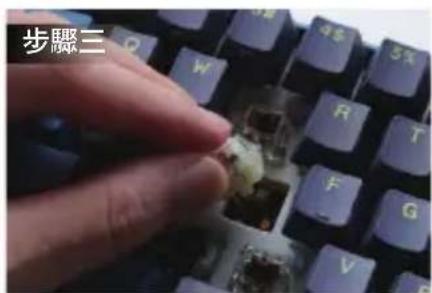
使用拔鍵器拔出鍵帽 拔軸器將軸拔出


校對針腳與孔位 垂直輕按並定位軸體


natural_image
Abstract arrangement of gray cubes with no text or symbolsDucky One 3 Pro Mini
免責聲明
natural_image
Abstract 3D illustration of gray cubes arranged in a scattered pattern (no text or symbols)Ducky One 3 Pro Mini
RGB LED Version

Specifications :
Type : Mechanical keyboard
LED : RGB LED
Keycap material : PBT or ABS
Printing method : Double-shot or Laser Engraved
Origin of Production : Taiwan
Size : 310 x 110 x 40 mm
Weight : 650g
Features :
Hot-swappable Kailh sockets
Various RGB LED lighting modes
True USB Type-C interface, compatible with all Type-C devices
Mouse functions for a convenient experience
Miniature yet packed with features
Supports Ducky Macro through hardware. Personalize functions as you like
Products with PBT Double-shot Seamless keycaps, providing the perfectly exceptional typing experience

natural_image
Abstract arrangement of gray cubes with one cube partially visible (no text or symbols)Ducky One 3 Pro Mini
Keyboard configuration diagram, US layout used as example
Standard Layer
![ESC 1 ! @ 3 # 5 6 $ % ^ 7 &2 8* 9 ( 0 ) - _ =+ ← ≡ T U IYRW EQ O P [ ]I \\ ! ↓ A S D F G H J K L ; : ' " → ↑ Z X C V B N M , < > · / ? ↑ Ctrl CtrlFnAlt A#](/content/2026/05/909980/images/dd3cf732071608a5b819fb132068a72eca245ff3df8b079c9e1b7abaa991a537.jpg)

natural_image
Abstract 3D arrangement of gray cubes with no text or symbolsDucky One 3 Pro Mini
Keyboard configuration diagram, US layout used as example
Fn Layer


natural_image
Abstract 3D arrangement of gray cubes with no text or symbolsDucky One 3 Pro Mini
Keyboard configuration diagram, US layout used as example
Fn + Ctrl Layer
natural_image
Abstract 3D illustration of gray cubes arranged in a scattered pattern (no text or symbols)RGB Backlit Modes
| Fn + Alt + T | First mode: Wave mode (Default) | Seventh mode: Halo mode |
| Second mode: Color Cycle mode | Eighth mode: Breathe mode | |
| Third mode: Rain Drop mode | Ninth mode: 100% Full Backlit mode | |
| Fourth mode: Ripple mode | Tenth mode: Radar mode | |
| Fifth mode: Rainbow Reactive mode | Eleventh mode: Laser mode | |
| Sixth mode: Reactive mode | Twelfth mode: Backlit OFF |
● All above modes can be adjusted with the following key sequence:
◆ Fn + Alt + / : Decrease speed
◆ Fn + Alt + , : Increase speed
● Hold Fn + Alt + T for 3 seconds to turn off all backlit (including CM1 and CM2).
- Only the backlit modes with ⚙ can be adjusted using the following:
◆ Fn + Alt + Z : Adjust color red (R) brightness. 10 Levels.
◆ Fn + Alt + X : Adjust color green (G) brightness. 10 Levels.
◆ Fn + Alt + C : Adjust color blue (B) brightness. 10 Levels.
◆ Fn + Alt + V : Erase red, green and blue color setting.
◆ Fn + Alt + Spacebar (Color palette) : Activate color palette to display various colors on each key, press on the desired color, all the keys will automatically change to match.

natural_image
Abstract arrangement of gray cubes with no text or symbolsRGB LED Zone Customization Modes
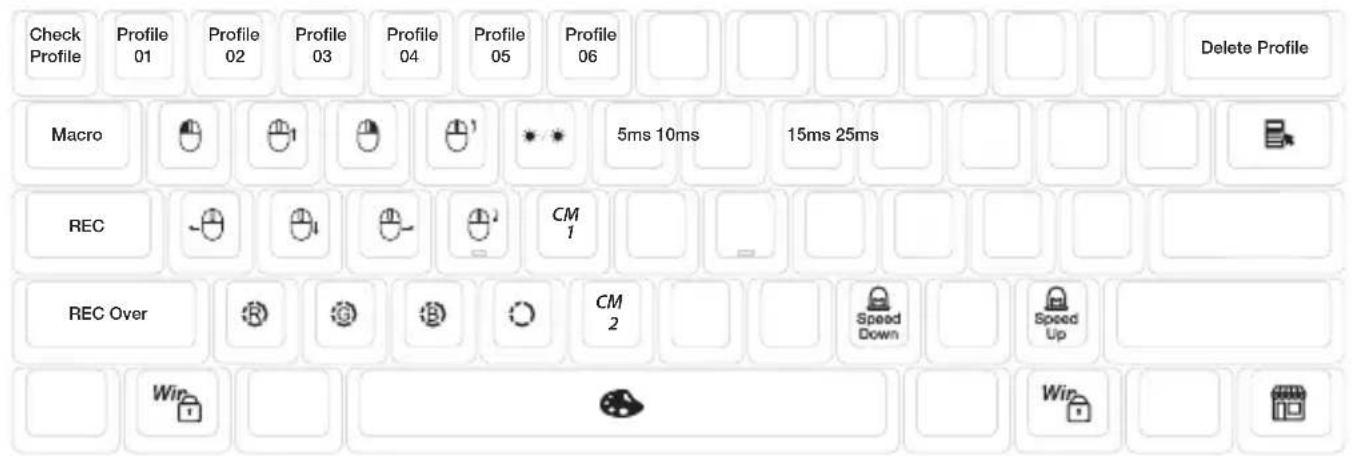
| Fn + Alt + G | CM1 cycle:First step: Turn on user's customized zone and color.Second step: Turn on user's customized zone and color in breathe mode.Third step: Turn off CM1. |
| Fn + Alt + B | CM2 cycle:First step: Turn on user's customized zone and color.Second step: Turn on user's customized zone and color in breathe mode.Third step: Turn off CM2. |
| Fn + Alt + Caps Lock (REC) | Press for 3 seconds until the G (CM1) and B (CM2) keys light up,choose the layer for setting, press it again and start recording. |
| Caps Lock + Z | Adjust color red (R), 10 levels. |
| Caps Lock + X | Adjust color green (G), 10 levels. |
| Caps Lock + C | Adjust color blue (B), 10 levels. |
| Caps Lock + V | Erase all LED light |
| Caps Lock + Spacebar | Color palette |
| Caps Lock + Left Shift | REC over, finish recording |

natural_image
Abstract 3D illustration of gray cubes arranged in scattered groups (no text or symbols)RGB LED Zone Customization Modes
Recording Steps:
- Adjust to the color first, then set the individual keys to be set to that color.
- Press Fn + Alt + Caps Lock for 3 seconds, the buttons G (CM1) and B (CM2) will illuminate then press G to set CM1 and press B to set CM2.
- When starting recording mode, Caps Lock will display the current LED color. The color can be adjusted by hitting Caps Lock + Z / X / C / V. After setting the desired color, hitting any key on the keyboard will set that key to the selected color.
- Repeating the above steps allows the user to set different colors to different keys. If the key has been set, press again to cancel the setting.
- To finish recording, press Caps Lock + Left Shift (REC over) to finish recording. The color of the Caps Lock key is the value you set.
Note:
- When starting recording mode, Caps Lock will display the current LED Color.
- CM1、CM2 can work with other LED light modes at the same time. CM1 and CM2 can be turned on along with other lighting modes. In addition, CM1 has the priority over CM2 when the zone overlaps.
Press Fn + Alt + T for 3 seconds to turn off ALL backlit modes. - If there is no activity in 30 seconds in the recording mode, the recording session will terminate without saving.
- Caps Lock LED color follows the "100% Full Backlit mode".

Multimedia Function
| Fn + Alt + W | Mouse cursor up | Fn + Alt + Q | Left mouse button |
| Fn + Alt + A | Mouse cursor left | Fn + Alt + E | Right mouse button |
| Fn + Alt + S | Mouse cursor down | Fn + Alt + R | Roller up |
| Fn + Alt + D | Mouse cursor right | Fn + Alt + F | Roller down |

Debounce Time Setting
| 5ms | Fn + Alt + Y | Hold the combine keys for 3 sec, the keyboard will flash 3 times to indicate the debounce time has been switched successfully. |
| 10ms (Default) | Fn + Alt + U | |
| 15ms | Fn + Alt + I | |
| 25ms | Fn + Alt + O |
Note:
The method is to adjust the debounce time of the metal shrapnel in the mechanical shaft during the pressing process. The shorter the time, the sooner it can be triggered, but if the time is too short may cause misjudgement. If it's not necessary to change the time, the default value is recommended.
Display Mode
Hold Fn + R_Alt + R_Ctrl for 3 sec
To display various LED backlit modes
● The entire keyboard will be disabled while cycling through various RGB modes.
● Unplug the keyboard to quit Display Mode.
Note: Used for showcasing purposes.

natural_image
Four grayscale 3D geometric shapes arranged horizontally (no text or symbols)
Reset to Factory Defaults
US ANSI and EU ISO layout
Left Windows key + Right Windows key
Note:
Hold for 3 seconds. The keyboard's backlight will flash 3 times to indicate the keyboard has been reset.

Enable / Disable Windows Function (Windows Key Lock)
Fn + any Alt key + any Windows key for 3 seconds, the keyboard's backlit will flash 3 times to indicate the keyboard has been enabled / disabled.

natural_image
Abstract arrangement of gray cubes with no text or symbolsKey Switch Functions
Key Switch Function
-
Applicable keys: Fn/Alt/Ctrl/Windows/Caps lock
-
Operation:
● Press Fn + Alt + k for 5 seconds.
● Until the ESC, L_Ctrl, L_Win, L_Alt, R_Alt, R_Win, Fn, R_Ctrl, and Caps lock keys are all lighting up. The colorways are respectively pink, red, orange, yellow, green, blue, indigo and purple.
● Except for Caps lock key, the rest of 6 keys are able to switch each function and color at will. (2 keys max at the same time)
● Pressing Caps lock once will change it to FN.
- Pressing Caps lock twice will change it to L_Ctrl.
● Press Esc key once to finish the switching function.
● Press Capslock again to resume Capslock.
Note: You can press Esc key to leave the switching function before starting it.

natural_image
Abstract arrangement of gray cubes with no text or symbolsDIP Switch Functions
DIP switch functions
| DIP1 | OFF (Default) | ON |
| Disable F Row Toggle (FN+\) | Enable F Row Toggle (FN+\) | |
| DIP2 | OFF (Default) | ON |
| N-Key Rollover mode | 6-Key Rollover mode | |
| DIP3 | OFF (Default) | ON |
| Ducky Vender ID (VID) | Vender ID definable | |
| DIP4 | OFF (Default) | ON |
| Right Windows key is default | Right Windows key changes to the Menu key |
Note :
You can input the ideal VID in both situation, but the VID can be only changed when DIP 3 turned on.

natural_image
Abstract 3D illustration of gray cubes arranged in scattered clusters (no text or symbols)Ducky One 3 Pro Mini
Step1. Profile selections
| Fn + Alt + | 1 | = | Switch to profile 1 | Factory settings (Default) |
| 2 | Switch to profile 2 | Customize Macro key features | ||
| 3 | Switch to profile 3 | |||
| 4 | Switch to profile 4 | |||
| 5 | Switch to profile 5 | |||
| 6 | Switch to profile 6 |
Note:
- When keyboard is plugged in, Caps Lock and Number Keys will blink based on selected profile number.
- Adjust profile to 2\~6 in order to set Macro.
● After profile is switched, Caps Lock or Indicator light will blink based on the current profile number.
Step2. To start Macro recording
Press Fn + Alt + Tab for 3 seconds to start Macro recording. Once in recording mode the Caps Lock or indicator lights will flash slowly.
Step3. Press a key to start recording Macro
Press on the key you want to use to activate Macro. The key pressed will blink (Non-backlit version will not) and the Caps Lock or indicator lights will flash swiftly.
Step4. Recording Macro
Step4. Recording Macro
Enter any key, and choose the Macro implementation and record time option.
Step5. To continue recording another key (Jump out the current recording file)
Press Fn + Alt to choose another key to continue recording.
Step6. Finish recording
Press Fn + Alt + Tab for 1 second to finish recording and back to the profile.

natural_image
Abstract arrangement of gray cubes with no text or symbolsDucky One 3 Pro Mini
Hotkeys Function
| Fn + Alt + | Tab | Start recording : Press for 3 seconds. Finish recording: Press for 1 second. |
| ESC | Caps Lock will blink in the amount of selected profile number. | |
| Backspace | Delete current profile value. |
| Fn + Alt |
| Press for 1 sec to finish recording the current key and choose another key to record. |

natural_image
Abstract 3D arrangement of gray cubes with no text or symbolsDucky One 3 Pro Mini
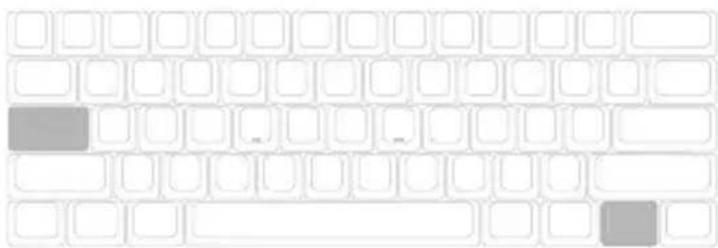
Setting Section
Ducky Mini Macro Configurable Keyboard Layer
- Standard Layer
● Fn Layer
● Fn + Ctrl Layer
Ducky Mini Macro Unsettable Key
● Fn
- Caps Lock
natural_image
Grid of white square tiles on a white background, no text or symbols presentNote:
● Support N keys recorded at the same time, and N keys recorded at the same time when outputting.
- Macro function will be based on the user's typing speed and record it.
natural_image
Abstract arrangement of gray cubes with no text or symbolsDucky One 3 Pro Mini
Multimedia Function Keys
| Fn + Windows key + Keys below | |||||||
| A | Mute | G | Previous playlist | M | Search | S | Mouse cursor up |
| B | Volume up | H | Calculator | N | Previous page | T | Mouse cursor down |
| C | Volume down | I | My computer | O | Next page | U | Mouse cursor left |
| D | Play / Pause | J | Browser | P | Mouse left click | V | Mouse cursor right |
| E | Stop | K | Q | Mouse right click | W | Mouse scroll up | |
| F | Next playlist | L | Multimedia | R | Mouse middle click | X | scroll down |
Note: Need to be recorded first before use.

natural_image
Abstract 3D arrangement of gray cubes with no text or symbolsDucky One 3 Pro Mini
Keyboard Button Function Keys
| Fn + Shift+ Keys below | |||
| A | Prompt profile value | N | Backlit mode : Wave mode (Default) |
| B | Profile 1 | O | Backlit mode : Color Cycle mode |
| C | Profile 2 | P | Backlit mode : Rain Drop mode |
| D | Profile 3 | Q | Backlit mode : Ripple mode |
| E | Profile 4 | R | Backlit mode : Random Reactive mode |
| F | Profile 5 | S | Backlit mode : Reactive mode |
| G | Profile 6 | T | Backlit mode : 100% Full backlit mode |
| H | Backlit modes switching | U | Backlit mode : Breathe mode |
| I | Adjust color red | V | Backlit mode : Radar mode |
| J | Adjust color green | W | Backlit mode : Backlit OFF |
| K | Adjust color blue | X | The key “ . ” on number pad (Num_. ) |
| L | Erase all value | Y | Number Lock |
| M | Color palette | ||
Note: Need to be recorded first before use.

natural_image
Abstract arrangement of gray cubes with no text or symbolsDucky One 3 Pro Mini
Windows Common Function Keys
| Ctrl + C | Copy select item | Windows + D | Desktop |
| Ctrl + X | Cut select item | Windows + M | Minimize all windows |
| Ctrl + V | Paste select item | Windows + L | Lock computer or change user |
| Ctrl + Z | Undo | Windows + R | Open [Run] window |
| Ctrl + Y | Redo | Windows + F | Search files or folders |
| Ctrl + N | Open new file | Windows + ↑ | Maximize all windows |
| Ctrl + O | Open current file | Windows+ ↓ | Minimize windows |
| Ctrl + S | Save file change | Windows + ← | Maximize window to the left side |
| Ctrl + P | Print file | Windows + → | Maximize window to the right side |
| Alt + F4 | Quit the software | Windows + Home | Minimize all windows other than the one used |
- http://windows.microsoft.com/en-us/windows/keyboard-shortcuts
natural_image
Abstract 3D arrangement of gray cubes with no text or symbolsDucky One 3 Pro Mini
Set-up Example
Note: Set the profile to profile 2\~6 before setting Macro.
Example A Configure the key "Z" to "Q" output.
Operation method :
Press Fn + Alt + Tab for 3 seconds → Press Z → Press down Q → Press Fn + Alt → Press Fn + Alt + Tab for 1 second
Example B To set Z as show "desktop" (under Windows system)
Operation method :
Press Fn + Alt + Tab for 3 seconds → Press Z → Press Windows key + D → Press Fn + Alt → Press Fn + Alt + Tab for 1 second
Example C - To set Fn + Ctrl + M as "mute volume"
Operation method :
Press Fn + Alt + Tab for 3 seconds → Press Fn + Ctrl + M → Press Fn + Windows key + A → Press Fn + Alt →
Press Fn + Alt + Tab for 1 second
Example D To set Fn + Ctrl + Q as "Reactive mode"
Operation method :
Press Fn + Alt + Tab for 3 seconds → Press Fn + Ctrl + Q → Press Fn + Shift + S → Press Fn + Alt → Press Fn + Alt +
Tab for 1 second

natural_image
Abstract 3D illustration of gray cubes arranged in scattered clusters (no text or symbols)Hot-swap
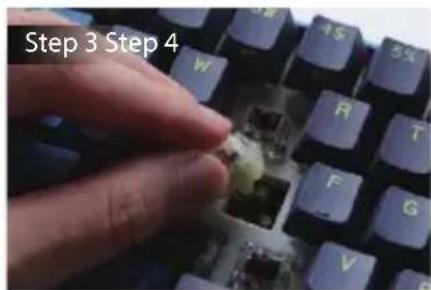
Set-up Example
Use key puller to pull out the key caps Use switch puller to pull out the switches

natural_image
Close-up of a keyboard with blue and purple keys and two red screw pads (no text or symbols visible)Align switch pins with the holes

Gently push the switch in

natural_image
Close-up of a blue computer keyboard with multiple black keys and one central socket (no text or symbols visible)
natural_image
Abstract 3D arrangement of gray cubes with no text or symbolsDucky One 3 Pro Mini
Disclaimers
- When using a Hot-swap model, make sure to support the hotswap socket with your finger when inserting the switch to ensure it does not damage the PCB from excessive force.
● Any liquid damage to the keyboard will void warranty.
● Modifications to the keyboard will void warranty.
Warranty is 1 year from date of purchase via our Official Vendors https://www.duckychannel.com.tw/en/location/global Please contact the vendor you purchased from for RMA procedures.

Ducky

Ducky

Ducky
www.duckychannel.com.tw
- 目錄
- Ducky One 3 Pro Mini
- RGB LED 燈版本
- 產品規格:
- RGB燈光操作模式
- RGB 記憶區域背光
- 操作過程
- 回復出廠設定
- 鍵位切換操作
- 鍵位切換功能
- DIP 指撥開關功能
- Step1. 選取要錄製的Profile
- 基本快捷鍵功能
- 設定區域的範圍
- Windows 常見功能快捷鍵
- 熱插拔使用說明
- 免責聲明
- RGB LED Version
- Specifications :
- Features :
- RGB Backlit Modes
- RGB LED Zone Customization Modes
- Recording Steps:
- Note:
- Multimedia Function
- Debounce Time Setting
- Display Mode
- Reset to Factory Defaults
- Enable / Disable Windows Function (Windows Key Lock)
- Key Switch Functions
- Key Switch Function
- DIP Switch Functions
- Step2. To start Macro recording
- Step3. Press a key to start recording Macro
- Step4. Recording Macro
- Step5. To continue recording another key (Jump out the current recording file)
- Step6. Finish recording
- Setting Section
- Multimedia Function Keys
- Windows Common Function Keys
- Example A Configure the key "Z" to "Q" output.
- Example B To set Z as show "desktop" (under Windows system)
- Example C - To set Fn + Ctrl + M as "mute volume"
- Example D To set Fn + Ctrl + Q as "Reactive mode"
- Hot-swap
- Set-up Example
- Disclaimers
- Ducky
Brand : Ducky
Model : One 3 Pro Mini
Category : Keyboard