
Photo PLUS Shiny NEO - Facial care device YA-MAN - Free user manual and instructions
Find the device manual for free Photo PLUS Shiny NEO YA-MAN in PDF.


| Product Type | Facial Care Device |
| Brand | YA-MAN |
| Model | Photo PLUS Shiny NEO |
| Dimensions (approx.) | 5.5 x 5.5 x 2.5 cm |
| Weight (approx.) | 150 g |
| Power Supply | Rechargeable lithium-ion battery (DC 5V, 1A via USB) |
| Charging Time | Approx. 2 hours |
| Battery Life | Approx. 40 minutes per full charge |
| Main Functions | LED light therapy (Red, Blue, Yellow), RF (Radio Frequency), EMS, Vibration, Cooling |
| LED Wavelengths | Red: 620 nm, Blue: 470 nm, Yellow: 590 nm |
| RF Frequency | 1 MHz |
| Intensity Levels | 5 adjustable levels |
| Waterproof Rating | IPX5 (splash-proof, can be used in wet conditions) |
| Cleaning | Wipe with a soft, damp cloth; do not use abrasive cleaners or immerse in water |
| Safety Features | Auto shut-off after 10 minutes; skin contact detection; overheat protection |
| Included Accessories | USB charging cable, pouch, user manual |
| Spare Parts | Replacement charging cable; no user-serviceable parts |
| Repairability | Not designed for user repair; contact YA-MAN service center |
| Intended Use | Home use for facial skincare, anti-aging, acne treatment |
| Warranty | 1 year (check local terms) |
Frequently Asked Questions - Photo PLUS Shiny NEO YA-MAN
User questions about Photo PLUS Shiny NEO YA-MAN
0 question about this device. Answer the ones you know or ask your own.
Ask a new question about this device
Download the instructions for your Facial care device in PDF format for free! Find your manual Photo PLUS Shiny NEO - YA-MAN and take your electronic device back in hand. On this page are published all the documents necessary for the use of your device. Photo PLUS Shiny NEO by YA-MAN.
USER MANUAL Photo PLUS Shiny NEO YA-MAN
| Home-care Beauty Device | Photo PLUS Shiny NEO | YJFM18 | |
| Table of Contents | Introduction....1 | After Treatment....27 | |
| Safety Precautions....1 | Additional Information....29 | ||
| When Using Outside of Japan....9 | ● Troubleshooting....29 | ||
| Names and Functions of Components....10 | ● Frequently Asked Questions....31 | ||
| Before Use....13 | ● Product Specifications....32 | ||
| How to Use....16 | After-sales Service....33 | ||
English User's Manual come with this product.
Please download the other language's User's Manual version from this link (https://www.ya-man.co.jp/en/support/documents/) or scan with QR code with your camera phone.
Please carefully read User's Manual to ensure safe and proper use of the device.

TO ACCESS SCAN WITH YOUR CAMERA PHONE

Introduction
Thank you for purchasing this YA-MAN product.
- Please read this User's Manual carefully for information on how to use the device properly and safely.
- After reading the contents hereof, be sure to keep this User's Manual in an accessible location.
- Make sure to include this User's Manual if you are transferring ownership of the device to another person.
Safety Precautions
- Read these Safety Precautions carefully before using the device.
• Use the device sensibly in accordance with the prescribed steps. - Immediately discontinue use and arrange to have the device repaired if any abnormality occurs.
- Do not use the device in a defective state, as doing so could cause a physical harm to the user.
- The precautions listed in the User's Manual are very important. For your safety, please follow them carefully.
- Precautions are classified as DANGER, WARNING, or CAUTION in order to clearly specify the level of danger and possible injury or damage that may occur if the device is misused.
• Classifications of Precautions

DANGER
Improper use of this device poses a severe and likely risk of death or serious injury.

WARNING
Failure to operate the device according to this type of precaution could result in death or serious injury.

CAUTION
Improper use of this device may result in an injury or a property damage*.
* 'Property damage' refers to damage affecting dwellings, household belongings, or domestic animals and pets.
Symbols

This symbol shows you what you must not do.

This symbol shows you what you must do.

This symbol shows you what you must be careful with.

DANGER (Use and storage)
The following individuals should not use the device:
Failure to comply may cause electronic medical devices to malfunction.
◆ Do not use the device in conjunction with any medical electronic equipment, including:
• pacemakers or other implanted electronic medical devices;
• artificial heart-lung machines or other electronic life-support medical devices; and
• electrocardiographs or other worn electronic medical devices.

Prohibited

WARNING (Use and storage)
Do not use under the following conditions:
Do not use under the following conditions:
- If you have existing or suspected heart disease, or related disorders - If you are unable to express your intentions on your own
- If you are unable to sense temperature or stimulation - If you have an autoimmune disease
Consult a physician prior to use under the following conditions:
• If you have an acute disease • If you have an infectious disease • If you have a malignant tumor • If you have a febrile disease
• If you have high blood pressure or a blood disease • If you have a fever • If you have sensory impairment due to severe peripheral circulatory dysfunction (e.g. diabetes)
• If you have a nerve damage • If you have a skin disease or atopic dermatitis • If you are a hospital outpatient and are taking medication
• If you have a pre-existing skin condition, such as an allergic constitution or contact dermatitis, or if you have a concern about your skin when using this device

Prohibited
Do not use in the following cases or on the following areas.
Doing so may cause an accident or other problems.
• If your skin is damaged, experiencing a rash, inflammation, or other abnormalities • If you are under the influence of alcohol • Head
• Anywhere inside the mouth, around the pubic region, or any mucous membrane • Eyeballs • Upper eyelids (except in COOL Mode)
• Lower eyelids or outer corner of the eye (except in EYE CARE Mode and COOL Mode) • Throat • Bulging moles • Viral warts • Areas where you have broken a bone
- Areas of internal bleeding, swelling or scabbing after cosmetic medical procedures
8 Avoid using the device for 2 weeks after cosmetic medical procedures. After this period, consult with a physician and only use the device if the physician confirms there is no problem.
(e.g. Hyaluronic acid injections, silicone injections. Bofox, thread lifts, double eyelid surgery, HIFU, etc.)
- Areas where metal was implanted by surgery (reconstructive surgery, plastic surgery, cosmetic surgery, etc.)
Do not use the device continuously for an overly long period (for example, through commercial use).
Doing so may cause an injury or the generation of heat.

WARNING (Use and storage)
Do not use the device for a long time over areas where the skin is thin or areas above bones.
Failure to comply may cause skin problems or physical ailments.
Do not use the device on the areas outside of specified areas.
Failure to comply may cause injuries.
Do not use continuously on the same area except when in EYE CARE or COOL Mode. Be sure to move the device across the skin while it is in use. Do not use on areas that cannot be reached by the entire electrode head surface.
Failure to comply may cause burn injuries.
- Do not place the device near fire or flames, and do not dispose of the device in a fire. Do not use or store in a high-temperature area or if the device is hot.
Failure to comply may lead to the generation of heat, a fire or explosion.
- Do not use the device near a flammable substance (such as alcohol, thinner, benzene nail polish remover or spray).
Failure to comply may cause a fire, electric shock or other injuries.
Do not use or store the device in the following locations:
· Dusty areas · A location where there is exposure to direct sunlight
- Uneven or unstable location, or a location where there is vibration or shocks
• An outdoor location • A location where there are strong radio waves or magnetism • Locations that are accessible to children
· A location where there is exposure to oil smoke or steam
• A location with drastic temperature changes (for example, near on air conditioner or heater)
Failure to comply may lead to a fire, electric shock, malfunction, failure of the device or other accidents.
- Do not use the device when an odor or abnormal generation of heat is detected.
Failure to comply may cause the device to become damaged or catch fire.

Prohibited
- Do not place heavy items on the device, drop the device (especially during use) or otherwise subject the device to a strong impact.
Failure to comply may cause an injury or a failure of the device.

Shock is prohibited
- Do not place the device on an unstable location. Do not drop or strike.
Doing so may cause a failure of the device. An injury may also be caused if the device is dropped on a foot or other exposed body part.

Dropping of the device is prohibited
- Do not use the device on individuals who are unable to express their will or who have reduced skin sensitivity.
Failure to comply may cause an accident or an injury.

User restrictions
● Sensory or mental capabilities, or lack of experience and knowledge, unless they have been given supervision or instruction concerning use of the appliance by a person responsible for their safety.
● Children shall not play with the device
● Cleaning and user maintenance shall not be made by children without supervision
● Cleaning and user maintenance shall not be made by children without supervision or mental capabilities, or lack of experience and knowledge, unless they have been given supervision or instruction concerning use of the appliance by a person responsible for their safety.
- Keep the device, charging base, and USB cable away from children and do not allow them to use the device. Do not allow children to play with the device.
Failure to comply may cause an accident or an injury.
- Do not use the device for any purpose other than those stated in the User's Manual.
Failure to comply may cause an injury or a failure of the device.

Non-intended uses are prohibited

WARNING (Use and storage)
Do not use or charge the device in the bathroom or near a bathtub, shower, sink or other vessels filled with water.
Failure to comply may cause an electric shock, short circuit, fire or failure of the device.
- Do not wet, wash or immerse the device in water.
Failure to comply may cause an electric shock, short circuit, fire or failure of the device.
- Do not disassemble, attempt to repair or modify this device in any way.
Failure to comply may cause a fire, electric shock or other injuries.
Contact your local distributor for advice on repairing the device.
- Be sure to perform a pre-test before using the device for the first time.
Failure to comply may cause an accident or an injury.
- If you are currently undergoing dental treatment or have teeth fillings, choose a lower intensity level and apply the device on a different area.
You may feel strong irritation or discomfort due to the EMS effect on your cheeks or chin. If you feel strong discomfort, consult a physician.
If water or foreign substance gets into the device (such as the main body), immediately discontinue use and request an inspection.
Failure to comply may lead to a fire or electric shock.

Exposure to water is prohibited

Disassembly is prohibited

Mandatory compliance

WARNING (Use and storage)
- Do not leave the device near fire, in the hot sun, in a bathroom or other high-temperature/high-humidity location or near combustible gas or a flammable object. Do not dispose of the device in a fire or place it near fire or flames. Do not use or charge in a high-temperature area or if the device is hot. Do not bring the device close to a heater.
The device features a built-in rechargeable battery. Failure to comply may cause the generation of heat, a fire, the explosion of the device or failure of the device.
- Do not put the device into a microwave or pressure vessel.
Failure to comply may lead to the generation of heat, a fire or explosion.

Fire hazard

CAUTION (Use and storage)
- Do not press the device strongly or use it intensively on a single area.
Pressing the device stronger than necessary or using it intensively on a single area may damage the skin.
- Avoid letting the electrode head come into a contact with any other metal surfaces or objects.
Failure to comply may cause the generation of heat, a fire, malfunctions or damage to the device.
Before use, check to make sure that the electrode is not cracked, deformed or broken. Do not use the device if it is damaged or malfunctioning.
Failure to comply may cause skin problems or a malfunctioning of the device.
- Do not use the device in locations that are extremely hot or cold.
The recommended temperature range for the device's usage environment is approx. 15°C to 30°C.

Explosion

Prohibited

CAUTION (Use and storage)
- Do not wipe the device or charging base with solvents such as alcohol, thinner, benzene, nail polish remover, kerosene, chemicals or polishing powder.
Failure to comply may cause a damage to the surface of the device. - Do not use the device on pets.
Failure to comply may cause an injury.
Do not leave the device on the floor or on top of furniture while it is switched on. Be sure to turn the device off after use.
Failure to comply may cause injuries or damages the furniture. - Do not allow the device to come into a contact with another electronic appliance (electric blankets/bed sheets, heated tables, etc.) while the power is on. Do not use with other electronic products simultaneously.
Failure to comply may cause an injury or a failure of the device.
Do not look directly into the LED light. When using the LED light to treat areas around the upper eyelids, lower eyelids or outer corner of the eye, be sure to close your eyes and keep the electrode head at least 5 cm away from your skin.
Failure to comply may cause damage to your eyes or skin.
Do not use COOL Mode continuously.
If used for continuous treatments, the head will not fully cool.
To resume using the device, wait at least 30 minutes before using again. - Do not use the device in combination with peelings.
Failure to comply may cause skin problems.
- Remove any accessories (necklace, belt, rings, earrings, etc.) before using the device.
Failure to comply may cause an accident or an injury.
Use only Level 1 upon the first use and until you are accustomed to use.
Failure to comply may cause an accident or an injury.
- Stop using the device immediately if you feel any pain during use. Failure to comply may cause an accident or skin problems.

Prohibited

Mandatory compliance

CAUTION (Use and storage)
Reapply skincare products or water during treatment to ensure that there is always some moistures between the electrode head and the skin.
If there is an insufficient amount of skincare product or water, the stimulation will become weaker, causing skin problems.
- If you feel an unpleasant tingling on your skin, reduce the intensity level or move to another area. You could also moisten your skin with skincare products, such as lotion, before using the device.
Failure to comply may cause damage to your skin.
Carefully clean the parts of the device that come into a contact with the skin every time you use it and keep the device clean at all times.
Failure to comply may cause skin problems.
- If you begin feeling ill or if a skin abnormality appears during use, stop using the device immediately.
Check carefully to make sure that there are no skin abnormalities before using the device. Stop using the device immediately if the treatment does not agree with your skin.
- Be sure to use the device only for the following lengths of time.
[Daily Core]
• DAILY Mode: up to 3 minutes per treatment, once a day
[Weekly Care]
• CLEAN Mode: up to 3 minutes per treatment, once a day, 2 to 3 times a week
· DYHP Mode: up to 5 minutes per treatment, once a day, 2 to 3 times a week
• EYE CARE Mode: up to 2 minutes per treatment, twice a day, 5 times a week
• COOL Mode: up to 3 minutes per treatment, once a day
Do not use Daily Care and Weekly Care (except in EYE CARE Mode and COOL Mode) on the same day.
- Avoid using the device continuously on the same area of skin (except when in EYE CARE Mode).
When using on the same area again, be sure to leave an interval of 24 hours or more between treatments.
Excessive use may damage the skin. The above recommendations are merely guidelines.
Please observe your skin condition and use the device accordingly.
After each use, be sure to remove dirt and other particles that have adhered to the device according to 'After Treatment' (page 27).
Failure to comply may cause skin problems or a malfunctioning of the device.

Mandatory compliance

WARNING (Power supply)
- Do not damage, modify or bundle the USB charging cable.
Do not place heavy objects on the USB charging cable or allow it to get pinched in between other objects as this may damage the cable and cause a fire or electrical shock hazard.
- Do not pull the USB charging cable when moving or lifting the device.
Failure to comply may break the cable or cause an electric shock, short circuit or fire.
- Do not use the device if the USB charging cable is damaged or if the USB port is loose.
Failure to comply may cause an electric shock, short circuit or fire. Contact your local distributor for advice on repairing the device.
- When unplugging the USB charging cable from the device and the USB port, do so by gripping the USB plug (do not touch the metal parts). Do not insert or disconnect the plug with wet or damp hands.
Failure to comply may cause an electric shock, short circuit or fire.
- When cleaning the device, be sure the power is switched off. When the device is not in use, disconnect the USB charging cable from the device. Do not insert or disconnect the plug with wet or damp hands.
Failure to comply may cause an electric shock, short circuit or fire.

Careless or reckless use is prohibited

Moving the device by pulling its cords is prohibited

Use of a damaged cable or plug is prohibited

Removing the plug
- Do not wash or submerge the USB charging cable in water.
Failure to comply may cause an electric shock, short circuit, fire or failure of the device.
● Make sure that the USB charging cable is fully inserted into the USB port.
Failure to comply may cause a fire, electric shock or a failure of the device.
- Be sure to use the dedicated USB charging cable supplied with the product. Plug the AC adapter (commercially available) directly into a wall outlet and do not overload the electric circuit.
Failure to comply may cause an electric shock, short circuit, fire or failure of the device.
Before charging the device, check to make sure there is no lotion on the charging terminal.
Failure to comply may cause an electric shock, short circuit or fire.
- In the unlikely event that an abnormality occurs, turn off the device immediately.
Retrain from using the device if faulty operation, smoke, abnormal noises, or odors are detected or if it is otherwise operating in an abnormal state.
- When you feel an earthquake or hear a thunder, stop using the device and turn it off.
If the device is charging, remove the USB charging cable from the device.
- Do not plug the AC adapter (commercially available) into a power outlet or charge the device when there is lotion or other liquid in the charging base.

Exposure to water is prohibited

Mandatory Compliance

Prohibited
When Using Outside of Japan

WARNING
- Use only with a 5 V DC USB power supply.
Failure to comply may cause a fire, electric shock or a failure of the device.
- Be sure to check the plug configuration and the voltage of the power outlet before use.
Failure to comply may cause the generation of heat, a fire, or a malfunction of the device.

Mandatory compliance

Fire hazard
• The plug configuration and voltage may vary depending on the region and the type of accommodation. Always be sure to check for compatibility before using the device.
• For information about plug adapters, consult a travel agency or a consumer electronics retailer.
Names and Functions of Components
Main Body
Front view
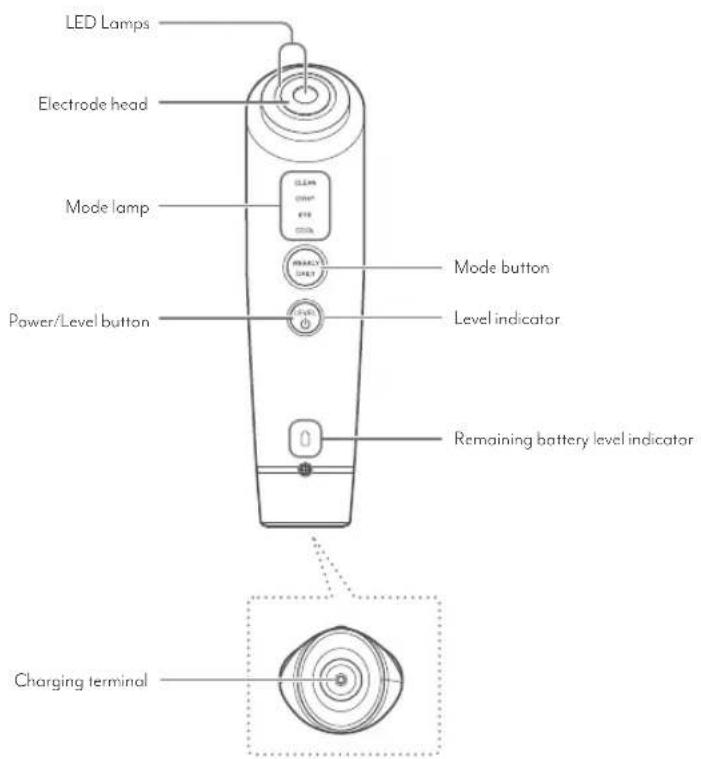
Back view

Accessories
● Charging base

Cotton stopper
(attached to the electrode head of the main body when packaged)

- USB charging cable (USB Type-C™)
User's Manual
Use this stopper to apply a cotton to the electrode head (page 19).
* An exclusively item for this product. Do not use attachments other than those provided with the product.
* The design and specifications of the device and attached accessories are subject to change for improvement purposes without notice.
Functions
Safety functions
Equipped with a variety of sensors for safe use.
Excessive care is prevented by controlling the output according to the condition of the device and your skin.
● Temperature sensor
If the temperature of your skin or the treatment head becomes too high, the power will be turned off for safety (the device beeps 10 times).
If this happens, let the device rest for about 30 minutes.
Motion sensor
The motion sensor detects movement of the device and pauses output for safety reasons when the device is stopped or when the electrode head has been used on the same area continuously.
- Current sensor
Detects whether the electrode is touching your skin and activates the output.
Output Control Sensor
Constantly monitors the current flowing through your skin and adjusts the output to the appropriate level. If a strong current flows between the electrodes, the power is turned off for safety.
Other Features
Timer
One beep will sound to indicate the half-way point in the operation time. Refer to pages 17 and 18 for each mode's operating time.
● Standby Mode (only if Weekly Care is selected)
When treatment in a certain mode is completed, the device will emit short rapid beeping sounds and the following mode indicator flashes (Standby Mode indicates operation has stopped).
Refer to pages 17 and 18 for each mode's operating time.
Briefly press the mode button again to start the mode that was flashing.
When treatment in COOL Mode has finished, the device will emit short rapid beeping sounds and the power will switch off automatically without the device going to Standby Mode.
Auto Power-off
If the device is not used within approx. 5 minutes of going into Standby Mode, it will emit short rapid beeping sounds and switch off automatically.
Before Use
Charge the device
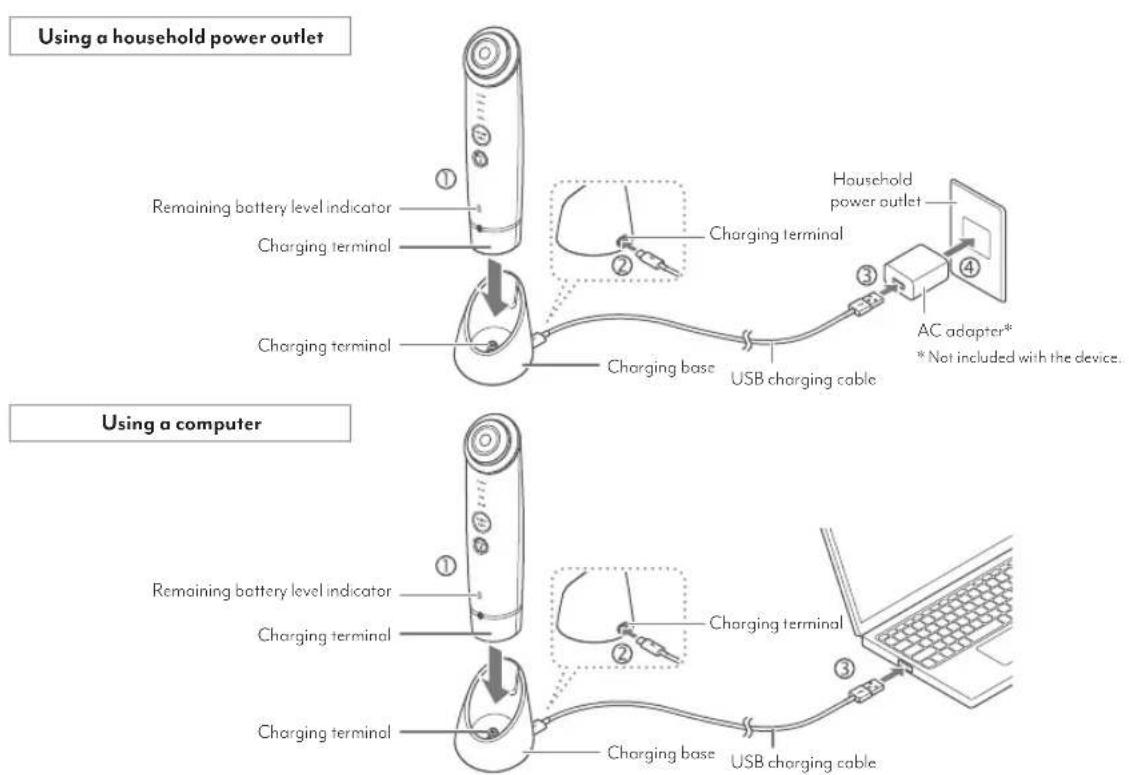
To begin charging, place the main body of the device on the charging base that is connected to the USB charging cord, as shown in the diagram.
* If charging does not begin after about 10 seconds, check that the USB charging cable and the AC adapter (commercially available) are connected properly.
| Charging | The remaining battery level indicatorflashesin white. |
| When charging is complete | The remaining battery level indicator lights up in white for 5 seconds and thenturns off. |
| Charging time | Approx. 3 hours (at room temperature approx. 25°C ).The actual charging time will differ depending on the remaining battery level, the charging environment, and the AC adapter (commercially available) being used. |
| Operating time | Approx. 30 minutes (at the maximum power in DYHP Mode).The actual operating time will differ depending on the remaining power level and the charging environment. |
You can check the remaining battery level with the remaining battery level indicator.
| Remaining battery level indicator | |
| White light | The battery is sufficiently charged. |
| Red light | The battery level is low. |
| Red flash | Charge the battery. |
CAUTION
- Do not overload an electrical circuit with the AC adapter (commercially available). Be sure the AC adapter is inserted directly into the wall outlet.
- Fully charge the battery before using the device for the first time.
- When using the device for the first time or when the device has not been used for an extended period of time, it is possible that you will be unable to use the device
for very long even with a full charge displayed. In such cases, recharge the device before using it. - Use only the enclosed USB charging cable.
- Do not recharge the device in locations where there are high temperatures or a high degree of humidity, such as bathrooms or washrooms.
Pre-testing on skin
When using the device for the first time, always test for its compatibility with your skin.

CAUTION
- Be sure to perform a pre-test in order to prevent skin problems from occurring.
If a rash, redness, itchiness, stinging sensation, or other abnormality occurs at the pre-testing area, immediately stop the pre-test. - Check carefully to make sure that there are no skin abnormalities before using the device. Stop using the device immediately if the treatment does not agree with your skin.
1
Wash the inner side of your arm with a soap and water, then wipe dry with a towel.
Be sure to wipe the moisture off completely.
2
Apply your regular skin lotion to your skin and use the device in DYHP Mode on level 1 for approx. 5 minutes (page 20).
3
Make sure you are experiencing no skin abnormalities.
Continue to use the product only if you experience no redness or burning sensation on your skin within 24 hours.

How to Use
Precautions
Read the items below carefully before use and use only as directed.
- Be sure to perform a pre-test before using the device for the first time (page 15).
- Be sure to move the device on your skin while it is in use. Using the device continuously on the same area may cause burns. (except in EYE CARE Mode and COOL Mode)
The warmth of the RF (radio frequency) changes depending on the type of skincare products used and the skin's condition at the time of treatment. - Do not use the device over the upper eyelids (except in COOL Mode), lower eyelids or outer corner of the eye (except in EYE CARE Mode and COOL Mode).
* The LED light can be used over the upper eyelids, lower eyelids and outer corner of the eye. Close your eyes and hold the device at least 5 cm away from your skin. Do not look directly into the LED light. - When holding the device, make sure that you are holding the hand electrode.
Recommended environmental temperature: 15°C to 30°C
Modes
| Mode Function | Cotton pad | Recommended cosmetics21 | Operating time | Level | Recommended frequency | ||
| Daily Care | DAILY | · RF· EMS· Iontophoresis· LED (Red) | Without a cotton pad | Skin lotion or serum | Approx. 3 minutes | 3 levels | Every day 23 |
| Weekly Care | CLEAN | · RF· Ion conduction· Vibration(only during ion emission) | With a cotton pad | Skin lotion | Approx. 3 minutes | 3 levels | 2 to 3 times a week |
| DYHP | · RF· DYHP· LED (Red) | Either with or without a cotton pad | Serum or sheet mask | Approx. 5 minutes | 3 levels | ||
| EYE CARE | · Micro-currents· EMS· Micro-currents | Without a cotton pad | Serum for the eye area | Approx. 2 minutes | 3 levels | 2 to 3 times a week 24 | |
| Mode Function | Cotton pad | Recommended cosmetics41 | Operating time | Level | Recommended frequency | ||
| Weekly care | COOL | Cool downLED (Blue) | Without a cotton pad | Place directly on the skin*4 | Approx. 3 minutes | - | Every day 5 |
*1: If using your regular skincare product, be sure it is water soluble. Do not use oil-based or scrubbing skincare products. Failure to comply may cause product malfunctions or skin problems.
*2: Do not use on the same day as Weekly Care Mode (except in EYE CARE Mode and COOL Mode).
*3: If you are concerned about dryness of the skin around the eyes, we recommend using the device 5 times a week.
*4: We recommend using the device after moisturizing your skin with a milky lotion or other skincare products.
*5: The above recommendations are merely guidelines. Please adjust the frequency of use, such as by using the device 2 to 3 times a week while observing the condition of your skin.
How to attach a cotton pad to the electrode head

Remove the cotton stopper from the electrode head.


Place a piece of cotton on top of the electrode head and press the cotton stopper down over the cotton.
- If the cotton stopper does not fit properly on the electrode head, please use a larger and thinner piece of cotton. Because thick cotton pads are difficult to fix in place, split them in half before use.
- If the cotton pad is too thick, the thermal action of the RF treatment may be adversely affected and you will feel less heat.

Apply your regular skin lotion to the cotton pad.
• Make sure the skin lotion covers the entire surface of the electrode head.

• If the cotton pod becomes dry, add more skin lotion.
Basic method of use
1
Remove makeup and gently cleanse your face.
- Remove oil and dirt from your skin so that it is in a clean condition prior to a treatment.
* COOL Mode can be used over makeup.
2
Attach cotton pad to the electrode head if necessary and apply skin lotion to the cotton pad.
Refer to page 19 for information on how to attach the cotton pad.
3
Turn on the device
Hold down the Power/Level button (hold down the button for approx. 3 seconds or longer).
The device will emit a beeping sound, the mode button (DAILY) lights up, and DAILY Mode starts.

4
Select the mode
To change the mode, press and hold or briefly press the mode button.
If Daily Care is selected, the mode button (DAILY) lights up.
If Weekly Core is selected, the mode button (WEEKLY) and the mode lamp for the selected mode light up.
![graph TD A["Mode lamp"] --> B["CLEAN"] B --> C["DYHP"] C --> D["EYE"] D --> E["COOL"] E --> F["VEEYLY"] F --> G["WEEKLY"] G --> H["DAILY"] H --> I["(Daily Care)"] I --> J["DAILY Mode"] J --> K["(Press and hold the mode button to change the mode)"] K --> L["(Weekly Care)"] L --> M["CLEAN Mode"] M -->…](/content/2026/05/909841/images/90b8bcb486c509852eb378b21153ac08e5558ddfe083750bde48cbf08d31ef6e.jpg)
- Press and hold the mode button to switch between Daily Care and Weekly Care.
- Press and hold the mode button when in Weekly Care Mode to switch to DAILY Mode.
For information about each mode, refer to 'Modes' (pages 17-18).
Select the treatment level (intensity) (except in COOL Mode)
• Each time you briefly press the Power/Level button, the device will beep once and the level will change.

- Be sure to start using the device at Level 1.
- Do not use the device at a level which pain can be felt.
6
Hold the device with your hand touching the hand electrode (the silver rim) on the rear
- If your hand is not touching the hand electrode, it cannot operate correctly.
7
Apply the electrode head to your skin and move the head over the area being treated
- When DAILY Mode is finished, the device will automatically turn off.
- When the treatment in each Weekly Care Mode is finished, the device will go into Standby (except when in COOL Mode). Select your preferred mode to start the next mode.
-
If you want to turn the power off during use, press and hold down the Power/Level button.
-
Refer to 'How to use the device on your skin' (pages 24 to 26) to learn how to move the device.
- Refer to pages 17 and 18 for each mode's operating time.
CAUTION
- During use, make sure the electrode head is firmly touching the skin.
8
Care for the skin after treatment
- When you have finished treatment, rub the remaining lotion into your skin before using your usual basic skincare products to condition it.
CAUTION
- Clean the main body of the device after each use (page 27).
How to use the device on your skin
- Recommended speed for moving the device: approx. 2 cm per second * If the treatment temperature feels too hot, move the head more quickly.
• One short beep will sound to indicate the half-way point in the operating time. When you hear the beep, begin care on the other side of your face.
CAUTION
- Use in a position in which the entire surface of the electrode head comes in a contact with your skin.
- Be sure to move the device over the skin as you use it (except when using the device in EYE CARE Mode and COOL Mode). Using the device continuously on the same area may lead to burn or low temperature burn.
- Do not use the device over the upper eyelids (except in COOL Mode), lower eyelids or outer corner of the eye (except in EYE CARE Mode and COOL Mode).
* The LED light can be used over the upper eyelids, lower eyelids and outer corner of the eye. Close your eyes and hold the device at least 5 cm away from your skin. Do not look directly into the LED light.
DAILY Mode
Move the electrode head over the skin in the direction of the arrows shown below. The LED light can be used to treat the upper eyelids, lower eyelids and outer corner of the eye.

Press and move the device in a circular, massaging motion, as indicated by the arrows.

Areas you should not treat

Can only be treated with LED light
* Close your eyes and hold the LED light at least 5 cm away from the eyes.
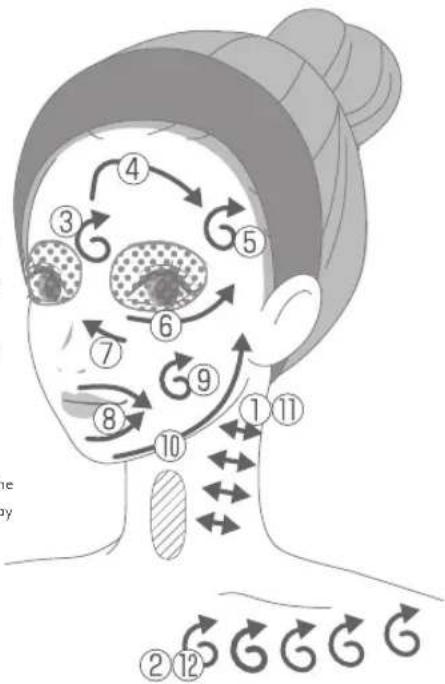
CLEAN Mode
Move the electrode head over the skin in the direction of the arrows shown below.

DYHP Mode
Move the electrode head over the skin in the direction of the arrows shown below. The LED light can be used to treat the upper eyelids, lower eyelids and outer corner of the eye.

EYE CARE Mode
Press the electrode head repeatedly on your face from the inner corner to the outer corner of the eye as if stamping on the skin (Press→Release→Move electrode head).
Press down on the skin for approx. 3 seconds. If you are concerned about dryness of the skin around the eyes, we recommend using the device for 2 minutes per treatment, twice a day, 5 times a week.
* Do not press down continuously on the skin for longer than 3 seconds.
* Do not move the device while pressing.


Areas you should not treat: Upper eyelids
* The device can be used around the lower eyelids and outer corner of the eye.
COOL Mode
Press the electrode head repeatedly on your face as if stamping on the skin (Press → Release → Move electrode head).
* This mode can also be used over the upper eyelids, lower eyelids, and outer corner of the eye.
* When using the LED light on the eyelids, be sure to close your eyes and keep the electrode head at least 5 cm away from the skin.
After Treatment
How To Clean
Clean the device after each use for hygienic reasons.

WARNING
- When cleaning the device, check to make sure it is not charging and that the power is switched off.
1
To clean the device and electrode head, wipe them with a damp and well-wrung cloth to remove any dirt.
Wash the cotton stopper with water after removing it from the main unit.
2
Wipe the entire device with a dry cloth and store it after removing all moisture.
CAUTION
Do not splash water on the main body of the device or the charging base or immerse them in water.
- Do not leave the device with lotion on it.
- Ensure no moisture is left on the charging terminals.
- Do not wipe the device with solvents such as alcohol, thinner, benzene, nail polish remover, kerosene, chemicals or polishing powder.

Storing
- If you will not be using it for an extended period, clean the device before storing it.
● Unplug the USB charging cable when not in use.
Avoid storing the device near a heater or in a bathroom or other high-temperature/high-humidity location. Also, avoid unstable locations or places where there is exposure to direct sunlight. - Keep the device out of the reach of children.
Maintenance and Inspections
If you have not used the device for an extended period, inspect it carefully and check that it works properly and safely before using it again.
If the device is malfunctioning, go to 'Troubleshooting' (page 29) and attempt to identify the problem before arranging to have the device repaired. If the problem persists, contact your local distributor, making sure that you have your purchase details ready when you call.
- If the device malfunctions, appears damaged, or needs service, please contact your local distributor.
Additional Information
Troubleshooting
If you perceive any abnormality while using the device, verify the following points before arranging to repair.
| Symptom Possible causes of solutions | |
| The device does not turn on | → Press and hold the Power/Level button for approx. 3 seconds or longer (page 20). |
| → The device has run out of power. Charge the battery (page 13). | |
| I cannot recharge the device | → Insert the AC adapter (commercially available) or USB charging cable properly (page 13). |
| → The main body may not be set correctly on the charging base. Set the main body correctly on the charging base (page 15). | |
| The device is too warm | → The device is being used continuously. Turn off the device and wait at least one hour before using it again. |
| The level (strength) does not change | → The intensity level cannot be selected for COOL Mode. |
| COOL Mode is not very cool | → COOL Mode is being used continuously. Turn off the device and wait at least 30 minutes before using it again. |
| → The device is being used in an environment where the temperature exceeds the recommended range. Use the device within a temperature range of 15°C to 50°C . | |
| The EMS effect feels strong(unpleasant tingling, painful) | → Lower the level by pressing the Power/Level button. |
| → The entire surface of the electrode head is not touching the skin. Use a mirror to check that the entire surface touches the skin. | |
| Symptom Possible causes | Solutions |
| The EMS feels weak (or you cannot feel it) | Raise the level by pressing the Power/Level button. |
| The skin lacks moisture. Moisturize your skin with lotion before use. Also Moisturize your hand. | |
| You are not applying the device along muscles. Apply the electrode head along muscles (page 24). | |
| There is an insufficient charge. Charge the battery. | |
| The treatment temperature is too high (except when using the device in COOL Mode). | You are using the device without moving the electrode head. Except when in COOL Mode, be sure to move the electrode head over your skin during the treatment. |
| The speed may be too slow. Move the device a little quicker. | |
| I cannot feel any warmth. | The device is in standby or Auto-off status (page 12). Press the mode button to start the mode of your choice (page 17). |
| The skin lacks moisture. Moisturize your skin with lotion before use. | |
| You are moving the device too quickly. Move the device a little slower. | |
| There is an insufficient charge. Charge the battery. | |
Frequently Asked Questions
| Q | How much of the skin lotion should I use each time? | A | As a general guide, when using cotton pads, be sure the entire electrode head is moistened with skin lotion.We recommend adding more skin lotion if you feel there is not enough. |
| Q | What is the recommended frequency and duration of use? | A | The recommended times are:[Daily Care]·DAILY Mode: 3 minutes per treatment, once a day[Weekly Care]·CLEAN Mode: 3 minutes per treatment, once a day, 2 to 3 times a week·DYHP Mode: 5 minutes per treatment, once a day, 2 to 3 times a week·EYE CARE Mode: 2 minutes per treatment, once a day, 2 to 3 times a week-If you are concerned about dryness of the skin around the eyes, we recommend using the device for 2 minutes per treatment, twice a day, 5 times a week.·COOL Mode: 3 minutes per treatment, once a day-Adjust the frequency of use, such as by using the device 2 to 3 times a week while observing the condition of your skin.Do not use Daily Care and Weekly Care (except in EYE CARE Mode and COOL Mode) on the same day.The above is also recommended if you only use one mode separately. |
| Q | I don't feel any warmth from the RF when using the device in DAILY/CLEAN/DYHP/EYE CARE Modes. | A | Move the electrode head more slowly or press harder against the skin surface. It is also possible that the moisture on the cotton pad is insufficient. Add more skin lotion or gel. |
| Q | The cotton pad is not picking up any dirt. | A | Dirt is removed even though it may not be visible on the cotton. The amount of visible dirt on the cotton can vary among individuals. |
| Q | The electrode head does not warm up when I use RF Mode. | A | The RF does not warm the electrode head. Rather, it uses the power of radio frequencies to warm your skin. |
Product Specifications
| Rated input | 5 V DC 1.0 A (Charging base) |
| Rated output | 9 V DC 0.55 A (Charging base) |
| Power consumption | Approx. 4.5 W (when charging) |
| Battery | Lithium-ion battery |
| Charging time | Approx. 3 hours* The actual charging time will differ depending on the remaining battery level, the charging environment, and the AC adapter (commercially available) being used. |
| Operating time | Approx. 30 minutes (at maximum power in DYHP mode)* The actual charging time and operating time will differ depending on the remaining power and the charging environment. |
| Outside dimensions | Main body (with cotton stopper): Approx. W 47 x D 44 x H 176 (mm) |
| Weight | Main body (with cotton stopper): Approx. 210 g |
| Materials | Main body: ABS resin and silicon rubberElectrode head: PET resin and stainless steelHand electrode: Stainless steel |
| Country of origin | Japan |
| Accessories | One charging baseOne USB charging cable (USB Type CTM)One cotton stopper (attached to the electrode head of the main body before packaging)User's Manual |
| Recommended environmental temperature | 15°C to 30°C |
After-sales service
Rechargeable battery
● This appliance contains batteries that are only replaceable by skilled persons.
● The rechargeable battery is a consumable item (It is not covered by warranty).
The battery is expected to last 300 charge cycles. If the device no longer operates for more than a short period of time even after the battery has been recharged, the battery may have reached the end of its service life.
- For battery replacement, please contact customer service.
Disposing of the device
- Follow your local government rules for proper disposal of this product.
This product uses a lithium-ion battery. For information on disposing of batteries, see 'Disposing of the battery' and 'Removing the battery' below (page 34).
Disposing of the battery
The lithium-ion battery used in this product is a valuable recyclable resource.
• The battery must be removed from the appliance before it is disposed of.
- Be sure to turn off the power and disconnect the AC adapter (sold separately) before removing the batteries.
- Use a screwdriver to remove the battery, being careful not to injure yourself.
- When removing the battery, be careful not to damage it with a hard object. *Failure to comply may cause the generation of heat or a fire.
- Follow your local government rules for proper disposal or recycling of this product.
Correct Disposal of this product
This marking indicates that this product should not be disposed with other household wastes throughout the UK and EU. To prevent possible harm to the environment or human health from uncontrolled waste disposal, recycle it responsibly to promote the sustainable reuse of material resources. To return your used device, please use the return and collection systems or contact the retailer where the product was purchased. They can take this product for environmental safe recycling.


Removing the battery
1
Remove the screw cover and the rubber sheet with a thin, sharp object, then remove the screw.
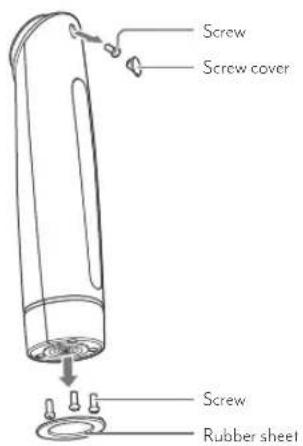
2
Remove the bottom housing
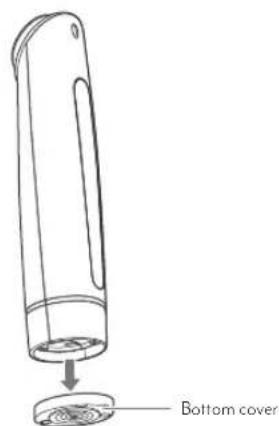
3
Remove the back cover
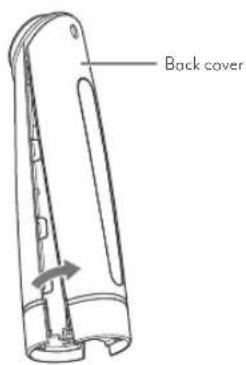
4
Disconnect the battery cable
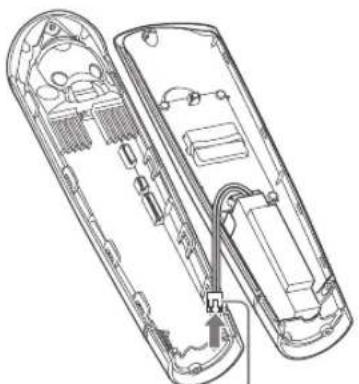
Battery cable
5
Remove the battery


CAUTION
This image is intended to be used for disposing of the product, not repairing it.
Do not disassemble the product except for disposal. Failure to comply may cause a fire, electric shock or other injuries.
Contacts for overseas customers
For countries and regions outside Japan, please contact the store where you purchased your product for any inquiries. Alternatively, check the YA-MAN GLOBAL Official Website (https://www.ya-man.com/en/)
Official website: https://www.ya-man.com/en/
©2023 YA-MAN LTD. ALL RIGHTS RESERVED. YJFM18-I-00IE

- INTRODUCTION
- SAFETY PRECAUTIONS
- CLASSIFICATIONS OF PRECAUTIONS
- DANGER
- WARNING
- CAUTION
- SYMBOLS
- DANGER (USE AND STORAGE)
- THE FOLLOWING INDIVIDUALS SHOULD NOT USE THE DEVICE
- WARNING (USE AND STORAGE)
- DO NOT USE UNDER THE FOLLOWING CONDITIONS
- DO NOT USE IN THE FOLLOWING CASES OR ON THE FOLLOWING AREAS
- DO NOT USE THE DEVICE CONTINUOUSLY FOR AN OVERLY LONG PERIOD (FOR EXAMPLE, THROUGH COMMERCIAL USE)
- CAUTION (USE AND STORAGE)
- WARNING (POWER SUPPLY)
- WHEN USING OUTSIDE OF JAPAN
- NAMES AND FUNCTIONS OF COMPONENTS
- MAIN BODY
- ACCESSORIES
- FUNCTIONS
- SAFETY FUNCTIONS
- OTHER FEATURES
- BEFORE USE
- PRE-TESTING ON SKIN
- HOW TO USE
- PRECAUTIONS
- HOW TO ATTACH A COTTON PAD TO THE ELECTRODE HEAD
- BASIC METHOD OF USE
- 1
- REMOVE MAKEUP AND GENTLY CLEANSE YOUR FACE
- 2
- ATTACH COTTON PAD TO THE ELECTRODE HEAD IF NECESSARY AND APPLY SKIN LOTION TO THE COTTON PAD
- 3
- TURN ON THE DEVICE
- 4
- SELECT THE MODE
- SELECT THE TREATMENT LEVEL (INTENSITY) (EXCEPT IN COOL MODE)
- 6
- HOLD THE DEVICE WITH YOUR HAND TOUCHING THE HAND ELECTRODE (THE SILVER RIM) ON THE REAR
- 7
- APPLY THE ELECTRODE HEAD TO YOUR SKIN AND MOVE THE HEAD OVER THE AREA BEING TREATED
- 8
- CARE FOR THE SKIN AFTER TREATMENT
- HOW TO USE THE DEVICE ON YOUR SKIN
- DAILY MODE
- CLEAN MODE
- DYHP MODE
- EYE CARE MODE
- COOL MODE
- AFTER TREATMENT
- STORING
- MAINTENANCE AND INSPECTIONS
- ADDITIONAL INFORMATION
- TROUBLESHOOTING
- AFTER-SALES SERVICE
- RECHARGEABLE BATTERY
- DISPOSING OF THE DEVICE
- DISPOSING OF THE BATTERY
- CORRECT DISPOSAL OF THIS PRODUCT
- REMOVING THE BATTERY
- CONTACTS FOR OVERSEAS CUSTOMERS
Brand : YA-MAN
Model : Photo PLUS Shiny NEO
Category : Facial care device