
THE MIYABI - Facial care device YA-MAN - Free user manual and instructions
Find the device manual for free THE MIYABI YA-MAN in PDF.


| Product Type | Facial care device |
| Brand | YA-MAN |
| Model | THE MIYABI |
| Dimensions (Main unit with cotton stopper) | Approx. W52 x D62 x H203 mm |
| Weight (Main unit with cotton stopper) | Approx. 312 g |
| Power Supply (Rated) | DC9V 2.0A |
| Power Consumption | Approx. 18 W |
| AC Adapter Input Voltage | AC100-240V |
| Battery Type | Lithium-ion rechargeable |
| Charging Time | Approx. 3 hours |
| Operating Time (fully charged) | Approx. 30 minutes |
| Treatment Modes | CLEAN, DWHP, NEB, EMS UP, EYE CARE, COOL, DAILY CARE |
| Intensity Levels | 5 levels (except COOL mode) |
| Water Resistance | IPX5 (JIS-compliant, splash-resistant) |
| Materials | Main unit: ABS resin; Indicator panel: Polycarbonate and acrylic; Electrode head: PET resin and stainless steel; Metallic parts: ABS resin with indium vapor deposition |
| Country of Origin | Japan |
| Accessories Included | Cotton stopper (silver ring), AC adapter |
| Cleaning Instructions | Wipe electrode head and cotton stopper with damp cloth; wash cotton stopper with water; do not use solvents |
| Safety Features | Temperature sensor, current sensor, motion sensor, touch sensor, timer, auto-off, personal memory |
| Spare Parts / Repairability | Battery replaceable only by service center; contact global after-sales for repairs |
| Warranty | Register online; warranty valid in Japan; free repair warranty only in Japan |
Frequently Asked Questions - THE MIYABI YA-MAN
User questions about THE MIYABI YA-MAN
0 question about this device. Answer the ones you know or ask your own.
Ask a new question about this device
Download the instructions for your Facial care device in PDF format for free! Find your manual THE MIYABI - YA-MAN and take your electronic device back in hand. On this page are published all the documents necessary for the use of your device. THE MIYABI by YA-MAN.
USER MANUAL THE MIYABI YA-MAN
natural_image
Illustration of a handheld electronic device with a circular top and control buttons (no visible text or symbols)English User's Manual come with this product.
Please download the other language's User's Manual version
from this link (https://www.ya-man.co.jp/cn/support/documents/)
or scan with QR code with your camera phone.
Please carefully read User's Manual to ensure safe and proper
use of the device.

TO ACCESS SCAN WITH
YOUR CAMERA PHONE
Table of Contents
Safety Precautions
Use in Foreign Countries 7
Names of Components 8
Before Use 9
How to Use 15
After Treatment 20
Troubleshooting 21
After-sales Service 24
● Product Specifications 26
Before using this product, please read these instructions carefully.
- Please read this User's Manual carefully for information on how to use the device properly and safely.
● After reading the contents hereof, be sure to keep this User's Manual in an accessible location. - Be sure to include this User's Manual if you are transferring ownership of the device to another person.
Safety Precautions
- Read these Safety Precautions carefully before using the device in order to use it correctly.
- Use the device sensibly in accordance with the prescribed steps.
- Immediately discontinue use and arrange to have the device repaired if any abnormality occurs.
- Do not use the device while it is in a defective state, as doing so could cause physical harm to the user.
- The precautions listed in the User's Manual are very important. For your safety, please follow them carefully.
- Precautions are classified as DANGER, WARNING, or ATTENTION in order to clearly specify the level of danger and possible injury or damage that may occur if the device is misused.
● Classifications of Precautions
| Improper use of this device poses a severe and likely risk of death or serious injury. | |
| Improper use of this device may pose a risk of death or serious injury. | |
| Improper use of this device may cause an injury or property damage*.* Property damage* refers to expanded damage affecting the following: household belongings, or dramatic animals and pets. |
Symbols
| This symbol shows you what you must not do. | |
| This symbol shows you what you must do. | |
| This symbol shows you what you must be careful with. |
! DANGER

Prohibition
The following individuals should not use the device:
Use of the device could cause electronic medical devices to malfunction.
Do not use the device in conjunction with any medical electronic equipment, including:
• pacemakers or other implanted electronic medical devices
- artificial heart-lung machines or other electronic life-support medical devices
• electrocardiographs or other worn electronic medical devices

Prohibition
o not use in the following cases or on the following areas.
Failure to comply may cause accidents or other problems.
- If your skin is damaged, experiencing a rash, inflammation, or other abnormalities
• If you are under the influence of alcohol
• Anywhere inside the mouth, around the pubic region, or any mucous membrane • Eyeballs
• Upper eyelids (exposure to LED light is possible)
- Lower eyelids and the outer corners of the eyes (EYE CARE Mode and exposure to LED light are possible)
- Throat - Head - Bulging moles - Viral worts - Sites where you have broken a bone
• Areas of internal bleeding, swelling or scabbing after cosmetic medical procedures
* Avoid using the device for 2 weeks after cosmetic medical procedures. After this period, consult with
a physician and only use the device if the physician confirms there is no problem. (e.g. Hyaluronic
acid injections, silicone injections, Borax, thread lifts, double eyelid surgery, HIFU, etc.)
• Areas where metal was implanted by surgery (reconstructive surgery, plastic surgery, cosmetic
surgery, etc.)

Prohibition
Do not use the device for a long time over areas where the skin is thin or areas above bones.
Failure to comply may cause skin problems or physical ailments.

Prohibition
Before use, check to make sure the electrode and treatment head are not cracked, deformed or
broken. Do not use the device if it
is damaged or malfunctioning.
Failure to comply may cause injuries
or skin problems.

Prohibition
Do not overuse the device. For usage time and frequency, follow
the instructions in the User's
Manual.
Failure to comply may cause
physical injuries.

WARNING WARNING

Prohibition
Do not use, store or charge the device in the following locations:
- In bathrooms or near bathtubs, showers, washbasins or other containers filled with water
· A dusty location
: Our clients or a location where there is exposure to direct sunlight.
A slope or a location where there are vibrations or shocks.
• 4. Carriers where there progress to identify a contrast
A solution where there are an only radio waves of magnetism. Now, the potential between the two curves is similar to the
Adej O Hattinikai, Aksianhia. (duch as Likatil, Thirner, Benzhen, Nam Polan, Elovar of Arity).
A location where there is exposure to all smoke or stream
• A location that may become hot, such as near a heating device (e.g. a heater)
• A location with drastic temperature changes (e.g. near an air conditioner or heater)
Failure to comply may cause a fire, electric shocks, accidents, malfunction of the device, falls or injuries.

Prohibition
Do not use the device if the AC
adapter is damaged.
Inquiry the Global After Service
(https://www.yo-mon.co.jp/en/support/
repair/) or your local distributor and
use the dedicated AC Adapter. Do not
connect anything other than the rated
power supply (DC9V 2.0A)

Prohibition
Do not pull out the plug from a
power outlet or pull out the plug
from the device during use.
Failure to comply may cause on electric
shock or a fire due to a short circuit.
Be sure to turn off the power before
pulling out the plug.

Non-intended
uses are
prohibited
Do not use the device for any
purpose or in areas other than
those stated in the User's Manual.
Failure to comply may cause a
mo function of the device or an injury.

Must Comply
Be sure to use AC100 to 240V.
Make sure the AC adapter is fully
inserted into a power outlet.
Failure to comply may cause a fire,
electric shock or other accidents.
The free-repair warranty is only
valid in Japan.

al thinner
ther containers filled with water
广力云智慧零售收银系统
unlight
[Non-Text]
17
2017
nzene, nail polish remover or spray!
[Non-Text]
device (e.g. a heater)
(air conditioner or heater)
malfunction of the device, falls or injuries
(1) 2017年1月1日

Prohibition
Do not use at a temperature
below the specified ambient
temperature.
Failure to comply may cause the
electrodes to stick to and damage
the skin.

User
Do not leave the device
unattended while it is turned on.
Failure to comply may cause a fire or
other accidents.

Combustion
warning
Keep the device and AC adapter
away from children and do not
allow them to use it alone.
Children shall not play with the
appliance.
Failure to comply may cause
accidents or injuries.
Do not dispose of the device in a
fire or place it near fire or flam
Do not use, charge or store in a
high-temperature or
high-pressure area.
The device features a built-in
rechargeable battery.
Failure to comply may lead to the
generation of heat, a fire or
explosion


If the device is dropped or
damaged, turn off the power
immediately, pull out the plug,
and request a repair/inspection.
Must Comply
Failure to comply may cause a fire
or electric shock.

Disassembly
Do not disassemble, attempt to
repair or modify this device in
any wa
Failure to comply may cause a fire,
on electric shock or other injuries
Contact your local distributor for
advice on repairing the device.

Removing
the plug
If you feel an earthquake, see
lightning or hear thunder, turn
off the power and unplug the
device.
Failure to comply may cause a fire
or electric shock.

Prohibition
Always use the dedicated AC
adapte
Failure to comply may cause on
electric shock, a short circuit or a
fire.

Overloading of
many plugs to one corner?
Forare to comply may cause on
electric shock, short circuit, fire, or
manufchion of the device.

Use of a
Do not use if the AC adapter is
damaged or if the wall socket is
too loo
Failure to comply may cause an
electric shock, short circuit, fire, or
malfunction of the device.
Contact your local distributor for
advice on repairing the device.

Removing the plug
When disconnecting the plug
from a power outlet, be sure to
pull it out by grasping its head
instead of the cord (do not touch
the metal parts). Do not insert o
disconnect the plug with wet or damp hands.
5.1
where to comply may cause an electric shock short circuit fire
electric shock, short-circuit, fire, or malfunction of the device

Removing
the plug
After using the device, when the
device is not in use and when
cleaning it, be sure to turn off the
power and remove the plug from
a power done
Make sure to disconnect the AC
adapter from a power outlet after
charging is completed. Failure to
comply may cause a fire or other
accidents,

C
Careless or - cable to break, resulting in a fire or
reckless use - an electric shock
is prohibited. Straighten out any twists in the card
before storing.

User
restrictions
Children shall not play with the device.
their guardians before using the device
and should only use it under the supervision of a guardian or a specialist.
Cleaning and user maintenance shall
not be made by children without supervision
experience and knowledge, unless they
have been given supervision or instruction
concerning use of the appliance by person responsible for their safety.
Failure to comply may cause
accidents or injuries.

ATTENTION

Do not press the device strongly or use it intensively on a single area.
Prohibition
Pressing the device stronger than necessary or using it intensively on a single area may damage the skin.

Do not use while driving. Failure to comply may cause accidents or injuries.

Do not use COOL Mode continuously.
Prohibition
If the mode is used for continuous treatments, the head will not become fully cool. Have an interval of at least 30 minutes between treatments.

Use only Level 1 upon the first use and until you are accustomed to use.
Even if you do not feel any stimulation, make only small adjustments to the intensity level.
Must Comply
Use the device at an intensity level that suits you.
Make only gradual adjustments to the intensity level. Failure to comply may cause accidents or injuries.

Prohibition
Do not allow the device to come into contact with another beauty device or electronic appliance while the power is on. Do not use with other electronic products (electric blankets/bed sheets, heated tables, etc.) at the same time.
Failure to comply may lead to accidents due to malfunctions of the device.

Prohibition
Do not expose the device to strong water pressure from showers or faucets nor submerge it in water.
The main unit is rated JIS-compliant and a water resistance rating of IPX5, which means that it is resistant to low-pressure splashes.
Do not intentionally splash water on the device as it is not
designed to withstand strong water pressure from showers or faucets, nor to be submerged in water. Failure to comply may cause a malfunction of the device.

Must Comply
Check carefully that your skin is not showing any abnormalities during the treatment. Stop using the device immediately if you start to feel pain, fatigue or if you see any skin reaction during use.
Stop using the device immediately if the treatment does not agree with your skin. If symptoms persist the following day and beyond, consult a physician.

ATTENTION

Prohibition
Do not look directly into the LED light. When using the LED light to treat the upper eyelids, lower eyelids and outer corners of the eye, be sure to close your eyes
and keep the electrode head at least 5 cm away from the skin.
Failure to comply may cause damage to your eyes or skin.

Must Comply
If you are currently undergoing dental treatment or have teeth fillings, choose a lower intensity level and apply the device to a different area.
You may feel strong irritation or discomfort due to EMS on your checks or chin.
If you feel strong discomfort, consult a physician.

Avoid using the device on the same area for longer than 15 minutes.
When using on the same area again, be sure to leave an interval of
24 or more hours between treatments. Excessive use may
damage the skin. The above
recommendations are guidelines only; please observe your skin condition and use the device accordingly.

If a power failure occurs, turn off the power immediately and
unplug the device from the power outlet.
Failure to comply may cause on accident.
Use in Foreign Countries
Names of Components

WARNING

Use the device at AC100 to 240V only.
Failure to comply may cause a fire, electric shock or malfunction of the device.
Must Comply

Be sure to check the plug configuration and the voltage of the power outlet before use.
Failure to comply may lead to the generation of heat, fire or malfunction of the device.
● The plug configuration and voltage may vary depending on the region and the type of accommodation. Always be sure to check for compatibility before using the device.
- For information about plug adapters, consult with a travel agency or a consumer electronics retailer.
● Main Unit

[Accessories]
● Cotton Stopper (Silver Ring)
* The cotton stopper is attached to the electrode head when purchased.
* Use this stopper to fix a cotton pad to the electrode head.
● AC Adapter
* The design and specifications of the device and accessories are subject to change for improvements without prior notice.

Before Use
Charging the Battery
This product is rechargeable and can be used either without an electric cord or by connecting it to an AC adapter.
Always use the device after charging when you use device without an electrical cord.
Before using for the first time, or if you have not used the device for an extended period, fully charge the battery and make sure that the Charging indicator has turned from flashing to solid, indicating a full charge.
- Make sure that there is no water on the adopter plug insertion port.
Failure to comply may cause an electric shock, short circuit, fire, or malfunction of the device.
● Estimated Charging Time
| Charging time Operating Time |
| Approx. 3 hours Approx. 30 minutes |
* Charging at room temperature of approx. 25°C.
* Operating time when fully charged.
* Operating time may vary depending on the operating mode, operating level and/or operating environment.
* Actual charging time will differ depending upon the remaining battery and the charging environment.
● Charging the Battery
1 Insert the AC adapter plug into the adapter socket of the main unit.
2 Plug the AC adapter into the power outlet.
- Use only the supplied exclusive AC adapter with this device.
- Plug the AC adapter directly into the wall socket. Do not overload an electric circuit.
- When charging begins, the Charge indicator will flesh. When charging has completed, the charging indicator will turn solid.
3 After charging is completed, disconnect the AC adapter plug from the wall outlet, then disconnect the adapter plug from the device.
How to Read the Indicator Panel
● Indicator and Buttons

- Press and hold the POWER/MODE button to turn on the device.
- Treatment mode can be changed by pressing the POWER/MODE button during operation.
• Each Mode has 5 intensity levels that can be adjusted only with the LEVEL button. - Press and hold the POWER/MODE button to turn the power off.

Mode Indicator
• DWHP course
When you press and hold the POWER/MODE button to turn ON the device, the treatment mode will be selected in the following order: CLEAN → DWHP → EMS UP → EYE CARE → COOL → CLEAN (repeat)

flowchart
graph LR
    A["Mode Mode"] --> B["CLEAN"]
    B --> C["DWHP"]
    C --> D["EMS UP"]
    D --> E["EYE CARE"]
    E --> F["COOL"]
    G["LEVEL S\nCLEAN"] --> H["LEVEL S\nDWHP"]
    H --> I["LEVEL S\nEMS UP"]
    I --> J["LEVEL S\nEYE CARE"]
    K["COOL"] --> L["COOL"]
: NEB course
The mode can be switched by briefly pressing the N+ button during the DWHP course, the treatment mode will be selected in the following order: CLEAN → NEB → EMS UP → EYE CARE → COOL → CLEAN (repeat)

flowchart
graph LR
    A["CLEAN"] --> B["NEB"]
    B --> C["EMS UP"]
    C --> D["EYE CARE"]
    D --> E["COOL"]

    subgraph Level S
        F["LEVEL S N+"] --> G["(-●)"]
        H["LEVEL S N-"] --> I["(-●)"]
        J["LEVEL S N+"] --> K["(-●)"]
        L["LEVEL S N-"] --> M["(-●)"]
        N["LEVEL S N+"] --> O["(-●)"]
    end

    subgraph Color
        P["CLEAN"] --> Q["NEB"]
        R["EMS UP"] --> S["COOL"]
    end
· DAILY CARE
Turn on the power and press and hold the N+ Button while the DWHP or NEB course is running, to switch to DAILY CARE Mode.
You cannot switch to DAILY CARE Mode when the device is in standby status of DWHP or NEB course.

● Level Indicator
Use only Level I upon the first use and until you are accustomed to use. 5 levels are available; choose the level you feel more comfortable with. Each time the LEVEL button is pressed, the level will change.
● Charging Indicator
The charging indicator lights up/flashes from 1 to 3 depending on the level of charge.
When using without an electric cord: light is on
When using while charging: light is off
Charging: Floshing
When charging has completed, the charging indicator will turn solid.
* When using the device without an electric cord, if the battery level is insufficient, the device will beep 3 times, the charging indicator will flash 3 times and the power will be turned off.

● Safety Functions
- Temperature sensor
If the temperature of your skin or of the electrode head becomes high, the output will be lowered for safety. Also, if the temperature rises excessively, the power will be turned off for safety (a buzzer will sound 10 times to notify you). If this happens, leave the device turned off for approximately 30 minutes.
- Current sensor
Measure the current value that is output and control it so that the current does not exceed the desired value.
- Motion sensor
The motion sensor will detect the movement of the device, and if the electrode head continues to be applied to the same position, the output will be stopped for safety.
If you move the device slowly, the motion sensor may cause the warmth of the device to be reduced.
- Touch sensor
The touch sensor detects when your skin is in contact with the device and when it is not, and it adjusts the output accordingly.
- Timer Function
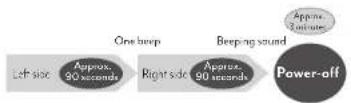
When half of the operating time has passed, you will be notified by a short beep sound. Refer to page 14 for the operating time at each mode.
● Standby status (available only when the DWHP or the NEB course is selected)
The device will sound three short beeps when the mode is complete, and the light indicator for the next mode will start flashing (standby status means that a function has stopped).
Refer to page 14 for the operating time of each mode.
If you briefly press the MODE button again, the mode of the indicator that is flashing will start.
When treatment in COOL Mode is finished, the device will sound two short beeps and the power will be turned off automatically instead of the device going into standby status. This operation only applies to COOL Mode.
● Auto-off (Automatic Power-off)
If the device is not operated within approx. 5 minutes of going into standby status, it will be turned off automatically after 2 short beeps. When treatment in COOL Mode is finished, the device will sound two short beeps for both the DWHP and the NEB courses, and then the power will turn off automatically. When using DAILY CARE, the device will sound two short beeps and the power will turn off automatically when the mode ends.
● Personal Memory Function
The device remembers the level being used when the last treatment mode ended, and returns to the same level settings the next time it is switched on.
● Resistance Factor Control
This function detects the ease of electric conductivity of your skin and controls the treatment accordingly to provide the appropriate output.
● Water-resistance
This product has a water resistance rating of IPX5 (JIS-compliant).
* It is therefore not completely water-resistant. Do not submerge the device in water or hold it under running water
*The AC adapter is not waterproof.
Pre-testing on Skin
* When using the device or a cosmetic product for the first time, always test for compatibility.
1 Clean your skin.
- Wash the inner side of your arm with soap and water, then wipe dry with a towel.
- Remove all metal accessories (watches, necklaces, rings, earrings, etc.) when using the device.
Failure to comply may cause accidents or injuries.
2 Apply water or skincare product (gel or lotion) on the inner side of your arm and apply DWHP Mode of DWHP course treatment for 3 minutes.
- Do not wet or rub the pre-testing area.
If you experience any skin abnormality (redness or burning sensation) at the pre-testing area within 24 hours, stop using the device.

- Be sure to perform a pre-test in order to prevent skin problems from occurring.
- If a rash, reddening, itchiness, stinging sensation or other abnormalities occur at the pre-testing area, immediately stop the pre-test and wash the area.
- Do not use the device if any skin abnormalities are perceived.
About Treatment Modes
| Mode Functions Cotton | Operating time | Frequency/L | ||||
| DWHP course | CLEAN | dot CERTEC 1 RF dot lon derivation dot LED (Red ) | With cotton | Approx. 3 minutes | 5 levels | 2 to 3 times a week |
| DWHP | dot CERTEC 2 DYHP dot DWHP dot LED (Red / Orange) | With or without cotton | Approx. 3 minutes | 5 levels | ||
| EMS UP | dot CERTEC 3 RF dot EMS dot LED (Red ) | With or without cotton | Approx. 3 minutes | 5 levels | ||
| EYE CARE | dot RF dot CERTEC ^* dot EMS for the eye area dot LED (Red ) | With or without cotton | Approx. 3 minutes | 5 levels | 5 times a week | |
| COOL | dot COOL dot Micro-currents LED (Blue) | Without cotton | Approx. 3 minutes | N/A | Everyday use is possible | |
| NEB course | CLEAN | dot CERTEC 3 RF dot lon derivation dot LED (Red ) | With cotton | Approx. 3 minutes | 5 levels | 2 to 3 times a week |
| NEB | dot CERTEC 4 DYHP dot LED (Red / Orange) | With or without cotton | Approx. 3 minutes | 5 levels | ||
| EMS UP | dot CERTEC 5 RF dot EMS dot LED (Red ) | With or without cotton | Approx. 3 minutes | 5 levels | ||
| EYE CARE | dot RF dot CERTEC ^* dot EMS for the eye area dot LED (Red ) | With or without cotton | Approx. 3 minutes | 5 levels | 5 times a week. | |
| COOL | dot COOL dot Micro-currents LED (Blue) | Without cotton | Approx. 3 minutes | N/A | Everyday use is possible | |
| DAILY CARE | DAILY | dot CERTEC 6 EMS dot RF dot lon derivation dot LED (Red ) | With or without cotton | Approx. 6 minutes | 5 levels | Everyday |
* Use the device after washing your face and performing your skin care routine using a skin lotion or a similar product.
*Cell Energy Regeneration Technology.
- Be sure to move the device on your skin during use (except in EYE CARE Mode and COOL Mode).
- If the COOL Made is used for continuous treatments, the head will not become fully coal. Have an interval of at least 30 minutes between treatments.
How to Use
How to attach a cotton pad to the electrode head
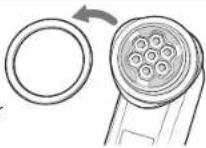
1 Remove the cotton stopper from the electrode head.
2 Place a cotton pad on top of the electrode head and press the cotton stopper down over the cotton pad.
* If the cotton stopper does not fit properly on the electrode head, please use a larger and thinner cotton pad. Because thick cotton pads are difficult to fix in place, split them in hall before use.
* If the cotton pad is too thick, the thermal action of the CERTEC and RF treatment may be adversely affected and you will feel less heat.
3 Apply your regular skin lotion or gel onto the cotton pad.
* Make sure the skin lotion or gel coats the entire surface of the electrode head.
* If using a watery (low-viscosity) skin lotion, the feeling of warmth may decrease. Recommended skin lotions: high-viscosity skin lotions
* Be sure to thoroughly wipe off any lotion or gel left on the device with a dry cloth after each use.
How to Use (General Instructions)
● Precautions
● Make sure that the cosmetics you use are water-soluble. Do not use oil-based or scrub-based products.
Doing so may cause the product to malfunction or lead to skin problems.
- Be sure to move the device on your skin during use. Do not stop on one spot as this may cause burns.
- The perceived warmth of the CERTEC and RF changes depending on the type of skin-core product used and the skin's condition at the time of treatment.
- Do not use any of the modes on your upper eyelid (exposure to LED light is possible). Use only EYE CARE Mode or COOL Mode on lower eyelids or on the outer corners of your eyes (exposure to LED light is possible).
* The LED light can be used over the upper eyelids, lower eyelids and outer corners of the eye. Close your eyes and hold the device at least 5 cm away from the eyes. Do not look directly into the LED light.
● Do not look directly into the LED light.
● The recommended ambient temperature is 15irc C to 30irc C.
- Remove all metal accessories (watches, necklaces, rings, earrings, etc.) when using the device. Failure to comply may cause accidents or injuries.
- Please carefully clean the parts of the device that come into contact with the skin every time you use it and keep the device clean at all times.
Failure to comply may cause skin problems.
3 Cell Energy Regeneration Technology.
● Treatment Method
1 Remove makeup and gently cleanse your face.
* Make sure to remove makeup before using the device on your face. If you use the device over makeup, the foundation may cause dark staining of the skin.
- Remove oil and dirt from your skin so that it is in a clean condition prior to treatment.
- If using your regular skin lotion, be sure that it is water soluble. Do not use oil based or scrub-type skin lotions, as these may cause to malfunction of the device or skin problems.
2 Attach a cotton pad if necessary and apply skin lotion onto it.
*Be sure to replace the cotton pad used in CLEAN Mode.
3 Press and hold the POWER/MODE button to turn on the power.
When using the DWHP course for treatment, select the mode and level and do not attempt to modify them.
When using the NEB course for treatment, press the N+ button briefly, and then select the mode and level.
When using DAILY CARE for treatment, press and hold the N+ button, and then select the mode and level.
You cannot switch between the DWHP course and the NEB course when the device is in standby status.
4 Gently apply the electrode head to your skin and move the head over the area being treated. Refer to pages 17-19 for more details.
- At the end of each mode, standby status is activated (for about 5 minutes), and when the POWER/MODE button is pressed the next mode starts.
* During use, make sure the electrode head is firmly touching the skin.
5 Press and hold the POWER/MODE button to turn off the power.
* When treatment in COOL Mode has finished, the power will turn off automatically.
6 After treatment, condition your skin as necessary.
• After finishing the treatment, apply lotion and other products throughly into the skin, and complete with your regular basic skin-care items.
* After each use, refer to 'After Treatment' (page 20) and remove the remaining sebum, serum and other particles stuck to the device.
Failing to remove them may cause a malfunction of the device or skin problems.
How to use the device on your skin
Move the electrode head over the skin in the direction of the arrows shown below.
- Please reapply skin-care products or water during treatment to ensure there is always some liquid between the electrode head and the skin. If there is an insufficient amount of skin-care products or water, the stimulation will weaken, causing skin problems.
Common to both the DWHP and NEB courses
- If the temperature feels too hot, move the head more quickly. You can also use a cotton pad to lower the temperature.
• Use the device in a position in which the entire surface of the electrode head comes in contact with your skin. - Be sure to move the device over the skin as you use it.
Placing the device continuously on the same area may cause burns or low-temperature injuries.
• Do not put the electrode head on the upper eyelids, lower eyelids or the outer corners of the eyes.
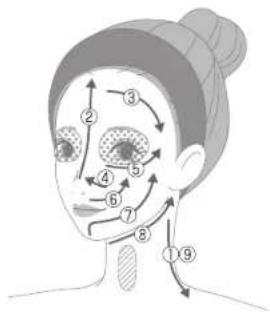

Areas you should not treat

Areas that can only be treated with LED light
(Refer to page 19 for how to use)
* Close your eyes and hold the device
at least 5 cm away from the skin.
Recommended speed for moving the device: 2 cm/second

Common to both the DWHP and NEB courses
If you feel an unpleasant tingling on your skin, reduce the intensity level or move to another area.
You could also moisten the skin with water, lotion or gel before using the device.
Failure to comply may cause skin damage.
- Do not let the electrode head to come in contact with your upper eyelids, lower eyelids, or the outer corners of your eyes.
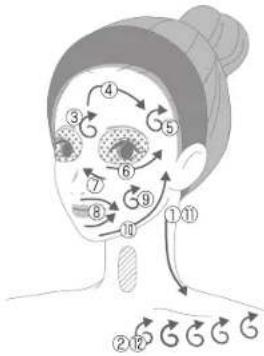

Press and move the device in a circular,
massaging motion as indicated by the arrows.

Areas you should not treat

Areas that can only be treated with LED light (Refer to page 19 for how to use)
* Close your eyes and hold the device
at least 5 cm away from the skin.

Common to both the DWHP and NEB courses
Press the electrode head repeatedly on your face from the inner to the outer corners of the eyes as if stamping on the skin (Press → Release → Move the electrode head in the direction of arrows shown below).
* Be sure not to press down continuously on the skin for longer than 3 seconds.
* Do not move the device while pressing.

Areas you should not treat: Upper eyelids
* Lower eyelid and the outer corners of the eyes can be treated.
Estimated pressing time: approx. 3 seconds for each point

If you are concerned about dryness around your eyes, we recommend applying EYE CARE Mode for approx. 2 minutes for each side (4 minutes in total).
Common to both the DWHP and NEB courses
Press the electrode head repeatedly on your face as if stamping on the skin (Press → Release → Move the electrode head)
• Do not let the electrode head to come in contact with your upper eyelids, lower eyelids, or the outer corners of your eyes.
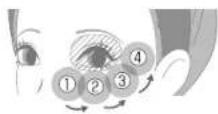
● How to treat the upper eyelids, lower eyelids and outer corners of the eye using the LED.
Remove the cotton pad, close your eyes and hold the device at least 5 cm away from the skin to use the LED light.
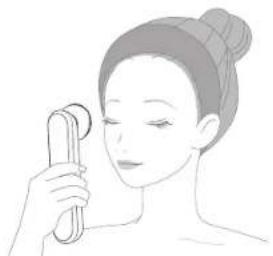
natural_image
Illustration of a person holding a circular object, no text or symbols present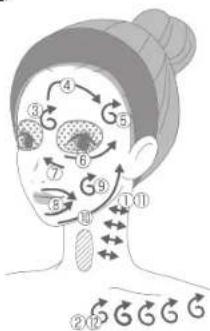

Press and move the device in a circular, massaging motion as indicated by the arrows.

Areas you should not treat
Areas that can only be treated with LED light (See above for usage)
* Close your eyes and hold the device at least 5 cm away from the skin.

After Treatment
* Please carefully clean the parts of the device that come into contact with the skin every time you use it and keep the device clean at all times.
Failure to comply may cause skin problems.
● How to clean and store the product
1 Ensure the power is off and unplug the AC adapter from the main unit.
2 To clean the treatment head and cotton stopper, wipe with a damp and well-wrung cloth to remove any dirt. Wash the cotton stopper with water.
- Remove the cotton stopper from the main unit and wash it with water before wiping it dry.
- Do not wipe the device with solvents such as alcohol, thinner, benzene, nail polish remover, kerosene, chemicals or polishing powder.
Failure to comply may cause damage to the surface of the device.
• After using the device, thoroughly wipe off any remaining lotion and gel, ensuring none is left on the device. Failure to comply may cause a malfunction of the device.
3 Wipe off any dirt from areas other than the electrode head and cotton stopper with a dry cloth.
Storage
- When the device is not in use for a long period of time, turn off the power and disconnect the AC adapter from the main unit and wall socket before storing.
● Avoid storing the device near a heater or in a bathroom or other high-temperature/high-humidity locations. Also, avoid unstable locations or places where there is exposure to direct sunlight. - Keep the device out of the reach of children.
● Cleaning and user maintenance shall not be made by children without supervision.
Maintenance and Inspections
- When you have not used the device for a long period of time, check to see that it is functioning normally before re-starting use. Failure to comply may lead to an accident or malfunction of the device.
- If the device is malfunctioning, go to 'Checklist for Possible Problems' (pages 21-22) and attempt to identify the problem before arranging to have the device repaired. If the problem persists, inquire the Global Alter Service (https://www.ya-man.co.jp/en/support/repair/) or your local distributor.
- If the device malfunctions, appears damaged or needs service, please contact your local distributor.
Troubleshooting
Checklist for Possible Problems
| Problems Possible Causes and Solutions | |
| The device does not turn on. | Press and hold the POWER/MODE button to turn the device on (page 16). |
| There is an insufficient charge. Charge the battery (page 9) or use the device with an electrical cord. | |
| The device only operates for a few minutes even after charging. | There is an insufficient charge. Charge the battery (page 9). Alternatively, use the device by connecting it to an AC adapter. |
| The expected life of the rechargeable battery (approximate number of charging times: 300 times) has expired. Inquire the Global After Service (https://www.ya-man.co.jp/en/support/repair/) or your local distributor.* Do not try to replace the battery by yourself as this may cause a malfunction of the device. | |
| You may have pressed the wrong button. Press and hold the POWER/MODE button to turn the device on again (page 16). | |
| The device is in standby or auto-off status (page 12 - 13). Press the POWER / MODE button. | |
| If the device is used at low temperature, the power may switch off immediately. Use the device while charging it. | |
| The device shuts off. | If you hear 3 long boops before it shuts off, the battery is insufficiently charged. Charge the battery (page 9). Alternatively, use the device by connecting it to an AC adapter. |
| If the device is left at low temperature for a long time, it may turn itself off. Leave it at the recommended ambient temperature of 15irc C to 30irc C for a while, check the charging status and try again. | |
| Device does not start charging (charge indicator does not flush). | The adaptor is not plugged into the device. Plug adapter into the device (page 9). |
| Plug the AC adaptor into the wall socket and press the LEVEL button and POWER/MODE buttons at the same time while the power is off (reset). | |
| The device is too warm. | The device is being used continuously. Turn all the device and wait at least 30 minutes before using it again. |
| Problems | Possible Causes and Solutions |
| COOL Mode is not very cool. | Cool Mode is being used continuously. Turn off the device and wait at least 30 minutes before using it again.The device is being used in an environment where the temperature exceeds the recommended range. Use the device within a temperature range of 15 to 30°C. |
| EMS causes uncomfortable tingling or pain. | Lower the intensity with the Level button.The entire surface of the electrode head is not touching skin. Use a mirror to check that the entire surface of the electrode head is touching the skin. |
| The EMS feels weak or I cannot feel it or all. | Increase the intensity with the Level button.The skin lacks moisture or is dry. Moisturize your skin with lotion or gel.You are not applying the device along muscles. Verify that you are applying the device along muscles with the help of a mirror (page 18).There is an insufficient charge. Charge the battery (page 9). Alternatively, use the device by connecting it to an AC adapter. |
| The treatment temperature is too high (except in COOL Mode). | You have been using the electrode head on your skin for a long time. Be sure to move the electrode head over your skin when using the device, except in COOL Mode.The electrode head moves to slow. Move the device a little quicker.It may feel very hot depending on the skin-care product used or the presence/absence of a cotton pad. If it feels hot, try the following:Use a cotton pad, or if you are already using a cotton pad, use the device without the cotton pad.Change the skin-care product used. |
| You cannot feel CERTEC® and RF warmth. | The device is in standby or auto-off status (page 12 - 13). Turn the power off and then on again, or activate the modes by pressing the POWER/MODE button.The skin lacks moisture or is dry. Moisturize your skin with lotion or gel.The electrode head moves fast. Please move the device a little slower. |
| I can't select the level. | There is no intensity level selection available in COOL Mode. |
| The device cannot be operated. | Press the LEVEL button and the POWER/MODE button at the same time (reset) |
* Cell Energy-Regeneration Technology.
Frequently Asked Questions
| Q | A |
| How much lotion or gel should I use each time? | This device is designed to achieve better results with sufficient use of lotions and/or gel.As a general guide, when using cotton pads, be sure the entire electrode head is moistened with face lotion.Use about two pearl-sized drops of gel.We recommend adding more lotion or gel if you feel there is not enough. |
| Can I use this product in the bath?Also, can I wash the main unit with water? | The device cannot be used in the bath (bathroom, tub).The main unit is rated JIS-compliant IPX5, which means that it is resistant to splashes but cannot withstand strong jets from showers and faucets, nor can it be submerged in waters. The main unit cannot be washed with water as this may cause a malfunction of the device. Only the cotton stopper can be washed with water. |
| Why do I not feel the warmth of CERTECTM and RF when using CLEAN, NEB or EYE CARE Modes? | Move the electrode head more slowly or press harder against the skin surface.It is also possible that there is insufficient moisture on the cotton pad. Add more lotion or gel. |
| Why can't I see any dirt on the cotton pad? | Dirt is removed even though it may not be visible on the cotton.The amount of visible dirt on the cotton can vary among individuals. |
| Can I use it over a facial mask? | It can be used over a facial mask too (except in CLEAN Mode).We recommend using a facial mask in DWHP Mode, NEB Mode and DAILY CARE Mode. |
6 Cell Energy Regeneration Technology.
After-sales Service
● Rechargeable Battery
- The rechargeable battery is a consumable item (It is not covered by warranty).
- If the operation time after charging has become extremely short, it could be the end of the battery's life. The battery can be charged approx. 300 times.
- Consult the Global After Service (https://www.ya-man.ca.jp/en/support/repair/) or your local distributor for a battery replacement.
● Disposing of the device
● Follow your local government rules for proper disposal of this product.
● This product uses a lithium-ion storage battery. For information on the disposal of batteries, see Disposing of the Battery and Removing the Battery below.
The lithium-ion battery used in this product is a valuable recyclable resource.
• The battery must be removed from the appliance before it is disposed.
- Be sure to turn off the power and disconnect the AC adapter before removing the batteries.
- Use a screwdriver to remove the battery. Be careful not to injure yourself.
- When removing the battery, be careful not to damage it on a hard object.
* Failure to comply may cause the generation of heat or a fire.
- Follow your local government rules for proper disposal or recycling of this product.
● Correct Disposal of this product
This marking indicates that this product should not be disposed with other household wastes throughout the UK and EU. To prevent possible harm to the environment or human health from uncontrolled waste disposal, recycle it responsibly to promote the sustainable reuse of material resources. To return your used device, please use the return and collection systems or contact the retailer where the product was purchased. They can take this product for environmental safe recycling.

Li-ion

Operation Steps
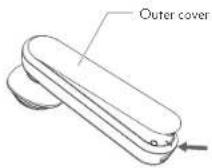
Refer to figures ① to ④ below to remove the battery.
① Remove the outer cover using a flat-tipped object.
* It is fixed with strongly adhesive tape
③Remove the inner cover and disconnect the battery cable from the connector.
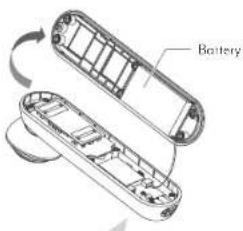

Do not cut the cable.

② Remove the 6 rubber stoppers and screws on the inner cover.
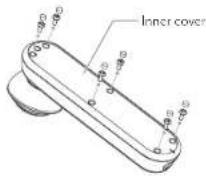
④ Remove the battery using a flat object like a ruler. 5 It is fixed with strongly adhesive tape

natural_image
Technical illustration of a mechanical component with a magnified inset showing a threaded rod (no text or symbols)① Pay attention not to damage the battery

This figure is intended to be used for disposing of the product, not repairing it. CAUTION: Disassembling the device by yourself may cause a failure.
● Product Specifications
| Rated Power Supply | DC9V 2.0A |
| Power Consumption | Approx. 18 W |
| Battery | Lithium-ion battery |
| Charging time | Approx. 3 hours (may vary depending on the charging environment) |
| Outer Dimensions | Main unit (with cotton stopper): approx. W52 x D62 x H203 (mm) |
| Weight | Main unit (with cotton stopper): approx. 312 g |
| Materials | Main unit: ABS resin - Indicator panel; Polycarbonate and acrylic resinElectrode head: PET resin and stainless steelMain unit's metallic parts: ABS resin (indium vapor deposition) |
| Country of origin | Japan |
| Accessories | Cotton stopper, AC adapter |
| Recommended Environmental Temperature | 15irc C to 30irc C |
| Water resistance class: | JIS-compliant IPX5 class protection |
● Warranty
If you have purchased from www.global.ya-man.com,
Warranty: Please register your device at https://global.ya-man.com/apps/warranty/registrants/new
Contact: inquiries to contactus@yo-man.com
If you have purchased from local distributor,
Warranty: Please contact your local distributor
- User's manual (WEB)
User's manual is also available at following address: https://www.yo-mon.co.jp/en/support/documents/

- Table of Contents
- Safety Precautions
- ! DANGER
- The following individuals should not use the device:
- Prohibition
- o not use in the following cases or on the following areas.
- Do not use the device for a long time over areas where the skin is thin or areas above bones.
- Before use, check to make sure the electrode and treatment head are not cracked, deformed or
- Do not overuse the device. For usage time and frequency, follow
- WARNING WARNING
- ATTENTION
- Use in Foreign Countries
- Names of Components
- WARNING
- [Accessories]
- ● Cotton Stopper (Silver Ring)
- ● AC Adapter
- Before Use
- Charging the Battery
- ● Charging the Battery
- How to Read the Indicator Panel
- Mode Indicator
- ● Level Indicator
- ● Charging Indicator
- ● Safety Functions
- - Timer Function
- ● Standby status (available only when the DWHP or the NEB course is selected)
- ● Auto-off (Automatic Power-off)
- ● Personal Memory Function
- ● Resistance Factor Control
- ● Water-resistance
- Pre-testing on Skin
- Clean your skin.
- Apply water or skincare product (gel or lotion) on the inner side of your arm and apply DWHP Mode of DWHP course treatment for 3 minutes.
- How to Use
- How to attach a cotton pad to the electrode head
- How to Use (General Instructions)
- ● Precautions
- ● Treatment Method
- How to use the device on your skin
- Common to both the DWHP and NEB courses
- After Treatment
- ● How to clean and store the product
- Storage
- Maintenance and Inspections
- Troubleshooting
- After-sales Service
- ● Rechargeable Battery
- ● Disposing of the device
- ● Correct Disposal of this product
- Operation Steps
- ● Warranty
- - User's manual (WEB)
Brand : YA-MAN
Model : THE MIYABI
Category : Facial care device