LED2425 - TV Reflexion - Free user manual and instructions
Find the device manual for free LED2425 Reflexion in PDF.


| Product Type | LED Television |
| Screen Size | 24 inches (diagonal) |
| Resolution | 1920 x 1080 (Full HD) |
| Refresh Rate | 60 Hz |
| Dimensions (with stand) | 55.3 x 38.2 x 17.5 cm |
| Weight (with stand) | 3.2 kg |
| Power Consumption | 30 W (typical) |
| Standby Power | < 0.5 W |
| Input Voltage | 100-240 V AC, 50/60 Hz |
| Connectivity | 2 x HDMI, 1 x USB, 1 x VGA, 1 x AV, 1 x Headphone out |
| Tuner | DVB-T/T2/C, DVB-S/S2 |
| Energy Class | A+ |
| Remote Control | Included (with batteries) |
| Wall Mountable | VESA 100 x 100 mm |
| Speakers | 2 x 3 W |
| Cleaning Instructions | Wipe with a soft, dry cloth; do not use liquid cleaners. |
| Safety Features | Child lock, auto power-off, overvoltage protection |
| Spare Parts Available | Remote control, power cable, stand |
| Reparability | Repairable by qualified technician; spare parts available for 3 years |
| General Information | Manufacturer: Reflexion; Model: LED2425; Year: 2020 |
Frequently Asked Questions - LED2425 Reflexion
User questions about LED2425 Reflexion
0 question about this device. Answer the ones you know or ask your own.
Ask a new question about this device
Download the instructions for your TV in PDF format for free! Find your manual LED2425 - Reflexion and take your electronic device back in hand. On this page are published all the documents necessary for the use of your device. LED2425 by Reflexion.
USER MANUAL LED2425 Reflexion
natural_image
Line drawing of a flat-screen TV stand with no text or symbols on the screen or sideLED TV with DVB-S2 / DVB-T2HD / DVB-C and CI+Slot
English user manual: page 32
CI-INFORMATION....16
MEDIA MODUS (USB)....22
USB AUFNAHME....24
DATENBLATT LED2225 / LED2425....28
| English | German |
| CI+ Slot | CI+ Steckplatz |
| CAM | CAM |
| Smart Card | Smart Card |
FERNBEDIENUNG
natural_image
Line drawing of a flat-screen monitor with two legs and a small logo on the front (no text or symbols on the screen)LED TV with DVB-S2 / DVB-T2HD / DVB-C and CI+Slot
English user manual: page 32
Read the operating instructions carefully before using the appliance for the first time and keep them in a safe place for future reference.
 | The operating and maintenance instructions (service) in this manual must be followed. Any use of the appliance other than that described in this manual may result in damage to health, a defect in the appliance and invalidation of the warranty. |
 | To avoid the risk of electric shock, do not open the appliance. Opening the appliance will invalidate the warranty. Repairs may only be carried out by an authorised specialist workshop and qualified persons. There are no parts inside the appliance that can be repaired by the user. |
 | This device is designed for DC 12V mains voltage. If the appliance is not to be used for a longer period of time, disconnect the mains adapter from the appliance. |
 | The device is operated with an external power supply unit. To prevent damage to the device, only use original accessories that comply with the specifications in these instructions. |
 | Do not expose the appliance to splashing water or high humidity and do not place any objects filled with liquids, such as vases, on the appliance. |
 | Position the appliance in such a way that an undisturbed supply of fresh air is always ensured. Never place the appliance on carpets or near curtains and do not install the appliance in bookshelves. |
 | Do not expose the appliance to direct sunlight or heat sources such as heaters or ovens and do not place open flames such as candles on the appliance. |
IMPORTANT SAFETY INSTRUCTIONS - PLEASE READ CAREFULLY BEFORE USE.
Observe the safety instructions on the back of the television.
 | Warning to prevent electric shock. Do not remove any of the covers. There are no user-serviceable parts in the appliance. Have the appliance serviced by qualified personnel. |
 | This symbol indicates important operating/maintenance instructions for this appliance in the operating instructions. |
 | This symbol indicates the risk of electric shock due to life-threatening voltage in this appliance. |
Follow the instructions below:
- Do not use this TV near water.
- Only use a dry cloth for cleaning.
- Do not cover any of the ventilation openings.
- Set up the appliance in accordance with the quick start guide supplied and these operating instructions.
- Ensure that the mains cable is not pinched or walked on, especially when plugging into the socket and DC input.
- Avoid running the mains cable over sharp edges.
- Disconnect the TV from the mains during thunderstorms or when it is not used for long periods.

Caution To reduce the risk of fire or electric shock, never expose the appliance to rain or moisture. Keep the TV away from splashing and dripping water and do not place any objects filled with liquid on the TV.
Note:
- Do not place any open heat sources (ovens, candles, etc.) near or on the TV.
IMPORTANT SAFETY INSTRUCTIONS
This appliance complies with all current safety regulations. The following safety tips are intended to protect the user from careless use and the resulting dangers.
- Although this appliance has been manufactured with the utmost care and has undergone a rigorous final inspection before leaving the factory, as with any other electrical appliance, problems may occur. In the event of smoke, excessive heat or any other abnormal occurrence, disconnect the appliance from the mains immediately.
- Ensure that the appliance is adequately ventilated! Never place the appliance near or under a curtain!
- The mains plug or appliance plug is used to disconnect the appliance from the mains and should be easily accessible at all times.
- The appliance may only be connected to a power supply that corresponds to the power supply specified on the rating plate on the back of the appliance. Never connect the appliance to any other type of power supply.
• The mains socket should be located near the appliance and must be easily accessible.
- To avoid overloading, do not connect too many other devices to the mains socket to which the TV is connected.
- Keep rodents away from the appliance. Rodents love to gnaw on the mains cable.
- Pull the mains cable out of the socket by the plug. Never pull on the mains cable itself as it could be damaged and cause a short circuit.
- Position the appliance so that nobody can trip over the power cable.
- Never place heavy objects on the power cable as this could damage it.
• To prevent injury, make sure that the power cable cannot be reached or pulled out by small children.
- Do not place the appliance near heat sources. The housing and power cable could be damaged by heat.
- The screen is made of plastic and may chip if damaged.
• To prevent the device from falling, only place it on firm and level surfaces.
- To protect the device from lightning strikes, disconnect it from the mains and remove the aerial. Warning: Do not touch the TV1 / TV2 antenna plug.
- For safety reasons, disconnect the appliance from the mains if you leave your home for a longer period of time.
- The appliance heats up when it is switched on. To avoid overheating, never place covers or blankets on the appliance. Never cover the ventilation holes. Never place the appliance near sources of heat.
- Avoid direct sunlight on the appliance. Keep a clearance of 5 cm (2") to the surroundings when placing the appliance on a shelf.
- Keep water or moisture away from the device. Do not use the appliance in a wet or damp environment such as the bathroom, a steam kitchen or near a swimming pool.
- Do not use the appliance if moisture condensation may occur.
- Any repairs may only be carried out by qualified specialists.
- Never open the appliance. Repairs that have not been carried out by qualified personnel can be the cause of fires.
- Liquids that have entered the appliance can cause serious damage. Switch the appliance OFF and disconnect it from the power supply. Contact your dealer or customer service.
- Never remove the safety covers. There are no serviceable or maintainable components inside the appliance. You would invalidate your warranty. The appliance may only be serviced by the manufacturer's service centre.
- Never hit or shake the screen as this could damage the internal circuitry. Handle the remote control with care and do not drop it.
• Never place hot objects or naked flames on or in the immediate vicinity of the TV.
Headphone warning
Set the volume of the device to minimum before using headphones. If the volume is set too high, this can lead to hearing impairment/damage over a long period of time. Therefore, to protect your hearing, use a comfortable room volume.
About the installation location
Set up the TV in a location without direct sunlight or strong light sources. Soft, indirect light is recommended for comfortable viewing. Use curtains or blinds to prevent sunlight from shining directly on the screen. Place the TV on a firm and level surface. This will prevent the set from falling. Position the TV so that objects cannot get into the set.
WHAT'S IN THE BOX?
- Main device
- Remote control
- 2x Batteries (AAA)
• Power adaptor (12V / 3A)
- User manual
• TV stand (left / right)
- 12V car cable
• DVB-T antenna (passive)
- 4x VESA screws
Note:
• The feet of the 24 inch model are plugged in.
- Screws are only included with the 22 inch model.
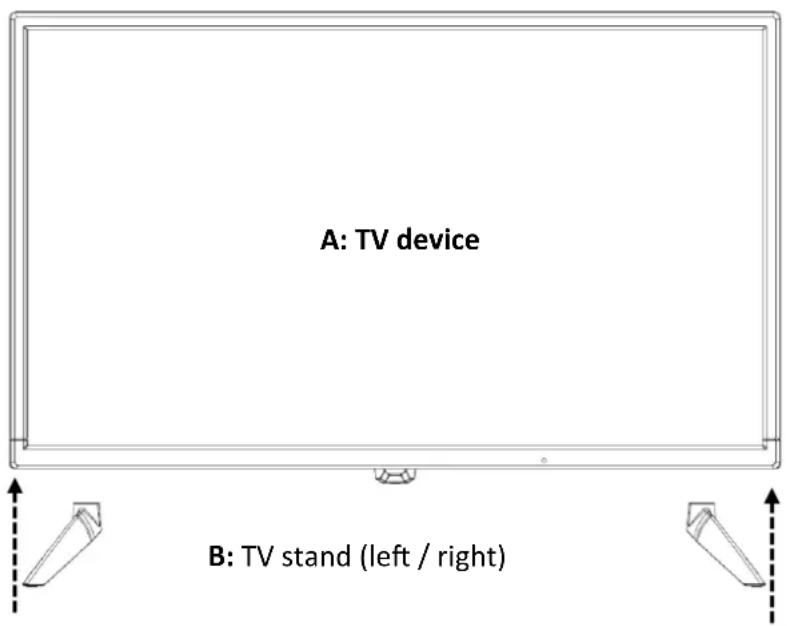
Bild 1:
- Place the TV set (A) on a level and lightly padded surface with the display facing downwards.
-
Insert the two feet into the device as shown in the illustration.
-
LED2225: The feet are attached to the TV set using the screws supplied.
- LED2425: The feet are plugged in. No screws are included in the scope of delivery.
Note:
- Do not overtighten the screws. You could damage the screws or the thread.
DESCRIPTION OF THE BUTTONS ON THE LED2225 DEVICE
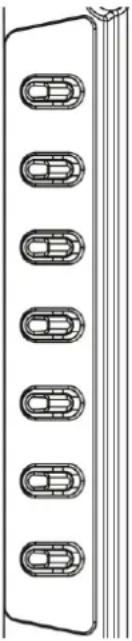 | Vol+: Louder | |
| Vol-: Quieter | ||
| CH+: Switch channel up | ||
| CH-: Switch channel down | ||
| Menu: Open / close device menu | ||
| Input: Open / close input menu | ||
| Power: Switch on device / Standby | ||
| Hinweis:The buttons are located on the back on the left-hand side. | ||
View from the front
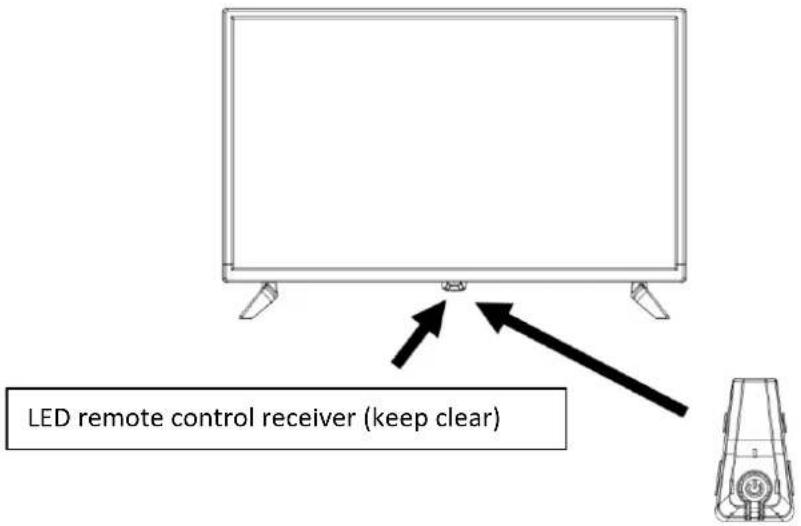
Description of the buttons and their function on the TV set:
| POWER | Device On / Off (Standby) |
CONNECTIONS
| DC IN | DC input for the supplied 12V / 3A power supply unit. |
| VGA | Connect your PC here. Video transmission. |
| PC Audio | Connect your PC here. For audio transmission. Only in combination with VGA. |
| SCART | Connect your Scart device here. |
| TV1 (S2) | Connect your satellite system here. |
| TV2 (T2HD/C) | Connect your cable system or DVB-T aerial here. |
| COAX | Connect your external audio device here. Digital audio output. |
| HDMI (ARC) | Connect your external HMDI device here. |
| USB | Connect your USB device for media playback here. |
| Common Interface (CI) | Insert your CI module (not included) here to decode chargeable channels. |
| Headphone socket | Connection for 3.5mm headphones. |
| Mini AV | Connect your external AV devices here. |
| Mini YPbPr | Only in combination with mini AV. |
Note:
- The maximum installation height of the appliance of 2 metres must not be exceeded. The appliance must be mounted on a solid surface.
This TV is equipped with a CI+ slot and supports the following digital standards: DVB-T/T2HD, DVB-S/S2 and DVB-C
Common Interface / Slot
The CI slot (CI+) is designed to accept conditional access modules (CAM) and smart cards to access pay TV and other services. Contact your pay TV service provider for more information about modules and subscriptions.
Note:
- Conditional Access Modules and Smart Cards are sold separately.
- Switch off your TV before inserting CI+ modules into the CI slot.
- Then insert the Smart Card into the Cl+ module.
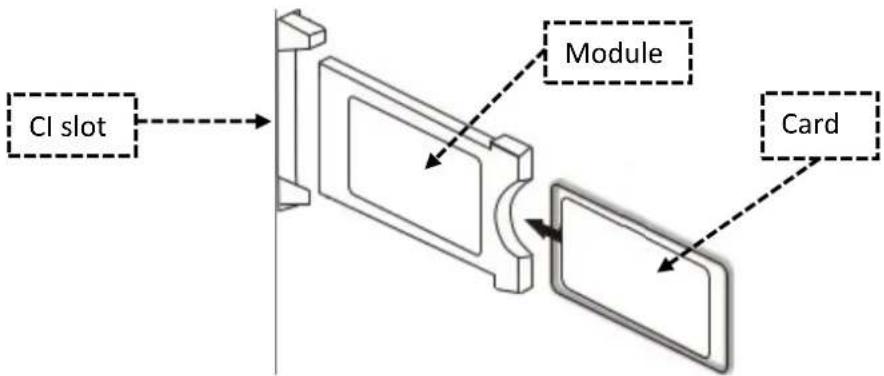
-
Switch on the TV and make sure that "Live TV" is selected as the source.
-
When the CAM is detected, the following message appears on the screen: "CI module has been detected". Wait a few seconds until the card is activated.
-
Now select the desired pay-TV programme.
-
Detailed information about the Smart Card used is displayed in the configuration menu under the following menu item: All settings > General > Transmitter > CI information.
-
Press the OK key to OK the CI menu. Refer to the manual of the module for details on the settings.
-
When the module is removed, the following text is displayed on the screen: "CI module has been removed".
REMOTE CONTROL
| English | German |
| CI+ Slot | CI+ Steckplatz |
| CAM | CAM |
| Smart Card | Smart Card |
The remote control uses infrared waves (IR). Hold the remote control in the direction of the front of the LED TV. If the remote control is out of range or angle, the remote control may not work properly.
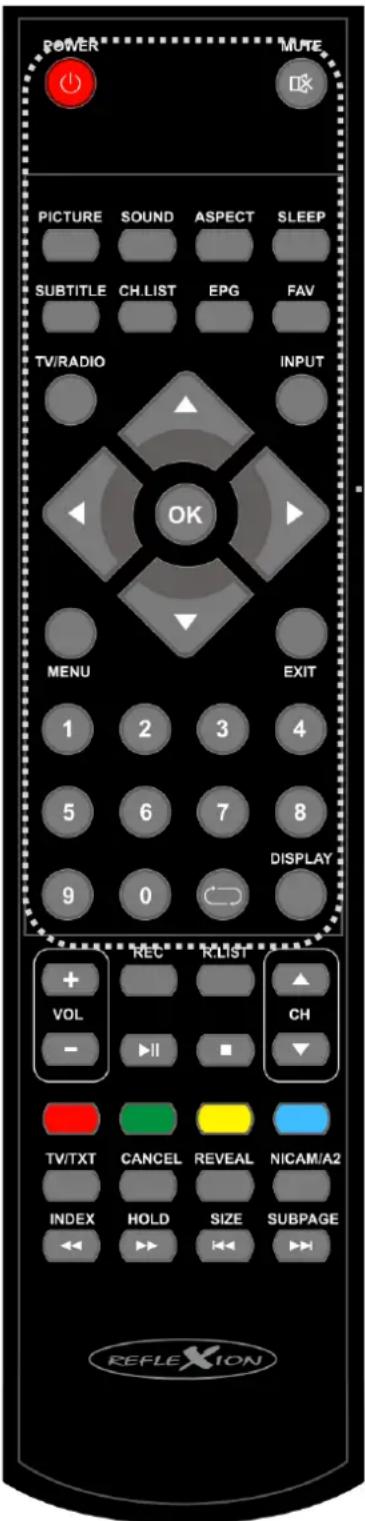
- POWER: On / Off (standby)
- MUTE: Mute On / Off
- PICTURE: Change picture mode
- SOUND: Change sound mode
- ASPECT: Setting the aspect ratio
- SLEEP: Switch SLEEP mode on / off
- SUBTITLE: Switch on and select subtitles
- CH.LIST: Open / close programme list
-
EPG: Programme and programme overview
-
FAV: Open / close favourites list
-
TV/RADIO: Switch between TV and radio programmes
-
INPUT: Select input source
-
▲ ◀ ▶ ▼: Navigation keys for menu operation
-
OK: Confirm menu item
-
MENU: Open main menu
-
EXIT: Closing menu item
-
0-9: Programme selection buttons
-
⇌: Last channel
-
DISPLAY: Show information
-
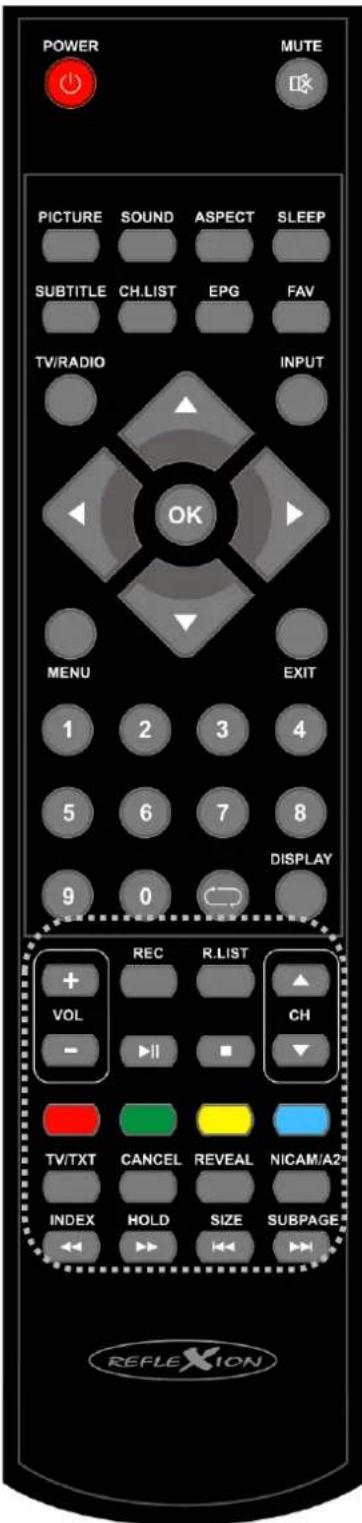
VOL +: Louder
-
VOL -: Quieter
-
CH ▲: Next Channel
-
CH ▼: Previous channel
-
▶ / 11: Play / Pause
-
■ / Stop: Stop playback
-
Colour buttons: Quick selection buttons for menu settings
-
TV/TXT: Open / close teletext
-
CANCEL: Hide display (teletext)
-
REVEAL: Show hidden texts (Teletext)
-
NICAM/A2: Open audio languages menu / close menu
-
INDEX: Homepage (Teletext)
-
←: Fast rewind
-
HOLD: Do not turn the page (teletext)
-
▶: Fast forward
-
SIZE: Enlarge display (teletext)
-
: Previous chapter / Title
-
SUBPAGE: Submenu selection (teletext)
-
▶: Next chapter / title
-
REC: Start USB recording
-
R.LIST: Open recording list
-
Press the [INPUT] button to open the 'Input source' menu screen.
- Use the [▲ / ▼] buttons to navigate in the menu.
- Press the [OK] button to confirm the selection.
- Press the [EXIT] button to close the menu.
- The following 'Input sources' are available: Satellite / DTV (DVB-C/T) / ATV / AV / PC / SCART / COMPONENTS / HDMI / MEDIA
NAVIGATION IN THE MENU
To navigate in the menu, press the following buttons.
- MENU: Open menu / Previous menu
• ▲ / ▼ / ◀ / ▶: Up / Down / Left / Right
• OK: Confirm menu item - EXIT: Close menu
SWITCH ON / SWITCH OFF TV
- Connect the supplied mains adapter to your power socket and the [DC IN] input on the back of the device.
- Press the [POWER] button to switch on the device.
- To switch the device off (standby), press the [POWER] button again.
FIRST INSTALLATION
First installation:
- Press the [POWER] button to switch on the device.
- Use the [▲▼◀▶] buttons to select the Menu language and the Country.
- Press the [OK] button to confirm the selection and move to the next menu item Channel search.
Channel search:
- Use the [▲▼◀▶] buttons to select the setting for TV reception.
- The following settings are available for TV reception.
Note:
- If you are receiving satellite / cable or terrestrial via an external device, press the [EXIT] button to skip the menu.
- Now select the appropriate Input source.
FIRST INSTALLATION DVB-C
Cable reception (DVB-C)
- For cable reception, set the menu item 'DVB selection type' to 'DVB-C'.
- In the normal case, nothing needs to be set in the menu.
- Setting the 'Network ID', the 'Frequency' and the 'Symbol Rate' is only recommended for experienced users.
- Once you have selected all settings accordingly, press the [OK] button to start the automatic scan.
- Once the search is complete, TV playback starts with the first channel.
DVB-C menu items:
| Tuning type | DTV+ATV / DTV / ATV |
| DVB selection type | DVB-T / DVB-C / Satellite |
| Search type | Full search / network search |
| Network ID | Auto / Manual (only if Search type is set to Network search) |
| Frequency | Auto / Manual (only if Search type is set to Network search) |
| Symbol rate | Auto / Manual (only if Search type is set to Network search) |
| LCN | On / Off (it is recommended to set the setting to Off). |
FIRST INSTALLATION DVB-T
Terrestrial reception (DVB-T / indoor aerial)
- For terrestrial reception, set the menu item 'DVB selection type' to 'DVB-T'.
- The menu items 'Search mode', 'Network ID', 'Frequency' and 'Symbol rate' are fixed and cannot be adjusted.
- Once you have selected all settings accordingly, press the [OK] button to start the automatic search.
- Once the search is complete, TV playback starts with the first channel.
Note:
- It is recommended to set the 'LCN' setting to Off.
DVB-T menu items:
| Tuning type | ATV (analogue) / DTV (digital) / ATV + DTV |
| DVB selection type | DVB-T / DVB-C / Satellite |
| Search type | Cannot be customised |
| Network ID | Cannot be customised |
| Frequency | Cannot be customised |
| Symbol rate | Cannot be customised |
| LCN | On / Off (it is recommended to set the setting to ‘Off’). |
FIRST INSTALLATION DVB-S
Satellite reception (DVB-S)
- For satellite reception, set the menu item 'DVB selection type' to 'Satellite'.
- In the normal case, nothing needs to be set in the menu.
- Confirm the entry with the [OK] button.
- A query now appears asking whether the 'Standard transmitter list' should be loaded?
• Yes: The Standard channel list (Astra 19.2°E) is loaded.
• No: The Automatic channel search is started.
- Once the 'Automatic search' or 'Loading the standard channel list' is complete, TV playback starts with the first channel.
DVB-S menu items:
| Tuning type | Cannot be customised |
| DVB selection type | Satellite / DVB-T / DVB-C |
| Satellite | Select the desired satellite.Astra 19.2°E is preset as the default. |
| Search mode | Standard / Blind Scan / Network |
| Channel type | All channels / Free channels |
| Service type | All / DTV / Radio |
MAIN MENU
- Press the [MENU] button to access the main menu.
- Use the [▲▼◀▶] buttons to navigate in the menu.
- Confirm the entry with the [OK] button.
- Use the [MENU] button to return to the previous menu item
- Press the [EXIT] button to close the menu.
- The following menu items are available for selection in the 'Main menu'.
CHANNEL / PICTURE / SOUND / TIME / LOCK / Set up
CHANNEL MENU SATELLITE
- Several channel-related menu items are available in the channel menu.
- The menu items available depend on whether Satellite or DTV has been selected as the 'Signal source.
- The following menu items are available for the Satellite area.
Automatic search
| Country | Set the installation location. |
| Satellite | Select the desired satellite. Astra 19.2°E is preset as the default. |
| Search mode | Standard / Blind Scan / Network |
| Channel type | All channels / FTA channels |
| Service type | All / DTV / Radio |
Setting up the satellite antenna
- The menu is divided into two areas. On the left is the satellite / transponder list.
- On the right side you will find the LNB settings.
Transponder list / Satellite list
| Transponder / Satellite list: | Press the [EPG] button to switch between the transponder or satellite list. |
| Selection: | Press the [OK] button to confirm the selection. |
| Edit: | Press the [Green] button to edit a satellite or transponder.edit a satellite or transponder. |
| New: | Press the [Yellow] button to add a new transponder or satellite. |
| Delete: | Press the [Yellow] button to add a new transponder or satellite. |
| Search: | Press the [Red] button to delete a satellite or transponder. |
| Exit: | Press the [Blue] button to start the search on a transponder or satellite marked with the [OK] button. |
Edit / New:
- Select a 'Transponder / Satellite' to be edited.
- Press the [Green / Yellow] button.
- The following settings can be adjusted.
• Satellite: Satellite name / Longitude Direction / Longitude Angle / Band
• Transponder: Frequency / SR (ks/s) Symbol rate / Polarity
LNB settings
- Press the [▶] button to switch from the 'Transponder list' to the 'LNB settings'.
- The following settings are available.
Note:
- The LNB settings are only recommended for experienced users.
| LNB type | 05150/05750, 09750/10600, 09750/10700, 10000/10450, 05150, 05750, 09750, 10200, 10600, 10750, 11250, 11300, 11475, User Single, User Dual, Unicable |
| LNB supply | 13/18V, 13V, 18V, Off |
| 22KHz | Auto, Off, On |
| Toneburst: | None, BurstA, BurstB |
| DiSEqC1.0 | None, LNB1, LNB2, LNB3, LNB4 |
| DiSEqC1.1 | None, LNB1 ~ LNB16 |
| Engine | None, DiSEqC1.2, DiSEqC1.3 |
Satellite Unicable setting
- Press the [Menu] button.
- Use the [▲▼◀▶] buttons to navigate to the 'Sat configuration' menu item.
- Confirm the entry with the [OK] button
- Press the [▶] button and select the [LNB type] menu item.
- Press the [OK] button and navigate to Unicable.
- Press the [OK] button to confirm the selection.
- The following setting options are available.
CHANNEL MENU SATELLITE
UK
| LNB low | Enter the lowest LNB frequency. The setting can be found on your LNB |
| LNB high | Enter the top LNB frequency. The setting can be found on your LNB. |
| Channel ID | Enter the channel ID. The setting can be found on your multiswitch or LNB. |
| Frequency | Enter the Unicable frequency. You can find the frequency on your multiswitch or LNB. |
CHANNEL MENU DTV (DVB-C/T)
- Several channel-related menu items are available in the channel menu.
- The menu items available depend on whether "Satellite" or "DTV" has been selected as the "Signal source".
- The following menu items are available for the "DTV" area.
Automatic search / ATV manual tuning / DTV manual search / Program editing / Signal information / CI information / 5V active antenna
Automatic search
The following settings are available for the "Auto search" menu item.
| Country | Select the installation location. |
| Tuning type | ATV (Analog) / DTV (Digital) / ATV + DTV |
| DVB selection type | DVB-C/DVB-T2 |
| Search type | Network Search / Full (Only for DVB-C) |
| Network ID | Auto / Manual (Only if “Search type” is set to “Network search”) For DVB-T, the value is fixed. |
| Frequency | Auto / Manual (Only if “Search type” is set to “Network search”) For DVB-T, the value is fixed. |
| Symbol Rate | Auto / Manual (Only if “Search type” is set to “Network search”) For DVB-T, the value is fixed. |
| LCN | On / Off (It is recommended to set the setting to “Off”) |
ATV tuning manually
The following settings are available for the menu item "ATV tuning manual".
| Current channel | Select the program number (1-99) for manual search. |
| Color System | Set the color system for searching.PAL / SECAM / AUTO |
| Sound system | Set the sound system for searching.BG / I / DK / L |
| fine tune | Manual fine-tuning |
| Search | Press [◀ / ▶] button to start manual search. |
DTV manual search
The following menu items are available for the "DTV manual search".
• DVB-C: Frequency / SR (ks/s) / QAM type
• DVB-T: Frequency / Channel (+/-)
5V active antenna
In this menu, set the 5V voltage for active antennas to "On" or "Off".
- On: A 5V voltage for active DVB-T antennas is output at the "TV2" connection.
- Off: The 5V voltage is switched off.
SIGNAL INFORMATION
This menu displays information on signal reception for the selected reception type (satellite, DVB-C, DVB-T).
• Satellite: Satellite name / transponder / modulation / signal quality / signal
• DVB-C: Frequency / Network / Modulation / Quality / Signal
• DVB-T: Channel / Network / Modulation / Quality / Signal
CI-INFORMATION
This menu displays information about the inserted CI module and the corresponding card.
Note:
- For more information on the module or card, please contact the provider of the module and card.
EDIT PROGRAMS
EDIT PROGRAMMESIn this menu you can edit the (satellite / DVB-C / DVB-T) channel list and adapt it to the desired channel order.
- Press the [MENU] button to open the "Main menu".
- Navigate to the "Channel" menu item and press the [OK] button.
- Navigate to the "Program editing" menu item and press the [OK] button.
- The following setting options are available.
Move (yellow)
- Select a transmitter to be moved.
- Press the [Yellow] button to select the channel.
- Navigate to the desired program position.
- Press the [OK] button to confirm the entry.
- The station has been moved.
- Repeat steps "1-4" until the desired program sequence is reached.
Skip (Blue)
- Select a station to be skipped.
- Press the [Blue] button to mark the station with a skip symbol.
- If the station is marked with the symbol, the station is skipped when switching.
- Repeat steps 1-2 until all the stations to be skipped are marked.
- To stop skipping a station, select a marked station and press the [Blue] button. The station is now no longer highlighted.
Delete (red)
- select a station to be deleted.
- Press the [Red] button to delete the selected station.
- Repeat steps 1-2 until all desired channels have been deleted.
Adding favorites (FAV)
- Select a station to be saved as a favorite.
- Press the [FAV] button to mark the station with a heart symbol.
- Repeat steps 1-2 until all desired channels are marked as favorites.
Opening the favorites list (FAV)
- In TV mode, press the [FAV] button to open the favorites list.
- Select the desired channel with the [▲▼] button and confirm the entry with the [OK] button to switch to the channel
- Press the [EXIT] button to close the list.
Note:
• The list cannot be sorted separately and is sorted by the overall list.
PICTURE MENU
You can make various picture settings in this menu.
- Press the [MENU] button to open the "Main menu".
- Navigate to the "Picture" menu item and press the [OK] button.
- The following setting options are available.
Picture mode / Contrast / Brightness / Color / Tint / Sharpness / Color temperature / Noise reduction
Picture mode
- Select one of the fixed picture settings.
- To set the "Contrast / Brightness / Color / Tint / Sharpness" values manually, select the "Picture setting" "Personal".
- The following settings are available for selection. Dynamic / Standard / Mild / Personal
Note:
- The set picture modes can be changed at any time in TV mode using the [PICTURE] button.
Contrast / Brightness / Color / Sharpness
• The values are fixed.
- Can only be adjusted if the "Picture mode" is set to "Personal".
Color tone
- The "Hue" is fixed.
- The “Hue” can only be adjusted if the “Picture mode” is set to “Personal” and if the device is connected to a PC via a “VGA” connection.
Color temperature
- Set the "Color temperature" for the picture.
- Ghe following settings are available.
Normal / Warm / Cold
Noise reduction
- Set the strength of the "Noise reduction" for the picture.
- The following settings are available Low / Medium / High / Standard / Off
You can make various sound settings in this menu.
- Press the [MENU] button to open the "Main menu".
- Navigate to the "Sound" menu item and press the [OK] button.
- The following settings are available.
Sound mode / Treble / Bass / Balance / Auto volume / SPDIF mode / AD switch Note:
- The set sound modes can be changed at any time in TV mode using the [SOUND] button.
Sound mode
- Select one of the fixed sound settings.
- To set the "Treble / Bass" values manually, select the "Sound mode" "Personal".
- The following settings are available for selection. Standard / Music / Movie / Sport / Personal
Treble / Bass
• The values are fixed.
- Can only be adjusted if the "Sound mode" is set to "Personal".
Balance
Use this menu to set the speaker balance.
Example:
- If the value is set to “-50”, only the left speaker is active.
- If the value is set to "50", only the right speaker is active.
Auto volume
This menu item adjusts the volume differences between loud and quiet scenes.
Example:
- The difference in volume between TV programs and commercial breaks is adjusted.
SPDIF Mode
In this menu, you set the format for the digital audio output "COAX". The following setting options are available.
Off / PCM / Auto
AD switch
Set the menu item to "On" / "Off" to automatically activate or deactivate the audio version of TV programs for people with visual impairments.
- AD switch: On / Off
• AD level: Set the level for the audio version.
Note:
• The audio version can only be played back if it is transmitted by the TV station.
TIME MENU
You can make various time-related settings in this menu.
- Press the [MENU] button to open the "Main menu".
- Navigate to the "Time" menu item and press the [OK] button.
- The following settings are available.
Clock / Time zone / Sleep timer / Auto standby / OSD timer
Clock
The time is set automatically based on the data transmitted from satellite reception, terrestrial reception or cable reception. The setting cannot be adjusted manually.
Time zone
Set the time zone based on the installation location. Various selection options are available.
Sleep timer
Set the "Sleep timer" so that the appliance switches off automatically after the set time has elapsed. The following settings are available.
The appliance switches off automatically after the time has elapsed if the appliance has not been operated (standby). The following settings are available for selection.
Off / 2H / 2H / 4h (in hours)
OSD Timer
You can use this menu item to set the time after which the menu is automatically closed if no operation takes place. The following settings are available.
Off / 5s / 15s / 30s (in seconds)
LOCK MENU
You can make various settings in this menu.
- Press the [MENU] button to open the "Main menu".
- Navigate to the "LOCK" menu item and press the [OK] button.
- The following settings are available.
System lock / Set password / Channel lock / Parental lock / Key lock / Hotel mode
System lock
Set this setting to "On" or "Off" to gain access to the "Channel lock / Parental lock / Key lock / Hotel mode" settings. The menu item also activates the password prompt for certain menu items.
Note:
• The default password is: 0000
Set password
You can change the password in this menu.
| Please enter old password | Enter the current password. |
| Please enter new password | Enter the new password. |
| Confirm new password | Enter the new password again to confirm the password. |
| The password is now adjusted. | |
Note:
• Make a note of the new password.
Channel lock
You can lock channels in this menu. The locked channels are provided with a password prompt.
- Navigate to the desired channel to be locked.
- Press the [Green] button to lock the transmitter.
- The selected transmitter is marked with a lock symbol.
-
Repeat steps "1-3" until the desired channels are locked.
-
If you no longer want to lock a transmitter, navigate to the transmitter and press the [Green] button again.
- The transmitter is now no longer locked.
Parental control
In this menu, you can set the value for the parental control query. The following options are available.
Off / 3 / 4 / 5 / 6 / 7 / 8 / 9 / 10 / 11 / 12 / 13 / 14 / 15 / 16 / 17 / 18
Key lock
In this menu, you can switch the lock for the operating buttons on the device "On" or "Off".
- On: The operating lock is activated and the operating buttons on the device have no function.
• Off: The operating lock is deactivated and the operating buttons on the device work.
HOTEL MODE
You can define and lock various settings in hotel mode. The following settings are available.
| Hotel mode | On / Off |
| Lock source | You can use this menu item to lock the “Input sources”. |
| Start source | Select an “Input source” with which the device should start when it is switched on. |
| Start channel | Select a “Start channel” with which the device should start when it is switched on. The setting is only possible if “Satellite”, “DTV” or “ATV” has been selected as the “Start source”.” |
| Standard volume | Set the “Volume” that is set as the default when switching on. |
| Max. Volume | Set the maximum volume available for selection. |
| Import database | Import the exported data from a USB stick to restore the previously set settings. |
| Export database | Export the settings you have made and the channel list you have created as a backup to a USB stick. |
| Reset locks | Use this menu item to reset all settings made in hotel mode to the default setting. |
CONFIGURATION MENU
You can make various settings in this menu.
- Press the [MENU] button to open the "Main menu".
- Navigate to the "Configuration" menu item and press the [OK] button.
- The following setting options are available.
Language / Teletext character set / Audio language / Subtitle language / Hearing impaired / Picture format / Blue screen / Initial installation / Restore factory settings / Software update (USB) / HDMI CEC
Menu language
You can set the menu language in this menu item. Select one of eight languages.
English / German / Spanish / French / etc.
Teletext character set
In this menu item, you can adjust the character set for the teletext.
West / East / Russian / Arabic / Farsi
Audio language
You can set the preferred audio language in this menu item. You can set a primary and secondary audio language.
English / German / Spanish / French / etc.
Subtitle language
This menu item allows you to set the preferred subtitle language. You can set a Primary and Secondary subtitle language.
English / German / Spanish / French / etc.
Hearing impaired
Set this menu item On or Off to activate or deactivate the automatic display of subtitles.
- On: Subtitles are switched on automatically.
- Off: Subtitles are switched off.
Picture format
Use this menu item to set the picture format. The following settings are available for selection.
Auto / 4:3 / 16:9 / Zoom1 / Zoom2
Blue screen
You can use this menu item to set whether the device displays a black or blue screen when there is no signal.
- On: Blue screen
- Off: Black screen
Initial installation
You can use this menu item to repeat the initial installation.
Restore factory settings
Use this menu item to reset the device to the factory settings. All settings made are reset.
Note:
- The password is not reset.
Software update (USB)
You can carry out a software update with this menu item. The software can only be updated via USB. For more information, please contact the manufacturer's service department with the device type and serial number.
With this menu item, you can set various CEC settings for the automatic "On" and "Off" switching of the TV set. The following settings are available.
Note:
- Only if supported by the external HDMI device.
| CEC Control: | When the TV set is switched on, the external device connected via HDMI also switches on.If the external device is switched on, the TV set switches on automatically.On / OFF |
| ARC: | This menu item allows you to transmit the TV sound via HDMI to other external playback devices.On / Off |
| Device Auto-Power Off: | ON: The function is switched on.If the TV set is switched off, the external device connected via HDMI is also switched off.If the TV set is switched on, the external device connected via HDMI is also switched on.OFF: The function is switched off. |
| TV Auto Power On | ON: The function is switched on.If the external device connected via HDMI is switched on, the TV set also switches on.OFF: The function is switched off. |
| Device list | Displays the device connected via HDMI. |
| Device control | Displays the device menu of the device connected via HDMI. |
MEDIA MODE (USB)
- Press the [INPUT] button to enter media mode.
- Use the [▲▼] buttons to navigate to "Media".
- Confirm the entry with the [OK] button.
- Insert a USB stick into the USB socket of the device.
- Select one of the following categories (Photo / Music / Movie / Text).
Playback function
The following buttons are important for media playback.
• ▶ / 11: Play / Pause
- ■ / Stop: Stop playback
• ◀: Next chapter / title
• ▶: Previous chapter / Title
• ←: Fast rewind
• : Fast forward
Photo / Music / Movie Text playback
- To select a file, press the [▲▼◀▶] buttons.
- To start the file in full screen view, press the [▶ / Play] button.
- To select several files, mark the files with the [OK] button
- Pause briefly on a file and a preview playback will start.
- Press the [OK] button during playback to call up the menu bar.
- Press the [▼] button to close the menu bar.
Photo menu bar
The following menu items are available in the photo menu bar:
Music menu bar
The following menu items are available in the music menu bar:
| Play / Pause | Resume playback normally / Pause playback |
| FB | Fast rewind |
| FF | Fast forward |
| Previous | Previous title |
| Next | Next title |
| Stop | Stop playback |
| Repeat | Repeat1 / Repeat ALL / Repeat NONE |
| A-B playback | Set start and end point. |
| Mute | Mute mode On / Off |
| Playlist | Displays the playlist |
| Info | Displays file information |
| Go to time | Switch to a desired playback point. |
Movie menu bar
The following menu items are available in the movie menu bar:
| Play /Pause | Resume playback normally / Pause playback. |
| FB | Fast rewind |
| FF | Fast forward |
| Previous | Previous title |
| Next | Next title |
| Stop | Stop playback |
| CharSet | Select subtitle character set |
| Playback modeRepeat 1Repeat ALLRepeat NONE | Only the current file is repeated.All selected files are repeated.No file is repeated. |
| A-B playback | Set start and end point |
| Playlist | Displays the playlist |
| Info | Displays file information |
| Slowl | Activate slow playback |
| Step | Step-by-step playback |
| Go to time | Switch to a desired playback point |
| Zoom in | Zoom into the image |
MEDIA MODE (USB)
UK
| Zoom out | Zoom out of the image |
| Picture format | 4:3 / 16:9 / Auto |
| Move view | Move zoom section |
Text menu bar
The following menu items are available for selection in the text menu bar:
| Previous page | Last page |
| Next page | Next page |
| Previous | Next file |
| Next | Previous file |
| Stop | Stop playback |
| CharSet | Select the character set |
| Music On / Off | Music playback when music is highlighted. |
| Playlist | Displays the playlist |
| Info | Displays file information |
USB RECORDING
Instant recording
- Press the [REC] button to start recording.
- Press the [▶/ ] button to play back the recording and start time-shifted television.
- Use the [ ] and [ ] buttons to fast forward and rewind the recording. Press the [▶/ ] button to pause playback. Press the [▶/ ] button again and playback will resume normally. The device continues to record.
- Press the [■] button and the time-shifted TV will stop. The device continues to record.
- Press the [■] button again to stop and save the recording. Press the [◀] button to confirm that the recording is finished and press the [▶] button to cancel the process.
EPG recording
- Press the [EPG] button to open the EPG menu.
- Press the [▲/▼] buttons to select the desired program.
- Then press the [▶] button and select the desired program to be recorded using the [▲/▼] buttons
- Press the [red] button on the remote control to program the recording. A red "R" symbol next to the time of the program indicates that the recording is programmed.
- Press the [EXIT] button to close the EPG menu.
- Press the [R.LIST] button to open the "Recording list / Planning list".
- Press the [◀/▶] buttons to switch between the two lists (recording list / planning list)
- Press the [EXIT] button to close the menu.
Recording list / Planning list
- press the [REC.L] button to open the menu.
- Use the [◀/▶] buttons to switch between the "Recording list" and the "Planning list" in the top line.
- Press the [▼] button to go to the recording list or the planning list.
- Use the following buttons to edit the recording list and planning list.
Planning list
- Navigate in the menu: [▲▼◀▶]
- Delete: [Red]
- Add: [Yellow]
- Edit: [Blue]
- Exit: [EXIT]
Recording list
- Navigate in the menu: [▲▼◀▶]
- Delete: [Red]
- Playback: [OK]
- Exit: [EXIT]
SIMPLE TROUBLESHOOTING
If the screen fails or there is a sharp drop in performance, check the TV using the following instructions: Also check connected devices to find the source of the fault. If the screen still does not work as expected, contact customer support.
No power
- Check that the mains adapter or the car adapter is connected to the TV set.
- Check that the toggle switch is in the on position.
No picture or no sound
- Check whether the mains adapter or the car adapter is connected to the TV set.
- Check the picture and sound settings.
- Check whether the antenna / cable system / satellite antenna is connected correctly.
- Change to another programme.
- Check that the connected devices (e.g. receiver) are connected correctly.
Poor picture quality
- Check that the antenna cable is connected correctly.
- Check the manual TV tuning of the TV channel.
- Change the picture settings: Brightness, colour, sharpness, contrast and hue. Make sure that the TV is not located near other electrical appliances that could cause radio frequency interference.
No colour
- Adjust the colour settings.
- Check that the selected programme is broadcast in colour.
• Make sure that the channel is tuned correctly.
The TV does not respond to the remote control
• Make sure there are no obstacles between the remote control and the TV.
• Make sure the remote control is within reach.
• Make sure that the batteries in the remote control are not dead.
This TV is intended for household use and is classified as harmless with regard to electromagnetic waves. Therefore, you can use the unit in any location, including residential areas.
USB output voltage: 5V / 500mA (Smartphones are not be detected as storage, Devices that need to be installed are also not detected).
USB stick / HDD size: max. 1TB
Formatting: FAT and NTSF
| MEDIA | FORMAT | CODEC | REMARK | |
| VIDEO | AUDIO | |||
| Movie | avi | Xvid, MPEG-2, MPGEG-4, H.264 | MP3 WMA AAC MP2 PCM | Max. Resolution: 1080P Max. Frame rate: 30fps |
| mp4 | MPEG-2, MPEG-4, H.264 | |||
| mpg | MPEG-1, MPEG-2 | |||
| mkv mov | MPEG-1/2/4, H.264 | |||
| dat | MPEG-1 | MP2 | Max. Resolution: 352 x 288 | |
| vob | MPEG-2 | Max. Resolution: 720 x 576 | ||
| rm | RV8, RV9, RV10, RA8-LBR | COOK | Max. Resolution: 800 x 600 (RV30) Max. Resolution: 1280 x 720 (RV40) | |
| MUSIC | ADPCM, LPCM | |||
| MP3 | ||||
| MPEG1 Layer1,2 | ||||
| AC3 | ||||
| AAC, HE-AAC | ||||
| WMA7, WMA8, WMA9 STD | ||||
| CDDA (wav) | ||||
| Real Audio8 LBR | ||||
| DD51 | ||||
| DD Plus | ||||
| PHOTO | JPEG | Max. Resolution:: 8192 x 8192 | ||
| Progressive JPEG | Max. Resolution: 1024 x 768 | |||
| BMP | Max. Resolution: 3000 x 3000 | |||
| PNG | Max. Resolution: 3000 x 3000 | |||
| TEXT | txt | ANSI / UNICODE GB / UTF8 | Max. File size: 1MB | |
Errors and technical modifications excepted.
| Device type | LED2225 | LED2425 | ||
| Manufacturer | Reflexion | Reflexion | ||
| Energy efficiency class (standard SDR) | E | E | ||
| Power consumption ‘On’ (standard SDR) | 15,1W | 17,2W | ||
| Power consumption standby | <0,5W | <0,5W | ||
| Type of electrical display | DLED, LCD / LED (Pixel Class 1) | |||
| Aspect ratio | 16:9 | 16:9 | ||
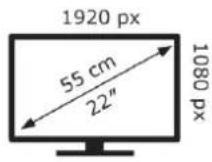
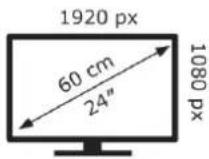
| Screen resolution (pixels) | 1920 x 1080 | 1920 x 1080 | ||
| Screen diagonal (cm / inch) | 55cm / 22 inch | 60cm / 24 inch | ||
| Visible screen area | 12,7dm2 | 15,3dm2 | ||
| Refresh rate / response time | 60Hz / 18ms | 60Hz / 20ms | ||
| Input voltage power supply unit | Input | AC: 100 – 240V~50/60Hz | AC: 100 – 240V~50/60Hz | |
| Output | DC: 12V / 3A | DC: 12V / 3A | ||
| Input voltage device | DC 12V / 3A | DC 12V / 3A | ||
| Average annual consumption (kWh/1000h) Standard SDR | 15,1kWh/1000h | 17,2kWh/1000h | ||
| Contrast | 3000:1 | 3000:1 | ||
| Brightness (cd/m2) | 180cd/m2 | 180cd/m2 | ||
| Colours | 16,7M colours | 16.7M colours | ||
| Viewing angle | Horizontal: 178° / Vertical: 178° | Horizontal: 178° / Vertical: 178° | ||
| TV function | Colour system | PAL / SECAM | PAL / SECAM | |
| Channels | 100 / 600 (T/C) / 3000 (S) | 100 / 600 (T/C) / 3000 (S) | ||
| Teletext (ATV / DTV) | 1000 / 1000 | 1000 / 1000 | ||
| Connections | Power input DC 12V | 1 | 1 | |
| VGA | 1 | 1 | ||
| PC AUDIO | 1 | 1 | ||
| SCART | 1 | 1 | ||
| TV1 (S2) | 1 | 1 | ||
| TV2 (T2HD/C) | 1 | 1 | ||
| COAX | 1 | 1 | ||
| HDMI (ACR) | 1 | 1 | ||
| USB (DC 5V / 500mA) | 1 | 1 | ||
| Headphones (3.5mm) | 1 | 1 | ||
| Mini YPbPr (3,5mm) | 1 | 1 | ||
| OSD language | German, English etc. | German, English etc. | ||
| AUDIO output | 2x 3W | 2x 3W | ||
| Weight (incl. stand) | 2,15Kg | 2,15Kg | ||
| Complete weight | 3,20Kg | 3,40Kg | ||
| Maximum power consumption | <36W | <36W | ||
| Peak luminance ratio in % | <85% | <76% | ||
| Mercury content in mg / lead contained | 0mg / No | 0mg / No | ||
| VESA | 100 x 100mm | 100 x 100mm | ||
| Dimensions without base: (W/D/H) in mm | 504 x 81 x 306 mm | 550 x 88 x 336 mm | ||
| Dimensions with base: (W/D/H) in mm | 526 x 153 x 327 mm | 550 x 142 x 369 mm | ||
NOTE: Design and specifications are subject to change without notice.
Hereby, UltraMedia GmbH & Co. Handels KG hereby declares that the radio equipment type LED2225 and LED2425 is in compliance with Directive 2014/53/EU.
The full text of the EU Declaration of Conformity is available at the following internet address.
We hope you enjoy using the device.
Your UltraMedia Team

DISPOSAL INSTRUCTIONS
This symbol on the product or in the instructions means that the appliance, electrical and electronic equipment and batteries must be disposed of separately from your household waste at the end of their working life. There are separate collection systems for recycling in the EU. For more information, please contact your local authority or your dealer.
BATTERY DISPOSAL INSTRUCTIONS
BATTERIES AND RECHARGEABLE BATTERIES MUST NOT BE DISPOSED OF WITH HOUSEHOLD WASTE! NON-PROFESSIONAL DISPOSAL OF BATTERIES AND ACCUMULATORS CAUSES ENVIRONMENTAL POLLUTION / DAMAGE.
EVERY CONSUMER IS LEGALLY OBLIGED TO DISPOSE OF BATTERIES AND ACCUMULATORS AT THE END OF THEIR LIFE CYCLE AT SUITABLE COLLECTION POINTS, FOR EXAMPLE, IN HIS OR HER MUNICIPALITY/BOROUGH OR AT RETAIL OUTLETS.
DROP-OFF AT COLLECTION POINTS IS FREE OF CHARGE. BY HANDING IN BATTERIES AND ACCUMULATORS AT COLLECTION POINTS, THEY ARE RECYCLED AND THUS DISPOSED OF IN AN ENVIRONMENTALLY FRIENDLY WAY.
DISPOSING OF BATTERIES AND ACCUMULATORS IN HOUSEHOLD WASTE DOES NOT ENSURE ENVIRONMENTALLY FRIENDLY DISPOSAL AND MAY CAUSE DAMAGE TO THE ENVIRONMENT.
BATTERIES AND RECHARGEABLE BATTERIES MUST BE REMOVED FROM THE APPLIANCE BEFORE DISPOSAL. PLEASE RETURN ONLY IN DISCHARGED CONDITION!
*) MARKED WITH:
CD = CADMIUM,
HG = MERCURY,
PB = LEAD
HDMI-INFORMATION
The terms HDMI and HDMI High-Definition Multimedia Interface and the HDMI logo are trademarks or registered trademarks of HDMI Licensing Administrator, Inc. in the United States and other countries.

HIGH-DEFINITION MULTIMEDIA INTERFACE

ENERG
LED2225
Reflexion
A
B
C
D
E
F
G
15 kWh/1000h
2019/2013

ENERG
LED2425
Reflexion
A
B
C
D
E
F
G

E
17 kWh/1000h
2019/2013
Dear Customer,
Thank you for choosing one of our products. Our products undergo precise quality control in the course of production. If one of our devices gives you cause for complaint, or you have questions about one of our devices, please call our customer support.
We give a 36 month warranty on TV and SAT devices, and a 24 month warranty on portable DVD and audio devices from the date of purchase. Outside of the warranty, we offer you a paid repair based on a cost estimate. Please contact our customer support before submitting.
The warranty relates to material and production defects. Your device will be repaired or replaced during the warranty period. Unfortunately, UltraMedia cannot reimburse the purchase price. Damage caused by improper use, the use of third-party accessories, falls, dust, water damage and signs of wear (e.g. scratches, optical wear and tear) caused by the customer or external influences are excluded from the guarantee.
In order to assert the warranty claims, send the device with all accessories, a copy of the invoice and the description of the fault to the address given below. Devices that do not have a proof of purchase cannot be guaranteed. Please do not forget to include your full address and a telephone number / email address for any queries.
Shipping to us takes place at your own expense. Unpaid parcels cannot be accepted and are returned to the sender.
Please pack the device securely for transport. UltraMedia assumes no liability for damage in transit that occurs on the way to us. After receiving your submission, we will process your device as soon as possible and send it back to you.
Before sending your device in, please contact our customer support or your specialist dealer, as many problems can also be solved over the phone.
| UltraMedia GmbH & Co. Handels KG | service@ultramedia.de |
| Friedrich-Penseler-Str. 28 | Tel.: +49 / (0) 4131/9239-20 |
| D-21337 Lüneburg | Mon.-Thu.: 08:00-17:00 |
| www.ultramedia.de | Fri.: 08:00-14:30 |
- English user manual: page 32
- FERNBEDIENUNG
- IMPORTANT SAFETY INSTRUCTIONS - PLEASE READ CAREFULLY BEFORE USE.
- Note:
- IMPORTANT SAFETY INSTRUCTIONS
- Headphone warning
- About the installation location
- WHAT'S IN THE BOX?
- Bild 1:
- DESCRIPTION OF THE BUTTONS ON THE LED2225 DEVICE
- Common Interface / Slot
- REMOTE CONTROL
- NAVIGATION IN THE MENU
- SWITCH ON / SWITCH OFF TV
- FIRST INSTALLATION
- First installation:
- Channel search:
- FIRST INSTALLATION DVB-C
- Cable reception (DVB-C)
- FIRST INSTALLATION DVB-T
- Terrestrial reception (DVB-T / indoor aerial)
- FIRST INSTALLATION DVB-S
- Satellite reception (DVB-S)
- MAIN MENU
- CHANNEL MENU SATELLITE
- Setting up the satellite antenna
- Edit / New:
- LNB settings
- Satellite Unicable setting
- CHANNEL MENU DTV (DVB-C/T)
- Automatic search
- ATV tuning manually
- DTV manual search
- 5V active antenna
- SIGNAL INFORMATION
- CI-INFORMATION
- EDIT PROGRAMS
- Move (yellow)
- Skip (Blue)
- Delete (red)
- Adding favorites (FAV)
- Opening the favorites list (FAV)
- PICTURE MENU
- Picture mode
- Contrast / Brightness / Color / Sharpness
- Color tone
- Color temperature
- Noise reduction
- Sound mode
- Treble / Bass
- Balance
- Auto volume
- Example:
- SPDIF Mode
- Off / PCM / Auto
- AD switch
- TIME MENU
- Clock
- Time zone
- Sleep timer
- OSD Timer
- LOCK MENU
- System lock
- Set password
- Channel lock
- Parental control
- Key lock
- HOTEL MODE
- CONFIGURATION MENU
- Menu language
- Teletext character set
- Audio language
- Subtitle language
- Hearing impaired
- Picture format
- Blue screen
- Initial installation
- Restore factory settings
- Software update (USB)
- MEDIA MODE (USB)
- Playback function
- Photo / Music / Movie Text playback
- Photo menu bar
- Music menu bar
- Movie menu bar
- Text menu bar
- USB RECORDING
- Instant recording
- EPG recording
- Recording list / Planning list
- Planning list
- Recording list
- SIMPLE TROUBLESHOOTING
- No power
- No picture or no sound
- Poor picture quality
- No colour
- The TV does not respond to the remote control
- DISPOSAL INSTRUCTIONS
- BATTERY DISPOSAL INSTRUCTIONS
- HDMI-INFORMATION
Brand : Reflexion
Model : LED2425
Category : TV