DANTE Encoder - Audio/video converter AudioControl - Free user manual and instructions
Find the device manual for free DANTE Encoder AudioControl in PDF.


| Product Type | Analog Stereo-to-Dante Encoder (Audio/Video Converter) |
| Brand | AudioControl |
| Model | ACP-DANTE-E-POE (DANTE Encoder) |
| Dimensions (Single Unit) | 110 x 96 x 25 mm (4.33 x 3.78 x 1 in) |
| Weight (Single Unit) | 0.5 lbs (0.23 kg) |
| Power Supply | USB-C 5V DC 1A (adapter included) or PoE via RJ45 |
| Audio Input | 1x Stereo RCA (analog), 1x TOSLINK (digital) |
| Audio Output | 1x Stereo RCA (loop-out), 1x RJ45 (Dante) |
| Supported Sample Rates | 44.1, 48, 88.2, 96 kHz |
| Supported Bit Depths | 16, 24, 32 bit |
| Latency | Configurable: 1, 2, 5 ms |
| Frequency Response | 20 Hz – 20 kHz |
| Analog Input Voltage | 1 VRMS (2.828 Vp-p) unbalanced |
| Loop-back Output Voltage | 1 VRMS (2.828 Vp-p) unbalanced |
| Operating Temperature | 23°F to 125°F (-5°C to 51°C) |
| Storage Temperature | -4°F to 140°F (-20°C to 60°C) |
| Humidity Range | 5% to 90% RH (non-condensing) |
| Mounting | Furniture mount (brackets included) |
| Box Contents | Unit, 5V 1A USB power adapter, European adapter, USB-A to USB-C cable, mounting brackets, screws |
| Warranty | 5 years (1 year if not installed by authorized dealer) |
| Maintenance | Clean with dry cloth; do not use water or solvents |
| Safety | Keep away from water; do not block ventilation; avoid excessive heat |
| Certifications | FCC (modifications void authority) |
| Recycling | Dispose at e-waste facility; do not trash |
Frequently Asked Questions - DANTE Encoder AudioControl
User questions about DANTE Encoder AudioControl
0 question about this device. Answer the ones you know or ask your own.
Ask a new question about this device
Download the instructions for your Audio/video converter in PDF format for free! Find your manual DANTE Encoder - AudioControl and take your electronic device back in hand. On this page are published all the documents necessary for the use of your device. DANTE Encoder by AudioControl.
USER MANUAL DANTE Encoder AudioControl
- Read these instructions.
- Keep these instructions.
- Reading the instructions should take less time than a Peter Jackson Trilogy.
- Do not use this apparatus near water.
- Clean only with a dry cloth.
- Do not block any ventilation openings.
- The devices and their accessories should never be exposed to open flames or excessive heat.
- Only use attachments and accessories specified by the manufacturer.
- To reduce the risk of electrical shock or damage to the devices and their operators, never handle or touch the devices and power cord with damp or wet hands.
- Refer all servicing to qualified service personnel. Servicing is required when the apparatus has been damaged in any way, such as power-supply cord or plug is damaged, liquid has been spilled or objects have fallen into the apparatus, the apparatus has been exposed to rain or moisture, does not operate normally, or has been dropped.
CAUTION: Changes or modifications to this device not expressly approved by AudioControl Inc. could void the user's authority to operate the equipment under FCC rules.
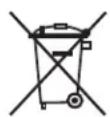
Recycling notice: If the time comes and this apparatus has fulfilled its destiny, do not throw it out into the trash. It has to be carefully recycled for the good of mankind, by a facility specially equipped for the safe recycling of electronic apparatii. Please contact your local or state recycling leaders for assistance in locating a suitable nearby recycling facility. Or, contact us and we might be able to repair it for you.
Important Safety Instructions....2
Table of Contents ....3
Introduction......4
Features 4
Key Benefits....4
Product Overview 5
Box Contents....5
Technical Specifications....5
Front and Rear Panels 6
Installation....7
Connecting the Devices....7
Dante Port Wiring 8
Audio Loop Out 8
Device Configuration....9
Basic Navigation and Dante Flow Subscription....9
Creating multicast Dante Flows 10
Changing Device Name and Encoding Configuration....10
Network Configuration 11
AES67 Audio Stream Configuration....11
Service....12
Support....12
Warranty 13
Installation Notes......15
Dante Boogie....16
Thank you 17
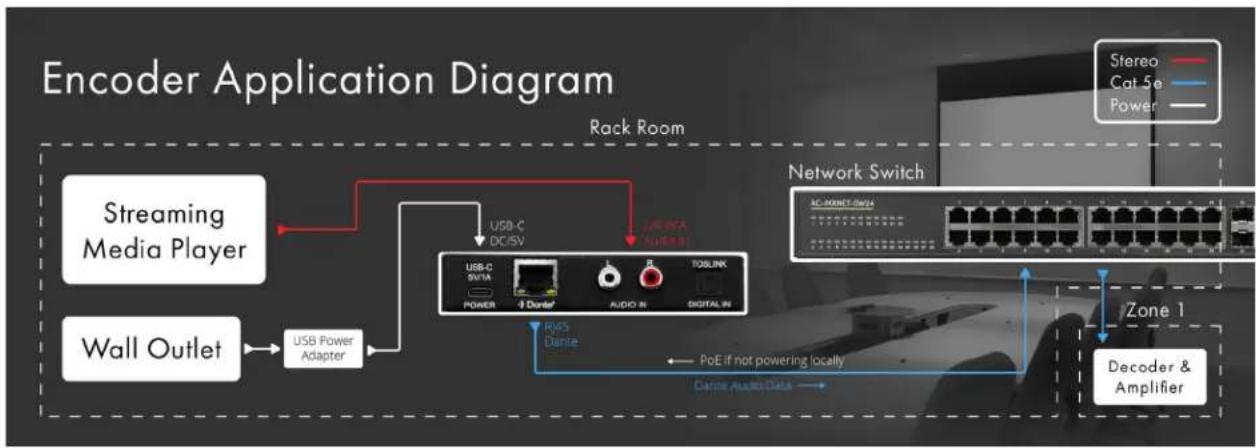
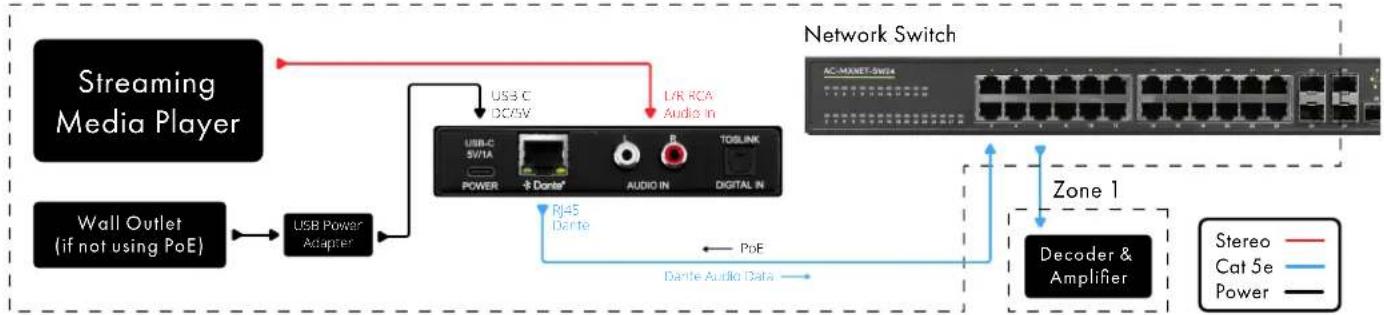
The AudioControl ACP-DANTE-E-POE is a compact, 2-channel, analog stereo-to-Dante™ platform encoder. Analog audio signals from sources with RCA-type stereo output connectors are digitally encoded by the ACP-DANTE-E-POE for distribution to other devices on a Dante™ network. Installation applications for house-of-worship, education, hotel/conference, and restaurant/retail with support equipment such as mixers, SD/USB recorders, and computer-related audio may use Dante™ devices for high quality, near-zero latency distribution of voice and music signaling. The diagram below shows the basic application of the ACP-DANTE-E-POE encoder and network switch.
flowchart
graph TD
    A["Streaming Media Player"] --> B["USB Power Adapter"]
    C["Wall Outlet"] --> B
    B --> D["USB-C DC/SV"]
    D --> E["USB-C SVTA"]
    E --> F["POWER"]
    F --> G["Dante"]
    G --> H["AUDIO IN"]
    H --> I["SIGITAL IN"]
    I --> J["TOSLINK"]
    J --> K["PoE if not powering locally"]
    K --> L["Dante Audio Data"]
    L --> M["Decoder & Amplifier"]
    N["Network Switch"] --> O["AC-MOUNT-SW1A"]
    O --> P["Power"]
    Q["Zone 1"] --> R["Decoder & Amplifier"]
    S["Stereo"] --> T["Cat 5e"]
    U["Power"] --> V["Power"]
Features
- Complete Dante™ system compatibility
• Audio Loop-out provides analog signal pass-through - Plug and play support
• Sample rates up to 96kHz
• 16-, 24-, and 32-bit audio support - Dante™ port LEDs indicate link status and activity
- Unit ships with power supply and USB Type A to Type C cable
- PoE Power
Key Benefits
- Easily interface analog audio sources with a Dante™ system
• Audio Loop-out for signal system continuity - Low profile, compact design for placement options
• Auto device-discovery on a Dante™ network - Activity LEDs provide power and Dante™ mute status
Box Contents:
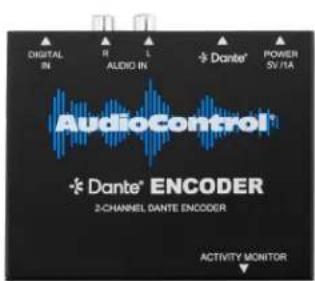
• (1x) ACP-DANTE-E-POE (Unit)
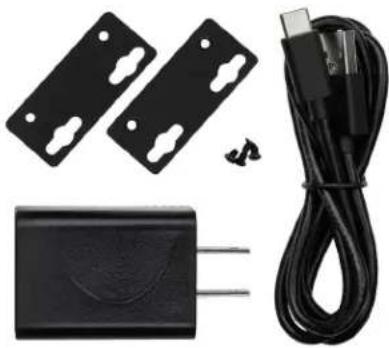
• (1x) 5V 1A USB Power Adapter
• (1x) European Adapter (not shown)
• (1x) USB-A to USB-C Cable
• (2x) Mounting Brackets
• (4x) Mounting Screws
natural_image
Product photo of a black plastic electrical connector with attached cable and two plastic clip components (no text or symbols visible)Technical Specifications
| AUDIO | |
| Frequency Response 20-20kHz | |
| Analog Input Voltage Unbalanced 1VRMS | (2.828VP-P) |
| Loopback Output Voltage Unbalanced 1VRMS | (2.828VP-P) |
| Format LPCM | |
| Supported Sample Rates 44.1kHz, 48kHz | 88.2kHz, 96kHz |
| Supported Bit Depths 16, 24, 32 | |
| Latency Configurable 1, 2, 5ms | |
| AUDIO CONNECTIONS | |
| Analog Input 1x Stereo RCA | |
| Analog Output 1x Stereo RCA | |
| Dante Network Audio 1x RJ-45 | |
| POWER | |
| USB Type-C Power Adapter Input: 100-240VAC, 50/60Hz, 0.5AOutput: 5VDC, 1A | |
| PoE via RJ45 Power over Ethernet | |
| ENVIRONMENTAL | |
| Operating Temperature | 23°F (-5°C) to 125°F (51°C) |
| Storage Temperature -4°F (-20°C) to 140°F (60°C) | |
| Humidity Range | 5% to 90% RH (no condensation) |
| DIMENSIONS | |
| Mounting | Furniture Mount Support |
| Height x Width x Depth (Single Unit) | Millimeters: 110 x 96 x 25Inches: 4.33 x 3.78 x 1 |
| Height x Width x Depth (Packaged Unit) | Millimeters: 193 x 136 x 41Inches: 7.6 x 5.35 x 1.62 |
| Weight (Single Unit) | 0.5 lbs (0.23 kg) |
| Weight (Packaged Unit) | 0.85 lbs (0.38 kg) |
| Product Warranty | 5 Years |
| *Specifications are subject to change without notice. Mass and dimensions are approximate. | |
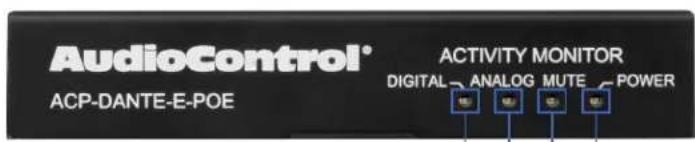
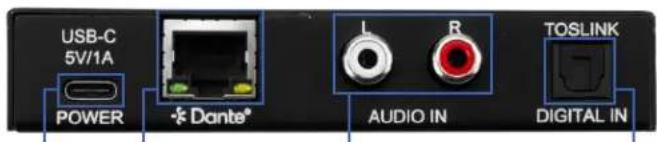
12567843
| 1 | MUTE | Red LED status indicator lightIlluminates solid red when DanteTM audio stream is muted |
| 2 | POWER | Blue LED status indicator lightIlluminates solid blue when power is present on the ACP-DANTE-E-POE |
| 3 | ANALOG | Blue LED status indicator lightWhen no audio present LED light is offWhen audio present Blue LED light is on |
| 4 | DIGITAL | Blue LED status indicator lightWhen no audio present LED light is offWhen audio present Blue LED light is on |
| 5 | DC/5V | USB Type C female connector portConnects to DC 5V 1A power supply with USB-A to USB-C cable |
| 6 | DANTE | 8-pin RJ-45 female connector portEncoded DanteTM digital audio output portConnects to the network switch with CAT5e (or better) cableIf connecting to PoE switch device receives power |
| 7 | AUDIO IN | Stereo RCA analog audio inputConnects to the audio source device |
8 TOSLINK • Digital toslink audio input
Once the ACP-DANTE-E-POE is powered on and connected to the AVPro Edge network switch, it will automatically be discovered on the network using the Dante™ Controller software.
Rack Room
flowchart
graph TD
    A["Streaming Media Player"] --> B["USB C DC/5V"]
    A --> C["USB/C SW1A POWER +8 Dante"]
    A --> D["L/R RCA Audio in"]
    E["Wall Outlet (if not using PoE)"] --> F["USB Power Adapter"]
    F --> G["Rj45 Dante"]
    G --> H["Dante Audio Data"]
    H --> I["Decoder & Amplifier"]
    I --> J["AC-MAXET-SW3"]
    J --> K["Network Switch"]
    L[" Stereo "] --> J
    M[" Cat 5e "] --> J
    N[" Power "] --> J
    O[" Band 1 "] --> J
Connecting the Devices
- Connect the provided USB-A to USB-C cable between the 5V 1A power supply and the ACP-DANTE-E-POE encoder's DC/5V port. Then plug the power supply into a suitable power outlet. Additionally you can use PoE to power this device via network switch. Both the POWER and MUTE LEDs on the front panel will illuminate solid for 6 seconds, after which the MUTE LED will shut off and the POWER LED will stay on, indicating the ACP-DANTE-E-POE is powered on.
NOTE: The ACP-DANTE-E-POE does support PoE, but also can be powered locally using the provided 5V 1A power supply and USB-A to USB-C cable.
- Connect the audio source device to the AUDIO IN port with a stereo RCA cable. Ensure the audio source device is powered on.
- Connect a CAT5e (or better) cable between a computer running the Dante™ Controller software and the network switch.
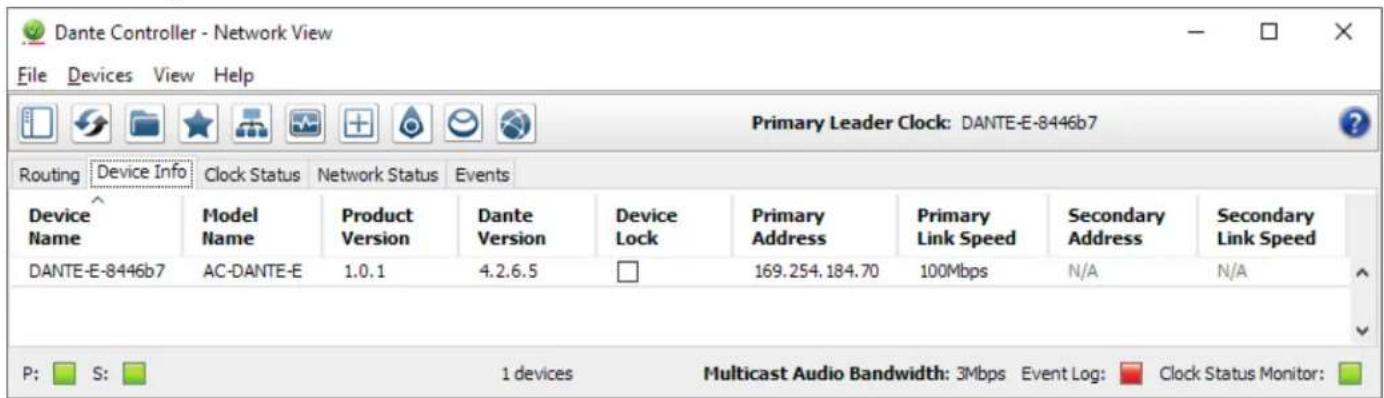
- Connect a CAT5e (or better) cable between the DANTE port on the ACP-DANTE-E-POE and the network switch. The ACP-DANTE-E-POE will be automatically discovered and routed using the Dante™ Controller software.
NOTE:
The computer running Dante™ Controller and the ACP-DANTE-E-POE must both have a physical connection to the Dante™ network in order for the ACP-DANTE-E-POE to be discovered by Dante™ Controller.
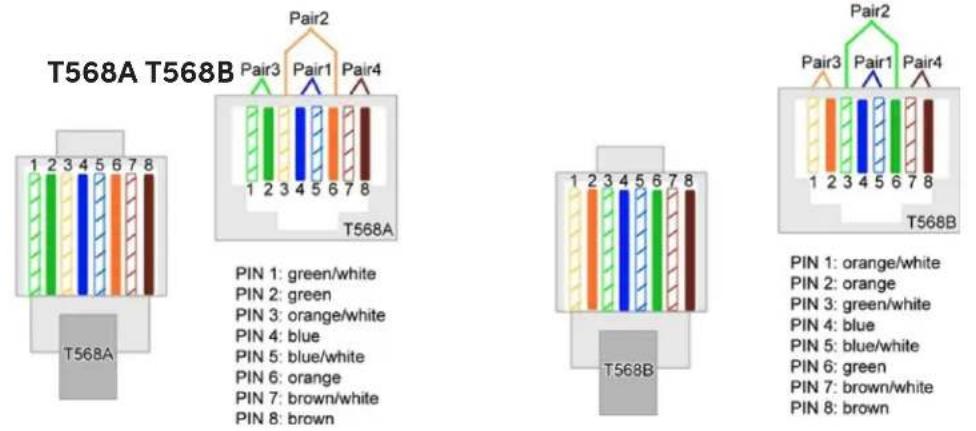
The DANTE audio output port on the encoder utilizes the standard RJ-45 connection. For maximum performance, the recommended cabling is CAT5e (or better) based on TIA/EIA T568A or T568B standards for the wiring of the twisted pair cables.
The DANTE audio output port features two status indicator LEDs to show active connections while troubleshooting.
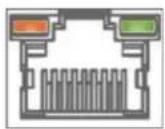
Right LED (Amber) - Link Status
Indicates there is data present between the ACP-DANTE-E-POE and the receiving end (typically a network switch). Steady blinking amber indicates normal operations.
Left LED (Green) - Link/Activity
Indicates there is an active link between the ACP-DANTE-E-POE and the receiving end. Solid green indicates the ACP-DANTE-E-POE and the receiving end device have been identified and are communicating with one another.
If either LED is not illuminating, check the following:
- Ensure the ACP-DANTE-E-POE is powered on from the DC/5V port.
- Verify cable length is within the maximum distance of 100 meters (328 feet).
- Connect the ACP-DANTE-E-POE directly to the network switch, bypassing all patch panels and punch-down blocks.
- Re-terminate connector ends. Use standard RJ-45 connectors and avoid using push-through or "EZ" type ends as these have exposed copper wiring at the tips that can cause signal interference.
- Contact AudioControl Technical Support if these suggestions do not work.
Configuring the ACP-DANTE-E-POE requires installing Audinate's Dante Controller software on a computer sharing the same network as Dante devices, such as the ACP-DANTE-E-POE. Dante Controller is a powerful tool used to configure network settings, signal latency, audio encoding parameters, Dante flow subscriptions, and AES67 audio support. The latest version of Dante Controller can be found here along with additional supplementary instructions that can be obtained via the online help support tool located under the Help tab in the Dante Controller.
Basic Navigation and Dante Flow Subscription
Dante Controller will open to the routing tab by default where discovered Dante devices are organized according to transmitter or receiver status. Signal routing from Dante encoders (transmitters) to Dante decoders (receivers) can be achieved by clicking the box located at the intersection of the desired transmit and receive channels. Successful subscription is denoted by a green check mark icon.
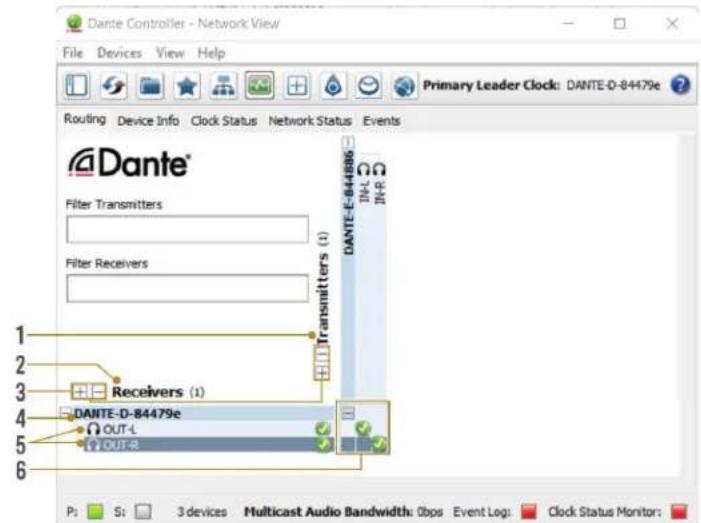
TIP
Hovering the mouse over the subscription indicator symbol will provide further details about the subscription and can be useful in troubleshooting
• Discovered Dante encoders
1 TRANSMITTERS
2 RECEIVERS
• Discovered Dante decoders
| 3 | +/- |
4 DEVICE NAME
5 CHANNEL NAME
- Select the (+) to expand or (-) to collapse view
- Displays the name assigned to the Dante device
- Device name is customizable in Device View
- Double-click to open Device View
- Displays the name of the Dante audio channel
- Channel name customizable in Device View
- Double click associated Device Name to open Device View
6 SUBSCRIPTION WINDOW
| 8-pin RJ-45 female connector port |
| Click the box to create a unicast subscription between the overlapping |
| Subscription in process |
| Subscription successful |
| Subscription error |
| Subscription warning |
| Device part way through setting up a subscription |
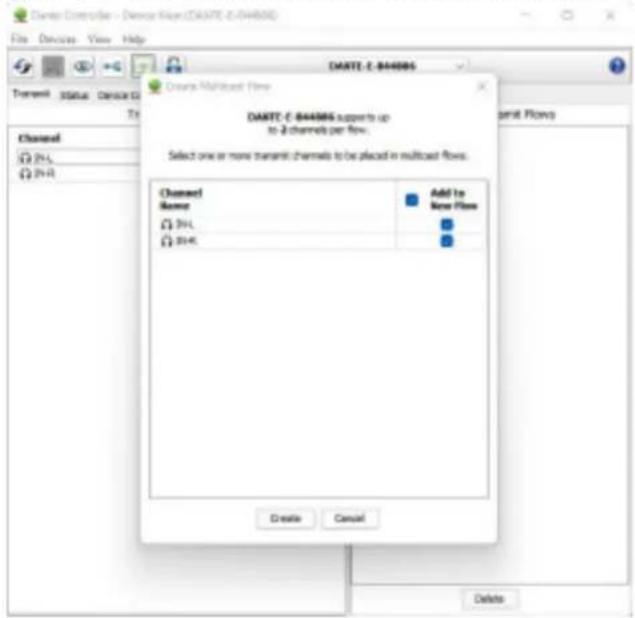
Due to Dante flow limitations, it may be necessary to create multicast flows in order to route audio from the ACP-DANTE-E-POE to a higher receive channel count. The ACP-DANTE-E-POE can transmit each output channel to 2 receive channels with unicast while both channels can be assigned to 8 devices with multicast.
To configure multicast flows, double-click on the ACP-DANTE-E-POE device name to open Device View and click on the flow icon located at the top of the Device View window. A secondary window will pop up where you can select the ACP-DANTE-E-POE channels to assign to a multicast flow. Click create to create the multicast flow. Subscriptions of the selected channels will now be assigned to the multicast flow instead of unicast.
Changing Device Name and Encoding Configuration
To configure the ACP-DANTE-E-POE audio stream, open the Device View by double clicking the Device Name for the ACP-DANTE-E-POE and navigate to the Device Config Tab.
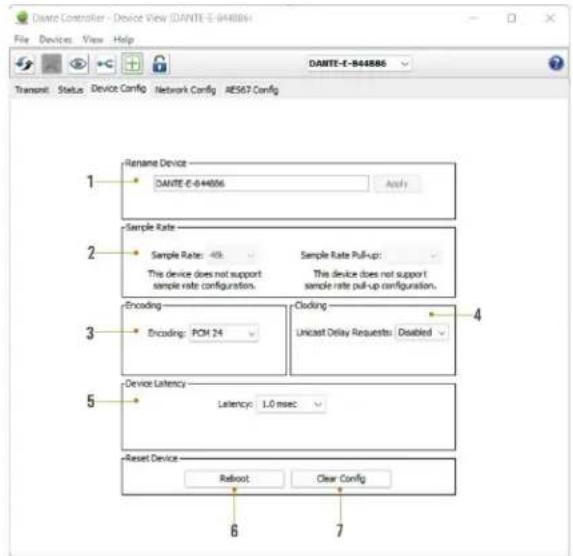
| 1 | DEVICE NAME | • Device Name for the ACP-DANTE-E-POE• Device Name can be changed by typinga new name and clicking apply |
| 2 | SAMPLE RATE | • Set ACP-DANTE-E-POE input sample rate• 44.1, 48, 88.2, 96 kHz sample ratessupported |
| 3 | ENCODING | • Set the bit depth of the sampled audioinput signal• 16, 24, 32 bit sampling supported |
| 4 | CLOCKING | • Enable/Disable unicast delay requests |
| 5 | DEVICE LATENCY | • Set latency for subscribed Dante flows• 1, 2, 5 millisecond latencies supported |
| 6 | REBOOT DEVICE | • Reboot the ACP-DANTE-E-POE |
| 7 | CLEAR CONFIG | • Factory Reset Settings |
DHCP for the ACP-DANTE-E-POE is enabled by default and will automatically be assigned an IP address when connected to the Dante network. Additionally, a static IP address can be assigned by opening the Device View for the ACP-DANTE-E-POE and navigating to the Network Config tab.
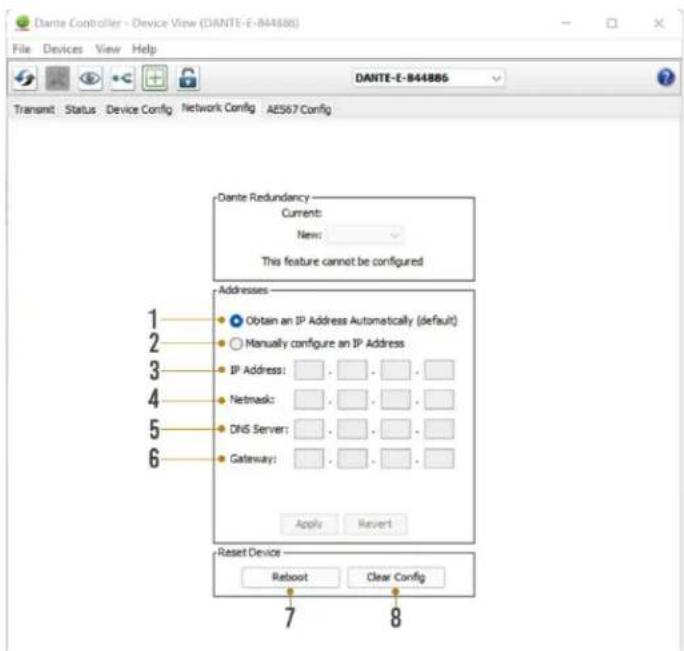
| 1 | AUTOMATIC IP ASSIGNMENT | Check this button to enable DHCP for automatic IP address assignment |
| 2 | MANUAL IP ASSIGNMENT | Check this button to enable manual(static) IP addressing |
| 3 | IP ADDRESS | Enter the desired IP address |
| 4 | SUBNET MASK | Enter the desired subnet mask |
| 5 | DNS SERVER | Enter the domain name server |
| 6 | DEFAULT GATEWAY | Enter the default gateway |
| 7 | REBOOT DEVICE | Reboot the ACP-DANTE-E-POE |
| 8 | CLEAR CONFIG | Factory reset the ACP-DANTE-E-POE |
| WARNING: | Manually setting the ACP-DANTE-E-POE IP address to a different subnet from the Dante Controller computer will result in loss of communication between Dante Controller and the ACP-DANTE-E-POE. | |
AES67 Audio Stream Configuration
The ACP-DANTE-E-POE supports multicast transmission of AES67 encoded audio to compatible non-Dante devices. AES67 multicast transmission can be configured by opening the Device View by double-clicking the ACP-DANTE-E-POE Device Name and navigating to the AES67 Config tab.
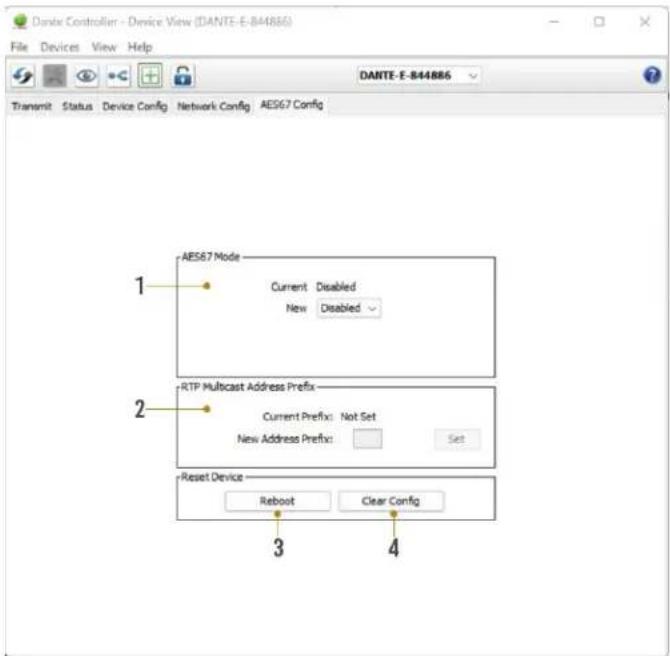
| 1 | AES67 MODE | · Enable/Disable AES67 multicast flows for compatible non-Dante devices |
| 2 | RTP MULTICAST ADDRESS PREFIX | · Displays current RTP multicast prefix · Type in a new RTP multicast prefix and click Set to apply |
| 3 | REBOOT | · Reboot the ACP-DANTE-E-POE |
| 4 | CLEAR CONFIG | · Factory Reset the ACP-DANTE-E-POE |
What to do if you need service
If the unit needs service, then please contact AudioControl, either by e-mail or phone. We will verify if there is anything wrong in the system that you can correct yourself, or if it needs to be sent back to our factory.
Please include the following items when returning the unit:
- A copy of your proof of purchase. No originals please. We cannot guarantee returning them to you.
- A brief explanation of the trouble you are having with the unit. (You'd be surprised how many people forget this.) If you can supply a really detailed description of the problem, this would be so much better, and our service technicians may add you to their Christmas Card list. Please include any notes about the system and other components you are using. Is it an intermittent problem that only occurs on the first full moon of Spring?
- A return street address. (No PO Boxes, please).
- A daytime phone number in case our technicians have a question about the problem you are having, or if they are just feeling lonely.
- Package the unit in the original packaging if you still have it. Use great care and plenty of good packing materials to protect the unit and prevent it from moving about inside the box. Do not use loose materials like packing peanuts or real peanuts.
You are responsible for the freight charges to us, but we'll pay the return freight back as long as the unit is under warranty. We match whatever shipping method you use to send it to us, so if you return the unit overnight freight, we send it back overnight. We recommend United Parcel Service (UPS) for most shipments.
Please do not return the unit to AudioControl if you have not received an RMA number from our masterful customer support team.
Phone 425-775-8461
techsupport@audiocontrolpro.com
support.audiocontrolpro.com
www.audiocontrolpro.com/contact-us
In just the same way as being covered in honey and thrown into a dark pit full of hungry woodchucks, people are scared of warranties. Lots of fine print. Months of waiting around. Well, fear no more. This warranty is designed to make you rave about AudioControl. It's a warranty that looks out for you and your client, plus helps you resist the temptation to have your friend Sparky, who's "good with electronics," try to repair your AudioControl product. So go ahead, grab a cup of tea, and carefully read through this warranty.
Our warranty has conditional conditions! "Conditional" doesn't mean anything ominous. The Federal Trade Commission tells all manufacturers to use the term to indicate that certain conditions have to be met before they'll honor the warranty. If you meet all of these conditions, AudioControl will, at its discretion, perform warranty service on any AudioControl products that exhibit defects in materials and/or workmanship during the warranty on your product for five (5) years from the date you bought it, and we will fix or replace it, at our option, during that time.
Here are the conditional conditions:
- You need to hold on to your sales receipt! All warranty service requires original sales receipt documentation. The warranty only applies to the original purchaser from an authorized AudioControl dealer. Note: Products purchased from unauthorized dealers are not covered under warranty.
- If an authorized AudioControl dealer installs your AudioControl product, the warranty is five years, otherwise the warranty is limited to one year.
- Our warranty covers AudioControl products that have been installed according to the instructions in the installation manual.
- You cannot let anybody who isn't: (A) the AudioControl factory; or (B) somebody authorized in writing by AudioControl service your AudioControl product. If anyone other than (A), or (B) messes with your AudioControl product, the warranty is void.
- The warranty is void if the serial number is altered, defaced or removed, or if your product has been used improperly. Now that may sound like a big loophole, but here is what we mean by this: Unwarranted abuse is: (A) physical damage (don't use your product to level your dining room table); (B) improper connections (120 volts into the RCA jacks can fry the poor thing); (C) sadistic things! This is the best product we know how to build, but for example if you mount it to the front bumper of your car, drop it over the Niagara Falls or use it for Clay Pigeon shooting practice, something will go wrong.
Assuming you conform to 1 through 5, and it really isn't all that hard to do, we will have you send your product to us for warranty service.
Legalese Section
This is the only warranty issued by AudioControl. This warranty gives you specific legal rights, and you may also have rights that vary from state to state. Promises of how well your AudioControl product will work are not implied by this warranty. Other than what we've said we'll do in this warranty, we have no obligation, express or implied. We make no warranty of merchantability or fitness for any particular purpose. Also neither we nor anyone else who has been involved in the development or manufacture of the unit will have any liability of any incidental, consequential, special or punitive damages, including but not limited to any lost profits or damage to other parts of your system by hooking up to the unit (whether the claim is one for breach of warranty, negligence of other tort, or any other kind of claim). Some states do not allow limitations of consequential damages.
Hurrah, You are done!
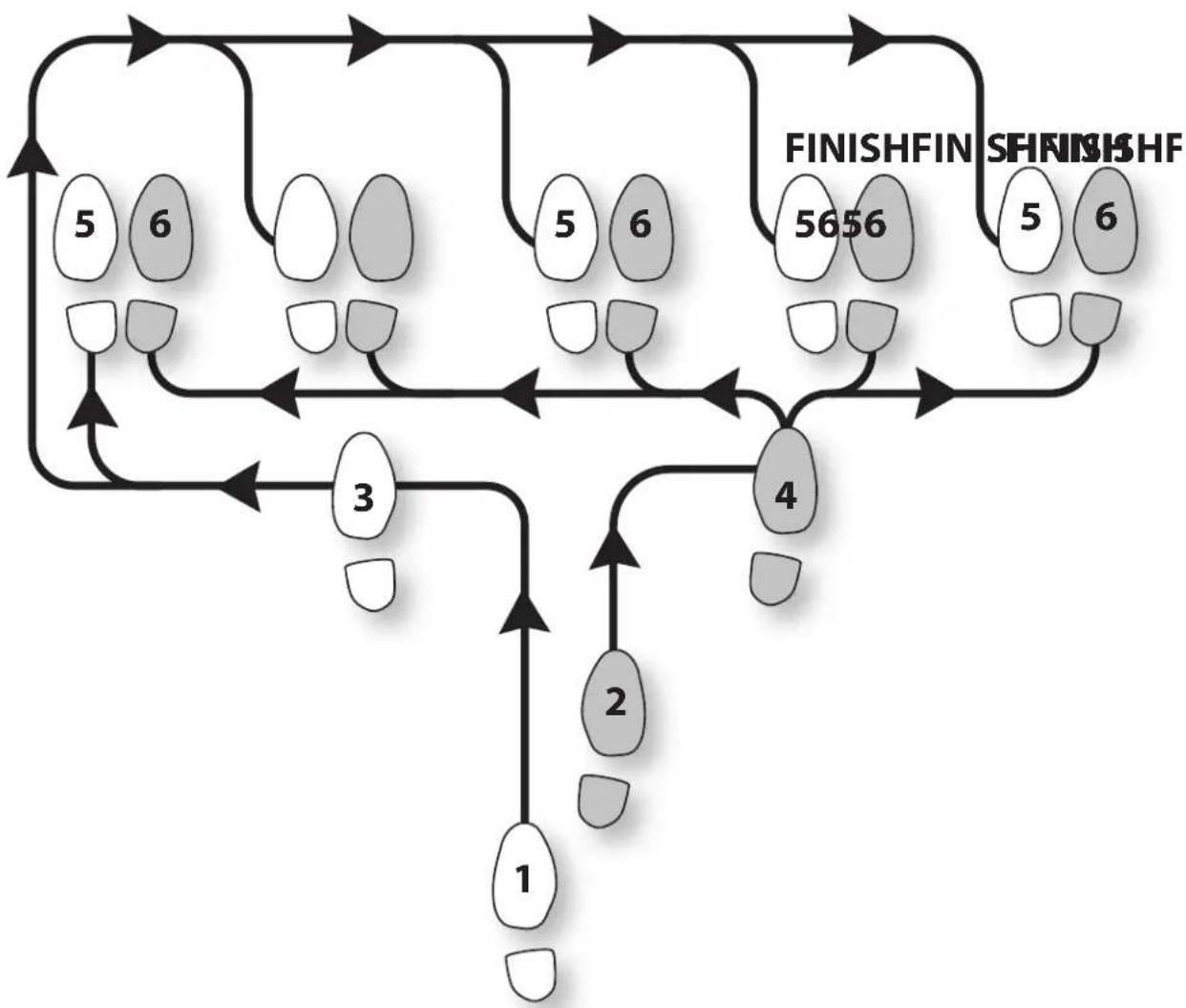
flowchart
graph TD
    A["1"] --> B["2"]
    B --> C["3"]
    C --> D["4"]
    D --> E["5656"]
    E --> F["FINISHFIN"]
    F --> G["SFINISHHF"]
    style A fill:#f9f,stroke:#333
    style G fill:#bbf,stroke:#333
START
Other common names for this dance:
• Dante Boogie Nights
• Dante 2 Electric Boogaloo
- Dante Inferno
Thank you for choosing AudioControl! Please contact us with any questions, we are happily at your service!
AudioControl®
an AVPro company
22410 70th Avenue West \~ Mountlake Terrace, WA 98043
support: 425-775-8461
techsupport@audiocontrolpro.com
Brand : AudioControl
Model : DANTE Encoder
Category : Audio/video converter