
KM0554 - Loudspeaker Krüger&Matz - Free user manual and instructions
Find the device manual for free KM0554 Krüger&Matz in PDF.


| Product Type | Wireless Speaker |
| Brand | Krüger&Matz |
| Model | KM0554 |
| Power Output | 10 W |
| Impedance | 4 Ohm |
| Frequency Response | 50 Hz - 12 kHz |
| Signal-to-Noise Ratio | 50 dB |
| Drive Units | 6.5" + 1" |
| Bluetooth Version | 4.1 |
| Supported Audio Formats | MP3 |
| TWS Function | Yes (connect two speakers) |
| Inputs | USB 2.0, AUX (3.5 mm), Microphone (6.3 mm) |
| Charging Port | Micro USB |
| Power Supply | 5 V / 1 A |
| Battery Capacity | 3.7 V / 1200 mAh |
| Dimensions (W x H x D) | 320 x 200 x 175 mm |
| Weight | 1150 g |
| Controls | Volume knob, Previous, Play/Pause/TWS, Next, Mode/Light |
| Display | Yes |
| Safety Precautions | Keep away from water, heat, and unstable surfaces |
Frequently Asked Questions - KM0554 Krüger&Matz
User questions about KM0554 Krüger&Matz
0 question about this device. Answer the ones you know or ask your own.
Ask a new question about this device
Download the instructions for your Loudspeaker in PDF format for free! Find your manual KM0554 - Krüger&Matz and take your electronic device back in hand. On this page are published all the documents necessary for the use of your device. KM0554 by Krüger&Matz.
USER MANUAL KM0554 Krüger&Matz
Wireless speaker KM0554

BEDIENUNGSANLEITUNG
DE
OWNER'S MANUAL
EN
INSTRUKCJA OBSŁUGI
PL
MANUAL DE UTILIZARE
RO
- Place the device on flat, stable surface.
- Do not place heavy objects on the device.
- Do not place anything in speakers interior.
- Do not place the device in close proximity to heat sources, such as radiators etc. Do not place the device on unstable surfaces.
- Position the device in a properly ventilated place. Do not obstruct ventilation by covering ventilation openings.
- Protect this device from humidity, water and other liquid. Avoid using/storing it in extreme temperatures. Do not expose it to direct sunlight and other sources of heat.
- Before connecting the device to power supply socket, make sure the voltage indicated on the appliance corresponds to the voltage in the power supply socket.
- Keep the volume at a reasonable level throughout entire time of using the speaker. To prevent damage to your hearing, do not rai the volume too high.
- If you experience tinnitus, discomfort or other concerning behaviors: stop using the device immediately.
- Make sure, that the device is placed away from electrical devices that generate
- Disconnect from power outlet if the device is not going to be used for a long time.
12.Do not handle this device with wet hands.
13.Do not use this device if it has been damaged. - Do not attempt to repair this device yourself. In case of damage, contact authorized service point for check-up or repair.
- Always disconnect the product from the power source before cleaning.
- lean this device with a soft, slightly damp cloth. Do not use any chemical agents to clean this device.
EN
FRONT PANEL
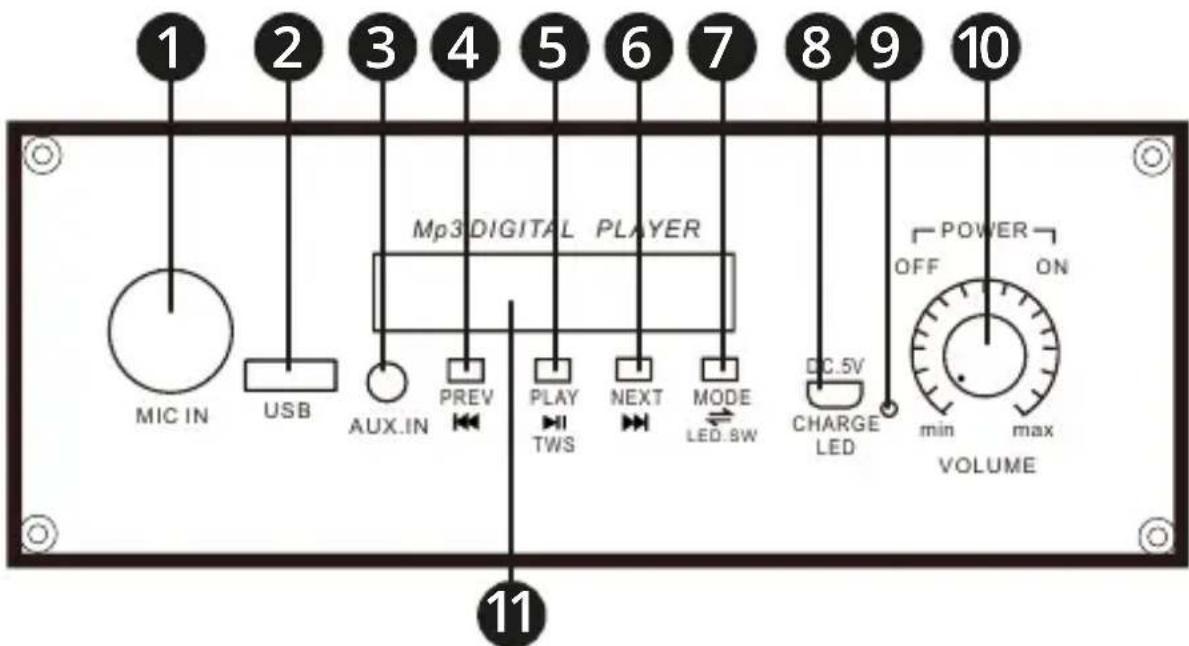
- Microphone input
- USB port
- AUX input
- Previous track button
- Play / pause / TWS function button
- Next track button
- Mode / light button
- Micro USB charging port
- Charging indicator
10.Volume / turn on knob 11.Display
OPERATION
Turning on / off / volume adjustment
To turn on the speaker, turn the volume knob clockwise, until it clicks. To turn off the speaker, turn the volume knob anticlockwise, until it clicks. Volume adjustment is done by moving the volume knob. To turn on or off the light, press and hold the mode button.
Playing via Bluetooth
If there is no external device connected (USB or AUX), the speaker is automatically go to Bluetooth mode, after turning it on. If there is a external device connected, press the mode button, to go to Bluetooth mode. On the external device, search for Bluetooth devices and
connect to the speaker (KM Music Box Mini). Played music can be controlled on the external device or with the buttons on the speaker
Playing via USB
After plugging the USB drive, the speaker will automatically go to USB mode. To control played music, use buttons on the speaker.
Playing via AUX
After plugging the cable to the AUX input, the speaker will automatically go to AUX mode. To control played music, use external device.
Microphone
After connecting the microphone to the microphone input, it can be used immediately. Note: microphone cord has to be mono.
TWS function
TWS function allows for playing from one source on two speakers. After turning on the speakers, simultaneously press and hold the TWS button on both speakers. Connection will be signaled with an audio cue. After connecting the external device, the sound will be played on both speakers.
CHARGING
EN
Low battery level will be signaled with icon on the display. Connect one plug of the USB cable to the micro USB port of the device, connect the other plug to the AC charger or a compatible PC USB port.
SPECIFICATION
- Power: 10 W
• Impedance: 4 Ohm
• Frequency response: 50 Hz - 12 kHz
• S/N ratio: 50 dB - Drive unit: 6,5" + 1"
- Bluetooth: 4.1
• Supported formats: MP3
• TWS function (connect two speakers)
• I/O: - USB port 2.0
- Microphone input (Jack 6,3 mm)
• AUX input (Jack 3,5 mm) - Micro USB input
• Power supply: 5 V / 1 A
• Battery: 3,7 V / 1200 mAh
• Dimensions: 320 x 200 x 175 mm - Weight: 1150 g
LEARN MORE
For more information on this device visit: www.krugermatz.com. Read owner's manual carefully before using.
Visit www.krugermatz.com website for more products and accessories.
In case of any doubts or questions reach out to our Frequently Asked Questions section.

English Correct Disposal of This Product (Waste Electrical & Electronic Equipment)

EN
(Applicable in the European Union and other European countries with separate collection systems) This marking shown on the product or its literature, indicates that it should not be disposed with other household wastes at the end of its working life. To prevent possible harm to the environment or human health from uncontrolled waste disposal, please separate this from other types of wastes and recycle it responsibly to promote the sustainable reuse of material resources. Household users should contact either the retailer where they purchased this product, or their local government office, for details of where and how they can take this item for environmentally safe recycling. Business users should contact their supplier and check the terms and conditions of the purchase contract. This product should not be mixed with other commercial wastes for disposal.
Made in China for LECHPOL ELECTRONICS Sp. z o.o. Sp.k., ul. Garwolińska 1, 08-400 Miętn
KWESTIE BEZPIECZEŃSTWA


www.krugermatz.com
Krüger&Matz is a registered trademark
Brand : Krüger&Matz
Model : KM0554
Category : Loudspeaker