
Smart Humidifier - Humidifier TESLA - Free user manual and instructions
Find the device manual for free Smart Humidifier TESLA in PDF.


| Product Name | Tesla Smart Humidifier |
| Model Number | PRO-4 |
| Product Category | Humidifier |
| Dimensions (mm) | 205 x 117 x 218 |
| Net Weight (kg) | 1.42 |
| Power Consumption (W) | 21 |
| Adapter Input | AC 100-240 V, 50/60 Hz |
| Water Tank Capacity (L) | 2.2 |
| Coverage Area (m²) | < 20 |
| Connectivity | Wi-Fi 2.4 GHz IEEE 802.11b/g/n |
| Smart App | Tesla Smart (iOS/Android) |
| Mist Control Levels | Low, Medium, High |
| Water Level Indicator | Green LED |
| Wi-Fi Indicator | Flashing for pairing, solid on when connected |
| Cleaning Frequency | Every 3 days; clean and empty if not used for long |
| Recommended Water | Clean tap water or pure water at normal temperature |
| Placement | Horizontal surface, away from valuable goods |
| Safety Features | Automatic shut-off when water runs out; do not operate empty |
| Packaging Contents | Humidifier, water tank, user manual |
| Manufacturer | Tesla Global Limited, Hong Kong |
| EU Declaration of Conformity | Complies with 2014/53/UE; full text at tsl.sh/doc |
Frequently Asked Questions - Smart Humidifier TESLA
User questions about Smart Humidifier TESLA
0 question about this device. Answer the ones you know or ask your own.
Ask a new question about this device
Download the instructions for your Humidifier in PDF format for free! Find your manual Smart Humidifier - TESLA and take your electronic device back in hand. On this page are published all the documents necessary for the use of your device. Smart Humidifier by TESLA.
USER MANUAL Smart Humidifier TESLA
natural_image
White stainless steel kitchen appliance with control panel and indicator lights (no visible text or symbols)TESLA SMART HUMIDIFIER
USER MANUAL
CONTENT
PRODUCT OVERVIEW 3
SPECIFICATION......4
FUNCTION INSTRUCTION....4
CONNECTION WITH TESLA SMART APP....6
MAINTENANCE 8
FAQ 9
SPECIFICATION
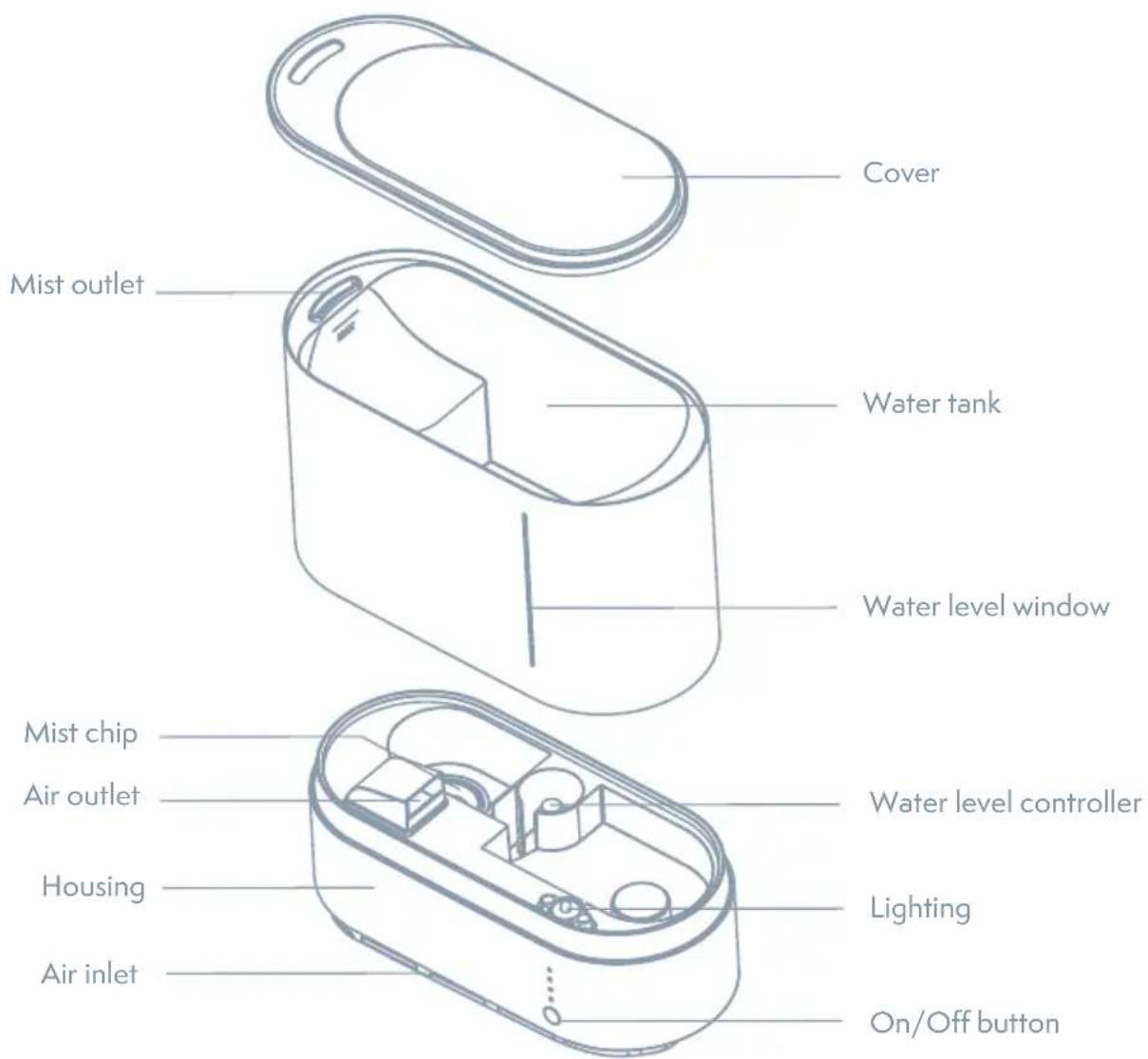
SPECIFICATION
| Model No PRO-4 | |
| Size 205 x 117 x 218 m | |
| Net weight 1,42 kg | |
| Adapter Input: AC 100 | -240 V 50/60 Hz |
| Power 21 W | |
| Volume 2,2 l | |
| Coverage area < 20 m | ^2 |
FUNCTION INSTRUCTION
Preparation Before Use
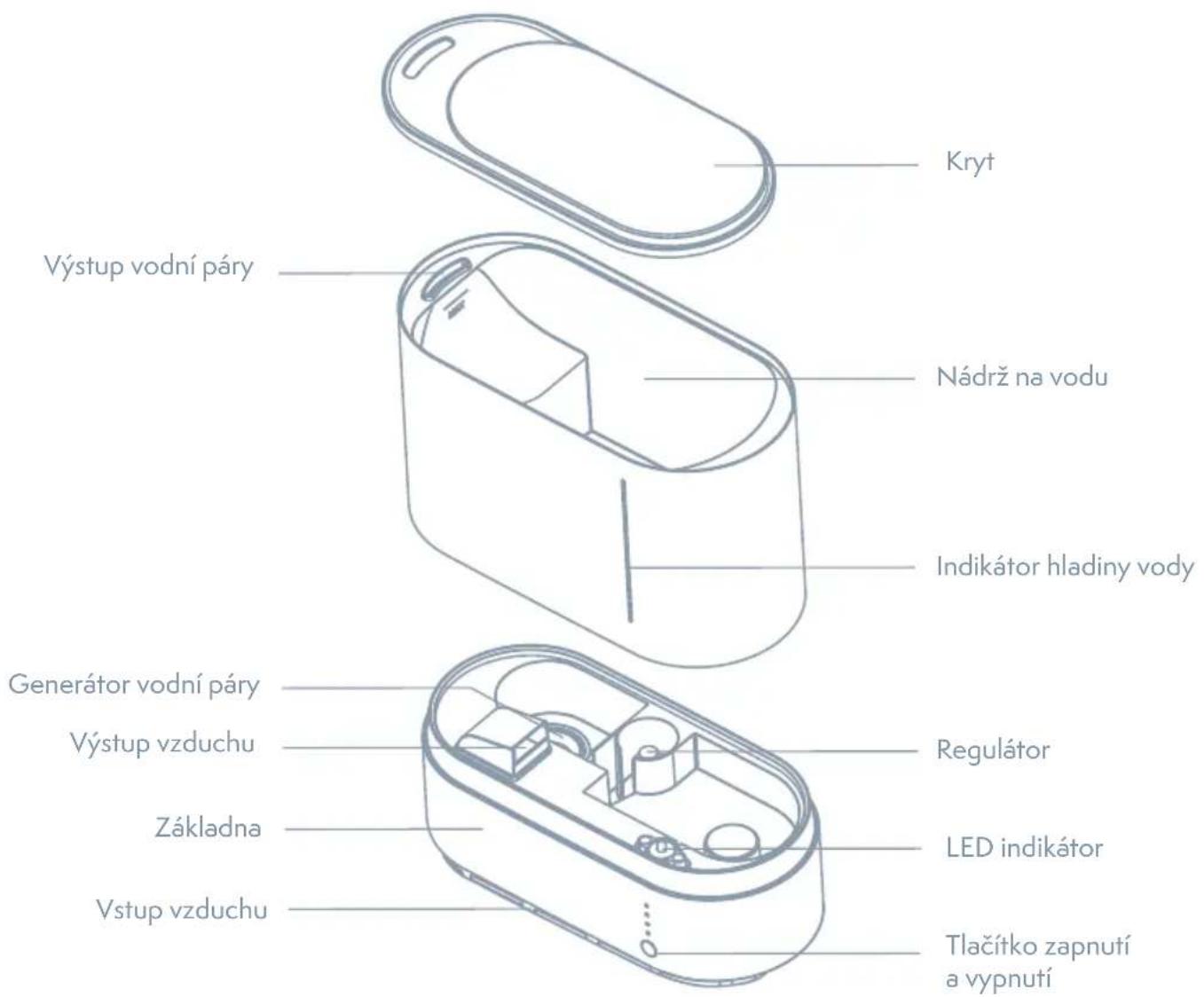
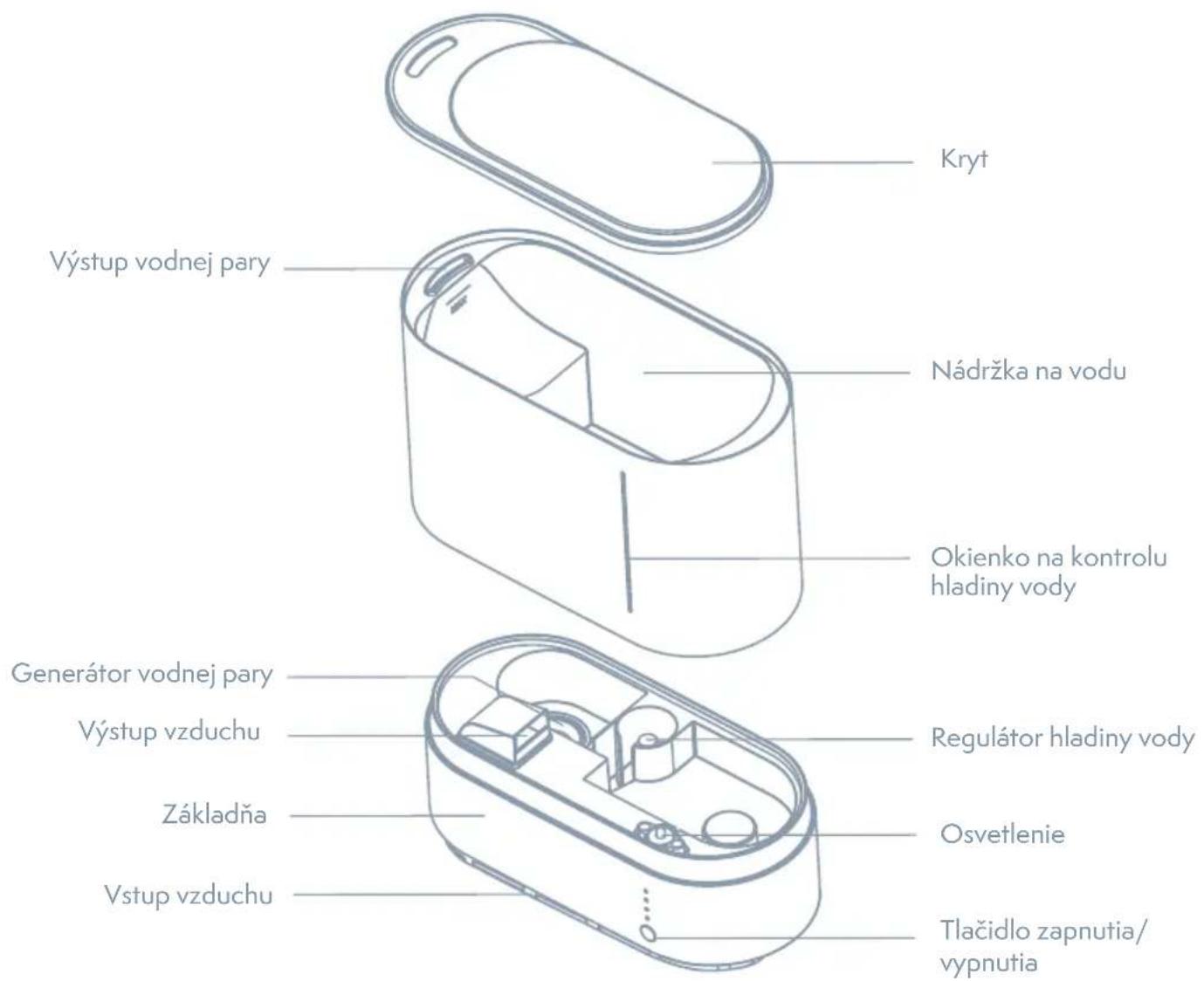
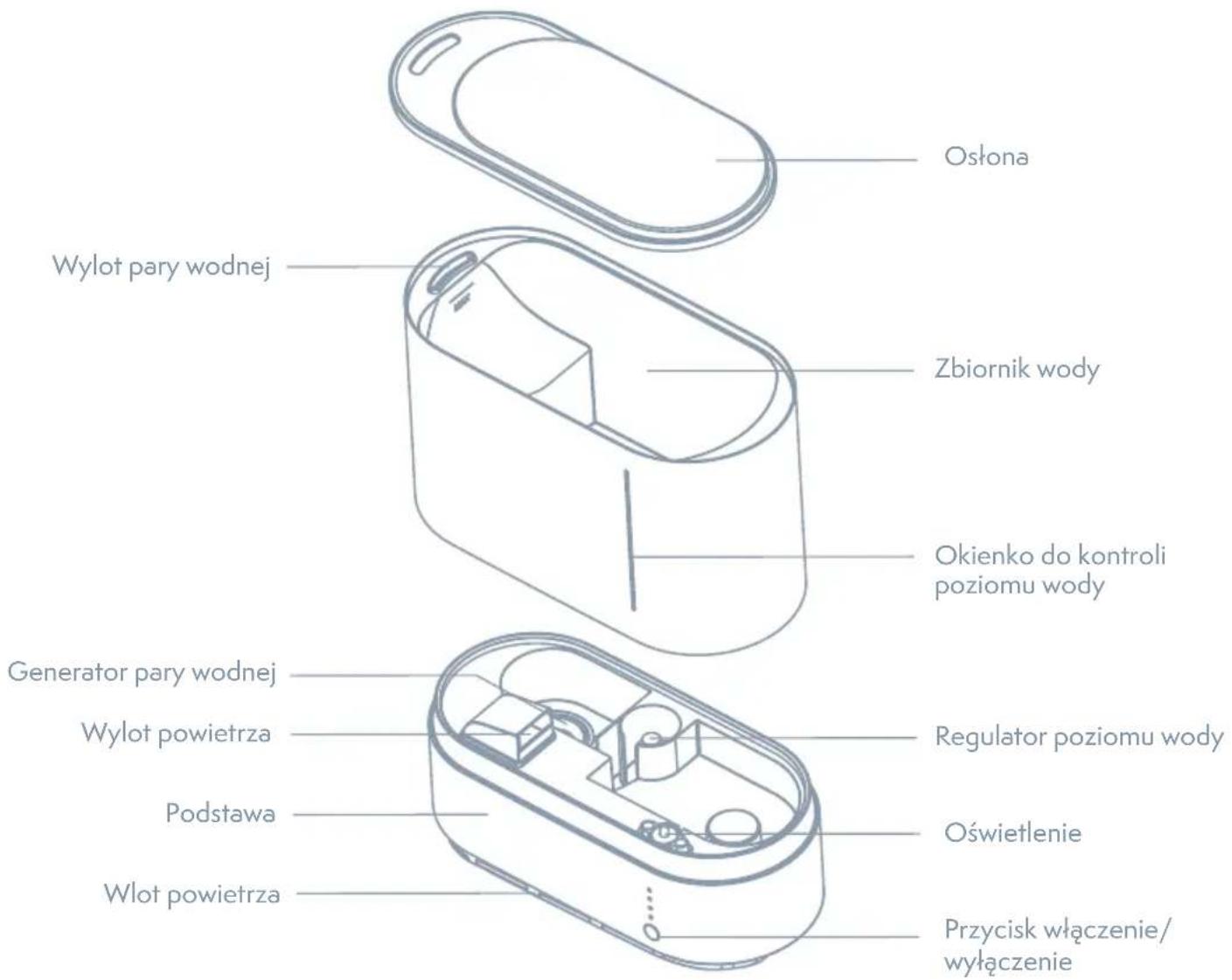
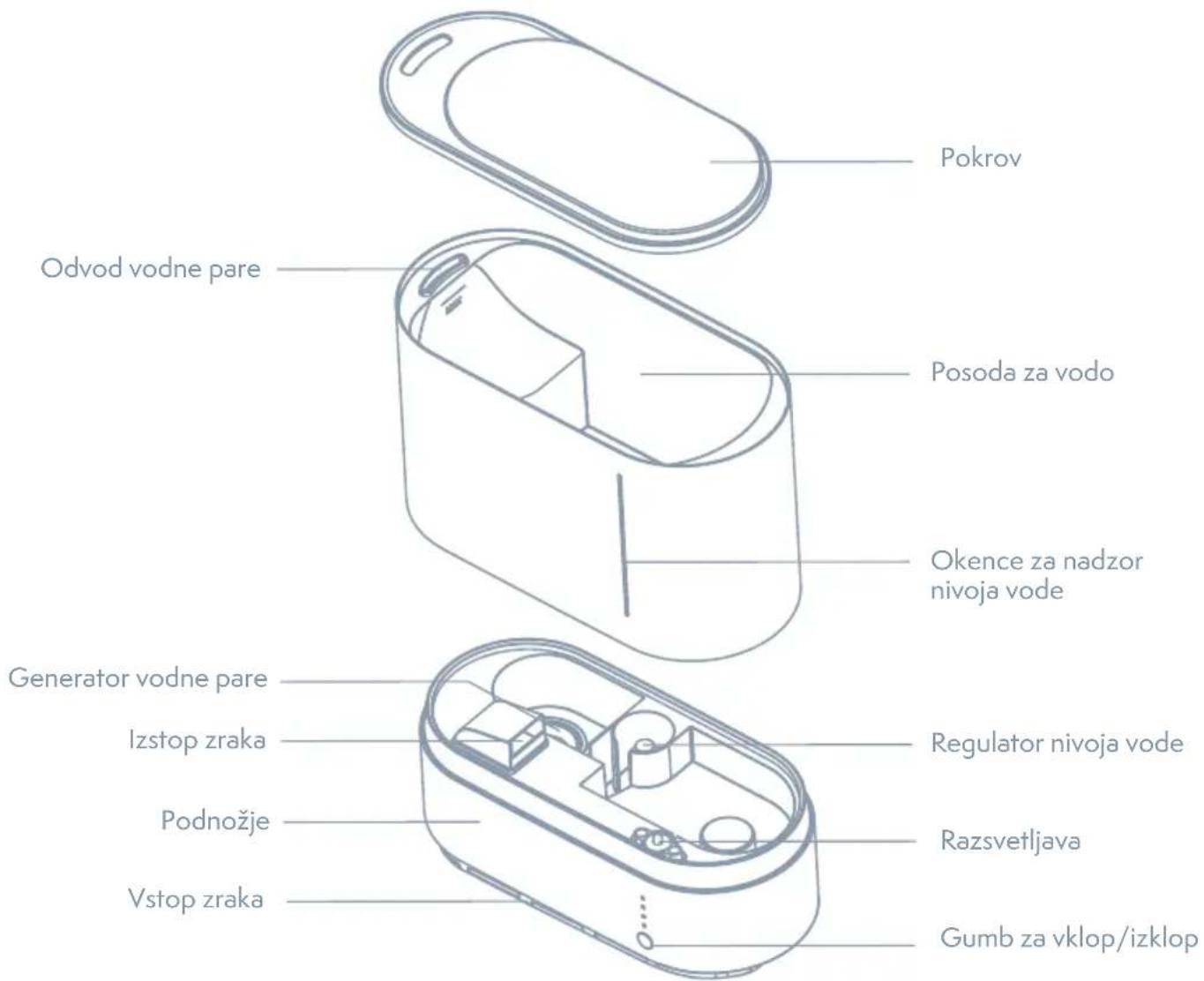
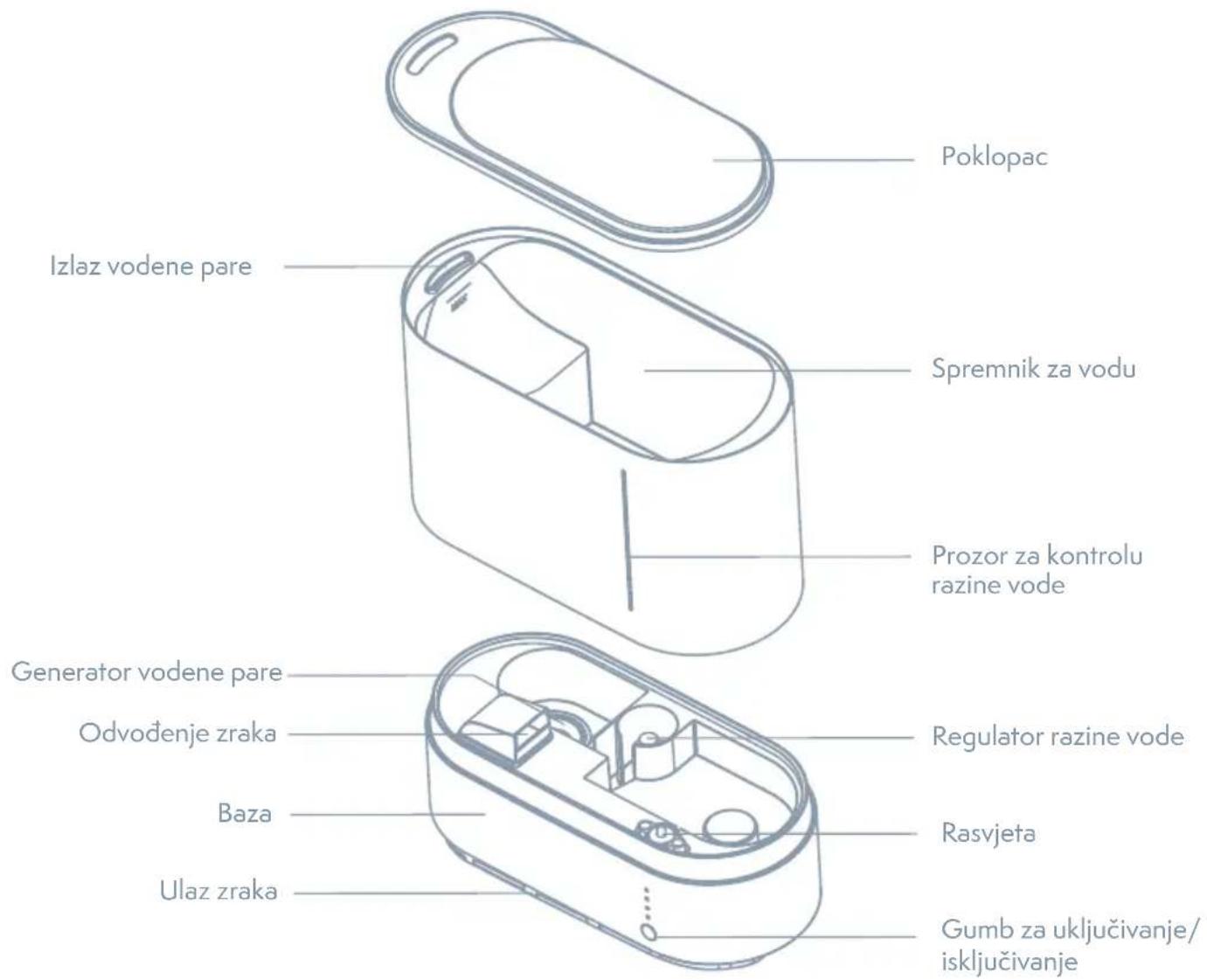
- Open the cover and add appropriate water into the water tank, the water should not exceed MAX water level.
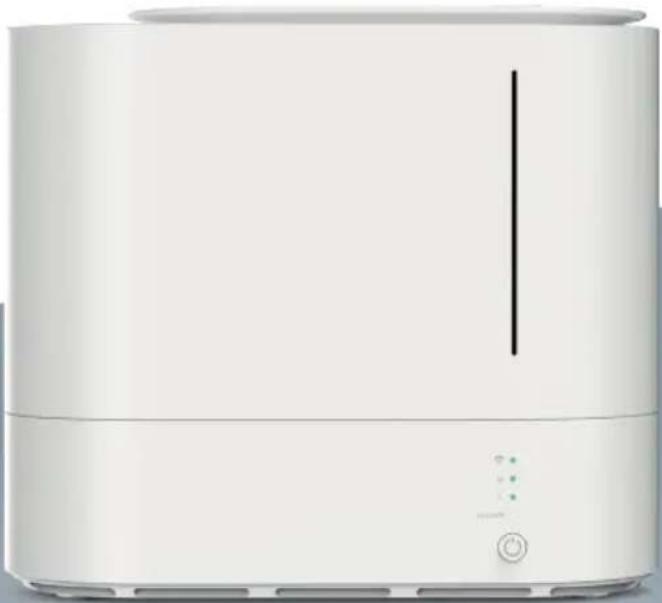
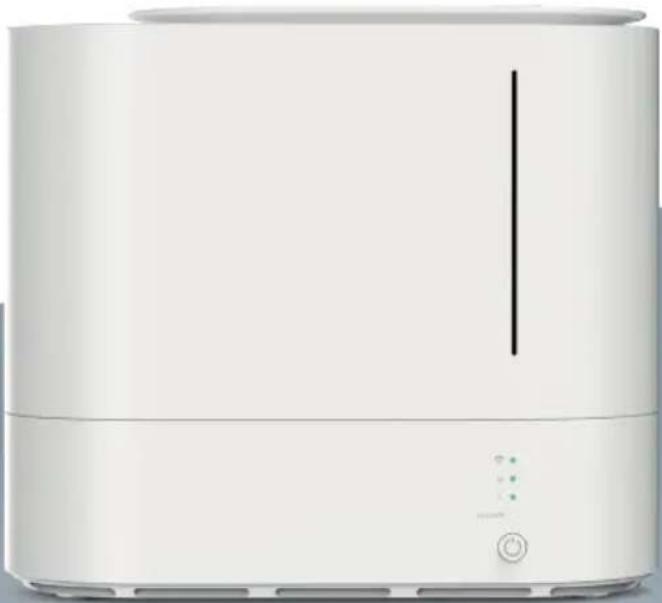
- Put back the cover and place the water tank on the housing and then connect the plug to the power socket. After the power indicator lights up white for about 1 second, the device enters standby state.
- The WiFi indicator flashes quickly. If the device was paired before, the WiFi indicator will be always on. If you need to re-pair, you need to press the button to flash the WiFi indicator.
Wind Speed Button
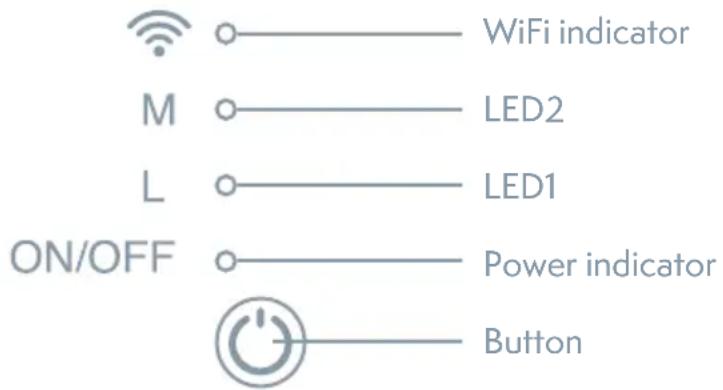
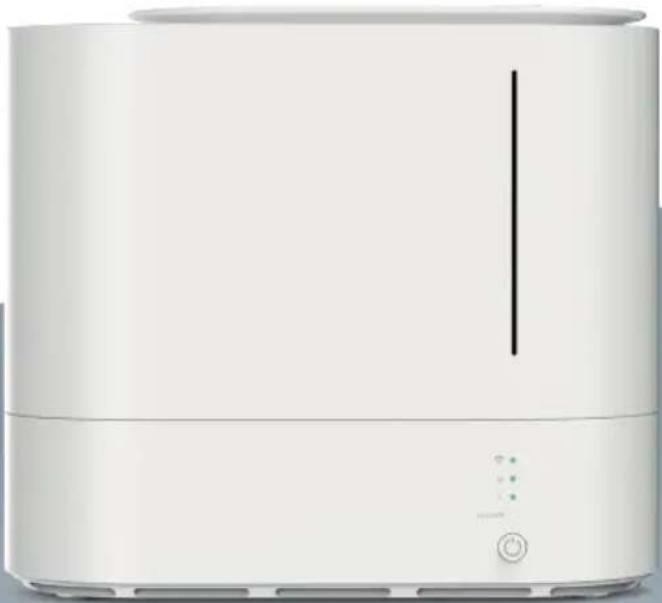
- Press the button, the power indicator and LED1 light will be on at the same time. The green light of the water level indicator lights up, and the mist will come out from mist outlet.
- Press the button again, the LED1 is off, the LED2 is on, and the mist volume is switched to the medium mode.
- Press the button for the third time, the LED1 and the LED2 are on, and the mist volume switches to high mode.
- Press the button for the fourth time, the LED1 and the LED2 are off, then the device stops working and enters the standby state.
Download & Registration
- Scan the QR code to download „Tesla Smart“ APP. You can also search „Tesla Smart“ in either APP store or Google Play to install the APP. Open the „Tesla Smart“ APP. tap „Register“ to register a „Tesla Smart“ account with your phone number or e-mail, then sign into the APP.

Add Devices in Easy Mode(Recommend)
- Make sure your smart device is powered and your mobile phone is connected to your WiFi network. If the WiFi indicator of smart device keeps flashing, it indicates, that the smart device is in the pairing mode; if not, please press the button for more than 5 seconds, after hearing the smart device's "beep", then loose it and this means the device is ready for configuration.
- Open your „Tesla Smart“ APP and tap“+” on the top right of the APP. Select type of service device, tap „Humidifiers“ and click to “Add Device”, then automatically fetch the password of the WiF network that your mobile phone connects to. Then tap „OK“ to connect to the device.
- When „Successfully added 1 device“ appears, it means the connection is complete and your device will be listed in your APP list.
How to remove device?
Method 1:
Press the buton for more than 5 seconds until you hear „beep“, it means the device is removed, and the WiFi indicator light begins to flash quickly again.
Method 2:
Open your „Tesla Smart“ app, select your device and tap the button in the top right corner. Tap „More“. Then tap the „Remove Device“ in the bottom, the WiFi indicator light begin to flash quickly again.
MAINTENANCE
Switch off the appliance, disconnect it from the power supply, remove the water tank cover and pour out the remaining water from the tank and the base. Clean the device with a clean cloth. (We recommend cleaning the device every three days and always cleaning and storing it when not in use for a long time.)
- Please do not to rinse the device with water to prevent the water from damaging the machine.
- Note that the magnet surface of the water valve at the bottom of the water tank should be kept clean, and avoid adsorbing foreign object. Otherwise, the machine may not work properly.
Safety Warning
- DO NOT place or use where your children and pet can touch the device..
- DO NOT pull the plug when your hands are wet.
- DO NOT block off the air inlet and air outlet.
- DO NOT let it work if there is no water in the water tank. Please pull the plug when not in use.
- If abnormality happens when using, DO NOT dismantle or repair by yourself. Please unplug the power and contact local manufacture.
ATTENTION
- Clean tap water or pure water in normal temperature should be used.
- Place the product in a horizontal position before using.
- Pour out the water after using, otherwise it will cause trouble and bacteria.
- Unplug if the machine is not use for a long time.
- The machine will produce mist when working, so please stay away from valuable goods or appliances.
- DO NOT operate if no water to avoid machine failure.
FAQ
If any abnormality happens during use, please stop using immediately and refer to the following "FAQ" for preliminary checking. It is not limited to the following questions, if problems remain or other problems arise, please contact the after sales service or local dealer for further assistance. In order to ensure your benefit, please do not disassemble the machine by yourself except professional technicians, so as not to cause unnecessary loss.
| TROUBLES COUNTERMEASURES | |
| The device does network after starting | Please check whether the power is connected, if not ,please plug in the power supply. |
| Check that the power line matches the product. | |
| Make sure the water in the humidifier is adequate. Add some water if the water is not enough. | |
| Significant noise Please make sure the water in the container is adequate. | |
INFORMATION ABOUT DISPOSAL AND RECYCLING
This product is marked with the symbol for separate collection. The product must be disposed of in accordance with the regulations for disposal of electrical and electronic equipment (Directive 2012/19/EU on waste electrical and electronic equipment). Disposal together with regular municipal waste is prohibited. Dispose of all electrical and electronic products in accordance with all local and European regulations at the designated collection points which hold the appropriate authorisation and certification in line with the local and legislative regulations. Correct disposal and recycling help to minimise impacts on the environment and human health. Further information regarding disposal can be obtained from the vendor, authorised service centre or local authorities.
EU DECLARATION OF CONFORMITY
Hereby, Tesla Global Limited declares that the radio equipment type PRO-4 is in compliance with 2014/53/UE directives. The full text of the EU declaration of conformity is available at the following internet address: tsl.sh/doc
Connectivity: Wi-Fi 2,4 GHz IEEE 802.11b/g/n Frequency band: 2.412 - 2.472 MHz Max. radio-frequency power (EIRP): < 20 dBm

Manufacturer
Tesla Global Limited
Far East Consortium Building,
121 Des Voeux Road Central
Hong Kong
www.teslasmart.com
TESLA
natural_image
White modern kitchen or oven appliance with a vertical indicator line and control buttons (no visible text or symbols)TESLA SMART HUMIDIFIER
BENUTZERHANDBUCH
INHALTSVERZEICHNIS
Far East Consortium Building,
121 Des Voeux Road Central
Hong Kong
www.teslasmart.com
TT TESLA
natural_image
White kitchen air fryer with control buttons and indicator lights (no visible text or symbols)TESLA SMART HUMIDIFIER
UŽIVATELSKÁ PŘÍRUČKA
OBSAH
POPIS PRODUKTU 22
SPECIFIKACE....23
POKYNY K POUŽITÍ 23
PŘIPOJENÍ K APLIKACI TESLA SMART.... 25
ÚDRŽBA 26
ČASTO KLADENÉ OTÁZKY 27
PŘEHLED PRODUKTU
Far East Consortium Building,
121 Des Voeux Road Central
Hong Kong
www.teslasmart.com
TESLA
natural_image
White modern kitchen or oven appliance with a vertical indicator line and control buttons (no visible text or symbols)TESLA SMART HUMIDIFIER
UŽÍVATELŠKÁ PRÍRUČKA
OBSAH
POPIS PRODUKTU 31
ŠPECIFIKÁCIA 32
POKYNY NA POUŽÍVANIE 32
PRIPOJENIE K APLIKÁCII TESLA SMART ...... 34
ÚDRŽBA 35
ČASTO KLADENÉ OTÁZKY 36
PREHL'AD PRODUKTU
PRIPOJENIE K APLIKĆCIU TESLA SMART
Far East Consortium Building,
121 Des Voeux Road Central
Hong Kong
www.teslasmart.com
TT
TESLA
natural_image
White modern kitchen or oven appliance with a vertical indicator line and control buttons (no visible text or symbols)TESLA SMART HUMIDIFIER
INSTRUKCJA UŻYTKOWNIKA
SPIS TREŚCI
OPIS PRODUKTU 40
SPECYFIKACJA 41
INSTRUKCJE KORZYSTANIA 41
POŁĄCZENIE Z APLIKACJĄ TESLA SMART...... 43
KONSERWACJA 44
CZĘSTO ZADAWANE PYTANIA...... 45
PRZEGLĄD PRODUKTÓW
Far East Consortium Building,
121 Des Voeux Road Central
Hong Kong
www.teslasmart.com
TT TESLA
natural_image
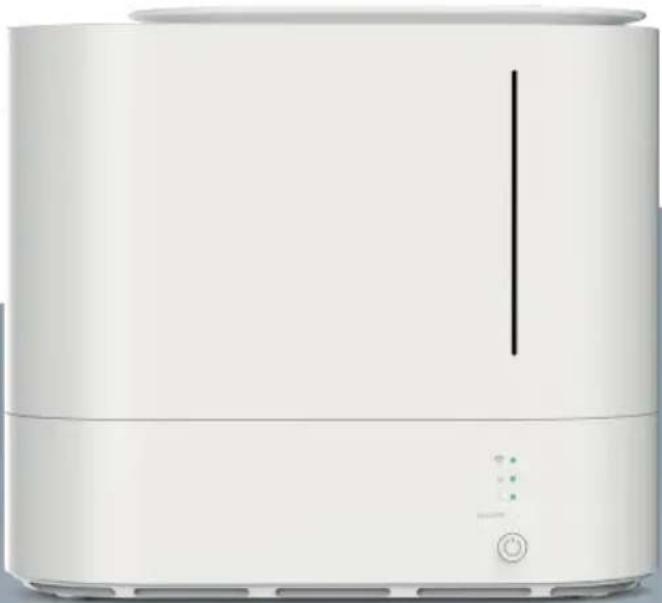
White modern kitchen or oven appliance with a vertical line and control buttons (no visible text or symbols)TESLA SMART HUMIDIFIER
HASZNÁLATI UTASÍTÁS
TARTALOM
A TERMÉK LEÍRÁSA 49
SPECIFIKÁCIÓ 50
HASZNÁLATI ÚTMUTATÓ 50
CSATLAKOZÁS A TESLA SMART ALKALMAZÁSHOZ ... 52
KARBANTARTÁS 53
GYAKRAN ISMÉTELT KÉRDÉSEK 54
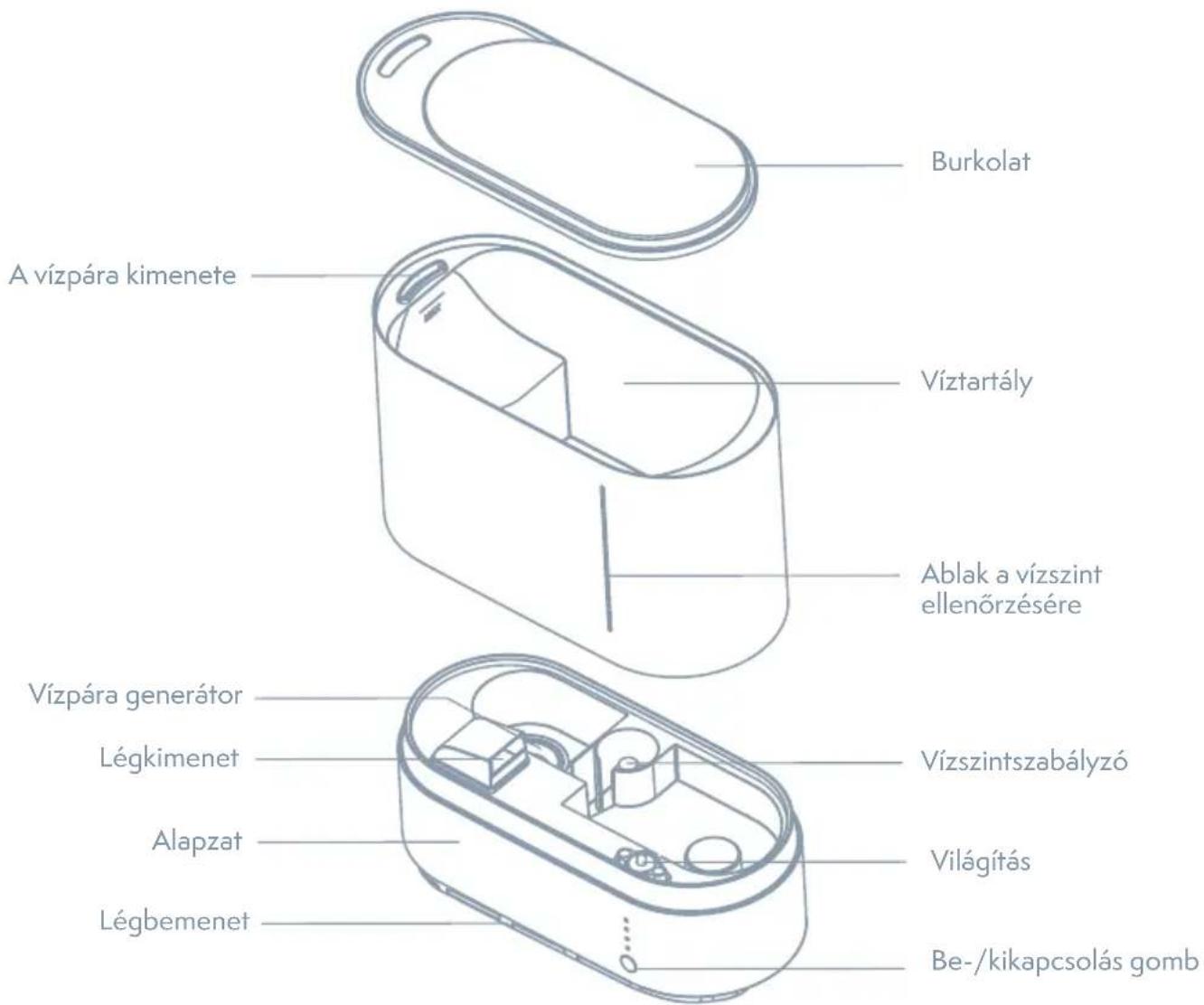
A TERMÉK LEÍRÁSA
Far East Consortium Building,
121 Des Voeux Road Central
Hong Kong
www.teslasmart.com
TT
TESLA
natural_image
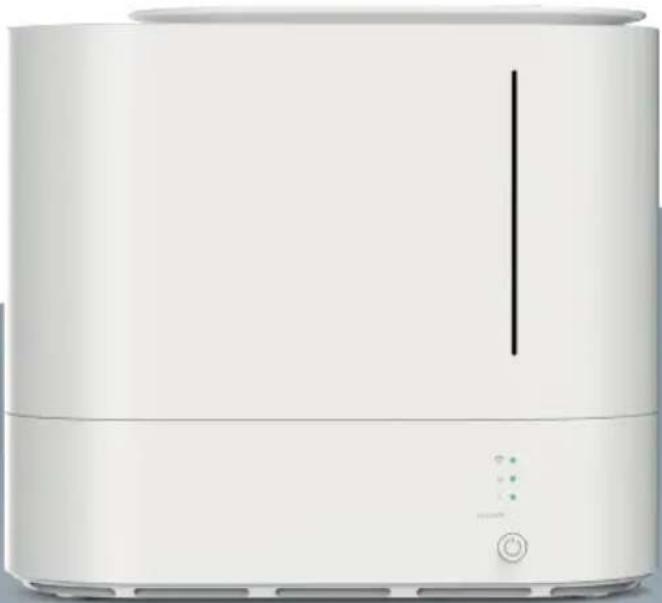
White modern kitchen or oven appliance with a vertical indicator line and control buttons (no visible text or symbols)TESLA SMART HUMIDIFIER
PRIROČNIK ZA UPORABO
KAZALO VSEBINE
OPIS IZDELKA 58
SPECIFIKACIJE 59
NAVODILA ZA UPORABO 59
POVEZAVA Z APLIKACIJO TESLA SMART 61
VZDRŽEVANJE 62
POGOSTO ZASTAVLJENA VPRAŠANJA 63
OPIS IZDELKA
POVEZAVA Z APLIKACIJO SMART LIFE
Far East Consortium Building,
121 Des Voeux Road Central
Hong Kong
www.teslasmart.com
TT
TESLA
natural_image
White modern kitchen or oven appliance with a vertical indicator line and control buttons (no visible text or symbols)TESLA SMART HUMIDIFIER
KORISNIČKI PRIRUČNIK
SADRŽAJ
OPIS UREĐAJA 67
SPECIFIKACIJE 68
UPUTE ZA UPOTREBU UREĐAJA 68
VEZA S APLIKACIJOM TESLA SMART 70
ODRŽAVANJE 71
ČESTO POSTAVLJANA PITANJA 72
OPIS UREĐAJA
Dodavanje uređaja u jednostavnom načinu (preporučeno)
- Provjerite je li vaš pametni uređaj napajan i je li mobitel povezan s WiFi mrežom. Ako WiFi indikator pametnog uređaja i dalje treperi, to znači da je pametni uređaj u načinu uparivanja; ako ne, pritisnite tipku dulje od 5 sekundi, nakon što pametni uređaji „zapište“, a zatim je otpustite i to znači da je uređaj spreman za konfiguraciju.
- Otvorite svoj „Tesla Smart“ APP i dodirnite „+“ u gornjem desnom dijelu APP-a. Odaberite vrstu uslužnog uređaja, dodirnite „ Humidifier“ i kliknite na „Dodaj uređaj“, a zatim automatski dohvatite lozinku WiF mreže s kojom se povezuje vaš mobilni telefon. Zatim dodirnite „U redu“ za povezivanje s uređajem.
- Kada se pojavi „Uspješno dodan 1 uređaj“, to znači da je veza dovršena i vaš će uređaj biti naveden na vašem popisu APP-a.
Far East Consortium Building,
121 Des Voeux Road Central
Hong Kong
www.teslasmart.com
TT
TESLA
TESLA SMART HUMIDIFIER
Manufacturer
Tesla Global Limited
Far East Consortium Building,
121 Des Voeux Road Central
Hong Kong
www.teslasmart.com
- TESLA SMART HUMIDIFIER
- USER MANUAL
- CONTENT
- SPECIFICATION
- FUNCTION INSTRUCTION
- Preparation Before Use
- Wind Speed Button
- Download & Registration
- Add Devices in Easy Mode(Recommend)
- How to remove device?
- Method 1:
- Method 2:
- MAINTENANCE
- Safety Warning
- ATTENTION
- FAQ
- INFORMATION ABOUT DISPOSAL AND RECYCLING
- EU DECLARATION OF CONFORMITY
- Manufacturer
- TESLA
- BENUTZERHANDBUCH
- INHALTSVERZEICHNIS
- TT TESLA
- UŽIVATELSKÁ PŘÍRUČKA
- OBSAH
- PŘEHLED PRODUKTU
- UŽÍVATELŠKÁ PRÍRUČKA
- PREHL'AD PRODUKTU
- PRIPOJENIE K APLIKĆCIU TESLA SMART
- TT
- INSTRUKCJA UŻYTKOWNIKA
- SPIS TREŚCI
- PRZEGLĄD PRODUKTÓW
- HASZNÁLATI UTASÍTÁS
- TARTALOM
- A TERMÉK LEÍRÁSA
- PRIROČNIK ZA UPORABO
- KAZALO VSEBINE
- OPIS IZDELKA
- POVEZAVA Z APLIKACIJO SMART LIFE
- KORISNIČKI PRIRUČNIK
- SADRŽAJ
- OPIS UREĐAJA
- Dodavanje uređaja u jednostavnom načinu (preporučeno)
Brand : TESLA
Model : Smart Humidifier
Category : Humidifier