
CoolPro TCX 14 - Cooler DOMETIC - Free user manual and instructions
Find the device manual for free CoolPro TCX 14 DOMETIC in PDF.


| Product Type | Thermoelectric Cooler/Warmer |
| Brand | Dometic |
| Model | CoolPro TCX 14 |
| Gross Capacity | 14 L |
| Usable Capacity | 13.5 L |
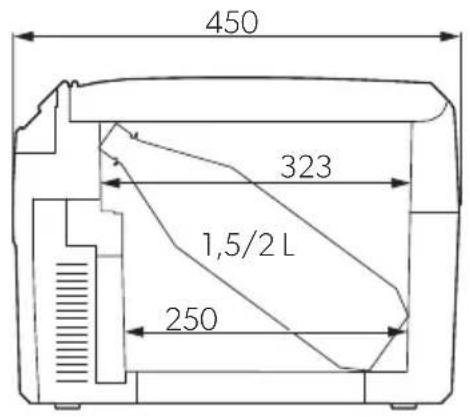
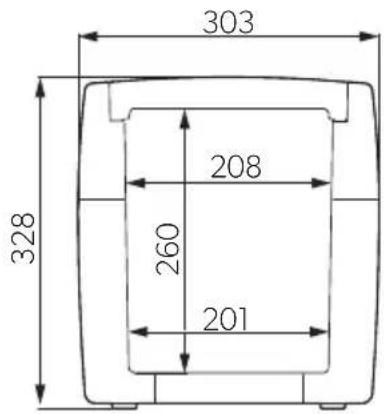
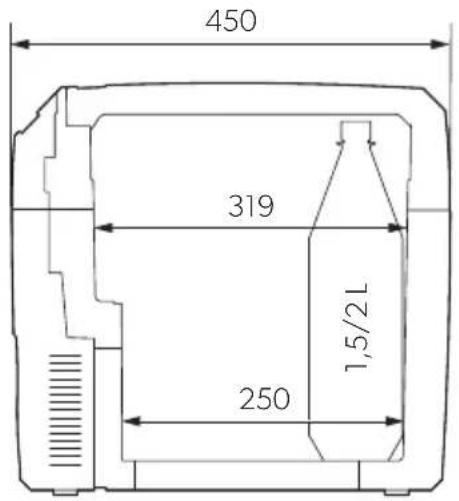
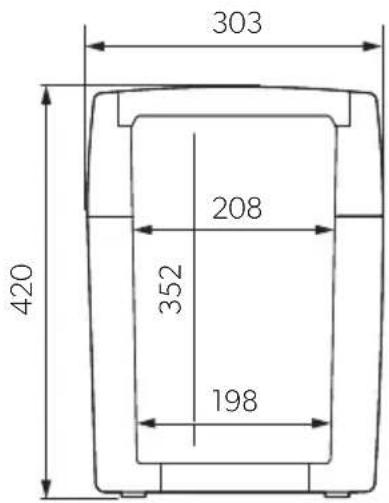
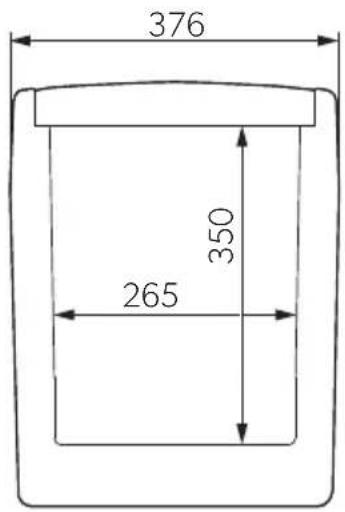
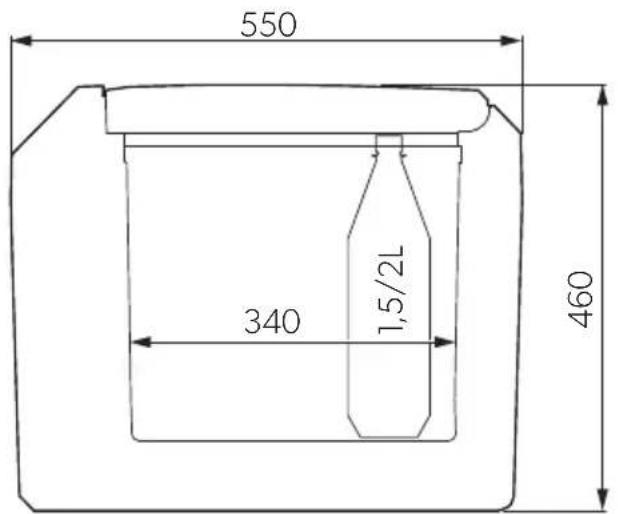
| Dimensions (approx.) | 450 x 323 x 250 mm (L x W x H) |
| Weight | 5.8 kg |
| Power Supply | 12/24 V DC (vehicle) or 220-240 V AC (mains) |
| Power Consumption (DC 12V) | 46 W |
| Power Consumption (DC 24V) | 50 W |
| Power Consumption (AC 230V) | 64 W |
| Power Consumption (ECO mode, AC) | 8.5 W |
| Cooling Temperature Range | 1 °C to 16 °C (max. 27 °C below ambient) |
| Heating Temperature Range | 48 °C to 65 °C |
| Energy Efficiency Class | A++ |
| Annual Energy Consumption | 74 kWh/annum |
| Climate Class | T (ambient +16 °C to +43 °C) |
| Noise Emission | 41 dB(A) |
| Battery Monitor | Multi-level (HIGH/LOW/OFF) to protect vehicle battery |
| Modes | Cooling, Heating, ECO mode |
| Safety Features | Polarity reversal protection, automatic priority circuit (AC mains priority), overheating protection |
| Maintenance | Clean with damp cloth; do not immerse in water; ensure ventilation openings are clear |
| Spare Parts / Repairability | Replaceable fuse (8 A) in DC plug; repairs only by authorized service center |
| Accessories Included | AC connection cable, DC connection cable, instruction manual |
Frequently Asked Questions - CoolPro TCX 14 DOMETIC
User questions about CoolPro TCX 14 DOMETIC
0 question about this device. Answer the ones you know or ask your own.
Ask a new question about this device
Download the instructions for your Cooler in PDF format for free! Find your manual CoolPro TCX 14 - DOMETIC and take your electronic device back in hand. On this page are published all the documents necessary for the use of your device. CoolPro TCX 14 by DOMETIC.
USER MANUAL CoolPro TCX 14 DOMETIC
natural_image
Three DOMETIC devices shown in front, front, and side views (no visible text or labels on the devices themselves)TCX 14, TCX21, TCX 35
EN
Thermoelectric cooler
Operating manual 5
natural_image
Technical line drawing of a printer with an inset close-up showing the internal structure (no text or symbols)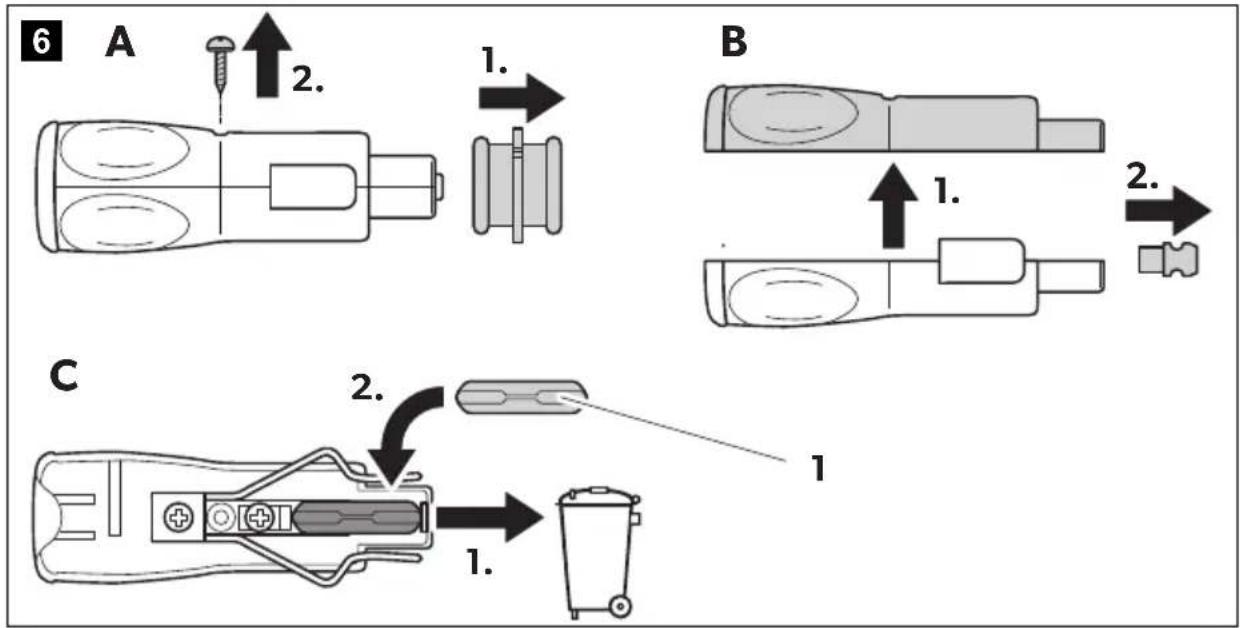
7
TCX14
TCX21
TCX35
Please read this manual carefully before starting the device. Keep it in a safe place for future reference. If the device is passed on to another person, this manual must be handed over to the user along with it.
The manufacturer cannot be held liable for damage resulting from improper usage or incorrect operation.
Table of contents
1 Explanation of symbols....5
2 Safety notes....6
3 Scope of delivery 9
4 Use as intended....9
5 Technical description....9
6 Operation 10
7 Cleaning and servicing....13
8 Disposal....14
9 Troubleshooting....14
10 Technical data....15
1 Explanation of symbols

WARNING!
Safety instruction: Indicates a hazardous situation that, if not avoided, could result in death or serious injury.

CAUTION!
Safety instruction: Indicates a hazardous situation that, if not avoided, could result in minor or moderate injury.

NOTICE!
Indicates a situation that, if not avoided, can result in property damage.

NOTE
Supplementary information for operating the product.
2 S a f e t y n o t
2.1 General safety

WARNING! Failure to obey these warnings could result in death or serious injury.
Electrocution hazard
- Do not operate the cooling device if it is visibly damaged.
- If this cooling device's power cable is damaged, it must be replaced by the manufacturer, customer service or a similarly qualified person in order to prevent safety hazards.
- This cooling device may only be repaired by qualified personnel. Improper repairs can lead to considerable hazards.
Health hazard
- This device is not intended for use by persons (including children) with reduced physical, sensory or mental capabilities, or lack of experience and knowledge, unless they have been given supervision or instruction concerning use of the device by a person responsible for their safety.
- Cleaning and user maintenance must not be carried out by children without supervision.
• Children must not play with the cooling device. - Children must be supervised to ensure that they do not play with the cooling device.
- Always keep and use the cooling device out of the reach of children under the age of 8 years.
Explosion hazard
- Do not store any explosive substances such as spray cans with a flammable propellant in the cooling device.

CAUTION! Failure to obey these cautions could result in minor or moderate injury.
Electrocution hazard
- Disconnect the cooling device from the power supply
– before each cleaning and maintenance - after every use
Health hazard
- Food may only be stored in its original packaging or in suitable containers.

NOTICE! Damage hazard
- Check that the voltage specification on the type plate corresponds to that of the energy supply.
• Only connect the cooling device as follows: - With the DC connection cable to a DC power supply in the vehicle
- Or with the AC connection cable to an AC power supply
• Never pull the plug out of the socket by the cable. - If the cooling device is connected to a DC outlet: Disconnect the cooling device and other power consuming devices from the battery before connecting a quick charging device.
- If the cooling device is connected to a DC outlet: Disconnect the cooling device or switch it off when you turn off the engine. Otherwise you may discharge the battery.
- The cooling device is not suitable for transporting caustic materials or materials containing solvents.
- The insulation of the cooling device contains flammable cyclopentane and requires special disposal procedures. Deliver the cooling device at the end of its life-cycle to an appropriate recycling center.
2.2 Operating the cooling device safely

CAUTION! Failure to obey these cautions could result in minor or moderate injury.
Electrocution hazard
- Before starting the cooling device, ensure that the power supply line and the plug are dry.
Health hazard
- Opening the door for long periods can cause significant increase of the temperature in the compartments of the device.
- Clean regularly surfaces that can come in contact with food and accessible drainage systems.
- Store raw meat and fish in suitable containers in the device, so that it is not in contact with or drip onto other food.
• If the device is left empty for long periods: - Switch off the device.
- Defrost the device.
– Clean and dry the device. - Leave the door open to prevent mould developing within the device.

NOTICE! Damage hazard
- Do not use electrical devices inside the cooling device unless they are recommended by the manufacturer for the purpose.
- Do not place the cooling device near naked flames or other heat sources (heaters, direct sunlight, gas ovens etc.).
• Danger of overheating!
Ensure at all times that there is a minimum of 50 mm ventilation on all four sides of the cooling device. Keep the ventilation area free of any objects that could restrict the air flow to the cooling components.
Do not place the cooling device in closed compartments or areas with none or minimal air flow.
- Ensure that the ventilation openings are not covered.
- Do not fill the inner container with ice or fluids.
• Never immerse the cooling device in water. - Protect the cooling device and cables against heat and moisture.
3 S c o p e o f d
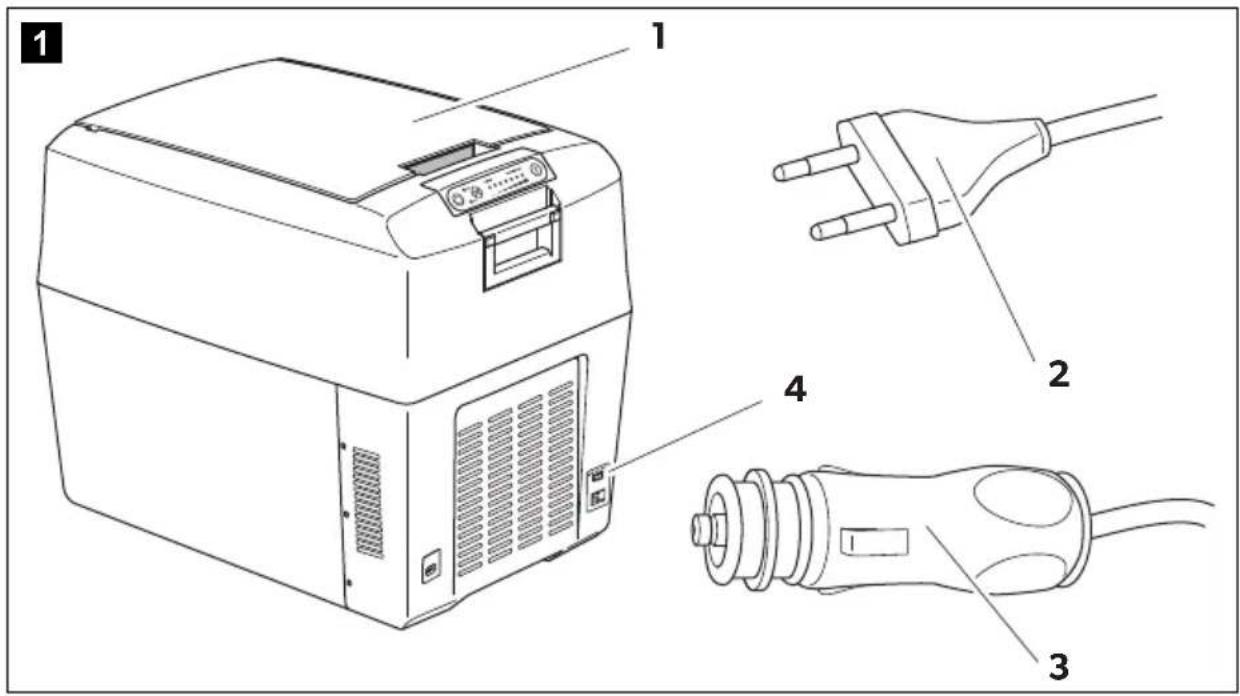
No. in fig. 1, page 2
Quantity Description
11 Thermoelectric cooler
21 Connection cable for AC connection
31 Connection cable for DC connection
- 1 Instruction manual
Check before starting up the device that all parts are available belonging to the scope of delivery.
4 U s e a s i n t e
The cooler can be used to cool and keep foodstuffs warm. The device can be also used for camping purposes.
All materials processed in the refrigerator are safe for foodstuffs.

CAUTION! Health hazard!
Please check if the cooling capacity of the device is suitable for storing the food or medicine you wish to cool.
5 Technical description
The cooling device is suitable for mobile use. It can cool goods up to max. 27 °C under ambient temperature (thermostatic switch-off at approx. 2 °C) or keep them warm up to max. 65 °C.
If the device has reached the set temperature range, it will automatically switch over to the energy save mode. In this mode only the energy which is required to reach the temperature inside the box is consumed.
The cooling device is a low-wear thermo-electric cooler with fan-assisted heat removal.
The cooling device is equipped with an automatic priority circuit. Thus it is ensured that with simultaneous connection to the AC mains supply and to a 12/24 V battery, the AC mains supply will be used.
6 O p e r a t i o n

NOTE
Before you put the new cooling device into operation, you should clean it inside and outside with a damp cloth for hygienic reasons (see also chapter "Cleaning and servicing" on page 13).
6.1 Tips to save energy

NOTE
A ventilator in the interior space of the cooling device provides for the circulation of the cold air within the box. Thus a better cooling capacity will be achieved. In order that the cold air cannot reach the outside when opening the cooling device, it is equipped with a switch which turns off the ventilator as soon as the lid is opened.
- Choose a well ventilated location which is protected from direct sunlight.
- If you want to set an increased energy efficiency and a limited cooling capacity for the cooler device, use the device's ECO mode.
- Allow warm food to cool down first before placing it in the cooling device to keep cool.
- Do not open the cooling device more often than necessary.
- Do not leave the cooling device open for longer than necessary.
6.2 Connecting to vehicle power

NOTE
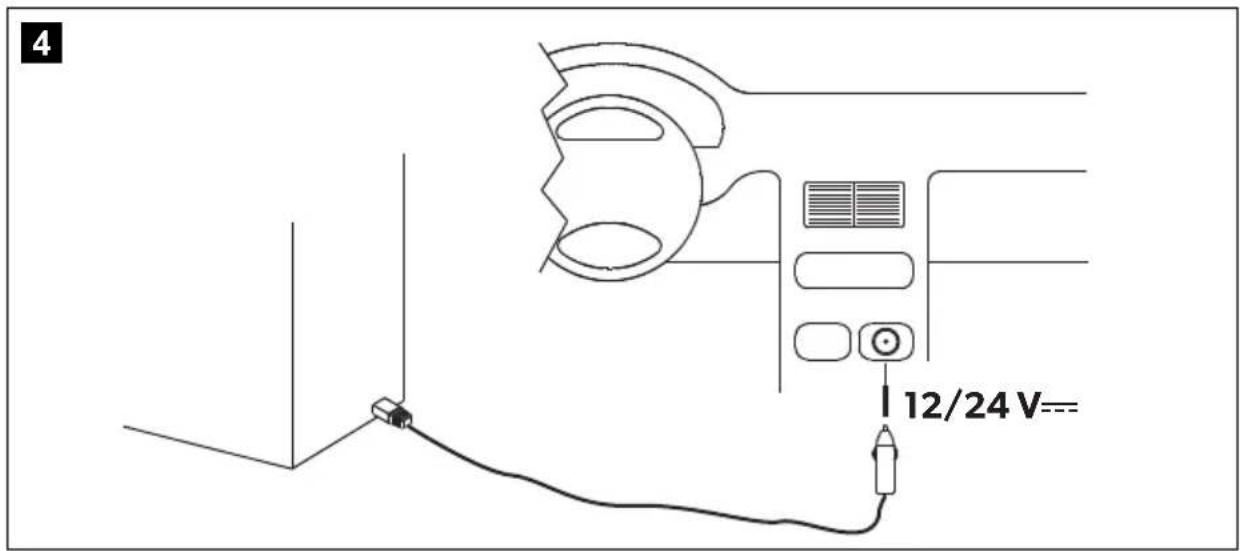
If you connect the cooling device to the vehicle power, remember that you may have to turn on the ignition to supply it with power.
For safety reasons the cooler is equipped with an electronic system to prevent polarity reversal. This protects the cooler against short-circuiting when connecting to a battery.
6.3 Using the battery monitor
The device is equipped with a multi-level battery monitor that protects your vehicle battery against excessive discharging when the device is connected to the on-board DC supply.
If the cooler is operated when the vehicle ignition is switched off, the cooler switches off automatically as soon as the supply voltage falls below a set level. The cooler will switch back on once the battery has been recharged to the restart voltage level.

NOTICE! Danger of damage!
When switched off by the battery monitor, the battery will no longer be fully charged. Avoid starting repeatedly or operating current consumers without longer charging phases. Ensure that the battery is recharged.
In "HIGH" mode, the battery monitor responds faster than at the level "LOW" (see the following table).
| Battery monitor mode LOW HIGH | |
| Switch-off voltage at 12 V | 10.1 V 11.7 V |
| Restart-voltage at 12 V | 11.5 V 13.1 V |
| Switch-off voltage at 24 V | 21.5 V 24.6 V |
| Restart voltage at 24 V | 23.0 V 26.2 V |
▶ Slide the switch (fig. 1 4, page 2) to the appropriate setting in order to select the battery monitor mode.
▶ Slide the switch (fig. 1 4, page 2) to „OFF“ in order to deactivate the battery monitor mode.

NOTE
When the cooler is supplied by the starter battery, select the battery monitor mode "HIGH". If the cooler is connected to a supply battery, the battery monitor mode "LOW" will suffice.
6.4 Opening the cooler
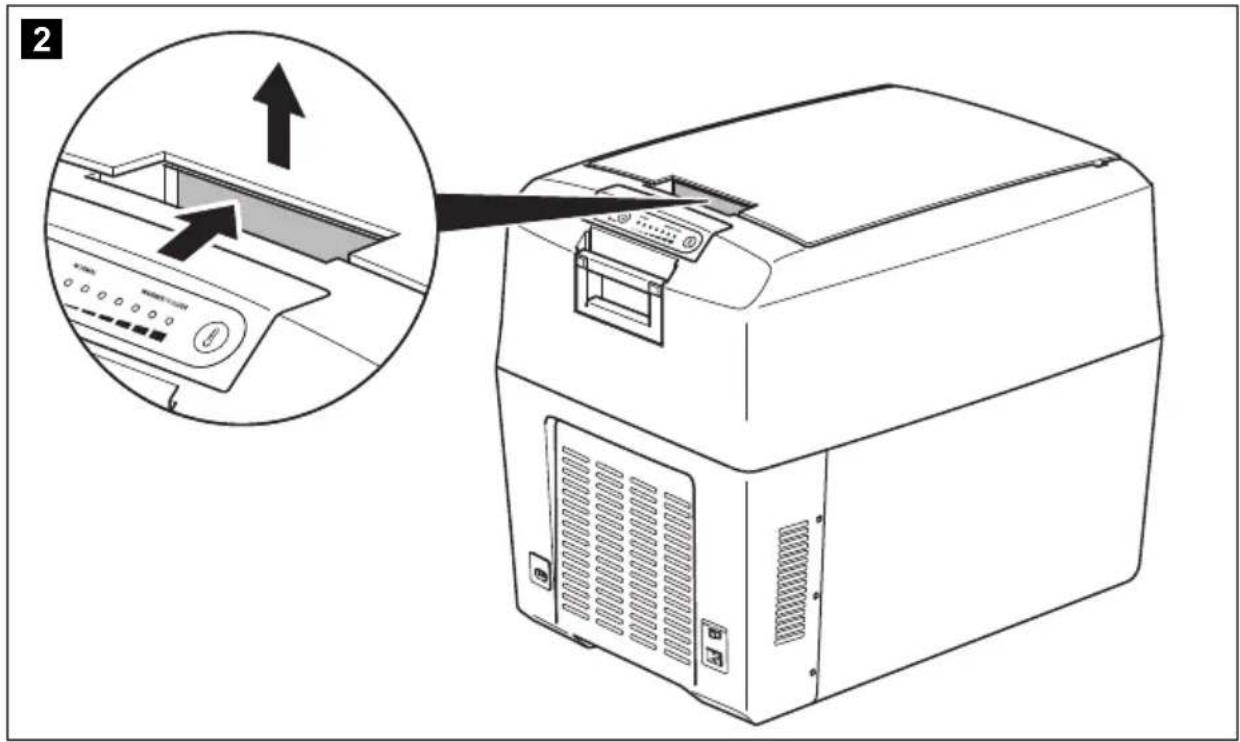
▶ TCX35 only: Unlock the cooling device (fig. 2, page 2).
▶Open the cooling device.
6.5 Switch on the cooling box

NOTICE!
Take care that there are only objects or goods in the cooling device which may be cooled or heated to the selected temperature.
▶ Place the cooling device on a stable base.
▶Connect the cooling device
- using the AC connection cable supplied (fig. 1 2, page 2) to an AC mains power socket or ...
- using the DC connection cable supplied (fig. 1 3, page 2) to the DC socket in the vehicle (fig. 4, page 3).
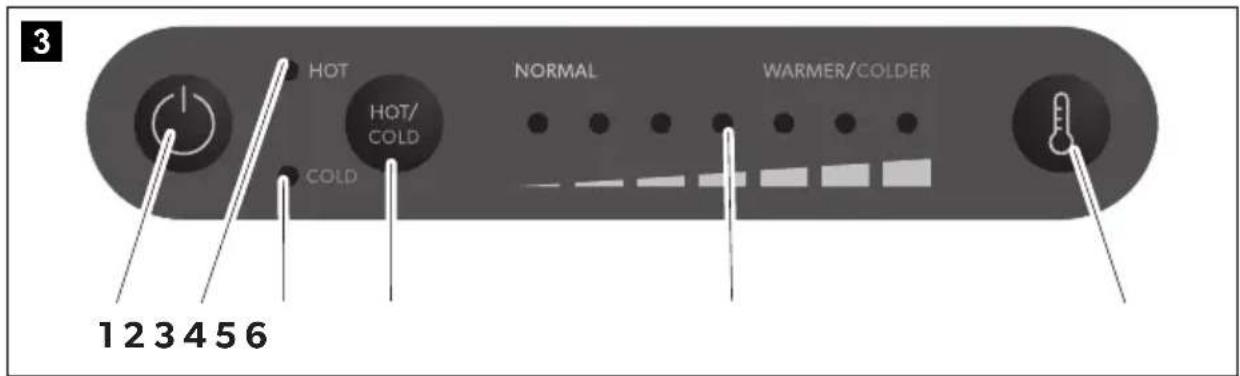
▶ Press the button "⏻" at the control panel to switch on the cooling device.
√The cooling device starts to cool or heat the interior space.
Operating display Operating mode
| red (fig. 3 2, page 2) | heating |
| blue (fig. 3 3, page 2) | cooling |
6.6 Switch over between cooling and heating
If you want to switch over between cooling and heating, press the button "HOT/COLD".

NOTE
The control unit of the cooling device has a memory function. It memorises the selected temperature range for each mode (cooling and heating). Thus the temperature range which is previously selected in the mode is set again with each switching on or switching over.
√The red or blue operating display lights up and the device starts to cool/heat.
▶ When you want to finish the cooling or heating process, press the button "⏻".
▶When you stop using the cooling device, disconnect it from the mains.
6.7 Select temperature
The set temperature status display (fig. 3 5, page 2) indicates the selected temperature. With an increasing number of illuminated LEDs, the cooling or heating intensity also increases.

NOTE
The following temperature indications are subject to tolerances and are dependent on the measuring position.
Interior space centre temperature at approx. 25 °C ambient temperature:
| Status display(fig. 3 5, page 2) | Interior temperature | |
| Cooling | 7 illuminated LEDs approx 1 °C (TCX14)approx 3 °C (TCX21, TCX35) | |
| 1 illuminated LED approx 16 °C (ECO mode) | ||
| Heating | 7 illuminated LEDs approx 65 °C | |
| 1 illuminated LED approx 48 °C | ||
To select the cool or heat temperature, press the "💡" button repeatedly until the required number of LEDs are illuminated.
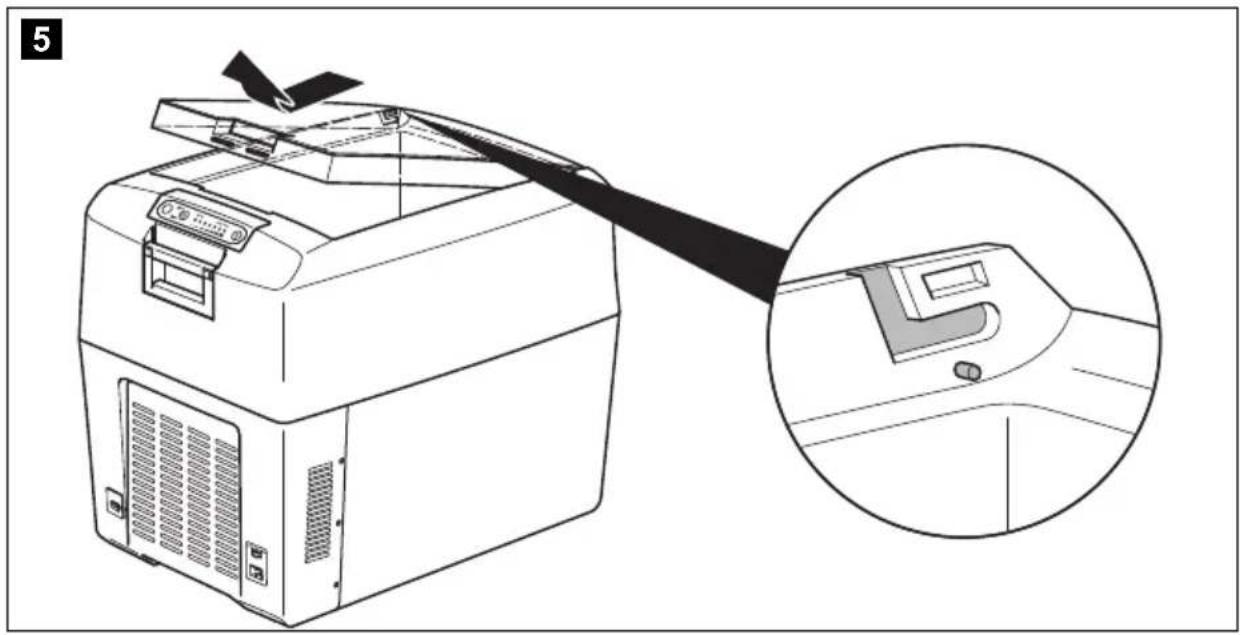
6.8 Removing the lid
You can remove the lid of the cooling device (fig. 5, page 3):
▶ Open the lid until it is at an approx. 30^ angle to the cooler.
▶ Pull the lid forwards and lift it off diagonally.
7 Cleaning and servicing

WARNING! Electrocution hazard
Always disconnect the device from the power supply before you clean and service it.

NOTICE! Risk of damage
• Never clean the cooler under running water or in dish water.
- Do not use abrasive cleaning agents or hard objects during cleaning as these can damage the cooler.
▶ Occasionally clean the device interior and exterior with a damp cloth.
▶ Make sure that the air inlet and outlet vents on the device are free of any dust and dirt, so that heat can be released and the device is not damaged.
8 D i s p o s a l
▶ Place the packaging material in the appropriate recycling waste bins wherever possible.
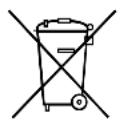
If you wish to finally dispose of the product, ask your local recycling centre or specialist dealer for details about how to do this in accordance with the applicable disposal regulations.
9 Troubleshooting
Fault Possible cause Suggestion
| The cooling device does not function and the fan impeller which is visible from outside does not rotate. | There is no voltage present in the DC power socket in your vehicle. | The ignition must be switched on in most vehicles to apply current to the DC power socket. |
| The ignition is switched on and the cooling device does not work. | The DC power socket is dirty. This results in a poor electrical contact. | Clean the socket of the DC power socket with a non-metallic brush and a solvent, so that the middle contact pin is clean. If the plug of your cooling device becomes very warm in the DC power socket, either the DC power socket must be cleaned or the plug has not been assembled correctly. |
| The fuse of the connecting cable is burnt through. | Replace the fuse (fig. 6 1, page 3) of the DC plug with one of the same rating. | |
| The vehicle fuse is burnt through.Suggestion | Replace the vehicle fuse of the DC power socket (usually 15 A). (Observe the operating instructions in your motorcar for this). | |
| Fault Possible cause | ||
| Your cooling device does not cool satisfactorily and the fan impeller at the outside does not rotate. | The ventilator motor is defective. | The repair can be executed only by an authorized customer service. |
| Your cooling device does not cool satisfactorily and the fan impeller at the outside rotates. | The ventilator motor for the inner ventilator is defective. | |
| The thermo-electric element is defective. | ||
| The integrated power unit is defective. |
10 Technical data
| TCX14 TCX21 | TCX35 | ||
| Ref. no.: | 9600014289 | 9600014290 | |
| Input voltage: 12/24 V--- | 220 - 240 V~ | ||
| Power input: | 46 W (12 V---)50 W (24 V---)64 W (230 V~) | ||
| 8.5 W(AC, ECO mode) | 8.8 W(AC, ECO mode) | ||
| Interior temperature range(7 to 1 LEDs)-Cooling: | 1 °C to 16 °C | 3 °C to 16 °C | |
| (max. 27 °C below ambient temperature) | |||
| Interior temperature range(7 to 1 LEDs)-Heating: 48 °C to 65 °C | |||
| Category: Pantry | |||
| Energy efficiency class: A++ | |||
| Energy consumption: 74 kWh/annum 77 kWh/a num | |||
| Gross capacity: 14 | 21 | 35 | | |||
| Usable capacity: 13.5 | 20 | 33 | | |||
| Climate class: T | |||
| Ambient temperature: +16 °C to +43 °C | |||
| Noise emission: 41 dB(A) | |||
| Weight: | 5.8 kg | 7.3 kg | 10.6 kg |
| Inspection/Certificate: |  | ||
AUSTRIA
Dometic Austria GmbH
Neudorferstraße 108
A-2353 Guntramsdorf
-432236908070
-43 2236 90807060
Mail: info@dometic.at
BENELUX
Dometic Branch Office Belgium
Zincstraat 3
B-1500 Halle
-3223598040
-3223598050
Mail: info@dometic.be
BRAZIL
Dometic DO Brasil LTDA
Avenida Paulista 1754, conj. 111
SP 01310-920 Sao Paulo
+551132513352
-551132513362
Dometic Germany GmbH
Dometic Group Asia Pacific
Suites 2207-11 · 22/F · Tower 1
The Gateway · 25 Canton Road,
Tsim Sha Tsui - Kowloon
-85224611386
-85224665553
Mail: info@waeco.com.hk
HUNGARY
Dometic Zrt. Sales Office
Kerékgyártó u. 5
H-1147 Budapest
+3614684400
-3614684401
Domettic Italy S.r.l.
Via Virgilio, 3
H47122 Forfi (FC)
+390543754901
■ +390543754983
Mail vendite@dometic.it
JAPAN
Dometic KK
Maekawa-Shibaura, Bldg. 2
2-13-9 Shibaura Minato-ku
Tokyo 108-0023
+81354453333
+81354453339
Mail info@dometic.jp
MEXICO
Circuito Médicos No. 6 Local
Colonia Ciudad Satélite
CP 53100 Naucalpan de Juárez
Estado de México
+52 55 5374 4108
+52 55 5393 4683
Mail info@dometic.com.mx
NETHERLANDS
Dometic Benelux B.V.
Ecustraat 3
NL-4879 NP Etten-Leur
+31765029000
+31765029019
Mail info@dometic.nl
NEW ZEALAND
Dometic New Zealand Ltd.
PO Box 12011
1642 Penrose, Auckland
+6496221490
+6496221573
Mail: customerservices@dometic.co.nz
NORWAY
Dometic Norway AS
∅sterøyveien 46
N-3232 Sandefjord
+4733428450
■ +4733428459
Mail: firmapost@dometic.no
POLAND
Dometic Poland Sp. z o.o.
Ul. Puławska 435A
PL-02-801 Warszawa
+48 22 414 3200
+48224143201
Mail info@dometic.pl
PORTUGAL
Dometic Spain, S.L.
Komsomolskaya square 6-1
RU-107140 Moscow
+74957807939
+74959165653
Mail: info@dometic.ru
SINGAPORE
Dometic Pte Ltd
18 Boon Lay Way 06-140 Trade Hub 21
Singapore 609966
+65 6795 3177
+65 6862 6620
Mail:dornetic@dornetic.com.sg
SLOVAKIA
Dometic Slovakia s.r.o. Sales Office Bratislava
Nádražná 34/A
900 28 Ivánka pri Dunaji
/ +421 2 45 529 680
Mail: bratislava@dometic.com
SOUTH AFRICA
Dometic (Pty) Ltd.
Regional Office
South Africa & Sub-Saharan Africa
2 Avalon Road
West Lake View Ext 11
Modderfontein 1645
johannesburg
+27114504978
+27114504976
Mail: info@dometic.co.za
SPAIN
Dometic Spain S.L.
Avda, Sierra del Guadarrama, 16
E-28691 Villanueva de la Cañada
Madrid
+34902111042
+34900100245
Mail: info@dometic.es
SWEDEN
Dometic Scandinavia AB
Gustaf Melins gata 7
Dometic Switzerland AG
Kiedackerstrasse 7a
CH-8153 Rümlang
+41 448187171
+41 448187191
Mail: info@dometic.ch
UNITED ARAB EMIRATES
Dometic Middle East FZCO
P.O.Box17860
S-D 6, Jebel Ali Freezone
Dubai
+97148833858
+97148833868
Mail: info@dometic.ae
UNITED KINGDOM
Dometic UK Ltd.
Dometic House, The Brewery
Blandford St. Mary
Dorset DT11 9LS
+44 344 626 0133
= +44 344 626 0143
Mail: customerservices@dometic.co.uk
USA
Dometic RV Division
1120 North Main Street
Elkhart, IN 46515
+1574-264-2131