
Stick Up Cam Battery (3rd Generation) - Camera RING - Free user manual and instructions
Find the device manual for free Stick Up Cam Battery (3rd Generation) RING in PDF.


| Product Type | Wireless Security Camera |
| Brand | Ring |
| Model | Stick Up Cam Battery (3rd Generation) – BSC1S9 |
| Dimensions (Approx.) | 3.8 x 3.8 x 9.6 cm (1.5 x 1.5 x 3.8 inches) |
| Weight (Approx.) | 230 g (0.5 lbs) with battery |
| Power Source | Rechargeable lithium-ion battery; optional power adapter (5V DC, 2.5A) |
| Battery Charging | Via included orange USB cable; full charge indicated by a single LED |
| Mounting Options | Freestanding on table/shelf, wall mount (included bracket), ceiling mount (sold separately) |
| Video Resolution | 1080p HD |
| Field of View | 130° diagonal |
| Night Vision | Yes – infrared LEDs |
| Two-Way Audio | Yes – built-in speaker and microphone |
| Motion Detection | Yes – adjustable motion zones |
| Weather Resistance | Designed for indoor/outdoor use; not submersible |
| Connectivity | Wi-Fi 802.11 b/g/n (2.4 GHz only) |
| App Compatibility | Ring app (iOS and Android) |
| Cloud Storage | Optional Ring Protect subscription (30-day free trial included) |
| Operating Temperature | 5°F to 122°F (-20°C to 50°C) |
| Security Screws | Two included – one for battery compartment, one for bracket |
| Included Accessories | Battery, battery cover, mounting bracket, security screws, USB charging cable |
| Warranty | 1-year limited warranty; theft protection included |
Frequently Asked Questions - Stick Up Cam Battery (3rd Generation) RING
User questions about Stick Up Cam Battery (3rd Generation) RING
0 question about this device. Answer the ones you know or ask your own.
Ask a new question about this device
Download the instructions for your Camera in PDF format for free! Find your manual Stick Up Cam Battery (3rd Generation) - RING and take your electronic device back in hand. On this page are published all the documents necessary for the use of your device. Stick Up Cam Battery (3rd Generation) by RING.
USER MANUAL Stick Up Cam Battery (3rd Generation) RING
Stick Up Cam | Battery
Quick Start
- Open the Ring app and select Set Up a Device.
Then follow the in-app instructions.
- Scan this code.
This identifies your Ring device to make setup fast and easy.

Download the Ring App.
The Ring App walks you through setting up and managing your Ring Cam.
Search for "Ring" in one of the app stores below, or visit ring.com/app

Download on the App Store

GET IT ON Google Play
Charge the provided battery.
First, fully charge the battery by plugging it into a USB power source using the provided orange cable.
The battery is fully charged when just one LED is lit.

natural_image
Line drawing of two hands inserting a small electronic component into a device (no text or symbols)
= Charging

= Charged
Remove the battery cover.
Twist the battery cover counterclockwise to unlock, then remove it from your Stick Up Cam.


Insert the battery.
Insert the charged battery into the bottom of your Stick Up Cam until it clicks into place. Now place the battery cover back onto your Stick Up Cam.

natural_image
Technical line drawing of a cylindrical device with three circular ports and a push button labeled 'PUSH', with an upward arrow indicating motion (no text or symbols beyond the label)Set up your Stick Up Cam in the Ring app.
In the Ring app, select Set Up a Device.
When prompted, select Security Cams and follow the in-app instructions.
Try it out!
After setup, tap the Live View button in the Ring app to see live video from your Stick Up Cam.
Blue light flashing?
If the light on the front of your Stick Up Cam is flashing after setup, it's updating its software.
Do not remove the battery from your Stick Up Cam while the light is flashing!
Choose a location.
Stick Up Cam is happy just about anywhere, indoors or out. It comes ready to sit on a flat surface like a table or shelf, but can also be mounted to a wall.
Choose a spot where it can provide the view you want.

natural_image
White cylindrical device with a circular display and perforated base (no visible text or symbols)Table or shelf
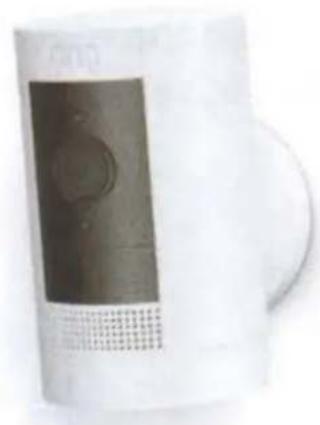
natural_image
White industrial air purifier device with a black cover and mesh grille (no visible text or symbols)Mounted on a wall
Wanna mount to a ceiling?
Mount to a ceiling with the Ring Stick Up Cam Mount (sold separately).
How to use Stick Up Cam on a table or shelf:
Insert the charged battery, then place it at your chosen location. Your Stick Up Cam is now ready to protect you.
Once you're done, check out the live video in the Ring app to make sure you have the view you want.
If you'd like a downward camera angle...
Swivel the base around so that the long side faces the front, then tilt your Stick Up Cam so it points downward.

Install the security screws (optional).
Your Stick Up Cam comes with two optional security screw locations.
One secures the battery compartment, and the other secures the mounting bracket to the base. To use them, open the battery compartment and/or remove the mounting bracket, then pop out the rubber plug(s).
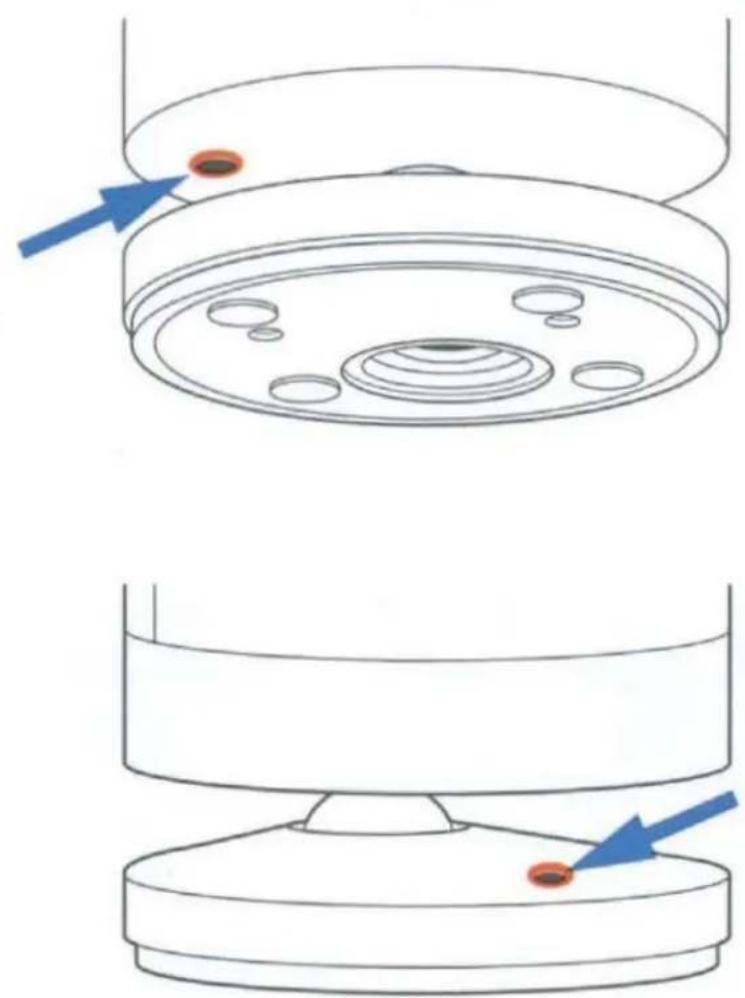
1 Swivel the base so the long side faces the front.

natural_image
Line drawing of a refrigerator with front panel and side door (no text or symbols)2 Insert and drive the security screw into the base screw location with a standard Phillips-head screwdriver (not included).

natural_image
Line drawing of a hand using a screwdriver to press or install a computer monitor (no text or symbols present)3 Turn your Stick Up Cam over to access the battery compartment screw hole, and drive the second security screw.
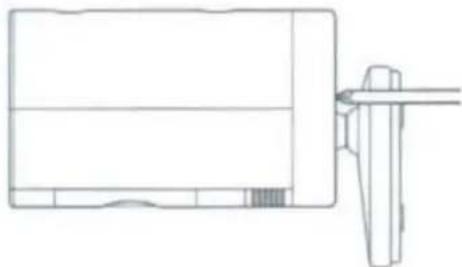
natural_image
Technical line drawing of a mechanical component with a bracket and pin (no text or symbols)How to install Stick Up Cam on a wall:
Remove the base. Unscrew it using a standard Phillips-head screwdriver (not included).
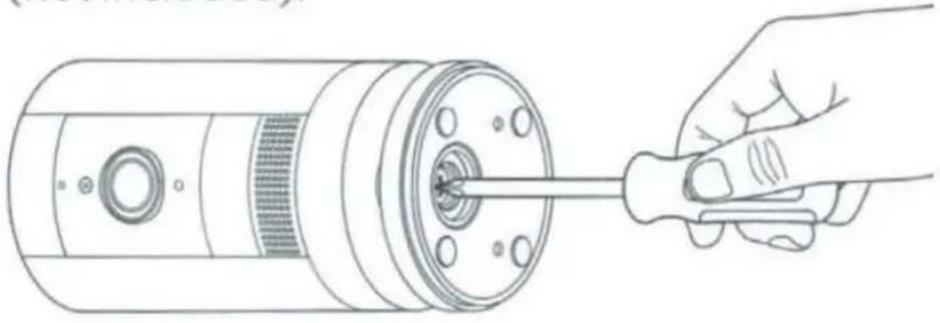
natural_image
Line drawing of a hand inserting a screwdriver into a cylindrical device (no text or symbols)Re-attach the base. Screw it into the back of your Stick Up Cam with the "UP" arrow on the bracket pointing upward.

natural_image
Technical line drawing of a device panel and its exploded view (no text or symbols)Remove the mounting bracket. Slide it down to remove it from the base.

natural_image
Hand inserting a button into a cylindrical device with an arrow indicating the direction (no text or symbols present)Drive the screws. Hold the bracket against your wall, making sure the "UP" arrow is pointing upward, and mount it with the included screws.
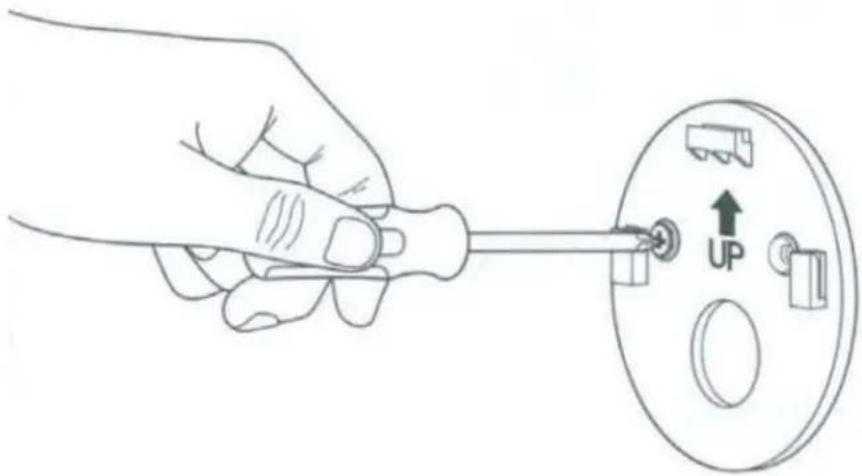
natural_image
Hand holding a screwdriver to adjust a circular component with an 'UP' indicator (no text or symbols on the diagram itself)Mount your cam. Guide the grooves in the base onto the hooks on the bracket. Slide Stick Up Cam down to secure it to the wall.

natural_image
Line drawing of a hand inserting a card into a device, showing the clip and handle (no text or symbols)Check it out! Now rotate it to your desired angle, and check out the live video in the Ring app to make sure you have the view you want.
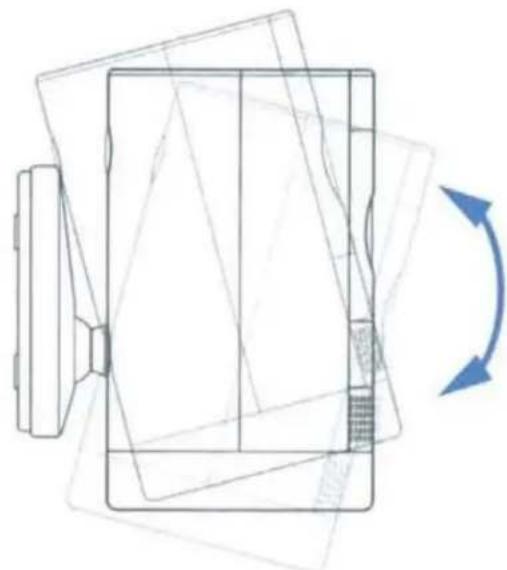
natural_image
Pure technical line drawing of a mechanical component with no text, numbers, or symbolsInstall the security screws (optional).
Your Stick Up Cam comes with two optional security screw locations.
One secures the mounting bracket to the base, and the other secures the battery compartment.
To access them after you've mounted your Stick Up Cam, rotate it to either side.
To install the base screw...
First, slide your Stick Up Cam off of the mounting bracket.
Pop the rubber plug out of the base, then place Stick Up Cam back on the bracket.
Secure with one of the provided screws.

natural_image
Line drawing of a hand using a screwdriver to adjust or install a cylindrical device (no text or symbols present)To install the battery compartment screw...
Remove the battery compartment, pop out the rubber plug, then replace the battery compartment on your Stick Up Cam.
Secure with one of the provided screws.

natural_image
Line drawing of a hand using a screwdriver to adjust or install a cylindrical device (no text or symbols present)Free Ring Protect Plan for 30 days.
Your new device comes with a free, 30-day trial of Ring Protect. This comprehensive subscription service lets you review, save, and share your video and photo history anytime so you never miss a moment.*
To continue using Ring Protect after your free trial ends, visit ring.com/protect-plans to compare plans and pricing.
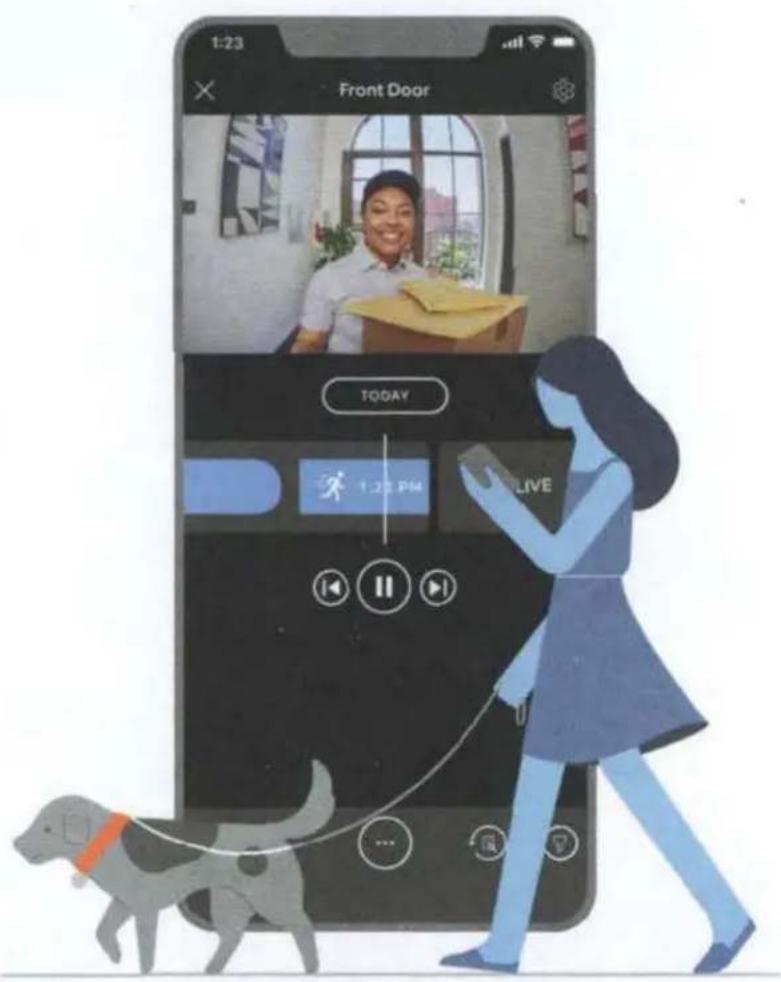
*Your free trial isn't applicable for locations with an existing Ring Protect subscription. See ring.com/protect-plans to learn more about your plan's retention period.
ring
For additional help, visit ring.com/help Or give us a call
US 1 800 656 1918
Canada 1 855 300 7289
Worldwide +1 310 929 7085
For a list of all our customer support numbers, visit ring.com/callus
For information on our warranty, theft protection, and Ring Protect Plans, visit ring.com/legal
© 2022 Ring LLC or its affiliates. Ring and all related marks are trademarks of Ring LLC or its affiliates.
22-004184-02
Warranty and Safety
IMPORTANT PRODUCT INFORMATION
Use Responsibly: Read all instructions and safety information before use.

SAFETY INFORMATION
FAILURE TO FOLLOW THESE SAFETY INSTRUCTIONS COULD RESULT IN FIRE, ELECTRIC SHOCK, OR OTHER INJURY OR DAMAGE

BATTERY SAFETY
HANDLE WITH CARE. Your device can optionally use a rechargeable lithium-ion battery. Do not disassemble, open, crush, bend, deform, puncture, or shred the battery in your device. Do not modify or remanufacture the battery, attempt to insert foreign objects into the battery, or immerse or expose it to water or other liquids, expose to fire, explosion or other hazard. Only use the battery for the system for which it is specified. Use of an unqualified battery or charger may present a risk of fire, explosion, leakage or other hazard. Do not short circuit a battery or allow metallic conductive objects to come into contact with battery terminals. Avoid dropping the device or battery. If the device or battery is dropped, especially on a hard surface, and the user suspects damage, do not attempt repair. Contact Ring Customer Service for assistance. Do not expose your device or adapter to liquids. If your device or adapter gets wet, carefully unplug all cables without getting your hands wet and wait for the device and adapter to dry completely before plugging them in again.
Do not attempt to dry your device or adapter with an external heat source, such as a microwave oven or a hair dryer. If the device or adapter appear damaged, discontinue use immediately. Use only accessories supplied with the device to power your device. To avoid risk of electric shock, do not touch your device or any wires connected to your device during a lightning storm.
Your device can withstand outdoor use and contact with water under certain conditions. However, your device is not intended for underwater use and may experience temporary effects from exposure to water. Do not intentionally immerse your device in water or expose it to liquids. Do not spill any food, oil, lotion, or other abrasive substances on your device. Do not expose your device to pressurized water, high velocity water, or extremely humid conditions (such as a steam room). To protect against electric shock, do not place cord, plug, or device in water or other liquids.
Install your power adapter into an easily accessible socket-outlet located near the equipment that will be plugged into, or powered by, the adapter.
Product Specifications
Model Number: BSC1S9
Electrical Rating: 5V DC 2.5A (when using optional power adapter)
Operating Temperature: 5°F to 122°F (-20°C to 50°C)
RECYCLING YOUR DEVICE PROPERLY
In some areas, the disposal of certain electronic devices is regulated. Make sure you dispose of, or recycle, your device in accordance with
your local laws and regulations. For information about recycling your device, go to amazon.com/devicesupport.
TERMS OF SERVICE AND WARRANTY
By purchasing or using the product, you agree to the Terms of Service found at ring.com/terms. For information on our warranty, Theft Protection, and Ring Protect Plans and any other applicable policy, visit ring.com/legal
FOR USERS IN THE UNITED STATES
FCC Compliance Statement
This device complies with part 15 of the FCC Rules. Operation is subject to the following two conditions: (1) This device may not cause harmful interference, and (2) This device must accept any interference received, including interference that may cause undesired operation.
NOTE: This equipment has been tested and found to comply with the limits for a Class B digital device, pursuant to part 15 of the FCC Rules. These limits are designed to provide reasonable protection against harmful interference in a residential installation. This equipment generates, uses and can radiate radio frequency energy and, if not installed and used in accordance with the instructions, may cause harmful interference to radio communications.
However, there is no guarantee that interference will not occur in a particular installation. If this equipment does cause harmful interference to radio or television reception, which can be determined by turning the equipment off and on, the user is encouraged to try to correct the interference by one or more of the following measures:
• Reorient or relocate the receiving antenna.
- Increase the separation between the equipment and receiver.
- Connect the equipment into an outlet on a circuit different from that to which the receiver is connected.
- Consult the dealer or an experienced radio/TV technician for help.
Pursuant to Section 15.21 of the FCC rules, changes or modifications to a Product by the user that are not expressly approved by the party responsible for compliance could void the user's authority to operate the equipment. The device meets the FCC Radio Frequency Emission Guidelines. Information on the product is on file with the FCC and can be found by inputting such Product's FCC ID (which can be found on the device) into the FCC ID Search form available at fcc.gov/oet/ea/fccid.
The party responsible for FCC compliance is Ring LLC, 1523 26th Street Santa Monica, CA 90404.
FCC Radiation Exposure Statement
This device complies with FCC radiation exposure limits set forth for an uncontrolled environment and it also complies with Part 15 of the FCC RF Rules.
This equipment must be installed and operated in accordance with provided instructions and the antenna(s) used for this transmitter must be installed to provide a separation distance of at least 20 cm from all persons and must not be co-located or operated in conjunction with any other antenna or transmitter.
FOR AUSTRALIAN CONSUMERS
LIMITED WARRANTY AND THEFT PROTECTION
Our goods come with guarantees that cannot be excluded under the Australian Consumer Law. You are entitled to a replacement or refund for a major failure and for compensation for any other reasonably foreseeable loss or damage. You are also entitled to have the goods repaired or replaced if the goods fail to be of acceptable quality and the failure does not amount to a major failure. Goods presented for repair may be replaced by refurbished goods of the same type rather than being repaired. Refurbished parts may be used to repair the goods.
Terms of Service and Warranty
By purchasing or using the product, you agree to the Terms of Service found at https://ring.com/au/en/terms. For more information on our warranty and any other applicable policy, see ring.com/au/en.
I. LIMITED WARRANTY
This is a "Limited Warranty" which gives you specific legal rights. You may also have other rights, which vary from jurisdiction to jurisdiction. Some jurisdictions, such as Australia, do not allow the exclusion or limitation of incidental or consequential damages, so the limitation or exclusion under this Limited Warranty may not apply to you. Please keep your dated sales receipt; it is required for all warranty requests. Except as otherwise provided by the Australian Consumer Law, any dispute or controversy regarding this Limited Warranty arising from your use of your Ring products will be resolved by final and binding bilateral arbitration in accordance with the "Dispute Resolution" section of the Terms of Service, found at https://ring.com/au/en/terms
1. WHAT THE WARRANTY COVERS
For a period of one (1) year from the date of purchase of your Ring product, or one (1) year from the date of receipt of your replacement Ring product (see Section II below for details). Ring LLC ("Ring") will, at its sole option, repair or replace any Ring products that malfunction due to defective parts or workmanship at no charge to you. This warranty is not transferable and applies only to the original consumer purchaser. Ring may, in its sole discretion, make any repair or replacement with new or refurbished product or components. If the product or component requiring repair or replacement is no longer available, Ring may, in its sole discretion, replace such product with a similar product of similar function.
2. WHAT THE WARRANTY DOES NOT COVER
Repair service, damage due to misuse, abuse, negligence or casualty (e.g., fire), acts of God (including but not limited to lightning, flood, tornado, earthquake, or hurricane), and consumable parts (including batteries) are not covered by this warranty. Damage from unauthorized service or modification of the product or of any furnished component will void this warranty in its entirety. This warranty does not include reimbursement for inconvenience, installation, loss of use, or unauthorized service. In addition, this warranty does not cover any losses, injuries to persons, loss of property or general damages. This warranty, our theft protection, and community support services do not apply to any products purchased from third party sellers on eBay and other online marketplaces. We strongly suggest that you do not buy Ring products from any unauthorized sellers, as such products may be used, defective, counterfeit or may not be designed for use in your
country. This warranty covers only Ring products and is not extended to other equipment, components, or devices that a customer uses in conjunction with our products. Except in relation to any guarantees you may be entitled to under the Australian Consumer Law, Ring's maximum liability under this warranty is limited to the original purchase price of the Ring product in question. THIS WARRANTY IS EXPRESSLY IN LIEU OF ALL OTHER WARRANTIES (EXCEPT THOSE GUARANTEES YOU MAY BE ENTITLED TO UNDER THE AUSTRALIAN CONSUMER LAW), EXPRESSED OR IMPLIED, INCLUDING ANY WARRANTY, REPRESENTATION OR CONDITION OF MERCHANTABILITY OR THAT THE PRODUCTS ARE FIT FOR ANY PARTICULAR PURPOSE OR USE, AND SPECIFICALLY IN LIEU OF ALL SPECIAL, INDIRECT, INCIDENTAL OR CONSEQUENTIAL DAMAGES. IF RING LLC CANNOT LAWFULLY DISCLAIM STATUTORY OR IMPLIED WARRANTIES, THEN TO THE EXTENT PERMITTED BY LAW AND EXCEPT IN RELATION TO ANY GUARANTEES YOU MAY BE ENTITLED TO UNDER THE AUSTRALIAN CONSUMER LAW, ALL SUCH WARRANTIES SHALL BE LIMITED IN DURATION TO THE DURATION OF THIS EXPRESS LIMITED WARRANTY AND TO REPAIR OR REPLACEMENT SERVICE. SOME JURISDICTIONS DO NOT ALLOW LIMITATIONS ON HOW LONG A STATUTORY IMPLIED WARRANTY LASTS, SO THE ABOVE LIMITATIONS MAY NOT APPLY TO YOU. EXCEPT AS OTHERWISE PROVIDED BY THE AUSTRALIAN CONSUMER LAW, REPAIR OR REPLACEMENT SHALL BE THE SOLE REMEDY OF THE CUSTOMER AND THERE SHALL BE NO LIABILITY ON THE PART OF RING LLC FOR ANY SPECIAL, INDIRECT, INCIDENTAL OR CONSEQUENTIAL DAMAGES, INCLUDING BUT NOT LIMITED TO ANY LOSS OF BUSINESS OR PROFITS, WHETHER OR NOT FORESEEABLE. SOME JURISDICTIONS, SUCH AS THOSE IN WHICH THE AUSTRALIAN CONSUMER LAW APPLIES, DO NOT ALLOW THE EXCLUSION OR LIMITATION OF INCIDENTAL OR CONSEQUENTIAL DAMAGES, SO THE ABOVE LIMITATION AND EXCLUSIONS MAY NOT APPLY TO YOU.
This limited warranty gives you specific rights. You may have additional rights under applicable law, and this limited warranty does not affect such rights.
II. THEFT PROTECTION
If your Ring camera or doorbell product is stolen at any time after your purchase, Ring will replace the stolen device at no charge to you. This theft protection is not transferable and applies only to the original consumer purchaser. Coverage of this theft protection is limited to one (1) replacement only for each Ring camera or doorbell product that you have purchased. Theft protection does not apply to any products purchased from third party sellers on eBay and other online marketplaces. Any claim based on theft of your Ring camera or doorbell product must be submitted within fifteen (15) days of the theft and include the original sales receipt, and a copy of a police report evidencing that you reported the theft to the police. Failure to report the theft to police voids this theft protection.
III. HOW TO OBTAIN SERVICE / REPLACEMENT
To obtain the benefit of the above limited warranty or theft protection, please contact Ring community support.
+61 2 8294 9169
1300 205 983 (Toll Free)
For warranty requests where the Australian Consumer Law does not apply: Please be prepared to describe the product that needs service, the nature of the problem and to provide proof of purchase. You will
also be required to return your existing device in accordance with directions that will be provided by Ring. Ring has no warranty obligations with respect any products that are excluded from warranty pursuant to Paragraph 2 above, as reasonably determined by Ring, and the owner of such device shall bear all shipping costs for the return of such product to owner. Any claim under this Limited Warranty must be submitted to Ring before the end of the warranty period described above. Please allow up to fourteen (14) business days for your warranty request to be processed. For replacement requests: Please be prepared to describe the product that needs to be replaced and a copy of the police report. Please allow up to fourteen (14) business days for your replacement to be processed.
For New Zealand consumers:
visit https://ring.com/au/en/warranty@Warranty-NZ
Ring LLC 1523 26th St
Santa Monica, CA 90404
© 2022 Ring LLC or its affiliates. Ring
and all related marks are trademarks
of Ring LLC or its affiliates.
22-004185-01


- Quick Start
- Download the Ring App.
- Charge the provided battery.
- Remove the battery cover.
- Insert the battery.
- Set up your Stick Up Cam in the Ring app.
- Try it out!
- Blue light flashing?
- Choose a location.
- Wanna mount to a ceiling?
- How to use Stick Up Cam on a table or shelf:
- If you'd like a downward camera angle...
- Install the security screws (optional).
- How to install Stick Up Cam on a wall:
- To install the base screw...
- To install the battery compartment screw...
- Free Ring Protect Plan for 30 days.
- ring
- Warranty and Safety
- IMPORTANT PRODUCT INFORMATION
- SAFETY INFORMATION
- BATTERY SAFETY
- Product Specifications
- RECYCLING YOUR DEVICE PROPERLY
- TERMS OF SERVICE AND WARRANTY
- FOR USERS IN THE UNITED STATES
- FCC Compliance Statement
- FCC Radiation Exposure Statement
- FOR AUSTRALIAN CONSUMERS
- LIMITED WARRANTY AND THEFT PROTECTION
- LIMITED WARRANTY
- WHAT THE WARRANTY COVERS
- WHAT THE WARRANTY DOES NOT COVER
- THEFT PROTECTION
- HOW TO OBTAIN SERVICE / REPLACEMENT
Brand : RING
Model : Stick Up Cam Battery (3rd Generation)
Category : Camera