IZ-8217 - Deep fryer Izzy - Free user manual and instructions
Find the device manual for free IZ-8217 Izzy in PDF.


| Product Type | Digital Air Fryer |
| Model | IZ-8217 |
| Brand | Izzy |
| Capacity | 6 liters |
| Power | 1500-1700 W |
| Voltage | 220-240 V ~ 50/60 Hz |
| Control Type | Digital touch panel with display |
| Preset Programs | Air Fry, Fries, Chicken Wings, Bacon, Reheat, Bake, Roast, Broil, Dehydrate, Keep Warm |
| Temperature Range | 34°C – 200°C (adjustable) |
| Timer Range | 1 minute – 24 hours (depending on program) |
| Preheat Function | Yes, selectable |
| Turn Reminder | Yes, selectable |
| Material | Plastic body, non-stick coated bucket and rack |
| Safety Features | Auto shut-off, overheat protection, cool-touch handle, safety interlocks |
| Cleaning | Hand wash bucket and rack with warm soapy water; wipe body with damp cloth |
| Dishwasher Safe | No (recommended hand wash) |
| Spare Parts / Repairability | Contact authorized BENRUBI service centers; use only original parts |
| Warranty | 2 years from purchase date (requires receipt) |
| Manufacturer | BENRUBI Company (H. BENRUBI & FILS SA) |
| Country of Origin | Not specified |
Frequently Asked Questions - IZ-8217 Izzy
User questions about IZ-8217 Izzy
0 question about this device. Answer the ones you know or ask your own.
Ask a new question about this device
Download the instructions for your Deep fryer in PDF format for free! Find your manual IZ-8217 - Izzy and take your electronic device back in hand. On this page are published all the documents necessary for the use of your device. IZ-8217 by Izzy.
USER MANUAL IZ-8217 Izzy
natural_image
Black and white photo of an IZZY air fryer with digital display and control buttons (no visible text or symbols on the device itself)natural_image
Two views of an air fryer with labeled parts (4 and 5), showing internal fan structure and interior casing (no text or symbols beyond labels)Thank you for having chosen an appliance from the IZZY range.
Safety interlocks

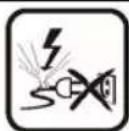
Please read these instructions carefully before using the appliance and save them for future reference. Please keep the sales receipt for guarantee purposes (pls see below “Guarantee and Customer Service”) Any us which does not conform to the instructions will absolve IZZY from an liability.
- Make sure your electricity supply is the same as the one shown on the underside of the appliance.
• Always plug your device into an outlet that is earthed. Failure to comply with this requirement may result in electric shock and possible serious injury. - Never leave the appliance unattended when it is operating.
- Close supervision is necessary when your appliance is being used near children or infirm persons. Ensure that they do not play with the appliance.
- This appliance is not intended for use by persons with reduced physical, sensory or mental capabilities, children or those with lack of experience and knowledge, unless they have been given supervision or instructic concerning use of the appliance by a person responsible for their safety.
- Switch off and unplug:
- After each use.
- Before cleaning.
-
Before moving
-
Never use the appliance for any other use than indicated.
- The device is intended for indoor use. Do not use the device outdoors.
- The device is intended only for domestic use. Any other use will cancel the warranty.
• Always use the kettle on a secure, dry, clean and heat resistant surface. -
Do not operate or place the device or parts in places of high humidity or where it may get wet.
-
Never let the body of the appliance, cord or plug get wet. If the appliance does get wet, immediately remove the power cord from the wall outlet and do not put your hands in the water. Never run the wet appliance ar contact one of the authorized BENRUBI service centers.
- Do not place the appliance near heat sources, on or next gas or electric hobs.
- The appliance must have sufficient airflow. Leave more than 10 cm around the appliance.
- Don't put the appliance near curtains, under shelves or cupboards, or near anything that might be damaged by the escaping steam.
- Don't cover the appliance or put anything on top of it during use.
ATTENTION: During use, be careful and do not touch the air outlet, on the back of the appliance. Hot air comes out.
- Misuse of the air fryer can result in injury.
- Do not let the power cord of the appliance hang over the edge of a table or bench top or where a child could grab it. Do not let the power cord to touch any hot surface.
- Never pull the cord to disconnect the appliance from the electrical supply. Instead grasp the plug and pull it to disconnect.
- Never leave the power cable wrapped during use. Unwind it completely.
- Never use highly corrosive or abstractive cleaning agents. Never use metal scouring pads for cleaning.
CAUTION: The surface of the appliance is hot during operation. Do not touch hot parts of the appliance during operation.
CAUTION: Do not let the resistance of the appliance to get wet.
CAUTION: Unplug the appliance immediately if you see dark smoke coming out. Wait for the smoke emission to stop before removing the bucket.
- It is suggested that it should not be used for more than 3 hours.
- Do not move the appliance when it is in operation.
- Do not touch the appliance with wet or damp hands.
- Do not use an extension power cord.
- This appliance is not intended to be operated by means of an external timer or separate remote-control system.
- Check the power cord periodically for possible damages. If the power cord or the plug of the appliance has been damaged, do not use the appliance and contact an authorized BENRUBI Service Center.
- In case of a possible damage, do not attempt to repair the appliance by
yourself. Please contact one of the authorized BENRUBI service centers.
- Any repair made by an unauthorized BENRUBI Service Center CANCELS THE GUARANTEE.
- Any misuse of the device cancels the warranty.
- Use only original spare parts.
• The appliance conforms to EU directive 2014/30/EU on Electromagnetic Compatibility, the 2014/35/EU Low Voltage Directive, the 2011/65/EU RoHS Directive, the directive 2009/125/EC for eco-design and the EC regulation no. 1935/2004 on materials intended to contact with food.
SAVE THESE INSTRUCTIONS
Parts of the Appliance
natural_image
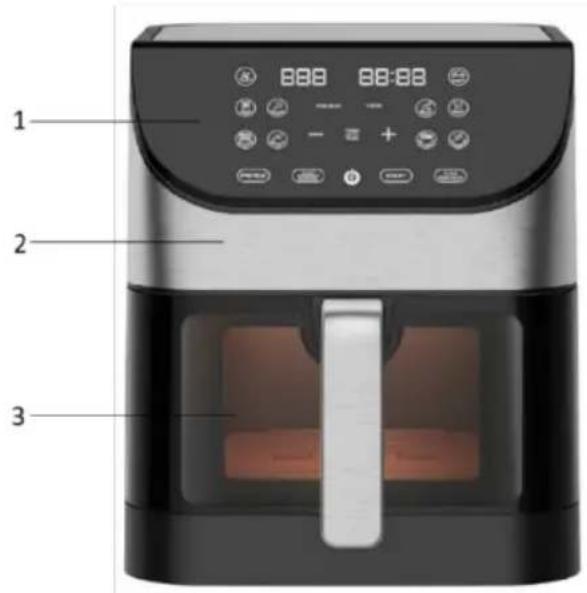
Exploded view of a square air fryer with labeled parts (no text or symbols beyond labels)- Control panel
- Body
- Window
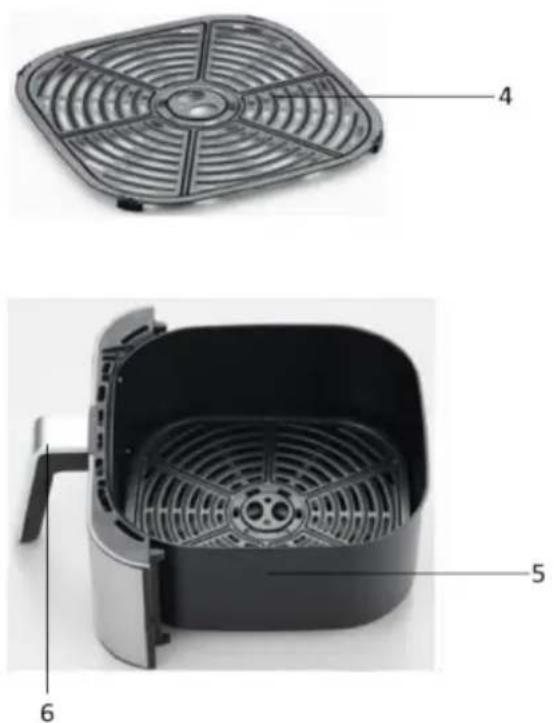
- Detachable non-stick rack
- Detachable non-stick bucket 6lt
- Bucket handle
Control panel
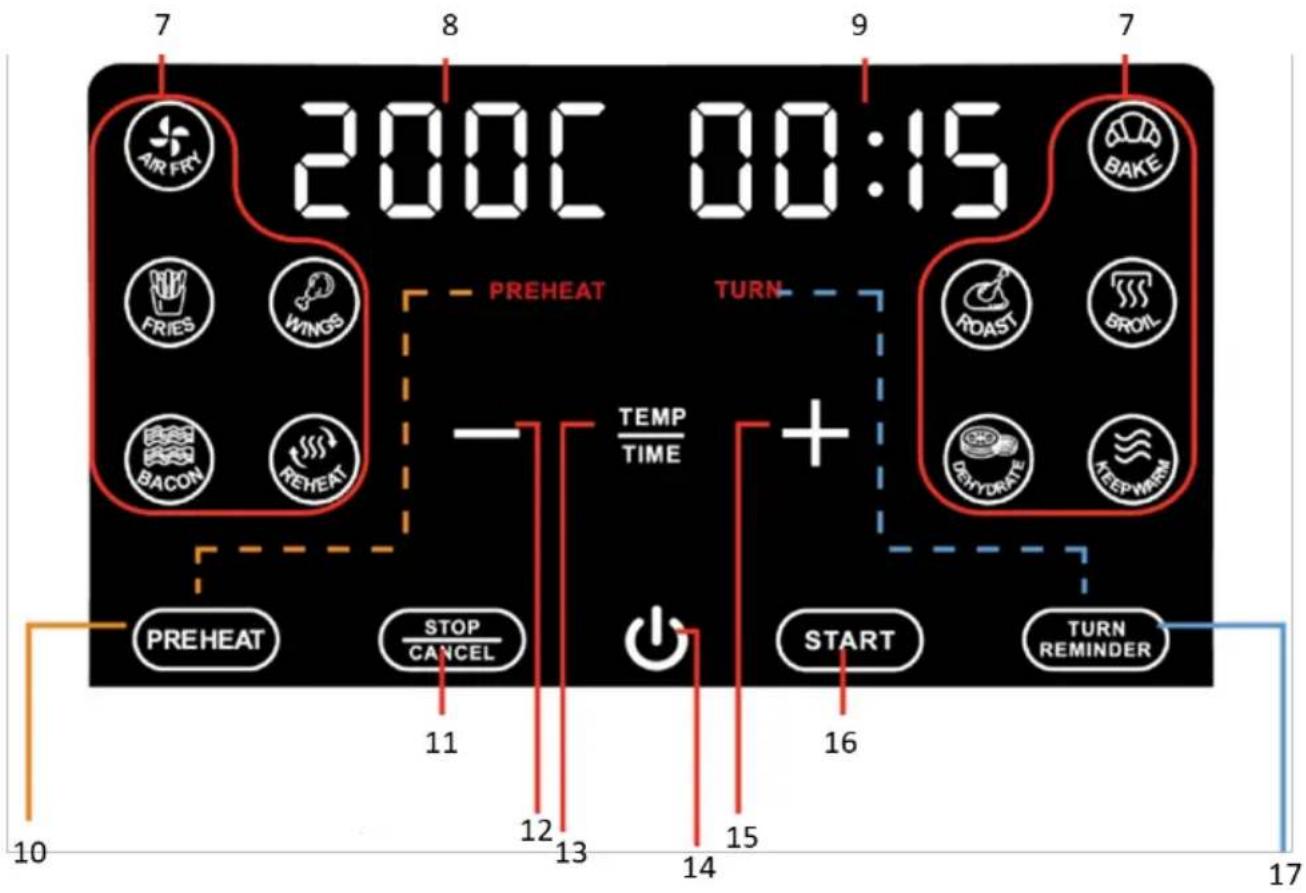
- Programs indication lights
- Temperature display
- Time display
- "PREHEAT" button
- STOP/CANCEL button
- Temperature/time decrease button “-”
- TEMP/TIME setting button
- Power button
- Temperature/time increase button “+”
- "START" button
- "TURN REMINDER" button
Programs and Preset Times and Temperatures
The following table lists the programs and the preset temperatures and times. Use this table for reference only.
| Program | Temperature (°C) | Time (minutes) | Preheat | Turn Reminder | ||||
| Default | Range | Default | Range | Default | Toggle | Default | Toggle | |
 Basic Air Fry Basic Air Fry | 200°C | 80-200°C | 20 | 1-60 | v | v | v | v |
 Fries Fries | 200°C | 80-200°C | 15 | 1-60 | v | v | v | v |
 Chicken Drumsticks/Wings Chicken Drumsticks/Wings | 200°C | 80-200°C | 25 | 1-60 | v | v | v | v |
 Bacon Bacon | 190°C | 80-200°C | 6 | 1-60 | NO | v | NO | v |
 Reheat Reheat | 150°C | 80-200°C | 15 | 1-60 | NO | v | NO | v |
 Bake Bake | 160°C | 80-200°C | 25 | 1A.-2hours | v | v | NO | v |
 Roast Roast | 200°C | 80-200°C | 25 | 1A.-2hours | v | v | v | v |
 Broil Broil | 200°C | 200°C | 12 | 1-60 | v | v | v | v |
 Dehydrate Dehydrate | 56°C | 34-76°C | 8 ωρες | 30A.-24hours | NO | NO | NO | v |
 Keep Warm Keep Warm | 94°C | 66-94°C | 30 | 1A.-8hours | NO | NO | NO | NO |
Note: v indicates that preheat and turn reminder can be turned on or off by pressing the respective PREHEAT or TURN REMINDER buttons before pressing the START button.
Display Indications and Settings
Display indications & settings
Display indications & explanation:
PREHEAT
Preheat is enabled.
TURN
Turn Reminder is enabled.
P-E HEAT
The air fryer is preheating.
Add Food
The air fryer is preheated.
turn Food
Reminder to turn or toss food.
End
The cook time has elapsed.
Settings:
Change temperature unit:
To change the temperature unit from Celsius (C) to Fahrenheit (F) or vice versa, press and hold the TEMP/TIME button (13) until a beep is heard.
Disable/enable button sound:
Press and hold the STOP/CANCEL button (11) until a sound is heard.
Note: Reminders are not muted.
Before the First Use
- Make sure the appliance is switched off and unplugged before use.
NOTE: Smoke and odors may occur during first use.
-
Wash the parts of the appliance. See "Care and Cleaning" section.
-
Place the appliance on a clean, flat and heat-resistant surface.
-
Place the rack (4) in the bucket (5).
Note: Do not use the appliance without the detachable rack.
- Insert the bucket in the reception without food until it snaps into place.
Note: If the bucket does not fit well into the reception, the appliance will not turn on.
-
Plug in. A sound will be heard, all the lights on the control panel (1) will turn on for a while and then the power button (14) will remain on.
-
Press the power button (14). A beep will sound, the indication lights on the control panel will turn on, and the display will show "On".
-
Press the “PREHEAT” button (10). The indicator will flash and the preset temperature (200°C) and the preset time (20min) will appear on the display screen.
-
Press the TEMP/TIME button (13). The time will flash on the display.
-
Press the “-” key (12) successively to set 5 minutes.
-
Press the "START" button (16). The internal light of the device will turn on and the display will show Pre HEAT
-
When the preheating is complete, it will beep 5 times and the display will show Add Food
-
Press the power button (14) and the appliance will stop. On the control panel, the power button will remain on.
-
The appliance is ready for use.
Using the Appliance
- Make sure the appliance is switched off and unplugged before use.
- It is recommended to preheat the appliance for 5 minutes without food before cooking.
-
Wash the parts of the appliance. See "Care and Cleaning" section.
-
Place the appliance on a clean, flat and heat-resistant surface.
-
Place the rack (4) in the bucket (5).
Note: Do not use the appliance without the detachable rack.
- Place the food on the rack (4) and insert the bucket (5) in the reception until it snaps into place.
ATTENTION: If you select the preheating mode, you place the food in the bucket after preheating.
Note: Make sure the food in the bucket does not come into contact with the heating element.
Note: If the bucket with the rack do not fit well into the airfryer cavity, the appliance will not turn on.
-
Plug in. A sound will be heard, all the lights on the control panel (1) will turn on for a while and then the power button (14) will remain on.
-
Press the power button (14). A beep will sound, the indication lights on the control panel will turn on, and the display will show "On".
-
Press the button of the program of your choice (see section "Programs & preset times & temperatures").
-
The program indicator you have selected and the "PREHEAT" and "TURN REMINDER" indicators will flash, and the preset temperature and preset time will appear on the display.
-
Press the TEMP/TIME button (13). The time will flash on the display.
-
Press the “-” (12) or “+” (15) buttons successively to set the time of your choice.
-
Press the TEMP/TIME button (13) again. The temperature will flash on the display.
-
Press the “-” (12) or “+” (15) buttons successively to set the temperature of your choice.
-
Press the "PREHEAT" button (10) to activate or deactivate the function. The indicator will turn on or off respectively.
-
Press the "TURN REMINDER" button (17) to activate or deactivate the function. The indicator will turn on or off respectively.
Note: If you do not activate the function reminder, it is recommended to stir the food inside the bucket for better results.
Note: PREHEAT and TURN REMINDER functions are enabled by default for certain programs.
- Press START button (16) to start the program. The internal light will turn on and the selected time and temperature will appear on the display screen. The internal light will flash sequentially during operation.
Note: If you have activated the preheat function, the display will show . Once the preheat is complete, a beep will sound and the display will show . Remove the bucket
(5), place the food on the rack (4) and put the bucket back in place. The program you have select will start.
Note: If you have activated the turn reminder function, in the middle of the selected time, a sound will be heard and the display will show turn Food
- Remove the bucket (5) turn or stir the food with plastic or wooden tools and put the bucket back in place. The program you have selected will continue.
or
- Press the STOP/CANCEL button (11) once, turn or stir the food with plastic or wooden tools, put the bucket back in place and press the START button (16) to continue the program you h selected.
- When the selected program is finished, the internal light of the appliance will turn off, a sound will be heard 5 times, the display will show and after a while the appliance will stop.
Note: If you want to stop the program before the selected time, press the STOP/CANCEL button (11) twice.
-
Press the power button (14).
-
Carefully remove the bucket from the reception.
-
Serve using tongs.
Tips
- Add 1-2 tablespoons of oil (depending on the amount) and stir before cooking.
- Smaller ingredients usually require less cooking time than larger ingredients.
- To ensure uniform cooking, in the middle of the cooking time, it is recommended to mix the food in the frying basket during cooking.
- Snacks that are normally baked in the oven can also be cooked in the fryer.
- Cooking extremely fatty ingredients is not recommended.
- The ideal quantity for preparing crispy potatoes is 500 grams.
- Use pre-made dough to make filling snacks quickly and easily. Pre-made dough also requires less preparation time than homemade dough.
- Place a baking tin or baking tray on the detachable rack if you want to bake a cake or quiche or if you want to fry brittle or stuffed ingredients.
- The appliance is suitable for heating food. To reheat your food, set the temperature to 150^ for up to 10 minutes.
Care and Cleaning
- Before cleaning and storage, unplug the appliance and let it cool down.
• Always clean the appliance and accessories after each use.
Body:
- Wipe with a damp cloth, then dry.
- Never use highly corrosive or abstractive cleaning agents.
- Never use metal scouring pads for cleaning.
Detachable rack & bucket:
- Wash with warm soapy water and dry thoroughly.
- Never use highly corrosive or abstractive cleaning agents.
- Never use metal scouring pads for cleaning.
- It is recommended not to wash the parts in the dishwasher.
Technical Characteristics
Model: Air fryer DIGITAL IZ-8217 IZZY
Voltage: 220\~240V
Frequency: 50/60Hz
Power: 1500W-max 1700W
Capacity: 6Lt
Important Information for Correct Disposal of the Product in Accordance with EC Directive 2002/96/EC
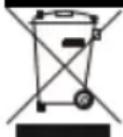
At the end of its working life, the product must not be disposed of as urban waste. It must be taken to a special local authority differentiated waste collection centre or to a dealer providing this service. Disposing of a household appliance separately avoids possible negative consequences for the environment and health deriving from inappropriate disposal and enables the constituent materials to be recovered to obtain significant savings in energy and resources.
As a reminder of the need to dispose of household appliances separately, the product is marked with a crossed-out wheeled dustbin.
Guarantee & Customer Service
- BENRUBI Company guarantees its products for any manufacturing defect or defective materials for a period of two (2) years from the date of purchase or delivery by presenting purchase receipt. If your product malfunctions or you find any defects, please revert to the retail location you have purchased it from or contact an authorized BENRUBI Service Centre. To find the nearest authorized BENRUBI Service Centre, visit our website www.benrubi.gr. It is in the discretion of BENRU Company to replace or repair the defective product.
- The warranty does not cover damages resulting from normal wear, breakage, scaling, improper installation or maintenance of the product, mishandling, abnormal working conditions, failure implement the instructions, conversion or repair of the product by an unauthorized technician who does not belong to the BENRUBI Service Centers.
Also, the warranty does not cover the following indicative factors:
• Stains, discoloration or scratches.
- Burns due to exposure to heat or flame.
- Damage from thermal shock (sudden temperature change or change of voltage).
FOR MORE INFORMATION CONTACT:
(NEW) H. BENRUBI & FILS SA
27 Aghiou Thoma str, GR15124
Maroussi - Athens
Tel. / Customer Support: +30210 6156400
e-mail: benrubi-sda@benrubi.gr

- Safety interlocks
- SAVE THESE INSTRUCTIONS
- Parts of the Appliance
- Programs and Preset Times and Temperatures
- Display indications & settings
- Settings:
- Change temperature unit:
- Disable/enable button sound:
- Before the First Use
- Using the Appliance
- or
- Tips
- Care and Cleaning
- Body:
- Detachable rack & bucket:
- Technical Characteristics
- Guarantee & Customer Service
Brand : Izzy
Model : IZ-8217
Category : Deep fryer