ION SmartBulb RGB E14 6W - Lighting Niceboy - Free user manual and instructions
Find the device manual for free ION SmartBulb RGB E14 6W Niceboy in PDF.


| Product Type | Smart LED Bulb |
| Base Type | E14 |
| Power Consumption | 6W |
| Input Voltage | AC 220-240V, 50/60Hz |
| Color Options | RGB (16 million colors) + White (2700-6500K) |
| Luminous Flux | 400-600 lm |
| Dimmable | Yes (via app) |
| Smart Connectivity | WiFi 2.4GHz |
| Compatibility | Alexa, Google Assistant |
| Lifespan | ~25,000 hours |
| Dimensions (DxH) | 45 x 80 mm |
| Weight | ~50 g |
| Material | Aluminum + PC |
| Operating Temperature | -10°C to 40°C |
| Certification | CE, RoHS |
| Package Contents | 1x Bulb, User Manual |
| Storage Conditions | Dry, cool place |
| Cleaning | Wipe with dry cloth; disconnect power first |
| Repair | Not user-serviceable; contact support |
Frequently Asked Questions - ION SmartBulb RGB E14 6W Niceboy
User questions about ION SmartBulb RGB E14 6W Niceboy
0 question about this device. Answer the ones you know or ask your own.
Ask a new question about this device
Download the instructions for your Lighting in PDF format for free! Find your manual ION SmartBulb RGB E14 6W - Niceboy and take your electronic device back in hand. On this page are published all the documents necessary for the use of your device. ION SmartBulb RGB E14 6W by Niceboy.
USER MANUAL ION SmartBulb RGB E14 6W Niceboy
natural_image
Simple line drawing of a trash bin with crossed lines and a solid black bar below (no text or symbols)natural_image
Simple line drawing of a trash bin with crossed lines indicating no waste or discharge (no text or symbols)- Download the app by scanning the QR code with your mobile phone or search „Niceboy ION“ on the mobile app market and download the app. Make sure your mobile phone is connected to Wi-Fi before using this feature.
- Open the „Niceboy ION“ app and register a new account or use your existing account.
- Insert the bulb into the appropriate power supply.
- Turn the light on and off 3 times to enter the pairing device. The lights will then flash rapidly. If this does not happen, repeat the process.
- Once the device is in pairing mode, click on the „+“ icon in the upper right corner and then select „Add Device“.
- Switch to „Autoscan“ and select the Niceboy ION SMARTBULB RGB E14 6W“.
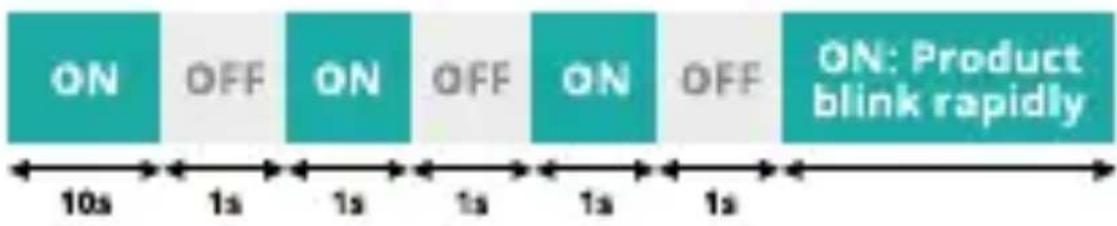
flowchart
graph LR
    A["ON"] --> B["OFF"]
    B --> C["ON"]
    C --> D["OFF"]
    D --> E["ON"]
    E --> F["OFF"]
    F --> G["ON: Product blink rapidly"]
    style A fill:#4CAF50,stroke:#388E3C
    style B fill:#4CAF50,stroke:#388E3C
    style C fill:#4CAF50,stroke:#388E3C
    style D fill:#4CAF50,stroke:#388E3C
    style E fill:#4CAF50,stroke:#388E3C
    style F fill:#4CAF50,stroke:#388E3C
    style G fill:#4CAF50,stroke:#388E3C
If the autoscan does not find the bulb, select „Lighting“ in the manual settings and connect to the „Niceboy ION SMART-BULB RGB E14 6W“.
- Make sure you know the name of your home WiFi, enter your WiFi password and click NEXT (note: only 2.4G WiFi connections are available)
WARNINGS
This product is not a toy. Please keep children away from this product. This product is designed for indoor use only. Do not use in humid environments or outdoors. Beware of moisture, do not spill water or other liquids onto the product. Do not place this product near a heat source. Do not attempt to repair this product by yourself. All repairs should be performed by an authorized professional. If a user violates the product use instructions, the manufacturer will not be liable for any damage.
SPECIFICATIONS
Model: SmartBulb
RGB E14
Lighting technology used: LED
Socket: E14
Wireless Protocol: Wi-Fi (2412-
2472 MHz)
Color spectrum: RGB
Useful luminous flux: 470 lm
Correlated colour
temperature: 2700-6500 K
On-mode power: 5,5 W
Colour rendering index (CRI): 85
Dimmable: Yes
Beam angle
correspondence: Sphere (360°)
Operating Temperature: -10^ to +50^
Operating Humidity: 10 - 90 % RV,
no condensation
App: Niceboy ION
Niceboy s.r.o. hereby declares that the type of radio equipment Niceboy ION SMARTBULB RGB E14 6W complies with Directives 2014/53 / EU, 2014/30 / EU, 2014/35 / EU, and 2011/65 / EU. The full content of EU Declaration of Conformity is available on the following websites: https://niceboy.eu/en/declaration/ion-smartbulb-rgb-e14-6w
USER INFORMATION FOR DISPOSING ELECTRICAL AND ELECTRONIC DEVICES (HOME USE)
natural_image
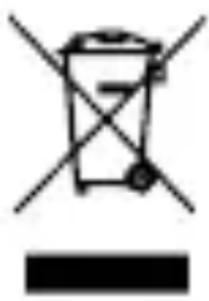
Simple line drawing of a trash bin with crossed lines indicating no waste or discharge (no text or symbols)This symbol located on a product or in the product's original documentation means that the used electrical or electronic products may not be disposed together with the communal waste. In order to dispose of these products correctly, take them to a designated collection site, where they will be accepted for free. By disposing of a product in this way, you are helping to protect precious natural resources and helping to prevent any potential negative impacts on the environment and human health, which could be the result of incorrect waste disposal. You may receive more detailed information from your local
authority or nearest collection site. According to national regulations, fines may also be given out to anyone who disposes of this type of waste incorrectly.
User information for disposing electrical and electronic devices (business and corporate use) In order to correctly dispose of electrical and electronic devices for business and corporate use, refer to the product's manufacturer or importer. They will provide you with information regarding all disposal methods and, according to the date stated on the electrical or electronic device on the market, they will tell you who is responsible for financing the disposal of this electrical or electronic device. Information regarding disposal processes in other countries outside the EU. The symbol displayed above is only valid for countries within the European Union. For the correct disposal of electrical and electronic devices, request the relevant information from your local authorities or the device seller.
FAQ
What should I do if the pairing fails??
- Make sure you are connecting to a 2.4 GHz WIFI network,
- Make sure you have filled in the correct WIFI network password.
- Make sure that you have used the correct pairing mode and that your device is in pairing mode (blinking rapidly).
- Make sure your WIFI is connected to the internet.
Do the device and router need to be in the same room when connecting?
No, the device and router do not need to be in the same room.
Can I control my device via Google Assistant and Amazon Alexa?
Yes, the device can be controlled via both of these voice assistants
DE
PACKUNGSINHALT
Glühbirne Niceboy ION SMARTBULB RGB E14 6W Handbuch
natural_image
Simple line drawing of a trash bin with crossed lines indicating no waste or discharge (no text or symbols)natural_image
Symbol of a trash bin crossed with a diagonal line, no text or numbers presentnatural_image
Simple line drawing of a trash bin with crossed lines indicating no waste or discharge (no text or symbols)natural_image
Simple line drawing of a trash bin with crossed lines indicating no waste or discharge (no text or symbols)natural_image
Simple line drawing of a trash bin with crossed lines indicating no waste or plastic (no text or symbols)natural_image
Simple line drawing of a trash bin with crossed lines indicating no waste or plastic (no text or symbols)Nusle, 140 00, Czech Republic, ID: 294 16 876, Made in China.
RoHS C€


Brand : Niceboy
Model : ION SmartBulb RGB E14 6W
Category : Lighting