
ELK103P - Cooker Elements - Free user manual and instructions
Find the device manual for free ELK103P Elements in PDF.


| Product Type | Induction Cooker |
| Brand | Elements |
| Model | ELK103P |
| Power Consumption | 2000 W (adjustable from 200 W to 2000 W) |
| Voltage | 220-240 V ~ 50/60 Hz |
| Number of Cooking Zones | 1 |
| Control Type | Touch panel with buttons: ON/OFF, Function, +/-, Timer, Child Lock |
| Functions | Manual (default 1000W), Low (400W), Medium (800W), High (1300W), Max (2000W) |
| Timer | Up to 3 hours, auto power-off |
| Child Lock | Yes, locks all buttons except ON/OFF |
| Overheat Protection | Yes, with cool-down fan |
| Dry Boil Protection | Yes, error code E5 |
| Compatible Cookware | Steel, cast iron, enameled iron, stainless steel, flat-bottom pans 12-26 cm diameter |
| Incompatible Cookware | Glass, ceramic, copper, aluminum, rounded bottom <12 cm diameter |
| Dimensions (Approx.) | 30 x 35 x 6 cm (L x W x H) |
| Weight (Approx.) | 2.5 kg |
| Cord Length | 1.5 m (approx.) |
| Body Material | Plastic with anti-slip feet |
| Cooking Surface | Glass ceramic |
| Cleaning | Damp cloth only; do not immerse or use scrub brushes |
| Usage | Domestic indoor only |
Frequently Asked Questions - ELK103P Elements
User questions about ELK103P Elements
0 question about this device. Answer the ones you know or ask your own.
Ask a new question about this device
Download the instructions for your Cooker in PDF format for free! Find your manual ELK103P - Elements and take your electronic device back in hand. On this page are published all the documents necessary for the use of your device. ELK103P by Elements.
USER MANUAL ELK103P Elements
Thank you for choosing KB ELEMENTS Products, please read carefully the instructions and precautions indicated in this Manual, and keep it for future reference.
IMPORTANT SAFETY MEASURES
- NEVER put the induction cooker and cable in water or any other liquid, to avoid electric shock.
- DO NOT use the product with wet hands.
- Unplug the Induction Cooker from the outlet if you're not using it, and wait until it cools down in order to clean, dry and store.
- NEVER pull on the cord; Hold the plug head and unplug it.
- DO NOT USE if the cord or any other part of the appliance has been damaged or dropped, in order to avoid risk of electric shock. If you face any faults please contact nearest KB ELEMENTS point of sales.
- Incorrect assembly and improper use can present a risk of electric shock.
- Die Verwendung von Zubehör oder Anbauteilen, die NICHT von KB ELEMENTS empfohlen werden kann Feuer, Stromschlag oder Verletzungen verursachen.
- DO NOT place: on or near an oven, gas cylinder, or electric oven, use it on a flat and heat-resistant surface.
- Be careful when moving utensils that contain food, water, oil, or other hot liquids.
- The Induction cooker is for domestic indoor use only, DO NOT USE in outdoors.
-
DO NOT allow the induction cooker to touch wall coverings, clothing, or other flammable materials during use
-
Control Panel
-
Turn ON and turn OFF button
3.Function
-
(+) (Increase Temperature or Time)
-
(−) (Adjust to decrease Temperature or Time)
6.Timer
-
Child Lock
-
Induction Area
-
Anti-slip feet

BEFORE USING FOR THE FIRST TIME
- Remove all packaging materials (plastics and stickers).
- Clean the Induction Cooker with a damp cloth.
INSTRUCTIONS FOR USE
- Place the induction cooker on a level, heat-resistant surface with enough of space.
- Connect the induction cooker to an outlet with 220V - 240V \~ 50/60Hz that can provide enough power for the usage of maximum temperature.
- The Control Panel will turn on showing(---).
- Touch the Power button: Appears with the word ON; now the induction cooker
is waiting for a function to start. - Place a compatible cookware on the induction area (Review the table of materials).
- Press the function key: the "Manual" option will appear, the display will show 1000 watts by default and the corresponding indicator light. The induction cooker is working and emitting heat.
- Each time you select the function button: the options will change and each one will show its characteristics such as power.
Note: Use the (+) button to increase or (-) to decrease the power.
CLEANING INSTRUCTIONS
- Disconnect the plug and wait until the induction cooker is completely cooled.
- If you are using unclean pots and pans, it can become discolored.
3.Do not clean it with scrub brushes. - Clean the product with a damp cloth.
- If necessary, use a vacuum cleaner to remove dirt from the ventilation area.
Note: Do not allow liquids to enter the induction cooker, it may be damaged.
CONTROL PANEL

 | ON and OFF. This button will turn the induction cooker on and off. |
 | Function: Touch this button to choose one of the heating functions with this button the induction cooker will start to work. |
| [A72W] | PLUS button: This button increases the temperature in Functions and the time on the timer. |
 | MINUS button: This button decreases the temperature in functions and the time on the timer |
 | Timer (Auto Power Off): Press the touch button once and set the time (minimum 0 minutes to maximum 3 hours) using (+) and (-) |
 | Lock: This button locks all the functions of the control panel, except the ON/OFF button. To unlock press it again for 3 sec. |
WARNING
Do not unplug the induction cooker immediately after cooking, press the ON / OFF button so it will stop heating and the display shows (---). The fan will stop working until the induction cooker cools down.
| FUNCTIONS | POWER | ADDITIONAL FUNCTIONS |
| Manual | 1000W | Adjustable from 200W to 2000W |
| Low | 400W | Adjustable from 200W to 2000W |
| Medium | 800W | Adjustable from 200W to 2000W |
| High | 1300W | Adjustable from 200W to 2000W |
| Max | 2000W | Adjustable from 200W to 2000W |
TIMER (ON/AUTO/OFF)
Select the timer button, then press the (+) and (-) buttons to set the time:
this can be a maximum of 3 hours.
After selecting the time, wait approximately 5 seconds for the timer to work. The control panel will alternately display time and power.
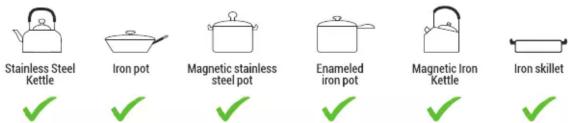
COMPATIBLE KITCHEN UTENSILS
Material: Steel, cast iron, enameled iron, stainless steel, flat-bottomed pans /pots
with a diameter of 12-26cm
KITCHEN UTENSILS NOT COMPATIBLE
Material: Heat resistant glass containers, ceramic, copper pans/ pots and aluminum pans, rounded pans/pots with bottom less than 12cm

PROBLEM SOLVING
| CODE | POSSIBLE REASON | SOLUTION |
| E0 | There is no pan or they are not compatible. | Replace the pot or pan with a utensil suitable on the induction area. |
| E1 | Abnormal supply voltage, voltage is less than 220V. | Check the power supply. |
| E2 | Abnormal supply voltage, voltage is over than 240V. | Check the power supply. |
| E3 | Open or shorted main temperature sensor. | Consult the supplier or go to a certified service center. |
| E4 | Temperature sensor is activated. | Wait for the induction cooker to cool down. |
| E5 | Dry boil protection. | Please add water to the pan and then cook. |
| E6 | The surface temperature is too high | Wait a few minutes for the induction cooker to cool down. |
CAUTION
In order to avoid danger or damage to the induction cooker: It must not be connected through an external switching device such as a timer or a circuit that regularly turns the unit on and off.
WARNINGS
To avoid overheating, do not cover the induction cooker.
This induction cooker is for domestic usage only.
Do not use this product near a wet places.


Brand : Elements
Model : ELK103P
Category : Cooker