
Blade A53+ - Mobile Phone ZTE - Free user manual and instructions
Find the device manual for free Blade A53+ ZTE in PDF.


User questions about Blade A53+ ZTE
0 question about this device. Answer the ones you know or ask your own.
Ask a new question about this device
Download the instructions for your Mobile Phone in PDF format for free! Find your manual Blade A53+ - ZTE and take your electronic device back in hand. On this page are published all the documents necessary for the use of your device. Blade A53+ by ZTE.
USER MANUAL Blade A53+ ZTE
Getting to Know Your Phone
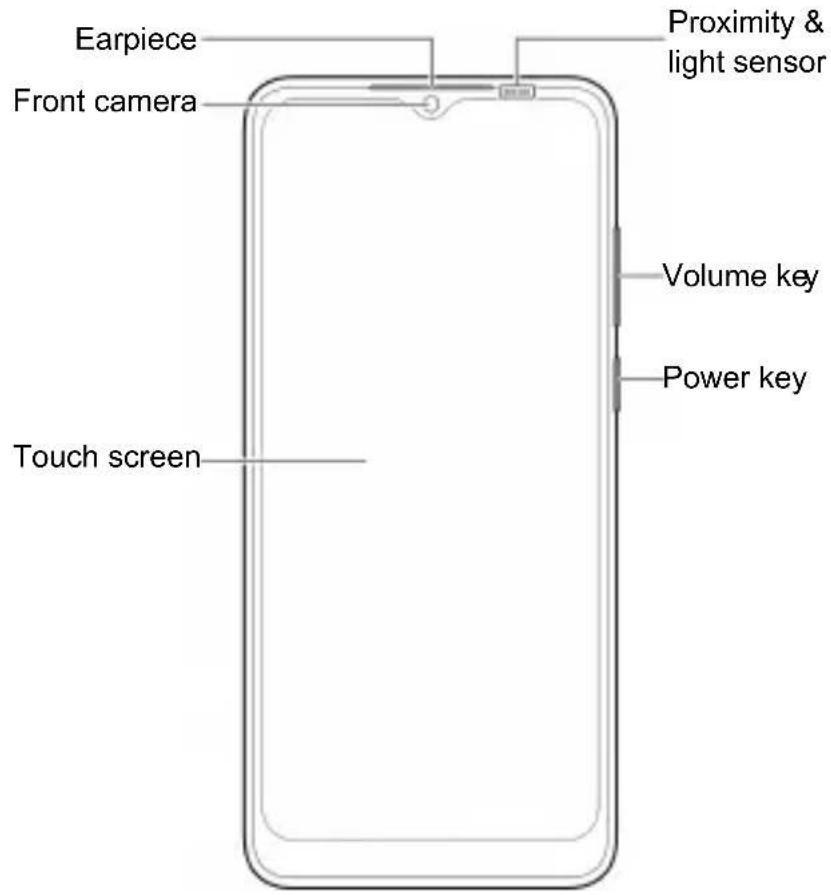
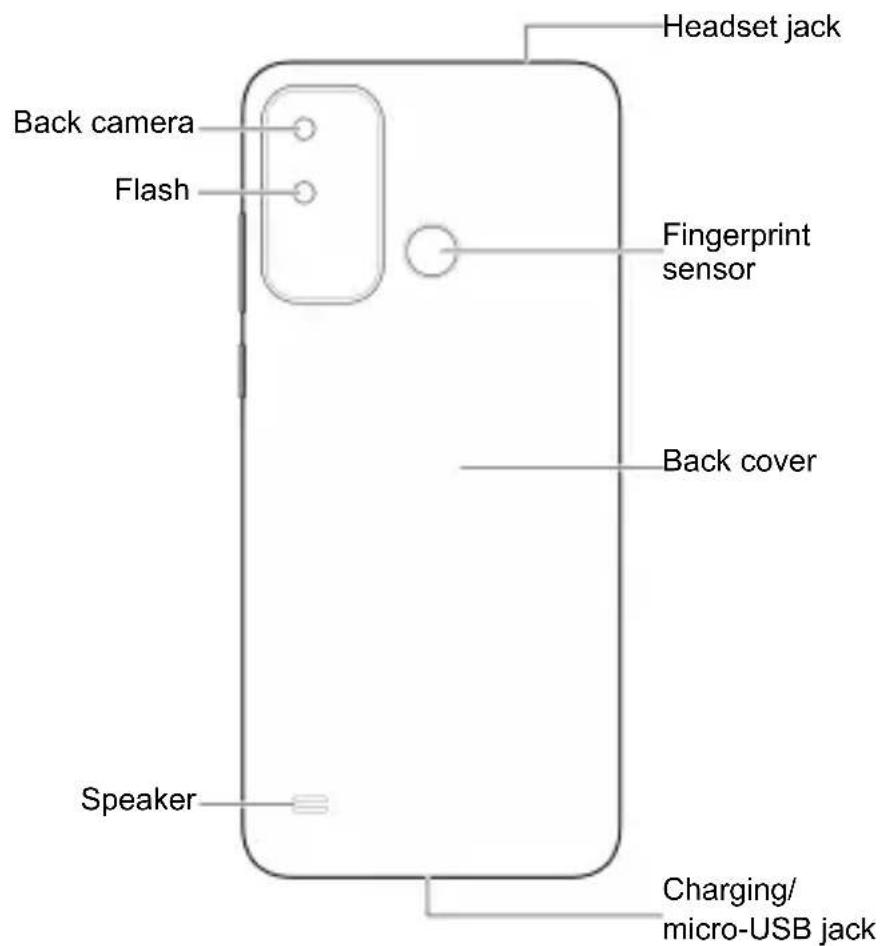
Setting Up Your Phone
The nano-SIM card(s) can be installed or removed while the phone is turned on.
Power off your phone before removing or replacing the battery.

WARNING!
To avoid damage to the phone, do not use any other kind of SIM cards, or any non-standard nano-SIM card cut from a SIM card. You can get a standard nano-SIM card from your service provider.
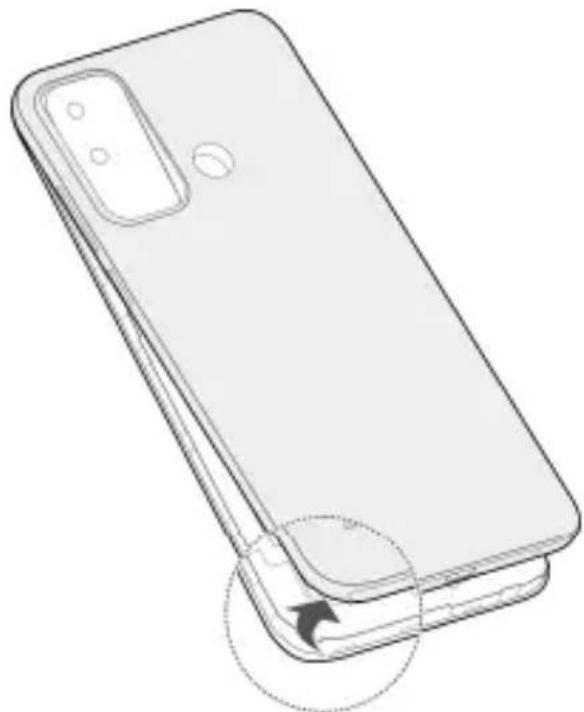
- Place your finger into the slot at the lower left of the back cover, and gently lift and remove the cover.
natural_image
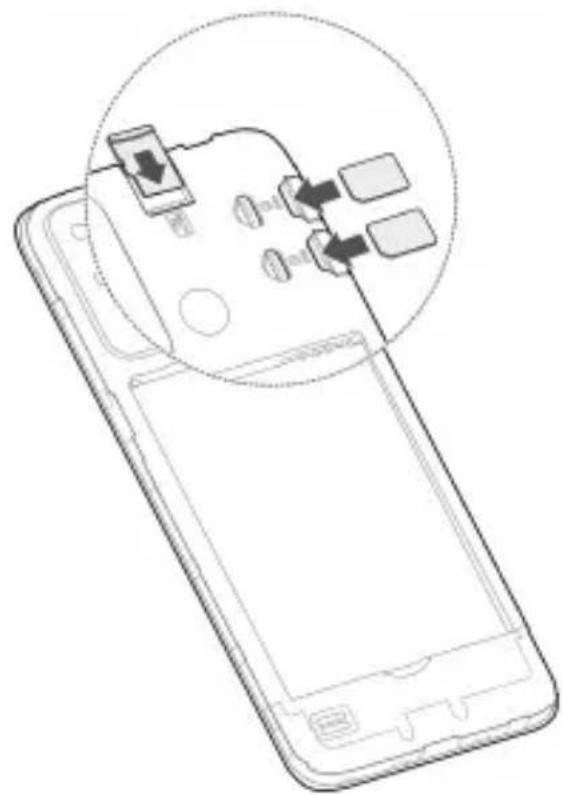
Line drawing of a smartphone showing front and side views (no text or symbols)- Insert the nano-SIM card(s) into the right card slot(s) and the microSDXC card (optional) into the top card slot, as shown.
natural_image
Line drawing of a smartphone showing internal components and a circular annotation (no text or symbols)NOTE:
If two nano-SIM cards are installed, both cards can connect to the 4G, 3G, or 2G network, and either card can be used for mobile data.
- Insert the battery, making sure the connectors align.
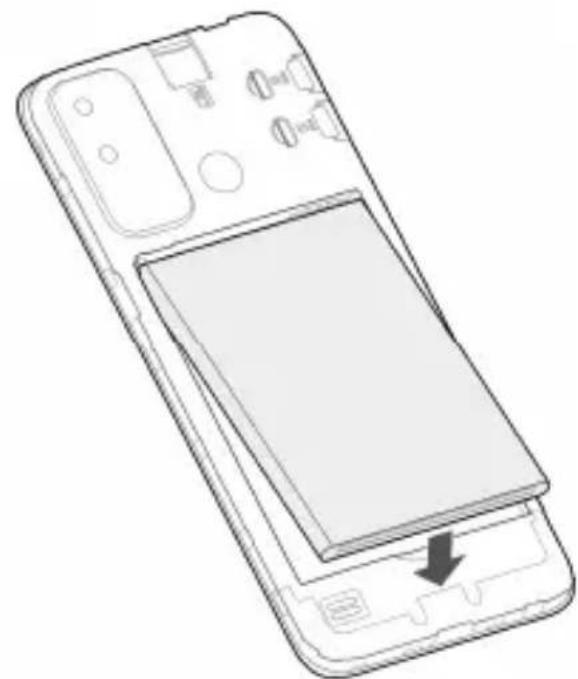
natural_image
Line drawing of a smartphone showing the front panel and internal components (no text or symbols)- Replace the back cover.
Charging the Phone
Your phone's battery should have enough power for the phone to turn on, find a signal, and make a few calls. You should fully charge the battery as soon as possible.

WARNING!
Use only ZTE-approved chargers and USB cables. The use of unapproved accessories could damage your phone or cause the battery to explode.
- Connect the adapter to the charging jack. Ensure that the adapter is inserted in the correct direction.
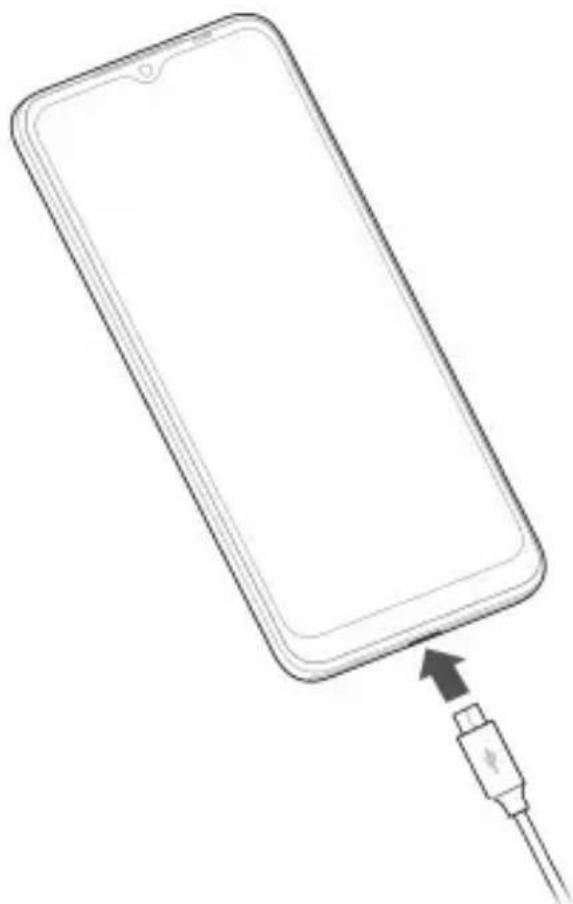
natural_image
Line drawing of a smartphone with an attached USB cable (no text or symbols)-
Connect the charger to a standard AC power outlet.
-
Disconnect the charger when the battery is fully charged.

NOTE:
If the battery is extremely low, you may be unable to power on the phone even when it is being charged. In this case, try again after charging the phone for at least 20 minutes. Contact the customer service if you still cannot power on the phone after prolonged charging.
Powering On/Off Your Phone
Make sure the battery is charged before powering on.
- Press and hold the Power key to turn on your phone.
- To power off, press and hold the Power key until the options menu appears, and then touch
NOTE:
If the screen freezes or takes too long to respond, reinstall the battery and power on again.
Waking Up Your Phone
Your phone automatically goes into sleep mode when it is not in use for some time. The display is turned off to save power and the keys are locked to prevent accidental operations.
You can wake up your phone by turning on the display and unlocking the keys.
-
Press the Power key to turn the screen on.
-
Swipe up on the screen.
NOTE:
If you have set a face verification, a fingerprint, an unlock pattern, a PIN or a password for your phone, you'll need to use your face or fingerprint, draw the pattern, or enter the PIN/password to unlock your screen.
LEGAL INFORMATION
Copyright © 2023 ZTE CORPORATION.
All rights reserved.
No part of this publication may be quoted, reproduced, translated or used in any form or by any means, electronic or mechanical, including photocopying and microfilm, without the prior written permission of ZTE Corporation.
Notice
ZTE Corporation reserves the right to make modifications on print errors or update specifications in this guide without prior notice.
We offer self-service for our smart terminal device users.
Please visit the ZTE official website (at
https://ztedevices.com) for more information on the full quick start guide, user manual, self-service and supported product models. Information on the website takes precedence.
Disclaimer
ZTE Corporation expressly disclaims any liability for faults and damages caused by unauthorized modifications of the software.
Images and screenshots used in this guide may differ from the actual product. Content in this guide may differ from the actual product or software.
Trademarks
ZTE and the ZTE logos are trademarks of ZTE Corporation.
Android ^TM is a trademark of Google LLC.
The Bluetooth ^® word mark and logos are registered trademarks owned by the Bluetooth SIG, Inc. and any use of such marks by ZTE Corporation is under license.

microSDXC Logo is a trademark of SD-3C,
LLC.
Other trademarks and trade names are those of their respective owners.
Product Safety Information
 | Don't make or receive phone calls while driving. Never text while driving. |
 | Keep your phone at least 5 mm away from your body while making calls. |
 | Small parts may cause choking. |
 | Your phone can produce a loud sound. |
 | To prevent possible hearing damage, do not listen at high volume levels for long periods. Exercise caution when holding your phone near your ear while the loudspeaker is in use. |
 | Avoid contact with anything magnetic. |
 | Keep away from pacemakers and other electronic medical devices. |
 | Turn off when asked to in hospitals and medical facilities. |
 | Turn off when told to on aircraft and at airports. |
 | Turn off when near explosive materials or liquids. |
 | Don't use at gas stations. |
 | Your phone may produce a bright or flashing light. |
 | Don't dispose of your phone in fire. |
 | Avoid extreme temperatures. |
 | Avoid contact with liquids. Keep your phone dry. |
 | Do not attempt to disassemble your phone. |
 | Only use approved accessories. |
 | For pluggable equipment, the socket-outlet shall be installed near the equipment and shall be easily accessible. |
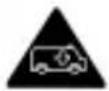 | Don’t rely on your phone as a primary device for emergency communications. |
Specific Absorption Rate (SAR)
Your mobile device is a radio transmitter and receiver. It is designed not to exceed the limits for exposure to radio waves recommended by international guidelines. These guidelines were developed by the independent scientific organization ICNIRP and include safety margins designed to assure the protection of all persons, regardless of age and health.
The guidelines use a unit of measurement known as Specific Absorption Rate, or SAR. The SAR limit for mobile devices is 2 W/kg and the highest SAR value for this device when tested at the head was 0.102 W/kg*, and when tested at the body was 0.982 W/kg* with 5 mm distance. As mobile devices offer a range of functions, they can be used in other positions, such as on the body as described in the user manual**.
As SAR is measured utilizing the device's highest transmitting power, the actual SAR of this device while operating is typically below that indicated above. This is due to automatic changes to the power level of the device to ensure it only uses the minimum power required to communicate with the network.
* The tests are carried out in accordance with EN 50360, EN 50566, EN 50663, EN 62209-1 and EN 62209-2.
** Please see body worn operation in the user manual.
Specification
| EUT tested radios application | GSM 850/900/1800/1900 MHzWCDMA Band 1/2/5/8FDD LTE Band 1/3/5/7/8/20TDD LTE Band 38802.11 b/g/nBluetooth 4.2GPS/Galileo |
| WCDMA Version Rel.9LTE Version Rel.12 | |
| Maximum RF output power | GSM 850: 34.00 dBmGSM 900: 34.00 dBmGSM 1800: 31.00 dBmGSM 1900: 31.00 dBmWCDMA Band 1: 24.00 dBmWCDMA Band 2: 24.00 dBmWCDMA Band 5: 24.00 dBmWCDMA Band 8: 24.00 dBmFDD LTE Band 1: 24.00 dBmFDD LTE Band 3: 24.00 dBmFDD LTE Band 5: 24.00 dBmFDD LTE Band 7: 24.00 dBmFDD LTE Band 8: 24.00 dBmFDD LTE Band 20: 24.00 dBmTDD LTE Band 38: 24.00 dBm802.11b/g/n EIRP: 18.05 dBmBluetooth EIRP: 6.37 dBm |
CE Caution
Battery Caution
- There is a risk of explosion if battery is replaced by an incorrect type.
- Dispose of used batteries according to the instructions.
- Do not dispose of a battery into fire or a hot oven, or mechanically crush or cut a battery. Doing so can result in an explosion.
- Leaving a battery in an extremely high temperature surrounding environment can result in an explosion or the leakage of flammable liquid or gas.
- A battery subjected to extremely low air pressure may result in an explosion or the leakage of flammable liquid or gas.
USB Port
This product shall only be connected to a USB interface of version USB 2.0.
Proper Use
As described in this guide, your device can be used only in right location. If possible, please do not touch the antenna area on your device.
Do not expose your device to extreme temperatures lower than -10 ^ and higher than +45 ^ .
Charge your device only between -5 °C and +45 °C.
Disposal of Your Old Appliance
natural_image
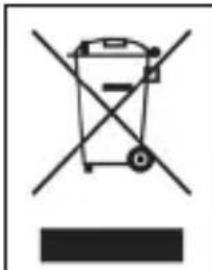
Symbol of a waste bin with no text or labels- When this crossed-out wheeled bin symbol is attached to a product, it means the product is covered by the European Directive 2012/19/EU.
- All electrical and electronic products should be disposed of separately from the municipal waste stream via designated collection facilities appointed by the government or the local authorities.
- The correct disposal of your old appliance will help prevent potential negative consequences for the environment and human health.
For this product's recycling information based on WEEE directive, please send an e-mail to weee@zte.com.cn
EU DECLARATION OF CONFORMITY
CE
Hereby, ZTE Corporation declares that the radio equipment type ZTE Blade A53+ is in compliance with Directive 2014/53/EU.
The full text of the EU declaration of conformity is available at the following Internet address: https://certification.ztedevices.com
ErP Conformity
The external power supply of this product conforms to the Energy-related Product Directive (ErP) 2009/125/EC of the European Parliament and the Council.
The detailed ErP information is available on ZTE website https://certification.ztedevices.com.
Kurzanleitung (de)
RECHTLICHE INFORMATIONEN
Copyright © 2023 ZTE CORPORATION.
Telif Hakkı © 2023 ZTE CORPORATION.
natural_image
Symbol of a waste bin with no text or labelsCopyright © 2023 ZTE CORPORATION.
Copyright © 2023 ZTE CORPORATION.
natural_image
Symbol of a waste bin with no text or labelsCopyright © 2023 ZTE CORPORATION.
natural_image
Symbol of a waste bin with no text or labelshttps://certification.ztedevices.com
Conformità ErP
natural_image
Symbol of a trash bin crossed with no text or numbers, representing waste sorting or disposal (no text present)https://certification.ztedevices.com
Skladnost z direktivo ErP
Autorska prava © 2023 ZTE CORPORATION.
Sva prava zadržana.
Nijedan deo ove publikacije ne sme da se citira, reprodukuje, prevodi niti koristi u bilo kom obliku ili na bilo koji način, elektronski ili mehanički, uključujući fotokopiranje i snimanje na mikrofilmu, bez prethodne pisane dozvole korporacije ZTE.
Napomena
Korporacija ZTE zadržava pravo da ispravi štamparske greške ili ažurira specifikacije u ovom vodiču bez prethodne najave.
Korisnicima našeg pametnog terminala nudimo samousluživanje. Na zvaničnom veb-sajtu korporacije ZTE (https://ztedevices.com) potražite više informacija o kompletnom vodiču za brzi početak, korisničkom priručniku, samousluživanju i podržanim modelima proizvoda. Informacije na veb sajtu imaju prioritet.
Odricanje od odgovornosti
Korporacija ZTE se izričito odriče svake odgovornosti za greške i oštećenja koji nastanu zbog neovlašćenog menjanja softvera.
natural_image
Symbol of a waste bin with no text or labelshttps://certification.ztedevices.com
Usklađenost sa direktivom ErP
Spoljni izvor napajanja ovog proizvoda usaglašen je sa Direktivom o proizvodima koji koriste energiju (ErP) 2009/125/EZ Evropskog parlamenta i Saveta.
Detaljne informacije o direktivi ErP dostupne su na veb sajtu kompanije ZTE https://certification.ztedevices.com.
natural_image
Symbol of a waste bin with no text or labels- Kada se ovaj simbol precrtane korpe za smeće nalazi na proizvodu, to znači da se na proizvod odnosi evropska Direktiva 2012/19/EU.
- Svi električni i elektronski proizvodi trebaju se odlagati odvojeno od kućnog otpada na namjenskim mjestima za prikupljanje koje odredi vlada ili lokalne vlasti.
- Ispravno odlaganje starih uređaja može spriječiti moguće negativne posljedice po okolinu i zdravlje ljudi.
Za informacije o reciklaži ovog proizvoda na osnovu Direktive o otpadnoj električnoj i elektronskoj opremi (WEEE) pošaljite na e-mail na weee@zte.com.cn
EU IZJAVA O SAGLASNOSTI
CE
ZTE korporacija ovim izjavljuje da je radio oprema tipa ZTE Blade A53+ usaglašena sa Direktivom 2014/53/EU. Cijeli tekst EU izjave o saglasnosti je dostupan na sljedećoj internet adresi: https://certification.ztedevices.com
ErP saglasnost
Vanjsko napajanje ovog proizvoda je u skladu s Direktivom o zahtjevima za energetski srodne proizvode (ErP) 2009/125/EC Evropskog parlamenta i Vijeća. Detaljne informacije o ErP-u dostupne su na web stranici ZTE-a https://certification.ztedevices.com.
Copyright © 2023 ZTE CORPORATION.
Minden jog fenntartva.
natural_image
Symbol of a waste bin with no text or labelsCopyright © 2023 ZTE CORPORATION.
natural_image
Symbol of a waste bin with no text or labelsAutorska prava © 2023 ZTE CORPORATION.
Sva prava pridržana.
Nijedan dio ove brošure ne smije se citirati, reproducirati, prevoditi ili upotrebljavati u bilo kojem obliku ni na bilo koji način, elektronički ili mehanički, uključujući fotokopiranje i snimanje na mikrofilm, bez prethodne pisane dozvole tvrtke ZTE Corporation.
Obavijest
natural_image
Symbol of a waste bin with no text or labelshttps://certification.ztedevices.com
Usklađenost s direktivom ErP
Copyright © 2023 ZTE CORPORATION.
natural_image
Symbol of a trash bin crossed out by two crossed lines, with a solid black rectangle below (no text or labels)Copyright © 2023 ZTE CORPORATION.
natural_image
Symbol of a waste bin with no text or labelsnatural_image
Symbol of a waste bin with no text or labelshttps://certification.ztedevices.com
Συμμόρφωση ErP
natural_image
Line drawing of a smartphone showing front and side views (no text or symbols)natural_image
Line drawing of a smartphone showing internal components and a circular annotation (no text or symbols)UWAGA:
natural_image
Line drawing of a smartphone showing the front panel and internal components (no text or symbols)natural_image
Line drawing of a smartphone with an attached cable showing a USB port (no text or symbols)Copyright © 2023 ZTE CORPORATION.
natural_image
Symbol of a waste bin with no text or labels- Getting to Know Your Phone
- Setting Up Your Phone
- WARNING!
- NOTE:
- Charging the Phone
- Powering On/Off Your Phone
- Waking Up Your Phone
- LEGAL INFORMATION
- Copyright © 2023 ZTE CORPORATION.
- All rights reserved.
- Notice
- Disclaimer
- Trademarks
- Specific Absorption Rate (SAR)
- CE Caution
- Battery Caution
- USB Port
- Proper Use
- Disposal of Your Old Appliance
- EU DECLARATION OF CONFORMITY
- CE
- ErP Conformity
- RECHTLICHE INFORMATIONEN
- Conformità ErP
- Skladnost z direktivo ErP
- Sva prava zadržana.
- Napomena
- Odricanje od odgovornosti
- Usklađenost sa direktivom ErP
- EU IZJAVA O SAGLASNOSTI
- ErP saglasnost
- Minden jog fenntartva.
- Autorska prava © 2023 ZTE CORPORATION.
- Sva prava pridržana.
- Obavijest
- Usklađenost s direktivom ErP
- Συμμόρφωση ErP
- UWAGA:
Brand : ZTE
Model : Blade A53+
Category : Mobile Phone