
DM-40D-BT - Uncategorized NEUMANN - Free user manual and instructions
Find the device manual for free DM-40D-BT NEUMANN in PDF.


| Product Type | Active Studio Monitor Speaker with Bluetooth |
| Model | DM-40D-BT |
| Brand | Neumann |
| Dimensions (each speaker) | Approx. 227 x 140 x 210 mm (8.9 x 5.5 x 8.3 in) |
| Weight (each speaker) | Approx. 4.5 kg (9.9 lbs) |
| Power Supply | AC 100-240 V, 50/60 Hz |
| Power Consumption | 60 W (max) |
| Frequency Response | 52 Hz – 22 kHz (±3 dB) |
| Woofer | 4" (100 mm) polypropylene cone |
| Tweeter | 1" (25 mm) soft dome |
| Amplifier Power | Bi-amped: 50 W (LF) + 25 W (HF) |
| Bluetooth Version | 4.2 |
| Bluetooth Codec | aptX, SBC |
| Inputs | 1 x RCA, 1 x 3.5 mm stereo jack, Bluetooth |
| Outputs | None (active speakers) |
| Controls | Volume, power, Bluetooth pairing button, bass/treble adjustment |
| Enclosure | Bass reflex with front port |
| Magnetic Shielding | Yes |
| Operating Temperature | 0°C to 40°C (32°F to 104°F) |
| Accessories Included | Power cable, RCA cable, 3.5 mm cable, user manual |
| Maintenance | Clean with dry cloth; do not use solvents |
| Safety Features | Overheat protection, overcurrent protection |
| Repairability | Spare parts available through authorized service centers |
Frequently Asked Questions - DM-40D-BT NEUMANN
User questions about DM-40D-BT NEUMANN
0 question about this device. Answer the ones you know or ask your own.
Ask a new question about this device
Download the instructions for your Uncategorized in PDF format for free! Find your manual DM-40D-BT - NEUMANN and take your electronic device back in hand. On this page are published all the documents necessary for the use of your device. DM-40D-BT by NEUMANN.
USER MANUAL DM-40D-BT NEUMANN
natural_image
Line drawing of a Pioneer DJ audio amplifier with concentric circles and control knobs (no text or symbols)
natural_image
Line drawing of a speaker with concentric circles and triangular bases (no text or symbols)DM-40D-BT / DM-40D-BT-W
Active Monitor Speaker
For FAQs and other support information for this product, visit the above site.
Before you start
How to read this manual
Thank you for choosing this Pioneer DJ product.
Be sure to read this manual, the "Quick Start Guide" and the "Precautions for Use" which are also included with this product. These documents include important information that you should understand before using the speakers.
What's in the box
• Power cord × 1
• Audio converter cable (3.5 mm stereo mini plug to RCA) × 1
- Speaker cord × 1
• Bottom cushion × 2 (4pcs / 1 sheet)
• Quick Start Guide × 1
• Precautions for Use
• Warranty (for some regions) *
* Only products in Europe.
Products in North America and Japan include warranty information in the "Precautions for Use".
Part names
Front panel
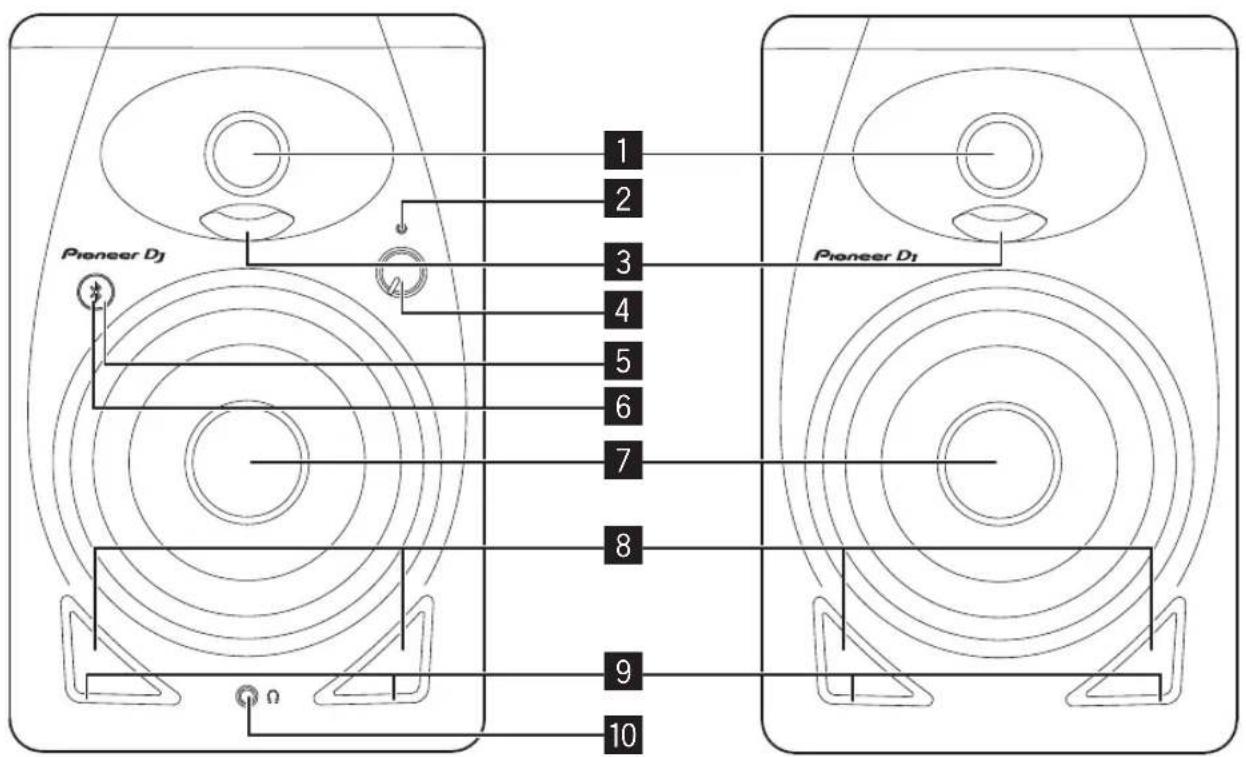
1 3/4 inch soft dome tweeters
2 POWER indicator
Lights up when the power is turned on. The indicator is off in Standby mode.
3 Diffusers
Improve the sound directivity of high frequencies and provide spacious sound.
4 LEVEL knob
Adjusts the volume.
5 Pairing button
Pairs the speakers with a Bluetooth device.
Plays/pauses a track played on a Bluetooth device.
For details, refer to "Listening to the music of a Bluetooth device" (Page 5).
6 Pairing indicator (Page 5)
When flashing: Pairing operation is performed or waiting to connect
When lit: Connected with a Bluetooth device
7 4 inch glass fiber woofers
8 Bass reflex ducts
9 Grooves
Adjust the airflow of the bass reflex ducts to radiate low frequencies smoothly.
10 Headphone terminal
This is a 3.5 mm stereo mini jack type output terminal. Connecting headphones mutes the sound output from the speakers and outputs the sound only from the headphones.
Rear panel
flowchart
graph LR
    subgraph Left
        A["SOUND MODE"] --> B["PRODUCTION"]
        C["OUTPUT TO RIGHT SPEAKER"] --> D["RCA"]
        D --> E["STEREO MINI"]
        F["R"] --> E
        E --> G["1"]
        E --> H["2"]
        I["CLASS"] --> J["+"]
        K["+"] --> L["+"]
        M["+"] --> N["+"]
        O["+"] --> P["+"]
    end
    subgraph Right
        Q["INPUT"] --> R["CLASS: +"]
        S["RIGHT"] --> T["+"]
        U["3"] --> V["4"]
        W["5"] --> X["6"]
    end
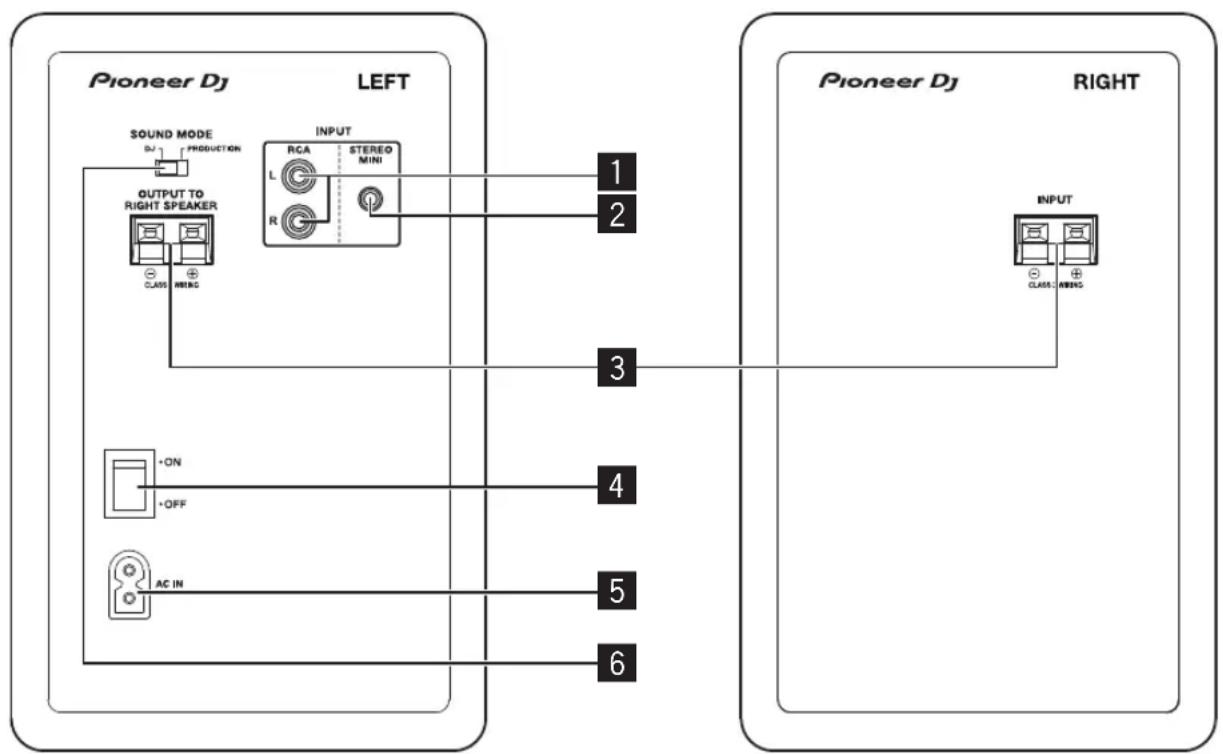
1 RCA INPUT terminals
These are RCA pin type unbalanced input terminals.
2 STEREO MINI INPUT terminal
This is a 3.5 mm stereo mini jack type unbalanced input terminal.
3 Speaker connection connectors
Connect the left and right speakers using the supplied cord. Do not connect these speakers to an amplifier other than that of this system. Doing so may cause a damage or fire.
4 POWER switch
Turns the power for the speakers on and off.
5 AC IN
Connect to a power outlet with the supplied power cord. Connect the power cord after all the connections are complete.
Use the supplied power cord.
6 SOUND MODE switch
Switches between the DJ mode and PRODUCTION mode. DJ mode: For a punchy sound suited for DJ applications. PRODUCTION mode: For flat frequency response that accurately reproduces the input sound.
CAUTION
The POWER switch on this unit will not completely shut off all power from the AC outlet. Since the power cord serves as the main disconnect device for the unit, you will need to unplug it from the AC outlet to shut down all power. Therefore, make sure the unit has been installed so that the power cord can be easily unplugged from the AC outlet in case of an accident. To avoid fire hazard, the power cord should also be unplugged from the AC outlet when left unused for a long period of time (for example, when on vacation).
D3-4-2-2-2a ^* _A1_En
CAUTION
- This product is provided with an auto standby function. If a state of no sound continues for a set time (approximately 10 hours) during use, the product automatically turns off the POWER indicator and enters Standby mode with low power consumption regardless of whether there is a Bluetooth connection.
- If the product enters Standby mode when there is a Bluetooth connection, the Bluetooth connection is disconnected and the Pairing indicator also turns off.
- When an audio signal is input from the input terminals in Standby mode, the product automatically enters Power-on mode. Furthermore, the product also enters the Power-on mode if the Bluetooth pairing button is pressed while in Standby mode.
- This auto standby function cannot be disabled.
Installation and connections
How to install
A speaker's playback sound is delicately influenced by conditions in the listening room. To produce optimum listening conditions, take due consideration of the conditions of your installation location before beginning actual installation.
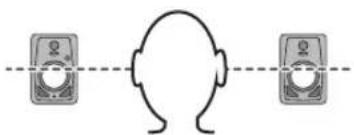
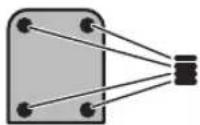
- Place the speakers at ear level.
- For a natural stereo effect, the right and left speakers should be installed in symmetrical and equidistant positions from the listening position.
natural_image
Simple line drawing of a human head facing two identical devices (no text or symbols)- To prevent sliding, apply the supplied cushions to the bottom of the speakers.
WARNING
Store small parts out of the reach of children and infants. If accidentally swallowed, contact a doctor immediately.
D41-6-4_A1_En
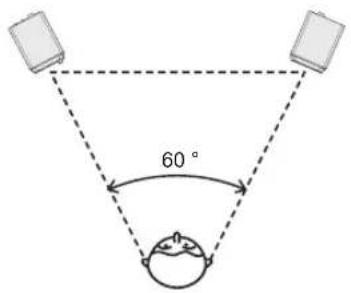
- The speakers should ideally be placed at an angle of 30^ to the left and right (for a total of 60^ ) from the listening position, and facing inward.
VENTILATION CAUTION
When installing this unit, make sure to leave space around the unit for ventilation to improve heat radiation (at least 15 cm at top, 15 cm at rear, and 15 cm at each side).
WARNING
Slots and openings in the cabinet are provided for ventilation to ensure reliable operation of the product, and to protect it from overheating. To prevent fire hazard, the openings should never be blocked or covered with items (such as newspapers, table-cloths, curtains) or by operating the equipment on thick carpet or a bed.
D3-4-2-1-7b ^* _A1_En
Connections
- Disconnect the power cord before making or changing connections.
- Read the instruction manuals for the devices you are going to connect with the speakers.
- Connect the power cord after all the connections are complete.
• Use the supplied power cord.
- The input signals to the RCA, STEREO MINI input terminals and the input signals from Bluetooth are mixed, so please beware of the volume level.
Connecting cords
Connect the supplied speaker cord to the speakers.
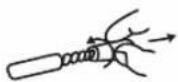
1 Strip about 1 cm of the head of the supplied speaker cord and twist and remove the exposed insulator.
After removing the insulator, thoroughly twist the core wires.
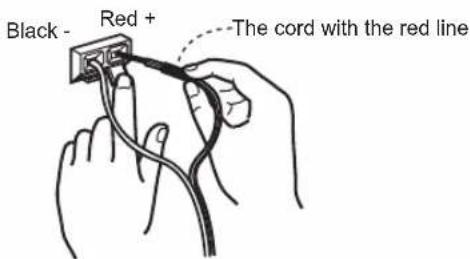
2 Connect the supplied speaker cord to the speaker terminals on the LEFT and RIGHT sides.
3 Insert the core wires into the terminals while pressing the claw on the speaker terminal.
Connect the speaker cord with the red line into the + terminal side (red) and the speaker cord without the red line into the - terminal side (black).

CAUTION
- After connecting to the terminals, lightly pull the speaker cord to make sure that heads of the speaker cord are securely connected to the terminals. A loose connection might cause audio output to be interrupted or noise to be output.
- When connecting the speaker cord, thoroughly twist the core wires, and make sure that the core wires are not protruding out of the speaker terminals. Core wires protruding out of the speaker terminals may come into contact with the rear panel or with each other. This may cause an excessive load to be placed on the amplifier which results in operation stopping or a malfunction.
- If a mistake is made with the polarities (+, -) on the LEFT and RIGHT sides when connecting the LEFT and RIGHT speaker cord, normal stereo effect can no longer be obtained.
Listening to the music of a Bluetooth device
These speakers allow you to wirelessly enjoy tracks saved to a Bluetooth device.
When using the speakers connected with a Bluetooth device for the first time or when connected with another Bluetooth device, you need to pair the speakers and a Bluetooth device.
Pairing (device mutual registration) is the operation required to connect a Bluetooth device and the speakers.
Pairing and connection procedure
1 Turn on the [POWER] switch on the speaker.
• The Paring indicator flashes for approximately 30 seconds and the speakers enter Pairing mode.
• If the Pairing indicator is off, press and hold the pairing button for at least 2 seconds to switch to Pairing mode again.
2 Perform the pairing procedure on a Bluetooth device.
Perform the pairing procedure on a Bluetooth device while the speakers are in paring mode. For details, see the instruction manual of your Bluetooth device.
3 The Pairing indicator on the speaker stops blinking and lights up when the connection is complete.
The Pairing indicator turns off if the speakers can't pair with a Bluetooth device within 30 seconds.
- A Bluetooth device that has already been paired can be connected by performing the connection procedure on the Bluetooth device side if the speakers are powered on.
Playback
When you play music on a connected Bluetooth device, the music playing on the Bluetooth device is output from the speakers.
- You can play/pause a track playing on a Bluetooth device by pressing the pairing button. (same function as the pause/play button on the Bluetooth device).

CAUTION
- When pairing (connecting), move the Bluetooth device close to the speakers.
- Loud sound may be output when the playback operation is performed for the first time after connecting completes so we recommend lowering the volume before playback.
• The pause/play operation may not be possible with the pairing button depending on the application used. - Connecting with the speakers may not be possible depending on the Bluetooth device.
- If you wish to pair the speakers with a different Bluetooth device, turn off the Bluetooth function of the currently connected Bluetooth device or disconnect the connection before performing the pairing operation.
- The speakers store the pairing information of up to eight Bluetooth devices, and attempt to connect to the last paired device if the pairing button is pressed in the state of no connection with a Bluetooth device.
Additional information
Troubleshooting
If you think something is wrong with the speakers, check the information below and refer to the [FAQ] for the DM-40D-BT at the URL below.
• Inspect devices connected with the speakers.
• The speakers may restore proper operation after you turn it off and on.
If the problems continue, read the "Precautions for Use" and consult an authorized service company or your dealer.
Problem Check Measures
The power is not turned on. Is the power cord properly connected? Plug in the power cord to an AC outlet.
| No sound is output or the sound is low. | Is the connected device set properly? | Set the devices external input and volume properly. |
| Is the volume set to the proper position? Turn the [LEVEL] knob on the front panel of the speaker clockwise to increase the volume. | ||
| Is the power turned on? Turn on the [POWER] switch on the rear panel of the speaker. | ||
| The POWER indicator (white) does not light. | Is the power turned on? | Turn on the [POWER] switch on the rear panel of the speaker. |
| Are the speakers in Standby mode? | Turn off the [POWER] switch on the rear panel of the speaker and then turn it back on after a few seconds. Or press the pairing button on the front panel of the speaker. | |
| The speakers wouldn't recover (power-on) from Standby mode. | Is the input signal level low? Increase the input signal level. | |
| The sound is affected by distortion. | Is the volume set to the proper position? | Turn the [LEVEL] knob on the front panel of the speaker counterclockwise to reduce the volume. |
| Is the level for input from the connected device appropriate? | Adjust the output level of the connected device properly. | |
| Unwanted noise is heard. (It continues sounding loud.) | Is the volume set to the proper position? Turn the [LEVEL] knob on the front panel of the speaker counterclockwise to reduce the volume. | |
| The sound is only output from the left speaker. | Is the speaker cord connected properly? Connect the left and right speakers properly. | |
| The power turns off (Standby mode) automatically. | Did a state of no sound continue for approximately 10 hours or longer? | Input signals from the RCA or stereo mini plug input terminal. Or press the pairing button on the front panel of the speaker. |
| Is the input signal level low? Increase the input signal level. | ||
When connected via the RCA or STEREO MINI input terminals
Problem Check Measures
| No sound is output from the connected device or the sound is low. | Are the connection cables properly connected? | Connect the connection cables properly. |
| Are the terminals and plugs dirty? | Clean the terminals and plugs before making connections. | |
| The sound is only output from one speaker. | Is the device connected properly? | Connect the device to both the left and right input terminals. |
| The sound is interrupted or unwanted noise can be heard. | Is there a contact problem with the connection cables? | Reconnect the connection cables. |
When connected via Bluetooth
| Problem Check Measures | ||
| Cannot connect or the sound is interrupted,or unwanted noise can be heard. | Is there a device producing electromagnetic waves in the 2.4 GHz band (microwave oven, wireless LAN device, otherBluetoothdevice, etc.) near to the speakers? | Either install the speakers away from such devices or stop using them. |
| Is the distance from theBluetoothdevice too far? Or is there a wall or an obstacle that blocks radio waves between the speakers and the device? | Move this unit and the connectedBluetoothdevice close to each other.Or change the position of theBluetoothdevice or the speakers. | |
| Is an application other than a music playback application running on theBluetoothdevice? | Exit any application on theBluetoothdevice other than the music playback application. | |
| Does theBluetoothdevice you wish to connect support A2DP? | Use aBluetoothdevice that supports A2DP. | |
| Has pairing with theBluetoothdevice been performed properly? | Turn the power of the speakers andBluetoothdevice off and back on,and then perform pairing again. | |
Trademarks and registered trademarks
- The Bluetooth® word mark and logos are registered trademarks owned by Bluetooth SIG, Inc. and any use of such marks by AlphaTheta Corporation is under license. Other trademarks and trade names are those of their respective owners.
- Other product, technology and company names, etc. mentioned herein are trademarks or registered trademarks of their respective owners.
Specifications
Type 2-Way Active Speaker
Amplifier
Amplifier type....Class D with DSP
Amplifier output....Lch: 19 W / 4 Ω, Rch: 19 W / 4 Ω
Input terminals (unbalanced input)....RCA pin jacks × 1, 3.5 mm stereo mini jack × 1
Input impedance 10 kΩ
Output terminal 3.5 mm stereo mini jack × 1
Speaker
Enclosure....Bass reflex
Enclosure material MDF vinyl laminate
Woofer (LF driver) 4" (102 mm) cones
Tweeter (HF driver)....3/4" (19 mm) soft dome
Bluetooth
Version......Bluetooth Specification Ver. 5.0
Maximum transmission distance .... Approximately 10 m* in unobstructed circumstances
Frequency used 2.4 GHz
Modulation....FH-SS (Frequency Hopping Spread Spectrum)
Supported Bluetooth profiles....A2DP, AVRCP
Supported Codec....SBC, AAC
Power unit / other
Supported voltages.... AC 110 V – 240 V, 50 Hz / 60 Hz
Power consumption 20 W
Power consumption during standby mode 0.3 W or less
Max. dimensions
(W × H × D) Lch: 146 × 227 × 223 mm / 5.75" × 8.94" × 8.78", Rch: 146 × 227 × 212 mm / 5.75" × 8.94" × 8.35"
Weight.....Lch: 2.5 kg / 5.5 lbs., Rch: 2.2 kg / 4.9 lbs.
* Transmission distances are a guideline. Transmission distance may change depending on the surrounding environment.
• The specifications and design of this product are subject to change without notice.
© 2022 AlphaTheta Corporation. All rights reserved.
AlphaTheta Corporation
6F, Yokohama i-Mark Place, 4-4-5 Minatomirai, Nishi-ku, Yokohama, Kanagawa 220-0012 JAPAN
AlphaTheta株式会社
AlphaTheta EMEA Limited
Artemis Building, Odyssey Business Park, West End Road, South Ruislip, Middlesex, HA4 6QE, U.K. TEL: +44-203-7617-220
AlphaTheta Music Americas, Inc.
2050 W. 190th Street, Suite 109, Torrance, CA 90504, U.S.A. TEL: +1 (424) 488-0480
AT_001_all_01
- DM-40D-BT / DM-40D-BT-W
- Before you start
- How to read this manual
- What's in the box
- Part names
- Pairing indicator (Page 5)
- 4 inch glass fiber woofers
- Bass reflex ducts
- Grooves
- Headphone terminal
- RCA INPUT terminals
- STEREO MINI INPUT terminal
- Speaker connection connectors
- POWER switch
- AC IN
- SOUND MODE switch
- CAUTION
- Installation and connections
- How to install
- WARNING
- VENTILATION CAUTION
- Connections
- Connecting cords
- Listening to the music of a Bluetooth device
- Pairing and connection procedure
- Turn on the [POWER] switch on the speaker.
- Perform the pairing procedure on a Bluetooth device.
- The Pairing indicator on the speaker stops blinking and lights up when the connection is complete.
- Playback
- Additional information
- Troubleshooting
- When connected via the RCA or STEREO MINI input terminals
- When connected via Bluetooth
- Trademarks and registered trademarks
- Specifications
- Amplifier
- Speaker
- Bluetooth
- Power unit / other
- Max. dimensions
- AlphaTheta Corporation
- AlphaTheta株式会社
- AlphaTheta EMEA Limited
- AlphaTheta Music Americas, Inc.
Brand : NEUMANN
Model : DM-40D-BT
Category : Uncategorized