
Baby RAM - Audio Electronics Heritage Audio - Free user manual and instructions
Find the device manual for free Baby RAM Heritage Audio in PDF.


| Product Type | 500 Series Audio Compressor |
| Brand | Heritage Audio |
| Model | Baby RAM |
| Form Factor | 500 Series Module |
| Width | 1.5 inches (38 mm) |
| Height | 5.25 inches (133 mm) |
| Depth | 6.5 inches (165 mm) |
| Weight | 1.2 lbs (0.54 kg) |
| Power Supply | ±16 V DC from 500 series rack |
| Circuitry | Class A discrete, hand-wired |
| Transformers | Custom input and output transformers |
| Controls | Threshold, Ratio, Attack, Release, Makeup Gain |
| Indicators | Gain reduction LED meter |
| Connectors | Edge connector for 500 series rack |
| Frequency Response | 20 Hz – 20 kHz (±0.5 dB) |
| Input Impedance | 600 ohms |
| Output Impedance | 600 ohms |
| Maximum Input Level | +24 dBu |
| Maximum Output Level | +24 dBu |
| Construction | Steel chassis |
| Cleaning | Wipe with a dry, lint-free cloth |
| Safety | Operate only within specified voltage range |
Frequently Asked Questions - Baby RAM Heritage Audio
User questions about Baby RAM Heritage Audio
0 question about this device. Answer the ones you know or ask your own.
Ask a new question about this device
Download the instructions for your Audio Electronics in PDF format for free! Find your manual Baby RAM - Heritage Audio and take your electronic device back in hand. On this page are published all the documents necessary for the use of your device. Baby RAM by Heritage Audio.
USER MANUAL Baby RAM Heritage Audio
USER MANUAL
Thank you for choosing the Baby R.A.M. Heritage Audio is dedicated to bringing you 'the sound of yesterday for tomorrow'. We specialize in capturing that unique, enticing sound that everybody has fallen in love with. For years engineers, producers and musicians have been yearning for that classic vibe. Usually the only option is to search for old, used original equipment that is almost always in a questionable state of operation. This brings with it a whole lot of other issues, making the experience less than desirable. Not to mention the very high prices asked for this equipment, which makes them virtually unobtainable for the great majority. Now it's possible to obtain that same sound with a brand new piece that will give you all the problem-free, heavy-duty use you'll need for years of music making history.
Peter Rodriguez
CEO
Heritage Audio - Madrid, Spain

© 2022 Heritage Audio S.L. is the sole owner of the copyright of all information and drawings contained in this manual which are not to be copied or reproduced by any means or disclosed in part or whole to any third party without written permission.
Heritage Audio reserves the right to alter specifications without notice. The information in this manual has been carefully checked and is believed to be accurate at the time of publication. However, no responsibility is taken by us for inaccuracies, errors or omissions nor any liability assumed for any loss or damage resulting either directly or indirectly from use of the information contained within it.
TABLE OF CONTENTS
| INTRODUCTION | 2 |
| CONTENTS | 2 |
| DESCRIPTION | 3 |
| GETTING STARTED | 4 |
| APPLICATIONS | 5 |
| SPECIFICATIONS | 6 |
| SIGNAL FLOW | 6 |
| TROUBLE SHOOTING | 7 |
| WARRANTY STATEMENT | 8 |
| REGISTRATION | 8 |
| RECALL SHEETS | 9 |

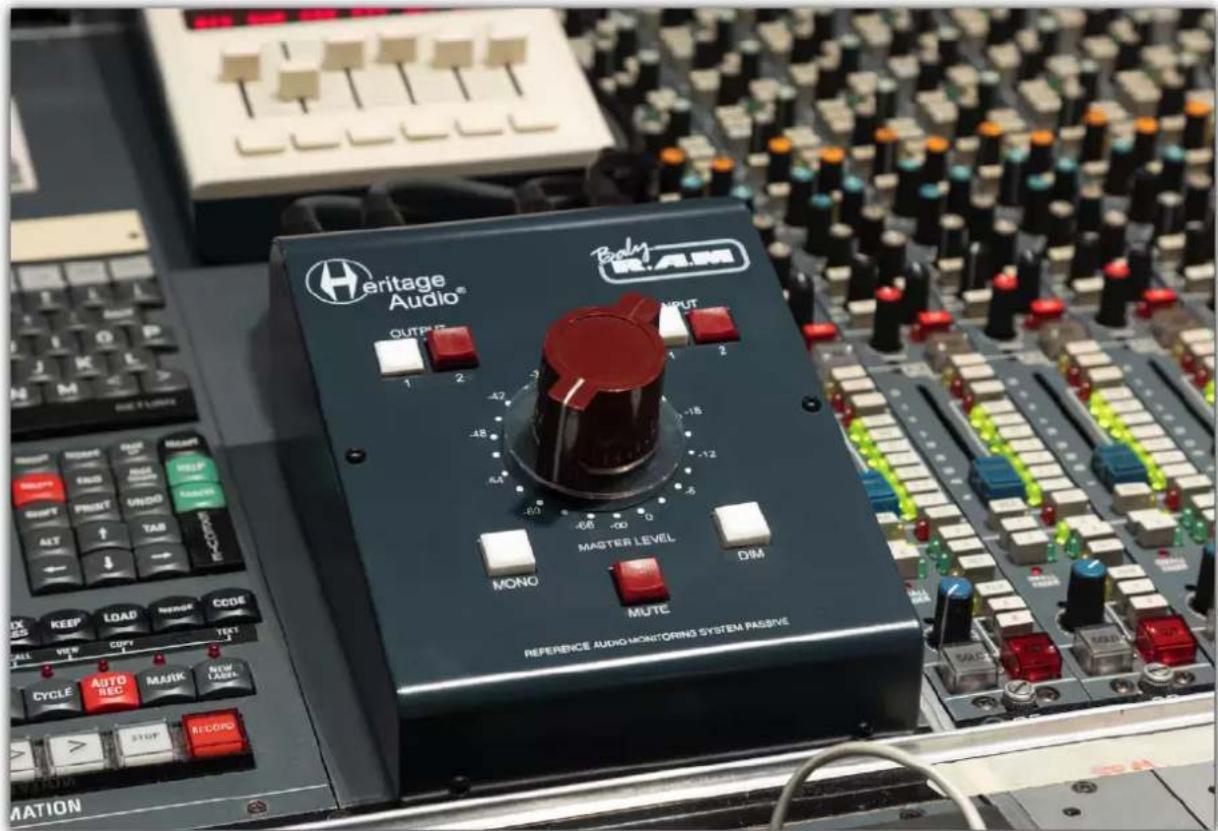
Heritage Audio's Baby RAM is the ultimate passive-monitoring system, delivering the most transparent signal with the best stereo imaging of any other passive designs available!
The Baby RAM is a boutique, passive-circuit monitor controller inspired by classic European console designs. A Baby RAM is the ultimate controller for total transparency — a zero-compromise signal path, paired with a simplified control set ensures your monitors receive the cleanest, purest signal possible without unnecessary complications.
The Baby RAM proudly features a 4 gang, 24 step rotary switch for volume as opposed to cheaper stereo potentiometers, which means the precision of your stereo signal is perfect on every position as well as offering a sub-tenth of a dB precision on every single attenuation position! Baby RAM also has no insertion loss, meaning that there's no extra coloration, signal loss or degradation at any settings.
Even though the Baby RAM packs a zero-compromise circuit design, it couldn't be any easier to use with 2 pairs of stereo inputs and outputs — both balanced and ground free (unbalanced compatible) on gold plated TRS jacks. Mute, Dim, Mono, and Volume monitoring controls make the Baby RAM a breeze to work with. And with it's passive design, it also means you have no concerns with bad power supplies, as no electrical current is needed!
The Baby RAM is built with the most cutting edge methods in manufacturing and design, without ever compromising audio quality or cutting corners.


| 1 | 2 | 3 | 4 | 5 | 6 |
| OUTPUT Selects either Output 1 or Output 2 | ATTENUATOR Steps through the volume range in 3 dB increments | MONO SWITCH Collapses the signal from Stereo to Mono | INPUT Selects either Input 1 or Input 2 | DIM SWITCH Reduces output by -20 dB | MUTE SWITCH Completely eliminates the output |

| 1 | 2 | 3 |
| INPUTS1/4 TRS Jacks | OUTPUTS1/4 TRS Jacks | BAL. & FLOAT / UNBAL.Lifts the ground on the output signal for better Unbalanced compatibility |

![graph TD A["ACTIVE SPEAKER 1-L"] --> B["PASSIVE SPEAKER 2-L"] B --> C["POWER AMPLIFIER"] C --> D["AMP LINE INPUT L & R"] C --> E["AMP LINE INPUT R"] C --> F["LINE OUT 1 L & R"] C --> G["LINE OUT 2"] D --> H["STERE OLINE OUT PORTABLE AUDIO PLAYER"] E --> H F --> H G --> H H --> I["THUNDERBOLT COMPUTE…](/content/2026/05/894964/images/0a9292c6c6a5f85651a101c12d73c89997c4e60dd4e2c973e1e5b39441cc82e7.jpg)

- Unlimited Headroom: Being a passive device, it is only limited by the preceding and following devices's headroom.
• Balanced and floating inputs and outputs: Inputs and Outputs TRS JACKs, unbalanced compatible. - 24 Step Passive Attenuator: In 3 dB steps for sub-tenth dB precision between left and right channels.
- Mute: Less than 100 dBu.
- No added distortion or noise.
- Insertion loss: Less than 0,2 dB.
- Dimensions (W x H x L): 142 mm x 85 mm x 192 mm.

SIGNAL FLOW
![graph LR A["STEREO LINE INPUT"] --> B["ATTENUATOR"] B --> C["MUTO"] B --> D["MONO"] B --> E["DIM"] C --> F["STEREO LINE OUTPUT"] E --> F](/content/2026/05/894964/images/a1982777c85558cdbf85d8f4d7cd5ac198123d2d7147b66e567f166458be355b.jpg)


| PROBLEMS | SOLUTIONS |
| There is no sound coming from my Baby RAM. | Make sure the ‘MUTE’ button is not pressed. |
| The audio from my Baby RAM seems less open than the audio directly from my DAW. | Double check that you have not accidentally pressed the ‘MONO’ button. |
| Even with the volume knob all the way up it doesn’t seem to output as much as before. | You may have the ‘DIM’ button pushed, reducing the output by -20 dB. |
| There is no signal present at the Baby RAM’s Output. | Verify that you have correctly connected the Input and Output cables. |
| There seems to be lots of extra noise coming from the unit. | Try pressing the white ‘Unbal’ button on the rear panel. |
| Is it possible to have both outputs or both inputs active at the same time? | No, you can only use one Input and one Output at an given time. |
* For any further doubts or questions please get in contact with us at: support@heritageaudio.com
LIMITED 2 YEAR WARRANTY
Heritage Audio Baby R.A.M is warranted by Heritage Audio SL to be free from defects in materials and workmanship for the period of 2 years to the original purchaser. In the event of such defects, the product will be repaired without charge or, at our option, replaced with a new one if delivered to Heritage Audio prepaid, together with a copy of the sales slip or other proof of purchase date. The warranty excludes problems due to normal wear, abuse, shipping damage or failure to use the product in accordance with the specifications.
Heritage Audio shall not be liable for damages based upon inconvenience, loss of use of the product, loss of time, interrupted operation or commercial loss or any other damages, whether incidental, consequential or otherwise.
This warranty is not transferable.
Heritage Audio and the Heritage Audio "H" logos are registered Trademarks owned and/or licensed by Heritage Audio.
REGISTRATION
Please visit our website: https://heritageaudio.com/registration/

Session / Title: ____ Track: ____ CUE: ____ Codec: ____
Date: ____ Instrument: ____ Notes: ____


Session / Title: ____ Track: ____ CUE: ____ Codec: ____
Date: ____ Instrument: ____ Notes: ____



www.heritageaudio.com
HERITAGE AUDIO. C/ Alfonso Gómez, 38, 3C. 28037 Madrid – Spain. Tel: +34 917 266 189
info@heritageaudio.com
Brand : Heritage Audio
Model : Baby RAM
Category : Audio Electronics