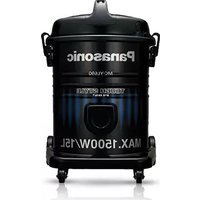
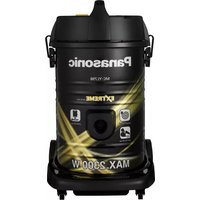
USER MANUAL MC-YL690 PANASONIC
Operating Instructions
Operating Instructions
Customer Instructions
Vacuum Cleaner
Garobrqi
Vacuum Cleaner
Model No.
Model No.
Model No.
MC-YL697K/695K/693K/691K/690K
MC-YL697/695/693/691/690

Thank you for purchasing the Panasonic product. Before use, please read this instruction manual completely in order to use this product properly and ensure its lasting operation. After reading this manual store it safely.
Before using the vacuum cleaner, please observe these basic precautions. WARNING: To reduce the risk of fire, electric shock, or injury.
- This appliance is not intended for use by persons (including children) with reduced physical, sensory or mental capabilities, or lack of experience and knowledge, unless they have been given supervision or instruction concerning use of the appliance by a person responsible for their safety. Children should be supervised to ensure that they do not play with the appliance.
- Do not use the appliance if the power cord or plug is damaged or faulty.
- This appliance is provided with a flexible cord. If this becomes damaged, it must be repaired by an Authorized Service Centre or a qualified person in order to avoid any hazard. Unplug from the socket outlet when not in use and before cleaning the appliance or undertaking maintenance operations. Turn off the appliance before removing the plug. Do not unplug by pulling on the cord. To unplug, grasp the plug, not the cord.
- Do not handle the plug or vacuum cleaner with wet hands.
- Do not use wet filters after washing; make sure they are completely dry to avoid damaging the cleaner.
- Do not vacuum flammable or combustible substances, and do not use the cleaner in areas where they may be present.
- Do not vacuum hot ash, embers, or large and sharp objects.
- Do not vacuum water or other liquids.
- Keep the vacuum cleaner away from heat sources such as radiators, fires, direct sunlight, etc.
- This vacuum cleaner is fitted with a thermal cut-out device that automatically turns off the cleaner to prevent overheating of the motor. When this happens, disconnect the cleaner from the socket outlet and check the dust compartment and filters, as they may be full or clogged with fine dust. Check for any other obstructions in the hose or tube. After removing the obstruction, leave the cleaner to cool down until the thermal cut-out resets after approximately 60 minutes.
PART NAMES AND THEIR ASSEMBLY
- At the beginning, when you purchase this product, accessories like the curved wand, hose, crevice tool, and upholstery nozzle are located inside the dust box.
- Push together until the projection clicks into place in the curved wand / hose connection wand hole.
Align the triangle markings and push in the dust box until it clicks into place with the dolly. (Once it is fixed into place, it cannot be removed.)
Align the triangle markings properly and push the dust box into place so that it fits securely onto the dolly. (Once it is fixed into place, it cannot be removed.)
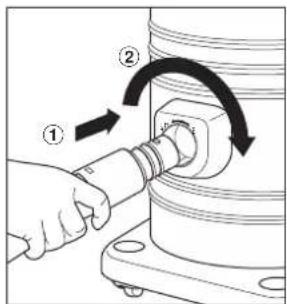
How to use the blower
For locations where the nozzle will
For either, connect this nose to the blower and blow the dust out.
Turn on the ON/OFF switch.
Use the nozzle that is appropriate for the location you are cleaning.
- When traveling over steps in the floor, always hold the
vacuum cleaner by the handle so that it does not fall over.
display correctly, so remove the device too before.
checking the vsc gauge
- Lift the nozzle off the floor, and if the vac gauge turns red, discard the dust.
• To decrease the suction power.
- If the vac gauge turns red when device tool is used, adjust the suction regulator.
To clean the dust in difficult to reach places
- Term this nose connection wand with the projection is modul by the groove, as shown in the diagram.
• For cushions and draperies.
Upholstery brushes
• For carpets and rugs
Libya
• For curtains and cushions
DISCARDING THE DUST
Discarding the dust
Discarding the dust
Removing the filter
Removing the filter
Removing the filter
- If the vac gauge turns red, discard the dust.
Pull the clamps upward.
Remove the motor housing hanging upward with the carrying handle.
Pull the expander upward and shake it about ten times.
(Never shake up and down and leave the hose connected.)
Remove the filter and empty dirt and dust.
- The plug must be removed from the socket outlet before cleaning or maintaining the appliance.
- IMPORTANT: Before re-installing the washable filter, make sure they are completely dry to avoid damaging the cleaner.
• Dry filters completely in the air. - Do not bend, pull, and step on the hose or put anything heavy on it.
Remove refuse with the brush.
Vacuum cleaner body and accessories
Wipe with a soft cloth soaked with water.
Maintaining the filter
1

Remove the expander from the filter as illustrated.
Wash the filter in water by hand. (Do not use washer or dryer.)
When filter becomes completely dry, replace it as in the same manner in reverse.
Please ensure to place the filter supporter back in its original location to avoid deformation, which can cause dust leakage.
When the secondary filter becomes dirty.
- Rinse it with water and dry it completely before reusing.
What to do if your cleaner does not work
Check that the appliance is correctly plugged in and that the socket outlet is working. If the thermal cut-off device has operated, wait until it resets after approximately 60 minutes. If after checking the mentioned points the cleaner still does not work, take it to an Authorized Service Centre for repair.
- Stop the cleaner and unplug it from the socket outlet.
- Check whether the wands, hose, and accessories are blocked. If they are blocked, remove the obstruction.
- Check that the dust box is full. If it is full, empty it.
- Check that the filter is blocked with dust. If it is blocked with dust, clean it first.
No. 3, Jalan Sesiku 15/2, Shah Alam Industrial Site,
40200 Shah Alam, Selangor Darul Ehsan, Malaysia.