
MJ-DJ01S - Juicer PANASONIC - Free user manual and instructions
Find the device manual for free MJ-DJ01S PANASONIC in PDF.


| Product Type | Centrifugal Juicer |
| Brand | Panasonic |
| Model | MJ-DJ01S |
| Power Consumption | 700 W |
| Voltage | 220-240 V ~ 50/60 Hz |
| Dimensions (W x D x H) | 23.5 x 19.0 x 38.5 cm |
| Weight | 3.2 kg |
| Pulp Container Capacity | 1.0 L |
| Juice Container Capacity | 0.8 L |
| Feeding Chute Diameter | 45 mm |
| Speed Settings | 2 speeds (low/high) |
| Anti-Drip System | Yes |
| Pulp Ejection | Automatic |
| Material | Stainless steel micro-mesh strainer, BPA-free plastic |
| Safety Features | Safety locking arm, overheat protection, non-slip feet |
| Cleaning | Dishwasher-safe detachable parts (excluding motor base) |
| Accessories Included | Juice container, pulp container, cleaning brush |
| Warranty | 2 years |
| Repairability | Spare parts available; user-replaceable filter and motor brushes |
Frequently Asked Questions - MJ-DJ01S PANASONIC
User questions about MJ-DJ01S PANASONIC
0 question about this device. Answer the ones you know or ask your own.
Ask a new question about this device
Download the instructions for your Juicer in PDF format for free! Find your manual MJ-DJ01S - PANASONIC and take your electronic device back in hand. On this page are published all the documents necessary for the use of your device. MJ-DJ01S by PANASONIC.
USER MANUAL MJ-DJ01S PANASONIC
Operating Instructions
Juicer (Household Use)
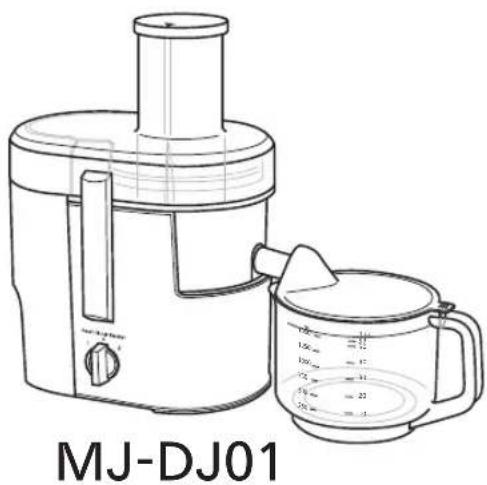
Model No. MJ-DJ01 MJ-SJ01

TABLE OF CONTENTS
SAFETY PRECAUTIONS 2-4
PART NAMES 5
DISASSEMBLY 6
CIRCUIT BREAKER PROTECTION ...... 6
HOW TO USE 7
AFTER USE 8
WARRANTY 9-10
SPECIFICATION.... 12
Thank you for purchasing this Panasonic product.
• This product is intended for household use only.
- Please read these instructions carefully in order to use this product correctly and safely.
- Before using this product please give your special attention to the section
"SAFETY PRECAUTIONS" (Page 2-4).
- Please keep these Operating Instructions for future use.
SAFETY PRECAUTIONS (Make sure to follow these instructions)
In order to prevent accidents or injuries to the user, other people, and damage to property, please follow the instructions below.
■ The following indication indicate the degree of damage caused by incorrect operation.
WARNING
Indicates serious injury or death.
CAUTION
Indicates risk of injury or property damage.
■ The symbols are classified and explained as follows.

This symbol indicates prohibition.

This symbol indicates requirement that must be followed.
WARNING

● Do not damage the Cord or the Plug.
(It may cause electric shock, or fire caused by short circuit.)
- Do not use the appliance if the Cord or the Plug is damaged or the Plug is loosely connected to the outlet.
(It may cause electric shock, or fire caused by short circuit.)
If the Cord is damaged, it must be replaced by the manufacturer, its service center or similarly qualified person in order to avoid a hazard.
● Do not plug or unplug the Plug with wet hands.
(It may cause electric shock.)
- Do not operate the appliance when the Cord is in wound condition.
(It may cause electric shock or fire.)
- Do not exceed outlet voltage or use an alternate current other than that specified on the appliance.
(It may cause electric shock or fire.)
• Make sure the voltage supplied to the appliance is the same as your local supply.
- Plugging other devices into the same outlet may cause over-heating.
- Do not immerse the Motor Housing in water or splash it with water.
(It may cause electric shock or fire caused by short circuit.)
- Do not dismantle, repair or modify the appliance.
(It may cause fire, electric shock or injury.)
→ Please contact your service center for repairing.
- Do not insert any objects in the vent or the gap.
(It may cause electric shock or malfunction.)
• Especially metal objects such as pins or wires.
WARNING
- Do not put your fingers or utensils such as spoons, forks etc. into the Feeding Tube during operation. If food becomes clogged in the Feeding Tube, use the Food Pusher or another piece of fruit or vegetable to push it down.
(It may cause injury.)
- Do not remove the Pulp Container when the motor is operating.
(It may cause injury.)
- Do not replace any parts of the appliance with non-genuine spare parts.
(It may cause injury, electric shock or fire.)
- Do not use the appliance if the Spinner is damaged.
(It may cause injury.)

- This appliance is not intended for use by persons (including children) with reduced physical, sensory or mental capabilities, or lack of experience and knowledge, unless they have been given supervision or instruction concerning use of the appliance by a person responsible for their safety. Children should be supervised to ensure that they do not play with the appliance.
(It may cause burning, injury or electric shock.)
- Insert the Plug firmly.
(Otherwise it may cause electric shock and fire caused by the heat that may generate around the Plug.)
● Clean the Plug regularly.
(A soiled Plug may cause insufficient insulation due to moisture, and may cause fire.)
- When abnormal operation or breaking down occurs, discontinue the appliance operation immediately and unplug.
(It may cause smoke, fire or electric shock.)
e.g. for abnormal operation or breaking down.
• The Plug and the Cord becomes abnormally hot.
- The Cord is damaged or there has been a power failure.
• The Motor Housing is deformed or abnormally hot.
→ Please unplug the appliance immediately and contact the service centre for advice or a repair.
● Care should be taken when handling and cleaning the Spinner and the Spout.
(It may cause injury.)
● Make sure to hold the Plug when unplugging the Plug, ie. never pull on the Cord.
(Otherwise it may cause electric shock, or fire caused by short circuit.)
CAUTION

- Do not leave the appliance unattended when it is in operation.
(It may cause fire or burns.)
- When leaving the appliance unattended, turn the power off.
- Do not use the appliance in the following places.
- Any uneven surface, on non-heat resistant carpet or table cloth etc.
(It may cause fire or injury.)
- In a location where there is risk of the appliance being splashed with water, or near a heat source.
(It may cause electric shock or current leakage.)
- Do not assemble the Spinner when there is food residue left around the Container Unit.
(It may cause unpleasant odour and the Spinner to work improperly.)
- Do not continue operation for a long time. It is recommended to rest the appliance for at least 2 minutes after 2 minutes operation.
(It may cause over-heating.)

● Unplug the Plug when the appliance is not in use.
(Otherwise it may cause electric shock, or fire caused by current leakage.)
- When carrying the appliance, be sure to hold the Motor Housing with both hands.
(It may cause injury.)
- Switch off the appliance and disconnect it from power supply before changing accessories or approaching parts that are moving during operation.
(It may cause injury.)
PART NAMES
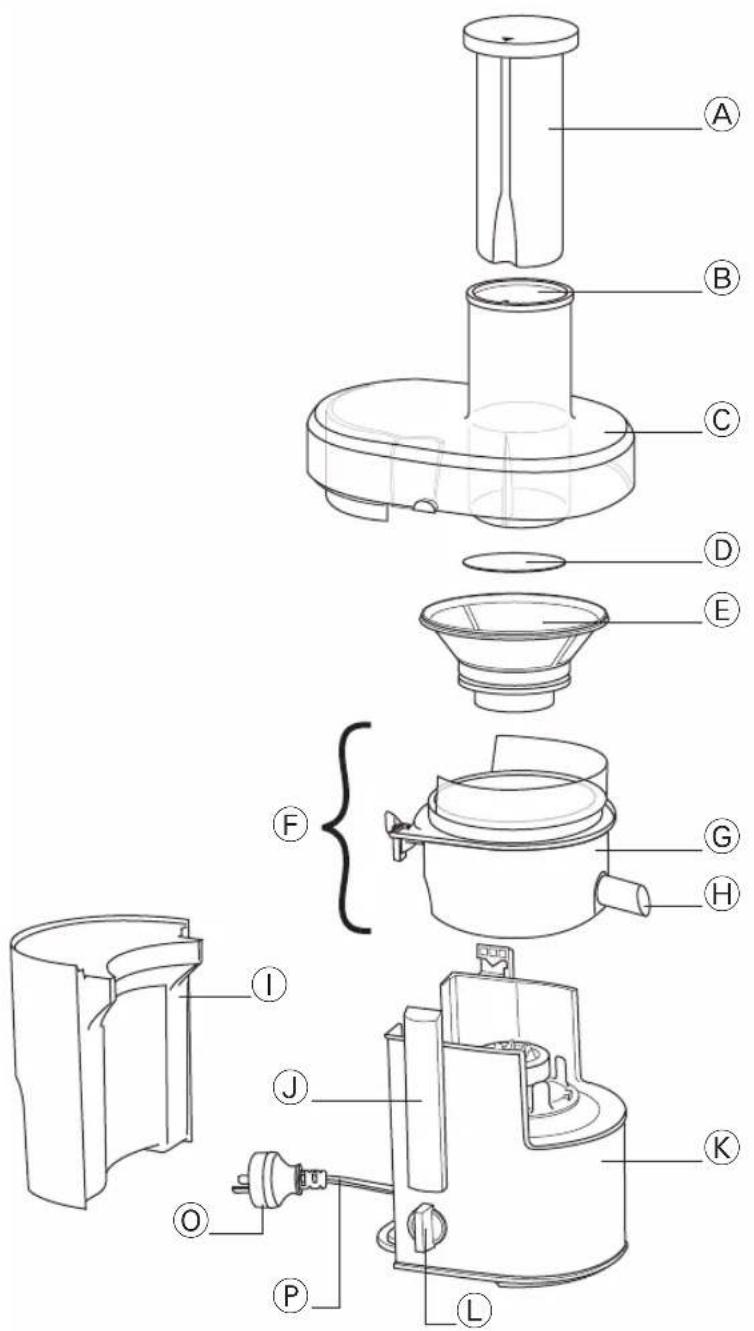

① MJ-DJ01
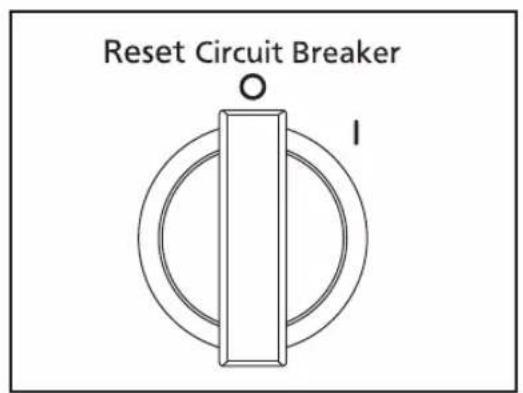
② MJ-SJ01
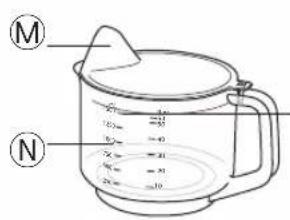
Maximum amount approx. 1.5 L / 53 fl oz
| A | Food Pusher | J | Clamps |
| B | Feeding Tube | K | Motor Housing |
| C | Container Cover | L | Switch 1 MJ-DJ012 MJ-SJ01 |
| D | Spinner Pad | ||
| E | Spinner | M | Cup Cover |
| F | Container Unit | N | Juice Jug |
| G | Rotatable Container | O | *Plug |
| H | Spout | P | Cord |
| I | Pulp Container |
*The shape of the Plug may be different from illustration.
DISASSEMBLY
1
natural_image
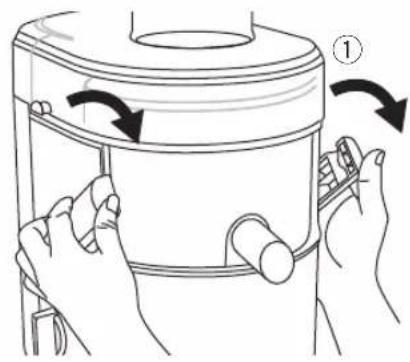
Line drawing of hands holding a container with arrows indicating rotation (no text or symbols)① Release the Clamps.

② Lift up the Container Cover and the Food Pusher.
③ Detach the Pulp Container.
2

natural_image
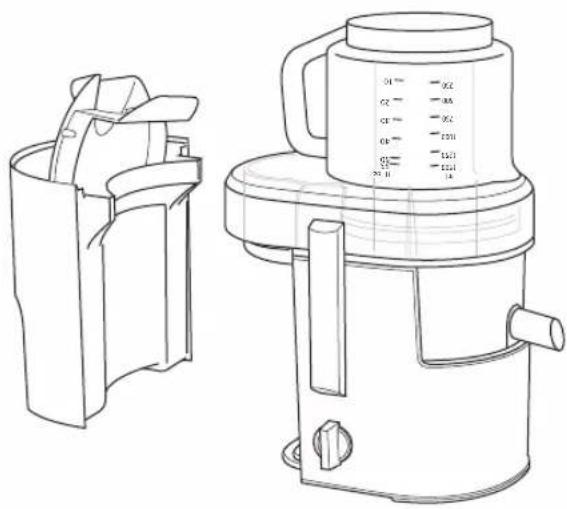
Technical line drawing of a portable kitchen fan with an upward arrow indicating motion (no text or symbols)① Lift up the Container Unit.
3

① Lift up the Spinner.
② Remove the Spinner Pad.
Note: If difficult to wash the Container Unit, it can be detached.

① Pull upper part Ⓐ of the Rotatable Container until the hook part Ⓑ is as illustrated.

natural_image
Illustration of hands operating a container with a lid, showing a step and component detail (no text or symbols)② Press the hook part Ⓑ as illustrated and pull upwards to detach it.

③ To attach the Container Unit again by insert part © first thus reversing steps ① to ②.
CIRCUIT BREAKER PROTECTION
When the Circuit Breaker automatically stops the motor due to overloading, follow the directions below.
- Turn off the Switch to "0 / O" position, (refer to page 5).
- Remove accumulated food residue from the Spinner and the Container Cover. Then cut ingredients into smaller pieces.
- Attach parts again (refer to page 7) and resume operation. Push them gently into the Feeding Tube using the Food Pusher.
HOW TO USE
Wash all detachable parts and dry well before using the appliance for the first time, refer to page 8. Unplug when assembling the unit. Before plugging in, ensure the Switch is switched to off.
1

natural_image
Technical line drawing of a mechanical device with a downward arrow indicating motion (no text or symbols)Place the Container Unit onto the Motor Housing.
● Make sure the Spout and the Clamps positioned same direction as illustrated.
● Make sure the Container Unit sits properly on the Motor Housing.

① Attach the Pulp Container and make sure it is fully aligned with the body.
② Place the Spinner in the Container Unit and fix it into position.
③ Place the Container Cover onto the Container Unit.
3

natural_image
Line drawing of hands holding a container with arrows indicating rotation (no text or symbols)① Push the Clamps as shown until a locking sound is heard.
- If the Clamps are not clamped correctly, the motor will not operate.
5

① Plug in and switch on.
② Insert the ingredients one by one and push them slowly into the Feeding Tube using the Food Pusher.
③ Align the Food Pusher into the Feeding Tube as illustrated.
natural_image
Diagram of a mechanical component with a circular housing and curved base, no visible text or symbols4

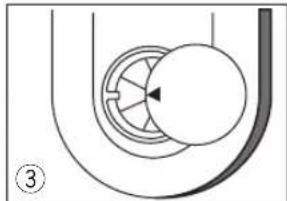
Place the Juice Jug as shown.
● Make sure the Spout is in the downward position when juicing.
Note:
* The Spout can be rotated freely for 120° when the Spout is in the upward position.
6

After use, switch off and unplug.
● While removing the Juice Jug, ensure the Spout is pulled up to prevent juice from dripping.
● Ensure the Spinner is fully stopped before release the Clamps.
● Some pulp might be hard to collect in the Pulp Container and stick on the Container Cover depending on the ingredients and amount.
Note:
- Ingredients that are not recommended:
Soft fruits that produce puree and can clog the Spinner – e.g. bananas, peaches, apricots etc. Low juice ingredients which can block the product – e.g. fresh basil leaf etc. - Please remove hard seeds and stones from fruit before juicing such as guava etc. Hard seeds that difficult to remove from such as pomegranate is prohibited for juicing.
- During initial usage, the appliances might have some unpleasant smell (slight burn smell) but this condition is normal.
- Some ingredients may produce a lot of pulps accumulate to the Container Cover that cause operation stop. (CIRCUIT BREAKER PROTECTION: refer to page 6)
- Make sure all parts are correctly mounted before you switch on the appliance.
- Please use the Juice Jug with the Cup Cover to avoid juice splashing. Make sure to align the Juice Jug opening to the Spout when juicing.
- For model MJ-DJ01, speed 2 is suitable for hard type fruits e.g. apples, carrots etc. while speed 1 is suitable for softer type fruits e.g. watermelons.
AFTER USE
Before detaching parts, make sure the motor has stopped completely, then disconnect the Plug from the outlet. (DISASSEMBLY: refer to page 6)
Note: ● Do not use benzene, thinner, alcohol, bleach, polishing powder or metal brush; otherwise the surface will be damaged.
● Do not put in the dishwasher.
● Some discolouration of the Spinner, the Container Cover, the Pulp Container, the Juice Cup Cover or the interior of the Container Unit may occur upon usage.
Cleaning
All parts must be cleaned immediately. Left-over fruit particles may cause unpleasant odours, stains or malfunction of the Spinner.
Wash both sides of the spinner filter mesh with a sponge under running water. If necessary use a brush.
Note: Sponge and brush is not provided.

natural_image
Line drawing of a hand pouring liquid into a bowl with a tool (no text or symbols)Wipe off the Motor Housing with a damp cloth.

natural_image
Line drawing of hands operating a mechanical device with a tool (no text or symbols)Wash each part in cold or lukewarm water with a soft sponge. Rinse and dry thoroughly before storing.

natural_image
Line drawing of a kitchen appliance setup with six different kitchenware items (no text or symbols)Storing
Plug and Cord
1) Turn over the Motor Housing and wind the
Cord two turns as illustrated.

natural_image
Technical diagram of a mechanical device with internal components and airflow arrows (no text or labels)2) Insert the Cord into the cord clamp to fix the Cord in position.

natural_image
Line drawing of a car electrical plug with wiring and circuit lines (no text or symbols)1) Turn over the Juice Cup and place it on the Feeder Opening.
2) Keep the Cup Cover inside the Pulp Container.
Panasonic Warranty
Home Appliance 12 Month Warranty from Date of Purchase
-
Subject to the conditions of this warranty Panasonic or it's Authorised Service Centre will perform necessary service on the product without charge for parts or labour, if in the opinion of Panasonic, the product is found to be faulty within the warranty period. For Line Communications products (i.e. Cordless Phones, etc) the genuine battery(s) has a 3 month warranty.
-
This warranty only applies to Panasonic products purchased in New Zealand and sold by Panasonic New Zealand or its Authorised Distributors or Dealers and only where the products are used and serviced within New Zealand or it's territories. Warranty cover only applies to service carried out by a Panasonic Authorised Service Centre and only if valid proof of purchase is presented when warranty service is requested.
-
This warranty only applies if the product has been installed and used in accordance with the manufacturer's recommendations (as noted in the operating instructions) under normal use and reasonable care (in the opinion of Panasonic). The warranty covers normal domestic use only (also Clip & Trim Professional use) and does not cover damage, malfunction or failure resulting from use of incorrect voltages, incorrect installation, accident, misuse, neglect, build-up of dirt or dust, abuse, maladjustment of customer controls, mains supply problems, thunderstorm activity, infestation by insects or vermin, tampering or repair by unauthorised persons (including unauthorised alterations), exposure to abnormally corrosive conditions or any foreign object or matter having entered the product.
-
This warranty does not cover the following items unless the fault or defect existed at the time of purchase:
(a) Cabinet Parts (b) Microwave Oven cook plates.
(c) User replaceable Batteries
(d) Kneader mounting shaft unit and Heads, Cutters, Foils, Blades and other accessories.
(e) Noise or vibration that is considered normal
(f) Wear and tear from normal use
-
To claim warranty service, when required, you should:
-
Telephone Panasonic's Customer Care Centre on 09 2720178 or visit our website referred to below and use the Service Centre Locator for the name/address of the nearest Authorised Service Centre.
-
Send or take the product to a Panasonic Authorised Service Centre together with your proof of purchase receipt as a proof of purchase date. Please note that freight and insurance to and / or from your nearest Authorised Service Centre must be arranged by you.
-
The warranties hereby conferred do not extend to, and exclude, any costs associated with the installation, de-installation or re-installation of a product, including costs related to the mounting, de-mounting or remounting of any screen, (and any other ancillary activities), delivery, handling, freighting, transportation or insurance of the product or any part thereof or replacement of and do not extend to, and exclude, any damage or loss occurring by reason of, during, associated with, or related to such installation, de-installation, re-installation or transit.
Panasonic Authorised Service Centres are located in major metropolitan areas and most regional centres of New Zealand, however, coverage will vary dependant on product. For advice on exact Authorised Service Centre locations for your product, please telephone our Customer Care Centre on 09 2720178 or visit our website and use the Service Centre Locator.
Unless otherwise specified to the consumer the benefits conferred by this express warranty are additional to all other conditions, warranties, guarantees, rights and remedies expressed or implied by the Consumer Guarantees Act of New Zealand and all other obligations and liabilities on the part of the manufacturer or supplier and nothing contained herein shall restrict or modify such rights, remedies, obligations and liabilities.
THIS WARRANTY CARD AND THE PURCHASE DOCKET (OR SIMILAR PROOF OF PURCHASE) SHOULD BE RETAINED BY THE CUSTOMER AT ALL TIMES
If you require assistance regarding warranty conditions or any other enquiries, please visit the
Panasonic New Zealand website www.panasonic.co.nz or contact by phone on 09 2720178
If phoning in, please ensure you have your operating instructions available.
Panasonic New Zealand Customer Care Centre
Phone: 09 2720178
Fax: 09 2720129
Email: customerservice@nz.panasonic.com
Website: www.panasonic.co.nz/support
Panasonic Warranty
Home Appliance 12 Month Warranty from Date of Purchase
- Subject to the conditions of this warranty Panasonic or its Authorised Service Centre will perform necessary service on the product without charge for parts or labour, if in the opinion of Panasonic, the product is found to be faulty within the warranty period. For Communications products (i.e. Cordless Phones, etc) the genuine battery(s) has a 3 month warranty.
- This warranty only applies to Panasonic products purchased in Australia and sold by Panasonic Australia or its Authorised Distributors or Dealers and only where the products are used and serviced within Australia or it's territories. Warranty cover only applies to service carried out by a Panasonic Authorised Service Centre and only if valid proof of purchase is presented when warranty service is requested.
- This warranty only applies if the product has been installed and used in accordance with the manufacturer's recommendations (as noted in the operating instructions) under normal use and reasonable care (in the opinion of Panasonic). The warranty covers normal domestic use only (also Clip & Trim Professional use) and does not cover damage, malfunction or failure resulting from use of incorrect voltages, incorrect installation, accident, misuse, neglect, build-up of dirt or dust, abuse, maladjustment of customer controls, mains supply problems, thunderstorm activity, infestation by insects or vermin, tampering or repair by unauthorised persons (including unauthorised alterations), exposure to abnormally corrosive conditions or any foreign object or matter having entered the product.
-
This warranty does not cover the following items unless the fault or defect existed at the time of purchase:
(a) Cabinet Parts
(c) User replaceable Batteries
(e) Accessories
(b) Microwave Oven Plates.
(d) Kneader Mounting Shaft, Shaver Heads, Cutters, Foils, Blades
(f) Noise or vibration that is considered normal -
To claim warranty service, when required, you should:
-
Contact Panasonic's Customer Care Centre on 132600
-
Send or take the product to a Panasonic Authorised Service Centre together with your purchase receipt as a proof of purchase date. Please note that freight and insurance to and / or from your nearest Authorised Service Centre must be arranged by you.
-
The warranties hereby conferred do not extend to, and exclude, any costs associated with the installation, de-installation or re-installation of a product, including costs related to the mounting, de-mounting or remounting of any screen, (and any other ancillary activities), delivery, handling, freighting, transportation or insurance of the product or any part thereof or replacement of and do not extend to, and exclude, any damage or loss occurring by reason of, during, associated with, or related to such installation, de-installation, re-installation or transit.
Panasonic Authorised Service Centres are located in major metropolitan areas and most regional centres of Australia, however, coverage will vary dependant on product. For advice on exact Authorised Service Centre locations for your product, please telephone our Customer Care Centre on 132600.
In addition to your rights under this warranty, Panasonic products come with consumer guarantees that cannot be excluded under the Australian Consumer Law. If there is a major failure with the product, you can reject the product and elect to have a refund or to have the product replaced or if you wish you may elect to keep the goods and be compensated for the drop in value of the goods. You are also entitled to have the product repaired or replaced if the product fails to be of acceptable quality and the failure does not amount to a major failure.
If there is a major failure in regard to the product which cannot be remedied then you must notify us within a reasonable period by contacting the Panasonic Customer Care Centre. If the failure in the product is not a major failure then Panasonic may choose to repair or replace the product and will do so in a reasonable period of time from receiving notice from you.
THIS WARRANTY CARD AND THE PURCHASE DOCKET (OR SIMILAR PROOF OF PURCHASE) SHOULD BE RETAINED BY THE CUSTOMER AT ALL TIMES
If you require assistance regarding warranty conditions or any other enquiries, please visit the Panasonic Australia website www.panasonic.com.au or contact by phone on 132 600 If phoning in, please ensure you have your operating instructions available.
Panasonic Australia Pty. Limited
ACN 001 592 187 ABN 83 001 592 187
1 Innovation Road, Macquarie Park NSW 2113
www.panasonic.com.au
PRO-031-F01 Issue: 6.0
02-10-2013
SPECIFICATION
| Model Name | MJ-DJ01 | MJ-SJ01 |
| Power Supply | 220 - 240 V ~ 50 - 60 Hz | |
| Power Consumption | 240 - 270 W | |
| Operation Rating | Continuous{Repetition 2 min. ON, then 2 min. OFF} | |
| Dimensions(WxDxH) (Approx.) | 216 mm x 305 mm x 384 mm | |
| Mass (Approx.) | 4.4 kg | 4.2 kg |
| Switch | 2 Speed | 1 Speed |
| Capacity (Approx.) | 1.5 L Juice Cup, 2.0 L Pulp Container | |
Panasonic Manufacturing Malaysia Berhad
No. 3, Jalan Sesiku 15/2, Section 15, Shah Alam Industrial Site, 40200 Shah Alam, Selangor Darul Ehsan, Malaysia.
Website: http://panasonic.net/
© Panasonic Corporation 2014
- Operating Instructions
- Juicer (Household Use)
- TABLE OF CONTENTS
- SAFETY PRECAUTIONS (Make sure to follow these instructions)
- WARNING
- CAUTION
- PART NAMES
- DISASSEMBLY
- CIRCUIT BREAKER PROTECTION
- HOW TO USE
- Note:
- AFTER USE
- Cleaning
- Storing
- Plug and Cord
- Panasonic Warranty
- Home Appliance 12 Month Warranty from Date of Purchase
- THIS WARRANTY CARD AND THE PURCHASE DOCKET (OR SIMILAR PROOF OF PURCHASE) SHOULD BE RETAINED BY THE CUSTOMER AT ALL TIMES
- Panasonic New Zealand Customer Care Centre
- Panasonic Australia Pty. Limited
- SPECIFICATION
- Panasonic Manufacturing Malaysia Berhad
Brand : PANASONIC
Model : MJ-DJ01S
Category : Juicer