
Classic 100 - Radio TECHNISAT - Free user manual and instructions
Find the device manual for free Classic 100 TECHNISAT in PDF.


| Product Type | Radio |
| Brand | TechniSat |
| Model | Classic 100 |
| Dimensions (approx.) | 200 x 120 x 100 mm |
| Weight (approx.) | 500 g |
| Power Supply | AC 230V~50Hz or 4x AA batteries |
| Frequency Range | FM 87.5-108 MHz, DAB+ 174-240 MHz |
| Preset Stations | 20 (FM) + 20 (DAB+) |
| Alarm Function | Dual alarm with snooze |
| Sleep Timer | Yes, adjustable 15-90 min |
| Display | LCD with backlight |
| Audio Output | Built-in speaker (2W RMS), headphone jack 3.5mm |
| Telescopic Antenna | Yes, for FM/DAB+ |
| Additional Functions | Clock display, date, auto scan, memory backup |
| Cleaning and Maintenance | Wipe with a soft, dry cloth. Do not use solvents. |
| Safety Instructions | Keep away from moisture and heat sources. Use only supplied adapter. |
| Spare Parts and Repairability | Spare parts not available; device not user-serviceable. Contact support. |
| General Information | Manufactured by TechniSat Digital GmbH. Manual available for free download. |
Frequently Asked Questions - Classic 100 TECHNISAT
User questions about Classic 100 TECHNISAT
0 question about this device. Answer the ones you know or ask your own.
Ask a new question about this device
Download the instructions for your Radio in PDF format for free! Find your manual Classic 100 - TECHNISAT and take your electronic device back in hand. On this page are published all the documents necessary for the use of your device. Classic 100 by TECHNISAT.
USER MANUAL Classic 100 TECHNISAT
natural_image
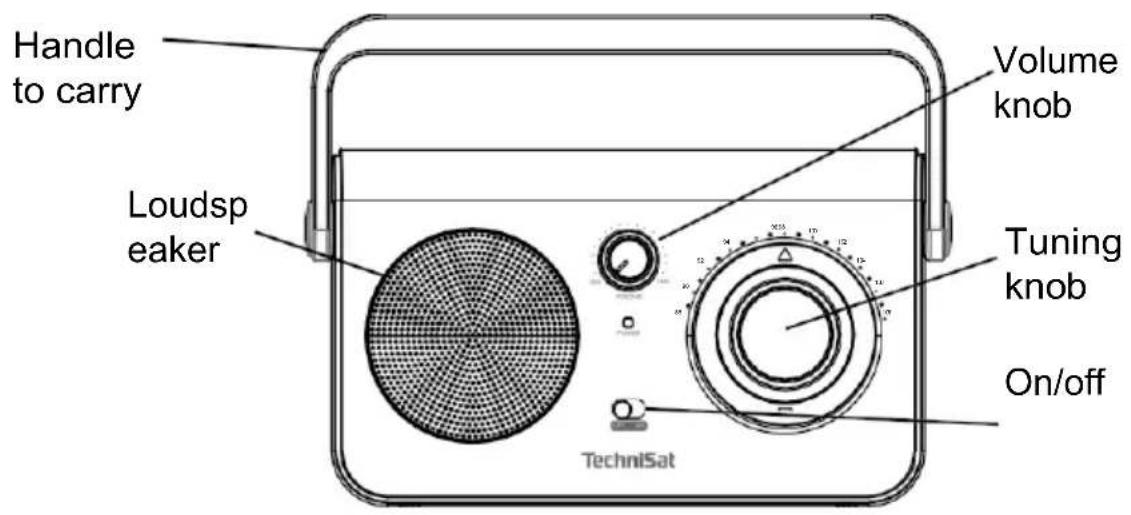
Black TechniSat portable radio with speaker grille and control knobs (no visible text or symbols on device body)1 Photos
1.1 Front view
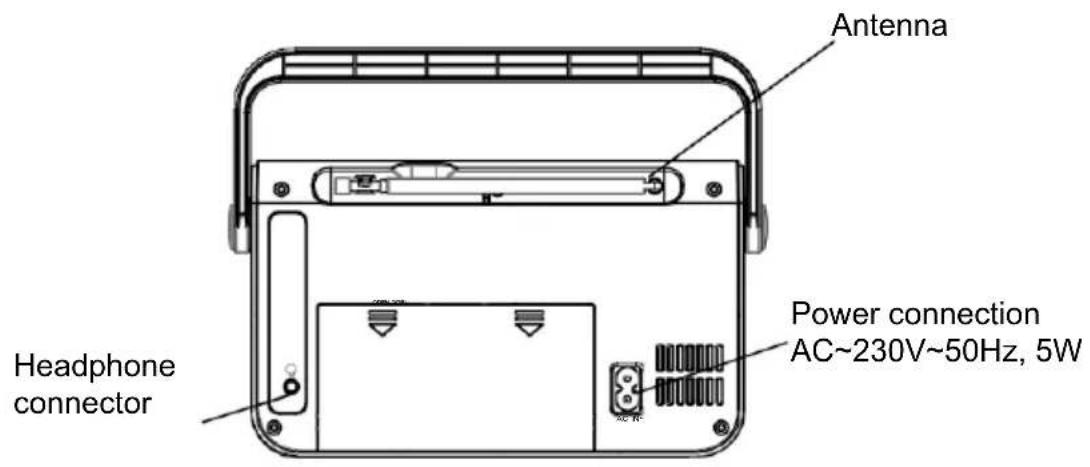
1.2 Rear view
3 Safety instructions
3.1 Foreword
Dear customers,
Thank you for choosing a TechniSat radio.
These operating instructions are intended to help you familiarise yourself with the functions of your new device and use them optimally. It will help you to use the radio safely and for its intended purpose. It is intended for anyone who installs, operates, cleans or disposes of the unit.
Keep the operating instructions in a safe place for future reference.
TechniSat team
3.2 Characters and symbols used
In this manual:

Indicates a safety instruction, failure to follow which may cause serious injury or death. Observe the following signal words:
DANGER - Serious injury resulting in death.
WARNING - Severe personal injury that could lead to death.
NOTE - Injuries.

It indicates the caution to be observed to avoid device malfunctions, data loss/misuse or unintended operation. It also describes further functions of the device.

Warning against electric voltage. Observe all safety instructions to avoid electric shock. Never open the appliance.
On the device:

Indoor use - appliances marked with this symbol are suitable for indoor use only.

Protection class II - Protection class II electrical equipment is electrical equipment that has continuous double and/or reinforced insulation and no possibility of connecting a protective conductor. The casing of a class II electrical appliance, which is enclosed in an insulating material, may partially or completely form additional or reinforced insulation.

Your device is CE marked and meets all required EU standards.

This appliance has been designed and manufactured with high-quality materials and components that are suitable for reuse. The symbol of the crossed-out wheeled bin indicates that the product is subject to separate collection in accordance with Directive 2012/19/EU of the European Parliament and of the Council and in accordance with Directive 2006/66/EC of the European Parliament and of the Council, and informs you that electrical and electronic equipment and batteries and accumulators, once used, must not be disposed of with other household waste. The user is obliged to return it to a waste electrical and electronic equipment and batteries and accumulators collection operator setting up a system for the collection of such waste including to an appropriate shop, local collection point or municipal unit. Waste equipment can have harmful effects on the environment and human health due to its potential content of hazardous substances, mixtures and components. The household plays an important role in contributing to the reuse and recovery, including recycling, of waste equipment. At this stage, attitudes are formed that influence the preservation of the common good, which is a clean environment. Households are also one of the biggest users of small equipment and rational management of this equipment influences the recovery of secondary raw materials.
In the event of improper disposal of this product, penalties may be imposed in accordance with national legislation. At the end of the product's life cycle, it should not be disposed of with normal household waste but at a collection point for used electrical and electronic equipment. This is indicated by the symbol on the product, user manual or packaging. Materials are recyclable according to the label. By reusing, recycling or otherwise recycling your old equipment, you are making an important contribution to environmental protection.
3.3 Purpose
The TechniSat CLASSIC 100 is designed to receive UKW radio broadcasts. The device is intended for private use and is not suitable for commercial purposes.
3.4 Safe handling
Observe the following instructions to minimise safety risks, avoid damage to the equipment and contribute to environmental protection.
Read all safety instructions carefully and keep them for future reference. Always observe all warnings and instructions in this manual and on the back of the appliance.

DANGER!
Never open the appliance!
Touching live components is life-threatening!

WARNING!
Danger of suffocation! Do not leave the packaging and its parts in the care of children. Danger of suffocation from foils and other
packaging materials!

To ensure the correct use of the appliance and to avoid damage to the appliance and personal injury, all the following instructions must be followed.
- Do not repair the appliance yourself. Repairs should only be carried out by trained specialists. Contact our customer service centres.
- The device must only be operated under the environmental conditions specified for it.
- Do not expose the appliance to dripping or splashing water. If water enters the appliance, switch it off and notify the service department.
- Do not expose the unit to heat sources that heat up the unit in addition to normal use.
- In the event of a noticeable defect in the appliance, odour or smoke, significant faults or damage to the housing, contact the service centre immediately.
- The device may only be operated at the specified mains voltage. Never attempt to operate the unit at any other voltage.
- If the unit is damaged, it must not be operated.
- Do not use the unit near bathtubs, showers, swimming pools or flowing/splashing water. There is a risk of electric shock and/or damage to the equipment.
- Foreign objects, e.g. needles, coins, etc. must not fall into the device. Do not touch the connection contacts with metal objects or fingers. This may cause a short circuit.
- The appliance is not intended for use by persons (including children) with reduced physical, sensory or mental capabilities, or lack of experience and/or knowledge, unless they have received supervision or instruction on the use of the appliance from a person responsible for their safety.
- It is forbidden to make changes to the device.
3.4.1 Legal guidelines

TechniSat hereby declares that the radio device type CLASSIC 100 is compliant with Directive 2014/53/EU and RoHS. The full text of the EU Declaration of Conformity is available at the following web address:
TechniSat is not responsible for damage to the product caused by external influences, wear and tear or improper handling, unauthorised repairs, modifications or accidents.

Subject to changes and printing errors. Reproduction and duplication only with permission of the publisher. The latest version of the manual is available in PDF format in the download area on the TechniSat homepage at www.technisat.pl.
3.4.2 Service information

This product is quality tested and comes with a statutory warranty period of 24 months from the date of purchase. Please keep your invoice receipt as proof of purchase. In the event of a warranty claim, the cost of postage directly to the manufacturer will be paid by the customer.

For questions and information or if you have a problem with this device, our technical hotline is available: Monday. - to Friday, from 8:00 a.m. to 4:00 p.m. on telephone number: +71 310 41 48.

The guarantor, within the scope of the granted guarantee, undertakes to remove at its own expense any defects in the product. The removal of defects will take place by replacing the defective product with a new, defect-free one or by repairing it.

In order to make use of the guarantee, the purchaser must report the defective product to the point of sale where the product was purchased and deliver the defective product there. The product must be delivered complete.

The warranty does not cover product defects caused by the purchaser or resulting from:
- use or install the product in a manner inconsistent with the instructions for use,
- improper storage or maintenance of the appliance,
- repairs or modifications to the product carried out by unauthorised persons,
- ingress of liquids or foreign bodies,
- lightning strikes and power line surges

The provisions of the guarantee do not exclude, limit or suspend the rights of purchasers (consumers) under generally applicable law (warranty).

To obtain detailed information on a Product, including the rules and procedures for the guarantee procedure, the assignment of an RMA number, it is possible to
by telephone 71 310 41 48 or email serwis@technisat.com, on working days, from 8 am to 4 pm.
4 Description of the device
4.1 Contents of the device
Please check that the following are included: 1x
TechniSat CLASSIC 100
1x Operating
instructions 1x Power
cable
4.2 Special features
The radio has the following special features:
- FM radio reception.
- UKW reception range 87.5-108 MHz (analogue).
- Handwheel for manual tuning
- 1W loudspeaker
4.3 Preparing the device for operation
4.3.1 Telescopic antenna set-up
The number and quality of stations received depends on the reception conditions at the installation site. Excellent reception can be achieved with a telescopic antenna.
Position the telescopic antenna and extend it lengthways.
i Accurate positioning of the telescopic antenna is often important, especially
in
peripheral FM/UKW reception sites.
i Start your first search at the window towards the transmitter mast.
In bad weather reception may be limited.
Do not touch the telescopic antenna during station playback. This may lead to reception interference and sound fading.
4.3.2 Connection to power supply
WARNING!
Do not touch the mains plug with wet hands, risk of electric shock!
NOTE!
Arrange the mains cable so that no one trips over it.
Connect the mains plug of the CLASSIC 100 to a mains socket (230V \~ 50Hz).
Before connecting the appliance to a wall socket, ensure that the operating voltage of the appliance corresponds to the local mains voltage.
i Pull the plug out of the socket when not in use. Pull the plug, not the cable. Unplug the device before a storm. Unplug the appliance if it is not going to be used for a long time, e.g. before embarking on a long journey. The heat generated during operation must be dissipated by adequate air circulation.
Therefore, do not cover the appliance or place it in a closed cabinet. Ensure there is free space around
equipment at least 10 cm wide.
4.3.3 Battery operation\*
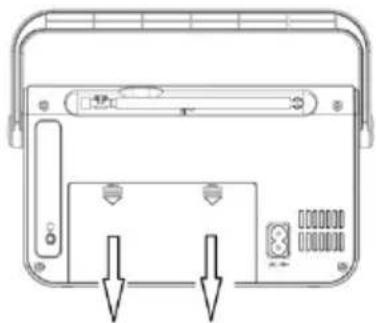
Turn the device so that the battery compartment at the back can be opened.
natural_image
Technical line drawing of a device rear panel with buttons and indicators (no text or symbols)Four UM-2 alkaline batteries are required for operation without power supply R14, 1.5V (not supplied). When inserting the batteries, please note the correct polarity.
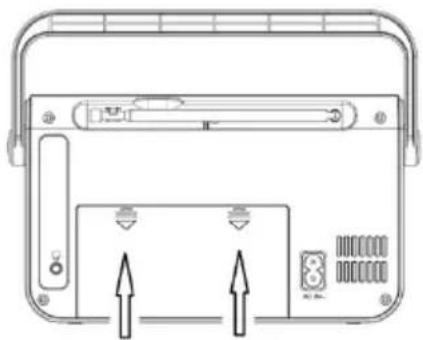
Carefully close the battery compartment cover again so that the cover retaining lugs go into the housing.
natural_image
Technical line drawing of a device rear panel with buttons and indicators (no text or symbols)i Please use batteries of the same type. Do not mix new batteries with old ones.
i Replace the fading battery in good time.
i Leaking batteries can cause damage to the radio.
If the device will not be used for a long time, remove the batteries from the battery compartment.
Important note on disposal: Batteries may contain toxic substances that are harmful to the environment. It is therefore imperative to dispose of batteries in accordance with current legislation. Never dispose of batteries in normal household waste.
i Make sure that batteries/batteries are not in the hands of children. Children could put the batteries in their mouths and swallow them. This can cause serious damage to health. If this happens, consult a doctorimmediately!
Keep batteries/batteries out of the reach of small children.
The appliance may only be powered by batteries/batteries approved for use in this appliance.
Normal batteries may not be recharged. Batteries must not be reactivated by other means, disassembled, heated or thrown into an open flame (danger of explosion!).
Clean the battery contacts and the device contacts before insertion. Incorrect insertion of batteries/batteries risks explosion!
i Only replace batteries/batteries with the correct type and model number.
i Caution! Do not expose batteries to extreme conditions.
Do not place on radiators, do not expose to direct sunlight!
Leaking or damaged batteries/batteries can cause burns on contact with the skin. Use suitable protective gloves in this case. Clean the battery compartment with a dry cloth.
If the device is not used for a long time, remove the batteries.

Improper handling of batteries/accumulators poses the risk of explosion!
EN
\* BATTERIES NOT INCLUDED
4.3.4 Using headphones
Hearing damage!
Do not listen to the radio at high volume through headphones. This may cause permanent damage to your hearing. Before using headphones, set the volume of the device to the minimum.
i Only use headphones with a 3.5-millimetre plug.
Insert the headphone plug into the headphone socket of the device. The sound is now only played through the headphones, the speaker is muted.
If you want to listen through the speakers again, remove the headphone plug from the device's headphone socket.
The sound from the headphone output is monophonic.
4.4 General device functions
4.4.1 Switching on the device
To ensure good FM reception, please fully extend the telescopic antenna, which is located on the back of the unit.
Slide the switch to the ON position on the device.
4.4.2 Switching off the device
To switch off the unit, please move the switch to the OFF position.
4.4.3 Volume control
Adjust the volume by turning the volume knob on the device.
- Turn right - louder
- Turn counterclockwise - quieter.
5 FM function
5.1 FM reception
To ensure good FM reception, please fully extend the telescopic antenna, which is located on the back of the unit.
5.1.1 Programme selection - tuning
Adjust the frequency by turning the tuning knob on the unit.
6 Cleaning
To avoid the risk of electric shock, do not clean the appliance with a wet cloth or under running water. Before cleaning, pull out the mains plug and switch off the device!
Do not use any of the following: Salt water, insecticides, solvents containing chlorine or acid (sal ammoniacal).
Clean the housing with a soft cloth dampened with water. Do not use methylated spirits, thinners, etc.; these may damage the surface of the unit.
7 Problem solving
If the unit is not operating as intended, check it using the table below.
| Symptom | Possible cause |
| The device does not switch on. | The device is not powered. |
| There is no sound. | Turn up the volume. |
| FM reception is poor | Remove the antenna completely. Change the position of the antenna or the device itself |
| The device cannot operate. | Disconnect the unit from the mains and reconnect the unit to the mains. |
| Symptom | Possible cause |
| Noises are audible. | There is a mobile phone or other device emitting interfering radio waves in the vicinity of the unit.Remove the mobile phone or device from the vicinity of the radio. |
If the fault still cannot be rectified after performing the described checks, contact the technical hotline.
8 Technical data
| Reception sources | FM |
| Power supply | AC input: 230 V / 50Hz, 5W Batteries: 6V (4x 1.5V UM2, LR14) |
| Frequency | UKW: 87.5 - 108 MHz |
| Power consumption | During operation max.: 5 W Standby: < 1 W |
| Output power | 1 W RMS |
| Ambient humidity | During operation: 30-80% |
| Ambient temperature | During operation: 0 ~ 35 °C |
| Weight (kg) | ~ 650g |
| Dimensions (W x H x D) cm | 22 x 13 (18 with handle) x 21.2 |
EN
- Photos
- Front view
- Rear view
- Safety instructions
- Foreword
- Dear customers,
- Characters and symbols used
- On the device:
- Purpose
- Safe handling
- DANGER!
- WARNING!
- Legal guidelines
- Service information
- Description of the device
- Contents of the device
- Special features
- Preparing the device for operation
- Telescopic antenna set-up
- Connection to power supply
- NOTE!
- Battery operation\*
- \* BATTERIES NOT INCLUDED
- Using headphones
- Hearing damage!
- General device functions
- Switching on the device
- Switching off the device
- Volume control
- FM function
- FM reception
- Programme selection - tuning
- Cleaning
- Problem solving
Brand : TECHNISAT
Model : Classic 100
Category : Radio