
JX-MP131 - Mp3 player JWIN - Free user manual and instructions
Find the device manual for free JX-MP131 JWIN in PDF.


| Product Type | USB Plug MP3 Player with LCD Screen and FM Radio |
| Brand | jWIN |
| Model | JX-MP131 (also JX-MP132, JX-MP134) |
| Memory Capacity | 1GB / 2GB / 4GB Flash |
| Display | 132x32 STN Dot Matrix LCD with 7-color backlight |
| Supported Audio Formats | MP3, WMA |
| Frequency Response | 20Hz - 20kHz |
| Audio Output | 5mW (L) + 5mW (R) into 32Ω |
| FM Radio Frequency | 87.5 - 108 MHz |
| Recording | Built-in microphone for voice recording; FM radio recording |
| Equalizer Modes | 6 modes: Normal, Pop, Rock, Classical, Jazz, Bass |
| Repeat Modes | 7 modes: Normal, Repeat One, Repeat All, Random Repeat, Dir Normal, Dir All Repeat, Dir Random Repeat |
| Power Source | Built-in rechargeable 180mAh lithium battery |
| Charging | Via USB connection to computer |
| Connectivity | Integrated USB plug (male); 3.5mm stereo headphone jack |
| System Requirements | Windows 98 / ME / 2000 / XP (driver may be required for 98) |
| Dimensions (W x H x D) | 3.3 x 1 x 0.5 inches (85 x 26 x 13 mm) |
| Weight | 0.8 oz (23 g) |
| Included Accessories | Necklace-type stereo earphones, driver/instruction manual CD |
| Special Features | A-B repeat, ID3 tag & lyric display, Hold function, loop for lanyard |
Frequently Asked Questions - JX-MP131 JWIN
User questions about JX-MP131 JWIN
0 question about this device. Answer the ones you know or ask your own.
Ask a new question about this device
Download the instructions for your Mp3 player in PDF format for free! Find your manual JX-MP131 - JWIN and take your electronic device back in hand. On this page are published all the documents necessary for the use of your device. JX-MP131 by JWIN.
USER MANUAL JX-MP131 JWIN
USB Plug MP3 Player with LCD Screen and FM Radio
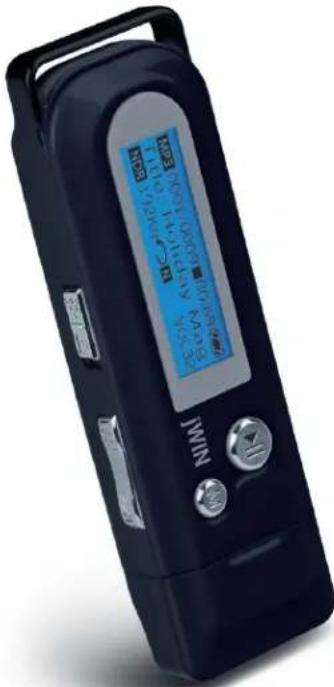
Instruction Manual JX-MP131 (132, 134)
Please read this manual carefully before operating and save it for future reference.
Have a question? Please visit http://www.jWIN.com
USER SAFETY GUIDE
INSTRUCTIONS ON ENVIRONMENTAL PROTECTION

Do not dispose of this product in the usual household garbage at the end of its life cycle; bring it to a collection point for the recycling of electrical and electronic appliances. This symbol on the product means the instructions for use or the packing will inform about the methods for disposal. The materials are recyclable as mentioned in its marking. By recycling, material recycling, or other forms of re-utilization of old appliances, you make an important contribution to protect the environment. Please inquire at your local community administration for the authorized disposal location.
Important Safety Instructions
- READ INSTRUCTIONS - All the safety and operating instructions should be read before the appliance is operated.
- RETAIN INSTRUCTIONS - The safety and operating instructions should be retained in a secure place for future reference.
- HEED WARNINGS - All warnings on the appliance and in the operating instructions should be observed.
- FOLLOW INSTRUCTIONS - All operating and use instructions should be followed.
- WATER AND MOISTURE - The appliance should not be used near water, such as near a bathtub, kitchen sink, laundry tub, and/or swimming pool.
USER SAFETY GUIDE
Important Safety Instructions – Continued
-
HEAT - The appliance should be situated away from heat sources such as radiators, heat registers, stoves, or other appliances (including amplifiers) that produce heat.
-
POWER SOURCES - The appliance should be connected to a power supply only of the type described in the operating instructions or as marked on the appliance.
-
CLEANING - The appliance should be cleaned with a dry cloth.
-
OBJECT AND LIQUID ENTRY - Care should be taken so that objects do not fall and liquids are not spilled into the device's openings.
-
CARTS AND STANDS - The appliance should be used only with a cart or stand that is recommended by the manufacturer. An appliance and cart combination should be moved with care. Quick stops,

natural_image
Symbolic icon of a person using a large scale inside a circle (no text or symbols)excessive force, and uneven surfaces may cause the appliance and cart combination to overturn.
-
SERVICING - The user should not attempt to service the appliance beyond that described in the user's operating instructions. All other servicing should be referred to qualified service professional.
-
DAMAGE REQUIRING SERVICE - The appliance should be serviced by qualified service professional when:
a. The power-supply cord or plug has been damaged.
b. Objects have fallen into, or liquid has been spilled into the appliance's apertures.
c. The appliance has been exposed to rain.
USER SAFETY GUIDE
Important Safety Instructions – Continued
d. The appliance has been dropped and suffered damage.
e. The appliance does not appear to operate normally, or exhibits a change in performance.
- BATTERY USAGE - To prevent battery leakage, which may result in bodily injury, property damage or damage to the unit, follow these instructions:
a. Install all batteries correctly according to the polarity (+/-) as marked on the unit.
b. Do not mix old and new batteries, carbon and alkaline, etc.
c. Remove batteries from the unit when the device will not be used for an extended period of time.
- LEAD AND MERCURY - This product may contain lead and/or mercury. Disposal of these materials may be regulated by your local authorities due to environmental considerations. For more detailed disposal or recycling information, please contact your local authorities or the EIA (Electronic Industries Alliance) – http://www.eiae.org
FCC Notice (USA)
This device complies with part 15 of the FCC Rules. Operation is subject to the condition that this device does not cause harmful interference.
USER SAFETY GUIDE
Do not change or modify this equipment. Any changes or modifications not expressly approved by the party responsible for compliance could void the user's authority to operate the equipment.
Important Notes on Hearing
Your hearing is very important to you and to us. Please take care when operating this equipment. We strongly recommend you to follow the guidelines below in order to prevent possible damage to or loss of hearing.
After continuously listening to the loud sounds, hearing will adapt and will give the impression that the volume has been reduced. What seems normal may, in fact, be harmful. To guard against this BEFORE HEARING ADAPTS, set the volume at a low level and slowly increase the volume level until sound can be heard comfortably and clearly without distortion. Damage to hearing is accumulative and is irreversible. Any ringing or discomfort in the ears indicates that the volume is too loud. Once a comfortable listening level is established, DO NOT INCREASE THE VOLUME LEVEL FURTHER.
In the use of headphones, please take more caution. Hearing experts say that continuous listening to loud music can damage hearing, especially when using headphones.
OPERATING INSTRUCTIONS
Thank you for purchasing the JX-MP131 (132, 134). Unpack the unit and make sure all the accessories are put aside so they will not be lost. We suggest that you retain the packaging materials for future transporting or moving the product in the future.
USB Plug MP3 Player with LCD Screen and FM Radio
- Compact and stylish design for maximum portability
- Liquid crystal display (LCD) with 7 color backlight
• Built-in flash memory (1GB / 2GB / 4GB)
• Built-in USB plug (no cables required) - File storage
• USB 2.0 for fast file transfer - Integrated FM stereo radio (87.5-108MHz)
• Supports MP3 and WMA files
• Digital voice recorder / FM radio recorder
• Supports multiple languages
• Supports ID3 tag and lyric display - Hold function
- 6 preset EQ (Normal, Pop, Rock, Classical, Jazz, Bass)
- 7 repeat modes (Normal, Repeat one, Repeat all, Random repeat, Dir normal, Dir all repeat, Dir random repeat)
- Loop for lanyard
• Built-in rechargeable 180mAh battery
What's Included
- Necklace Type Stereo Earphones
- Driver / Instruction Manual (ENG/SP) CD
OPERATING INSTRUCTIONS
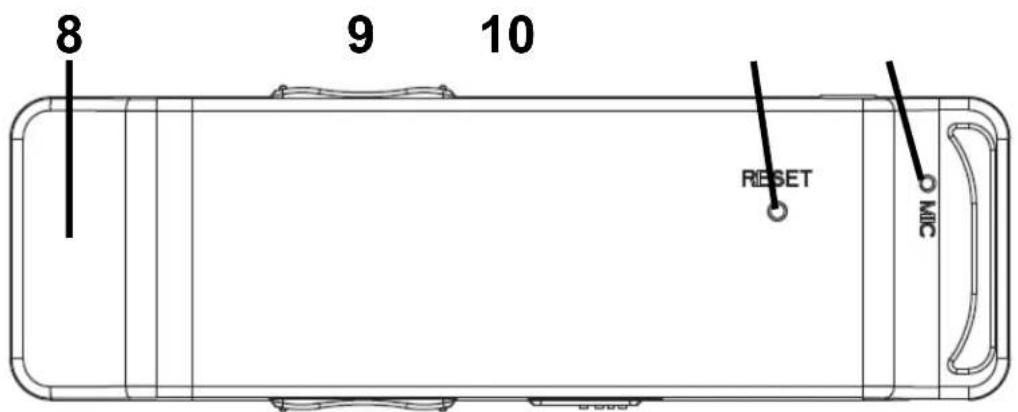
Location of Controls

OPERATING INSTRUCTIONS
Location of Controls-continued
| 1. Headphone jack | 6. FWD/RWD ◀◀/▶▶ button |
| 2. LCD Screen 7. M button | |
| 3. Volume - / + button 8. USB cap | |
| 4. Play / Pause ▶II button | 9. Reset button |
| 5. Hold switch 10. Microphone |
Connecting the Player to a Computer
- Remove the USB cap.
- Install driver.
- Plug directly into the USB port on your computer
-
It is not necessary to install this driver program under WINDOWS 2000 / WINDOWS XP or higher operating system.
-
For WINDOWS 98
-
Insert the installation CD into the CD-Rom of computer.
- Open CD file and click the driver program/Setup.exe.
- Please follow the prompt of installing program to finish the installation step by step.
- When installation is done. We suggest you restart the computer.
Note: Always fully charge the built-in rechargeable batteries before using this unit.
OPERATING INSTRUCTIONS
Playing Music
- Press and hold [▶II] to turn the player on.
- Press and hold [M] to enter main menu.
- Press [◄◄ / ►►] to select the music playing menu.
- Press M] to enter music playing mode.
- Press ▶II][to play music.
Note: This player supports lyric files of *.LRC and recognizes the synchronous playing of music and lyric. The name of lyric file must be the same with the song file.
During music playback:
- Press [◄◄ / ►►] to select the last track or the next track.
- Press and [|◄◄ / ►►] to fast forward or backward.
- Press ▶II][to pause.
- Press + / [+] to increase or reduce volume.
- For Repeat Mode:
a. Press M] during playback to set the start point. "A" will appear on the LCD screen.
b. Press M] again to set end point A-B will appear on the screen. The player will play contents between points A and B.
c. Press M] ∅ne more time to cancel repeat mode and return to the original play mode.
OPERATING INSTRUCTIONS
Recording Mode (set sound source to MIC)
- Press and hold [▶II] to turn the player on
- Press and hold [ M] to enter main menu.
- Press [◄◄ / ►►] to select Voice mode.
- Press M] to enter.
- Press M] again to record.
- Press ▶II][to end and save the recording.
Play recording
- Press and hold [▶II] to turn the player on.
- Press and hold [M] to enter main menu.
- Press [◄◄ / ►►] to select Voice mode.
- Press M] [o enter.
- Press ▶II][to play recording. (For basic operation, please refer to the instructions under Playing Music).
Note: In voice stop or pause mode, press [M] to record.
FM Radio mode
- Press and hold [▶II] to turn the player on.
- Press and hold [ M] to enter main menu.
- Press [◄◄ / ►►] to select FM Radio mode.
- Press M] to enter FM mode
- Press M] again to enter FM submenu (Save Station, Delete Station, Auto Scan, Record, and Exit).
Save Station: Press [I◄◄ / ►►I] to select the station you wish to save. Press [M] to confirm.
OPERATING INSTRUCTIONS
FM Radio Mode-continued
Delete Station: Press [|◄◄ / ►►] to select the station you wish to delete. Press [M] to confirm.
Auto Scan: Automatically searches for FM radio stations.
Record: Press [M] to start recording. Press [▶II] to store recording
While listening to the radio, press [▶II] to select Search or
Preset.
• In Search, press [|◄◄ / ►►] to select your favorite station
• In Preset, press [|◄◄ / ►►] to select the preset station.
- Press and hold [ M] to exit FM and return to main menu.
Settings
- Press and hold [▶II] to turn the player on.
- Press and hold [ M] to enter main menu.
- Press [|◄◄ / ►►] to select the Settings menu.
- Press M] [to enter music Settings menu.
Note: Press [▶II] to back out one menu
EQ
The EQ Mode includes 6 Modes (Normal, Pop, Rock, Classical, Jazz and Bass)
Repeat Mode
The Play Mode includes 7 kinds settings, (Normal, Repeat one, Repeat all, Random repeat, Dir normal, Dir all repeat and Dir random repeat)
OPERATING INSTRUCTIONS
Settings-continued
Contrast
Set the LCD contrast
Backlight
Set the backlight time. (Always on, 5sec, 10sec, Always off).
Power Set
Set the idle shutdown time (Disable, 2Min, 5Mins, 10Mins).
Record Set
Set the sample (32kbps, 44kbps, 64kbps, 88kbps).
Language
Select the appropriate language.
Folder
- The Folder setting displays the folders and files (music and recorded) stored in the player.
- When a folder is selected, press [M] to enter folder. When a file is selected, press [M] to call out the submenu. You can play or delete the file in the folder.
Note: The Folder display the music files when you enter the Folder in the state of music play, pause, stop. The Folder displays the recorded files when you enter the Folder during record play, pause, or stop modes.
SPECIFICATIONS
• Memory: (1GB / 2GB / 4GB), Flash
- Display: 132 x 32 STN Dot Matrix LCD, with 7 color backlight
• Audio frequency: 20 – 20kHz
• Audio Output: 5mW (L) + 5mW (R), 32Ω
• Supported file format: MP3, WMA
- Supported language: English, French, Chinese, German, Spanish, Italian, Portuguese, Farsi, Russian, Greek, Korean, Japanese, Thai
- Connectivity
- 3.5mm stereo headphone jack
- Integrated USB plug (male)
• Power Sources
○ Built-in rechargeable 180mAh battery
• Frequency Range:
- FM: 87.5MHz - 108MHz
- System Requirement: Windows 98 / ME / 2000 / XP (May require driver installation)
- Unit Dimensions (W x H x D): 3.3" x 1" x 0.5" (85mm x 26mm x 13mm)
• Unit Weight: 0.8 oz (23 g)
* Features and specifications are subject to change without prior notification. Dimensions and weights are approximate.
jWIN
TEL: 516-626-7188
FAX: 516-626-7105
website: www.jWIN.com
© 2008 jWIN Electronics Corp. All rights reserved. No portion of this printed material or product enclosed herewith including design, shape and graphics, may be reproduced or transmitted in any form without the prior written consent of jWIN Electronics Corp. by any means, electronic or mechanical, including photocopying, recording or use of an information storage and retrieval system. Any unauthorized distribution or reproduction of this printed material or product, or any portion thereof, will be prosecuted to the fullest possible extent of the law.

- USB Plug MP3 Player with LCD Screen and FM Radio
- Instruction Manual JX-MP131 (132, 134)
- USER SAFETY GUIDE
- INSTRUCTIONS ON ENVIRONMENTAL PROTECTION
- Important Safety Instructions
- Important Safety Instructions – Continued
- FCC Notice (USA)
- Important Notes on Hearing
- OPERATING INSTRUCTIONS
- What's Included
- Connecting the Player to a Computer
- Playing Music
- During music playback:
- Recording Mode (set sound source to MIC)
- Play recording
- FM Radio mode
- FM Radio Mode-continued
- Preset.
- Settings
- EQ
- Repeat Mode
- Settings-continued
- Contrast
- Backlight
- Power Set
- Record Set
- Language
- Folder
- SPECIFICATIONS
- jWIN
Brand : JWIN
Model : JX-MP131
Category : Mp3 player