
NVR-3370BBW - Scale NEVIR - Free user manual and instructions
Find the device manual for free NVR-3370BBW NEVIR in PDF.


| Type | Digital bathroom scale |
| Model | NVR-3370BBW |
| Brand | Nevir |
| Dimensions | Approx. 30 x 30 x 2.5 cm |
| Weight | Approx. 1.5 kg |
| Power supply | 2 x AAA batteries (1.5 V) |
| Display | LCD screen with large digits |
| Platform material | Tempered glass |
| Maximum weight capacity | 180 kg / 396 lb |
| Graduation | 0.1 kg / 0.2 lb |
| Units | kg / lb / st |
| Auto on/off | Step-on activation, auto-off after 10 seconds |
| Low battery indicator | Yes |
| Overload indicator | Yes ("Err" or "O-Ld") |
| Measurement accuracy | ±0.1 kg |
| Non-slip feet | Yes, 4 rubber pads |
| Maintenance | Clean with damp cloth; do not immerse or use chemicals |
| Safety | Use on hard, flat surface; avoid drops or impacts |
| Spare parts / repairability | Replaceable batteries; scale generally non-repairable by user |
| General information | For household use only; not for commercial or medical use |
Frequently Asked Questions - NVR-3370BBW NEVIR
User questions about NVR-3370BBW NEVIR
0 question about this device. Answer the ones you know or ask your own.
Ask a new question about this device
Download the instructions for your Scale in PDF format for free! Find your manual NVR-3370BBW - NEVIR and take your electronic device back in hand. On this page are published all the documents necessary for the use of your device. NVR-3370BBW by NEVIR.
USER MANUAL NVR-3370BBW NEVIR
natural_image
Circular logo featuring a stylized lion face with a mouth, surrounded by a rainbow-colored ring (no text or symbols)nevir®
Báscula de Análisis Corporal
natural_image
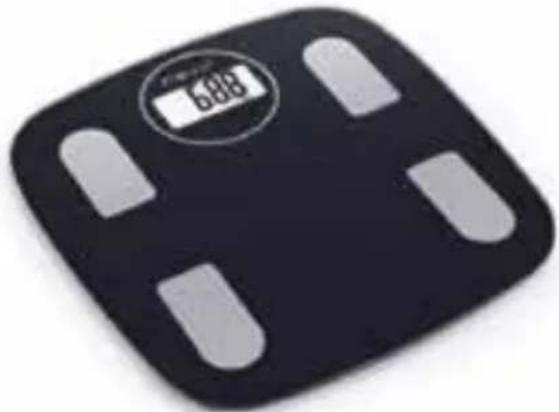
Black square digital balance scale with white adjustment bands and a digital display showing 688 (no text or symbols beyond the display)
¡App aquí!
natural_image
Simple line drawing of a horizontal beam with a downward force arrow, no text or symbols presentNota:
- Please make sure only one device is setting up connection with the Bluetooth scale.
- Please make sure your device is equipped with Bluetooth 4.0 or above.
LCD sin respuesta
natural_image
Circular logo featuring a stylized lion face with a camera lens, set against a multicolored ring (no text or symbols)
Smart Body Fat Scale
Instructions for Use
NVR-3370BBW

Bluetooth™
natural_image
Black square digital balance scale with white adjustment bands and a digital display showing 688 (no text or symbols on the device itself)
¡App aquí!
(1) If it's powered by AAA batteries, please install as shown below:
First Use: Open the battery cover on the back of scale and put out the insulating strip. Change battery: Open the battery cover on the back of scale, then install the batteries properly according to the pictures shown below.
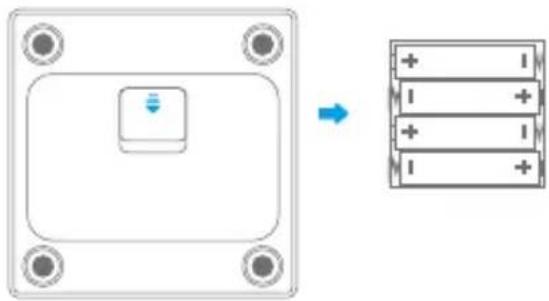
Note: After battery installation, please close the battery cover. Please use corresponding battery. Remove battery if it is not used for a long time (more than three months).
(2) If the scale is with built-in rechargeable battery
- The scale should be fully charged when firstly used or after long-time stored. Battery symbol flashes during charging and displays constantly when charging is finished. It takes about 2 hours to finish.
- Please use android 5V charger with current equal to or smaller than 2A. DO NOT use charger with voltage larger than 5V.
- Suggest to charge every 3 months if the scale is not used for a long time.

natural_image
Simple line drawing of a horizontal panel with a blue arrow pointing upward (no text or symbols)Remark:
Battery symbol is shown on LCD during charging. For your safety, please do not use the scale during charging. Only start weighing after charging is finished and removing charger.
2. DOWNLOAD AND SET UP THE APPLICATION
Search "MovingLife" in "App Store" or "Google Play" to download the Application. Or in another most convenient way by scanning the QR code below.
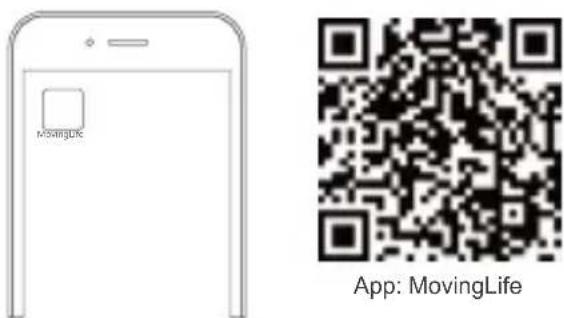
Tips: App is keeping updating, so it may differ from showed on manual. For the final and accurate information, please check on App.
3. REGISTERING AND CONNECTING
Open App "MovingLife", connect the device with App and submit your personal profile. (Before connection, please make sure Bluetooth is turned on and scale LCD is lighted up) Note: Please make sure your setted personal information is correct, in order to get accurate measurements.
EN
The LCD is lighted up
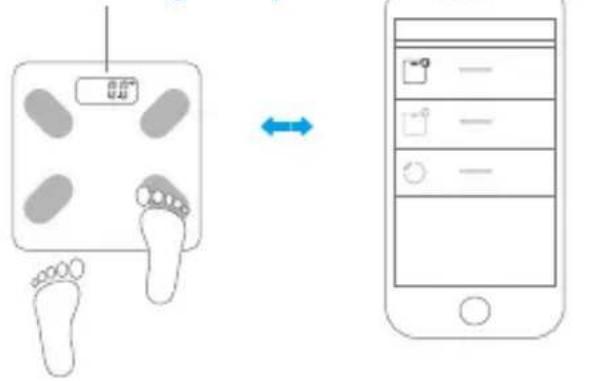
Step gently to turn on the scale
Connect the scale with App
4. START WEIGHING
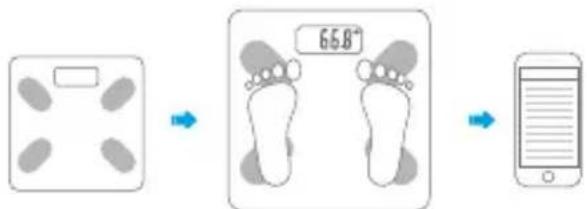
Place the scale on hard and flat floor. Stand on the scale with bare feet. The weight reading is stable and flashes, then begins to be transmitted. The scale shuts off after several seconds. App will show and save all indexes and history record.
flowchart
graph LR
    A["Body Weight Measurement"] --> B["Footprint Diagnosis"]
    B --> C["Mobile Screen Usage"]
Place the scale on hard and flat floor.
Keep your bare feet on the electrodes of scale.
Check the measurement data on App.
Note:
To make a proper measurement of body fat, please keep your bare feet on the electrodes of scale.
5. MULTIPLE USERS SUPPORTED
The scale can be connected with multiple users.
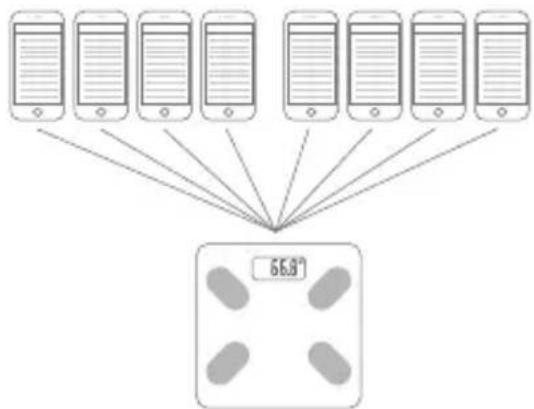
Note: Final user amount depends on the product.
6. WARNING INDICATIONS ON LCD
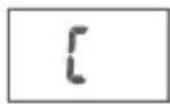
Calibration
Error exists, please re-test to get the correct result.
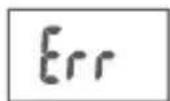
Over-load Indication
The weighing subject on the platform exceeds the maximum capability of scale. Please step off to avoid damage.
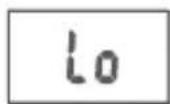
Low Battery Indication
The battery power is running low.
7. THE DISPLAY OF AMBIENT TEMPERATURE
This product can detect and display ambient temperature automatically if starting up. And It would constantly refresh the latest ambient temperature until power off.
If you change service environment of the product, it is recommend to check the temperature display in 30 minutes later to ensure its accuracy.
(Some products don't have temperature display, please refer to the actual one.)
EN
8. WEIGHT UNIT SETTING AND SCALE RESTARTING
Please set the weight unit by APP. If unavailable, you can press UNIT button on back of scale to convert the weight unit.
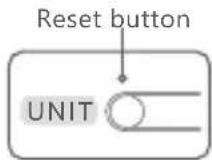
Back of the scale
Remark:
- The unit system of scale depends on scale destination or the requirement of distributor.
- Product with rechargeable battery is with a restart button as shown in the picture. If the product cannot work properly, please press the restart button to reset the scale with the aid of a sharp object.
USER-FRIENDLY TIPS
The product can be used to weigh and caculate body fat % & hydration % after you set gender/ height/age parameters ect. These measurements are only indicative for body fat status.
This product is not for medical treatment and can't be used in any medical institution. Growing children, pregnant women, those with symptom of edema and those on heart bypass treatment are not suggested to use the product.
ABOUT THE BODY FAT SCALE
The product is a smart body fat scale with a high-precision strain gauge sensor, which can help you to store and keep track of your weight on smart phone. This scale can transmit your

weight data to your smart phone via Bluetooth technology, as well as make graph of your weight results, from which you are able to keep track of the trend anytime. Download the App on your phone to use Smart scale, you will start your first step of weight control.
ADVICE FOR USE & CARE
- To ensure the accuracy of the data, it is recommended that each measurement be carried out at the same time of day. Don't use in strong electro-magnetic condition and field with intense shake.
- Stand on the scale steadily and touch the electrodes on the platform with your bare feet. Tip over will lead to a fall when you step on the edge of one side of the scale. Keep standing firmly on scale when in use.
- Do not use the scale in humid, overheat environment. (Temperature range from 5°C to 35°C)
- When the battery runs out, please remove the battery in time to prevent leakage of the battery lead scale body corrosion;
- If the product cannot work properly, then
- For the scale using 1.5V AAA batteries, please check whether battery is installed, or battery power is low. Inset or replace new batteries.
- For the scale with built-in rechargeable battery, please press the restart button to reset the scale with the aid of a sharp object.
- Do not drop, shock or strike the scale as it is a precise instrument.
- Keep the scale clean. Do not use acid cleaning agent.
EN
FAQ
The software can't obtain weighing results from Smart scale.
- Please confirm the connection sign on the App interface to know the connection status.
- Confirm the Bluetooth is on in your device and the Smart scale is on within the valid range of signal coverage.
- Check whether the battery power is running low.
- Relaunch the application.
- Turn off the Bluetooth and on again, then bridge the Bluetooth connection between scale and smart phone again.
Fail to connect to your device
- Please make sure only one device is setting up connection with the Smart scale.
- Please make sure your device is equipped with Bluetooth 4.0 or above.
LCD has no response
- If it's powered by AAA batteries, please first check the batteries and replace them if necessary. If the scale is with built-in rechargeable battery, please use the USB cable to recharge the scale if necessary.
- Repairs may only be carried out by our authorized customer service or dealers.
- nevir®
- Smart Body Fat Scale
- Instructions for Use
- If it's powered by AAA batteries, please install as shown below:
- If the scale is with built-in rechargeable battery
- Remark:
- DOWNLOAD AND SET UP THE APPLICATION
- REGISTERING AND CONNECTING
- EN
- START WEIGHING
- MULTIPLE USERS SUPPORTED
- WARNING INDICATIONS ON LCD
- Calibration
- Over-load Indication
- Low Battery Indication
- THE DISPLAY OF AMBIENT TEMPERATURE
- WEIGHT UNIT SETTING AND SCALE RESTARTING
- USER-FRIENDLY TIPS
- ABOUT THE BODY FAT SCALE
- ADVICE FOR USE & CARE
- FAQ
- The software can't obtain weighing results from Smart scale.
- Fail to connect to your device
- LCD has no response
Brand : NEVIR
Model : NVR-3370BBW
Category : Scale