
BR-124026 - Scale Emerio - Free user manual and instructions
Find the device manual for free BR-124026 Emerio in PDF.


| Product Type | Digital Bathroom Scale |
| Brand | Emerio |
| Model | BR-124026 |
| Maximum Capacity | 180 kg |
| Graduation (Division) | 0.1 kg |
| Power Supply | 2 x 1.5V AAA batteries (not included) |
| Functions | Weight, Body Fat %, Body Water %, Muscle Mass, Bone Mass, Calories, BMI |
| User Memory | Up to 10 users |
| Age Range Setting | 10 – 99 years |
| Height Range Setting | 100 – 240 cm |
| Display | LCD |
| Platform Material | Stainless steel plates |
| Auto Power Off | Yes, after a few seconds of inactivity |
| Low Battery Indicator | "Lo" on display |
| Overload Indicator | "oL" on display |
| Error Indicator | "Err" on display |
| Operating Temperature | 10°C – 40°C |
| Storage Temperature | -10°C – 40°C |
| Cleaning Instructions | Wipe with a clean, dry cloth; do not immerse in water |
| Safety Precautions | Not suitable for pregnant women, children under 10, or persons with medical implants (e.g., pacemaker) |
| Warranty | 2 years |
| Dimensions (Approx.) | 30 x 30 x 3 cm |
| Weight (Approx.) | 1.5 kg |
Frequently Asked Questions - BR-124026 Emerio
User questions about BR-124026 Emerio
0 question about this device. Answer the ones you know or ask your own.
Ask a new question about this device
Download the instructions for your Scale in PDF format for free! Find your manual BR-124026 - Emerio and take your electronic device back in hand. On this page are published all the documents necessary for the use of your device. BR-124026 by Emerio.
USER MANUAL BR-124026 Emerio
natural_image
Black digital balance scale with 'sailing' branding and measurement adjustment buttons (no text-heavy elements)Digital bathroom scale (EN)
Instruction manual – English ...... - 2 -
Brugsanvisning – Danish...... - 6 -
Instruction manual – English
SAFETY INSTRUCTIONS
When using your digital scale, basic precautions should always be followed. Please read and follow all instructions and warnings before using this product. Save these instructions for future reference.
- Caution! Do not step onto the scale with wet feet or when the scale's surface is damp – danger of slipping!
-
Before stepping on the scale, make sure that the surface of the scale is clear of water and condensation. Wipe it with a clean, dry cloth or towel before stepping on the scale.
-
Do not immerse the scale in water.
-
Do not attempt to lubricate or open the scale casing as this will void your warranty.
-
Treat your scale with care. It contains sensitive electronic parts. Avoid rough treatment. Do not jump on, drop or kick the scale.
-
This scale is designed to read weights between 5kg-180kg, in graduations of 0.1kg. To prevent damage, never use the scale for a weight more than 180kg.
-
Do not store the scale where you store cleaning chemicals. The vapors from some household products may affect the electronic components of your scale. Do not store the scale resting on its side.
-
This scale is an extremely sensitive weighing device. To prevent the run-down of the battery, do not store anything on the scale.
-
Remove the battery if the scale will not be used for an extended period of time.
-
Replace weak batteries before they discharge completely.
-
Swallowing batteries can be extremely dangerous. Keep the batteries and scale out of the reach of small children. Should a child swallow a battery, seek medical assistance immediately.
-
This scale is designed for personal use only, not for professional, commercial or industrial use.
-
Please note that this is a home healthcare product only and it is not intended to serve as a substitute for the advice of a physician or medical professional.
-
Place the scale on a firm level floor, which is required for correct measurement. Avoid carpet soft surface.
-
Protect the unit against hard knocks, moisture, dust, chemicals, major temperature fluctuations and heat sources which are too close (stoves, heating radiators).
PARTS DESCRIPTION
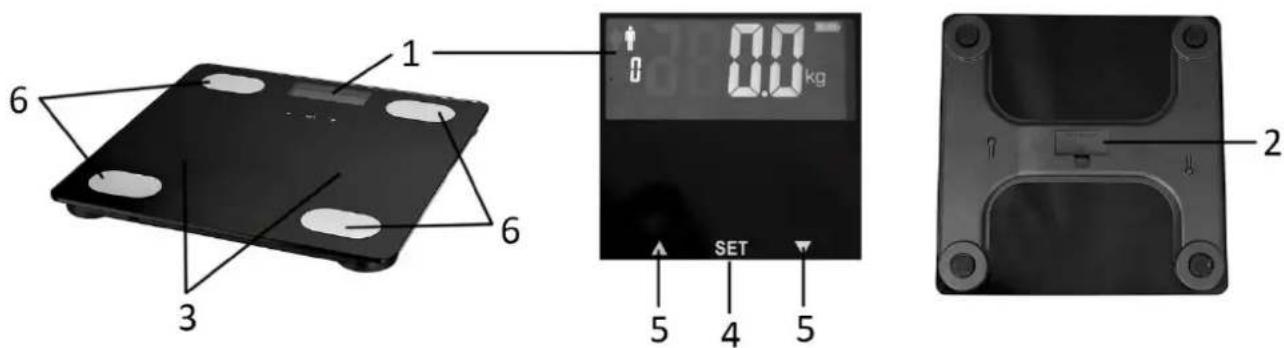
- LCD display
- Battery compartment
- Scale platform
- Setting button
- Selection buttons
- Stainless plates
OPERATION
Trying up your scale
- This scale operates on two 1.5 V AAA batteries. Open the cover of battery compartment which is located in the back of the scale, install the batteries into the compartment and put back the cover.
- The scale needs to be initialized before first use or after battery replacement. Step on the scale platform. The display will turn on, showing your weight automatically. The scale is now ready for use.
Quickly weighing yourself
If you would like to weigh yourself without advanced measuring, follow the steps below.
- Make sure the batteries are installed and the scale is placed on a hard even surface.
- Gently step on the scale, then the scale will be automatically turned on. Stand evenly on the scale without moving and wait until your weight shown on display is stable and locked.
Note: Do not step on the scale immediately after the unit is just moved. Wait for a few minutes and then step on the scale to weigh yourself.
Setting up your personal data / Advanced measurement
- Press "SET" to input personal data. The scale supports up to 10 users' data.
1) Press "SET" and the display flashes, use the selection button "▲" or "▼" to select user number from "0" to "9". Press "SET" to confirm the user selection.
2) Press "▲" or "▼" to set the age from 10 – 99 (years old). Press "SET" to confirm the age selection.
3) When the height value is flashing, press “▲” or “▼” to set the height from 100 – 240 cm. Press “SET” to confirm the height selection.
4) Select the gender by pressing “▲” or “▼”. is for male; is for female. Press “SET” to confirm the gender selection.
- After finishing all the settings, the LCD display will flash all the data until the "0.0" shows up. Then you can step onto the scale.
- Several seconds after your weight value is settled, the measurement of weight, fat, water, muscle, bone, calories and BMI (Body Mass Index) will cycle 2 times in the LCD display. Your body state is concluded at the side of the display by showing "Underfat" / "Healthy" / "Overfat". See below illustration for a reference.
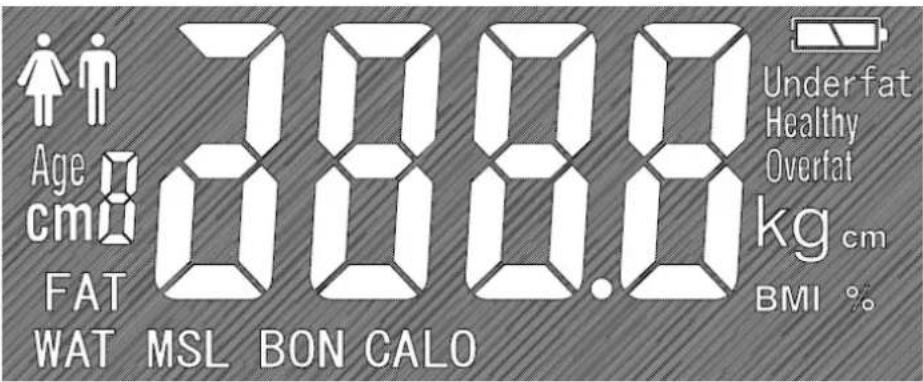
LCD display
CAUTION: Women who are pregnant, children under 10 years old and persons with medical implants (e.g. heart pacemaker) are not suitable to use the appliance for above functions.
NOTE:
• During the input, data can only be adjusted when it is flashing on the LCD display.
• The numerals in digital display will be fast changed when you long press the selection button “▲” or “▼”.
• There must be no skin contact between your feet, legs or knees. Otherwise the measurement cannot be
performed correctly.
• The advanced measurement cannot be conducted if you step onto the scale with socks on.
- To ensure the advanced measurement, make your feet contact with the stainless plates when you stand on the scale.
Tips:
- If possible, always weigh yourself at the same time of day (preferably in the morning), after using the toilet, on an empty stomach and unclothed, in order to achieve comparable results.
- Stand still and upright during the measurement.
- Wait a few hours after unaccustomed physical activity.
- Wait approximately 15 minutes after getting up in the morning to allow the water in the body to distribute.
- Please remember that only long-term trends are important. Short-term changes in weight within a few days are usually caused by a loss of fluid. Body water play an important role toward our general wellbeing.
AUTOMATIC SWITCH-OFF
When there is no operation, the scale will automatically switch off in a few seconds.
INDICATION CODES
| Display | Meaning |
| Lo | Low battery indication. The battery power is running low. Please replace it with a new battery. |
| Err | Error indication. The scale cannot conduct the advanced measurement due to standing on the scale with socks on feet or there is no enough contact between bare feet and the stainless plates. |
| oL | Over-load indication. The weighing subject exceeds the maximum capacity of the scale. |
CLEANING AND MAINTENANCE
- The unit should be cleaned occasionally. Do not use abrasive detergents and never immerse the unit in water.
- Make sure no liquid gets on the scale. Never wash the scale under running water.
- Do not wash the unit in a dishwasher.
- Do not place any objects on the scale when it is not being used.
- Do not expose the scale to high temperature or strong electromagnetic fields (e.g. mobile phones).
REFERENCE CHART
| SEX | AGES | Body fat rate(%) | ||
| Underfat | Healthy | Overfat | ||
| Male | ≤25 | 5.0 ~ 13.0 | 13.1 ~ 23.0 | 23.1 ~ 60.0 |
| >25 | 5.0 ~ 10.0 | 10.1 ~ 21.0 | 21.1 ~ 60.0 | |
| Female | ≤25 | 5.0 ~ 21.0 | 21.1 ~ 35.0 | 35.1 ~ 60.0 |
| >25 | 5.0 ~ 20.0 | 20.1 ~ 34.0 | 34.1 ~ 60.0 | |
SPECIFICATIONS
• Power supply: 2 × 1.5V AAA batteries
• Operating temperature: 10^ C \~ 40^ C
• Storage temperature: -10^ 40^
• Capacity (max.): 180kg
- Weight Unit: kg
- Division: 0.1kg
- Height unit: cm
GUARANTEE AND CUSTOMER SERVICE
Before delivery our devices are subjected to rigorous quality control. If, despite all care, damage has occurred during production or transportation, please return the device to your dealer. In addition to statutory legal rights, the purchaser has an option to claim under the terms of the following guarantee:
For the purchased device we provide 2 years guarantee, commencing from the day of sale. If you have a defective product, you can directly go back to the point of purchase.
Defects which arise due to improper handling of the device and malfunctions due to interventions and repairs by third parties or the fitting of non-original parts are not covered by this guarantee. Always keep your receipt, without the receipt you can't claim any form of warranty. Damage caused by not following the instruction manual, will lead to a void of warranty, if this results in consequential damages then we will not be liable. Neither can we hold responsible for material damage or personal injury caused by improper use if the instruction manual is not properly executed. Damage to accessories does not mean free replacement of the whole appliance. In such case please contact our service department. Broken glass or breakage of plastic parts is always subject to a charge.
Defects to consumables or parts subjected to wearing, as well as cleaning, maintenance or the replacement of said parts are not covered by the warranty and are to be paid.
ENVIRONMENT FRIENDLY DISPOSAL
Recycling – European Directive 2012/19/EU
This marking indicates that this product should not be disposed with other household wastes. To prevent possible harm to the environment or human health from uncontrolled waste disposal, recycle it responsibly to promote the sustainable reuse of material resources. To return your used device, please use the return and collection systems or contact the retailer where the product was
purchased. They can take this product for environmental safe recycling.


BATTERY MUST BE RECYCLED OR DISPOSED OF PROPERLY. DO NOT OPEN. DO NOT
DISPOSE OR IN FIRE OR SHORT CIRCUIT.
Brugsanvisning – Danish
SIKKERHEDSINSTRUKTIONER
- Instruction manual – English
- SAFETY INSTRUCTIONS
- PARTS DESCRIPTION
- OPERATION
- Trying up your scale
- Quickly weighing yourself
- Setting up your personal data / Advanced measurement
- LCD display
- NOTE:
- Tips:
- AUTOMATIC SWITCH-OFF
- CLEANING AND MAINTENANCE
- REFERENCE CHART
- SPECIFICATIONS
- GUARANTEE AND CUSTOMER SERVICE
- ENVIRONMENT FRIENDLY DISPOSAL
- Brugsanvisning – Danish
- SIKKERHEDSINSTRUKTIONER
Brand : Emerio
Model : BR-124026
Category : Scale