
IO 20662-92 X - Oven GRAM - Free user manual and instructions
Find the device manual for free IO 20662-92 X GRAM in PDF.


| Product Type | Built-in Electric Oven |
| Brand | Gram |
| Model | IO 20662-92 X |
| Capacity | 65 Liters |
| Dimensions (H x W x D) | 595 x 595 x 548 mm |
| Weight | 44.5 kg |
| Energy Source | Electric |
| Power Consumption | 2.7 kW |
| Oven Functions | Conventional, Grill, Fan Forced, Defrost, Pizza, Bottom Heat |
| Temperature Range | 50°C - 250°C |
| Timer | Electronic with Minute Minder and Automatic Shut-off |
| Interior Light | Yes |
| Cleaning Type | Catalytic (Self-cleaning) |
| Safety Features | Child Lock, Cool Touch Door, Automatic Shut-off |
| Installation Type | Built-in under counter or in column |
| Color | Stainless Steel |
| Warranty | 2 Years |
Frequently Asked Questions - IO 20662-92 X GRAM
User questions about IO 20662-92 X GRAM
0 question about this device. Answer the ones you know or ask your own.
Ask a new question about this device
Download the instructions for your Oven in PDF format for free! Find your manual IO 20662-92 X - GRAM and take your electronic device back in hand. On this page are published all the documents necessary for the use of your device. IO 20662-92 X by GRAM.
USER MANUAL IO 20662-92 X GRAM
natural_image
Line drawing of a standard open oven with control knobs and a front panel (no text or symbols)(EN) INSTRUCTION MANUAL
The oven is exceptionally easy to use and extremely efficient. After reading the instruction manual, operating the oven will be easy.
Before being packaged and leaving the manufacturer, the oven was thoroughly checked with regard to safety and functionality.
Before using the appliance, please read the instruction manual carefully.
By following these instructions carefully you will be able to avoid any problems in using the appliance.
It is important to keep the instruction manual and store it in a safe place so that it can be consulted at any time.
It is necessary to follow the instructions in the manual carefully in order to avoid possible accidents.

Caution!
Do not use the oven until you have read this instruction manual.
The oven is intended for household use only.
The manufacturer reserves the right to introduce changes which do not affect the operation of the appliance.
TABLE OF CONTENTS
Safety instructions .... 4
Description of the appliance 8
Installation....10
Operation....12
Baking in the oven – practical hints 21
Test dishes....24
Cleaning and maintenance 26
Technical data....31
Warning: The appliance and its accessible parts become hot during use. Care should be taken to avoid touching heating elements. Children less than 8 years of age shall be kept away unless continuously supervised.
This appliance can be used by children aged from 8 years and above and persons with reduced physical, sensory or mental capabilities or lack of experience and knowledge if they have been given supervision or instruction concerning use of the appliance in a safe way and understand the hazards involved. Children shall not play with the appliance. Cleaning and user maintenance shall not be made by children without supervision.
During use the appliance becomes hot. Care should be taken to avoid touching heating elements inside the oven.
Accessible parts may become hot during use. Young children should be kept away.
Warning: Do not use harsh abrasive cleaners or sharp metal scrapers to clean the oven door glass since they can scratch the surface, which may result in shattering of the glass.
Warning: Ensure that the appliance is switched off before replacing the lamp to avoid the possibility of electric shock.
You should not use steam cleaning devices to clean the appliance.
Danger of burns! Hot steam may escape when you open the oven door. Be careful when you open the oven door during or after cooking. Do NOT lean over the door when you open it. Please note that depending on the temperature the steam can be invisible.
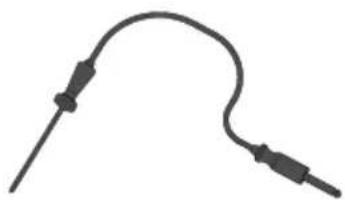
Use only original temperature probe supplied with the appliance.
- Ensure that small items of household equipment, including connection leads, do not touch the hot oven as the insulation material of this equipment is usually not resistant to high temperatures.
- Do not leave the oven unattended when frying. Oils and fats may catch fire due to overheating or boiling over.
- Do not put pans weighing over 15 kg on the opened door of the oven.
- Do not use harsh cleaning agents or sharp metal objects to clean the door as they can scratch the surface, which could then result in the glass cracking.
- Do not use the oven in the event of a technical fault. Any faults must be fixed by an appropriately qualified and authorised person.
- In the event of any incident caused by a technical fault, disconnect the power and report the fault to the service centre to be repaired.
- The rules and provisions contained in this instruction manual should be strictly observed. Do not allow anybody who is not familiar with the contents of this instruction manual to operate the oven.
- The appliance has been designed only for cooking. Any other use (for example for heating) does not comply with its operating profile and may cause danger.

natural_image
Simple black-and-white line drawing of a tree with cloud-like canopy and two wavy lines at base (no text or symbols)Using energy in a responsible way not only saves money but also helps the environment. So let's save energy! And this is how you can do it:
- Do not uncover the pan too often (a watched pot never boils!).
Do not open the oven door unnecessarily often.
- Only use the oven when cooking larger dishes.
Meat of up to 1 kg can be prepared more economically in a pan on the cooker hob.
● Make use of residual heat from the oven.
If the cooking time is greater than 40 minutes switch off the oven 10 minutes before the end time.
Important! When using the timer, set appropriately shorter cooking times according to the dish being prepared.
● Make sure the oven door is properly closed.
Heat can leak through spillages on the door seals. Clean up any spillages immediately.
- Do not install the cooker in the direct vicinity of refrigerators/freezers.
Otherwise energy consumption increases unnecessarily.

natural_image
Simple line drawing of a recycling symbol (three chasing arrows), no text or labels present.During transportation, protective packaging was used to protect the appliance against any damage. After unpacking, please dispose of all elements of packaging in a way that will not cause damage to the environment.
All materials used for packaging the appliance are environmentally friendly; they are 100% recyclable and are marked with the appropriate symbol.
Caution! During unpacking, the packaging materials (polythene bags, polystyrene pieces, etc.) should be kept out of reach of children.
natural_image
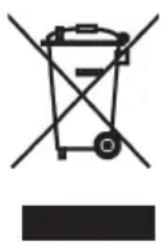
Symbol of a trash bin with crossed lines indicating no waste or discharge (no text or labels)Old appliances should not simply be disposed of with normal household waste, but should be delivered to a collection and recycling centre for electric and electronic equipment. A symbol shown on the product, the instruction manual or the packaging shows that it is suitable for recycling.
Materials used inside the appliance are recyclable and are labelled with information concerning this. By recycling materials or other parts from used devices you are making a significant contribution to the protection of our environment.
Information on appropriate disposal centres for used devices can be provided by your local authority.
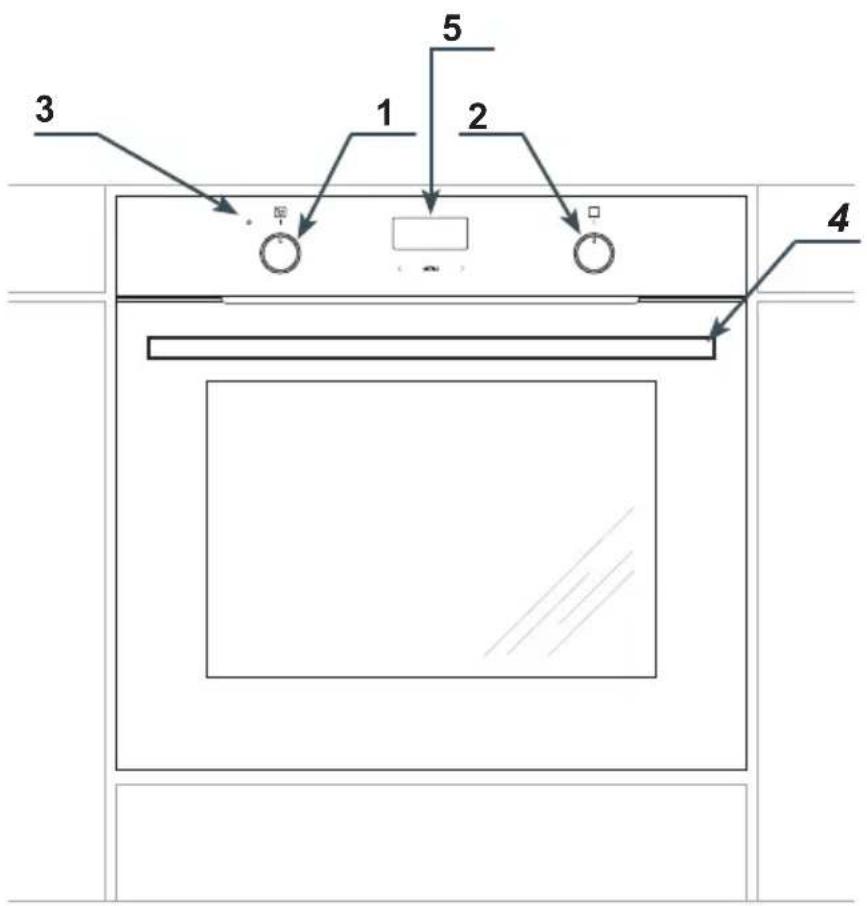
1 Temperature control knob
2 Oven function selection knob
3 Temperatureregulatorsignal light
4 Drawer
5 Electronic programmer
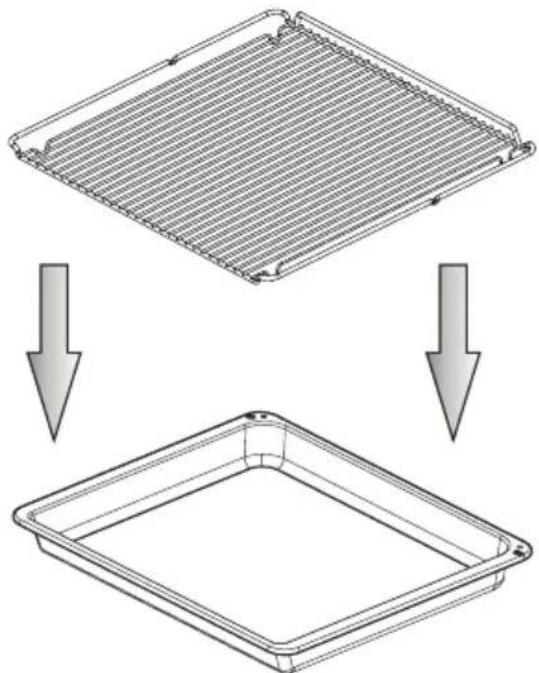
Oven fittings:
Grill grate (drying rack)
flowchart
graph TD
    A["Top-Down Process"] --> B["Bottom-Down Process"]
    B --> C["Final Output"]
natural_image
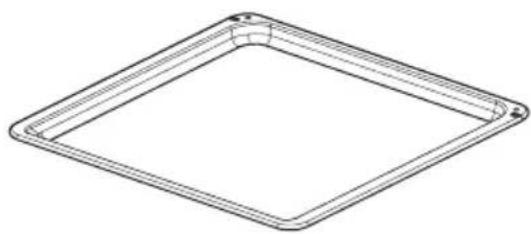
Line drawing of a square frame with rounded corners and a small circular indentation on the top edge (no text or symbols)Baking tray
natural_image
Simple line drawing of a medical or electrical device with no text or symbolsMeat probe
Roasting tray
Installing the oven
- The kitchen area should be dry and aired and equipped with efficient ventilation. When installing the oven, easy access to all control elements should be ensured.
- This is a Y-type design built-in oven, which means that its back wall and one side wall can be placed next to a high piece of furniture or a wall. Coating or veneer used on fitted furniture must be applied with a heat-resistant adhesive (100°C). This prevents surface deformation or detachment of the coating.
- Hoods should be installed according to the manufacturer's instructions.
● Make an opening with the dimensions given in the diagram for the oven to be fitted.
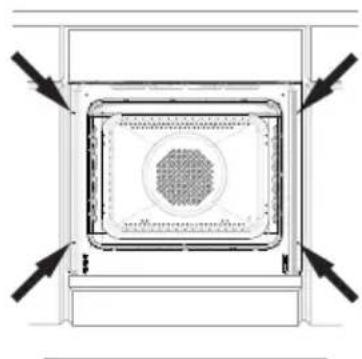
● Make sure the mains plug is disconnected and then connect the oven to the mains supply. - Insert the oven completely into the opening without allowing the four screws in the places shown in the diagram to fall out.
natural_image
Top-down schematic of a rectangular device with internal grid pattern and directional arrows (no text or symbols)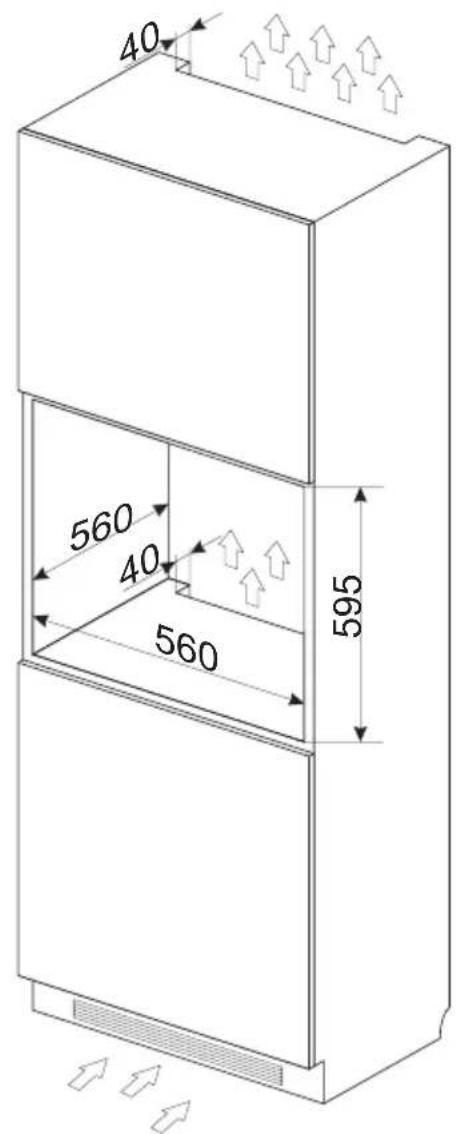
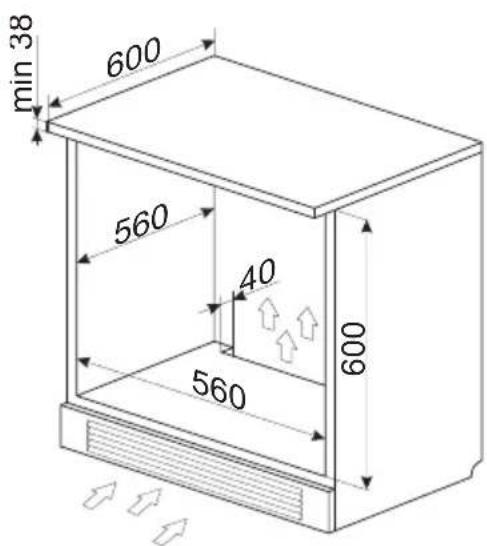
Electrical connection
- The oven is manufactured to work with a one-phase alternating current (230V 1N\~50 Hz) and is equipped with a 3 x 1,5 mm² connection lead of 1.5 mm length with a plug including a protection contact.
- A connection socket for electricity supply should be equipped with a protection pin and may not be located above the cooker. After the cooker is positioned, it is necessary to make the connection socket accessible to the user.
-
Before connecting the oven to the socket, check if:
-
the fuse and electricity supply are able to withstand the cooker load,
- the electricity supply is equipped with an efficacious ground system which meets the requirements of current standards and provisions,
- the plug is within easy reach.
Important!
If the fixed power supply cable is damaged, it should be replaced at the manufacturer or at an authorized servicing outlet, or by a qualified person to avoid danger.
Before using the oven for the first time
- Remove packaging, clean the interior of the oven.
- Take out and wash the oven fittings with warm water and a little washing-up liquid.
- Switch on the ventilation in the room or open a window.
- Heat the oven (to a temperature of 250^ C, for approx. 30 min.), remove any stains and wash carefully.
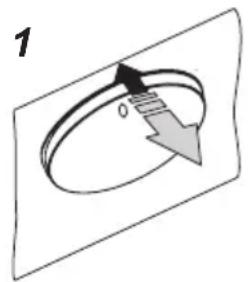
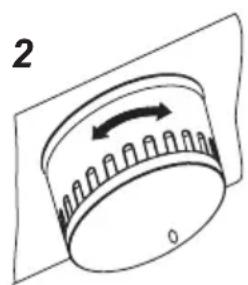
The oven is equipped with a retractable knobs. In order to select a function do the following:
- Gently press and release a knob which will pop out,
- Turn the oven functions selection knob to the desired function.
Symbols printed around the knob indicate available oven functions.
natural_image
Diagram of a cylindrical device with a rotating arrow and base, no text or symbols presentImportant!
In ovens equipped with the electronic programmer Tts, the time "0.00" will start flashing in the display field upon connection to the power supply.
The programmer should be set with the current time. (See Electronic programmer). If the current time is not set operation of the oven is impossible.
The electronic programmer Tts is equipped with electronic sensors which are switched on by touching or pressing the sensor surface for at least one second.
Each sensor reaction is confirmed by the beep. Keep the sensor surface clean at all times.
Important!
To clean the oven, only use a cloth well rang out with warm water to which a little washing-up liquid has been added.
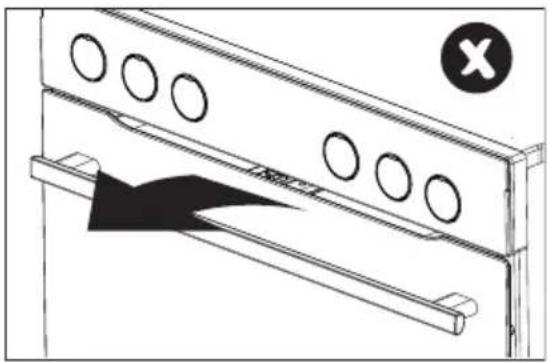
Child safety lock
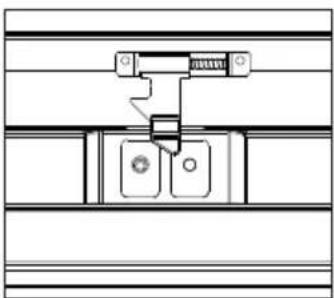
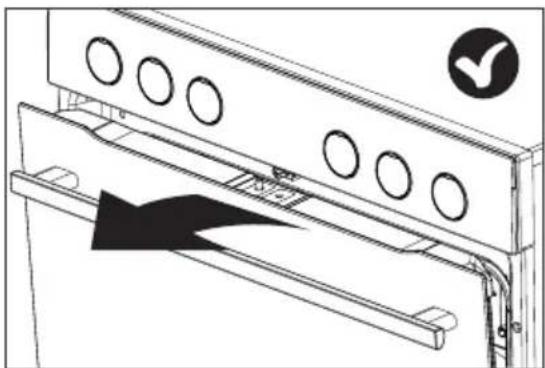
Oven door features a child safety lock device that prevents children from opening of the door. The appliance is supplied by the manufacturer with the door safety lock device engaged.
natural_image
Technical line drawing of a mechanical assembly with circular holes and a black triangular component, no text or symbols present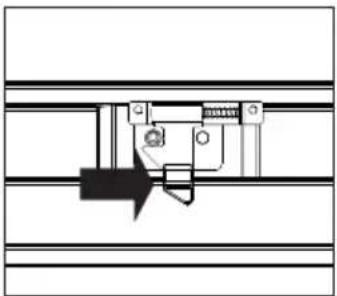
natural_image
Pure mechanical assembly diagram without any text, numbers, or symbolsRelease the child safety lock.
natural_image
Pure mechanical assembly diagram without any text, numbers, or symbolsThe lock is released and you can open the door.
natural_image
Technical line drawing of a door frame with circular vent holes and an arrow indicating direction (no text or symbols)The child safety lock is re-engaged once you close the door.
Electronic programmer

Touch sensors
1 - function selection button
2 - “-” sensor
3 - “+” sensor
The electronic programmer is equipped with electronic sensors which are switched on by touching or pressing the sensor surface for at least 2 seconds.
Each sensor reaction is confirmed by the beep.
Keep the sensor surface clean at all times.
Setting the time
After connection to the mains or reconnection after a power cut the display shows flash
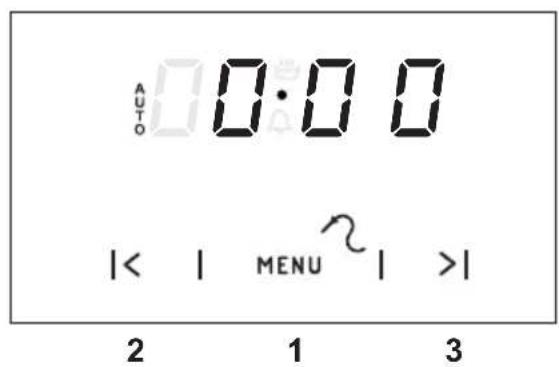
- Press sensor 1, then the display will show 🚗,
- set the time using sensors 3 and 2.
7 seconds after the time has been set the new data will be saved.
Caution!
If the correct time is not set then proper operation of the oven is not possible.
Timer
The timer can be activated at any time, regardless of the status of other functions. The timer can be set for from 1 minute to up to 23 hours and 59 minutes.
To set the timer you should:
- Press sensor 1, then the display will show flashing 🔊,
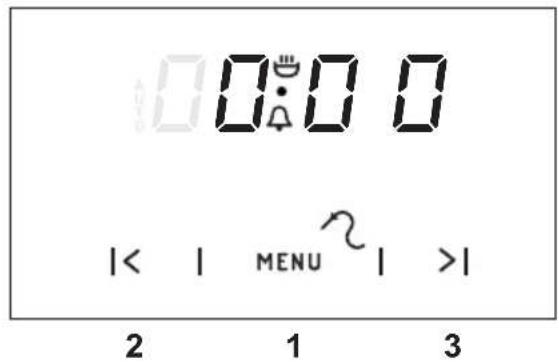
- set the timer using sensors 3 and 2.
The time set is shown on the display and the signal function 📁 is on.
- Press sensor 1, 2 or 3 in order to switch off the signal, the signal function will go out and the display will show the current time.
Caution!
If the alarm signal is not turned off manually, it will be turned off automatically after approx. 7 minutes.
Semi-automatic operation
If the oven is to be switched off at a given time, then you should:
- Set the oven function knob and the temperature regulator knob to the setting at which you want the oven to operate.
●Press sensor 1 until the display will show:
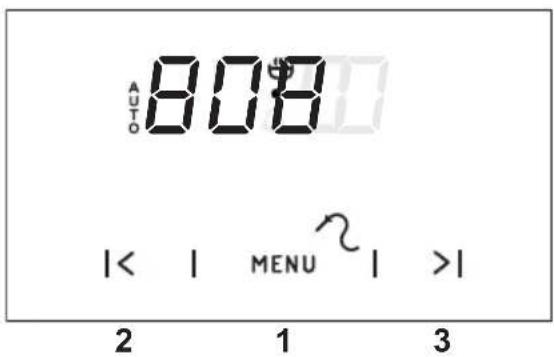
- Set the required time using sensors 3 and 2, within a range from 1 minute to 10 hours.
The set time will be introduced to the memory after approx. 7 seconds and the display will show AUTO function.
When the set time has passed the oven is switched off automatically, the alarm signal is activated and the signal function AUTO flashing again;
- Set the oven function knob and the temperature regulator knob to the switched-off position.
- Press sensor 1, 2 or 3 in order to switch off the signal; the signal function will go out and the display will show the current time.
Caution!
In ovens equipped with one control knob, the oven function knob is integrated with the temperature regulator knob.
Automatic operation
If the oven is to be switched on for a specified period of time and switched off at a fixed hour then you should set the operation time and the operation end time:
- Press sensor1 until the display will show:
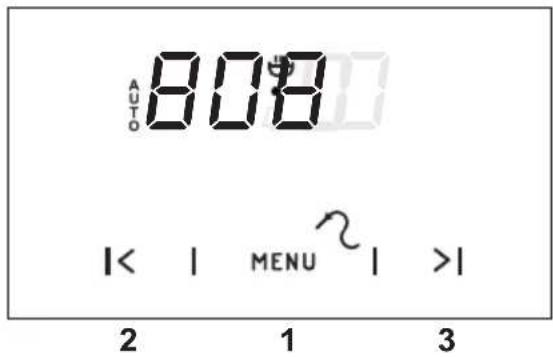
- Set the required time using the sensors 3 and 2 within a range from 1 minute to 10 hours.
●Press sensor 1 until the display will show:
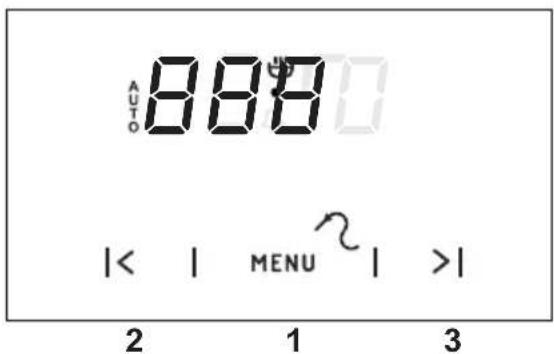
- Set the switch-off time (operation end time) using sensors 3 and 2, which is limited to a period of 23 hours and 59 minutes from the current time.
- Set the oven function knob and the temperature regulator knob to the setting at which you want the oven to operate.
The function AUTO is now on; the oven will start operating from the point when the difference between the set operation end time and the operation duration time occurs (e.g. the operation time is set to 1 hour, the operation end time is set to 14.00, so the oven will start working automatically at 13.00).
When the oven reaches the operation end time it will switch off automatically, the alarm will be activated and the function AUTO will start flashing again.
- Set the oven function knob and the temperature regulator knob to the switched-off position.
- Press sensor 1, 2 or 3 in order to switch off the alarm; the function AUTO will go out and the display will show the current time.
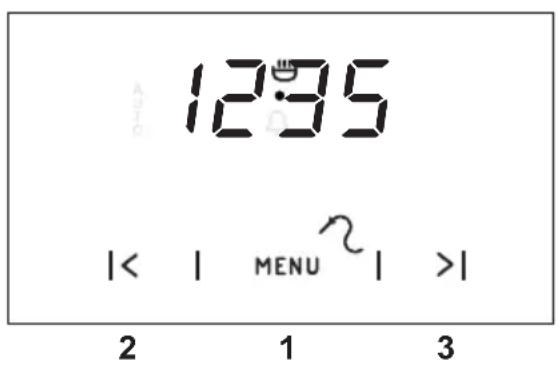
Cancel settings
Timer and automatic function settings may be cancelled at any time.
Cancel automatic function settings: - press sensors 2 and 3 simultaneously,
Cancel timer settings: - press sensor 1 to select timer settings, - press sensors 2 and 3 again,
Change the timer beeps
The tone of the timer beeps may be changed as follows:
- press sensors 2 and 3 simultaneously, - select "tone" function with the 1 sensor, the display panel will start to blink:
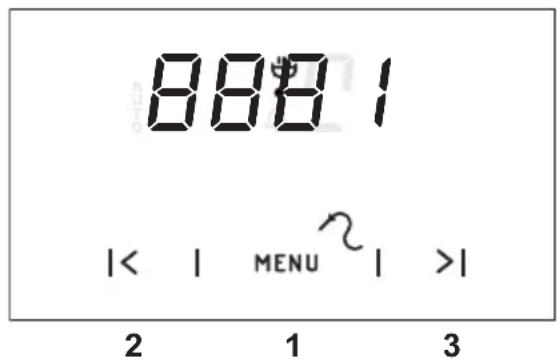
- with the 2 sensor press the appropriate sensors from 1 to 3 to select the option you wish.
Meat Probe
Adjustment and display range: 30°C till 99°C, Resolution: 1 Grad, Default set value: 80°C.
Meat probe is recognized automatically when temperature at meat probe is above 0^ C.
If meat probe is plugged in, the two digits on the left side show the actual temperature at the meat probe and the two digits at the right side show the set point value.
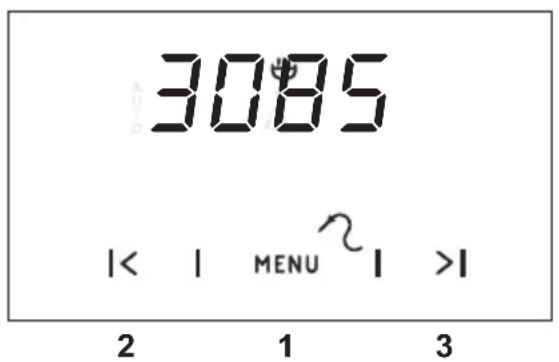
If the probe temperature is lower than the minimum setting temperature of 30 °C , the display reads "30". If the probe temperature is higher than the maximum setting temperature of 99 °C , the display reads the maximum setting temperature.
With plugging in the connector of the meat probe, the program is started and the nominal temperature is set to 80 °C. The value of the set temperature can be changed as long as the temperatures are displayed, but not when timer is still in start up mode.
The meat probe alarm can be reset by pressing any key.
An active meat probe program or a pending alarm can be reset by disconnecting the meat probe.
The use of temperature probe is recommended when cooking large portions of meat (at least 1 kg).
The use of temperature probe is not recommended when cooking poultry and meat with bones.
When not in use, disconnect the temperature probe from its socket and remove from oven chamber.
Important!
Use only original temperature probe supplied with the appliance.
Recommended probe temperature settings
| Type of meat Temperature [°C] | |
| Pork 85 - 90 | |
| Beef 80 - 85 | |
| Veal 75 - 80 | |
| Lamb 80 - 85 | |
| Venison 80 - 85 | |
Oven functions and operation.
Oven with automatic air circulation (including a fan and ring heater)
The oven can be heated up using the bottom and top heaters, the grill or the ultra-fan heater. Operation of the oven is controlled by the oven function knob – to set a required function you should turn the knob to the selected position, and the temperature regulator knob – to set a required function you should turn the knob to the selected position.
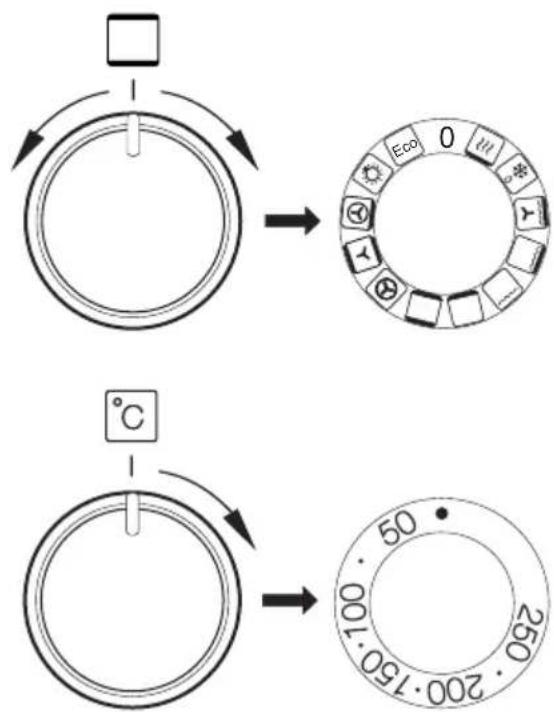
The oven can be switched off by setting both of these knobs to the position “●”/“0”.
Caution!
When selecting any heating function (switching a heater on etc.) the oven will only be switched on after the temperature has been set by the temperature regulator knob.
0 Oven is off

Rapid Preheating
Ring heater and roaster on. Use to preheat the oven.

Defrosting
Only fan is on and all heaters are off.

Fan and combined grill on
When the knob is turned to this position, the oven activates the combined grill and fan function. In practice, this function allows the grilling process to be speeded up and an improvement in the taste of the dish. You should only use the grill with the oven door shut.

Enhanced roaster (super roaster)
In this setting both roaster and top heater are on. This increases temperature in the top part of the oven's interior, which makes it suitable for browning and roasting of larger portions of food.

Roaster on.
Roasting is used for cooking of small portions of meat: steaks, schnitzel, fish, toasts, Frankfurter sausages, (thickness of roasted dish should not exceed 2-3 cm and should be turned over during roasting).

Bottom heater on
When the knob is set to this position the oven is heated using only the bottom heater. Baking of cakes from the bottom until done (moist cakes with fruit stuffing).

Top and bottom heaters on
Set the knob in this position for conventional baking. This setting is ideal for baking cakes, meat, fish, bread and pizza (it is necessary to preheat the oven and use a baking tray) on one oven level.

Convection with ring heating element
Setting the knob in this position allows the oven to be heated up by a heating element with air circulation forced by a rotating fan fitted in the central part of the back wall of the of and chamber. Lower baking temperatures than in the conventional oven can be used. Heating the oven up in this manner ensures uniform heat circulation around the dish being cooked in the oven.

Top heater, bottom heater and fan are on.
This knob setting is most suitable for baking cakes. Convection baking (recommended for baking).
When the functions have been selected but the temperature knob is set to zero only the fan will be on. With this function you can cool the dish or the oven chamber.

Convection with ring heating element and bottom heater on
With this setting the convection fan and bottom heater are on, which increases the temperature at the bottom of the cooked dish. Intense heat from the bottom, moist cakes, pizza.

Independent oven lighting
Set the knob in this position to light up the oven interior.

Eco fan assisted heating
This is an optimised heating function designed to save energy when preparing food. At this knob position, the oven lighting is off.
If the 3 light goes out, it means the oven has reached the set temperature. If a recipe recommends placing dishes in a warmed-up oven, this should be not done before the 3 light goes out for the first time. When baking, the 3 light will temporarily come on and go out (to maintain the temperature inside the oven).
Use of the grill
The grilling process operates through infrared rays emitted onto the dish by the incandescent grill heater.
In order to switch on the grill you need to:
- Set the oven knob to the position marked grill,
● Heat the oven for approx. 5 minutes (with the oven door shut). - Insert a tray with a dish onto the appropriate cooking level; and if you are grilling on the grate insert a tray for dripping on the level immediately below (under the grate).
- Close the oven door.
For grilling with the function grill and combined grill the temperature must be set to 220^ C, but for the function fan and grill it must be set to a maximum of 190^ C.
Warning!
When using function grill it is recommended that the oven door is closed.
When the grill is in use accessible parts can become hot.
It is best to keep children away from the oven.
Baking
- we recommend using the baking trays which were provided with your cooker;
- it is also possible to bake in cake tins and trays bought elsewhere which should be put on the drying rack; for baking it is better to use black trays which conduct heat better and shorten the baking time;
● shapes and trays with bright or shiny surfaces are not recommended when using the conventional heating method (top and bottom heaters), use of such tins can result in undercooking the base of cakes; - when using the ultra-fan function it is not necessary to initially heat up the oven chamber, for other types of heating you should warm up the oven chamber before the cake is inserted;
- before the cake is taken out of the oven, check if it is ready using a wooden stick (if the cake is ready the stick should come out dry and clean after being inserted into the cake);
● after switching off the oven it is advisable to leave the cake inside for about 5 min.; - temperatures for baking with the ultra-fan function are usually around 20 – 30 degrees lower than in normal baking (using top and bottom heaters);
- the baking parameters given in Table are approximate and can be corrected based on your own experience and cooking preferences;
- if information given in recipe books is significantly different from the values included in this instruction manual, please apply the instructions from the manual.
Roasting meat
- cook meat weighing over 1 kg in the oven, but smaller pieces should be cooked on the gas burners.
- use heatproof ovenware for roasting, with handles that are also resistant to high temperatures;
- when roasting on the drying rack or the grate we recommend that you place a baking tray with a small amount of water on the lowest level of the oven;
- it is advisable to turn the meat over at least once during the roasting time and during roasting you should also baste the meat with its juices or with hot salty water – do not pour cold water over the meat.
ECO fan assisted heating
- ECO fan assisted heating is an optimised heating function designed to save energy when preparing food.
- You cannot reduce the cooking time by setting a higher temperature; preheating the oven is not recommended.
- Do not change the temperature setting and do not open the oven door during cooking.
Recommended setting for ECO fan assisted heating
| Type of dish | Oven functions | Temperature (°C) | Level Time | in minutes |
| Sponge cake | Eco | 180 - 200 2 - 3 | 50 - 70 | |
| Yeast cake/ Pound cake | Eco | 180 - 200 2 50 | - 70 | |
| Fish | Eco | 190 - 210 2 - 3 | 45 - 60 | |
| Beef | Eco | 200 - 220 2 90 | - 120 | |
| Pork | Eco | 200 - 220 2 90 | - 160 | |
| Chicken | Eco | 180 - 200 2 80 | - 100 |
BAKING IN THE OVEN – PRACTICAL HINTS
Oven with automatic air circulation (including a fan and ring heater)
| Type of dish | Type of heating | Temperature (°C) | Level Time | (min.) |
| Sponge cake 160 - 200 2-3 30 - 50 | ||||
| Yeast cake/ Pound cake | 160 - 170^1) | 3 25 - 40 | 2) | |
| Yeast cake/ Pound cake | 155 - 170^1) | 3 25 - 40 | 2) | |
| Pizza 200 - 230 | 1) | 2 - 3 15 - 25 | ||
| Fish 210 - 220 2 45 -60 | ||||
| Fish 160 - 180 2 - 3 460 | ||||
| Fish 190 2 - 3 60 - 70 | ||||
| Sausages 200 - 220 4 14 - 18 | ||||
| Beef 225 - 250 2 120 - 150 | ||||
| Beef 160 - 180 2 12060 | ||||
| Pork 160 - 230 2 | 90 - 120 | |||
| Pork 160 - 190 2 | 90 - 120 | |||
| Chicken | 180 - 190 2 70 | - 90 | ||
| Chicken | 160 - 180 2 45 | - 60 | ||
| Chicken | 175 - 190 2 60 | - 70 | ||
| Vegetables | 190 - 210 2 40 | - 50 | ||
| Vegetables | 170 - 190 3 40 | - 50 | ||
The times are apply to dish that is placed into a cold oven. For the preheated oven, the times should be reduced by about 5-10 minutes.
^1) Preheat
2) Baking smaller items
Note: The figures given in Tables are approximate and can be adapted based on your own experience and cooking preferences.
Baking
| Type of dish Accessory Level Type | of heating | Temperature (°C) | Baking time 2)(min.) | ||
| Small cakes | Baking tray 4 | 160 |  | 1) | 28 - 32 2) |
| Baking tray 3 | 155 |  | 1) | 23 - 26 2) | |
| Baking tray 3 | 150 |  | 1) | 26 - 30 2) | |
| Baking tray Roasting tray | 2 + 42 - baking tray or roasting tray4 - baking tray |  | 150 1) | 27 - 30 2) | |
| Shortbread | Baking tray 3 | 150 - 160 |  | 1) | 30 - 40 2) |
| Baking tray 3 | 150 - 170 | [GABK] | 1) | 25 - 35 2) | |
| Baking tray 3 | 150 - 170 |  | 1) | 25 - 35 2) | |
| Baking tray Roasting tray | 2 + 42 - baking tray or roasting tray4 - baking tray |  | 160 - 175 1) | 25 - 35 2) | |
| Fatless sponge cake | Wire rack + black baking tin diameter 26cm | 2 170 - 180 |  | 1) | 38 - 46 2) |
| Apple pie | Wire rack + 2 black baking tins diameter 20cm | 2 black baking tins placed after the diagonal, back right, front left |  | 180 - 200 1) | 50 - 65 2) |
^1) Preheat 5 minutes, do not use Rapid preheat function.
^2) The times are apply to dish that is placed into a cold oven.
TEST DISHES. According to standard EN 60350-1.
Grilling
| Type of dish | Accessory Level | Type | of heating | Temperature (°C) | Time (min.) |
| White bread toast | Wire rack 4 220 |  | 1) | 3 - 7 | |
| Beef burgers | Wire rack + roasting tray (to gather drops) | 4 - wire rack 3 - roasting tray |  | 220 1) | 1st side 13 - 18 2nd side 10 - 15 |
^1) Preheat for 8 minutes, do not use Rapid preheat function.
Roasting
| Type of dish | Accessory Level | Type | of heating | Temperature (°C) | Time (min.) |
| Whole chicken | Wire rack + roasting tray (to gather drops) | 2 - wire rack1 - roasting tray |  | 180 - 190 70 | - 90 |
| Wire rack + roasting tray (to gather drops) | 2 - wire rack1 - roasting tray |  | 180 - 190 80 | - 100 |
The times are apply to dish that is placed into a cold oven. For the preheated oven, the times should be reduced by about 5-10 minutes.
By ensuring proper cleaning and maintenance of your cooker you can have a significant influence on the continuing fault-free operation of your appliance.
Before you start cleaning, the cooker must be switched off and you should ensure that all knobs are set to the “●”/“0” position. Do not start cleaning until the cooker has completely cooled.
- The oven should be cleaned after every use. When cleaning the oven the lighting should be switched on to enable you to see the surfaces better.
- The oven chamber should only be washed with warm water and a small amount of washing-up liquid.
- SteamCleaning function:
-pour 250ml of water (1 glass) into a bowl placed in the oven on the first level from the bottom,
- close the oven door,
- set the temperature knob to 50^ C, and the function knob to the bottom heater position ☐
- heat the oven chamber for approximately 30 minutes,
- open the oven door, wipe the chamber inside with a cloth or sponge and wash using warm water with washing-up liquid.,
- After cleaning the oven chamber wipe it dry.
Caution!
Do not use cleaning products containing abrasive materials for the cleaning and maintenance of the glass front panel.
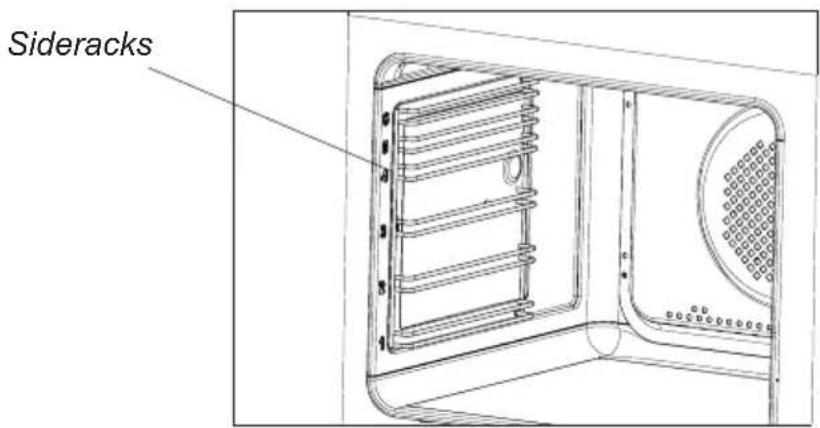
● Wire shelf supports
Wire shelf supports are esay to remove for wasking. Pull the front catch, then tilt the support and remove from the rear catch.
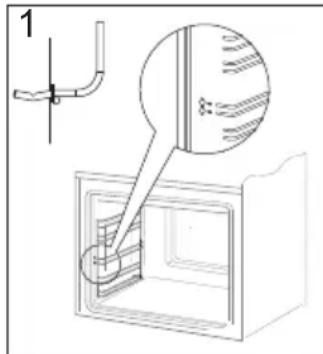
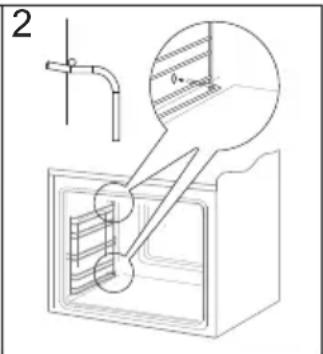
Removing wire shelf supports
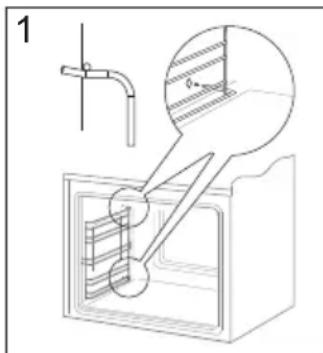
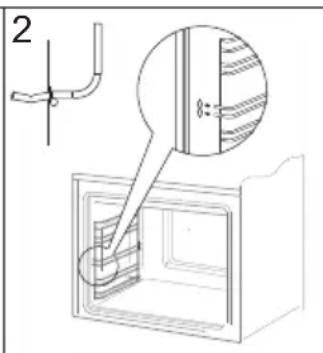
Installing wire shelf supports
Replacing the halogen bulb in the oven
Before replacing the halogen bulb, make sure the appliance is disconnected from the electric mains to avoid a possible electric shock.
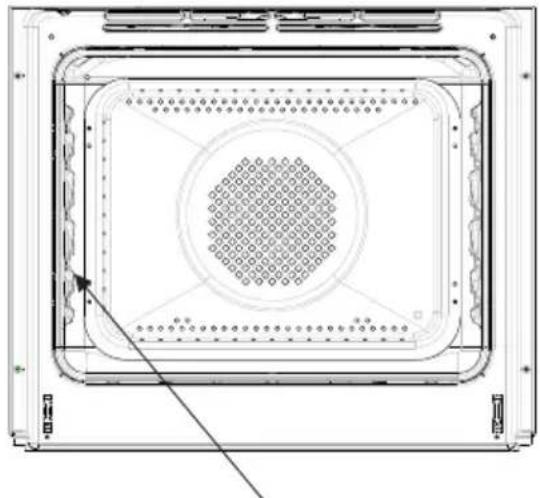
natural_image
Technical line drawing of a rectangular electronic device with a central circular grid pattern and mounting brackets (no text or symbols)Oven lighting
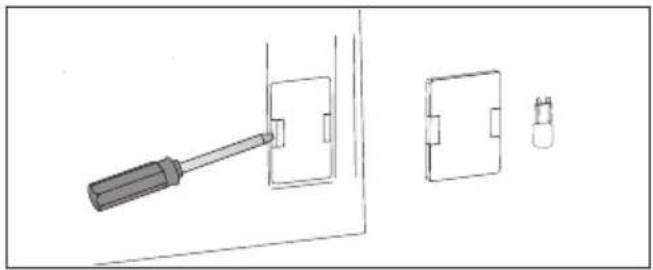
natural_image
Technical line drawing showing a screwdriver inserted into a wall socket and two separate views of a component (no text or symbols)- Unplug the appliance
- Remove shelves and trays from the oven.
- If the oven has telescopic runners, remove them also.
- Use a flat screwdriver to pry the lamp cover loose, remove it, wash and carefully wipe it dry.
- Pull the halogen bulb out by sliding it down using a cloth or paper. If necessary, replace the halogen bulb with a new one.
- voltage 230V
- power 25W
- Replace the halogen bulb in its socket.
- Replace the lamp cover
Door removal
In order to obtain easier access to the oven chamber for cleaning, it is possible to remove the door. To do this, tilt the safety catch part of the hinge upwards (fig. A). Close the door lightly, lift and pull it out towards you. In order to fit the door back on to the cooker, do the inverse. When fitting, ensure that the notch of the hinge is correctly placed on the protrusion of the hinge holder. After the door is fitted to the oven, the safety catch should be carefully lowered down again. If the safety catch is not set it may cause damage to the hinge when closing the door.
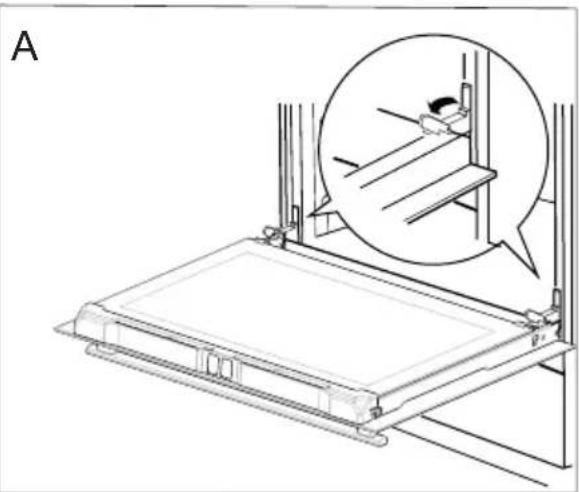
natural_image
Technical line drawing of a mechanical assembly with an inset showing a component detail (no text or symbols)Tilting the hinge safety catches
Removing the inner panel
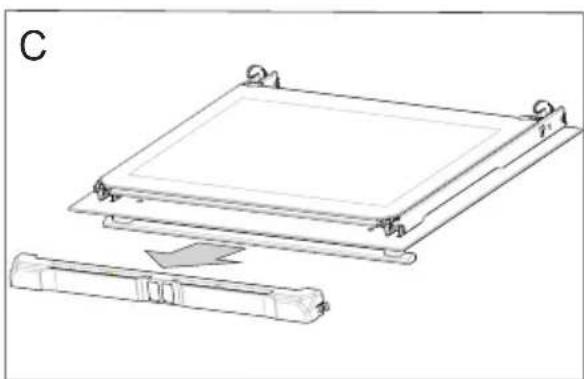
- Pull the upper door slat loose. (fig. B, C)
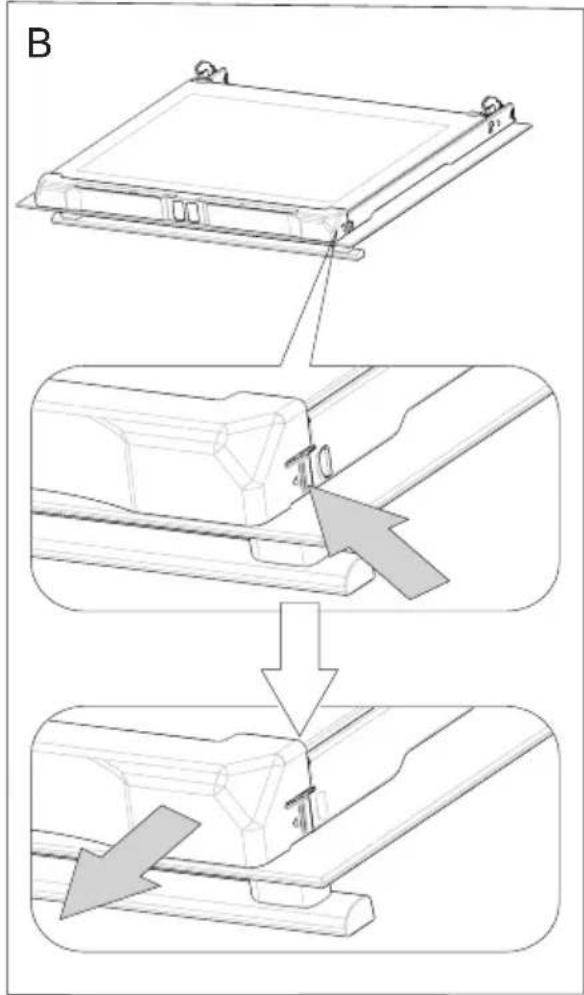
natural_image
Technical line drawing of a mechanical assembly with a rectangular component and a separate cylindrical component (no text or symbols)- Pull the inner glass panel from its seat (in the lower section of the door).
fig. D, D1.
- Clean the panel with warm water with some cleaning agent added.
Carry out the same in reverse order to reassemble the inner glass panel. Its smooth surface shall be pointed upwards.
Important! Do not force the upper strip in on both sides of the door at the same time. In order to correctly fit the top door strip, first put the left end of the strip on the door and then press the right end in until you hear a "click". Then press the left end in until you hear a "click".
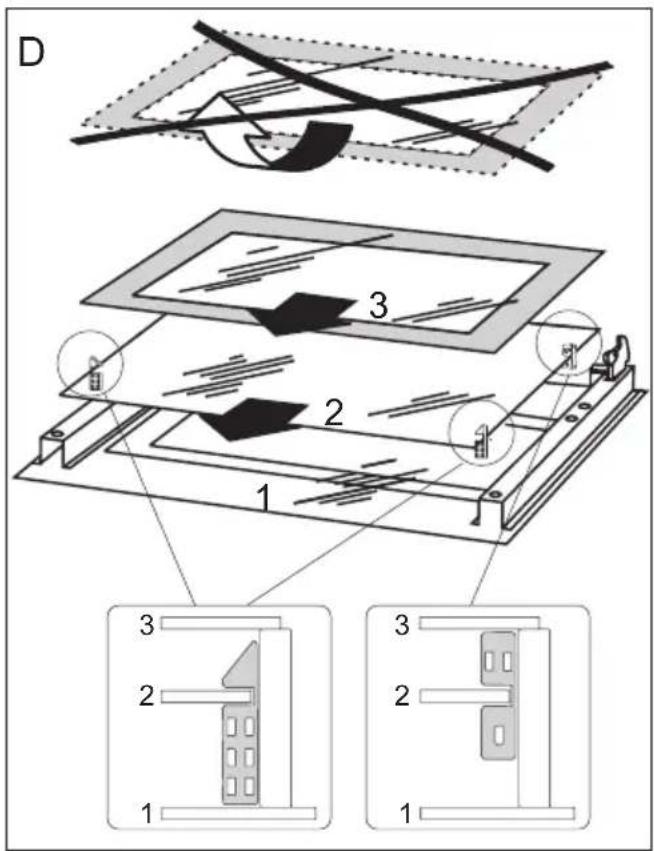
Removal of the internal glass panel. 3 glass panel.
Regular inspections
Besides keeping the oven clean, you should:
- carry out periodic inspections of the control elements and cooking units of the cooker. After the guarantee has expired you should have a technical inspection of the cooker carried out at a service centre at least once every two years,
- fix any operational faults,
- carry out periodical maintenance of the cooking units of the oven.
Caution!
All repairs and regulatory activities should be carried out by the appropriate service centre or by an appropriately authorised fitter.
Regular inspections
Besides keeping the oven clean, you should:
- carry out periodic inspections of the control elements and cooking units of the cooker. After the guarantee has expired you should have a technical inspection of the cooker carried out at a service centre at least once every two years,
- fix any operational faults,
● carry out periodical maintenance of the cooking units of the oven.
Caution!
All repairs and regulatory activities should be carried out by the appropriate service centre or by an appropriately authorised fitter.
OPERATION IN CASE OF EMERGENCY
In the event of an emergency, you should:
- switch off all working units of the oven
- disconnect the mains plug
- call the service centre
- some minor faults can be fixed by referring to the instructions given in the table below.
Before calling the customer support centre or the GRAM service centre check the following points that are presented in the table.
| PROBLEM REASON ACTION | ||
| 1. The appliance does not work. | Break in power supply. Check the household fuse box; if there is a blown fuse replace it with a new one. | |
| 2. The oven lighting does not work. | The bulb is loose or damaged. Tighten up or replace the blown bulb (see ‘Cleaning and Maintenance’). | |
Voltage rating 230V\~50 Hz
Power rating max. 3,6 kW
Oven dimensions H/W/D 59,5 / 59,5 / 57,5 cm
Basic Information:
The product meets the requirements of European standards EN 60335-1; EN60335-2-6.
The data on the energy labels of electric ovens is given according to standard EN 60350-1 / IEC 60350-1. These values are defined with a standard workload a with the functions active: bottom and top heaters (conventional heating) and fan assisted heating (forced air heating), if these functions are available.
The energy efficiency class was assigned depending on the function available in the product in accordance with the priority below:
| Forced air circulation ECO (ring heater + fan) | [644W]  |
| Forced air circulation ECO (bottom heater + top + roaster + fan) |   |
| Conventional mode ECO (bottom heater + top) |   |
During energy consumption test, remove the telescopic runners (if the product is fitted with any).

Gram A/S
Gejlhavegård 2B
DK-6000 Kolding
+45 73 20 10 00
www.gram.dk