
Radiant 360 R1 - Loudspeaker SAMSUNG - Free user manual and instructions
Find the device manual for free Radiant 360 R1 SAMSUNG in PDF.


| Product Type | Wireless Speaker |
| Model | Radiant 360 R1 |
| Brand | Samsung |
| Dimensions (W x H x D) | 155 x 240 x 155 mm |
| Weight | 1.5 kg |
| Power Supply | 100-240V AC, 50/60Hz |
| Audio Output | 360° omnidirectional sound |
| Connectivity | Bluetooth 4.0, Wi-Fi 802.11 b/g/n |
| Multi-room Support | Yes (via Samsung Multiroom app) |
| Voice Control | Compatible with Bixby, Alexa (via firmware update) |
| App Support | Samsung Multiroom app (iOS/Android) |
| Inputs | 3.5 mm auxiliary input |
| Care and Cleaning | Wipe with soft, dry cloth. Avoid liquids. |
| Safety | Do not expose to water or moisture. Keep away from heat sources. |
| Spare Parts & Repairability | Not user-serviceable. Contact Samsung support for repairs. |
| Warranty | Standard 1-year limited warranty |
Frequently Asked Questions - Radiant 360 R1 SAMSUNG
User questions about Radiant 360 R1 SAMSUNG
0 question about this device. Answer the ones you know or ask your own.
Ask a new question about this device
Download the instructions for your Loudspeaker in PDF format for free! Find your manual Radiant 360 R1 - SAMSUNG and take your electronic device back in hand. On this page are published all the documents necessary for the use of your device. Radiant 360 R1 by SAMSUNG.
USER MANUAL Radiant 360 R1 SAMSUNG
WAM5500/WAM3500/WAM1500
Wireless Audio Radiant - 360
R5/R3/R1
User Manual
imagine the possibilities
Thank you for purchasing this Samsung product.
To receive more complete service,
please register your product at
www.samsung.com/register
Contents
GETTING STARTED
Accessories....3
Speaker Top....3
Operation Terminology .... 3
OLED Display and LED Indicator Descriptions....5
Speaker Bottom 6
Connecting the Power Cord....7
Installing on a wall 8
CONNECTING TO A WI-FI NETWORK
Connecting to Bluetooth Devices ..... 9
Connecting a Samsung TV to the speaker 11
Connecting to a Samsung TV via bluetooth (TV SoundConnect).... 11
APPENDIX
Troubleshooting....12
Open Source License Notice ..... 14
Licenses....14
Specifications....14
Regulatory Compliance Statements 15
Warning 15
FCC Statement: (for U.S.A) 15
IC Statement: (for Canada)......16
Important Safety Instructions .... 17
Safety precautions....18
Power Supply Precautions 18
Installation Precautions 18
Usage Precautions....19
Cleaning Precautions 20
Additional Information......20
About the Network Connection......20
Works with SmartThings™......20
Copyright 20
Getting Started
Accessories
Confirm you have the supplied accessories shown below.
• WAM5500/WAM3500

Power Cord (3903-000910)

Quick Setup Guide (AH68-02895A)

Regulatory Guide (AH68-02881A)
WAM1500

Power Cord (3903-000598)

Power Adapter (BN44-00835A)

Quick Setup Guide (AH68-02894A)
Regulatory Guide (AH68-02881A)

natural_image
Stacked books with one open showing a grid, no text or symbols visible
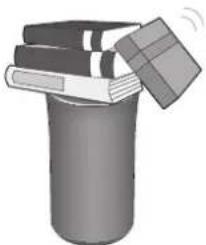
CAUTION
√ Do not place any items on top off or sit on the main unit.
Speaker Top
Operation Terminology
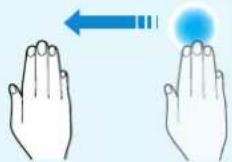
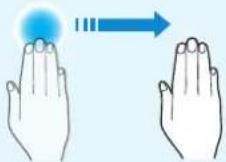
Touch/Tap Touch and Hold Swipe



< WAM5500/WAM3500 >

< WAM1500 >
| 1 | Display | WAM5500/WAM3500 | Displays the current status. |
| Indicator WAM1500 Flashes, glows, or changes color depending on the speaker's status. | |||
| 2 | MODE Button Toggle among the TV SoundConnect, Bluetooth and Wi-Fi modes. | ||
| 3 | Touch Area | Tap in the Touch Area to play music or to pause playback.Tap to mute the sound if the TV SoundConnect function is enabled.Play/Pause: Tap the Touch Area to toggle between playback and pause.Mute: If TV SoundConnect is enabled, tap the Touch Area to mute or unmute the sound.Previous/Next Song: Swipe LEFT TO RIGHT to play the next song.Swipe RIGHT TO LEFT to play the previous song.Standby mode: Touch and hold anywhere in the Touch Area for 5 seconds.Touch the touch area to wake the speaker up.Power Off: Touch and hold anywhere in the Touch Area for 10 seconds.Touch the touch area to turn the speaker back on. | |
| 4 | Volume +,- Button | To adjust the volume rapidly, touch and hold + or - key. | |

NOTE
√ To reset the speaker, touch and hold the Volume (-,+) button at the same time for 5 seconds.
OLED Display and LED Indicator Descriptions
| OLED Display Description Indicated Action | ||
| Circle size increases or decreases, then fades out | Power on / Wake-up / Power off | |
| Play icon Play | ||
| Pause icon Pause | ||
| Volume status Volume up or down | ||
| Wave moves to the right Next song | ||
| Wave moves to the left Previous song | ||
| Mute icon | Mute (from the App or by tapping in the Touch Area when TV SoundConnect is active.) | |
| Group icon (Two circles partially overlapped) | Group/Surround mode | |
| Ungroup icon (Two circles separated) Un-Group/Release Surround mode | ||
| Bluetooth icon (blinking) Bluetooth Pairing | ||
| TV icon (blinking) TV SoundConnect Pairing | ||
| Exclamation icon Wireless router disconnected | ||
| Wi-Fi Pairing Wi-Fi mode | ||
| LED Color Description | Indicated Action | |
| White | ON | 1) Power On2) Volume max/min |
| Flashing | 1) Touch control2) Wake up3) Any connecting or group action4) StandBy Mode (fade in/out repeatedly then after a few hours, auto off) | |
| Red | Flashing (6 seconds) | Wireless router disconnected |
| Off | All off | Power Off |

Speaker Bottom
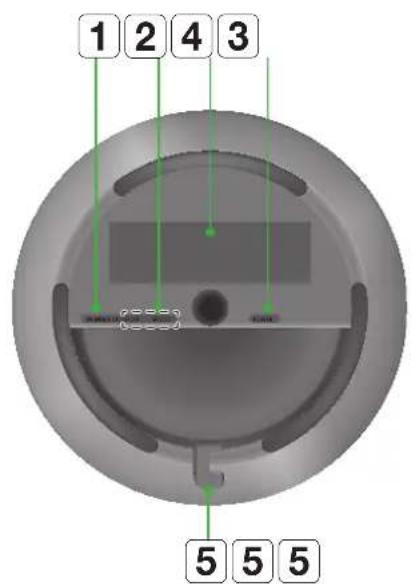
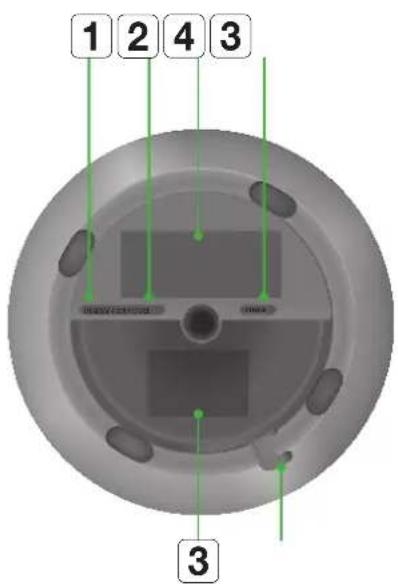
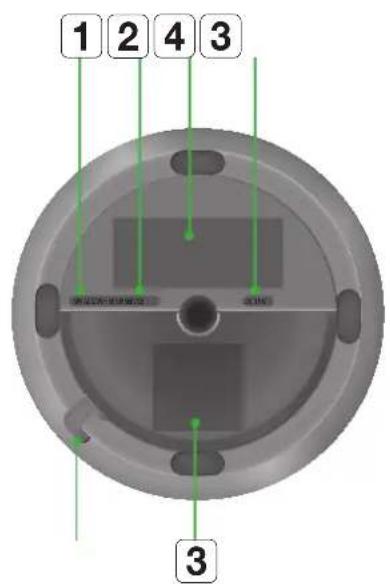
< WAM5500 > < WAM1500 > < WAM3500 >
| 1 | SPK ADD/Wi-Fi SETUP | |
| 2 | SERVICE | |
| 3 | Label | |
| 4 | POWER | WAM5500/WAM3500 |
| DC 19V | WAM1500 | |
| 5 | Notch for Power Cable | |
- Press this button to pair your speaker with a HUB (Not Included) or add another speaker.
- Press and hold this button for more than 5 seconds when connecting the speaker to your network using the Wi-Fi Setup method. (Requires a smart device and the Samsung Multiroom app.)
For service only.
Connection for the speaker's power cord.
Connecting the Power Cord
1 Connect the power cord of your speaker as shown. It will connect at an angle.
2 Push the power cord into the notch at the edge of the speaker bottom. This lets the speaker rest flat when you stand it up.
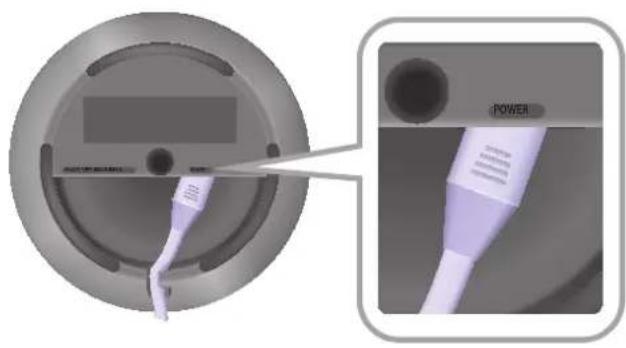
natural_image
Close-up of a circular device with a power button and cable, showing internal components (no text or symbols)1 Connect the adaptor's input power cord to the adaptor.
2 Connect the adaptor's output power cord (with the round plug) to the DC 19V jack on the speaker.
3 Push the power cord into the notch at the edge of the speaker bottom. This lets the speaker rest flat when you stand it up.

natural_image
Diagram showing a circular device with internal piping and a close-up view of its internal structure (no text or symbols)
NOTE
√ Make sure to rest the AC/DC Adapter flat on a table or the floor. If you place the AC/DC Adapter so that it is hanging with the AC cord input facing upwards, water or other foreign substances could enter the Adapter and cause the Adapter to malfunction.
Installing on a wall
You can purchase a wall mount separately to install the speaker on a wall if you want.
■ Considerations for purchasing
- Endurable load : WAM5500 : Above 23.8 lbs (10.8 Kg)
WAM3500 : Above 17.6 lbs (8.0 Kg)
WAM1500 : Above 12.3 lbs (5.6 Kg)
- Hole size : 1/4 - 20 threaded insert

NOTES
√ Since Wall-mount installation is optional, you must purchase the corresponding accessories separately.
√ Please have a qualified installer install the Wall Mount Bracket.
√ Ask a professional installation company to mount your product on the wall.
√ Check the strength of the wall before you install the Wall Mount Bracket. If the strength is insufficient, make sure to reinforce the wall before installing the Wall Mount Bracket and the speaker on the wall.
√ For more information, please refer to the Wall Mount's manual.
√ Samsung Electronics is not liable for any damage to the product due to the product being installed inappropriately.
√ Please beware not to install the speaker being laid down or turned upside down.
Connecting to a Wi-Fi network
Connecting to Bluetooth Devices
You can connect the WAM speaker to a Bluetooth device and listen to the music stored on the device.
1 Touch the MODE button on top of the speaker one or more times until you hear "Bluetooth is ready."

2 Turn on the Bluetooth function of your smart device, and then select Search.
3 Select the [Samsung] R5, [Samsung] R3 or [Samsung] R1.
The Bluetooth connection between the smart device and the WAM speaker is made.
4 Without connection with Samsung Multiroom app, you might see Samsung Wireless Audio on the Bluetooth device list. Select it.

NOTES
√ A Bluetooth device may cause noise or malfunction, depending on usage, if:
- A part of your body is in contact with the receiving/transmitting system of the Bluetooth device or the speaker.
- It is subject to electrical variation from obstructions caused by a wall, corner, or by office partitioning.
- It is exposed to electrical interference from same frequency-band devices including medical equipment, microwave ovens, and wireless LANs.
√ Pair the speaker with the Bluetooth device while they are close together.
√ The Bluetooth connection will be lost if the distance between the speaker and the Bluetooth device exceeds 32 feet (10 m). Even within range, the sound quality may be degraded by obstacles such as walls or doors.
√ This speaker may cause electric interference during its operation.
√ The speaker supports SBC data (44.1kHz, 48kHz).
√ In Bluetooth mode, the Play/Pause/Next/Prev functions are available in Bluetooth devices supporting AVRCP.
√ Connect only to a Bluetooth device that supports the A2DP (AV) function.
√ You cannot connect to a Bluetooth device that supports only the HF (Hands Free) function.
√ Only one Bluetooth device can be paired at a time.
√ If you unplug the speaker, the Bluetooth connection is terminated. To re-establish the connection, plug the speaker into an outlet, and then reset the Bluetooth connection.

Connecting a Samsung TV to the speaker
Connecting to a Samsung TV via bluetooth (TV SoundConnect)
The TV SoundConnect function lets you conveniently connect a Samsung TV to an external speaker wirelessly and listen to the TV's sound through the speaker.
1 Plug the WAM speaker into an outlet, and then touch the MODE button on its top one or more times until you hear "TV SoundConnect is ready."
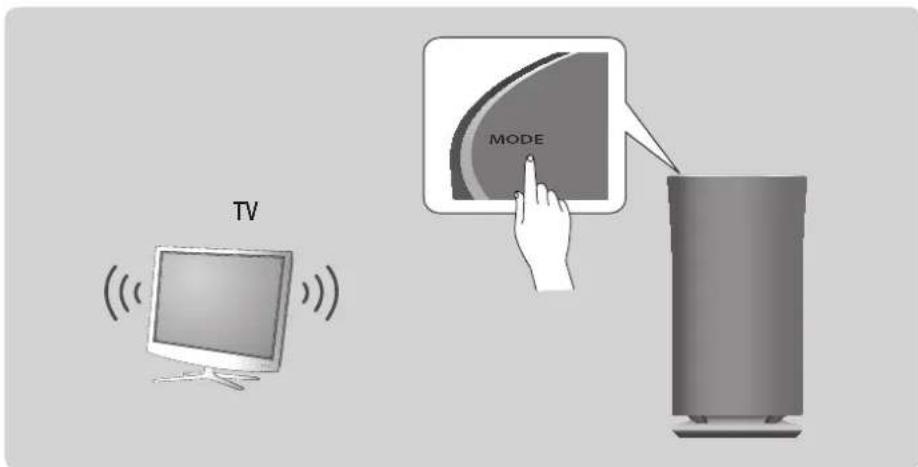
2 Touch and hold the MODE button for more than 5 seconds to reset TV SoundConnect.
3 A pop-up appears on the TV asking you to approve the connection. Approve to continue.

NOTES
√ Optimal pairing distance is 6.5 feet (2m) or less.
√ If you unplug the WAM speaker, the TV SoundConnect connection is terminated. To re-establish the connection, plug the speaker into an outlet, and then touch the MODE button one or more times until you hear "TV SoundConnect is ready.". Then skip number 2 and 3 step. Speaker will output TV sound automatically.
√ When the speaker is in Standby mode, the TV SoundConnect connection is not terminated. To connect new TV, follow above 1, 2, 3 steps.
√ Operational range of TV SoundConnect
- Recommended pairing range: up to 6.5 feet (2 m).
- Recommended operating range: up to 32 feet (10 m).
- The connection may be lost or sound may stutter if the distance between the TV and the speaker exceeds 32 feet (10 m).
√ The SoundConnect feature is available on some Samsung TVs released since 2012. Check whether your TV supports the SoundShare or SoundConnect function.
(For further details, refer to the TV's user's manual.)
√ Instability in the network environment may cause the connection to be lost or sound to stutter.
Appendix

Troubleshooting
Refer to the table below when this product does not function properly. If the problem you are experiencing is not listed below or if the instructions below do not help, turn off the product, disconnect the power cord, and contact Samsung Electronics at 1-800-SAMSUNG (1-800-726-7864).
| Symptom Check Remedy | ||
| The unit will not turn on. | Is the power cord plugged into the outlet? | Connect the power cord to the outlet. |
| My HUB and WAM speaker won't pair. | When the Hub is plugged in, do the HUB's front indicators show it's operating properly?Is the LAN cable connected to the wireless router and the HUB properly? | Reset the HUB. (Refer to the HUB's user manual for details.)Unplug the HUB and plug it in again. Check whether the pairing indicator on the front of the HUB is blinking or not.Reset the WAM speaker. (see page 4) Click here.Unplug the WAM speaker and plug it in again. |
| A function does not work when the button is pressed. | Is there static electricity in the air? | Disconnect the power plug and connect it again. |
| No sound. | Is the volume set to minimum? | Connect the speaker correctly.Adjust the volume. |
| The TV SoundConnect (TV pairing) failed. | Does your TV support TV SoundConnect?Is your TV firmware the latest version?Does an error occur when connecting? | TV SoundConnect is supported by some Samsung TVs released after 2012. Check your TV to see if it supports TV SoundConnect.Confirm TV SoundConnect is set to On in your TV's menu.Update your TV with the latest firmware.Contact the Samsung Call Center.Touch and hold the MODE button for more than 5 seconds to reset TV SoundConnect and connect a new TV. |
| The HUB doesn't work properly. | Is the HUB plugged in?Is the LAN cable connected to the wireless router and the HUB properly?When the Hub is plugged in, do the HUB's front indicators show it's operating properly? | Plug in the HUB.Connect a LAN cable to anETHERNET SWITCH port on the back of the HUB and to your wireless router.Reset the HUB. (Refer to the HUB's user manual for details.)If you experience problems connecting the HUB and WAM speaker, try relocating the WAM speaker so that it is closer to the wireless router or HUB. |
| The WAM speaker doesn't work properly. | Is the speaker plugged in? | Plug in the speaker.Unplug the speaker, plug it back in, and then reconnect it to the router.Reset the WAM speaker. (see page 4) Click here.If used with a HUB- Make sure your smart device and the HUB are connected to the same Wi-Fi network.- Make sure the HUB's indicator LED's show that it is working correctly.- If the problem persists, reset the HUB. (Refer to the HUB's user manual for details.)- Unplug, then plug in the HUB. Then, unplug and plug in the WAM speaker.- If you experience problems connecting the HUB and WAM speaker, try relocating the speaker so that it is closer to the wireless router or HUB. |

NOTE
√ If the problem persists, contact the Samsung Call Center for troubleshooting.
Open Source License Notice
- For further information on Open Sources used in this product, please visit the website: http://opensource.samsung.com
Licenses
- The Spotify Software is subject to third party licenses found here: www.spotify.com/connect/third-party-licenses.
• For more information about Spotify Connect, please visit www.spotify.com/connect

Spotify®
Specifications
| General | Weight | R5 (WAM5500) 6.0 lbs (2.7 Kg) |
| R3 (WAM3500) 4.4 lbs (2.0 Kg) | ||
| R1 (WAM1500) 3.1 lbs (1.4 Kg) | ||
| Dimensions | R5 (WAM5500) Φ6 .5 X 12.3 (H) inches (Φ166.0 X 313.0 (H) mm) | |
| R3 (WAM3500) Φ5 .7 X 10.8 (H) inches (Φ144.0 X 273.0 (H) mm) | ||
| R1 (WAM1500) Φ4 .8 X 9.2 (H) inches (Φ123.0 X 234.0 (H) mm) | ||
| Operating Temperature Range +41°F to +95°F | ||
| Operating Humidity Range 10 % to 75 % | ||
| Network | Wireless LAN Built-in | |
| Security | WEP (OPEN/SHARED) | |
| WPA-PSK (TKIP/AES) | ||
| WPA2-PSK (TKIP/AES) | ||
- Network speeds equal to or below 10Mbps are not supported.
- Design and specifications are subject to change without prior notice.
- For power supply and power consumption information, refer to the label attached to the product.
- See the speaker's bottom for important safety information.
- Weight and dimensions are approximate.
- Dispose unwanted electronics through an approved recycler.
To find the nearest recycling location, go to our website: www.samsung.com/recyclingdirect or call, (877) 278 - 0799.
- This user manual is based on the speaker using the Android or iOS operating system.
- The Multiroom app screen is based on the Android operating system. The screen configuration may change after you upgrade the software version.
- For further details on using the speaker, visit www.samsung.com.
Regulatory Compliance Statements
 | CAUTIONRISK OF ELECTRIC SHOCKDO NOT OPEN |  |
| The lighting flash and arrowhead within the triangle is a warning sign alerting you to dangerous voltage inside the product. | CAUTION: TO REDUCE THE RISK OF ELECTRIC SHOCK, DO NOT REMOVE THE COVER (OR BACK). NO USER SERVICEABLE PARTS INSIDE. REFER SERVICING TO QUALIFIED SERVICE PERSONNEL. | The explanation point within the triangle is a warning sign alerting you to important instructions accompanying the product. |
Warning
- This product contains chemicals known to the State of California to cause cancer and reproductive toxicity.
- To reduce the risk of fire or electric shock, do not expose this appliance to rain or moisture.
- Do not expose this apparatus to dripping or splashing.
Do not put objects filled with liquids, such as vases, on the apparatus. - To turn this apparatus off completely, you must pull the power plug out of the wall socket. Consequently, the power plug must be easily and readily accessible at all times.
FCC Statement: (for U.S.A)
Federal Communication Commission Interference Statement
This equipment has been tested and found to comply with the limits for a Class B digital device, pursuant to Part 15 of the FCC Rules. These limits are designed to provide reasonable protection against harmful interference in a residential installation. This equipment generates, uses and can radiate radio frequency energy and, if not installed and used in accordance with the instructions, may cause harmful interference to radio communications. However, there is no guarantee that interference will not occur in a particular installation. If this equipment does cause harmful interference to radio or television reception, which can be determined by turning the equipment off and on, the user is encouraged to try to correct the interference by one of the following measures:
• Reorienting or relocating the receiving antenna.
- Increasing the separation between the equipment and receiver.
- Connecting the equipment to an outlet that is on a different circuit than the radio or TV.
- Consulting the dealer or an experienced radio/TV technician for help.
FCC Caution: Any changes or modifications not expressly approved by the party responsible for compliance could void the user's authority to operate this equipment.
This device complies with Part 15 of the FCC Rules. Operation is subject to the following two conditions: (1) This device may not cause harmful interference, and (2) this device must accept any interference received, including interference that may cause undesired operation.
For products available in the US and Canadian markets, only channels 1\~11 are available. You cannot select other channels.
This device and it's antennas must not be co-located or operated in conjunction with any other antenna or transmitter except in accordance with FCC multi-transmitter product procedures.
This device operates in the 5.15\~5.25GHz frequency range. It is restricted to indoor environments only.
IMPORTANT NOTE
FCC Radiation Exposure Statement
This equipment complies with FCC radiation exposure limits set forth for an uncontrolled environment. This equipment should be installed and operated so there is at least 8 inches (20cm) between the radiator and your body.
IC Statement: (for Canada)
CAN ICES-3 (B)/NMB-3(B)
This device complies with Industry Canada license-exempt RSS standard(s). Operation is subject to the following two conditions: (1) this device may not cause interference, and (2) this device must accept any interference, including interference that may cause undesired operation of the device.
For products available in the US and Canadian markets, only channels 1\~11 are available. You cannot select other channels.
This device and it's antennas must not be co-located or operated in conjunction with any other antenna or transmitter except in accordance with IC multi-transmitter product procedures.
This device may automatically discontinue transmission if there is no information to transmit, or an operational failure. Note that this is not intended to prohibit the transmission of control or signaling information or the use of repetitive codes where required by the technology.
To reduce potential for harmful interference to co-channel mobile satellite systems, this device operates in the 5150-5250 MHz band, and is for indoor use only.
IMPORTANT NOTE:
IC Radiation Exposure Statement:
This equipment complies with IC RSS-102 radiation exposure limits set forth for an uncontrolled environment. This equipment should be installed and operated so there is at least 8 inches (20cm) between the radiator and your body.
Important Safety Instructions
Read these operating instructions carefully before using the unit. Follow all the safety instructions listed below.
Keep these operating instructions handy for future reference.
1 Read these instructions.
2 Keep these instructions.
3 Heed all warnings.
4 Follow all instructions.
5 Do not use this apparatus near water.
6 Clean only with a dry cloth.
7 Do not block any ventilation openings. Install in accordance with the manufacturer's instructions.
8 Do not install near any heat sources such as radiators, heat registers, stoves, or other apparatus (including AV receivers) that produce heat.
9 Do not defeat the safety purpose of the polarized or grounding-type plug. A polarized plug has two blades with one wider than the other. A grounding type plug has two blades and a third grounding prong. The wide blade or the third prong are provided for your safety. If the provided plug does not fit into your outlet, consult an electrician for replacement of the obsolete outlet.
10 Protect the power cord from being walked on or pinched particularly at plugs, convenience receptacles, and the point where it exits the apparatus.
11 Only use attachments/accessories specified by the manufacturer.
12 Use only with the cart, stand, tripod, bracket, or table specified by the manufacturer, or sold with the apparatus. When a cart is used, use caution when moving the cart/apparatus combination to avoid injury from tip-over.
13 Unplug this apparatus during lightning storms or when unused for long periods of time.
14 Refer all servicing to qualified service personnel. Servicing is required when the apparatus has been damaged in any way, such as when the power-supply cord or plug is damaged, liquid has been spilled or objects have fallen into the apparatus, the apparatus has been exposed to rain or moisture, does not operate normally, or has been dropped.


Safety precautions
Power Supply Precautions
- Do not overload outlets or extension cords.
- This may result in abnormal heat or fire.
- Do not plug in or unplug the power cord with wet hands.
- Do not place the product near heating equipment.
- To clean the power plug blades, remove the plug from the wall outlet and wipe the blades with a dry cloth only.
- Do not bend the power cord or pull it forcefully.
- Do not put heavy objects on the power cord.
- Do not plug the power cord into a loose or damaged outlet.
- Fully insert the power cord's plug into the wall outlet so that the plug is firmly attached to the outlet.
- If the connection is unstable, there is a risk of fire.
Installation Precautions
- Do not install the product near equipment or objects that generate heat or produce fire (candles, mosquito coils, heaters, radiators, etc.). Do not install in direct sunlight.
- When moving the product, turn off the power and disconnect all cords (include the power cord) from the unit.
- A damaged cord may cause a fire and poses a risk of electric shock.
- Installing the product in environments with high heat or humidity, dust, or extreme cold, can lead to quality problems or cause the product to malfunction. Before you install the product in an environment that is outside the norm, please contact a Samsung service center for additional information.
- When placing the product on a shelf, cabinet, or desk, make sure the top panel faces upwards.
- Do not place the product on an unstable surface (e.g. a shaky shelf, a tilted desk, etc.).
- Dropping the product can cause it to malfunction and poses a risk of injury. Severe vibration or impact can also cause the product to malfunction and lead to a fire hazard.
• Install your product with enough space around it for ventilation.
- Leave at least 4 inches (10cm) at the rear of the product and more than 2 inches (5cm) on each side of the product.
- Keep the plastic packing materials out of reach of your children.
- Children playing with the plastic packing materials run the risk of suffocation.
Usage Precautions
• Using for an extended time at high volume may cause serious damage to your hearing.
- If you are exposed to sound louder than 85db for an extended time, you may adversely affect your hearing. The louder the sound is, the more seriously damaged your hearing may become. Note that an ordinary conversation is between 50 to 60 db and road noise is approximately 80 db.
- This product contains dangerous high voltage. Do not attempt to disassemble, repair, or modify it yourself.
- Contact a Samsung service center when your product is in need of repair.
- Do not place any container that contains liquid on the product (e.g. a vase, beverages, cosmetics, chemicals, etc.). Do do not allow any metal objects (e.g. coins, hair clips, etc.) or flammable material (e.g. paper, matches, etc.) to enter the product (through the air vents, I/O ports, etc.).
- If any harmful material or liquid enters the product, turn off the product immediately, unplug the power cord, and then contact a Samsung service center.
- Do not drop the product. In case of a mechanical breakdown, disconnect the power cord and contact a Samsung service center.
- There is a risk of fire or electric shock.
- Do not hold or pull the product by the power cord or the signal cable.
- A damaged cable can cause the product to malfunction, cause a fire, and poses a risk of electric shock.
- Do not use or keep flammable materials near the product.
- If the product emits an abnormal sound or a burnt smell or smokes, unplug the power-cord immediately and contact a Samsung service center.
- If you smell gas, ventilate the room immediately. Do not touch the power plug of the product. Do not turn the product off or on.
- Do not strike or subject the product to a sudden shock. Do not pierce the product with a sharp object.
• This product can be moved and placed indoors only.
• This product is not waterproof or dustproof.
- Be careful when moving the product to avoid dropping it and possibly damaging it.
Cleaning Precautions
- Never use alcohol, solvents, waxes, benzene, thinners, air freshener, or lubricants to clean the product, or spray insecticide on the product.
- Using any of these materials can discolor the exterior coating or cause it to split or peel off, or remove the labelling on the product.
- To clean the product, unplug the power cord, and then wipe the product with a clean, dry, soft cloth (Microfiber, cotton).
- Avoid leaving dust on the product. Dust can scratch its surface.
Additional Information
About the Network Connection
- Depending on the wireless router used, some network operations may perform differently.
- For detailed information on networking with a wireless router or modem, refer to the router's or modem's documentation.
- Select one wireless channel that is not used currently. If the selected channel is used by another communication device nearby, radio interference may result in communication failure.
- In compliance with the newest Wi-Fi certification specifications, the HUB does not support WEP, TKIP, or TKIP-AES (WPA2 Mixed) security encryption in networks running in the 802.11n mode.
- By its nature, wireless LAN may experience radio interference depending on the environmental conditions (such as wireless router performance, distance, obstruction, interference with other wireless devices, etc.)
• WEP encryption does not work with WPS (PBC) / WPS (PIN).
Works with SmartThings™
• This product is compatible with SmartThings.
• SmartThings service varies from country to country.
• For more information, visit http://www.smartthings.com
Copyright
© 2015 Samsung Electronics Co., Ltd.
All rights reserved; No part or whole of this user's manual may be reproduced or copied without the prior written permission of Samsung Electronics Co., Ltd.
This SAMSUNG brand product, as supplied and distributed by SAMSUNG and delivered new, in the original carton to the original consumer purchaser, is warranted by SAMSUNG against manufacturing defects in materials and workmanship for a limited warranty period of:
One (1) Year Parts and Labor\* (\*90 Days Parts and Labor for Commercial Use)
This limited warranty begins on the original date of purchase, and is valid only on products purchased and used in the United States. To receive warranty service, the purchaser must contact SAMSUNG for problem determination and service procedures. Warranty service can only be performed by a SAMSUNG authorized service center. The original dated bill of sale must be presented upon request as proof of purchase to SAMSUNG or SAMSUNG's authorized service center. Transportation of the product to and from the service center is the responsibility of the purchaser.
SAMSUNG will repair or replace this product, at our option and at no charge as stipulated herein, with new or reconditioned parts or products if found to be defective during the limited warranty period specified above. All replaced parts and products become the property of SAMSUNG and must be returned to SAMSUNG. Replacement parts and products assume the remaining original warranty, or ninety (90) days, whichever is longer.
SAMSUNG's obligations with respect to software products distributed by SAMSUNG under the SAMSUNG brand name are set forth in the applicable end user license agreement. Non-SAMSUNG hardware and software products, if provided, are on an "AS IS" basis.
Non-SAMSUNG manufacturers, suppliers, publishers, and service providers may provide their own warranties.
This limited warranty covers manufacturing defects in materials and workmanship encountered in normal, and except to the extent otherwise expressly provided for in this statement, noncommercial use of this product, and shall not apply to the following, including, but not limited to: damage which occurs in shipment; delivery and installation; applications and uses for which this product was not intended; altered product or serial numbers; cosmetic damage or exterior finish; accidents, abuse, neglect, fire, water, lightning or other acts of nature; use of products, equipment, systems, utilities, services, parts, supplies, accessories, applications, installations, repairs, external wiring or connectors not supplied and authorized by SAMSUNG, or which damage this product or result in service problems; incorrect electrical line voltage, fluctuations and surges; customer adjustments and failure to follow operating instructions, cleaning, maintenance and environmental instructions that are covered and prescribed in the instruction book; product removal or reinstallation; reception problems and distortion related to noise, echo, interference or other signal transmission and delivery problems. SAMSUNG does not warrant uninterrupted or error-free operation of the product.
THERE ARE NO EXPRESS WARRANTIES OTHER THAN THOSE LISTED AND DESCRIBED ABOVE, AND NO WARRANTIES WHETHER EXPRESS OR IMPLIED, INCLUDING, BUT NOT LIMITED TO, ANY IMPLIED WARRANTIES OF MERCHANTABILITY OR FITNESS FOR A PARTICULAR PURPOSE, SHALL APPLY AFTER THE EXPRESS WARRANTY PERIODS STATED ABOVE, AND NO OTHER EXPRESS WARRANTY OR GUARANTY GIVEN BY ANY PERSON, FIRM OR CORPORATION WITH RESPECT TO THIS PRODUCT SHALL BE BINDING ON SAMSUNG. SAMSUNG SHALL NOT BE LIABLE FOR LOSS OF REVENUE OR PROFITS, FAILURE TO REALIZE SAVINGS OR OTHER BENEFITS, OR ANY OTHER SPECIAL, INCIDENTAL OR CONSEQUENTIAL DAMAGES CAUSED BY THE USE, MISUSE OR INABILITY TO USE THIS PRODUCT, REGARDLESS OF THE LEGAL THEORY ON WHICH THE CLAIM IS BASED, AND EVEN IF SAMSUNG HAS BEEN ADVISED OF THE POSSIBILITY OF SUCH DAMAGES. NOR SHALL RECOVERY OF ANY KIND AGAINST SAMSUNG BE GREATER IN AMOUNT THAN THE PURCHASE PRICE OF THE PRODUCT SOLD BY SAMSUNG AND CAUSING THE ALLEGED DAMAGE. WITHOUT LIMITING THE FOREGOING, PURCHASER ASSUMES ALL RISK AND LIABILITY FOR LOSS, DAMAGE OR INJURY TO PURCHASER AND PURCHASER'S PROPERTY AND TO OTHERS AND THEIR PROPERTY ARISING OUT OF THE USE, MISUSE OR INABILITY TO USE THIS PRODUCT SOLD BY SAMSUNG NOT CAUSED DIRECTLY BY THE NEGLIGENCE OF SAMSUNG. THIS LIMITED WARRANTY SHALL NOT EXTEND TO ANYONE OTHER THAN THE ORIGINAL PURCHASER OF THIS PRODUCT, IS NONTRANSFERABLE AND STATES YOUR EXCLUSIVE REMEDY.
Some states do not allow limitations on how long an implied warranty lasts, or the exclusion or limitation of incidental or consequential damages, so the above limitations or exclusions may not apply to you. This warranty gives you specific legal rights, and you may also have other rights which vary from state to state.
To obtain warranty service, please contact SAMSUNG customer care center.
The benefits of this Limited Warranty extend only to the original purchaser of Samsung products from an authorized Samsung reseller.
THIS LIMITED WARRANTY SHALL NOT APPLY TO ANY SAMSUNG PRODUCTS PURCHASED FROM UNAUTHORIZED RESELLERS OR RETAILERS, EXCEPT IN STATES WHERE SUCH RESTRICTION MAY BE PROHIBITED.
For a list of Samsung authorized retailers, please go to: http://www.samsung.com/us/peaceofmind/authorized_resellers.html.
Contact SAMSUNG WORLD WIDE
If you have any questions or comments relating to Samsung products, please contact the SAMSUNG customer care center listed for your country.
| Country Contact Center | Web Site | ||
| North America | U.S.A 1-800-SAMSUNG (726-7864) www.samsung.com/us/support | ||
| CANADA 1-800-SAMSUNG (726-7864)www.samsung.com/ca/support (English)CANADA 1-800-SAMSUNG (726-7864)www.samsung.com/ca_fr/support (French) | |||
| Latin America | MEXICO 01-800-SAMSUNG (726-7864) www.samsung.com/mx/support | ||
| BRAZIL | 0800-124-421 (Demais cidades e regiões)4004-0000 (Capitais e grandes centros) | www.samsung.com/br/support | |
| COSTA RICA | 0-800-507-726700-800-1-SAMSUNG (726-7864) | www.samsung.com/latin/support (Spanish)www.samsung.com/latin_en/support (English) | |
| DOMINICAN REPUBLIC | 1-800-751-2676 | www.samsung.com/latin/support (Spanish)www.samsung.com/latin_en/support (English) | |
| ECUADOR | 1-800-10-72671-800-SAMSUNG (72-6786) | www.samsung.com/latin/support (Spanish)www.samsung.com/latin_en/support (English) | |
| EL SALVADOR | 800-6225800-0726-7864 | www.samsung.com/latin/support (Spanish)www.samsung.com/latin_en/support (English) | |
| GUATEMALA | 1-800-299-00131-800-299-0033 | www.samsung.com/latin/support (Spanish)www.samsung.com/latin_en/support (English) | |
| HONDURAS | 800-2791-9267800-2791-9111 | www.samsung.com/latin/support (Spanish)www.samsung.com/latin_en/support (English) | |
| JAMAICA | 1-800-234-72671-800-SAMSUNG (726-7864) | www.samsung.com/latin_en/support (English) | |
| NICARAGUA 001-800-5077267www.samsung.com/latin/en/support (English) | 800-5077267 | www.samsung.com/latin/support (Spanish)www.samsung.com/latin/en/support (English) | |
| PANAMA | 800-7267800-0101 | www.samsung.com/latin/support (Spanish)www.samsung.com/latin/en/support (English) | |
| PUERTO RICO 1-800-682-3180www.samsung.com/latin/en/support (English) | 800-682-3180 | www.samsung.com/latin/support (Spanish)www.samsung.com/latin/en/support (English) | |
| TRINIDAD & TOBAGO | 1-800-SAMSUNG(726-7864)www.samsung.com/latin/en/support (English) | www.samsung.com/latin/en/support (Spanish)www.samsung.com/latin/en/support (English) | |
| VENEZUELA 0-800-SAMSUNG (726-7864) www.samsung.com/ve/support | |||
| COLOMBIA | Bogotá 600 12 72Gratis desde cualquier parte del país 01 8000 112112 | www.samsung.com/co/support | |
| CHILE 800-SAMSUNG(726-7864) www.samsung.com/cl/support | |||
| BOLIVIA 800-10-7260 www.samsung.com/cl/support | |||
| PERU 0800-777-08 www.samsung.com/pe/support | |||
| ARGENTINE | 0800-555-SAMSUNG (0800-555-7267) | www.samsung.com/ar/support | |
| URUGUAY | 000-405-437-33 | www.samsung.com/latin/support (Spanish)www.samsung.com/latin_en/support (English) | |
| PARAGUAY | 009-800-542-0001 | www.samsung.com/latin/en/support (Spanish)www.samsung.com/latin/en/support (English) | |
| Europe | UK | 0330 SAMSUNG (7267864) | www.samsung.com/uk/support |
| EIRE | 0818 717100 | www.samsung.com/ie/support | |
| GERMANY | 0180 6 SAMSUNG bzw.0180 6 7267864*(0,20 €/Anruf aus dem dt. Festnetz, aus dem Mobil-funk max. 0,60 €/Anruf) | www.samsung.com/de/support | |
| FRANCE | 01 48 63 00 00 | www.samsung.com/fr/support | |
| ITALIA | 800-SAMSUNG (800.7267864) | www.samsung.com/it/support | |
| SPAIN | 0034902172678 | www.samsung.com/es/support | |
| PORTUGAL | 808 20 7267 | www.samsung.com/pt/support | |
| Country Contact Center | # | Web Site | |
| Europe | LUXEMBURG 261 | 03 710 www.samsung.com/support | |
| NETHERLANDS 0900-SAMSUNG (0900-7267864) (€ 0,10/Min) www.samsung.com/nl/support | |||
| BELGIUM 02-201 | -24-18 | www.samsung.com/be/support (Dutch)www.samsung.com/be_fr/support (French) | |
| NORWAY 815 56480 www.samsung.com/no/support | |||
| DENMARK 70 70 | 19 70 www.samsung.com/dk/support | ||
| FINLAND 030-6227 515 www.samsung.com/fi/support | |||
| SWEDEN 0771 726 7864 (0771-SAMSUNG) www.samsung.com/se/support | |||
| POLAND | 801-172-678* lub +48 22 607-93-33 **(koszt połączenia według taryfy operatora) | www.samsung.com/pl/support | |
| HUNGARY | 0680SAMSUNG (0680-726-786)0680PREMIUM (0680-773-648) | www.samsung.com/hu/support | |
| SLOVAKIA 0800 - | SAMSUNG (0800-726 786) www.samsung.com/sk/support | ||
| AUSTRIA | 0800-SAMSUNG (0800-7267864)[Only for Premium HA] 0800-366661[Only for Dealers] 0810-112233 | www.samsung.com/at/support | |
| SWITZERLAND | 0800 726 78 64 (0800-SAMSUNG) | www.samsung.com/ch/support (German)www.samsung.com/ch_fr/support (French) | |
| CZECH | 800 - SAMSUNG (800-726786) | www.samsung.com/cz/support | |
| CROATIA 072 726 786 www.samsung.com/hr/support | |||
| BOSNIA | 055 233 999 www.samsung.com/support | ||
| MONTENEGRO | 020 405 888 www.samsung.com/support | ||
| SLOVENIA | 080 697 267 (brezplačna številka)090 726 786 (0,39 EUR/min)klicni center vam je na voljo od ponedeljka do petkaod 9. do 18. ure. | www.samsung.com/si | |
| SERBIA | 011 321 6899 | www.samsung.com/rs/support | |
| BULGARIA | 800 111 31, Безплатна телефонна линия | www.samsung.com/bg/support | |
| ROMANIA | 08008 726 78 64 (08008 SAMSUNG )Apel GRATUIT | www.samsung.com/ro/support | |
| CYPRUS | 8009 4000 only from landline, toll free | www.samsung.com/gr/support | |
| GREECE | 80111-SAMSUNG (80111 726 7864) only from landline | ||
| LITHUANIA | 8-800-77777 | www.samsung.com/lt/support | |
| LATVIA | 8000-7267 | www.samsung.com/iv/support | |
| ESTONIA 800-7267 www.samsung.com/ee/support | |||
| CIS | RUSSIA | 8-800-555-55-55 (VIP care 8-800-555-55-88) | www.samsung.com/ru/support |
| BELARUS | 810-800-500-55-500 | www.samsung.com/support | |
| GEORGIA 0-800-555-555 www.samsung.com/support | |||
| ARMENIA | 0-800-05-555 | www.samsung.com/support | |
| AZERBAIJAN 0-88-555-55-55 www.samsung.com/support | |||
| KAZAKHSTAN | 8-10-800-500-55-500 (GSM: 7799, VIP care 7700) | www.samsung.com/support | |
| UZBEKISTAN | 8-10-800-500-55-500 (GSM: 7799) | www.samsung.com/support | |
| KYRGYZSTAN | 00-800-500-55-500 | www.samsung.com/kz_ru/support | |
| TAJIKISTAN | 8-10-800-500-55-500 | www.samsung.com/support | |
| MONGOLIA | +7-495-363-17-00 | www.samsung.com/support | |
| UKRAINE 0-800-502-000 | www.samsung.com/ua/support (Ukrainian)www.samsung.com/ua_ru/support (Russian) | ||
| MOLDOVA 0-800-614-40 www.samsung.com/support | |||
| China | CHINA | 400-810-5858 | www.samsung.com/cn/support |
| HONG KONG | (852) 3698 4698 | www.samsung.com/hk/support (Chinese)www.samsung.com/hk_en/support (English) | |
| MACAU | 0800 333 | www.samsung.com/support | |
| S.E.A | SINGAPORE 1800-SAMSUNG(726-7864) www.samsung.com/sg/support | ||
| AUSTRALIA 1300 362 603 www.samsung.com/au/support | |||
| NEW ZEALAND 0800 726 786 www.samsung.com/nz/support | |||
| VIETNAM 1800 588 889 www.samsung.com/vn/support | |||
| THAILAND 0-2689-3232,1800-29-3232 | www.samsung.com/th/support | ||
| MYANMAR +95-01-2399-888 www.samsung.com/support | |||
| MALAYSIA 1800-88-9999603-77137477 (Overseas contact) | www.samsung.com/my/support | ||
| INDONESIA 021-5699777708001128888 | www.samsung.com/id/support | ||
| PHILIPPINES 1-800-10-7267864 [PLDT]02-4222111 [Other landline] | www.samsung.com/ph/support | ||
| TAIWAN 0800-329999 www.samsung.com/tw/support | |||
| JAPAN 0120-363-905 www.samsung.com/jp/support | |||
| S.W.A | INDIA 1800 3000 8282 - Toll Free1800 266 8282 - Toll Free | www.samsung.com/in/support | |
| BANGLADESH 09612300300 www.samsung.com/in/support | |||
| SRI LANKA 94117540540 www.samsung.com/support | |||
| MENA | EGYPT 08000-726786416580 | www.samsung.com/eg/support | |
| ALGERIA 021 36 11 00 | www.samsung.com/n_africa/support | ||
| IRAN 021-8255 [CE] | www.samsung.com/iran/support | ||
| SAUDI ARABIA 8002474357 | www.samsung.com/sa/supportwww.samsung.com/sa_en/support (English) | ||
| PAKISTAN 0800-Samsung (72678) | www.samsung.com/pk/support | ||
| TUNISIA 80-1000-12 www.samsung.com/n_africa/support | |||
| U.A.E 800-SAMSUNG (800 - 726 7864) | www.samsung.com/ae/support (English)www.samsung.com/ae_ar/support (Arabic) | ||
| OMAN 800-SAMSUNG (800 - 726 7864) | |||
| KUWAIT 183-CALL (183-2255) | |||
| BAHRAIN 8000-GSAM (8000-4726) | |||
| QATAR 800-CALL (800-2255) | |||
| TURKEY 444 77 11 www.samsung.com/tr/support | |||
| JORDAN 0800-2227306 5777444 | www.samsung.com/Levant/support (English) | ||
| SYRIA 18252273 | www.samsung.com/Levant/support (English) | ||
| MOROCCO 080 100 22 55 | www.samsung.com/n_africa/support | ||
| Africa | SOUTH AFRICA 0860 SAMSUNG (726 7864) | www.samsung.com/support | |
| BOTSWANA 8007260000 | |||
| NAMIBIA 08 197 267 864 | |||
| ZAMBIA 0211 350370 | |||
| MAURITIUS 23052574020 | |||
| REUNION 262508869 | |||
| MOZAMBIQUE 847267864 / 827267864 | |||
| NIGERIA 0800-726-7864 | www.samsung.com/africa_en/support | ||
| Ghana 0800-100770302-200077 | |||
| Cote D'Ivoire 8000 0077 | www.samsung.com/africa_fr/support | ||
| SENEGAL 800-00-0077 | |||
| CAMEROON 7095-0077 | |||
| KENYA 0800 545 545 | www.samsung.com/support | ||
| UGANDA 0800 300 300 | |||
| TANZANIA 0800 755 755 / 0685 889 900 | |||
| RWANDA 9999 | |||
| BURUNDI 200 | |||
| DRC 499999 | |||
| SUDAN 1969 | |||
SAMSUNG
QUESTIONS OR COMMENTS?
| AREA CALL OR VISIT US ONLINE AT WRITE | |||
| IN THE US | 1-800-SAMSUNG (726-7864) | www.samsung.com/us/support | Samsung Electronics America, Inc. 85 Challenger Road Ridgefield Park, NJ 07660 |
- Wireless Audio Radiant - 360
- R5/R3/R1
- User Manual
- imagine the possibilities
- Contents
- GETTING STARTED
- CONNECTING TO A WI-FI NETWORK
- APPENDIX
- Accessories
- CAUTION
- Speaker Top
- NOTE
- OLED Display and LED Indicator Descriptions
- Speaker Bottom
- Connecting the Power Cord
- Installing on a wall
- ■ Considerations for purchasing
- NOTES
- Connecting to Bluetooth Devices
- Connecting a Samsung TV to the speaker
- Connecting to a Samsung TV via bluetooth (TV SoundConnect)
- Troubleshooting
- Open Source License Notice
- Licenses
- Specifications
- Regulatory Compliance Statements
- Warning
- FCC Statement: (for U.S.A)
- Federal Communication Commission Interference Statement
- IMPORTANT NOTE
- FCC Radiation Exposure Statement
- IC Statement: (for Canada)
- CAN ICES-3 (B)/NMB-3(B)
- IMPORTANT NOTE:
- IC Radiation Exposure Statement:
- Important Safety Instructions
- Safety precautions
- Power Supply Precautions
- Installation Precautions
- Usage Precautions
- Cleaning Precautions
- Additional Information
- About the Network Connection
- Works with SmartThings™
- Copyright
- One (1) Year Parts and Labor\* (\*90 Days Parts and Labor for Commercial Use)
- Contact SAMSUNG WORLD WIDE
- SAMSUNG
Brand : SAMSUNG
Model : Radiant 360 R1
Category : Loudspeaker