
AC-SSB200 - Camera tripod REVO - Free user manual and instructions
Find the device manual for free AC-SSB200 REVO in PDF.


| Product Type | Bluetooth Selfie Stick for Smartphones |
| Brand | REVO |
| Model | AC-SSB200 |
| Weight | 4.8 oz (136 g) |
| Folded Length | 7" (17.8 cm) |
| Extended Length | 28" (71.1 cm) |
| Camera Clip Maximum Width | 3" (7.6 cm) |
| Compatibility | iOS 5.0 or later, Android 4.2.2 or later |
| Connectivity | Bluetooth |
| Battery Life | Approximately 20 hours |
| Charging | Via Micro-USB (USB cable included) |
| Shutter Control | Bluetooth shutter button on handle |
| Clip Adjustment | Spring-loaded, rubber-coated clip with adjustable angle |
| Handle | Padded, rubber-coated, ergonomic |
| Additional Features | Telescoping shaft, locking knob, wrist strap |
| Cleaning | Clean with soft, dry cloth only |
| Safety | Do not misuse or neglect; avoid damage from abuse |
| Warranty | 1 year limited warranty from original purchase |
| Repairability | Contact Revo customer service for RMA and repair |
| Spare Parts | Not specified; contact manufacturer for parts |
Frequently Asked Questions - AC-SSB200 REVO
User questions about AC-SSB200 REVO
0 question about this device. Answer the ones you know or ask your own.
Ask a new question about this device
Download the instructions for your Camera tripod in PDF format for free! Find your manual AC-SSB200 - REVO and take your electronic device back in hand. On this page are published all the documents necessary for the use of your device. AC-SSB200 by REVO.
USER MANUAL AC-SSB200 REVO
Wired/
Bluetooth
Selfie
Stick
for Smartphones
Thank you for choosing Revo.
The Revo Bluetooth and Wired Selfie Sticks are designed to add up to 28" of reach for anyone taking pictures with their smartphone. It connects with your iPhone or Android phone via an integrated cable (AC-SSW200) or Bluetooth (AC-SSB200) and allows you to control the camera while experimenting with creative angles.
The shutter button on the handle triggers the camera so you can experiment with high- or low-angle shooting. These selfie sticks feature a rubber-coated, spring-loaded clip that securely grips your phone and allows for adjustable camera angles. The padded, rubber-coated handle is easy to hold, and the stick conveniently folds down to a compact 7" length for easy transport. A USB cable is included (AC-SSB200 only) and connects to any powered USB port for swift recharging.
Precautions
- Please read and follow these instructions, and keep this manual in a safe place.
- Clean the unit with only a soft, dry cloth.
- Make sure the item is intact and that there are no missing parts.
- All images are for illustrative purposes only.
Specifications
Weight: 4.8 oz. (136 g)
Folded length: 7" (17.8 cm)
Extended length: 28" (71.1 cm)
Camera clip maximum width: 3" (7.6 cm)
Compatibility: iOS 5.0 or later, Android 4.2.2 or later
Connector: 1/8" (3.5 mm) mini plug (AC-SSW200 only)
USB cable connectors: USB Standard-A to Micro-B (AC-SSB200 only)
Components


Micro USB port (AC-SSB200 only)
Wrist strap

natural_image
Line drawing of a USB cable with two connectors (no text or symbols)USB cable (AC-SSB200 only)
Attaching the Wrist Strap
- Thread the end of the strap through the strap hole, located at the base of the handle.
- Pull the other end of the strap through the loop of the threaded end.

natural_image
Diagram showing a cable being inserted into a cylindrical component with a green arrow indicating the insertion direction (no text or symbols present)Inserting Your Phone
- Place the phone so that one side rests on the bottom of the clip.
- Pull the clip tab to widen the opening until the phone fits into the clip, and release the tab.
Important! Make sure that the clip is not making contact with any of the control buttons on the side of the phone.

natural_image
Line drawing of a smartphone mounted on a stand with a green arrow indicating upward motion (no text or symbols)Connecting via Cable (AC-SSW200 only)
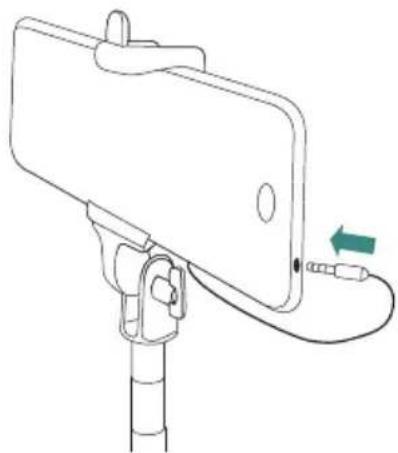
- Mount the phone into the clip (see instructions for Inserting Your Phone.)
- Connect the mini plug to the headphone jack on your phone.
natural_image
Line drawing of a selfie stick with attached cable and connector (no text or symbols)Pairing via Bluetooth (AC-SSB200 only)
To connect your smartphone to the AC-SSB200 via Bluetooth, follow these steps:
- Press the shutter button for approximately three seconds. The blue LED in the button will blink to indicate that it is in Bluetooth pairing mode.
- Open the settings on your phone and turn Bluetooth on. Your phone will enter discover mode. In a few seconds, you will see Revo AC-SSB200 appear in the device list.
- Select Revo AC-SSB200 in the device list. Your phone will indicate when it is paired, and the LED in the button will glow a steady blue to indicate that the AC-SSB200 is paired.
To disconnect your phone, press and hold the shutter button for three seconds. The LED will turn off, and your phone will indicate that it is not connected.
Adjusting the Selfie Stick
-
Loosen the locking knob, adjust the phone to the desired angle, and tighten the knob.
-
Hold the handle firmly and pull the camera and clip to extend the stick to the desired length.

natural_image
Simple line drawing of a selfie stick with a green arrow indicating upward motion (no text or symbols)Taking pictures
Once your smartphone has been paired via Bluetooth or plugged into the Selfie Stick, you're ready to start taking pictures.
- Open the camera app on your phone.
- Press the shutter button on the handle of the Selfie Stick to take a picture.
Charging the battery (AC-SSB200 only)
A USB cable is included to recharge the battery in your Selfie Stick.
-
Plug the Micro USB connector into the Micro USB port on the base of the handle.
-
Plug the USB Standard-A connector into a powered USB port on a computer or USB charger. The LED indicator next to the Micro USB port will glow while the battery is recharging.
-
The LED will turn off when the battery is fully charged.
Note: The battery will operate for approximately 20 hours when fully charged. If you plan to use your Selfie Stick for an extended period of time, fully charge the battery before use.
This Revo product is warranted to the original purchaser to be free from defects in materials and workmanship under normal consumer use for a period of one (1) year from the original purchase date or thirty (30) days after replacement, whichever occurs later. The warranty provider's responsibility with respect to this limited warranty shall be limited solely to repair or replacement, at the provider's discretion, of any product that fails during normal use of this product in its intended manner and in its intended environment. Inoperability of the product or part(s) shall be determined by the warranty provider. If the product has been discontinued, the warranty provider reserves the right to replace it with a model of equivalent quality and function.
This warranty does not cover damage or defect caused by misuse, neglect, accident, alteration, abuse, improper installation or maintenance. EXCEPT AS PROVIDED HEREIN, THE WARRANTY PROVIDER MAKES NEITHER ANY EXPRESS WARRANTIES NOR ANY IMPLIED WARRANTIES, INCLUDING BUT NOT LIMITED TO ANY IMPLIED WARRANTY OF MERCHANTABILITY OR FITNESS FOR A PARTICULAR PURPOSE. This warranty provides you with specific legal rights, and you may also have additional rights that vary from state to state.
To obtain warranty coverage, contact the Revo Customer Service Department to obtain a return merchandise authorization ("RMA") number, and return the defective product to Revo along with the RMA number and proof of purchase. Shipment of the defective product is at the purchaser's own risk and expense.
For more information or to arrange service, visit www.revocinegear.com or call Customer Service at 212-594-2353.
Revo is a registered trademark of the Gradus Group. © 2015 Gradus Group LLC. All Rights Reserved.
Product warranty provided by the Gradus Group. www.gradusgroup.com


Brand : REVO
Model : AC-SSB200
Category : Camera tripod