Solar Car BT - Headphones Navitel - Free user manual and instructions
Find the device manual for free Solar Car BT Navitel in PDF.


| Product Type | Wireless Solar Headphones |
| Brand | Navitel |
| Model | Solar Car BT |
| Dimensions (approx.) | 180 x 160 x 80 mm |
| Weight (approx.) | 200 g |
| Power Source | Solar panel + USB-C charging |
| Battery Capacity | 500 mAh |
| Charging Time | 2-3 hours (USB-C) |
| Playback Time | Up to 30 hours |
| Bluetooth Version | 5.0 |
| Wireless Range | 10 meters |
| Noise Cancellation | Passive noise isolation |
| Microphone | Built-in, for hands-free calls |
| Solar Panel | Mounted on headband, charges in sunlight |
| Driver Diameter | 40 mm |
| Frequency Response | 20 Hz - 20 kHz |
| Impedance | 32 Ω |
| Controls | On-ear buttons for volume, calls, playback |
| Compatibility | All Bluetooth-enabled devices |
| Protection Rating | IPX4 (splash resistant) |
| Maintenance | Wipe with soft dry cloth; keep away from liquids |
| Safety Warnings | Do not expose to extreme heat; use only specified charger |
| Spare Parts / Repairability | Not available; device is non-repairable |
| Recommended Use | Outdoor activities, daily commute |
Frequently Asked Questions - Solar Car BT Navitel
User questions about Solar Car BT Navitel
0 question about this device. Answer the ones you know or ask your own.
Ask a new question about this device
Download the instructions for your Headphones in PDF format for free! Find your manual Solar Car BT - Navitel and take your electronic device back in hand. On this page are published all the documents necessary for the use of your device. Solar Car BT by Navitel.
USER MANUAL Solar Car BT Navitel
natural_image
Black NAVITEL car BT solar charging device with two earbuds (no visible text or symbols on the devices themselves)NAVITEL SOLAR CAR BT

NAVITEL
NAVITEL SOLAR CAR BT
2 | UŽIVATELSKÁ PŘÍRUČKA

NAVITEL
Popis
Multifunctional Bluetooth headset NAVITEL NAVITEL SOLAR CAR BT used with a cell phone and other supported devices.
Functions of the headset:
- answering or rejecting incoming calls;
- redialing (repeat last number);
- holding the call;
- playing the music;
• pairing with two devices; - voice notifications;
- charging by solar or USB.
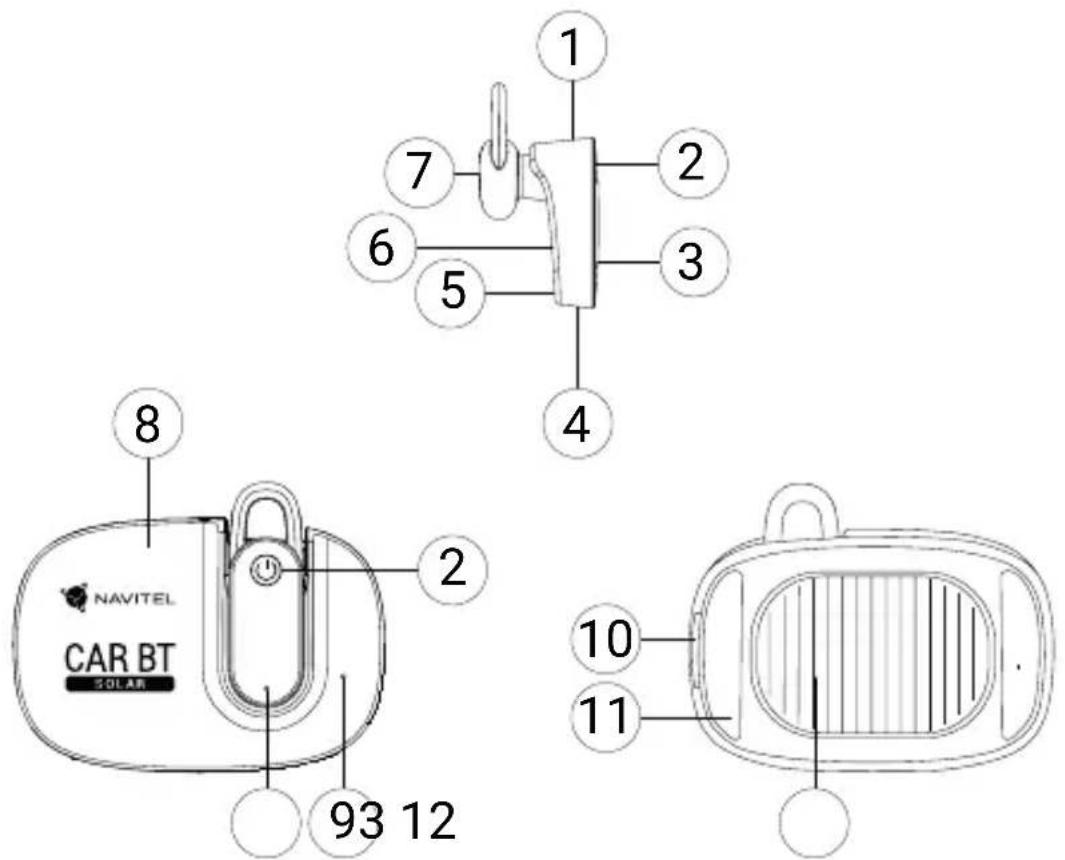
Device layout
(shown on the page 1)
- Earphone.
- Speaker.
- Control button.
- Charging station.
- Earphone indicators.
- Charging station indicator.
- Microphone.
- Micro-USB port.
- Magnet. 11. 3M sticker.
- Earphone contacts.
- Solar battery.
Package contents
- Charging station
- Earphone
• Cable micro-USB – USB - User manual
- Warranty card
Specifications
| Chip CSR8615 V4.1 | |
| Charging voltage 4.75 | ~ 5.75 V |
| Charging current 40 mA | |
| Earphone battery 40 mAh, 3.7 V | |
| Solar battery 500 mAh | |
| Working voltage 3.0 | ~ 4.2 V |
| Earphone standby time 16 hours | |
| Earphone talk time 2.5 hours | |
| Earphone charging time | 1 hour |
| Distortion ≤ 0.1% | |
| Frequency 2.40 | - 2.48 GHz |
| Protocol (profile) HSP / HFP / A2DP / AVRCP | |
| Receiving sensitivity -92 dBm | |
| Distance 10 m | |
| Port | micro-USB |
| Materials | environmental friendly ABS |
| Size | 72 × 56 × 28 mm |
Note: the specifications may change due to upgrades.

NAVITEL
NAVITEL SOLAR CAR BT
Power on and pairing
- To use solar energy, fix the charging station on the car windshield using 3M sticker.
- Tap the control button once to turn on the earphone. The voice notification "power on" will play, blue indicator will flash once. If there is no pairing, the earphone will enter pairing mode, blue and red earphone indicators will flash alternately. If the earphone will not connected to your cellphone within 10 minutes, the voice notification "power off" will play, earphone indicators will stop flashing, the earphone will turn off automatically.
- Tap the control button twice before pairing to change the voice notifications language. The corresponding voice notification will play.
- Turn on Bluetooth in the your cellphone settings and connect the "SO-05" device to pair the earphone with your cellphone. The voice notification "your device is connected" will play, blue earphone indicator will flash every 4 seconds. The next time you turn on the earphone, the pairing will be restored automatically (if it is detected).
- If your cellphone is out of range of earphone for more than 5 minutes, the pairing will be disconnected. The voice notification "your device is disconnected" will play, blue and red earphone indicators flash alternately. You can also unpairing manually by disconnected the "SO-05" device or turning off Bluetooth in the phone settings or by turning off the earphone. Connect the "SO-05" device in the cellphone settings to pair the earphone again.
- Press and hold the control button for 3 seconds to turn off the earphone. The voice notification "power off" will play, red earphone indicator will flash once.
- When the battery level is low, the voice notification "battery low" will play, the red earphone indicator will flash every 4 seconds.
- When you put the earphone to the charging station, charging will start automatically.
Pairing with two cellphones
- Pair the earphone with your first cellphone.
- Turn off Bluetooth in the first phone settings. If there is no pairing, the earphone will enter pairing mode, the voice notification "your device is connected" will play, blue and red earphone indicators will flash alternately.
- Pair the earphone with your second cellphone.
- Turn on Bluetooth of the first cellphone again, connect the device "SO-05" in the settings.
- Now the earphone pairing with two phones. You can repeat last number using the earphone button, it is possible only from the second phone.
Calls
-
Incoming call (the voice notification (phone number) will play, blue earphone indicator will flash 2 times per second):
-
if the earphone is on the charging station, remove it and tap the control button once to answer the call;
- if the earphone is out of the charging station, tap the control button once to answer the call;
- press the control button twice to answer the second call (holding the first call);
-
press and hold the control button for 2 seconds to reject the call.
-
During an active call:
-
tap the control button once to end the call (if there is second caller on hold, the connection will be switched to it automatically);
-
tap the control button twice to switched between the first call and the second call (when answer call and hold other call).
-
In standby mode or playing music, tap the control button twice to redialing (dial the last outgoing call).
Playing music
- Pair the earphone with your cellphone.
- Open the media player and start playback on your cellphone.
- Tap the control button to pause playback.
- Tap the control button again to continue playback.
Precautions
- Permissible ambient temperature in operating mode: 0 to +35 °C. Storage temperature: +5 to +45 °C. Relative humidity: 5% to 90% without condensation (25 °C).
- Put the device away from fire sources to avoid explosion or fire.
- Do not expose the device to physical impacts.
- Avoid contacting the device with sources of electromagnetic radiation.
- Strictly follow the laws and regulatory acts of the region where the device is used. This device can not be used for illegal purposes.
- Do not disassemble or repair device by yourself. In case of device failure, contact the service center.

NAVITEL
NAVITEL SOLAR CAR BT
Earphone indicators
| Earphone Indicators | |
| Turn on Blue indicator flash once | |
| Turn off Red indicator flash once | |
| Power off Indicator is off | |
| Pairing mode | Blue and red indicators flash alternately |
| Connected to cellphone | Blue indicator flash every 4 seconds |
| Incoming call | Blue indicator flash 2 times per second |
| Outgoing call (dial the number) | Blue indicator flash 2 times per second |
| During an active call | Blue indicator flash every 8 seconds |
| Playing music | Blue indicator flash every 8 seconds |
| Charging Red indicator is on | |
| Finishing the charging | Blue indicator is on about 2 minutes |
| Low battery | Red indicator flash every 4 seconds |
Charging station indicator
| Charging station Indicator | |
| Earphone changing on charging station | Indicator is on |
| Earphone fully charged on charging station | Indicator is off |
| Earphone is out of the charging station | Indicator is off |
| Changing of the charging station from micro-USB | Indicator flash every 2 seconds |
Note: the charging station indicator turns off 30 seconds after the earphone is removed.
Voice notifications
- Power on
- Power off
- Your device is connected
- Your device is disconnected
- Low battery
NAVITEL s.r.o. hereby declares that the device NAVITEL SOLAR CAR BT is compatible with the European directive RED 2014/53/EU.
The full text of Declaration of conformity is available at the following internet address:
www.navitel.cz/en/declaration_of_conformity/car_bt
Opis
natural_image
Green spherical logo with three interlocking rings (no text or symbols)NAVITEL
Brand : Navitel
Model : Solar Car BT
Category : Headphones