
Lucky 55 - Smartphone MAJESTIC - Free user manual and instructions
Find the device manual for free Lucky 55 MAJESTIC in PDF.


| Product Type | Smartphone |
| Brand | MAJESTIC |
| Model | Lucky 55 |
| Dimensions | 10.3 (H) x 4.3 (L) x 1.3 (P) cm |
| Weight | 60g |
| Display | 1.77 inch color display (128x160 pixels) |
| Camera | 0.08 MP (160x120) camera |
| Battery | Rechargeable lithium battery, 500mAh |
| Power Adapter | Input: 100-240V AC 50/60Hz 200mA; Output: 5V DC 1000mA |
| Memory Card | Micro SD up to 32GB (not included) |
| SIM Card | Dual SIM (dual standby) |
| Network | GSM Quad-band 850/900/1800/1900 MHz |
| Connectivity | Bluetooth, FM Radio (requires earphones), 3.5mm audio jack, Micro USB |
| Multimedia | Audio player (MP3), Video player (3GP), FM radio, Sound recorder, Camera, Image viewer |
| Phonebook | Stores contacts on phone or SIM |
| Messages | SMS messaging with inbox, outbox, drafts, sent items, templates |
| Profiles | General, Silence, Meeting, Indoor, Outdoor (customizable ringtones, volume, vibration) |
| Data Transfer | USB Plug & Play support on Windows XP/Vista/7/8/10 |
| Languages | Multiple languages available (set via Settings > Phone settings > Language) |
| Security | PIN/PUK, phone lock, auto power on/off, restore factory settings (code 1234) |
Frequently Asked Questions - Lucky 55 MAJESTIC
User questions about Lucky 55 MAJESTIC
0 question about this device. Answer the ones you know or ask your own.
Ask a new question about this device
Download the instructions for your Smartphone in PDF format for free! Find your manual Lucky 55 - MAJESTIC and take your electronic device back in hand. On this page are published all the documents necessary for the use of your device. Lucky 55 by MAJESTIC.
USER MANUAL Lucky 55 MAJESTIC
CE
Contenuti
Supporto Dual SIM (dual standby)
Supporto Reti GSM Quadri Band 850/900/1800/1900Mhz

MAJESTIC
LUCKY 55
manual

CE
Contents
Start to Use ......26
Menu introductions ......29
Main menu ......29
1 Call logs ......29
2 Contacts ....30
3 Camera ....31
4 Multimedia ....31
5 Messaging ....32
6 Settings ....33
7 Profiles ....36
8 Applications ....36
TECHNICAL SPECIFICATIONS ....37
Keyboard instruction

| 1 | Receiver 7 | Numeric key | |
| 2 | Display 8 | Micro USB port | |
| 3 | Right softkey 9 | Audio jack | |
| 4 | Left softkey 10 | Mic | |
| 5 | call key | 11 | Camera |
| 6 | Hang up key | 12 | Speaker |
Start to Use
- Open the battery cover

- Put battery into the battery slot. Keep three metal points of battery facing downward and matching with the three
metal connection points on phone.

- Close the battery cover. Make sure that cover is completely matched and the cover matching sound could be heard.
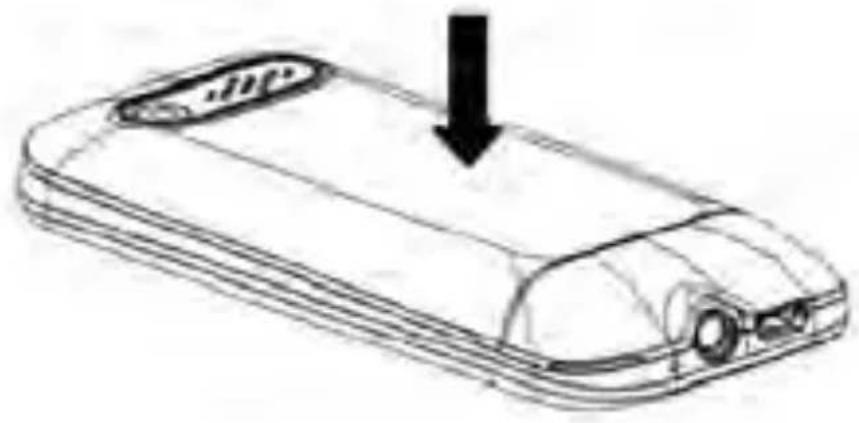
Remark: Shut down all devices and cut the connection with charger when removing
battery. Please use battery which is matched with this phone only
Insert/Take out SIM card
- Insert SIM card: Remove battery cover; Insert and slide the SIM card with the metal part facing downward until SIM card is completely inserted in right position.
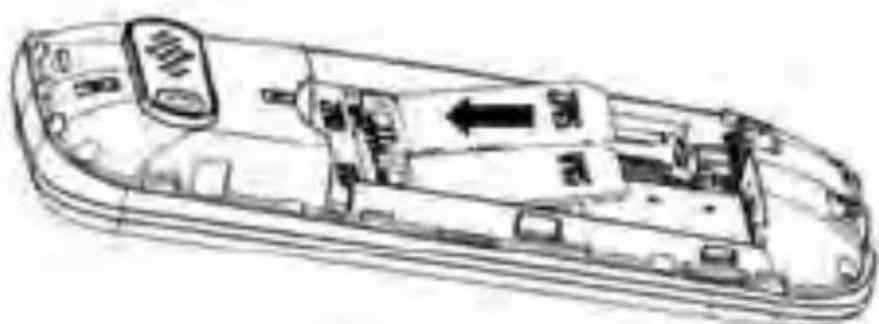
- Take out SIM card: Hold the notch of SIM card and lift it slightly down by the other hand to take card out.

Remark: this phone does not support SIM cards which only require UMTS connections.
Menu introductions
Main menu
1 Call logs
Missed calls : You can view all of missed calls
▶ Dialed calls: You can view all of dialed calls.
Received calls: You can view all of received calls.
Rejected calls: You can view all of rejected calls.
Delete all: Delete all call logs.
➢ Call timers: Record the time for last call, the total time of dialed, received calls and a chronology of all the calls.
2 Contacts
Options (Choose one contact)
New: Added a new phone to the phone book record, you can choose the storage mode for SIM card 1, and the SIM card 2 or cell phones.
View contact: Viewing contact details.
Edit: Edit selected contact.
Write message: Select a contact, send SMS.
▶ Call: To dial out selected contact.
Delete: Delete selected contact.
➢ Delete multiple: Delete selected several contacts.
▶ Copy: Copy contacts to phone from SIM.
Other:
- Speed dial: Set selected contact as speed dial on button 2-9.
- Memory status: Display the storage status for phone and SIM card.
3 Camera
You can press navigation button to take pictures when entering camera mode. In the submenu options there are different settings/effects to configure photos.
4 Multimedia
Multimedia functions
The phone has small built-in memory where to save pictures to be used as wallpaper in standby menu or as contact photo.
If you want to make further use of multimedia functions, it is necessary to insert a micro SD card (not supplied) where to save the contents.
➢ Camera: You can press navigation button to take pictures.
DV: You can press navigation button to start recording, then refer to the related menu for other options.
Note: it is necessary to insert micro SD card before shooting video.
Audio player: at first you should create a folder named “my music” in the memory card and copy MP3 files inside. Through
audio player it is possible to play the music copied in the micro SD card.
Video player: this function allows to play video in "3gp" format available on micro SD card (not supplied).
FM radio: by this menu it is possible to listen FM radio. (Note: FM radio requires stereo earphones inserted to be used as antenna) At first turn on auto scan will be done and it will save the channels. In the option menu you can find all the functions related to FM radio. To stop radio playback press navigation key.
➢ Recorder: this menu allows making recording through the built-in microphone.
5 Messaging
Write message: Write text messages (SMS).
- Options:
-
Send to: select the recipient to send the message.
-
Insert template: Insert phone SMS template (you can customize message templates).
-
Save as draft: it is possible to save a message in the draft folder to be sent later
- Exit: quit SMS edit interface.
Inbox: View message that has been received.
Outbox: View the SMS which are not sent yet.
Drafts: view the SMS saved in the draft box.
Sentbox: view the sent SMS.
Templates: View the SMS templates.
Voice mail server: manage voice mail messages (please contact your provider to check this service settings).
Message settings: You can set SMS style according to your favorite when sending.
Message capacity: You can view SMS storage status for SIM and Phone.
6 Settings
6.1 Call settings
Dual-SIM: You can set preferred SIM for calls and SMS, start or close air mode.
▶ Call barring: You can turn on or off Call barring feature to prohibit making any
outgoing calls or receiving any incoming calls..
➢ Hide ID: You can set if display own phone number on the phone display of the opposite side when calling. Please note this feature should be supported by local operator.
Answer mode: You can set answer mode here according to your preference.
6.2 Phone settings
Date&time: time/date format settings.
Language settings: Set the menu display and input language.
Shortcuts settings: You can set shortcut feature to enter certain menu by navigation keys.
Auto power on/off: You can set phone automatically power on or off on specified time.
Restore factory setting: You can restore factory setting and erase all saved data. The code is 1234.
6.3 Display
in this menu you can find all settings related to display, such as power on/off animation, wallpaper, contrast and backlight. It is also possible to adjust the keys backlight, changing the idle time before turning off.
6.4 Security
You can do some security settings such as turn on/off PIN/PUK (PUK2), change PIN code, turn on/off Phone lock and change phone password etc.
6.5 Connections:
Connect the network operator to obtain the following network services.
Bluetooth: With Bluetooth, you can make a wireless connection to other compatible devices, such as mobile phones, computers, headsets and car kits. You can use the Bluetooth to send images, video clips, music, sound clips and notes.
Network selection: Automatic mode is recommended. When Network selection mode is set to Automatic, the mobile phone will prefer the network where the SIM card
is registered. When Network selection mode is set to Manual, you need to select the network operator's network where the SIM card is registered.
7 Profiles
There are General, Silence, Meeting, Indoor,
Outdoor mode.
➢ Rename: You can rename the name of mode.
➢ Ring settings: You can set different ringtone and SMS tone.
Adjust volume: You can set different level of volume for incoming call, Message and Alarm etc.
➢ Ring type: You can set incoming call mode such as only ringtone, only vibration, silent or ringtone and vibrate.
Other alert rings: You can set other tones according to your preference such as key tone, battery low alert, dial tone.
8 Applications
My files: this function allows to manage all the files in the phone or in the memory card.
Use the options menu to display all the available actions.
▶ Calendar: You can view calendar here and create your schedule.
Calculator: You can use calculator by pressing digits directly and use navigation keys to modify the operation type.
▶ Alarm: You can create three alarms and set according to your preference.
SIM tools: in this menu you can find all the services stored by the provider on the SIM card.
TECHNICAL SPECIFICATIONS
Display color 1.77"(128*160pixel) 0.08 Mpixel camera Micro SD input (support up to 32GB cards) Dual SIM support (Dual standby) GSM quad band 850/900/1800/1900MHz supported Dial tone function FM radio Built-in Bluetooth Phones jack 3,5mm Multimedia files playback (JPG/MP3/ 3GP) Calculator/alarm/calendar functions
Sound recorder
Built-in mic
Built-in speaker
Support USB Plug & Play on Windows
XP/Vista/7/8/10
Rechargeable lithium battery 500mAh
AC 100/240V – 50/60Hz DC 5V/1000mA
adaptor
Dimensions: 10,3(H) × 4,3(L) × 1,3(P) cm
Weight: 60g
CE


- CONTENUTI
- MAJESTIC
- LUCKY 55
- MANUAL
- CONTENTS
- START TO USE
- INSERT/TAKE OUT SIM CARD
- MENU INTRODUCTIONS
- MAIN MENU
- 1 CALL LOGS
- 2 CONTACTS
- OPTIONS (CHOOSE ONE CONTACT)
- 3 CAMERA
- 4 MULTIMEDIA
- MULTIMEDIA FUNCTIONS
- 5 MESSAGING
- 6 SETTINGS
- 6.1 CALL SETTINGS
- 6.2 PHONE SETTINGS
- 6.3 DISPLAY
- 6.4 SECURITY
- 6.5 CONNECTIONS
- 7 PROFILES
- 8 APPLICATIONS
- TECHNICAL SPECIFICATIONS
Brand : MAJESTIC
Model : Lucky 55
Category : Smartphone