
ARL 878/A+ - Fridge IGNIS - Free user manual and instructions
Find the device manual for free ARL 878/A+ IGNIS in PDF.


| Product Type | Refrigerator with freezer compartment |
| Brand | IGNIS |
| Model | ARL 878/A+ |
| Automatic Defrost (Refrigerator) | Yes |
| Manual Defrost (Freezer) | Yes (when frost exceeds 3 mm) |
| Meat & Fish Box | Yes (depending on model) |
| Zero Degrees Box | Yes (depending on model) |
| LED Lighting | Yes (depending on model) |
| Temperature Alarm | Yes (audible, can be silenced) |
| Fan | Yes (for uniform air circulation) |
| Anti-bacterial/Anti-odour Filter | Yes (insert into fan) |
| Reversible Door | Yes (professionally done) |
| Standby Mode | Yes (special function) |
| Holiday Mode | Yes (Vacation special function) |
| Defrost Water Drain | Yes (with supplied tool) |
| Power Supply (UK/Ireland) | 220-240 V, 13 A fuse (BS 1363 plug) |
| Shelves | Adjustable glass shelves |
| Crisper Drawer | Yes (removable) |
Frequently Asked Questions - ARL 878/A+ IGNIS
User questions about ARL 878/A+ IGNIS
0 question about this device. Answer the ones you know or ask your own.
Ask a new question about this device
Download the instructions for your Fridge in PDF format for free! Find your manual ARL 878/A+ - IGNIS and take your electronic device back in hand. On this page are published all the documents necessary for the use of your device. ARL 878/A+ by IGNIS.
USER MANUAL ARL 878/A+ IGNIS
Connect the appliance to the mains power supply.
A beep may be emitted by some models, to indicate that the temperature alarm has intervened: press and hold the button to switch off acoustic alarms. As applicable, insert the anti-bacterial/anti-odour filter into the fan as indicated on the filter package.
Note: after switching on, the refrigerator needs approximately 4/5 hours to reach the correct temperature for storing a normal fridge load of food.
APPLIANCE MAINTENANCE AND CLEANING
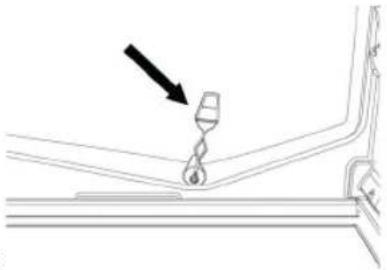
Clean the appliance regularly using a cloth and a solution of lukewarm water and neutral detergent specifically formulated for refrigerator interiors. Never use abrasive detergents. Clean inside the defrost water drain outlet on the rear wall of the refrigerator (near the fruit and vegetable crisper drawer) regularly, using the tool supplied with the appliance so as to ensure defrost water is removed correctly (see figure). Before all cleaning or maintenance procedures, unplug the appliance from the mains or disconnect the electricity supply.
natural_image
Technical line drawing of a mechanical component with a black arrow pointing to a hook (no text or symbols)CHANGING THE BULB OR LED (depending on the model)
Always unplug the refrigerator before replacing any light bulbs, then follow the relevant instructions in accordance with the type of lighting fitted in your appliance.
Only use bulbs of the same type, which can be requested from the After-Sales Service and authorised dealers.
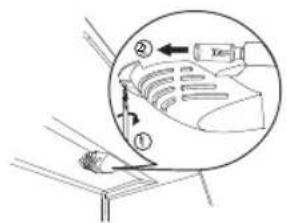
Lighting type I)
I. Loosen the screws and take off the lamp cover.
2. The lamp has a bayonet bulb and needs to be pulled out, not unscrewed, following the directions of the arrows as indicated.
3. After the new bulb has been inserted, replace the lamp cover and wait five minutes before plugging the appliance back in.
Lighting type 2)
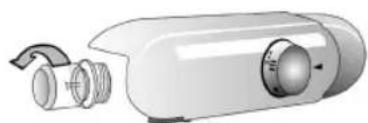
To remove the light bulb, turn anticlockwise as shown in the figure. Wait for 5 minutes before reconnecting the appliance.
natural_image
Illustration of a white cylindrical device with a handle and internal components, no text or symbols visible.Lighting type 3)
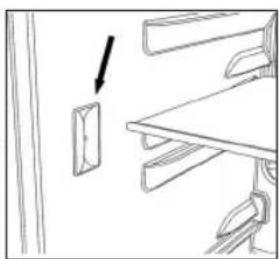
If the product has LED lighting which is in need of replacing, contact the After-Sales Service for assistance.
LED lights last longer than normal bulbs, they illuminate better and are more environmentally friendly
natural_image
Simple line drawing of a cabinet or shelf with an arrow pointing to a door (no text or symbols)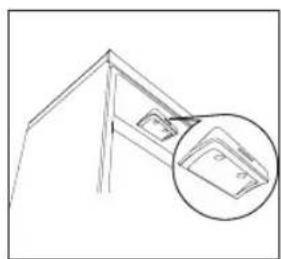
natural_image
Line drawing of a roof structure with an inset showing a detail of a component (no text or symbols)WHEN THE APPLIANCE IS NOT IN USE
Unplug the appliance from the mains, then empty, defrost (if necessary) and clean it. Leave the doors ajar, so that air can circulate inside the compartments. This will prevent the formation of mould and bad odours.
DURING BLACKOUTS
Keep the doors closed to allow the stored food to stay cold as long as possible. Do not refreeze partially thawed food. If the blackout persists, the blackout alarm may sound (depending on the model).
REFRIGERATOR COMPARTMENT
The refrigerator compartment is designed for the storage of fresh food and beverages.
Refrigerator compartment defrosting is completely automatic.
Droplets of water on the rear wall of the compartment indicate that the periodic automatic defrost cycle is in progress. The defrost water is automatically routed to a drain outlet and into a container from which it evaporates.
Depending on the model, the appliance may have a special box ("Meat & Fish" or "Zero Degrees") which is ideal for the storage of fresh meat and fish.
Important: refrigerator accessories must not be washed in a dishwasher.
Note: the ambient temperature, the door opening frequency and the position of the appliance may affect temperatures inside the two compartments. Set the temperature in accordance with these factors.
Note: when there is a lot of moisture inside the refrigerator compartment and on the glass shelves in particular, condensation may form. In this case, we recommend closing any liquid-filled containers (e.g.: saucepans full of stock), wrapping foods with a high liquid content (e.g.: vegetables) and setting the temperature to a warmer value.
Removing the crisper drawer (depending on the model)
If your product only has a crisper drawer, to facilitate its removal we recommend emptying (and, if necessary, removing) the two lower door trays beforehand.
Fan and anti-bacterial/anti-odour filter (depending on the model)
The fan will ensure uniform air circulation inside the compartment, for improved food storage and excess moisture reduction. Do not obstruct the fan inlet. The fan can be activated/deactivated manually (see Quick Start Guide); when activated, it works automatically as necessary.
FREEZER COMPARTMENT
The freezer compartment if res frozen food (for the period indicated on the package) and freezes fresh food. The amount of fresh food that can be frozen in 24 hours is shown on the rating plate; place the food in the freezer compartment (see Quick Start Guide), leaving leaving enough space around the packages to allow air to circulate. Refreezing partially thawed food is not recommended. It is important to wrap food so that no water, moisture, or vapour may penetrate.
To save energy and prolong the life of the appliance, make sure hot foods are never placed inside it.
Note: the ambient temperature, door opening frequency and position of the appliance can affect the temperatures inside the two compartments. Set the temperature based on these factors.
Making ice cubes
Fill the ice cube tray (where provided) 2/3 full and place it in the freezer compartment. Never use sharp or pointed objects to remove the ice.
Removing drawers (depending on model)
Pull the drawers all the way out, lift them up a little and remove. To create more space, the freezer compartment can also be used as follows:
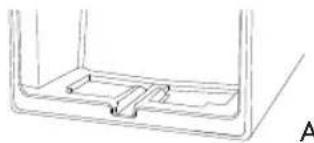
A) If the freezer compartment base resembles figure A, remove the upper drawers and/or lids. The lower drawer should be left in position. Make sure that, once the food has been placed on the racks/shelves, the door closes properly.
B) If the freezer compartment base resembles figure B, remove all drawers or lids. Make sure that, once the food has been placed on the racks/shelves, the door closes properly.
Removing the lid (if present)
Open the lid and remove the pin, as illustrated in figure C.
natural_image
Simple line drawing of a container with internal compartments and a side view labeled A (no text or symbols)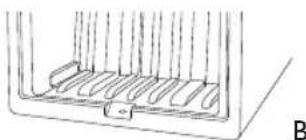
natural_image
Simple line drawing of a container with internal compartments and a side outlet (no text or symbols)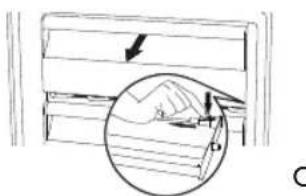
DEFROSTING THE FREEZER COMPARTMENT (depending on the model)
No Frost models do not need defrosting.
For other models, if frost forms in the freezer compartment, we recommend it is defrosted twice a year or whenever an excessive amount of frost has formed (3 mm thickness).
It is perfectly normal for frost to form.
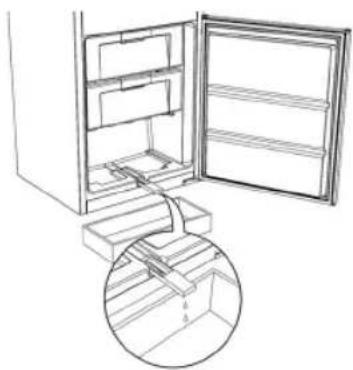
The amount of frost which forms and the rate at which it builds up depends on room temperature and humidity, and on how often the door is opened. To defrost, unplug the appliance and remove all foodstuffs. Leave the door ajar to allow the frost to melt. For products with a freezer compartment below the refrigerator compartment, the defrost water drain pipe can be removed (see figure) and a recipient placed underneath.
natural_image
Line drawing of an open refrigerator with a circular inset showing the interior structure (no text or symbols)After defrosting, replace the drain pipe, making sure that no water is left in it. Clean inside the freezer compartment and dry carefully.
Switch the appliance back on and place the food back inside.
MEAT & FISH BOX (depending on model)
The Meat & Fish box was designed specially to keep foods fresher for longer, without altering nutritional values or original freshness.
Do not store fruit or vegetables in this box, as the temperature may drop below 0^ C, causing water contained in the food to freeze.
natural_image
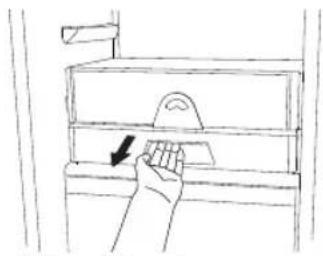
Hand placing a small object into a filing cabinet drawer (no text or symbols visible)Temperature Adjustment
The temperature inside the Meat & Fish box is indicated by the position of the arm on the door of the box, and depends on the general temperature of the refrigerator compartment.
We recommend setting the temperature of the refrigerator compartment between +2° and +6°.
To work out if the temperature inside the Meat & Fish box is correct, refer to the pictures below:
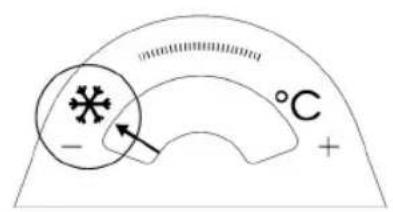
When the arm points to the left, you need to raise the temperature in the refrigerator compartment.
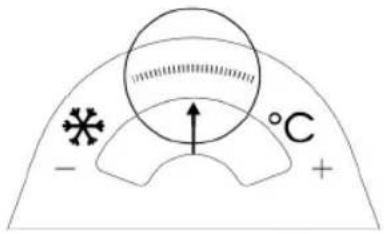
When the arm is in the middle, the temperature is ok.
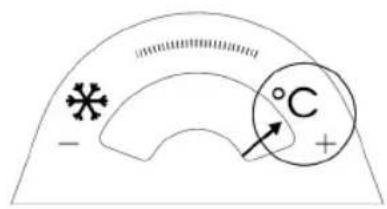
When the arm points to the right, you need to lower the temperature in the refrigerator compartment.
Important: when the function is activated and foods with a high water content are present, condensation may form on the shelves. In this case, disable the function temporarily.
Removing the Meat & Fish compartment:
To ensure correct operation of the product, adequate preservation of food and to optimise energy consumption, it is advisable not to remove the Meat & Fish compartment if the symbol (see Quick Guide) is not present on the control panel. In all other cases, the Meat & Fish compartment can be removed to obtain more space inside the refrigerator.
Proceed as follows:
I. Remove the compartment drawer (Figure 1).
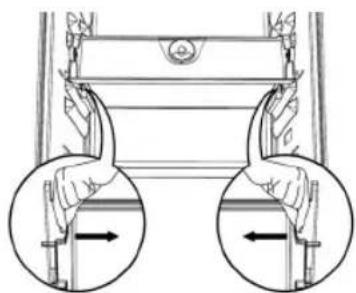
2. Remove the drawer cover by releasing the bottom side clips (Figure 2).
To reinstate the Meat & Fish compartment, make sure to refit the drawer cover before inserting the drawer and reactivating operation.
- Press the "Meat & Fish compartment function" button on the control panel for 3 seconds, until the yellow indicator goes off.
To optimise energy consumption, it is advisable to deactivate the Meat & Fish compartment and remove its components (except the shelf above the crisper drawers).
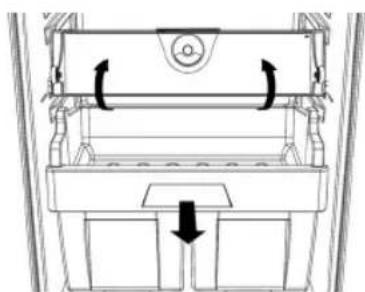
natural_image
Technical line drawing of a mechanical assembly with arrows indicating motion (no text or symbols)Fig. I
natural_image
Diagram of a mechanical device with two hands holding arrows, showing internal components (no text or symbols)Fig. 2
"ZERO DEGREES" BOX (depending on the model)
The "Zero Degrees" box is specifically designed to maintain a low temperature and a suitable humidity level, in order to keep foods fresher for longer (e.g. meat, fish, fruit and winter vegetables).
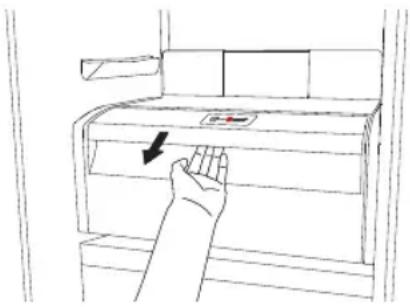
Activating and deactivating the box
The temperature inside the box, when active, is approximately 0^ .
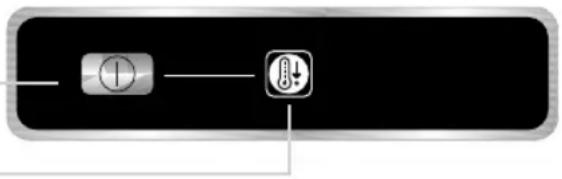
To activate the compartment, press the button shown in the figure for more than 1 second, until the symbol lights up
The symbol lit indicates that the compartment is functioning. Press the button again for more than 1 second to deactivate the compartment
natural_image
Pure electrical circuit lines without any symbolsThe following factors are vital for the "Zero Degrees" box to work properly:
- the refrigerator compartment must be switched on
- the temperature of the refrigerator compartment must be between +2°C and +6°C
- the box must be inserted to enable activation
- no special functions must have been selected (Standby, Cooling-Off, Vacation – where applicable).
If one of these special functions has been selected, the "Zero Degrees" box must be deactivated manually, and any fresh food inside it removed. If manual deactivation does not take place, the box will be deactivated automatically after 8 hours.
Note:
- if the symbol does not light up when the box is activated, check that the box is properly inserted; if the problem persists, contact your nearest authorized After-sales Service
- if the box is active and the drawer open, the symbol on the control panel may be deactivated automatically. If the drawer is inserted, the symbol will become active again
- irrespective of the state of the box, a slight noise may be heard: this is normal and is not a cause for concern.
- when the box is not active, the temperature inside it depends on the general temperature inside the refrigerator compartment. In this case, we recommend it is used to store fruit and vegetables which are not sensitive to cold temperatures (fruits of the forest, apples, apricots, carrots, spinach, lettuce, etc.).
Important: If the function is activated and food with high water content is present, condensate may form on the shelves. In this case, temporarily deactivate the function.
When placing small containers and food products on the top shelf of the "zero degrees" compartment, make sure they do not accidentally fall between the drawer and the back of the refrigerator compartment
Removing the "Zero Degrees" box:
The "Zero Degrees" box can be removed to create more space inside the refrigerator. In this case proceed as follows:
- to facilitate removal, we recommend emptying (and if necessary, removing) the two lower door trays
- switch off the box
- pull out the drawer and the white plastic shelf underneath the box.
Note: the upper shelf and the side supports cannot be removed.
To restore "Zero Degrees" box operation, make sure you replace the white plastic shelf underneath the box before inserting the drawer and reactivating the function. To optimise energy consumption, we recommend you deactivate the "Zero Degrees" box and remove it.
Clean the box and all its parts regularly, using a cloth and a solution of warm water and neutral detergent specifically formulated for refrigerator interiors (take care not to immerse the white plastic shelf underneath the box in water).
Before cleaning the box (including the outside), remove the drawer so as to disconnect the box from the electricity supply.
Never use abrasive detergents.
AFTER-SALES SERVICE
Before contacting the After-Sales Service:
Switch the appliance on again to see if the problem has been solved. If it has not, unplug the appliance and wait for about an hour before switching on again.
If the appliance is still not working after you have gone through all the checks listed in the troubleshooting guide and switched it off then on again, contact the After-Sales Service to explain the problem and have the following information ready:
- the type of fault
- the model
- the type and serial number of the appliance (given on the rating plate)
- the Service number (the number after the word SERVICE on the rating plate inside the appliance)

0000 000 00000
Note:
the door opening direction can be changed. If this operation is performed by the After-Sales Service it is not covered by the warranty.
ELECTRICAL CONNECTION FOR GREAT BRITAIN AND IRELAND ONLY
Warning - this appliance must be earthed
Fuse replacement
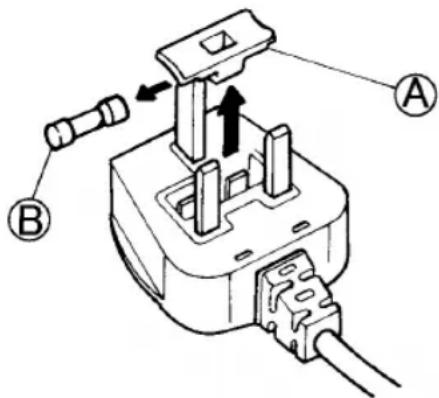
If the mains lead of this appliance is fitted with a BS I363A
13amp fused plug, to change a fuse in this type of plug use an A.S.T.A. approved fuse to BS 1362 type and proceed as follows:
I. Remove the fuse cover (A) and fuse (B).
2. Fit replacement I3A fuse into fuse cover.
3. Refit both into plug.
Important:
The fuse cover must be refitted when changing a fuse and if the fuse cover is lost the plug must not be used until a correct replacement is fitted. Correct replacement are identified by the colour insert or the colour embossed in words on the base of the plug. Replacement fuse covers are available from your local
For the Republic of Ireland only
The information given in respect of Great Britain will frequently apply, but a third type of plug and socket is also used, the 2-pin, side earth type.
Socket outlet / plug (valid for both countries)
If the fitted plug is not suitable for your socket outlet, please contact After-sales Service for further instruction. Please do not attempt to change plug yourself. This procedure needs to be carried out by a qualified technician in compliance with the manufactures instructions and current standard safety regulations.
- APPLIANCE MAINTENANCE AND CLEANING
- CHANGING THE BULB OR LED (depending on the model)
- Lighting type I)
- Lighting type 2)
- Lighting type 3)
- WHEN THE APPLIANCE IS NOT IN USE
- DURING BLACKOUTS
- REFRIGERATOR COMPARTMENT
- FREEZER COMPARTMENT
- Making ice cubes
- Removing drawers (depending on model)
- Removing the lid (if present)
- DEFROSTING THE FREEZER COMPARTMENT (depending on the model)
- It is perfectly normal for frost to form.
- MEAT & FISH BOX (depending on model)
- Temperature Adjustment
- Removing the Meat & Fish compartment:
- "ZERO DEGREES" BOX (depending on the model)
- Activating and deactivating the box
- Note:
- Removing the "Zero Degrees" box:
- AFTER-SALES SERVICE
- Before contacting the After-Sales Service:
- ELECTRICAL CONNECTION FOR GREAT BRITAIN AND IRELAND ONLY
- Warning - this appliance must be earthed
- Fuse replacement
- Important:
- For the Republic of Ireland only
- Socket outlet / plug (valid for both countries)
Brand : IGNIS
Model : ARL 878/A+
Category : Fridge