
DEH-S1250UB - Car stereo PIONEER - Free user manual and instructions
Find the device manual for free DEH-S1250UB PIONEER in PDF.


| Product Type | Car Stereo / CD Receiver |
| Model | Pioneer DEH-S1250UB |
| Dimensions (DIN Chassis) | 178 mm × 50 mm × 165 mm |
| Dimensions (DIN Nose) | 188 mm × 58 mm × 17 mm |
| Weight | 1 kg |
| Rated Power Source | 14.4 V DC (allowable 12.0 V to 14.4 V DC) |
| Grounding System | Negative type |
| Maximum Current Consumption | 10.0 A |
| Maximum Power Output (4 speakers) | 50 W × 4 ch (4 Ω) |
| Maximum Power Output (with subwoofer) | 50 W × 2 ch (4 Ω) + 70 W × 1 ch (2 Ω) |
| Continuous Power Output | 22 W × 4 (50 Hz – 15,000 Hz, 5% THD, 4 Ω) |
| Load Impedance | 4 Ω to 8 Ω (allowable) |
| CD Player System | Compact disc audio system, signal-to-noise ratio 94 dB (1 kHz) |
| USB Standard | USB 2.0 full speed, max current supply 1 A, supports MSC, MTP, AOA 2.0 |
| File Systems Supported (USB) | FAT12, FAT16, FAT32 |
| FM Tuner Frequency Range | 87.5 MHz to 108.0 MHz |
| FM Usable Sensitivity | 11 dBf (1.0 μV/75 Ω, mono, S/N: 30 dB) |
| AM Tuner Frequency Range | 531 kHz to 1,602 kHz (9 kHz step) or 530 kHz to 1,640 kHz (10 kHz step) |
| Bluetooth | Not supported (model DEH-S1250UB) |
| Built-in Amplifier | MOSFET 50 W × 4 (max) |
| Equalizer | 5-Band Graphic EQ (80 Hz/250 Hz/800 Hz/2.5 kHz/8 kHz), ±12 dB adjustment |
| Subwoofer Control | Monaural output, adjustable frequency (50–200 Hz), slope (-12/-24 dB/oct), gain, phase |
| Front/Rear Preamp Outputs | 2.0 V max (RCA) |
| Safety Classification | Class 1 laser product (IEC 60825-1:2014) |
| Maintenance | Clean discs with soft cloth; avoid moisture; disconnect battery before installation |
| Spare Parts Included | Trim ring, mounting sleeve, power cord, remote control, extraction keys, screws |
| Repair Service | Contact dealer or authorized Pioneer Service Station |
| User Manual | Free download at pioneer-mea.com |
Frequently Asked Questions - DEH-S1250UB PIONEER
User questions about DEH-S1250UB PIONEER
0 question about this device. Answer the ones you know or ask your own.
Ask a new question about this device
Download the instructions for your Car stereo in PDF format for free! Find your manual DEH-S1250UB - PIONEER and take your electronic device back in hand. On this page are published all the documents necessary for the use of your device. DEH-S1250UB by PIONEER.
USER MANUAL DEH-S1250UB PIONEER
About the Operation manual
This guide is intended to guide you through the basic functions of this unit.
For details, please refer to the Operation manual stored on the website.
https://pioneer-mea.com/en/

Before You Start
Thank you for purchasing this PIONEER product
To ensure proper use, please read through this manual before using this product. It is especially important that you read and observe WARNINGs and CAUTIONs in this manual. Please keep the manual in a safe and accessible place for future reference.
WARNING
- Do not attempt to install or service this product by yourself. Installation or servicing of this product by persons without training and experience in electronic equipment and automotive accessories may be dangerous and could expose you to the risk of electric shock, injury or other hazards.
- Do not attempt to operate the unit while driving. Make sure to pull off the road and park your vehicle in a safe location before attempting to use the controls on the device.
CAUTION: USE OF CONTROL OR ADJUSTMENT OR PERFORMANCE OF PROCEDURES OTHER THAN THOSE SPECIFIED HEREIN MAY RESULT IN HAZARDOUS RADIATION EXPOSURE. CAUTION: THE USE OF OPTICAL INSTRUMENTS WITH THIS PRODUCT WILL INCREASE EYE HAZARD.
CAUTION
- Do not allow this unit to come into contact with moisture and/or liquids. Electrical shock could result. Also, damage to this unit, smoke, and overheating could result from contact with liquids.
• Always keep the volume low enough to hear outside sounds. - This product is evaluated in moderate and tropical climate condition under the Audio, video and similar electronic apparatus - Safety requirements, IEC 60065.
CAUTION
This product is a Class 1 laser product classified under the safety standard, IEC 60825-1:2014.
CLASS 1 LASER PRODUCT
If you experience problems
Should this unit fail to work properly, please contact your dealer or nearest authorized PIONEER Service Station.
Getting Started
Basic operation
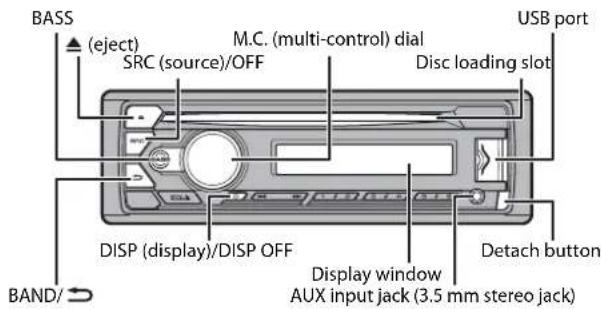
DEH-S1253UB/S1252UB/S1250UB
text_image
BASS (eject) SRC (source)/OFF M.C. (multi-control) dial Disc loading slot USB port DISP (display)/DISP OFF Display window AUX input jack (3.5 mm stereo jack) Detach button BAND/ ⊃Remote Control
text_image
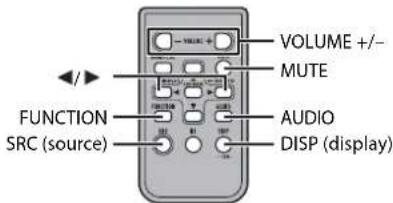
VOLUME +/- MUTE FUNCTION AUDIO SRC (source) DISP (display)Frequently used operations
| Purpose | Operation | |
| Head Unit Remote Control | ||
| Turn on the power* | Press SRC/OFF to turn on the power. Press and hold SRC/OFF to turn off the power. | Press SRC to turn on the power. Press and hold SRC to turn off the power. |
| Adjust the volume | Turn the M.C. dial. | Press VOLUME + or -. Press MUTE to mute the unit. Press MUTE again or press VOLUME + or - to unmute. |
| Select a source | Press SRC/OFF repeatedly. | Press SRC repeatedly. |
| Change the display information | Press DISP/DISP OFF repeatedly. Press and hold DISP/DISP OFF to turn off the display information. | Press DISP repeatedly. |
| Return to the previous display/list | Press BAND/Press / to select the next/previous folder. | |
| Return to the normal display from the menu | Press and hold BAND/ | - |
| Boost the bass level Press BASS. • You can select the bass level in [BASS BOOST]. | - | |
* When this unit's blue/white lead is connected to the vehicle's auto-antenna relay control terminal, the vehicle's antenna extends when this unit's source is turned on. To retract the antenna, turn the source off.
Setup menu
When you turn the ignition switch to ON after installation, [SET UP :YES] appears in the display.
1 Press the M.C. dial.
The setup menu disappears after 30 seconds of no operation. If you prefer not to set at this time, turn the M.C. dial to select [NO], then press to confirm.
2 Turn the M.C. dial to select the options, then press to confirm.
To proceed to the next menu option, you need to confirm your selection.
| Menu Item | Description |
| CLOCK SET | Set the clock. |
| FM STEP[100], [50] | Select the FM tuning step from 100 kHz or 50 kHz. |
| AM STEP[10], [9] | Select the AM tuning step from 10 kHz or 9 kHz. |
3[QUIT:YES] appears when all the settings have been made.
To return to the first item of the setup menu, turn the M.C. dial to select [QUIT:NO], then press to confirm.
4 Press the M.C. dial to confirm the settings.
Radio
Receiving preset stations
1 Press SRC/OFF to select [RADIO].
2 Press BAND/→ to select the band from [FM1], [FM2], [FM3], [AM], [SW1] or [SW2].
3 Press a number button (1/∧ to 6/⇐).
Best stations memory (BSM)
The six strongest stations are stored on the number buttons (1/∧ to 6/⇐).
1 After selecting the band, press the M.C. dial to display the main menu.
2 Turn the M.C. dial to select [FUNCTION], then press to confirm.
3 Turn the M.C. dial to select [BSM], then press to confirm.
To store stations manually
1 While receiving the station you want to store, press and hold one of the number buttons (1/∧ to 6/⇨) until it stops flashing.
CD/USB/AUX
Playing back
Disconnect headphones from the device before connecting it to the unit.
CD
1 Insert a disc into the disc loading slot with the label side up.
To eject a disc, stop playback first then press ▲
USB devices (including Android™)
1 Open the USB port cover.
2 Plug in the USB device using an appropriate cable.
MTP connection
A device installed with Android OS 4.0 or most of later versions can be connected to the unit via MTP, using the cable supplied with the device. However, depending on the connected device, OS version or the numbers of the files in the device, audio files/songs may not be able to be played back via MTP.
NOTE
If you use an MTP connection, [ANDROID WIRED] needs to be set to [MEMORY] in the SYSTEM settings.
AUX
1 Insert the stereo mini plug into the AUX input jack.
2 Press SRC/OFF to select [AUX] as the source.
Using Pioneer ARC APP

WARNING
Do not attempt to operate the application while driving. Make sure to pull off the road and park your vehicle in a safe location before attempting to use the controls on the application.
Making a connection with Pioneer ARC APP
NOTE
This function is compatible with a phone that runs Android 4.1 up to 7.1.2 and also supports AOA (Android Open Accessory) 2.0, but the compatibility depends on the smartphone.
1 Press the M.C. dial to display the main menu.
2 Turn the M.C. dial to select [SYSTEM], then press to confirm.
3 Turn the M.C. dial to select [ANDROID WIRED], then press to confirm.
4 Turn the M.C. dial to select [APP CONTROL], then press to confirm.
5 Turn the M.C. dial to select [P.APP AUTO ON], then press to confirm.
6 Turn the M.C. dial to select [ON], then press to confirm.
7 Connect this unit with the Android device via USB. Pioneer ARC APP on the device starts automatically.
Settings
You can adjust various settings in the main menu.
1 Press the M.C. dial to display the main menu.
2 Turn the M.C. dial to select one of the categories below, then press to confirm.
• FUNCTION settings
• AUDIO settings
• SYSTEM settings
• ILLUMINATION settings
• MIXTRAX settings
3 Turn the M.C. dial to select the options, then press to confirm.
Connections/Installation
Supplied part list
• This product (×1)
• Truss screw (5 mm × 9 mm) (×4)
- Trim ring (×1)
- Mounting sleeve (×1)
• Power cord (×1)
- Remote Control (×1)
- Extraction key (×2)
Connections

WARNING
- When speaker output is used by 4 channels, use speakers over 50 W (maximum input power) and between 4 Ω to 8 Ω (impedance value). Do not use 1 Ω to 3 Ω speakers for this unit.
- When rear speaker output is used by 2 Ω of subwoofer, use speakers over 70 W (maximum input power). * Please refer to connections for a connection method.
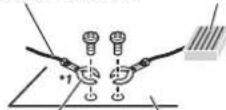
- The black cable is ground. When installing this unit or power amp (sold separately), make sure to connect the ground wire first. Ensure that the ground wire is properly connected to metal parts of the car's body. The ground wire of the power amp and the one of this unit or any other device must be connected to the car separately with different screws. If the screw for the ground wire loosens or falls out, it could result in fire, generation of smoke or malfunction.
Ground wire POWER AMP
Other devices
(Another electronic device in the car)
Metal parts of car's body
*1 Not supplied for this unit
Important
- When installing this unit in a vehicle without an ACC (accessory) position on the ignition switch, failure to connect the red cable to the terminal that detects operation of the ignition key may result in battery drain.


ACC position No ACC position
- Use this unit with a 12-volt battery and negative grounding only. Failure to do so may result in a fire or malfunction.
- To prevent a short-circuit, overheating or malfunction, be sure to follow the directions below.
- Disconnect the negative terminal of the battery before installation.
- Secure the wiring with cable clamps or adhesive tape. Wrap adhesive tape around wiring that comes into contact with metal parts to protect the wiring.
- Place all cables away from moving parts, such as the shift lever and seat rails.
-
Place all cables away from hot places, such as near the heater outlet.
-
Do not connect the yellow cable to the battery by passing it through the hole to the engine compartment.
- Cover any disconnected cable connectors with insulating tape.
- Do not shorten any cables.
- Never cut the insulation of the power cable of this unit in order to share the power with other devices. The current capacity of the cable is limited.
- Use a fuse of the rating prescribed.
- Never wire the negative speaker cable directly to ground.
– Never band together negative cables of multiple speakers. - When this unit is on, control signals are sent through the blue/white cable. Connect this cable to the system remote control of an external power amp or the vehicle's auto-antenna relay control terminal (max. 300 mA 12 V DC). If the vehicle is equipped with a glass antenna, connect it to the antenna booster power supply terminal.
- Never connect the blue/white cable to the power terminal of an external power amp. Also, never connect it to the power terminal of the auto antenna. Doing so may result in battery drain or a malfunction.
- The graphical symbol placed on the product means direct current.
- The function and audio settings other than the settings of steering wheel remote terminal and RCA pre-outs are stored in memory if the unit is disconnected from power supply.
This unit
DEH-S1253UB
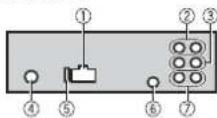
DEH-S1252UB/S1250UB
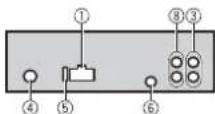
i Power cord input
② Rear output
③ Front output
④ Antenna input
⑤ Fuse (10 A)
⑥ Wired remote input
Hard-wired remote control adapter can be connected (sold separately).
⑦ Subwoofer output
⑧ Rear output or subwoofer output
Power cord
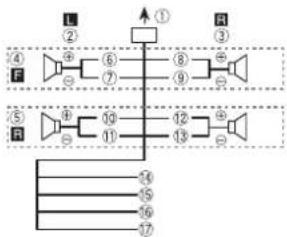
Perform these connections when not connecting a rear speaker lead to a subwoofer.
flowchart
graph TD
    A["1"] --> B["2"]
    B --> C["3"]
    C --> D["4"]
    D --> E["5"]
    E --> F["6"]
    F --> G["7"]
    G --> H["8"]
    H --> I["9"]
    I --> J["10"]
    J --> K["11"]
    K --> L["12"]
    L --> M["13"]
    M --> N["14"]
    N --> O["15"]
    O --> P["16"]
    P --> Q["17"]
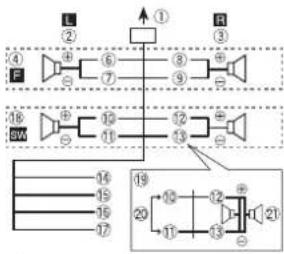
Perform these connections when using a subwoofer without the optional amplifier.
flowchart
graph TD
    subgraph L
        A["①"] --> B["②"]
        C["③"] --> D["④"]
        E["⑥"] --> F["⑦"]
        G["⑧"] --> H["⑨"]
        I["⑩"] --> J["⑪"]
        K["⑫"] --> L["⑬"]
        M["⑬"] --> N["⑭"]
    end
    subgraph R
        O["③"] --> P["④"]
        Q["⑤"] --> R["⑥"]
        S["⑦"] --> T["⑧"]
        U["⑨"] --> V["⑩"]
        W["⑪"] --> X["⑫"]
        Y["⑬"] --> Z["⑭"]
    end
    subgraph SW
        AA["④"] --> AB["⑤"]
        AC["⑥"] --> AD["⑦"]
        AE["⑧"] --> AF["⑨"]
        AG["⑩"] --> AH["⑪"]
        AI["⑬"] --> AJ["⑭"]
        AK["⑮"] --> AL["⑯"]
        AM["⑯"] --> AN["⑰"]
        AO["⑱"] --> AP["⑲"]
        AQ["⑲"] --> AR["⑳"]
        AS["㉑"] --> AT["㉒"]
    end
    A --> 6
    6 --> 8
    8 --> 9
    9 --> 10
    10 --> 12
    12 --> 13
    13 --> 14
    14 --> 15
    15 --> 16
    16 --> 17
    17 --> 18
    18 --> 19
    19 --> 20
    20 --> 21
    21 --> 22
    22 --> 23
    23 --> 24
    24 --> 25
    25 --> 26
    26 --> 27
    27 --> 28
    28 --> 29
    29 --> 30
    30 --> 31
    31 --> 32
    32 --> 33
    33 --> 34
    34 --> 35
    35 --> 36
    36 --> 37
    37 --> 38
    38 --> 39
    39 --> 40
    40 --> 41
    41 --> 42
    42 --> 43
    43 --> 44
    44 --> 45
    45 --> 46
    46 --> 47
    47 --> 48
    48 --> 49
    49 --> 50
    50 --> 51
    51 --> 52
    52 --> 53
    53 --> 54
    54 --> 55
    55 --> 56
    56 --> 57
    57 --> 58
    58 --> 59
    59 --> 60
    60 --> 61
    61 --> 62
    62 --> 63
    63 --> 64
    64 --> 65
    65 --> 66
    66 --> 67
    67 --> 68
    68 --> 69
    69 --> 70
    70 --> 71
    71 --> 72
    72 --> 73
    73 --> 74
    74 --> 75
    75 --> 76
    76 --> 77
    77 --> 78
    78 --> 79
    79 --> 80
    80 --> 81
    81 --> 82
    82 --> 83
    83 --> 84
    84 --> 85
    85 --> 86
    86 --> 87
    87 --> 88
    88 --> 89
    89 --> 90
Important
In the case of above, two 4 Ω
subwoofers wired in parallel will represent a 2 Ω load.
① To power cord input
② Left
③ Right
④ Front speaker
⑤ Rear speaker
⑥ White
⑦ White/black
⑧ Gray
⑨ Gray/black
⑩ Green
⑪ Green/black
⑫ Violet
⑬ Violet/black
⑭ Black (chassis ground)
Connect to a clean, paint-free metal location.
15 Yellow
Connect to the constant 12 V supply terminal.
16 Red
Connect to terminal controlled by the ignition switch (12 V DC).
17 Blue/white
Connect to the system control terminal of the power amp or auto-antenna relay control terminal (max. 300 mA 12 V DC).
18 Subwoofer (4 Ω)
19 When using a subwoofer of 2 Ω, be sure to connect the subwoofer to the violet and violet/black leads of this unit. Do not connect anything to the green and green/black leads.
⑳ Not used.
② Subwoofer (4 Ω) × 2
NOTE
Change the initial menu of this unit. Refer to [REAR-SP]/[SP-P/O MODE]. The subwoofer output of this unit is monaural.
Power amp (sold separately)
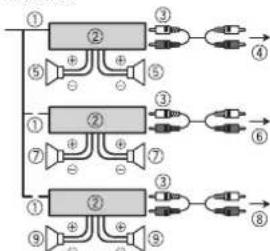
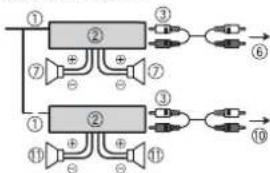
Perform these connections when using the optional amplifier.
DEH-S1253UB
flowchart
graph TD
    A["①"] --> B["②"]
    B --> C["③"]
    C --> D["④"]
    A --> E["⑤"]
    E --> F["⊕"]
    F --> G["⊕"]
    G --> H["⑤"]
    I["①"] --> J["②"]
    J --> K["③"]
    K --> L["⑥"]
    I --> M["⑦"]
    M --> N["⊕"]
    N --> O["⊕"]
    O --> P["⑦"]
    Q["①"] --> R["②"]
    R --> S["③"]
    S --> T["⑧"]
    Q --> U["⑨"]
    U --> V["⊕"]
    V --> W["⑨"]
DEH-S1252UB/S1250UB
flowchart
graph TD
    A["①"] --> B["②"]
    B --> C["③"]
    B --> D["⑦"]
    B --> E["⑦"]
    F["①"] --> G["②"]
    G --> H["③"]
    G --> I["⑪"]
    G --> J["⑪"]
    K["⑥"] --> L["→"]
    M["⑩"] --> N["→"]
① System remote control
Connect to blue/white cable.
② Power amp (sold separately)
③ Connect with RCA cables (sold separately)
④ To rear output
⑤ Rear speaker
⑥ To front output
⑦ Front speaker
⑧ To subwoofer output
⑨ Subwoofer
⑩ To rear output or subwoofer output
⑪ Rear speaker or subwoofer
Installation
Important
- Check all connections and systems before final installation.
- Do not use unauthorized parts as this may cause malfunctions.
- Consult your dealer if installation requires drilling of holes or other modifications to the vehicle.
- Do not install this unit where:
- it may interfere with operation of the vehicle.
- it may cause injury to a passenger as a result of a sudden stop.
- The semiconductor laser will be damaged if it overheats. Install this unit away from hot places such as near the heater outlet.
- Optimum performance is obtained when the unit is installed at an angle of less than 60^ .
- When installing, to ensure proper heat dispersal when using this unit, make sure you leave ample space behind the rear panel and wrap any loose cables so they are not blocking the vents.


DIN mount installation
1 Insert the supplied mounting sleeve into the dashboard.
2 Secure the mounting sleeve by using a screwdriver to bend the metal tabs (90°) into place.
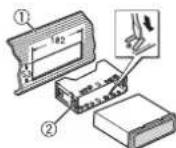
① Dashboard
② Mounting sleeve
• Make sure that the unit is installed securely in place. An unstable installation may cause skipping or other malfunctions.
When not using the supplied mounting sleeve
1 Determine the appropriate position where the holes on the bracket and the side of the unit match.
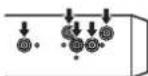
2 Tighten two screws on each side.
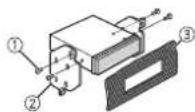
① Truss screw (5 mm × 9 mm)
② Mounting bracket
③ Dashboard or console
Removing the unit (installed with the supplied mounting sleeve)
1 Remove the trim ring.
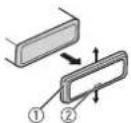
① Trim ring
② Notched tab
- Releasing the front panel allows easier access to the trim ring.
- When reattaching the trim ring, point the side with the notched tab down.
2 Insert the supplied extraction keys into both sides of the unit until they click into place.
3 Pull the unit out of the dashboard.
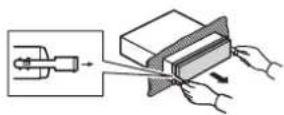
Additional Information
Troubleshooting
The display automatically returns to the normal display.
→No operations have been made for about 30 seconds.
Perform an operation.
The repeat play range changes unexpectedly.
→Depending on the repeat play range, the selected range may change when another folder or track is being selected or during fast forwarding/reversing. - Select the repeat play range again.
A subfolder is not played back.
→Subfolders cannot be played when [FLD] (folder repeat) is selected. - Select another repeat play range.
The sound is intermittent.
→You are using a device, such as a cellular phone, that may cause audible interference.
- Move electrical devices that may be causing the interference away from the unit.
Handling guidelines
Discs and player
- Use only discs that feature either of the following two logos.


- Use 12-cm discs.
- Use only conventional, fully circular discs.
• The following types of discs cannot be used with this unit:
-DualDiscs
- 8-cm discs: Attempts to use such discs with an adaptor may cause the unit to malfunction.
- Oddly shaped discs
- Discs other than CDs
– Damaged discs, including discs that are cracked, chipped or warped
- CD-R/RW discs that have not been finalized
- Do not write on or apply chemicals to the surface of the discs.
- To clean a CD, wipe the disc with a soft cloth outward from the center.
- Condensation may temporarily impair the player's performance. Let it rest for about one hour to adjust to a warmer temperature. Also, wipe any damp discs off with a soft cloth.
- When using discs that can be printed on label surfaces, check the instructions and the warnings of the discs. Depending on the discs, inserting and ejecting may not be possible. Using such discs may result in damage to this equipment.
- Do not attach commercially available labels or other materials to the discs.
- The discs may warp making the disc unplayable.
- The labels may come off during playback and prevent ejection of the discs, which may result in damage to the equipment.
USB storage device
- Connections via USB hubs are not supported.
- Firmly secure the USB storage device before driving. Do not let the USB storage device fall onto the floor, where it may
become jammed under the brake or accelerator pedal.
- Depending on the USB storage device, the following problems may occur.
- Operations may vary. - The storage device may not be recognized.
- Files may not be played back properly. - The device may cause audible interference when you are listening to the radio.
Specifications
General
Rated power source: 14.4 V DC (allowable voltage range: 12.0 V to 14.4 V DC)
Grounding system: Negative type Maximum current consumption: 10.0 A
Dimensions (W × H × D): DIN Chassis: 178 mm × 50 mm × 165 mm Nose: 188 mm × 58 mm × 17 mm D
Chassis: 178 mm × 50 mm × 165 mm Nose: 170 mm × 46 mm × 17 mm
Weight: 1 kg
Audio
Maximum power output:
- 50 ~W × 4 ~ch / 4 (for no subwoofer)
- 50 W × 2 ch/4 Ω + 70 W × 1 ch/2 Ω (for subwoofer)
Continuous power output:
22 W × 4 (50 Hz to 15 000 Hz, 5 %
THD, 4 Ω load, both channels driven)
Load impedance: 4 Ω (4 Ω to 8 Ω allowable)
Preout maximum output level: 2.0 V
Loudness contour: +10 dB (100 Hz), +6.5 dB (10 kHz) (volume: -30 dB)
Equalizer (5-Band Graphic Equalizer): Frequency: 80 Hz/250 Hz/800 Hz/2.5 kHz/8 kHz
Equalization range: ±12 dB (2 dB step) Subwoofer (mono):
Frequency: 50 Hz/63 Hz/80 Hz/100
Hz/125 Hz/160 Hz/200 Hz
Slope: -12 dB/oct, -24 dB/oct
Gain: +6 dB to -24 dB
Phase: Normal/Reverse
CD player
System: Compact disc audio system
Usable discs: Compact disc
Signal-to-noise ratio: 94 dB (1 kHz) (IEC-A network)
Number of channels: 2 (stereo)
MP3 decoding format: MPEG-1 & 2 Audio Layer 3
WMA decoding format: Ver. 7, 8, 9, 9.1, 9.2 (2 ch audio)
WAV signal format: Linear PCM (Non-compressed)
USB
USB standard specification: USB 2.0 full speed
Maximum current supply: 1.5 A (DEH-S1253UB), 1 A (DEH-S1252UB/S1250UB)
USB Protocol:
MSC (Mass Storage Class)
MTP (Media Transfer Protocol)
AOA (Android Open Accessory) 2.0
File system: FAT12, FAT16, FAT32
MP3 decoding format: MPEG-1 & 2 Audio Layer 3
WMA decoding format: Ver. 7, 8, 9, 9.1, 9.2 (2 ch audio)
WAV signal format: Linear PCM (Non-compressed)
FM tuner
Frequency range: 87.5 MHz to 108.0 MHz
Usable sensitivity: 11 dBf (1.0 μV/75 Ω, mono, S/N: 30 dB)
Signal-to-noise ratio: 72 dB (IEC-A network)
AM tuner
Frequency range: 531 kHz to 1602 kHz (9 kHz)
530 kHz to 1 640 kHz (10 kHz)
Usable sensitivity: 25 μV (S/N: 20 dB)
Signal-to-noise ratio: 62 dB (IEC-A network)
SW tuner
Frequency range:
2 300 kHz to 7 735 kHz (2 300 kHz to 2
495 kHz, 2 940 kHz to 4 215 kHz, 4 540
kHz to 5 175 kHz, 5 820 kHz to 6 455
kHz, 7 100 kHz to 7 735 kHz)
9 500 kHz to 21 975 kHz (9 500 kHz to
10 135 kHz, 11 580 kHz to 12 215 kHz,
13 570 kHz to 13 870 kHz, 15 100 kHz
to 15 735 kHz, 17 500 kHz to 17 985
kHz, 18 015 kHz to 18 135 kHz, 21 340 kHz to 21 975 kHz)
Usable sensitivity: 28 μV (S/N: 20 dB)
Signal-to-noise ratio: 62 dB (IEC-A network)
NOTE
Specifications and the design are subject
to modifications without notice.
關於操作手冊
A (DEH-S1252UB/S1250UB)
USB协定:
MSC(大量储存等级)
MTP(媒體傳輸通訊協定)
AOA (Android 開放附件) 2.0
2 300 kHz 至 7 735 kHz (2 300 kHz
(DEH-S1252UB/S1250UB)
:USB بروتوکول
(Mass Storage Class) MSC
(Media Transfer Protocol) MTP
2.0 (Android Open Accessory) AOA
FAT32 .FAT16 .FAT12 :نظام الملكات
MPEG-1 & 2 Audio:MP3 صيغةFK التشفر
Layer 3
9.2,9.1,9,8,7:WMA إصدار
(صوت ستريو)
(DEH-S1252UB/S1250UB) 1
:USB بروتکل
flowchart
graph TD
    A["Stage ①"] --> B["Speaker"]
    B --> C[" amplifiers"]
    C --> D[" Channel ②"]
    D --> E[" R1"]
    E --> F[" Channel ③"]
    F --> G[" Channel ④"]
    G --> H[" S1"]
    H --> I[" Channel ⑤"]
    I --> J[" Channel ⑥"]
    J --> K[" Channel ⑦"]
    K --> L[" Channel ⑧"]
    L --> M[" Channel ⑨"]
    M --> N[" Channel ⑩"]
    N --> O[" Channel ⑪"]
    O --> P[" Channel ⑫"]
    P --> Q[" Channel ⑬"]
    Q --> R[" Channel ⑭"]
    R --> S[" Channel ⑮"]
    S --> T[" Channel ⑯"]
    T --> U[" Channel ⑰"]
    U --> V[" Channel ⑱"]
    V --> W[" Channel ⑲"]
    W --> X[" Channel ⑳"]
مهم
The Ground Truth image displays a single, solid horizontal line. According to Rule 2 (UNDERSCORE & LINE RULES), this is a stylistic or background line, not a placeholder underscore. Therefore, the OCR result must ignore it. The provided OCR content is "____", which consists of four underscores. This is an incorrect interpretation of the line as a placeholder, violating the rule that stylistic lines must be ignored. The OCR has hallucinated text (underscores) where none should exist. Hence, the result is inconsistent with the Ground Truth.
[Non-Text]
AUX
https://pioneer-mea.com/en/

قبل از شروع به کار
Visit us on the World Wide Web at
http://pioneer.jp/group/index-e.html
Pioneer Gulf.FZE
http://www.pioneer-mea.com
Pioneer Electronics Australia. Pty.Ltd
http://www.pioneer.com.au/
Pioneer Electronics Asiacentre.Pte
http://www.pioneer.com.sg
Pioneer (HK) Ltd.
http://www.pioneerhongkong.com.hk
Pioneer High Fidelity Taiwan Co., Ltd.
http://www.pioneer-twn.com.tw
Pioneer International Latin America S.A.
http://www.pioneer-latin.com
PIONEER CORPORATION
28-8, Honkomagome 2-chome, Bunkyo-ku,
Tokyo 113-0021, Japan
PIONEER ELECTRONICS (USA) INC.
P.O. Box 1540, Long Beach, California 90801-1540, U.S.A.
TEL: (800) 421-1404
PIONEER EUROPE NV
Haven 1087, Keetberglaan 1, B-9120 Melsele, Belgium/Belgique
TEL: (0) 3/570.05.11
PIONEER ELECTRONICS ASIACENTRE PTE. LTD.
2 Jalan Kilang Barat, #07-01, Singapore 159346
TEL: 65-6378-7888
PIONEER ELECTRONICS AUSTRALIA PTY. LTD.
5 Arco Lane, Heatherton, Victoria, 3202 Australia
TEL:(03)9586-6300
PIONEER ELECTRONICS DE MÉXICO S.A. DE C.V.
Blvd. Manuel Ávila Camacho 138, 10 piso
Col.Lomas de Chapultepec, México, D.F. 11000
Tel: 52-55-9178-4270, Fax: 52-55-5202-3714
先鋒股份有限公司
台北市內湖區瑞光路407號8樓
電話:886-(0)2-2657-3588
先鋒電子(香港)有限公司
香港九龍長沙灣道909號5樓
電話:852-2848-6488