
DES-1016D - Network switch D-LINK - Free user manual and instructions
Find the device manual for free DES-1016D D-LINK in PDF.


| Product Type | Network Switch |
| Brand | D-Link |
| Model | DES-1016D |
| Number of Ports | 16 x 10/100Base-TX |
| Switching Capacity | 3.2 Gbps |
| MAC Address Table | 8K entries |
| Forwarding Rate | 2.38 Mpps |
| Jumbo Frame Support | Yes, up to 9,216 bytes |
| Switching Method | Store-and-forward |
| Standards | IEEE 802.3, 802.3u, 802.3x |
| Power Input | 100-240V AC, 50-60Hz |
| Power Consumption | 6.5W (max) |
| Dimensions (W x D x H) | 280 x 126 x 44 mm |
| Weight | 0.8 kg |
| Operating Temperature | 0°C to 40°C |
| Storage Temperature | -10°C to 70°C |
| Humidity (Operating) | 10% to 90% (non-condensing) |
| Mounting | Desktop or wall-mountable |
| LED Indicators | Power, Link/Activity per port |
| Fanless Design | Yes, silent operation |
| Package Contents | Switch, power adapter, quick start guide |
Frequently Asked Questions - DES-1016D D-LINK
User questions about DES-1016D D-LINK
0 question about this device. Answer the ones you know or ask your own.
Ask a new question about this device
Download the instructions for your Network switch in PDF format for free! Find your manual DES-1016D - D-LINK and take your electronic device back in hand. On this page are published all the documents necessary for the use of your device. DES-1016D by D-LINK.
USER MANUAL DES-1016D D-LINK
Building Networks for People

RECYCLABLE
(May. 2005)
Ver. 1.02
P/N : 2907D1016D16004
TABLE OF CONTENTS
ABOUT THIS GUIDE ....1
PURPOSE....1
TERMS/USAGE....1
OVERVIEW OF THIS USER'S GUIDE .... 1
INTRODUCTION ......2
FAST ETHERNET TECHNOLOGY 2
SWITCHING TECHNOLOGY 3
FEATURES 4
UNPACKING AND SETUP ....5
UNPACKING....5
SETUP 5
DESKTOP INSTALLATION....6
RACK MOUNTING....6
IDENTIFYING EXTERNAL COMPONENTS......8
TECHNICAL SPECIFICATION ....10
ABOUT THIS GUIDE
Congratulations on your purchase of the DES-1016D 16-port 10/100Mbps Auto-negotiation Fast Ethernet Switch. This device integrates 100Mbps Fast Ethernet and 10Mbps Ethernet network capabilities in a highly flexible package.
Purpose
This guide discusses how to install your DES-1016D.
Terms/Usage
In this guide, the term “Switch” (first letter upper case) refers to DES-1016D 16-port 10/100Mbps Fast Ethernet Switch, and “switch” (first letter lower case) refers to other Ethernet switches.
Overview of this User's Guide
Introduction. Describes the Switch and its features.
Unpacking and Installation. Helps you get started with the basic installation of the Switch.
Identifying External Components. Describes the front panel, rear panel and LED indicators of the Switch.
Technical Specifications. Lists the technical (general, physical and environmental, and performance) specifications of the Switch.
INTRODUCTION
This chapter describes the features of the DES-1016D and some background information about Ethernet/Fast Ethernet switching technology.
Fast Ethernet Technology
The growing importance of LANs and the increasing complexity of desktop computing applications are fueling the need for high performance networks. A number of high-speed LAN technologies have been proposed to provide greater bandwidth and improve client/server response times. Among them, 100BASE-T (Fast Ethernet) provides a non-disruptive, smooth evolution from the current 10BASE-T technology. The non-disruptive and smooth evolution nature, and the dominating potential market base, virtually guarantee cost-effective and high-performance Fast Ethernet solutions in the years to come.
100Mbps Fast Ethernet is a new standard specified by the IEEE 802.3 LAN committee. It is an extension of the 10Mbps Ethernet standard with the ability to transmit and receive data at 100Mbps, while maintaining the CSMA/CD Ethernet protocol. Since the 100Mbps Fast Ethernet is compatible with all other 10Mbps Ethernet environments, it provides a straightforward upgrade and takes advantage of the existing investment in hardware, software, and personnel training.
Switching Technology
Another approach to pushing beyond the limits of Ethernet technology is the development of switching technology. A switch bridges Ethernet packets at the MAC address level of the Ethernet protocol, transmitting among connected Ethernet or Fast Ethernet LAN segments.
Switching is a cost-effective way of increasing the total network capacity available to users on a local area network. A switch increases capacity and decreases network loading by dividing a local area network into different segments, which don't compete with each other for network transmission capacity.
The switch acts as a high-speed selective bridge between the individual segments. The switch, without interfering with any other segments, automatically forwards traffic that needs to go from one segment to another. By doing this the total network capacity is multiplied, while still maintaining the same network cabling and adapter cards.
For Fast Ethernet networks, a switch is an effective way of eliminating problems of chaining hubs beyond the “two-repeater limit.” A switch can be used to split parts of the network into different collision domains, making it possible to expand your Fast Ethernet network beyond the 205-meter network diameter limit for 100BASE-TX networks. Switches supporting both traditional 10Mbps Ethernet and 100Mbps Fast Ethernet are also ideal for bridging between the existing 10Mbps networks and the new 100Mbps networks.
Switching LAN technology is a marked improvement over the previous generation of network bridges, which were characterized by higher latencies. Routers have also been used to segment local area networks, but the cost of a router, the setup and maintenance required make routers relatively impractical. Today switches are an ideal solution to most kinds of local area
Features
The DES-1016D is designed for easy installation and high performance in an environment where traffic on the network and the number of users increase continuously.
√ 16-port 10/100BASE Ethernet Switch with RJ-45 connectors
√ Supports Auto-negotiation of speed and duplex modes for each port
√ Supports Auto-MDI/MDI-X for each port
√ Wire speed reception and transmission
√ Store-and-Forward switching method
√ Integrated address Look-Up Engine, supports 8K absolute MAC addresses
√ Supports 160Kbytes RAM for data buffering
√ Front-panel diagnostic LEDs
√ Broadcast storm protection
√ IEEE 802.3x flow control for full-duplex
√ Back pressure flow control for half-duplex
UNPACKING AND SETUP
This chapter provides unpacking and setup information for the DES-1016D.
Unpacking
Open the shipping carton for the Switch and carefully unpack its contents. The carton should contain the following items:
√ One DES-1016D 16-port 10/100Mbps Fast Ethernet Switch
√ One AC power cord, suitable for your area's electrical power connections
√ Four rubber feet to be used for shock cushioning
√ Screws and two mounting brackets
√ Quick Installation Guide
√ This User's Guide
If any item is found missing or damaged, please contact your local reseller for replacement.
Setup
Please consider the following when setting up the Switch:
- The surface must support at least 5 kg.
- The power outlet should be within 1.42 meters (6 feet) of the device.
-
Visually inspect the power cord and see that it is secured fully to the AC power connector.
-
Make sure that there is proper heat dissipation from and adequate ventilation around the Switch. Do not place heavy objects on the Switch.
Desktop Installation
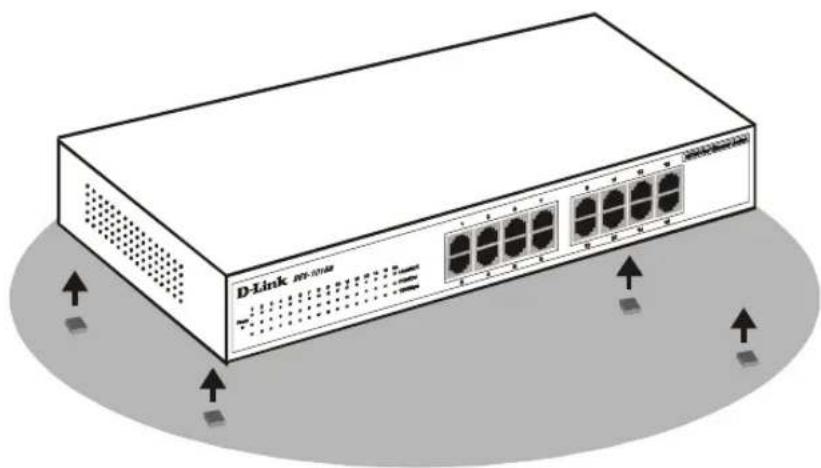
When installing the Switch on a desktop, the rubber feet included with the device must be attached first. Attach these cushioning feet on the bottom at each corner of the device. Allow enough ventilation space between the device and the objects around it.
natural_image
Illustration of a D-Link network switch device with multiple ports and ventilation slots (no text or symbols on the device body)Fast Ethernet Switch installed on a Desktop or Shelf
Rack Mounting
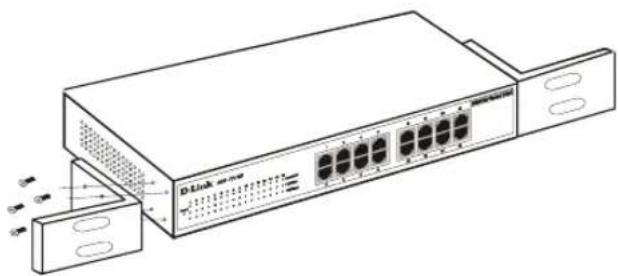
The DES-1016D can be mounted in an EIA standard-size, 19-inch rack, which can be placed in a wiring closet with other equipment. Attach the mounting brackets at the switch's front panel (one on each side), and secure them with the provided screws.
natural_image
Line drawing of a D-Link server rack with multiple ports and connectors (no text or symbols)Attaching the mounting brackets to the Switch
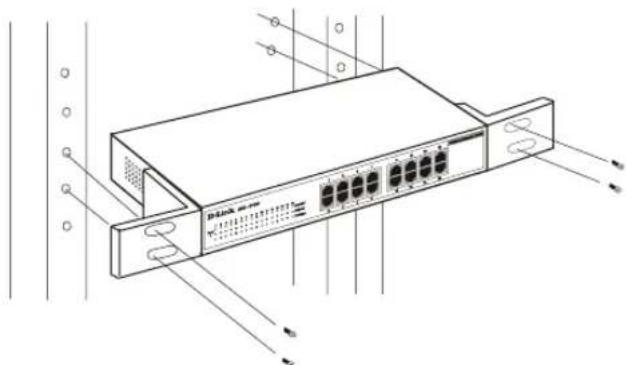
Then, use screws provided with the equipment rack to mount each switch in the rack.
natural_image
Technical line drawing of a network switch device with ports and connectors (no text or symbols)Installing the Switch in an equipment rack
This section identifies all the major external components of the DES-1016D. The figure below shows the front panels of the DES-1016D.

1. LED Indicator Panel
Refer to the detailed information about each of the DES-1016D's LED indicators.
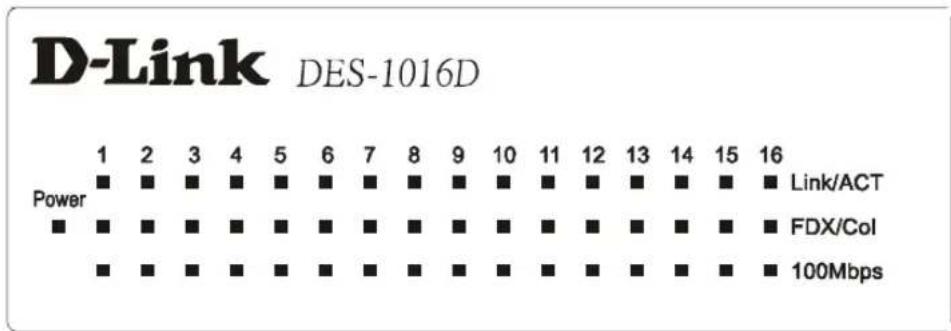
Power
This indicator lights green when the switch is receiving power; otherwise, it is off.
◆ Link / Act (Link/Activity)
This indicator lights on when the port is connected to a Fast Ethernet or Ethernet device; if the light is blinking, it indicates that data is being transmitted or received.
◆ FDX / Col (Full-duplex/Collision)
This LED indicator lights green when a respective port is in full duplex (FDX)
operation mode. Otherwise, it is blinking when collisions are occurring on the respective port in half duplex operation mode.
◆ 100Mbps
This LED indicator lights green when the port is connected to a 100Mbps Fast Ethernet station. Otherwise, the LED is off when the port is connected to a 10Mbps Ethernet device.
2. Twisted-Pair Ports
These ports support auto-negotiation for speeds of 10M or 100M, and operation modes of full or half duplex. They also support Auto-MDI/MDIX crossover detection function for giving a true “plug and play” capability. Just plug the network cable directly into the Switch. It makes no difference if the end node is a NIC (Network Interface Card,) a switch, or a hub.
TECHNICAL SPECIFICATION
| General | |
| Standards | IEEE 802.3 10BASE-T EthernetIEEE 802.3u 100BASE-TX Fast Ethernet |
| Protocol | CSMA/CD |
| Data Transfer Rate | Ethernet: 10Mbps (half duplex), 20Mbps (full-duplex)Fast Ethernet: 100Mbps (half duplex), 200Mbps (full- duplex) |
| Topology | Star |
| Network Cables | 10BASE-T: 2-pair UTP Cat. 3,4,5, EIA/TIA- 568 100-ohm STP100BASE-TX: 2-pair UTP Cat. 5, EIA/TIA-568 100-ohm STP |
| Number of Ports 16 x | 10/100Mbps Auto-MDI ports |
| Physical and Environmental | |
| AC inputs 100 to 240 | VAC, 50 or 60 Hz internal universal power supply |
| Power Consumption 6 | watts. (max.) |
| Temperature | Operating: 0° ~ 40°C, Storage: -10° ~ 70°C |
| Humidity Operating: | 10% ~ 90%, Storage: 5% ~ 90% |
| Dimensions | 280(W) × 180(D)× 44(H) mm |
| EMI: FCC Class A, CE | CE Mark Class A, VCCI Class A |
| Safety | CUL |
| Performance | |
| Transmits Method: | Store-and-forward |
| RAM Buffer: | 160Kbytes per device |
| Filtering Address Table: | 8K entries per device |
| Packet Filtering/Forwarding Rate: | 10Mbps Ethernet: 14,880/pps100Mbps Fast Ethernet: 148,800/pps |
| MAC Address Learning: | Automatic update |
Subject to the terms and conditions set forth herein, D-Link Systems, Inc. ("D-Link") provides this Limited Warranty:
• Only to the person or entity that originally purchased the product from D-Link or its authorized reseller or distributor, and
- Only for products purchased and delivered within the fifty states of the United States, the District of Columbia, U.S. Possessions or Protectorates, U.S. Military Installations, or addresses with an APO or FPO.
Limited Warranty: D-Link warrants that the hardware portion of the D-Link product described below ("Hardware") will be free from material defects in workmanship and materials under normal use from the date of original retail purchase of the product, for the period set forth below ("Warranty Period"), except as otherwise stated herein.
• Hardware (excluding power supplies and fans): Five (5) Years
• Power supplies and fans: One (1) Year
- Spare parts and spare kits: Ninety (90) days
The customer's sole and exclusive remedy and the entire liability of D-Link and its suppliers under this Limited Warranty will be, at D-Link's option, to repair or replace the defective Hardware during the Warranty Period at no charge to the original owner or to refund the actual purchase price paid. Any repair or replacement will be rendered by D-Link at an Authorized D-Link Service Office. The replacement hardware need not be new or have an identical make, model or part. D-Link may, at its option, replace the defective Hardware or any part thereof with any reconditioned product that D-Link reasonably determines is substantially equivalent (or superior) in all material respects to the defective Hardware. Repaired or replacement hardware will be warranted for the remainder of the original Warranty Period or ninety (90) days, whichever is longer, and is subject to the same limitations and exclusions. If a material defect is incapable of correction, or if D-Link determines that it is not practical to repair or replace the defective Hardware, the actual price paid by the original purchaser for the defective Hardware will be refunded by D-Link upon return to D-Link of the defective Hardware. All Hardware or part thereof that is replaced by D-Link, or for which the purchase price is refunded, shall become the property of D-Link upon replacement or refund.
Limited Software Warranty: D-Link warrants that the software portion of the product ("Software") will substantially conform to D-Link's then current functional specifications for the Software, as set forth in the applicable documentation, from the date of original retail purchase of the Software for a period of ninety (90) days ("Software Warranty Period"), provided that the Software is properly installed on approved hardware and operated as contemplated in its documentation. D-Link further warrants that, during the Software Warranty Period, the magnetic media on which D-Link delivers the Software will be free of physical defects. The customer's sole and exclusive remedy and the entire liability of D-Link and its suppliers under this Limited Warranty will be, at D-Link's option, to replace the non-conforming Software (or defective media) with software that substantially conforms to D-Link's functional specifications for the Software or to refund the portion of the actual purchase price paid that is attributable to the Software. Except as otherwise agreed by D-Link in writing, the replacement Software is provided only to the original licensee, and is subject to the terms and conditions of the license granted by D-Link for the Software. Replacement Software will be warranted for the remainder of the original Warranty Period and is subject to the same limitations and exclusions. If a material non-conformance is incapable of correction, or if D-Link determines in its sole discretion that it is not practical to replace the non-conforming Software, the price paid by the original licensee for the non-conforming Software will be refunded by D-Link; provided that the non-conforming Software (and all copies thereof) is first returned to D-Link. The license granted respecting any Software for which a refund is given automatically terminates.
Non-Applicability of Warranty: The Limited Warranty provided hereunder for Hardware and Software portions of D-Link's products will not be applied to and does not cover any refurbished product and any product purchased through the inventory clearance or liquidation sale or other sales in which D-Link, the sellers, or the liquidators expressly disclaim their warranty obligation pertaining to the product and in that case, the product is being sold "As-ls" without any warranty whatsoever including, without limitation, the Limited Warranty as described herein, notwithstanding anything stated herein to the contrary.
Submitting A Claim: The customer shall return the product to the original purchase point based on its return policy. In case the return policy period has expired and the product is within warranty, the customer shall submit a claim to D-Link as outlined below:
- The customer must submit with the product as part of the claim a written description of the Hardware defect or Software nonconformance in sufficient detail to allow D-Link to confirm the same, along with proof of purchase of the product (such as a copy of the dated purchase invoice for the product) if the product is not registered.
- The customer must obtain a Case ID Number from D-Link Technical Support at 1-877-453-5465, who will attempt to assist the customer in resolving any suspected defects with the product. If the product is considered defective, the customer must obtain a Return Material Authorization ("RMA") number by completing the RMA form and entering the assigned Case ID Number at https://rma.dlink.com/.
- After an RMA number is issued, the defective product must be packaged securely in the original or other suitable shipping package to ensure that it will not be damaged in transit, and the RMA number must be prominently marked on the outside of the package. Do not include any manuals or accessories in the shipping package. D-Link will only replace the defective portion of the product and will not ship back any accessories.
- The customer is responsible for all in-bound shipping charges to D-Link. No Cash on Delivery ("COD") is allowed. Products sent COD will either be rejected by D-Link or become the property of D-Link. Products shall be fully insured by the customer and shipped to D-Link Systems, Inc., 17595 Mt. Herrmann, Fountain Valley, CA 92708. D-Link will not be held responsible for any packages that are lost in transit to D-Link. The repaired or replaced packages will be shipped to the customer via UPS Ground or any common carrier selected by D-Link. Return shipping charges shall be prepaid by D-Link if you use an address in the United States, otherwise we will ship the product to you freight collect. Expedited shipping is available upon request and provided shipping charges are prepaid by the customer.
D-Link may reject or return any product that is not packaged and shipped in strict compliance with the foregoing requirements, or for which an RMA number is not visible from the outside of the package. The product owner agrees to pay D-Link's reasonable handling and return shipping charges for any product that is not packaged and shipped in accordance with the foregoing requirements, or that is determined by D-Link not to be defective or non-conforming.
What Is Not Covered: The Limited Warranty provided herein by D-Link does not cover: Products that, in D-Link's judgment, have been subjected to abuse, accident, alteration, modification, tampering, negligence, misuse, faulty installation, lack of reasonable care, repair or service in any way that is not contemplated in the documentation for the product, or if the model or serial number has been altered, tampered with, defaced or removed; Initial installation, installation and removal of the product for repair, and shipping costs; Operational adjustments covered in the operating manual for the product, and normal maintenance; Damage that occurs in shipment, due to act of God, failures due to power surge, and cosmetic damage; Any hardware, software, firmware or other products or services provided by anyone other than D-Link; and Products that have been purchased from inventory clearance or liquidation sales or other sales in which D-Link, the sellers, or the liquidators expressly disclaim their warranty obligation pertaining to the product. While necessary maintenance or repairs on your Product can be performed by any company, we recommend that you use only an Authorized D-Link Service Office. Improper or incorrectly performed maintenance or repair voids this Limited Warranty.
Disclaimer of Other Warranties: EXCEPT FOR THE LIMITED WARRANTY SPECIFIED HEREIN, THE PRODUCT IS PROVIDED "AS-IS" WITHOUT ANY WARRANTY OF ANY KIND WHATSOEVER INCLUDING, WITHOUT LIMITATION, ANY WARRANTY OF MERCHANTABILITY, FITNESS FOR A PARTICULAR PURPOSE AND NON-INFRINGEMENT. IF ANY IMPLIED WARRANTY CANNOT BE DISCLAIMED IN ANY TERRITORY WHERE A PRODUCT IS SOLD, THE DURATION OF SUCH IMPLIED WARRANTY SHALL BE LIMITED TO THE DURATION OF THE APPLICABLE WARRANTY PERIOD SET FORTH ABOVE. EXCEPT AS EXPRESSLY COVERED UNDER THE LIMITED WARRANTY PROVIDED HEREIN, THE ENTIRE RISK AS TO THE QUALITY, SELECTION AND PERFORMANCE OF THE PRODUCT IS WITH THE PURCHASER OF THE PRODUCT.
Limitation of Liability: TO THE MAXIMUM EXTENT PERMITTED BY LAW, D-LINK IS NOT LIABLE UNDER ANY CONTRACT, NEGLIGENCE, STRICT LIABILITY OR OTHER LEGAL OR EQUITABLE THEORY FOR ANY LOSS OF USE OF THE PRODUCT, INCONVENIENCE OR DAMAGES OF ANY CHARACTER, WHETHER DIRECT, SPECIAL, INCIDENTAL OR CONSEQUENTIAL (INCLUDING, BUT NOT LIMITED TO, DAMAGES FOR LOSS OF GOODWILL, LOSS OF REVENUE OR PROFIT, WORK STOPPAGE, COMPUTER FAILURE OR MALFUNCTION, FAILURE OF OTHER EQUIPMENT OR COMPUTER PROGRAMS TO WHICH D-LINK'S PRODUCT IS CONNECTED WITH, LOSS OF INFORMATION OR DATA CONTAINED IN, STORED ON, OR INTEGRATED WITH ANY PRODUCT RETURNED TO D-LINK FOR WARRANTY SERVICE) RESULTING FROM THE USE OF THE PRODUCT, RELATING TO WARRANTY SERVICE, OR ARISING OUT OF ANY BREACH OF THIS LIMITED WARRANTY, EVEN IF D-LINK HAS BEEN ADVISED OF THE POSSIBILITY OF SUCH DAMAGES. THE SOLE REMEDY FOR A BREACH OF THE FOREGOING LIMITED WARRANTY IS REPAIR, REPLACEMENT OR REFUND OF THE DEFECTIVE OR NON-CONFORMING PRODUCT. THE MAXIMUM LIABILITY OF D-LINK UNDER THIS WARRANTY IS LIMITED TO THE PURCHASE PRICE OF THE PRODUCT COVERED BY THE WARRANTY. THE FOREGOING EXPRESS WRITTEN WARRANTIES AND REMEDIES ARE EXCLUSIVE AND ARE IN LIEU OF ANY OTHER WARRANTIES OR REMEDIES, EXPRESS, IMPLIED OR STATUTORY.
Governing Law: This Limited Warranty shall be governed by the laws of the State of California. Some states do not allow exclusion or limitation of incidental or consequential damages, or limitations on how long an implied warranty lasts, so the foregoing limitations and exclusions may not apply. This Limited Warranty provides specific legal rights and you may also have other rights which vary from state to state.
Trademarks: D-Link is a registered trademark of D-Link Systems, Inc. Other trademarks or registered trademarks are the property of their respective owners.
Copyright Statement: No part of this publication or documentation accompanying this product may be reproduced in any form or by any means or used to make any derivative such as translation, transformation, or adaptation without permission from D-Link Corporation/D-Link Systems, Inc., as stipulated by the United States Copyright Act of 1976 and any amendments thereto. Contents are subject to change without prior notice. Copyright 2004 by D-Link Corporation/D-Link Systems, Inc. All rights reserved.
CE Mark Warning: This is a Class A product. In a residential environment, this product may cause radio interference, in which case the user may be required to take adequate measures.
FCC Statement: This equipment has been tested and found to comply with the limits for a Class A digital device, pursuant to part 15 of the FCC Rules. These limits are designed to provide reasonable protection against harmful interference in a commercial installation. This equipment generates, uses, and can radiate radio frequency energy and, if not installed and used in accordance with the instructions, may cause harmful interference to radio communication. However, there is no guarantee that interference will not occur in a particular installation. Operation of this equipment in a residential environment is likely to cause harmful interference to radio or television reception. If this equipment does cause harmful interference to radio or television reception, which can be determined by turning the equipment off and on, the user is encouraged to try to correct the interference by one or more of the following measures:
- Reorient or relocate the receiving antenna.
- Increase the separation between the equipment and receiver.
- Connect the equipment into an outlet on a circuit different from that to which the receiver is connected.
- Consult the dealer or an experienced radio/TV technician for help.
For detailed warranty information applicable to products purchased outside the United States, please contact the corresponding local D-Link office.
Register online your D-Link product at http://support.dlink.com/register/
Product registration is entirely voluntary and failure to complete or return this form will not diminish your warranty rights.
International Offices
U.S.A
Fountain Valley, CA 92708
TEL: 1-800-326-1688
URL: www.dlink.com
Canada
2180 Winston Park Drive
Oakville, Ontario, L6H 5W1
Canada
TEL: 1-905-8295033
FAX: 1-905-8295223
URL: www.dlink.ca
Europe (U. K.)
4^th Floor, Merit House
Edgware Road, Colindale
London NW9 5AB
U.K.
TEL: 44-20-8731-5555
FAX: 44-20-8731-5511
URL: www.dlink.co.uk
Germany
Helioupolis Athens, Greece
TEL: +30 210 9914 512
FAX: +30 210 9916902
URL: www.dlink.gr
Luxemburg
1 International Business Park
03-12 The Synergy
Singapore 60991
TEL: 65-6774-6233
FAX: 65-6774-6322
URL: www.dlink-intl.com
Australia
1 Giffnock Avenue
North Rydc, NSW 2113
Australia
TEL: 61-2-8899-1800
FAX: 61-2-8899-1868
URL: www.dlink.com.au
India
D-Link House, Kurla Bandra Complex Road
Off CST Road, Santacruz (East)
Mumbai - 400098
India
TEL: 91-022-26526696/56902210
FAX: 91-022-26528914
URL: www.dlink.co.in
Middle East (Dubai)
P.O.Box: 500376
Office: 103, Building:3
Dubai Internet City
Dubai, United Arab Emirates
Tel: +971-4-3916480
Fax: +971-4-3908881
URL: www.dlink-me.com
Turkey
Ayazaga Maslak Yolu
URL: www.dlink.com.tr
Egypt
19 El-Shahed Helmy, El Masri
Al-Maza, Heliopolis
Cairo, Egypt
TEL:+202 414 4295
FAX:+202 415 6704
URL: www.dlink-me.com
Israel
11 Hamanofim Street
Ackerstein Towers, Regus Business Center
P.O.B 2148, Hertzelia-Pituach 46120
Israel
TEL: +972-9-9715700
FAX: +972-9-9715601
URL: www.dlink.co.il
LatinAmerica
Isidora Goyeechea 2934
Oficina 702
Las Condes
Santiago – Chile
TEL: 56-2-232-3185
FAX: 56-2-232-0923
URL: www.dlink.cl
Brazil
102-106 Witch-Hazel Avenue
Highveld Technopark
Centurion
Gauteng
Republic of South Africa
TEL: 27-12-665-2165
FAX: 27-12-665-2186
URL: www.d-link.co.za
Russia
Grafsky per., 14, floor 6
Moscow
129626 Russia
TEL: 7-095-744-0099
FAX: 7-095-744-0099 #350
URL: www.dlink.ru
China
No.202,Cl Building, Huitong Office Park, No. 71, Jiangu
Road, Chaoyang District, Beijing
100025, China.
TEL +86-10-58635800
FAX: +86-10-58635799
URL: www.dlink.com.cn
Taiwan
2F, No. 119, Pao-Chung Rd.
Hsin-Tien, Taipei
Taiwan
TEL: 886-2-2910-2626
FAX: 886-2-2910-1515
URL: www.dlinktw.com.tw
Headquarters
2F, No. 233-2, Pao-Chiao Rd.
Hsin-Tien, Taipei
Taiwan
TEL: 886-2-2916-1600
FAX: 886-2-2914-6299
URL: www.dlink.com.tw
MEMO
Registration Card All Countries and Regions Excluding USA
Print, type or use block letters.
Your name: Mr./Ms
Organization: ____ Dept.
Your title at organization:
Telephone:____ Fax:
Organization's full address:
Country:
Date of purchase (Month/Day/Year):
| Product Model Product Serial No. * Product | Installed in type of computer (e.g., Compaq 486) | * Product installed in computer serial No. |
(* Applies to adapters only)
Product was purchased from:
Reseller's name:
Telephone:____ Fax:
Reseller's full address:
Answers to the following questions help us to support your product:
- Where and how will the product primarily be used?
□Home □Office □Travel □Company Business □Home Business □Personal Use
- How many employees work at installation site?
□1 employee □2-9 □10-49 □50-99 □100-499 □500-999 □1000 or more
- What network protocol(s) does your organization use?
☐XNS/IPX ☐TCP/IP ☐DECnet ☐Others
- What network operating system(s) does your organization use?
□D-Link LANsmart □Novell NetWare □NetWare Lite □SCO Unix/Xenix □PC NFS □3Com 3+Open
□Banyan Vines □DECnet Pathwork □Windows NT □Windows NTAS □Windows '95
□Others
- What network management program does your organization use?
□D-View □HP OpenView/Windows □HP OpenView/Unix □SunNet Manager □Novell NMS
□NetView 6000 □Others
- What network medium/media does your organization use?
☐Fiber-optics ☐Thick coax Ethernet ☐Thin coax Ethernet ☐10BASE-T UTP/STP
□100BASE-TX □100BASE-T4 □100VGAnyLAN □Others
- What applications are used on your network?
□Desktop publishing □Spreadsheet □Word processing □CAD/CAM
□Database management □Accounting □Others
- What category best describes your company?
□Aerospace □Engineering □Education □Finance □Hospital □Legal □Insurance/Real Estate □Manufacturing
□Retail/Chainstore/Wholesale □Government □Transportation/Utilities/Communication □VAR
□System house/company □Other
- Would you recommend your D-Link product to a friend?
□Yes □No □Don't know yet
- Your comments on this product?

D-Link®
- TABLE OF CONTENTS
- ABOUT THIS GUIDE ....1
- INTRODUCTION ......2
- UNPACKING AND SETUP ....5
- IDENTIFYING EXTERNAL COMPONENTS......8
- TECHNICAL SPECIFICATION ....10
- ABOUT THIS GUIDE
- Purpose
- Terms/Usage
- Overview of this User's Guide
- INTRODUCTION
- Fast Ethernet Technology
- Switching Technology
- Features
- UNPACKING AND SETUP
- Unpacking
- Setup
- Desktop Installation
- Rack Mounting
- LED Indicator Panel
- Power
- ◆ Link / Act (Link/Activity)
- ◆ FDX / Col (Full-duplex/Collision)
- ◆ 100Mbps
- Twisted-Pair Ports
- International Offices
- U.S.A
- Canada
- Europe (U. K.)
- Germany
- Luxemburg
- 03-12 The Synergy
- Australia
- India
- Middle East (Dubai)
- Turkey
- Egypt
- Israel
- LatinAmerica
- Brazil
- Russia
- China
- Taiwan
- Headquarters
- MEMO
- Registration Card All Countries and Regions Excluding USA
- D-Link®
Brand : D-LINK
Model : DES-1016D
Category : Network switch