
X6 - Loudspeaker ONKYO - Free user manual and instructions
Find the device manual for free X6 ONKYO in PDF.


| Product Type | Bluetooth Speaker |
| Brand | Onkyo |
| Model | X6 |
| Dimensions (W x H x D) | 180 x 63.8 x 87.4 mm |
| Weight | 0.2 kg |
| Power Supply | AC adapter (100-230V, 50/60 Hz) or built-in rechargeable battery (7.4 V, 2200 mAh) |
| Charging Time | Approximately 3 hours |
| Bluetooth Version | V2.1 |
| Bluetooth Profiles | HFP, A2DP, AVRCP |
| Wireless Range | 10 m (free space) |
| Amplifier Output Power | 2 x 6W RMS (THD=1%) |
| Frequency Response | 40 - 20000 Hz (±3 dB) |
| Signal-to-Noise Ratio | >75 dBA |
| Speaker Driver | 1.75 inch full range |
| Speaker Impedance | 4 ohm |
| Audio Input | 3.5 mm AUX (AUDIO IN) |
| USB Charging Output | DC5V, 1A |
| Multipair Support | Up to 4 Bluetooth devices simultaneously |
| Controls | Power on/off, Bluetooth pairing, Play/Pause/Call, Volume +/- , Multipair |
| Indicators | Bluetooth/power LED (blue/amber), Multipair LED (white) |
| Operating Temperature | 0°C to 40°C (32°F to 104°F) |
| Package Contents | Main unit, power adapter, printed materials |
Frequently Asked Questions - X6 ONKYO
User questions about X6 ONKYO
0 question about this device. Answer the ones you know or ask your own.
Ask a new question about this device
Download the instructions for your Loudspeaker in PDF format for free! Find your manual X6 - ONKYO and take your electronic device back in hand. On this page are published all the documents necessary for the use of your device. X6 by ONKYO.
USER MANUAL X6 ONKYO
2 Your Bluetooth speaker 3
Introduction 3
What's in the box 3
Overview of the speaker 4
3 Get started 5
Power supply 5
Switch on/off 6
4 Use Bluetooth devices 7
Connect a Bluetooth-enabled device 7
Connect and manage multiple
Bluetooth-enabled devices at the same time 8
Play from a Bluetooth-enabled device 8
Control your phone call 9
5 Other features 10
Listen to an external device 10
Adjust volume 10
6 Product information 11
Specifications 11
7 Troubleshooting 12
General 12
About Bluetooth device 12
8 Notice 13
1 Important

Warning
- Never remove the casing of this speaker.
- Never lubricate any part of this speaker.
- Never place this speaker on other electrical equipment.
-
Keep this speaker away from direct sunlight, naked flames or heat.
-
Make sure that there is enough free space around the device for ventilation.
- Use only power supplies listed in the user manual.
- Only use attachments or accessories specified by the manufacturer.
- The battery shall not be exposed to excessive heat such as sunshine, fire or the like.
- The device shall not be exposed to dripping or splashing.
- Do not place any sources of danger on the device (e.g. liquid filled objects, lighted candles).
- Where the plug of the Direct Plug-in Adapter is used as the disconnect device, the disconnect device shall remain readily operable.

Note
- The type plate is located on the bottom of the product.
About operating temperatures and humidity
- Operate in a place where temperature is between 0ircC (32°F) and 40ircC (104°F) (up to 80% relative humidity)
- Battery life may be shorter in high or low temperature conditions
2 Your Bluetooth speaker
Thank you for purchasing an Onkyo product. Please read this manual carefully before making any connections or using this product. By following these instructions, you'll get the best audio performance and the most listening pleasure from your Onkyo product. Keep this manual for future reference.
Introduction
With this speaker, you can
- enjoy audio from your Bluetooth-enabled devices or other external audio devices; and
• control the incoming phone call through Bluetooth connection.
What's in the box
Check and identify the contents of your package:
- Main unit
- Power adapter
- Printed materials
Overview of the speaker

① Bluetooth/power indicator
- Indicate the Bluetooth connection status.
- Indicate the power status.
②
- Press and hold to switch the speaker on or off.
③
- Press and hold for more than 2 seconds to enter pairing mode manually.
- Press and hold for more than 10 seconds to clear pairing information.
④
- Start, pause, or resume play.
- Press to answer an incoming call.
- Press and hold to reject an incoming call.
- During a call, press to end the current call.
⑤ -/+
- Adjust volume.
⑥ MULTIPAIR
- Activate multipair mode to allow 4 Bluetooth connections to the speaker at the same time.
- (Press and hold) kick off idle Bluetooth devices connected to the speaker.
⑦ Multipair indicator
- Indicate whether multipair mode is activated.
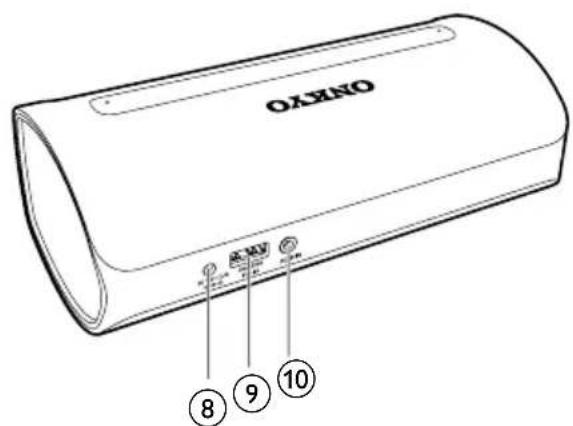
⑧ Power socket
⑨ USB charging socket
- Charge an external portable device.
⑩ AUDIO IN socket
- Connect an external audio device.
3 Get started
Always follow the instructions in this chapter in sequence.
Power supply
Either AC power or battery can be used as power supply of this product.
Option 1: AC power

Caution
- Risk of product damage! Make sure that the power voltage corresponds to the voltage printed on the back or underside of the speaker.
- Risk of electric shock! When you unplug the AC adapter, always pull the plug from the socket. Never pull the cord.
- Connect the power adaptor to:
- the DC IN socket at the back of the speaker.
- the wall outlet.

Option 2: Battery power
The speaker can also be powered by the built-in rechargeable battery.

Note
•Rechargeable battery has a limited number of charge cycles. Battery life and number of charge cycles vary by use and settings.
- It takes you approximately three hours to fully charge the battery.
To charge the built-in battery:
- Connect to AC power supply.
When powered by AC mains:
| System status | Battery status | Bluetooth/ power LED status |
| On Under | charging | Blue in Bluetooth mode; amber in AUDIO IN mode. |
| Fully charged | ||
| Off Under | charging | Flashing red |
| Fully charged | Off |
When powered by the built-in battery:
| System Status | Bluetooth/power LED status |
| On Blue in Bluetooth mode; amber in AUDIO IN mode (Full battery) Flashing red quickly (Low battery) | |
| Off Off | |
Switch on/off
- Press and hold to switch the speaker on.
For first-time setup, the Bluetooth/ power indicator flashes blue, indicating that the speaker is in pairing mode.
- To switch off, press and hold ⏻ again.
→ The Bluetooth/power indicator turns off.
Switch to standby mode
- In Bluetooth mode, if Bluetooth connection is invalid or music playback is stopped for 15 minutes, this speaker switches to standby mode automatically.
In AUDIO IN mode, if the audio-in cable is disconnected or music playback is stopped for 15 minutes, this speaker switches to standby mode automatically.
4 Use Bluetooth devices
With this speaker, you can listen to audio from Bluetooth-enabled devices and control the incoming call through Bluetooth.
Connect a Bluetooth-enabled device

Note
• Make sure that your Bluetooth device is compatible with this speaker.
- Before pairing a device with this speaker, read its user manual for Bluetooth compatibility.
- The speaker can memorize a maximum of 4 paired devices.
• Make sure that Bluetooth function is enabled on your device, and your device is set as visible to all other Bluetooth devices.
- Any obstacle between this speaker and a Bluetooth device can reduce the operational range.
- Keep away from any other electronic device that may cause interference.
- The operational range between this speaker and a Bluetooth device is approximately 10 meters (30 feet).

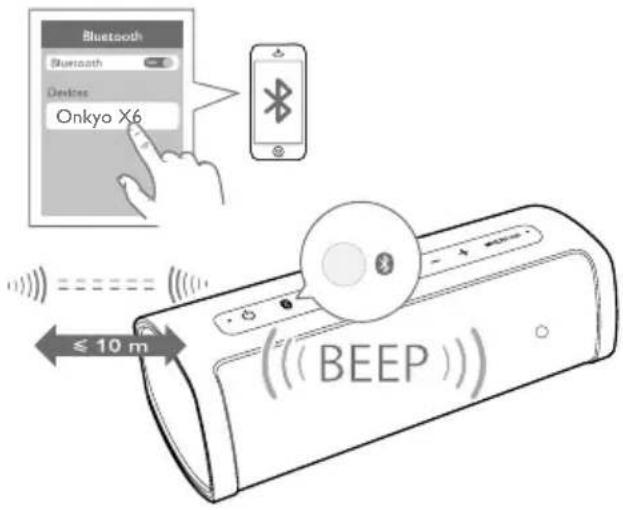
1 Make sure that the speaker is in pairing mode, that is, the Bluetooth/power indicator flashes blue.
2 On your Bluetooth device, enable Bluetooth and search for Bluetooth devices (refer to the user manual of the device).
3 When [Onkyo X6] is displayed on your device, select it to start pairing and connection. If necessary, enter the default password "0000".
→ After successful pairing and connection, the speaker beeps twice, and the Bluetooth/power indicator turns solid blue.
To disconnect the Bluetooth-enabled device:
- Disable Bluetooth on your device;
- Press and hold Ⓤ on the speaker for more than 2 seconds; or
- Move the device beyond the communication range.
To clear the existing pairing information:
- Press and hold Ⓠ for more than 10 seconds.
To reconnect the Bluetooth-enabled device:
- For a paired Bluetooth device on which automatic reconnection is enabled, this product reconnects with it once it is detected.
- For a paired Bluetooth device that does not support automatic reconnection, reconnect it with this product manually.
Bluetooth/power Description indicator
Flashing blue Connecting or waiting for connection
Solid blue Connected
Connect and manage multiple Bluetooth-enabled devices at the same time
The multipair feature allows you to connect up to four Bluetooth devices to the speaker at the same time. You can switch between these Bluetooth devices easily.
1 Press MULTIPAIR to enter multipair mode.
→ The multipair indicator lights up white.
2 On your new Bluetooth device, enable Bluetooth and search for Bluetooth devices (refer to the user manual of the device).
3 When [Onkyo X6] is displayed on your device, select it to start pairing and connection. If necessary, enter the default password "0000".
→ After successful pairing and connection, the Bluetooth/power indicator flashes blue for four times.
4 Repeat steps 2 and 3 to pair and connect more Bluetooth devices.
5 Play music from any connected device.
- To play from another connected device, just use controls on that device directly and the music streaming from the current device will be paused.
Tip
- When 4 Bluetooth devices are connected to the speaker at the same time, you can press and hold
or MULTIPAIR to kick off idle ones.
- In multipair mode, you cannot use the product as a speaker phone. To control speaker phones through the speaker, first press MULTIPAIR to exit multipair mode.
Play from a Bluetooth-enabled device
Note
- If there is an incoming call on the connected mobile phone, music play pauses.
• After successful Bluetooth connection, play audio on the Bluetooth device.
→ Audio streams from your Bluetooth device to the speaker.
Control your phone call

Note
• To use this function, make sure that multipair mode is deactivated.
After Bluetooth connection, you can control an incoming call with this speaker.
Button Function
| Press to answer an incoming call. |
| Press and hold to reject an incoming call. |
| During a call, press to end the current phone call. |

Note
•You can talk through the microphone of the speaker.
• Music play pauses when there is an incoming call, and resumes when your phone call ends.
5 Other features
Listen to an external device
With this speaker, you can also listen to an external audio device such as an MP3 player.
1 Connect an audio input cable with a 3.5 mm connector on both ends to
- the AUDIO IN socket on this speaker, and
• the headphone socket on the external device.
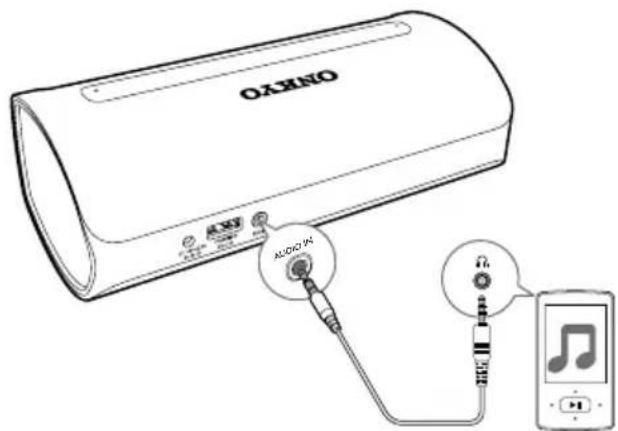
2 Make sure there is no music streaming from the connected Bluetooth device (if available).
3 Play music on the external device (refer to its user manual).
→ The speaker switches to the AUDIO IN source.
→ The Bluetooth/power indicator turns solid amber.

Tip
- When you start music streaming from a connected Bluetooth device, the speaker switches to the Bluetooth source automatically.
Adjust volume
- Press +/- on the speaker to increase or decrease the volume.

6 Product information

Note
- Product information is subject to change without prior notice.
Specifications
| Amplifier |
| Rated Output Power 2 x 6W RMS, THD = 1% |
| Frequency Response 40 - 20000 Hz, ±3dB |
| Signal to Noise Ratio >75 dBA |
| Audio In 650mV (RMS), 22k ohm |
Bluetooth
| Bluetooth version V2.1 |
| Supported Profiles HFP, A2DP, AVRCP |
| Range 10 m (Free space) |
Speakers
| Speaker Impedance 4 ohm |
| Speaker Driver 1.75 inch full range driver |
| Sensitivity >82dB/m/W ± 3dB/m/W |
General information
| Power Adaptor AS340-100-AD270 |
| Power Input 100 - 230V,50/60 Hz |
| DC Output 10V, 2.7A | |
| USB Charging Output | DC5V, 1A |
| Built-in Battery | Lithium ion battery (7.4 V, 2200 mAh) |
| Dimensions- Main Unit(W x H x D) | 180 x 63.8 x 87.4 mm |
| Weight- Main Unit | 0.2 kg |
7 Troubleshooting

Warning
• Never remove the casing of this device.
To keep the warranty valid, never try to repair the system yourself.
If you encounter problems when using this device, check the following points before requesting service. If the problem remains unsolved, contact Onkyo service center. When you contact Onkyo, make sure that the device is nearby and the model number and serial number are available.
General
No power
- Make sure that the AC power plug is connected properly.
- Make sure that there is power at the AC outlet.
- Recharge the built-in battery.
No sound
- Adjust volume on the speaker or the Bluetooth-connected device.
- Make sure that your Bluetooth device is within the effective operational range.
No response from the speaker
- Restart the speaker.
About Bluetooth device
The audio quality is poor after connection with a Bluetooth-enabled device.
- The Bluetooth reception is poor. Move the device closer to this speaker or remove any obstacle between them.
Cannot connect with the device.
- The Bluetooth function of the device is not enabled. Refer to the user manual of the device for how to enable the function.
- This speaker is already connected with another Bluetooth-enabled device. Disconnect that device, or press MULTIPAIR to enter multipair mode (see 'Connect and manage multiple Bluetooth-enabled devices at the same time' on page 8), and then try again.
The paired device connects and disconnects constantly.
- The Bluetooth reception is poor. Move the device closer to this product or remove any obstacle between them.
- For some devices, Bluetooth connection may be deactivated automatically as a power-saving feature. This does not indicate any malfunction of this speaker.
Cannot receive or originate calls through the speaker.
- The speaker is in multipair mode. Press MULTIPAIR to exit multipair mode.
The speaker is in demo mode and not working as usual.
- The demo mode is not intended for end users. You may have activated this mode by accident. In this case, press and hold 📋▶ for 15 seconds to exit demo mode and enter standby mode. Then you can power on and operate the speaker as usual.
8 Notice
CE0890
Hereby, Gibson Innovations declares that this product is in compliance with the essential requirements and other relevant provisions of Directive 1999/5/EC. You can contact Onkyo service center to get the Declaration of Conformity.
Any changes or modifications made to this device that are not expressly approved by Gibson Innovations may void the user's authority to operate the equipment.
Disposal of your old product and battery

Your product is designed and manufactured with high quality materials and components, which can be recycled and reused.

This symbol on a product means that the product is covered by European Directive 2012/19/EU.

This symbol means that the product contains a built-in rechargeable battery covered by European Directive 2013/56/EU which cannot be disposed of with normal household waste. We strongly advise you to take your product to an official collection point or an Onkyo service centre to have a professional remove the rechargeable battery. Inform yourself about the local separate collection system for electrical and electronic products and rechargeable
batteries. Follow local rules and never dispose of the product and rechargeable batteries with normal household waste. Correct disposal of old products and rechargeable batteries helps prevent negative consequences for the environment and human health.

Caution
- Removal of the built-in battery invalidates the warranty and may destroy the product.
Always bring your product to a professional to remove the built-in battery.

natural_image
Diagram of a mechanical assembly with a central component and an upward arrow indicating motion (no text or symbols present)Environmental information
All unnecessary packaging has been omitted. We have tried to make the packaging easy to separate into three materials: cardboard (box), polystyrene foam (buffer) and polyethylene (bags, protective foam sheet.)
Your system consists of materials which can be recycled and reused if disassembled by a specialized company. Please observe the local regulations regarding the disposal of packaging materials, exhausted batteries and old equipment.
Bluetooth
The Bluetooth ® word mark and logos are registered trademarks owned by Bluetooth SIG, Inc. and any use of such marks by Gibson Innovations Limited is under license. Onkyo ® is a registered trade mark of Onkyo Corporation. Other trademarks and trade names are those of their respective owners.
ONKYO
www.onkyo-speakers.com
Specifications are subject to change without notice.
2016 © Gibson Innovations Limited. All rights reserved.
This product has been manufactured by, and is sold under the responsibility of Gibson Innovations Ltd., and Gibson Innovations Ltd.
is the warrantor in relation to this product.
Onkyo ® is a registered trade mark of Onkyo Corporation. Other trademarks and trade names are those of their respective owners.
OKAX6_10_UM_V3.0
- Your Bluetooth speaker 3
- Get started 5
- Use Bluetooth devices 7
- Other features 10
- Product information 11
- Troubleshooting 12
- Notice 13
- Important
- Warning
- Note
- Your Bluetooth speaker
- Introduction
- What's in the box
- Overview of the speaker
- ① Bluetooth/power indicator
- ⑥ MULTIPAIR
- ⑦ Multipair indicator
- ⑧ Power socket
- ⑨ USB charging socket
- ⑩ AUDIO IN socket
- Get started
- Power supply
- Option 1: AC power
- Caution
- Option 2: Battery power
- To charge the built-in battery:
- When powered by AC mains:
- When powered by the built-in battery:
- Switch on/off
- Switch to standby mode
- Use Bluetooth devices
- Connect a Bluetooth-enabled device
- To disconnect the Bluetooth-enabled device:
- To clear the existing pairing information:
- To reconnect the Bluetooth-enabled device:
- Bluetooth/power Description indicator
- Connect and manage multiple Bluetooth-enabled devices at the same time
- Tip
- or MULTIPAIR to kick off idle ones.
- Play from a Bluetooth-enabled device
- Control your phone call
- Other features
- Listen to an external device
- Adjust volume
- Product information
- Troubleshooting
- General
- No power
- No sound
- No response from the speaker
- About Bluetooth device
- The audio quality is poor after connection with a Bluetooth-enabled device.
- Cannot connect with the device.
- The paired device connects and disconnects constantly.
- Cannot receive or originate calls through the speaker.
- The speaker is in demo mode and not working as usual.
- Notice
- CE0890
- Disposal of your old product and battery
- Environmental information
- Bluetooth
- ONKYO
Brand : ONKYO
Model : X6
Category : Loudspeaker