
CMNR6204XPUEWIFI - Freezer CANDY - Free user manual and instructions
Find the device manual for free CMNR6204XPUEWIFI CANDY in PDF.


| Product type | Freezer (combined refrigerator-freezer) |
| Brand | Candy |
| Model | CMNR6204XPUEWIFI |
| Climate class | SN, N, ST, T (from 10°C to 43°C) |
| Refrigerant | R600a (isobutane) |
| Power supply | 230 V ~ 50 Hz (standard estimate) |
| Freezing capacity | Not specified in the manual (estimate: about 20 kg/24h) |
| Energy class | Not specified (estimate: A+ to D) |
| Dimensions (approx.) | Height: 185 cm, Width: 60 cm, Depth: 65 cm (estimate) |
| Weight (approx.) | Approximately 70 kg (estimate) |
| Main functions | Fast Freezing, Fast Cooling, Eco Mode (Smart ECO), Vacation Mode, Power Failure Memory, Door Open Alarm, Overheating Alarm |
| Wi-Fi technology | SmartFi+ compatible with simplyFi app |
| Display | Vertical or round touch screen depending on version |
| Interior lighting | Replaceable LED |
| Water dispenser | Yes (with internal reservoir) |
| Antibacterial system | PURACTION EVO (UV photocatalysis) |
| Humidity control | Freshness Control (vegetable drawer) |
| Defrost | Automatic (no frost likely) |
| Cleaning and maintenance | Interior cleaning with baking soda, condenser cleaning with vacuum cleaner |
| Safety | Child lock via screen (LOCK), alarms, delayed shutdown after power cut |
| Door reversal | Possible, requires qualified technician |
| Warranty | Valid for domestic use only |
Frequently Asked Questions - CMNR6204XPUEWIFI CANDY
User questions about CMNR6204XPUEWIFI CANDY
0 question about this device. Answer the ones you know or ask your own.
Ask a new question about this device
Download the instructions for your Freezer in PDF format for free! Find your manual CMNR6204XPUEWIFI - CANDY and take your electronic device back in hand. On this page are published all the documents necessary for the use of your device. CMNR6204XPUEWIFI by CANDY.
USER MANUAL CMNR6204XPUEWIFI CANDY
INTERFACCIA UTENTE INTERNA (SOLO SU ALCUNI MODELLI)
WATER DISPENSER (SOLO SU ALCUNI MODELLI)
natural_image
3D mechanical assembly diagram showing a lever and base components (no text or symbols visible)natural_image
3D rendering of a refrigerator with open door and side shelves (no text or symbols visible)Tips for keeping food perfect in the Fridge
Where to store your foods in the fridge
Storing Frozen Food
ENERGY SAVING
TAKE CARE
Defrosng
Cleaning and Care
CHANGING THE INTERNAL LIGHT
REVERSING THE DOOR SWING
TROUBLE SHOOTING
Thank you for purchasing this product.
Before using your refrigerator, please carefully read this instrucon manual in order to maximize its performance. Store all documentaon for subsequent use or for other owners. This product is intended solely for household use or similar applicaons such as:
- the kitchen area for personnel in shops, oces and other working environments
- on farms, by clientele of hotels, motels and other environments of a residential type
-at-bed and breakfasts (B & B) - for catering services and similar applicaons not for retail sale.
This appliance must be used only for purposes of storage of food, any other use is considered dangerous and the manufacturer will not be
responsible for any omissions. Also, it is recommended that you take note of the warranty condions. Please, to obtain the best possible performance and trouble free operaon from your appliance it is very important to carefully read these instrucons. Failure to observe these instrucons may invalidate your right to free service during the guarantee period.
SAFETY INFORMATION
This guide contains many important safety informaon. Please, we suggest you keep these instrucons in a safe place for easy reference and a good experience with the appliance.
The refrigerator contains a refrigerant gas (R600a: isobutane) and insulang gas (cyclopentane), with high compatibility with the environment, that are, however, inammable.

Cauon: risk of re
If the refrigerant circuit should be damaged:
- Avoid opening ames and sources of ignition. Thoroughly venlate the room in which the appliance is situated
WARNING!
- Care must be taken
while cleaning/carrying the appliance to avoid touching the condenser metal wires at the back of the appliance, as you might injure your ngers and hands or damage your product.
- This appliance is not designed for stacking with any other appliance. Do not aempt to sit or stand on top of your appliance as it is not designed for such use. You could injure yourself or damage the appliance.
- Make sure that mains cable is not caught under the appliance during and aer carrying/moving the appliance, to avoid the mains cable becoming cut or damaged.
- When posioning your appliance take care not to damage
your ooring, pipes, wall coverings etc. Do not move the appliance by pulling by the lid or handle. Do not allow children to play with the appliance or tamper with the controls. Our company declines to accept any liability should the instrucons not be followed.
- Do not install the appliance in humid, oily or dusty places, nor expose it to direct sunlight and to water.
- Do not install the appliance near heaters or inammable materials.
- If there is a power failure do not open the lid. Frozen food should not be aected if the failure lasts for less than 20 hours. If the failure is longer, then the food
should be checked and eaten immediately or cooked and then refrozen.
- If you nd that the lid of the chest freezer is dicult to open just aer you have closed it, don't worry. This is due to the pressure dience which will equalize and allow the lid to be opened normally aer a few minutes.
- Do not connect the appliance to the electricity supply unl all packing and transit protectors have been removed.
- Leave to stand for at least 4 hours before switching on to allow compressor oil to sele if transported horizontally.
- This freezer must only be used for its intended purpose (i.e. storing and freezing of edible
foodstu).
- Do not store medicine or research materials in the Wine Coolers. When the material that requires a strict control of storage temperatures is to be stored, it is possible that it will deteriorate or an uncontrolled beacon may occur that can cause risks.
- Before performing any operaon, unplug the power cord from the power socket.
- On delivery, check to make sure that the product is not damaged and that all the parts and accessories are in perfect condition.
- If in the refrigeraon system a leak is noted, do not touch the wall outlet and do not use open ames. Open the window and let air
into the room. Then call a service center to ask for repair.
- Do not use extension cords or adapters.
- Do not excessively pull or fold the power cord or touch the plug with wet hands.
- Do not damage the plug and/or the power cord; this could cause electrical shocks or res.
- If the supply cord is damaged, it must be replaced by the manufacturer, its service agent or similarly qualified person in order to avoid a hazard.
- Do not place or store inammable and highly volale materials such as ether, petrol, LPG, propane gas, aerosol spray cans, adhesives, pure alcohol, etc. These materials may cause an explosion.
- Do not use or store inammable sprays, such as spray paint, near the Wine Coolers. It could cause an explosion or re.
- Do not place objects and/or containers lled with water on the top of the appliance.
• We do not recommend the use of extension leads and mul-way adapters.
- Do not dispose of the appliance on a re. Take care not to damage, the cooling circuit/pipes of the appliance in transportaon and in use. In case of damage do not expose the appliance to re, potential ignition source and immediately venlate the room where the appliance is situated.
- The refrigeraon
system posioned behind and inside the Wine Coolers contains refrigerant. Therefore, avoid damaging the tubes.
- Do not use electrical appliances inside the food storage compartments of the appliance, unless they are of the type recommended by the manufacturer.
- Do not damage the refrigerant circuit.
- Do not use mechanical devices or other means to accelerate the defrosng process, other than those recommended by the manufacturer.
- Do not use electrical appliances inside the food storage compartments, unless they are of the type recommended by the manufacturer.
- Do not touch internal cooling elements,
especially with wet hands, to avoid cracks or injuries.
- Maintain the venlaon openings in the appliance enclosure or in the built-in structure, free of obstrucon.
- Do not use pointed or sharp-edged objects such as knives or forks to remove the frost.
- Never use hairdryers, electrical heaters or other such electrical appliances for defrosng.
- Do not scrape with a knife or sharp object to remove frost or ice that occurs. With these, the refrigerant circuit can be damaged, the spill from which can cause a re or damage your eyes.
- Do not use mechanical devices or other equipment to hasten the defrosng
process.
- Absolutely avoid the use of open ame or electrical equipment, such as heaters, steam cleaners, candles, oil lamps and the like in order to speed up the defrosng phase.
- Never use water wash the compressor posion, wipe it with a dry cloth thoroughly aer cleaning to prevent rust.
- It is recommended to keep the plug clean, any excessive dust residues on the plug can be the cause re.
- The product is designed and built for domesc household use only.
- The guarantee will be void if the product is installed or used in commercial or non-residential domesc household premises.
- The product must be
correctly installed, located and operated in accordance with the instrucons contained in the User Instrucons Booklet provided.
- The guarantee is applicable only to new products and is not transferable if the product is resold.
- Our company disclaims any liability for incidental or consequential damages.
- The guarantee does not in any way diminish your statutory or legal rights.
- Do not perform repairs on this Wine Coolers. All intervenons must be performed solely by qualified personnel.
- If you are discarding an old product with a lock or latch ed to the door, ensure that
it is le in a safe condion to prevent the entrapment of children.
- This appliance can be used by children aged from 8 years and above and by persons with reduced physical, sensory or mental capabilities or with a lack of experience and knowledge; provided that they have been given adequate supervision or instrucon concerning how to use the appliance in a safe way and understand the hazards involved.
- Children should not play with the appliance. Cleaning and user maintenance should not be made by children without supervision.
- Locks :If your Fridge/Freezer is
ed with a lock, to prevent children being entrapped keep the key out of reach and not in the vicinity of the appliance. If disposing of an old Fridge/Freezer break o any old locks or latches as a safeguard.
COMBI REFRIGERATOR CANDY Climate Class
The appliance is designed to operate at the limited range of ambient temperature, depending on climate zones. Do not use the appliance at the temperature out of the limit. Climate class of your appliance is indicated on the label with technical descripon inside the fridge compartment.
| Climate Class | Amb. T. (°C) | Amb. T. (°F) |
| SN | From 10 to 32 | From 50 to 90 |
| N | From 16 to 32 | From 61 to 90 |
| ST | From 16 to 38 | From 61 to 100 |
| T | From 16 to 43 | From 61 to 110 |
TRANSPORTATION INSTRUCTIONS
The appliance should be transported only in a vercal upright posion. The packing as supplied must be intact during transportaon. If during the course of transport the product has been transported horizontally, it must only be laid on its le hand side (when facing the door front) and it must not be operated for at least 4 hours to allow the system to sele aer the appliance is brought back to upright posion.
- Failure to comply with the above instrucons could result in damage occurring to the appliance. The manufacturer will not be held responsible if these instrucons are disregarded.
- The appliance must be protected against rain, moisture and other atmospheric inuences.
INSTALLATION INSTRUCTIONS
- If possible avoid placing the appliance near cookers, radiators or in direct sunlight as this will cause the compressor to run for long periods. If installed next to a source of heat or refrigerator, maintain the following minimum side clearances:
| From Cookers | 4" (100 mm) |
| From Radiators | 12" (300 mm) |
| From Fridges | 4" (100 mm) |
- Make sure that sucient room, with an average temperature of between 16^ C and 32^ C, is provided around the appliance to ensure free air circulaon. Ideally, a space of no less than 9cm on the back and 2cm on the sides.
- The appliance should be located on a smooth surface.
- It is forbidden to use the refrigerator outdoors.
- Protecon from moisture. Do not locate the freezer in moist space to avoid the metal parts rusty. And do not spray water to the freezer, otherwise it will weaken the insulaon and causes current leakage.
- Refer to "Cleaning and Care" secon to prepare your appliance for use.
- If the freezer is installed in unheated areas, garages etc., in cold weather condensaon may form on the outer surfaces. This is quite normal and is not a fault. Remove the condensaon by wiping with a dry cloth.
- Never place Refrigerator in a wall recessed or into ed cabinets or furniture when it is working, the grille at the back may become hot and the sides warm. Do not drape the Refrigerator with any covering.
STARTING TO USE
Before you starng to use the freezer, please check that:
- The interior is dry and air can circulate freely at the rear.
- Clean the interior as recommended under "TAKE CARE" secon (electric parts of the refrigerator can only be wiped by dry cloth).
- Do not switch on unl 4 hours aer moving the fridge/freezer. The coolant uid needs me to sele. If the appliance is switched o at any me, wait 30 minutes before switching back on to allow the coolant uid to sele.
- Before connecng the Refrigerator to the mains supply posion. The thermostat control dias is located inside the Fridge compartment.
- Turn the thermostat knob to the "3"
posion and turn on the electricity. The compressor and the light inside the refrigerator will begin to work.
- Before storing foods in your refrigerator, turn the refrigerator on and wait for 24 hours, to make sure it is working properly and to allow the Fridge/Freezer to fail to the correct temperature.
- Open the door 30 minutes later, if the temperature in the refrigerator decreased obviously, it shows that the refrigerator system works well. When the refrigerator operates for a period of me, the temperature controller will automatically set the temperature within limits it opens.
COMBI OPERATION
Appliance connected to power at the rst me:
When the appliance is connected to power at the rst me, the display will be lit for 2 seconds before going normal and the appliance runs with intelligence funcon.
Display Control: When the refrigerator door is closed and there is no buon operaon in 3 minutes, the display light goes o.
When the display light is o, open the refrigerator door or click any buon to light it up.
VERTICAL DISPLAY (if present)

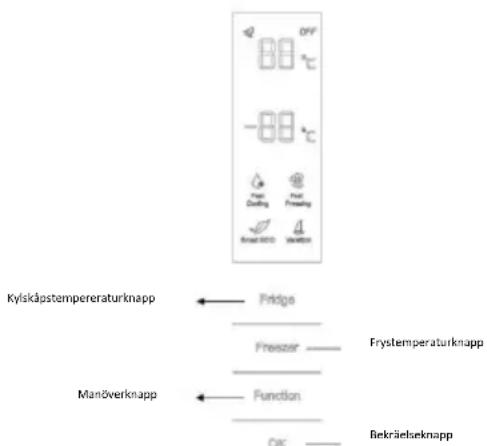
TEMPERATURE SETTING: Click the "Fridge" or "Freezer" buon and when it ickers in the symbol, temperatures can be set. Each me when the buon is clicked, the temperature changes accordingly. Temperatures cannot be set under funcons of fast cooling, fast freezing, Smart ECO and vacaon. Under temperature seng, if there is no buon operaon in 5 seconds, the buon stops ickering and the set temperature comes into eect.
SMART ECO: Acvate the Smart Eco buon to set the temperatures of the fridge in max. energy eciency condions (+4°C for fridge temperature, -18°C for freezer temperature).
To enter Smart Eco: Click "opon" unl it ickers and then click "OK" to enter this funcon.
To deacvate Smart Eco: Click "opon" unl it goes to Smart ECO, click "OK" to quit this funcon and the light goes o.
FAST COOLING: Acvate Fast Cooling mode to start an additional pulse for a fast freezing of the fridge compartment. The funcon is acvated and conrmed by the switching on of the dedicated LED icon.
To enter Fast Cooling: Click "opon" until it ickers in "Fast Cooling" and then click "OK" to enter this funcon.
To deacvate Fast Cooling: Click "opon" unl it goes to "fast cooling" and then click "OK" to deacvate this funcon.
FAST FREEZING: Acvate Fast Freezing to rapidly freeze big quanes of food keeping intact nutritional food properes. When the light in Fast Freezing goes o and the freezer temperature goes back to the value before fast freezing. When Fast Freezing me is up (26 hours), it deacvates automatically. When it goes to Vacaon, Fast Freezing stops.
To enter Fast Freezing: Click "opon" until it ickers in "Fast Freezing" and then click "OK" to enter this funcon.
To deacvate Fast Freezing: Click "opon" unl it goes to "fast freezing" and then click "OK" to quit this funcon.
VACATION: In case of long stops, the Vacaon funcon can be used. This funcon deacvates the fridge compartment, while leaving the freezer on. Ensure that there is no food inside the fridge compartment before using this funcon. The funcon is acvated and conrmed by the switching on of the dedicated LED icon. The light in Vacaon goes o and the refrigerator temperature goes back to the value before Vacaon.
Vacaoon quits under funcons of Smart ECO and Fast Cooling.
To enter Vacaon: Click "opon" unl it ickers in "Fast Freezing" and then click "OK" to enter this funcon.
To deacvate Vacaon: Click "opon" unl it goes to "Vacaon" and then click "OK" to quit this funcon.
POWER OFF MEMORY: Refrigerator can automatically keep all the seng in case of power o. When the unit is plugged in again, the refrigerator will run with the seng before power o.
POWER-ON DELAY: To prevent harm to the refrigerator in case of sudden power cut and power on, the unit does not start immediately if the power o me is less than 5 minutes.
FREEZER OVER-TEMPERATURE ALARM (only in case
of power on): When the freezer temperature is higher than 10^ Cat the rst me connected to power, the symbol light of the freezer chamber goes on and the number representing temperature ickers.
Press any buon or wait for 5 seconds, ickering stops and it goes back to the temperature that was set.
REFRIGERATOR DOOR OPENING ALARM: When the refrigerator is open over 3 minutes, the buzzer will buzz. Close the door or press any buon to stop the alarm, but for the laer, the alarm will go o again aer 3 minutes.
SENSOR FAULT ALARM: When it shows "E0", "E1", "E2" or other abnormal symbols, it means sensor faults and the refrigerator needs repair.
ROUNDED DISPLAY (if present)


Rounded Display is a
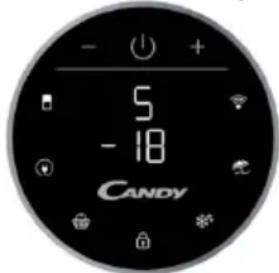
touch user interface. When the refrigerator is turned on, white LED lights will be enlightened. When the funcons is pressed the icon lights change from white to blue.
SETTING TEMPERATURE: Press MODE icon to change the temperature
In the models with PURACTION EVO, press the “MODE” buon for 3 seconds to lock and unlock the display.
-Refrigerator Temperature: Press one me MODE icon, refrigerator digit blinks, and manage temperature of refrigerator with "+" and "-" buons.
-Freezer Temperature: Press two mes MODE icon, freezer digit blinks, and manage temperature of freezer with "+" and "-" buons.
PURACTION EVO icon: You can deacvate the PURACTION EVO funcon by pressing the appropriate icon and the PURACTION EVO icon will be o.
ECO MODE Icon: Press Eco Mode icon to set temperatures of the fridge in max. energy eciency condions (+5°C for fridge temperature, -18°C for freezer temperature). The funcon is acvated and conrmed when the icon LED changes from white to blue.
If you want to exit the ECO mode funcon, you need to press the Eco Mode icon again and the refrigerator temperature turns back to normal operaon.
SUPER COOLING Icon: Press Super Cooling icon to start an additional pulse for a fast freezing of the fridge compartment. The funcon is acvated and conrmed when the icon LED changes from white to blue.
If you want to exit the Super Cooling funcon, you need to press the Super Cooling icon again and refrigerator temperature turns back to normal operaon.
LOCK Icon: Press Lock icon to block display user interface. If the lock funcon is selected, the icon
(LED) should turn into blue. When Lock funcon is turned on the user cannot set any new funcons. To turn o Lock funcon, the user must perform a long press on the icon for 3 seconds to unlock display.
SUPER FREEZING Icon: Press Super Freezing icon to rapidly freeze big quanes of food keeping intact nutritional food properes. The funcon is acvated and conrmed when the icon LED changes from white to blue.
If you want to exit the Super Freezing funcon, you need to press the Super Freezing icon again and the freezer temperature turns back to normal operaon.
HOLIDAY Icon: In case of long stops, the Holiday funcon can be used. This funcon deacvates the fridge compartment, while leaving the freezer on.
Ensure that there is no food inside the fridge compartment before using this funcon. The funcon is acvated and conrmed when the icon LED changes from white to blue.
If you want to exit the Holiday funcon, you will need to press the Holiday icon again, the light in Holiday goes o and the refrigerator temperature goes back to the value before Holiday.
WI-FI Icon: This appliance is equipped with SmartFi+ technology that allows you to control it remotely via App. Press Wi-Fi icon for 3 seconds to acvate Wi-Fi funcon and the icon light changes from white to blue.
Machine Enrollment (on App): Download the
SimplyFi App on your device. The Candy SimplyFi App is available for devices running both Android and iOS, both for tablets and for smartphones. Get all the details of the SmartFi+ funcons by browsing the App in DEMO mode.
Open the App, create the user prole and enroll the appliance following the instrucons on the device display or the "Quick Guide" aached on the machine. This operaon is necessary just for the rst installaon. To nalize the enrollment following the instrucon on the smartphone's screen.
Refrigerator usage from remote by App: When the enrollment is completed, there will be Wi-Fi LED switched on. From now on it will be possible to manage the product by using the buons on the display or using the App: both of them will be aligned according to the last command given.
INTERNAL USER INTERFACE (if present)

SET Buon: Press SET button for setting the temperature until you reach the level you want where level 1 is the warmest and level 4 is the coldest. Under normal operating conditions, we recommend using an intermediate setting (level 2).
Once the seng takes eect, it immediately enters the corresponding stall for operaon control, and the stall indicator lights up 3s3min and then goes out. Factory default temperature is set to 2.
Long press "SET" key to exceed 3s and enter the hardware self-check program. The hardware self-check operaon is eecve within 10min, and the long buon operaon aer 10min is invalid.
WI-FI Buon: This appliance is equipped with SmartFi+ technology that allows you to control it remotely via App. Press Wi-Fi icon for 3 seconds to acvate Wi-Fi funcon and the icon light changes from white to blue.
Machine Enrollment (on App): Download the SimplyFi App on your device. The Candy SimplyFi App is available for devices running both Android and iOS, both for tablets and for smartphones. Get all the details of the SmartFi+ funcons by browsing the App in DEMO mode.
Open the App, create the user prole and enroll the appliance following the instrucons on the device display or the "Quick Guide" aached on the machine. This operaon is necessary just for the rst installaon. To nalize the enrollment following the instrucon on the smartphone's screen.
Refrigerator usage from remote by App: When the enrollment is completed, there will be Wi-Fi LED switched on. From now on it will be possible to manage the product by using the buons on the display or using the App: both of them will be aligned according to the last command given.
FAST COOL Buon: when "FAST COOL" buon is pressed, rapid cooling funcon is acvated, according to the 21°C to refrigeraon control gear.
Maximum running me is 3h, aer this me temperature will be set to 1.
If the "SET" buon is pressed in the process of speed cooling, the instant cooling funcon is immediately withdrawn and the default is entered into the next gear.
TECHNICAL FEATURES FRESHNESS CONTROL (if present)
Thanks to freshness control, you can guarantee the right humidity level for vegetables and fruits in the crisper drawer (Fresh drawer). The humidity gets bigger as the rod goes from le to right.
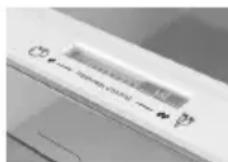
PURACTION EVO (if present)
The PURACTION EVO funcon is started by pressing the "PURACTION EVO" icon on the display that lights up. It works when the buon is pressed for a certain period of me (20 minutes) and at each door opening. The cycles have been optimized to guarantee the best eciency and the lowest energy waste.
LED UVA lights acvate a tanium Iter which produces a "photocatalysis" reacon, which destroys the bacteria in the air inside the refrigerator. The Iter has a duraon of 10 years. The anbacterial system must be switched o during the energy consumpon test.
WATER DISPENSER (if present)
The water dispenser allows you to get chilled water without opening the fridge compartment door.
Before rst use
Before using the water dispenser for the rst me,
remove and clean
the water tank located
inside the fridge
compartment.
- Li the water tank out of
the fridge compartment.
- Open the water tank cover
and then clean the water
tank and cover
in warm soapy water. Rinse thoroughly.
- Aer cleaning, each the cover to the water tank and then replace
the water tank back on the fridge door.
- Clean the dispenser pad outside the fridge door.
Filling the water tank with water
- Open the small cover.
- Fill the water tank with drinkable water up to the Max line.
- Close the small cover.
Dispensing
To dispense water, push the dispenser pad gently, using
a glass or container. To stop the ow of water, pull your glass away from the dispenser pad.
Tips for keeping food perfect in the Fridge
Take extra care with meat and sh: cooked meats should always be stored on a shelf above raw meats to avoid bacterial transfer. Keep raw meats on a plate which is large enough to collect juices and cover it with cling lm or foil.
Leave space around food: this allows cold air to circulate around the Fridge, ensuring all parts of the Fridge are kept cool.
Wrap up food!: to prevent transfer of avors and drying out, food should be separately packed or covered. Fruit and vegetables need not be wrapped.
Pre-cooked food should be cooled properly: allow pre-cooked food to cool down before placing in the Fridge. This will help to stop the internal temperature of the Fridge from rising.
Shut the door!: to prevent cold air escaping, try to limit the number of mes you open the door. When retuning from shopping, sort foods to be kept in your Fridge before opening the door. Only open the door to put food in or take it out.
Where to store your foods in the fridge
Cool area: this is where to store foods which will keep longer if they are kept cool. Milk, eggs, yogurt, fruit juices, hard cheeses eg. Cheddar. Opened jars and boles of salad dressings, sauces and jams. Fats, eg. Buer, margarine, low-fat speads, cooking fats and lard.
Coldest area (0°C to 5°C): this is where foods which must be cold to keep them safe should be kept:
- Raw and uncooked foods should always be wrapped.
- Pre-cooked chilled foods, eg. Ready meals, meat pies, so cheeses.
-Pre-cooked meats eg. Ham,
- Prepared salads(including pre-packed mixed green salads, rice, potato salad etc).
·Desserts, eg. Fromage frais, home-prepared food and leovers or cream cakes.
Crisper: this is the most humid part of the Fridge. Vegetables, fruit, fresh salad items eg. Unwashed whole leuce, whole tomatoes, radishes etc can be stored here.
WE RECOMMEND THAT ALL PRODUCE KEPT IN THE SALAD BIN IS WRAPPED.
NOTE: Always wrap and store raw meat, poultry and sh on the lowest shelf at the boom of the fridge. This will stop them dripping onto, or touching other foods. Do not store inammable gasses or liquids in the fridge.
Electrical operaon aer 3h on the freezer, the temperature in the cabinet above -12^ , the alarm light is lit, and buzzer sounds.
Storing Frozen Food
Prepackaged commercially frozen food should be stored in accordance with the frozen food manufacturer's instrucons for a freezer compartment.
To ensure that the high quality achieved by the frozen food manufacturer and the food retailer is maintained the following should be remembered:
- Put packets in the freezer as quickly as possible aer purchase.
- Do not exceed "Use By", "Best Before" dates on the packaging.
DO
Defrost food from the freezer thoroughly in a fridge or in a microwave oven following defrosng and cooking instrucons.
Defrost frozen meat completely before cooking.
Store commercially frozen food in accordance
DON'T
Use pointed sharp edged objects such as knives, forks to remove the ice.
Put hot food in the freezer. Let it cool down rst.
Put liquid-llled boles or sealed cans
| with the instrucons given on the packets that you buy. | containing carbonated liquids into the freezer as they may burst. |
| Check contents of the refrigerator at regular intervals. | Remove items from the freezer with wet hands. |
| Clean and defrost your refrigerator regularly. | Freeze zzy drinks. |
| Prepare fresh food for freezing in small porons to ensure rapid freezing. | Consume ice-cream and water ices direct from freezer. It may cause “freezer burns” on lips. |
| Always choose high quality fresh food and be sure it is thoroughly clean before you freeze it. | Store poisonous or dangerous substances in the freezer. |
| Wrap all foods in aluminum foil or freezer quality plasc bags and make sure any air is excluded. | |
| Wrap frozen food when you buy it and put it into the freezer shortly. | |
| Keep food for as short a me as possible and adhere to “Best Before”, “Use By” dates. |
For more about storing, download the App and visit "Tips & Hints".
ENERGY SAVING
For beer energy saving we suggest:
- Installing the appliance away from heat sources and not exposed to direct sunlight and in a well-venlated room.
- Avoid pung hot food into the refrigerator to avoid increasing the internal temperature and therefore causing connuous funconalizing of the compressor.
- Do not excessively stu foods so as to ensure proper air circulaon.
- Defrost the appliance in case there is ice to facilitate the transfer of cold.
- In case of absence of electrical energy, it is advisable to keep the refrigerator door closed.
- Open or keep the doors of the appliance open as lile as possible.
- Avoid adjusng the seng to temperatures too cold.
- Remove dust present on the rear of the appliance.
TAKE CARE
Defrosting
This appliance has automac defrosng system, no need to defrost by hand.
Cleaning and Care
Aer defrosng you should clean the Fridge/Freezer internally with a weak soluon of bicarbonate of soda. Then rinse with warm water using a damp sponge or cloth and wipe dry. Wash the baskets in warm soapy water and ensure they are completely dry before replacing in the Fridge/Freezer. Condensaon will form on the back wall of the Fridge; however it will normally run down the back wall and into the drain hole behind the salad bin. The drain hole will have a "cleaning spike" inserted into it. This ensures that small pieces o food can not enter the drain. Aer you have cleaned the inside of your Fridge and removed any food residues from around the whole, use the "cleaning spike" to make sure that there are no blockages. Use standard furniture polish to clean the Fridge/Freezer exterior. Make sure that the doors are closed to prevent polish geng on the magnec door seal or inside. The grille of the condenser at the back of the Fridge/Freezer and the adjacent components can be vacuumed using a so brush aachment. Do not use harsh cleaners, scouring pads or solvents to clean any part of the Fridge/Freezer.
CHANGING THE INTERNAL LIGHT
- Before carrying out the LED replacement always disconnect the mains supply.
- Hold and li up the LED light cover.
- Remove the old LED by unscrewing it in an an-clockwise direcon.
- Replace with a new LED light by screwing it in a clockwise direcon marking sure that it is secure in the light holder.
- Ret the light cover and re-connect your Fridge to the mains supply and switch on.
REVERSING THE DOOR SWING Dissemble the Refrigerator Door
- a. Use a tool to remove the screw o the hinge cover, and then remove the laer. Insert the communicaon line to the hole on the cabinet top. b. Use a tool to remove the 4 screws o the upper hinge cover and then remove the laer. Pry up the door bush and small end cap cover on the door. c. Insert the door bush and door communicaon line into the hole on the door and then put on the small end cap cover. d. Use a tool to remove the 2 screws as shows in the below gure to remove the hole cover on the cabinet top and get the cabinet communicaon line out of the hole. Pry up the small end cap cover on the door and get out the door bush and door communicaon line.
e. Insert the door bush into the round hole on the door and then put on the small end cap cover.
f. Move the refrigerator door upward over
500mm to remove the door.
- a. Use a tool to remove the 3 screws of the middle hinge cover and then remove the middle hinge.
b. move the freezer door upward over 500mm to remove the door.
c. Remove the adjustable front feet under the lower hinge; use a tool to remove the 4 screws from the lower hinge and then disassemble the lower hinge. Door disassembly is nished.
Assemble door, lower hinge accessories to the corresponding positions
- a. Use a tool to get the door bush out as shown in the below gure and assemble it to the corresponding posion of the other side.
b. Use a tool to remove the screws o the stopper ass as shown in the below gure and then assemble them to the other side of the door.
c. Use a tool to remove the axle and two stoppers on the lower hinge and then assemble them to the posion as shown in the below gure.
Assemble the refrigerator door and freezer door to the opposite side
-
a. Remove the adjustable front foot as shown below by hand and then assemble the lower hinge to the other side of the cabinet and x the screws by using a tool.
b. Assemble the shorter adjustable front foot to the lower hinge side and adjust the height of the foot to make the refrigerator stay in level. -
Put on the freezer door and turn the middle hinge by 180 °C and then assemble it to the other side of the cabinet; use a tool to screw up the 3 screws to x the middle hinge.
-
Put on the refrigerator door and assemble the upper hinge to the other side of the cabinet; use a tool to screw up the 4 screws to x the upper hinge.
-
Aer that, connect the door communicaon line and the cabinet communicaon line and then put on the upper hinge cover and x it using a screw.
Assemble the hole cover to the other side of the cabinet and use a tool to screw up the hole cover.
Door disassembly is nished here.
Double check that the door is aligned correctly and all the seals are closed on all sides. If necessary, re-adjust the levelling feet.
NOTE: If you want to have the door swing reversed, we recommend that your contact a qualified technician. You should only try to reverse the door yourself if you believe that you are qualified to do so.
All parts removed must be saved to do the reinstallaon of the door. You should rest the fridge freezer on something solid so that it will not slip during the door change process. Do not lay the fridge freezer at as this may damage the coolant system. Ensure the fridge freezer is unplugged and empty. We recommend that 2 people handle the fridge freezer during assembly.
TROUBLE SHOOTING
- If the appliance does not operate when switched on, check.
- Power cut: If the internal temperature of the Fridge/Freezer compartment is -18^ C or less when the power returns, your food is safe. The food in your Fridge/Freezer will remain frozen for approx 16 hours with the door closed. Do not open the Fridge/Freezer door more than necessary.
- The product is designed and built for domestic household use only.
- The plug is inserted properly in the socket and that the power supply is on. (To check the power supply to the socket, plug in another appliance).
- The fuse has blown/circuit breaker has tripped/main distribuon switch has been turned o.
- The temperature control has been set correctly.
- If the refrigerator is exceptionally cold, you may have accidentally adjusted the thermostat control dial to a higher posion.
- If the refrigerator is exceptionally warm, the compressor may not be working. Turn the thermostat control dial to the maximum seng and wait a few minutes. If there is no humming noise, it is not working. Contact the local store where your purchase was made.
- If condensaon appears outside of the Refrigerator, this may be due to a change in the room temperature. Wipe o any residue of moisture. If the problem connues contact the local store where your purchase was made.
- If the provided plug has been replaced make sure the new plug is properly connected. If the appliance is sill not operang aer the above checks, please contact Customers Service.
SCRAPPING OLD APPLIANCES

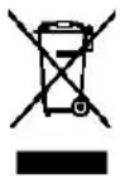
This appliance is marked according to the European direcve 2012/19/EU on Waste Electrical and Electronic Equipment (WEEE).
WEEE contains both pollung substances (which can cause negative consequences for the environment) and basic components (which can be re-used). It is important to have WEEE subjected to specic
treatments, in order to remove and dispose properly all pollutants, and recover and recycle all materials. Individuals can play an important role in ensuring that WEEE does not become an environmental issue; it is essenal to follow some basic rules: WEEE should not be treated as household waste.
WEEE should be handed over to the relevant collecon points managed by the municipality or by registered companies. In many countries, for large WEEE, home collecon could be present.
In many countries, when you buy a new appliance, the old one may be returned to the retailer who has to collect it free of charge on a one-to-one basis, as long as the equipment is of equivalent type and has the same funcons as the supplied equipment.
Conformity
By placing the C€ mark on this product, we are conming compliance to all relevant European safety, health and environmental requirements which are applicable in legislaon for this product.
TABLE DES MATIÈRES
INFORMATIONS SUR LA SÉCURITÉ
COMBI CANDY
Classe climaque
INSTRUCTIONS DE TRANSPORT
INSTRUCTIONS D'INSTALLATION
DÉMARRAGE
FONCTIONNEMENT COMBINÉ
UNITÉ D'AFFICHAGE VERTICALE
UNITÉ D'AFFICHAGE RONDE
INTERFACE UTILISATEUR INTERNE
CARACTÉRISTIQUES TECHNIQUES
FRESHNESS CONTROL
natural_image
Front view of a double-door refrigerator with open doors and internal compartments (no visible text or symbols)natural_image
Illustration of a refrigerator with open doors and internal compartments (no text or symbols)- in bed and breakfasts (B & B)
VERTICAAL DISPLAY (INDIEN AANWEZIG)

WATERDISPENSER (INDIEN AANWEZIG)
natural_image
Illustration of a cabinet with open doors and internal compartments (no text or symbols)DET VERTIKALE DISPLAY
RUNDT DISPLAY
INTERN BRUGERGRÅENSEFLADE
TEKNISKE EGENSKABER
FRESHNESS CONTROL
ANTIBAKTERIELT SYSTEM (hvis I stede)
VANDDISPENSER
SENSOR FAULT ALARM (ALARM VED SENSORFEJL):
natural_image
Illustration of a refrigerator with open doors and internal compartments (no text or symbols)LODRÄT DISPLAY (OM DET FINNS)
RUND DISPLAY (OM DET FINNS)

Rund display är e
FRESHNESS CONTROL (OM DET FINNS)
PURACTION EVO (OM DET FINNS)
natural_image
Illustration of a refrigerator with open doors and internal compartments (no visible text or symbols)SKROTNING AV GAMLA APPARATER

FRESHNESS CONTROL (JOS VARUSTEENA)
natural_image
Illustration of a multi-level refrigerator with ovens and doors (no visible text or symbols)FERSKHETSKON TROLL (HVIS TILSTEDE)
natural_image
Illustration of a multi-level refrigerator with doors, ovens, and drawers (no text or symbols visible)POSTAVKE TEMPERATURE: Prisnite gumb „Fridge” ili „Freezer” i kada simbol zasvijetli, temperatura se može namjes. Temperatura se mijenja svakim priskom na gumb. Temperatura se ne može postavi u okviru funkcija brzog hlađenja, brzog zamrzavanja, funkcije Smart ECO i funkcije godišnjeg odmora. Ako u okviru postavki temperature gumb nije u funkciji pet sekundi, prestaje svijetli, a postavljena temperatura počinje se primjenjiva.
SMART ECO: Akvirajte gumb „Smart Eco“ da biste namjesli temperature uređaja u uvjema maksimalne energetske učinkovitos (+4 °C za temperaturu hladnjaka, -18 °C za temperaturu zamrzivača).
Pokretanje funkcije Smart Eco: Držite gumb „Opon” dok ne zasvijetli, a zam prisnite „OK” da biste pokrenuli ovu funkciju.
Prekid funkcije Smart Eco Držite gumb „Opon” dok ne prijeđe u Smart ECO, prisnite „OK” da biste prekinuli ovu funkciju i svjetlo će se ugasi.
BRZO HLAĐENJE: Akvirajte način brzog hlađenja da biste akvirali dodatni puls za brzo zamrzavanje hladnjaka. Funkcija se akvira i potvrđuje uključivanjem odgovarajuće LED ikonice.
Pokretanje funkcije brzog hlađenja: Držite gumb „Opon” dok ne zasvijetli na funkciji „Fast Cooling“, a zam prisnite „OK” da biste pokrenuli ovu funkciju. Prekid funkcije brzog hlađenja Držite gumb „Opon” dok ne prijeđe u „Fast Cooling“, a zam prisnite „OK” da biste prekinuli ovu funkciju.
BRZO ZAMRZAVANJE: Akvirajte brzo zamrzavanje da biste brzo zamrznuli velike količine hrane zadržavajući njezina prehrambena svojstva. Kada se svijetlo funkcije brzog zamrzavanja ugasi, temperatura zamrzivača se vraća na vrijednost prije brzog zamrzavanja. Kada protekne vrijeme brzog zamrzavanja (26 sa), funkcija se automatski prekida. Kada se uključi funkcija godišnjeg odmora, brzo zamrzavanje se prekida.
Pokretanje funkcije brzog zamrzavanja: Držite gumb „Opon“ dok ne zasvijetli na funkciji „Fast Freezing“, a zam prisnite „OK“ da biste pokrenuli ovu funkciju.
Prekid funkcije brzog zamrzavanja: Držite gumb „Opon“ dok ne prijeđe u „Fast Freezing“, a zam prisnite „OK“ da biste prekinuli ovu funkciju.
GODIŠNJI ODMOR: U slučaju duže obustave rada, možete koris funkciju Vacaon. S pomoću ove funkcije isključuje se hladnjak, dok zamrzivač ostaje uključen. Prije korištenja ove funkcije provjerite nije li u hladnjaku ostalo hrane. Funkcija se akvira i potvrđuje uključivanjem odgovarajuće LED ikonice.
Gumb SET: Prisnite gumb „SET“ da biste postavili
temperaturu dok ne dođete do željene razine, pri čemu razina 1 predstavlja najvišu, a razina 4 najnižu temperaturu. U normalnim radnim uvjema preporučujemo upotrebu srednje razine (razina 2). Kada postavka stupi na snagu, ona odmah pokreće odgovarajuće zaustavljanje za operavnu kontrolu, a pokazatelj zaustavljanja osvijetljen je 3 minuta i nakon toga se gasi. Standardna tvornička temperatura postavljena je na 2.
Prisnite gumb „SET“ i držite dulje od tri sekunde da biste ušli u program samostalne provjere računalne opreme. Operacija samostalne provjere računalne opreme pokreće se u roku od 10 minuta, a dugo držanje gumba nije važeće nakon 10 minuta.
Gumb WI-FI: Uređaj je opremljen tehnologijom SmartFi+ koja omogućava daljinsko upravljanje uređajem s pomoću aplikacije. Prisnite i držite ikonu Wi-Fi tri sekunde da biste akvirali funkciju Wi-Fi, svjetlo ikone prelazi iz bijele u plavu boju.
Dugme SET: Prisnite dugme SET da biste podesili temperaturu dok ne dođete do željenog nivoa gde nivo 1 predstavlja najtopliju, a nivo 4 najhladniju temperaturu. U normalnim radnim uslovima preporučujemo upotrebu srednjeg nivoa (nivo 2). Kada postavka stupi na snagu, ona odmah pokreće odgovarajuće zaustavljanje za operavnu kontrolu, a pokazatelj zaustavljanja je osvetljen 3min i nakon toga se gasi. Standardna fabrička temperatura je postavljena na 2.
Prisnite dugme „SET“ i držite duže od 3 sekunde da biste ušli u program samostalne provere hardvera. Operacija samostalne provere hardvera se pokreće u roku od 10 minuta, a dugo držanje dugmeta nije važeće nakon 10 minuta.
natural_image
Illustration of a refrigerator with open doors and internal compartments (no text or symbols)- farmy, v hotely, motely a jiné typy residencí
- noclehárny (B & B)
natural_image
Illustration of a multi-level cabinet with doors and compartments (no visible text or symbols)natural_image
Illustration of a multi-level cabinet or storage unit with ovals and drawers, no visible text or symbolsnatural_image
Front view of a refrigerator with open doors and side compartments (no visible text or symbols)Undirected to "Helenin to Sillands". We will take place in
v smeri urinega kazalca.
- Zamenjajte jo z novo lučko LED tako, da jo privijete v smeri urinega kazalca, pri tem pa se prepričajte, da je čvrsto privita v držalu lučke.
- Ponovno nameste pokrovček za lučko ter ponovno priključite hladilnik na električno omrežje in ga vklopite.
PRÍTOMNÁ)
natural_image
Front view of a modern refrigerator with open doors and internal compartments (no visible text or symbols)natural_image
Illustration of a cabinet with open doors and internal compartments (no text or symbols)natural_image
Illustration of a refrigerator with open doors and side compartments (no text or symbols)natural_image
Illustration of a refrigerator with open doors and side compartments (no text or symbols)

- INTERFACCIA UTENTE INTERNA (SOLO SU ALCUNI MODELLI)
- WATER DISPENSER (SOLO SU ALCUNI MODELLI)
- SAFETY INFORMATION
- WARNING!
- COMBI REFRIGERATOR CANDY Climate Class
- TRANSPORTATION INSTRUCTIONS
- INSTALLATION INSTRUCTIONS
- STARTING TO USE
- COMBI OPERATION
- Appliance connected to power at the rst me:
- FREEZER OVER-TEMPERATURE ALARM (only in case
- ROUNDED DISPLAY (if present)
- INTERNAL USER INTERFACE (if present)
- TECHNICAL FEATURES FRESHNESS CONTROL (if present)
- PURACTION EVO (if present)
- WATER DISPENSER (if present)
- Before rst use
- Filling the water tank with water
- Dispensing
- Tips for keeping food perfect in the Fridge
- Where to store your foods in the fridge
- Storing Frozen Food
- ENERGY SAVING
- TAKE CARE
- Defrosting
- Cleaning and Care
- CHANGING THE INTERNAL LIGHT
- REVERSING THE DOOR SWING Dissemble the Refrigerator Door
- Assemble door, lower hinge accessories to the corresponding positions
- Assemble the refrigerator door and freezer door to the opposite side
- TROUBLE SHOOTING
- SCRAPPING OLD APPLIANCES
- Conformity
- TABLE DES MATIÈRES
- VERTICAAL DISPLAY (INDIEN AANWEZIG)
- WATERDISPENSER (INDIEN AANWEZIG)
- SENSOR FAULT ALARM (ALARM VED SENSORFEJL):
- FRESHNESS CONTROL (OM DET FINNS)
- PURACTION EVO (OM DET FINNS)
- SKROTNING AV GAMLA APPARATER
- FRESHNESS CONTROL (JOS VARUSTEENA)
- FERSKHETSKON TROLL (HVIS TILSTEDE)
- PRÍTOMNÁ)
Brand : CANDY
Model : CMNR6204XPUEWIFI
Category : Freezer