
BD3086WFAN - Refrigerator Profilo - Free user manual and instructions
Find the device manual for free BD3086WFAN Profilo in PDF.


| Product type | Fridge / Freezer combined |
| Brand | Profilo |
| Model | BD3086WFAN |
| Power supply | 220-240 V ~ 50 Hz |
| Interior lighting | LED (modules replaceable by after-sales service) |
| Number of doors | 2 (refrigerator and freezer) |
| Refrigerator shelves | Glass, adjustable height |
| Vegetable drawer | Yes, with lid |
| Bottle rack | Yes, removable |
| Freezer drawer | Removable frozen food drawer |
| Door shelves | Height-adjustable shelves |
| Door seal | Replaceable, without specific tools |
| Hinges | Upper, intermediate and lower, replaceable |
| Door handles | Removable, screw fixing |
| Repairability | Detailed instructions for replacement of attached parts, LED, etc. |
| Safety | Disconnect power before repair, VDE 0701 test recommended |
| Maintenance | Regular cleaning, avoid water on electronic components |
| Estimated weight | Approximately 60-70 kg (not specified, estimate) |
| Estimated dimensions (H x W x D) | 185 x 60 x 65 cm (estimate for standard combined) |
Frequently Asked Questions - BD3086WFAN Profilo
User questions about BD3086WFAN Profilo
0 question about this device. Answer the ones you know or ask your own.
Ask a new question about this device
Download the instructions for your Refrigerator in PDF format for free! Find your manual BD3086WFAN - Profilo and take your electronic device back in hand. On this page are published all the documents necessary for the use of your device. BD3086WFAN by Profilo.
USER MANUAL BD3086WFAN Profilo
natural_image
Diagram of hands connecting a cable to a rectangular panel with shelves, showing structural details (no text or symbols)natural_image
Illustration of hands holding a cable with a black arrow indicating direction (no text or symbols)
natural_image
Isometric line drawing of a wall-mounted shelf with an eye icon above (no text or symbols)natural_image
Line drawing of a refrigerator with hand gestures indicating side placement (no text or symbols)
Ремонт
natural_image
Diagram of a hand interacting with a refrigerator drawer, showing shelves and drawers with arrows indicating movement (no text or symbols)


Ремонт

Ремонт


natural_image
Illustration of hands holding a tablet with a curved arrow indicating rotation (no text or symbols)Рафтът е свален.
natural_image
Abstract diagram with wavy blue lines and a black arrow pointing downward (no text or symbols)natural_image
Diagram showing two mechanical components with upward arrows indicating motion or assembly (no text or symbols)natural_image
Diagram of a mechanical or structural component with directional arrows indicating movement or force (no text or symbols present)natural_image
Diagram of a refrigerator with an open door and directional arrows indicating movement (no text or symbols)
natural_image
Diagram of a mechanical or electrical setup with a red component and wiring, no visible text or symbolsnatural_image
Diagram of a screwdriver inserted into a mechanical component, showing a red component and surrounding vertical lines (no text or symbols)
Ремонт

natural_image
Close-up of a refrigerator interior showing a glass door and lid, with no visible text or symbols.
Ремонт
natural_image
Interior view of a refrigerator showing the door and shelf, with a black arrow pointing to the door handle (no text or symbols visible)natural_image
Abstract graphic with a rectangular panel and two arrows pointing outward, no text or symbols present.
Ремонт
natural_image
Diagram of a screwdriver inserted into a rectangular component with a red highlighted section (no text or symbols)natural_image
3D rendering of a rectangular device with attached red panel and white circular elements, no visible text or symbols

Ремонт
- Развийте винта.
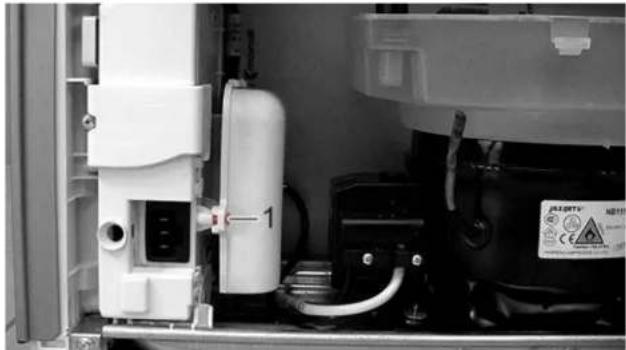
natural_image
Interior view of an appliance showing internal components and a labeled component (no readable text or symbols)natural_image
Close-up of a hand holding a white plastic enclosure with a magnified inset showing a small component (no visible text or symbols)natural_image
Close-up of hands assembling an electric motor casing with visible wiring and components (no text or symbols)natural_image
Two-step photo showing hands installing or adjusting a small electronic component, labeled ① and ② (no text or symbols on the device itself)natural_image
Illustration of hands connecting a cable to a rectangular panel with shelves (no text or symbols)natural_image
Illustration of hands holding a cable with a black arrow indicating direction (no text or symbols)
natural_image
Isometric line drawing of a 3D wall-mounted device with multiple shelves and an eye icon (no text or symbols)natural_image
Line drawing of a refrigerator with hand gestures indicating side placement (no text or symbols)
Popravak
natural_image
Diagram of a hand interacting with a refrigerator drawer, showing shelves and drawers with arrows indicating movement (no text or symbols)
Brtva vrata je postavljena.

Popravak

Nastavak Torx TX20 6.3 mm (1/4") [00340865]




Zahtjev:

Popravak
-
- Pritisnite poklopac gornjeg zgloba s obje strane (1).
-
Izvadite poklopac gornjeg zgloba (2).
- Okrenite poklopac zgloba (3).
- Uklonite poklopac gornjeg zgloba (4).
- Odvijte dva vijka (5).
- Uklonite gornji zglob (6)/


Gomji je zglob uklonjen.
4.3.2 Postavljanje gornjeg zgloba vrata
▶ Postavite obratnim redoslijedom.

Popravak

Popravak
-
- Uklonite poklopac gornjeg zgloba (1).
-
Uklonite poklopac kutije za kabele (2).
- Odvojite električni priključak (3)
- Odvijte vijak priključka za uzemljenje (4).
- Uklonite zaštitu kabela (5).
- Odvijte vijak (6)
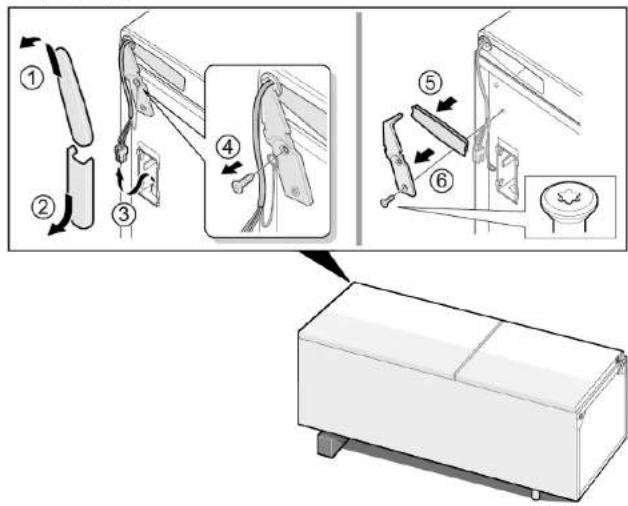

Gomji je zglob uklonjen.
4.4.2 Postavljanje gornjeg zgloba vrata
▶ Postavite obratnim redoslijedom.

Popravak
Nastavak Torx TX20 6.3 mm (1/4") [00340865]



Zahtjev:
Srednji je zglob uklonjen.
4.5.2 Postavljanje srednjeg zgloba vrata
▶ Postavite obratnim redoslijedom.

Popravak
4.6 Zamjena donjeg zgloba vrata
Specijalni alati:
Nastavak Torx TX20 6.3 mm (1/4") [00340865]





Zahtjev:

natural_image
Diagram of a mechanical component with an arrow indicating direction, no text or symbols presentDonji je zglob vrata uklonjen.
4.6.2 Postavljanje donjeg zgloba vrata
▶ Postavite obratnim redoslijedom.

Popravak
4.7 Zamjena police
Zahtjev:
Vrata su otvorena.
4.7.1 Uklanjanje police
- Izvucite policu.
natural_image
Illustration of hands holding a tablet with a black curved arrow indicating rotation (no text or symbols)natural_image
Diagram of a roof drainage system with wavy roof lines and black directional arrows indicating flow or movement (no text or symbols)Polica za boce je uklonjena.
4.8.2 Postavljanje police za boce
▶ Postavite obratnim redoslijedom.

Popravak
natural_image
Diagram showing two mechanical components with upward arrows indicating motion or assembly (no text or symbols)natural_image
Diagram of a mechanical or structural component with directional arrows indicating movement or force (no text or symbols present)Prilagodljiva posuda za vrata je uklonjena.
4.10.2 Postavljanje prilagodljive posude za vrata
▶ Postavite obratnim redoslijedom.

Popravak
4.11 Zamjena spremnika za zamrznute namirnice
Zahtjev:
Vrata su otvorena.
4.11.1 Uklanjanje spremnika za zamrznute namirnice
natural_image
Diagram of a refrigerator with an open door and directional arrows indicating movement (no text or symbols)Spremnik za zamrznute namirnice je uklonjen.
4.11.2 Postavljanje spremnika za zamrznute namirnice
▶ Postavite obratnim redoslijedom.

Popravak
4.12 Zamjena spremnika
Zahtjev:
Vrata su otvorena.
4.12.1 Uklanjanje spremnika
- Izvadite donji spremnik hladnjaka (1).
- Izvadite gornji spremnik hladnjaka (2).

Spremnici su uklonjeni.
- Izvlačni spremnik je uklonjen.
4.13.2 Postavljanje izvlačnog spremnika
▶ Postavite obratnim redoslijedom.

Popravak
natural_image
Diagram of a mechanical or electrical setup with a red component and connected components (no visible text or symbols)natural_image
Diagram of a screwdriver interacting with a red component, no text or symbols present
Popravak

natural_image
Close-up of a refrigerator interior showing a door, shelf, and door panel (no text or symbols visible)
Popravak
natural_image
Close-up of a refrigerator interior showing glass panels and a circular doorbell (no text or symbols visible)natural_image
Abstract graphic with a rectangular panel and arrows pointing to it, set against a dark background with curved lines (no text or symbols)
Popravak
natural_image
Diagram of a screwdriver interacting with a rectangular device, no text or symbols presentnatural_image
3D rendering of a monitor mounted on a wall with a red panel, against a gray background (no text or symbols visible)
Popravak
- Odvijte vijak.

natural_image
Interior view of an appliance showing internal components and a labeled component (no readable text or symbols)Otpušta se kutija za kondenzator za pokretanje kompresora i LED modul za napajanje.
natural_image
Close-up of a hand holding a white plastic enclosure with a magnified inset showing a small component (no visible text or symbols)Otpušta se poklopac kutije za kondenzator za pokretanje kompresora i LED modul za napajanje.
- Otpustite četiri kuke.

natural_image
Close-up of hands assembling an electric motor casing with visible wiring and components (no text or symbols)natural_image
Two-panel photo showing hands installing or adjusting a small electronic component, labeled ① and ② (no text or symbols on the components themselves)Uklanja se LED modul za napajanje.
Popravak
4.18.2 Ugradnja LED modula za napajanje
▶ Postavite obratnim redoslijedom.
natural_image
Illustration of hands connecting a cable to a rectangular panel with shelves (no text or symbols)natural_image
Illustration of hands holding a cable inside a rectangular frame with a curved arrow indicating rotation (no text or symbols)
natural_image
Isometric line drawing of a wall-mounted shelf with an eye icon (no text or symbols)natural_image
Line drawing of a refrigerator with hand gestures indicating side placement (no text or symbols)
Oprava
natural_image
Diagram of a hand interacting with a refrigerator drawer, showing shelves and drawers with arrows indicating movement (no text or symbols)


Oprava


Oprava


natural_image
Diagram of a mechanical component with an arrow indicating direction, no text or symbols presentnatural_image
Illustration of hands holding a tablet with a curved arrow indicating rotation (no text or symbols)natural_image
Diagram of a roof drainage system with wavy roof lines and black directional arrows indicating flow or movement (no text or symbols)natural_image
Diagram showing two mechanical components with upward arrows indicating motion or assembly (no text or symbols)natural_image
Diagram of a mechanical component with directional arrows indicating movement or force (no text or symbols)natural_image
Diagram of a refrigerator with an open door and directional arrows indicating movement (no text or symbols)natural_image
Diagram of a mechanical or electrical component with a red arrow pointing to a component, no visible text or symbols.natural_image
Diagram of a tool interacting with a red rectangular object, possibly a component or device (no text or symbols visible)
Oprava

natural_image
Close-up of a refrigerator interior showing a glass door and shelf, with no visible text or symbols.
Oprava
natural_image
Close-up of a refrigerator interior showing glass shelves and a circular door (no text or symbols visible)natural_image
Abstract graphic with two arrows pointing to a rectangular object, no text or symbols present
Oprava
natural_image
Diagram of a tool interacting with a device, showing motion lines and a red highlighted section (no text or symbols)natural_image
3D rendering of a rectangular electronic device with a red panel and white components, set against a gray background (no text or symbols visible)

Oprava
- Vyšroubujte šroub.
natural_image
Interior view of an industrial equipment cabinet with white components and a labeled component (no readable text or symbols)natural_image
Close-up of a hand holding a white plastic enclosure with red connectors, next to an industrial machine component (no visible text or symbols)natural_image
Close-up of hands assembling an electric motor with visible wiring and components (no text or symbols)natural_image
Two-step photo showing hands installing or adjusting a component with wires and wiring (no visible text or symbols)LED napájecí modul je vyjmutý.

Oprava
natural_image
Illustration of hands connecting a cable to a rectangular panel with shelves (no text or symbols)natural_image
Illustration of hands holding a cable inside a rectangular frame with a curved arrow indicating rotation (no text or symbols)
natural_image
Isometric line drawing of a wall-mounted shelf with an eye icon pointing to the top panel (no text or symbols)natural_image
Line drawing of a door handle with hand gestures indicating left and right motion (no text or symbols)
Reparation
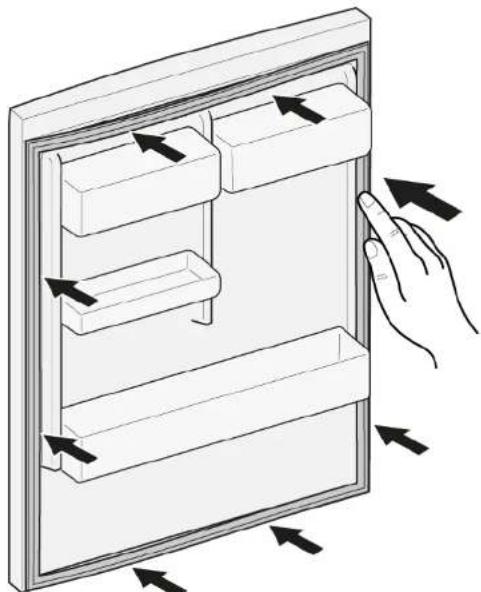
- Tryk hele pakningen trinvist i rillen.
natural_image
Diagram of a hand interacting with a refrigerator drawer, showing multiple compartments and directional arrows indicating movement (no text or symbols present)


Reparation


Reparation


natural_image
Diagram of a device with a labeled component and arrow, no readable text or symbols presentnatural_image
Illustration of hands holding a tablet with a curved arrow indicating rotation (no text or symbols)Hylden er fjernet.
natural_image
Diagram of a roof drainage system with wavy roof lines and black directional arrows indicating flow or movement (no text or symbols)natural_image
Diagram showing two mechanical components with upward arrows indicating motion or assembly (no text or symbols)natural_image
Diagram of a mechanical or structural component with directional arrows indicating movement or force (no text or symbols present)natural_image
Diagram of a refrigerator with an open door and directional arrows indicating movement (no text or symbols)
- Afbryd LED-spotlampens elektriske tilslutninger.
LED-spotlampen er fjernet.
4.14.2 Montering af LED-spotlampe
natural_image
Diagram of a mechanical or electrical setup with a red component and wiring, no visible text or symbolsnatural_image
Diagram of a screwdriver inserted into a red component, with no visible text or symbols

natural_image
Close-up of a refrigerator interior showing a glass door and shelf, with a circular component inserted (no text or symbols visible)
Reparation
natural_image
Close-up of a refrigerator interior showing glass shelves and a circular door (no text or symbols visible)natural_image
Abstract graphic with a rectangular block and two arrows pointing outward, no text or symbols present.
Reparation
natural_image
Diagram of a tool interacting with a device, showing motion lines and a red highlighted section (no text or symbols)- Afbryd LED-spotlampens elektriske tilslutning.

natural_image
3D rendering of a rectangular electronic device with a red panel and white components, set against a gray background (no text or symbols visible)
Reparation
- Skru skruen ud.

natural_image
Interior view of an appliance showing internal components and a labeled component (no readable text or symbols)natural_image
Close-up of a hand holding a white plastic enclosure with a magnified inset showing a small component (no visible text or symbols)natural_image
Close-up of hands assembling an electric motor casing with visible wiring and components (no text or symbols)natural_image
Two-panel black-and-white photo showing hands assembling or adjusting a small electronic component, labeled with numbers 1 and 2 (no text or symbols on the device itself)natural_image
Illustration of hands connecting a cable to a rectangular panel with shelves (no text or symbols)natural_image
Illustration of hands holding a cable inside a rectangular frame, with an arrow indicating direction (no text or symbols)
natural_image
Isometric line drawing of a wall-mounted shelf with an eye icon (no text or symbols)natural_image
Line drawing of a refrigerator with hand gestures indicating side placement (no text or symbols)
Reparatie
natural_image
Diagram of a hand interacting with a refrigerator drawer, showing shelves and drawers with directional arrows (no text or symbols)
Apparaat is losgekoppeld is van de stroomvoorziening.
Deur is open.


Reparatie

Reparatie

natural_image
Diagram of a mechanical device with a labeled component (①) and an arrow indicating direction, no text or symbols present.natural_image
Illustration of hands holding a tablet with a curved arrow indicating rotation (no text or symbols)natural_image
Diagram of a roof drainage system with wavy roof lines and black directional arrows indicating flow or movement (no text or symbols)natural_image
Diagram showing two mechanical components with upward arrows indicating motion or assembly (no text or symbols)natural_image
Diagram of a mechanical component with directional arrows indicating movement or force (no text or symbols)natural_image
Diagram of a refrigerator with an open door and directional arrows indicating movement (no text or symbols)Apparaat is losgekoppeld is van de stroomvoorziening.
Deur is open.
natural_image
Diagram of a mechanical or electrical setup with a red component and wiring, no visible text or symbolsnatural_image
Diagram of a mechanical or electrical component with a tool inserted, showing no visible text or symbols.
Reparatie
natural_image
Diagram of a mechanical assembly with a red component and a black arrow indicating direction (no text or symbols)
natural_image
Close-up of a refrigerator interior showing a glass door and shelf, with no visible text or symbols.
Reparatie
natural_image
Close-up of a refrigerator interior showing glass panels and a circular button with an arrow pointing to the door (no text or symbols visible)natural_image
Abstract graphic with a document icon and two arrows pointing to it, set against a dark background (no text or symbols)
Reparatie
natural_image
Diagram of a screwdriver interacting with a rectangular device, no text or symbols presentnatural_image
3D rendering of a rectangular electronic device with a red panel and white components, set against a gray background (no text or symbols visible)
Reparatie
natural_image
Interior view of an appliance showing internal components and a labeled component (no readable text or symbols)natural_image
Close-up of a hand holding a white plastic enclosure with a magnified inset showing a small component (no visible text or symbols)natural_image
Close-up of hands assembling an electric motor casing with visible wiring and components (no text or symbols)natural_image
Two-panel photo showing hands installing or adjusting a small electronic component, labeled ① and ② (no text or symbols on the components themselves)Repair hints - Fridge-freezer
i Concerning this document.... 163
1.1 Important information.... 163
1.1.1 Purpose.... 163
1.2 Explanation of symbols 163
1.2.1 Danger levels.... 163
1.2.2 Hazard symbols 163
1.2.3 Structure of the warnings.... 164
1.2.4 General symbols.... 164
Safety....
2.1 General Safety instructions 165
2.1.1 All domestic appliances 165
Tools and aids....10
Repair
4.4 Replacing door upper hinge (door with display) 173
4.4.1 Removing door upper hinge.... 173
4.4.2 Installing door upper hinge.... 174
4.5 Replacing door middle hinge 175
4.5.1 Removing door middle hinge 175
4.5.2 Installing door middle hinge 175
4.6 Replacing door lower hinge.... 176
4.6.1 Removing door lower hinge 176
4.6.2 Installing door lower hinge 176
4.7 Replacing shelf.... 177
4.7.1 Removing shelf.... 177
4.7.2 Installing shelf.... 177
4.8 Replacing bottle tray 178
4.8.1 Removing bottle tray.... 178
4.8.2 Installing bottle tray 178
4.9 Replacing door rack 179
4.9.1 Removing door rack.... 179
4.14 Replacing LED spot light 184
4.14.1 Removing LED spot light.... 184
4.14.2 Installing LED spot light 184
4.15 Replacing LED top light 185
4.15.1 Removing LED light.... 185
4.15.2 Installing top LED light 186
4.16 Replacing LED side bar light 187
4.16.1 Removing LED side bar light 187
4.16.2 Installing LED side bar light 188
4.17 Replacing LED spot light 189
4.17.1 Removing LED spot light.... 189
4.17.2 Installing LED spot light 190
4.18 Replacing LED power supply module 191
4.18.1 Removing LED power supply module 191
4.18.2 Installing LED power supply module 193
i Concerning this document
1.1 Important information
1.1.1 Purpose
These repair hints support consumer to repair appliances by himself according to the applicable eco-design regulation (as of 03/2021).
They contain information how to exchange defined spare parts including warnings and risks.
In case of questions, please contact our customer service. We will only be liable for damages if the repair hints have been followed properly.
1.2 Explanation of symbols
1.2.1 Danger levels
The warning levels consist of a symbol and a signal word. The signal word indicates the severity of the danger.
| Warning level Meaning | |
| Danger | Non-observance of the warning message will result in death or serious injuries. |
| Warning | Non-observance of the warning message could result in death or serious injuries. |
| Caution | Non-observance of the warning message could result in minor injuries. |
| Notice | Non-observance of the warning message could result in damage to property. |
Table 1: Danger levels
1.2.2 Hazard symbols
Hazard symbols are symbolic representations which give an indication of the kind of danger.
The following hazard symbols are used in this document:
| Hazard symbol Meaning | ||
 | General warning message | |
 | Danger from electrical voltage | |
 | Risk of explosion | |
 | Danger of cuts | |
 | Danger of crushing |
i Concerning this document
| Hazard symbol Meaning | ||
 | Danger from hot surfaces | |
 | Danger from strong magnetic field | |
 | Danger from non-ionizing radiation | |
Table 2: Hazard symbols
1.2.3 Structure of the warnings
Warnings in this document have a standardised appearance and a standardised structure.


Type and source of danger!
Possible consequences of ignoring the danger / warning.
▶ Measures and prohibitions for preventing the danger.
The following example shows a warning that warns against electric shock due to live parts. The measure for avoiding the danger is mentioned.


Risk of electric shock due to live parts!
Death by electrocution
- Disconnect appliances from electrical supply at least 60 seconds before starting repairs.
1.2.4 General symbols
The following general symbols are used in this document:
| Gen. symbol Meaning | |
| Identification of a special tip (text and/or graphic) | |
| Identification of a simple tip (only text) | |
| Identification of a link to a video tutorial |
| Gen. symbol Meaning | |
| Identification of required tools | |
| Identification of required preconditions | |
| Identification of a condition (if ..., then ...) | |
| Identification of a result | |
| StartIdentification of a key or button | |
| [00123456] Identification of a material number | |
| StatusIdentification of displayed text / window(in the appliance's display) | |
Table 3: General symbols
Safety
2.1 General Safety instructions
2.1.1 All domestic appliances
Risk of electric shock due to live parts!
; Errors by repairs involving electrical components can lead to electrical shock!
; Disconnect the appliance from the mains for at least 60 seconds before starting work.
After the repair have a safety test according VDE 0701 or country-specific regulations performed.
Risk of injury from sharp edges!
; Wear protective gloves.
Risk of crushing during repair, maintenance, troubleshooting and service due to heavy and moving components
; Wear protective shoes.
; Secure heavy components from falling down.
Do not stick body parts into moving components.
Risk to the appliance's safety / function!
; Only use original spare parts.
Risk of damage to electrostatically sensitive components (ESDs)!
Do not touch the modules, including connections and conductor paths.

Tools and aids
| Designation Details Images | |||
| Protection cloth[00342013] | 60 cm x 50 cm | 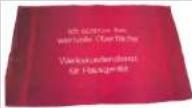 | |
| Slotted screwdriver | Blade 2.4 mm x 0.4 mm x60 mm, in the kit [00341820] |  | |
| Special tool[00342180] | |||
| Suction cup[00342224] | ∅50 mm | ||
| Torx Bit TX20[00340865] | 6,3 mm (1/4") | 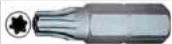 | |
| Slotted screwdriver | Blade 10 mm x 1.6 mm x200 mm |  | |

Repair
- Release door gasket from the groove on right and left corner.

natural_image
Illustration of hands connecting a cable to a rectangular panel with shelves (no text or symbols)- Pull out door gasket from groove.

natural_image
Illustration of hands holding a cable with a black arrow indicating direction (no text or symbols)
Door gasket is removed.
| Thickness of new door gasket may deviate slightly from thickness of old door gasket. This will not affect closing behavior and long-term function. | |
| If your appliance has adjustable hinges or hinge attachments, you can optimize the closing behavior subsequently. | |
| Small side holes in door gasket are functional (required for ventilation). These are not production faults. |
Repair
- Check groove for gasket for damage.

natural_image
Isometric line drawing of a wall-mounted shelf with an eye icon (no text or symbols)- (if) If groove for gasket is it is damaged.
-
Contact customer service.
-
i Slight deformation of door gasket is normal and does not affect its function. It is recommended to straighten door gasket before inserting it into appliance.
Heat door gasket with a hair dryer or hot water and manually reshape it.
- Push corners of gasket at the top and bottom to the groove.

natural_image
Line drawing of a refrigerator with hand gestures indicating side placement (no text or symbols)
Repair
- Press whole gasket step by step into the groove.
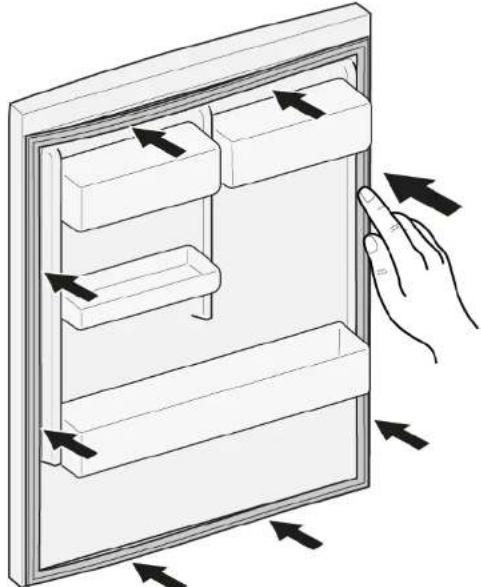
natural_image
Diagram of a hand interacting with a refrigerator drawer, showing multiple compartments and directional arrows indicating movement (no text or symbols present)
Door gasket is installed.

Repair
4.2 Replacing door handle
Required tools:
Torx Bit TX20 6,3 mm (1/4") [00340865]
Slotted screwdriver Blade 10 mm x 1.6 mm x 200 mm
Prerequisite:
√ Appliance is disconnected from power supply.
√ Door is open.
4.2.1 Removing door handle
- Remove two screw caps (1).
- Unscrew two screws (2).
- Remove door handle (3).


Door handle is removed.

Door handle for the second door can be removed in the same manner.
▶ Install in reverse order.

Repair




Prerequisite:
√ Appliance is disconnected from power supply.
√ Appliance interior fittings are removed.
- Place appliance on the back side.


Repair
-
- Press upper hinge cover on both sides (1).
-
Move out upper hinge cover (2)
- Rotate hinge cover (3).
- Remove upper hinge cover (4).
- Unscrew two screws (5).
- Remove upper hinge (6)
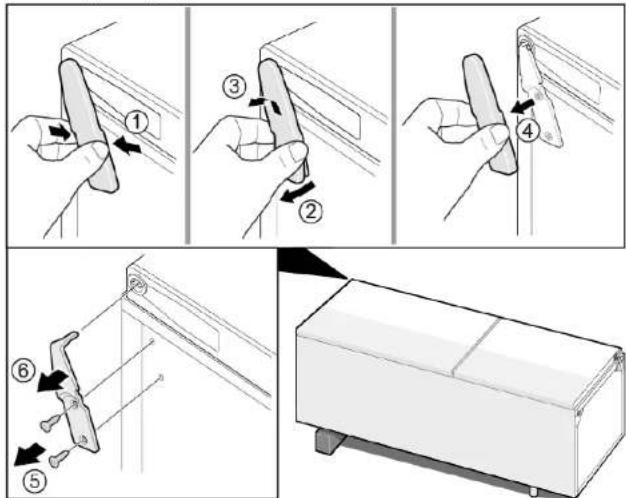

Upper hinge is removed.
▶ Install in reverse order.

Repair
4.4 Replacing door upper hinge (door with display)
Required tools:
Torx Bit TX20 6,3 mm (1/4") [00340865]


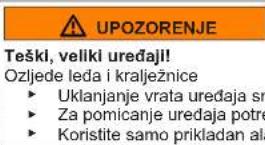
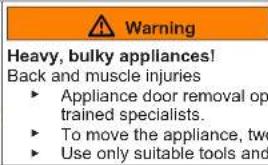
Heavy, bulky appliances!
Back and muscle injuries
▶ Appliance door removal operation should only be carried out by
trained specialists.
To move the appliance, two people are required.
▶ Use only suitable tools and equipment.

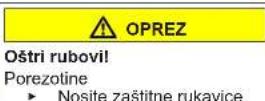
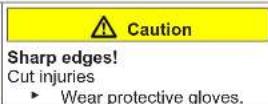
Sharp edges!
Cut injuries
▶ Wear protective gloves.


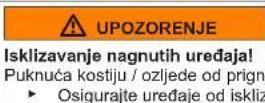
Slipping of tilted appliances!
Bone fractures / crush injuries
- Secure appliances against slipping


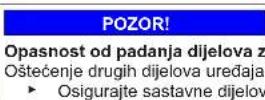
Risk of falling parts due to released screws!
Injury because of falling parts.
- Secure component from falling down.


Risk of falling parts due to released screws!
Damage to other parts of the appliance or at customers home e.g. bot-
tom.
- Secure component from falling down.


Risk of electric shock due to live parts!
Danger to life through electric shock in case of improper repair
▶ Electric parts should be repaired by a qualified electricians.
▶ After the repair have a safety test according VDE 0701 or country-specific regulations performed.


Risk of electric shock due to live parts!
Death by electrocution
- Disconnect appliances from electrical supply at least 60 seconds before starting repairs.
Prerequisite:
√ Appliance is disconnected from power supply.
√ Appliance interior fittings are removed.
- Place appliance on the back side.


Repair
2.1. Remove upper hinge cover (1).
- Remove cable box cover (2).
- Disconnect electrical connection (3)
- Unscrew ground connection screw (4).
- Remove cable protection (5).
- Unscrew the screw (6)


Upper hinge is removed.
▶ Install in reverse order.

Repair
4.5 Replacing door middle hinge
Required tools:
Torx Bit TX20 6,3 mm (1/4") [00340865]



Prerequisite:
√ Appliance is disconnected from power supply.
√ Appliance interior fittings are removed.
√ Door upper hinge is removed.
4.5.1 Removing door middle hinge
▶ 1. Remove fridge compartment door (1).
2. Unscrew two screws (2).
3. Remove middle hinge (3).

Middle hinge is removed.
4.5.2 Installing door middle hinge
▶ Install in reverse order.
Repair
4.6 Replacing door lower hinge
Required tools:
Torx Bit TX20 6,3 mm (1/4") [00340865]




Prerequisite:
√ Appliance is disconnected from power supply.
√ Appliance interior fittings are removed.
√ Upper hinge is removed.
√ Middle hinge is removed.
4.6.1 Removing door lower hinge
▶ 1. Remove freezer compartment door (1).
2. Unscrew the screw (2).
3. Turn lower hinge out (3).
4. Remove lower hinge (4).

Door lower hinge is removed.
▶ Install in reverse order.

Repair
4.7 Replacing shelf
Prerequisite:
Door is open.
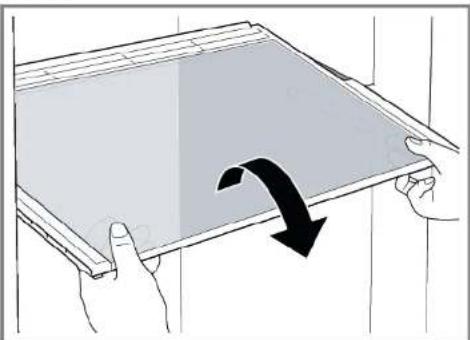
4.7.1 Removing shelf
▶ Pull out shelf.

natural_image
Illustration of hands holding a tablet with a black curved arrow indicating rotation (no text or symbols)Shelf is removed.
4.7.2 Installing shelf
▶ Install in reverse order.

Repair
4.8 Replacing bottle tray
Prerequisite:
√ Door is open.
4.8.1 Removing bottle tray
▶ Pull out bottle tray.

natural_image
Diagram of a roof drainage system with wavy roof lines and black directional arrows indicating flow or movement (no text or symbols)→ Bottle tray is removed.
4.8.2 Installing bottle tray
▶ Install in reverse order.

Repair
4.9 Replacing door rack
Prerequisite:
√ Door is open.
▶ Lift door rack upwards.

natural_image
Diagram showing two mechanical components with upward arrows indicating motion or assembly (no text or symbols)Door rack is removed.
▶ Install in reverse order.
Repair
4.10 Replacing adjustable door rack
Prerequisite:
√ Door is open.
4.10.1 Removing adjustable door rack
- Move high-adjustable door rack upwards until the door rack is released from the holder.

natural_image
Diagram of a mechanical component with directional arrows indicating movement or force (no text or symbols)Adjustable door rack is removed.
4.10.2 Installing adjustable door rack
▶ Install in reverse order.

Repair
4.11 Replacing frozen food container
Prerequisite:
√ Door is open.
4.11.1 Removing frozen food container
- Pull out frozen food container all the way (1).
- Remove food container (2).
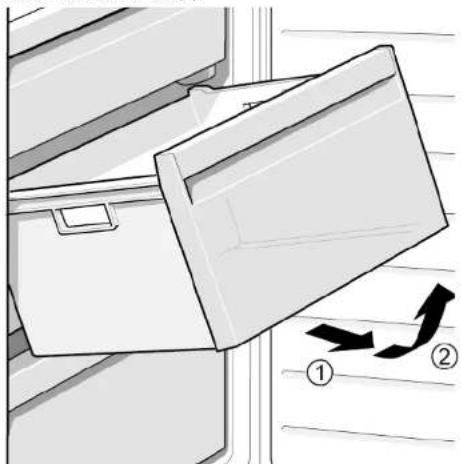
natural_image
Diagram of a refrigerator with an open door and directional arrows indicating movement (no text or symbols)Frozen food container is removed.
4.11.2 Installing frozen food container
▶ Install in reverse order.

Repair
4.12 Replacing container
Prerequisite:
√ Door is open.
4.12.1 Removing container
- Move out lower fridge container (1).
- Move out upper fridge container (2).


Containers are removed.
4.12.2 Installing container
▶ Install in reverse order.

Repair
4.13 Replacing extendable container
Prerequisite:
√ Door is open.
4.13.1 Removing extendable container
- Pull extendable container out all the way (1).
- Remove extendable container (2).
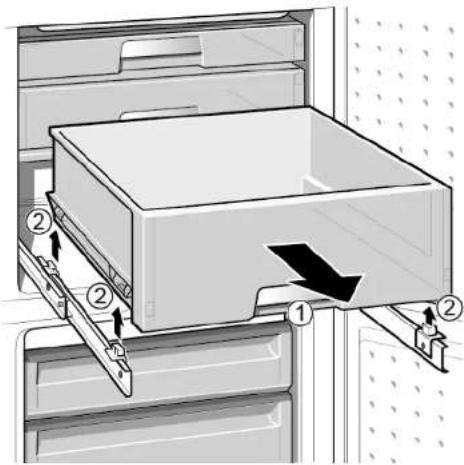
Extendable container is removed.
4.13.2 Installing extendable container
▶ Install in reverse order.

Repair
4.14 Replacing LED spot light
Required tools:

Special tool [00342180]

Your appliance features a maintenance-free LED light. These lights may be repaired by customer service or authorised technicians only!


Risk of electric shock due to live parts!
Danger to life through electric shock in case of improper repair
▶ Electric parts should be repaired by a qualified electricians.
After the repair have a safety test according VDE 0701 or country-specific regulations performed.


Risk of electric shock due to live parts!
Death by electrocution
- Disconnect appliances from electrical supply at least 60 seconds before starting repairs.


Sharp edges!
Cut injuries
▶ Wear protective gloves.
Prerequisite:
√ Appliance is disconnected from power supply.
√ Door is open.
4.14.1 Removing LED spot light
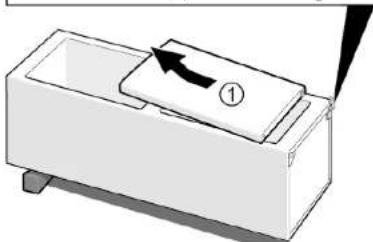
- Use special tool to pull out LED spot light (1).

- Unplug electrical connections of LED spot light.
→ LED spot light is removed.
4.14.2 Installing LED spot light
▶ Install in reverse order.

Repair
4.15 Replacing LED top light
Required tools:
Slotted screwdriver Blade 2.4 mm x 0.4 mm x 60 mm, in the kit [00341820]

Your appliance features a maintenance-free LED light.
These lights may be repaired by customer service or authorised technicians only!

Risk of electric shock due to live parts!
Danger to life through electric shock in case of improper repair
Electric parts should be repaired by a qualified electricians.
After the repair have a safety test according VDE 0701 or country-specific regulations performed.


Risk of electric shock due to live parts!
Death by electrocution
- Disconnect appliances from electrical supply at least 60 seconds before starting repairs.

Sharp edges!
Cut injuries
▶ Wear protective gloves.
Prerequisite:
√ Appliance is disconnected from power supply.
Door is open.
√ Upper interior fittings are removed.
4.15.1 Removing LED light
- Move the LED light to the left side.

natural_image
Diagram of a mechanical or electrical component with a red rectangular block and an arrow pointing to it, no visible text or symbols.LED light electrical connection is disconnected.
- Release LED light hooks.

natural_image
Diagram of a mechanical or electrical component with a tool inserted, showing a red block and vertical supports (no text or symbols visible)
Repair
- Remove LED light moving it forward.


LED light is removed.
4.15.2 Installing top LED light
▶ Install in reverse order.

Repair
4.16 Replacing LED side bar light
Required tools:

Suction cup ∅50 mm [00342224]

Your appliance features a maintenance-free LED light. These lights may be repaired by customer service or authorised technicians only!


Risk of electric shock due to live parts!
Danger to life through electric shock in case of improper repair
▶ Electric parts should be repaired by a qualified electricians.
After the repair have a safety test according VDE 0701 or country-specific regulations performed.


Risk of electric shock due to live parts!
Death by electrocution
- Disconnect appliances from electrical supply at least 60 seconds before starting repairs.


Sharp edges!
Cut injuries
▶ Wear protective gloves.
Prerequisite:
√ Appliance is disconnected from power supply.
√ Door is open.
√ Fridge compartment shelves are removed.
4.16.1 Removing LED side bar light
- Stick the suction cup on the upper third of LED side bar light.

natural_image
Close-up of a refrigerator interior showing a door, shelf, and door panel (no text or symbols visible)Repair
- Pull suction cup with forward LED side bar light in one rotary movement.

natural_image
Close-up of a refrigerator interior showing glass panels and a circular button with an arrow pointing to the door (no text or symbols visible)- Disconnect electrical connection of LED side bar light.
LED side bar light is removed.
4.16.2 Installing LED side bar light
- Connect electrical connection of LED side bar light.
- Fix LED side bar light into it's location on compartment wall (hooks click).
LED side bar light is installed.

Repair
4.17 Replacing LED spot light
Required tools:

Special tool [00342180]

Slotted screwdriver Blade 2.4 mm x 0.4 mm x 60 mm, in the kit [00341820]

Your appliance features a maintenance-free LED light. These lights may be repaired by customer service or authorised technicians only!

Risk of electric shock due to live parts!
Danger to life through electric shock in case of improper repair
Electric parts should be repaired by a qualified electricians.
After the repair have a safety test according VDE 0701 or country-specific regulations performed.


Risk of electric shock due to live parts!
Death by electrocution
- Disconnect appliances from electrical supply at least 60 seconds before starting repairs.


Sharp edges!
Cut injuries
▶ Wear protective gloves.
Prerequisite:
√ Appliance is disconnected from power supply.
Door is open.
√ Fridge compartment shelves are removed.
4.17.1 Removing LED spot light
- Release LED spot light cover.
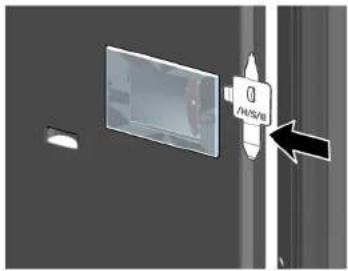
- Pull LED spot light cover inwards and simultaneously push forwards.

natural_image
Abstract graphic with a rectangular panel and two arrows pointing outward, no text or symbols present.
Repair
- Detach LED spot light module.

natural_image
Diagram of a screwdriver inserted into a rectangular component with a red edge, against a dark background (no text or symbols)- Disconnect LED spot light electrical connection.
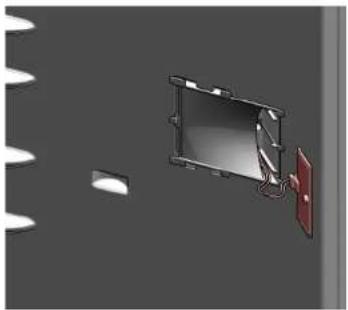
natural_image
3D rendering of a rectangular device with attached red panel and white circular elements, no visible text or symbolsLED spot light is removed.
4.17.2 Installing LED spot light
▶ Install in reverse order.

Repair
4.18 Replacing LED power supply module
Required tools:
Torx Bit TX20 6,3 mm (1/4") [00340865]
Slotted screwdriver Blade 2.4 mm x 0.4 mm x 60 mm, in the kit [00341820]
Container min. 200 ml capacity
Valid for appliance variants with Camera in Fridge (CIF).

Electronic modules may be repaired by customer service or authorised technicians only!


Risk of electric shock due to live parts!
Danger to life through electric shock in case of improper repair
▶ Electric parts should be repaired by a qualified electricians.
After the repair have a safety test according VDE 0701 or country-specific regulations performed.

Risk of electric shock due to live parts!
Death by electrocution
- Disconnect appliances from electrical supply at least 60 seconds before starting repairs.

Sharp edges!
Cut injuries
▶ Wear protective gloves.
Prerequisite:
√ Appliance is disconnected from power supply.
√ Back side of appliances is accessible.
4.18.1 Removing LED power supply module
1.
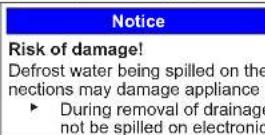
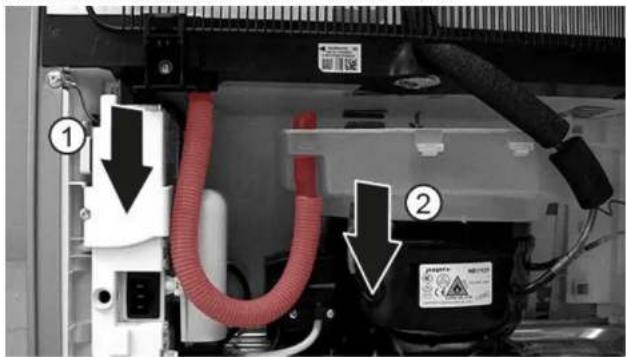
- Disconnect drainage hose from water drain outlet (1).
- Pour defrost water into the container.
- Disconnect drainage hose from water evaporation tray (2).

Repair
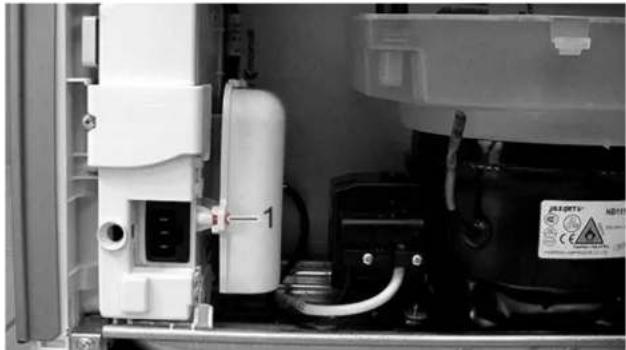
- Unscrew the screw.

natural_image
Interior view of an industrial equipment unit with white components and a labeled component (no readable text or symbols)Compressor starting capacitor and LED power supply module box is released.
- Release two hooks.

natural_image
Close-up of a hand holding a white plastic enclosure with red connectors, next to an industrial machine component (no visible text or symbols)Compressor starting capacitor and LED power supply module box cover is released.
- Release four hooks.

natural_image
Close-up of hands assembling an electric motor with visible wiring and components (no text or symbols)LED power supply module is released.
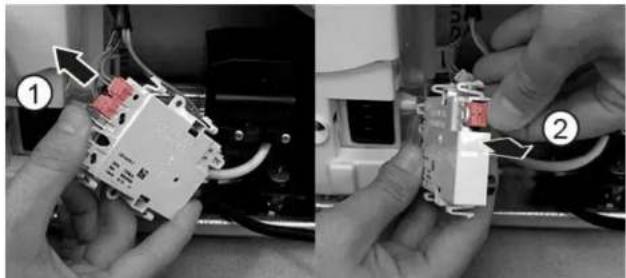
- Disconnect LED power supply module electrical connections (1) and (2).
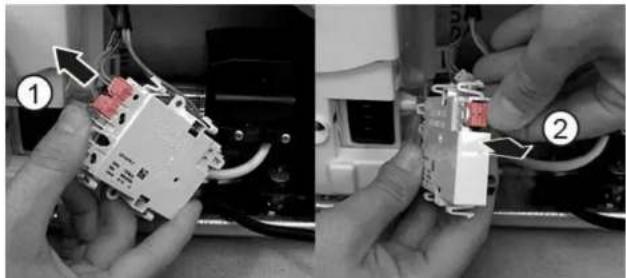
natural_image
Two-step photo showing hands installing or adjusting a component with wires and wiring (no visible text or symbols)LED power supply module is removed.
Repair
4.18.2 Installing LED power supply module
▶ Install in reverse order.
Remonditeave - Kombikülmik
i Selle dokumendiga seoses 195
1.1 Tähtis teave 195
natural_image
Illustration of hands connecting a cable to a rectangular panel with shelves (no text or symbols)natural_image
Illustration of hands connecting a cable to a wall-mounted panel with a black arrow indicating direction (no text or symbols)
natural_image
Isometric line drawing of a refrigerator with an eye icon above, showing shelves and doors (no text or symbols)natural_image
Line drawing of a refrigerator with hand gestures indicating side placement (no text or symbols)
Remont
- Vajutage terve tihend jupphaaval soonde.

natural_image
Diagram of a hand interacting with a refrigerator drawer, showing shelves and drawers with arrows indicating movement (no text or symbols)


Remont


Remont

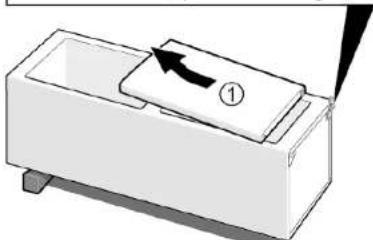
natural_image
Diagram of a device with a labeled component and arrow, no readable text or symbols present
natural_image
Illustration of hands holding a tablet with a curved arrow indicating rotation (no text or symbols)natural_image
Diagram of a roof drainage system with wavy roof lines and black directional arrows indicating flow or movement (no text or symbols)
natural_image
Diagram showing two mechanical components with upward arrows indicating motion or assembly (no text or symbols)natural_image
Diagram of a mechanical or structural component with directional arrows indicating movement or force (no text or symbols present)natural_image
Diagram of a refrigerator with an open door and directional arrows indicating movement (no text or symbols)
natural_image
Diagram of a vertical structure with a red rectangular component and an arrow pointing to it, no visible text or symbols.
natural_image
Diagram of a screwdriver inserted into a mechanical component with a red block and vertical supports (no text or symbols)
Remont
- Eemaldage LED-tuli, liigutades seda ettepoole.


natural_image
Close-up of a refrigerator interior showing a glass door and shelf, with no visible text or symbols.
Remont
natural_image
Interior view of a refrigerator showing the door, shelves, and a circular vent (no text or symbols visible)natural_image
Abstract graphic with a rectangular object and two arrows pointing outward, set against a dark background with faint white patterns (no text or symbols)
Remont
natural_image
Diagram of a tool interacting with a device, showing motion lines and a red highlighted section (no text or symbols)natural_image
3D rendering of a rectangular electronic device with a red panel and white components, set against a gray background (no text or symbols visible)Remont
- Keerake kruvi lahti.

natural_image
Interior view of an industrial equipment cabinet with visible wiring and a labeled component (no readable text or symbols)natural_image
Close-up of a hand holding a white plastic enclosure with red connectors, next to an industrial machine component (no visible text or symbols)natural_image
Close-up of a hand holding an open electrical contactor with visible wiring and components (no text or symbols)natural_image
Two-step photo showing hands installing or adjusting a component with wires and wiring (no visible text or symbols)natural_image
Illustration of hands connecting a cable to a rectangular panel with shelves (no text or symbols)natural_image
Illustration of hands holding a cable inside a rectangular frame with a curved arrow indicating rotation (no text or symbols)
natural_image
Isometric line drawing of a wall-mounted shelf with an eye icon above (no text or symbols)natural_image
Line drawing of a door handle with hand gestures indicating left and right motion (no text or symbols)
Korjaus
natural_image
Diagram of a hand interacting with a refrigerator drawer, showing multiple compartments and directional arrows indicating movement (no text or symbols)


Korjaus

Korjaus

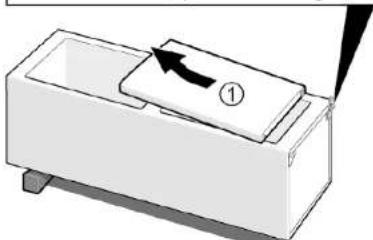
natural_image
Diagram of a device with a labeled component and arrow indicating direction (no text or symbols present)natural_image
Illustration of hands holding a tablet with a curved arrow indicating rotation (no text or symbols)Hylly on poistettu.
natural_image
Abstract diagram with wavy blue lines and a black arrow pointing downward (no text or symbols)natural_image
Diagram showing two mechanical components with upward arrows indicating motion or assembly (no text or symbols)natural_image
Diagram of a mechanical or architectural component with directional arrows indicating movement or force (no text or symbols present)natural_image
Diagram of a refrigerator with an open door and directional arrows indicating movement (no text or symbols)natural_image
Diagram of a mechanical or electrical component with a red component and an arrow pointing to it, no visible text or symbols.natural_image
Diagram of a screwdriver inserted into a component with a red block, showing mechanical assembly (no text or symbols)
Korjaus

Imukuppi ∅50 mm [00342224]

natural_image
Close-up of a refrigerator interior showing a glass door and shelf, with no visible text or symbols.Korjaus
natural_image
Close-up of a refrigerator interior showing glass panels and a circular button with an arrow pointing to the door (no text or symbols visible)natural_image
Abstract graphic with a rectangular panel and two arrows pointing outward, no text or symbols present.
Korjaus
- Irrota LED-kohdevalomoduuli.

natural_image
Diagram of a tool interacting with a device, showing motion lines and a red highlighted section (no text or symbols)natural_image
3D rendering of a rectangular electronic device with a red panel and white components, set against a gray background (no text or symbols visible)
Korjaus
- Kierrä ruuvi auki.

natural_image
Interior view of an appliance showing internal components and a labeled component (no readable text or symbols)natural_image
Close-up of a hand holding a white plastic enclosure with a magnified inset showing a small component (no visible text or symbols)natural_image
Close-up of hands assembling an electric motor casing with visible wiring and components (no text or symbols)natural_image
Two-panel photo showing hands installing or adjusting a small electronic component, labeled ① and ② (no text or symbols on the components themselves)natural_image
Diagram of hands connecting a cable to a door panel with shelves, showing structural components (no text or symbols)- Retirer le joint de porte de la rainure.

natural_image
Illustration of hands holding a cable inside a rectangular frame, with a black arrow indicating direction (no text or symbols)
natural_image
Isometric line drawing of a wall-mounted shelf with an eye icon above (no text or symbols)natural_image
Line drawing of a door handle with hand gestures indicating left and right motion (no text or symbols)
Réparation
natural_image
Diagram of a hand interacting with a refrigerator drawer, showing shelves and drawers with arrows indicating movement (no text or symbols)


Réparation

Réparation

natural_image
Illustration of hands holding a tablet with a black curved arrow indicating rotation (no text or symbols)natural_image
Diagram of a roof drainage system with wavy roof lines and black directional arrows indicating flow or movement (no text or symbols)natural_image
Diagram showing two mechanical components with upward arrows indicating motion or assembly (no text or symbols)natural_image
Diagram of a mechanical or architectural component with directional arrows indicating movement or force (no text or symbols present)natural_image
Diagram of a refrigerator with an open lid and directional arrows indicating airflow or movement (no text or symbols)natural_image
Diagram of a mechanical or electrical setup with a red component and connected components (no visible text or symbols)natural_image
Diagram of a screwdriver inserted into a component with a red block, showing mechanical assembly (no text or symbols)
Réparation

natural_image
Close-up of a refrigerator interior showing a door, glass panel, and shelf (no text or symbols visible)
Réparation
natural_image
Close-up of a refrigerator interior showing glass shelves and a circular button with an arrow pointing to the door (no text or symbols visible)natural_image
Abstract graphic with a document icon and arrows, no readable text or symbols
Réparation
natural_image
Diagram of a tool interacting with a device, showing motion lines and a red highlighted section (no text or symbols)natural_image
3D rendering of a rectangular electronic device with a red panel and white components, set against a gray background (no text or symbols visible)
Réparation
- Dévisser la vis.

natural_image
Interior view of an appliance showing internal components and a labeled component (no readable text or symbols)natural_image
Close-up of a hand holding a white plastic enclosure with a magnified inset showing a small component (no visible text or symbols)natural_image
Close-up of hands assembling an electric motor casing with visible wiring and components (no text or symbols)natural_image
Two-panel black-and-white photo showing hands assembling or adjusting a small electronic component, labeled with numbers 1 and 2 (no visible text or symbols)natural_image
Diagram of hands connecting a cable to a door panel with shelves, showing structural components (no text or symbols)natural_image
Illustration of hands holding a cable with a black arrow indicating direction (no text or symbols)
natural_image
Isometric line drawing of a wall-mounted shelf with an eye icon (no text or symbols)natural_image
Line drawing of a refrigerator with hand gestures indicating side placement (no text or symbols)Instandsetzen


Instandsetzen

Instandsetzen

natural_image
Illustration of hands holding a tablet with a black curved arrow indicating rotation (no text or symbols)natural_image
Diagram of a roof drainage system with wavy roof lines and black directional arrows indicating flow or movement (no text or symbols)natural_image
Diagram showing two mechanical components with upward arrows indicating motion or assembly (no text or symbols)natural_image
Diagram of a mechanical or architectural component with directional arrows indicating movement or force (no text or symbols present)natural_image
Diagram of a refrigerator with an open door and directional arrows indicating movement (no text or symbols)
natural_image
Diagram of a mechanical or electrical setup with a red component and wiring, no visible text or symbolsnatural_image
Diagram of a screwdriver inserted into a component with a red block, showing mechanical assembly (no text or symbols)
Instandsetzen
natural_image
Interior view of a refrigerator showing the door, glass panel, and shelf (no text or symbols visible)
Instandsetzen
natural_image
Interior view of a refrigerator showing the door, shelves, and a circular vent (no text or symbols visible)natural_image
Abstract graphic with a document icon and arrows, no readable text or symbols
Instandsetzen
natural_image
Diagram of a tool interacting with a device, showing motion lines and a red highlighted section (no text or symbols)natural_image
3D rendering of a rectangular electronic device with a red panel and white components, set against a gray background (no text or symbols visible)

Instandsetzen
natural_image
Interior view of an appliance showing internal components and a labeled component (no readable text or symbols)natural_image
Close-up of a hand holding a white plastic enclosure with a magnified inset showing a small component (no visible text or symbols)natural_image
Close-up of hands assembling an electric motor casing with visible wiring and components (no text or symbols)natural_image
Two-panel black-and-white photo showing hands installing or adjusting a small electronic component, labeled ① and ② (no text or symbols on the device itself)
Instandsetzen
natural_image
Illustration of hands connecting a cable to a storage unit panel (no text or symbols)natural_image
Illustration of hands connecting a cable to a wall-mounted panel with a curved arrow indicating rotation (no text or symbols)
natural_image
Isometric line drawing of a wall-mounted shelf with an eye icon (no text or symbols)natural_image
Line drawing of a refrigerator with hand gestures indicating side placement (no text or symbols)
Επισκευή
natural_image
Diagram of a hand interacting with a refrigerator drawer, showing shelves and drawers with arrows indicating movement (no text or symbols)


Επισκευή


Επισκευή

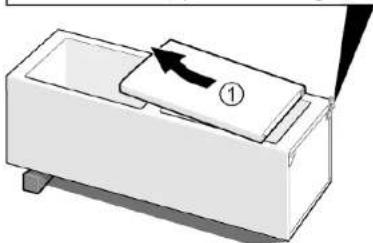
natural_image
Diagram of a mechanical component with an arrow indicating direction, no text or symbols presentnatural_image
Illustration of hands holding a tablet with a curved arrow indicating rotation (no text or symbols)To páφι αφαιρέθηκε.
natural_image
Diagram of a roof drainage system with wavy roof lines and a black arrow indicating flow direction (no text or symbols)natural_image
Diagram showing two mechanical components with upward arrows indicating motion or assembly (no text or symbols)To páfi pórtas éxei aφαιρεθεί.
natural_image
Diagram of a mechanical or architectural component with directional arrows indicating movement or force (no text or symbols present)To páfi pórtas me duvatótnta rúθμισης έχει αφαιρεθεί.
natural_image
Diagram of a refrigerator with an open door and directional arrows indicating movement (no text or symbols)natural_image
Diagram of a mechanical or electrical component with a red arrow pointing to a central component (no text or symbols visible)natural_image
Diagram of a screwdriver inserted into a mechanical component with a red block and vertical supports (no text or symbols)
Επισκευή

natural_image
Close-up of a refrigerator interior showing a door and shelf, with a magnified inset highlighting the door (no text or symbols visible)
Επισκευή
natural_image
Interior view of a refrigerator showing the door, shelves, and a circular vent (no text or symbols visible)natural_image
Abstract graphic with a document icon and two arrows pointing right, set against a dark gray background (no text or symbols)
Επισκευή
natural_image
Diagram of a screwdriver interacting with a rectangular device, showing internal components and wiring (no text or symbols)natural_image
3D rendering of a monitor mounted on a wall with a red panel, against a gray background (no text or symbols visible)

Επισκευή
- Ξεβιδώστε τη βίδα.

natural_image
Interior view of an appliance showing internal components and a labeled component (no readable text or symbols)natural_image
Close-up of a hand holding a white plastic enclosure with a magnified inset showing a small component (no visible text or symbols)natural_image
Close-up of hands assembling an electric motor casing with visible wiring and components (no text or symbols)natural_image
Two-step photo showing hands assembling a small electronic component, labeled with arrows and numbered positions (no text or symbols present)natural_image
Illustration of hands connecting a cable to a rectangular panel with shelves (no text or symbols)natural_image
Illustration of hands holding a cable with a black arrow indicating direction (no text or symbols)
natural_image
Isometric line drawing of a wall-mounted shelf with an eye icon (no text or symbols)natural_image
Line drawing of a refrigerator with hand gestures indicating side placement (no text or symbols)
Javítás
natural_image
Diagram of a hand interacting with a refrigerator drawer, showing shelves and drawers with arrows indicating movement (no text or symbols)


Javítás

Javítás

natural_image
Illustration of hands holding a tablet with a black curved arrow indicating rotation (no text or symbols)natural_image
Diagram of a roof drainage system with wavy roof lines and black directional arrows indicating flow or movement (no text or symbols)natural_image
Diagram showing two mechanical components with upward arrows indicating motion or assembly (no text or symbols)natural_image
Diagram of a mechanical or structural component with directional arrows indicating movement or force (no text or symbols present)natural_image
Diagram of a refrigerator with an open door and directional arrows indicating movement (no text or symbols)natural_image
Diagram of a mechanical or electrical component with a red block and arrow indicating direction (no text or symbols)natural_image
Diagram of a screwdriver inserted into a mechanical component with a red component, no text or symbols present
Javítás
natural_image
Close-up of a refrigerator interior showing a door, shelf, and door panel (no text or symbols visible)
Javítás
natural_image
Interior view of a refrigerator showing the door, shelves, and a hanging glass (no text or symbols visible)natural_image
Abstract graphic with a document icon and arrows, no readable text or symbols
Javítás
natural_image
Diagram of a tool interacting with a device, showing motion lines and a red highlighted section (no text or symbols)natural_image
3D rendering of a rectangular electronic device with a red panel and white components, set against a gray background (no text or symbols visible)

Javítás
natural_image
Interior view of an industrial equipment cabinet with white components and a labeled component (no readable text or symbols)natural_image
Close-up of a hand holding a white plastic enclosure with red connectors, next to an industrial machine component (no visible text or symbols)natural_image
Close-up of hands assembling an electric motor with visible wiring and components (no text or symbols)natural_image
Two-step photo showing hands installing or adjusting a component with wires and wiring (no visible text or symbols)natural_image
Diagram of hands connecting a cable to a rectangular panel with shelves, showing structural details (no text or symbols)natural_image
Illustration of hands holding a cable inside a rectangular frame with a curved arrow indicating rotation (no text or symbols)natural_image
Isometric line drawing of a wall-mounted shelf with an eye icon above (no text or symbols)natural_image
Line drawing of a refrigerator with hand gestures indicating side placement (no text or symbols)
Riparazione
natural_image
Diagram of a hand interacting with a refrigerator drawer, showing shelves and drawers with arrows indicating movement (no text or symbols)

Riparazione
Riparazione
natural_image
Illustration of hands holding a tablet with a curved arrow indicating rotation (no text or symbols)natural_image
Diagram of a roof drainage system with wavy roof lines and a black arrow indicating flow direction (no text or symbols)natural_image
Diagram showing two mechanical components with upward arrows indicating motion or assembly (no text or symbols)natural_image
Diagram of a mechanical or architectural component with directional arrows indicating movement or force (no text or symbols present)natural_image
Diagram of a refrigerator with an open door and directional arrows indicating movement (no text or symbols)natural_image
Diagram of a mechanical or electrical setup with a red component and wiring, no visible text or symbolsnatural_image
Diagram of a screwdriver interacting with a red rectangular object on a mechanical assembly (no text or symbols visible)
Riparazione

natural_image
Interior view of a refrigerator showing the door, glass panel, and lid (no text or symbols visible)Riparazione
natural_image
Interior view of a refrigerator showing the door, shelves, and a circular vent (no text or symbols visible)natural_image
Abstract graphic with a rectangular panel and two arrows pointing outward, no text or symbols present.
Riparazione
natural_image
Diagram of a tool interacting with a device, showing motion lines and a red highlighted section (no text or symbols)natural_image
3D rendering of a rectangular electronic device with a red panel and white components, set against a gray background (no text or symbols visible)
Riparazione
- Svitare la vite.

natural_image
Interior view of an appliance showing internal components and a labeled component (no readable text or symbols)natural_image
Close-up of a hand holding a white plastic enclosure with a magnified inset showing a small component (no visible text or symbols)natural_image
Close-up of hands assembling an electric motor casing with visible wiring and components (no text or symbols)natural_image
Two-panel photo showing hands installing or adjusting a small electronic component, labeled ① and ② (no text or symbols on the components themselves)natural_image
Illustration of hands connecting a cable to a rectangular panel with shelves (no text or symbols)natural_image
Illustration of hands holding a cable with a black arrow indicating direction (no text or symbols)
natural_image
Isometric line drawing of a wall-mounted shelf with an eye icon (no text or symbols)natural_image
Line drawing of a refrigerator with hand gestures indicating side placement (no text or symbols)
Remonts
natural_image
Diagram of a hand interacting with a refrigerator drawer, showing shelves and drawers with arrows indicating movement (no text or symbols)

Durvju rokturis ir nonemts.

Otru durvju rokturi nonem tāpat.

Remonts

Remonts


natural_image
Diagram of a mechanical component with an arrow indicating direction, no text or symbols presentnatural_image
Illustration of hands holding a tablet with a curved arrow indicating rotation (no text or symbols)Plaukts ir izņemts.
natural_image
Diagram of a roof drainage system with wavy roof lines and black directional arrows indicating flow or movement (no text or symbols)natural_image
Diagram showing two mechanical components with upward arrows indicating motion or assembly (no text or symbols)natural_image
Diagram of a mechanical component with directional arrows indicating movement or force (no text or symbols)natural_image
Diagram of a refrigerator with an open door and directional arrows indicating movement (no text or symbols)- Izvelkamä tvertne ir iznemta.
- Atvienojiet LED starmeša elektriskos savienojumus.
LED starmetis ir nonemts.
natural_image
Diagram of a mechanical or electrical component with a red rectangular block and arrow indicating direction (no text or symbols)natural_image
Diagram of a screwdriver inserted into a component, showing a red component and mechanical assembly (no text or symbols)
Remonts
- Lai nonemtu LED gaismekli, virziet to uz priekšu.

LED gaismeklis ir nonemts.
natural_image
Close-up of a refrigerator interior showing a glass door and adjacent storage unit (no text or symbols visible)
Remonts
natural_image
Close-up of a refrigerator interior showing glass shelves and a circular door (no text or symbols visible)- Atvienojiet sānu LED apgaismes joslas elektriskos savienojumus.
natural_image
Abstract graphic with a rectangular block and two arrows pointing outward, no text or symbols present.
Remonts
- Atvienojiet LED starmeša moduli.

natural_image
Diagram showing a tool interacting with a rectangular device, no text or symbols present- Atvienojiet LED starmeša elektrisko savienojumu.

natural_image
3D rendering of a rectangular device with attached red panel and white circular elements, no visible text or symbols
LED starmetis ir nonemts.

Remonts
natural_image
Interior view of an appliance showing internal components and a labeled component (no readable text or symbols)natural_image
Close-up of a hand holding a white plastic enclosure with a magnified inset showing a small component (no visible text or symbols)natural_image
Close-up of hands assembling an electric motor casing with visible wiring and components (no text or symbols)Tiek atbrivots LED barošanas padeves modulis.
natural_image
Two-panel black-and-white photo showing hands assembling or adjusting a small electronic component, labeled with numbers 1 and 2 (no visible text or symbols)natural_image
Illustration of hands connecting a cable to a rectangular panel with shelves (no text or symbols)natural_image
Illustration of hands connecting a cable to a wall-mounted panel with a black arrow indicating direction (no text or symbols)
natural_image
Isometric line drawing of a wall-mounted shelf with an eye icon pointing to the top panel (no text or symbols)natural_image
Line drawing of a door handle with hand gestures indicating left and right motion (no text or symbols)
Remontas
natural_image
Diagram of a hand interacting with a refrigerator drawer, showing shelves and drawers with arrows indicating movement (no text or symbols)


Remontas


Remontas

natural_image
Diagram of a mechanical component with a labeled section (①) and an arrow indicating direction, no text or symbols present.natural_image
Illustration of hands holding a tablet with a curved arrow indicating rotation (no text or symbols)Lentyna išimta.
natural_image
Abstract diagram with wavy blue lines and a black arrow pointing downward (no text or symbols)natural_image
Diagram showing two mechanical components with upward arrows indicating motion or assembly (no text or symbols)natural_image
Diagram of a mechanical component with directional arrows indicating movement or force (no text or symbols)natural_image
Diagram of a refrigerator with an open door and directional arrows indicating movement (no text or symbols)Talpyklos išimtos.
natural_image
Diagram of a mechanical or electrical setup with a red component and wiring, no visible text or symbolsnatural_image
Diagram of a screwdriver inserted into a mechanical component with a red block and connecting rod (no text or symbols visible)
Remontas

LED lemputė išimta.
natural_image
Close-up of a refrigerator interior showing the door, glass panel, and lid (no text or symbols visible)
Remontas
natural_image
Interior view of a refrigerator showing the door and shelf, with a black arrow pointing to the door panel (no text or symbols visible)natural_image
Abstract graphic with a document icon and arrows, no readable text or symbols
Remontas
natural_image
Diagram of a tool interacting with a device, showing motion lines and no visible text or symbolsnatural_image
3D rendering of a rectangular electronic device with a red panel and white components, set against a gray background (no text or symbols visible)

Remontas
- Išsukite varžta.

natural_image
Interior view of an appliance showing internal components and a labeled component (no readable text or symbols)natural_image
Close-up of a hand holding a white plastic enclosure with a magnified inset showing a small component (no visible text or symbols)natural_image
Close-up of hands assembling an electric motor casing with visible wiring and components (no text or symbols)LED elektros tiekimo modulis atlaisvintas.
- Atjunkite LED elektros tiekimo modulio elektros junglis (1) ir (2).
natural_image
Two-panel photo showing hands installing or adjusting a small electronic component, labeled ① and ② (no text or symbols on the components themselves)natural_image
Illustration of hands connecting a cable to a rectangular panel with shelves (no text or symbols)natural_image
Illustration of hands holding a cable inside a rectangular frame with a curved arrow indicating rotation (no text or symbols)
natural_image
Isometric line drawing of a wall-mounted shelf with an eye icon (no text or symbols)natural_image
Line drawing of a refrigerator with hand gestures indicating side placement (no text or symbols)
Reparasjon
natural_image
Diagram of a hand interacting with a refrigerator drawer, showing shelves and drawers with arrows indicating movement (no text or symbols)


Reparasjon

∅vre hengsel er demontert.

Reparasjon

∅vre hengsel er demontert.
natural_image
Diagram of a mechanical device with a handle and arrow, no visible text or symbols

natural_image
Diagram of a mechanical component with an arrow indicating direction, no text or symbols presentnatural_image
Illustration of hands holding a tablet with a curved arrow indicating rotation (no text or symbols)natural_image
Diagram of a roof drainage system with wavy roof lines and black directional arrows indicating flow or movement (no text or symbols)Flaskehyllen er demontert.
4.8.2 Montering av flaskehylle
natural_image
Diagram showing two mechanical components with upward arrows indicating motion or assembly (no text or symbols)
natural_image
Diagram of a mechanical or structural component with directional arrows indicating movement or force (no text or symbols present)natural_image
Diagram of a refrigerator with an open door and directional arrows indicating movement (no text or symbols)→ Beholderen for frysevarer er demontert.
natural_image
Diagram of a mechanical or electrical component with a red rectangular block and black arrow indicating direction (no text or symbols present)LED-lampens elektriske tilkobling kobles fra.
- Løsne LED-lampens kroker.

natural_image
Diagram of a screwdriver inserted into a red component, with no visible text or symbols
Reparasjon

LED-lampen er demontert.
natural_image
Interior view of a refrigerator showing the door and shelf, with a circular component inserted (no text or symbols visible)Reparasjon
- Trekk sugekoppen forover med LED-lampen i sidelisten i en roterende bevegelse.

natural_image
Close-up of a refrigerator interior showing shelves and a circular dial (no text or symbols visible)- Koble fra den elektriske tilkoblingen for LED-lampen i sidelisten.
LED-lampen i sidelisten er demontert.
natural_image
Abstract graphic with a rectangular block and two arrows pointing outward, no text or symbols present.
Reparasjon
- Løsne LED -spotlightmodulen.

natural_image
Diagram of a tool interacting with a device, showing motion lines and a red highlighted section (no text or symbols)natural_image
3D rendering of a rectangular electronic device with a red panel and white components, set against a gray background (no text or symbols visible)
LED-spotlight er demontert.
Reparasjon
- Skru ut skruen.

natural_image
Interior view of an industrial equipment enclosure showing internal components and wiring (no visible text or symbols)Kapasitor for kompressorstart og LED-modul for strømforsyningsboks frigis.
- Løsne to kroker.

natural_image
Close-up of a hand holding a white plastic enclosure with red connectors, next to an industrial machine component (no visible text or symbols)Kapasitor for kompressorstart og LED-modul for strømforsyningsboksdeksel frigis.
- Løsne fire kroker.

natural_image
Close-up of hands assembling an electric motor with visible wiring and components (no text or symbols)LED for strømforsyningsmodulen frigis.
natural_image
Two-panel black-and-white photo showing hands installing or adjusting a small electronic component, labeled ① and ② (no text or symbols on the device itself)Reparasjon
LED for strømforsyningsmodulen fjernes.
natural_image
Diagram of hands connecting a cable to a rectangular panel with shelves, showing structural components (no text or symbols)natural_image
Illustration of hands holding a cable with a black arrow indicating direction (no text or symbols)
natural_image
Isometric line drawing of a wall-mounted shelf with an eye icon above (no text or symbols)natural_image
Line drawing of a refrigerator with hand gestures indicating front and back (no text or symbols)
Naprawy
natural_image
Diagram of a hand interacting with a refrigerator drawer, showing shelves and drawers with arrows indicating movement (no text or symbols)


Naprawy


Naprawy

natural_image
Illustration of hands holding a tablet with a curved arrow indicating rotation (no text or symbols)Półka jest wyjęta.
4.7.2 Montaż półki
natural_image
Diagram of a roof drainage system with wavy roof lines and black directional arrows indicating flow or movement (no text or symbols)natural_image
Diagram showing two mechanical components with upward arrows indicating motion or assembly (no text or symbols)natural_image
Diagram of a mechanical or architectural component with directional arrows indicating movement or force (no text or symbols present)natural_image
Diagram of a refrigerator with an open lid and directional arrows indicating airflow or movement (no text or symbols)natural_image
Diagram of a mechanical or electrical setup with a red component and wiring, no visible text or symbolsnatural_image
Diagram of a screwdriver inserted into a mechanical component with a red block on a base (no text or symbols visible)
Naprawy
natural_image
Close-up of a refrigerator interior showing the door, glass panel, and lid (no text or symbols visible)
Naprawy
natural_image
Interior view of a refrigerator showing the door, shelves, and a circular vent (no text or symbols visible)natural_image
Abstract graphic with a rectangular panel and two arrows pointing outward, no text or symbols present.
Naprawy
natural_image
Diagram of a tool interacting with a device, showing motion lines and a red highlighted section (no text or symbols)natural_image
3D rendering of a rectangular electronic device with a red panel and white components, set against a gray background (no text or symbols visible)
Naprawy
- Odkręcić śrubę.

natural_image
Interior view of an industrial equipment cabinet with white components and a labeled component (no readable text or symbols)natural_image
Close-up of a hand holding a white plastic enclosure with red connectors, next to an industrial machine component (no visible text or symbols)natural_image
Close-up of hands assembling an electric motor with visible wiring and components (no text or symbols)natural_image
Two-step photo showing hands installing or adjusting a component with wires and wiring (no visible text or symbols)natural_image
Illustration of hands connecting a cable to a rectangular panel with shelves, no text or symbols presentnatural_image
Illustration of hands connecting a cable to a wall-mounted panel with a black arrow indicating direction (no text or symbols)
natural_image
Isometric line drawing of a wall-mounted shelf with an eye icon (no text or symbols)natural_image
Line drawing of a refrigerator with hand gestures indicating side placement (no text or symbols)
Reparação
natural_image
Diagram of a hand interacting with a refrigerator drawer, showing shelves and drawers with arrows indicating movement (no text or symbols)


Reparação
-
- Pressione a tampa da dobradiça superior de ambos os lados (1).
-
Extraia a tampa da dobradiça superior (2).
- Rode a tampa da dobradiça (3).
- Remova a tampa da dobradiça superior (4).
- Desaperte dois parafusos (5).
- Remova a dobradiça superior (6).


Reparação

natural_image
Illustration of hands holding a tablet with a black curved arrow indicating rotation (no text or symbols)natural_image
Diagram of a roof drainage system with wavy roof lines and black directional arrows indicating flow or movement (no text or symbols)natural_image
Diagram showing two mechanical components with upward arrows indicating motion or assembly (no text or symbols)natural_image
Diagram of a mechanical component with directional arrows indicating movement or force (no text or symbols)natural_image
Diagram of a refrigerator with an open door and directional arrows indicating movement (no text or symbols)natural_image
Diagram of a mechanical or electrical component with a red arrow pointing to a central component, no visible text or symbols.
natural_image
Diagram of a mechanical assembly with a tool inserted into a component, no visible text or symbols
Reparação
natural_image
Close-up of a refrigerator interior showing a glass door and shelf, with no visible text or symbols.
Reparação
natural_image
Interior view of a refrigerator showing the door, shelves, and a circular vent (no text or symbols visible)natural_image
Abstract graphic with a rectangular panel and two arrows pointing outward, set against a dark gray background (no text or symbols)
Reparação
natural_image
Diagram of a screwdriver inserted into a rectangular component with a red edge, against a dark background (no text or symbols)natural_image
3D rendering of a rectangular device with attached red panel and white circular elements, no visible text or symbols
Reparação
- Desaperte o parafuso.

natural_image
Interior view of an appliance showing internal components and a labeled component (no readable text or symbols)natural_image
Close-up of a hand holding a white plastic enclosure with a magnified inset showing a small component (no visible text or symbols)natural_image
Close-up of hands assembling an electric motor casing with visible wiring and components (no text or symbols)natural_image
Two-panel black-and-white photo showing hands installing or adjusting a small electronic component, labeled ① and ② (no text or symbols visible)
Reparação
natural_image
Illustration of hands connecting a cable to a rectangular panel with shelves (no text or symbols)natural_image
Illustration of hands holding a cable inside a rectangular panel with a curved arrow indicating rotation (no text or symbols)
natural_image
Isometric line drawing of a wall-mounted shelf with an eye icon (no text or symbols)natural_image
Line drawing of a refrigerator with hand gestures indicating side placement (no text or symbols)
Repararea
natural_image
Diagram of a hand interacting with a refrigerator drawer, showing shelves and drawers with directional arrows (no text or symbols)
Cap torx TX20 6.3 mm (1/4") [00340865]

Cap torx TX20 6.3 mm (1/4") [00340865]


Repararea
Cap torx TX20 6.3 mm (1/4") [00340865]


Repararea

Cap torx TX20 6.3 mm (1/4") [00340865]


natural_image
Diagram of a mechanical device with a labeled component (①) and a black arrow indicating direction, no text or symbols present.
Cap torx TX20 6.3 mm (1/4") [00340865]


natural_image
Diagram of a mechanical device with a labeled component (①) and an arrow indicating direction, no text or symbols present.natural_image
Illustration of hands holding a tablet with a curved arrow indicating rotation (no text or symbols)natural_image
Abstract diagram with wavy blue lines and a black arrow pointing downward (no text or symbols)natural_image
Diagram showing two mechanical components with upward arrows indicating motion or assembly (no text or symbols)natural_image
Diagram of a mechanical or structural component with directional arrows indicating movement or force (no text or symbols present)natural_image
Diagram of a refrigerator with an open door and directional arrows indicating movement (no text or symbols)- Containerele sunt demontate.
Instrument special [00342180]

natural_image
Diagram of a mechanical or electrical setup with a red component and wiring, no visible text or symbolsnatural_image
Diagram of a screwdriver inserted into a component, showing a red rectangular block and mechanical assembly (no text or symbols)
Repararea
natural_image
Close-up of a refrigerator interior showing a glass door and adjacent shelf, with a circular component inserted (no text or symbols visible)Repararea
natural_image
Interior view of a refrigerator with shelves and a door, showing a black arrow pointing to the door (no text or symbols visible)natural_image
Abstract graphic with two arrows pointing to a rectangular object, no text or symbols present
Repararea
natural_image
Diagram of a tool interacting with a rectangular device, showing motion lines and no text or symbolsnatural_image
3D rendering of a rectangular electronic device with a red panel and white components, set against a gray background (no text or symbols visible)

Repararea
- Deşurubați şurubul.

natural_image
Interior view of an appliance or enclosure showing internal components and wiring (no visible text or symbols)natural_image
Close-up of a hand holding a white plastic enclosure with a magnified inset showing a small component (no visible text or symbols)natural_image
Close-up of hands assembling an electric motor casing with visible wiring and components (no text or symbols)natural_image
Two-panel black-and-white photo showing hands installing or adjusting a small electronic component, labeled ① and ② (no text or symbols on the device itself)Repararea
natural_image
Illustration of hands connecting a cable to a rectangular panel with shelves (no text or symbols)- Vytiahnite tesnenie z drážky.

natural_image
Illustration of hands holding a cable inside a rectangular appliance with a curved arrow indicating rotation (no text or symbols)
natural_image
Isometric line drawing of a wall-mounted shelf with an eye icon above (no text or symbols)natural_image
Line drawing of a door handle with hand gestures indicating left and right motion (no text or symbols)
Oprava
natural_image
Diagram of a hand interacting with a refrigerator drawer, showing shelves and drawers with arrows indicating movement (no text or symbols)
Tesnenie dvierok je namontované.

Oprava


Oprava

Oprava
-
- Odoberte kryt horného závesu (1).
-
Odoberte kryt priestoru na káble (2).
- Odpojte elektrické pripojenie (3)
- Odskrutkujte skrutku uzemňovacieho pripojenia (4).
- Odoberte ochranu kábla (5).
- Odskrutkujte skrutku (6)


natural_image
Illustration of hands holding a tablet with a curved arrow indicating rotation (no text or symbols)natural_image
Diagram of a roof drainage system with wavy roof lines and black directional arrows indicating flow or movement (no text or symbols)Odkladací priestor na fl'aše je odobratý.
4.8.2 Montáž odkladacieho priestoru na fl'aše
natural_image
Diagram showing two mechanical components with upward arrows indicating motion or assembly (no text or symbols)Polička v dvierkach je odobratá.
4.9.2 Montáž poličky do dvierok
natural_image
Diagram of a mechanical or architectural component with directional arrows indicating movement or force (no text or symbols present)natural_image
Diagram of a refrigerator with an open door and directional arrows indicating movement (no text or symbols)natural_image
Diagram of a mechanical or electrical setup with a red component and connected components (no visible text or symbols)natural_image
Diagram of a mechanical assembly with a tool inserted into a component, no visible text or symbols
Oprava
natural_image
Diagram of a mechanical assembly with a red component and a black arrow indicating direction (no text or symbols)
LED svetlo je odobraté.
natural_image
Close-up of a refrigerator interior showing a glass door and lid, with no visible text or symbols.
Oprava
natural_image
Interior view of a refrigerator showing the door, shelves, and a circular vent (no text or symbols visible)natural_image
Abstract graphic with a rectangular panel and two arrows pointing outward, no text or symbols present.
Oprava
natural_image
Diagram showing a tool interacting with a rectangular device, no text or symbols presentnatural_image
3D rendering of a rectangular device with attached red panel and white circular elements, no visible text or symbols

Oprava
- Odskrutkujte skrutku.

natural_image
Interior view of an industrial equipment unit with white components and a labeled component (no readable text or symbols)Spustí sa spúšťací kondenzátor kompresora a skrinka LED modulu napájania.
- Uvoľnite dva háčiky.

natural_image
Close-up of a hand holding a white plastic enclosure with red connectors, next to an industrial machine component (no visible text or symbols)Spusti sa spúštaci kondenzátor kompresora a kryt skrinky LED modulu napájania.
natural_image
Close-up of hands assembling an electric motor with visible wiring and components (no text or symbols)Spustí sa LED modul napájania.
- Odpojte elektrické pripojenia (1) a (2) LED modulu napájania.

natural_image
Two-step photo showing hands installing or adjusting a component with wires and wiring (no visible text or symbols)LED modul napájania je odobratý.

Oprava
4.18.2 Montáž LED modulu napájania
natural_image
Illustration of hands connecting a cable to a door panel with shelves (no text or symbols)- Tesnilo vrat izvlecite iz utora.
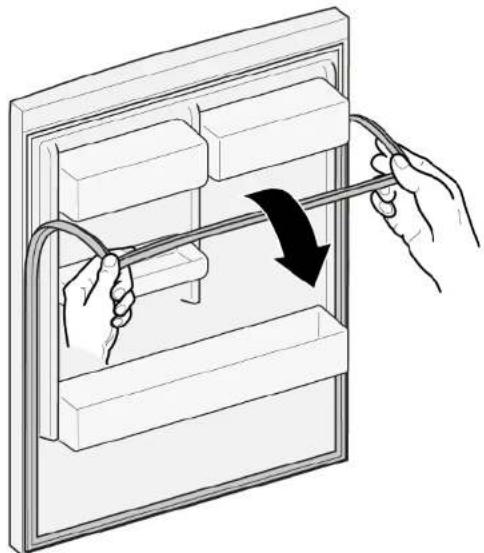
natural_image
Illustration of hands holding a cable with a black arrow indicating direction (no text or symbols)
natural_image
Isometric line drawing of a wall-mounted shelf with an eye icon (no text or symbols)natural_image
Line drawing of a refrigerator with hand gestures indicating side placement (no text or symbols)
Popravilo
- Celotno tesnilo korak po koraku potisnite v utor.

natural_image
Diagram of a hand interacting with a refrigerator drawer, showing shelves and drawers with arrows indicating movement (no text or symbols)


Popravilo

Poškodbe hrbta in mišic

Popravilo

Poškodbe hrbta in mišic

natural_image
Diagram of a device with a labeled component and arrow, no readable text or symbols presentnatural_image
Illustration of hands holding a tablet with a black curved arrow indicating rotation (no text or symbols)Polica je odstranjena.
4.7.2 Namestitev police
- Namestite v obratnem vrstnem redu.

Popravilo
4.8 Zamenjava nosilca za steklenice
Zahteva:
Vrata so odprta.
4.8.1 Odstranjevanje nosilca za steklenice
natural_image
Diagram of a roof drainage system with wavy roof lines and black directional arrows indicating flow or movement (no text or symbols)natural_image
Diagram showing two mechanical components with upward arrows indicating motion or assembly (no text or symbols)natural_image
Diagram of a mechanical component with directional arrows indicating movement or force (no text or symbols)natural_image
Diagram of a refrigerator with an open door and directional arrows indicating movement (no text or symbols)
natural_image
Diagram of a mechanical or electrical setup with a red component and wiring, no visible text or symbolsElektrični priključek lučke LED je odklopljen.
- Sprostite zatiče lučke LED.

natural_image
Diagram of a screwdriver interacting with a red rectangular object, no text or symbols present
Popravilo
- Lučko LED premaknite naprej in jo odstranite.


natural_image
Close-up of a refrigerator interior showing a door, shelf, and lid (no text or symbols visible)Popravilo
natural_image
Close-up of a refrigerator interior showing glass shelves and a circular button with an arrow pointing to the door (no text or symbols visible)- Pokrovček točkovne lučke LED povlecite navznoter in ga hkrati potisnite naprej.

natural_image
Abstract graphic with a document icon and arrows, no readable text or symbols
Popravilo
natural_image
Diagram showing a tool interacting with a rectangular device, no text or symbols presentnatural_image
3D rendering of a rectangular device with attached red panel and white circular elements, no visible text or symbols
Popravilo
- Odvijte vijak.

natural_image
Interior view of an appliance or enclosure showing internal components and wiring (no visible text or symbols)natural_image
Close-up of a hand holding a white plastic enclosure with a magnified inset showing a small component (no visible text or symbols)natural_image
Close-up of hands assembling an electric motor casing with visible wiring and components (no text or symbols)natural_image
Two-panel photo showing hands installing or adjusting a small electronic component, labeled ① and ② (no text or symbols on the components themselves)natural_image
Diagram of hands connecting a cable to a rectangular panel with shelves, showing structural details (no text or symbols)natural_image
Illustration of hands holding a cable inside a rectangular frame with a curved arrow indicating rotation (no text or symbols)natural_image
Isometric line drawing of a wall-mounted shelf with an eye icon (no text or symbols)natural_image
Line drawing of a refrigerator with hand gestures indicating side placement (no text or symbols)
Reparación
natural_image
Diagram of a hand interacting with a refrigerator drawer, showing shelves and drawers with arrows indicating movement (no text or symbols)


Reparación


Reparación

natural_image
Illustration of hands holding a tablet with a curved arrow indicating rotation (no text or symbols)natural_image
Diagram of a roof drainage system with wavy roof lines and black directional arrows indicating flow or movement (no text or symbols)natural_image
Diagram showing two mechanical components with upward arrows indicating motion or assembly (no text or symbols)natural_image
Diagram of a mechanical or architectural component with directional arrows indicating movement or force (no text or symbols present)natural_image
Diagram of a refrigerator with an open door and directional arrows indicating movement (no text or symbols)natural_image
Diagram of a mechanical or electrical setup with a red component and wiring, no visible text or symbolsnatural_image
Diagram of a screwdriver inserted into a component, showing a red block and mechanical assembly (no text or symbols)
Reparación
natural_image
Close-up of a refrigerator interior showing a glass door and adjacent storage unit (no text or symbols visible)
Reparación
natural_image
Interior view of a refrigerator showing the door, shelves, and a circular vent (no text or symbols visible)natural_image
Abstract graphic with two arrows pointing to a rectangular object, no text or symbols present
Reparación
natural_image
Diagram of a tool interacting with a device, showing motion lines and a red highlighted section (no text or symbols)natural_image
3D rendering of a rectangular electronic device with a red panel and white components, set against a gray background (no text or symbols visible)

Reparación
natural_image
Interior view of an appliance showing internal components and a labeled component (no readable text or symbols)natural_image
Close-up of a hand holding a white plastic enclosure with a magnified inset showing a small component (no visible text or symbols)natural_image
Close-up of hands assembling an electric motor casing with visible wiring and components (no text or symbols)natural_image
Two-panel black-and-white photo showing hands installing or adjusting a small electronic component, labeled ① and ② (no text or symbols visible)Reparación
natural_image
Illustration of hands connecting a cable to a rectangular panel with shelves (no text or symbols)natural_image
Illustration of hands holding a cable inside a rectangular frame with a curved arrow indicating rotation (no text or symbols)
natural_image
Isometric line drawing of a wall-mounted shelf with an eye icon (no text or symbols)natural_image
Line drawing of a refrigerator with hand gestures indicating side placement (no text or symbols)
Reparation
natural_image
Diagram of a hand interacting with a refrigerator drawer, showing shelves and drawers with arrows indicating movement (no text or symbols)


Reparation

Reparation


natural_image
Diagram of a device with a labeled component and arrow, no readable text or symbols presentnatural_image
Illustration of hands holding a tablet with a curved arrow indicating rotation (no text or symbols)natural_image
Diagram of a roof drainage system with wavy roof lines and black directional arrows indicating flow or movement (no text or symbols)Flaskhyllan har tagits bort.
4.8.2 Montera flaskhylla
natural_image
Diagram showing two mechanical components with upward arrows indicating motion or assembly (no text or symbols)Dörrhyllan har tagits bort.
natural_image
Diagram of a mechanical or structural component with directional arrows indicating movement or force (no text or symbols present)Den justerbara dörrhyllan har tagits bort.
4.10.2 Montera justerbar dörrhylla
natural_image
Diagram of a refrigerator with an open door and directional arrows indicating movement (no text or symbols)- Lossa elanslutningarna till LED-spotlighten.
→ LED-spotlighten har tagits bort.
4.14.2 Montera LED-spotlight
natural_image
Diagram of a mechanical or electrical setup with a red component and wiring, no visible text or symbolsnatural_image
Diagram of a tool interacting with a red rectangular object, possibly a component or device (no text or symbols visible)
Reparation

Sugkopp ∅50 mm [00342224]

natural_image
Close-up of a refrigerator interior showing a glass door and shelf, with no visible text or symbols.
Reparation
natural_image
Close-up of a refrigerator interior showing glass shelves and a circular door (no text or symbols visible)- Lossa elanslutningen till LED-sidoramplampan.
LED-sidoramplampan har tagits bort.
4.16.2 Montera LED-sidoramplampa
natural_image
Abstract graphic with a document icon and two arrows pointing right, set against a dark background (no text or symbols)
Reparation
- Ta loss LED-spotlightmodulen.

natural_image
Diagram of a tool interacting with a device, showing motion lines and a red highlighted section (no text or symbols)- Lossa LED-spotlightens elanslutning.
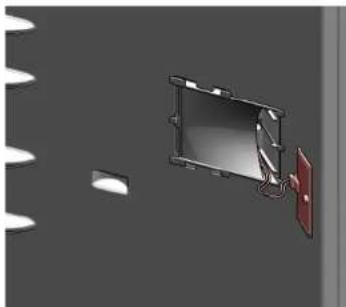
natural_image
3D rendering of a rectangular electronic device with a red panel and white components, set against a gray background (no text or symbols visible)
LED-spotlighten har tagits bort.
4.17.2 Montera LED-spotlight

Reparation
- Skruva ut skruven.

natural_image
Interior view of an appliance showing internal components and a labeled component (no readable text or symbols)natural_image
Close-up of a hand holding a white plastic enclosure with a magnified inset showing a small component (no visible text or symbols)natural_image
Close-up of hands assembling an electric motor casing with visible wiring and components (no text or symbols)natural_image
Two-step photo showing hands installing or adjusting a small electronic component, labeled ① and ② (no text or symbols present)natural_image
Illustration of hands connecting a cable to a rectangular panel with shelves (no text or symbols)natural_image
Illustration of hands holding a cable inside a rectangular frame with a curved arrow indicating rotation (no text or symbols)
natural_image
Isometric line drawing of a wall-mounted shelf with an eye icon above (no text or symbols)natural_image
Line drawing of a refrigerator with hand gestures indicating side placement (no text or symbols)
Onarim
natural_image
Diagram of a hand interacting with a refrigerator drawer, showing shelves and drawers with arrows indicating movement (no text or symbols)


Onarim


Onarim


natural_image
Diagram of a device with a labeled component and arrow indicating direction (no text or symbols present)natural_image
Illustration of hands holding a tablet with a curved arrow indicating rotation (no text or symbols)natural_image
Abstract diagram with wavy blue lines and a black arrow pointing downward (no text or symbols)natural_image
Diagram showing two mechanical components with upward arrows indicating motion or assembly (no text or symbols)natural_image
Diagram of a mechanical or architectural component with directional arrows indicating movement or force (no text or symbols present)natural_image
Diagram of a refrigerator with an open door and directional arrows indicating movement (no text or symbols)
Special tool [00342180]
natural_image
Diagram of a mechanical or electrical setup with a red component and wiring, no visible text or symbolsnatural_image
Diagram of a tool interacting with a red rectangular object, possibly a component or device (no text or symbols visible)
Onarim
natural_image
Diagram of a mechanical assembly with a red component and a black arrow indicating direction (no text or symbols)
LED ışığı söküldü.
natural_image
Close-up of a refrigerator interior showing a glass door and shelf, with no visible text or symbols.
Onarim
natural_image
Close-up of a refrigerator interior showing glass panels and a circular doorbell (no text or symbols visible)Special tool [00342180]
Düz tornavida Biçak 2,4 mm x 0,4 mm x 60 mm,
natural_image
Abstract graphic with two arrows pointing to a rectangular object, no text or symbols present
Onarim
natural_image
Diagram of a screwdriver inserted into a rectangular component with a red edge, against a dark background (no text or symbols)natural_image
3D rendering of a rectangular device mounted on a wall with a red panel and cable, against a gray background (no text or symbols visible)

Onarim
- Vidayı sökün.

natural_image
Interior view of an appliance showing internal components and a labeled component (no readable text or symbols)natural_image
Close-up of a hand holding a white plastic enclosure with a magnified inset showing a small component (no visible text or symbols)natural_image
Close-up of hands assembling an electric motor casing with visible wiring and components (no text or symbols)natural_image
Two-panel photo showing hands installing or adjusting a small electronic component, labeled ① and ② (no text or symbols on the components themselves)
- Ремонт
- Popravak
- Postavljanje gornjeg zgloba vrata
- Postavljanje gornjeg zgloba vrata
- Zahtjev:
- Postavljanje srednjeg zgloba vrata
- Zamjena donjeg zgloba vrata
- Postavljanje donjeg zgloba vrata
- Zamjena police
- Uklanjanje police
- Postavljanje police za boce
- Postavljanje prilagodljive posude za vrata
- Zamjena spremnika za zamrznute namirnice
- Uklanjanje spremnika za zamrznute namirnice
- Postavljanje spremnika za zamrznute namirnice
- Zamjena spremnika
- Uklanjanje spremnika
- Postavljanje izvlačnog spremnika
- Ugradnja LED modula za napajanje
- Oprava
- Reparation
- Montering af LED-spotlampe
- Reparatie
- Repair hints - Fridge-freezer
- i Concerning this document.... 163
- Safety....
- Tools and aids....10
- Repair
- i Concerning this document
- Important information
- Purpose
- Explanation of symbols
- Danger levels
- Hazard symbols
- Structure of the warnings
- General symbols
- Safety
- General Safety instructions
- All domestic appliances
- Tools and aids
- Replacing door handle
- Removing door handle
- Replacing door upper hinge (door with display)
- Replacing door middle hinge
- Removing door middle hinge
- Installing door middle hinge
- Replacing door lower hinge
- Removing door lower hinge
- Replacing shelf
- Removing shelf
- Installing shelf
- Replacing bottle tray
- Removing bottle tray
- Installing bottle tray
- Replacing door rack
- Replacing adjustable door rack
- Removing adjustable door rack
- Installing adjustable door rack
- Replacing frozen food container
- Removing frozen food container
- Installing frozen food container
- Replacing container
- Removing container
- Installing container
- Replacing extendable container
- Removing extendable container
- Installing extendable container
- Replacing LED spot light
- Removing LED spot light
- Installing LED spot light
- Replacing LED top light
- Removing LED light
- Installing top LED light
- Replacing LED side bar light
- Removing LED side bar light
- Installing LED side bar light
- Replacing LED spot light
- Removing LED spot light
- Installing LED spot light
- Replacing LED power supply module
- Removing LED power supply module
- Installing LED power supply module
- Remonditeave - Kombikülmik
- i Selle dokumendiga seoses 195
- Remont
- Korjaus
- Réparation
- Instandsetzen
- Επισκευή
- Javítás
- Riparazione
- Remonts
- Remontas
- Reparasjon
- Montering av flaskehylle
- Naprawy
- Montaż półki
- Reparação
- Repararea
- Montáž odkladacieho priestoru na fl'aše
- Montáž poličky do dvierok
- Montáž LED modulu napájania
- Popravilo
- Namestitev police
- Zamenjava nosilca za steklenice
- Odstranjevanje nosilca za steklenice
- Reparación
- Montera flaskhylla
- Montera justerbar dörrhylla
- Montera LED-spotlight
- Montera LED-sidoramplampa
- Montera LED-spotlight
- Onarim
Brand : Profilo
Model : BD3086WFAN
Category : Refrigerator