EAP400D - Air purifier ElectriQ - Free user manual and instructions
Find the device manual for free EAP400D ElectriQ in PDF.


| Product Type | Portable Air Purifier |
| Model | EAP400D |
| Dimensions (W x D x H) | 329 x 170 x 300 mm |
| Net Weight | 3.2 kg |
| Power Supply | 220-240 V, 50 Hz |
| Power Consumption | 36 W |
| Fan Speeds | 3 (Low, Med, High) |
| Airflow (Low / Med / High) | 70 / 100 / 150 m³/h |
| Noise Level (Low / Med / High) | 25 / 32 / 40 dB |
| Filtration Stages | 6-Stage: Pre-filter, True HEPA, Activated Carbon, VOC Filter, UV Lamp, Plasma Ioniser |
| HEPA Filter Efficiency | 99.97% of particles ≥ 0.25 µm |
| VOC Filter | Removes volatile organic compounds and odors |
| UV Light | Ultraviolet light for germicidal action |
| Plasma Ioniser Output | 5 x 10⁶ ions/cm³ |
| Timer Settings | 2, 4, or 8 hours |
| Child Lock | Yes, accessible via POWER button hold |
| Sleep Mode | Yes, low fan speed with lights off |
| Filter Replacement Indicator | Yes, flashing speed LED |
| Filter Life (Estimated) | About 6 months |
| Replacement Filter Reference | FIL-EAP400D-V2 (pair) |
| Recommended Room Size | Suitable for medium to large rooms |
| Minimum Clearance from Walls | 20 cm |
| Power Cord Length | ≥ 1.4 m |
| Certification | CE compliant |
Frequently Asked Questions - EAP400D ElectriQ
User questions about EAP400D ElectriQ
0 question about this device. Answer the ones you know or ask your own.
Ask a new question about this device
Download the instructions for your Air purifier in PDF format for free! Find your manual EAP400D - ElectriQ and take your electronic device back in hand. On this page are published all the documents necessary for the use of your device. EAP400D by ElectriQ.
USER MANUAL EAP400D ElectriQ
natural_image
White electric air conditioner unit with three indicator lights and ventilation grille (no visible text or symbols on body)MULTISTAGE PORTABLE AIR PURIFIER TRUE HEPA, VOC FILTER, UV LAMP, TIO _2 PHOTO CATALYST (PCO), PLASMA IONISER AND ADVANCED ACTIVATED CARBON FILTER
EAP400D
Thank you for choosing this innovative electriQ Air Purifier.
Please read before using the product and keep it safe for future reference.
Visit our page www.electriQ.co.uk for our entire range of Intelligent Electricals
CONTENTS
SAFETY INSTRUCTIONS 3
INDOOR POLLUTANTS 4
INTRODUCTION 5
DIAGRAM 5
OPERATION 6
BEFORE FIRST USE 6
FILTER INSTALLATION 6
CONTROL PANEL 7
CARE AND MAINTENANCE 8
CLEANING THE APPLIANCE 8
FILTER REPLACEMENT REMINDER INDICATOR 9
TECHNICAL DATA 10
TROUBLESHOOTING 10
UK PRODUCT SUPPORT 11
SAFETY INSTRUCTIONS
Important!
- Carefully read the instructions before operating the unit.
- This appliance is for indoor use only.
- Rating: This unit must only be connected to a 220-240 V / 50 Hz earthed outlet.
- Installation must be in accordance with regulations of the country where the unit is used.
- If you are in any doubt about the suitability of your electrical supply have it checked and, if necessary, modified by a qualified electrician.
- Only use with the power cable provided by the manufacturer.
- This air purifier has been tested and is safe to use. However, as with any electrical appliance - use it with care.
- Disconnect the power from the air purifier before changing the filters or cleaning the unit.
- Avoid touching any moving parts of the appliance.
- Never insert fingers, pencils or any other objects though the guard
- This device is not intended for use by persons (including children) with reduced physical, sensory or mental capabilities. It is also not intended for use by those with a lack of experience and knowledge, unless they have been given supervision or instruction concerning the use of the appliance by a person responsible for their safety.
- Do not leave children unsupervised with this device.
- Do not clean the unit by spraying it or immersing it in water. Use a damp cloth only
- Do not clean with strong chemical agents or other abrasive materials.
- Never connect the unit to an electrical outlet using an extension cord. If a power outlet is not available, one should be installed by a qualified electrician.
- Never operate this appliance if the power cord is damaged. Ensure the power cord is not stretched or exposed to sharp objects or edges.
- A damaged power supply should be replaced by the manufacturer. Never extend or attempt to change the power cord or plug.
- Any service other than regular cleaning or filter replacement should be performed by an authorized service representative. Failure to comply could result in a voided warranty.
- Do not use the appliance for any purpose other than its intended use.
- Avoid removing the power adapter from the socket while unit is still in operation. This could cause electrical damage.
- Never use the power supply as a switch to start and turn off the air purifier unit. Use the ON/OFF button located on the control panel.
• Always place the unit on a dry and stable surface. - The use of accessories or attachments that have not been approved by the appliance manufacturer is not recommended, as this may result in fire, cause an electric shock and/or cause personal injury.
- Ensure hands are fully dried before plugging or unplugging the appliance.
- The appliance should not be installed in laundry or wet rooms.
ENERGY SAVING AND UNIT SAFETY PROTECTION TIPS
- Do not cover or restrict the airflow from the outlet or inlet grills.
- For maximum performance and safety, the minimum distance from a wall or objects should be 20cm. Keep away from other electrical appliances.
- Keep the filters clean. Under normal conditions, filters should only need cleaning once every two weeks (approximately). Since the filters remove airborne particles, more frequent cleaning may be necessary,
depending on the air quality. Replace the filters regularly as instructed.
INFORMATION ON INDOOR POLLUTANTS
VOC (Volatile Organic Compound) – VOC's come from motor vehicle exhausts, gasoline vapour, pollutants such as formaldehyde, ammonia and many other common and chemical solvents such as paints and glues. They can also be a by-product of mould growth. VOC's cause irritation to the eyes and/or nose as well as causing headaches, nausea, and can even lead to damage to the central nervous system. Pressed wood furniture, newly decorated rooms, paint and cleaning solvents are common sources of VOC's.
Mould / Fungus – These can affect our respiratory system and cause allergic reactions, like a runny nose, eye and throat irritation, headaches, fatigue and aggravation of asthma. Other indoor pollutants include - bacteria, viruses, dust mites and pollen.
Emissions from electronic office equipment – Many studies, including those from EPA and the University of California Berkeley, have reported that emissions from office equipment such as computers and printers include VOC's, ultra-fine particles and ozone. These emissions have been proven to have a negative effect on the health of many people.
Using HEPA and Carbon Activated filters, Plasma Ionisation, VOC Filter, TiO_2 photo catalyst and UV light.
An effective HEPA filter is absolutely necessary to remove particles, even at a microscopic level; it ensures that the particles are not spread. A Plasma ioniser will sterilise the air and reduce bacterial growth.
UV light dramatically improves the indoor air quality by destroying airborne bio-contaminants such as viruses and bacteria which are a leading cause infections and discomfort. Ultraviolet air treatment systems have been used for more than 50 years in hospitals and various other healthcare industries but with the advent of small highly efficient UV Lamps the technology now finds its place in the domestic environment.
Photocatalytic oxidation (PCO) is achieved when UV light rays are combined with a TiO_2 (titanium oxide) coated filter. Your electriQ air purifier features an advanced VOC filter coated with TiO_2 . This process of photo catalytic oxidation creates hydroxyl radicals and super-oxide ions, which are highly reactive electrons that react with other elements in the air such as bacteria and especially VOCs. Once bound together, a chemical reaction takes place between the super-charged particle and the pollutant, effectively burning ("oxidizing") the pollutant. This breaks the pollutant down into harmless carbon dioxide and water molecules, making the air even cleaner.
The antibacterial activated carbon is a natural material biosynthesized from walnut shell, the adsorption area of activated carbon is very large. The activated carbon filter will absorb unpleasant odours and will help decomposing VOCs when combined with the TiO_2 filter and UV light.
INTRODUCTION
The EAP400D features an easy to use touch control panel, and provides 6 stages air purification using professional air filtration and sterilisation.
- Advanced activated carbon filter - Removes unpleasant odours and absorbs harmful substances such as formaldehydes and benzenes.
• True HEPA filter - Removes 99.97 % of airborne particles which are 0.25 micrometres or larger.
• VOC filter - Removes toxic volatile organic compounds and unpleasant smells.
• Ultra-violet light - UV light treatment to kill airborne bacteria, germs and viruses. - TiO _2 filter - Titanium Dioxide screen to maximise UV effectiveness.
- Plasma Ioniser - sterilises the air further by removing mould spores and allergens from the air.
• Built in filter replacement indicator, ensuring your purifier is always efficient.
APPLICATIONS
- Personal use in domestic and office space to improve air quality.
• Helps smokers to minimise the effects of smoking. - Provides relief for asthma and allergy sufferers.
• Great for schools, hospitals, hotels, pubs and other public spaces to enhance clean air standards.
Notes: This air purifier is not a substitute for proper ventilation, regular vacuum cleaning or for use as a cooker hood while cooking. If the relative humidity is over 60% we recommend using a dehumidifier to remove moisture from the air.
PRODUCT DIAGRAM
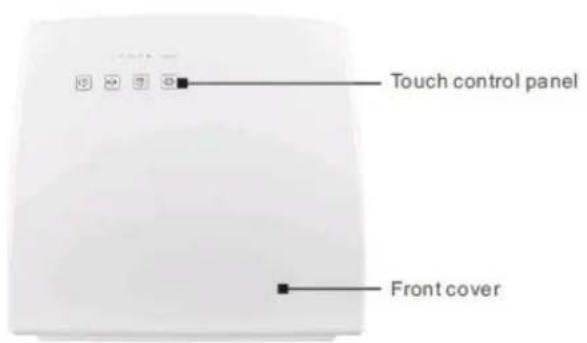
Front view
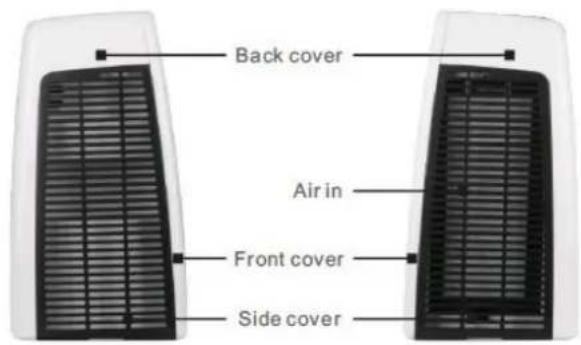
Left view
Right view
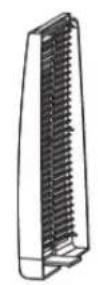
Left cover
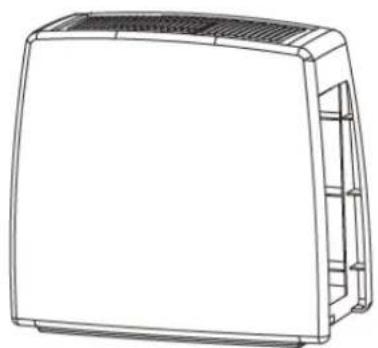
natural_image
Line drawing of a rectangular electronic device with ventilation grilles and side shelves (no text or symbols)Body
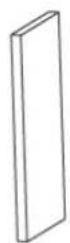
Activated carbon+photo catalyst
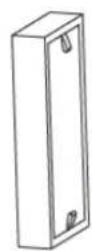
Antimicrobial+HEPA
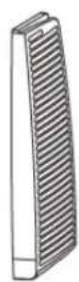
Right filter cover
OPERATION
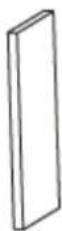
Activated carbon and Photo catalyst
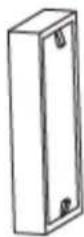
Antimicrobial and HEPA
BEFORE FIRST USE
The EAP400D uses a combination of two filter units, which should be installed in the air purifier before operating for the first time. When inserting the filters, the "AIR FLOW" label should be pointing outwards.
INSTALLING AND REPLACING THE FILTERS
- Disconnect the power from the appliance.
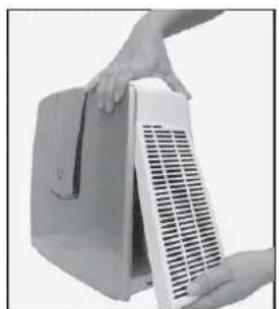
- Remove the right filter cover, by unclipping at the base.
- Remove both of the filters from inside of the unit.
- Before installing the new filters, ensure the protective plastic wrap has been removed.
- Insert both new filters into the unit. The carbon filter should be inserted first, followed by the HEPA filter, both with the AIRFLOW labels pointing outwards.
- Reattach the right filter cover pushing it securely it into place.
- Reconnect the power supply.
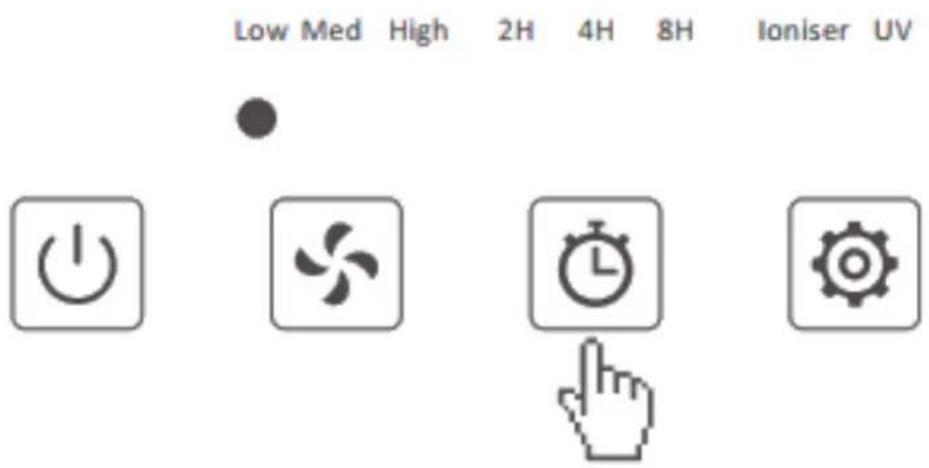
- If the fan speed light continues to flash, hold the TIMER button to register that a new filter has been installed
natural_image
Close-up of hands holding a white industrial fan or heater component (no visible text or symbols)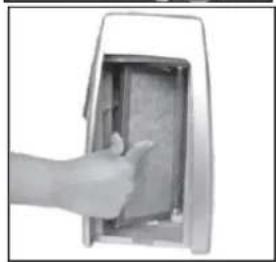
natural_image
Hand inserting a card into a device (no visible text or symbols)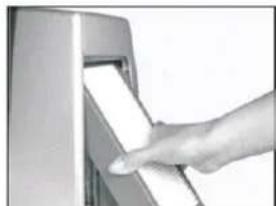
natural_image
Hand inserting a card into a machine (no visible text or symbols)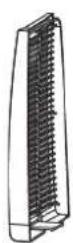
Left cover
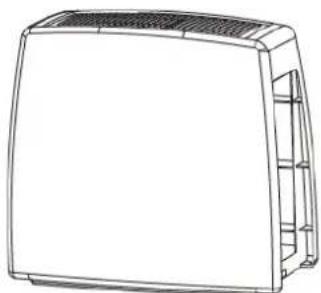
natural_image
Line drawing of a rectangular electronic device with ventilation grilles and internal shelves (no text or symbols)Body
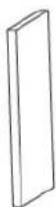
Activated carbon+photo catalyst
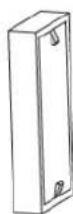
Antimicrobial+HEPA
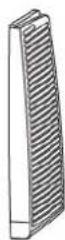
Right filter cover
CONTROL PANEL
Low Med High 2H 4H 8H Ioniser UV




POWER BUTTON:
Press to turn the unit on and off
CHILD LOCK: Hold the POWER button for 5 seconds until the unit bleeps once. This will lock the controls and prevent them from been adjusted. Exit child lock by holding the button for another 5 seconds.

SPEED BUTTON:
Press the SPEED button to change the fan speed. There are 3 fan speeds which can be selected while the unit is in operation (Low, Med, High). This provides the choice between maximum air purification on high speed to lower air flow but quieter operation mode with low fan speed.
SLEEP MODE: Hold the SPEED button for 5 seconds until the unit bleeps once. This will put the unit into sleep mode, the unit will operate in low fan speed, with no lights illuminated. To resume normal operation, press the POWER button.

BUTTON:
The air purifier can be timed to operate for intervals of 2, 4 or 8 hours, stopping automatically when the selected duration has elapsed.
With the unit operating, repeatedly press the TIMER button to select the required timer duration. The LED lights will indicate the remaining operating time.
To cancel the timer, repeatedly press the TIMER button until none of the timer lights are illuminated.
REPLACE FILTERS: Hold the TIMER button for 5 seconds following replacing the filters to reset the flashing "speed" indicator LED

MODE BUTTON:
Press the MODE button to cycle between running the Ioniser and/or UV light. The LED's above the button will indicate which of the features are currently activated.
CARE AND MAINTENANCE
Always turn off the appliance and unplug from the mains before cleaning or performing any maintenance. Unplug the appliance while not in use. Do not use chemical solvents (such as benzene, alcohol or gasoline) as they may cause irreversible damage to the unit.
CLEAN THE EXTERNAL CASE
Only use tepid water and a mild detergent on a soft cloth. Do not use bleach or abrasives. Do not splash water directly onto the main unit. Avoid wetting the power socket or cable. Doing so may cause an electrical shock and can lead to the insulation to deteriorate, or cause the unit to rust.
CLEAN THE FILTER AND THE FILTER HOLDING AREA
Hoover the filters with a gentle brush every 2-3 weeks or more often if the air quality is poor. Please make sure the filter is not damaged during the process and replace in such occurrence. Wipe with a dry cloth the filter holding area if necessary.
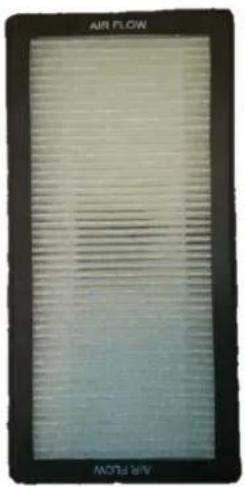
Front (VOC and HEPA)
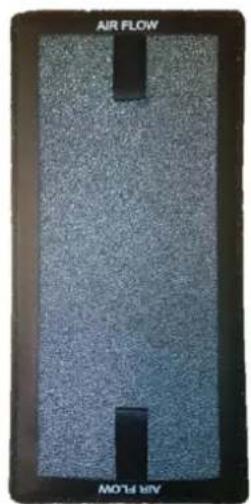
Back (Carbon and Photo catalyst)
NOTE: The filters are not washable, and should be replaced if damaged or clogged.
Replacement filters are available from the retailer as a pair under the reference: FIL-EAP400D-V2
CLEAN THE FILTER COVER AND CLEAN AIR OUTLET
Use water and a mild detergent. Do not use bleach or abrasives. Do not spray water inside the unit. If the clean air outlet grilles get soiled easily, use a vacuum attachment or soft brush to clean. If the filter cover is dirty hoover it, if it is heavily soiled wash it with warm soapy water and dry thoroughly before reinserting into the unit.
Note: Do not assemble the unit and power it before all the parts are completely dry. Any other maintenance than what is described in this user manual must be only performed by the service centre.
FILTER REPLACEMENT REMINDER INDICATOR
When the filters are due for replacement, the SPEED indicator will start to flash.
Once the filters have been replaced following the steps in the "INSTALLING AND REPLACING THE FILTERS" section, hold down the TIMER button for five seconds, until the unit bleeps to register the new filters.
CLEAN OR REPLACE THE FILTERS
- If necessary wipe the inside of the filter cavity with a dry cloth.
- After cleaning or replacing the filters refit them into the unit in the correct order following the "INSTALLING AND REPLACING THE FILTERS" section.
- Do not connect the power before the unit is fully assembled. The filters must be installed before operating the unit.
Replacement filters are available from the retailer as a pair under the reference: FIL-EAP400D-V2
TECHNICAL DATA
| Model | EAP400D-V2 | ||
| Fan Speed | Low | Medium | High |
| Airflow (m3/hr) | 70 | 100 | 150 |
| Noise level (db) | 25 | 32 | 40 |
| Power rating | 36 Watts / 220-240 V, 50 Hz | ||
| Ioniser | 5 × 10^6 ions/cm3 | ||
| Power cord length | ≥ 1.4 meters | ||
| Net Size (WxDxH) | 329x170x300 mm | ||
| Net Weight | 3.2 kgs | ||
| VOC and HEPA Filter | |||
| Size (WxDxH) | Efficiency | Particle Size | Life Time |
| 20.9×10.2×4cm | 99.9% | ≤0.0003 mm | about 6 months |
| Carbon Activated and Photo catalyst Filter | |||
| Size (WxDxH) | Material | Active Filter Absorption Surface | Life Time |
| 20.3×9.7×1.5cm | Walnut Shell | 300,000 m2 | about 6 months |
TROUBLESHOOTING
| The Air purifier does not seem to work | Is the plug disconnected from the wall socket?Is the socket switched on?The filter cover panel may not be properly installed, remove and reinstall. |
| No clean air is delivered or performance is poor | Please ensure filters are cleaned and the packing was removed before installing the filter cartridgeEnsure unit is only operating with a filter cartridge installed.Set the unit to high fan speed.Ensure the air purifier is suitable for the room size and for larger rooms it has been left long enough to operate. |
| Abnormal noise during operation | Check if the filter cartridge packaging was removed during the filter change.Unit may not be on a hard / flat surface.Air inlet or outlets may be blocked. Remove obstruction and try again. |
| Speed light Flashing | Indicates that the filters require replacing, replace filters, and hold the TIMER button for 5 seconds to resume normal operation. |
| Control panel not responding | Check that child lock has not been activated, by holding power button for around 5 seconds, or unplug the unit for 5 minutes. |
Disposal: Do not dispose of this product as unsorted waste. Collection of such waste must be handled separately as special treatment is necessary.
Recycling facilities are now available for all customers at which you can deposit your old electrical products. Customers will be able to take any old electrical equipment to participating civic amenity sites run by their local councils. Please remember that this
equipment will be further handled during the recycling process, so please be considerate when depositing your equipment. Please contact the local council for details of your local household waste recycling centres.
UK PRODUCT SUPPORT
www.electriQ.co.uk
Please, for your own convenience, make these simple checks before calling the service line.
If the unit still fails to operate call: 0330 390 3061 or complete the online form
-
Is the unit plugged into the mains?
-
Is the power supply working?
-
Have you followed the troubleshooting suggestions?
-
Have you cleaned or changed the filters if the unit lost efficiency?
-
Switch the unit off and wait three minutes to see if the issue is resolved. Restart the unit.
Office hours: 9AM - 5PM Monday to Friday
www.electriQ.co.uk
Unit J6, Lowfields Business Park
Lowfields Way, Elland
West Yorkshire, HX5 9DA
- EAP400D
- CONTENTS
- SAFETY INSTRUCTIONS
- Important!
- ENERGY SAVING AND UNIT SAFETY PROTECTION TIPS
- INFORMATION ON INDOOR POLLUTANTS
- INTRODUCTION
- APPLICATIONS
- OPERATION
- BEFORE FIRST USE
- INSTALLING AND REPLACING THE FILTERS
- CONTROL PANEL
- POWER BUTTON:
- SPEED BUTTON:
- BUTTON:
- MODE BUTTON:
- CARE AND MAINTENANCE
- CLEAN THE EXTERNAL CASE
- CLEAN THE FILTER AND THE FILTER HOLDING AREA
- CLEAN THE FILTER COVER AND CLEAN AIR OUTLET
- FILTER REPLACEMENT REMINDER INDICATOR
- CLEAN OR REPLACE THE FILTERS
- UK PRODUCT SUPPORT
- www.electriQ.co.uk
Brand : ElectriQ
Model : EAP400D
Category : Air purifier