MD2000 - Humidifier ElectriQ - Free user manual and instructions
Find the device manual for free MD2000 ElectriQ in PDF.


| Product Type | Thermoelectric Dehumidifier |
| Model | MD2000 |
| Brand | ElectriQ |
| Dehumidifying Capacity | 750 ml/day (at 30°C, 80% RH) |
| Water Tank Capacity | 2.0 litres |
| Power Supply | AC 100-240V, 50/60Hz |
| Power Consumption | 40 W |
| Cooling Element | Thermo-electric Peltier module |
| Fan Type | 120mm x 120mm x 25mm DC Brushless motor |
| Product Dimensions (W x H x D) | 228 mm x 150 mm x 373 mm |
| Net Weight | Approx. 2.5 kg (estimated) |
| Noise Level | Low (ultra-quiet Peltier technology) |
| Operating Environment | Temperature >15°C, Humidity >40% RH |
| Automatic Shut-off | Yes, when water tank is full (orange LED indicator) |
| Filter Type | Washable antibacterial mesh dust filter |
| Control Type | Single power button with green/orange LED indicator |
| Placement | Indoor use only, on dry stable surface, min. 30 cm from walls |
| Safety Features | Automatic cut-off, no extension cord, upright use only |
| Maintenance | Clean filter every 3 weeks, clean tank every few weeks |
| Warranty | Supported by manufacturer; see manual for details |
Frequently Asked Questions - MD2000 ElectriQ
User questions about MD2000 ElectriQ
0 question about this device. Answer the ones you know or ask your own.
Ask a new question about this device
Download the instructions for your Humidifier in PDF format for free! Find your manual MD2000 - ElectriQ and take your electronic device back in hand. On this page are published all the documents necessary for the use of your device. MD2000 by ElectriQ.
USER MANUAL MD2000 ElectriQ
natural_image
White rectangular electronic device with a green circular button on top (no visible text or symbols)MD2000
DEHUMIDIFIER WITH 2 LITRE TANK
Thank you for choosing electriQ.
Please read this user manual before using this innovative dehumidifier.
Please keep it safe for future reference.
Visit our page www.electriQ.co.uk for our entire range of Intelligent Electricals
CONTENTS
SAFETY INSTRUCTIONS 2
PARTS AND FEATURES 3
INSTALLATION AND OPERATION 3
WATER DRAINAGE 4
CARE AND MAINTENANCE 4
SPECIFICATION 5
SUPPORT 6
SAFETY INSTRUCTIONS
IMPORTANT
- Carefully read the instructions before operating the unit.
• This appliance is for indoor use only.
• Rating: This unit must be only connected to a 100-240V earthed outlet.
• Installation must be in accordance with the regulations of the country where the unit is used. - If you are in any doubt about the suitability of your electrical supply have it checked and, if necessary, modified by a qualified electrician.
- This dehumidifier has been tested and is safe to use. However, as with any electrical appliance - use it with care.
- Disconnect the power from the appliance before dismantling, assembling or cleaning.
- Avoid touching any moving parts within the appliance.
- Never insert fingers, pencils or any other objects though the guard.
- This appliance is not intended for use by persons (including children) with reduced physical, sensory or mental capabilities. It is also not intended for use by those with a lack of experience and knowledge, unless they have been given supervision or instruction concerning the use of the appliance by a person responsible for their safety.
- Do not leave children unsupervised with this appliance.
- Do not clean the unit by spraying it or immersing it in water.
- Never connect the unit to an electrical outlet using an extension cord. If an outlet is not available, one should be installed by a qualified electrician.
- Never operate this appliance if the cord, power adapter or plug is damaged. Ensure the power cord is not stretched or exposed to sharp objects or edges.
- A damaged supply cord should be replaced by the manufacturer or a qualified electrician in order to avoid a hazard.
- Any service other than regular cleaning or filter replacement should be performed by an authorised service representative. Failure to comply could result in a voided warranty.
- Only use the appliance for its intended purpose.
- Do not tilt the unit while in use. The unit is designed to work only while in an upright position.
- This dehumidifier must always be stored and transported upright.
- Avoid restarting the dehumidifier unless 3 minutes have passed since being turned off.
- Never use the mains plug as a switch to start or turn off the dehumidifier. Use the provided ON/OFF button located on the control panel.
• Always place the unit on a dry and stable surface. - The appliance should not be installed in laundry or wet rooms where the humidity is higher than 85% RH.
- Do not place the unit next to heat sources (e.g. Electrical fires, fireplaces, etc.)
ENERGY SAVING AND UNIT SAFETY PROTECTION TIPS
- Do not cover or restrict the airflow from the outlet or inlet grills.
- For maximum performance the minimum distance from a wall or objects should be 30cm
- Keep the filters and grills of the unit clean. Under normal conditions, the filters and grills should only need cleaning once every three weeks (approximately).
PARTS AND FEATURES
The MD2000 dehumidifier uses compressor free Peltier technology which makes it light and quiet. It is perfect for small rooms, kitchens, wardrobes, small boats and caravans. The MD2000 is an ultraportable dehumidifier that will solve unwanted humidity issues, preventing mould, fungus and bad smells.
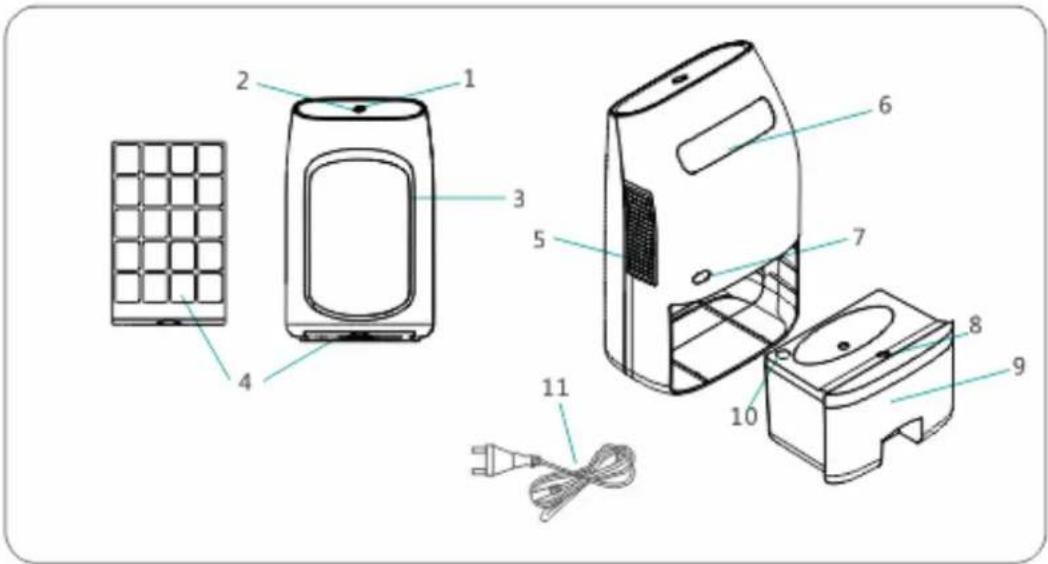
| 1 | Power Button | 7 | Power Socket |
| 2 | Indicator LED | 8 | Float Sensor |
| 3 | Air Inlet | 9 | Water Tank |
| 4 | Filter | 10 | Water Displacement Hole |
| 5 | Air Outlet | 11 | Power Lead |
| 6 | Handle | ||
INSTALLATION AND OPERATION
- Remove the dehumidifier and power cord from the packaging.
- Plug the power cord into the power socket in the rear of the unit, and then connect the plug to an appropriate mains socket.
- Press the Power button, the indicator LED will illuminate green and the dehumidifier will begin to operate. You should able to feel the air blowing from the air outlets on both sides of the dehumidifier.
- To switch off the unit, press Power button, the indicator LED will go out and the dehumidifier will turn off.
WATER DRAINAGE
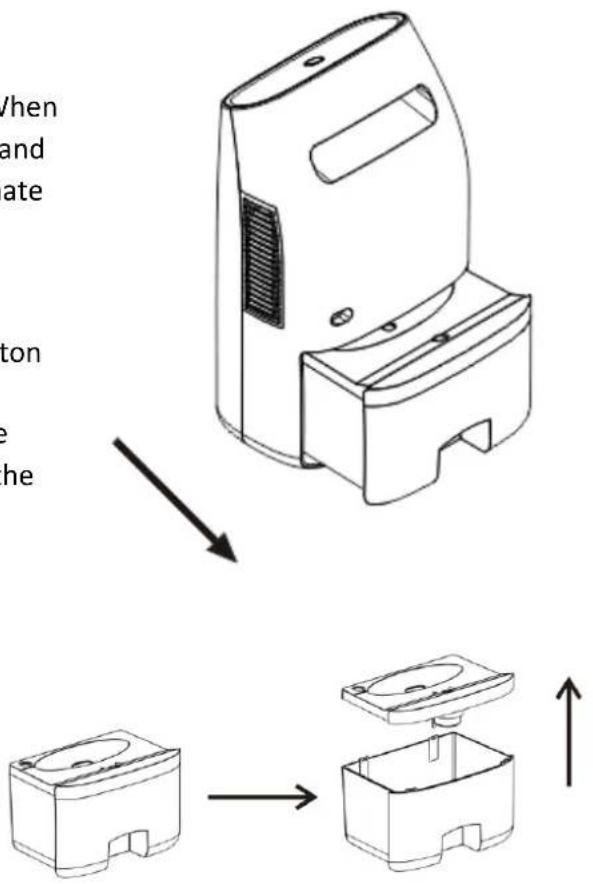
The water tank has a capacity of approximately 2 litres. When the water tank is full, the unit will switch off automatically and the Indicator LED around the power button will illuminate orange.
To empty the water tank:
- Turn off the dehumidifier by pressing the power button so that the indicator LED goes out.
- Remove the water tank from the unit, by holding the handle on the tank and sliding it out of the rear of the unit.
• Unclip the lid from the top of the water tank
• Empty the water in to a toilet or sink. - When the water tank has been emptied, reattach the lid and insert the tank back into the unit.
To continue dehumidifying, press the Power button so that the LED indicator is green, and the dehumidifier will start to operate
CARE AND MAINTENANCE
Always turn off the unit and unplug it from the mains before cleaning or performing any maintenance. When it is not in use for long periods, it is advisable to unplug the appliance. Do not use chemical solvents (such as benzene, alcohol or gasoline) as they may cause irreversible damage to the unit.
CLEANING THE CASING
Use a piece of soft cloth to clean the surface of the product or use a brush to wipe dust off the air inlet and the air outlets.
FILTER CLEANING
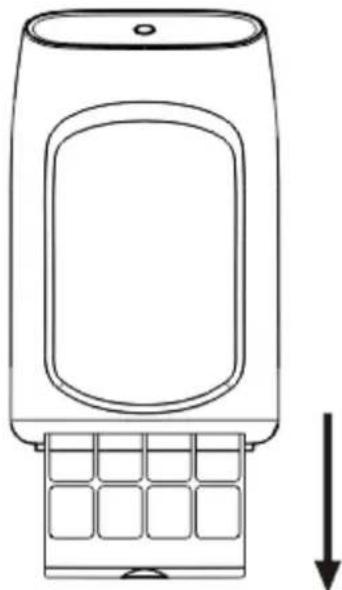
This dehumidifier contains a mesh dust filter behind the air inlet. This should be regularly cleaned by sliding it out of the base of the dehumidifier. Use a vacuum cleaner or soft brush to remove the accumulated dust. For a deeper clean the filter can be washed in a solution of water and a mild detergent. Do not use bleach or abrasives. Allow the filter to fully dry before inserting back into the dehumidifier.
Note: Never use the unit without the antibacterial mesh dust filter.
natural_image
Line drawing of a mobile phone casing with a grid keypad and a vertical arrow indicating downward motion (no text or symbols)CLEAN THE WATER TANK
Every few weeks, clean the tank to prevent the growth of mould, mildew and bacteria. Partially fill the tank with clean water and add a little mild detergent. Swish it around and then empty the tank and rinse.
NOTE: Do not use a dishwasher to clean the tank. After cleaning and drying, the tank must be reinserted securely into dehumidifier in order to restart operation.
END OF SEASON MAINTENANCE
- Empty and clean the water tank.
- Clean the unit and the filter as per cleaning procedure above.
- Cover the unit and keep it in a dry place.
CAUTION:
When not in use, the user should switch the unit off by pressing the Power button so that the indicator LED is turned off, before unplugging it from the mains.
Always follow the safety instructions outlined at the beginning of the user manual.
Disconnect the dehumidifier from the mains if the unit is not in use.
To prolong the life of the dehumidifier, do not use for long periods of time without disconnecting the unit from the power supply.
TECHNICAL SPECIFICATION:
| Capacity | 750ml per day at 30°C, 80% RH |
| Cooling element | Thermo-electric Peltier module |
| Fan | 120mm x 120mm x 25mm DC Brushless motor |
| Power | AC100-240V |
| Power consumption | 40 W |
| Removable water tank | 2.0 litres |
| Product Dimension | 228mm (W) x 150mm (H) x 373mm (D) |
| Operation environment | >15°C, Humidity over 40%RH |
| Automatic cut out with Orange LED Indicator when water tank is full. | |
ENVIRONMENTAL PROTECTION
Waste electrical products should not be disposed of with household waste. Please recycle where facilities exist. Check with your Local Authority or retailer for recycling advice.

www.electriQ.co.uk/support
Please, for your own convenience, make these simple checks before calling the service line.
If the unit still fails to operate call: 0330 390 3061 or complete the online form
- Have you emptied the water tank before resuming operation?
- Is the unit plugged into the mains? Does the power adapter works?
- Is the fuse in the power plug OK?
Office hours: 9AM - 5PM Monday to Friday
www.electriQ.co.uk
Unit J6, Lowfields Business Park
Lowfields Way, Elland
West Yorkshire, HX5 9DA
- DEHUMIDIFIER WITH 2 LITRE TANK
- CONTENTS
- SAFETY INSTRUCTIONS
- IMPORTANT
- ENERGY SAVING AND UNIT SAFETY PROTECTION TIPS
- PARTS AND FEATURES
- INSTALLATION AND OPERATION
- WATER DRAINAGE
- CARE AND MAINTENANCE
- CLEANING THE CASING
- FILTER CLEANING
- CLEAN THE WATER TANK
- END OF SEASON MAINTENANCE
- CAUTION:
- TECHNICAL SPECIFICATION:
- ENVIRONMENTAL PROTECTION
Brand : ElectriQ
Model : MD2000
Category : Humidifier