
TX401 - Network Card/Adapter TP-LINK - Free user manual and instructions
Find the device manual for free TX401 TP-LINK in PDF.


| Product Type | Network Card/Adapter |
| Brand | TP-Link |
| Model | TX401 |
| Interface | PCI Express (PCI-E) |
| Transfer Rate | Up to 10 Gbps |
| Connector Type | RJ45 |
| Compatibility | Windows, Linux |
| Power Supply | Via PCI Express bus |
| Features | Supports 10G/5G/2.5G/1G/100 Mbps speeds |
| Standards | IEEE 802.3, IEEE 802.3ab, IEEE 802.3an, IEEE 802.3bz |
| Safety | Compliant with directives 2014/30/EU, 2011/65/EU and (EU)2015/863 |
| Operating Temperature | 0 °C to 40 °C |
| Operating Humidity | 10% to 90% |
| Maintenance | Keep away from water, fire, humidity or any hot environment. Do not attempt to disassemble, repair or modify. |
| Cleaning | Use a dry cloth, do not use chemical products. |
| Spare parts | No detachable parts available. |
| Repairability | For any repair, contact TP-Link technical support. |
| Warranty | TP-Link limited warranty (see website for duration) |
| Installation | Insert into a free PCI-E slot, install the driver from the CD or TP-Link website. |
| Support | https://www.tp-link.com/fr/support |
| Driver download | https://www.tp-link.com/fr/download-center |
Frequently Asked Questions - TX401 TP-LINK
User questions about TX401 TP-LINK
0 question about this device. Answer the ones you know or ask your own.
Ask a new question about this device
Download the instructions for your Network Card/Adapter in PDF format for free! Find your manual TX401 - TP-LINK and take your electronic device back in hand. On this page are published all the documents necessary for the use of your device. TX401 by TP-LINK.
USER MANUAL TX401 TP-LINK
Quick Installation Guide
PCI Express Network Adapter

For technical support, replacement services, user guides, and other information, please visit https://www.tp-link.com/support
CONTENTS
01 / Deutsch
04 / English
07 / Español
10 / Ελληνικά
13 / Français
16 / Italiano
19 / Português
22 / Suomi
25 / Nederlands
28 / Svenska
31 / Norsk
34 / Dansk
1 Hardwareinstallation
1 Hardware Connection
a. Turn off your computer, unplug the power cable and remove the case panel.
b. Locate an available PCI-E slot and carefully insert the adapter.
Note: If the bracket is not suitable for your computer, detach it from the adapter's board and replace it with the low-profile bracket.
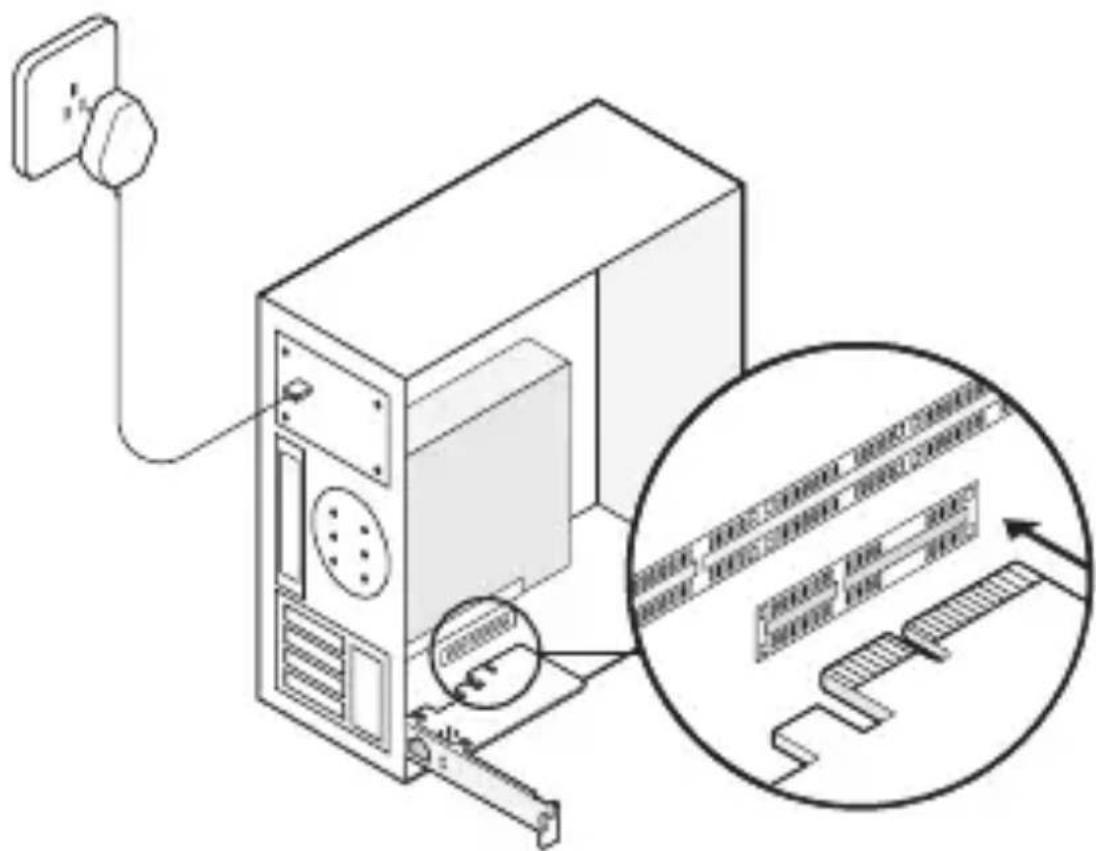
c. Replace the case panel, plug in the power cable and turn on your computer. Then connect the Ethernet cable to the adapter.
2 Driver Installation
a. Insert the CD and run the Autorun.exe.
Note:
If there is no Autorun.exe in your CD file, go to
https://www.tp-link.com/download-center and enter the adapter model to get a detailed installation guide.
b. Select your adapter and follow the instructions to complete the installation.
Note:
If you can't install the driver successfully, disable the antivirus software and firewall, then try again.
FAQ (Frequently Asked Questions)
Q1: How do I find the driver if the CD is lost or broken?
A. You could find and download the driver at https://www.tp-link.com/download-center
Q2: How do I find the hardware version of the adapter?
A1. The hardware version (Ver:X.Y) is printed on the product label on the package or the adapter. The number X is the hardware version of the adapter.
A2. For more detailed instructions, please visit https://www.tp-link.com/faq-46.html
Q3: What should I do if PC cannot find the new hardware?
A1. Restart your computer and try again.
A2. Power off the computer, then reinsert the adapter or try to change another PCI-E slot.
A3. If the problem persists, contact our Technical Support.
A. Potete trovare e scaricare i driver in https://www.tp-link.com/download-center
c. Sett dekselet på plass, sett i strømledningen og slå på datamaskinen. Koble Ethernet-kabelen til nettverkskortet.
EU declaration of conformity
English
TP-Link hereby declares that the device is in compliance with the essential requirements and other relevant provisions of directives 2014/30/EU, 2011/65/EU and (EU)2015/863.
The original EU declaration of conformity may be found at https://www.tp-link.com/en/ce.
Deutsch
https://www.tp-link.com/en/ce.
Português
- Keep the device away from water, fire, humidity or hot environments.
- Do not attempt to disassemble, repair, or modify the device. If you need service, please contact us
- This equipment can be powered only by equipments that comply with Power Source Class 2 (PS2) or Limited Power Source (LPS) defined in the standard of IEC 62368-1.
Please read and follow the above safety information when operating the device. We cannot guarantee that no accidents or damage will occur due to improper use of the device. Please use this product with care and operate at your own risk.
English
For the information about warranty period, policy and procedures, please visit
https://www.tp-link.com/en/support
THIS WARRANTY GIVES YOU SPECIFIC LEGAL RIGHTS, AND YOU MAY HAVE OTHER RIGHTS THAT VARY FROM STATE TO STATE (OR BY COUNTRY OR PROVINCE).
TO THE EXTENT ALLOWED BY LOCAL LAW, THIS WARRANTY AND THE REMEDIES SET FORTH ARE EXCLUSIVE AND IN LIEU OF ALL OTHER WARRANTIES, REMEDIES AND CONDITIONS.
TP-Link warrants the TP-Link branded hardware product contained in the original packaging against defects in materials and workmanship when used normally in according with TP-Link's guidelines for some period which depends on the local service from the date of original retail purchase by the end-user purchaser.
Deutsch
https://www.tp-link.com/de/support
https://www.tp-link.com/en/support
TÄMÄ TAKUU MYÖNTÄÄ KÄYTTÄJÄLLE TIETTYJÄ LAILLISIA OIKEUKSIA, JA HÄNELLÄ VOI OLLA MUITA OIKEUKSIA, JOTKA VAIHTELEVAT MAAKOHTAISESTI.
SIINÄ MÄÄRIN KUIN LAKI SEN SALLII, TÄMÄ TAKUU JA SEN MUKAISET KORJAUSKEINOT OVAT YKSINOMAISIA JA KORVAAVAT KAIKKI MUUT TAKUUT, KORJAUSKEINOT JA EHDOT.
https://www.tp-link.com/nl/support
DEZE GARANTIE GEEFT U SPECIFIEKE WETTELIJKE RECHTEN EN U KUNT NOG ANDERE RECHTEN HEBBEN, DIE PER LAND (OF PER PROVINCIE) KUNNEN VERSCHILLEN.
VOOR ZOVER TOEGESTAAN DOOR DE PLAATSELIJKE WETGEVING ZIJN DEZE GARANTIE EN HET VERMELDE VERHAAL EXCLUSIEF EN KOMEN DIE IN DE PLAATS VAN ALLE ANDERE GARANTIES, VERHALEN EN VOORWAARDEN.
https://www.tp-link.com/en/support
DEN HÄR GARANTIN GER DIG SPECIFIKA FORMELLA
RÄTTIGHETER OCH DU KAN HA ANDRA RÄTTIGHETER SOM
VARIERAR FRÅN LAND TILL LAND (ELLER STAT ELLER PROVINS).
I DEN OMFATTNING SOM LOKALA LAGAR TILLÅTER ÄR DENNA
GARANTI OCH GOTTGÖRANDEN EXKLUSIVA OCH I STÄLLET FÖR
ALLA ANDRA GARANTIER, GOTTGÖRANDEN OCH VILLKOR.
https://www.tp-link.com/en/support
DENNE GARANTIEN GIR DEG SPESIFISERTE, RETTSLIGE
RETTIGHETER, OG I TILLEGG KAN DU HA ANDRE RETTIGHETER
SOM VARIERER MED JURISDIKSJON (ETTER LAND).
I DEN UTSTREKNING DET ER TILLATT I HENHOLD TIL LOKAL LOV
ER DENNE GARANTIEN OG L∅SNINGENE SOM HER ER FREMSATT
EKSKLUSIVE OG ERSTATTER ALLE ANDRE GARANTIER,
L∅SNINGER OG BETINGELSER.

Brand : TP-LINK
Model : TX401
Category : Network Card/Adapter